





Google Introduces ML-based Predictive Autoscaling to Forecast Capacity and Match Scaling Demands

4980
Of your peers have already read this article.
3:00 Minutes
The most insightful time you'll spend today!
At Google Cloud, we believe you get most benefits from the cloud when you scale infrastructure based on changing demand. Compute Engine allows you to configure autoscaling to save costs during periods of low demand, and add capacity to support peak loads.
When you use a managed instance group (MIG), you can have an autoscaler automatically create or delete virtual machine (VM) instances based on increases or decreases in load. However, if your application takes several minutes to initialize, creating VMs in response to growing load might not increase your application’s capacity quickly enough. For example, if there’s a large increase in load (like when users first wake up in the morning), some users might experience delays while your application is initializing on new instances.
A good way to solve this problem would be to create VMs ahead of demand so that your application has enough time to initialize beforehand. This requires knowing upcoming demand. If only we could predict the future… Well, now we can!
Introducing predictive autoscaling
Predictive autoscaling uses Google Cloud’s machine learning capabilities to forecast capacity needs. It creates VMs ahead of growing demand allowing enough time for your application to initialize.
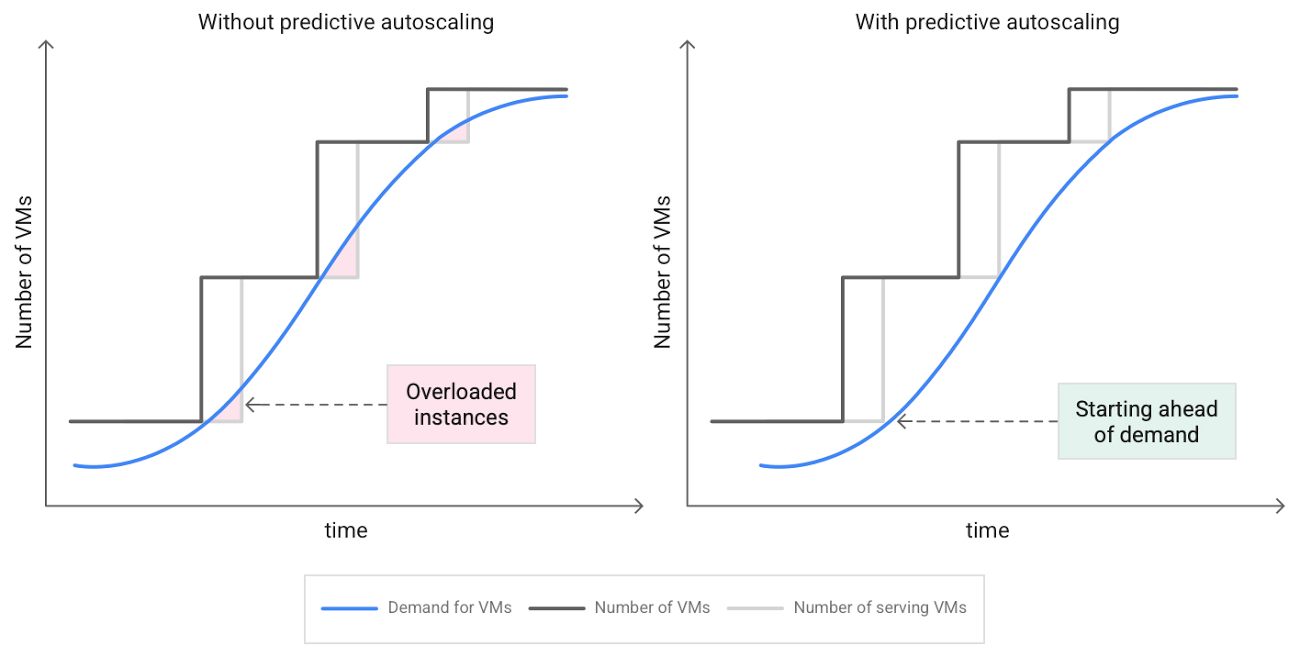
How does it work?
Predictive autoscaling uses your instance group’s CPU history to forecast future load and calculate how many VMs are needed to meet your target CPU utilization. Our machine learning adjusts the forecast based on recurring load patterns for each MIG.
You can specify how far in advance you want autoscaler to create new VMs by configuring the application initialization period. For example, if your app takes 5 minutes to initialize, autoscaler will create new instances 5 minutes ahead of the anticipated load increase. This allows you to keep your CPU utilization within the target and keep your application responsive even when there’s high growth in demand.
Many of our customers have different capacity needs during different times of the day or different days of the week. Our forecasting model understands weekly and daily patterns to cover for these differences. For example, if your app usually needs less capacity on the weekend our forecast will capture that. Or, if you have higher capacity needs during working hours, we also have you covered.
Why should you try it?
Predictive autoscaling continuously adapts forecasted capacity to best match upcoming demand. Autoscaler checks the forecast several times per minute and creates or deletes VMs to match its prediction. The forecast itself is updated every few minutes to match recent load trends so if your growth rate is higher or lower than usual we will adjust the forecast accordingly. This gives you capacity needed to cover peak load while saving on cost when demand goes down.
You can start using predictive autoscaling without worry as it’s fully compatible with the current autoscaler. Autoscaler will calculate enough VMs to cover both forecasted as well as real-time CPU load—whichever is higher. This works with other autoscaling features as well: you can scale based on schedule, your Load Balancer request target or Cloud Monitoring metrics. Autoscaler provides enough capacity to all of your configurations by taking the highest number of VMs needed to meet all your targets.
Getting started
You can enable predictive autoscaling in the Google Cloud Console. Select an autoscaled MIG from the instance groups page and click Edit group. Change predictive autoscaling configuration from Off to Optimize for availability.
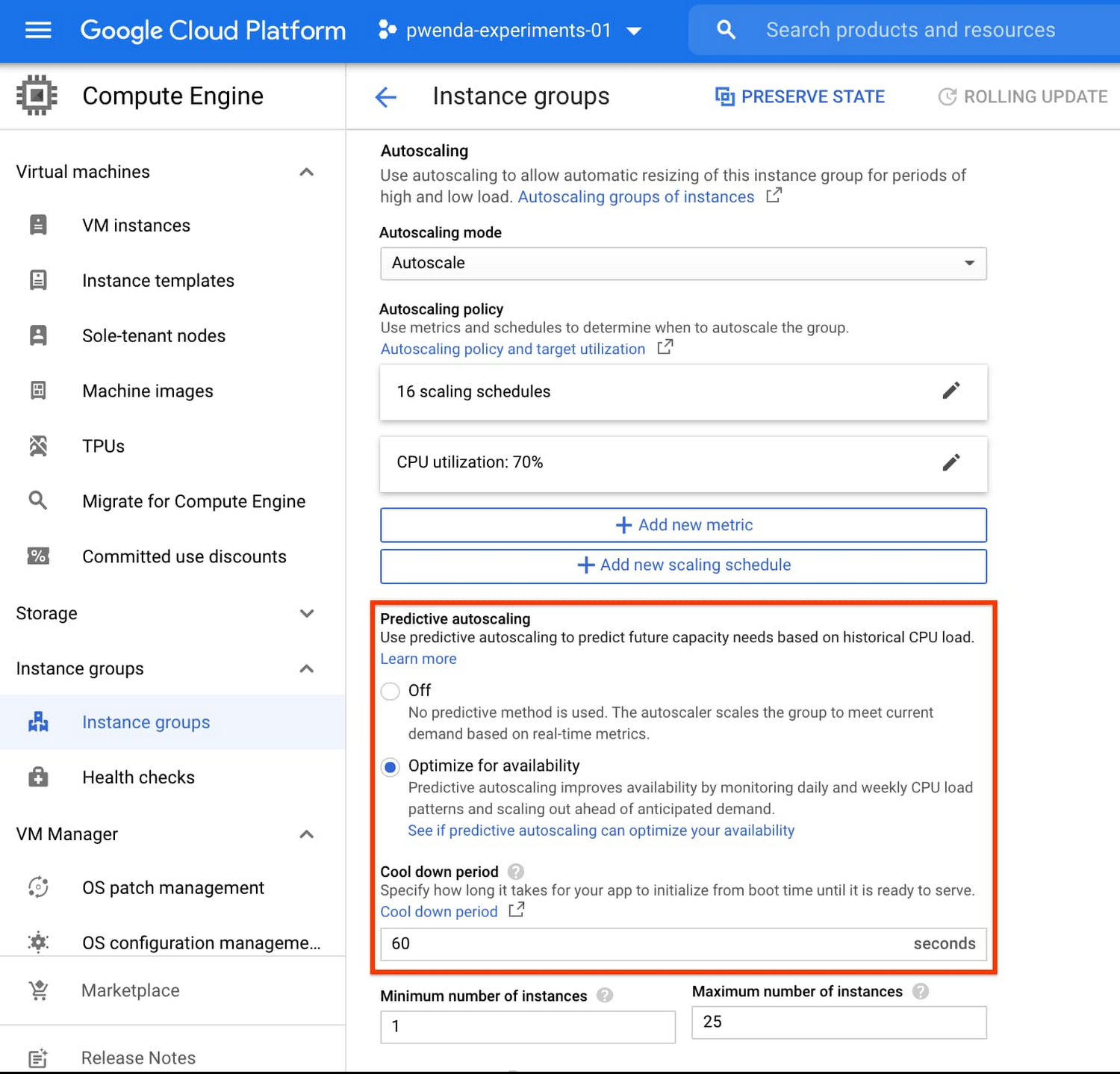
To better understand whether predictive autoscaling is good for your application, click the link See if predictive autoscaling can optimize your availability. This will show you a comparison of the last seven days with your current autoscaling configuration vs. with predictive autoscaling enabled.
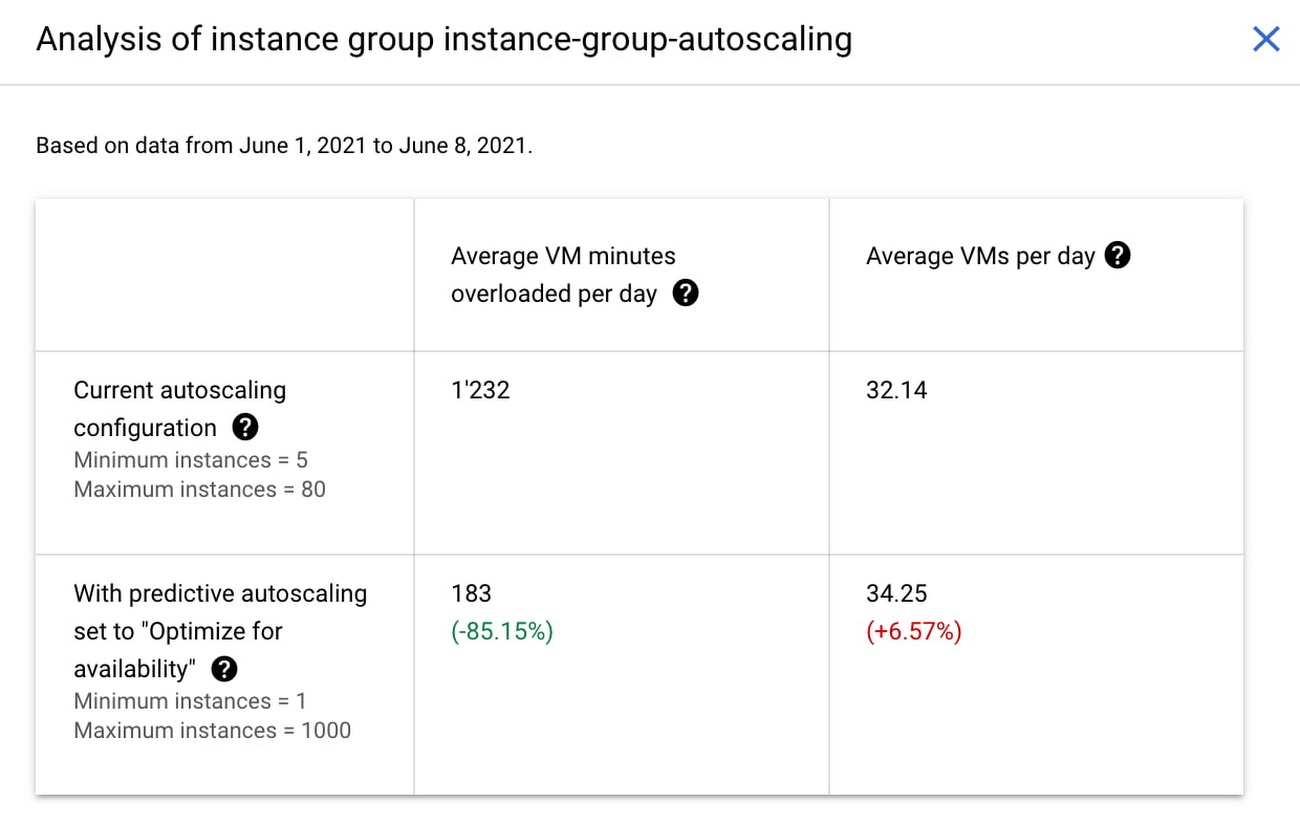
In the above chart,
- Average VM minutes overloaded per day shows how often your VMs exceed your CPU utilization target. This happens when demand is higher than available capacity. Predictive autoscaling can reduce this by starting VMs ahead of anticipated load.
- Average VMs per day is a proxy for cost. This shows how much additional VM capacity you need to keep your CPU utilization within the target you have set. You can optimize your cost by adjusting Minimum instances andCPU utilization as explained below.
Optimizing your configuration
Make sure your Cool down period reflects how long it takes for your application to initialize from VM boot time until it’s ready to serve the load. Predictive autoscaling will use this value to start VMs ahead of forecasted load. If you set it to 10 minutes (600 seconds) your VMs will start 10 minutes before the load is expected to increase.
Review your autoscaling CPU utilization target and Minimum number of instances. With predictive autoscaling you no longer need a buffer to compensate for the time it takes for a VM to start. If your application works best at 70% CPU utilization you don’t need to set target to a much lower value as predictive autoscaling will start VMs ahead of usual load. A higher CPU utilization and lower Minimum number of instances allows you to reduce the cost as you don’t need to pay for additional capacity to prepare for growing demand.
Try predictive autoscaling today
Predictive autoscaling is generally available across all Google Cloud regions. For more information on how to configure, simulate and monitor predictive autoscaling, consult the documentation.
Google Cloud Migration Speeds Up The New York Times’ Journey to New Normal
5791
Of your peers have already read this article.
2:30 Minutes
The most insightful time you'll spend today!
Like virtually every business across the globe, The New York Times had to quickly adapt to the challenges of the coronavirus pandemic last year. Fortunately, our data system with Google Cloud positioned us to perform quickly and efficiently in the new normal.
How we use data
We have an end-to-end type of data platform; on one side we work very closely with our product teams to collect the right level of data that they’re interested in, such as which articles people are reading, and how long they’re staying onsite. We frequently measure our audience to understand our user segments, and how they come onsite or use our apps. We then provide that data to analysts for end-to-end analytics.
On the other side, the newsroom is also focused on audience, and we build tools to help them understand how Google Search or different social promotions play a role in a person’s decision to read The New York Times, and also to get a better sense of their behavior on our pages. With this data, the newsroom can make decisions about information that should be displayed on our homepage or in push notifications.
Ultimately, we’re interested in behavioral analytics—how people engage with our site and our apps. We want to understand different behavioral patterns, and which factors or features will encourage users to register and subscribe with us.
We also use data to create or curate preferences around personalization, to ensure we’re delivering to our users fresh content, or content that they may not have normally read. Likewise, our data also gets used in our targeting system, so that we can send out the right messaging about our various subscription packages to the right users.
Choosing to migrate to Google Cloud
When I came to The New York Times over five years ago, our data architecture was not working for us. Our infrastructure was gathering data that proved harder for analysts to crunch on a daily basis. We were also hitting hang ups with how that data was streaming into our system and environment. Back then we’d run a query and then go grab some coffee, hoping that the query would finish or give us the right data by the time we came back to our desks. Sometimes it would, sometimes it wouldn’t.
We realized that Hadoop was definitely not going to be the on-premises solution for us, and that’s when we started talking with the Google Cloud team. We began our digital transformation with a migration to BigQuery, their fully managed, serverless database warehouse. We were under a pretty aggressive migration timeline, focusing first on moving over analytics. We made sure our analysts got a top-of-the-line system that treated them the way that they themselves would want to treat the data.
One significant prominent requirement in our data architecture choice was to enable analysts to be able to work as quickly as they needed to provide high-quality deliverables for their business partners. For our analysts, the transition to BigQuery was night and day. I still remember when my manager ran his very first query on BigQuery and was ready to go grab his coffee, but the query finished by the time he got up from his chair. Our analysts talk about that to this day.
While we were doing the BigQuery transition, we did have concerns about our other systems not scaling correctly. Two years ago, we weren’t sure we’d be able to scale up to the audience we expected on that election day. We were able to band-aid a solution back then, but we knew we only had two more years to figure out a real, dependable solution.
During that time, we moved our streaming pipeline over to Google Cloud, primarily using App Engine, which has been a flexible environment that enabled quick scaling changes and requirements as needed. Dataflow and Pub/Sub also played significant roles in managing the data. In Q4 of 2020 we had our most significant traffic ever recorded, at 273 million global readers, and four straight days of the highest traffic we’ve had compared to other election weeks. We were proud to see that there was no data loss.
A couple of years ago, on our legacy system, I was up until three in the morning one night trying to keep data running for their needs. This year, for election night, I relaxed and ate a pint of ice cream because I was able to more easily manage our data environment, allowing us to set and meet higher expectations for data ingestion, analysis and insight among our partners in the newsroom.
How COVID-19 changed our 2020 roadmap
The coronavirus pandemic definitely wasn’t on my team’s roadmap for 2020, and it’s important to mention here that The New York Times is not fundamentally a data company. Our job is to get the news out to our users every single day in paper, on apps, and onsite. Our newsroom didn’t expect the need to build out a giant coronavirus database that would enrich the news they share every day.
Our newsroom moves quickly, and our engineers have built one of the most comprehensive datasets on COVID-19 in the U.S. With Google, The New York Times decided to make our data publicly available on BigQuery Google’s COVID-19 public dataset. Check out this webinar for more details on our evolution architecture:https://www.youtube.com/embed/mtNlrFpschU?enablejsapi=1&
Flexible approach
We have many different teams that work within Google Cloud, and they’ve been able to pick from the range of available services and tailor project requirements keeping those tools available in mind.
One challenge we think about with the data platform at The New York Times is determining the priorities of what we build. Our ability to engage with product teams at Google though the Data Analytics Customer Council allows us to see into the BigQuery roadmap, or the data analytics roadmap, and plays a significant role in determining where we focus our own development. For example, we’ve built tools like our Data Reporting API, which reads data directly from BigQuery, in order to take advantage of tools like BigQuery BI Engine. This approach encourages our analysts to be better managers of their domains around dimensions and metrics, but not have to focus on building caching mechanisms of their data. Getting that kind of clarity helps us plan how to build The New York Times in the new normal and beyond.
If you are interested to learn more about the data teams at the New York Times, take a look at our open tech roles here and you’ll find many interesting articles at NYT data blog.
Vizrt’s Story of ‘Lift and Shift’ and Delivering Phenomenal Performance with Google Cloud

3214
Of your peers have already read this article.
3:00 Minutes
The most insightful time you'll spend today!
When moving software applications from on-premise hardware to the cloud, it often “just works,” but it’s never guaranteed. This is especially the case for applications that are hardware intensive. This blog post examines what happened when a media company took software for real-time video broadcasts into the cloud. We’ll share how we, Google Cloud, collaborated with media software provider Vizrt to meet the demanding requirements of an eSports broadcaster. Together, we delivered a solution that not only met but exceeded the expected performance from a cloud-based deployment.
Video broadcasting in the cloud
Video broadcasts are a very hardware-intensive workflow. By needing to process and store data streams in near-real-time, broadcasts stress GPU, memory, disk, and CPU. In addition, the performance requirements quickly increase as producers add additional video streams into the mix, such as in this case, an eSports broadcast.
Vizrt’s customer wanted to increase their broadcast production by doubling the amount of camera feeds from 8 to 16, to have a more compelling and elaborate production.
At the heart of the eSports broadcasters’ production was Viz Vectar Plus, Vizrt’s software-based 4K switcher. While the client wanted to move more of its production into the cloud, Viz Vectar Plus was designed initially for on-premise hardware. So, when they tried a straightforward “lift and shift ” to the cloud, it surprised no one that the software didn’t run as well. They turned to Google Cloud and Vizrt to make it run the way they needed it to.
Troubleshooting lift and shift
Initially, we suspected that the issue could be in the design of the cloud deployment, i.e., the configuration of the VM hosting the software. So the focus of our troubleshooting was to find a cloud configuration that 1) made sure the software worked to spec and 2) did so optimally considering costs, robustness, and performance. Furthermore, we wanted to ensure that all components met performance specifications, particularly throughput, IOPS, and network bandwidth, as this was a video media application. Only after we validated the cloud deployment would we ask Vizrt to investigate the code itself. We would:
- Set up a test environment.
- Benchmark the environment.
- Test various configurations.
- Validate that the vendor software was optimally using the configuration.
This high-level methodology is straightforward. However, we approached the details in a particular order, considering we were optimizing for broadcast video. We honed in on the optimal cloud configuration by testing the following elements, prioritized in order of expected impact:
- VM type: The VM type largely dictates the available memory and CPU configurations. However, because this was a VM workflow, we had to pick N1’s. Today, they are the only VM type that can be attached to GPUs, which are practically a requirement for broadcast video.
- Disk type: Video broadcasts require high I/O speeds to handle high-quality video streams. We went from an HDD to a much-faster SSD.
- CPU size: We increased the VM CPU cores from 16 in increments up to 32. Increasing CPU size indeed increased performance, but did not return the level of performance we needed.
- SSD size: We increased the SSD size (and the accompanying higher IOPS and throughput that comes with increasing the size) enabling more simultaneous recordings. Again, this only partially worked.
- Disk count. We noticed read/write problems when the application was reading/writing with a single drive. There are two typical ways to approach this: 1) Separate read/writes tasks among two discs and 2) striping the data streams across discs. Implementing these had improved but marginal improvements in performances.
After our testing, we arrived at the following optimal configuration:
- VM: n1-standard-32 instance w/ 500Gb boot drive
- GPU: 1 T4 GPU
- SSD: 1 persistent disk with 1TB*
* We would later determine that two SSDs for separate read and write operations would be more optimal
This configuration was able to produce between 6 – 12 streams. Compared to the on-premise target of 8 streams, this was about as good but was not the customer’s target of 16. So we would need Vizrt to take the ball from here to optimize the software itself.
Optimizing media applications for cloud
We provided Vizrt our recommended configuration, performance notes, and the following best practices that are generally applicable to cloud-based video workloads:
- Separate read and write operations to two different disks to enable higher performance for both operations.
- A second 1 TB SSD persistent disk can be attached to the VM instance to increase performance.
With this information, Vizrt engineers worked their magic, providing daily patches to test; with each daily iteration the overall solution was found quickly. Not only were they able to meet the broadcaster’s request of 16 feeds, but they were also able to go even further to 44. Over a 5x improvement by optimizing for the cloud!
Teamwork in troubleshooting
Because of the specialized nature of media and entertainment, workflow situations across multiple companies are common as specialized applications hand their work from one to another.
“By working in partnership with Google Cloud we managed to build a system that can scale in ways that probably none of us thought would be possible. This allowed Viz Vectar Plus to run fully in the cloud using NDI and opened up amazing possibilities for making shows,” Dr. Andrew Cross, President R&D, Vizrt Group. “We ended up with great feedback from the customer, who were appreciative of how Google Cloud and Vizrt collaborated on a solution.”
The results speak for themselves: A satisfied customer with over a 5x improvement in results. That’s what we call a good game.
Answering the 4 Common FAQs on Compute Engine

3861
Of your peers have already read this article.
1:30 Minutes
The most insightful time you'll spend today!
Compute Engine lets you create and run virtual machines (VMs) on Google’s infrastructure, allowing you to launch large compute clusters with ease. When it comes to getting started with Compute Engine, our customers have lots of questions—but some questions come up more often than others.
We looked at an internal list of the most popular Compute Engine documentation pages over a 30-day period to find out what topics were explored by users again and again. Here are the top four questions users have about Compute Engine, in order.
1. What are the different machine families
Compute Engine lets you select the right machine for your needs. You can choose from a curated set of predefined virtual machine (VM) configurations optimized for specific workloads, ranging from small-level purpose to large-scale use cases or create a machine type customized to your needs with our custom machine type feature.
Compute Engine machines are categorized by machine family, including:
- General-purpose: Best price-performance ratio for a variety of standard and cloud-native workloads
- Compute-optimized: Highest performance per core for compute-intensive workloads, such as ad serving or media transcoding
- Memory-optimized: More compute and memory per core than any other family for memory-intensive workloads, such as SAP HANA or in-memory data analytics
- Accelerator-optimized: Designed for your most demanding workloads, such as machine learning (ML) or high performance computing (HPC)
Read the documentation to learn more about each machine family category.
2. How to connect to VMs using advanced methods
In general, we recommend using the Google Cloud Console and the gcloud command-line tool to connect to Linux VM instances. However, some of our customers want to use third-party tools, or require alternative connection configurations.
In these cases, there are several methods that might fit your needs better than the standard connection options:
- Connecting to instances using third-party tools (e.g. Windows PuTTY, Chrome OS Secure Shell app), or MacOS or Linux local terminal)
- Connecting to instances without external IP addresses
- Connecting to instances as the root user Manually connecting between instances and running commands as a service account
Read the documentation to learn about advanced methods for connecting Linux VMs.
3. How to set up OS Login
OS Login lets you use IAM roles and permissions to manage access and permissions to VMs.
OS Login is the recommended way to manage users across multiple instances or projects. OS Login provides:
- Automatic Linux account lifecycle management
- Fine-grained authorization using Google IAM without having to grant broader privileges
- Automatic permissions updates to prevent unwanted access
- Ability to import existing Linux accounts from Active Directory (AD) and Lightweight Directory Access Protocol (LDAP)
You can also add an extra layer of security by setting up OS Login with two-factor authentication or manage organization access by setting up organization policies.
Read the documentation to learn how to configure OS login and connect to your instances.
4. How to manage SSH keys in metadata
Compute Engine allows you to manually manage SSH keys and local user accounts by editing public SSH key metadata.
You can add public SSH keys to instance and project metadata using:
- The Google Cloud Console The gcloud command-line tool
- API methods from the Google Cloud Client Libraries
Read the documentation to learn how to manually manage SSH keys and local user accounts in metadata.
Don’t see your question here? Check out the Compute Engine documentation for all of our recommended guides, tutorials, and resources.
3441
Of your peers have already downloaded this article
1:30 Minutes
The most insightful time you'll spend today!
Enterprises developing digital leadership are increasingly moving out of their data centers to focus on core business innovation, and save on complex infrastructure costs. This puts challenges related to demand peaks and business continuity under a magnifying glass.
Many CIOs are under pressure to complete migrations quickly — 68% of CIOs are seeking to migrate existing applications to the cloud, according to Forrester. Motivations range from cost or risk reductions, to refocusing on agility and speed.
As they assess their options, many enterprises face an enormous challenge of balancing the function of their existing infrastructure with a new operating model in the cloud. This involves thousands of variables, different technologies, different processes and skills, disparate teams, and competing interests.
Download this guide and see hoo to craft a strategy out of the data center and into public cloud. It surfaces typical industry patterns, key dimensions to be taken into account while designing the journey, as well as Google’s capabilities and approach to executing a successful modernization, to help you drive lower costs and increased agility.
3355
Of your peers have already watched this video.
10:00 Minutes
The most insightful time you'll spend today!
Transform Your Business with Google’s Open, Hybrid, and Multi-Cloud Enterprise Network
Modernization and digital transformation starts with the network, which must enable agile access to the innovation promised by cloud, as well as simplified models for multi-cloud, multi-platform deployments. The network must evolve to provide agility, simplicity, and openness that is needed to power this transformation.
Google’s enterprise network is revolutionizing the enterprise networks paradigm, enabling you to use Google’s network as your own to connect your offices, branches, data center, Google, and other public clouds. It provides innovative technical and business models for open multi-cloud, application-centric networks, and integrates with a partner ecosystem, so that you can leverage your current on-premises site investments.
More Relevant Stories for Your Company

Strengthening Operational Resilience in Financial Services by Migrating to Google Cloud
Operational resilience continues to be a key focus for financial services firms. Regulators from around the world are refocusing supervisory approaches on operational resilience to support the soundness of financial firms and the stability of the financial ecosystem. Our new white paper discusses the continuing importance of operational resilience to the financial




L’Oréal: Managing Big-data Complexity with Google Cloud
L’Oreal is a global company with a presence in 150 countries worldwide. Between managing all of its brands and requirements for different countries, L’Oreal looks to data to make insightful business decisions. How does L’Oreal unify its data across all its systems and databases? How does L’Oreal make the data

If You Run Your Country’s Largest Retail Franchise, How Do You Pull Together, in Sync?
In 1984, Mario Maio set up a small business manufacturing electrical transformers in his Johannesburg garage. Over the next two decades, the ACDC Dynamics company he created came to dominate manufacturing, import, and distribution in South Africa’s electrical goods sector. Then, in 2007, Mario’s son, Ricardo Maio, founded a retail arm to

Airbus: Taking the flight to a brighter future with Google Cloud and Google Workplace
“Any device, anytime, anywhere.” A cohort of CIOs within Airbus believed that the cloud, combined with new ways of working, could provide the foundation for this vision. Google Workspace and Google Cloud have played a pivotal role in helping Airbus realize this new path, transforming security, data management, and collaboration
