





Google’s Record-breaking Performance Tops the MLPerf Benchmark Results

3123
Of your peers have already read this article.
4:00 Minutes
The most insightful time you'll spend today!
The latest round of MLPerf benchmark results have been released, and Google’s TPU v4 supercomputers demonstrated record-breaking performance at scale. This is a timely milestone since large-scale machine learning training has enabled many of the recent breakthroughs in AI, with the latest models encompassing billions or even trillions of parameters (T5, Meena, GShard, Switch Transformer, and GPT-3).
Google’s TPU v4 Pod was designed, in part, to meet these expansive training needs, and TPU v4 Pods set performance records in four of the six MLPerf benchmarks Google entered using TensorFlow and JAX. These scores are a significant improvement over our winning submission from last year and demonstrate that Google once again has the world’s fastest machine learning supercomputers. These TPU v4 Pods are already widely deployed throughout Google data centers for our internal machine learning workloads and will be available via Google Cloud later this year.
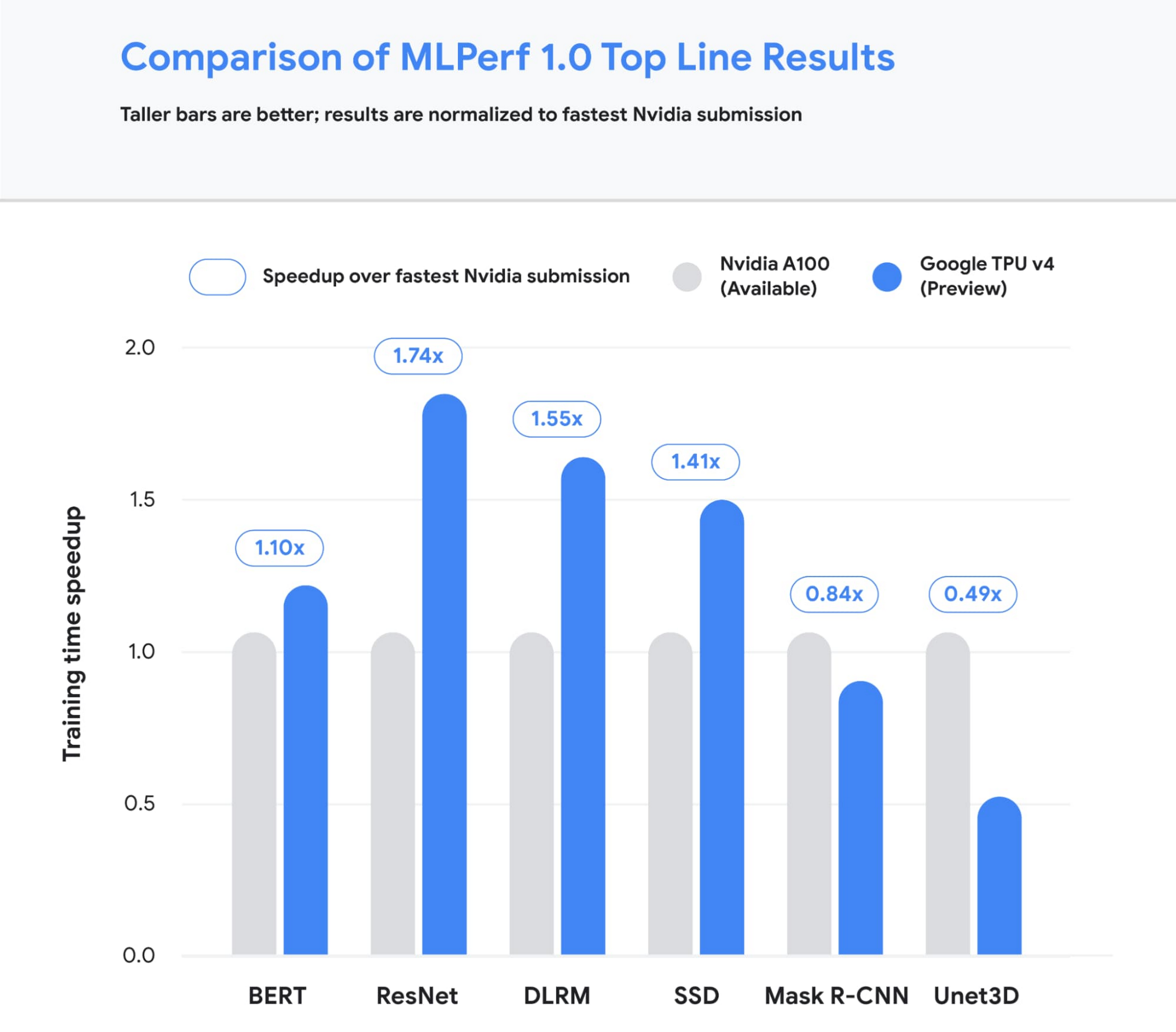
Figure 1: Speedup of Google’s best MLPerf Training v1.0 TPU v4 submission over the fastest non-Google submission in any availability category – in this case, all baseline submissions came from NVIDIA. Comparisons are normalized by overall training time regardless of system size. Taller bars are better.1
Let’s take a closer look at some of the innovations that delivered these ground-breaking results and what this means for large model training at Google and beyond.
Google’s continued performance leadership
Google’s submissions for the most recent MLPerf demonstrated leading top-line performance (fastest time to reach target quality), setting new performance records in four benchmarks. We achieved this by scaling up to 3,456 of our next-gen TPU v4 ASICs with hundreds of CPU hosts for the multiple benchmarks. We achieved an average of 1.7x improvement in our top-line submissions compared to last year’s results. This means we can now train some of the most common machine learning models in a matter of seconds.
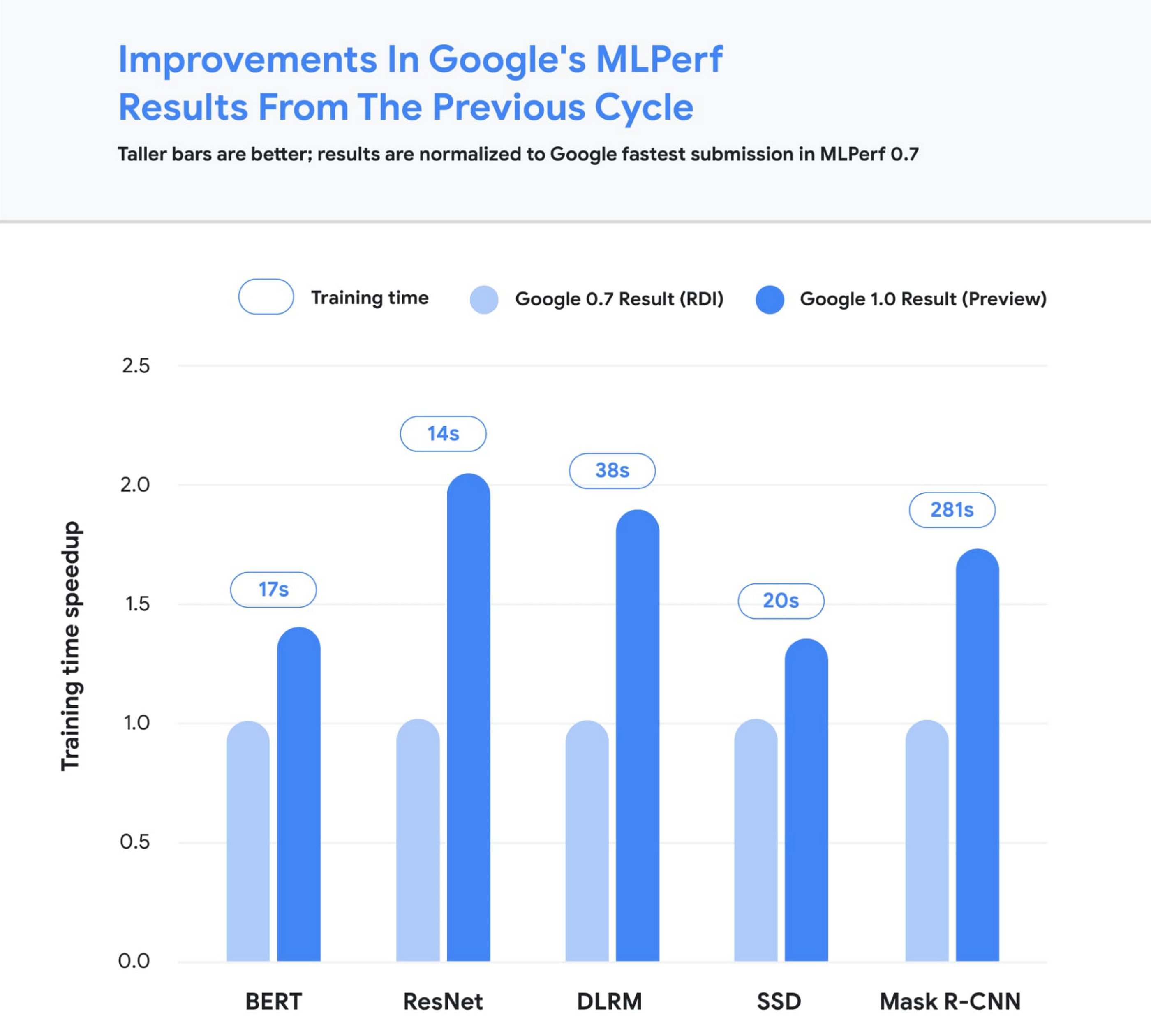
Figure 2: Speedup of Google’s MLPerf Training v1.0 TPU v4 submission over Google’s MLPerf Training v0.7 TPU v3 submission (exception: DLRM results in MLPerf v0.7 were obtained using TPU v4). Comparisons are normalized by overall training time regardless of system size. Taller bars are better. Unet3D not shown since it is a new benchmark for MLPerf v1.0.2
We achieved these performance improvements through continued investment in both our hardware and software stacks. Part of the speedup comes from using Google’s fourth-generation TPU ASIC, which offers a significant boost in raw processing power over the previous generation, TPU v3. 4,096 of these TPU v4 chips are networked together to create a TPU v4 Pod, with each pod delivering 1.1 exaflop/s of peak performance.

Figure 3: A visual representation of 1 exaflop/s of computing power. If 10 million laptops were running simultaneously, then all that computing power would almost match the computing power of 1 exaflop/s.
In parallel, we introduced a number of new features into the XLA compiler to improve the performance of any ML model running on TPU v4. One of these features provides the ability to operate two (or potentially more) TPU cores as a single logical device using a shared uniform memory access system. This memory space unification allows the cores to easily share input and output data – allowing for a more performant allocation of work across cores. A second feature improves performance through a fine-grained overlap of compute and communication. Finally, we introduced a technique to automatically transform convolution operations such that space dimensions are converted into additional batch dimensions. This technique improves performance at the low batch sizes that are common at very large scales.
Enabling large model research using carbon-free energy
Though the margin of difference in topline MLPerf benchmarks can be measured in mere seconds, this can translate to many days worth of training time on the state-of-the-art models that comprise billions or trillions of parameters. To give an example, today we can train a 4 trillion parameter dense Transformer with GSPMD on 2048 TPU cores. For context, this is over 20 times larger than the GPT-3 model published by OpenAI last year. We are already using TPU v4 Pods extensively within Google to develop research breakthroughs such as MUM and LaMDA, and improve our core products such as Search, Assistant and Translate. The faster training times from TPUs result in efficiency savings and improved research and development velocity. Many of these TPU v4 Pods will be operating at or near 90% carbon free energy. Furthermore, cloud datacenters can be ~1.4-2X more energy efficient than typical datacenters, and the ML-oriented accelerators – like TPUs – running inside them can be ~2-5X more effective than off-the-shelf systems.
We are also excited to soon offer TPU v4 Pods on Google Cloud, making the world’s fastest machine learning training supercomputers available to customers around the world. Cloud TPUs support leading frameworks such as TensorFlow, PyTorch, and Jax, and we recently released an all-new Cloud TPU system architecture that provides direct access to TPU host machines, greatly improving the user experience.
Want to learn more?
Please contact your Google Cloud sales representative to request early access to Cloud TPU v4 Pods. We are excited to see how you will expand the machine learning frontier with access to exaflops of TPU computing power!
1. All results retrieved from www.mlperf.org on June 30, 2021. MLPerf name and logo are trademarks. See www.mlperf.org for more information. Chart uses results 1.0-1067, 1.0-1070, 1.0-1071, 1.0-1072, 1.0-1073, 1.0-1074, 1.0-1075, 1.0-1076, 1.0-1077, 1.0-1088, 1.0-1089, 1.0-1090, 1.0-1091, 1.0-1092.
2. All results retrieved from www.mlperf.org on June 30, 2021. MLPerf name and logo are trademarks. See www.mlperf.org for more information. Chart uses results 0.7-65, 0.7-66, 0.7-67, 1.0-1088, 1.0-1090, 1.0-1091, 1.0-1092.
BigQuery ML for Sentiment Analysis: How to Make the Most of Your Data

1816
Of your peers have already read this article.
4:30 Minutes
The most insightful time you'll spend today!
Introduction
We recently announced BigQuery support for sparse features which help users to store and process the sparse features efficiently while working with them. That functionality enables users to represent sparse tensors and train machine learning models directly in the BigQuery environment. Being able to represent sparse tensors is a useful feature because sparse tensors are used extensively in encoding schemes like TF-IDF as part of data pre-processing in NLP applications and for pre-processing images with a lot of dark pixels in computer vision applications.
There are numerous applications of sparse features such as text generation and sentiment analysis. In this blog, we’ll demonstrate how to perform sentiment analysis with the space features in BigQuery ML by training and inferencing machine learning models using a public dataset. This blog also highlights how easy it is to work with unstructured text data on BigQuery, an environment traditionally used for structured data.
Using sample IMDb dataset
Let’s say you want to conduct a sentiment analysis on movie reviews from the IMDb website. For the benefit of readers who want to follow along, we will be using the IMDb reviews dataset from BigQuery public datasets. Let’s look at the top 2 rows of the dataset.
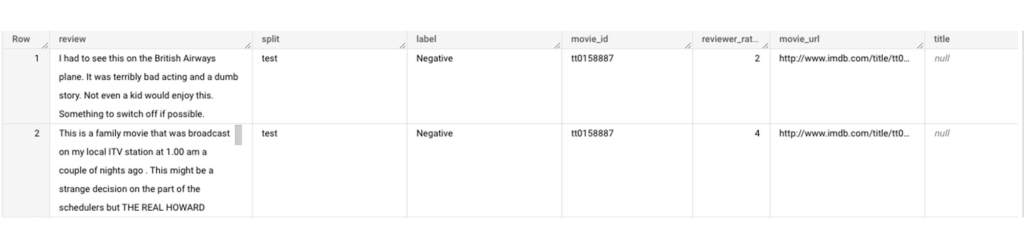
Although the reviews table has 7 columns, we only use reviews and label columns to perform sentiment analysis for this case. Also, we are only considering negative and positive values in the label columns. The following query can be used to select only the required information from the dataset.
SELECT
 review,
 label,
FROM
 `bigquery-public-data.imdb.reviews`
WHERE
 label IN ('Negative', 'Positive')
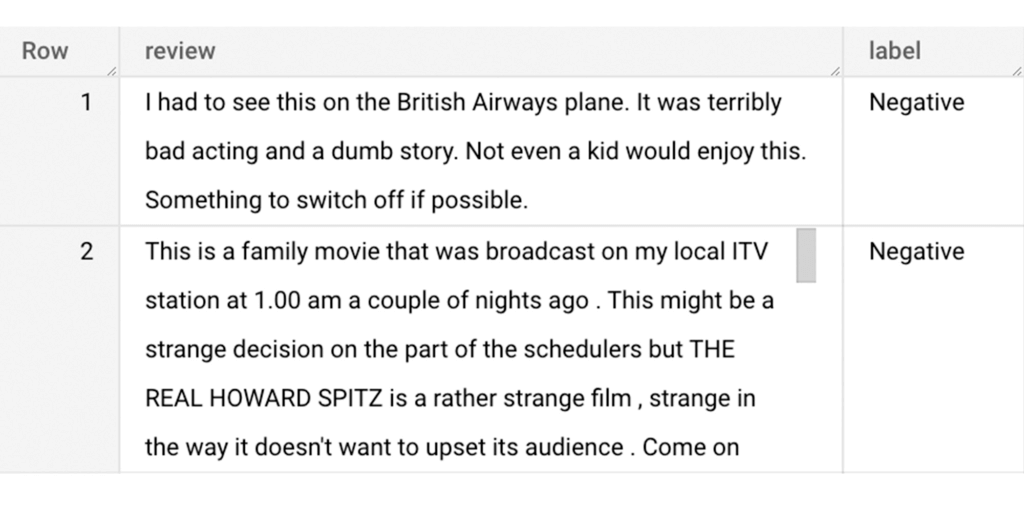
The top 2 rows of the result is as follows:
Methodology
Based on the dataset that we have, the following steps will be carried out:
- Build a vocabulary list using the review column
- Convert the review column into sparse tensors
- Train a classification model using the sparse tensors to predict the label (“positive” or “negative”)
- Make predictions on new test data to classify reviews as positive or negative.
Feature engineering
In this section, we will convert the text from the reviews column to numerical features so that we can feed them into a machine learning model. One of the ways is the bag-of-words approach where we build a vocabulary using the words from the reviews and select the most common words to build numerical features for model training. But first, we must extract the words from each review. The following code creates a dataset and a table with row numbers and extracted words from reviews.
-- Create a dataset named `sparse_features_demo` if doesn’t exist
CREATE SCHEMA IF NOT EXISTS sparse_features_demo;


-- Select unique reviews with only negative and positive labels
CREATE OR REPLACE TABLE sparse_features_demo.processed_reviews AS (
 SELECT
   ROW_NUMBER() OVER () AS review_number,
   review,
   REGEXP_EXTRACT_ALL(LOWER(review), '[a-z]{2,}') AS words,
   label,
   split
 FROM (
   SELECT
     DISTINCT review,
     label,
     split
   FROM
     `bigquery-public-data.imdb.reviews`
   WHERE
     label IN ('Negative', 'Positive')
 )
);
The output table from the query above should look like this:
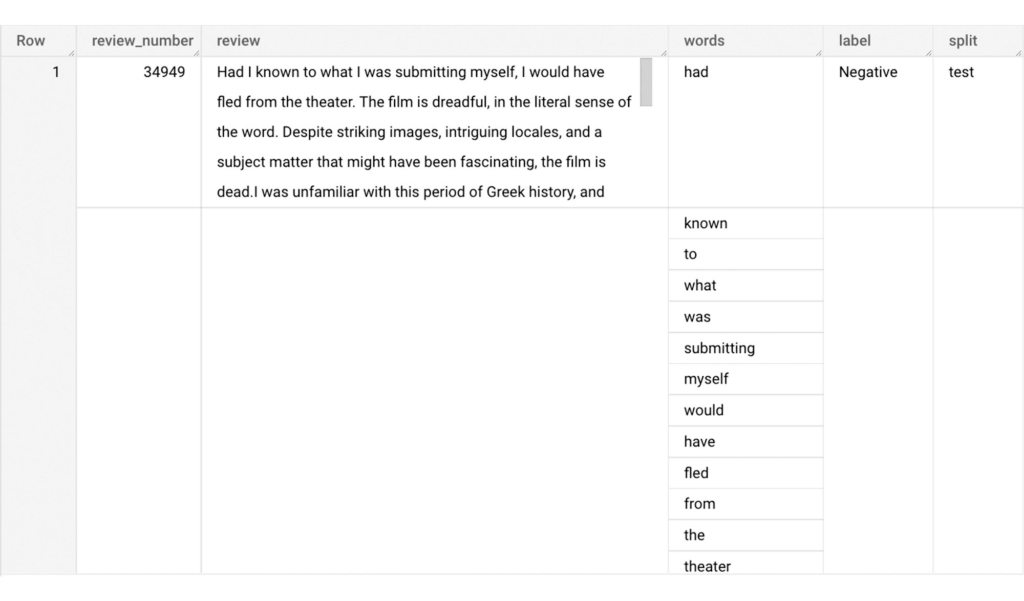
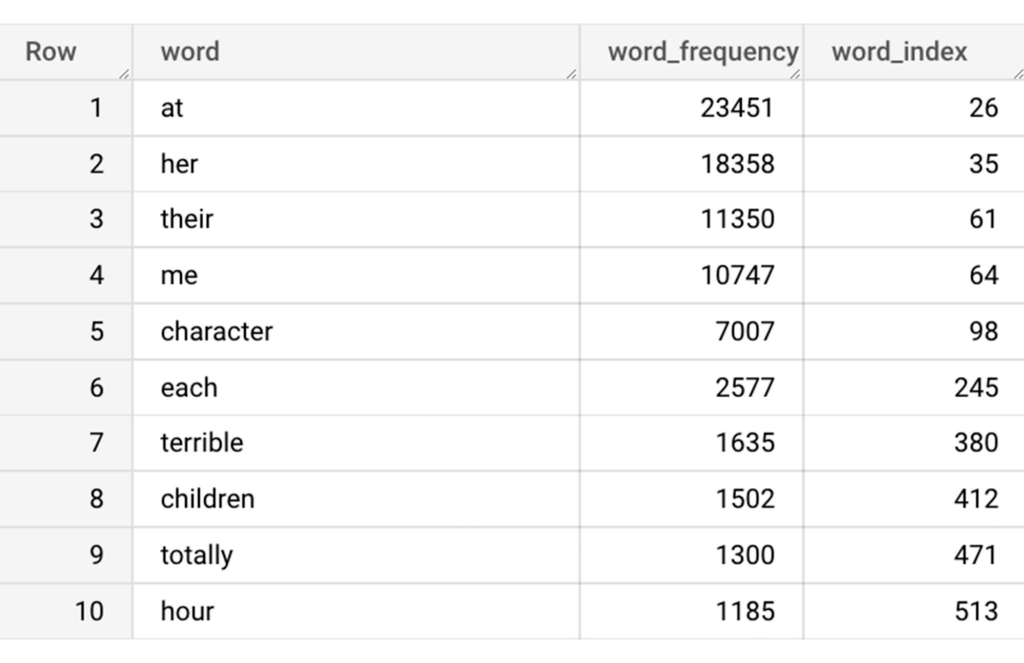
The next step is to build a vocabulary using the extracted words. The following code creates a vocabulary including word frequency and word index from reviews. For this case, we are going to select only the top 20,000 words to reduce the computation time.
-- Create a vocabulary using train dataset and select only top 20,000 words based on frequency
CREATE OR REPLACE TABLE sparse_features_demo.vocabulary AS (
 SELECT
   word,
   word_frequency,
   word_index
 FROM (
   SELECT
     word,
     word_frequency,
     ROW_NUMBER() OVER (ORDER BY word_frequency DESC) - 1 AS word_index
   FROM (
     SELECT
       word,
       COUNT(word) AS word_frequency
     FROM
       sparse_features_demo.processed_reviews,
       UNNEST(words) AS word
     WHERE
       split = "train"
     GROUP BY
       word
   )
 )
 WHERE
   word_index < 20000 # Select top 20,000 words based on word count
);
The following shows the top 10 words based on frequency and their respective index from the resulting table of the query above.
Creating a sparse feature
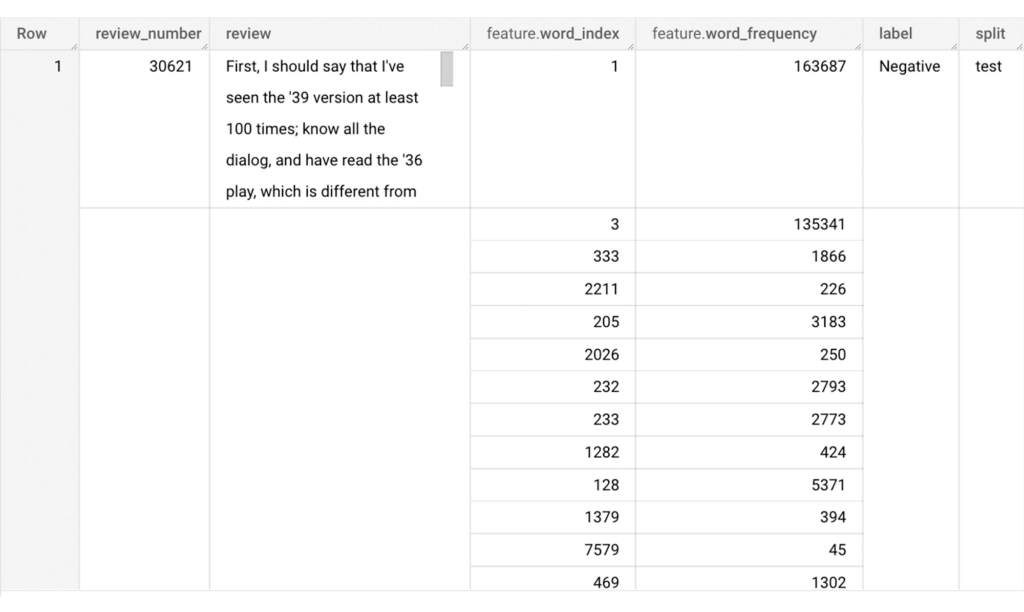
Now we will use the newly added feature to create a sparse feature in BigQuery. For this case, we aggregate word_index and word_frequency in each review, which generates a column as ARRAY[STRUCT] type. Now, each review is represented as ARRAY[(word_index, word_frequency)].
-- Generate a sparse feature by aggregating word_index and word_frequency in each review.
CREATE OR REPLACE TABLE sparse_features_demo.sparse_feature AS (
 SELECT
   review_number,
   review,
   ARRAY_AGG(STRUCT(word_index, word_frequency)) AS feature,
   label,
   split
 FROM (
   SELECT
     DISTINCT review_number,
     review,
     word,
     label,
     split
   FROM
     sparse_features_demo.processed_reviews,
     UNNEST(words) AS word
   WHERE
     word IN (SELECT word FROM sparse_features_demo.vocabulary)
 ) AS word_list
 LEFT JOIN
   sparse_features_demo.vocabulary AS topk_words
   ON
     word_list.word = topk_words.word
 GROUP BY
   review_number,
   review,
   label,
   split
);
Once the query is executed, a sparse feature named `feature` will be created. That `feature` column is an `ARRAY of STRUCT` column which is made of `word_index` and `word_frequency` columns. The picture below displays the resulting table at a glance.
Training a BigQuery ML model
We just created a dataset with a sparse feature in BigQuery. Let’s see how we can use that dataset to train with a machine learning model with BigQuery ML. In the following query, we will train a logistic regression model using the review_number, review, and feature to predict the label:
-- Train a logistic regression classifier using the data with sparse feature
CREATE OR REPLACE MODEL sparse_features_demo.logistic_reg_classifier
 TRANSFORM (
   * EXCEPT (
       review_number,
       review
     )
 )
 OPTIONS(
   MODEL_TYPE='LOGISTIC_REG',
   INPUT_LABEL_COLS = ['label']
 ) AS
 SELECT
   review_number,
   review,
   feature,
   label
 FROM
    sparse_features_demo.sparse_feature
 WHERE
   split = "train"
;
Now that we have trained a BigQuery ML Model using a sparse feature, we evaluate the model and tune it as needed.
-- Evaluate the trained logistic regression classifier
SELECT * FROM ML.EVALUATE(MODEL sparse_features_demo.logistic_reg_classifier);
The score looks like a decent starting point, so let’s go ahead and test the model with the test dataset.

-- Evaluate the trained logistic regression classifier using test data
SELECT * FROM ML.EVALUATE(MODEL sparse_features_demo.logistic_reg_classifier,
 (
   SELECT
     review_number,
     review,
     feature,
     label
   FROM
     sparse_features_demo.sparse_feature
   WHERE
     split = "test"
 )
);
The model performance for the test dataset looks satisfactory and it can now be used for inference. One thing to note here is that since the model is trained on the numerical features, the model will only accept numeral features as input. Hence, the new reviews have to go through the same transformation steps before they can be used for inference. The next step shows how the transformation can be applied to a user-defined dataset.
Sentiment predictions from the BigQuery ML model
All we have left to do now is to create a user-defined dataset, apply the same transformations to the reviews, and use the user-defined sparse features to perform model inference. It can be achieved using a WITH statement as shown below.
WITH
 -- Create a user defined reviews
 user_defined_reviews AS (
   SELECT
     ROW_NUMBER() OVER () AS review_number,
     review,
     REGEXP_EXTRACT_ALL(LOWER(review), '[a-z]{2,}') AS words
   FROM (
     SELECT "What a boring movie" AS review UNION ALL
     SELECT "I don't like this movie" AS review UNION ALL
     SELECT "The best movie ever" AS review
   )
 ),


 -- Create a sparse feature from user defined reviews
 user_defined_sparse_feature AS (
   SELECT
     review_number,
     review,
     ARRAY_AGG(STRUCT(word_index, word_frequency)) AS feature
   FROM (
     SELECT
       DISTINCT review_number,
       review,
       word
     FROM
       user_defined_reviews,
       UNNEST(words) as word
     WHERE
       word IN (SELECT word FROM sparse_features_demo.vocabulary)
   ) AS word_list
   LEFT JOIN
     sparse_features_demo.vocabulary AS topk_words
     ON
       word_list.word = topk_words.word
   GROUP BY
     review_number,
     review
 )


-- Evaluate the trained model using user defined data
SELECT review, predicted_label FROM ML.PREDICT(MODEL sparse_features_demo.logistic_reg_classifier,
 (
   SELECT
     *
   FROM
     user_defined_sparse_feature
 )
);
Here is what you would get for executing the query above:
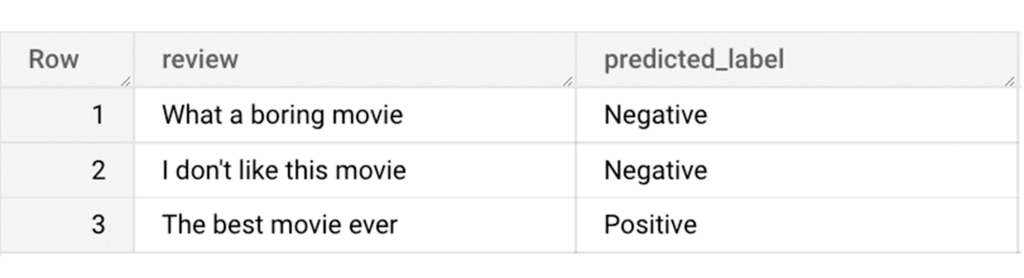
And that’s it! We just performed a sentiment analysis on the IMDb dataset from a BigQuery Public Dataset using only SQL statements and BigQuery ML. Now that we have demonstrated how sparse features can be used with BigQuery ML models, we can’t wait to see all the amazing projects that you would create by harnessing this functionality.
If you’re just getting started with BigQuery, check out our interactive tutorial to begin exploring.
How Digital Simulation of Physical Stores Helped e-Commerce Companies Replenish Stocks and Fulfil Online Orders at Scale in 2020

2977
Of your peers have already read this article.
3:00 Minutes
The most insightful time you'll spend today!
Editor’s note: We’re inviting partners from across our retail ecosystem to share stories, best practices, and tips and tricks on how they are helping retailers transform during a time that has seen tremendous change. The original version of this blog was published by Trax Retail in October 2021. Please enjoy this updated entry from our partner.

In 2020, we saw a massive leap in online grocery. Within a few weeks, the industry reached numbers that were unexpected for at least four more years. In a snap, what seemed like a relatively insignificant channel became one that grocery retailers simply couldn’t ignore and, what’s more, is likely to remain a norm.
Retailers trying to stay ahead of the curve have already started experimenting with methods like building warehouses and installing robots to fulfill the growing demand, but in-store picking has been and will continue to remain one of the primary methods of fulfilling online orders as it offers several advantages. First, it allows the use of existing infrastructure – large retailers already have geographically well-located outlets in major cities, which enables shorter lead time to delivery. Secondly, it allows retailers to stay flexible and move swiftly between in-store and online order fulfillment. And finally, it fits perfectly with the omnichannel approach to allow customers to shop wherever and however they want – click and collect, curbside pick-up, or inside brick-and-mortar stores.
How improving on-shelf availability helps ecommerce profitability

Despite its many advantages, in-store picking is expensive and affects profitability in an already competitive space since the cost of picking is directly tied with hourly labor fees. Moreover, with labor being a major challenge to obtain and retain, every minute spent picking counts. However, there is an easy way to keep costs down – optimizing the picking process by ensuring product availability and reducing the need for substitution.
An average of 8% of products are not available on-shelf in stores at any given time. As a result, pickers waste much of their time hunting for products that simply aren’t on the shelf or are misplaced, or spend time looking for substitutes, further increasing the time and cost for picking. In fact, grocery pickers often claim that out-of-stock (OOS) occurrences are the main reason that slows down the picking process. Without these factors, pick rates could be two times faster. Since picking accounts for 50% of the fulfillment cost, it has a substantial impact on the order’s bottom line and often makes the difference between a loss-making and a profitable basket.
Maintaining on-shelf availability for the thousands of products in every store has always been a significant problem to solve. The shift to online ordering has made the availability issue even more significant as the shelf is also now the fulfillment center for the majority of online orders. For e-commerce, out of stocks present two major issues for retailers. First, the impact of out-of-stock items is even more noticeable for online shoppers as they do not select their own substitutions. Additionally, out-of-stocks cause inefficiencies in the item fulfillment process, which is already a costly and margin-diluting practice for retailers. The good news is that through a partnership between Trax and Google Cloud, and the power of Google Cloud’s AI/ML capabilities, these challenges are addressed. The granular, real-time data at scale to enable picking efficiency and the data transparency to unlock a better shopping experience are now a reality which benefits both shoppers and store associates.
Trax and Google Cloud technology helps the bottom line
Trax and Google Cloud offer solutions that can help retailers improve on-shelf availability (OSA). Trax Retail Watch powered by Google Cloud uses computer vision (CV) and AI to create a digital version of the physical store in real-time and informs out-of-stocks so that retailers always have full visibility of items that are running low and can replenish them quickly. In turn, pickers are more likely to find everything they need quickly without facing the problem of missing products or having to look for substitutes. Trax Retail Watch also allows store associates to quickly spot any issues arising on shelves without having to physically walk down each aisle. From misplaced products to low stock, having full visibility means that shelf managers make more informed decisions, so that pickers face fewer obstacles, are aware of the true inventory, and significantly improve their pick rates. Faster picking means lower costs and ultimately, higher margins for online grocery orders.
With more e-commerce retailers crowding the online space, competition is tough. Want to know how frustrated e-commerce shoppers are about on-shelf availability? Trax uncovered this problem through an in-depth consumer study. Learn how to address shopper happiness while driving more profitable fulfillment and stay on the leaderboard with this Trax and Google Cloud whitepaper: Winning the online grocery race.
5494
Of your peers have already downloaded this article
10:30 Minutes
The most insightful time you'll spend today!
Modernizing your data warehouse is one way to keep up with evolving business requirements and harness new technology. For many companies, cloud data warehousing offers a fast, flexible, and cost-effective alternative to traditional on-premises solutions.
In a report sponsored by Google Cloud, TDWI examines the rise of cloud-based data warehouses and identifies associated opportunities, benefits, and best practices.
Featuring strategic advice from Google experts, it answers questions such as:
- What’s driving businesses to consider the cloud for their data warehousing strategy?
- What are the advantages of a cloud-native data warehouse?
- How can you coordinate data warehouse modernization with other modernization projects?
- What’s the first step in migrating your data warehouse to the cloud?
- How will cloud data warehousing affect your business’s security posture?
Download the complete report to learn more about cloud data warehousing and how it can help your business transform with the times — and prepare for the future.
How Google Cloud’s PSO Supports Customers’ Migration Goals

5042
Of your peers have already read this article.
2:00 Minutes
The most insightful time you'll spend today!
Google Cloud’s Professional Services Organization (PSO) engages with customers to ensure effective and efficient operations in the cloud, from the time they begin considering how cloud can help them overcome their operational, business or technical challenges, to the time they’re looking to optimize their cloud workloads.
We know that all parts of the cloud journey are important and can be complex. In this blog post, we want to focus specifically on the migration process and how PSO engages in a myriad of activities to ensure a successful migration.
As a team of trusted technical advisors, PSO will approach migrations in three phases:
- Pre-Migration Planning
- Cutover Activities
- Post-Migration Operations
While this post will not cover in detail all of the steps required for a migration, it will focus on how PSO engages in specific activities to meet customer objectives, manage risk, and deliver value. We will discuss the assets, processes and tools that we leverage to ensure success.
Pre-Migration Planning
Assess Scope
Before the migration happens, you will need to understand and clarify the future state that you’re working towards. From a logistical perspective, PSO will be helping you with capacity planning to ensure sufficient resources are available for your envisioned future state.
While migration into the cloud does allow you to eliminate many of the considerations for the physical, logistical, and financial concerns of traditional data centers and co-locations, it does not remove the need for active management of quotas, preparation for large migrations, and forecasting. PSO will help you forecast your needs in advance and work with the capacity team to adjust quotas, manage resources, and ensure availability.
Once the future state has been determined, PSO will also work with the product teams to determine any gaps in functionality. PSO captures feature requests across Google Cloud services and makes sure they are understood, logged, tracked, and prioritized appropriately with the relevant product teams. From there, they work closely with the customer to determine any interim workarounds that can be leveraged while waiting for the feature to land, as well as providing updates on the upcoming roadmap.
Develop Migration Approach and Tooling
Within Google Cloud, we have a library of assets and tools we use to assist in the migration process. We have seen these assets help us successfully complete migrations for other customers efficiently and effectively.
Based on the scoping requirements and tooling available to assist in the migration, PSO will help recommend a migration approach. We understand that enterprises have specific needs; differing levels of complexity and scale; regulatory, operational, or organization challenges that will need to be factored into the migration. PSO will help customers think through the different migration options and how all of the considerations will play out.
PSO will work with the customer team to determine the best migration approach for moving servers from on-prem to Google Cloud. PSO will walk customers through different migration approaches, such as refactoring, lift-shift, or new installs. From there, the customer can determine the best fit for their migration. PSO will provide guidance on best practices and use cases from other customers with similar use cases.
Google offers a variety of cloud native tools that can assist with asset discovery, the migration itself, and post-migration optimization. PSO, as one example, will help work with project managers to determine the best tooling that accommodates the customer’s requirements for migrating servers. PSO will also engage Google product team to ensure the customer fully understands the capabilities of each tool and the best fit for the use case. Google understands from a tooling perspective, one size does not fit all, thus PSO will work with the customer on determining the best migration approach and tooling for different requirements.
Cutover Activities
Once all of the planning activities have been completed, PSO will assist in making sure the cutover is successful.
During and leading up to critical customer events, PSO can provide proactive event management services which deliver increased support and readiness for key workloads. Beyond having a solid architecture and infrastructure on the platform, support for this infrastructure is essential and TAMs will help ensure that there are additional resources to support and unblock the customer where challenges arise.
As part of event management activities, PSO liaises with the Google Cloud Support Organization to ensure quick remediation and high resilience for situations where challenges arise. A war room is usually created to facilitate quick communication about the critical activities and roadblocks that arise. These war rooms can give customers a direct line to the support and engineering teams that will triage and resolve their issues.
Post-Migration Activities
Once cutover is complete, PSO will continue to provide support in areas such incident management, capacity planning, continuous operational support, and optimization to ensure the customer is successful from start to finish.
PSO will serve as the liaison between the customer and Google engineers. If support cases need to be escalated, PSO will ensure the appropriate parties are involved and work to get the case resolved in a timely manner. Through operational rigor, PSO will work with the customer in determining if certain Google Cloud services will be beneficial to the customer objectives. If services will add value to the customer, PSO will help enable the services so it aligns with the customer’s goal and current cloud architecture. In cases where there are missing gaps in services, PSO will proactively work with the customer and Google engineering teams to close the gaps by enabling additional functionality in the services.
PSO will continue to work with the engineering teams to consistently review and provide recommendations on the customer’s cloud architecture in ensuring the most optimal and cost efficient design along with adhering to Google’s best practices guidelines.
Aside from migrations, PSO is also responsible for providing continuous training of Google Cloud to customers. To ensure consistent development of Google Cloud, PSO will work with the customer to jointly develop a learning roadmap to ensure the customer has the necessary skills to succeed in delivering successful projects in Google Cloud.
Conclusion
Google PSO will be actively engaged throughout the customer’s cloud journey to ensure the necessary guidance, methodology, and tools are presented to the customer. PSO will engage in a series of activities from pre-migration planning to post migration in key areas such as capacity planning to ensure sufficient resources are allocated for future workloads to providing support on technical cases for troubleshooting. PSO will serve as a long-term trusted advisor who will be the voice of the customer and provide the reliability and stability of the customer’s Google Cloud environment.
Click here if you’d like to engage with our PSO team on your migration. Or, you can also get started with a free discovery and assessment of your current IT landscape.
How Ather Energy is leveraging the Cloud to build and scale smart mobility solutions for India

8388
Of your peers have already read this article.
8:30 Minutes
The most insightful time you'll spend today!
In 2013, long before the world was discussing clean energy and sustainable practices, two IIT Madras graduates — Swapnil Jain and Tarun Mehta — had an idea to develop India’s first-ever electrical scooter.
This was at a time when auto manufacturers were still focusing on fossil-fuel-driven vehicles and ‘eco-friendly’ mobility solutions were more a trendy alternative catering to a niche market.
The duo founded Ather Energy in 2013 and launched their first fully-electric scooter, the Ather S340, in Bengaluru in 2016. Since then, the company has released several new models into the market and is planning to expand to eight more cities by the end of the year.
To support the smooth running of their vehicles, lower costs, improve time to market, and create great customer experience, Ather turned to Google Cloud.
Read the Full Story on YourStory
More Relevant Stories for Your Company

Global Communication Made Easy with Translation Hub
Hello! ¡Hola! 你好! नमस्ते! Bonjour! Being greeted in your own language can instantly put a smile on your face, and organizations around the world recognize that messages become more inclusive and powerful when translated into many languages. As the Head of Product Management for Translation AI at Google Cloud, I


What’s Next for Personalization on Google Cloud
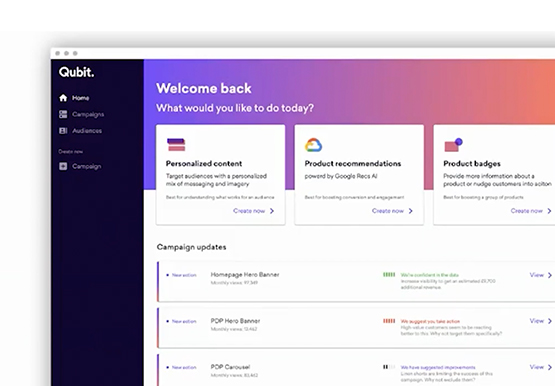
Customer shopping behavior has changed for good. With fewer in-store shopping visits retailers have had to shore up their digital storefronts and explore new ways to meaningfully engage with their customers. Delivering a superior customer experience has become even more of a differentiator for the early movers and personalized recommendations

Guide to Create and Manage Datasets with Vertex AI
At Google I/O this year, we introduced Vertex AI to bring together all our ML offerings into a single environment that lets you build and manage the lifecycle of ML projects. In a previous post, we gave you an overview of Vertex AI, sharing how it supports your entire ML workflow—from data management

New Capabilities in BigQuery to Ease Anomalies Detection in the Absence of Labeled Data
When it comes to anomaly detection, one of the key challenges that many organizations face is that it can be difficult to know how to define what an anomaly is. How do you define and anticipate unusual network intrusions, manufacturing defects, or insurance fraud? If you have labeled data with
