





Cloud Security : The First Priority for Enterprises

3335
Of your peers have already read this article.
2:00 Minutes
The most insightful time you'll spend today!
Cloud-based solutions were a technology life raft for organizations during the COVID-19 pandemic as employees took to the virtual office and companies scrambled to adjust to a distributed, remote reality. However, these rapid and substantial changes in the role of cloud technologies on the business came with an increased focus on security.
The accelerated move to the cloud also meant companies needed to rapidly evolve existing security practices to protect everything that matters at the core of business—from their people and their operational and transactional data to customers and their most sensitive personal information. Suddenly, enterprises were keenly aware of where business practices, employee training, and security policies were falling short.
A recent Google-commissioned study by IDG explored the details behind the heightened focus on security solutions since the start of the pandemic while highlighting the role cloud-based security solutions are playing in helping keep customers safe. The survey of 2,000 global IT leaders serves to illustrate that in this new and unfamiliar world, enterprises are more ready than ever to embrace cloud security.LEARN MOREIT Leaders Research ReportWhat are the biggest IT priorities in 2021? Explore insights from a survey of 2,000 Senior IT leaders conducted by IDG, in collaboration with Google Cloud.
Security is an even higher priority post-pandemic
In the wake of the pandemic, many organizations are facing a broader attack surface than ever before as employees moved to temporarily working from remote home offices (and in some cases, encouraged to stay there for the foreseeable future). With fewer inherent security protections on personal internet connections and more work meetings happening via video conferencing, attackers have launched a cyber pandemic of their own designed to take advantage of and exploit new weaknesses.
However, even as businesses amp up security initiatives and preventative measures, the growing wave of threats continue to keep security top of mind for IT leaders. Security risks and concerns remain one of the top pain points impeding innovation according to the IDG study respondents—only surpassed by insufficient IT and developer skills.
Enterprises looking to cloud providers for help with security
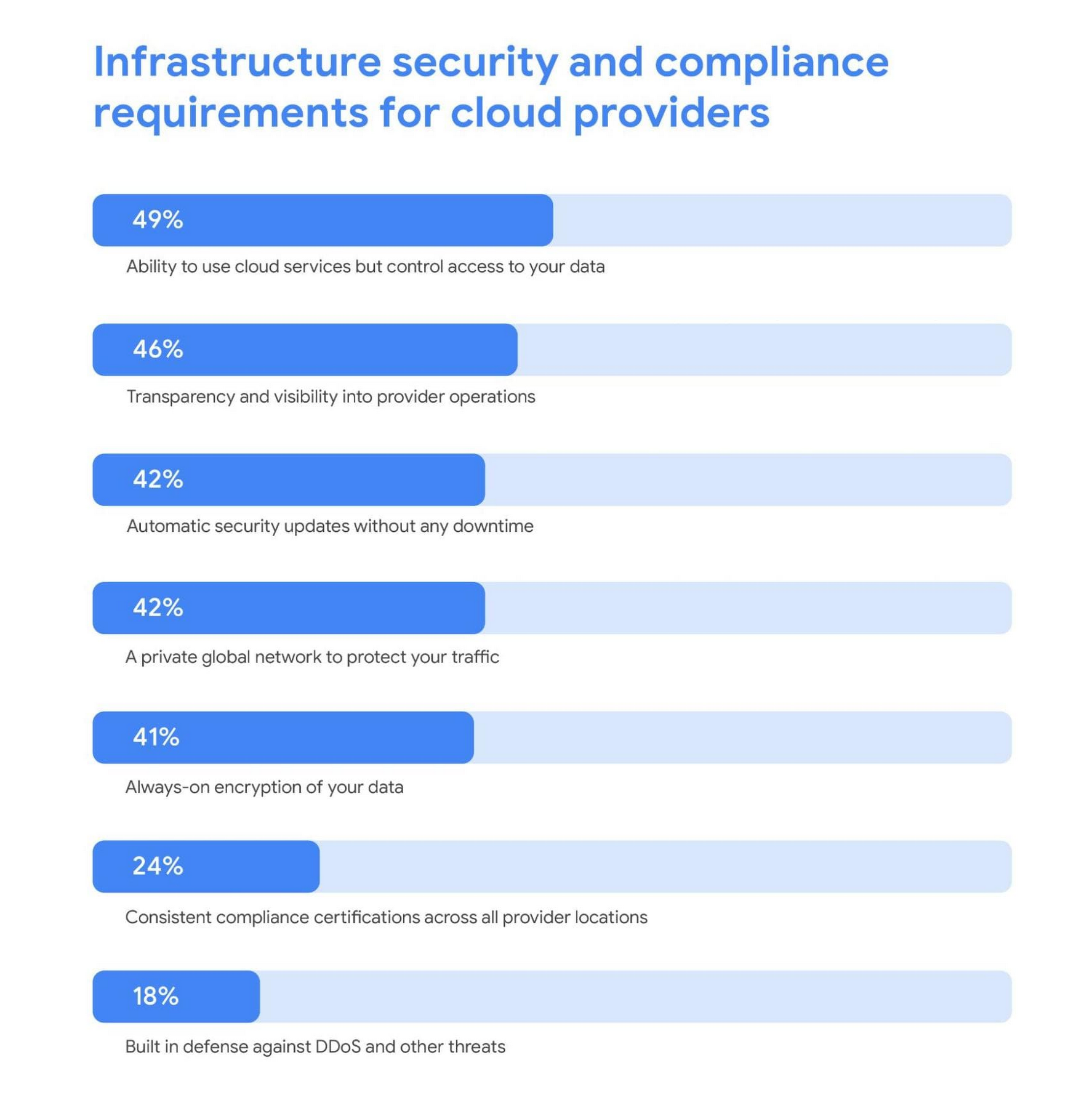
As a result, addressing security risks is a leading area where IT leaders turn to cloud providers for support. For these organizations, the ability to control access to data while using cloud services was the most required infrastructure security and compliance features from a cloud provider.
Cloud security is more trusted than ever
A deeper look into the results also revealed a shift in perspective about whether cloud security is really up to the task of protecting enterprises against modern attacks. Despite skepticism in the past, the majority of IT leaders are now comfortable with using cloud-based security solutions.
Confidence in the security of cloud infrastructure is extremely high with 85% of respondents stating they feel secure (or more secure) than on-premises infrastructure—compared to just 15% who believe on-premises is still safer.
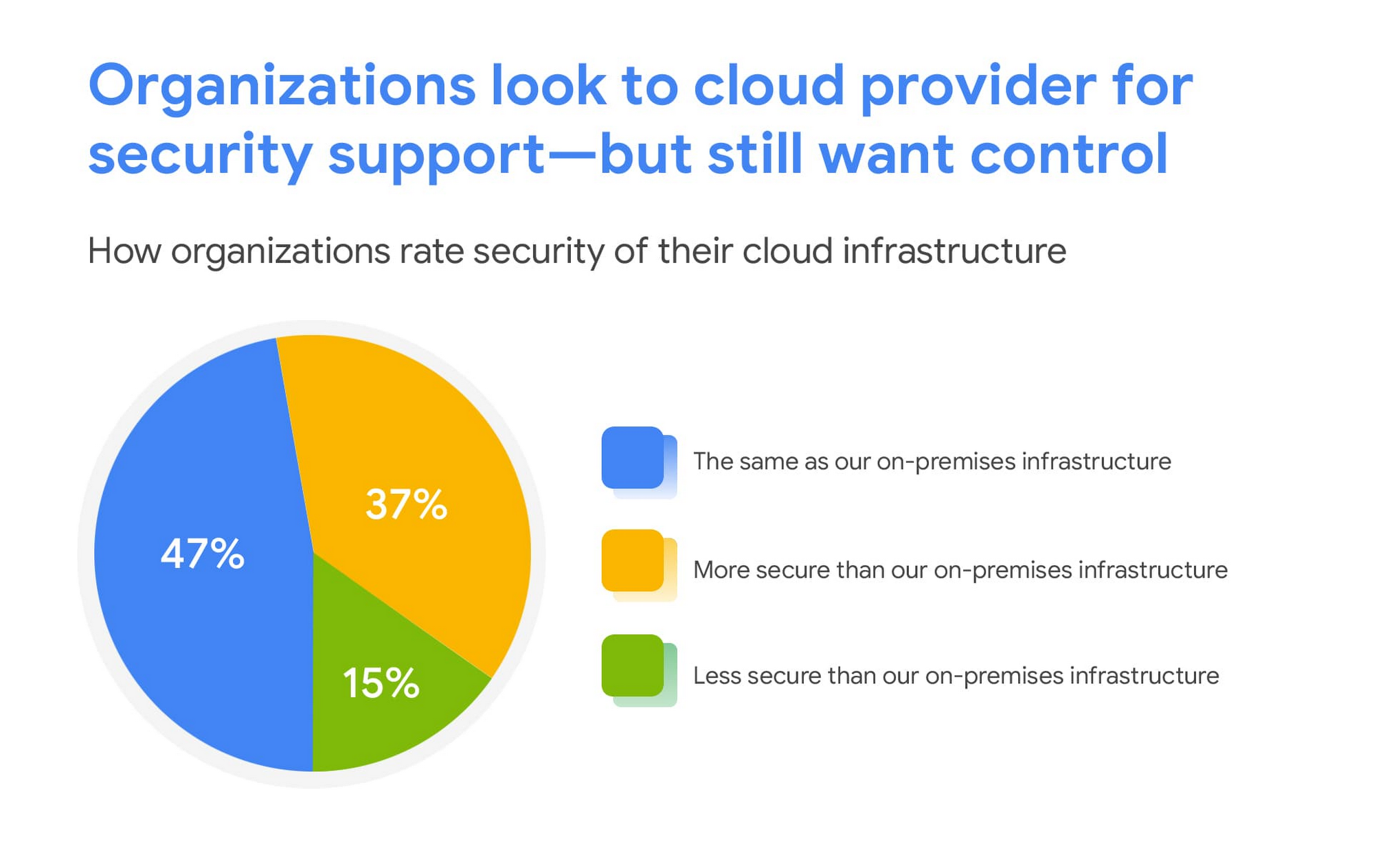
This is a clear indication that there are fewer reservations around the efficacy of cloud-based security solutions, signaling an increase in trust as organizations invest in cloud-based infrastructure and solutions.
We are committed to safe, secure solutions
Google Cloud protects your data, applications, and infrastructure, as well as your customers, from fraudulent activity, spam, and other types of online abuse. We protect you against a growing list of cybersecurity threats using the same infrastructure foundation and security services that we use for our own operations, so you never have to compromise between ease of use and advanced security.
To learn more about the IDG findings and how IT leaders are addressing security concerns post-COVID, download the full report.
Interested in how Google Cloud’s commitment to providing safe, secure solutions helps you address your security needs?
Our networking, data storage, and compute services encrypt data at rest and in transit to ensure the integrity, authenticity, and privacy of your data and your customers’ data. We also offer the ability to encrypt data in use, while it’s being processed in VM and container workloads, and our advanced security tools support compliance and data confidentiality with minimal operational overhead.
Create and Protect Admin Accounts

4856
Of your peers have already read this article.
1:30 Minutes
The most insightful time you'll spend today!
Setting up your new cloud infrastructure is scary. Extra scary when you realize that someone (is it gonna be you?) gets to have phenomenal cosmic power over the whole thing.
Yes, I’m talking about the admin account, and today we’ll dig into why they are important, dangerous and different.
When the team at pistach.io got their nuts-as-a-service business growing fruitfully, they knew they needed to think carefully about admin accounts. These people would have tremendous control over their use of Google Cloud, and they could potentially cause very big problems if any were compromised. Definitely resources that require a protective shell.

Early in pistach.io’s development, an employee named Walter Nutt wanted to play a prank by changing his co-worker’s profile photo from an almond to a peanut (pretty devious, since a peanut is actually a legume). He didn’t have access to his friend’s computer, but he did have access to the company’s Cloud Storage bucket. While searching for the profile photo in question, Wally inadvertently deleted the entire contents of the bucket!
As he searched for ways to restore its contents, Wally modified access to two other pistach.io buckets. The company was ground to a halt for a week while teams worked to crack through the permissions issues.
Time to rethink permissions a bit, so this couldn’t spoil their buttery smooth operations in the future.
Following the resource manager guide, the team made a super admin email address that wasn’t tied to a particular individual or Workspace account, and secured it with strong multi-factor authentication. This would be their backup in case an admin account were to be compromised, so they could recover and repair.
The team already uses Google Workspace, so they have an organization set up already. That creation process established initial super administrators, allowing them to create and modify all other resources inside the organization. As they looked toward using Google Cloud, the super administrators could:
- Give the admin role to people, for Cloud
- Act as a point of contact for account recovery
- Modify or delete the organization if needed
Making admin users for the organization allows other people to then flesh out the resources and policies for pistach.io, before they go nuts and give everyone all the permissions. While that would speed things up, it would make it easy for an attacker to crack through the security shell because any account compromise could give ousize access. Yikes!

Instead, the IT leads specified certain people to act as organization admins, and then gave them permissions to:
- Define Identity and Access Management policies
- Structure the Resource Hierarchy
- Delegate control of specific Cloud elements to others on the team
Once those organization admins were set up, they could give management and oversight of Compute, Storage, Networking and other resource types to the relevant leads, making sure each person had just the right amount of permission for the role they needed to perform. The organization admins don’t have permissions themselves to make these resources. They just delegate.
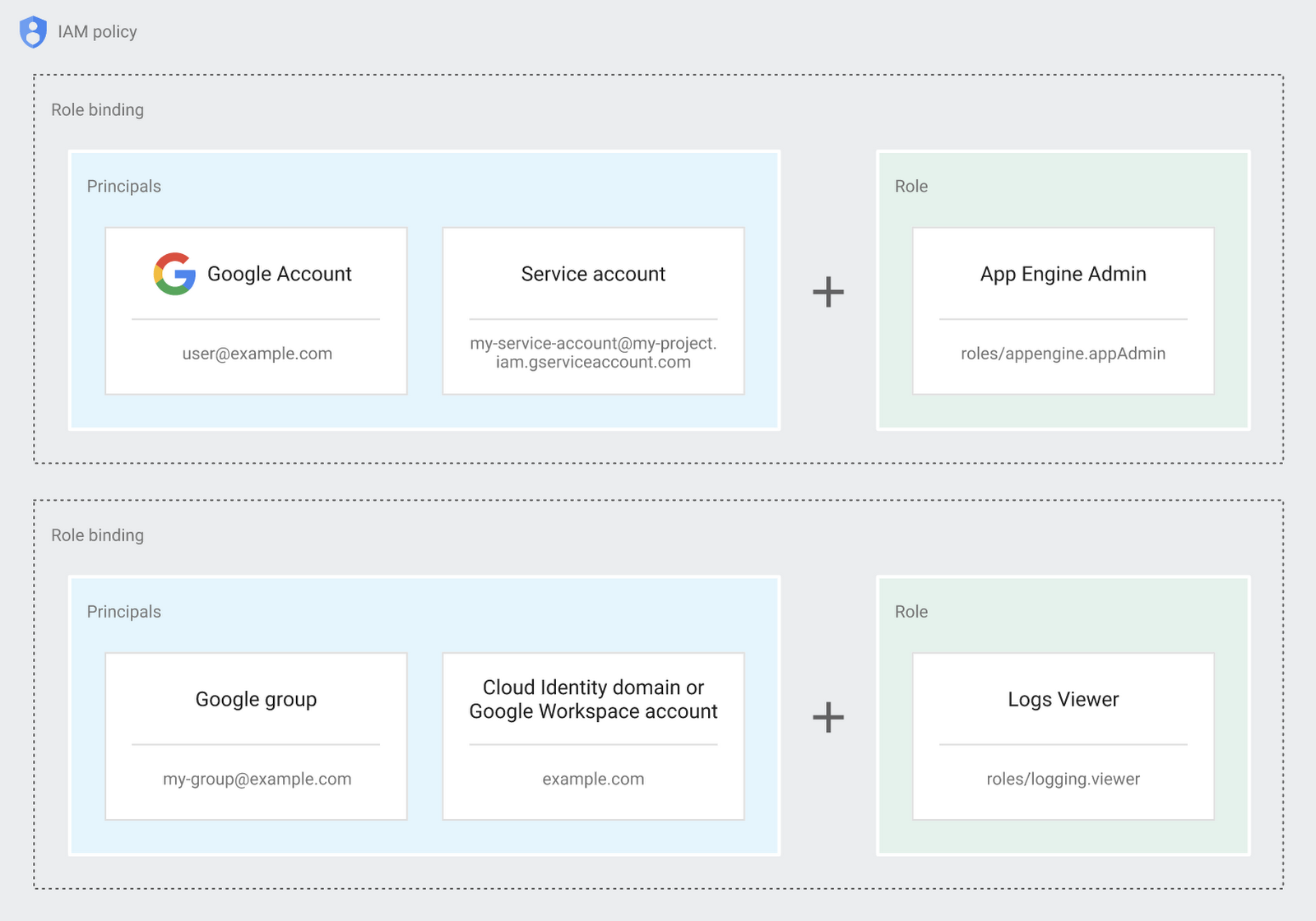
Now each person can accomplish the job they’re responsible for, but doesn’t have overly permissive access. Delegating like this keeps the entire organization safer, and limits the blast radius if someone does manage to break in.
You can go through these steps yourself with this tutorial.
By default the creation of an organization resource for the domain gives everyone the ability to create projects and billing accounts. Once they set up their Organization Admin at pistach.io they decided to remove some of these wide permissions and, in a nutshell, bring everything down to a much finer control. So people could get permissions for a folder or a project, but not the entire organization!
Remember to take care of your admin roles, as they have the power, and responsibility, to cause serious harm if not used safely. Be safe with your Identity and Access Management. And keep your data yours!
Next time we join you we’ll take a crack at creating and provisioning an app to run inside the policies and resource management frameworks created today.
Secrets Management Risk Analysis: Mitigating Threats with Secret Manager

914
Of your peers have already read this article.
2:30 Minutes
The most insightful time you'll spend today!
Can you keep a secret? Many people struggle to keep secrets. So do organizations. An organization’s digital credentials — its passwords, API keys, tokens, and encryption keys baked into its software code — are its vital secrets, used to authenticate access to protected resources and services.
The security of these secrets represent one of the biggest risks that enterprises must manage when securing application infrastructure and environments. Fortunately, we have an important tool to help our customers better manage their secrets: Google Cloud Secret Manager.
Secret Manager is a secure and efficient tool to centrally store, access, manage, and audit your organization’s secrets. As we noted in our April 2023 Threat Horizons Report, insufficient management of credentials and keys is now one of the top security issues facing cloud customers today. In particular, we have observed service account keys being used for everything from insider threats to cross-cloud breaches to intellectual property espionage.
Along with the increasing popularity of DevOps, secrets are used throughout development. In some cases, secrets are coded as plaintext into configuration files or directly into functions, where they can end up exposed in code repositories. If compromised, secrets can be used to gain unauthorized privileged access to enterprise data, infiltrate critical systems, and launch attacks.
Secret Manager can help organizations better manage their secrets even as concerns over potential security breaches grow. Organizations must consider the following four points during their secrets management risk analysis:
- Secrets sprawl: As organizations move more workloads to the cloud, the number of secrets they need to manage increases exponentially. This can lead to secrets sprawl, where secrets are stored in a variety of different locations, making it difficult to track and manage them.
- Human error: Humans are fallible, and this is especially true when it comes to managing secrets. Mistakes, such as accidentally sharing a secret with the wrong person or the misconfiguration of a secret management tool, can have serious consequences.
- Compliance violations: Organizations that handle sensitive data are subject to a variety of compliance regulations, including PCI-DSS, SOC 2, HIPAA, and GDPR. Without proper management, secrets could lead to potential compliance violations.
- Downtime: If secrets are not properly managed or rotated, it could lead to downtime for applications and services that rely on them.
Secret Manager can enable IT teams to keep track of secrets by providing a centralized place to store and manage them. You can access secrets directly from the Secret Manager console, or use the Secret Manager API or SDKs. Secret Manager is also designed to scale with your application. You can store as many secrets as you need without performance issues, and its API-first design lets you extend and integrate into other existing systems.
Secret Manager integrations in Google Cloud
In many cases, developers save secret configuration details as plaintext in code for ease of use. There are two main risks associated with this approach:
- Anyone with access to secrets can see and copy them. There is no way to enforce any auditing or access controls practices here.
- It becomes difficult to move code between dev, test, and production environments.
Cloud-centered integrations supported by Secret Manager with other Google Cloud services in the software supply chain make it easier and safer to store and access sensitive information.
The tool is about the secret information being made securely available in build or runtime.
Secret Manager integrations also can play a role in securing sensitive information in the software supply chain:
1. Integration with CI/CD systems used to build and deploy your software
Cloud Code integration can help developers build more secure applications by preventing hard-coding of sensitive configuration data such as passwords, credentials, and tokens in the codebase. It replaces them with secrets which can be programmatically fetched as required. You can create, access, and modify secrets directly from within your favorite IDE without having to navigate away from it. Integration is available for VS Code, IntelliJ, and Cloud Shell Editor.
Cloud Functions integration lets you access and expose secrets as environment variables or as a volume via the filesystem.
Cloud Build: To handle sensitive data in builds, you can store them in Secret Manager and then configure the build steps to access the information directly. In the build steps, you can associate the value of a secret to an environment and you can access this value via an environment variable from scripts or processes. Two common uses for fetching sensitive dependencies during build time are:
- Storing Docker authentication credentials for pull/push of images to Docker hub.
- Creating GitHub pull requests in response to builds.
2. Integration with runtime engines
Cloud Run: Native integration makes it easy to mount secrets in cloud run services. Using this integration, secrets can be made available to containers either as volume mounts or as env variables. Sensitive dependencies can be stored in environment variables, by referencing a secret name stored in Secret Manager instead of storing it as a plain text environment variable. This secret access operation can be done directly from the Cloud Run console without changing a single line of source code.
If code reads secrets from a file instead of an env variable, the “mounted as volume” option can be used to make secrets look like files to the env vars. During service deployment, the service account used to run the containers are checked to see if they have the required permissions or not, preventing any unwanted access.
Kubernetes and GKE: The CSI driver–provider solution is an open-source work that provides integration with K8s. The driver lets customers centrally store their secrets in Google Secret Manager and consume them in a kubernetes native manner, as files mounted in K8s pods. The solution also comes with additional syncing capabilities. This method of consuming secrets also allows users to take advantage of SM’s capabilities like versioning, managed rotation, default/CMEK encryption and cloud-focused integrations with other Google Cloud services. Work is currently ongoing to provide official support to the driver solution as a GKE component.
Is Secret Manager right for my organization?
Developers carry a big responsibility to protect the sensitive data they are entrusted to work with, and keep secrets out of their code. However, organizations also have a responsibility to provide the tools and solutions needed to help their teams deliver on these expectations. Secret Manager makes it straightforward for developers to store and manage secrets while improving security.
To learn more about Secret Manager, please review these resources:
Read the previous Best Kept Security Secrets blogs here:
Case Study: How Exabeam Unlocked its Ability to Scale for Storage & Ingest Data from More Than 500 Security Vendors

3089
Of your peers have already read this article.
2:30 Minutes
The most insightful time you'll spend today!
Editor’s note: The post is part of a series highlighting our awesome partners, and their solutions, that are Built with BigQuery.
Exabeam, a leader in SIEM and XDR, provides security operations teams with end-to-end Threat Detection, Investigation, and Response (TDIR) by leveraging a combination of user and entity behavioral analytics (UEBA) and security orchestration, automation, and response (SOAR) to allow organizations to quickly resolve cybersecurity threats. As the company looked to take its cybersecurity solution to the next level, Exabeam partnered with Google Cloud to unlock its ability to scale for storage, ingestion, and analysis of security data.
Harnessing the power of Google Cloud products including BigQuery, Dataflow, Looker, Spanner and Bigtable, the company is now able to ingest data from more than 500 security vendors, convert unstructured data into security events, and create a common platform to store them in a cost-effective way. The scale and power of Google Cloud enables Exabeam customers to search multi-year data and detect threats in seconds
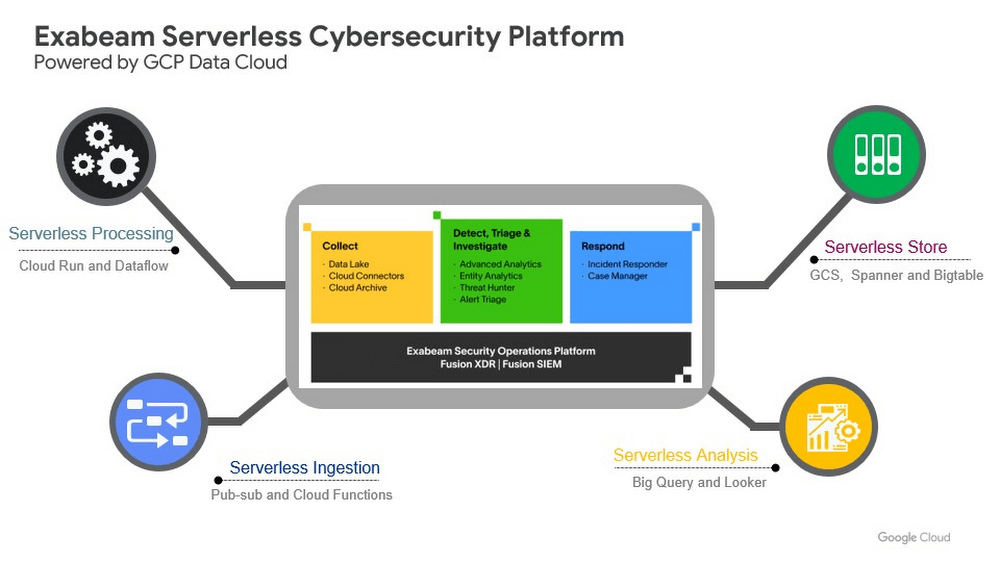
Google Cloud provides Exabeam with three critical benefits.
- Global scale security platform. Exabeam leveraged serverless Google Cloud data products to speed up platform development. The Exabeam platform supports horizontal scale with built-in resiliency (backed by 99.99% reliability) and data backups in three other zones per region. Also, multi-tenancy with tenant data separation, data masking, and encryption in transit and at rest are backed up in the data cloud products Exabeam uses from Google Cloud.
- Scale data ingestion and processing. By leveraging Google’s compute capabilities, Exabeam can differentiate itself from other security vendors that are still struggling to process large volumes of data. With Google Cloud, Exabeam can provide a path to scale data processing pipelines. This allows Exabeam to offer robust processing to model threat scenarios with data from more than 500 security and IT vendors in near-real time.
- Search and detection in seconds. Traditionally, security solutions break down data into silos to offer efficient and cost-effective search. Thanks to the speed and capacity of BigQuery, Security Operations teams can search across different tiers of data in near real time. The ability to search data more than a year old in seconds, for example, can help security teams hunt for threats simultaneously across recent and historical data.
Exabeam joins more than 700 tech companies powering their products and businesses using data cloud products from Google, such as BigQuery, Looker, Spanner, and Vertex AI. Google Cloud announced the Built with BigQuery initiative at the Google Data Cloud Summit in April, which helps Independent Software Vendors like Exabeam build applications using data and machine learning products. By providing dedicated access to technology, expertise, and go-to-market programs, this initiative can help tech companies accelerate, optimize, and amplify their success.
Google’s data cloud provides a complete platform for building data-driven applications like those from Exabeam — from simplified data ingestion, processing, and storage to powerful analytics, AI, ML, and data sharing capabilities — all integrated with the open, secure, and sustainable Google Cloud platform. With a diverse partner ecosystem and support for multi-cloud, open-source tools, and APIs, Google Cloud can help provide technology companies the portability and the extensibility they need to avoid data lock-in.
To learn more about Exabeam on Google Cloud, visit www.exabeam.com. Click here to learn more about Google Cloud’s Built with BigQuery initiative.
Latest Enhancements in reCAPTCHA Enterprise Helps Govts Sites Protect against Digital Frauds

2990
Of your peers have already read this article.
1:30 Minutes
The most insightful time you'll spend today!
Download our guidebook to learn how reCAPTCHA Enterprise can help strengthen your website security quickly.
Cyber threats on the rise
In 2021, the United States saw 40.5% of website attacks committed through “bad bots” on the internet, with 37.2% of government website traffic being bad bots, according to research by cybersecurity firm Imperva1. As cyber threats increase, government agencies need a way to safely let constituents access digital services. Google Cloud reCAPTCHA Enterprise protects websites by distinguishing between humans and bots. Full-scale implementation of reCAPTCHA Enterprise solution expands on bot detection to protect public sector websites from a broad range of digital fraud. Below are some highlights from our new reCAPTCHA Enterprise guidebook detailing functional enhancements and ways for government agencies to take advantage of enterprise capabilities.
Advanced website protection
reCAPTCHA Enterprise builds upon the existing reCAPTCHA API that has defended 5+ million websites for over a decade. It uses advanced risk analysis techniques to distinguish between humans and bots, protecting sites from spam and abuse as well as detecting other fraudulent activities, including credential stuffing, account takeovers (ATO), and automated account creation.
How it works
Detecting password leaks and credential breaches
With reCAPTCHA Enterprise’s password leak protection, agencies can conduct regular audits of user credentials, such as passwords, to detect leaks and breaches and prevent account takeovers (ATOs), as well as credential stuffing attacks.
UI challenge vs. frictionless
reCAPTCHA Enterprise returns a score, giving you the ability to take a number of actions, including requiring additional factors of authentication or throttling bots that may be scraping content. This functionality allows you to verify if an interaction is legitimate without any user interaction.
User-friendly migration
Google Cloud’s reCAPTCHA Enterprise offers a simple migration process in which your account is moved from the reCAPTCHA Admin to the Google Cloud Platform (GCP) after you create a project to migrate it to. Watch our 10-minute webinar to see how.
A cost-effective upgrade to a standard cybersecurity solution
Google reCAPTCHA Enterprise comes with 99.9%+ uptime, multi-factor authentication, and support for Android, iOS, and web applications. Our reCAPTCHA offering is structured in a way that allows you to fully control your investment and responsibly allocate taxpayer dollars.
reCAPTCHA Enterprise in action
Google Cloud’s reCAPTCHA protects against key automated attacks, including account creation, credential stuffing, cashing out, denial of inventory, and skewing. State governments have found success with using Google Cloud’s reCAPTCHA for cyber risk management. Wisconsin’s Workforce Development Agency used fraud detection and identification, including reCAPTCHA, to mitigate malicious bot logins on its external website, and several agencies in the Commonwealth of Pennsylvania have implemented reCAPTCHA to prevent bots from booking and reselling COVID-19 vaccine appointments.
Protecting public sector websites from bad actors can be challenging, especially with emerging threats from adversaries and extremist groups. Google Cloud’s reCAPTCHA Enterprise offers comprehensive website security solutions to successfully protect against cyber threats.
Download our reCAPTCHA Enterprise guidebook for a detailed look at how you can use reCAPTCHA Enterprise to strengthen your website security and implement the solution quickly and easily.
References:
5 Compelling Ways to Practice the Principle of Least Privilege for Security Leaders

3554
Of your peers have already read this article.
4:30 Minutes
The most insightful time you'll spend today!
When it comes to security, managing access is a foundational capability—whether you’re talking about a physical space or your cloud infrastructure. If you were securing an office, you wouldn’t give every employee a master key that can open the front door, the mailbox, and the safe. Likewise, when you’re securing your cloud infrastructure, you should limit employees’ access based on their role and what they require to do their job.
This concept is known as the principle of least privilege, which NIST’s Computer Security Resource Center defines as: “A security principle that restricts the access privileges of authorized personnel… to the minimum necessary to perform their jobs.” In practice, this means assigning credentials and privileges only as needed to both users and services, and removing any permissions that are no longer necessary.
Keeping the principle of least privilege in mind, here are five practical tips to minimize the surface area of exposed resources on Google Cloud Platform (GCP) and defend against some common attacks.
Avoid excessive use of broad primitive roles
Primitive roles like Owner and Editor grant wide-ranging access to all project resources. To tighten access security, consider using more specific predefined roles in Cloud Identity and Access Management (IAM), or defining custom roles that are better suited to your organization. For example, if you have a Cloud SQL database, instead of granting the project-wide Editor role to everybody, you could grant the cloudsql.editor role to users who create new databases, cloudsql.client to those who only need to connect to existing databases, and limit cloudsql.admin to database administrators.
Our policy design page has some sample structures and policies for different types of organizations, including startups, large enterprises, and education and training customers.
Assign roles to groups, not individuals
If you assign an IAM role directly to an individual, they retain the rights granted by that role even if they change roles, move around your organization, or no longer require them. A safer and more maintainable option is to place users into logical groups. For example, to manage databases, you could create db-editors, db-viewers, and db-admins groups, and let users inherit roles from these groups:
Groups can be created within the Admin Console for any G Suite domain, or federated from an external tool like Active Directory. By using groups for ownership, you can also avoid “orphaned” projects and resources—where a project or resource has a single owner who leaves the organization.
You can assign roles at the organization, folder, project, or resource level. This lets larger organizations easily manage roles for, say, a specific developer team or the entire accounting department. Be aware, however, that a child resource cannot limit roles granted by a parent: a user’s project-level cloudsql.viewer role, for example, will override any resource-level restrictions on any database in the same project.
Reduce the risks of default service account behavior
Service accounts are a special type of account intended for apps that need to access data. If the app’s own private credentials are compromised, however, the attacker then has all the access granted to the app by the service account’s roles.
The Compute Engine default service account, which has the editor role, is enabled for all instances created in a project unless you specify otherwise.
Creating a custom service account to use for creating instances and limiting its roles to the minimum necessary significantly reduces risk. For example, many apps using Cloud SQL only need the cloudsql.client role that lets them connect to an existing database.
An alternative approach is to grant the instance service account minimal privileges and create dedicated service accounts for your apps. This gives you more fine-grained control over each app’s privileges, although you will need to carefully manage the service account credentials.
Reduce risk and control access to your project by using networking features
To enable inter-resource communication, new GCP projects initially have a default network connecting all resources in that project. This is convenient for development, but in this default configuration, if an attacker gains unauthorized access to one resource, they may be able to reach others as well.
To limit this risk, don’t use the default network in production and explicitly specify accepted source IP ranges, ports, and protocols in network firewalls. You should also separate sensitive apps into individual virtual private clouds (VPCs), and if inter-app connectivity is required, use a Shared VPC. In each VPC, use different subnets for public facing services (e.g., web servers and bastion hosts) and private backend services. Allocate public IPs only to instances in the public subnet and add firewall rules with network tags to control which services can communicate with each other. Finally, grant permission to create or modify firewalls and routes only to those directly responsible for the network.
The Secure Instances and Apps with Custom Networks codelab walks you through setting up the public/private subnet configuration above. The Policy design for customers article we mentioned earlier also contains sample network designs for common use cases. For guidance on the tradeoffs of single, multiple, and shared VPCs, see Best practices and reference architectures for VPC design.
Consider using managed platforms and services
If you deploy and manage your own applications, you are responsible for security configuration, including the maintenance of accounts and permissions. You can limit your responsibilities by hosting your apps on managed platforms like Cloud Run, App Engine, or Cloud Functions, or by using fully managed services for databases and processing frameworks like Cloud SQL for MySQL and Postgres, Cloud Dataproc for Hadoop and Spark, and Cloud Memorystore for Redis.
A final note
Security is a priority in all aspects of Google Cloud, but cloud security is a shared responsibility, and ultimately you are responsible for making the right configuration and product choices for your organization to protect your data on GCP. These tips are a great starting point to help reduce your attack surface and help you make more informed risk decisions.
More Relevant Stories for Your Company

Announcing reCAPTCHA Enterprise’s Mobile SDK to Help Protect iOS, Android apps
reCAPTCHA Enterprise is Google’s online fraud detection service that leverages more than a decade of experience defending the internet. reCAPTCHA Enterprise can be used to prevent fraud and attacks perpetrated by scripts, bot software, and humans. When installed inside a mobile app at the point of action, such as login,

Protect Corporate Apps with BeyondCorp Enterprise
As part of our efforts to democratize Zero Trust, Google Cloud has designed our BeyondCorp Enterprise solution to be an extensible platform where customers can choose to integrate signals from other technology vendors and incorporate these into their Zero Trust access policies. Following our integrations announcements earlier this year, we

Google Workspace to Extend Digital Sovereignity for EU Organizations in Later Part of 2022
European organizations are moving their operations and data to the cloud in increasing numbers to enable collaboration, drive business value, and transition to hybrid work. However, the cloud solutions that underpin these powerful capabilities must meet an organization’s critical requirements for security, privacy, and digital sovereignty. We often hear from

Highmark & Google’s Secure-by-design Technique to Bring the Living Health Solution to Life
In an industry as highly regulated as healthcare, building a single secure and compliant application that tracks patient care and appointments at a clinic requires a great deal of planning from development and security teams. So, imagine what it would be like to build a solution that includes almost everything
