





Recapping Google Cloud VMware Engine’s Latest Milestones
3465
Of your peers have already read this article.
3:00 Minutes
The most insightful time you'll spend today!
We’ve made several updates to Google Cloud VMware Engine in recent weeks—today’s post provides a recap of our latest milestones. Google Cloud VMware Engine delivers an enterprise-grade VMware stack running natively in Google Cloud. This cloud service is one of the fastest paths to the cloud for VMware workloads without making changes to existing applications or operating models across a variety of use-cases. These include rapid data center exit, application lift and shift, disaster recovery, virtual desktop infrastructure, or modernization at your own pace.
In fact, Mitel, a global provider of unified communications-as-a-service to 70 million business users across 100 countries, migrated 1,000 VMware instances to Google Cloud VMware Engine in less than 90 days and improved its monthly operational output four times.
In our last update, we focused on several innovative capabilities around networking, reach, and scale. Let us take a look at the highlights we released since our last installment.
Fast provisioning of a dedicated, intrinsically secure VMware private cloud
With Google Cloud VMware Engine, you can spin up a VMware private cloud in about 30 minutes. You can also scale your VMware-based infrastructure on-demand with dedicated hosts located in secure Google data centers. Let us look at what’s new:
Autoscale: The ability to elastically and programmatically manage infrastructure resources to align with business needs or what is called “right-sizing” is a core capability of an IaaS platform. With autoscale, Google Cloud VMware Engine users can leverage policy-driven automation to scale the nodes needed to meet the compute demands of the VMware infrastructure.
Autoscale:
- Addresses seasonal spikes in demand, gradual increases of utilization, or new projects being onboarded or expanded due to disaster recovery events.
- Analyzes the CPU, memory, and storage utilization to give you the controls to scale Google Cloud VMware Engine nodes up or down.
- Ensures that storage consumption does not exceed the recommended limits for maintaining the Google Cloud VMware Engine service-level agreement.
- Reduces overhead on IT teams by automating capacity monitoring and enabling sufficient availability of resources based on thresholds. Note that safeguards for maintaining minimum capacity and maximum capacity can be configured to ensure there are boundaries to the automation.
Learn how to set up Autoscale.

Mumbai region availability
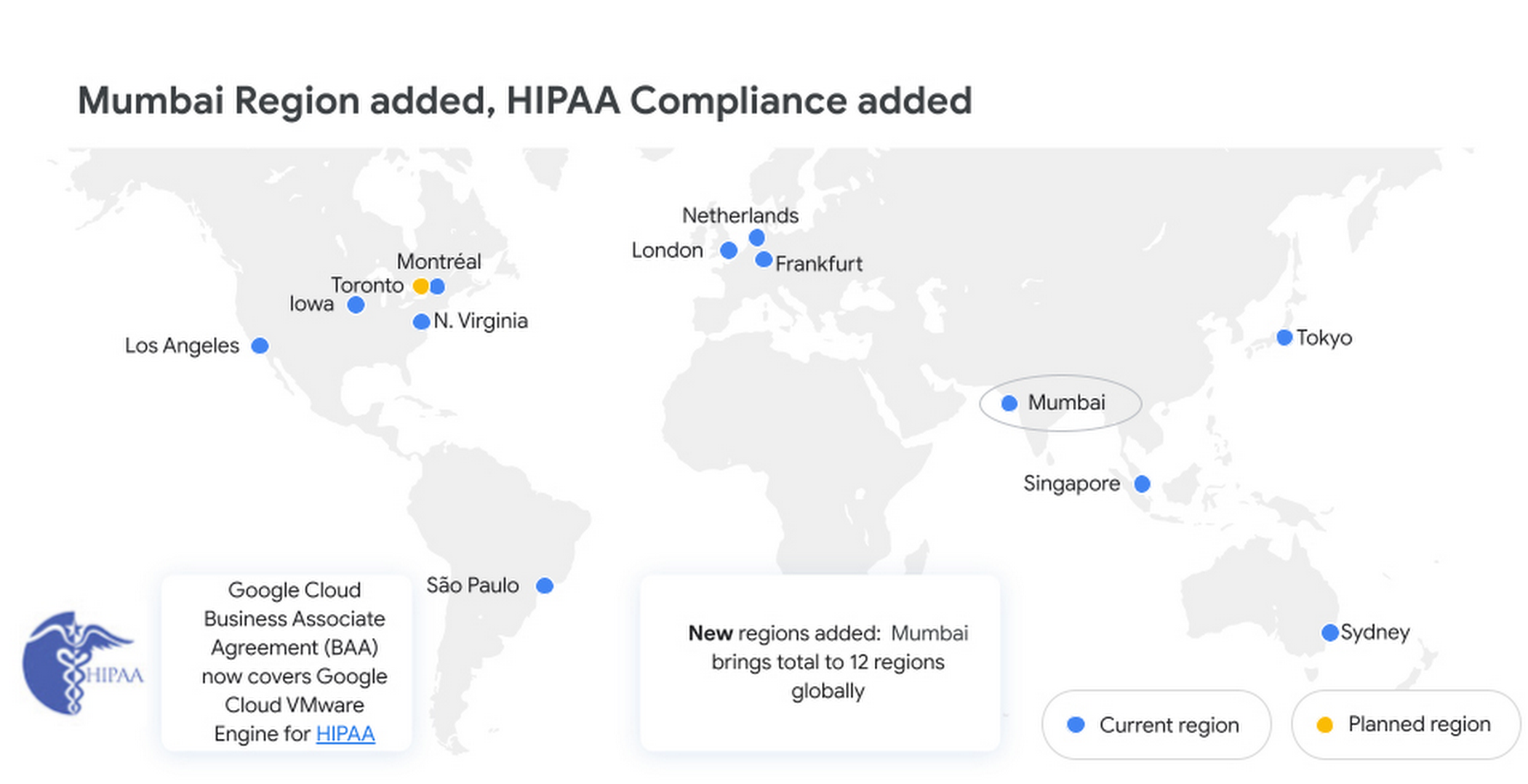
Google Cloud VMware Engine is now available in the Mumbai region. This brings the availability of the service to 12 regions globally, enabling our multi-national and regional customers to leverage a VMware-compatible infrastructure-as-a-service platform on Google Cloud. For more details, please read the press release.
Enterprise-grade infrastructure
With 99.99% availability for a cluster in a single zone, fully dedicated 100 Gbps east-west networking with no oversubscription, and all nonvolatile memory express storage, Google Cloud VMware Engine provides the highest performance required for the most demanding workloads. Let us look at what’s new:
Preview – Google Cloud KMS integration: You already have the ability to bring your own keys to encrypt your vSAN datastores. With this new capability, organizations that want to eliminate the overhead of managing external key providers can leverage a Google managed key provider, using Cloud KMS. This brings increased flexibility in securing workloads and data by enabling vSAN encryption by default for newly instantiated VMware Private Clouds. This feature is currently in Preview.
HIPAA compliance: Since April, Google Cloud VMware Engine is Health Insurance Portability and Accountability Act (HIPAA) compliant. This opens the service up to healthcare organizations, that can now migrate and run their HIPAA-compliant VMware workloads in a fully compatible VMware Cloud Verified stack running natively in Google Cloud with Google Cloud VMware Engine, without changes or re-architecture to tools, processes, or applications. Read more in this blog.
NSX-T support for Active Directory: With NSX-T support for Active Directory, you can now leverage your on-premises Active Directory as one of the lightweight directory access protocol identity sources for user authentication into NSX-T manager. This extends the theme of being able to leverage your on-premises tools with Google Cloud VMware Engine. For more information, read the documentation on how to set up identity sources.
vSAN TRIM/UNMAP support: For space-efficiency, vSAN allows creating thin-provisioned disks that grow gradually as they are filled with data. However, files that are deleted within the guest operating system (OS) do not result in vSAN freeing up space allocated. To increase space efficiency, guest OS file systems have the ability to reclaim capacity that is no longer used, using TRIM/UNMAP commands. vSAN is fully aware of these commands that are sent from the guest OS and enables reclamation of previously allocated storage as free space. We have enabled TRIM/UNMAP for vSan by default in Google Cloud VMware Engine.
Simplicity in experience and operations
With Google Cloud VMware Engine, you only need to worry about your workloads—not patching, upgrading, and updating the solution layer, for fewer interoperability issues and infrastructure maintenance. IIn addition, we have pre-built service accounts to enable your third-party VMware-supported tools and solutions to work seamlessly in VMware Engine. Access to Google services privately over local connections is also natively supported, enabling enrichment of existing applications and modernization over time. Finally, this service brings the power of Google Cloud Virtual Private Cloud (VPC) design by natively providing multi-VPC, multi-region networking that’s unique. Let’s look at what’s new:
Dashboards for Day 2 operations: To speed up cloud transformation and enable efficiency, Google Cloud VMware Engine administrators can take advantage of Cloud Operations dashboards for the solution. In addition, administrators can create custom policies through cloud alerting and enable notifications via channels of their choice (SMS, email, Slack, and more). For more details on how to set up cloud monitoring, please refer to Setting up Cloud Monitoring.
For the latest updates, bookmark Google Cloud VMware Engine release notes.
Thanks to Manish Lohani, Product Management, Google Cloud; Nargis Sakhibova, Product Management, Google Cloud; and Wade Holmes, Solutions Management, Google Cloud; for their contributions to this blog post.
Take a Look at 30 Eventrac Locations!

4934
Of your peers have already read this article.
2:00 Minutes
The most insightful time you'll spend today!
New locations in Eventarc
Back in August, we announced more Eventarc locations (17 new regions, as well as 6 new dual-region and multi-region locations to be precise). This takes the total number of locations in Eventarc to more than 30. You can see the full list in the Eventarc locations page or by running gcloud eventarc locations list .
What does location mean in Eventarc?
An Eventarc location usually refers to the single region that the Eventarc trigger gets created in. However, depending on the trigger type, the location can be more than a single region:
- Pub/Sub triggers only support single-region locations.
- Cloud Storage triggers support single-region, dual-region, and multi-region locations.
- Cloud Audit Logs triggers support single-region locations and the special
globalregion.
Before looking into trigger location in more detail, let’s look at other locations relevant in Eventarc.
What other locations are relevant in Eventarc?
Triggers connect event sources to event targets:
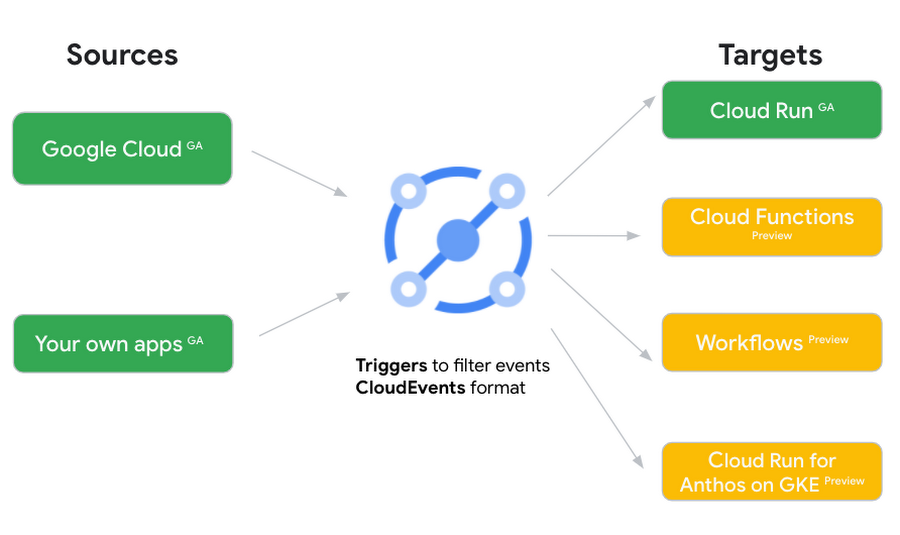
Each event source, event target, and trigger has its own location. Sometimes, these locations have to match and sometimes they can be different.
Here’s an example of a trigger connecting Cloud Storage events from a bucket in the europe-west1 region to a Cloud Run service in the us-central1 region with a trigger located in the europe-west1 region:
gcloud eventarc triggers create trigger-storage \--destination-run-service=hello \--destination-run-region=us-central1 \--location=europe-west1 \--event-filters="type=google.cloud.storage.object.v1.finalized" \--event-filters="bucket=my-bucket-in-europe-west1-region" \--service-account=$PROJECT_NUMBER-compute@developer.gserviceaccount.com
In many cases, you don’t have control over the location of the event source. In the example above, the Cloud Storage bucket is in the europe-west1 region. That’s the location that you need to work with and it has implications for the trigger location (which I’ll get to later).
The location of the event target is the region of the service where you want the events to go. You get to choose this from one of the supported regions when you deploy your Cloud Run service. You typically want this to be in the same region as your event source for latency and data locality reasons (but this is not strictly a requirement). In the example above, the event source (bucket) is in europe-west1 but the event target (Cloud Run service) is in us-central1 as specified by the --destination-run-region flag.
The location of the trigger is dictated by the event source location, but the trigger type also comes into play. It is specified by the –location flag. Let’s take a look at the trigger location for each trigger type in more detail.
Location in Pub/Sub triggers
In a Pub/Sub trigger, you connect a Pub/Sub topic to an event target. Pub/Sub topics are global and not tied to a single region. However, when you create a Pub/Sub trigger, you need to specify a region for it (because Eventarc triggers need to live in a region) with the --location flag as follows:
gcloud eventarc triggers create trigger-pubsub \--destination-run-service=hello \--destination-run-region=us-central1 \--location=us-central1 \--event-filters="type=google.cloud.pubsub.topic.v1.messagePublished" \--transport-topic=projects/your-projectid/topics/your-topic
By specifying a location, Eventarc automatically configures the geofencing feature in Pub/Sub such that events only persist in the specified location. As I noted above, you typically want to (but are not required to) choose the same region for the trigger and the Cloud Run service for lower latency and data locality. You can also use regional Pub/Sub service endpoints to publish to the topic to ensure that all of the data stays in a single region.
Location in Cloud Storage triggers
In a Cloud Storage trigger, you connect a Cloud Storage bucket to an event target. A Cloud Storage bucket can be in a single-region (e.g. europe-west1), dual-region (e.g. eur4), or multi-region (e.g. eu) location. The location of the bucket dictates the location of the trigger and they have to match. The earlier trigger example was for a bucket in the europe-west1 single-region location. Here’s another trigger connecting Cloud Storage events from a bucket in the eu multi-region location. Notice how the location flag matches the bucket region:
gcloud eventarc triggers create trigger-storage \--destination-run-service=hello \--destination-run-region=us-central1 \--location=eu \--event-filters="type=google.cloud.storage.object.v1.finalized" \--event-filters="bucket=my-bucket-in-eu-multi-region" \--service-account=$PROJECT_NUMBER-compute@developer.gserviceaccount.com
If the bucket region and the trigger region do not match, you’ll see an error:
ERROR: (gcloud.eventarc.triggers.create) INVALID_ARGUMENT: The request was invalid: Bucket "my-bucket-in-eu-multi-region" location "eu" does not match trigger location "europe-west1". Try again by creating the trigger in "eu".
Location in Cloud Audit Logs triggers
In a Cloud Audit Logs trigger, you connect any event source that emits Audit Logs to an event target. The location of the event source will dictate the trigger location. This is typically a single region but there is a special global region that’s necessary in some cases.
For example, if you want to read Cloud Storage events from a bucket in the europe-west1 region with an Audit Logs trigger, you will create the trigger with the same location. Note that this will match all buckets in the europe-west1 region as there’s no filter by bucket in Audit Logs:
gcloud eventarc triggers create trigger-auditlog \--destination-run-service=hello \--destination-run-region=us-central1 \--location=europe-west1 \--event-filters="type=google.cloud.audit.log.v1.written" \--event-filters="serviceName=storage.googleapis.com" \--event-filters="methodName=storage.objects.create" \--service-account=$PROJECT_NUMBER-compute@developer.gserviceaccount.com
On the other hand, if you want to match a dual-region or a multi-region bucket such as eu, you will create the trigger with the global location as Audit Logs triggers only support a single or global region. Note that this will match all buckets in all regions globally:
gcloud eventarc triggers create trigger-storage \--destination-run-service=hello \--destination-run-region=us-central1 \--location=global \--event-filters="type=google.cloud.storage.object.v1.finalized" \--event-filters="bucket=my-bucket-in-europe-west1-region" \--service-account=$PROJECT_NUMBER-compute@developer.gserviceaccount.com
As you can see from this example, if you want to read Cloud Storage events, the native Cloud Storage trigger is a much better option, but this example illustrates a typical case in which a global Audit Log trigger is necessary.
That wraps up this closer look at locations in Eventarc. Feel free to reach out to me on Twitter @meteatamel for any questions or feedback.
Linking the Middle East with Southern Europe and Asia: Google’s New Subsea Cables to Be Ready by 2024!
3370
Of your peers have already read this article.
1:30 Minutes
The most insightful time you'll spend today!
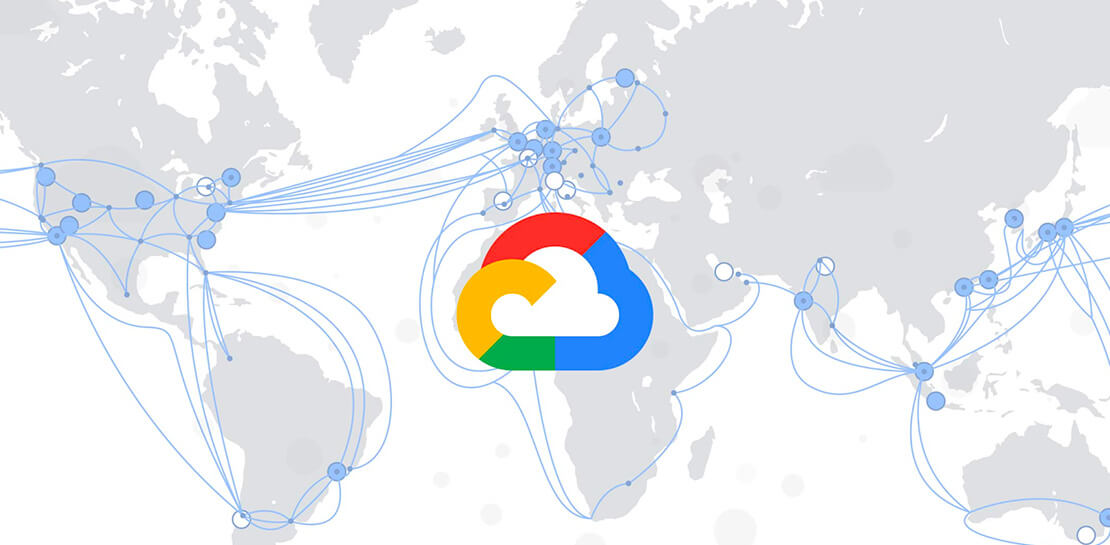
Today, we’re announcing that we are collaborating with Sparkle and others to build and operate two submarine cable systems linking the Middle East with southern Europe and Asia: the Blue Submarine Cable System connecting Italy, France, Greece, and Israel; and the Raman Submarine Cable System connecting Jordan, Saudi Arabia, Djibouti, Oman and India.
Developing additional network capacity and routes is critical to Google users and customers around the globe, who depend on robust connectivity to power their online lives, and communicate with friends, family and business partners. Google users and Google Cloud customers will benefit from increased capacity and decreased latency to regions in the area.
Each equipped with 16 fiber optic pairs, the Blue and Raman Submarine Cable Systems are expected to be ready for service in 2024. In time, consortium members hope to make additional landings and connect the two systems through terrestrial network assets.
Like with other infrastructure projects, building a subsea cable is an opportunity to pay tribute to a regional luminary who has advanced human understanding. The Raman cable is named for Sir Chandrasekhara Venkata Raman, an Indian physicist who won the 1930 Nobel Prize in Physics—the first Asian to receive that honor in science. C.V. Raman’s work centered on light scattering, which finds that when light traverses a transparent material, some of the deflected light changes wavelength and amplitude. This so-called Raman effect is a foundational principle in the field of optics that enables any underwater network cable. A trip across the Mediterranean also prompted him to ask why the sea is blue, when water itself is clear? Thanks to C.V. Raman, we now know that the sea isn’t simply reflecting the sky, but because the water itself causes blue light to scatter.
With Blue and Raman, we now have 18 investments in subsea cables around the world, including Google-funded cables like Curie, Dunant, Equiano, Firmina and Grace Hopper, and consortium cables like Echo, JGA, INDIGO and Havfrue. You can learn more about Google Cloud’s network and infrastructure here.
RAMPing Up Cloud Migration Process
3195
Of your peers have already read this article.
1:30 Minutes
The most insightful time you'll spend today!
As enterprises accelerate their migration to the cloud, they experience more notable mid- and late-phase migration challenges. Specifically, 41% face challenges when optimizing apps in the cloud post-migration, and 38% struggle with performance issues on workloads migrated to the cloud. Further, organizations have also increased reliance on outside consultants and other service providers for early-stage cloud migration tasks to ongoing management post-implementation.1
To help customers through these challenges with a simple, quick path to a successful cloud migration, Google Cloud created our comprehensive Rapid Assessment & Migration Program (RAMP). And we’ve got some exciting developments to share with our customers and partners:
Expanded focus on post-migration TCO/ROI
Given the complex nature of cloud migrations, we are committed to meeting our customers where they’re at in their cloud journeys and partnering with them to achieve their business goals — be it building customer value through innovation, driving cost efficiencies, or increasing competitive differentiation and productivity. RAMP is a holistic framework based on tangible customer TCO and ROI analyses, that supports our customers’ journeys all the way through: from assessing their digital landscapes across multiple sources including on-prem and other clouds, and identifying prioritized target workloads to building a comprehensive migration and modernization plan.
Accelerate positive outcomes with expert partners
Customers can also now expect a more streamlined migration experience through our ecosystem of partners who have completed their cloud migration specialization. Last week, we announced industry-leading updates to our partner funding programs with new assessment and consumption packages that simplify and accelerate our customers’ journey to Google Cloud, at little-to-no cost. These packages offer prescriptive pathways for infrastructure and application modernization initiatives, empowering our partners to support our customers at every stage — from discovery and planning to migration and modernization.
Through our partner ecosystem, our customers can expect:
- Distinct funding packages for assessment, planning, and migration
- Faster approval processes for accelerated deployments
- More partners eligible to participate in RAMP and access these new funding packages
Sustainability through migration
Another major focus area for RAMP is helping enterprises optimize their migration planning and maximize their ROI by including their business and technical considerations early in the process and including any sustainability goals they may have. To aid with their sustainability efforts, we are excited to share that customers can now receive a Digital Sustainability Report along with their IT assessments – enabling sustainability to be built into their migration strategies. The report provides actionable insights to measure and reduce their environmental impact, and is based on some of Google Cloud’s own best practices, having been carbon-neutral for decades and looking to run on carbon-free energy by 2030.
We are committed to solving complex problems for our customers and partners, and these updates are a reflection of the feedback we receive. Simplify your cloud migration strategy today by requesting your free assessment, finding a partner to work with, or talking to your existing partner to get started.
1. Forrester Consulting, State Of Public Cloud Migration; A study commissioned by Google, 2022
What Our Google Cloud Experts Say About Multi-cloud Journey

3441
Of your peers have already read this article.
1:30 Minutes
The most insightful time you'll spend today!
Do you want to fire up a bunch of techies? Talk about multicloud! There is no shortage of opinions. I figured we should tackle this hot topic head-on, so I recently talked to four smart folks—Corey Quinn of Duckbill Group, Armon Dadgar of Hashicorp, Tammy Bryant Butow of Gremlin, and James Watters of VMware—about what multicloud is all about, key considerations, and why you should (or shouldn’t!) do it.
Five important insights came out of these discussions. If you’re on a multicloud journey or considering one, keep reading.
Do: Choose to do multicloud for the right reasons
Don’t do multicloud because Gartner says so, implores Corey Quinn. Before embarking on a multicloud, define a “why” focused on business value journey, says Armon Dadger. For example, you might want to use services from each public cloud because of their differentiated services, according to Tammy Bryant Butow. Armon also calls out regulatory reasons, existing business relationships, and accommodating mergers and acquisitions. On the topic of M&A, Corey points out that if you acquire a company that uses another cloud, it’s usually expensive and difficult to consolidate. It can be smarter to stay put.
Don’t: Over-engineer for workload or data portability
Thinking that you’ll build a system that moves seamlessly among the various cloud providers? Hold up, says our group of experts. Armon points out that aspects of your toolchain or architecture may be multicloud—think of some of your workflows or global network routing—but that shifting workloads or data is far from simple. Corey says that trying to engineer for “write once, run anywhere” can slow you down, and ignores the inherent uniqueness that’s part of each platform. Specifically, Corey calls out the per-cloud stickiness of identity management, security features, and even network functionality. And data gravity is still a thing, says James, that causes some to dismiss multicloud outright.
If you’re using multiple public clouds, you take advantage of the distinct value each offers, Armon says. Use native cloud services where possible so that you see the benefits from useful innovations, built-in resilience, and baked-in best practices. The value from that cloud-infused workload may outweigh the benefits of seamless portability.
Do: Recognize different stakeholder interests and needs
James smartly points out that many multicloud debates happen because people are arguing from different perspectives. Context matters. If you’re an infrastructure engineer who invests heavily in a given cloud’s identity and access management model, multicloud looks tricky. Or if you’re a data engineer with petabytes of data homed in a particular cloud, multicloud may look unrealistic. James highlights that many developers default to multicloud because their local tools—where all the work happens—are multicloud. A developer’s IDE and preferred code framework(s) aren’t tied to any given cloud. Be aware that groups within your organization will come at multicloud from distinct directions. And this may impact your approach!
Don’t: Go it alone
Corey talks about the importance of asking others what worked, and what didn’t. Tammy offers her best practices around sharing results from experiments. It’s about sharing knowledge and tapping into it for community benefit. Others have probably tried what you’re trying, and can help you avoid common pitfalls. If you’ve just made an architectural choice that didn’t work out, share it, and help others avoid the pain.
Read research from analysts, go to conferences or watch videos to observe case studies, and join online communities that offer a safe place to share mistakes and learn from others.
Do: Experiment first using techniques like multi-region deployments
If you think you can operate systems across clouds, how about you first try doing it across regions in a specific cloud, suggests Corey. Getting a system to properly work across cloud regions isn’t trivial, he says, and that experience can help you uncover where you have architectural or operational constraints that will be even worse across cloud providers.
This is great guidance if your multicloud aspirations involve using multiple clouds to power one application—versus the more standard definition of multicloud where you use different clouds for different applications—but can also surface issues in your support process or toolchain that fail when faced with distributed systems. Start with muti-region deployments and chaos engineering experiments before aggressively jumping into multicloud architectures.
The Google Cloud take
Do the things above. It’s great advice. I’ll add three more things that we’ve learned from our customers.
- Don’t fear multicloud. You’re already doing it. You don’t single-source everything. As Corey mentioned, you probably already have one cloud for productivity tools, another for source code, another for cloud infrastructure. You’ll use software and application services from a mix of providers for a single app. You have that experience in your team and have been doing that for decades. What people do rightly worry about is using more than one infrastructure service beneath an application, as that can introduce latency, security, and logistical hurdles. Make sure you know which model your team is considering.
- Embrace the right foundational components, including Kubernetes. Will everything run on Kubernetes? Of course not. Don’t try to do that. But it also represents the closest thing we have to a multicloud API. Companies are using Kubernetes to stripe a consistent experience across clouds. And this isn’t just to orchestrate containers, but also to manage infrastructure and cloud-native services. Also, consider where you need other fundamental consistency across clouds, including areas like provisioning and identity federation.
- Use Google Cloud as your anchor. Here’s a fundamental question you have to decide for yourself: Are you going to bring your on-premises technology and practices to the cloud, or bring cloud technology and practices on-prem? We sincerely believe in the latter. Anchor to where you’re trying to get to. We offer Anthos as a way to build and run distributed Kubernetes fleets in Google Cloud and across clouds. By using a cloud-based backplane instead of an on-prem one, you’re offloading toil, leveraging managed services for scale and security, and introducing modern practices to the rest of your team.
We learned a lot about multicloud through these discussions, and it seems like others did too. That’s why we’re going to do a second round of interviews with a new crop of experts so that we can keep digging deeper into this topic. Stay tuned!
Google Cloud Announces Improvements in Private Catalog to Drive Terraform Deployments

3368
Of your peers have already read this article.
3:00 Minutes
The most insightful time you'll spend today!
As an enterprise admin, when you choose to use Google Cloud Private Catalog to enable curated, self-serve Google Cloud infrastructure provisioning, you need the ability to manage your organization’s deployments. Today, we’re pleased to announce support for several improvements to Terraform driven deployments through Private Catalog.
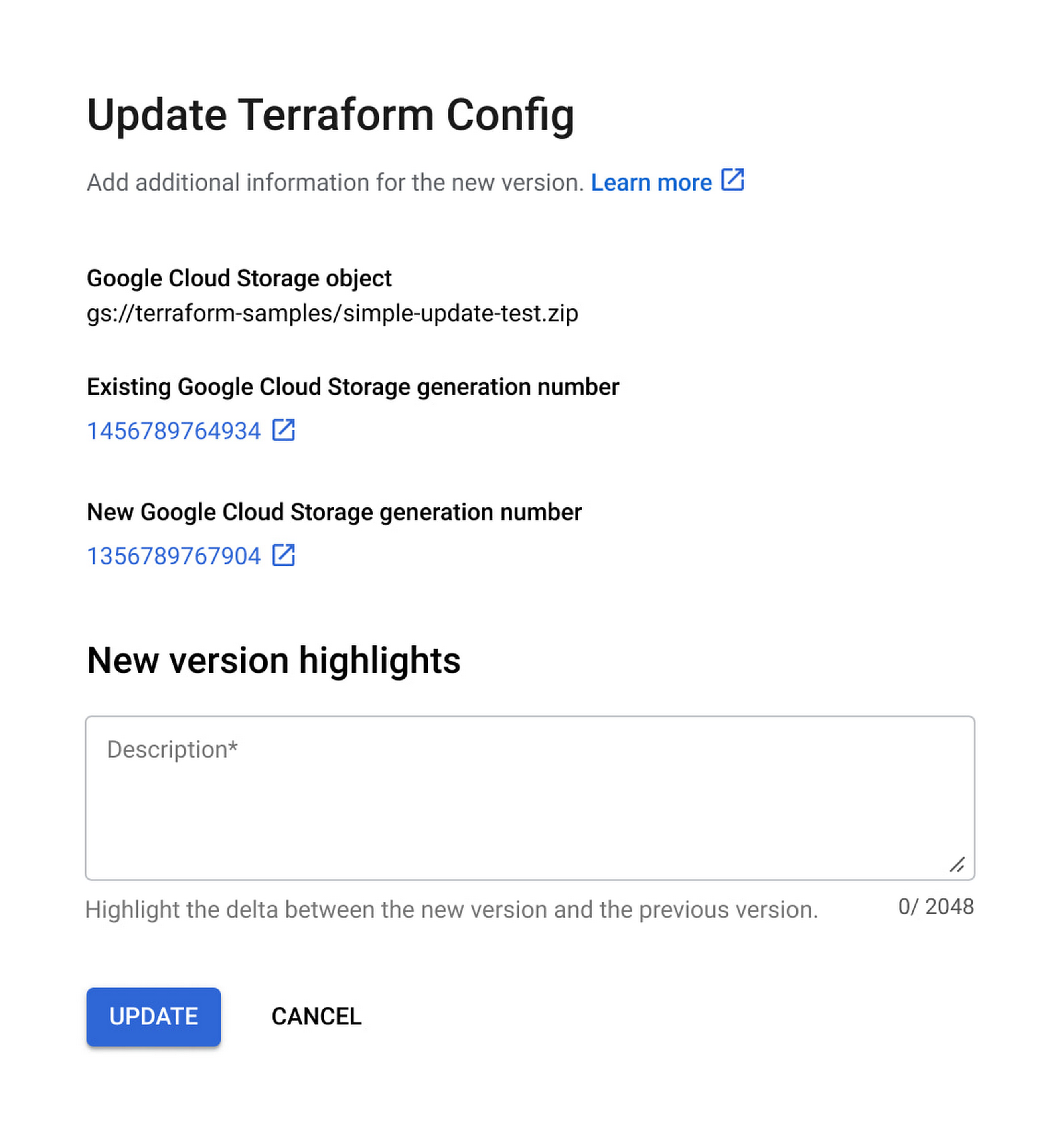
With this new release, you can update Terraform configurations and keep your end users informed about updates. At the same time, Private Catalog users have the ability to view new updates, note version highlights and then update the deployment. This gives you greater control over managing deployments for solutions provisioned through Private Catalog and ensuring compliance with organizational policies and standards.
Let’s take a closer look at the features you’ll find in this release.
Deployment change management
Terraform solutions use Cloud Storage’s Object Versioning to manage updates to configuration files. With this release, you may update configuration files using multiple approaches.
- Update the solution’s Cloud Storage object with a new configuration version
- Use a different Cloud Storage object that contains a new configuration file
Once you view and apply the changes to the solution in a Private Catalog, end users are immediately able to consume the new version of the deployment configuration.

Additionally, prior to applying any changes, you can evaluate the contents of an update by comparing versions to download and compare the current and latest versions of the configuration and use new version highlights to add a description about the updates.

Ease of consumption
Once Private Catalog detects a change to the deployment configuration, it automatically informs catalog users about the change. On the Solutions page, end users have the ability to:
- Get informed about solutions that have updates
- View version highlights published by the admin
- Apply the new version
Additionally, with this release, Catalog users can retry existing deployments by modifying deployment parameters.
Reporting improvements
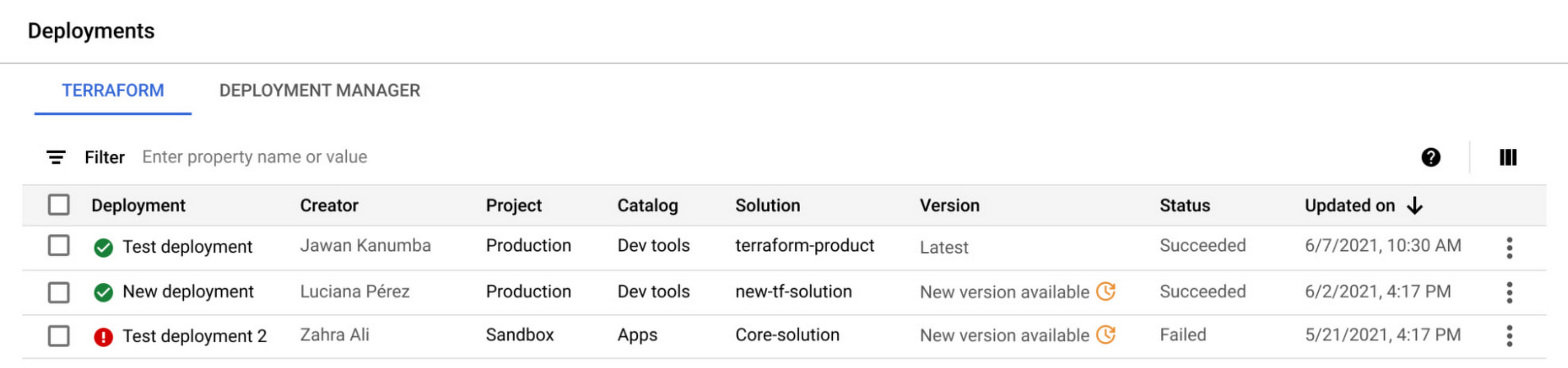
The deployment reporting dashboards for Private Catalog-based deployments now show additional information about the version of a solution deployed. This enables deeper insights into the overall deployment status across all Private Catalog solution assets.

Get started today
These new features are available to all Private Catalog customers. To learn how to use these features, refer to our documentation:
- Create a Terraform configuration in Private Catalog
- Manage and update your Terraform configurations in Private Catalog
More Relevant Stories for Your Company

A Record Breaking Calculation: 100 Trillion Digits of π on Google Cloud!
Records are made to be broken. In 2019, we calculated 31.4 trillion digits of π — a world record at the time. Then, in 2021, scientists at the University of Applied Sciences of the Grisons calculated another 31.4 trillion digits of the constant, bringing the total up to 62.8 trillion

The Future of Cloud Computing: Choose Your Own Services and Payment Options
As the saying goes, “it’s hard to make predictions, especially about the future.” Some organizations find it challenging to predict what cloud resources they’ll need in months or years ahead. Every organization is on its own unique cloud journey. To help, we’re developing new ways for customers to consume and

TVG Network Turns to Google Cloud and Saves $0.5 Million a Year
Google Cloud Results Maximizes revenue by allowing customers to place bets faster and more confidentlyScales for major racing events with 80% less IT involvement and up to $500,000 annual savingsImproves time to market for new product releases by more than 30xHelps enable richer mobile experiences to keep fans engagedProcesses up

A CIO’s Guide to Application Modernization
Even before the current crisis, IT organizations saw pressure to be more agile and innovative. Customer demographics and expectations are changing. Competition is emerging faster and from unexpected sources. Business models are being reinvented. Digital technology was at the heart of many of these challenges, and its adoption was key
