





All About Cloud Run, its Scalability and Management Features

7393
Of your peers have already read this article.
3:00 Minutes
The most insightful time you'll spend today!
Mindful Containers is a fictitious company that is creating containerized microservice applications. They need a fully managed compute environment for deploying and scaling serverless containerized microservices. So, they are considering Cloud Run.
They are excited about Cloud Run because it abstracts away the cluster configuration, monitoring, and management so they can focus on building the features for their apps. Cloud Run is a fully-managed compute environment for deploying and scaling serverless containerized microservices.

What is Cloud Run?
Cloud Run is a fully-managed compute environment for deploying and scaling serverless HTTP containers without worrying about provisioning machines, configuring clusters, or autoscaling.
- No vendor lock-in – Because Cloud Run takes standard OCI containers and implements the standard Knative Serving API, you can easily port over your applications to on-premises or any other cloud environment.
- Fast autoscaling – Microservices deployed in Cloud Run scale automatically based on the number of incoming requests, without you having to configure or manage a full-fledged Kubernetes cluster. Cloud Run scales to zero— that is, uses no resources—if there are no requests.
- Split traffic – Cloud Run enables you to split traffic between multiple revisions, so you can perform gradual rollouts such as canary deployments or blue/green deployments.
- Custom domains – You can set up custom domain mapping in Cloud Run and it will provision a TLS certificate for your domain.
- Automatic redundancy – Cloud Run offers automatic redundancy so you don’t have to worry about creating multiple instances for high availability
How to use Cloud Run
With Cloud Run, you write your code in your favorite language and/or use a binary library of your choice. Then push it to Cloud Build to create a container build. With a single command—“gcloud run deploy”—you go from a container image to a fully managed web application that runs on a domain with a TLS certificate and auto-scales with requests.
How does Cloud Run work?
Cloud Run service can be invoked in the following ways:
HTTPS: You can send HTTPS requests to trigger a Cloud Run-hosted service. Note that all Cloud Run services have a stable HTTPS URL. Some use cases include:
- Custom RESTful web API
- Private microservice
- HTTP middleware or reverse proxy for your web applications
- Prepackaged web application
gRPC: You can use gRPC to connect Cloud Run services with other services—for example, to provide simple, high-performance communication between internal microservices. gRPC is a good option when you:
- Want to communicate between internal microservices
- Support high data loads (gRPC uses protocol buffers, which are up to seven times faster than REST calls)
- Need only a simple service definition you don’t want to write a full client library
- Use streaming gRPCs in your gRPC server to build more responsive applications and APIs
WebSockets: WebSockets applications are supported on Cloud Run with no additional configuration required. Potential use cases include any application that requires a streaming service, such as a chat application.
Trigger from Pub/Sub: You can use Pub/Sub to push messages to the endpoint of your Cloud Run service, where the messages are subsequently delivered to containers as HTTP requests. Possible use cases include:
- Transforming data after receiving an event upon a file upload to a Cloud Storage bucket
- Processing your Google Cloud operations suite logs with Cloud Run by exporting them to Pub/Sub
- Publishing and processing your own custom events from your Cloud Run services
Running services on a schedule: You can use Cloud Scheduler to securely trigger a Cloud Run service on a schedule. This is similar to using cron jobs. Possible use cases include:
- Performing backups on a regular basis
- Performing recurrent administration tasks, such as regenerating a sitemap or deleting old data, content, configurations, synchronizations, or revisions
- Generating bills or other documents
Executing asynchronous tasks: You can use Cloud Tasks to securely enqueue a task to be asynchronously processed by a Cloud Run service. Typical use cases include:
- Handling requests through unexpected production incidents
- Smoothing traffic spikes by delaying work that is not user-facing
- Reducing user response time by delegating slow background operations, such as database updates or batch processing, to be handled by another service,
- Limiting the call rate to backend services like databases and third-party APIs
Events from Eventrac: You can trigger Cloud Run with events from more than 60 Google Cloud sources. For example:
- Use a Cloud Storage event (via Cloud Audit Logs) to trigger a data processing pipeline
- Use a BigQuery event (via Cloud Audit Logs) to initiate downstream processing in Cloud Run each time a job is completed
How is Cloud Run different from Cloud Functions?
Cloud Run and Cloud Functions are both fully managed services that run on Google Cloud’s serverless infrastructure, auto-scale, and handle HTTP requests or events. They do, however, have some important differences:
- Cloud Functions lets you deploy snippets of code (functions) written in a limited set of programming languages, while Cloud Run lets you deploy container images using the programming language of your choice.
- Cloud Run also supports the use of any tool or system library from your application; Cloud Functions does not let you use custom executables.
- Cloud Run offers a longer request timeout duration of up to 60 minutes, while with Cloud Functions the requests timeout can be set as high as 9 mins.
- Cloud Functions only sends one request at a time to each function instance, while by default Cloud Run is configured to send multiple concurrent requests on each container instance. This is helpful to improve latency and reduce costs if you’re expecting large volumes.
Pricing
Cloud Run comes with a generous free tier and is pay per use, which means you only pay while a request is being handled on your container instance. If it is idle with no traffic, then you don’t pay anything.
Conclusion
After learning about the ease of set up, scalability, and management capabilities of Cloud Run the Mindful Containers team is using it to deploy stateless microservices. If you are interested in learning more, check out the documentation.https://www.youtube.com/embed/oR4btKLRdn4?enablejsapi=1&
For more #GCPSketchnote, follow the GitHub repo. For similar cloud content follow me on Twitter @pvergadia and keep an eye out on thecloudgirl.dev
Delivering 10X Improvement to Risk and Regulatory Reporting Through Cloud and AI
4992
Of your peers have already read this article.
2:30 Minutes
The most insightful time you'll spend today!
Enterprise agility and the ability to innovate, adapt and respond quickly to the ever-changing risk and regulatory landscape is no longer a choice, but the cornerstone of successful digital transformation and commercial growth. Traditional access to and ways of managing data invariably create challenges in dealing with multiple data repositories, reconciliations, fire-drills, etc.
In response, the move to cloud is increasing significantly. It enables risk analytics and regulatory reporting at scale in a secure environment with data storage, management and encryption capabilities as a standard. In addition, as regulatory reporting requirements become more granular, machine learning can help facilitate new insights and allow for risk management to become more embedded into operational processes.
This webinar will address the day-to-day challenges in risk management and regulatory compliance, while also exploring how technological innovations can provide massive improvements and potential.
Key themes
- Real-life data challenges in the eyes of risk managers: can compliance, fraud detection and identifying liquidity positions be improved through the use of AI?
- Innovative approaches to streamline regulatory reporting to derive deeper customer insights from data at the moment of truth.
- Reimagining operations: how to modernise the data infrastructure to accommodate data explosion, drive flexibility and deliver a more cost effective outcome.
Google’s Research and Data Insights Solutions to Power Drug Development and Clinical Research

3710
Of your peers have already read this article.
1:30 Minutes
The most insightful time you'll spend today!
In order to be successful, research needs to be replicable, so scientists can build on past work and insights. However, an article in Nature warned that as much as 50% of published drug development research could not be reproduced in subsequent trials. As a result, promising drug candidates sometimes led to disappointment, as well as wasted time and money, when key findings could not be replicated.
The shift to cloud computing helps solve this problem because it allows researchers to use open-source tools that work across platforms. As demand for cloud computing rises, our customers have asked us for more ready-made solutions to assure reproducibility of results by their collaborators, regardless of the platform they are using. They asked for secure and effective collaboration tools as well as faster time-to-insight from any type of data.
We listened. Google’s new research and data insights solution includes three sets of functionalities to address these key challenges. Each can be activated on demand and may be eligible for subscription pricing. “HPC in a box” offers abstract complexity to run high performance computing (HPC) workloads by automatically managing your cluster in the most effective manner. It integrates seamlessly with some of the industry’s most-used schedulers like Slurm and PBS. It makes it easier than ever to answer bigger questions faster by accessing Google’s fast, powerful hardware like TPUs and GPUs, all for one predictable flat fee for eligible workloads. Healthcare Innovation Hub provides healthcare-specific functionality to help ingest, aggregate, and de-identify any type of healthcare data in its original format. It unlocks cross-modality analysis and collaboration and empowers researchers with harmonization tools to overcome healthcare interoperability issues. Google Cloud Real-World Insights (formerly FDA MyStudies) accelerates and streamlines drug development and clinical trials to address urgent medical challenges with reproducible results.
The solution enables researchers to ask new questions, get answers more quickly, and work more collaboratively–with no wait times or down times. Institutions can scale to more ambitious projects and generate actionable, real-time insights from any data source–all while staying within budget.
Many top research centers have already found it faster and more cost effective to shift from downloading and storing data on their own servers to storing and analyzing data on Google Cloud. Here are some of the real-world projects already yielding breakthroughs:
- Clemson analyzed 8,500 hours of traffic camera feeds with 2.1M vCPUs in three hours to improve evacuation routes for disaster planning.
- The Colorado Center for Personalized Medicine saved $2.9M by building their Compass data warehouse on Google Cloud rather than on on-prem.
- The Broad Institute slashed costs of genomic sequencing by 90% with Google Cloud.
Our partners, such as Atos, Burwood, Omnibond, Mavenwave, Quantiphi, and Deloitte, can help you first design and develop, then install and implement your own solution, including training. To assess your institution’s needs and develop a customized plan for your next-generation research solution with research and insights, contact our sales team.
3578
Of your peers have already downloaded this article
3:30 Minutes
The most insightful time you'll spend today!
Defending the world’s largest network against persistent and constantly evolving cyber threats has driven Google to architect, automate, and develop advanced tools to help keep it ahead. Understanding how Google has built and evolved it’s defenses can help you make smart architectural decisions of your own as you move forward.
- At Google every minute:
- 10 million spam messages are prevented from reaching Gmail customers.
- 694,000 indexed Web pages are scanned for harmful software.
- 7,000 deceitful URLs, executables, and browser extensions that may carry viruses, unwanted content, or phishing attempts are spotted and stopped.
- 6000 instances of unwanted software and nearly 1,000 instances of suspected malware are reported to Chrome users.
- 2 phishing sites and 1 malware site are found and labeled.
Download this e-book to know more about Google’s security at scale.
Dual Run: A Proven Solution for Secure Mainframe Modernization

957
Of your peers have already read this article.
4:30 Minutes
The most insightful time you'll spend today!
CIOs are again evaluating their mainframe investments, balancing rising operational costs and difficulty finding talent with the perceived costs and risks of moving critical applications to the cloud. Increased business agility, technical innovation, computing elasticity, customer insights, and a growing talent pool all encourage CIOs to migrate and modernize from “Big Iron” onto public cloud platforms.
Google Cloud recently announced Dual Run, a new mainframe modernization solution, to help customers mitigate the risk involved in mainframe migrations and accelerate their migration to the cloud. Leaders can leverage Dual Run in their quest to ensure their mainframe modernization projects will succeed and pay off so let’s dive a little deeper into what Dual Run is, how it works, and how it can help you.
Mainframe modernization with a proven technology
Since so many businesses still run mainframes, we decided to partner with Banco Santander—one of the largest banks in the world—to bring Dual Run to our enterprise customers, since they had already built a solution. In fact, Dual Run was built on top of Banco Santander’s unique technology which has already demonstrated proven results in the regulated financial services industry. Now that Dual Run is available, Banco Santander has been using it to bring their data and workloads onto Google Cloud’s trusted infrastructure.
The concept is not new, but the solution is unique
Dual Run enables you to run a parallel production system, allowing you to simultaneously run workloads on your mainframes and on Google Cloud. While many enterprises running mainframes have thought about parallel production concept and a few even tried before, Google Cloud is unique among the hyperscalers to provide such a solution as an offering to its customers.
With a parallel production run, you can perform real-time testing of your applications on Google Cloud and quickly gather data on performance and stability with no disruption to your business. Once you’re satisfied with the functional and performance equivalence of the two systems, you can make the new Google Cloud environment your system of record, while existing mainframe systems can be used as a backup or decommissioned.
In addition to the transformative benefits you get from moving to Google Cloud–such as AI-based scalability, speed, and security–migrating mainframes with Dual Run offers you even more benefits:
Mitigate migration risk: Dual Run reduces risk during the migration by running your business critical systems in parallel with powerful reporting to track the difference between your current and target systems. This ensures there is no impact or risk to your existing mainframes while migrating to Google Cloud.
Secure migration investments: Avoid costly migration mistakes by basing your decisions and actions on empirical data acquired from your production system.
Reduce business testing effort: Compare the functional equivalence of outcomes in the current and target system with production data and drastically reduce the testing cycles of your migrated workload.
Accelerate migration: Speed up the entire mainframe migration process with a well-defined framework, automation components, predefined dashboards, and a tested approach. Empirical reporting available in Dual Run also enables customers in regulated industries to more readily respond to regulator reviews and requests for information.
Your migration journey with Dual Run
Dual Run is packaged with several automation components to aid your migration journey, from assessment all the way through to production.
This chart shows how Dual Run plays a key role throughout your mainframe modernization journey:
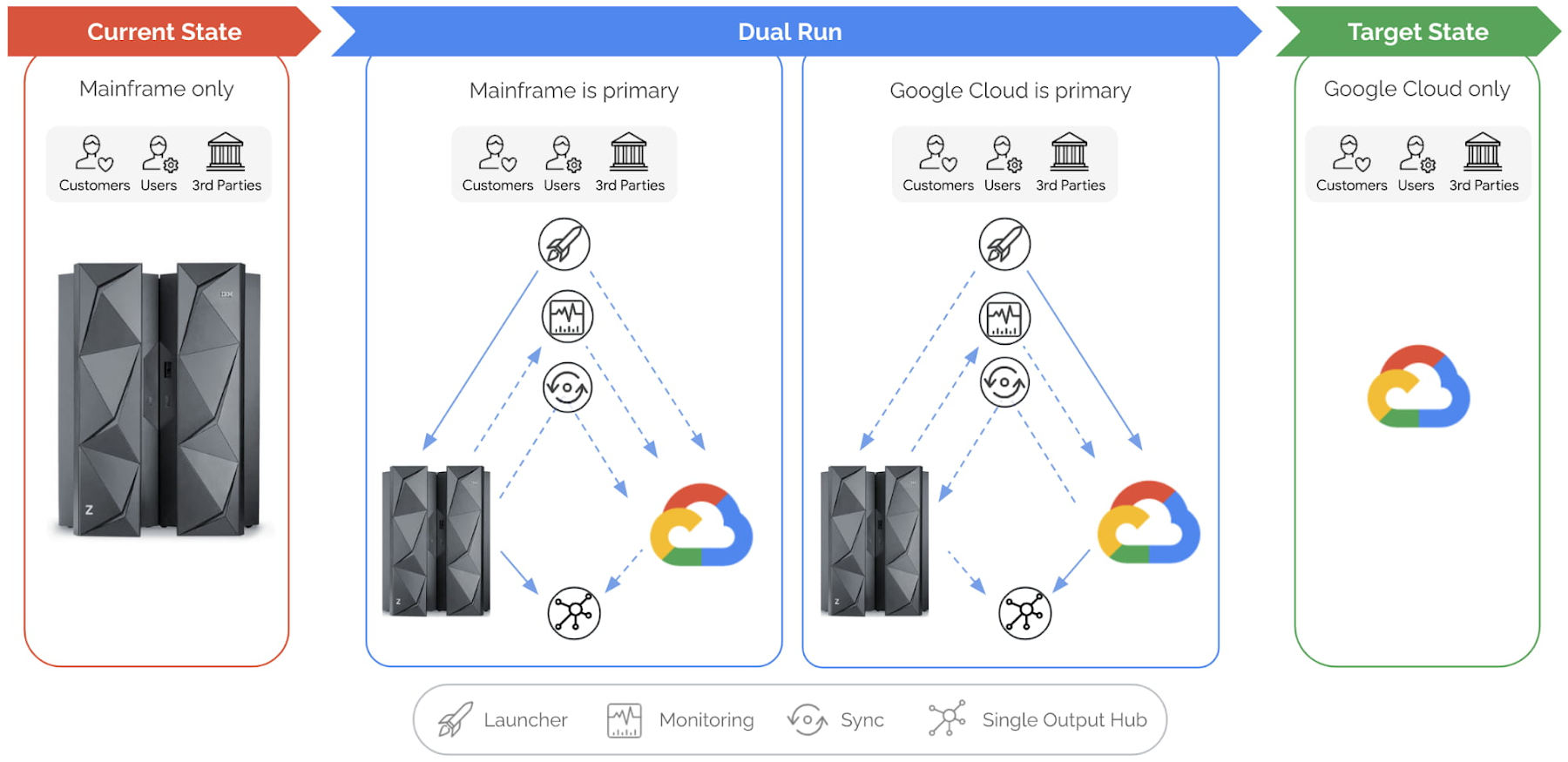
Let’s explore this illustration in a bit more detail, phase by phase:
Current state: This is your starting point, when your production workloads are still running in your mainframe. Dual Run helps you assess your mainframe workload for compatibility on Google Cloud.
After this assessment, Dual Run’s conversion engine helps address the incompatibilities in your current application and then migrates the application and data to Google Cloud. At this stage, you have your current application executing on the mainframe and your migrated application is ready to be executed or tested on Google Cloud.
Dual Run state: In this state, the migrated workload will be executed in two stages.
Dual Run stage 1:
In the first stage of Dual Run, your mainframe will remain as the “primary” system — meaning the response and outputs to other systems are sent from your mainframe — while the migrated workload will be executed in parallel in Google Cloud as “secondary.”
Dual Run performs the following actions as a cyclical process, repeated until you reach your desired migrated application quality is achieved:
- All workloads — batch & transactions — executed in the mainframe are replicated in Google Cloud
- The outcomes from both systems are validated to report any differences, enabling you to take corrective actions in migrated applications
- The functional and performance differences between the two systems will be observed, and the mainframe and Google Cloud data are periodically synchronized to bring both the systems in sync
Typically, most of your migration time will be spent in the first stage of Dual Run until you are satisfied with the results. The key goal for this stage is that your primary, business-critical mainframe workload is not disturbed while your migrated application is tuned to provide the exact same results as your current application.
Dual Run stage 2:
When the Dual Run reporting and results confirm that the migrated application matches your mainframe system, Google Cloud then becomes the “primary” system, while your mainframe will still be executed in parallel as “secondary.” Dual Run will enable you to do a smooth switch between primary and secondary systems through a configuration management system.
Target state: In this final state, the mainframe can be decommissioned while the Dual Run components are removed, enabling an optimal and efficient business execution with Google Cloud.
Summary
For any business or organization that has to migrate or modernize their mainframes, Dual Run offers a unique solution to achieve this with reduced risk and time. In fact, what we’re seeing from our customers is that Dual Run offers the right combination of proven experience, engineering, and strategic partnership that is essential for mainframe migration success. If you would like to learn more, check out our mainframe modernization website.

3152
Of your peers have already downloaded this article
10:00 Minutes
The most insightful time you'll spend today!
FinOps is a concept similar to DevOps, but with a different set of goals. Cloud FinOps is an operational framework and cultural shift that brings together technology, finance and business to drive financial accountability and accelerate business value realization. In layman terms, FinOps aims to help companies achieve most out of every dollar invested on cloud technology. It includes a broad set of existing and net-new processes or frameworks that breaks silos across functions, and build a better working model to achieve collaboration, agility, ownership and value.
Rest your anxieties about the changes in mindset and organizational behavior around current financial management practices while taking full flexibility benefits of cloud. Ease your cloud migration journey and value realization as experts at Google Cloud have shared best-practices, insights and action items to implement FinOps on Google Cloud in this whitepaper. Download now!
More Relevant Stories for Your Company

S4 Agtech Transforms Agriculture with Google Cloud
Like countless other industries, farming is going digital and undergoing big changes—driven by access to more actionable information. The agriculture business can now gather and analyze georeferenced data from satellites, combined with data from IoT sensors in fields, crop rotation and yield histories, weather patterns, seed genotypes and soil composition to help

Tencent Africa Cuts Cost and Improves Stability with Google Cloud
As one of Africa’s leading technology companies, Tencent Africa is responsible for WeChat operations on the continent. WeChat Africa has successfully launched a number of features including the WeChat Wallet, a mobile payment service for smartphones, which enables seamless and secure transactions for friends to send money to one another,

Rightmove’s Right Move to Google Cloud
In 2020, Rightmove, UK's renowned property website app saw over a billion minutes from users and clocked about 100 busy days in 2021. To continue innovating their products and improve customer experiences while achieving sustainability goals, Rightmove chose Google Cloud to migrate their infrastructure! The property search application platform already

Google Cloud’s Metric Scope Makes Multi-project Monitoring Simple
Customers need scale and flexibility from their cloud and this extends into supporting services such as monitoring and logging. Google Cloud’s Monitoring and Logging observability services are built on the same platforms used by all of Google that handle over 16 million metrics queries per second, 2.5 exabytes of logs per month, and over
