





Arab Bank Accelerates its App Development and Testing Using Apigee and Anthos

6170
Of your peers have already read this article.
3:30 Minutes
The most insightful time you'll spend today!
Founded in 1930 and headquartered in Jordan, Arab Bank is one of the oldest banks in the Middle East. Operating out of 28 countries, we’ve earned our customers’ trust with a prudent approach to operations and respect for the cultures and customs in the region.
With a few exceptions where cloud providers have hosted their datacenter in a Middle Eastern or North African country, the banking sector, in general, in the region has been slow to adopt cloud technology for a number of reasons, including concern about data security, maturity and security controls of cloud services (PaaS and SaaS), and regulations in place. But on the other hand, we saw the opportunity to accelerate our development and testing using the cloud, as well as to partner with the fintech community and digital service providers to integrate their solution in the banking ecosystem. We needed more flexibility to connect with the outside world, and a more open architecture to help us drive our internal innovation at a faster rate with the help of the fintech industry. By collaborating with Google Cloud, we reached those goals and accelerated app development and testing through products like Apigee and Anthos. We’re now offering innovative apps and services to our customers and employees that leverage new technological capabilities to give more agility and flexibility, and to optimize our workloads.
Embracing the cloud in a regulated industry
To get started with the cloud, we needed to create internal awareness about cloud technology, the API layer, containers and their benefits amongst our leaders and staff. Google helped us educate and get buy-in from key functions by organizing open technology demonstration sessions and discussion panels. When considering potential cloud providers we had four decision criteria: maturity of security controls, ease of use, cost, and scalability / agility for new deployments and continuous innovation. This last factor was critical, and we were impressed by Google Cloud’s innovation roadmap, both via direct conversations and at Google’s Next conference, where we met a lot of people passionate about technology, innovation and building something new.
Going back to our journey, given the above-mentioned regional limitations, we started to develop a hybrid cloud approach. This helped us continue to operate on-premises for a number of services in production, particularly those that have personally identifiable information (PII) or other sensitive data attached, and to leverage the cloud for development, testing and production workloads that don’t contain customer data.
In the short term, we didn’t anticipate that our many jurisdictions would allow data to be transported to other countries. But cloud tools will allow us to tokenize or anonymize customer data while maintaining customer data on-premises. This applies to many digital journeys such as customer onboarding, credit facility online applications, or marketplace navigation. In the coming years, we predict our API integration with partners will accelerate and enrich the overall digital value proposition of our business segments, namely consumer banking, small and medium-size businesses and large corporate and institutional clients.
Building connections and cornerstones in the cloud
The first move in our digital transformation was to implement Apigee, Google Cloud’s API management platform, to connect to the world’s digital banking ecosystem. Apigee provides the security, sharing, mediation policies, and developer portal capabilities for us to successfully meet Open Banking standards while focusing on innovation.
On the back of the Apigee implementation, we created an accelerator program to incubate Fintech ideas that can, in turn, integrate into our digital platforms and be offered to our customers. We also developed various banking APIs, all designed and documented in accordance with PSD2 and Open Banking regulations, and made them available to our partners. These APIs exposed on our API development portal offer the needed code structure for fintech companies to design creative solutions around them.
Next, we adopted Anthos, Google Cloud’s managed application platform. Anthos has become a cornerstone of our operations because it works across hybrid cloud, offering integration of microservice containers and fueling collaborative opportunities with external parties. Our current Anthos infrastructure includes several hundreds of microservices now running on containers in Google Kubernetes Engine (GKE) and on-premises. We now use the cloud for collaboration, development and testing, but not for production, which is done on-premises.
Along the way, Google Cloud’s Professional Services Organization (PSO) helped us through the entire cloud setup process, and with the adoption of Anthos. We originally built on the cloud tools through an iterative process, learning from our successes and errors along the way. Now that we have a better sense of how Anthos operates, we’re building a fresh infrastructure atop a sound, stable, and resilient foundation that will let us scale easily as we work to transform Arab Bank into a digital-first enterprise, that is our ambition.
Currently products running on Anthos include customer acquisition and onboarding via mobile apps, and our Arabi-Pay app, which allows customers to instantly pay each other via WhatsApp or other messaging platforms. Leveraging Anthos, our instant loan service for Arab Bank salaried employees can grant and disburse loans up to $7,000 in less than seven minutes.
In addition, we’ve built a number of digital journeys for our Small and Medium Enterprise (SME) customers, such as our SME client digital onboarding process and paperless SME lending platform.
While some may think that digital adoption in this part of the world can be slow, as customer contact remains anchored in our customs, the recent COVID-19 pandemic has accelerated the adoption of digital banking services and electronic payments, inspiring more confidence to buy and pay online. Thanks to our rich and user-friendly banking app that relies on Apigee and Anthos for critical customer journeys, over 90% of new-to-bank customers are using our mobile apps. Within the next 18 months, we predict that number will be closer to 100%.
Of course, with higher customer adoption comes the challenge of potential service interruptions. A single moment of downtime can be highly visible to many digital customers. But Google Cloud’s Anthos and Apigee give us the flexibility to resume processes at a fast rate, so any interruptions are almost invisible to our customers. In fact, when the COVID-19 pandemic hit, though our branches could be open only for limited hours each day, our consumer clients in particular were able to take advantage of our digital services in a very self-sufficient manner. Being well positioned with Google Cloud, we could also keep our internal teams and external partners connected and productive. Without Google Cloud, continuing the digital transformation of the bank at the pace we wanted would have been a big challenge.
Collaborating across borders and time zones
With Google Cloud, our ability to collaborate and partner has transformed significantly. We operate 24/7 now because our developers are scattered across multiple geographies and different time zones. Because testing and deployment can run around the clock, including on weekends, we currently deploy a new digital journey in a few weeks, faster than ever before. This has given our organization a spirited mindset that prioritizes innovation, and raised the bar in terms of our operating model.
Another consideration about Google Cloud tools is the elimination of inefficient processes typically seen in a software development lifecycle. We now build in a completely agile manner, from design squads until deployment in production. Compared to where we were two years ago, when we had an annual maximum of two systems releases in production, we now have close to monthly releases of our digital packages. In addition, we also supplement those monthly releases with additional ad-hoc releases and fixes in between. As a result, we have removed internal silos and improved tremendously the collaboration between the product and sales teams, operations, IT Dev Factory and Infrastructure, as well as our supporting functions.
Through the agile process facilitated by APIs, we introduced Design Thinking workshops involving external customers and prospects early on to understand their true pain points better and emotions during the existing journeys and how to make new digital journeys frictionless. As a result, the relevance of our products for various customer personas has improved tremendously.
Transcending banking
With Google Cloud, we can offer our customers so much more than just banking. We’ve become more digitally relevant to their lives. For example, we recently launched a mortgage app that helps customers all the way from home selection through mortgage negotiations and closing, and even to getting the home decorated. It’s an end-to-end journey in which API integration with key regional players was a cornerstone to our success.
For other digital products, we have an extensive roadmap of lifestyle-based solutions relevant to each segment and age group. We’ve only scratched the surface of the services we can provide, and we see the cloud as the future for everything we want to do.
Read more about Google Cloud’s Open Banking solution to learn how you can simplify and accelerate the process of delivering open banking as required by PSD2. You can also view our video on Open Banking, powered by Apigee API Management.
Canadian Bank’s SAP Workload Moved to BigQuery Helps Unlock New Business Opportunities

7355
Of your peers have already read this article.
2:00 Minutes
The most insightful time you'll spend today!
When ATB Financial decided to migrate its vast SAP landscape to the cloud, the primary goal was to focus on things that matter to customers as opposed to IT infrastructure. Based in Alberta, Canada, ATB Financial serves over 800,000 customers through hundreds of branches as well as digital banking options. To keep pace with competition from large banks and FinTech startups and to meet the increasing 24/7 demands of customers, digital transformation was a must. To support this new mandate, in 2019, ATB migrated its extensive SAP backbone to Google Cloud. In addition to SAP S/4 HANA, ATB runs SAP financial services, core banking, payment engine, CRM and business warehouse on Google Cloud.
In parallel, changes were needed to ATB’s legacy data platform. The platform had stability and reliability issues and also suffered from a lack of historical data governance. Analytics processes were ad hoc and manual. The legacy data environment was also not set up to tackle future business requirements that come with a high dependency on real-time data analysis and insights.
After evaluating several potential solutions, ATB chose BigQuery as a serverless data warehouse and data lake for its next-generation, cloud-native architecture. “BigQuery is a core component of what we call our data exposure enablement platform, or DEEP,” explains Dan Semmens, Head of Data and AI at ATB Financial. According to Semmens, DEEP consists of four pillars, all of which depend on Google Cloud and BigQuery to be successful:
- Real-time data acquisition: ATB uses BigQuery throughout its data pipeline, starting with sourcing, processing, and preparation, moving along to storage and organization, then discovery and access, and finally consumption and servicing. So far, ATB has ingested and classified 80% of its core SAP banking data as well as data from a number of its third-party partners, such as its treasury and cash management platform provider, its credit card provider, and its call center software.
- Data enrichment: Before migrating to Google Cloud, ATB managed a number of disconnected technologies that made data consolidation difficult. The legacy environment could handle only structured data, whereas Google Cloud and BigQuery lets the bank incorporate unstructured data sets, including sensor data, social network activity, voice, text, and images. ATB’s data enrichment program has enabled more than 160 of the bank’s top-priority insights running on BigQuery, including credit health decision models, financial reporting, and forecasting, as well as operational reporting for departments across the organization. Jobs such as marketing campaigns and month-end processes that used to take five to eight hours now run in seconds, saving over CA$2.24 million in productivity.
- Self-service analytics: Data for self-service reporting, dashboarding, and visualization is now available for ATB’s 400+ business users and data analysts. Previously, bringing data and analytics to the business users who needed it while ensuring security was burdensome for IT, fraught with recurrent data preparation and other highly manual elements. Now, ATB automates much of its data protection and governance controls through the entire data lifecycle management process. Data access is not only open to more team members but it is faster and easier to acquire without compromising security. And it’s not just raw data that users can access. ATB uses BigQuery to define its enterprise data models and create what it calls its data service layer to make it easier for team members to visualize their data.
- AI-assisted analytics and automation: Through Google Cloud and BigQuery, ATB has been able to publish data and ML models that provide alerts and notifications via APIs to customer service agents. These real-time recommendations allow customer service agents to provide more tailored service with contextualized advice and suggested new services. So far, the company has deployed more than 40 ML models to generate over 20,000 AI-assisted conversations per month. Thanks to improved customer advocacy and less churn, the bank has realized more than CA$4 million in operating revenue. During the ongoing COVID crisis, the system was also able to predict when business and personal banking customers were experiencing financial distress so that a relationship manager could proactively reach out to offer support, such as payment deferral or loan restructuring. The AI tools provided by BigQuery are also helping ATB detect fraud that previously evaded rules-based fraud detection by using broader sets of timely and accurate data.
Thanks to the speed and ease of moving data from SAP to BigQuery, ATB is using artificial intelligence (AI) and machine learning (ML) to do things it previously hadn’t thought possible, including sophisticated fraud prevention models, product recommendations, and enriched CRM data that improves the customer experience.
Using the power of Google Cloud and BigQuery, ATB Financial has been able to draw more value from its SAP data while lowering cost and improving security and reliability. Speed to provide data sets and insights to internal team members has improved 30%. The bank also has seen a 15x reduction in performance incidents while improving data governance and security. Dan Semmens projects that the digital transformation strategy built on Google Cloud and BigQuery has both saved millions compared to its on-premises environment and has also realized millions in new business opportunities.
Semmens is looking toward the future that includes initiatives like Open Banking and greater ability to provide real time personalized advice for customers to drive revenue growth. “We see our data platform as foundational to ATB’s 10-year strategy,” he says. “The work we’ve undertaken over the past 18 months has enabled critical functionality for that future.”
Learn more about how ATB Financial is leveraging BigQuery to gain more from SAP data. Visit us here to explore how Google Cloud, BigQuery, and other tools can unlock the full value of your SAP enterprise data.
How to Get Your Cloud Migration Journey Started Off on the Right Foot

3605
Of your peers have already read this article.
2:30 Minutes
The most insightful time you'll spend today!
When moving to the cloud, many organizations concentrate their focus on the change in technology, and overlook an area just as complex: cultural change.
At Google, we’ve spent years nurturing our culture and workforce to best operate in the cloud, and the Google Cloud Professional Services team leverages the lessons we’ve learned for the benefit of enterprise customers embarking on their own cloud journeys.
While it can be tempting to believe in a universally ‘correct’ strategy for change management, there is no one-size-fits-all answer. Every organization will have its own unique considerations. But with that said, there are some core strategies we’ve found to be relevant and useful across a broad range of businesses.
1. Define your purpose for moving to Cloud
While pockets of cloud use and experimentation can evolve independently and in parallel across an organization, it’s important to make some deliberate decisions before starting a larger migration. At this stage, we recommend having a detailed answer to two key questions to ensure a successful cloud migration:
- Where do you want to go? (Or “What’s your cloud vision?”)
- How do you plan to get there?
Start by having a conversation with leaders and those who will be key to the journey about how far you want to push your cloud vision. This alignment ensures everyone is on the same page—and will provide greater direction, allowing more deliberate action.
2. Find the change path which is right for you
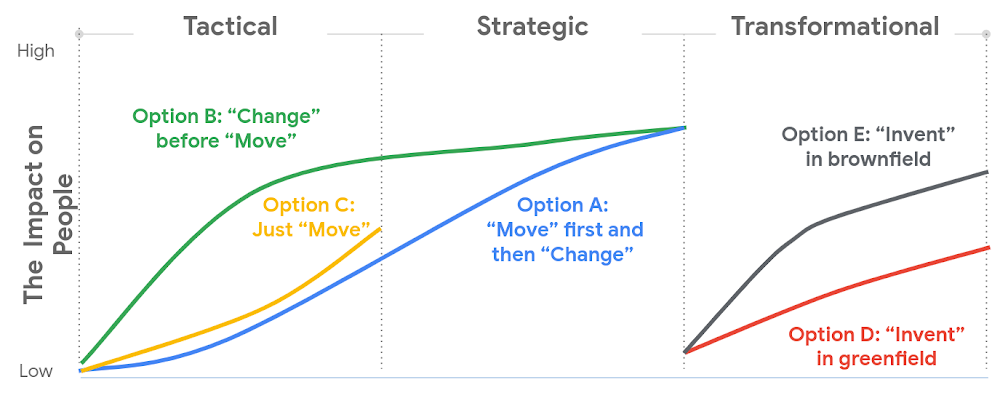
Whether a ‘lift and shift’ approach to the cloud is right for you, or a more transformative approach with a lot of re-architecting—the most important thing is to find the flavor of change which is appropriate to your context and level of ambition.This will both shape your key migration activities, but also the level of impact to be managed within your organization.
There are many ways to embark on a change journey for cloud migration (which one can find in the chart below). It is important to deeply understand the needs of your business and its people and determine what strategy makes the most sense.
3. Learn from best practices
Based on the lessons we’ve learned along our own journey, and the work we’ve done with customers, there are a number of recommendations we can share that can make a cloud migration more successful. We go into these in more detail in our new whitepaper, but below you can find the ones we think are most relevant:
- Share the vision—and measure, measure, measure. Once you’ve crystallised your cloud vision with leadership and key stakeholders, share that vision widely. Set success goals and communicate them to hold yourself accountable.
- Be clear about the capabilities you will need in the future—and where you’ll get them. For example, if your vision is to become a cloud-first, data and AI-led organization, ensuring you have the right data science skills and machine learning capabilities in your organization to achieve that vision becomes a critical step—be they home-grown or bought-in.
- Find the right balance between capabilities that should be under central control, and capabilities that should be decentralized, or agile. For example, should machine learning be something that sits centrally, or should it be spread across your organization? For every business, the solution will be a little different, and there’s no “one true answer.” There’ll be lots of different opinions about this, so the sooner the conversation starts, the better.
- Start thinking about the needed tech and non-tech skills now, and how you’ll fill the gaps. Building the tech skills will take time, and not everyone will feel comfortable with the future picture of collaboration, innovation, and agility.
To help businesses navigate their own cloud journeys, Google Cloud Professional Services has released a new whitepaper that can help guide organizations. “Managing Change in the Cloud” is closely aligned with the Google Cloud Adoption Framework and is a practical guide for organizations looking to maintain momentum in their cloud adoption. You can download the whitepaper here.

3582
Of your peers have already downloaded this article
3:30 Minutes
The most insightful time you'll spend today!
Defending the world’s largest network against persistent and constantly evolving cyber threats has driven Google to architect, automate, and develop advanced tools to help keep it ahead. Understanding how Google has built and evolved it’s defenses can help you make smart architectural decisions of your own as you move forward.
- At Google every minute:
- 10 million spam messages are prevented from reaching Gmail customers.
- 694,000 indexed Web pages are scanned for harmful software.
- 7,000 deceitful URLs, executables, and browser extensions that may carry viruses, unwanted content, or phishing attempts are spotted and stopped.
- 6000 instances of unwanted software and nearly 1,000 instances of suspected malware are reported to Chrome users.
- 2 phishing sites and 1 malware site are found and labeled.
Download this e-book to know more about Google’s security at scale.
3 Important Factors to Consider for Moving Large-scale On-prem Data to Cloud with Storage Transfer Service

3527
Of your peers have already read this article.
1:30 Minutes
The most insightful time you'll spend today!
Organizations have been moving their on-premises data and applications to the cloud for the past several years, driven by reasons as varied as application modernization and content delivery to archival. In particular, we have seen migration momentum pick up in sectors like media and entertainment, where customers are rethinking how they monetize and store their valuable historical content, often while exploring Google Cloud’s many analytical and AI solutions.
Many of these customers are interested in moving their unstructured data from on-premises appliances to Google’s Cloud Storage. Over the past year, we’ve noticed an uptick in larger migrations, where customers move tens of petabytes or more of on-premises file data to Google’s flexible, secure object storage.
For customers like Telecom Italia/TIM Brasil, Google’s fully managed Storage Transfer Service played a key role in making this transformation possible by moving data from on-premises filesystems to extensible, low-cost Cloud Storage over the network.
“Storage Transfer Service helped us move petabyte-scale data from on-premises filesystem to Google Cloud in a highly performant and fully-managed way,” said Auana Mattar, CIO at Telecom Italia/TIM Brasil. “Setting up the transfer pipeline required performing some tests to figure out the ideal number of agents and networking settings in our on-prem environment. Once the initial setup was done, transferring data was seamless, and the service was able to saturate a 20 Gbps Partner Interconnect link.”
While large-scale cloud migrations can be intimidating, there are a number of actions that customers can take to ensure that a multi-petabyte data transfer goes as smoothly as possible. In the past, we’ve shared general architectural guidance for customers new to their cloud journey. And for customers looking for options, Google has multiple paths to move on-premises file data to the cloud, including our fully offline Transfer Appliance.
In this blog post, we’ll provide an updated perspective focused on how to use Storage Transfer Service to move data from on-prem to the cloud. Specifically, we’ll look at three different factors to consider prior to moving large amounts of data from your on-premises filesystem to Cloud Storage with our Storage Transfer Service.
Understanding the source files and filesystem
If you are moving data from an on-premises filesystem, you should be aware of how your source files, and your source filesystem, can impact transfer performance.
Each copy you make to Cloud Storage incurs some overhead from associated operations like metadata transfer, checksumming, and encryption. This means that, for a given amount of storage, transferring large numbers of very small files will take longer. As a rule of thumb, Storage Transfer Service will be most performant when moving files that are 16 MB or larger.
If you have a large number of smaller files, you may choose to batch them using tools like tar and upload as a single object. This will improve transfer performance but will limit how you can use those files in Cloud Storage. It’s an option best considered for use cases like archival storage, where the data transferred to Google Cloud may not be managed or accessed regularly. Our Nearline, Coldline, and Archive archival tiers offer excellent performance should you ever need to retrieve the archived data.
The source filesystem may also slow down transfer performance, particularly if the filesystem has limited read throughput. Tools like Fio can be used to test read throughput. We’ve included a command below to run a series of 1MB sequential read operations in Fio and to generate a report:
#Install fio> sudo apt install -y fio#Create a new directory fiotest> TEST_DIR=/mnt/mnt_dir/fiotest> sudo mkdir -p $TEST_DIR#Test read throughput> sudo fio --directory=$TEST_DIR --direct=1 --rw=randread --randrepeat=0 --ioengine=libaio --bs=1M --iodepth=8 --time_based=1 --runtime=180 --name=read_test --size=1G
Fio will then generate a report. The final line labeled ‘bw’ represents the total aggregate bandwidth of all threads, and it can be used as a proxy for read throughput. In general, you should strive for read throughput (‘bw’) that is 1.5x of your desired upload throughput or speed. (And one easy way to increase read throughput is to ensure that the filesystem itself is not imposing any limits on maximum throughput.)
Optimizing Storage Transfer Service resources
Within the Storage Transfer Service, there are a few settings that we can adjust ahead of time to ensure optimal performance for a larger workload.
First, we should ensure that we have the right number of transfer agents for our source data. We would advise that, for any transfer job larger than 1 GB, you start with at least three agents in separate VMs, with each agent assigned at least 4 vCPU and 8 GB of RAM. In addition to providing a foundation for performant data transfer, this architecture also ensures that the transfer is fault tolerant should one agent machine become unavailable.
Google Cloud supports up to 100 concurrent agents for a given Google Cloud project. To help you identify the right number of agents to support your workload, you should start your larger transfer first, then wait three minutes after adding each agent to ensure that throughput has stabilized.
In general, each agent can facilitate roughly 1 Gbps of throughput for up to 10 agents, at which point it may be necessary to add more agents for a very large amount of network bandwidth. For example, in one larger migration, a customer with 20 Gbps of dedicated network capacity ran ~30 agents at once. These numbers illustrate what was required at one enterprise data center. Across all of your environments, it is important to test and monitor your throughput via Cloud Monitoring to ensure you have the right configuration for your transfer goals.
Another area to optimize is where and how you install your agents. As we mentioned earlier, agents should be installed in separate VMs, and each host machine should dedicate at least 4 vCPUs and 8 GB of memory per agent. This is a starting off point, and larger, long-running transfers may require additional CPU or memory. For those longer jobs, we advise that you monitor CPU utilization and unused memory closely to ensure optimal performance. You should provision more CPUs when utilization exceeds 70%. Similarly, you should be ready to provision additional memory when the agent has less than 1GB of unused memory.
Preparing your network for large-scale data transfer
The third and final area to consider is your network connectivity. While it can be easy to reduce this to the bandwidth between the source filesystem and the Google Cloud bucket, the network includes two other components that can be easier to configure: first, the network interface from the on-premises agents to the WAN; and second, the agents’ connection to the on-premises filesystem.
For the first component, the network interface from the on-premises agents to the WAN, the general guidance is to not let this become a bottleneck. Specifically, you should ensure that this interface is greater than or equal to the bandwidth you require to read from the filesystem, plus the upload bandwidth to write to Google Cloud. In other words, if you plan on moving 10 Gbps of data from on-premises to Google Cloud, you will need 20 Gbps of bandwidth between the on-premises agents to the WAN: 10 Gbps to read from the networked filesystem, and 10 Gbps to transfer and write to Google Cloud.
On-premises filesystems, and on-premises networks, come in many flavors. For the second component, how the agents connect to an on-premises filesystem, our general rule is to be mindful of latency and to test regularly. It is essential to ensure that agents run on machines that can access a networked filesystem with very low latency.
Finally, if you are trying to maximize transfer performance, make sure you’ve configured your network to avoid bandwidth restrictions between on-premises filesystem and Google Cloud that might impact transfer speed. Storage Transfer Service will allow you to cap the bandwidth used by transfer, making it easy to minimize any impact on other production applications. Consider using tools like lperf3, tcpdump, and gsutil to measure the network bandwidth available to upload to Cloud Storage.
In particular, gsutil is worth some additional detail. Gsutil is a Python tool that can help you perform a number of object storage management tasks in Google Cloud, including checking your agent’s connection to the Cloud Storage APIs. It can be installed via the Google Cloud SDK, or separately. In this case, you should also ensure that gsutil is available in the same on-premises VM as the Storage Transfer Service agent.
If you’d like to use gsutil to test connectivity to Google Cloud, here’s the command:
gsutil cp test.txt gs://my-bucketReplace:my-bucket with the name of your Cloud Storage bucket.
CP is a copy command that lets you copy data from on-premises to the cloud. In this case, gsutil is copying a test document, test.txt, to ensure that you have a connection with the Google Cloud APIs. You will need to create a test document before running this command.
Test twice, transfer once
One overarching theme across all factors is that testing can help you understand performance. For many customers, a large-scale data transfer from an on-premises filesystem to Google Cloud is an unusual event. And as with any unusual event in enterprise IT, it is a great idea to make sure that each party – from network administrators to filesystem and storage experts to cloud architects – is able to test their domain multiple times, to ensure the event will proceed seamlessly.
As you fine tune your testing in advance of a data transfer, you may want to learn more about your options for obtaining more network bandwidth, orchestrating transfer from SMB filesystems, or even how to make the right choices to save money on object storage. And we plan to share more in our blog about how customers have used our transfer offerings in the months ahead. Advanced agent setup | Cloud Storage Transfer Service Documentation
For more information about Storage Transfer Service and how to get started, please take a look at our documentation or get started via the Google Cloud console.
What Swiggy and You Can Learn From This Company’s Use of ML to Engage Customers

9663
Of your peers have already read this article.
1:45 Minutes
The most insightful time you'll spend today!
The app economy has enabled a huge range of unique business models to flourish. One such model is online food ordering and delivery services, in which apps leverage geo-location data to aggregate local food choices and offer personalized options to consumers.
A leading company in this space is Just Eat. Launched in the UK in 2001 with a vision of ‘serving the world’s greatest menu. Brilliantly.’ The company has capitalized on the popularity of online food delivery and grown its presence across 12 markets.
Just Eat acts as an intermediary between take-out food outlets and hungry customers, giving local restaurants access to a broader base of potential diners, while providing consumers with an easy and secure way to order and pay for food from their favourite restaurants.
Today the company helps 27 million customers find food from more than 112,000 restaurants—everything from homemade Italian pasta, to Chinese noodle bowls, to fish-and-chips.
Data is the fuel of Just Eat’s rapid growth, but it wasn’t always looked at that way. In its early days, Just Eat struggled with the deluge of information and faced fragmentation across its systems. In fact, the company realized its legacy data vendor wasn’t capable of ingesting 90 percent of the data produced by its food platform. This was incredibly frustrating for Just Eat’s analysts and data scientists, who had to waste time cleaning up sources instead of leveraging the data to create a better user experience.
Just Eat turned to Google Cloud, and now uses machine learning (ML) to power sophisticated consumer recommendations on both its app and website. It also makes heavy use of features offered by Google Cloud Platform, including BigQuery for running analytics on its customer data set and Cloud Pub/Sub for messaging app users with relevant offers in real-time.
Having all of Just Eat’s data in one platform has translated into real value for its customers. With Google Cloud tools, Just Eat has created its own proprietary Customer Ontology framework, which today contains 5.5 billion features that better understand consumers’ behavior and food habits, and provides insights into previous visits.
Just Eat recently created an “Adventurous Index” to map its customers according to their ordering habits, enabling them to tailor their marketing and user experiences. For example, mid-adventurous customers are shown a choice of restaurants that serve their most ordered cuisine, while adventurous customers can choose from restaurants that serve a wider variety. This not only has prompted consumers to be more adventurous with their choices, but also has led to more business at a more diverse set of restaurants.
Matt Cresswell, Director of Customer Platforms at Just Eat said that Google Cloud has become integral to its product delivery: “Consumer food choice is a hugely nuanced topic. We know that individuals have their own unique journeys when they use Just Eat. We’ve sought to create a truly one-to-one relationship with every customer. The changes we’ve made to the platform mean they can access the dishes they enjoy at the touch of a fingertip, and find inspiration to discover new dishes they’ll love. We’re grateful to Google Cloud for helping us support our customers on their culinary explorations.”
More Relevant Stories for Your Company

Five Ways Cloud Computing Helps Companies Optimize Operations and Lower IT Costs
There is no one way to recover. The past year has seen unprecedented challenges for business across the world, with social distancing and quarantine measures forcing many organizations to quickly adapt to remote working. A new report from BCG Platinion, titled “Finding a New Normal in the Cloud”, points out that while companies

If You Run Your Country’s Largest Retail Franchise, How Do You Pull Together, in Sync?
In 1984, Mario Maio set up a small business manufacturing electrical transformers in his Johannesburg garage. Over the next two decades, the ACDC Dynamics company he created came to dominate manufacturing, import, and distribution in South Africa’s electrical goods sector. Then, in 2007, Mario’s son, Ricardo Maio, founded a retail arm to

Cloud FinOps Breaks Down Gaps in Finance, Tech and Business Teams, Accelerating Digital Transformation!
Accelerating digital transformation Digital transformation is what propels businesses and industries forward. Organizations of all sizes—from startups to global enterprises—focus on digital transformation not only to make scaled improvements, but also to drive significant change and fully embrace the digital age. The pandemic has jump started and pushed many organizations

Beyond Traditional Learning: AI-based Online Learning Platform and Google Cloud Solutions Push Learners to Get Ahead
The combination of a vital need for IT experts among businesses and a digital skills gap is making lifelong learning increasingly critical. Beyond professional development, learning new skills offers additional rewards from building peer connections to boosting your creativity. That’s why in 2020 Krishna Deepak Nallamilli and I launched KIMO.ai to reimagine how people
