






How Google Helped the Indian Govt Choose Airport Sites: The Inside Story
READ FULL INTRODOWNLOAD AGAIN5262
Of your peers have already downloaded this article
6:45 Minutes
The most insightful time you'll spend today!
Notebook Executor Feature of Vertex AI Workbench to Schedule Notebooks Ad Hoc or on Recurring Basis

4450
Of your peers have already read this article.
3:00 Minutes
The most insightful time you'll spend today!
When solving a new ML problem, it’s common to start by experimenting with a subset of your data in a notebook environment. But if you want to execute a long-running job, add accelerators, or run multiple training trials with different input parameters, you’ll likely find yourself copying code over to a Python file to do the actual computation. That’s why we’re excited to announce the launch of the notebook executor, a new feature of Vertex AI Workbench that allows you to schedule notebooks ad hoc, or on a recurring basis. With the executor, your notebook is run cell by cell on Vertex AI Training. You can seamlessly scale your notebook workflows by configuring different hardware options, passing in parameters you’d like to experiment with, and setting an execution schedule, all via the Console UI or the notebooks API.
Built to Scale
Imagine you’re tasked with building a new image classifier. You start by loading a portion of the dataset into your notebook environment and running some analysis and experiments on a small machine. After a few trials, your model looks promising, so you want to train on the full image dataset. With the notebook executor, you can easily scale up model training by configuring a cluster with machine types and accelerators, such as NVIDIA GPUs, that are much more powerful than the current instance where your notebook is running.
Your model training gets a huge performance boost from adding a GPU, and you now want to run a few extra experiments with different model architectures from TensorFlow Hub. For example, you can train a new model using feature vectors from various architectures, such as Inception, ResNet, or MobileNet, all pretrained on the ImageNet dataset. Using these feature vectors with the Keras Sequential API is simple; all you need to do is pass the TF Hub URL for the particular model to hub.KerasLayer.

Instead of running these trials one by one in the notebook, or making multiples copies of your notebook (inceptionv3.ipynb, resnet50.ipynb, etc) for each of the different TF Hub URLs, you can experiment with different architectures by using a parameter tag. To use this feature, first select the cell you want to parameterize. Then click on the gear icon in the top right corner of your notebook.

Type “parameters” in the Add Tag box and hit Enter. Later when configuring your execution, you’ll pass in the different values you want to test.
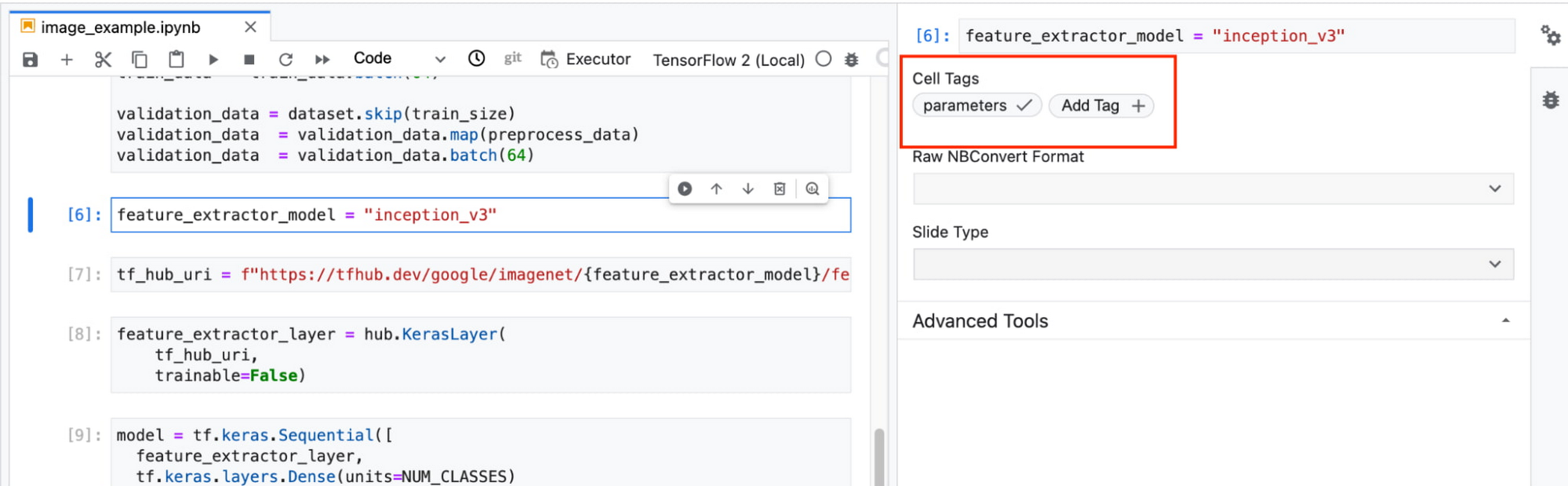
In this example, we create a parameter called feature_extractor_model, and we’ll pass in the name of the TF hub model we want to use when launching the execution. That model name will be substituted into the tf_hub_uri variable, which is then passed to the hub.KerasLayer, as shown in the screenshot above.
After you’ve discovered the optimal model architecture for your use case, you’ll want to track the performance of your model in production. You can create a notebook that pulls the most recent batch of serving data that you have labels for, gets predictions, and computes the relevant metrics. By scheduling these jobs to execute on a recurring basis, you’ve created a lightweight monitoring system that tracks the quality of your model predictions over time. The executor supports your end-to-end ML workflow, making it easy to scale up or scale out notebook experiments written with Vertex AI Workbench.
Configuring Executions
Executions can be configured through the Cloud Console UI or the Notebooks API.
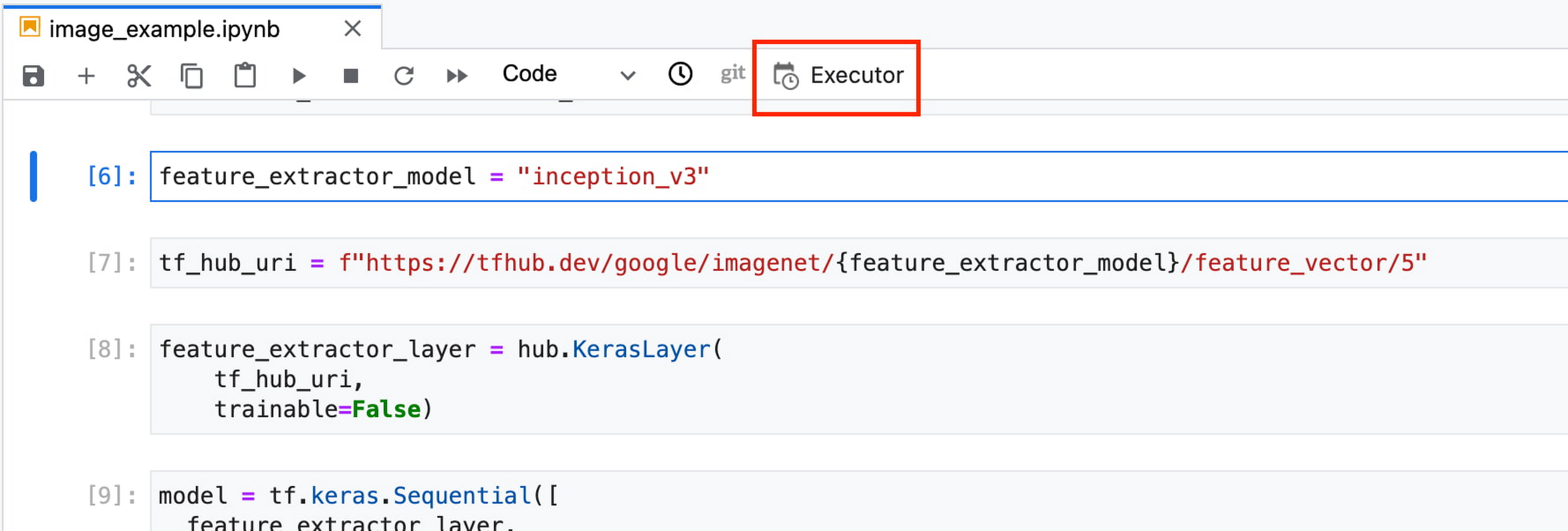
In your notebook, click on the Executor icon.
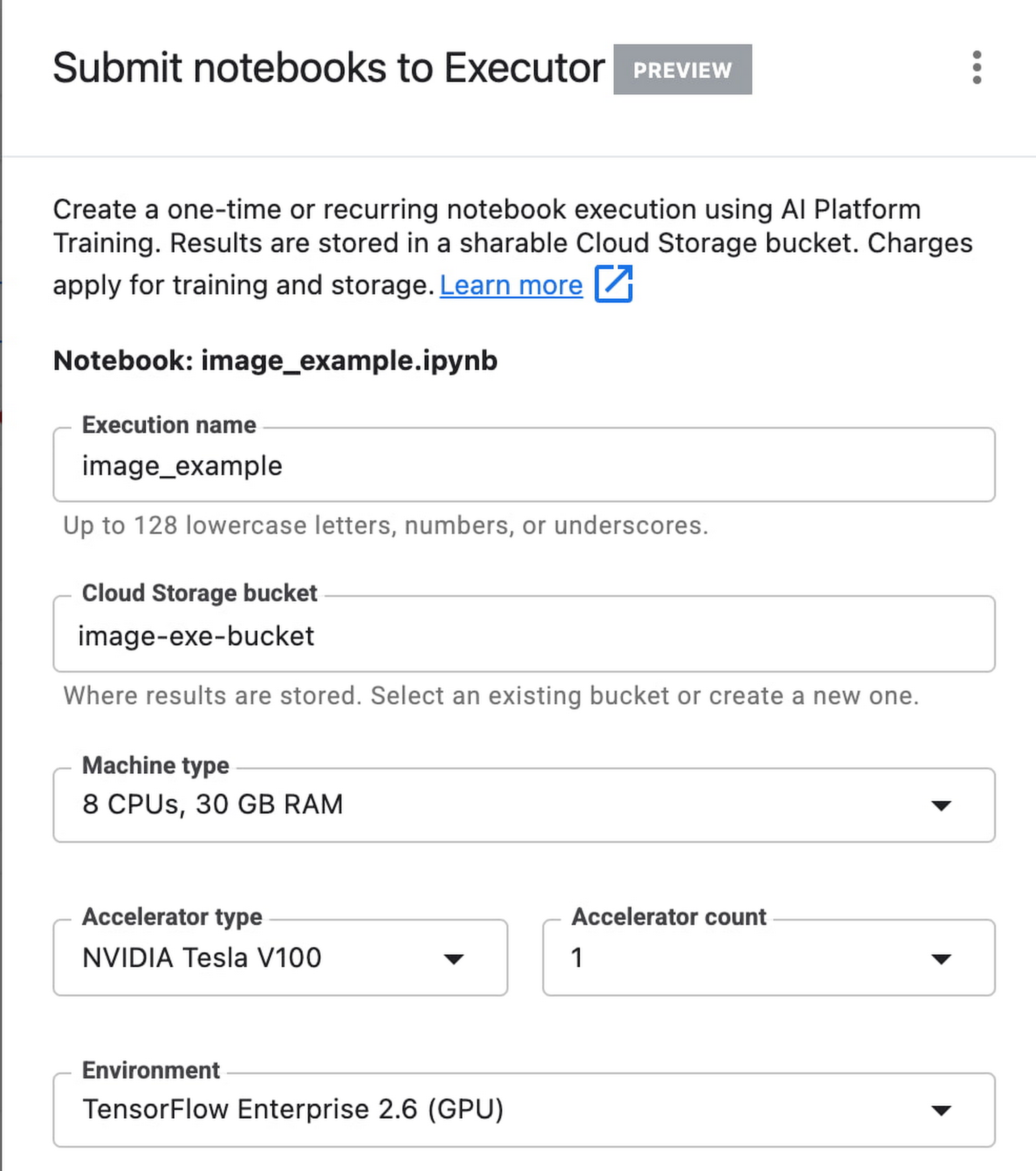
In the side panel on the right specify the configuration for your job, such as the machine type and the environment. You can select an existing image, or provide your own custom docker container image.
If you’ve added parameter tags to any of your notebook cells, you can pass in your parameter values to the executor.

Finally, you can choose to run your notebook as a one time execution, or schedule recurring executions.
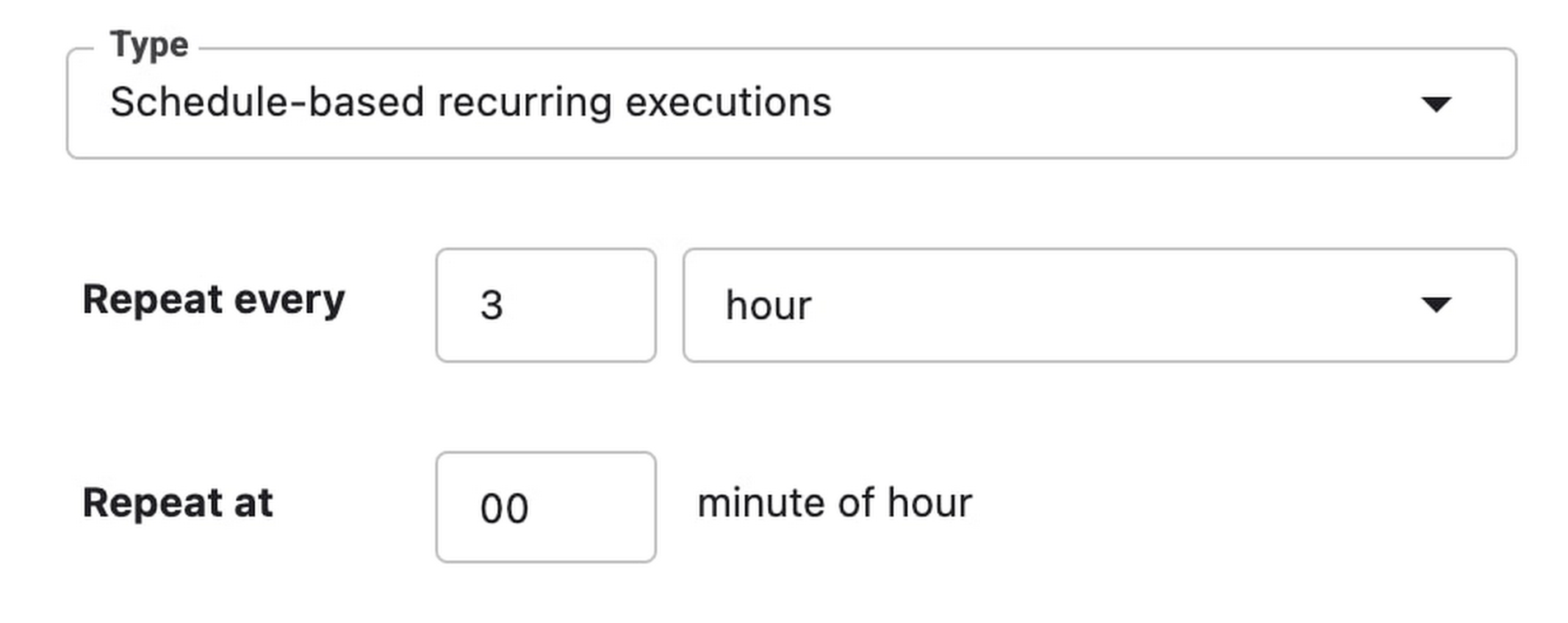
Then click SUBMIT to launch your job.
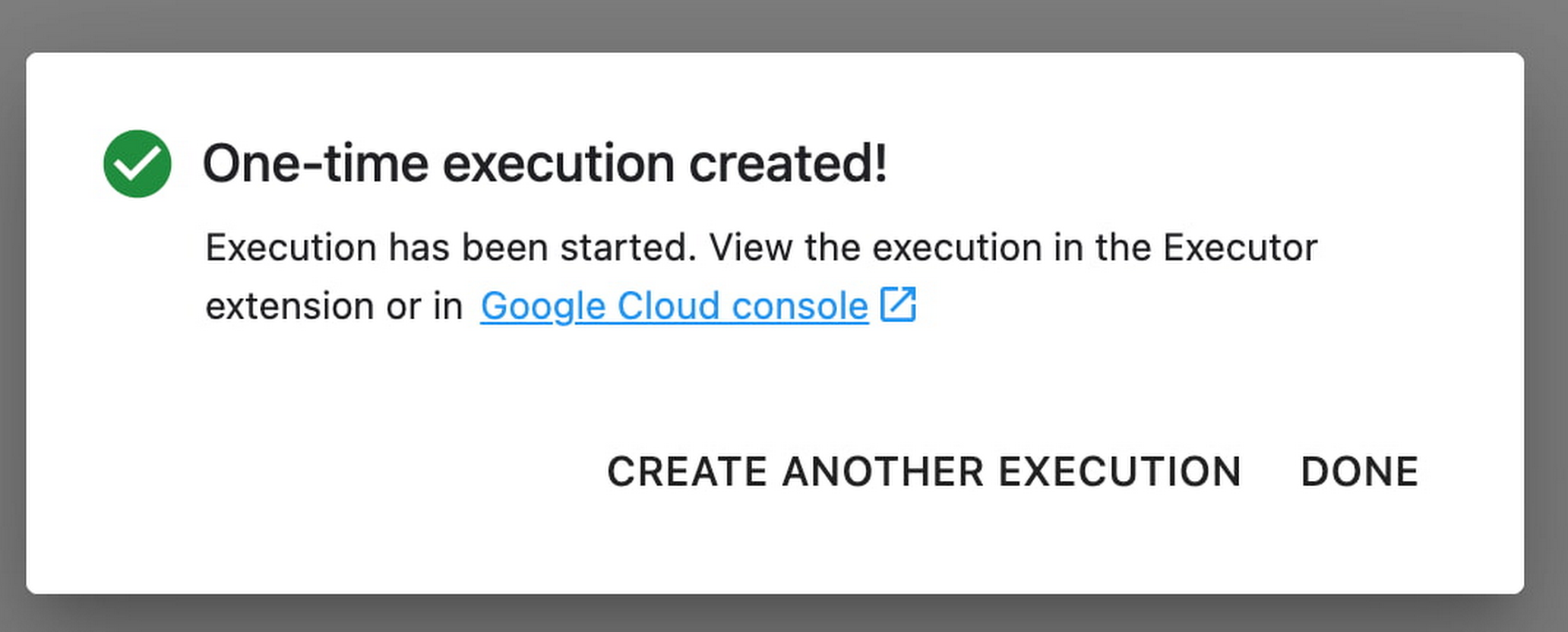
In the EXECUTIONS tab, you’ll be able to track the status of your notebook execution.

When your execution completes, you’ll be able to see the output of your notebook by clicking VIEW RESULT.

You can see that an additional cell was added with the comment # Parameters, that overrides the default value for feature_extractor_model, with the value we passed in at execution time. As a result, the feature vectors used for this execution came from a ResNet50 model instead of an Inception model.
What’s Next?
You now know the basics of how to use the notebook executor to train with a more performant hardware profile, test out different parameters, and track model performance over time. If you’d like to try out an end-to-end example, check out this tutorial. It’s time to run some experiments of your own!
3967
Of your peers have already watched this video.
1:30 Minutes
The most insightful time you'll spend today!
90-Sec Demos of Truly Incredible Customer Care Calls Powered By AI
How real, fast, and easy do you think an AI-powered call center experience is for customers today?
It’s likely you have seen AI-powered chatbots and are deeply unimpressed with the static nature of the interaction between customers and service representatives.
But that’s not how Google Cloud’s AI-powered contact centers are.
Here have a look yourself. Here’s what a customer from a bank or financial organisation would experience.
And here’s what a customer from a telecom company would experience.
Trading and Investment Companies will Increase Consumption of Cloud Services: Study Confirms

4902
Of your peers have already read this article.
3:00 Minutes
The most insightful time you'll spend today!
While some traditional financial services companies have more slowly transitioned to the cloud, capital markets firms have embraced cloud computing across their entire value chains — front-, middle-, and back-office. We wanted to understand the dynamics behind this rapid adoption, the most common use cases, and the types of technology most in use, particularly as it relates to market data. Google Cloud commissioned Coalition Greenwich to survey 102 institutional capital markets professionals — at exchanges, trading systems, data aggregators, data producers, asset managers, hedge funds, and investment banks — in the United States, Canada, France, Germany, Italy, the Netherlands, Switzerland, and the United Kingdom.
Our research found that while there are many drivers, demand for easier accessibility is fueling widespread adoption of cloud-based market data services, and associated trading infrastructures, across the buy side and sell side. In fact, 68% of sell-side and buy-side users find it critical for market data providers to offer public cloud-based data services. At the same time, exchanges, market data providers, aggregators, and trading systems are embracing the cloud as a delivery model by offering access to data directly via their own cloud services, APIs or partners.
Here were five noteworthy takeaways from the study:
1. Cloud services are becoming ubiquitous for data delivery. Today, the cloud is pervasive, with 93% of exchanges, trading systems and data providers offering cloud-based data and services, according to surveyed executives. Moreover, 100% of those surveyed intend to offer new cloud-based services, such as derived data, in the next 12 months.
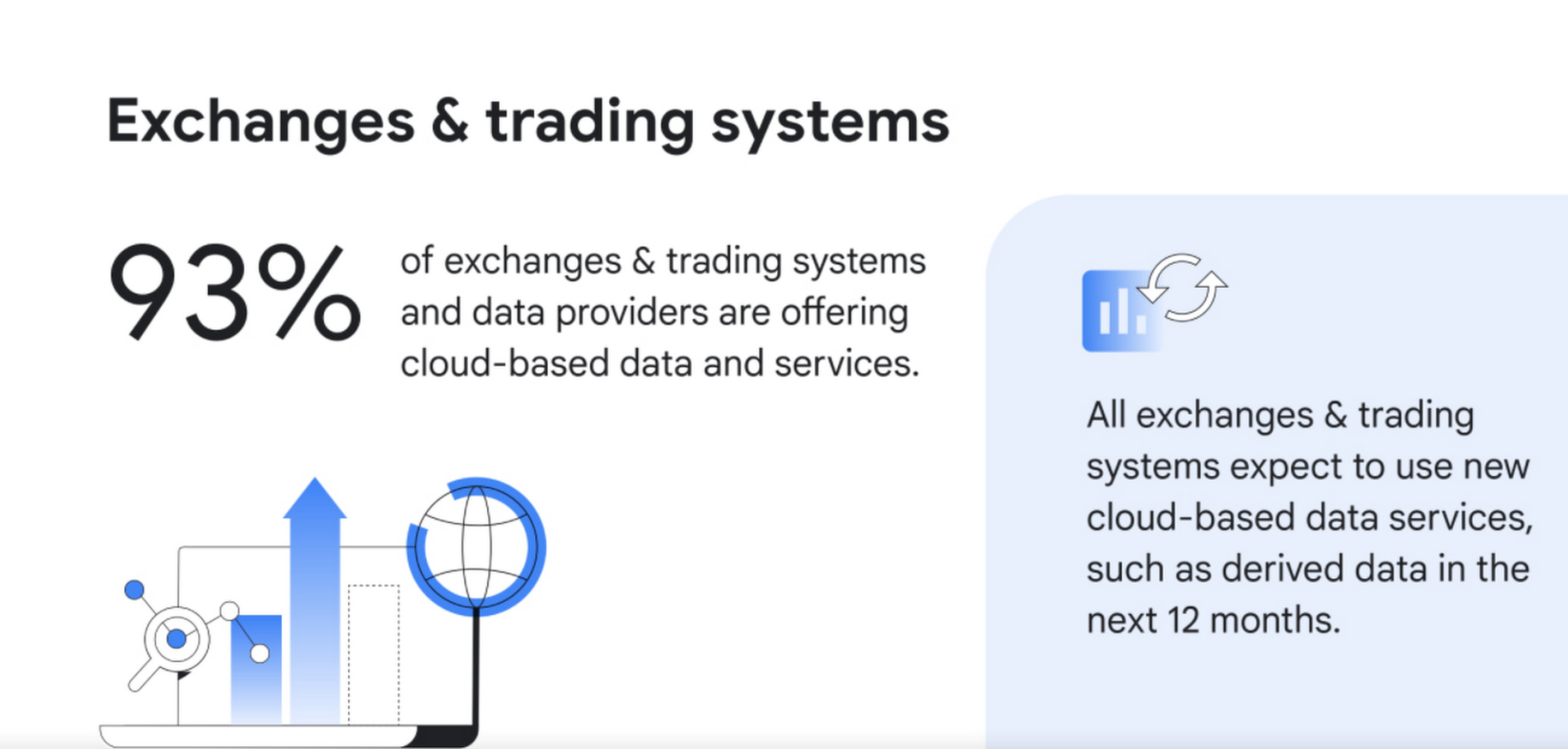
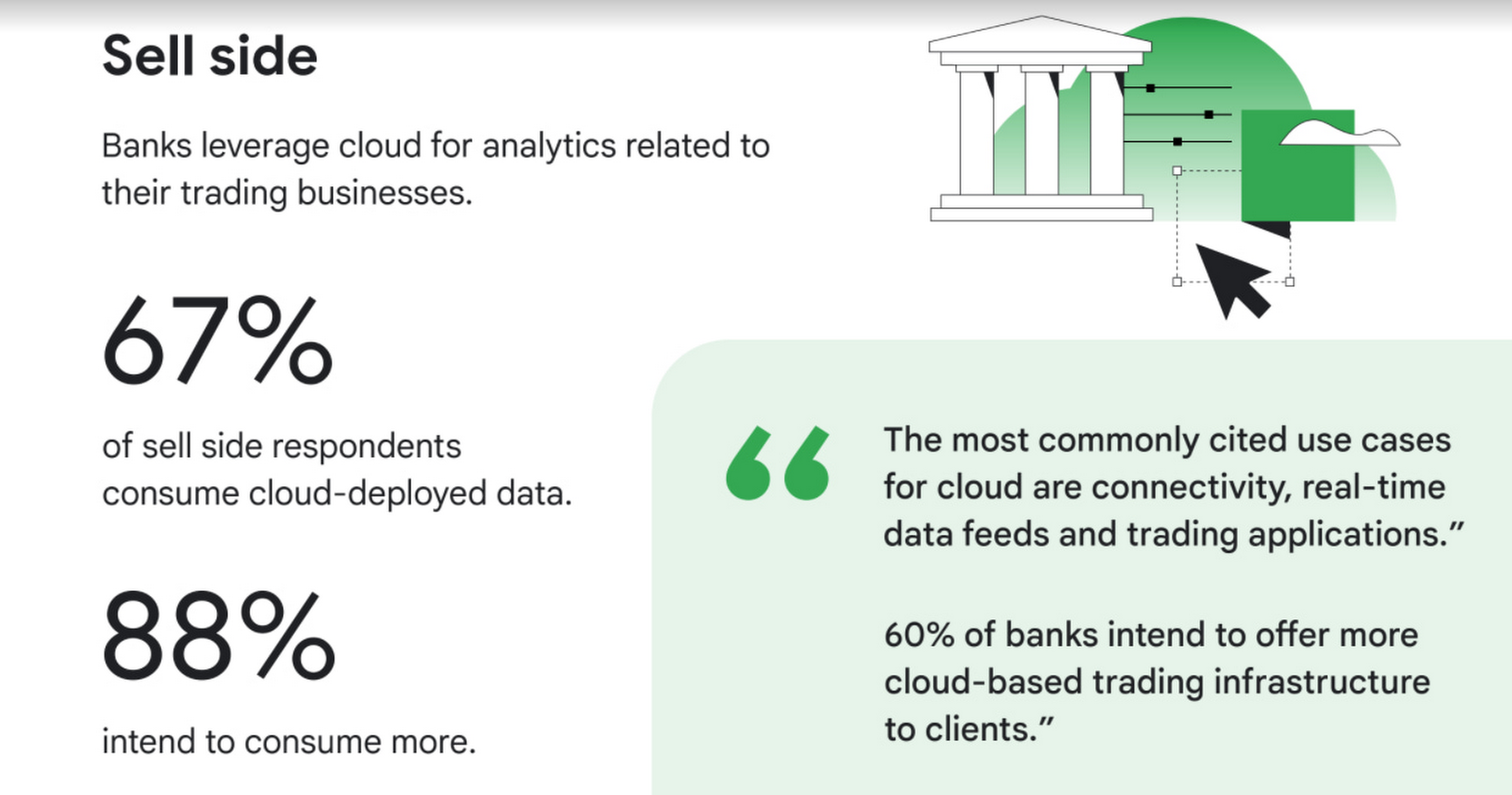
2. Commercial and investment banks are offering additional connectivity, real-time data feeds, and trading applications delivered via the cloud,demonstrating that it’s not only exchanges, trading systems, and data providers that are moving rapidly to the cloud. Internal use cases abound as well, with 67% of those surveyed consuming cloud-deployed market data, primarily for data analytics. 88% of surveyed sell-side firms intend to consume cloud-based market data services, with digital transformation, data science and quant research as the top use cases.
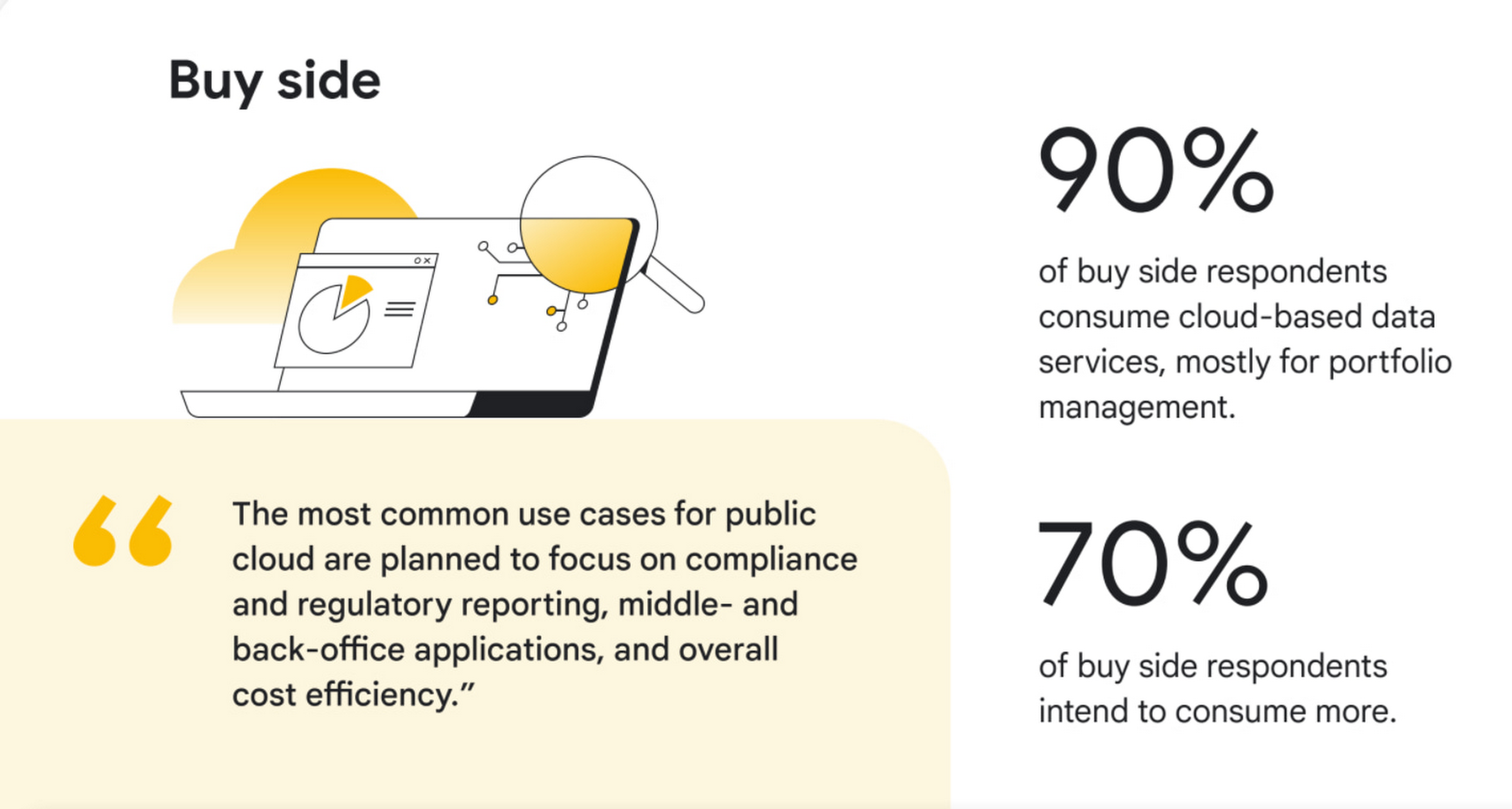
3. Buy side firms will consume even more cloud-deployed data. Today, 90% of surveyed buy-side firms are consuming cloud-deployed market data, mostly for portfolio management. 70% of buy-side firms intend to consume more public cloud-based market data services in the next 12 months, adding services such as compliance and regulatory reporting.
4. AI/ML, powered by cloud, is moving out of the pilot phase and into mainstream use. Today, 50% of exchanges, trading systems, and data providers are offering data products or services powered by AI/ML, and of those, 42% intend to offer AI-powered trade execution and trading analytics services in the next 12 months. Within commercial and investment banks, 55% said they are currently using AI/ML in the cloud, and while that was true for only 14% of overall buy-side respondents, 44% of large buy-side respondents are using it.

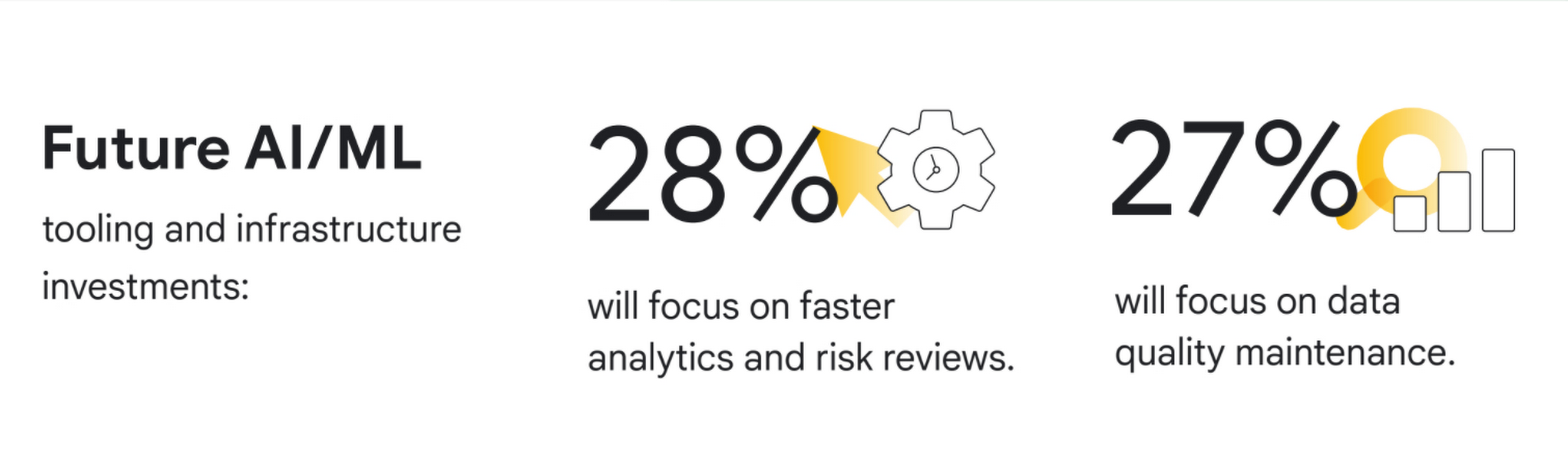
5. Exchanges, trading systems, and data providers are prioritizing public cloud for internal insights. 71% of these firms are using the public cloud, mostly for data transmission, processing, analysis, and long-term data storage. Over the next 12 months, 33% of new public cloud workloads will focus on data mining, data insights and advanced analytics, while 28% of new AI/ML tooling and infrastructure investments will focus on faster analytics and risk reviews, and 27% on data quality maintenance.
“We see new, dramatic shifts on the adoption of cloud across market data,” said David Easthope, Senior Analyst for Coalition Greenwich. “And we expect further proliferation of cloud-based services and greater consumption across the trading and investing lifecycle.”
Conclusions and future predictions
Based on the survey results, Coalition Greenwich predicts five following trends over the next 12 months:
- Exchanges and trading systems will continue to launch a wide array of new cloud-based and possibly cloud exclusive data services across derived data, end of day data, reference data and pricing data.
- Data providers will launch new data products such as pre-trade analytics powered by AI/ML in the cloud.
- Commercial and investment banks will offer additional connectivity, real-time data feeds, and trading applications delivered via the cloud.
- Buy-side firms will consume even more cloud-deployed data, including real-time market data, portfolio management data, and risk analytics.
- Exchanges, trading systems and data providers will explore proof-of-concepts around core systems on the cloud. Improvements to AI/ML tooling or infrastructure will ramp up as firms seek more rapid responses to risk initiatives.
To learn more about these findings, download our two full reports, The Future of market data: Distribution and consumption through cloud and AI and Exchanges and data providers: Prioritizing the cloud and AI for internal insights or our short infographic.
Research methodology
The survey was conducted online by Coalition Greenwich on behalf of Google Cloud from March 2021 to April 2021 among 102 executives in North America (n=82), EMEA (n=17) and other (n=3) who are employed full-time and who are participants or influencers in decisions around cloud and/or senior management with a role at a company which is an institutional asset manager, hedge fund, alternative investment manager, exchange and/or trading system, information provider, information aggregator, or other asset manager/asset owner. The survey included wide perspectives from a range of firm size and asset class focus, including equity, fixed income, FX, commodities, multi-asset, and other asset classes.
Foot Notes
1. We defined market data as direct feeds, consolidated feeds, terminal and desktop products, security and reference data, pricing data, historical data, alternative data, and index data.
How Google Cloud’s PSO Supports Customers’ Migration Goals

5047
Of your peers have already read this article.
2:00 Minutes
The most insightful time you'll spend today!
Google Cloud’s Professional Services Organization (PSO) engages with customers to ensure effective and efficient operations in the cloud, from the time they begin considering how cloud can help them overcome their operational, business or technical challenges, to the time they’re looking to optimize their cloud workloads.
We know that all parts of the cloud journey are important and can be complex. In this blog post, we want to focus specifically on the migration process and how PSO engages in a myriad of activities to ensure a successful migration.
As a team of trusted technical advisors, PSO will approach migrations in three phases:
- Pre-Migration Planning
- Cutover Activities
- Post-Migration Operations
While this post will not cover in detail all of the steps required for a migration, it will focus on how PSO engages in specific activities to meet customer objectives, manage risk, and deliver value. We will discuss the assets, processes and tools that we leverage to ensure success.
Pre-Migration Planning
Assess Scope
Before the migration happens, you will need to understand and clarify the future state that you’re working towards. From a logistical perspective, PSO will be helping you with capacity planning to ensure sufficient resources are available for your envisioned future state.
While migration into the cloud does allow you to eliminate many of the considerations for the physical, logistical, and financial concerns of traditional data centers and co-locations, it does not remove the need for active management of quotas, preparation for large migrations, and forecasting. PSO will help you forecast your needs in advance and work with the capacity team to adjust quotas, manage resources, and ensure availability.
Once the future state has been determined, PSO will also work with the product teams to determine any gaps in functionality. PSO captures feature requests across Google Cloud services and makes sure they are understood, logged, tracked, and prioritized appropriately with the relevant product teams. From there, they work closely with the customer to determine any interim workarounds that can be leveraged while waiting for the feature to land, as well as providing updates on the upcoming roadmap.
Develop Migration Approach and Tooling
Within Google Cloud, we have a library of assets and tools we use to assist in the migration process. We have seen these assets help us successfully complete migrations for other customers efficiently and effectively.
Based on the scoping requirements and tooling available to assist in the migration, PSO will help recommend a migration approach. We understand that enterprises have specific needs; differing levels of complexity and scale; regulatory, operational, or organization challenges that will need to be factored into the migration. PSO will help customers think through the different migration options and how all of the considerations will play out.
PSO will work with the customer team to determine the best migration approach for moving servers from on-prem to Google Cloud. PSO will walk customers through different migration approaches, such as refactoring, lift-shift, or new installs. From there, the customer can determine the best fit for their migration. PSO will provide guidance on best practices and use cases from other customers with similar use cases.
Google offers a variety of cloud native tools that can assist with asset discovery, the migration itself, and post-migration optimization. PSO, as one example, will help work with project managers to determine the best tooling that accommodates the customer’s requirements for migrating servers. PSO will also engage Google product team to ensure the customer fully understands the capabilities of each tool and the best fit for the use case. Google understands from a tooling perspective, one size does not fit all, thus PSO will work with the customer on determining the best migration approach and tooling for different requirements.
Cutover Activities
Once all of the planning activities have been completed, PSO will assist in making sure the cutover is successful.
During and leading up to critical customer events, PSO can provide proactive event management services which deliver increased support and readiness for key workloads. Beyond having a solid architecture and infrastructure on the platform, support for this infrastructure is essential and TAMs will help ensure that there are additional resources to support and unblock the customer where challenges arise.
As part of event management activities, PSO liaises with the Google Cloud Support Organization to ensure quick remediation and high resilience for situations where challenges arise. A war room is usually created to facilitate quick communication about the critical activities and roadblocks that arise. These war rooms can give customers a direct line to the support and engineering teams that will triage and resolve their issues.
Post-Migration Activities
Once cutover is complete, PSO will continue to provide support in areas such incident management, capacity planning, continuous operational support, and optimization to ensure the customer is successful from start to finish.
PSO will serve as the liaison between the customer and Google engineers. If support cases need to be escalated, PSO will ensure the appropriate parties are involved and work to get the case resolved in a timely manner. Through operational rigor, PSO will work with the customer in determining if certain Google Cloud services will be beneficial to the customer objectives. If services will add value to the customer, PSO will help enable the services so it aligns with the customer’s goal and current cloud architecture. In cases where there are missing gaps in services, PSO will proactively work with the customer and Google engineering teams to close the gaps by enabling additional functionality in the services.
PSO will continue to work with the engineering teams to consistently review and provide recommendations on the customer’s cloud architecture in ensuring the most optimal and cost efficient design along with adhering to Google’s best practices guidelines.
Aside from migrations, PSO is also responsible for providing continuous training of Google Cloud to customers. To ensure consistent development of Google Cloud, PSO will work with the customer to jointly develop a learning roadmap to ensure the customer has the necessary skills to succeed in delivering successful projects in Google Cloud.
Conclusion
Google PSO will be actively engaged throughout the customer’s cloud journey to ensure the necessary guidance, methodology, and tools are presented to the customer. PSO will engage in a series of activities from pre-migration planning to post migration in key areas such as capacity planning to ensure sufficient resources are allocated for future workloads to providing support on technical cases for troubleshooting. PSO will serve as a long-term trusted advisor who will be the voice of the customer and provide the reliability and stability of the customer’s Google Cloud environment.
Click here if you’d like to engage with our PSO team on your migration. Or, you can also get started with a free discovery and assessment of your current IT landscape.
An AI-Powered Cost Cutting Guide: 8 Strategies for Maximizing Profits

1719
Of your peers have already read this article.
3:30 Minutes
The most insightful time you'll spend today!
We are increasingly seeing one question arise in virtually every customer conversation: How can the organization save costs and drive new revenue streams?
Everyone would love a crystal ball, but what you may not realize is that you already have one. It’s in your data. By leveraging Data Cloud and AI solutions, you can put your data to work to achieve your financial objectives. Combining your data and AI reveals opportunities for your business to reduce expenses and increase profitability, which is especially valuable in an uncertain economy.
Google Cloud customers globally are succeeding in this effort, across industries and geographies. They are improving ROI by saving money and creating new revenue streams. We have distilled the strategies and actions they are implementing—along with customer examples and tips—in our eBook, “Make Data Work for You.” In it, you’ll find ways you can pare costs, increase profitability, and monetize your data.
Find money in your data
Our Google Cloud teams have identified eight strategies that successful organizations are pursuing to trim expenses and uncover new sources of revenue through intelligent use of data and AI. These use cases range from scaling small efficiencies in logistics to accelerating document-based workflows, monetizing data, and optimizing marketing spend.
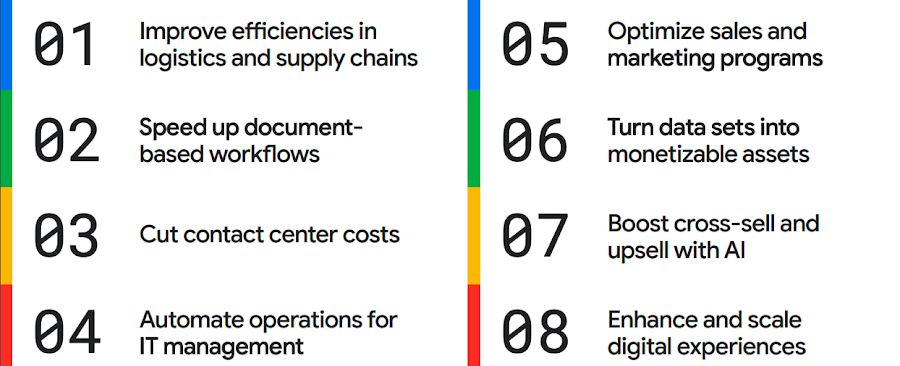
The results are impressive. They include massive cost savings and additional revenue. On-time deliveries have increased sharply at one company, and procure-to-pay processing costs have fallen by more than half at another. Other organizations have reaped big gains in ecommerce upselling and customer satisfaction.
We’ve found that businesses across every industry and around the globe are able to take action on at least one of these eight strategies. Contrary to common misperceptions, implementation does not require massive technology changes, crippling disruption to your business, or burdensome new investments.
What success looks like
If you worry your business is not ready or you need to gain buy-in from leadership, the success stories of the 15 companies in this report are helpful examples. Learning how organizations big and small, in different industries and parts of the world, have implemented these data and AI strategies makes the opportunities more tangible.
Carrefour
Among the world’s largest retailers, Carrefour operates supermarkets, ecommerce, and other store formats in more than 30 countries. To retain leadership in its markets, the company wanted to strengthen its omnichannel experience.
Carrefour moved to Google Data Cloud and developed a platform that gives its data scientists secure, structured access to a massive volume of data in minutes. This paved the way for smarter models of customer behavior and enabled a personalized recommendation engine for ecommerce services.
The company saw a 60% increase in ecommerce revenue during the pandemic, which it partly attributes to this personalization.
ATB Financial
ATB Financial, a bank in the Canadian province of Alberta, uses its data and AI to provide real-time personalized customer service, generating more than 20,000 AI-assisted conversations monthly. Machine learning models enable agents to offer clients real-time tailored advice and product suggestions.
Moreover, marketing campaigns and month-end processes that used to take five to eight hours now run in seconds, saving over CA$2.24 million a year.
Bank BRI
Bank BRI, which is owned by the Indonesian government, has 75.5 million clients. Through its use of digital technologies, the institution amasses a lot of valuable data about this large customer base.
Using Google Cloud, the bank packages this data through more than 50 monetized open APIs for more than 70 ecosystem partners who use it for credit scoring, risk management, and other applications. Fintechs, insurance companies, and financial institutions don’t have the talent or the financial resources to do quality credit scoring and fraud detection on their own, so they are turning to Bank BRI.
Early in the effort, the project generated an additional $50 million in revenue, showing how data can drive new sources of income.
How to get going now
“Make Data Work for You” will help you launch your financial resiliency initiatives by outlining the steps to get going. The process lays the groundwork for realizing your own cost savings and new revenue streams by leveraging data and AI.
Among these steps include building frameworks to operate cost efficiently, make informed decisions related to spending and optimize your data and AI budgets.
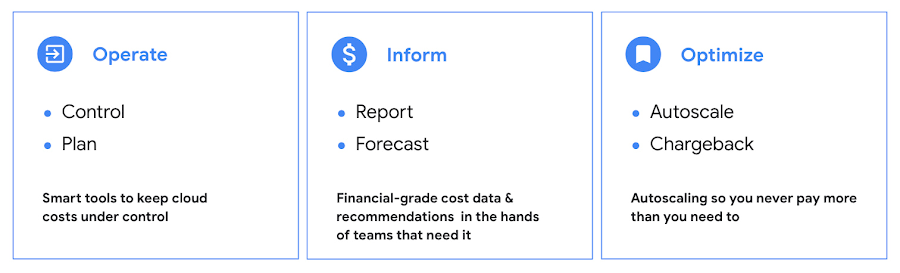
Operate: Billing that’s specific to your use-case
Control your costs by choosing data and analytics vendors who offer industry-leading data storage solutions and flexible pricing options. For example, multiple pricing options such as flat rate and pay-as-you-go allow you to optimize your spend for best price-performance.
Inform: make informed decisions based on usage
Use your cloud vendor’s dashboards or build a billing data report to gain insights on your spending over time. Make use of cost recommendations and other forecasting tools to predict what your future expenses are going to be.
Optimize: Never pay more than you use
While planning data analytics capacity, organizations often overprovision and overpay than what they actually use. Consider migrating your workloads that have unpredictable demand to a data warehousing solution that offers granular level autoscaling features so that you never have to pay for more than what you use.
There are other key moves that will set your initiative up for success including how to shorten time to value in building AI models and measuring impact. You can find details in the report.
A brighter future
The teams at Google Cloud helped the companies in “Make Data Work for You,” along with many more organizations, use their data and AI to achieve meaningful results. Download the full report to see how you can too.
More Relevant Stories for Your Company

Leverage the Power of Looker to Extract Data Value at Web Scale
Data science can be applied to business problems to improve practices and help to strengthen customer satisfaction. In this blog, we address how the addition of Looker extends the value of your Google Cloud investments to help you understand your customer journey, unlock value from first-party data, and optimize existing

Startup Success Blueprint: Insights on Cloud Provider Selection from One AI
From the newsroom to the boardroom, everywhere we turn these days the topic of conversation is artificial intelligence (AI). From the smallest startups to the largest enterprises, every business is looking for ways to incorporate generative AI technology into their products or services. Generative AI is a new breed, able to

Global Communication Made Easy with Translation Hub
Hello! ¡Hola! 你好! नमस्ते! Bonjour! Being greeted in your own language can instantly put a smile on your face, and organizations around the world recognize that messages become more inclusive and powerful when translated into many languages. As the Head of Product Management for Translation AI at Google Cloud, I

Speak Now to Book a Flight: easyJet’s Uses AI to Improve Customer Experience
With a growing fleet of 325 aircraft that cover more than 1,000 routes across 158 airports, easyJet is one of Europe’s most popular airlines. And easyJet serves an average of 90 million passengers each year, so a helpful mobile experience for its customers is a top priority. Travellers today are
