





16 Popular Chrome Insider Posts to Help You Simplify Browser Deployments

4436
Of your peers have already read this article.
1:00 Minutes
The most insightful time you'll spend today!
We launched the Chrome Insider blog in 2019 to share tips and best practices with IT admins so they could better deploy, manage, and secure Chrome browser. Since then, the series has covered everything from supporting legacy browsers to protecting enterprise credentials to simplifying deployments. To make it even easier to find and browse the series, we’ve pulled together all the posts to date here so you can read them all in one place or bookmark them for later.
Managing Chrome tips and tricks
- Understanding Policy Precedence for Chrome browser
- Protecting enterprise credentials with Password Alert
- Managing Chrome browser in a controlled environment
- Simplifying Chrome deployments on macOS
- Configuring Chrome browser in your VDI environment
- Know your options for Modern Enterprise Browser Management
- Managing policies and extensions across operating systems in Chrome Browser
Improving extension management and reporting
- Improving Chrome browser extension management through permissions
- Publishing custom extensions for the enterprise
- Enhanced extension reporting with Chrome Browser’s Takeout API
Ensuring your organization is secure
- Managing BeyondCorp Enterprise’s threat and data protection capabilities in Chrome
- A primer on enterprise private browsing modes
Increasing your organization’s productivity
- Ready, set, Chrome—Improvements and polices to make Chrome more performant
- Troubleshooting with Chrome Browser
- Preparing your enterprise for Flash deprecation
- Apps from the past? Fear not with legacy browser support in Chrome Enterprise
Although the series is 16 posts strong, there are plenty more Chrome Insider posts to come. You can read these posts and more on our Chrome Enterprise channel.
5318
Of your peers have already watched this video.
1:34 Minutes
The most insightful time you'll spend today!
How You Can Collaborate in Real Time to Build Pitch Proposals Overnight
It’s no secret that marketing and sales teams have a love-hate relationship. But there’s one thing that binds them like no other: The pressure of creating pitch decks overnight.
The struggle is real.
Be it for a new marketing campaign or a sales idea, pitch decks need multiple teams in different parts of the world to collaborate towards a single goal—and race with the clock.
That’s why, more often than not, marketing and sales teams watch deadlines fly past and risk losing potential customers, fail to beat the competition, and adversely impact revenue.
But with G Suite, marketing teams can now collaborate in real time, tweak proposals, add missing data, and write and edit the same file—all together. In fact, 74 percent of all time spent in Docs, Sheets, and Slides is on collaborative work—that is, multiple people creating and editing content together. That means they can create pitch decks overnight.
With AI and machine learning powering, and protecting, the G Suite, today’s marketing and sales teams have a smarter, quicker and more secure platform to ensure their ideas get to market faster and also remain within the organization.
That’s probably why companies like Whirlpool, Nielsen, BBVA, and Broadcom are among the many who chose G Suite to move faster, better connect their teams, and advance their competitive edge.
Google Launches Product Locator and Gives Store Locator Plus an Upgrade to Expand Retail Offerings

5841
Of your peers have already read this article.
1:30 Minutes
The most insightful time you'll spend today!
We all experienced, first hand, how Covid-19 has impacted the world and our communities. Last year, store closures, reduced hours, and social-distancing requirements drove people to adopt more e-commerce options, which, according to eMarketer, grew 27.6% worldwide in 2020. Meanwhile, consumer desires to shop locally also grew with Google searches for “____ near me” up 100% year over year,1 and 1 in 3 consumers having tried curbside pickup over the last year.2
As countries begin to lift Covid-19 restrictions, businesses are looking toward a post-pandemic future and asking ‘Which of these shopping trends will stick and how should I adapt?’ At Google, we expect consumers to continue demanding helpful shopping experiences that blur the line between the physical retail and digital experience, as well as help them to continue shopping locally.3 To address these changes in shopper behavior, we refreshed our retail solutions—adding a new solution, Product Locator, and updating Store Locator Plus—to help you offer the best possible online-to-offline experience and drive shoppers to your stores.
Introducing Product Locator solution: connecting online shopping to nearby stores
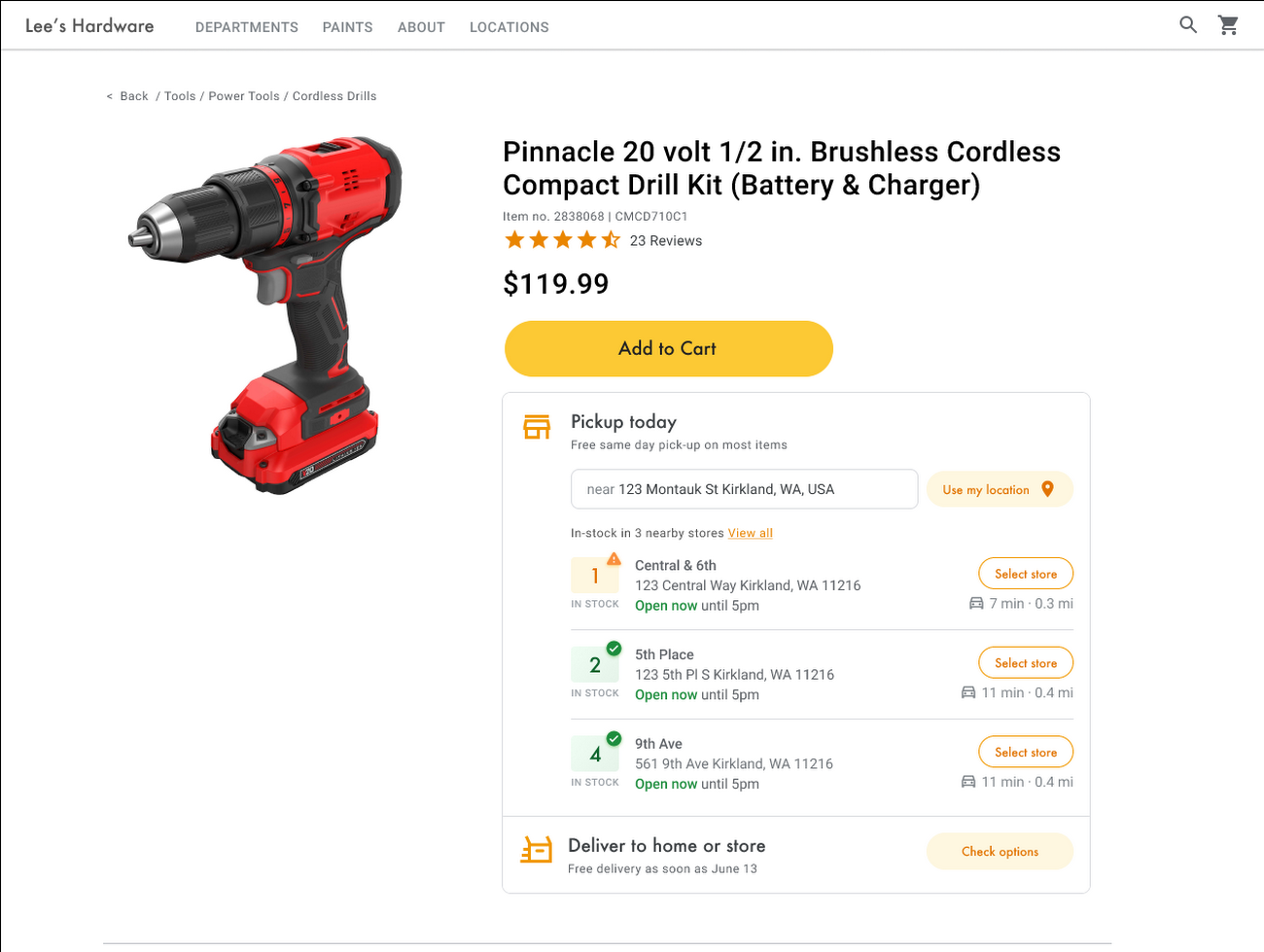
Under Covid restrictions, consumers have grown accustomed to having a myriad of shopping options, from curbside pickup to same-day delivery. Increased searches for ‘along my route’ and ‘in stock’ tell us that convenience is king for today’s consumer.4 Retailers can increase online conversion rates and drive store visits by including product availability and pick-up options on each of their product description pages (PDP); emphasizing the speed and convenience of these options and saving on significant shipping costs.
Our newest retail solution, Product Locator, can further help drive customers to visit by showing the exact distance stores are to the shopper and even estimated driving time, to further highlight the convenience of a store visit. A study conducted by Shopify found that showcasing local inventory boosted key store metrics including 45% of local pickup who made an additional purchase upon arrival.5 See the Product Locator solution guide to get started today.
Update your store locator page to address more of shoppers’ needs
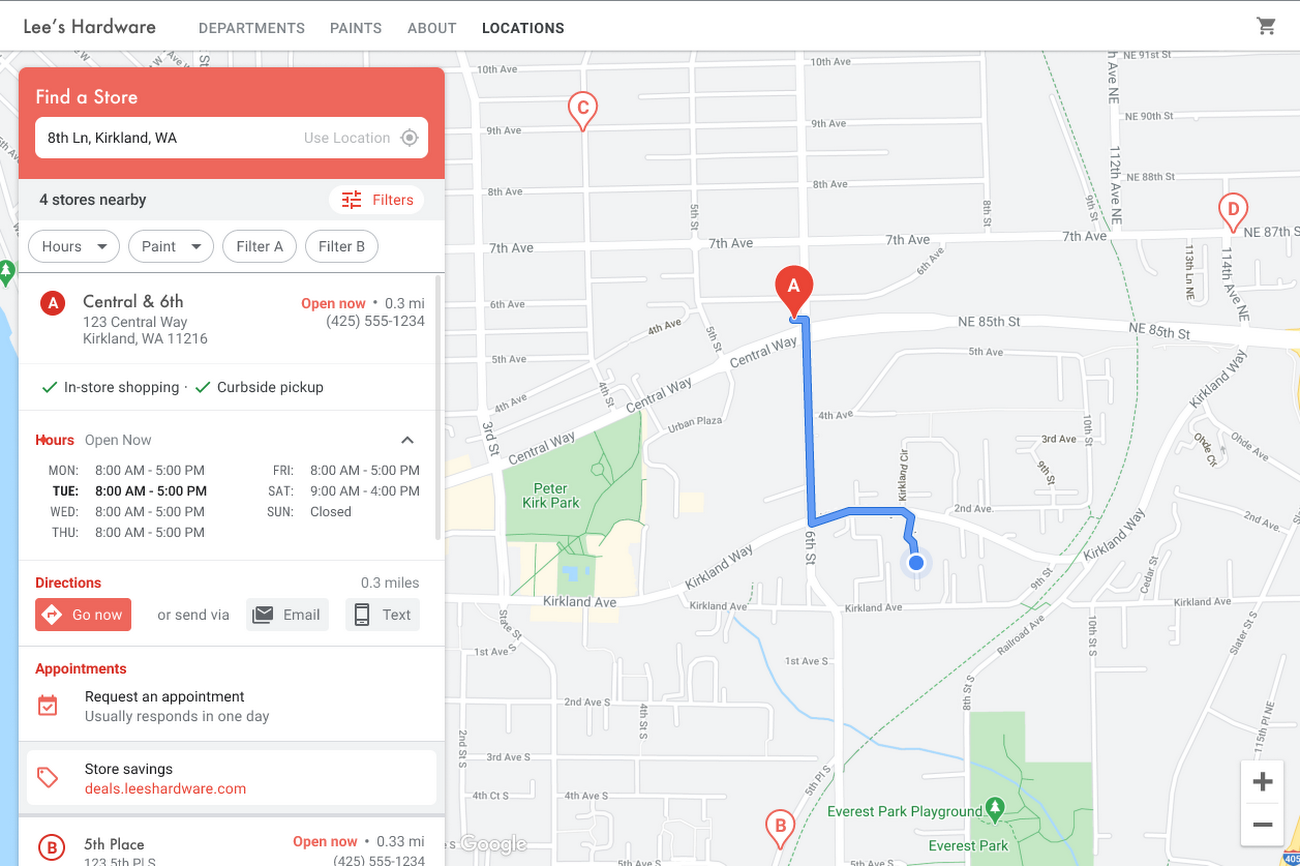
Store locators allow shoppers to more easily find your stores and can be made even more helpful with our Store Locator Plus solution. Our updated Store Locator Plus solution refreshes the store locator page to be more informative and engaging by integrating offers redeemable in-store, online scheduling for appointments and services, and text me directions services. Implement Store Locator Plus today using the guide.
Build and customize Store Locator Plus for your business in minutes
At Google Maps Platform, we are always thinking of ways to make building a map easier and faster for our customers. In May at I/O we made Cloud-based Maps Styling generally available, enabling map updates to happen without touching a line of code. Today we’re excited to introduce Quick Builder, our free, low code builder which allows you to demo, customize and build a version of the Store Locator Plus solution for your website in minutes. Experience Quick Builder today.
To learn more about how you can start adopting these retail solutions, visit our retail solutions page.
For more information on Google Maps Platform, visit our website.
1 Global Insights Briefing: Getting back out there
2 https://www.shopify.com/pos/future-of-retail-2021
3 https://www.thinkwithgoogle.com/future-of-marketing/digital-transformation/covid-trends-1-year/
4 https://www.thinkwithgoogle.com/consumer-insights/consumer-trends/pandemic-shopping-behavior/
5 https://www.shopify.com/pos/future-of-retail-2021
How Google Classroom Helps State of Iowa Employees Serve the Public Better

5581
Of your peers have already read this article.
1:30 Minutes
The most insightful time you'll spend today!
Organizations are pressed with the need to engage, retain, and upskill employees with many positions staying fully or partially remote as the pandemic continues. The Center for Digital Government (CDG) reports that 74% of state and local governments believe they will continue hybrid operations for the long-term. This transition is the latest in a long list of reasons agencies are looking for solutions to help train their workforce digitally. Some have found Google Classroom to be the perfect solution.
The State of Iowa knew about the advantages of digital classrooms even before the pandemic. They were already successfully using Google Classroom for in-person training, making the transition to digital seamless when the state closed down. Jessica Van Heuveln, a Google support specialist for the State of Iowa CIO’s Office, says the switch to digital doesn’t deprive workers of hands-on training. “You can use Google Classroom for many different environments, so if you’re doing self-taught, in-person or virtual training, it’s going to work with all those approaches.”
The logistics of a digital classroom
Iowa uses Google Classroom to onboard and upskill employees as well as train volunteers. When the pandemic shifted the state’s workforce to 70% working from home, they needed a platform that could not only handle a vast range of topics and teaching styles to support remote workers but also scale to meet their demand. Van Heuveln notes that Google Classroom was particularly helpful for handling compliance training, especially with its integration with Google Meet. These trainings often require an entire sector of the workforce to attend a single class with more than 100 attendees, according to Van Heuveln. The logistics of these larger sessions cuts down on the number of total sessions the state needs to host. Iowa also found that employees were less apprehensive about learning when they could do it from the comfort of their own homes.
Iowa follows a train-the-trainer model to train employees expected to instruct using Google Classroom. Trainers working in departments across the state learn to use Google Classroom to create and host virtual learning experiences specific to their own departments.
Collaborative classrooms made simple
Google Classroom meets many needs for Iowa, such as setting up training, managing attendance, reviewing uploaded coursework, and communicating with attendees. Both course attendees and trainers have everything they need in one place, and robust engagement tools help attendees stay focused while giving trainers the feedback they need from their lessons. Built-in survey options let trainers gauge attendee knowledge, and the chat function ensures no one ever misses a question. The reporting dashboard gives trainers access to analytics to track engagement and attendance, providing insights that can improve future training sessions.
Google Classroom also makes it easier to ensure attendees stay on board throughout the training program. Coursework can be uploaded directly into Google Classroom, and training sessions can be recorded and archived. This feature allows employees to work at their own pace or lets them catch up when a scheduling conflict means they might miss a session.
The enterprise version of Google Classroom Iowa uses interfaces with other Google Workspace tools such as Google Meet, Google Calendar, Google Drive, and Gmail, which streamlines training and leads to more collaboration between employees and trainers. It can also interface with applications from other providers, further boosting its utility as an effective virtual classroom. Google Drive stores training materials securely. Lastly, Google Classroom enterprise comes with 24/7 support to make sure agencies always have everything they need for success.
Helping employees be better prepared to serve
Google Classroom can be a powerful part of any training program, whether it be digital or in-person. Building virtual connections empowers organizations to deliver better experiences. Google Classroom is helping the State of Iowa accomplish this for their constituents. Designed to scale and be accessible from anywhere, the platform helps public employees better serve the public. Virtual training strategies are essential for agencies that are looking to grow their workforce and build employee skill levels. The most important thing, however, is that training programs enable employees to further your agency’s mission. To learn more about Google Classroom and see more solutions designed with government in mind, check out the Google Cloud for government page.
Chrome OS’s Hybrid Work Model Powers Google’s Return to Work Strategy

7486
Of your peers have already read this article.
1:30 Minutes
The most insightful time you'll spend today!
The pandemic continues to deeply affect our lives around the globe. In some places, new cases are surging and returning to work is the last thing on people’s minds. In other areas, conditions are improving and companies are starting to think about transitioning their workforce back to the office.
Exactly when and how to do this remains complex and varies by country, industry, and company. What’s certain is that hybrid work will become an essential part of the business world moving forward. And finding solutions that bridge the gap between “in-person” and “somewhere else” are crucial.
At Google, we’ve been focused on what the hybrid transformation means for us. To prepare for hybrid work, using modern solutions is a key enabler.
Chrome OS: Supporting Google’s return to office strategy
At Google, we’ll move to a hybrid work week where most Googlers spend approximately three days in the office and two days wherever they work best. It’s no surprise that as the modern, secure, cloud-first platform, Chrome OS is playing a key role in our transition to a hybrid work model. Because Chrome OS devices can easily be shared, more flexible working models and spaces are now possible. And with user profiles stored in the cloud and collaboration solutions like Google Workspace, employees can log in to any Chrome OS device, access what they need and pick up where they left off.
Here are just a few ways we are using Chrome OS and its tools to support the return to the office:
- In select office locations, Googlers can reserve desks through an internal booking tool set up with a high-performance Chromebox, keyboard, mouse, and monitor. Employees can log in to the Chromebox which syncs their cloud profile, and start working with the same environment they have on all their Chrome OS devices.
- We’re announcing new docking stations that are designed for Chrome OS devices and allow employees to bring in their Chromebook from home, connect to the dock with one USB-C cable, and use a monitor, keyboard, and mouse for a full desktop experience.
- Every Chrome OS device enables a zero-trust security working model with BeyondCorp Enterprise providing our workforce with simple and secure access to applications while providing additional security controls for IT.
- We’ve deployed the new Chrome OS Readiness Tool to our extended workforce to identify employees that are able to switch to Chrome OS. This allows us to expand the latest security, deployment, and manageability benefits to more of the workforce.
Additional ways Chrome OS is helping organizations with return to office
We aren’t the only ones supporting our return to office and hybrid work strategy with Chrome OS. We’ve heard more ways our customers are using Chrome OS to make the transition as smooth as possible. These include:
- Streamlining deployment and management of Chrome OS devices using zero-touch enrollment which allows devices to automatically enroll into a corporate domain without IT configuration.
Grab & Go Chromebooks being used for frontline and hybrid information workers, allowing employees to grab a Chromebook from a cart and get to work right away. - Parallels Desktop for Chrome OS being deployed to allow employees to access Windows or legacy apps locally on their Chrome OS devices.
- Existing Windows and Mac devices being modernized and repurposed to run a Chrome OS experience using CloudReady. (Google is currently offering a CloudReady promotion. Learn more here.)
While the Chrome OS team has been working towards making remote working as seamless as possible for IT, we’ve also made advancements in supporting traditional technology that’s required in the office.
- In October, we announced Chrome Enterprise Recommended: a collection of identity, printing, productivity, communications, and virtualization solutions that are verified to run great on Chrome OS.
- With the increased usage of video conferencing on Chrome OS devices, we’ve made improvements to Google Meet and Zoom performance including camera and video improvements to reduce any unnecessary processing and features that intelligently adapt to your device, your network, and what you are working on.
- For improved access to Windows and legacy apps, VMware Horizon introduced multi-monitor support and USB redirection and Citrix Workspace released a tech preview with webcam enhancements and Microsoft Teams optimizations.
- We integrated with the Okta Workflows platform, so IT administrators can include Chrome OS in it’s access logic and deploy quickly without code. Recently, we’ve added the ability to require users to reauthenticate on their Chrome OS device once Okta has detected that the user has changed their password. Try out this new capability by signing up for our Trusted Tester program.
- We’ve increased our support for direct IP printing with additional printer models since the beginning of 2020. In addition, we have made improvements to management features, including support for multiple print servers and launched policy APIs to provide a better IT admin experience.
Join us for a digital event with Modern Computing Alliance and its newest member HP
Last year we announced the launch of the Modern Computing Alliance—a collaboration of industry leaders including Box, Chrome Enterprise, Citrix, Dell, Google Workspace, Imprivata, Intel, Okta, RingCentral, Slack, VMware, and Zoom aim to create the pioneering solutions that businesses need. We are thrilled to introduce HP, who brings their innovative hardware and enterprise hardware expertise to the Modern Computing Alliance and has been working closely with the alliance to ensure true silicon-to-cloud innovation.
As an alliance, we’ve been deeply engaged in the hybrid work shift. We invite you to join us for a digital event where we discuss questions about returning to work. Like how product design can encourage participation and collaboration regardless of where employees are, important security issues to keep in mind, and what factors businesses should consider to support a safe, working environment.
Home. Heading back. Hybrid.
Hear from the experts on hybrid work and return to office.
Date: May 20th, 2021
Register here.
If you are ready to try Chrome OS today, it’s easy to get started. You can contact us to get connected to a partner, sign up for a free 30-day trial of Chrome Enterprise Upgrade to start managing Chrome OS devices, or deploy the Chrome OS Readiness Tool to identify employees that are ready to switch to Chrome OS.POSTED IN:
Celebrating Google Cloud and State of Wyoming’s Decade of Partnership!

4041
Of your peers have already read this article.
2:00 Minutes
The most insightful time you'll spend today!
When Wyoming became the first state to transition all its employees to Google Workspace ten years ago, everyone expected a million dollars in cost savings. What started as a move to save money and ease communication has turned into much more. While the cost savings continues to be significant, state efficiency skyrocketed, allowing employees to spend more time working directly with the community.
This year, we’re celebrating 10 of the most important lessons learned over ten years in our Wyoming-Google partnership.
1. Collaborative tools breed a collaborative culture. Wyoming was prepared when the COVID-19 pandemic hit, forcing our workers to transition to at-home environments. Employees across the state were already using Google Workspace collaboration and productivity tools, which made the switch easy. We also had already set a precedent by hosting a key budget meeting over Google Meet from outside the country. Using Google Meet in such a high visibility meeting showed state employees that every level of government could benefit from digital collaboration. This culture was made possible by Google Workspace tools.
2. Digital tools can connect the community with essential services. That same collaborative spirit helped our government employees better connect with our community throughout the pandemic, delivering key information for food assistance, as an example. One in five children in Wyoming suffer from food insecurity. Google Workspace allows programs like the Wyoming Hunger Initiative to run smoothly, as everything from scheduling and planning events, to tracking and research, is handled with Google Workspace. The data gathered and stored in Google Cloud is protected and helps to bring meals to the kids who need them most.
3. Easy-to-use apps make transitions simpler. Google Workspace apps have been a breeze to learn from day one. They are designed to be intuitive and state employees are able to get the hang of the software simply by trying it themselves. We also developed a training series for new users to further ease the transition. Training is offered every six weeks so users can take the training when they are onboarded or at any time they need a refresher.As I started my career with the State of Wyoming, Wyoming began its journey as the first state to go Google – forever changing how and where we work. This was especially evident as we worked through our emergency telework at the height of the pandemic. Whether meeting with stakeholders around the capitol complex, across the state or teleworking from home, Google ensures our teams are always connected and collaborating.
-Tim Sheehan
Interim CIO & Information Services Administrator, Dept. of Enterprise Technology Services
4. Invest in students, invest in the future. How do you enable students to retain access to their work and emails as they transition from elementary to middle and high school? Wyoming developed “Wyo for Life ,” which established a state email domain across all our school districts. Students get an email address with unlimited data that they can keep forever. This makes the transition for students seamless, and their digital portfolio is theirs for life.
5. Switching to Google Cloud saved millions on technology costs. The cost savings from moving to Google have taken many forms over the years. Google Cloud’s migration tools made it easy to move various systems to a single centralized platform, consolidating IT resources—and saving money—across the state. In the past 10 years, the cost of Google Workspace within the Department of Transportation has increased by only 7%, a third of the inflation rate over the same period. Our state also switched from a $1.5 million legacy video conferencing system to Google Chromeboxes in 2015—at a fraction of the cost. When combined with the savings over each year, the switch has saved taxpayers a compelling amount of money. This allows our state to keep innovating and adapting without putting pressure on taxpayers.
6. Security is both simpler and stronger. In the last decade, Wyoming has become the state with one of the best security records in the country. We have consistently ranked in the top five most secure states, year after year, with the help of Google Cloud. Other states have found it difficult to keep constituent data secure, and major breaches have left communities across the country floundering. By partnering with Google, we have ensured constituent data is constantly secure.
7. Flexibility is crucial for governments that want to grow. Focusing on flexibility, the State of Wyoming has been able to look at the needs of our employees and community and change the way we apply technology to our constituent services with Google Workspace. As those needs have changed, we have been able to shift our focus and better serve constituents without having to spend time rebuilding internal systems.
8. Working together has led to stronger, more cost-effective solutions over time. Our state has access to Google Cloud experts, and that relationship has allowed real flexibility. For example, Google Meet and its predecessor Google Hangouts, weren’t available at the beginning of our partnership. When it became clear that those tools could serve the Department of Corrections, we worked with Google Cloud to ensure the tool was added to our Google Workspace portfolio.
9. Workspace apps are always improving. Google Cloud is constantly evolving, upgrading, and improving their products to serve their users better. The hundreds of product updates they’ve put out over the years have benefited us as a long-term customer, and Google Workspace for Government ensures the complex problem of running an efficient public office has real solutions.
10. Community is key, even outside of Wyoming. The State of Wyoming is part of a larger community of public sector workers using Google called Public Sector Connect. All public sector employees can connect with others, join discussions, and get inspired by how Google tools are changing government and education. All community members hold positions in government or education, and new ideas are being shared every day. This community is at the forefront of public sector innovation. We meet with Google engineers and suggest solutions, feature set requests, and learn from others about problem-solving, innovation and implementation. This is the space that has been lacking in the public sector for years and if you are in the public sector, please join!
Using Google has allowed the State of Wyoming government to focus on our future roadmap. Over the last 10 years, instead of retrofitting our ideas into legacy technology or developing applications as we go, Google Workspace and Google Cloud contained all of the tools to achieve our milestones seamlessly. Google Workspace contains all of the applications our end users need for working remotely, in-person, or hybrid. The harmony between Google Workspace and Google Cloud opens new opportunities for our government, to include data analytics, big queries, and the use of artificial intelligence. Our enterprise processes have modernized thanks to the innovative solutions and support by Google.
Now 10 years later, we are proud of the partnership we have built with Google Cloud and are looking forward to the next 10 years using Google to support our community.
More Relevant Stories for Your Company

Google Dataflow Named Leader in The 2021 Forrester Wave™: Streaming Analytics
We are excited to announce that Google has been named a Leader in The Forrester Wave™: Streaming Analytics, Q2 2021 report. Thank you to our strong community of customers and partners for working with us to deliver a customer focused product. We believe Forrester’s recognition is an acknowledgement of our leadership

How Google is Showing the Way to the Differently-abled: A Blind Program Manager’s Account
What does “accessibility” mean to businesses? It’s not just about making sure that your office or retail space is accessible to workers and customers who have mobility challenges, it’s also about making sure that your apps, digital tools and content are also more accessible to everyone. Our product teams work

Download the Forrester Study to Explore the Benefits of AI for IT Operations in Cloud Environment
Organizations are currently modernizing their businesses in order to meet the increasing complexity of today’s business landscape. In effect, business leaders must evaluate the best way to mitigate the challenges which plague their cloud operations, all while meeting customers’ growing expectations around digital experience (DX) through agility, automation, and proactive
How Japan’s Vaccine Locator Platform Became A One-stop Shop for COVID-19 and Vaccination-related Information
Editor’s Note: David Moore, Founder and CEO of Navagis, shares his story of teaming up with the Google Maps Platform team to help people across Japan get vaccinated amid COVID-19 pandemic. The roots of Navagis go back to Hurricane Katrina, when I led an Army Corps of Engineers team that
