





Four Simple Steps to SRE Implementation

3190
Of your peers have already read this article.
3:00 Minutes
The most insightful time you'll spend today!
A few months ago, we wrote about how the first step to implementing Site Reliability Engineering (SRE) in an organization is getting leadership on board. So, let’s assume that you’ve gone ahead and done that. Now what? What are some concrete steps you can take to get the SRE ball rolling? In this blog post, we’ll take a look at what you as an IT leader can do to fast-track SRE within your team.
Step 1: Start small and iterate
“Rome wasn’t built in a day,” the saying goes, but you do need to start somewhere. When it comes to implementing SRE principles, the approach that I (and my team) found to be the most effective is to start with a proof of concept, learn from our mistakes, and iterate!
Start by identifying a relevant application and/or team
There are many factors that go into choosing a specific team or application for your SRE proof of concept. Most of the time, though, this is a strategic decision for the organization, which is outside the scope of this article. Possible candidates can be a team shifting from traditional operations or DevOps to SRE, or a need to increase reliability to a business-critical product. No matter the reason, it’s crucial to select an application that is:
- Critical to the business. Your customers should care deeply about its uptime and reliability.
- Currently in development. Pick an application in which the business is actively investing resources.
- In a perfect world, the application provides data and metrics regarding its behaviour.
Conversely, stay away from proprietary software. If the application wasn’t built by you, it’s not a good candidate for SRE! You need the ability to make strategic decisions about—and engineering changes to—the application as needed.
Pro tip: In general, if you have workloads both on-premises and in the cloud, try to start with the cloud-based app. If your engineers come from a traditional operations environment, changing their thinking away from ‘bare metal’ and infrastructure metrics will be easier for a cloud-based app, as managed infrastructure turns practitioners into users and forces them to consume it like developers (APIs, infrastructure as code, etc.)
Remember: Set realistic goals. Discouraging your team with unrealistic expectations early on will have a negative effect on the initiative.
Step 2: Empower your teams
Implementing SRE principles requires fostering a learning culture, and in that regard, team enablement means both training them, i.e., in regards to knowledge, as well as empowering them.
Building a training program is a topic in and of itself, but it’s important to think about an enablement strategy at an early stage. Especially in large organizations, you need to address topics like internal upskilling, hiring and scaling the team as well as onboarding and creating a learning community.
Your enablement strategy should also accommodate employees at different levels and in different functions. For example, higher leadership’s training will look very different from practitioners’ training. Leadership’s education should be sufficient to get buy-in and to be able to make organizational decisions. To drive change in the entire organization, additional training to leadership on cultural concepts and practices might be required.
When it comes to engineering leadership and/or middle management (managers that manage managers), training should be a combination of high-level cultural concepts to help foster the required culture, and technical SRE practices that are deep enough to understand prioritization, resource allocation, process creation, and future needs.
When it comes to practitioners, ideally you want the entire organization to be aligned both from a knowledge perspective as well as culturally. But as we’ve mentioned earlier, it’s best to start simple, with just one team.
The starting point for those teams should be to understand reliability and key concepts like SLAs, SLOs, SLIs and error budgets. These are important because SRE is focused on the customer experience. Measuring whether systems meet customer expectations requires a shift in mindset and can take time.
After identifying your first application and/or the team responsible for it, it’s time to identify the app’s user journeys, the set of interactions a user has with a service to achieve a single goal—for example, a single click or a multi-step pipeline, and rank them according to business impact. The most critical ones are called Critical User Journeys (CUJ), and these are where you should start drafting SLO/SLIs.

Pro tip: There are some general technical practices that can help you embrace SRE faster. For example, using less repos rather than more can help you reduce silos within the organization and better utilize resources.
Likewise, prioritizing automatic processes and self-healing systems can benefit reliability, but also team satisfaction, helping the organization retain talent.
Final note: Similar to the way that you make architecture decisions, your chosen technology, solutions and implementation tools should enable you to do what you are trying to do and not vice versa.
Step 3: Scale those learnings
After you establish these SRE practices with one or a few teams, the next step is to think about building an SRE community and formalized processes across the organization. In some organizations, you can do this in parallel to the end of step 2, and in some organizations, only after you have a few successful implementations under your belt.
In this phase, you’ll probably want to address community, culture, enablement and processes. You will need to address them all, especially as they are intertwined, but which one you prioritize will depend on your organization.
Creating an SRE community in the organization is important both from a learning perspective, but also to establish a knowledge base of best practices, train subject-matter experts, help create needed guardrails, and align processes.
Building a community goes hand in hand with fostering an empowered culture and training teams. The idea is that early adopters are ambassadors for SRE who share their learnings and train other teams in the organization.
It is also useful to identify potential ambassadors or champions in individual development teams who are passionate about SRE and will help with the adoption of those practices.
It is also crucial to create repeatable trainings for each functional role, including onboarding sessions. Onboarding new team members is a critical aspect of training and fostering an empowered SRE culture. Therefore it is vital to be mindful about your onboarding process and make sure that the knowledge is not lost when team members change roles.
LEARN MOREDeploying SRE training best practices to productionHow to “SRE” an SRE training program
During this phase, you also want to foster an org-wide culture that promotes psychological safety, accepts failure as normal and enables the team to learn from mistakes. For that, leadership must model the desired culture and promote transparency.
Finally, having structured and formalized processes can help reduce the stress around emergency response—especially being on-call. Processes can also provide clarity and make teams more collaborative and effective.
In order to have the most impact, start by prioritizing the most painful areas under your team’s remit—for example, clean up noisy alerts to avoid (or address) alert fatigue, automate your change management processes and involve only the necessary people to save team bandwidth. Team members shouldn’t work on software engineering projects while doing on-call incident management, and vice-versa. Make sure they have enough bandwidth to do both, separately. Similar to other areas, you want to use data to drive your decisions. As such, identify where your teams spend the most time, and for how long.
If you find that it is challenging to collect this kind of data, be it quantitative or qualitative, a good starting point is often your emergency response processes, as those have a direct impact on the business, especially around the escalation process, incident management and related policies.
Pro tip: All the above practices contribute to reducing silos and align goals across the organization; those should include also your vendors and engineering partners. To that end, make sure your contracts with them capture those goals as well.
Step 4: Embody a data-driven mindset
Starting the SRE journey can take time, even if you’re just implementing it for one team. Two quick wins that you can start with that will make a positive impact are collecting data and doing blameless postmortems.
In SRE we try to be as data-driven as possible, so creating a measurement culture in your organization is crucial. When prioritizing data collection, ideally look for data that represents the customer experience. Collecting that data will help you identify your gaps and help you prioritize according to business needs and by extension your customer expectations.
Another thing that you can do is run or improve postmortems, which are an essential way of learning from failure and fostering a strong SRE culture. From our experience, even organizations that do run postmortems can benefit from them much more with a few minor improvements. It is important to remember that postmortems should be blameless in order to make the team feel safe to share and learn from failures. And to make tomorrow better than today, i.e., not repeat the same problems, it’s important that postmortems include action items and are assigned to an owner.
Creating a shared repository for postmortems can have a tremendous impact on the team: it increases transparency, reduces silos, and contributes to the learning culture. It also shows the team that the organization “practices what it preaches.” Implementing a repository can be as easy as creating a shared drive.
Pro tip: Postmortems should be blameless and actionable.
On the SRE fast track
Of course, no two organizations are alike, and no two SRE teams are either. But by following these steps, you can help get your team on the path to SRE success faster. To learn more about developing an effective SRE practice, check out the following resources.
New Enterprise Capabilities and Changes to Cloud Spanner Reduces Cost of Running Workloads by 90 Percent

5405
Of your peers have already read this article.
3:00 Minutes
The most insightful time you'll spend today!
Customers love Cloud Spanner because it gives them the benefits of relational semantics and SQL while also delivering the scale and availability of non-relational databases. Many of these customers want to move even more of their work to Spanner, and have requested smaller instance sizes to support development, testing and small production workloads. We’re happy to announce that they’ll soon get what they asked for: more granular instance sizing is coming to Spanner.
Granular instance sizing will be available in Public Preview soon. With this feature, you can run workloads on Spanner at as low as 1/10th the cost of regular instances, equating to approximately $65/month.
In addition, we are launching new enterprise capabilities to break down operational silos for real-time insights and provide greater database observability to developers:
- Datastream, now in public preview, is a change data capture (CDC) service that allows enterprises to synchronize data across heterogeneous databases and applications. With Spanner support in Datastream, users will be able to stream data from MySQL or Oracle to Spanner reliably and with minimal latency.
- BigQuery federation to Spanner (coming soon) lets users query transactional data residing in Spanner, from BigQuery, without moving or copying data.
- Key Visualizer, available now in public preview, provides interactive monitoring so developers can quickly identify trends and usage patterns in Spanner.
Democratizing access with more granular instance sizing
Today, customers provision Spanner instances by specifying the number of nodes they need to run their workloads. Each node can provide up to 10,000 queries per second (QPS) of reads or 2,000 QPS of writes (writing single rows at 1 KB of data per row) and 2 TB of storage. A Spanner node is replicated across 3 zones for regional instances, and 5 or more zones for multi-regional instances. The choice of node count determines the amount of serving and storage resources that are available to the databases in a given instance.
Historically, the most granular unit for provisioning resources on Spanner has been one node. To enable more granular control, we are introducing Processing Units (PUs); one Spanner node is equal to 1,000 PUs. Customers can now provision in batches of 100 PUs, and get a proportionate amount of compute and storage resources. This will allow teams to run smaller workloads on Spanner at much lower cost. With this feature, customers can start at 100 PUs and scale up as needed in batches of 100 PUs, to up to 1,000 PUs (1 node), all with zero downtime. Subsequently, customers can continue to scale up by adding more nodes, just like what they do today. Customers do have the choice of using either PUs or nodes to provision resources within workloads, when those workloads occupy multiple nodes of capacity.
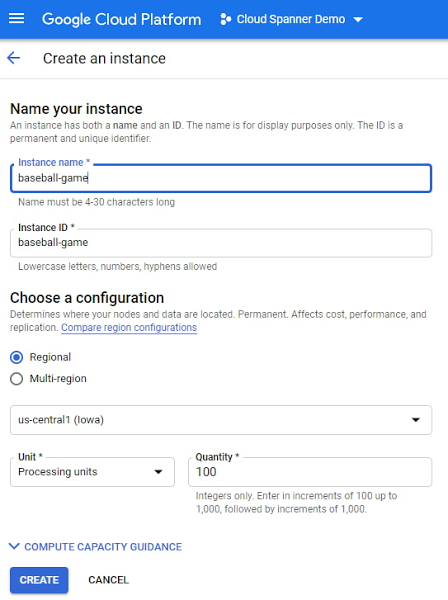
To illustrate with an example, let’s say a game developer creates a Spanner instance called “baseball-game” in us-central1, with 100 PU compute capacity at $65/month price.
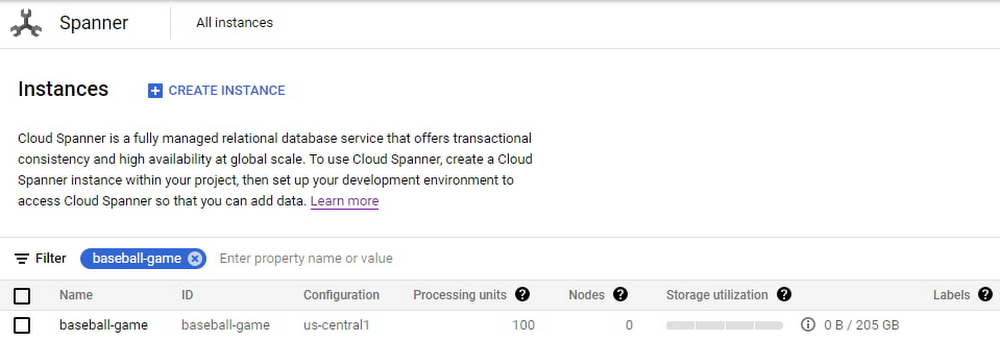
As you can see below, proportional maximum storage of 205 GB is assigned to the 100 PU instance.
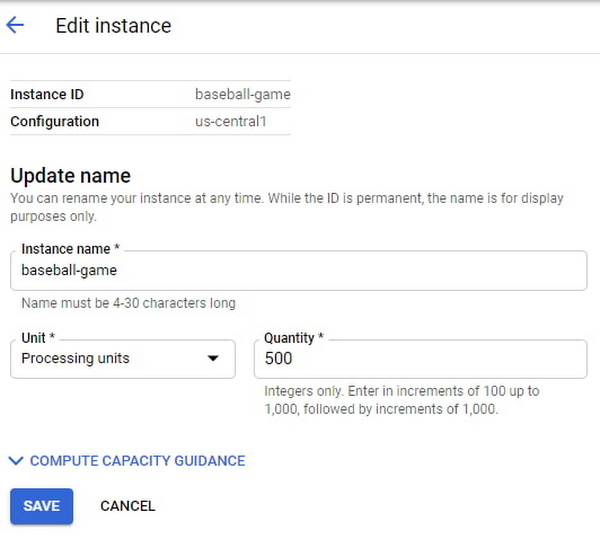
Once the game starts becoming popular and resource demands increase, the user edits the instance to increase the compute capacity to 500 PUs with proportional maximum 1 TB of storage.
The game grows in popularity, and the gaming company prepares to launch a much-awaited capability in the game. Anticipating a sharp increase in usage at launch day, the game developers increase the compute capacity to 3,000 PUs. Compute capacity assigned to the instance over a period of time can be viewed in Cloud Monitoring graphs:

Request Access
You can request early access to granular instance sizing feature by filling this form.
Breaking down operational silos with Datastream CDC and BigQuery federation
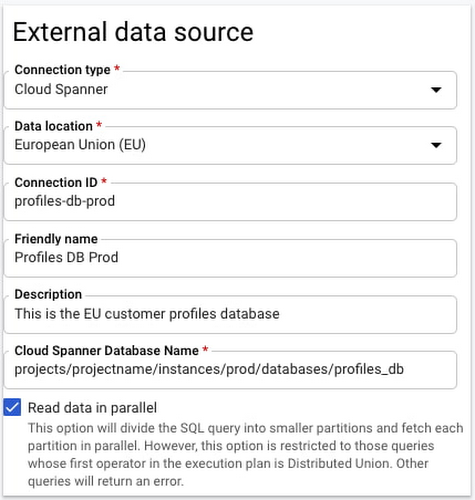
BigQuery Federation. BigQuery has made analytics easy by bringing together data from multiple sources for seamless analysis. Soon you’ll also be able to analyze data in Spanner directly in BigQuery. With Spanner’s BigQuery federation, you’ll be able to instantly query data residing in Spanner in real-time without moving or copying the data. Simply set up the Spanner as an external data source in BigQuery, as shown below.
Change Data Capture ingest. Now in public preview, Datastream lets you stream change data into Google Cloud from MySQL and Oracle databases. As of today, you can ingest this change data directly into Spanner using a built-in Dataflow template. This lets you migrate data from MySQL and Oracle databases into Spanner in near-real time.
Understanding performance and resource usage with Key Visualizer
Key Visualizer is a new interactive monitoring tool that lets developers and administrators analyze usage patterns in Spanner. It reveals trends and outliers in key performance and resource metrics for databases of any size, helping to optimize queries and reduce infrastructure costs. Designed for performance tuning and instance sizing, Key Visualizer is available today in public preview in the web-based Cloud Console for all Spanner databases at no additional cost. Learn more in the Key Visualizer blog.
Learn more
- To request early access to granular instance sizing in Spanner, fill out this form.
- To get started with Spanner today, create an instance or try it out with a Spanner Qwiklab.
4 Steps to a Successful Cloud Migration

3958
Of your peers have already read this article.
2:00 Minutes
The most insightful time you'll spend today!
Digital transformation and migration to the cloud are top priorities for a lot of enterprises. At Google Cloud, we’re working hard to make this journey easier. For example, we recently launched Migrate for Compute Engine and Migrate for Anthos to simplify cloud migration and modernization. These services have helped customers like Cardinal Health perform successful, large-scale migrations to GCP.
But we understand that the migration journey can be daunting. To make things easier, we developed a whitepaper on application migration featuring investigative processes and advice to help you design an effective migration and modernization strategy. This guide outlines the four basic steps you need to follow to migrate successfully and efficiently:
- Build an inventory of your applications and infrastructure: Understanding how many items, such as applications and hardware appliances, exist in your current environment is an important first step.
- Categorize your applications: Analyze the characteristics of all of your applications and evaluate them across two dimensions: migration to cloud, and modernization.
- Decide whether or not to migrate an application to the cloud: Not all applications should move to the cloud quite yet. The whitepaper lists the questions to ask to determine whether or not to migrate a given application.
- Pick your migration strategy: For the applications you decided to migrate, decide on your ideal strategy—pure lift and shift, containers, cloud managed services, or a combination thereof.
There’s a lot to consider when you start thinking about digital transformation, and every cloud modernization project has its nuances and unique considerations. The secret to success is understanding the advantages and disadvantages of the options at your disposal, and weighing them against what you want to transform and why. To learn how to migrate and modernize your applications with Google Cloud, download this whitepaper.
How Google Cloud Sped up Nuro’s Data Delivery to Engineers and Automated Storage Transfer

3404
Of your peers have already read this article.
3:00 Minutes
The most insightful time you'll spend today!
Engineers that build last-mile delivery services belong to an elite order, a hallowed subcategory. Delivery customers are incredibly demanding when it comes to speed and convenience, and the services they use must take variables like increased traffic, road conditions, human error, and even driver availability into account every day.
Nuro is a company with a new approach to delivery services. Nuro has a fleet of autonomous vehicles designed to address many of the problems related to last-mile delivery. And every day, these vehicles — and their sensors — generate a lot of data before parking for the night. For Nuro engineers, that data can help them understand the impact of new on-road features, make improvements to their vehicles’ software, and ensure even better deliveries for their customers.
For Nuro, the key challenge is how to move petabytes of data as quickly, securely, and easily as possible from their edge environments, like vehicle depots, to Google’s Cloud Storage. For this delivery effort, Nuro selected Google’s Transfer Appliance with its new online transfer capability, now generally available.
Helping Nuro to speed up data delivery from the edge to the cloud
Like many Google Cloud customers, Nuro collects data from remote environments, like vehicle depots, that have different networking and storage capabilities when compared to a traditional data center. For a transfer solution to be effective moving unstructured data from these environments to the cloud, the solution needs to be easy to deploy and automate, while still providing similar performance as a more complicated alternative.
The Transfer Appliance was built for this use case. It arrives to customers as a physical appliance with a preconfigured version of Google’s Storage Transfer Service software already installed. Customers can move files to the appliance by using SFTP or SCP, or, alternately, can mount the appliance as an NFS share and copy target. Data can be stored locally on the appliance or transferred over the network, and secure encryption — at-rest and in-flight — is enabled by default.
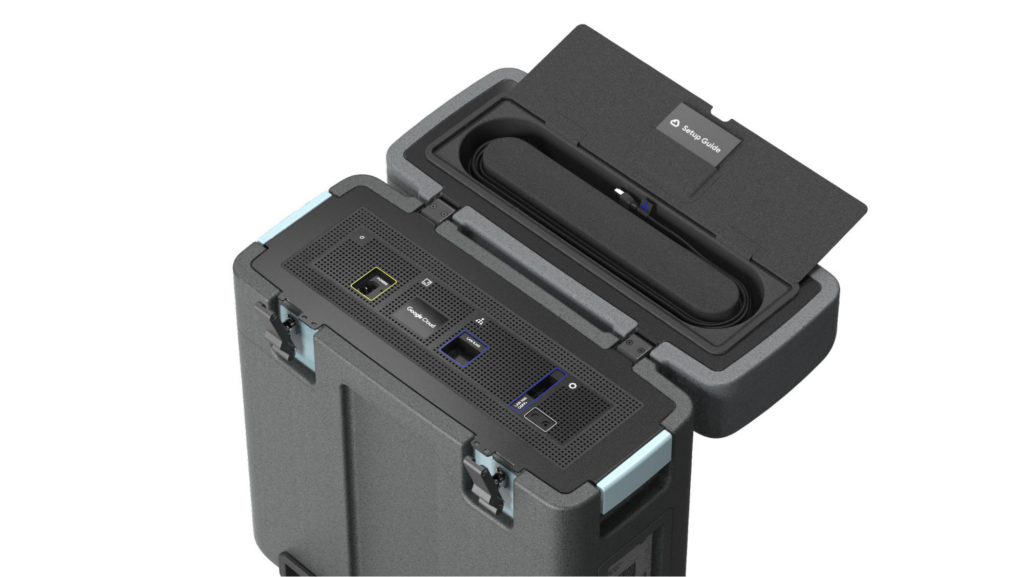
With these new appliances, Nuro will be able to automate much of their storage transfer needs. When their autonomous vehicles return to the depot, they can move data like software logs, LIDAR data, and sensor data — all ideal fits for Google’s Cloud Storage — from parked vehicles to the Transfer Appliance. Online transfers can then be performed throughout the day, ensuring a steady stream of valuable data in the cloud for developers to analyze and use in their nightly builds. All of this will help Nuro’s engineering leaders like Jie Pan to run more productive development teams with less operational overhead.
“Our autonomous vehicles generate a tremendous amount of useful data, and our goal is to get that data to our engineers as soon as possible,” said Jie Pan, Engineering Manager at Nuro. “When vehicles return to the depot, we can move data hourly into Cloud Storage over the network. We also have the flexibility to return the Transfer Appliance back to Google Cloud. Most importantly, this rapid transfer architecture gives a meaningful boost to engineering productivity and development velocity.”
Going the extra mile
Engineering and infrastructure leaders understand the value of delivering the right data to the right teams, as fast as possible. By adding preconfigured, over-the-network transfer into a turnkey Transfer Appliance, Google Cloud customers can more easily automate these data deliveries by scheduling regular migrations of on-premises files, objects, and other unstructured data to our Cloud Storage.
As Nuro continues to grow their manufacturing and testing footprint, they plan to use Transfer Appliances to further scale and simplify their data migration from on-premises to Google Cloud. Cutting the time to migrate their data by more than half will make for happier, more productive developers, and that will help Nuro bring us all the future of delivery a little faster.
If you’d like to learn more about Transfer Appliance and its new online transfer capability, click here or reach out to your Google Cloud account team.
3309
Of your peers have already watched this video.
1:30 Minutes
The most insightful time you'll spend today!
Fitbit’s Zero-Downtime Migration to GCP
In 2019, Fitbit moved all of its production operations from managed hosting to Google Cloud Platform without any downtime. The Fitbit experience is provided by a monolithic application backed by 200+ data stores, making the task of moving service by service impossible.
So, Fitbit decided to run services in both hosting environments and move user by user. This is the story of Fitbit’s migration to GCP, which was tested and executed mostly in production, without any effects to the users.
The tale starts with a review of goals and requirements for the migration. What should the user experience be during this period? How would we know if we are meeting that benchmark and can push forward? How would we slow or reverse migration if things weren’t going well? Answering these questions led us to a migration plan that started with the movement of internal users, followed by the careful transplant of a small number of real customers, and concluded with a mass migration of the majority of our users.
This migration path required significant new additions to Fitbit’s architecture, including new testing, routing, and caching techniques. As the journey approached its conclusion, we recognized that these methods were not merely allowing us to migrate; they were allowing Fitbit to operate in multiple hosting environments simultaneously. The lessons from this migration have provided the foundation for a mutli-region architecture that will unlock the full potential of life in Google Cloud Platform.
How One Company Uses AI and Data Analysis to Boost Revenue

9474
Of your peers have already read this article.
4:30 Minutes
The most insightful time you'll spend today!
AI, deep learning, and image recognition is transforming the shopping experience. These technologies enable consumers to use product images or screenshots rather than text to search for similar products. This improves the customer experience and enables retailers with online and offline outlets to provide a genuine omnichannel experience.
The lack of complexity and the ease of use of BigQuery has enabled ViSenze to reduce its data infrastructure and management costs by 30%–50%, and scale up without incurring downtime.
—Renjie Yao, Data Platform Lead, ViSenze
Visual commerce provider ViSenze is helping some of the world’s leading retailers improve conversion rates through image-based search.
The business’s products also enable media companies to use the platform to turn images and videos into engagement opportunities—driving new and incremental revenues.
Created through NExT—a research center established by the National University of Singapore and Tsinghua University of China—ViSenze now operates in the United States, United Kingdom, India, China, and Singapore. The business is backed by Japan-based internet and ecommerce company Rakuten and cross-border investment specialist WI Harper Group.
Growth in SMB and Mobiles
Renjie Yao, Data Platform Lead at ViSenze, sees opportunities for growth in the small-to-medium business sector, where companies do not have the resources to build similar technologies, and with mobile device OEMs to integrate ViSenze natively on smartphones.
Phone owners can activate a “shopping lens” on camera and gallery apps to capture an image of a product. They then receive matching results from more than 800 partner merchants and retailers and can then click through to product pages on partner apps or mobile websites. Alternatively, they may use a photo to compare products sold on different sites or shop matching styles.
“Our research found Google Cloud provided a complete, integrated ecosystem rather than a disparate collection of tools and components, and so was ideal for our needs.”
—Renjie Yao, Data Platform Lead, ViSenze
The ViSenze API analyzes the contents of a selected or clicked image and sends the information back to the organization’s visual commerce platform. The platform feeds back similar results based on that information.
The ViSenze offering also extends to image analysis for the tagging of product attributes—such as a white turtleneck cardigan with full sleeves—to provide an improved search experience.
Data Vital to ViSenze
Capturing and analyzing large volumes of data is integral to ViSenze. “We have to understand how consumers interact with our customers’ ecommerce websites and apps,” says Yao. “For example, we need to know who has looked at a particular pair of jeans on a website and whether that visit led to a conversion. We can then tell that customer whether they need to make more stock available.”
ViSenze also relies on data to provide high-quality training for its image recognition models and its domain-specific models for online retail.
Protect Customer Data
Data is vital to ViSenze—but customer privacy is most important. “All the data we collect is transparent to our customers, meaning they can decide what they do not want us to collect. In addition, all personal data processing complies with privacy protection regulations in each region, such as the General Data Protection Regulation in Europe.”
A Quick Move to the Cloud
ViSenze started operations using servers, storage, networking, and associated systems in an on-premises data center operated by NExT.
However, to support rapid growth, the business decided to move its workloads to the cloud. ViSenze opted for a multi-cloud architecture, using in part a Google Cloud data infrastructure.
“Our research found Google Cloud provided a complete, integrated ecosystem rather than a disparate collection of tools and components, and so was ideal for our needs,” says Yao. “We could connect different components with the click of a mouse.” Further, the business found it could easily configure rules and pipelines to route data logs to relevant Google Cloud services.
The review found Google Cloud’s extensive managed services would also remove administration and maintenance tasks from ViSenze’s in-house technology team—freeing team members to focus on more valuable tasks.
In addition, Google Cloud provided the security features—including custom hardware running hardened operating systems and file systems and encryption of data at rest and in transit—needed to protect sensitive information. Finally, the location of Google Cloud regions in several countries would enable the business to meet regulatory and data sovereignty requirements.
A Three-Month Implementation
ViSenze opted to move to Google Cloud in mid-2017 and completed a three-month implementation using internal resources. “The process was very smooth and intuitive, and we had no problems building our entire data platform within Google Cloud,” says Yao.
The business now uses an architecture comprising Google Kubernetes Engine to manage and orchestrate Docker containers running in Google Cloud Platform; BigQuery to provide an analytics data warehouse, with Google Data Studio providing customizable visualization and reports; Stackdriver to monitor and manage virtual machine instances and services inside Google Cloud; Cloud SQL to manage its relational databases for real-time analytics; Compute Engine to provide compute resources; Cloud Storage to store files and objects; Cloud Pub/Sub to provide real-time messaging between applications; and Cloud Functions to build event-driven applications.
After collecting the request logs of users in virtual machine instances and Docker containers, ViSenze distributes them in three directions. “We export raw logs into Cloud Pub/Sub for indexing inside an Elasticsearch search engine, and to a BigQuery data warehouse for further analytics,” explains Yao. “We also use Cloud Functions-created applications to obtain the logs from Cloud Pub/Sub to perform some real-time calculations.”
“We are currently using Airflow workflow management on Compute Engine as our hosted ETL platform, but are likely to move to Cloud Composer in future.”
500 Million Records Per Day
With Google Cloud providing its data infrastructure, ViSenze is well positioned to meet internal and customer demands for more granular insights. The business is now processing 500 million records per day through BigQuery and saves up to one year’s aggregated data—excluding any personal data—in the data warehouse for analysis.
The nature of ViSenze’s business means most reports are generated for data processed on an hourly, daily, or monthly basis. “BigQuery is extremely stable and performance optimized, regardless of the volume of data it processes,” says Yao. “Across BigQuery and other Google Cloud Platform services, we’ve recorded 99.99% availability over the past year.”
The lack of complexity and the ease of use of BigQuery has enabled ViSenze to reduce its data infrastructure and management costs by 30%–50%, and scale up without incurring downtime.
“With BigQuery, we have saved the equivalent of two full-time engineers and now need only half of one person’s time to maintain our whole data platform,” says Yao.
“In addition, BigQuery integrates closely with Data Studio, enabling non-technical people in our product and business teams to create dynamic, detailed analysis dashboards. We now use Data Studio to create nearly 50 separate reports.”
The business has now grown to offer access to more than 1 billion users and a listing of more than 400 million purchasable products.
Next Steps
ViSenze is now researching the potential of the Cloud AutoML suite of machine learning products to improve the training of its models and run a fully managed NoSQL database through Cloud Datastore.
“A NoSQL database service is the only missing piece of our architecture for now, and using Cloud Datastore would enable us to focus almost exclusively on our business,” says Yao. “With Google Cloud Platform, we are ideally positioned to continue providing support to our business team and help them continue expanding into new markets.
“In addition, we can help retailers and consumers to unlock the potential of the web and apps to transform the purchasing experience.”
More Relevant Stories for Your Company

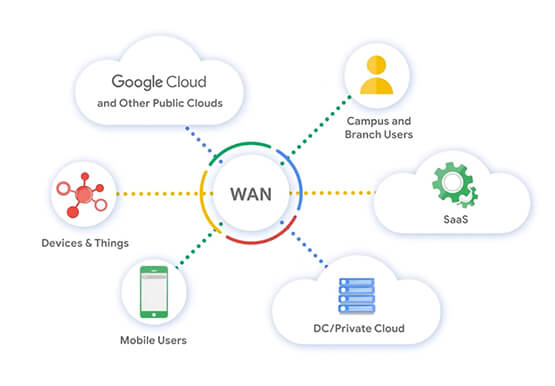
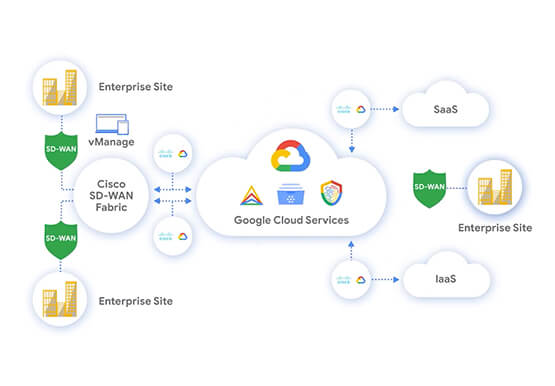

Transform Your Business with Google’s Open, Hybrid, and Multi-Cloud Enterprise Network
Modernization and digital transformation starts with the network, which must enable agile access to the innovation promised by cloud, as well as simplified models for multi-cloud, multi-platform deployments. The network must evolve to provide agility, simplicity, and openness that is needed to power this transformation. Google’s enterprise network is revolutionizing

Quick Recap on Google Cloud: Latest News, Launches, Updates, Events and More
Want to know the latest from Google Cloud? Find it here in one handy location. Check back regularly for our newest updates, announcements, resources, events, learning opportunities, and more. Tip: Not sure where to find what you’re looking for on the Google Cloud blog? Start here: Google Cloud blog 101: Full list

Analyze and Evaluate Migration Strategies with Google
In this whitepaper, we outline migration frameworks that we built based on conversations we’ve had with CIOs, CTOs, and their technical staff. The goal of these frameworks is to help you devise a migration strategy that empowers both IT and the business. Learn how to analyze migration strategies for your

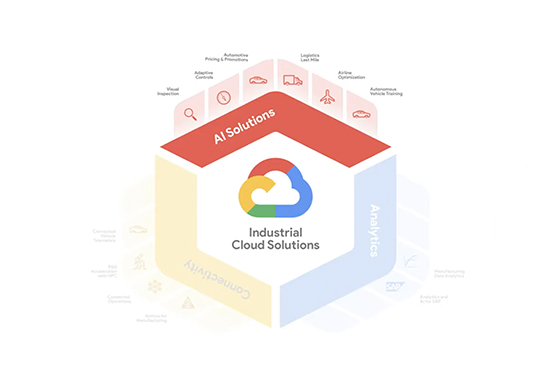
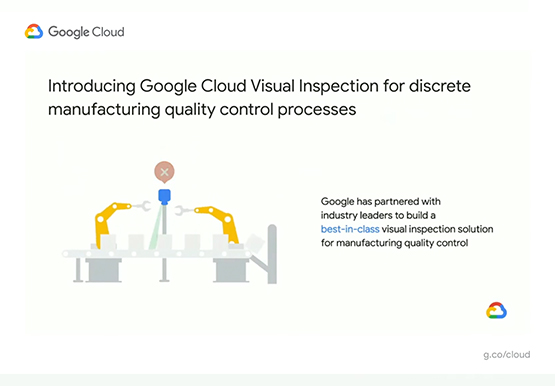
Driving Business Transformation in Manufacturing, Industrial, and Transportation Using Google Cloud and AI/ML
Google Cloud partners closely with manufacturing, industrial, and transportation organizations to drive business transformation. In this video, Mandeep Waraich, Head of Product - Industrial AI, Google Cloud, shares customer stories as well as Google Cloud’s differentiated AI products and solutions. Waraich covers the current state of automation and industrial efficiency
