





2920
Of your peers have already watched this video.
15:00 Minutes
The most insightful time you'll spend today!
What Makes Google Cloud the Go-to Platform to Build Next-gen Security Services
Join the discussion by the panel of security experts and IT leaders from renowned organizations to examine the role of Google Cloud for security companies in building next-generation security services. Watch the video from the security session of Google Cloud Next ’21 to deep dive into Google Cloud’s security and partnership models to explore the security-related aspects of building robust, security based SaaS products.
3097
Of your peers have already watched this video.
23:30 Minutes
The most insightful time you'll spend today!
Three Lesser-Known Ways to Protect Your Customers and Business From Phishing and Fraud
Your users are critical to your business, and you need security controls to keep them — and your business — safe. Built from years of Google Cloud technology and experience, these security features focus on keeping users safe on the web.
You can reduce online fraud (chargebacks, hijackings, and abuse) with reCAPTCHA Enterprise, help protect your customers from phishing sites with Phishing Protection, and detect malicious links with the Web Risk API.
Fight Fraud: Fraudulent web activities cost enterprises billions of dollars each year. Security teams need to keep the bad actors out of their websites and ensure that their customers can always get in. reCAPTCHA has been defending millions of sites for almost a decade, and the reCAPTCHA Enterprise service builds on this technology with capabilities designed specifically for enterprise security concerns.
Combat Phishing: The majority of cyber attacks begin with phishing emails and websites. Attackers use many tricks, including by leveraging enterprise brand assets, such as company names and logos, to develop phishing websites that appear authentic and lure internet users to enter valuable information such as user names and passwords. Phishing Protection helps prevent users from accessing phishing sites by identifying various signals associated with malicious content.
Watch the video to find out how the third method and what impact it can create on your organization.
How Ocado Technology revolutionized the online grocery space by applying technology and automation

2848
Of your peers have already read this article.
2:30 Minutes
The most insightful time you'll spend today!
Grocery shopping has changed for good and Ocado Group has played a major role in this transformation. We started as an online supermarket, applying technology and automation to revolutionise the online grocery space. Today, after two decades of innovation, we are a global technology company providing state-of-the-art software, robotics, and AI solutions for online grocery. We created the Ocado Smart Platform, which powers the online operations of some of the world’s most forward-thinking grocery retailers, from Kroger in the U.S. to Coles in Australia.
With the global penetration of the Ocado Smart Platform and the increasing complexity of our operations, we’re paying close attention to our security estate. To proactively identify and tackle any security vulnerabilities, we decided to introduce Google Cloud’s Security Command Center (SCC) Premium as our centralized vulnerability and threat reporting service.
Gaining consolidated visibility into Ocado’s cloud assets
From the start, we were impressed with the speed of deployment and security findings surfaced with SCC. Where it would take several weeks in the past with other software vendors, we were able to quickly set up SCC in our environment and we could immediately start identifying our most vulnerable assets.
Today, we use SCC to detect misconfigurations and vulnerabilities across hundreds of projects throughout our organization and we use it to get an aggregated view of our security health findings. We filter the findings and then use Pub/Sub or Cloud Functions to send alerts directly to the tools each division is working with, such as Splunk or JIRA. This way, each of our teams can discover and respond to the security findings in their own environment, with SCC acting as the single source of truth for our security-related issues.
Driving autonomy by delegating security findings
Autonomy fuels innovation at Ocado Technology, which is why we want to make our teams as self-sufficient as possible. SCC helps to make our divisions more autonomous from the central organization. It delivers all the security insights technology teams need to make smart decisions on their own and at pace.
Here’s where SCC’s delegation features providing folder and project level access control come in. The platform’s fine-grained access control capabilities enable us to delegate SCC findings to specific teams, without having to give them a view of the entire Ocado Technology organization. Business units no longer need to contact us in the security team to track down vulnerabilities, they can do it themselves in a compliant and secure manner. It makes our work more efficient and autonomous, allowing everyone to focus on their own areas of expertise and environments.
Identifying and remediating multiple medium and high vulnerabilities
SCC’s findings are very rich and don’t end with the identification of the potential misconfigurations and vulnerabilities. It goes beyond this, recommending solutions to resolve any issues and providing clear guidelines on next steps. That’s why the feedback from our users across the organization has been so good.
SCC delivers on both quality and quantity. Since implementation, it has helped us identify and remove hundreds of medium and high vulnerabilities from our Google Cloud estate. The number of security related findings have also gone down each quarter, indicating real and tangible improvements in our security posture. SCC is so useful in maintaining our security posture as once we know where the issues are, tackling them is easy.
From 8-hour security scans to instant insights
One particular issue we’ve been able to handle well with SCC are vulnerabilities targeting the Apache logging system Log4j. SCC informed us about attempted compromises, active compromises, or the vulnerability exposure of our Dataproc images. During Log4j response, all these would have been otherwise very hard to track down, especially with limited resources. With SCC, we were able to leverage the security expertise of Google Cloud to identify the latest vulnerabilities, based on the most up-to-date security trends, and act on them quickly.
Obviously, speed is of the essence when it comes to threat mitigation and SCC has enabled us to fix issues faster, making us less exposed to outside threats. In the past, just scanning everything once could take up to eight hours. SCC sped things up from the start and findings have been nearly instantaneous since it rolled out real-time Security Health Analytics.
Strengthening compliance and demonstrating standards to stakeholders
SCC helps us to achieve better compliance standards, and demonstrate these standards to our stakeholders. We recently ran an internal audit exercise across the Ocado Technology organization, for example, where we identified the projects with the most numerous and severe security-related findings. Without the reports from SCC, this would have been extremely hard or even impossible.
We also use the Security Health Analytics information from SCC to visualize the data per project, creating a kind of heat map of security across the organization. This helps us assign our resources to the right projects and prioritize our efforts accordingly, informing our strategic decisions.
From top-down to a developer-led security
There’s been a paradigm shift in security operations, and things are moving from a top-down approach to a more developer-led and autonomous process. SCC helps drive that change at Ocado Technology. It enables us to place the responsibility for security-related issues closer to the resource owners. By making sure that the teams most impacted by a potential problem are the ones who get to fix it, we empower teams to resolve issues proactively and efficiently.
Looking forward, we can’t wait to see SCC evolve further. One of the features we’re most excited about is the ability to create custom findings (currently in preview) and additional integration capabilities that enable automation. We’re still not using everything SCC has to offer, but it is already a vital tool for our security team.
At Ocado Technology, we’re pioneering the future of online grocery shopping, and this future needs a strong security foundation. SCC helps us to strengthen and maintain that foundation, making profitable, scalable, and secure online grocery shopping possible for even more businesses around the world.
Nine Interesting Google Cloud Identity and Environment Features to Know About!

2908
Of your peers have already read this article.
2:00 Minutes
The most insightful time you'll spend today!
I’ve been at Google Cloud just a few weeks, following years of experience as an AWS Hero and building on other clouds. So last week’s Google Cloud Next–my first!—was a bit of a culture shock. On the GCP podcast, I used the word “intentionality” to describe what I’m seeing: a thoughtful, holistic approach that informs so much of how Google Cloud is put together. Not just in the headline-grabbing new announcements like Google Distributed Cloud, but in the everyday things too.
Things like IAM and project setup. Step 1 of any cloud project is to provision access to an environment, and that’s why I always found it so frustrating in my past life when I had to deal with outdated or clunky stuff like:
- Homebrewed, sketchy SSO tooling and config files
- No centralized identity—I was a different person in every cloud account
- Mysterious logouts, redirects, and missing project context within the cloud console
- Account organization features that were “bolted-on” rather than designed the right way from the beginning
In contrast, I recently shared a Twitter thread about how shockingly right Google Cloud gets identity and environments. It’s probably my favorite thing about Google Cloud so far, and so in this post I want to expand on what I’ve learned. If you’re searching for a better way to access and organize your cloud, let me make you one of today’s lucky 10,000.
Nine things to love about Google Cloud identity and environments
1. You are YOU!
Every user is just a Google account (personal or corporate) that works across projects. For beginners, this lowers the barrier to entry and makes cloud feel like an extension of things you already know. For experts, it reduces the friction of having to juggle a bunch of unrelated identities. I love that you can permit any Google account into a cloud project as a collaborator—even a contributor from outside your organization!
2. No non-IAM root accounts
Google Cloud has been designed from the ground up to avoid the chicken/egg problem of requiring a manually configured superuser that sits outside the rest of the identity management infrastructure. In the Google world, humans use Google accounts, and services use IAM-based service accounts —it’s as straightforward as that. (Even non-Google services can be IAM—yay, workload identity federation!)
3. Project discovery for humans
Project, folder, and organization discovery are baked into the console, like browsing a file system scoped to your access level. This hardly even feels like a feature, it’s so subtle and yet absolutely fundamental. But once you see it, you can’t imagine going back to a world where environments exist in a vacuum with no contextual awareness of each other.
The hierarchical organization model also means that project-per-application-per-environment best practices are the path of least resistance; if anything, I’ve erred on the side of setting up *too many* logical groupings. It’s just too much fun to play with projects and folders!
4. Billing that protects you from yourself
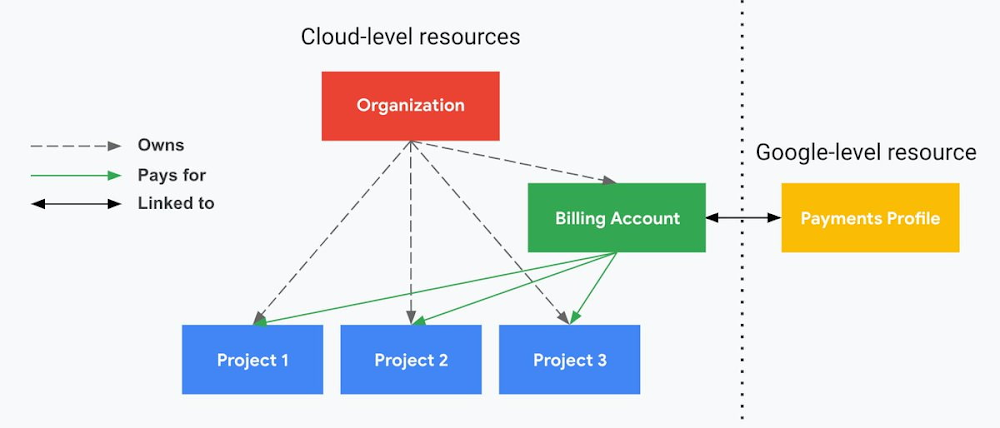
The project context gives you a logical container for the cost of the resources contained within it. My favorite part of this is that your billing entity is managed separately from the project itself. So you can delete a project and feel sure that all associated resources are gone and no longer racking up charges … without also trashing your ability to pay for future projects you might spin up.
(Related: the free tier does not charge you money unless you click a big button that basically says “YES, IT’S OK TO CHARGE ME MONEY.” This guarantee, combined with the familiarity of Google Accounts for access, are the main reasons I now recommend Google Cloud to beginners in my network who are looking for a safe place to learn and explore cloud.)
5. Organizational structure != billing structure
For organizations, billing is decoupled from the organization root. So permissions inheritance is a separate design decision from chargeback, as it should be. This keeps your Google Cloud footprint from converging toward Conway’s Law.
6. SSO that just works
Want to use the CLI? You get SSO out of the box with your Google Account—no corporate organization required, and no manual shuffling with config files and access keys. Or, better yet, you can use Cloud Shell to run gcloud commands right in your browser, even (especially?) on the docs pages. (Random trivia: I think Cloud Shell is the only native cloud service that has the same name across AWS, Azure, and Google Cloud–but Google’s version has been around the longest and as far as I can tell is the most fully-featured.)
7. One group to rule them all
Remember how user entities are just Google accounts? Guess what: you can use Google Groups to manage group access to IAM roles! That’s right: one set of users with permissions across docs, email, and cloud. It’s one reason why Google Workspace makes sense as a core piece of Google Cloud; it really does function like just another cloud service from an identity standpoint.
8. Never lose your place
In other clouds, I’ve experienced a problem I call the Timeout of Doom: when your console session expires, you’re left on a generic error screen and it’s up to you to figure out how to rebuild your context from scratch–starting with remembering what account you used in the first place. Imagine my delight to realize that reaching your Google Cloud console is as easy as bookmarking a single URL. console.cloud.google.com works and remembers who you are (or, at least, suggests the set of people you might be)—no mystery logouts or redirects.
9. Progressive complexity FTW
In my experience it’s been common for cloud providers to design most of their account features for organizations: if you’re an independent developer, you get more exposure to dangerous bills, less access to helpful SSO features, and generally must fend for yourself in a world that wasn’t really created with you in mind.
I love that Google Cloud has found a way to work with enterprises while still maintaining their roots as a cloud that developers love to use. Sign in with your personal Google account, attach it to an organization when-and-if you’re ready, and in the meantime you get the same thoughtfulness around SSO and billing as the giant shop down the street.
I’m not going to tell you my experience has been seamless; there are footguns here (every Google Workspace integration creates a new project?), and I’m still learning. But it’s that “intentionality” thing again. The Google Cloud identity and environment experience feels like it was designed, not just accreted; there’s an elegant simplicity to it that makes cloud feel fresh and exciting to me all over again. I can’t wait to see what’s next.
In the meantime, I highly encourage you to do what I did and spin up a free trial to try things out for yourself. Then hit me up on Twitter with your favorite Google Cloud identity or environment feature!

3518
Of your peers have already downloaded this article
10:45 Minutes
The most insightful time you'll spend today!
In its 25-criterion evaluation of data security portfolio providers, Forrester identified the 13 most significant ones and researched, analyzed, and scored them.
Here’s a summary of what Forrester said about Google Cloud
- Google puts cloud and cloud security at the center of its strategy. Capabilities from Google Cloud Platform, G Suite, Cloud Security Command Center, G Suite Security Center, BeyondCorp, and more are a part of Google’s overall portfolio. There is support for hybrid environments (multi-cloud and on-premises) and use of open source models where it’s possible to enable integration and portability. Its tools are software-based, available in management console or via APIs, and enable organizations to ease into automation to scale data security efforts.
- Google supports a Zero Trust approach with its capabilities to identify data, map flows, encrypt, control access, and automate. Strengths include depth and granularity in access control and security data analytics. Weaknesses include user-driven data classification and file encryption. Customers appreciate Google’s ease of deployment and scalability of its capabilities. Google is a good fit for buyers whose infrastructure runs on Google Cloud and G Suite.
Download the report now!
What You Need to Know About Compute Engines

6521
Of your peers have already read this article.
1:30 Minutes
The most insightful time you'll spend today!
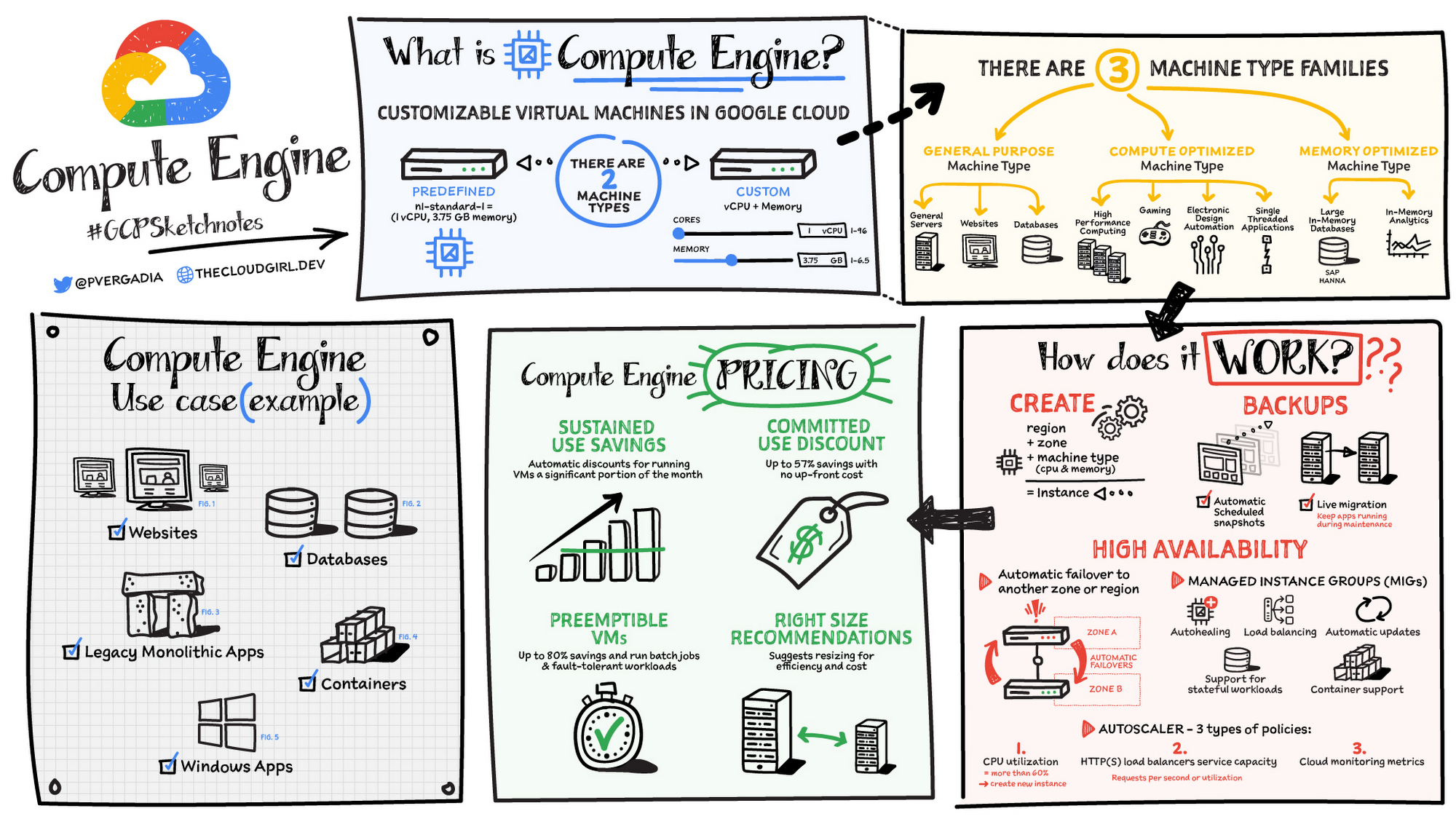
Compute Engine is a customizable compute service that lets you create and run virtual machines on Google’s infrastructure. You can create a Virtual Machine (VM) that fits your needs. Predefined machine types are pre-built and ready-to-go configurations of VMs with specific amounts of vCPU and memory to start running apps quickly. With Custom Machine Types, you can create virtual machines with the optimal amount of CPU and memory for your workloads. This allows you to tailor your infrastructure to your workload. If requirements change, using the stop/start feature you can move your workload to a smaller or larger Custom Machine Type instance, or to a predefined configuration.
Machine types
In Compute Engine, machine types are grouped and curated by families for different workloads. You can choose from general-purpose, memory-optimized, compute-optimized and accelerator-optimized families.
- General-purpose machines are used for Day-to-day computing at a lower cost and for balanced price/performance across a wide range of VM shapes. The use cases that best fit here are web serving, app serving, back office applications, databases, cache, media-streaming, microservices, virtual desktops, development environments.
- Memory-Optimized machine are recommended for ultra high-memory workloads such as in-memory analytics and large in-memory databases such as SAP HANA
- Compute-Optimized machines are recommended for ultra high performance workloads such as High Performance Computing (HPC), Electronic Design Automation (EDA), gaming, video transcoding, single-threaded applications.
- Accelerator-Optimized machines are optimized for high performance computing workloads such as Machine learning (ML), Massive parallelized computations and High Performance Computing (HPC)
How does it work?
You can create a VM instance using a boot disk image, a boot disk snapshot, or a container image. The image can be a public operating system (OS) image or a custom one. Depending on where your users are you can define the zone you want the virtual machine to be created in. By default all traffic from the internet is blocked by the firewall and you can enable the HTTP(s) traffic if needed.
Use snapshot schedules (hourly, daily, or weekly) as a best practice to back up your Compute Engine workloads. Compute Engine offers live migration by default to keep your virtual machine instances running even when software or hardware update occurs. Your running instances are migrated to another host in the same zone instead of requiring your VMs to be rebooted.
Availability
For High Availability (HA) Compute Engine offers automatic failover to other regions or zones in event of a failure. Managed instance groups (MIGs) help keep the instances running by automatically replicating instances from a predefined image. They also provide application based autohealing health checks. If an application is not responding on a VM, the auto healer automatically recreates that VM for you. Regional MIGs let you spread app load across multiple zones. This replication protects against zonal failures. MIGs work with load balancing services to distribute traffic across all of the instances in the group.
Compute Engine offers autoscaling to automatically add or remove VM instances from a managed instance group based on increases or decreases in load. Autoscaling lets your apps gracefully handle increases in traffic, and it reduces cost when the need for resources is lower. You define the autoscaling policy for automatic scaling based on the measured load, CPU utilization, requests per second or other metrics.
Active Assist’s new feature, predictive autoscaling, helps improve response times for your applications–When you enable predictive autoscaling, Compute Engine forecasts future load based on your Managed Instance Group’s (MIG) history and scales it out in advance of predicted load, so that new instances are ready to serve when the load arrives. Without predictive autoscaling, an autoscaler can only scale a group reactively, based on observed changes in load in real time. With predictive autoscaling enabled, the autoscaler works with real-time data as well as with historical data to cover both the current and forecasted load. That makes predictive autoscaling ideal for those apps with long initialization times and whose workloads vary predictably with daily or weekly cycles. For more information, see How predictive autoscaling works or check if predictive autoscaling is suitable for your workload, and to learn more about other intelligent features, check out Active Assist.
Pricing
You pay for what you use. But you can save cost by taking advantage of some discounts! Sustained use saving are automatic discounts applied for running instances for a significant portion of the month. If you know your usage upfront, you can take advantage of committed use discounts which can lead up to significant savings without any upfront cost. And by using short lived preemptive instances you can save up to 80%, they are great for batch jobs and fault tolerant workloads. You can also optimize resource utilization with automatic recommendations. For example if you are using a bigger instance for a workload that can run on a smaller instance you can save costs applying these recommendations.
Security
Compute Engine provides you default hardware security. Using Identity and Access Management (IAM) you just have to ensure that proper permissions are given to control access to your VM resources. All the other basic security principles apply, if the resources are not related and don’t require network communication amongst themselves, consider hosting them on different VPC networks. By default, users in a project can create persistent disks or copy images using any of the public images or any images that project members can access through IAM roles. You may want to restrict your project members so that they can create boot disks only from images that contain approved software that meet your policy or security requirements. You can define an organization policy that only allows Compute Engine VMs to be created from approved images. This can be done by using the Trusted Images Policy to enforce images that can be used in your organization.
By default all VM families are Shielded VMs. Shielded VMs are virtual machine instances that are hardened with a set of easily configurable security features to ensure that when your VM boots, it’s running a verified bootloader and kernel — is the default for everyone using Compute Engine, at no additional charge. For more details on Shielded VMs refer to the documentation here.
For additional security, you also have the option to use Confidential VM to encrypt your data in use, while it’s being processed in Compute Engine. For more details on Confidential VM refer to the documentation here.
Use cases
There are many use cases Compute Engine can serve in addition to running websites and databases. You can also migrate your existing systems onto Google Cloud, with Migrate for Compute Engine, enabling you to run stateful workloads in the cloud within minutes rather than days or weeks. Windows, Oracle or VMware applications have solution sets enabling a smooth transition to Google Cloud. To run windows applications either bring your own license leveraging Sole-tenant nodes or using the included licenced images.
Conclusion
Whatever your application use case may be, from legacy enterprise applications to digital native applications, Compute Engine’s families will fit it. For a more in-depth look into Compute Engine check out the documentation.
For more #GCPSketchnote, follow the GitHub repo. For similar cloud content follow me on Twitter @pvergadia and keep an eye out on thecloudgirl.dev
More Relevant Stories for Your Company

Google Cloud & Siemplify Join Forces to Empower Companies to Manage Threat Responses Better
At Google Cloud, we are committed to advancing invisible security and democratizing security operations for every organization. Today, we’re proud to share the next step in this journey with the acquisition of Siemplify, a leading security orchestration, automation and response (SOAR) provider. Siemplify shares our vision in this space, and

Building Effective Visibility into Technology Assets Used in Healthcare
When technology just works, it's easy to trust. But too often, we place our trust in technology that doesn’t deserve it. When we do this with technology to provide healthcare, we put the safety of patients and the security and reliability of our global healthcare system at risk. The institutions

Deep Dive into Google Cloud’s Security Track at the Next 21
In every industry, in every part of the world, cybersecurity concerns continue to grow in the wake of attacks on critical infrastructure and the software supply chain. Governments and businesses of all sizes recognize that they must do more to protect their employees, customers and citizens. But doing more of

Google Announces New Cloud Region in Israel to Meet Growing Customer Demands
Google has long looked to Israel for globally impactful technologies including popular Search features, Waze, Live Caption, Duplex and flood forecasting. At our Decode with Google 15RAEL event last week, we celebrated 15 years of Google innovation in Israel and our longstanding support of the country’s vibrant startup ecosystem. Over the years, we’ve expanded our enterprise
