





3309
Of your peers have already watched this video.
27:00 Minutes
The most insightful time you'll spend today!
Unburden Your Operations and Development Teams with Anthos
VMs are used to run the majority of services in enterprises. Whether due to specific technical requirements, developer preferences, or simply time and budget constraints, many applications are not moving to containers and Kubernetes yet.
Think services first
Microservices architectures present numerous benefits but also introduce challenges like added complexity and fragmentation for different workloads. The Anthos platform unburdens your operations and development teams by simplifying service delivery across the board, from traffic management and mesh telemetry to securing communications between services. Anthos Service Mesh, Google’s fully managed service mesh, lets you easily manage these complex environments and enjoy the benefits they promise.
Learn how to incorporate these existing VM workloads into Anthos Service Mesh. Also, see how to use Compute Engine to simplify the installation and management of the Envoy proxy and how to add VMs to the mesh. Lastly, explore how you can modernize your VMs in place or develop a strategy to migrate your VMs to containers. Regardless of the path chosen, we show how the VMs can participate in the mesh and get all the same benefits of security, policy, and telemetry that Anthos Service Mesh provides to Kubernetes workloads.
Google Cloud is Every Retailer’s Most Trusted Cloud

6616
Of your peers have already read this article.
3:00 Minutes
The most insightful time you'll spend today!
Whether they were ready for it or not, the COVID-19 pandemic transformed many retailers into digital businesses. Retailers made huge investments into commerce technologies, customer experience tools, sales and fulfillment technology, and improving digital experiences to continue providing their goods and services to their customers. Now, more than a year into the COVID-19 pandemic, digital retail is the new normal. In fact, many retailers are planning on expanding their digital investments. However, as their digital footprint expands, so do their threats and security concerns.
As a digital-focused retailer, your website is the most visible part of your attack surface. Your website is where your customers search for goods or services, make payments, or learn more about your brand. However, your website does not operate in isolation. There is an underlying infrastructure as well as the services that run on top of it that need protection from a wide array of attacks that may seek to compromise your data, internal employees, business, and customers. During this week’s Google Cloud Retail Summit, we’ve shared why Google Cloud is built to be the most trusted cloud for retailers. From providing you with control over your data as you move from your own data centers to the public cloud to giving you built-in technology to protect your applications all the way to your end users, Google Cloud helps you safely migrate to and operate in our Trusted Cloud.
Trusted Cloud Gives You Control, Transparency, and Sovereignty
- Access Transparency: We offer the ability to monitor and approve access to your data or configurations by Google Cloud support and engineering based on specific justifications and context, so you have visibility and control over insider access.
- Certificate Authority Service (CAS): CAS is a highly scalable and available service that simplifies and automates the management and deployment of private CAs while meeting the needs of modern developers and applications. With CAS, you can offload to the cloud time-consuming tasks associated with operating a private CA, like hardware provisioning, infrastructure security, software deployment, high-availability configuration, disaster recovery, backups, and more, allowing you to stand up a private CA in minutes, rather than the months it might normally take to deploy.
- Confidential Computing: We already encrypt data at-rest and in-transit, but customer data needs to be decrypted for processing. Confidential Computing is a breakthrough technology which encrypts data in-use—while it’s being processed. Confidential VMs take this technology to the next level by offering memory encryption so that you can further isolate your workloads in the cloud. With the beta launch of Confidential VMs, we’re the first major cloud provider to offer this level of security and isolation while giving you a simple, easy-to-use option for your newly built and “lift and shift” applications.
- Cloud Key Management: We allow you to configure the locations where your data is stored, where your encryption keys are stored, and where your data can be accessed from. We give you the ability to manage your own encryption keys, even storing them outside Google’s infrastructure. Using our External Key Management service, you have the ability to deny any request by Google to access encryption keys necessary to decrypt customer data at rest for any reason.
Trusted cloud Helps You Prevent, Detect, and Respond to Threats
- BeyondCorp Enterprise is Google’s comprehensive zero trust product offering. Google has over a decade of experience managing and securing cloud applications at a global scale, and this offering was developed based on learnings from our experience managing our own enterprise, feedback from customers and partners, as well as informed by leading engineering and security research. We understand that most customers host resources across different cloud providers. With this in mind, BeyondCorp Enterprise was purpose-built as a multicloud solution, enabling customers to securely access resources hosted not only on Google Cloud or on-premises, but also across other clouds such as Azure and Amazon Web Services (AWS).
- Cloud Armor: We’re simplifying how you can use Cloud Armor to help protect your websites and applications from exploit attempts, as well as Distributed Denial of Service (DDoS) attacks. With Cloud Armor Managed Protection Plus, you will get access to DDoS and WAF services, curated rule sets, and other services for a predictable monthly price.
- Chronicle: Chronicle is a threat detection solution that identifies threats, including ransomware, at unparalleled speed and scale. Google Cloud Threat Intelligence for Chronicle surfaces highly actionable threats based on Google’s collective insight and research into Internet-based threats. Threat Intel for Chronicle allows you to focus on real threats in the environment and accelerate your response time.
- Google Workspace Security: Used by more than five million organizations worldwide, from large banks and retailers with hundreds of thousands of people to fast-growing startups, Google Workspace and Google Workspace for Education include the collaboration and productivity tools found here. Google Workspace and Google Workspace for Education are designed to help teams work together securely in new, more efficient ways, no matter where members are located or what device they use. For instance, Gmail scans over 300 billion attachments for malware every week and prevents more than 99.9% of spam, phishing, and malware from reaching users. We’re committed to protecting against security 1 threats of all kinds, innovating new security tools for users and admins, and providing our customers with a secure cloud service.
- Identity & Access Management IAM: Identity and Access Management (IAM) lets administrators authorize who can take action on specific resources, giving you full control and visibility to manage Google Cloud resources centrally. For enterprises with complex organizational structures, hundreds of workgroups, and many projects, IAM provides a unified view into security policy across your entire organization, with built-in auditing to ease compliance processes.
- reCAPTCHA Enterprise: reCAPTCHA has over a decade of experience defending the internet and data for its network of more than 5 million sites. reCAPTCHA Enterprise builds on this technology with capabilities, such as two-factor authentication and mobile application support, designed specifically for enterprise security concerns. With reCAPTCHA Enterprise, you can defend your website against common web-based attacks like credential stuffing, account takeovers, and scraping and help prevent costly exploits from malicious human and automated actors. And, just like reCAPTCHA v3, reCAPTCHA Enterprise will never interrupt your users with a challenge, so you can run it on all webpages where your customers interact with your services.
- Security Command Center: With Security Command Center (SCC), our native posture management platform, you can prevent and detect abuse of your cloud resources, centralize security findings from Google Cloud services and partner products, and detect common misconfigurations, all in one easy-to-use platform. We have Premium tier for Security Command Center to provide even more tools to protect your cloud resources. It adds new capabilities that let you spot threats using Google intelligence for events in Google Cloud Platform (GCP) logs and containers, surface large sets of misconfigurations, perform automated compliance scanning and reporting. These features help you understand your risks on Google Cloud, verify that you’ve configured your resources properly and safely, and document it for anyone who asks.
- VirusTotal: VirusTotal inspects items with over 70 antivirus scanners and URL/domain blocklisting services, in addition to a myriad of tools to extract signals from the studied content. Any user can select a file from their computer using their browser and send it to VirusTotal.
- Web Risk API: With Web Risk, you can quickly identify known bad sites, warn users before they click infected links, and prevent users from posting links to known infected pages from your site. Web Risk includes data on more than a million unsafe URLs and stays up to date by examining billions of URLs each day.
Trusted cloud Plays an Active Role in Our Shared Fate
Our trusted cloud provides a shared-fate model for risk management. We stand with retailers from day one, helping them implement best practices for safely migrating to and operating in our trusted cloud.
We hope you enjoy the sessions we’ve created for you with Google Cloud Retail Summit and that they help you understand the ways our trusted cloud can help secure retailers all over the world.
Harnessing the Power of AI with Google Cloud: What Every IT Pro Needs to Know

961
Of your peers have already read this article.
4:30 Minutes
The most insightful time you'll spend today!
As an IT architect or IT professional, you are essential to the success of your organization, responsible for designing, building, and maintaining the IT systems that your businesses and governments rely on. As if that wasn’t enough, you’ve also got to constantly learn and adapt to keep up with the demand of an ever-changing IT landscape — especially when technologies like generative AI suddenly emerge and become a crucial part of your business. Did you know that 77% of companies are using or plan to use AI in the future? And that’s growing year over year. Then there are the constant firedrills, a contributing factor in 40% of IT professionals being at risk of burnout. So, the fundamental question you’re asking yourself is: how can I do my job successfully, but with less toil and stress?
Well, we come with good news! First, Google Cloud has a plethora of ways to help you evolve your IT landscape quickly, easily, and effectively. And second, our upcoming event, Google Cloud Next ‘23 from August 29th to 31st, is exactly what you need to learn more about capitalizing on those opportunities. But if you’re still on the fence about going, let’s power through five scenarios that might be on your plate right now, and how Next ‘23 can help you
#1 — Architect infrastructure for AI workloads
Chances are good that you’ve been asked to spin up new resources to run emerging AI-based applications on. At Next ‘23, we’ll show you how you can innovate, scale and optimize workloads quickly, safely, and cost effectively with purpose-built infrastructure that has AI efficiencies baked-in. Google is an AI-first company, so our AI-optimized infrastructure is built to deliver the global scale and performance demanded by our own products such as YouTube, Gmail, Google Maps, Google Play, and Android, all of which serve billions of users. It’s also designed for intensive workloads like training and serving large language models like PaLM 2, the basis of generative AI features and tools Bard and the PaLM API.
Google’s deep experience in AI and cloud computing means that Google Cloud is uniquely positioned to present one of the strongest AI infrastructure offerings on the market. Here’s a few ways you can learn about our AI infrastructure during Next ‘23:
- Watch our exciting spotlight session “What’s next for architects and IT professionals,” where our GMs will explore what’s coming for infrastructure and AI/ML.
- Attend our “Build your organization’s future on Google AI and machine learning infrastructure” breakout session, or check out dozens of others on AI/ML.
- Visit our AI Innovation pavilion within our Demo Showcase.
- Get hands on (literally!) with some of our AI infrastructure at our Hardware-verse.
- Upgrade your AI/ML skillsets with our live training workshops at the Innovators Hive.
#2 — Build and run modern container-based applications quickly and securely
Your org has no doubt been using containers and Kubernetes for years, but are they Google Cloud containers and Kubernetes? Google Cloud provides one of the best places to run modern containerized workloads, packaging more than a decade’s worth of experience launching several billion containers per week into our offerings, so that developers and businesses of many sizes can tap the latest in container innovation.
IT pros who are building modern, container-based applications often choose Google Cloud because of its managed services and range of database options, so developers can quickly build applications securely and at scale. For these types of use cases, here’s where you should spend some time during Next ‘23:
- Watch our GM Spotlight session “What’s next for IT operations,” which will dive deep into everything from containers to AI.
- Learn how legendary gaming company CAPCOM is running Street Fighter 6 on Google Cloud in this breakout session “The future of modern enterprise applications with Google Kubernetes Engine,” and browse all our other great container sessions.
- Come and mingle with your friends and peers in our Innovators Hive Community Hub.
- Watch our Innovator Hive Lightning Talk “How to run ML workloads in GKE with Cloud TPU and GPU.”
- Visit our Containers area at the Demo Showcase.
#3 — Boost traditional enterprise applications with high reliability, scale, and price-performance
Cloud-native workloads are great and all, but traditional enterprise workloads such as ERP, databases, web apps, and mainframes continue to be the lifeblood of the organization. These workloads will likely not disappear. They are evolving into more modern versions of themselves — often with major opportunities for modernization using data analytics and AI. Now more than ever, CIOs have to ensure these workloads are healthy and thriving.
Google Cloud ensures that our platform design and choices are centered on real-world workloads like SAP and VMware. We simplify the migration and modernization decision-making process so customers can get to the cloud confidently with an intuitive set of options and prescriptive solutions that deliver better reliability, security, scale, performance, and cost. At Next ‘23, there are a ton of ways to learn more about solving these challenges:
- No matter what you’re looking to deploy or migrate, we’ve got a breakout session for you. For starters, check out “How Sabre migrated their apps and data centers to Google Cloud with speed and ease,” “Accelerate innovation with SAP on Google Cloud,” or any of these others.
- Explore how our customer ADT successfully migrated their VMware estate to Google Cloud by visiting their interactive story in our Demo Showcase.
- Click through Migration Center, our unified service for end-to-end migration and modernization, as well as other demos at our Architect’s Corner of Innovators Hive.
#4 – Run on high performance, distributed infrastructure
Google Cloud’s infrastructure isn’t limited to what we run in our data centers. If your business or government needs infrastructure designed for sovereignty, scale, security, and high-intensity compute workloads, we’ve got exactly what you need:
- For governments and highly regulated businesses, we have unique offerings and services including Google Distributed Cloud Hosted and Google Cloud Sovereign Solutions for organizations with specific sovereignty and security needs.
- For Telecommunications, we have purpose-built telecom offerings to help Communication Service Providers (CSPs) digitally transform their networks with hybrid cloud principles and identify new revenue opportunities. In addition, we have Google Distributed Cloud Edge which provides an open, Kubernetes-based offering tuned for telecom network workloads.
- Telecoms should also be sure to check out “How Google Cloud helps shape and transform Telecom Network deployment and monetization models” and live on the edge at the Demo Showcase.
- And for Distributed Cloud, make sure you attend “Running AI at the edge to deliver modern customer experiences” and “Mind the air gap: How cloud is addressing today’s sovereignty needs”, or visit our area at the Demo Showcase.
#5 — Save money and help meet sustainability ambitions
Everyone knows that AI can help you do more, faster, but did you know that our AI-assisted recommendations and cost optimization tools can help you save money and to plan for strong financial resiliency? Take control of your cloud spending and optimize costs through APIs, Cloud Scheduler, and with Committed Use Discounts (CUDs). Complementary to these cost optimization capabilities, we’ve also built a collection of tools to help you accurately report on the carbon emissions associated with your Google Cloud usage and take action to reduce your carbon footprint and costs. Looking to learn more at Next ‘23, here’s what you need to explore:
- For sustainability, register for our “GreenOps: Drive carbon and cost efficiencies with a new wave of developer tools” breakout session.
- And for cost savings, check out “Creating a FinOps culture change through cloud automation” and “Unlock cloud value for everyone with Google Cloud FinOps tools”, and also visit our cost optimization area at the Demo Showcase.
So, what do you think: are any of those challenges on your plate right now? If they are, we hope you’ll join us at Next ‘23 starting on August 29th, so that we can show you how we live up to your motto: your cloud, your way. See you soon!
Manage Packages Using Artifact Registry in Google Cloud Functions with Private Dependencies

3389
Of your peers have already read this article.
2:30 Minutes
The most insightful time you'll spend today!
Late last year, we announced that Artifact Registry was going GA, allowing GCP customers to manage their packages within the same platform as they were being deployed. In this blogpost, we want to show you how to do exactly that with a private dependency.
Private dependencies allow your packages to be shared with only a select group of viewers. If your codebase is already private, a private dependency can help modularize functionality using the same methodologies you use in your open source projects. Furthermore, you can experimentally develop your private dependency without breaking your overall codebase by pinning the version of the dependency on a working release. It can also provide necessary and durable abstraction if multiple projects depend on the same functionality. It does so by allowing multiple teams access to up-to-date and tested code rather than relying on copying and pasting fragmented code snippets.
With Artifact Registry, you can now wire together your serverless processes with your private dependencies without ever leaving Google Cloud Platform. This blogpost will discuss one example of how you can host your private dependency and later deploy to a serverless host like Google Cloud Functions using Cloud Build to automate the deployment.
Before getting started, take a look at the sample code here to copy and follow along.
Creating a package
Let’s walk through deploying a Google Cloud Function with a simple private dependency written in Node. Our example dependency will return the input given in unicode. It’s index.js file will look like this:
const unicode = require('to-unicode');// This function returns the input in unicode.module.exports = (input) => {return unicode(input);};
First, you’ll want to prepare your package to upload to Artifact Registry. For Node, this package should have a package.json file, which should dictate the entry point and information about the package. You can create a simple one like the one below by running the command npm init -y.
For the name of the package you should specify your scope. A scope allows you to group packages, which is helpful if you want to publish a private package; alternatively, publishing without a scope would make the repository public by default. In this blogpost, we’re going to use the scope @example, but you should name it after your private dependency’s group (i.e., your company, team or project).
{"name": "@example/blog-repo","version": "1.0.0","description": "A sample repository for blogpost demonstration purposes.","main": "index.js","scripts": {"test": "echo \"Error: no test specified\" && exit 1","artifactregistry-login": "npx google-artifactregistry-auth"},"author": "Blogpost Authors","license": "ISC","devDependencies": {"google-artifactregistry-auth": "^2.1.0"},"dependencies": {"to-unicode": "^1.0.2"}}
Another important detail in this file is that the devDependencies property contains the dependency for authenticating to the google artifact registry. To authenticate, you will use the command in the scripts section later in this tutorial.
Uploading the package to Artifact Registry & setting up authentication
Follow the instructions on these guides for creating an npm package repository on Artifact Registry, without configuring npm or pushing the repository. Next, you’ll want to configure the .npmrc file. To do so, simply add an empty file titled .npmrc, which should live at the base of your repository. To configure this file to deploy to the registry you just created, run the following command, and add the output to the .npmrc file. (Note: you may need to install the Google Cloud SDK before running the command.)
gcloud alpha artifacts print-settings npm –scope=@example
—repository=blog-repo —location=”us-central1”
Copy that output into your .npmrc file. Ultimately, it should look like this, substituting <projectId> for your Google Cloud Platform project ID.
@example:registry=https://us-central1-npm.pkg.dev/<projectId>/blog-repo///us-central1-npm.pkg.dev/<projectId>/blog-repo/:_authToken=""//us-central1-npm.pkg.dev/<projectId>/blog-repo/:always-auth=true
Then, you can push the package to the artifact repository. To do so, run this command (ensuring that you’ve copied the scripts portion from the package.json file above):
npm run artifactregistry-login <path to your .npmrc file>
This command allows you to refresh your access token when pushing your repository.
Then, simply publish by running:
npm publish
You can confirm you’ve deployed your library by searching for the repo in Artifact Registry in your Google Cloud Platform dashboard.
Setting up your Google Cloud Function
Once you have set up a repository in Artifact Registry, you can start to build your applications on top of it. Take a simple serverless example, like a Google Cloud Function:
const unicode = require('@example/blog-repo');const escapeHtml = require('escape-html');exports.mygcf= (req, res) => {res.send(`Hello ${escapeHtml(unicode(req.query.name || req.body.name || 'World'))}!`);};
This simple Cloud Function uses our private dependency to print out “Hello World” to the specified URL in unicode (it actually uses the same example in this tutorial). But how will Cloud Function successfully pull the private dependency? By using the .npmrc file you created in your original repository.
To see it in action, follow instructions for creating a simple Google Cloud Function. You can follow the tutorial exactly, ensuring that the following three key elements are in your function:
- When you create the index.js file (as done in the tutorial), it should live at the base of the repository, and should use the private dependency you’ve set up in artifact registry (like the example above),
- Its package.json should list:
- Your dependency with the version as listed in Artifact Registry
- A script to authenticate with artifact registry (just as for your dependency)
{"name": "mygcf","version": "1.0.0","description": "","main": "index.js","scripts": {"test": "echo \"Error: no test specified\" && exit 1","artifactregistry-login": "npx google-artifactregistry-auth .npmrc"},"author": "","license": "ISC","dependencies": {"escape-html": "^1.0.3","@example/blog-repo": "1.0.0","ini":: "^2.0.0"}}
- And, most importantly, you should copy over your
.nmprcfile to the base of this Google Cloud Function to authenticate your npmrc token.
Then, you can deploy the function using the following command:
gcloud functions deploy mygcf --runtime nodejs12 --trigger-http --allow-unauthenticated
To see it in action, simply follow the http trigger link (from the tutorial) and check out your input in unicode.
Automate and protect your Cloud Function
The command above will deploy the function, but it does so by exposing your token in your .npmrc file, and by forcing you to manually re-authenticate each time you redeploy the function. To automate the redeployment of the function in a safe manner, you can add a cloudbuild.yaml file to the root of your Cloud Function package.
First, let’s start by creating a helper function to modify the .npmrc file. You should save the following file to the root of your Cloud Function package, and name it npmrc-parser.js:
const fs = require('fs');const ini = require('ini');function main(pathToAuthToken, pathToNpmrc) {const config = ini.parse(fs.readFileSync(pathToNpmrc, 'utf-8'));const token = config[pathToAuthToken];config[pathToAuthToken] = "${TOKEN}";fs.writeFileSync(pathToNpmrc, ini.stringify(config));console.log(token);return token;}const args = process.argv.slice(2);main(...args);
Next, let’s create the file cloud build file. To do so, copy the following file in the root of your directory, and title it cloudbuild.yaml:
steps:- name: nodeentrypoint: npmargs: ['run', 'artifactregistry-login']- name: nodeentrypoint: npmargs: ['install']- name: nodeentrypoint: /bin/bashargs:- -c- |token=$(node npmrc-parser.js ${_PATHTOTOKEN} ${_PATHTONPMRC})echo $tokenecho $token > _TOKEN- name: gcr.io/cloud-builders/gcloudentrypoint: /bin/bashargs:- -c- |gcloud functions deploy "${_FUNCTIONNAME}" \--trigger-http \--runtime nodejs12 \--allow-unauthenticated \--set-build-env-vars TOKEN="$(cat _TOKEN)"
The first two steps of the build file will authenticate your private dependency, and install all dependencies on the project. The third step will call the custom helper function we created above to prepare your .npmrc file. This function takes two arguments, pathToAuthToken, and pathToNpmrc. The pathToAuthToken is the left-hand side of the authToken assignment in your .npmrc file. It should look something like this, replacing projectId with your own project:
"//us-central1-npm.pkg.dev/<projectId>/blog-repo/:_authToken"
The pathToNpmrc would be wherever you’ve saved your .npmrc file. In this case, the value would look like so:
".npmrc"
This build step removes the token value on the file and saves it to a variable, and replaces the .npmrc file with the environment variable TOKEN. So, the Cloud Function never stores the actual token in the source code, and the .npmrc file that is saved locally looks like this:
@example:registry=https://us-central1-npm.pkg.dev/<projectId>/blog-repo/
//us-central1-npm.pkg.dev/<projectId>/blog-repo/:_authToken=””
//us-central1-npm.pkg.dev/<projectId>/blog-repo/:always-auth=true
The last step in the build file redeploys the function, replacing the environment variable in the .npmrc file with the token value we just created. To run the build steps, you can set up a trigger, or run the following command manually, replacing the variables as we’ve described above:
gcloud builds submit --config=cloudbuild.yaml \ --substitutions=_PATHTOTOKEN="<PATHTOTOKEN>",_PATHTONPMRC="<PATHTONPMRC>",_FUNCTIONNAME="<CLOUDFUNCTIONNAME>"
Before running, make sure you’ve set the appropriate permissions for your Cloud Build function.
That’s all there is to it! Once set up this way, your Google Cloud Function can pull in your private dependency from Artifact Registry without hosting on any external package managers, and without any manual deployment steps.
Automate publishing your private dependency
To speed up the deployment of your local package to Artifact Registry, you can also add a Cloud Build file to your Artifact Registry package that will trigger a publishing event when changes are saved to your package. You can follow the setup steps here, but here is a snippet of a sample cloudbuild.yaml file that would live in your private dependency:
steps:- name: gcr.io/cloud-builders/npmargs: ['run', 'artifactregistry-login']- name: gcr.io/cloud-builders/npmargs: ['publish','${_PACKAGE}']
What about other languages and runtimes?
Even though this blog post focuses on Node.js, Cloud Functions and Artifact Registry support other runtimes as well, like Python and Java. For example, with Python the steps for deploying the module to Python aren’t much more complicated than Node. Once you’ve readied your private dependency and published to Artifact Registry, you can start creating a Google Cloud Function like the one above, but in Python. Next, you will want to fetch and package these dependencies locally.
Want to Code for the Cloud? Get Started with the Native App Development Track

6742
Of your peers have already read this article.
2:00 Minutes
The most insightful time you'll spend today!
Earlier this year, we launched the Google Cloud skills challenge, which provides 30 days of free access to training to build your cloud knowledge and an opportunity to earn skill badges that showcase your Google Cloud competencies. Today, we’re adding a Native App Development track to the skills challenge, joining the Getting Started, Data Analytics, Kubernetes, Machine Learning (ML) and Artificial Intelligence (AI) tracks.
The Native App Development track is designed for cloud developers who want to learn to build serverless web apps and Google Assistant applications on Google Cloud using Cloud Run and Firebase. Specifically, you’ll have an opportunity to earn three skill badges in the Native App Dev track: Serverless Firebase Development, Serverless Cloud Run Development, and Build Interactive Apps with Google Assistant. To earn a skill badge, you complete a series of hands-on labs and take a final assessment challenge lab to test your skills.
Here’s an overview of each badge.
Serverless Firebase Development
To earn this skill badge, you’ll learn how to build serverless web apps, import data into a serverless database, and build Google Assistant applications using Firebase, Google’s backend-as-service platform for creating mobile and web applications.
Serverless Cloud Run Development
For this badge, you’ll discover how to use Cloud Run, a fully managed serverless platform, to connect and leverage data stored in Cloud Storage. You’ll learn how to use Cloud Run to build a resilient, asynchronous system with Pub/Sub, build a REST API gateway as well as build and expose services.
Build Interactive Apps with Google Assistant
To earn the final skills badge, you’ll build Google Assistant applications by creating a project in the Actions console, integrating Dialogflow, testing your action in the Actions simulator, and adding Cloud Translation API to your assistant application.
Ready to jump into the skills challenge? Sign up here.
You can also check out this quick video below to learn how to join the skills challenge.
3390
Of your peers have already watched this video.
19:00 Minutes
The most insightful time you'll spend today!
Booking.com’s Apigee Hybrid on Anthos is the Largest Hybrid Deployment Ever
Apigee API Management Platform helps unlock the value of data in legacy systems and applications to accelerate end-user/customer experience by modernizing apps and building multi-cloud environments. With Apigee Hybrid on Anthos, a service mesh technology, Booking.com was able to achieve its goal of providing customers a connected trip experience. Watch the video to understand how Booking.com, a biggest brand in Booking Holdings portfolio with over 1.5 million room bookings in 24 hours moved to hybrid cloud and unified APIs to one platform offering a end-to-end customer journey for a connected trip!
More Relevant Stories for Your Company

Consent is a Key Component for a Successful Embedded Financial Solution: Read Why
When banks and other financial institutions make their products available via non-banks, we call that Embedded Finance. Think, for example, of a retailer offering financing for people buying goods; or a budgeting app gathering bank transactions to help you categorize and understand your spending patterns. The finance - the money

How Kubernetes is enabling digital transformation for retailers
Retail organizations constantly face financial pressure to increase sales while maintaining profit margins. Digital commerce creates new opportunities and a more competitive landscape for retailers by allowing them to reach a global customer base online, but it also exposes them to competition from larger online retailers. To be successful in

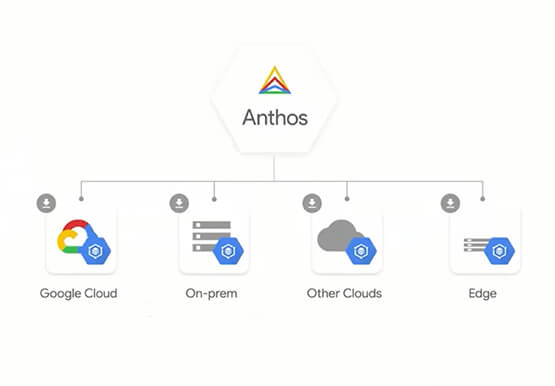
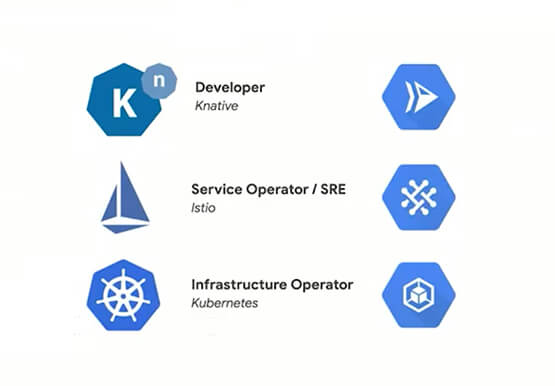

Build, Deploy, Modernize and Manage Apps Using Anthos
Anthos enables platform teams to defragment application delivery across hybrid and multi cloud. Learn how Anthos provides a consistent runtime and operational experience for a platform team to enable developers to move at an agile pace while minimizing operational overhead.

Introducing a strong alternative to CentOS: Rocky Linux Optimized for Google Cloud
As CentOS 7 reaches end of life, many enterprises are considering their options for an enterprise-grade, downstream Linux distribution on which to run their production applications. Rocky Linux has emerged as a strong alternative that, like CentOS, is 100% compatible with Red Hat Enterprise Linux. In April 2022, we announced
