





3286
Of your peers have already watched this video.
24:30 Minutes
The most insightful time you'll spend today!
Modernizing 100-Year Old Retail Chain with Anthos
H-E-B, like many enterprises, was moving away from legacy mainframes in favor of microservices and public cloud infrastructure. With hundreds of applications powering their 100+ year-old business, H-E-B needed to be confident that the platform they are building will provide them the agility and security to continue to innovate for their customers.
See how the H-E-B engineering team started breaking down their Curbside and Home Delivery monoliths into microservices, why they chose to make Kubernetes, and why they’re leveraging Anthos as a hybrid cloud platform.
Apigee: Unlock Innovation by Managing APIs for SAP Workloads

3652
Of your peers have already read this article.
3:00 Minutes
The most insightful time you'll spend today!
Businesses migrating their SAP environments to Google Cloud do so for a number of reasons. Most cite the agility, scalability and security advantages of migrating SAP workloads to Google Cloud; many also focus on improved uptime and performance.
At some point, most businesses also want to explore the idea that there’s a fortune locked up in their business data—and that the cloud holds the key. But leveraging the cloud to transform data into dollars is a process that involves special challenges—and specialized tools to address these challenges. For businesses running SAP environments in the cloud, most of which maintain a significant stake in legacy systems and data stores, the challenges tend to get even bigger.
The promises and pitfalls of APIs
This is where Google Cloud’s advanced data analytics, machine learning and AI capabilities, especially our API (application programming interface) management tools, come into play. Our Apigee API Management Platform is emerging as a star player for many of our SAP customers because it can open the door to innovation and opportunity for SAP systems and data stores.
API management speaks directly to what it really means to get value from business data. By connecting the right data sets with people willing and able to monetize that data, your business can benefit both indirectly (for example, by generating insights that lead to increased sales or better customer experiences) and directly (such as by selling access to your data to another business).
APIs have emerged as a pillar of modern digital business practices because they facilitate precisely these types of transactions. Today, every mobile device, website and application uses APIs to access connected services and data sources. APIs provide connection points between apps, platforms and entire application ecosystems. And by using de-facto standards such as REST (representational state transfer), businesses can utilize APIs to build and deploy innovative applications quickly.
3 reasons legacy systems and modern APIs don’t mix
Google Cloud customers running SAP environments may be ready to find the value in their data, but their SAP systems and data, as well as legacy APIs that don’t adhere to REST or other modern approaches, may not quite be up to the task. This is because:
- Balancing accessibility, usability and security is a tough task—and the stakes are high. Opening up access to business-critical systems to third-party as well as internal developers could raise significant risks. Even for SAP teams with a high focus on security, the process of providing dependable, programmatic access to legacy SAP systems often involves significant time and effort. And while limiting access and API functionality are both valid ways to mitigate security risk, employing these tactics can slow the pace of innovation and very quickly undermine the reasons for starting this process in the first place.
- Managing APIs across legacy SAP applications and other data stores can be complex, costly and technically challenging. There’s a fundamental mismatch between the “how and why” of modern APIs and the types of programmatic access for which legacy systems were designed. Modern apps, for example, typically deliver API requests in far greater numbers; that’s true for client-side single-page applications as well as for more traditional server-side apps running on modern, elastically scaled app servers. There are also disparities in the size and structure of data payloads between what modern apps were designed to use and what legacy systems were designed to serve.
These examples boil down to the same issue: If your business is running legacy SAP systems or is in the process of migrating away from them, you’ll have serious work to do to make your data accessible for modern use cases and integrations. And asking third-party developers to adjust their methods and skill sets to consume your legacy systems is going to be a very tough sell.
- Monetizing API access presents another set of technical and practical challenges. For many companies, the name of the data game is monetization: actually charging developers for the privilege of accessing your high-value data sources. Getting this right isn’t just a matter of putting a virtual turnstile in front of your existing APIs. Any monetization strategy lives or dies based on its pricing—and this means understanding exactly who’s using your data, when they access it and how they’re using it. Even if you are not charging your developers for API calls, there are also some valuable insights to be gained from more advanced types of analysis, right up to having a unified view of every data flow and data interaction related to your organization’s API traffic. Overall, API monetization demands that APIs be built in a modern style, designed and maintained for developer consumption rather than just, per legacy methods, for exposing a system.
It probably comes as no surprise that an SAP environment, whether or not it’s considered legacy, was designed to focus on SAP system data and not designed to open the data inside an SAP system to other applications. And since these tools don’t build themselves, the question becomes, who will build them?
Apigee: Bridging the gaps with API management
An API management solution such as Apigee can help IT organizations tackle these issues more efficiently. In practice, companies are turning to Apigee for help with three primary SAP application modernization patterns, all of which speak to the challenges of using APIs to create value:
1. Modernizing legacy services. One of Apigee’s most important capabilities involves placing an API “wrapper” around legacy SAP interfaces. Developers then get to work with feature-rich, responsive, thoroughly modern APIs, and the Apigee platform handles the process of translating and optimizing incoming API calls before passing the requests through to the underlying SAP environment.
This approach to API management also gives IT organizations some useful capabilities. Apigee simplifies the process of designing, implementing and testing APIs that can add more functionality on top of legacy SAP interfaces; and it helps manage where, how and when developers work with APIs. This is also the basis for Apigee’s API monitoring and metrics—essential capabilities that would involve significant effort for most IT teams to build themselves.
2. Abstracting APIs from source systems. By providing an abstraction layer between SAP legacy systems and developers, the Apigee platform also ensures a consistent, reliable and predictable developer experience. Through this decoupling of APIs from the underlying source systems, Apigee can adjust to changes in the disposition and availability of systems while carrying on business as usual with developers using its APIs. In this way, SAP enterprises can package and market their API offerings—for example, publishing APIs through a developer portal—and lets them monitor API consumption by target systems.
Decoupling the source system from the developer entry points also shields connected applications from significant backend changes like a migration from ECC to S/4HANA. As you make backend changes to your services, apps continue to call the same API without any interruption. The migration may also provide opportunities for consolidating multiple SAP and non-SAP implementations into S/4HANA or cleaning up core SAP systems by moving out some of the functionality to cloud-native systems. Because Apigee abstracts consuming applications from changes to underlying systems and creates uniformity across these diverse systems, it can de-risk the migration from ECC to S/4HANA or similar consolidation projects.
3. Creating cloud-native, scalable services. Apigee also excels at bridging the often wide gap between SAP applications and modern, distributed application architectures in which microservices play an essential role. In addition to repackaging SAP data as a microservice and providing capabilities to monetize this data, Apigee takes on some essential performance, availability and security functions: handling access control, authentication, security monitoring and threat assessment plus throttling traffic when necessary to keep backend systems running normally while providing applications with an endpoint that can scale to suit any of your workloads.
Needless to say, Apigee’s security capabilities are absolutely essential no matter how you’re using API management tools. But because Apigee also offers performance, analytics and reliability features, it can position companies to jump into a fully mature API monetization strategy. At the same time, it can give IT teams confidence that opening their SAP systems to innovation does not expose mission critical systems to potential harm.
Conrad Electronic and Apigee: using APIs to drive innovation
We’re seeing quite a few businesses using Apigee to create value from legacy SAP environments in ways that didn’t seem possible before. For an example of how Apigee and the rest of Google Cloud work together to open new avenues for innovation for SAP users, consider Conrad Electronic.
Conrad Electronic combines many years of history as a successful German retailer with a progressive approach to innovation. The company has digitally transformed itself by leveraging an existing, legacy SAP environment alongside Google BigQuery, which provides a single repository for data that once resided in dozens of disparate systems. Conrad Electronic is using Apigee to amplify the impact and value of its transformation on two levels.
First, it’s using Apigee to manage data exchanges with shipping companies and with the procurement systems of its B2B customers, giving these companies an improved retail experience and reducing the friction and potential for error that come with traditional transaction environments.
At the same time, Conrad Electronic uses Apigee to give its own developers a modern set of tools for innovation and experimentation. A small development team ran with the idea, building an easy-to-use tool that gives in-store staff and visitors access to key product, service and warranty information, using their own tablets and other devices.
“APIs give people the freedom and independence to implement their ideas quickly and effectively,” said Aleš Drábek, Conrad Electronics’ Chief Digital and Disruption Officer. “As an effective API management solution, Apigee enables us to harness the power of APIs to transform how we interact with customers and how we transfer data with our B2B customers.”
Explore the possibilities with API management
To learn more about how Apigee can solve the challenges that come with opening up your SAP systems to new business models and methods for innovation, see here. Also for more information on Google Cloud solutions for SAP customers, see here.
4044
Of your peers have already watched this video.
2:20 Minutes
The most insightful time you'll spend today!
Telstra Leverages APIs To Accelerate Digital Transformation
Telstra is Australia’s leading telecommunications and technology company, offering a full range of communication services and competing in all telecommunications markets.
In Australia, it provides 17.7 million retail mobile services, 4.9 million retail fixed voice services and 3.6 million retail fixed broadband services.
But owing to legacy infrastructure the company was unable to boost business efficiency and agility. To address these challenges, the company decided to leverage the Apigee platform.
“One of the key challenges that Apigee helped us solve was ensuring greater efficiency. Efficiency in business is absolutely critical. The more efficient you become the quicker you can solve problems and hence lower costs of solving those problems,” says David Freeman, General Manager of API enablement, Telstra.
Freeman also highlights that the Apigee platform has helped Telstra reduce the cycle time of delivery from months to days and sometimes even minutes. It also empowered the organization to efficiently track their developer community as well.
“Apigee was not only able to take systems and services and turn them into APIs but it also provided an analytics capability where we could keep an eye on the developer community, we could see what the developers were doing with APIs. On top of that, it also provided a great way to monetize APIs. This ensures that our developers can quickly and easily consume APIs,” says Freeman.
Watch this short video and get greater insights into how Apigee is helping Telstra accelerate digital transformation.
Anthos Makes Hybrid and Multi-Cloud Deployments Easy

3659
Of your peers have already read this article.
1:30 Minutes
The most insightful time you'll spend today!
Most enterprises have applications in disparate locations—in their own data centers, in multiple public clouds, and at the edge. These apps run on different proprietary technology stacks, which reduces developer velocity, wastes computing resources, and hinders scalability. How can you consistently secure and operate existing apps, while developing and deploying new apps across hybrid and multicloud environments? How can you get centralized visibility and management of the resources? Well, that is why Anthos exists!
This post explores why traditional hybrid and multicloud deployments are difficult, and then shows how Anthos makes it easy to manage applications across multiple environments.
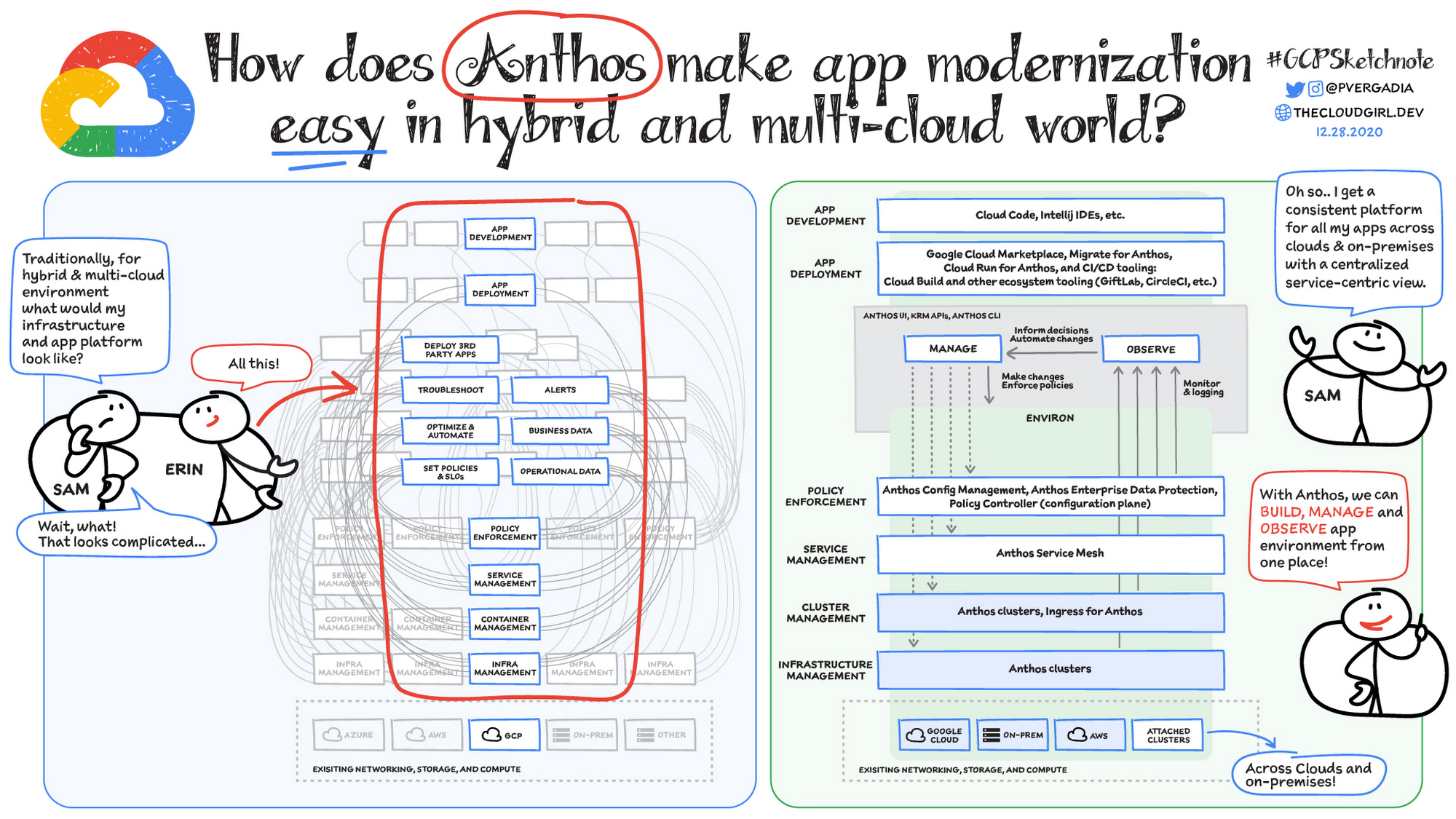
Why is traditional hybrid and multicloud difficult?
In hybrid and multicloud environments, you need to manage infrastructure. Let’s say you use containers on the clouds, and you develop apps using services on Google Cloud and AWS. Regardless of environment, you will need policy enforcement across your IT footprint. To manage your apps across the environment, you need monitoring and logging systems. You need to integrate that data into meaningful categories, like business data, operational data, and alerts.
Digging further, you might use operational data and alerts to inform optimizations, implement automations, and set policies or SLOs. You might use business data to do all those things, and to deploy third-party apps. Then, to actually enact the changes you decide to implement, you need to act on different parts of the system. That means digging into each tool for policy enforcement, securing services, orchestrating containers, and managing infrastructure. Don’t forget, all of this work is in addition to what it takes to develop and deploy your own apps.
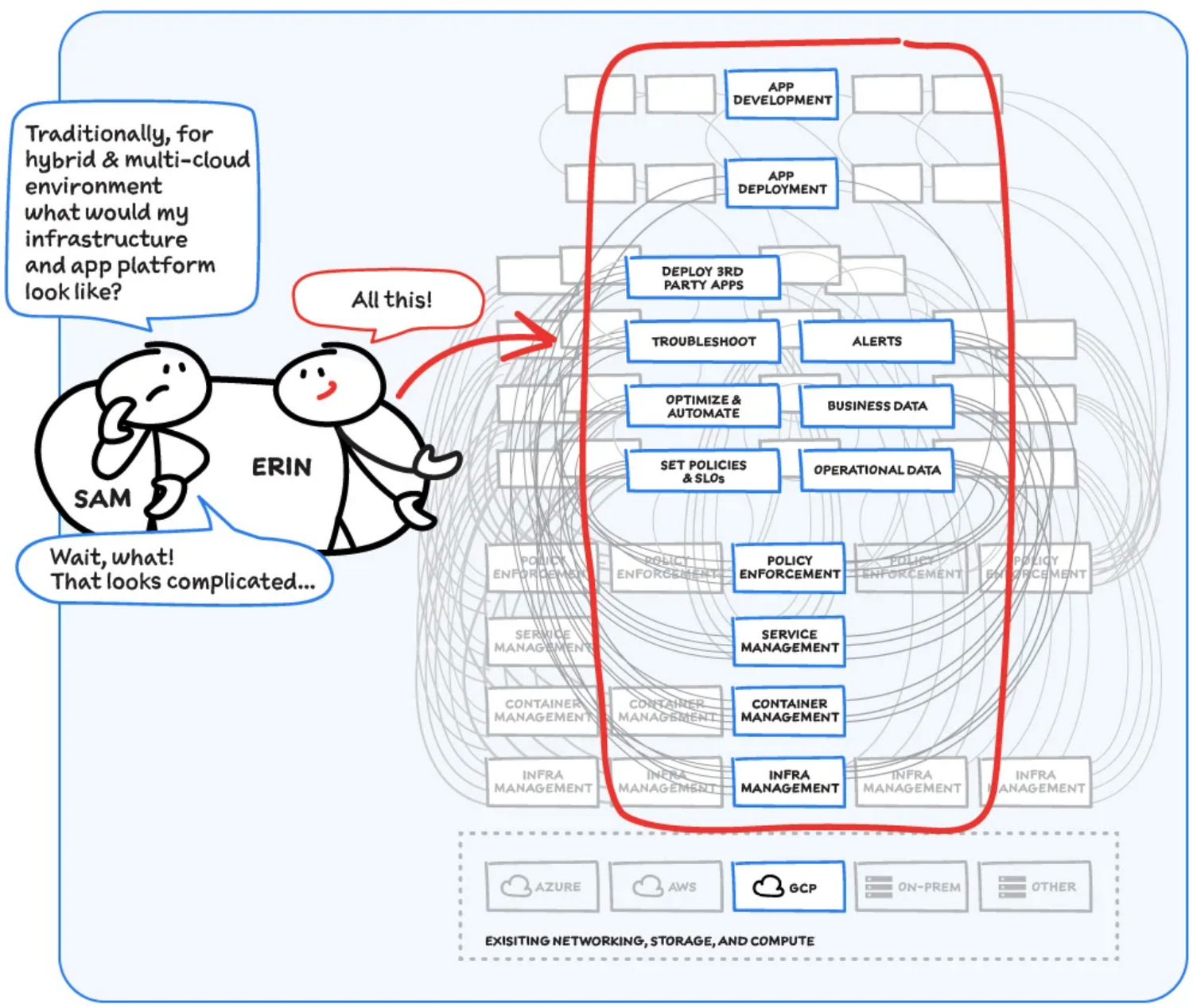
Now, consider repeating this set of tasks across a hybrid and multicloud landscape. It becomes very complex, very quickly. Your platform admins, SREs, and DevOps teams who are responsible for security and efficiency have to do manual, cluster-by-cluster management, data collection, and information synthesis. With this complexity, it’s hard to stay current, to understand business implications, and to ensure compliance (not to mention the difficulty of onboarding a new hire). Anthos helps solve these challenges!
How does Anthos make hybrid and multicloud easy?
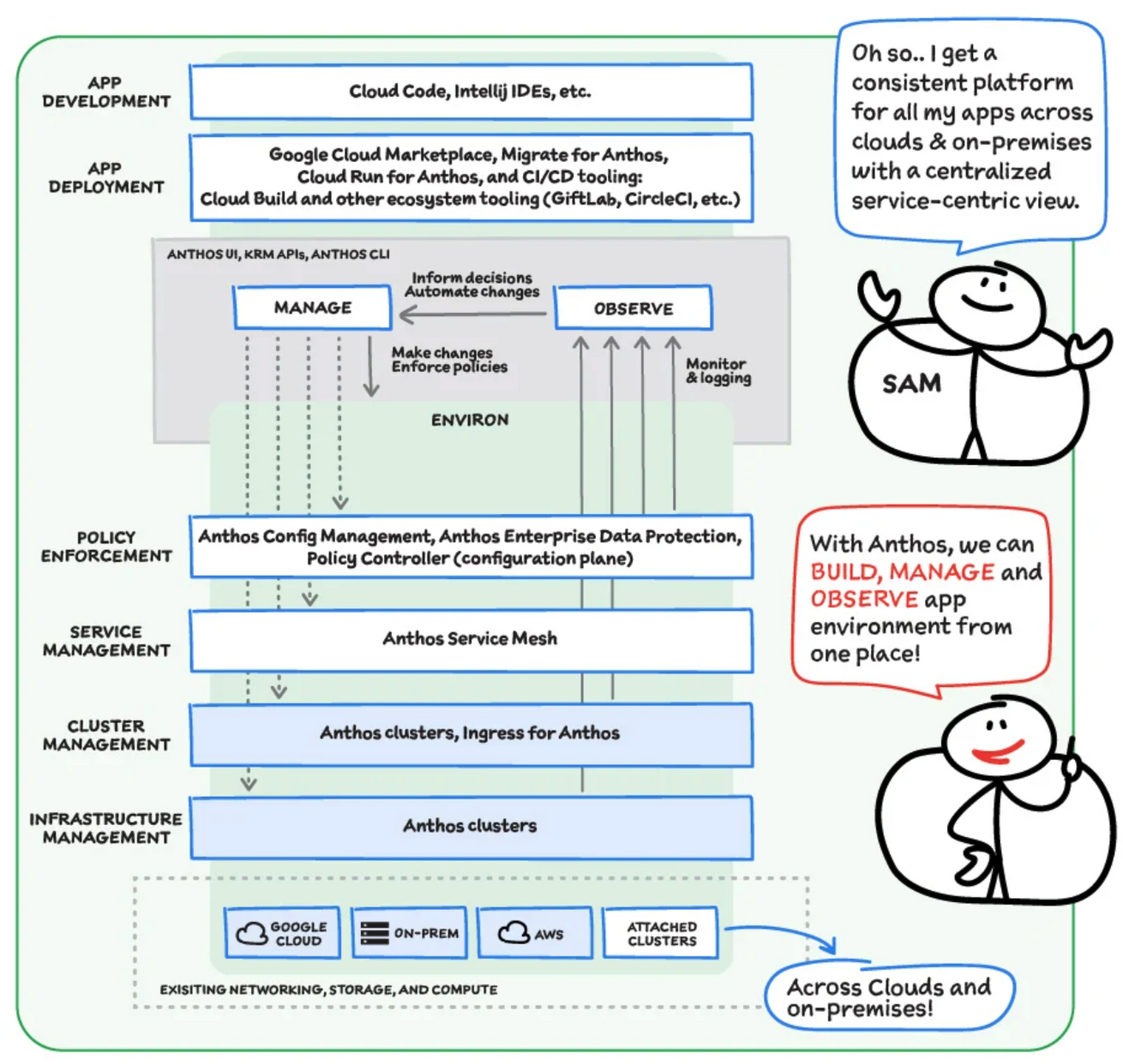
With Anthos, you get a consistent way to manage your infrastructure, with similar infrastructure management, container management, service management, and policy enforcement across your landscape.
As a result, you have observability across all your platforms in one place, including access to business information, alerts, and operations information. With this information you might decide to optimize, automate, and set policies or SLOs.
Digging deeper into Anthos
Environs
You may have different regions that need different policies, and also have different development, staging, or production environments that need different permissions. Some parts of your work may need more security. That’s where environs come in! Environs are a way to create logical sets of underlying Kubernetes clusters, regardless of which platform those clusters live on.
By considering, grouping, and managing sets of clusters as logical environs, you can think about and work with your applications at the right level of detail for what you need to do, be it acquiring business insights over the entire system, updating settings for a dev environment, or troubleshooting data for a specific cluster. Using environs, each part of the functional stack can take declarative direction about configuration, compliance, and more.
Modernize application development
Anthos also helps modernize application development because it uses environs to enforce policies and processes, and abstracts away the cluster and container management from application teams. Anthos enables you to easily abstract away infrastructure from application teams, making it easy for them to incorporate a wide variety of CI/CD solutions on top of environs. It lets you view and manage your applications at the right level of detail, be it business insights for services across the entire system, or troubleshooting data for a specific cluster. Anthos also works with container-based tools like buildpacks to simplify the packaging process. It offers Migrate for Anthos to take those applications out of the VMs and move them to a more modern hosting environment.
What’s in it for platform administrators?
Anthos provides platform administrators a single place to monitor and manage their landscape, with policy control and marketplace access. This reduces person-hours needed for management, enforcement, discovery, and communication. Anthos also provides administrators an out-of-the-box structured view of their entire system, including services, clusters, and more, so they can improve security, use resources more efficiently, and demonstrate measurable success. Administrators also save time and effort by managing declaratively, and they can communicate the success, cost savings, and efficiency of the platforms without needing to manually combine data.
Interested in getting started with Anthos? Check out the free on-demand training here and my YouTube series.
For more resources, you can also read the Anthos ebook at no cost. For more #GCPSketchnote and similar cloud content, follow me on twitter @pvergadia and keep an eye out on thecloudgirl.dev
How Eventrac and Workflows Integration Helps Implement Hybrid Architecture in Google Cloud

6524
Of your peers have already read this article.
3:00 Minutes
The most insightful time you'll spend today!
I previously talked about Eventarc for choreographed (event-driven) Cloud Run services and introduced Workflows for orchestrated services.
Eventarc and Workflows are very useful in strictly choreographed or orchestrated architectures. However, you sometimes need a hybrid architecture that combines choreography and orchestration.
For example, imagine a use case where a message to a Pub/Sub topic triggers an automated infrastructure workflow or where a file upload to a Cloud Storage bucket triggers an image processing workflow. In these use cases, the trigger is an event but the actual work is done as an orchestrated workflow.
How do you implement these hybrid architectures in Google Cloud? The answer lies in Eventarc and Workflows integration.
Eventarc triggers
To recap, an Eventarc trigger enables you to read events from Google Cloud sources via Audit Logs and custom sources via Pub/Sub and direct them to Cloud Run services:

One limitation of Eventarc is that it currently only supports Cloud Run as targets. This will change in the future with more supported event targets. It’d be nice to have a future Eventarc trigger to route events from different sources to Workflows directly.
In absence of such a Workflows enabled trigger today, you need to do a little bit of work to connect Eventarc to Workflows. Specifically, you need to use a Cloud Run service as a proxy in the middle to execute the workflow.
Let’s take a look at a couple of concrete examples.
Eventarc Pub/Sub + Workflows integration
In the first example, imagine you want a Pub/Sub message to trigger a workflow.
Define and deploy a workflow
First, define a workflow that you want to execute. Here’s a sample workflows.yaml that simply decodes and logs the Pub/Sub message body:
main:params: [args]steps:- init:assign:- headers: ${args.headers}- body: ${args.body}...- pubSubMessageStep:call: sys.logargs:text: ${"Decoded Pub/Sub message data is " + text.decode(base64.decode(args.body.message.data))}severity: INFODeploy the workflow with a single command:gcloud workflows deploy ${WORKFLOW_NAME} --source=workflow.yaml --location=${REGION}
Deploy a Cloud Run service to execute the workflow
Next, you need a Cloud Run service to execute this workflow. Workflows has an execution API and client libraries that you can use for your favorite language. Here’s an example of the execution code from a Node app.js file. It simply passes the received HTTP request headers and body to the workflow and executes it:
const execResponse = await client.createExecution({parent: client.workflowPath(GOOGLE_CLOUD_PROJECT, WORKFLOW_REGION, WORKFLOW_NAME),execution: {argument: JSON.stringify({headers: req.headers, body: req.body})}});
Deploy the Cloud Run service with the Workflows name and region passed as environment variables:
gcloud run deploy ${SERVICE_NAME} \--image gcr.io/${PROJECT_ID}/${SERVICE_NAME} \--region=${REGION} \--allow-unauthenticated \--update-env-vars GOOGLE_CLOUD_PROJECT=${PROJECT_ID},WORKFLOW_REGION=${REGION},WORKFLOW_NAME=${WORKFLOW_NAME}
Connect a Pub/Sub topic to the Cloud Run service
With Cloud Run and Workflows connected, the next step is to connect a Pub/Sub topic to the Cloud Run service by creating an Eventarc Pub/Sub trigger:
gcloud eventarc triggers create ${SERVICE_NAME} \--destination-run-service=${SERVICE_NAME} \--destination-run-region=${REGION} \--location=${REGION} \--event-filters="type=google.cloud.pubsub.topic.v1.messagePublished"
This creates a Pub/Sub topic under the covers that you can access with:
export TOPIC_ID=$(basename $(gcloud eventarc triggers describe ${SERVICE_NAME} --format='value(transport.pubsub.topic)'))
Trigger the workflow
Now that all the wiring is done, you can trigger the workflow by simply sending a Pub/Sub message to the topic created by Eventarc:
gcloud pubsub topics publish ${TOPIC_ID} --message="Hello there"
In a few seconds, you should see the message in Workflows logs, confirming that the Pub/Sub message triggered the execution of the workflow:

Eventarc Audit Log-Storage + Workflows integration
In the second example, imagine you want a file creation event in a Cloud Storage bucket to trigger a workflow. The steps are similar to the Pub/Sub example with a few differences.
Define and deploy a workflow
As an example, you can use this workflow.yaml that logs the bucket and file names:
main:params: [args]steps:...- log:call: sys.logargs:text: ${"Workflows received event from bucket " + bucket + " for file " + file}severity: INFO
Deploy a Cloud Run service to execute the workflow
In the Cloud Run service, you read the CloudEvent from Eventarc and extract the bucket and file name in app.js using the CloudEvent SDK and the Google Event library:
const cloudEvent = HTTP.toEvent({ headers: req.headers, body: req.body });//"protoPayload" : {"resourceName":"projects/_/buckets/events-atamel-images-input/objects/atamel.jpg}";const logEntryData = toLogEntryData(cloudEvent.data);const tokens = logEntryData.protoPayload.resourceName.split('/');const bucket = tokens[3]
Executing the workflow is similar to the Pub/Sub example, except you don’t pass in the whole HTTP request but rather just the bucket and file name to the workflow:
const execResponse = await client.createExecution({parent: client.workflowPath(GOOGLE_CLOUD_PROJECT, WORKFLOW_REGION, WORKFLOW_NAME),execution: {argument: JSON.stringify({bucket: bucket, file: file})}});
Connect Cloud Storage events to the Cloud Run service
To connect Cloud Storage events to the Cloud Run service, create an Eventarc Audit Logs trigger with the service and method names for Cloud Storage:
gcloud eventarc triggers create ${SERVICE_NAME} \--destination-run-service=${SERVICE_NAME} \--destination-run-region=${REGION} \--location=${REGION} \--event-filters="type=google.cloud.audit.log.v1.written" \--event-filters="serviceName=storage.googleapis.com" \--event-filters="methodName=storage.objects.create" \--service-account=${PROJECT_NUMBER}-compute@developer.gserviceaccount.com
Trigger the workflow
Finally, you can trigger the workflow by creating and uploading a file to the bucket:
echo "Hello World" > random.txtgsutil cp random.txt gs://${BUCKET}/random.txt
In a few seconds, you should see the workflow log the bucket and object name.
Conclusion
In this blog post, I showed you how to trigger a workflow with two different event types from Eventarc. It’s certainly possible to do the opposite, namely, trigger a Cloud Run service via Eventarc with a Pub/Sub message (see connector_publish_pubsub.workflows.yaml) from Workflows or a file upload to a bucket from Workflows.
All the code mentioned in this blog post is in eventarc-workflows-integration. Feel free to reach out to me on Twitter @meteatamel for any questions or feedback.
KRM Series Part 5: Learn to Manage and Configure Hosted Resources with Kubernetes

3200
Of your peers have already read this article.
3:00 Minutes
The most insightful time you'll spend today!
This is the fifth and final post in a multi-part series about the Kubernetes Resource Model. Check out parts 1, 2, 3, and 4 to learn more.
In part 2 of this series, we learned how the Kubernetes Resource Model works, and how the Kubernetes control plane takes action to ensure that your desired resource state matches the running state.
Up until now, that “running resource state” has existed inside the world of Kubernetes- Pods, for example, run on Nodes inside a cluster. The exception to this is any core Kubernetes resource that depends on your cloud provider. For instance, GKE Services of type Load Balancer depend on Google Cloud network load balancers, and GKE has a Google Cloud-specific controller that will spin up those resources on your behalf.
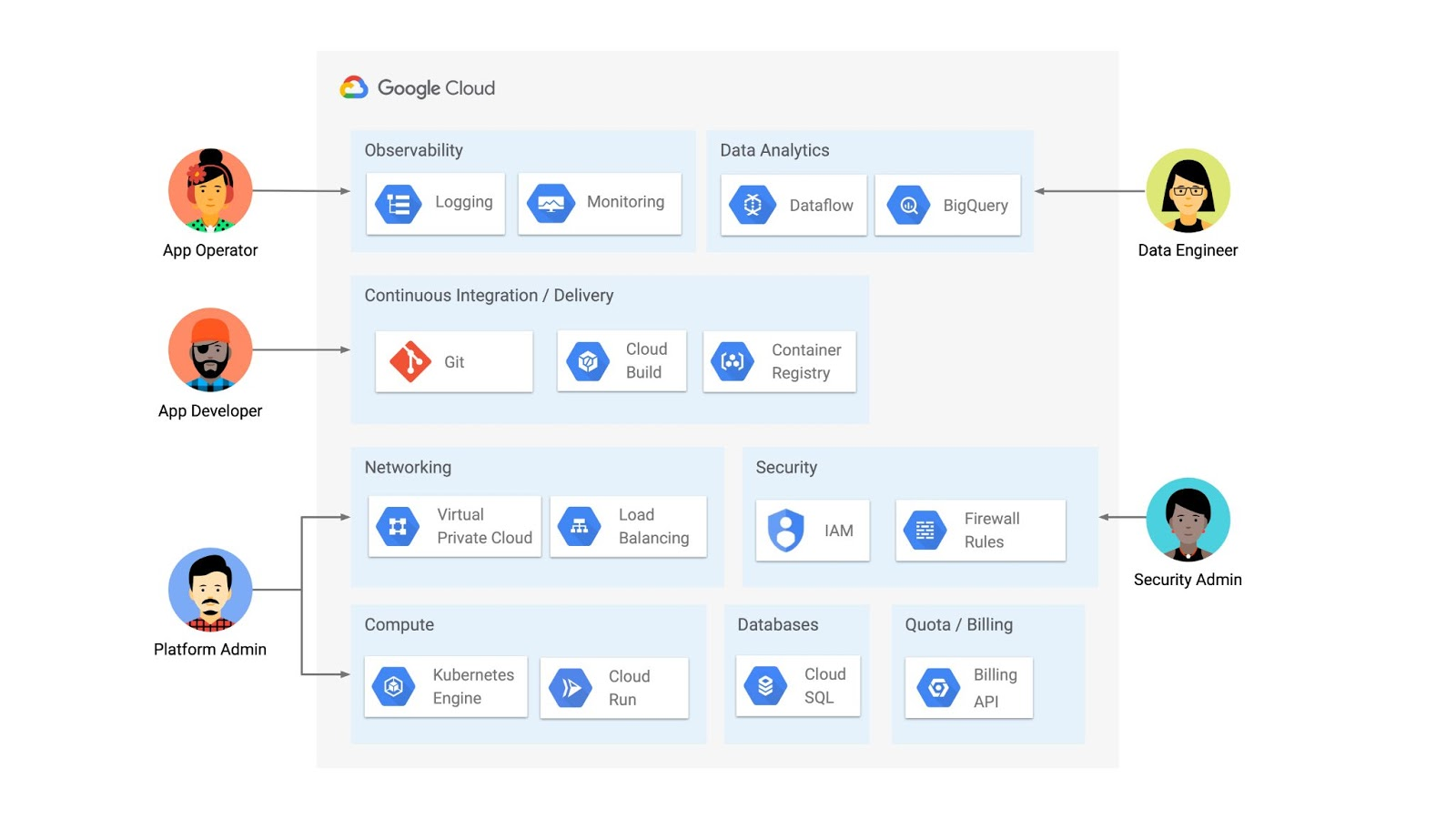
But if you’re operating a Kubernetes platform, it’s likely that you have resources that live entirely outside of Kubernetes. You might have CI/CD triggers, IAM policies, firewall rules, databases. The first post of this series introduced the platform diagram below, and asserted that “Kubernetes can be the powerful declarative control plane that manages large swaths” of that platform. Let’s close that loop by exploring how to use the Kubernetes Resource Model to configure and provision resources hosted in Google Cloud.
Why use KRM for hosted resources?
Before diving into the “what” and “how” of using KRM for cloud-hosted resources, let’s first ask “why.” There is already an active ecosystem of infrastructure-as-code tools, including Terraform, that can manage cloud-hosted resources. Why use KRM to manage resources outside of the cluster boundary?
Three big reasons. The first is consistency. The last post explored ways to ensure consistency across multiple Kubernetes clusters- but what about consistency between Kubernetes resources and cloud resources? If you have org-wide policies you’d like to enforce on Kubernetes resources, chances are that you also have policies around hosted resources. So one reason to manage cloud resources with KRM is to standardize your infrastructure toolchain, unifying your Kubernetes and cloud resource configuration into one language (YAML), one Git config repo, one policy enforcement mechanism.
The second reason is continuous reconciliation. One major advantage of Kubernetes is its control-loop architecture. So if you use KRM to deploy a hosted firewall rule, Kubernetes will work constantly to make sure that resource is always deployed to your cloud provider- even if it gets manually deleted.
A third reason to consider using KRM for hosted resources is the ability to integrate tools like kustomize into your hosted resource specs, allowing you to customize resource specifications without templating languages.
These benefits have resulted in a new ecosystem of KRM tools designed to manage cloud-hosted resources, including the Crossplane project, as well as first-party tools from AWS, Azure, and Google Cloud.
Let’s explore how to use Google Cloud Config Connector to manage GCP-hosted resources with KRM.
Introducing Config Connector
Config Connector is a tool designed specifically for managing Google Cloud resources with the Kubernetes Resource Model. It works by installing a set of GCP-specific resource controllers onto your GKE cluster, along with a set of Kubernetes Custom Resources for Google Cloud products, from Cloud DNS to Pub/Sub.
How does it work? Let’s say that a security administrator at Cymbal Bank wants to start working more closely with the platform team to define and test Policy Controller constraints. But they don’t have access to a Linux machine, which is the operating system used by the platform team. The platform team can address this by manually setting up a Google Compute Engine (GCE) Linux instance for the security admin. But with Config Connector, the platform team can instead create a declarative KRM resource for a GCE instance, commit it to the config repo, and Config Connector will spin up the instance on their behalf.
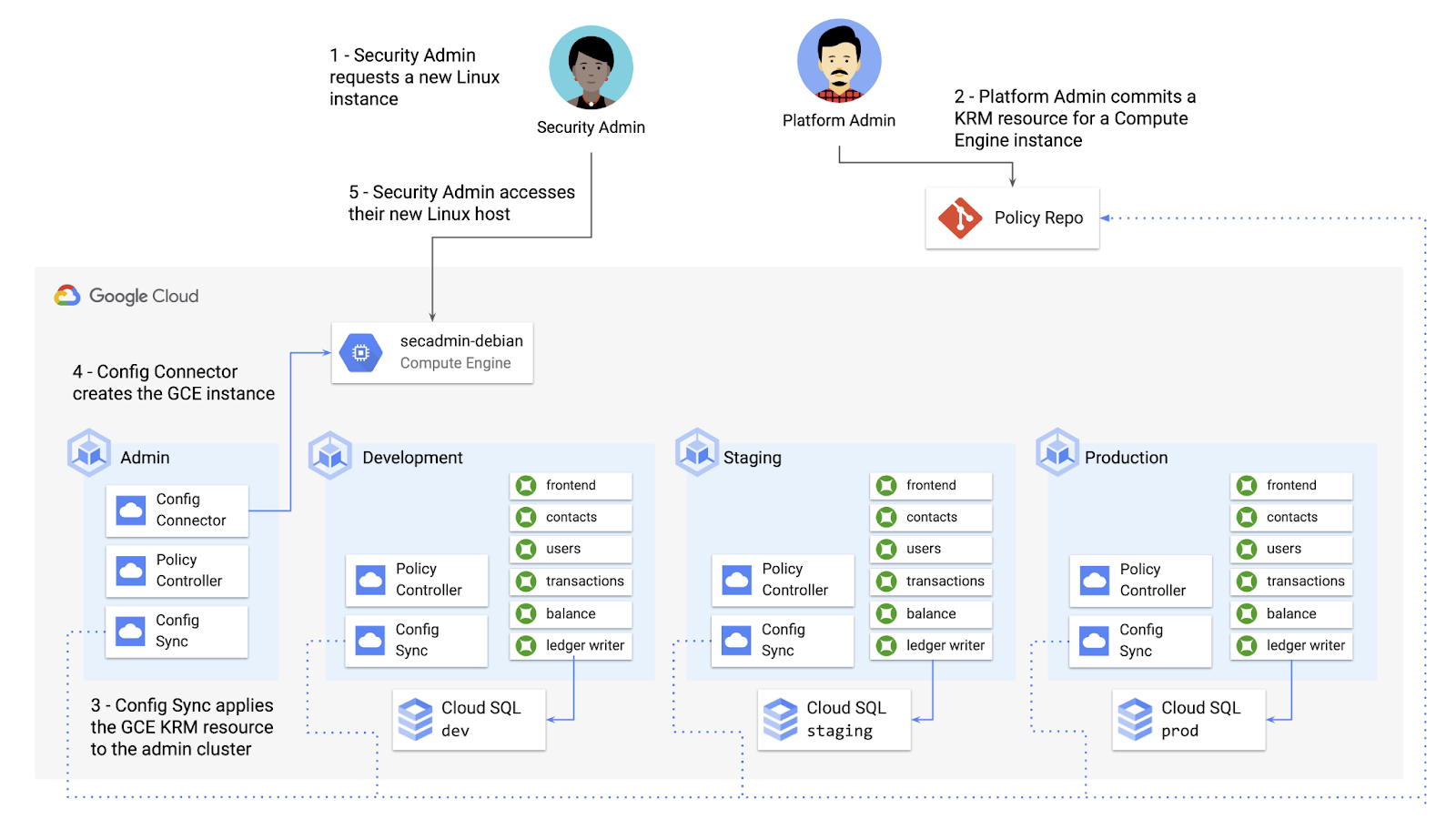
What does this declarative resource look like? A Config Connector resource is just a regular Kubernetes-style YAML file- in this case, a custom resource called Compute Instance. In the resource spec, the platform team can define specific fields, like what GCE machine type to use.
apiVersion: compute.cnrm.cloud.google.com/v1beta1kind: ComputeInstancemetadata:annotations:cnrm.cloud.google.com/allow-stopping-for-update: "true"name: secadmin-debianlabels:created-from: "image"network-type: "subnetwork"spec:machineType: n1-standard-1zone: us-west1-abootDisk:initializeParams:size: 24type: pd-ssdsourceImageRef:external: debian-cloud/debian-9...
Once the platform team commits this resource to the Config Sync repo, Config Sync will deploy the resource to the cymbal-admin GKE cluster, and Config Connector, running on that same cluster, will spin up the GCE resource represented in the file.
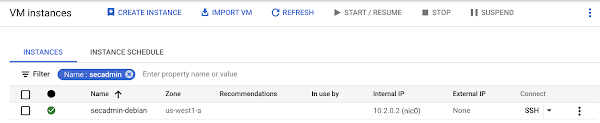
This KRM workflow for cloud resources opens the door for powerful automation, like custom UIs to automate resource requests within the Cymbal Bank org.
Integrating Config Connector with Policy Controller
By using Config Connector to manage Google Cloud-hosted resources as KRM, you can adopt Policy Controller to enforce guardrails across your cloud and Kubernetes resources.
Let’s say that the data analytics team at Cymbal Bank is beginning to adopt BigQuery. While the security team is approving production usage of that product, the platform team wants to make sure no real customer data is imported. Together, Config Connector and Policy Controller can set up guardrails for BigQuery usage within Cymbal Bank.
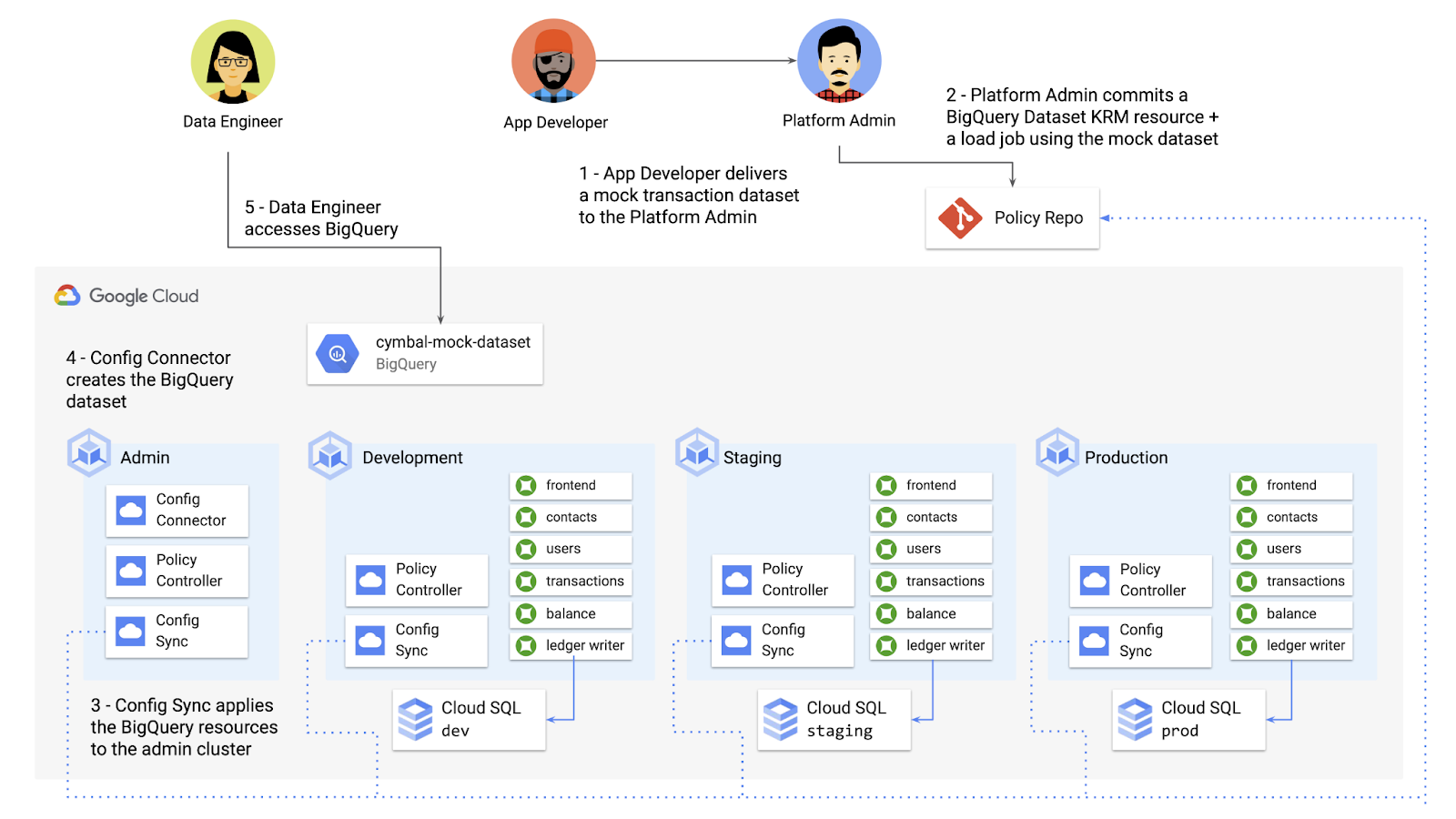
Config Connector supports BigQuery resources, including Jobs, Datasets, and Tables. The platform team can work with the analytics team to define a test dataset, containing mocked data, as KRM, pushing those resources to the Config Sync repo as they did with the GCE instance resource.
apiVersion: bigquery.cnrm.cloud.google.com/v1beta1kind: BigQueryJobmetadata:name: cymbal-mock-load-jobannotations:configsync.gke.io/cluster-name-selector: cymbal-adminspec:location: "US"jobTimeoutMs: "600000"load:sourceUris:- "gs://cymbal-bank-datasets/cymbal-mock-transactions.csv"
From there, the platform team can create a custom Constraint Template for Policy Controller, limiting the allowed Cymbal datasets to only the pre-vetted mock dataset:
rego: |package bigquerydatasetallownameviolation[{"msg": msg}] {input.review.object.kind == "BigQueryDataset"input.review.object.metadata.name != input.parameters.allowedNamemsg := sprintf("The BigQuery dataset name %v is not allowed", [input.review.object.metadata.name])}apiVersion: constraints.gatekeeper.sh/v1beta1
These guardrails, combined with IAM, can allow your organization to adopt new cloud products safely- not only defining who can set up certain resources, but within those resources, what field values are allowed.
Manage existing GCP resources with Config Connector
Another useful feature of Config Connector is that it supports importing existing Google Cloud resources into KRM format, allowing you to bring live-running resources into the management domain of Config Connector.
You can use the config-connector command line tool to do this, exporting specific resource URIs into static files:
config-connector export "//sqladmin.googleapis.com/sql/v1beta4/projects/cymbal-bank/instances/cymbal-dev" \--output cloudsql/
Output:
apiVersion: sql.cnrm.cloud.google.com/v1beta1kind: SQLInstancemetadata:annotations:cnrm.cloud.google.com/project-id: cymbal-bankname: cymbal-devspec:databaseVersion: POSTGRES_12region: us-east1resourceID: cymbal-dev...
From here, we can push these KRM resources to the config repo, and allow Config Sync and Config Controller to start lifecycling the resources on our behalf. The screenshot below shows that the cymbal-dev Cloud SQL database now has the “managed-by-cnrm” label, indicating that it’s now being managed from Config Connector (CNRM = “cloud-native resource management”).
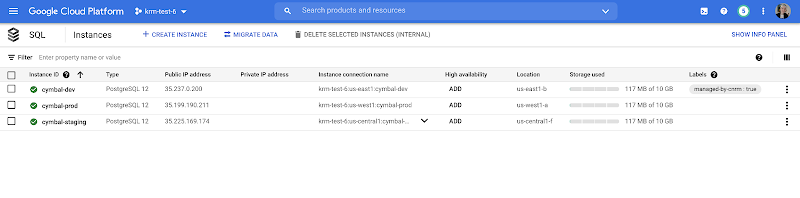
This resource export tool is especially useful for teams looking to try out KRM for hosted resources, without having to invest in writing a new set of YAML files for their existing resources. And if you’re ready to adopt Config Connector for lots of existing resources, the tool has a bulk export option as well.
Overall, while managing hosted resources with KRM is still a newer paradigm, it can provide lots of benefits for resource consistency and policy enforcement. Want to try out Config Connector yourself? Check out the part 5 demo.
This post concludes the Build a Platform with KRM series. Hopefully these posts and demos provided some inspiration on how to build a platform around Kubernetes, with the right abstractions and base-layer tools in mind.
Thanks for reading, and stay tuned for new KRM products and features from Google.
More Relevant Stories for Your Company

Streamlining Workflow Executions: Using Cloud Tasks in Google Cloud
Introduction In my previous post, I talked about how you can use a parent workflow to execute child workflows in parallel for faster overall processing time and easier detection of errors. Another useful pattern is to use a Cloud Tasks queue to create Workflows executions and that’s the topic of this

2,602 Uses of AI for Social Good, and What We Learned from Them
For the past few years, we’ve applied core Google AI research and engineering to projects with positive societal impact, including forecasting floods, protecting whales and predicting famine. Artificial intelligence has incredible potential to address big social, humanitarian and environmental problems, but in order to achieve this potential, it needs to be accessible to organizations

Why You Should Consider API-first Integration
Enterprises need to move faster than ever to gain a competitive advantage in today’s customer-focused environment. Time-to-market for products and services has shortened dramatically, from years to days. IT teams must move fast, react fast, and enable business strategies via constant innovation. All of this digital transformation is about more

How The New York Times Increased Speed of Delivery by Using Kubernetes
When New York Times decided a few years ago to move out of its data centers, its first deployments on the public cloud were smaller and less critical applications that were being managed on virtual machines. "We started building more and more tools, and at some point, we realized that
