





3253
Of your peers have already watched this video.
2:00 Minutes
The most insightful time you'll spend today!
A Path to Predictable Cloud Costs
Google Cloud’s cost management tools provide the visibility, accountability, control, and intelligence you need so that you can scale your business in the cloud with confidence. Tailored to meet the needs of organizations of all sizes, these tools help reduce complexity and increase the predictability of your cloud costs.
These tools help you gain visibility into your current and forecasted costs, identify cost drivers, and leverage key insights to confidently plan, manage, and optimize your costs with built-in reporting and customizable dashboards.
You can promote a culture of accountability for costs across your organization and better understand your return on cloud investments with flexible options for organizing resources and allocating costs to departments and teams.
7 Fantastic Ways Google Cloud VMWare Engine Stands Out from the Rest for Running VMWare Workloads in the Cloud!

3582
Of your peers have already read this article.
2:00 Minutes
The most insightful time you'll spend today!
Google Cloud VMware Engine delivers an enterprise-grade, cloud-native VMware experience that is built on Google Cloud’s highly performant and scalable infrastructure. By enabling a consistent VMware experience, the service allows customers to adopt Google Cloud rapidly, easily, and with minimal modifications to their vSphere workloads, bringing the best of VMware and Google Cloud together on one platform for a variety of use-cases. These include rapid data center exit, application lift and shift, disaster recovery, virtual desktop infrastructure, or modernization at your own pace.
Here are seven ways VMware Engine outshines alternatives for running your VMware workloads in the cloud, simplify your operations, and help you innovate faster:
- Dedicated 100Gbps east-west networking
Google Cloud VMware Engine nodes come with redundant switching and dedicated 100Gbps east-west networking with no oversubscription of bandwidth, unlike other options where there is generally oversubscription. This is especially important when it comes to running latency-sensitive workloads. - Four 9’s of availability in a single zone
The service offers 99.99% uptime SLA for a cluster in a single Zone with five to 16 nodes and FTT=2 or more without the need for stretched clusters, which is higher than the alternatives. Further, dedicated connectivity for core service functions such as vSAN and vMotion enables better solution stability and availability. This enables the service to support the needs of enterprise workloads that require high availability.
Note: “Cluster” means a deployment of three or more dedicated bare metal nodes running VMware ESXi and associated networking managed via management interfaces.
- Global networking without complex routing
Google Cloud VMware Engine networking is built based on Google Cloud’s powerful networking architecture. With simplified regional and global routing modes—which allow a VPC’s subnets to be deployed in any region where our service is available—you can architect global networks without the need or overhead of creating and connecting regional network designs. You get instant, direct Layer 3 access between them. In alternative cloud environments, you may have to configure special networking between regions, often requiring VPN-based tunnels over the WAN to enable global uniform network communication. This adds to the deployment and operational complexity, in addition to cost. - Integrated multi-VPC networking
Users often have application deployments in different VPC networks, such as separate dev/test and production environments or multiple administrative domains across business units. The service supports “many-to-many” access from VPC networks to Google Cloud VMware Engine networks with multi-VPC networking, allowing you to retain existing deployed architectures and extend them flexibly to your VMware environments. In addition, by providing multi-VPC networking, you can pool their VMware needs—say for QA and dev—to a smaller set of clusters, effectively reducing their costs.
For more information about the end-to-end networking capabilities and services available in Google Cloud VMware Engine, please refer to the Private Cloud Networking for Google Cloud VMware Engine whitepaper. Here, you’ll find details about network flows, configuration options, and the differentiated benefits of running your VMware workloads in Google Cloud.
- Unified, cloud-integrated model
Google Cloud VMware Engine is a fully managed Google first-party service, operated and supported by Google and its world-class team. With fully integrated identities, billing, and access control, you have a simpler end-to-end experience that is different from other services. You access Google Cloud VMware Engine service via the Google Cloud console, like any other Google Cloud service. You can also access other native Google Cloud services privately from your VMware private cloud running in Google Cloud VMware Engine over local connections. - Flexibility in third-party ecosystem compatibility
With Google Cloud VMware Engine, you can set up existing VMware on-premises third-party tools or products that require additional privileges by using a solution user account. This uniquely enables operational consistency, ensuring that the tools you have invested in and used over the years work on Google Cloud VMware Engine. Furthermore, in key areas such as vSAN data encryption, you have the choice of not only using Google Cloud Key Management Service (KMS)—which is turned on by default on vSAN datastores—but also external KMS providers such as HyTrust, Thales, and Fortanix. - Dense nodes with high storage:core and memory:core ratios and fast provisioning
Google Cloud VMware Engine nodes are dense. Each node is powered by Intel® Xeon® Scalable Processors and comes with 36 cores, 72 hyperthreaded cores, 768 GB memory, 19.2 TB NVMe data and 3.2 TB NVMe cache storage. This, along with oversubscription, leads to high consolidation ratios and compelling storage:core per dollar and memory:core per dollar. In addition, you can rapidly spin up these nodes in a VMware private cloud often in under an hour, enabling on-demand, VMware-consistent capacity in Google Cloud for your needs.
These are just a few examples of customer-centric innovation that set Google Cloud VMware Engine infrastructure apart. In addition, migrating to Google cloud can save you up to 38% in TCO. Get started by learning about Google Cloud VMware Engine and your options for migration, or talk to our sales team to join the customers who have embarked upon this journey.
The authors would like to thank the Google Cloud VMware Engine product team for their contributions on this blog.
Three Typical Connectivity Use Cases to Pick the Right Option for Your Enterprise

3304
Of your peers have already read this article.
3:00 Minutes
The most insightful time you'll spend today!
Enterprises today have a very broad mix of networks — from SD-WANs, dedicated WANs such as MPLS, cloud interconnects, to VPNs. At the same time, they’re moving those WANs to the cloud to take advantage of faster turn-up, lower cost, and increased feature velocity. As workloads migrate to the cloud and multi-cloud environments, we believe that it’s critical to simplify enterprises’ networking model.
Each major cloud provider uses distinct abstraction models to configure networks or connections between your resources. Some use gateways, some use connections or links. Network Connectivity Center, launched last year, provides a simple management solution for your network connection, and is now Generally Available.
In this post, we outline the typical connectivity use cases for customers to help you select and set up the best connectivity option for your environment.
Understanding cloud network connectivity
Cloud networking refers to the ability to connect two resources together inside a cloud, across clouds and with on-premises data centers. A cloud provider needs to provide three main types of connectivity:
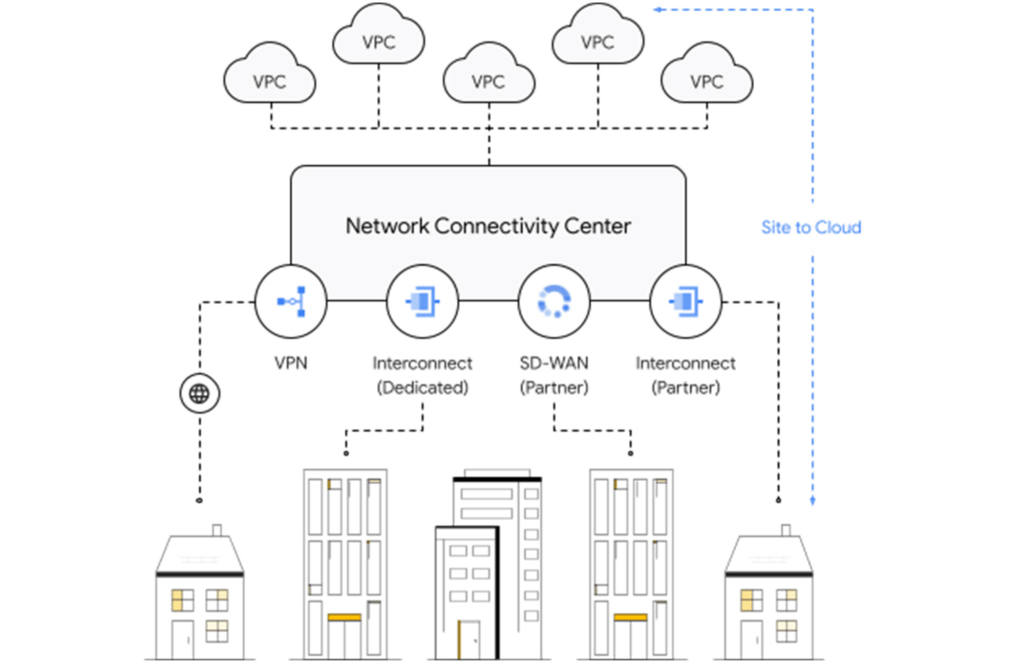
- Site-to-cloud – Between on-premises equipment and cloud resources
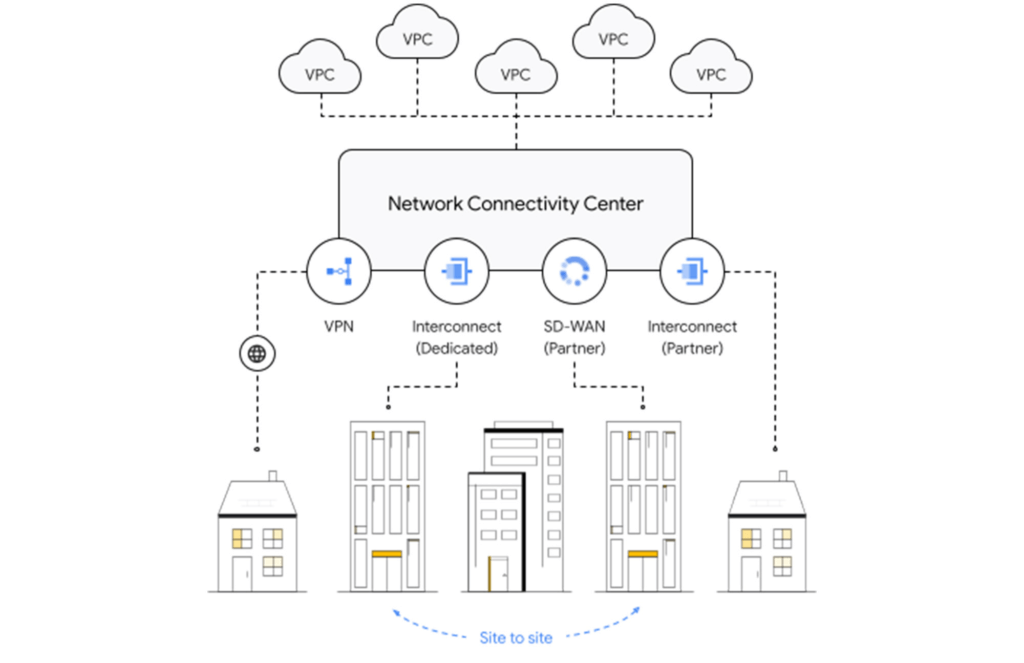
- Site-to-site – To connect on-premises resources together
- VPC-to-VPC – Connectivity between cloud resources
- Let’s take a look at each one.
Site-to-cloud connectivity
Site-to-cloud connectivity traditionally is done via a cloud interconnect or a cloud VPN. The automatic exchange of routes between on-premises and multiple VPCs can be done using a transit VPC.
A newer approach is to add cloud providers into an SD-WAN mesh using a router virtual appliance in Google Cloud. Network Connectivity Center brings the capacity to synchronize the appliance routes dynamically via BGP to Cloud Router and hence their VPCs. It enables connectivity between on-premises data centers and branch offices and their cloud workloads via SD-WAN-enabled connectivity. This capability is available globally across all 29+ Google Cloud regions. Several of our partners also support this capability in their router appliances.
Site-to-site connectivity
Site-to-site connectivity enables network connectivity directly between two or more hybrid connection points (VPN, Interconnect or SD-WAN). Network Connectivity Center simplifies this model by automating the routing announcements in this environment, such that all sites connected to a single global Network Connectivity Center hub are able to communicate freely in any-any fashion. You can see an example of this for a specific market vertical use case in a recent blog, Voice trading in the cloud — digital transformation of private wires.
VPC-to-VPC connectivity
You can create a full or partial mesh of VPC connections using multiple technologies, with VPC peering being the most common. VPC peering provides highly performant, low latency, private connectivity for customer networks connected via hybrid connectivity and Network Connectivity Center to multiple VPCs containing workloads, which can be segmented via granular firewall policies as needed. Alternatively, you can use a transit VPC model to connect multiple VPCs together in a hub and spoke topology.
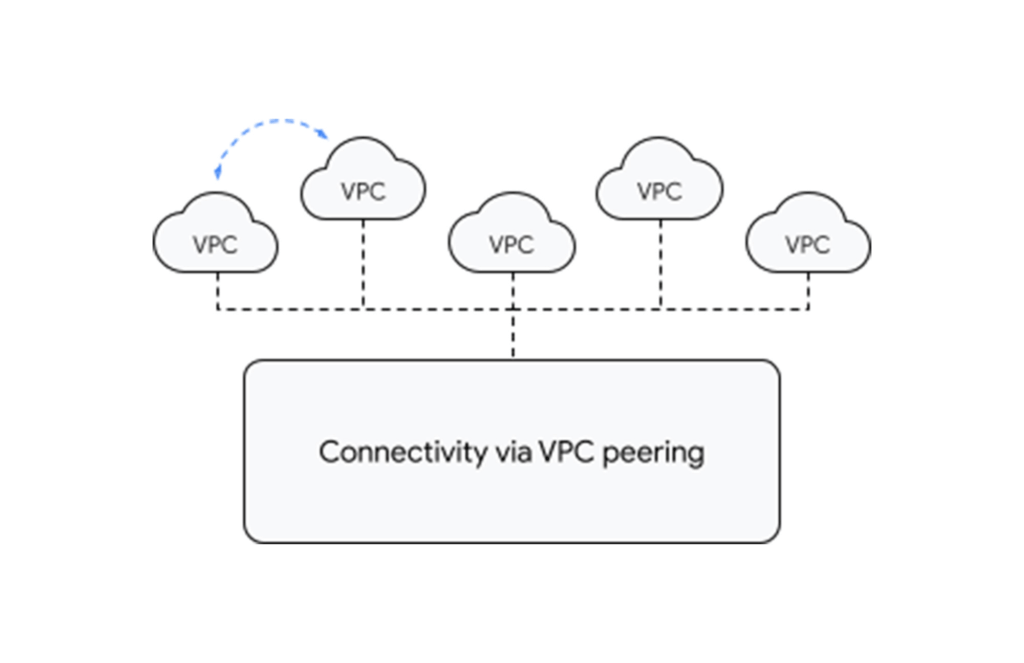
With tight integration with third-party router appliances as mentioned earlier, you can also leverage their third-party supported solutions such as next-generation firewalls to connect your VPCs together to meet specific compliance and segmentation requirements. Network Connectivity Center allows you to synchronize the routing tables of these appliances with your VPC’s routing table, simplifying the process of setting up redundant configurations.
What’s next for cloud networking connectivity in Google Cloud?
As enterprises continue to migrate different types of workloads to public cloud providers, networking topologies are becoming more complex. In summary, we have solutions for all connectivity needs. We aim to keep our models and solutions understandable and simple. Over time, look for Network Connectivity Center to become Google Cloud’s single point of configuration for all your connectivity needs, with capabilities to handle the most complex network.
Strengthening Operational Resilience in Financial Services by Migrating to Google Cloud

3267
Of your peers have already read this article.
3:30 Minutes
The most insightful time you'll spend today!
Operational resilience continues to be a key focus for financial services firms. Regulators from around the world are refocusing supervisory approaches on operational resilience to support the soundness of financial firms and the stability of the financial ecosystem. Our new white paper discusses the continuing importance of operational resilience to the financial services sector, and the role that a well-executed migration to Google Cloud can play in strengthening it. Here are the key highlights:
Operational resilience in financial services
Financial services firms and regulators are increasingly focused on operational resilience, reflecting the growing dependency that the financial services industry has on complex systems, automation and technology, and third parties.
Operational resilience can be defined as the “ability to deliver operations, including critical operations and core business lines, through a disruption from any hazard”1. Given this definition, operational resilience needs to be thought of as a desired outcome, instead of a singular activity, and as such, the approach to achieving that outcome needs to address a multitude of operational risks including:
- Cybersecurity: Continuously adjusting key controls, people, processes and technology to prevent, detect and react to external threats and malicious insiders.
- Pandemics: Sustaining business operations in scenarios where people cannot, or will not, work in close proximity to colleagues and customers.
- Environmental and Infrastructure: Designing and locating facilities to mitigate the effects of localised weather and infrastructure events, and to be resilient to physical attacks.
- Geopolitical: Understanding and managing risks associated with geographic and political boundaries between intragroup and third-party dependencies.
- Third-party Risk: Managing supply chain risk, and in particular of critical outsourced functions by addressing vendor lock in, survivability and portability.
- Technology Risk: Designing and operating technology services to provide the required levels of availability, capacity, performance, quality and functionality.
Operational resilience benefits from migrating to Google Cloud
There is a growing recognition among policymakers and industry leaders that, far from creating unnecessary new risk, a well-executed migration to public cloud technology over the coming years will provide capabilities to financial services firms that will enable them to strengthen operational resilience in ways that are not otherwise achievable.
Foundationally, Google Cloud’s infrastructure and operating model is of a scale and robustness that can provide financial services customers a way to increase their resilience in a highly commercial way.
Equally important are the Google Cloud products, and our support for hybrid and multi-cloud, that help financial services customers manage various operational risks in a differentiated manner:
- Cybersecurity that is designed in, and from the ground up. From encryption by default, to our Titan security chip, to high-scale DOS defences, to the power of Google Cloud data analytics and Security Command Center our solutions help you secure your environment.
- Solutions that decouple employees and customers from physical offices and premises. This includes zero-trust based remote access that removes the need for complex VPNs, rapidly deployed customer contact center AI virtual agents, and Google Workspace for best-in-class workforce collaboration.
- Globally and regionally resilient infrastructure, data centers and support. We offer a global footprint of 24 regions and 73 zones allowing us to serve customers in over 200 countries, with a globally distributed support function so we can support customers even in adverse circumstances.
- Strategic autonomy through appropriate controls. Our recognition that customers and policymakers, particularly in Europe, strive for even greater security and autonomy is embodied in our work on data sovereignty, operational sovereignty, and software sovereignty.
- Portability, substitutability and survivability, using our open cloud. We understand that from a financial services firm’s perspective, achieving operational resilience may include solving for situations where their third parties are unable, for any reason, to provide the services contracted.
- Reducing technical debt, whilst focusing on great financial products and services. We provide a portfolio of solutions so that financial services firms’ technology organisations can focus on delivering high-quality services and experiences to customers, and not on operating foundational technologies such as servers, networks and mainframes.
End Security Risks with the Unattended Projects Recommender Feature

6117
Of your peers have already read this article.
3:00 Minutes
The most insightful time you'll spend today!
In fast-moving organizations, it’s not uncommon for cloud resources, including entire projects, to occasionally be forgotten about. Not only such unattended resources can be difficult to identify, but they also tend to create a lot of headaches for product teams down the road, including unnecessary waste and security risks.
To help you prune your idle cloud resources, we’re excited to introduce Unattended Project Recommender. It’s a new feature of Active Assist that provides you with a one-stop shop for discovering, reclaiming, and shutting down unattended projects. With actionable and automatic recommendations, you no longer have to worry about wasting money or mitigating security risks presented by your idle resources. Unattended Project Recommender uses machine learning to identify, with a high degree of confidence, projects that are likely abandoned based on API and networking activity, billing, usage of cloud services, and other signals. This feature is available via the Recommender API today, making it easy for you to integrate with your company’s existing workflow management and communication tools, or export results to a BigQuery table for custom analysis.
Thousands of projects can be unattended in large organizations, presenting major security risks
Your cloud projects can go abandoned or unattended for a number of reasons — ranging from a test environment that’s no longer needed, to project cancellation, to project owner switching jobs, and more. Not only can such projects contribute to your cloud bill (waste) but they may contain security issues such as open firewalls or privileged service account keys that attackers can exploit to get a hold of your cloud resources for cryptocurrency mining or, worse, compromise your company’s sensitive data. These security risks tend to grow over time because the latest best practices and patches are usually not applied to unattended projects.
We experience this issue here at Google, too… In fact, it has been on Google’s internal security team’s radar for some time now, so we joined forces and looked into this problem together, starting with our very own “google.com” organization cloud projects. We quickly found some projects that were unattended, but remediating this issue was easier said than done due to challenges in several areas:
- Detection: With lots of signals available to you via sources like Cloud Monitoring, what are the right ones you should look at (e.g. API, networking, user activity)? How can you tell the difference between an unattended project and a project that has a low level of activity by design (e.g. a “shell” project that holds an auth token)?
- Remediation: Once you have identified a project that seems abandoned, how do you go about ensuring that it’s indeed an unattended project? How do you reduce the risk of deleting something that might be essential to a production workload, causing irreversible data loss? How do you solve this at the scale of your entire organization, beyond a one-time cleanup?
Over the course of 2021 we built and tested a Google-internal prototype first, cleaning up many of our internal unattended projects, and then worked with a number of Google Cloud customers to build and tune this feature based on real-life data (thank you to all of our early adopters for working with us and your generous feedback that helped us shape this feature!) It was not uncommon for us to come across organizations with thousands of unattended projects, and we’re very excited to bring Unattended Project Recommender to all customers, in public preview.
Discovering and acting on unattended project recommendations
Unattended Project Recommender analyzes usage activity across all projects under your organization, including the following data:
- API activity (e.g. service accounts with authentication activity, API calls consumed)
- Networking activity (ingress and egress)
- Billing activity (e.g. services with billable usage)
- User activity (e.g. active project owners)
- Cloud services usage (e.g. number of active VMs, BigQuery jobs, storage requests)
Based on these signals, it can generate recommendations to clean up projects that have low usage activity (where “low usage” is defined using a machine learning model that ranks projects in your organization by level of usage), or recommendations to reclaim projects that have high usage activity but no active project owners. Here’s what an example post-processed summary list of recommendations can look like for the “foobar” organization that has 3 projects:
Project ID: demo-project-307815Recommendation: CLEANUP_PROJECTProject ID: new-projectRecommendation: N/AProject ID: bobs-playground-projectRecommendation: RECLAIM_PROJECT
In addition to the recommendations, you can also examine the underlying project activity insights that the recommendations are based upon. The insights provide additional information that can be useful for integration with your organization’s existing workflows and automation (e.g. send an auto-generated email or chat message to project owners based on the list provided by the owners field). Here’s an example insight payload:
content:activeAppengineInstanceDailyCount: 0activeCloudsqlInstanceDailyCount: 0activeGceInstanceDailyCount: 3activeServiceAccountDailyCount: 1apiClientDailyCount: 18922 // Daily average API calls producedbigqueryInflightJobDailyCount: 0bigqueryInflightQueryDailyCount: 0bigqueryStorageDailyBytes: 0bigqueryTableDailyCount: 0consumedApiDailyCount: 0 // Daily average API calls consumeddatastoreApiDailyCount: 0gcsObjectDailyCount: 11gcsRequestDailyCount: 0gcsStorageDailyBytes: 2663548hasActiveOauthTokens: false // OAuth tokens used in the last 180 dayshasBillingAccount: truenumActiveUserOwners: 1owners: // List of project owners- activeOnProject: falsemember: user:user1@example.com- activeOnProject: truemember: user:user2@example.comserviceWithBillableUsage:– Cloud Storage- Compute EnginevpcEgressDailyBytes: 264456938 // Daily average VPC egress bytesvpcIngressDailyBytes: 392435047 // Daily average VPC ingress bytesusagePercentile: 20 // Level of usage relative to other projects
GCP projects are used in many different ways and for many different purposes. In case you get a recommendation to delete a project that’s being used in a way that’s out of the scope for this feature, you can dismiss the recommendation and it will stop showing up for the given project.
Restoring deleted projects
When you choose to shut down a project using the projects.delete() method, it gets marked for deletion. After a project is marked for deletion, it becomes unusable, all resources within that project are shut down, and a 30-day wait period for the project and all of its data to get fully deleted begins.
In case a useful project is accidentally shut down, you have the option to restore the project within that 30-day wait period. Since restoring allows you to recover most but not necessarily all of your project data and resources, we recommend carefully examining the utilization insights associated with a project and considering any additional utilization signals that may not be captured by the Unattended Project Recommender before taking the cleanup action.
Early customer success stories
A number of enterprise customers are already using Unattended Project Recommender to keep their organizations clean of unattended projects and resources.
Decathlon, a French sporting goods retailer, is excited for the insight Unattended Project Recommender will bring to their environment, and are already deploying it as a part of their latest cloud security initiatives.
“After a thorough test of this feature and the validation of our CISO, we ended up deleting our first 775 projects, and no one complained! A great help to improve our security. The next step for us will be to operationalize it at scale, and implement a company wide policy for unattended resource management.” —Adeline Villette, Cloud Security Officer
For Veolia, one of the world’s largest water, waste and energy management companies, not only does this feature reduce security risks and waste, but also helps drive cultural shift and alignment with its ecological transformation strategy.
“This feature allows us to reduce our costs and security debt on assets that are no longer in use, and is also fully in line with Veolia’s philosophy of limiting its carbon footprint. After having tested Unattended Project Recommender on more than 3,000 projects throughout our organization, we are looking to bring it as proactive alerts to our project owners at scale.”—Thomas Meriadec, Product Manager
Box, a secure cloud content management provider, views it as a foundation for building a repeatable process to remediate unused resources.
“Unattended Project Recommender is a great fit for us. It gives us a unified view of project usage across our entire organization and enables us to address security risks of legacy projects in a systematic and organized manner, ensuring an even safer environment.” —Matt Bowes, Staff Security Engineer
Getting started with the Unattended Project Recommender
To help you get started, we’ve prepared a Cloud Shell tutorial (source code) that you can use to find unattended project recommendations within your own Projects/Folders/Organization. Click this button to clone the tutorial from GitHub and run in your Cloud Shell environment:

As you can see, listing recommendations for your projects only takes a few clicks with the tutorial (special thanks to Lanre Ogunmola, Security & Compliance Specialist, for making this look so easy)! For additional detail on using the gcloud CLI or API to discover unattended project recommendations, please refer to the documentation page.
You can also automatically export all recommendations from your Organization to BigQuery and then investigate the recommendations with DataStudio or Looker, or use Connected Sheets that let you use Google Workspace Sheets to interact with the data stored in BigQuery without having to write SQL queries.
As with any other Recommender, you can choose to opt out of data processing at any time by disabling the appropriate data groups in the Transparency & control tab under Privacy & Security settings.
We hope that you can leverage Unattended Project Recommender to improve your cloud security posture and reduce cost, and can’t wait to hear your feedback and thoughts about this feature! Please feel free to reach us at active-assist-feedback@google.com and we also invite you to sign up for our Active Assist Trusted Tester Group if you would like to get early access to the newest features as they are developed.
What Our Google Cloud Experts Say About Multi-cloud Journey

3437
Of your peers have already read this article.
1:30 Minutes
The most insightful time you'll spend today!
Do you want to fire up a bunch of techies? Talk about multicloud! There is no shortage of opinions. I figured we should tackle this hot topic head-on, so I recently talked to four smart folks—Corey Quinn of Duckbill Group, Armon Dadgar of Hashicorp, Tammy Bryant Butow of Gremlin, and James Watters of VMware—about what multicloud is all about, key considerations, and why you should (or shouldn’t!) do it.
Five important insights came out of these discussions. If you’re on a multicloud journey or considering one, keep reading.
Do: Choose to do multicloud for the right reasons
Don’t do multicloud because Gartner says so, implores Corey Quinn. Before embarking on a multicloud, define a “why” focused on business value journey, says Armon Dadger. For example, you might want to use services from each public cloud because of their differentiated services, according to Tammy Bryant Butow. Armon also calls out regulatory reasons, existing business relationships, and accommodating mergers and acquisitions. On the topic of M&A, Corey points out that if you acquire a company that uses another cloud, it’s usually expensive and difficult to consolidate. It can be smarter to stay put.
Don’t: Over-engineer for workload or data portability
Thinking that you’ll build a system that moves seamlessly among the various cloud providers? Hold up, says our group of experts. Armon points out that aspects of your toolchain or architecture may be multicloud—think of some of your workflows or global network routing—but that shifting workloads or data is far from simple. Corey says that trying to engineer for “write once, run anywhere” can slow you down, and ignores the inherent uniqueness that’s part of each platform. Specifically, Corey calls out the per-cloud stickiness of identity management, security features, and even network functionality. And data gravity is still a thing, says James, that causes some to dismiss multicloud outright.
If you’re using multiple public clouds, you take advantage of the distinct value each offers, Armon says. Use native cloud services where possible so that you see the benefits from useful innovations, built-in resilience, and baked-in best practices. The value from that cloud-infused workload may outweigh the benefits of seamless portability.
Do: Recognize different stakeholder interests and needs
James smartly points out that many multicloud debates happen because people are arguing from different perspectives. Context matters. If you’re an infrastructure engineer who invests heavily in a given cloud’s identity and access management model, multicloud looks tricky. Or if you’re a data engineer with petabytes of data homed in a particular cloud, multicloud may look unrealistic. James highlights that many developers default to multicloud because their local tools—where all the work happens—are multicloud. A developer’s IDE and preferred code framework(s) aren’t tied to any given cloud. Be aware that groups within your organization will come at multicloud from distinct directions. And this may impact your approach!
Don’t: Go it alone
Corey talks about the importance of asking others what worked, and what didn’t. Tammy offers her best practices around sharing results from experiments. It’s about sharing knowledge and tapping into it for community benefit. Others have probably tried what you’re trying, and can help you avoid common pitfalls. If you’ve just made an architectural choice that didn’t work out, share it, and help others avoid the pain.
Read research from analysts, go to conferences or watch videos to observe case studies, and join online communities that offer a safe place to share mistakes and learn from others.
Do: Experiment first using techniques like multi-region deployments
If you think you can operate systems across clouds, how about you first try doing it across regions in a specific cloud, suggests Corey. Getting a system to properly work across cloud regions isn’t trivial, he says, and that experience can help you uncover where you have architectural or operational constraints that will be even worse across cloud providers.
This is great guidance if your multicloud aspirations involve using multiple clouds to power one application—versus the more standard definition of multicloud where you use different clouds for different applications—but can also surface issues in your support process or toolchain that fail when faced with distributed systems. Start with muti-region deployments and chaos engineering experiments before aggressively jumping into multicloud architectures.
The Google Cloud take
Do the things above. It’s great advice. I’ll add three more things that we’ve learned from our customers.
- Don’t fear multicloud. You’re already doing it. You don’t single-source everything. As Corey mentioned, you probably already have one cloud for productivity tools, another for source code, another for cloud infrastructure. You’ll use software and application services from a mix of providers for a single app. You have that experience in your team and have been doing that for decades. What people do rightly worry about is using more than one infrastructure service beneath an application, as that can introduce latency, security, and logistical hurdles. Make sure you know which model your team is considering.
- Embrace the right foundational components, including Kubernetes. Will everything run on Kubernetes? Of course not. Don’t try to do that. But it also represents the closest thing we have to a multicloud API. Companies are using Kubernetes to stripe a consistent experience across clouds. And this isn’t just to orchestrate containers, but also to manage infrastructure and cloud-native services. Also, consider where you need other fundamental consistency across clouds, including areas like provisioning and identity federation.
- Use Google Cloud as your anchor. Here’s a fundamental question you have to decide for yourself: Are you going to bring your on-premises technology and practices to the cloud, or bring cloud technology and practices on-prem? We sincerely believe in the latter. Anchor to where you’re trying to get to. We offer Anthos as a way to build and run distributed Kubernetes fleets in Google Cloud and across clouds. By using a cloud-based backplane instead of an on-prem one, you’re offloading toil, leveraging managed services for scale and security, and introducing modern practices to the rest of your team.
We learned a lot about multicloud through these discussions, and it seems like others did too. That’s why we’re going to do a second round of interviews with a new crop of experts so that we can keep digging deeper into this topic. Stay tuned!
More Relevant Stories for Your Company

How Google Cloud Sped up Nuro’s Data Delivery to Engineers and Automated Storage Transfer
Engineers that build last-mile delivery services belong to an elite order, a hallowed subcategory. Delivery customers are incredibly demanding when it comes to speed and convenience, and the services they use must take variables like increased traffic, road conditions, human error, and even driver availability into account every day. Nuro

How Ather Energy is leveraging the Cloud to build and scale smart mobility solutions for India
In 2013, long before the world was discussing clean energy and sustainable practices, two IIT Madras graduates — Swapnil Jain and Tarun Mehta — had an idea to develop India’s first-ever electrical scooter. This was at a time when auto manufacturers were still focusing on fossil-fuel-driven vehicles and ‘eco-friendly’ mobility

Why Moving SAP Workloads to Google Cloud is Beneficial for the Consumer Goods Industry
Even before the COVID-19 pandemic struck, the consumer packaged goods (CPG) industry was facing disruption. Consumers have come to expect personalized and seamless experiences at every point in their relationship with a brand. Additionally, consumers are expecting CPG brands to meet rising standards for sustainability, social responsibility, and transparency. Business

Bushel: Empowering Agribusinesses One Step at a Time with Google Cloud
Working to put food on all of our tables, today’s farmers are facing a higher amount of instability from input supply chain issues to weather patterns. Adding to this challenge are problems farmers face when trying to correctly time grain purchases, sales and transport. Farmers have always been stewards of
