






1123
Of your peers have already downloaded this article
5:30 Minutes
The most insightful time you'll spend today!
4646
Of your peers have already downloaded this article
1:30 Minutes
The most insightful time you'll spend today!
As organizations continue to move workloads to public clouds, security professionals must protect the sensitive data and digital identities found in those workloads. Once wary of cloud adoption, many security professionals now believe that the native security capabilities of large public cloud platforms actually offer more affordable and superior security than what their teams could deliver themselves if the workloads remained on premises.
However, native security capabilities and features vary across public cloud providers. Three key factors can ensure a smooth transition to the cloud and influence public cloud provider selection: breadth and depth of native security features, unified configuration and management, and aggressive roadmaps.
Forrester researched, analyzed, and scored seven leading public cloud providers on 37 criteria and found that Google Cloud leads the pack.
Download this Forrester Research report to learn why Google Cloud comes out on top.
Google Announces New Cloud Region in Toronto

3410
Of your peers have already read this article.
1:30 Minutes
The most insightful time you'll spend today!
For over a decade, we’ve been investing in Canada to become a go-to cloud partner for organizations across the country. Whether they’re in financial services, media and entertainment, retail, telecommunications or the public sector, a rapidly growing number of organizations located or operating in Canada are choosing Google Cloud to help them build applications better and faster, store data, and deliver awesome experiences to their users, all on the cleanest cloud in the industry. To support this growing customer base, we’re excited to announce that the new Google Cloud region in Toronto is now open.
As you’d expect, we’re thrilled about this news, but we aren’t the only ones that have been looking forward to this launch. We asked some of our customers operating in Canada for their take on the upcoming cloud region. Here’s what they had to say:
“Our alliance with Google is truly distinctive in the Canadian market as we are working together to co-innovate and create new services for key industries, including communications technology, healthcare, agriculture, security, and the connected home. The new cloud region in Toronto marks another key milestone that will propel TELUS’ digital leadership by further leveraging the scalability, reliability and cost effectiveness of Google Cloud to support improved customer experience and build stronger, healthier and more sustainable communities.”—Hesham Fahmy, Chief Development Officer, TELUS
“We’re simplifying, modernizing and digitizing Scotiabank to enhance the customer experience for our 25 million customers across the globe. By leveraging powerful cloud-based services including Google Cloud, we’re able to put the most advanced software engineering, data analytics and machine learning tools in the hands of our talented employees. We welcome Google Cloud’s investment in Toronto and look forward to the opportunities the Toronto Cloud Region will present to our Technology team.”
—Michael Zerbs, Group Head Technology & Operations, Scotiabank
“Cloud technologies—and the access to scalable compute, rich geospatial datasets and smart analytics tools—will be critical contributors to support climate action and sustainable policy decisions. At Natural Resources Canada, scientists and researchers are applying innovative digital solutions to support Canada’s natural resource sector. The new Google Cloud region in Toronto will provide our scientists, technologists and researchers with the products and services necessary to turn Earth data into actionable insights.”
—Vik Pant, PhD, Chief Scientist and Chief Science Advisor, Natural Resources Canada
“At Accenture, we bring together technology and human ingenuity to create and respond to change. We’re thrilled to join forces with Google Cloud and their newest region in Toronto with an important mutual goal: to accelerate cloud innovation in Canada. Our clients already know us for our deep industry intelligence, cloud-first expertise and market-renowned delivery. We’re now combining that with Google’s human-centric design to bring even more opportunities to our clients across all industries.”
—Jeffrey Russell, President of Accenture in Canada.
“We are thrilled to see Google’s commitment to Canada. We look forward to helping our joint customers transform their operations, leveraging Google Cloud’s latest data center in Toronto. At Deloitte, we believe cloud is THE opportunity to reimagine everything.”
—Terry Stuart, Deloitte Chief Digital Officer, Canada.
“As Canadian organizations increasingly leverage cloud to transform their businesses, we are excited about the new opportunities that the Toronto Google Cloud region brings to the market. We look forward to continuing our strong partnership with Google Cloud to bring customized and innovative solutions that help Canadian companies fully realize the value of cloud technology, so that they can compete and win on the global stage.”
—Andrew Caprara, Chief Operating Officer, Softchoice
Toronto joins 27 existing Google Cloud regions connected via our high-performance network, helping customers better serve their users and customers throughout the globe. In combination with our Montreal region, customers now benefit from improved business continuity planning with distributed, secure infrastructure needed to meet IT and business requirements for disaster recovery, while maintaining data sovereignty.
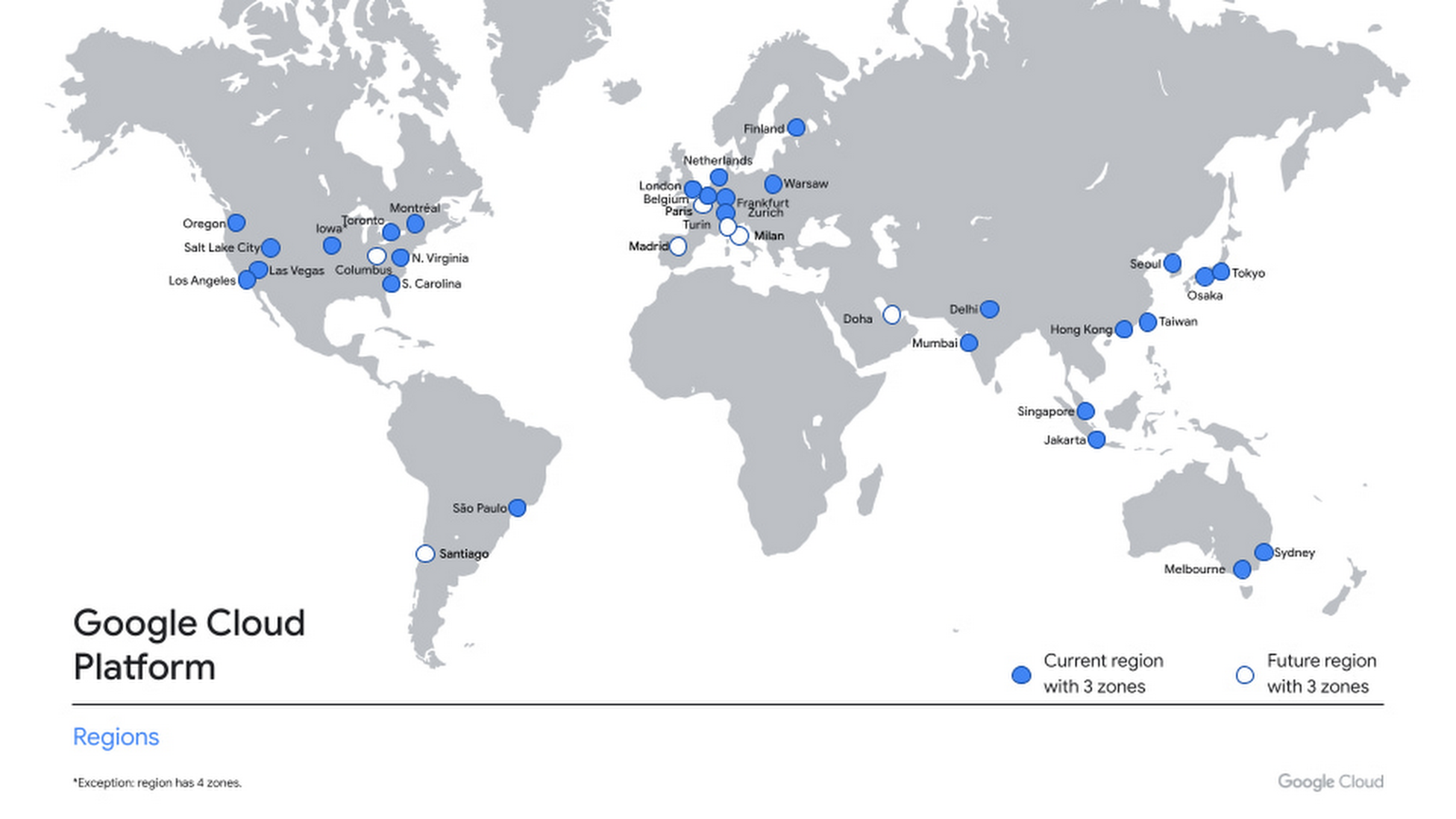
The new region launches with three zones, allowing organizations of all sizes and industries to distribute apps and storage to protect against service disruptions, and with our core portfolio of Google Cloud Platform products, including Compute Engine, App Engine, Google Kubernetes Engine, Bigtable, Spanner, and BigQuery.
We’re working to bring you new cloud products and capabilities in Canada, and our goal is to allow you to access those services quickly and easily—wherever you might be in the country. The past year has proved how important easy access to digital infrastructure, technical education, training and support are to helping businesses respond to the pandemic. We’re particularly proud of the teams who faced the unique challenges of building a cloud region during this time to help our customers and community accelerate their digital transformation.
To support all of our users, customers and government organizations in Canada, we’ll continue to invest in new infrastructure, engineering support and solutions. We’re currently hosting our first ever Google Cloud Accelerator Canada to bring the best of Google’s programs, products, people and technology to startups doing interesting work in the cloud. We’ve recently received Protected B accreditation with Canadian Centre for Cyber Security, which is crucial for healthcare, education, and regulated industries adopting cloud services. We’re also pleased to announce the preview of Assured Workloads for Canada—a capability which allows you to secure and configure sensitive workloads in accordance with your specific regulatory or policy requirements.
For help migrating to Google Cloud, please contact our local partners. For additional details on Google Cloud regions, please visit our locations page, where you’ll find updates on the availability of additional services and regions. You can always contact us to help you get started or access our many educational resources. We’re excited to see what you build next with Google Cloud.
Recommendations for Modelling SAP Data inside BigQuery

8425
Of your peers have already read this article.
4:00 Minutes
The most insightful time you'll spend today!
Over the past few years, many organizations have experienced the benefits of migrating their SAP solutions to Google Cloud. But this migration can do more than reduce IT maintenance costs and make data more secure. By leveraging BigQuery, SAP customers can complement their SAP investments and gain fresh insights by consolidating enterprise data and easily extending it with powerful datasets and machine learning from Google.
BigQuery is a leading cloud data warehouse, fully managed and serverless, and allows for massive scale, supporting petabyte-scale queries at super-fast speeds. It can easily combine SAP data with additional data sources, such as Google Analytics or Salesforce, and its built-in machine learning lets users operationalize machine learning models using standard SQL — all at a comparatively low cost.
If your SAP-powered organization is looking to supercharge its analytics with the strength of BigQuery, read on for considerations and recommendations for modeling with SAP data. These guidelines are based on our real-world implementation experience with customers and can serve as a roadmap to the analytics capabilities your business needs.
Considerations for data replication
Like most technology journeys, this one should start with a business objective. Keeping your intended business value and goals in mind is critical to making the right decisions in the early steps of the design process.
When it comes to replicating the data from an SAP system into BigQuery, there are multiple ways to do it successfully. Decide which method will work best for your organization by answering these questions:
- Does your business need real-time data? Will you need to time travel into past data?
- Which external datasets will you need to join with the replicated data?
- Are the source structures or business logic likely to change? Will you be migrating the SAP source systems any time soon? For instance, will you be moving from SAP ECC to SAP S/4HANA?
You’ll also need to determine whether replication should be done on a table-by-table basis or whether your team can source from pre-built logic. This decision, along with other considerations such as licensing, will influence which replication tool you should use.
Replicating on a table-by-table basis
Replicating tables, especially standard tables in their raw form, allows sources to be reused and ensures more stability of the source structure and functional output. For example, the SAP table for sales order headers (VBAK) is very unlikely to change its structure across different versions of SAP, and the logic that writes to it is also unlikely to change in a way that affects a replicated table.
Something else to consider: Reconciliation between the source system and the landing table in BigQuery is linear when comparing raw tables, which helps avoid issues in consolidation exercises during critical business processes, such as period-end closing. Since replicated tables aren’t aggregated or subject to process-specific data transformation, the same replicated columns can be reused in different BigQuery views. You can, for instance, replicate the MARA table (the material master) once and use it in as many models as needed.
Replicating pre-built logic
If you replicate pre-built models, such as those from SAP extractors or CDS views, you don’t need to build the logic in BigQuery, since you’re using existing logic. Some of these extraction objects have embedded delta mechanisms, which may complement a replication tool that can’t handle deltas. This will save initial development time, but it can also lead to challenges if you create new columns, or if customizations or upgrades change the logic behind the extraction.
It’s also important to note that different extraction processes may transform and load the same source columns multiple times, which creates redundancy in BigQuery and can lead to higher maintenance needs and costs. However, replicating pre-built models may still be a good choice, since doing so can be especially useful for logic that tends to be immutable, such as flattening a hierarchy, or logic that is highly complex.
How you approach replication will also depend on your long-term plans and other key factors — for example, the availability (and curiosity) of your developers, and the time or effort they can put into applying their SQL knowledge to a new data warehouse.
With either replication approach, bear in mind when designing your replication process that BigQuery is meant to be an append-always database — so post-processing of data and changes will be required in both cases.
Processing data changes
The replication tool you choose will also determine how data changes are captured (known as CDC – change data capture). If the replication tool allows for it (for example as SAP SLT does) the same patterns described in the CDC with BigQuery documentation also apply to SAP data.
Because some data, like transactions, are known to be less static than others (e.g., master data), you need to decide what should be scanned in real time, what will require immediate consistency, and what can be processed in batches to manage costs. This decision will be based on the reporting needs from the business.
Consider the SAP table BUT000, containing our example master data for business partners, where we have replicated changes from an SAP ERP system:

In an append-always replication in BigQuery, all updates are received as new records. For example, deleting a record in the source will be represented as a new record in BigQuery with a deletion flag. This applies to whether the records are coming from raw tables like BUT000 itself or pre-aggregated data, as from a BW extractor or a CDS view.
Let’s take a closer look at data coming particularly from the partners “LUCIA” and “RIZ”. The operation flag tells us whether the new record in BigQuery is an insert (I), update (U) or deletion (D), while the timestamps help us identify the latest version of our business partner.

If we want to find the latest updated record for the partners LUCIA and RIZ, this is what the query would look like:
SELECT partner,ARRAY_AGG(i1 ORDER BY i1.recordstamp DESC LIMIT 1) AS rowFROM SAP_ECC.but000 i1WHERE partner in ('LUCIA','RIZ')GROUP BY partner
With the following result:

After identifying stale records for “LUCIA” and “RIZ” business partners, we can proceed to deleting all stale records for “LUCIA” if we do not want to retain the history. In this example, we are using a different table to which the same replication has been done, for the purpose of comparison and to check that all stale records have been deleted for the selection made and that we only kept last updated records. For example:
DELETE SAP_HANA.but000 i1WHEREi1.recordstamp < TIMESTAMP_SUB(CURRENT_TIMESTAMP(), INTERVAL 3 HOUR) ANDi1.recordstamp < (SELECT MAX(recordstamp) FROM SAP_HANA.but000 i2WHEREi1.partner = i2.partnerand partner="LUCIA")
You can also use the following query to retrieve stale records for “LUCIA” partner before moving forward with deletion
SELECT partner, operation_flag, recordstamp FROM SAP_HANA.but000 i1WHEREi1.recordstamp < TIMESTAMP_SUB(CURRENT_TIMESTAMP(), INTERVAL 3 HOUR)ANDi1.recordstamp < (SELECT MAX(recordstamp) FROM SAP_HANA.but000 i2WHEREi1.partner = i2.partnerand partner="LUCIA")
Which produces all of the records, except the latest update:

Partitioning and clustering
To limit the number of records scanned in a query, save on cost and achieve the best performance possible, you’ll need to take two important steps: determine partitions and create clusters.
Partitioning
A partitioned table is one that’s divided into segments, called partitions, which make it easier to manage and query your data. Dividing a large table into smaller partitions improves query performance and controls costs because it reduces the number of bytes read by a query.
You can partition BigQuery tables by:
- Time-unit column: Tables are partitioned based on a “timestamp,” “date,” or “datetime” column in the table.
- Ingestion time: Tables are partitioned based on the timestamp recorded when BigQuery ingested the data.
- Integer range: Tables are partitioned based on an integer column.
Partitions are enabled when the table is created, as in the example below. A great tip is to always include the partition filter as shown on the left-hand side of the query.

Clustering
Clustering can be created on top of partitioned tables by applying the fields that are likely to be used for filtering. When you create a clustered table in BigQuery, the table data is automatically organized based on the contents of one or more of the columns in the table’s schema. The columns you specify are then used to colocate related data.
Clustering can improve the performance of certain query types — for example, queries that use filter clauses or that aggregate data. It makes a lot of sense to use them for large tables such as ACDOCA, the table for accounting documents in SAP S/4HANA. In this case, the timestamp could be used for partitioning, and common filtering fields such as the ledger, company code, and fiscal year could be used to define the clusters.

A great feature is that BigQuery will also periodically recluster the data automatically.
Materialized views
In BigQuery, materialized views are precomputed views that periodically cache the results of a query for better performance and efficiency. BigQuery uses precomputed results from materialized views and, whenever possible, reads only the delta changes from the base table to compute up-to-date results quickly. Materialized views can be queried directly or can be used by the BigQuery optimizer to process queries to the base table.
Queries that use materialized views are generally completed faster and consume fewer resources than queries that retrieve the same data only from the base table. If workload performance is an issue, materialized views can significantly improve the performance of workloads that have common and repeated queries. While materialized views currently only support single tables, they are very useful common and frequent aggregations like stock levels or order fulfillment.
Further tips on performance optimization while creating select statements can be found in the documentation for optimizing query computation.
Deployment pipeline and security
For most of the work you’ll do in BigQuery, you’ll normally have at least two delivery pipelines running — one for the actual objects in BigQuery and the other to keep the data staging, transforming, and updated as intended within the change-data-capture flows. Note that you can use most existing tools for your Continuous Integration / Continuous Deployment (CI/CD) pipeline — one of the benefits of using an open system like BigQuery. But, if your organization is new to CI/CD pipelines, this is a great opportunity to gradually gain experience. A good place to start is to read our guide for setting up a CI/CD pipeline for your data-processing workflow.
When it comes to access and security, most end-users will only have access to the final version of the BigQuery views. While row and column-level security can be applied, as in the SAP source system, separation of concerns can be taken to the next level by splitting your data across different Google Cloud projects and BigQuery datasets. While it’s easy to replicate data and structures across your datasets, it’s a good idea to define the requirements and naming conventions early in the design process so you set it up properly from the start.
Start driving faster and more insightful analytics
The best piece of advice we can give you is this: Try it yourself. Anyone with SQL knowledge can get started using the free BigQuery tier. New customers get $300 in free credits to spend on Google Cloud during the first 90 days. All customers get 10 GB storage and up to 1 TB queries/month, completely free of charge. In addition to discovering the massive processing capabilities, embedded machine learning, multiple integration tools, and cost benefits, you’ll soon discover how BigQuery can simplify your analytics tasks.
If you need additional assistance, our Google Cloud Professional Services Organization (PSO) and Customer Engineers will be happy to help show you the best path forward for your organization. For anything else, contact us at cloud.google.com/contact.
RISE with SAP on Google Cloud is An Engine of Progress for Cloud Migrations!

3377
Of your peers have already read this article.
3:00 Minutes
The most insightful time you'll spend today!
The practical benefits of migrating SAP systems to the cloud aren’t lost on most businesses. Running SAP in the cloud lets companies simplify tasks, scale quickly, and reduce costs. But as a growing number of organizations are discovering, the cloud is more than the sum of improved processes and workflows. It offers unique and powerful ways to transform an enterprise.
That’s because the cloud is more than a technology. It’s a foundational layer for business and IT transformation. In the best scenario, it unleashes exponential gains that fundamentally change an enterprise. Organizations achieve greater agility and resilience, and they’re equipped to innovate and disrupt like never before.
RISE with SAP and Google Cloud sit at the intersection of these possibilities. RISE with SAP helps organizations embark on the cloud migration journey with minimal risk and on their own terms. Together with Google Cloud, it enables a more advanced framework for a move to the cloud. Think of RISE with SAP on Google Cloud as business-transformation-as-a-service.
Companies move their SAP systems to the cloud for very clear and compelling reasons: 44% say it fuels digital transformation, and 43% are looking to build out a modern IT infrastructure to lower costs and simplify processes. RISE with SAP on Google Cloud takes direct aim at these challenges.
MSC Industrial Supply Co., a premier North American distributor of metalworking and maintenance, repair, and operations products and services to industrial customers views RISE with SAP on Google Cloud as a way to make its IT systems and the business more flexible and scalable by expanding data access in the cloud. With approximately 2 million products and more than 6,500 associates, that’s no small task for the Melville, New York, company.
In June 2021, MSC successfully migrated to SAP S/4HANA Cloud, private edition, running on Google Cloud infrastructure. Through RISE with SAP, MSC adopted cloud resources that were both reliable and scalable, without any disruption to its business operations. Advanced data analytics, machine learning, and other AI capabilities are now available to MSC.
At the center of this transformation is BigQuery, with which MSC data scientists can pinpoint business insights among vast and complex data sets from diverse sources, including Ads, Maps, Shopping, or the Google Marketing Platform. The net effect is significantly less time needed to manage and analyze rich data sets.
Energizer Holdings Inc., a leading manufacturer and distributor of primary batteries (think Energizer Bunny), portable lights, and auto care products, has turned to RISE with SAP on Google Cloud to power its move to SAP S/4HANA. The company wants to automate essential business processes, improve customer service, and boost innovation. It had been using a private cloud solution but needed to gain flexibility while better containing costs.
After migrating through RISE with SAP on Google Cloud, Energizer is able to share data and intelligence to keep teams better informed. The framework has also helped contain costs and support business growth through reduced licensing costs and a more economical and efficient SaaS model.
Inchcape plc, the leading multi-brand automotive distributor for Toyota, Mercedes, BMW and others, is turning to RISE with SAP on Google Cloud to take its business-critical sales, marketing and operations systems, and data into the cloud. Doing so will allow the UK-based company to join a diverse range of datasets into a centralized, secure, and scalable platform for the first time.
With operations in over 40 markets and geographies, Inchcape has complex logistics requirements. Google Cloud supports and offers the types of advanced analytics and machine learning capabilities the company requires for today’s complex manufacturing environment.
GCP Applied Technologies Inc. (GCPAT) is dedicated to the development of high-performance products and the advancement in construction technologies, simplifying the complexities of construction worldwide and delivering value to its customers. As a part of their business transformation initiatives, the company was looking to move from an on-premise data center to a more modern framework that can keep up with evolving demands. GCPAT considered various solution options like non-cloud colocation, but ultimately opted to move to the cloud through RISE with SAP on Google Cloud.
The platform provides a resilient foundation for accelerating business process improvement and innovation while optimizing maintenance and licensing costs. With the ability to deliver transformative solutions across the enterprise, GCPAT is now well-positioned to handle the pace of business change.
Veolia is an international company with nearly 180,000 employees across the globe and activities in three main service and utility areas: water management, waste management and energy services. Veolia, which aims to become the benchmark company for ecological transformation, was looking to digitize its processes and operations with a modern, cloud-based enterprise management system. Fundamental to Veolia’s success is its ability to continually roll out new, digital services to its industrial and municipal clients, so the company needed an enterprise management system capable of adapting quickly as the company’s business model evolves.
Veolia Poland upgraded to S/4HANA Private Cloud Edition on Google Cloud through RISE with SAP. Not only has the company been able to take advantage of a simplified, fully managed, and shortened cloud implementation, it has also been able to extend its existing Google environment, including BigQuery, to place data at the center of its digitization strategy and develop predictive capabilities using Google Cloud AI.
4 steps to cloud success
These successful transformation stories share four key characteristics in common.
- Low-risk path: Each enterprise reduced its risk of migrating to the cloud while speeding up time-to-value. Subject matter experts from Google Cloud and its partners guided each enterprise through the transition, and they were able to take advantage of incentives to defray infrastructure costs through the Google Cloud Acceleration Program.
- Near-zero downtime: By increasing SAP application availability with Live Migration, our success stories dramatically reduced planned outages due to infrastructure and maintenance updates, down to less than 1 percent.
- Room to innovate: With advanced analytics, artificial intelligence, and machine learning capabilities, these enterprises are improving processes, reducing costs and driving new revenue streams. Additionally, they have the ability to experiment with modern applications faster and more securely using their SAP data with Apigee.
- IT sustainability: By moving SAP applications to smarter and more efficient data centers, these success stories instantly reduced their IT emissions, while eliminating guesswork. Now, they can set goals based on seamless, agentless assessments and track progress with Google Cloud tools, analytics and reporting capabilities.
The engine of progress for cloud migrations
RISE with SAP on Google Cloud delivers a modular and low-risk path to the cloud for organizations at various stages of the migration and transformation path by clearing roadblocks and using performance indicators and industry benchmarks to pinpoint the best place to start.
The result? Reporting that’s 100x faster, as well as embedded AI technology, real-time advanced analytics, streamlined data display, consumer-grade UX across devices, strong sustainability, and a 50% reduction in a company’s data footprint. In practical terms, all the numbers add up to a simple but profound conclusion: RISE with SAP on Google Cloud is an engine of progress for organizations looking to gain an advantage in today’s highly competitive business environment.
To learn more about RISE with SAP on Google Cloud click here.
12013
Of your peers have already watched this video.
3:26 Minutes
The most insightful time you'll spend today!
How L&T Financial Services Processes 95% of Motorcycle Loans in Less Than Two Minutes
L&T Financial Services is one of the largest lenders in India. India’s demonetization policy in recent years has led to a shift from cash transactions to digital payments. In 2016, the government withdrew 500 and 1000 rupee notes from circulation and encouraged a heavily cash-based population to deposit their canceled notes in banks. Financial institutions needed to pivot to a new way of doing business to stay competitive. L&T Financial Services modernized its IT infrastructure to keep up with changes and capture digital opportunities.
“Working capital is crucial to stimulate growth in rural communities. Our role as a lender is to provide access to funds. We don’t want to burden borrowers with the complexities of getting a loan. Towards this end, digitization is an important step,” says Dinanath Dubhashi, Managing Director and CEO at L&T Financial Services. “Google Cloud helps us streamline service delivery and identify the right customers. By offering the fastest processing time in the industry, we want to be the go-to lender for all customers.”
L&T Financial Services considered multiple cloud providers before choosing Google Cloud. According to Dinanath, Google Cloud understands both the need for businesses to move fast and the need for IT to modernize at different speeds. “We weren’t forced to abandon existing IT systems and migrate lock, stock, and barrel to Google Cloud on day one.”
L&T Financial Services engaged Google Cloud Professional Services to guide its digital transformation journey. The smooth migration from proof of concept to full-scale deployment on Google Cloud took a matter of months.
“Collaboration: a small idea with big opportunities. G Suite helps us connect remote branches with the head office, easily access shared files to submit and track approvals, and conduct face-to-face discussions to accelerate approval processes.”
—Dinanath Dubhashi, MD and CEO, L&T Financial Services
Digitizing the workforce with G Suite
The move to the cloud at L&T Financial Services started in 2017 when the company introduced G Suite to its 14,500 employees. The legacy email system was cumbersome to use, especially for frontline staff who need email access while they are on the road. Using Gmail, employees can connect with customers and co-workers from anywhere, on any device. Employees save time by scheduling meetings with Calendar, collaborating on Docs, and conducting video calls using Hangouts Meet.
Converting data into credit insights using BigQuery
Taking data intelligence one step further, L&T Financial Services adopts a responsible lending approach by applying algorithm-based data analytics to improve credit standards. Beyond traditional data such as credit score and credit payment history, the company also considers macro-economic indicators for risk audits. For example, a farmer’s ability to pay off the loan of his new tractor depends on a successful planting and harvest. So L&T Financial Services feeds long-term data into BigQuery and runs queries to predict loan defaults based on rainfall and crop yield.
More Relevant Stories for Your Company

End Security Risks with the Unattended Projects Recommender Feature
In fast-moving organizations, it's not uncommon for cloud resources, including entire projects, to occasionally be forgotten about. Not only such unattended resources can be difficult to identify, but they also tend to create a lot of headaches for product teams down the road, including unnecessary waste and security risks. To




L’Oréal: Managing Big-data Complexity with Google Cloud
L’Oreal is a global company with a presence in 150 countries worldwide. Between managing all of its brands and requirements for different countries, L’Oreal looks to data to make insightful business decisions. How does L’Oreal unify its data across all its systems and databases? How does L’Oreal make the data

Titanium: A Robust Foundation for Workload-optimized Cloud Computing
Google Cloud is built on world-class technical infrastructure that supports services that are loved and relied on by billions of people across the globe: Google Search, YouTube, Gmail, Google Maps and more. A core tenet at Google Cloud is to leverage Google’s experience building and operating highly available and highly

Casper on Google Cloud: Revolutionizing Web3 Development with Flexibility & Security
Casper Labs announced a collaboration with Google Cloud that will allow developers to launch public and/or private Casper nodes directly from Google Cloud. This enables a much more seamless and highly secure process for the millions of developers who want to build in blockchain environments without having to learn new,
