





VCP Peering and Private Endpoints on Vertex AI to Better Security and Predictions in Near Real-time

4485
Of your peers have already read this article.
2:00 Minutes
The most insightful time you'll spend today!
One of the biggest challenges when serving machine learning models is delivering predictions in near real-time. Whether you’re a retailer generating recommendations for users shopping on your site, or a food service company estimating delivery time, being able to serve results with low latency is crucial. That’s why we’re excited to announce Private Endpoints on Vertex AI, a new feature in Vertex Predictions. Through VPC Peering, you can set up a private connection to talk to your endpoint without your data ever traversing the public internet, resulting in increased security and lower latency for online predictions.
Configuring VPC Network Peering
Before you make use of a Private Endpoint, you’ll first need to create connections between your VPC (Virtual Private Cloud) network and Vertex AI. A VPC network is a global resource that consists of regional virtual subnetworks, known as subnets, in data centers, all connected by a global network. You can think of a VPC network the same way you’d think of a physical network, except that it’s virtualized within GCP. If you’re new to cloud networking and would like to learn more, check out this introductory video on VPCs.
With VPC Network Peering, you can connect internal IP addresses across two VPC networks, regardless of whether they belong to the same project or the same organization. As a result, all traffic stays within Google’s network.
Deploying Models with Vertex Predictions
Vertex Predictions is a serverless way to serve machine learning models. You can host your model in the cloud and make predictions through a REST API. If your use case requires online predictions, you’ll need to deploy your model to an endpoint. Deploying a model to an endpoint associates physical resources with the model so it can serve predictions with low latency.
When deploying a model to an endpoint, you can specify details such as the machine type, and parameters for autoscaling. Additionally, you now have the option to create a Private Endpoint. Because your data never traverses the public internet, Private Endpoints offer security benefits in addition to reducing the time your system takes to serve the prediction when it receives the request. The overhead introduced by Private Endpoints is minimal, achieving performance nearly identical to DIY serving on GKE or GCE. There is also no payload size limit for models deployed on the private endpoint.
Creating a Private Endpoint on Vertex AI is simple.
In the Models section of the Cloud console, select the model resource you want to deploy.
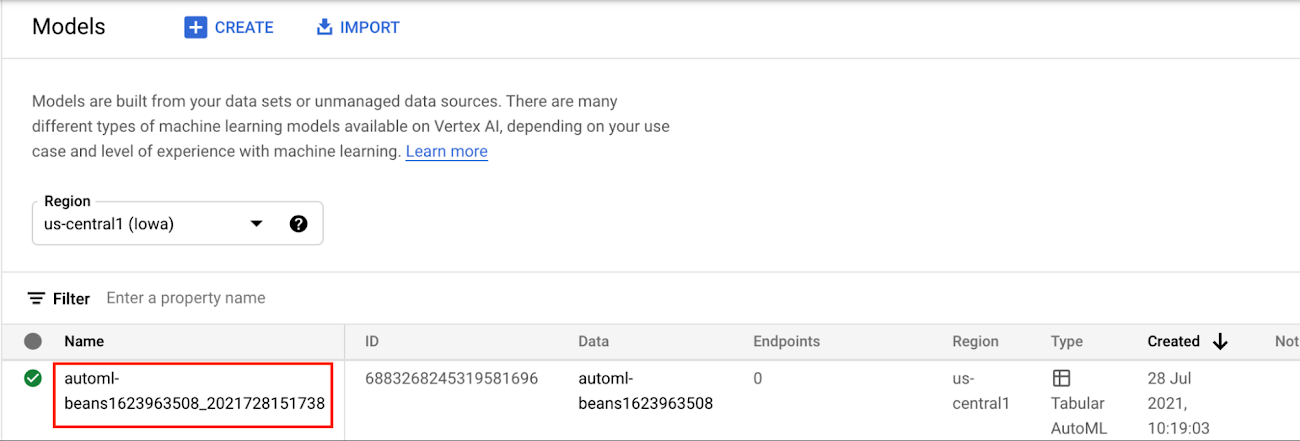
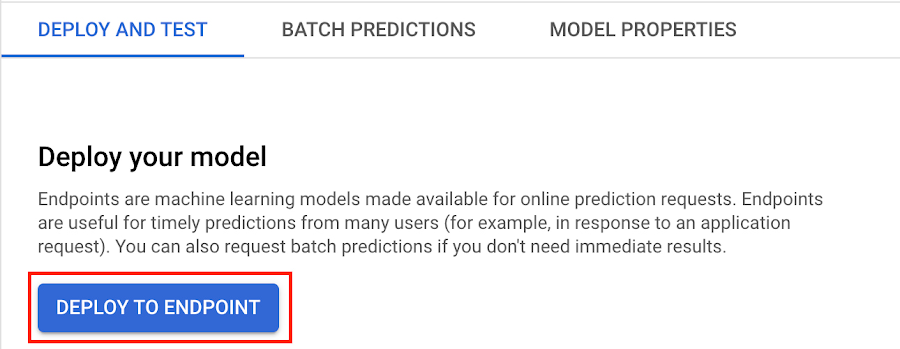
Next, select DEPLOY TO ENDPOINT
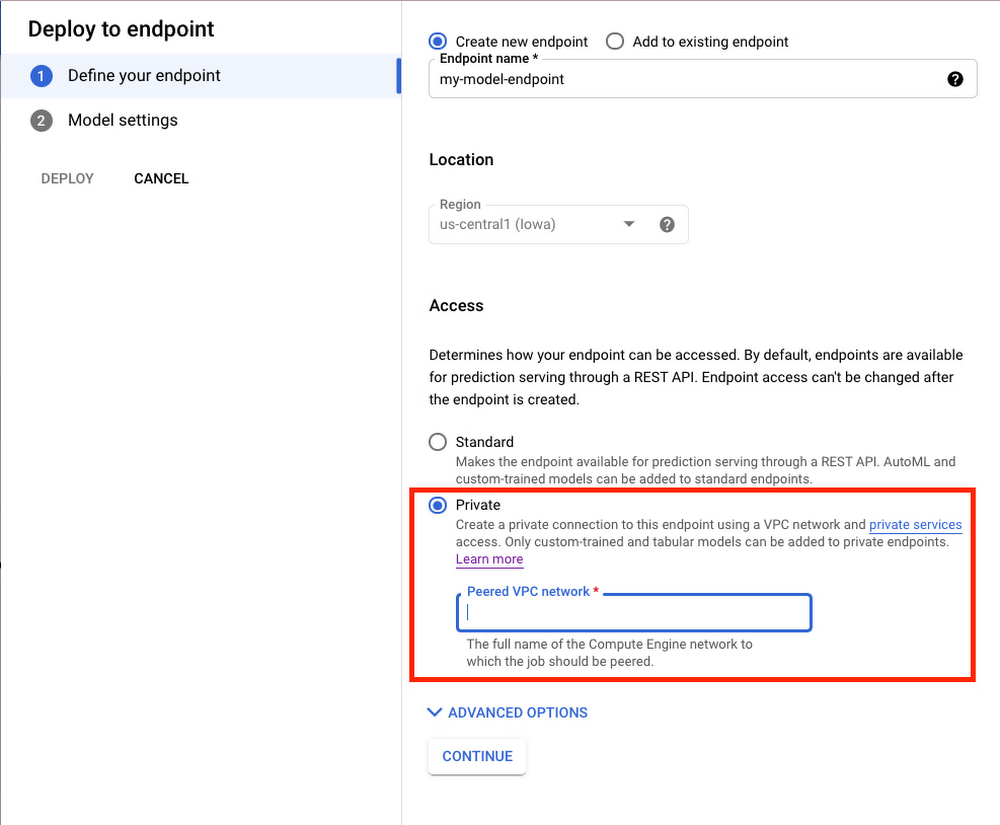
In the window on the right hand side of the console, navigate to the Access section and select Private. You’ll need to add the full name of the VPC network for which your deployment should be peered.
Note that many other managed services on GCP support VPC peering, such as Vertex Training, Cloud SQL, and Firestore. Endpoints is the latest to join that list.
What’s Next?
Now you know the basics of VPC Peering and how to use Private Endpoints on Vertex AI. If you want to learn more about configuring VPCs, check out this overview guide. And if you’re interested to learn more about how to use Vertex AI to support your ML workflow, check out this introductory video. Now it’s time for you to deploy your own ML model to a Private Endpoint for super speedy predictions!
Announcing New, Faster Search and Investigative Experience in Chronicle Security Operations

2932
Of your peers have already read this article.
1:30 Minutes
The most insightful time you'll spend today!
In cybersecurity, speed matters. Whether a security analyst is trying to understand the details of an alert that was triggered by an indicator of compromise (IoC), or find additional context for a suspicious asset, speed is often the critical factor that will help thwart a cyberattack before threat actors are able to inflict damage.
With speed in mind, we are pleased to announce the general availability of our new investigative experience in Chronicle Security Operations. We are continuing to deliver on our mission to bring the power of Google to security operations and are raising the bar for search and the investigative experience in the SOC.
With this release, SecOps teams will be able to harness Chronicle’s lightning-fast search across any form of structured data. Additionally, the new investigation experience can provide greater flexibility to pivot and drill-down when conducting complex, open-ended threat investigations and surface insights quickly and easily.
Our Unified Data Model (UDM) schema, with its built-in flexibility that can effectively handle a wide variety of security related events, is at the heart of Chronicle’s powerful search. We have scaled this capability by optimizing query responses across structured data. Additionally, analysts can investigate large datasets and build complex queries with a new and intuitive user experience. With user personalization enhancements, analysts can quickly access saved searches and top queries in their environment to improve routine SOC workflows.
With the new investigative experience, security teams can:
- Drive faster threat understanding with an interactive event results timeline that helps eliminate unnecessary long wait times by streaming results as they are processed to quickly begin threat analysis
- Use enhanced context and operationalize relevant data for threat analysis with one-click filter-to-query conversion
- Personalize the analyst experience with saved search and search history functions for quicker analyst knowledge recall
- Power threat investigation and hunting with a new, improved, highly performant UDM search
Let’s look at an example of how to use the reimagined investigative experience and our new broader, faster search.
In our use-case, a security analyst is investigating a curated detection alert for potentially suspicious behavior on a Windows environment. Additionally, there is a low prevalence domain from host “win-dc-01” with ip “10.166.0.3”. To investigate further, let’s open the UDM Search page and construct a query containing the host and IP information along with destination information of the domain the host was contacting (edge.microsoft.com). Over 70,000 events stream into the investigation interface providing the analyst an immediate picture of data surrounding their alert.
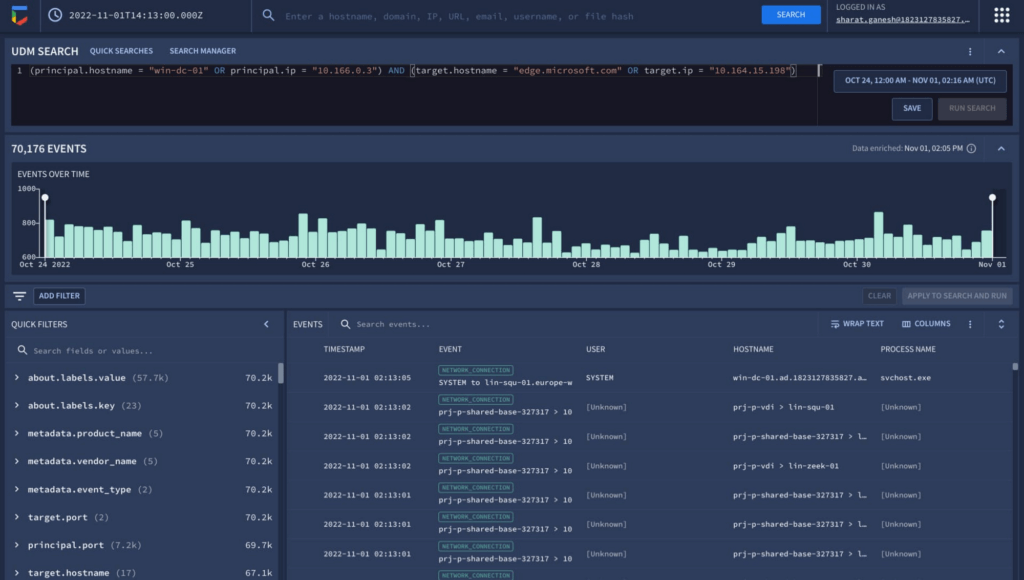
The new interactive events timeline can provide a clear picture of event trends over time with key statistical data which can be easily filtered. Additionally, with the new quick filters, the analyst is able to easily filter out hosts that are known-good to get pertinent information about the domain.
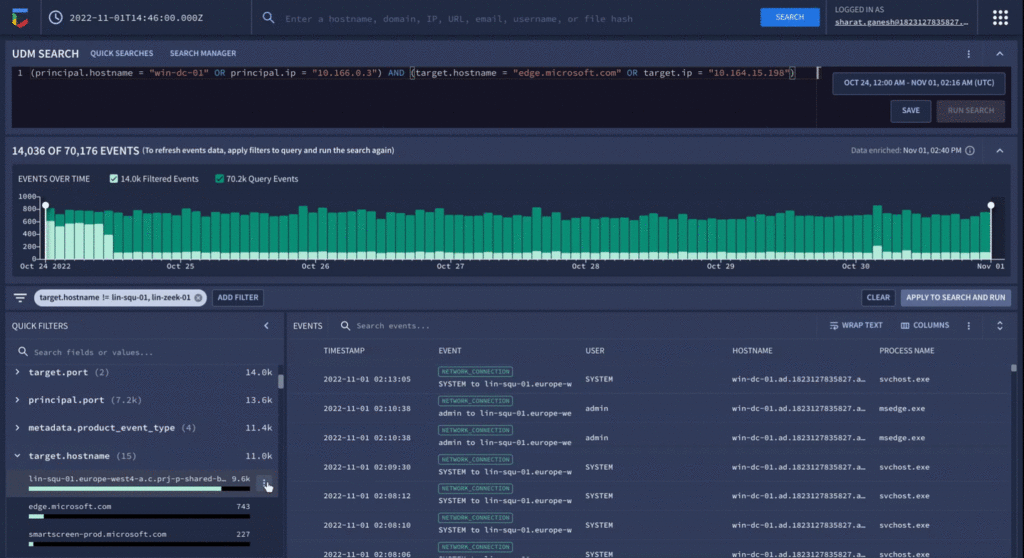
Analyzing value aggregations present in the filter panel, automatically generated by Chronicle, enables analysts to domain values of highest interest, and quickly determine that approximately 800 events were present in the last week that related to edge.microsoft.com URL. Since Microsoft Edge is disallowed in the organization, there should not be any outbound traffic to this type of destination.
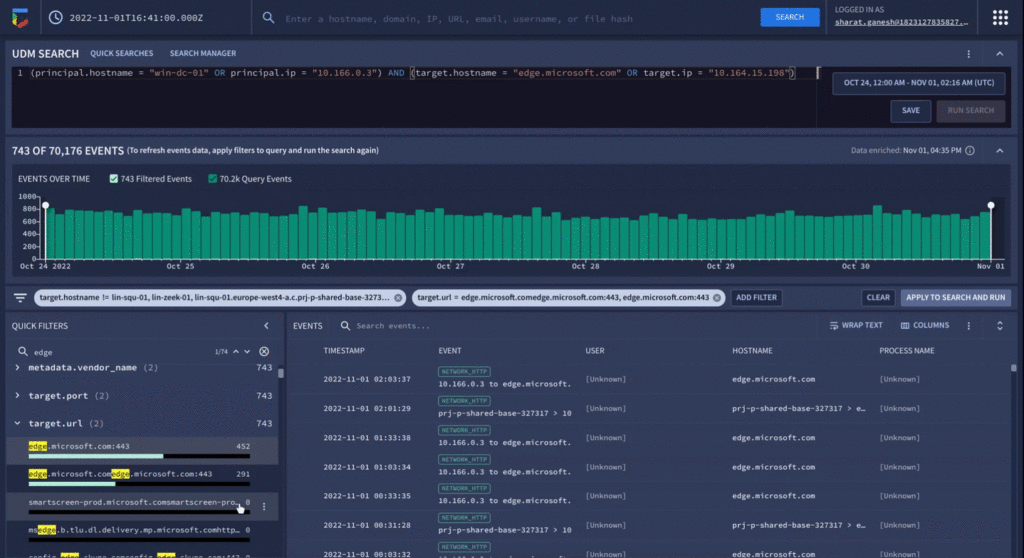
As a final step before orchestrating a response in Chronicle SOAR’s case management, the analyst can save their search to quickly recall the steps they took in the future for related investigations.
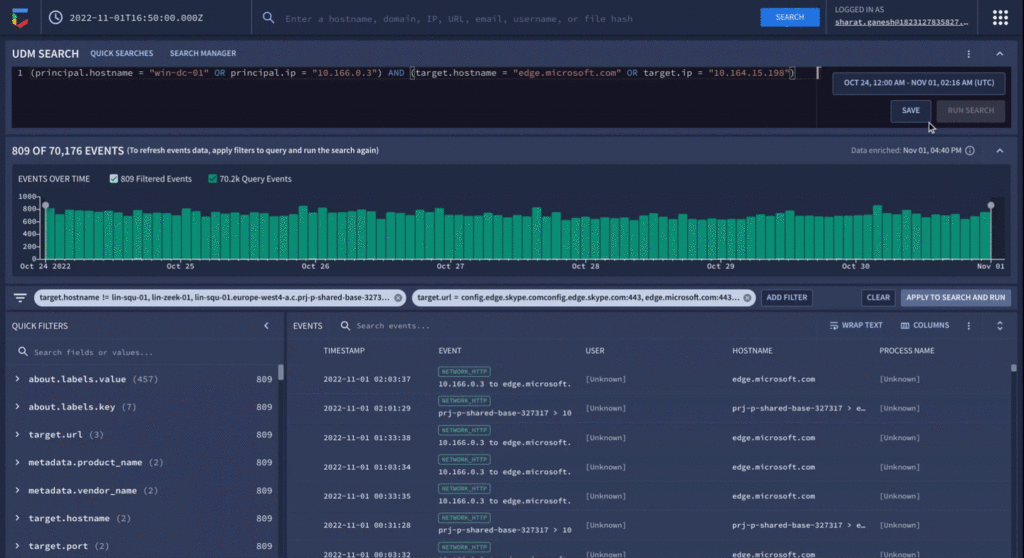
We have already seen our customers use these new capabilities in preview to build new use cases, accelerate existing threat hunting workflows, and drive faster threat response. We will continue our mission to bring Google speed, scale, and intelligence to the investigative experience, expediting “time to aha” for security analysts, and driving better, faster responses.
Ready to put Chronicle to work in your Security Operations Center? Contact Google Cloud sales or your customer success CSM team. You can also learn more about all these new capabilities in Google Chronicle in our product documentation.
5683
Of your peers have already watched this video.
22:00 Minutes
The most insightful time you'll spend today!
Chronicle Security Analytics: Key to Address Security Data Overload
Google Cloud’s Chronicle is a security analytics platform built for modern use cases to combat modern threats. In today’s world, enterprises have undergone significant changes in all aspects, and must adapt to their security needs to counter threats and attacks. Watch the video to learn Google Cloud’s initiative to help businesses improve their security by 10x to catch up with the way the world is changing and how Chronicle Security Analytics is poised to help address data security challenges.
Stop Cribbing About Shadow IT and Start Taking Charge Now

3660
Of your peers have already read this article.
2:20 Minutes
The most insightful time you'll spend today!
Employees use tools at their disposal to get work done, but if these tools (often legacy) hamper collaboration or are inflexible, they’ll turn to less secure options for the sake of convenience. According to Gartner, a third of successful attacks experienced by enterprises will come from Shadow IT usage by 2020.
And this problem is not unknown. Eighty-three percent of IT professionals reported that employees stored company data in unsanctioned cloud services, a challenge especially apparent with file sync and share tools. When people work around their legacy systems to use tools like Google Drive, it’s often because they find their current systems to be clunky or that they can’t collaborate with others as easily. They’re unable to do three key things in legacy file sync and share systems (like Microsoft SharePoint):
1. Unable to work on their phones. By now, people expect to be able to work on the go—and this means not just opening an attachment, but actually making edits to and comments on work. It gives them freedom to work when it’s convenient for them and to help teammates anytime.
2. Unable to create workspaces independently and easily. This might sound counterintuitive, but if an employee needs to contact IT to have a new project folder made on a drive, the bar is too high. Employees need to be able to quickly, and independently, create documents that can be shared simply because of the changing nature of collaboration. Work happens ad-hoc, on the go (like we mentioned above), and with people inside and outside of your organization. If someone has to contact IT to create a new folder, they’re more likely to neglect the request or use a different tool altogether to get started.
3. Unable to make the data work for them. Traditional file storage is just that, storage. Like an attic, we store things in these systems, but at some point stuff gets stale and it’s hard to tell what we should keep or pitch. People need their storage systems to not only house their data, but to help them categorize and find information quicker so that they can make this data work better for them.
You have two choices when it comes to making a decision on file sync and share systems:
Option 1: Continue to let your employees work on unsanctioned products, some of which may open your business up to unintended security issues (and, in some instances, scary terms of service).
Option 2: Buy the tools that your users want to use because these tools are making them more productive.
If you want to create a more productive workforce, take cues from your employees. Your tools should not only meet the highest security standards for IT, but let people work the way they want to (and be intelligent enough to guide them along the way).
Imagine if your technology could flag that a file contains confidential information before an employee accidentally shares it. Or surface files as they’re needed to help people work faster. Google Drive does this.
Remember, if the technology doesn’t suit your employees, they’re just going to work around it anyway. Instead of investing time and resources on routine maintenance, shift this energy toward helping your employees stay productive in ways that work for both you and them.
VCP Peering and Private Endpoints on Vertex AI to Better Security and Predictions in Near Real-time
4486
Of your peers have already read this article.
2:00 Minutes
The most insightful time you'll spend today!
One of the biggest challenges when serving machine learning models is delivering predictions in near real-time. Whether you’re a retailer generating recommendations for users shopping on your site, or a food service company estimating delivery time, being able to serve results with low latency is crucial. That’s why we’re excited to announce Private Endpoints on Vertex AI, a new feature in Vertex Predictions. Through VPC Peering, you can set up a private connection to talk to your endpoint without your data ever traversing the public internet, resulting in increased security and lower latency for online predictions.
Configuring VPC Network Peering
Before you make use of a Private Endpoint, you’ll first need to create connections between your VPC (Virtual Private Cloud) network and Vertex AI. A VPC network is a global resource that consists of regional virtual subnetworks, known as subnets, in data centers, all connected by a global network. You can think of a VPC network the same way you’d think of a physical network, except that it’s virtualized within GCP. If you’re new to cloud networking and would like to learn more, check out this introductory video on VPCs.
With VPC Network Peering, you can connect internal IP addresses across two VPC networks, regardless of whether they belong to the same project or the same organization. As a result, all traffic stays within Google’s network.
Deploying Models with Vertex Predictions
Vertex Predictions is a serverless way to serve machine learning models. You can host your model in the cloud and make predictions through a REST API. If your use case requires online predictions, you’ll need to deploy your model to an endpoint. Deploying a model to an endpoint associates physical resources with the model so it can serve predictions with low latency.
When deploying a model to an endpoint, you can specify details such as the machine type, and parameters for autoscaling. Additionally, you now have the option to create a Private Endpoint. Because your data never traverses the public internet, Private Endpoints offer security benefits in addition to reducing the time your system takes to serve the prediction when it receives the request. The overhead introduced by Private Endpoints is minimal, achieving performance nearly identical to DIY serving on GKE or GCE. There is also no payload size limit for models deployed on the private endpoint.
Creating a Private Endpoint on Vertex AI is simple.
In the Models section of the Cloud console, select the model resource you want to deploy.
Next, select DEPLOY TO ENDPOINT
In the window on the right hand side of the console, navigate to the Access section and select Private. You’ll need to add the full name of the VPC network for which your deployment should be peered.
Note that many other managed services on GCP support VPC peering, such as Vertex Training, Cloud SQL, and Firestore. Endpoints is the latest to join that list.
What’s Next?
Now you know the basics of VPC Peering and how to use Private Endpoints on Vertex AI. If you want to learn more about configuring VPCs, check out this overview guide. And if you’re interested to learn more about how to use Vertex AI to support your ML workflow, check out this introductory video. Now it’s time for you to deploy your own ML model to a Private Endpoint for super speedy predictions!
Efficient, Safe and Dynamic Gaming Experience: Aristocrat’s Digital Journey on Google Cloud

4768
Of your peers have already read this article.
2:00 Minutes
The most insightful time you'll spend today!
Since Aristocrat’s founding in 1953, technology has constantly transformed gaming and the digital demands on our gaming business are a far cry from challenges we faced when we started. As we continue to expand globally, security and compliance are top priorities.
Managing IT security for several gaming subsidiaries and our core business became more complex as we entered into new markets and scaled up our number of users. We needed a centralized platform that could give us full visibility into all of our systems and efficient monitoring capabilities to keep data and applications secure. We also needed the ability to secure our systems without compromising user experiences.
We turned to Google Cloud and Splunk to better manage complexity and support highly efficient, secure, and more dynamic gaming experiences for everyone. We are committed to using today’s modern technologies to give players more optimal experiences.
Bringing our digital footprint into the cloud
When we set out on our digital transformation, we looked to address many business requirements.
These requirements included:
- Regulation: We wanted a platform that could efficiently address our industry’s stringent and global regulatory compliance requirements.
- Player experience: Our IT environment must support smooth gaming experiences to keep users engaged and satisfied.
- Scalability: As we grow and diversify, meeting the changing demands of an increasingly global gaming community, we need an easily scalable platform to align with our current and future needs.
Google Cloud offered us the perfect foundation through solutions such as Compute Engine, Google Kubernetes Engine, BigQuery, and Google Cloud Storage. These acted as the right infrastructure components for us for the following reasons:
- Google Cloud is globally accessible and supports compliance, helping to streamline security and regulatory processes for our team.
- With Google Cloud, we can manage our entire development and delivery processes globally with fast and efficient reconciliation of regional compliance requirements.
- When we need to adjust existing infrastructure or deliver new capabilities, Google Cloud accelerates the process and takes the heavy lifting off of our team.
- Google Cloud allows us to support tens of thousands of players on each of our apps while experiencing minimal downtime and low latency. The importance of this support can’t be underestimated in an industry where players have little to no patience if lags in games occur.
We migrated our back-office IT stack alongside our consumer-facing production applications to Google Cloud given our positive experiences with compliance, security, scalability, and process management. This migration has significantly accelerated our digital transformation while streamlining our infrastructure for faster and more cost-effective performance.
In many ways, Google Cloud has been, with maybe a pun intended, a game-changer for us. For instance, when we suddenly had to support a lot of remote work during the COVID-19 pandemic, native identity and access management tools in Google Cloud allowed us to retire costly VPNs used for backend access and quickly adopt a more easily managed, cost-effective zero-trust security posture.
Accessing vital third-party partners and managed services
Aristocrat has many IT needs best addressed in a multi-cloud environment. Google Cloud is particularly attractive given its strong cloud interoperability, as well as the many products and services available on Google Cloud Marketplace. The marketplace accelerated our deployment of key third-party apps including Splunk and Qualys.
Given the personal information we store and the global regulatory compliance statutes we must oblige, security lies at the heart of our business. Splunk is a critical component of our digital transformation because it offers solutions that provide the enhanced monitoring capabilities and visibility we need. The integration between Splunk and Google Cloud gives us confidence that our data is secure. We know our data can be secure in Google Cloud, while simplified billing through Google Cloud Marketplace makes payments and license tracking easier for our procurement team.
As part of our protected environment, we use the Splunk platform as our security information and event management system, leveraging the InfoSec app for Splunk that provides continuous monitoring and advanced threat detection to significantly improve our security.
We can manipulate and present data in Splunk in a way that provides us with a single pane-of-glass for our hybrid, multi-cloud environment and our third-party apps and systems. Splunk observability tools have likewise helped us to track browser-based applications like our online gaming apps to monitor details related to security and performance.
Splunk and Google Cloud have transformed how we operate. We can now quickly ingest and analyze data at scale within our refined approach to security management by offloading software management to Splunk and Google Cloud. This ability enables us to approach security more strategically, and positions us to integrate more AI/ML capabilities into our products for even greater governance and performance.
This is just the beginning of our journey with Splunk and Google Cloud. We’re excited to see the innovation we can continue bringing to the gaming community worldwide.
More Relevant Stories for Your Company

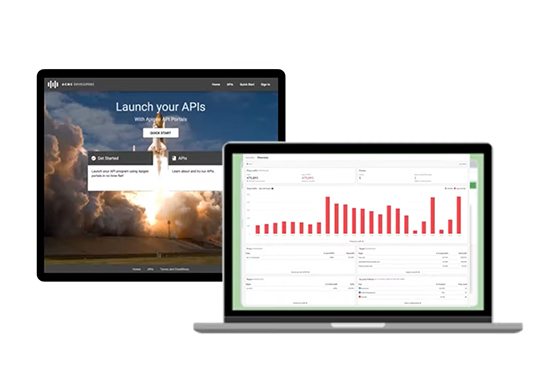

Best Practices to Protect APIs against 6 Common Threats
APIs are exposed to a set of vulnerabilities that are both, unique and similar to that of software and web apps. Watch the video to learn six common API threats and best practices to protect from unwanted attacks.

Google Cloud’s Metric Scope Makes Multi-project Monitoring Simple
Customers need scale and flexibility from their cloud and this extends into supporting services such as monitoring and logging. Google Cloud’s Monitoring and Logging observability services are built on the same platforms used by all of Google that handle over 16 million metrics queries per second, 2.5 exabytes of logs per month, and over

Introducing New Capabilities for Secure Transformations
Organizations large and small are realizing that digital transformation and the changing threat landscape require a grounds up effort to transform security. At Google Cloud, we continue to invest in our vision of invisible security where advanced capabilities are engineered into our platforms, operations are simplified, and stronger security outcomes

Google Workspace to Extend Digital Sovereignity for EU Organizations in Later Part of 2022
European organizations are moving their operations and data to the cloud in increasing numbers to enable collaboration, drive business value, and transition to hybrid work. However, the cloud solutions that underpin these powerful capabilities must meet an organization’s critical requirements for security, privacy, and digital sovereignty. We often hear from
