





Transitioning to Hybrid Environment with Chrome Browser
4087
Of your peers have already read this article.
3:00 Minutes
The most insightful time you'll spend today!
It’s been quite a year. In general, and for work. Just the other day, I read a new study from Pew Research that shows 71% of people are currently working from home, and 50% of employees say they want to continue working from home at least three days a week. That’s more than half of people wanting to be remote over half the time!
As we’ve been navigating our own return to the office here at Google, one thing has become more clear than ever: the browser is no longer just a portal to the internet—it’s one of the most critical components of our tech stack. And we know we’re not alone in this. As our organization, and other organizations of all sizes, transition to a more hybrid way of working, it’s absolutely key to have a modern browser that’s built to support both admins and end users.
The good news is, Chrome is made for this! Literally. It’s purpose-built for flexible work—and as the future unfolds and businesses’ needs continue to evolve, we’re committed to making sure our browser is even easier to manage, even more secure, and even more helpful, so all of us can be more productive.
What’s next for Chrome
As we design and build Chrome to be a stronger asset for the enterprise, we are focused on these key areas:
- Simple management
- Modernized security
- Productivity enhancements
- Helpful integrations
We’ve already made great strides in all four areas, with more exciting releases to come soon. Let’s take a closer look at what’s new and available right now, what to look forward to, and how each feature is equipping Chrome browser-based businesses (and their users) for what’s next.
When it comes to simple management there have been a lot of exciting developments—Chrome Browser Cloud Management is built for this new hybrid reality, giving IT teams the advantage of powerful and flexible management capabilities both in the cloud and on premises, so they always have the visibility and insights they need to make more informed decisions, quickly.
With recent new releases admins can:
- Track all versions of Chrome from one place. Our new daily version report allows IT teams to see all versions, including minor versions, in a single report to support compliance and make it easier to see and manage their entire deployment.
- Report on apps and extensions across the organization. A new Apps & Usage report provides helpful visibility into all installed extensions, Progressive Web Apps (PWAs), Chrome apps, and Android apps. You can see versions and permissions for each individual app and even force install or block, right from the report.
- Remotely troubleshoot and clear browser data. This is one of my favorites because not only is it incredibly helpful, it was created from customer requests! Admins (and a lot of service desk employees) told us how useful it would be if they could clear an end user’s browsing data, cookies, and cache remotely – and our team made it happen.
- Extension management improvements. Coming this summer: extension request workflow will empower admins to change the behavior of Chrome Web Store so that end users request extensions and admins then approve or deny the installations from a centralized list in Admin Console. Another new release is extension details, where admins can now find out exactly what extensions are installed where, who makes them, what resources they’re using, and all other extension-related details – also right from the Admin console.
Of all of our priorities, modernized security often feels most urgent. In a recent security report, 65% of US and UK employees said they received a phishing email during the remote working period initiated by COVID-19. Further, a study by the Ponemon Institute found that 41% of responding organizations had dealt with an attack involving the compromise of employees’ passwords, costing an average of $267,408 per organization. Between the regular emergence of new threats and the increase in targeted mobile attacks, our new ways of working definitely demand a fresh approach to security.
- BeyondCorp Enterprise, our new modern zero trust solution, enables secure access to critical apps and services with integrated threat and data protection, all delivered through Chrome browser, was introduced in January 2021. Its agentless approach simplifies the admin and end-user experience. We also just launched BeyondCorp Enterprise protected profiles to help organizations protect their extended workforce, including contractors, frontline workers, and anyone working from home who needs to securely access corporate resources from shared or unmanaged devices.
To learn more about Google’s approach to modernizing security, tune into the Wall Street Journal’s Advancing Security in the New Business Environment event tomorrow from 10:35 am – 10:55 am EST, with very own Parisa Tabriz (Head of Chrome Engineering, Product Management and UX) and Phil Venables (CISO of Google Cloud).
When it comes to productivity enhancements, I’m proud to share that we’re consistently releasing features that support users no matter where they’re working. Now that the browser is where so much of our day-to-day work happens, it’s more important than ever before to build in new ways to save time and work together while apart.
Recently released productivity-boosting features include:
- A faster way to take action right from the address bar. Chrome Actions is a feature we launched last year, where you can simply type in commands such as “clear browsing data ” or “open incognito window”and get down to business in just a few clicks. We’re excited to announce new Chrome Actions are now available through our beta channel! Try one of these actions to check it out: “ Run Chrome safety check,” “Create doc,” and “Manage Google Account.”
- Link directly to highlighted text. If you like to share snippets and quotes from articles or websites with your colleagues, you’re in luck. Now, instead of sharing the URL link from the address bar, you can take advantage of the new “link to highlight” feature in Chrome to point to the specific content. Simply choose the content you want to share, right click, select “Copy link to highlight,” and then send the link – to the exact part of the page you want people to see. It’s available for desktop and Android now, and coming soon for iOS.
- Decreased Chrome CPU usage. This means more battery life, less heat coming off of your device, and less fan noise. 🎉 🙌🏻
- And there’s more! To explore additional productivity features, check out this blog post.
Our final area of focus is all about giving Chrome customers more choice with helpful integrations. We’re actively partnering with best-of-breed organizations to bring integrations —and your favorite tools— into Chrome, to create a more seamless and productive experience across the board. Stay tuned on this as we’ll have more to share later this year. In the meantime, hear from our Modern Computing Alliance partners, such as Box, HP, RingCentral, Okta and VMware, as they explore many of the most important questions about returning to the office.
We’re constantly thinking about how we can help people and organizations adapt and thrive as they begin to return to the office. See below for three events from the team that cover how to make the transition to hybrid easier for your team, be sure to check them out.
Modernizing Your Approach to Security session at the Wall Street Journal’s Advancing Security in the New Business Environment event
- Tomorrow June 2, 2021
- 10:35 – 10:55 AM EST
- Register here
Chrome Insider: Browser tips & tricks for IT admins
- June 10, 2021
- 10:00 AM – 11:15 PT
- Register here

4243
Of your peers have already downloaded this article
1:30 Minutes
The most insightful time you'll spend today!
Dr. Alan Hippe, CFO & CIO, Roche Group, shares how collaboration tools help healthcare firms like the Roche Group take timely decisions that help them focus on saving patients’ lives.
For over 110 years, Roche has been pioneering the discovery, development, production and marketing of novel healthcare solutions. Our focus has always been on innovation.
The way our employees communicate and collaborate is diverse, and our employees are spread globally.
Our two different email and calendaring platforms have often been an obstacle for effective collaboration. To end these platform interoperability issues, the Roche Corporate Executive Committee made the decision that all employees will move to G Suite as the single common platform for the Roche Group.
The integrated and socially-focused way that G Suite enables collaboration is very compelling, and we expect this to not only bring our company closer together but give us a strategic advantage. Additionally, being able to deploy G Suite features by simply enabling them via a control panel versus planning for and deploying complex infrastructure in our data-centers will help us focus on our core business–helping save patients’ lives.
Three months, 30x demand: How we scaled Google Meet during COVID-19

4179
Of your peers have already read this article.
10:30 Minutes
The most insightful time you'll spend today!
As COVID-19 turned our world into a more physically distant one, many people began looking to online video conferencing to maintain social, educational, and workplace contact. As shown in the graph below, this shift has driven huge numbers of additional users to Google Meet.
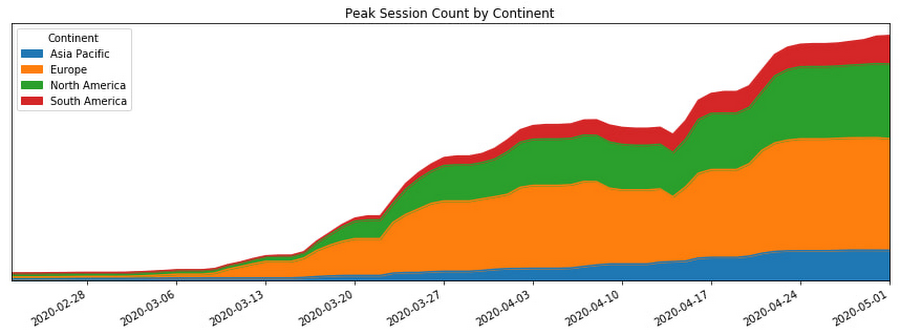
In this post, we’ll share how we ensured that Meet’s available service capacity was ahead of its 30x COVID-19 usage growth, and how we made that growth technically and operationally sustainable by leveraging a number of site reliability engineering (SRE) best practices.
Early alerts
As the world became more aware of COVID-19, people began to adapt their daily rhythms. The virus’s growing impact on how people were working, learning, and socializing with friends and family translated to a lot more people looking to services like Google Meet to keep in touch. On Feb. 17, the Meet SRE team started receiving pages for regional capacity issues.
The pages were symptomatic, or black-box alerts, like “Too Many Task Failures” and “Too Much Load Being Shed.” Because Google’s user-facing services are built with redundancy, these alerts didn’t indicate ongoing user-visible issues. But it soon became clear that usage of the product in Asia was trending sharply upward.
The SRE team began working with the capacity planning team to find additional resources to handle this increase, but it became obvious that we needed to start planning farther ahead, for the eventuality that the epidemic would spread beyond the region.
Sure enough, Italy began its COVID-19 lockdown soon thereafter, and usage of Meet in Italy began picking up.
A non-traditional incident
At this point, we began formulating our response. True to form, the SRE team began by declaring an incident and kicking off our incident response to this global capacity risk.
It’s worth noting, however, that while we approached this challenge using our tried-and-true incident management framework, at that point we were not in the middle of, or imminently about to have, an outage. There was no ongoing user impact. Most of the social effects of COVID-19 were unknown or very difficult to predict. Our mission was abstract: we needed to prevent any outages for what had become a critical product for large amounts of new users, while scaling the system without knowledge of where the growth would come from and when it would level off.
On top of that, the entire team (along with the rest of Google) was in the process of transitioning into an indefinite period of working from home due to COVID-19. Even though most of our workflows and tools were already accessible from beyond our offices, there were additional challenges associated with running such a long-standing incident virtually.
Without the ability to sit in the same room as everyone else, it became important to manage communication channels proactively to ensure we all had access to the information needed to achieve our goals. Many of us also had additional, non-work related challenges, like looking after friends and family members as we all adjusted. While these factors created extra challenges for our response, tactics like assigning and ramping up standbys and proactively managing ownership and communication channels helped us overcome these challenges.
Nevertheless, we carried on with our incident management approach. We started our global response by establishing an Incident Commander, Communications Lead, and Operations Lead in both North America and Europe so that we had around-the-clock coverage.
As one of the overall Incident Commanders, my function was like that of a stateful information router—albeit with opinions, influence, and decision-making power. I collected status information about which tactical problems lingered, who was working on what, and on the contexts that affected our response (e.g. governments’ COVID-19 responses), and then dispatched work to people who were able to help. By sniffing out and digging into areas of uncertainty (both in problem definition: “Is it a problem that we’re running at 50% CPU utilization in South America?” and solution spaces: “How will we speed up our turn-up process?”), I coordinated our overall response effort and ensured that all necessary tasks had clear owners.
Not long into the response, we realized that the scope of our mission was huge and the nature of our response would be long-running. To keep each contributor’s scope manageable, we shaped our response into a number of semi-independent workstreams. In cases where their scopes overlapped, the interface between the workstreams was well-defined.

We set up the following workstreams, visible in the diagram above:
- Capacity, which was tasked with finding resources and determining how much of the service we could turn up in which places.
- Dependencies, which worked with the teams that own Meet’s infrastructure (e.g., Google’s account authentication and authorization systems) to ensure that these systems also had enough resources to scale with the usage growth.
- Bottlenecks, which was responsible for identifying and removing relevant scaling limits in our system.
- Control knobs, which built new generic mitigations into the system in the case of an imminent or in-progress capacity outage.
- Production changes, which safely brought up all of the found capacity, re-deployed servers with newly-optimized tuning, and pushed new releases with additional control knobs ready to be used.
As incident responders, we continuously re-evaluated if our current operational structure still made sense. The goal was to have as much structure as required to operate effectively, but no more. With too little structure, people make decisions without having the right information, but with too much structure, people spend all of their time in planning meetings.
This was a marathon, and not a sprint. Throughout, we regularly checked in to see if anyone needed more help, or needed to take a break. This was essential in preventing burnout during such a long incident.
To help prevent exhaustion, each person in an incident response role designated another as their “standby.” A standby attended the same meetings as the role’s primary responder; got access to all relevant documents, mailing lists, and chat rooms; and asked the questions they’d need answers to if they had to take over for the primary without much notice. This approach came in handy when any of our responders got sick or needed a break because their standby already had the information they needed to be effective right away.
Building out our capacity runway
While the incident response team was figuring out how best to coordinate the flow of information and work needed to resolve this incident, most of those involved were actually addressing the risk in production.
Our primary technical requirement was simply to keep the amount of regionally available Meet service capacity ahead of user demand. With Google’s more than 20 data centers operating around the world, we had robust infrastructure to tap into. We quickly made use of raw resources already available to us, which was enough to approximately double Meet’s available serving capacity.
Previously, we relied on historical trends to establish how much more capacity we’d need to provision. But because we could no longer rely on the extrapolation of historical data, we needed to begin provisioning capacity based on predictive forecasts. To translate those models into terms our production changes team could act upon in production, the capacity workstream needed to translate the usage model into how much additional CPU and RAM we needed. Building this translation model is what later enabled us to speed up the process of getting available capacity in production, by teaching our tools and automation to understand it.
Soon, it became clear that merely doubling our footprint size was not going to be enough, so we started working against a previously unthinkable 50x growth forecast.
Reducing resource needs
In addition to scaling up our capacity, we also worked on identifying and removing inefficiencies in our serving stack. We could bucket much of this work into a couple of categories: tuning binary flags and resource allocations and rewriting code to make it cheaper to execute.
Making our server instances more resource-efficient was a multi-dimensional effort—the goal could be phrased as “the most requests handled at the cheapest resource cost, without sacrificing user experience or reliability of the system.”
Some investigative questions we asked ourselves included:
- Could we run fewer servers with larger resource reservations to reduce computational overhead?
- Had we been reserving more RAM than we needed, or more CPU than we needed? Could we better use those resources for something else?
- Did we have enough egress bandwidth at the edge of our network to serve video streams in all regions?
- Could we reduce the amount of memory and CPU needed by a given server instance by subsetting the number of backend servers in use?
Even though we always qualified new server shapes and configurations, at this point, it was very much worth reevaluating them. As Meet usage grew, its usage characteristics—like how long a meeting lasts, the number of meeting participants, how participants share audio time—also shifted.
As the Meet service required ever more raw resources, we began noticing that a significant percentage of our CPU cycles were being spent on process overhead like keeping connections to monitoring systems and load balancers alive, rather than on request handling.
In order to increase the throughput, or “number of requests processed per CPU per second,” we increased our processes’ resource specification in terms of both CPU and RAM reservation. This is sometimes called running “fatter” tasks.
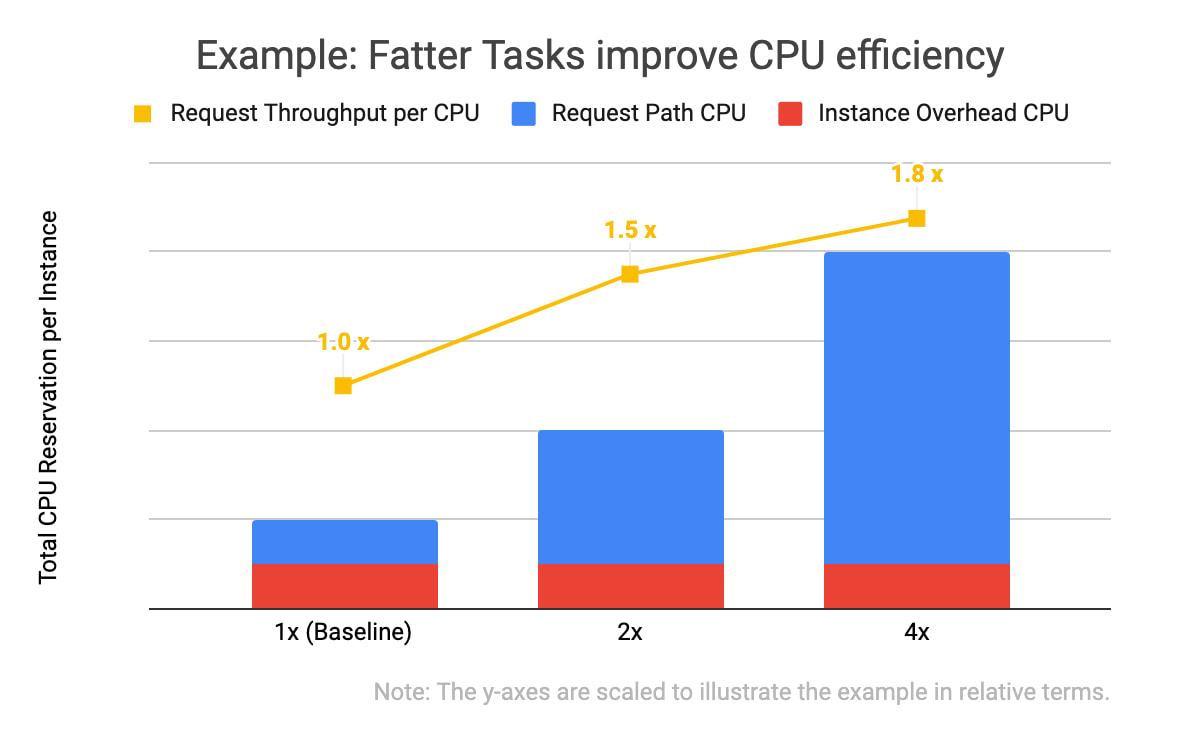
In the example data above, you will notice two things: that all three of the instance specifications have the same computational overhead (in red), and that the larger the overall CPU reservation of an instance, the more request throughput it has (in yellow). With the same total amount of CPU allocated, one instance of the 4x shape can handle 1.8 times as many requests as the four instances with the baseline shape. This is because the computational overhead (like persisting debug log entries, checking if network connection channels are still alive, and initializing classes) doesn’t scale linearly with the number of incoming requests the task is handling.
We kept trying to double our serving tasks’ reservations while cutting in half the number of tasks across our fleet until we hit a scaling limitation.
Of course, we needed to test and qualify each of these changes. We used canary environments to make sure that these changes behaved as expected and didn’t introduce or hit any previously undiscovered limitations. Similar to how we qualify new builds of our servers, we qualified that there weren’t any functional or performance regressions, and that the desired effects of the changes were indeed realized in production.
We also made functional improvements to our codebase. For example, we rewrote an in-memory distributed cache to be more flexible in how it sharded entries across task instances. This, in turn, let us store more entries in a single region when we grew the number of server instances in a cluster.
Crafting fire escapes
Though our confidence in our usage growth forecasts was improving, these predictions were still not 100% reliable. What would happen if we ran out of serving capacity in a region? What would happen if we saturated a particular network link? The control knob workstream’s goal was to provide satisfactory, if not ideal, answers to those kinds of questions. We needed an acceptable plan for any black swans that arrived on our consoles.
A group began working to identify and build more production controls and fire escapes—all of which we hoped we wouldn’t need. For example, these knobs would allow us to quickly downgrade the default video resolution from high-definition to standard-definition when someone joined a Meet conference. That change would buy us some time to course-correct using the other workstreams (provisioning and efficiency improvements) without substantial product degradation, but users would still be able to upgrade their video quality to high-definition if they wanted to.
Having a variety of instrumented controls like this built, tested, and ready to go bought us some additional runway if our worst-case forecasts weren’t accurate—along with some peace of mind.
Operational sustainability
This structured response involved large numbers of Googlers in a variety of roles. This meant that to keep making progress throughout the incident, we also needed some serious coordination and intentional communications.
We held daily handover meetings between our two time zones to accommodate Googlers based in Zurich, Stockholm, Kirkland, Wash., and Sunnyvale, Calif. Our communications leads provided regular updates to numerous stakeholders across our product team, executives, infrastructure teams, and customer support operations so that each team had up-to-date status information when they made their own decisions. The workstream leads used Google Docs to keep shared status documents updated with current sets of risks, points of contact, ongoing mitigation efforts, and meeting notes.
This approach worked well enough to get things going, but soon began to feel burdensome. We needed to lengthen our planning cycle from days to weeks in order to meaningfully reduce the amount of time spent coordinating, and increase the time we spent actually mitigating our crisis.
Our first tactic here was to build better and more trustworthy forecasting models. This increased predictability meant we could stabilize our target increase in serving capacity for the whole week, rather than just for tomorrow.
We also worked to reduce the amount of toil necessary to bring up any additional serving capacity. Our processes, just like the systems we operate, needed to be automated.
At that point, scaling Meet’s serving stack was our most work-intensive ongoing operation, due to the number of people who needed to be up-to-date on the latest forecast and resource numbers, and the number of (sometimes flaky) tools involved in certain operations.

As outlined in the life-cycle diagram above, the trick to automating these tasks was incremental improvements. First we documented tasks, and then we began automating pieces of them until finally, in the ideal case, the software could complete the task from start to finish without manual intervention.
To accomplish this, we committed a number of automation experts from within and outside the Meet organization to focus on tackling this problem space. Some of the work items here included:
- Making more of our production services responsive to changes in an authoritative, checked-in configuration file
- Augmenting common tools to support some of Meet’s more unique system requirements (e.g., its higher bandwidth and lower latency networking requirements)
- Tuning regression checks that had become more flaky as the system grew in scale
Automating and codifying these tasks made a significant dent in the manual operations required to turn up Meet in a new cluster or to deploy a new binary version that would unlock performance improvements. By the end of this scaling incident, we were able to fully automate our per-zone, per-serving job capacity footprint, which precluded hundreds of manually constructed invocations of command-line tools. This freed up time and energy for more than a few engineers to work on some of the more difficult (but equally important) problems.
At this point in scaling our operations, we could move to “offline” handoffs between sites via email, further reducing the number of meetings to attend. Now that our strategy was solidified and our runway was longer, we moved into a more purely tactical mode of execution.
Soon after, we wound down our incident structure and began to operate the remaining work more like how we’d run any long-term project.
Results
By the time we exited our incident, Meet had more than 100 million daily meeting participants. Getting there smoothly was not easy or straightforward; the scenarios the Meet team explored during disaster and incident response tests prior to COVID-19 did not encompass the length or the scale of increased capacity requirements we encountered. As a result, we formulated much of our response on the fly.
There were plenty of hiccups along the way, as we had to balance risk in a different way than we normally do during standard operations. For example, we deployed new server code to production with less canary baking time than normal because it contained some performance fixes that bought us additional time before we were due to run out of available regional capacity.
One of the most crucial skills we honed throughout this two month-long endeavour was the ability to catalog, quantify, and qualify risks and payoffs in a way that was flexible. Everyday, we learned new information about COVID-19 lockdowns, new customers’ plans to start using Meet, and available production capacity. Sometimes this new information made obsolete the work we’d started the day before.
Time was of the essence, so we couldn’t afford to treat each work item with the same priority or urgency, but we also couldn’t afford not to hedge our own forecast models. Waiting for perfect information wasn’t an option at any point, so the best we could do was build out our runway as much as possible, while making calculated but quick decisions with the data we did have.
All of this work was only possible because of the savvy, collaborative, and versatile people across a dozen teams and as many functions—SREs, developers, product managers, program managers, network engineers, and customer support—who worked together to make this happen.
We ended up well-positioned for what came next: making Meet available for free to everyone with a Google account. Normally, opening the product up to consumers would have been a dramatic scaling event all on its own, but after the intense scaling work we’d already done, we were ready for the next challenge.
10 Reasons that Make Google Cloud the Champion of IaaS

10453
Of your peers have already read this article.
5:00 Minutes
The most insightful time you'll spend today!
When you choose to run your business on Google Cloud you benefit from the same planet-scale infrastructure that powers Google’s products such as Maps, YouTube, and Workspace.
We have picked 10 ways in which Google Cloud Infrastructure services outshine alternatives in the market in how they simplify your operations, save money, and secure your data.
1. Custom Machine Types means no wasted resources
Compute Engine offers predefined machine types that you can use when you create a VM instance. A predefined machine type has a preset number of vCPUs and a preset amount of memory; each type is billed at a set price as described on the Compute Engine pricing page.
If predefined machine types don’t meet your needs, you can create a VM instance with a custom number of vCPUs and custom amount of memory, effectively building a custom machine type. Custom machine types are available only for general-purpose machine families. When you create a custom machine type, you are deploying a custom machine type from the E2, N2, N2D, or N1 machine family on GCP. No other leading cloud vendor offers custom machine types so extensively.
Custom machine types are a good idea for workloads that aren’t a good fit for the predefined machine types and for workloads that require more processing power or memory but don’t need all of the upgrades provided by the next machine type level. This translates into lower operating costs. They are also useful for controlling software licensing costs that are based on the number of underlying compute cores.
Jeremy Lloyd, Infrastructure and Application Modernization Lead at Appsbroker, a Google partner:
“Custom machine types coupled with Google’s StratoZone data center discovery tool provides Appsbroker with the flexibility we need to provide cost efficient virtual machines matched to a virtual machine’s actual utilization. As a result, we are able to keep our customers’ operating costs low while still providing the ability to scale as needed.”
2. Compute Engine Virtual Machines are optimized for scale-out workloads
For scale-out workloads, T2D, the first instance type in the Tau VM family, is based on 3rd Gen AMD EPYC processors and leapfrogs VMs for scale-out workloads of any leading public cloud provider today, both in terms of performance and price-performance. Tau VMs offer 56% higher absolute performance and 42% higher price-performance compared to general-purpose VMs from any leading public cloud vendor (source). The x86 compatibility provided by these AMD EPYC processor-based VMs gives you market-leading performance improvements and cost savings, without having to port your applications to a new processor architecture. Sign up here if you are interested in trying out T2D instances in Preview.
For SAP HANA, Google Cloud has demonstrated with SAP how we can run the world’s largest scale-out HANA system in the public cloud (96TB). With such innovation, you are covered as your business grows exponentially.
3. Largest single node GPU-enabled VM
Google is the only public cloud provider to offer up to 16 NVIDIA A100 GPUs in a single VM, making it possible to train very large AI models. Users can start with one NVIDIA A100 GPU and scale to 16 GPUs without configuring multiple VMs for single-node ML training, without crossing the VM layer.
Additionally, customers can choose smaller GPU configurations—1, 2, 4 and 8 GPUs per VM—providing the flexibility to scale their workload as needed.
The A2 VM family was designed to meet today’s most demanding applications—workloads like CUDA-enabled machine learning (ML) training and inference, for example. This family is built on the A100 GPU which offers up to 20x the compute performance compared to the previous generation GPU and comes with 40 GB of high-performance HBM2 GPU memory. To speed up multi-GPU workloads, the A2 VMs use NVIDIA’s HGX A100 systems to offer high-speed NVLink GPU-to-GPU bandwidth that delivers up to 600 GB/s. A2 VMs come with up to 96 Intel Cascade Lake vCPUs, optional Local SSD for workloads requiring faster data feeds into the GPUs and up to 100 Gbps of networking. A2 VMs provide full vNUMA transparency into the architecture of underlying GPU server platforms, enabling advanced performance tuning. Google Cloud offers these GPUs globally.
4. Non-disruptive maintenance means you worry less about planned downtime
Compute Engine offers live migration (non-disruptive maintenance) to keep your virtual machine instances running even when a host system event, such as a software or hardware update, occurs. Google’s Compute Engine live migrates your running instances to another host in the same zone without requiring your VMs to be rebooted. Live migration enables Google to perform maintenance that is integral to keeping infrastructure protected and reliable without interrupting any of your VMs. When a VM is scheduled to be live-migrated, Google provides a notification to the guest that a migration is imminent.
Live migration keeps your instances running during:
- Regular infrastructure maintenance and upgrades
- Network and power grid maintenance in the data centers
- Failed hardware such as memory, CPU, network interface cards, disks, power, and so on. This is done on a best-effort basis; if a hardware component fails completely or otherwise prevents live migration, the VM crashes and restarts automatically and a hostError is logged.
- Host OS and BIOS upgrades
- Security-related updates
- System configuration changes, including changing the size of the host root partition, for storage of the host image and packages
Live migration does not change any attributes or properties of the VM itself. The live migration process transfers a running VM from one host machine to another host machine within the same zone. All VM properties and attributes remain unchanged, including internal and external IP addresses, instance metadata, block storage data and volumes, OS and application state, network settings, network connections, and so on. This has the benefit of reducing operational and maintenance overhead, helps you build a more robust security posture where infrastructure can be consciously revamped from a known good state and minimizes risks for advanced persistent threats.
Refer to Lessons learned from a year of using live migration in production on Google Cloud from the Google engineering team.
5. Trusted Computing: Shielded VMs guard you against advanced, persistent attacks
Establishing trust in your environment is multifaceted, involving hardware and firmware, as well as host and guest operating systems. Unfortunately, threats like boot malware or firmware rootkits can stay undetected for a long time, and an infected virtual machine can continue to boot in a compromised state even after you’ve installed legitimate software.
Shielded VMs can help you protect your system from attack vectors like:
- Malicious guest OS firmware, including malicious UEFI extensions
- Boot and kernel vulnerabilities in the guest OS
- Malicious insiders within your organization
To guard against these kinds of advanced persistent attacks, Shielded VMs use:
- Unified Extensible Firmware Interface (UEFI) BIOS: Helps ensure that firmware is signed and verified
- Secure and Measured Boot: Helps ensure that a VM boots an expected, healthy kernel
- Virtual Trusted Platform Module (vTPM): Establishes root-of-trust, underpins Measured Boot, and prevents exfiltration of vTPM-sealed secrets
- Integrity Monitoring: Provides tamper-evident logging, integrated with Stackdriver, to help you quickly identify and remediate changes to a known integrity state
The Google approach allows customers to deploy Shielded VMs with only a simple click, thereby easing implementation.
6. Confidential Computing encrypts data while in use
Google Cloud was a founding member of the Confidential Computing Consortium. Along with encryption of data in transit and at rest using customer-managed encryption keys (CMEK) and customer-supplied encryption keys (CSEK), Confidential VM adds a “third pillar” to the end-to-end encryption story by encrypting data while in use. Confidential Computing uses processor-based technology that allows data to be encrypted in use while it is being processed in the public cloud. Confidential VM allows you to to encrypt memory in use on a Google Compute Engine VM by checking a single checkbox.
All Confidential VMs support the previously mentioned Shielded VM features under the covers—you can think of Shielded VM as helping to address VM integrity, while Confidential VM addresses the memory encryption aspect which relies on CPU features. With the confidential execution environments provided by Confidential VM and AMD Secure Encrypted Virtualization (SEV), Google Cloud keeps customers’ sensitive code and other data encrypted in memory during processing. Google does not have access to the encryption keys. In addition, Confidential VM can help alleviate concerns about risk related to either dependency on Google infrastructure or Google insiders’ access to customer data in the clear.
See what Google Cloud partners say about Confidential Computing here.
7. Advanced networking delivers full-stack networking and security services with fast, consistent, and scalable performance
Google Cloud’s network delivers low latency, reduces operational costs and ensures business continuity, enabling organizations to seamlessly scale up or down in any region to meet business needs. Our planet-scale network uses advanced software-defined networking and security with edge caching services to deliver fast, consistent, and scalable performance. With 28 regions, 85 zones, and 146 PoPs connected by 16 subsea fiber cables around the world, Google Cloud’s network offers a full stack of layer 1 to layer 7 services for enterprises to run their workloads anywhere. Enterprises can be assured that they have best-in-class networking and security services connecting their VMs, containers, and bare metal resources in hybrid and multi-cloud environments with simplicity, visibility, and control.
Google Cloud’s network has protected customers from one of the world’s largest DDoS attacks at 2.54 Tbps. With our multi-layer security architecture and products such as Cloud Armor, our customers ran their business with no disruptions. Furthermore, our recent integration of Cloud Armor with reCAPTCHA Enterprise adds best-in-class bot and fraud management to prevent volumetric attacks. Cloud Armor is deployed with our Cloud Load Balancer and Cloud CDN, extending the secure benefits at the network edge for traffic coming into Google Cloud so customers have security, performance, and reliability all built in. Furthermore, we are excited to offer Cloud IDS in preview, which was co-developed with security industry leader, Palo Alto Networks, to run natively in Google Cloud.
Our advanced networking capabilities also extends to GKE and Anthos networking. With the GKE Gateway controller, customers can manage internal and external HTTPS load balancing for a GKE cluster or a fleet of GKE clusters with multi-tenancy while maintaining centralized admin policy and control. Unlike other Kubernetes offerings, we offer eBPF dataplane which brings powerful tooling such as Kubernetes network policy and logging to GKE. eBPF is known to kernel engineers as a “superpower” for its unique architecture to load and unload modules in kernel space, and now this capability is built in with Google Cloud networking.
For observability and monitoring, our customers deploy Network Intelligence Center, Google Cloud’s comprehensive network monitoring, verification and optimization platform. With four key modules in Network Intelligence Center, and several more to come, we are working towards realizing our vision of proactive network operations that can predict and heal network failures, driven by AI/ML recommendations and remediation. Network Intelligence Center provides unmatched visibility into your network in the cloud along with proactive network verification. Centralized monitoring cuts down troubleshooting time and effort, increases network security and improves the overall user experience.
8. Regional Persistent Disk for High Availability
Regional Persistent Disk is a storage option that provides synchronous replication of data between two zones in a region. Regional Persistent Disks can be a great building block if you need to ensure high availability of your critical applications as they offer cost-effective durable storage and replication of data between two zones in the same region.
Regional Persistent Disks are also easy to set up within the Google Cloud Console. If you are designing robust systems or high availability services on Compute Engine, Regional Persistent Disks combined with other best practices such as backing up your data using snapshots enable you to build an infrastructure that is highly available and recoverable in a disaster. Regional Persistent Disks are also designed to work with regional managed instance groups. In the unlikely event of a zonal outage, Regional Persistent Disks allow continued I/O through failover of your workloads to another zone. Regional Persistent Disks can help meet zero RPO and near-zero RTO requirements and other stringent SLAs that your critical applications might require by maximizing application availability and protection of data during events such as host/VM failures and zonal outages.
9. Cloud Storage’s single namespace for dual-region and multi-region means managing regional replication is incredibly simple
Similar to how Persistent Disk makes data more available by replicating data across zones, Cloud Storage provides similar benefits for object storage. Cloud Storage within a region is cross-zone by definition, reducing the risk that a zonal outage would take down your application. Cloud Storage adds to this by also providing a cross-region option that can protect against a regional outage and gets your data closer to distributed users. This comes in the form of Dual-region or Multi-region settings for a bucket. These are the simplest to implement cross-region replication offerings in the industry—just a simple button or API call to enable them. In addition to being simple to implement, they offer an added advantage of using a single bucket name that spans regions.
This is unique in the industry. Competitive offerings currently require setting up and managing two distinct buckets, one in each region and they don’t offer the strong consistency properties Cloud Storage offers across regions. Operations and app development are burdened by this design. Google’s single namespace approach dramatically simplifies application development (the app runs on single region or dual/multi-region without any changes), and provides simpler application restarts and testing for DR.
10. Predictive autoscaling
Customers use predictive autoscaling to improve response times for applications with long initialization times or for applications with workloads that vary predictably with daily or weekly cycles. When you enable predictive autoscaling, Compute Engine forecasts future load based on your Managed Instance Group’s history and scales out the MIG’s in advance of predicted load, so that new instances are ready to serve when the load arrives. Without predictive autoscaling, an autoscaler can only scale a group reactively, based on observed changes in load in real time.
With predictive autoscaling enabled, the autoscaler works with real-time data as well as with historical data to cover both the current and forecasted load. Forecasts are refreshed every few minutes (faster than competing clouds) and consider daily and weekly seasonality, leading to more accurate forecasts of load patterns.
For more information, see How predictive autoscaling works and Checking if predictive autoscaling is suitable for your workload.
These are just a few examples of customer-centric innovation that set Google Cloud infrastructure apart. Bring your applications and let the platform work for you.
Get started by learning about your options for migration, or talk to our sales team to join the thousands of customers who have embarked upon this journey.
Acknowledgement
Special thanks to Dheeraj Konidena (Google) for contributing to this article.
Bigbasket: Delivering Groceries Across 25 Cities in India

7331
Of your peers have already read this article.
1:30 Minutes
The most insightful time you'll spend today!
When Bigbasket was founded in December 2011, it guaranteed to deliver goods within a one-hour delivery slot of its customers’ choosing or it would refund them 10 percent of their orders. The company also introduced an express service, delivering groceries within 90 minutes of an order being placed.
Bigbasket needed a mapping platform that could help it meet its delivery times, and offer a familiar interface to customers. MediaAgility, a digital consulting company, recommended Google Maps Platform to Bigbasket.
When customers use the Bigbasket mobile app to place orders, they select their locations on a Google Map. The prices and availability of groceries varies according to location, so a customer’s location determines the cost of the order and what can be ordered.
Google Maps Platform Results
- Bigbasket handles more than one million orders per month, and delivers in more than two dozen cities in India
- Bigbasket now has more than four million customers
- Orders are delivered on time, increasing customer loyalty
It is also used to determine driver routes. Bigbasket used the Maps Javascript API to build a web-based app for the company’s backend that tracks all orders and delivery progress. Dispatchers use the Directions API to match drivers with orders and customers, and the Distance Matrix API to get estimate the time of arrival for deliveries. As dispatchers track the progress of deliveries on the map, they can tweak routes as necessary.
“We’ve built Bigbasket from the ground up using Google Maps Platform. It makes sure we have the right customer locations and deliver to them on time. We couldn’t have started Bigbasket without Google Maps. It helps us to be fast and efficient, and make sure our customers get what they’ve ordered quickly,” said Pramod Jajoo, Chief Technology Officer, Bigbasket
3990
Of your peers have already watched this video.
33:29 Minutes
The most insightful time you'll spend today!
Introducing G Suite Essentials: The simplest way for teams to securely work together from anywhere
With millions of employees forced to work from home, it has become clear that the existing tools many have in place were not cutting it. The Google Cloud team stepped in and accelerated production timelines to launch a new offering. G Suite Essentials is Google’s integrated set of tools designed to support a modern workspace.
With that in mind, Google wants to give an introduction to Essentials and insights into how Google addresses this specific situation we find ourselves in due to the pandemic.
And so the question becomes, now that remote work is the new normal, are the tech tools that we have in place the right ones? And here’s the harsh reality–for many, anything other than collaboration whilst sharing the same conference room in-person is broken.
We all have our examples–incorrect versions of documents, not being able to find the right information, unproductive conference calls, you name it. You have your own story. The unfortunate thing is that it feels normal at this point, and that’s just not fair.
How—and where—people work has changed. Being a part of a distributed team is the new normal, and teams need easy-to-adopt tools that empower them to collaborate from anywhere. Learn how your team can get started in minutes, swiftly and securely.
More Relevant Stories for Your Company

Securing Remote Workers with Google and Chrome Enterprise
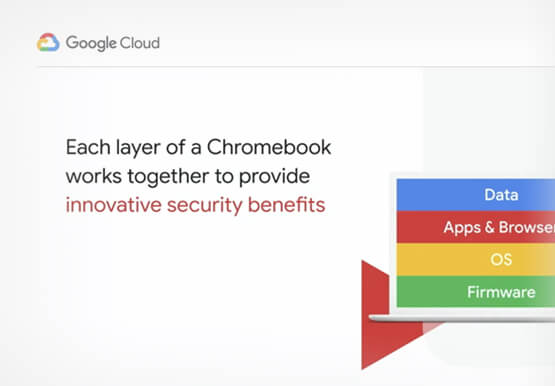
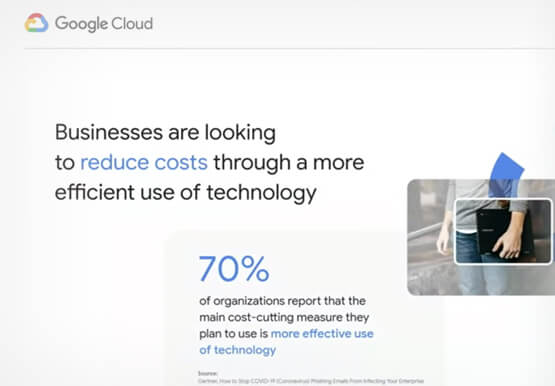
With the proliferation of COVID-19 across the globe, the need for a remote working strategy has become paramount to keep businesses running. A Gartner survey found that 88% of organizations have asked their employees to work remotely. And 97% of the organizations canceled work-related travel. However, only 10% of the

Why I Moved to the G Suite: Rentokil CIO
Whether it's getting rid of pests, cleaning up a crime scene or tending to office plants, Rentokil Initial is a service business whose primary aim is to offer customers the best possible standard. This can only be achieved if teams work closely together, sharing expertise and ideas and communicating constantly.

A Brand New Google Cloud Homepage
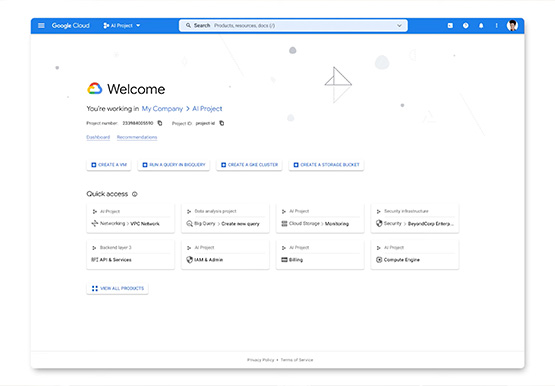
After collating multiple feedbacks from our Google Cloud users, Team Google has come up with a brand new homepage which is much more faster, simpler and easy to navigate. The new page gives you a clean and streamlined customised experience helping you reach to your most relevant destinations. It allows

Workspace’s Collaboration Equity Integral for Delivering the ‘Promise of Hybrid Workplace’
Like many businesses around the world, Google is trying to combine on-site and off-site work into an efficient hybrid model. And like most businesses, we’re also figuring out how to get it right. As we grow our vision for the best possible hybrid workplace, one theme consistently emerges: the need for
