





Track metrics and stay focused on threats: Achieving Autonomic Security Operations

2835
Of your peers have already read this article.
2:30 Minutes
The most insightful time you'll spend today!
What’s the most difficult question a security operations team can face? For some, is it, “Who is trying to attacks us?” Or perhaps, “Which cyberattacks can we detect?” How do teams know when they have enough information to make the “right” decision? Metrics can help inform our responses to those questions and more, but how can we tell which metrics are the best ones to rely on during mission-critical or business-critical crises?
As we discussed in our blogs, “Achieving Autonomic Security Operations: Reducing toil” and “Achieving Autonomic Security Operations: Automation as a Force Multiplier,” your Security Operations Center (SOC) can learn a lot from what IT operations discovered during the Site Reliability Engineering (SRE) revolution. In this post, we discuss how those lessons apply to your SOC, and center them on another SRE principle—Service Level Objectives (SLOs).
Even though industry definitions can vary for these terms, SLI, SLO, and SLA have specific meanings, wrote the authors of the Service Level Objectives chapter in our e-book, “Site Reliability Engineering: How Google runs production systems.” (All subsequent quotes come from the SLO chapter of the book, which we’ll refer to as the “SRE book.”)
- SLI: “An SLI is a service level indicator—a carefully defined quantitative measure of some aspect of the level of service that is provided.”
- SLO: “An SLO is a service level objective: a target value or range of values for a service level that is measured by an SLI.”
- SLA: An SLA is a Service Level Agreement about the above: “an explicit or implicit contract with your users that includes consequences of meeting (or missing) the SLOs they contain.”
In practice, we measure something (SLI) and we set the target value (SLO); we may also have an agreement about it (SLA).
This is not about cliches like “what gets measured gets done” here, but metrics and SLIs/SLOs will to a large extent determine the fate of your SOC. For example, SOCs (including at some Managed Security Service Providers) that obsessively focus on “time to address the alert” end up reducing their security effectiveness while making things go “whoosh” fast. If you equate mean time to detect or discover (MTTD) with “time to address the alert” and then push the analyst to shorten this time, attackers gain an advantage while defenders miss things and lose.
How to choose which metrics to track
One view of metrics would be that “whatever sounds bad” (such as attacks per second or incidents per employee) needs to be minimized, while “whatever sounds good” (such as successes, reliability, or uptime) needs to be maximized.
But the SRE experience is that sometimes good metrics have an optimum level, and yes, even reliability (and maybe even security). The book’s authors, Chris Jones, John Wilkes, and Niall Murphy with Cody Smith, cite an example of a service that defied common wisdom and was too reliable.
“Its high reliability provided a false sense of security because the services could not function appropriately when the service was unavailable, however rarely that occurred… SRE makes sure that global service meets, but does not significantly exceed, its service level objective,” they wrote.
The SOC lesson here is that some security metrics have optimum value. The above-mentioned time to detect has an optimum for your organization. Another example is the number of phishing incidents, which may in fact have an optimum value. If nobody phishes you, it’s probably because they already have credentialed access to many of your systems – so in your SOC, think of SLI optimums, and don’t automatically assume zero or infinite targets for metrics.
Three specific quotes from the SRE book remind us that “good metrics” may need to be balanced with other metrics, rather than blindly pushed up:
- “User-facing serving systems generally care about availability, latency, and throughput.”
- “Storage systems often emphasize latency, availability, and durability.”
- “Big data systems, such as data processing pipelines, tend to care about throughput and end-to-end latency.”
In a SOC, this may mean that you can detect threats quickly, review all context related to an incident, and perform deep threat research—but the results may differ for various threats. A fourth guidepost explains why your SOC should care even about this: “Whether or not a particular service has an SLA, it’s valuable to define SLIs and SLOs and use them to manage the service.” Indeed, we agree that SLIs and SLOs matter more for your SOC than any SLAs or other agreements.
Metrics matter, but so does flexibility
When considering the list of most difficult questions a security operations team can face, it’s vital to understand how to evaluate metrics to reach accurate answers. Consider another insight from the book: “Most metrics are better thought of as distributions rather than averages.”
If the average alert response is 20 minutes, does that mean that “all alerts are addressed in 18 to 22 minutes,” or that “all alerts are addressed in five minutes, while one alert is addressed in six hours?” Those different answers point to very different operational environments.
What we’ve seen before in SOCs is that a single outlier event is probably the one that matters most. As the authors put it, “The higher the variance in response times, the more the typical user experience is affected by long-tail behavior.” So, in security land, that one alert that took six hours to respond to was likely related to the most dangerous activity detected.
To address this, the book advises, “Using percentiles for indicators allows you to consider the shape of the distribution.” Google detection teams track the 5% and 95% values, not just averages.
Another useful concept from SRE is the “error budget,” a rate at which the SLOs can be missed, and tracked on a daily or weekly basis. It’s a SLO for meeting other SLOs.
The SOC value here may not be immediately obvious, but it’s vital to understanding the unique role security occupies in technology. In security, metrics can be a distraction because the real game is about preventing the threat actor from achieving their objectives. Based on our own experiences, most blue teams would rather miss the SLO and catch the threat in their environment. The defenders win when the attacker loses, not when the defenders “comply with a SLA.” The concept of the error budget might be your best friend here.
The SRE book takes that line of thinking even further. “It’s both unrealistic and undesirable to insist that SLOs will be met 100% of the time: doing so can reduce the rate of innovation and deployment.”
More broadly, and as we said in our recent paper with Deloitte on SOCs, rigid obeisance is its own vulnerability to exploit. “This adherence to process and lack of ability for the SOC to think critically and creativity provides potential attackers with another opportunity to successfully exploit a vulnerability within the environment, no matter how well planned the supporting processes are.”
To be successful at defending their organizations, SOCs must be less like the unbending oak and more like the pliant but resilient willow.
Track metrics but stay focused on threats
A third interesting puzzle from our SRE brethren: “Don’t pick a target based on current performance.”
We all want to get better at what we do, so choosing a target goal for improvement based on our existing performance can’t be bad, right? It turns out, however, that choosing a goal that sets up unrealistic or otherwise unhelpful, or woefully insufficient, expectations can do more harm than good.
Here is an example: An analyst handles 30 alerts a day (per their SLI), and their manager wants to improve by 15% so they set the SLO to 35 alerts a day. But how many alerts are there? Leaving aside the question of whether it is the right SLI for your SOC, what if you have 5,000 alerts, and you drop 4,970 of them on the floor. When you “improve,” you still drop 4,965 on the floor. Is this a good SLO? No, you need to hire, automate, filter, tune, or change other things in your SOC, not set better SLO targets that seemingly improve upon today’s numbers.
To this, our SRE peers say: “As a result, we’ve sometimes found that working from desired objectives backward to specific indicators works better than choosing indicators and then coming up with targets… Start by thinking about (or finding out!) what your users care about, not what you can measure.”
In the SOC, this probably means start with threat models and use cases, not the current alert pipeline performance.
SOC guidance can sometimes be more cryptic than we’ve let on. One challenging question is determining how many metrics we really need in a typical SOC. SREs wax philosophical here: “Choose just enough SLOs to provide good coverage of your system’s attributes.”
In our experience, we haven’t seen teams succeed with more than 10 metrics, and we haven’t seen people describe and optimize SOC performance with fewer than 3. However, SREs offer a helpful, succinct test: “If you can’t ever win a conversation about priorities by quoting a particular SLO, it’s probably not worth having that SLO.”
SLOs will get to define your SOC, so define them the way you want your SOC to be, the book advises. “It’s better to start with a loose target that you tighten than to choose an overly strict target that has to be relaxed when you discover it’s unattainable. SLOs can—and should—be a major driver in prioritizing work for SREs and product developers, because they reflect what users care about.”
Importantly, make SLOs for your SOC transparent within the company. As the SREs say, “Publishing SLOs sets expectations for system behavior.” The benefit is that nobody can blame you for non-performance if you perform to those agreed upon SLOs.
Finally, here are some examples of metrics from our teams at Google. In addition to reviewing all escalated alerts, they collect and review weekly:
- event volume
- event source counts
- pipeline latency
- triage time median
- triage time at 95%
Analyzing these metrics can reveal useful guidance for applying SRE principles and ideas with their detection and response teams.
Event volume: What we need to know here is what is driving the volume. Is the event volume normal, high, or low—and why? Was there a flood of messages? New data source causing high volume? What caused it? Any bad signals? Or is there a problematic area of the business that needs strategic follow-up to implement additional controls?
Event source count: Are there signals or automation that’s behaving abnormally? Is there new automation that’s misbehaving? Counting events for each source call makes for a decent SLI.
Pipeline latency: Here at Google, we aim for a confirmed detection within an hour of an event being generated. The aspirational time is 5 minutes. This means that the event pipeline latency is something that must be tracked very diligently. This also means that we must scrutinize automation latency. To achieve this, we try to remove self-caused latency so that we’re not hiding the pain of bad signals or bad automation.
We triage median and 95p time: We track the response time to events. As the SRE book points out, tracking only a single average number can get you in trouble very quickly. Note that triage time is not the same as time to resolution, but more of a dwell time for an attacker before they are discovered.
Incident resolution times: When you have a SLI but not a SLO, this can be the proverbial elephant in the room and create all sorts of bad incentives to “go fast” instead of “go good.” Specifically, SLO without SLI causes harm from encouraging the analysis to resolve quickly and potentially increase the risk of missing serious security incidents, especially when subtle signals are involved.
When reviewing alert escalations, we look to determine if the analysis is deep enough, if handoffs contain the right information for our response teams, and to get a sense of analyst fatigue. If analysts are phoning in their notes, it’s a sign that they’re over a particular signal or that there are a ton of duplicate incidents and we need to drive the business in some way.
By measuring these and other factors, metrics allow us to drive down the cost of each detection. Ultimately, this can help our detection and response operation scale faster than the threats.
Related posts:
- “Achieving Autonomic Security Operations: Automation as a Force Multiplier”
- “Achieving Autonomic Security Operations: Reducing toil”
- “Taking an autonomic approach to security operations” video
- “New Paper: “Future Of The SOC: Process Consistency and Creativity: a Delicate Balance” (Paper 3 of 4)”
- “New Paper: “Autonomic Security Operations — 10X Transformation of the Security Operations Center””
- “EP75 How We Scale Detection and Response at Google: Automation, Metrics, Toil” podcast episode
Latest News: Secure Digital Infrastructure Services with Apigee Advanced API Security for Google Cloud

4473
Of your peers have already read this article.
3:30 Minutes
The most insightful time you'll spend today!
Organizations in every region and industry are developing APIs to enable easier and more standardized delivery of services and data for digital experiences. This increasing shift to digital experiences has grown API usage and traffic volumes. However, as malicious API attacks also have grown, API security has become an important battleground over business risk.
To help customers more easily address their growing API security needs, Google Cloud is announcing today the Preview of Advanced API Security, a comprehensive set of API security capabilities built on Apigee, our API management platform. Advanced API Security enables organizations to more easily detect security threats. Here’s a closer look at the two key functionality included in this launch: identifying API misconfigurations and detecting bots.
Identify API misconfigurations
Misconfigured APIs are one of the leading reasons for API security incidents. In 2017, Gartner® predicted that by 2022 API abuses will be the most frequent attack vector resulting in data breaches for enterprise web applications. Today, our customers tell us application API security is one of their top concerns, which is supported by an independent study from 2021 by Fugue and Sonatype. The report found that misconfigurations are the number one cause of data breaches, and that “too many cloud APIs and interfaces to adequately govern” are frequently the main point of attack in cyberattacks.
While identifying and resolving API misconfigurations is a top priority for many organizations, the configuration management process can be time consuming and require considerable resources.
Advanced API Security can make it easier for API teams to identify API proxies that do not conform to security standards. To help identify APIs that are misconfigured or experiencing abuse, Advanced API Security regularly assesses managed APIs and provides API teams with a recommended action when configuration issues are detected.
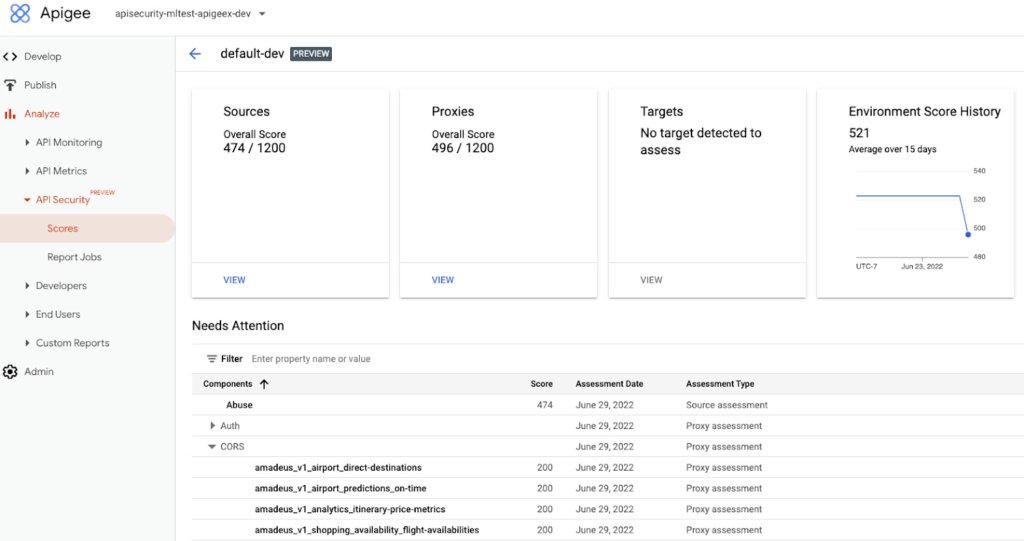
Advanced API Security identifies misconfigured API proxies, including the missing CORS policy.
APIs form an integral part of the digital connective tissue that make modern medicine run smoothly for patients and healthcare staff. One common healthcare API use case occurs when a healthcare organization inputs a patient’s medical coverage information into a system that works with insurance companies. Almost instantly, that system determines the patient’s coverage for a specific medication or procedure, a process which is enabled by APIs. Because of the often-sensitive personal healthcare data being transmitted, it is important that the required authentication and authorization policies are implemented so that only authorized users, such as an insurance company, can access the API.
Advanced API Security can detect if those required policies have not been applied, an alert which can help reduce the surface area of API security risks. By leveraging Advanced API Security, API teams at healthcare organizations can more easily detect misconfiguration issues and can reduce security risks to sensitive information.
Detect Bots
Because of the increasing volume of API traffic, there is also an increase in cybercrime in the form of API bot attacks—the automated software programs deployed over the Internet for malicious purposes like identity theft.
Advanced API Security uses pre-configured rules to help provide API teams an easier way to identify malicious bots within API traffic. Each rule represents a different type of unusual traffic from a single IP address. If an API traffic pattern meets any of the rules, Advanced API Security reports it as a bot.
Additionally, Advanced API Security can speed up the process of identifying data breaches by identifying bots that successfully resulted in the HTTP 200 OK success status response code.
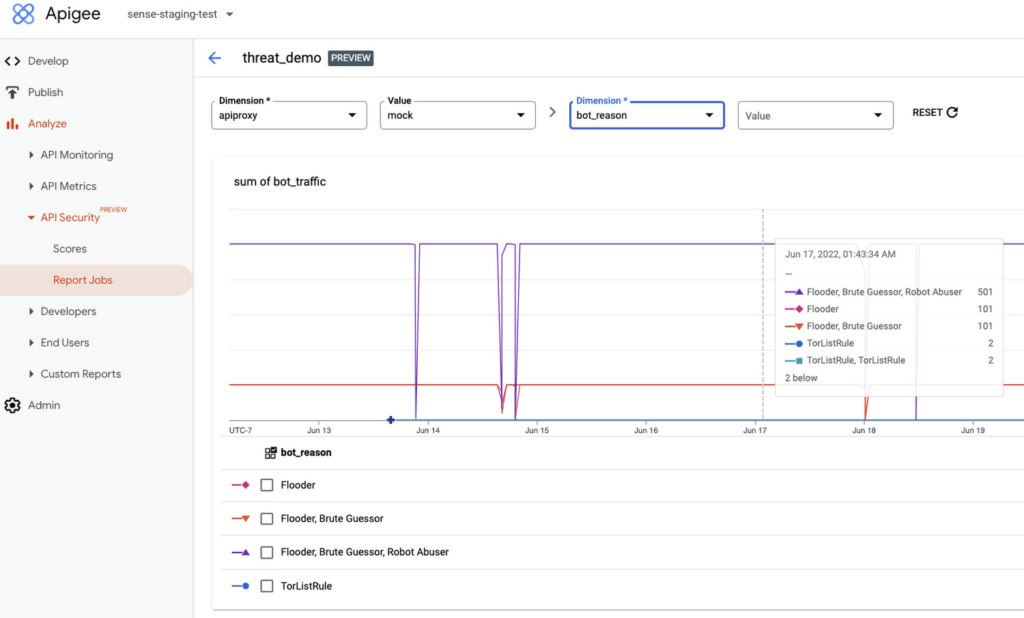
Financial services APIs are frequently the target of malicious bot attacks due to the high-value data that is processed. A bank that has adopted open banking standards by making APIs accessible to customers and partners can use Advanced API Security to make it easier to analyze traffic patterns and identify the sources of malicious traffic. You may experience this when your bank allows you to access your data with a third-party application. While a malicious hacker could try to use a bot to access this information, Advanced API Security can help the bank’s API team to identify and stop malicious bot activity in API traffic.
API Security at Equinix
Equinix powers the world’s digital leaders, bringing together and interconnecting infrastructure to fast-track digital advantage. Operating a global network of more than 240 data centers with a 99.999% or greater uptime, Equinix simplifies global interconnections for organizations, saving customers time and effort with the Apigee API management platform.
“A key enabler of our success is Google’s Apigee, delivering digital infrastructure services securely and quickly to our customers and partners,” said Yun Freund, senior vice president of Platform at Equinix. “Security is a key pillar to our API-first strategy and Apigee has been instrumental in enabling our customers to securely bridge the connections they need for their businesses to easily identify potential security risks and mitigate threats in a timely fashion. As our API traffic has grown, so has the amount of time and effort required to secure our APIs. Having a bundled solution in one managed platform gives us a differentiated high-performing solution.”
Getting started
To learn more, check out the documentation or contact us to request access to get started with Advanced API Security.
To learn more about API security best practices, please register to attend our Cloud OnAir webcast on Thursday, July 28th, 2:00 pm PT.
Five Ways Cloud Computing Helps Companies Optimize Operations and Lower IT Costs

4801
Of your peers have already read this article.
1:30 Minutes
The most insightful time you'll spend today!
There is no one way to recover. The past year has seen unprecedented challenges for business across the world, with social distancing and quarantine measures forcing many organizations to quickly adapt to remote working. A new report from BCG Platinion, titled “Finding a New Normal in the Cloud”, points out that while companies have done well to survive so far, the overall business environment is still a tough one with contracted economies and lowered revenues. CIOs have to find the right balance between technological innovation and lowering their cash burn rate.
The report identifies five key ways in which companies can use cloud computing to optimize their operations and reduce overall IT costs by as much as 10%.
1. Go beyond VPN
The BCG Platinion report states that companies need “rapid, efficient, highly scalable, and device agnostic solutions”. Traditionally, when employees had to work offsite, companies provided them with VPNs. But the sheer scale of the COVID-19 pandemic has shown these solutions to be expensive, slow, inconvenient, and hard to manage when entire workforces are working remotely.
Instead, BCG Platinion emphasizes the need for cloud-based solutions such as BeyondCorp Enterprise for more secure, more effective, lower cost remote access at scale. BeyondCorp Enterprise offers customers a zero trust platform for simple and secure access with continuous end-to-end protection that can be used on any device at any time. Deliveroo, a global food delivery company headquartered in the UK, uses BeyondCorp Enterprise to bring the zero trust model to its distributed workforce.
“Having secure access to applications and associated data is critical for our business,” says Vaughn Washington, VP of Engineering at Deliveroo. “With BeyondCorp Enterprise, we manage security at the app level, which removes the need for traditional VPNs and associated risks.”1
With a low cost cloud subscription model, BeyondCorp Enterprise eliminates the need for hardware, operating, and maintenance costs that come with VPN solutions and can also enable organizations to offer protection to the extended workforce at a fraction of the cost. BCG Platinion estimates that solutions like BeyondCorp Enterprise can save companies as much as 50% versus the cost of a traditional VPN.
2. Use SaaS to keep productivity up
With so much of the workforce fragmented due to social distancing measures, the need for seamless, efficient collaboration is greater than ever. According to BCG Platinion, a fully functional Software-as-a-Service productivity solution such as Google Workspace helps to “alleviate the traditional costs and burdens around availability, backup, and maintenance of on-premise collaboration infrastructure.” BCG Platinion analysts estimate that adopting a SaaS solution can lower computing costs for end users by up to 35%.
But working in the cloud does more than lower costs. The BCG Platinion report cites a 2020 study from Forrester that found adopting Google Workspace boosted revenue growth by 1.5%, reduced the need for on-demand tech support by 20%, and cut the risk of data breaches by more than 95%. Over the last year, companies of all sizes have looked on the conditions of the pandemic as an opportunity to change the way they work.
“Airbus has spent the past year thinking about what it actually means to return to work and we’re looking to support greater flexibility with Google Workspace in a leading role,” says Andrew Plunkett, Airbus Vice President Digital Workplace. “In 2020, we held 5.6M Google Meet sessions and we now have more than 70,000 shared Drives where people collaborate. Google Workspace has changed the way people work at Airbus and that will continue as the solution empowers the hybrid work reality.”2
3. Reduce IT overhead and management costs with cloud-first devices
Working in the cloud can be made even more effective with devices specifically designed for the cloud, says the BCG Platinion report. “Cloud-native devices such as Google’s Chromebooks and Chromeboxes are cost-effective, easy to deploy, simple to use, and highly secure,” says BCG Platinion. Additionally, with “thin client” devices, companies can save on hardware costs compared with traditional laptops and desktops.The report suggests that a thin client approach can produce savings of up to 25% in end-user technology and support.
Organizations and businesses of all sizes have found that Chrome OS and devices have greatly enhanced their capacity to work together in even the most challenging circumstances. Chrome OS provides employees with a modern experience and devices that stay fast, have built-in security, deploy quickly, and reduce the total cost of ownership. “Chromebooks are simple-to-use and cost-effective devices that do everything that our staff need them to do, which is mainly accessing Google Workspace online,” says Henry Lewis, Head of Platform for the London Borough of Hackney. “As soon as the Grab and Go Chromebooks were available, they were well used every day.”3
4. Lift and shift for easier transitions
While migrating to the cloud is a priority for many organizations to succeed, it does not have to happen all at once and in the same way. A total cloud migration can be a huge undertaking, involving redesigns of architecture and refactoring of applications. For many organizations, this process can take several months, even years.
But in times like these, CIOs need to make decisions quickly and reduce cash burn as much as possible. When resources are stretched and time is tight, BCG Platinion recommends a “lift-and-shift” approach for minimal disruption. With Google Compute Engine, for example, organizations can simply rehost their existing workloads on virtual machines without transformation. BCG Platinion reports that moving non-critical workloads to the cloud with lift-and-shift approaches can reduce IT spend by as much as 4% in just three months. Additionally, a quick, effective migration paves the way for more advanced IT infrastructure changes, creating effects that ripple long into the future.
5. Make data work for you with the cloud
Data is central to any industry and making the most out of it is more important now than ever before. With business as usual upended by the pandemic, organizations have turned to data for urgent tasks like demand forecasting or predicting supply-chain disruptions. A McKinsey report from last year points out that while many organisations had already started to engage with analytics and AI technologies, their progress was dramatically accelerated by the urgency of the pandemic: “Analytics capabilities that once might have taken these organizations months or years to build came to life in a matter of weeks.”
With the right setup a company can use data to drive efficiencies, respond quickly to its customers and open new markets. But big wins require huge amounts of information and powerful analytics, which means that effective data handling can be very difficult and expensive to do with on-premises architecture.
Moving to a cloud-based infrastructure minimizes infrastructure costs while opening up cutting edge techniques like machine learning for greater insight. The BCG Platinion report found that using a cloud-based data platform was not only cheaper and more efficient for businesses, but could result in a 70% increase in “effectiveness” which it defined as increased sales, lower costs of procured goods, and reduced inventory holding costs. “Moving to cloud provides competitive advantage as you scale innovation, accelerating the creation of new services to keep ahead of the competition,” explains Norbert Faure, Managing Director, Platinion Western Europe at Boston Consulting Group (BCG).
The key mission of any data platform is to make sure that the right people have access to the right information at the right time. Google Cloud helps to unify data across the entire business, increase agility, and innovate faster with a range of products. BigQuery runs complex analytics at infinite scale while helping organizations save up to 34% on the total cost of ownership compared with alternative cloud-based data warehouse solutions.4 Cloud Spanner provides a fully managed relational database that operates at 99.999% availability. Meanwhile, with Vertex AI, businesses can access the same groundbreaking machine learning tools that Google uses itself for unprecedented insight on a unified AI platform. “The whole Google Cloud suite of products accelerates the process of getting established and up and running, so we can perform the ‘bread-and-butter’ work of data science,” says David Herberich, VP, Head of Data at fintech startup Branch.5
Minimize costs today, innovate for tomorrow
As the world recovers from the pandemic, continued success depends on staying nimble and adaptive, argues the BCG Platinion report. Cloud computing can make companies more resilient by helping them to keep costs low, reducing overall IT spend by as much as 10% overall according to BCG Platinion. “For CIOs, cloud migrations can offer important near-term savings and benefits, while also reinvigorating progress toward the long-term goal of digital transformation.“
To learn more, read the full report from BCG Platinion.
1. BeyondCorp Enterprise: Introducing a safer era of computing
2. Building the future of work with Google Workspace
3. Hackney Council: Empowering 4,000 staff to keep serving their community from home
4. The Economic Advantages of Google BigQuery versus Alternative Cloud-based EDW Solutions
5. Fintech startup, Branch makes data analytics easy with BigQuery
4875
Of your peers have already watched this video.
1:30 Minutes
The most insightful time you'll spend today!
How does Google Pick its Data Center ?
Google is well known for its sustainable tech and hardware initiatives. Did you know alongside its environmental friendly designs of its data centers, it takes into account various factors such as redundant power supplies, data replication, network connectivity, etc. Watch the video to learn more.
Create and Protect Admin Accounts

4864
Of your peers have already read this article.
1:30 Minutes
The most insightful time you'll spend today!
Setting up your new cloud infrastructure is scary. Extra scary when you realize that someone (is it gonna be you?) gets to have phenomenal cosmic power over the whole thing.
Yes, I’m talking about the admin account, and today we’ll dig into why they are important, dangerous and different.
When the team at pistach.io got their nuts-as-a-service business growing fruitfully, they knew they needed to think carefully about admin accounts. These people would have tremendous control over their use of Google Cloud, and they could potentially cause very big problems if any were compromised. Definitely resources that require a protective shell.

Early in pistach.io’s development, an employee named Walter Nutt wanted to play a prank by changing his co-worker’s profile photo from an almond to a peanut (pretty devious, since a peanut is actually a legume). He didn’t have access to his friend’s computer, but he did have access to the company’s Cloud Storage bucket. While searching for the profile photo in question, Wally inadvertently deleted the entire contents of the bucket!
As he searched for ways to restore its contents, Wally modified access to two other pistach.io buckets. The company was ground to a halt for a week while teams worked to crack through the permissions issues.
Time to rethink permissions a bit, so this couldn’t spoil their buttery smooth operations in the future.
Following the resource manager guide, the team made a super admin email address that wasn’t tied to a particular individual or Workspace account, and secured it with strong multi-factor authentication. This would be their backup in case an admin account were to be compromised, so they could recover and repair.
The team already uses Google Workspace, so they have an organization set up already. That creation process established initial super administrators, allowing them to create and modify all other resources inside the organization. As they looked toward using Google Cloud, the super administrators could:
- Give the admin role to people, for Cloud
- Act as a point of contact for account recovery
- Modify or delete the organization if needed
Making admin users for the organization allows other people to then flesh out the resources and policies for pistach.io, before they go nuts and give everyone all the permissions. While that would speed things up, it would make it easy for an attacker to crack through the security shell because any account compromise could give ousize access. Yikes!

Instead, the IT leads specified certain people to act as organization admins, and then gave them permissions to:
- Define Identity and Access Management policies
- Structure the Resource Hierarchy
- Delegate control of specific Cloud elements to others on the team
Once those organization admins were set up, they could give management and oversight of Compute, Storage, Networking and other resource types to the relevant leads, making sure each person had just the right amount of permission for the role they needed to perform. The organization admins don’t have permissions themselves to make these resources. They just delegate.
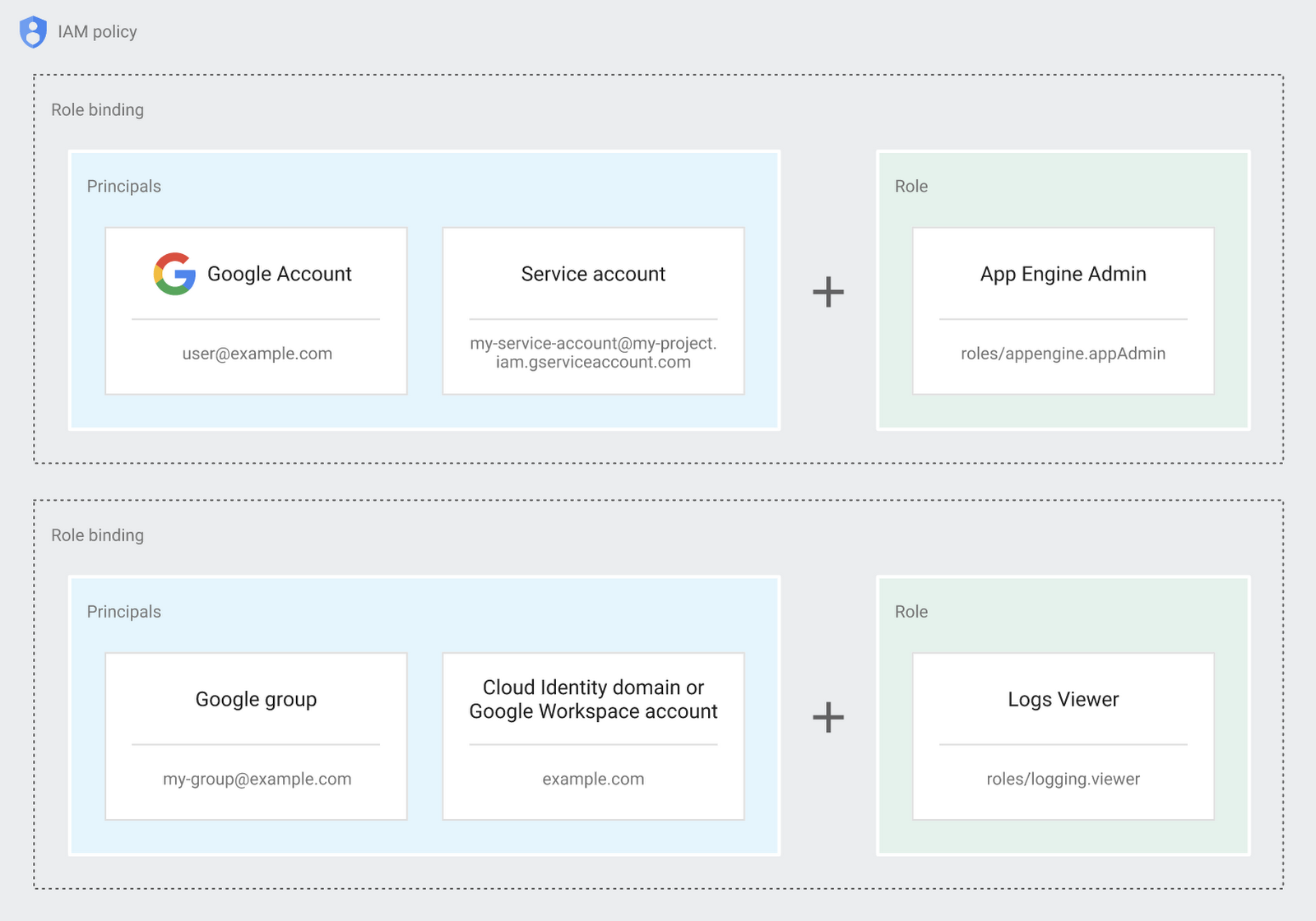
Now each person can accomplish the job they’re responsible for, but doesn’t have overly permissive access. Delegating like this keeps the entire organization safer, and limits the blast radius if someone does manage to break in.
You can go through these steps yourself with this tutorial.
By default the creation of an organization resource for the domain gives everyone the ability to create projects and billing accounts. Once they set up their Organization Admin at pistach.io they decided to remove some of these wide permissions and, in a nutshell, bring everything down to a much finer control. So people could get permissions for a folder or a project, but not the entire organization!
Remember to take care of your admin roles, as they have the power, and responsibility, to cause serious harm if not used safely. Be safe with your Identity and Access Management. And keep your data yours!
Next time we join you we’ll take a crack at creating and provisioning an app to run inside the policies and resource management frameworks created today.
Building Effective Visibility into Technology Assets Used in Healthcare

3175
Of your peers have already read this article.
4:00 Minutes
The most insightful time you'll spend today!
When technology just works, it’s easy to trust. But too often, we place our trust in technology that doesn’t deserve it. When we do this with technology to provide healthcare, we put the safety of patients and the security and reliability of our global healthcare system at risk.
The institutions that make up our global healthcare system also place their trust in cybersecurity measures and technology to keep their systems running and repelling the unceasing wave of attacks they face. We often hear about the institutions that succumb to cyberattacks, but we don’t read much about the institutions that have been successful at defending their digital perimeter, and ultimately protected their ability to treat and protect patients.
Why were some institutions successful and others not as much? What cybersecurity capabilities made the healthcare institution resilient from these attacks? As we covered in our previous post on how healthcare can strengthen its cybersecurity resilience, establishing visibility and antifragility practices are necessary to repel attackers and build trust in the security and reliability of the technology our global healthcare system relies on.
As we continue our series on healthcare and cybersecurity, we’ll focus next on establishing sustainable visibility mechanisms so cybersecurity teams working in our global healthcare system can secure and preserve patient care and safety.
Visibility is akin to a patient taking 20 different medications but their doctor only knows about 10 of them. That’s the current state of many healthcare organizations’ relationship to the technology used on their networks and systems: They aren’t always aware of what technology is in use, whether it has vulnerabilities, how serious those vulnerabilities are, or how one weakness could lead to another or cascade out of control.
Visibility maps those technology assets (including the software, hardware, configurations, protections, who built it, and where the component parts come from) and help prioritize the importance of those assets in keeping systems and networks secure, no matter how complex the healthcare organization’s use of technology might be.
Building effective visibility
Building visibility into technology assets requires a structured approach. As mentioned in the first blog in this series, using a guide like the NIST Cybersecurity Framework (CSF) provides an important mental model we can use to get a clear picture of the strengths and weaknesses of an organization’s cybersecurity risk profile, and how it applies to the assets the organization seeks to protect.
Cybersecurity author and leader Sounil Yu’s book Cyber Defense Matrix provides an important interpretation of the NIST CSF framework that can help us better understand what visibility we have into technology assets and how they are protected. Visibility is about more than just seeing all assets we have all at once. It’s also about understanding which assets are mission-critical and must be protected at all costs versus which ones are perhaps important but less crucial overall. Without the right balance, we end up trying to protect everything while not protecting what matters enough. This is where structural awareness comes in.
Structural awareness, or the conscious understanding and state of an organization’s assets, is established as one implements controls captured in the NIST CSF functions Identify and Protect. These controls focus on identifying assets, their bill of materials, their creators, their dependencies on other assets, the protections and vulnerabilities they have, and the threats they face. While visibility helps create an accurate map of technology assets, structural awareness builds on that visibility and answers questions such as, “What are the ways the threat actor could compromise that asset? What could be lost? How would it most likely happen? Would I know?”
Yu says that structural awareness is efficiently achieved with the help of automation, and is not as people-intensive as many practitioners, decision-makers, and executives might think. If a cyberattack is like an explosion, cybersecurity teams’ structural awareness helps them understand how the explosion could happen before (or ‘left of’) it goes ‘boom’.
It’s also important to remember that while structural awareness is related to situational awareness in some ways, they are different concepts. Situational awareness refers to mechanisms that are used to detect and respond to an event. Structural awareness mechanisms are ‘left of boom,’ or mechanisms that protect your assets so that events don’t happen. The goal is to stay ‘left of boom’ and avoid being ‘right of boom’. Being proactive in your protections and being ready to respond in either case is really important, nonetheless.
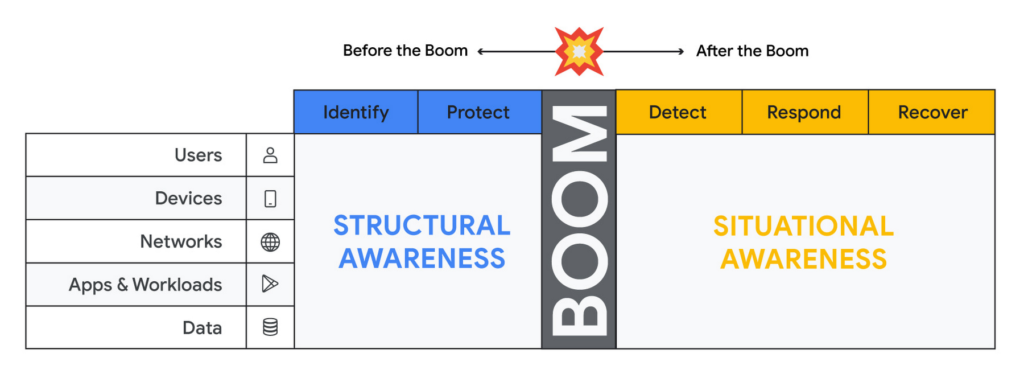
Thinking about assets in terms of users, devices, networks, applications and workloads and data (asset classes), and adopting mechanisms to discover assets of each type through visibility controls suggested by the NIST CSF, will lead to developing structural awareness. Structural awareness can help avoid the boom, but if the boom does happen, it can also help shape the situational awareness needed to react. The Cyber Defense Matrix is an ongoing project, and you can read more about it (and contribute to it) here.
Framing asset discovery for resilience
Cybersecurity teams must map out their organizations’ most critical healthcare services and systems that support them, but that’s easier said than done. Asset discovery can feel overwhelming. Trying to find, count, and audit the hardware, software, users, and data down to the component across even a small part of one’s technology footprint can feel like pushing a dead car up a steep hill. The way to make this easier is to prioritize this effort in the parts of the business where the impact of a quality or safety issue has the potential to create the most harm to the organization and those who depend on it.
A smart place to begin the process to find and evaluate the measurements that an institution uses to monitor those processes.
Healthcare providers: Start with the quality and safety measurements which must be submitted to various regulatory agencies in order to maintain licenses to operate.
- Health insurers: Look at the performance improvement metrics used to ensure subscriber benefits, quality requirements, and legal mandates are being met.
- Health IT services: Use service level agreements for measuring contract compliance with things like uptime, recovery time and point objectives, and response turnarounds.
- Life sciences organizations: Begin with the relevant Good Practice definitions and the metrics used to monitor quality and safety levels of products and services.
When analyzing the types of technology unique to healthcare – like network-connected medical devices such as infusion pumps, implantable pacemakers, ventilators, EKG equipment, and MRI machines – it’s important to ask what are the immediate safety hazards if there was a cyberattack. Not sure how to answer that question? The International Medical Device Regulators Forum produced a risk categorization model that could be helpful in framing that response. Operational technology, like blood bank and sample refrigerators, climate control, air handling, infection control and pneumatic tube systems, may also be used to identify and prioritize inventory efforts.
Once priorities have been set, teams can begin gathering data on critical services, the owners of those services, the systems those owners rely on, and the technology itself.
Inventory tactics on Google Cloud
Building service-technology mapping is not a one-time exercise. Organizations should take the time to automate inventory creation and maintenance, so they can maintain an up-to-date view of all the items in their environment at any given time. This is especially for organizations that have highly dynamic environments.
Google Cloud provides best practices on discovering and cataloging assets in its Cloud Architecture Center. Implement controls found in the Identity and Protect categories using the NIST Framework & Google Cloud technical paper. Automation is your friend when building and maintaining a complete and accurate inventory. Google Cloud Asset Inventory and Security Command Center can be used to inventory a variety of resources running in Google Cloud. Cloud Build, Google Cloud’s CI/CD platform, implements SLSA 1 and provides a trustworthy audit of software artifacts deployed through a managed pipeline. Cloud DLP inventories and labels data stored on Google Cloud Storage and services like BigQuery.
Meanwhile, a number of Google Cloud Marketplace partners have solutions that can help build a comprehensive inventory, and innovation continues to improve our technological options. One emerging field of security technology, called attack surface management, helps discover previously-unknown assets. Finally, our next blog on resilience discusses how to use a software bill of materials (also known by the breezy acronym SBOM) to gain visibility and structural awareness into applications.
It’s important to remember that when starting down this path, the goal is not to gain 100% visibility into every single component on every single device attached to every network supporting every service running. Success or failure is not achieved when the inventory process has reached an arbitrarily-determined ‘percentage complete.’ We want to prioritize expanding visibility and developing structural awareness on assets where safety and quality are at risk, so we can improve their resilience.
And finally, we feel it’s important to emphasize that in the past, healthcare industries have focused mainly on protecting the confidentiality of data. While that’s important, we must evolve security programs beyond protecting confidentiality as its primary (and some cases, only) focus.
To be resilient, we must design and build cybersecurity capabilities that deliver safety, integrity, and availability of the technology that cares for patients directly. As we gain visibility into the technology we depend on to keep us healthy, we improve our understanding about which parts of it we can trust, and which parts we can’t. Improving visibility is an important early step on our path to resilience.
More Relevant Stories for Your Company

Google Cloud to Implement European Commission’s New Privacy Clauses to Safeguard Cross-border Data Transfer
The European Commission (EC) has recently published new Standard Contractual Clauses (SCCs, also known as Model Contractual Clauses) to help safeguard European personal data. Following the applicable transition period, these new SCCs will replace the SCCs previously adopted by the EC. Google Cloud plans to incorporate the new SCCs into our contracts

Investing for Future: Why Shifting Security Left Helps Your Bottom Line
The concept of "shifting left" has been widely promoted in the software development lifecycle. The concept is that introducing security earlier, or leftwards, in the development process will lead to fewer software-related security defects later, or rightwards, in production. Shifting cloud security left can help identify potential misconfigurations earlier in

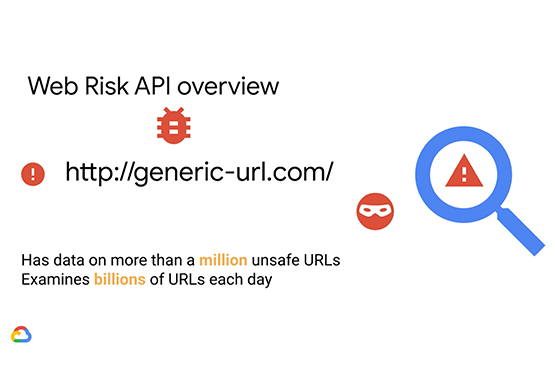

Why CISOs Need to Know This to Protect Users From Unsafe Websites
Unsafe web resources include social engineering sites—such as phishing and deceptive sites—and sites that host malware or unwanted software. For CISOs and their teams, this can quickly become an insurmountable challenge if it's not nipped in the bud. But there's a way to enable companies to find unsafe URLs before their

Introducing New Capabilities for Secure Transformations
Organizations large and small are realizing that digital transformation and the changing threat landscape require a grounds up effort to transform security. At Google Cloud, we continue to invest in our vision of invisible security where advanced capabilities are engineered into our platforms, operations are simplified, and stronger security outcomes
