





Track metrics and stay focused on threats: Achieving Autonomic Security Operations

2839
Of your peers have already read this article.
2:30 Minutes
The most insightful time you'll spend today!
What’s the most difficult question a security operations team can face? For some, is it, “Who is trying to attacks us?” Or perhaps, “Which cyberattacks can we detect?” How do teams know when they have enough information to make the “right” decision? Metrics can help inform our responses to those questions and more, but how can we tell which metrics are the best ones to rely on during mission-critical or business-critical crises?
As we discussed in our blogs, “Achieving Autonomic Security Operations: Reducing toil” and “Achieving Autonomic Security Operations: Automation as a Force Multiplier,” your Security Operations Center (SOC) can learn a lot from what IT operations discovered during the Site Reliability Engineering (SRE) revolution. In this post, we discuss how those lessons apply to your SOC, and center them on another SRE principle—Service Level Objectives (SLOs).
Even though industry definitions can vary for these terms, SLI, SLO, and SLA have specific meanings, wrote the authors of the Service Level Objectives chapter in our e-book, “Site Reliability Engineering: How Google runs production systems.” (All subsequent quotes come from the SLO chapter of the book, which we’ll refer to as the “SRE book.”)
- SLI: “An SLI is a service level indicator—a carefully defined quantitative measure of some aspect of the level of service that is provided.”
- SLO: “An SLO is a service level objective: a target value or range of values for a service level that is measured by an SLI.”
- SLA: An SLA is a Service Level Agreement about the above: “an explicit or implicit contract with your users that includes consequences of meeting (or missing) the SLOs they contain.”
In practice, we measure something (SLI) and we set the target value (SLO); we may also have an agreement about it (SLA).
This is not about cliches like “what gets measured gets done” here, but metrics and SLIs/SLOs will to a large extent determine the fate of your SOC. For example, SOCs (including at some Managed Security Service Providers) that obsessively focus on “time to address the alert” end up reducing their security effectiveness while making things go “whoosh” fast. If you equate mean time to detect or discover (MTTD) with “time to address the alert” and then push the analyst to shorten this time, attackers gain an advantage while defenders miss things and lose.
How to choose which metrics to track
One view of metrics would be that “whatever sounds bad” (such as attacks per second or incidents per employee) needs to be minimized, while “whatever sounds good” (such as successes, reliability, or uptime) needs to be maximized.
But the SRE experience is that sometimes good metrics have an optimum level, and yes, even reliability (and maybe even security). The book’s authors, Chris Jones, John Wilkes, and Niall Murphy with Cody Smith, cite an example of a service that defied common wisdom and was too reliable.
“Its high reliability provided a false sense of security because the services could not function appropriately when the service was unavailable, however rarely that occurred… SRE makes sure that global service meets, but does not significantly exceed, its service level objective,” they wrote.
The SOC lesson here is that some security metrics have optimum value. The above-mentioned time to detect has an optimum for your organization. Another example is the number of phishing incidents, which may in fact have an optimum value. If nobody phishes you, it’s probably because they already have credentialed access to many of your systems – so in your SOC, think of SLI optimums, and don’t automatically assume zero or infinite targets for metrics.
Three specific quotes from the SRE book remind us that “good metrics” may need to be balanced with other metrics, rather than blindly pushed up:
- “User-facing serving systems generally care about availability, latency, and throughput.”
- “Storage systems often emphasize latency, availability, and durability.”
- “Big data systems, such as data processing pipelines, tend to care about throughput and end-to-end latency.”
In a SOC, this may mean that you can detect threats quickly, review all context related to an incident, and perform deep threat research—but the results may differ for various threats. A fourth guidepost explains why your SOC should care even about this: “Whether or not a particular service has an SLA, it’s valuable to define SLIs and SLOs and use them to manage the service.” Indeed, we agree that SLIs and SLOs matter more for your SOC than any SLAs or other agreements.
Metrics matter, but so does flexibility
When considering the list of most difficult questions a security operations team can face, it’s vital to understand how to evaluate metrics to reach accurate answers. Consider another insight from the book: “Most metrics are better thought of as distributions rather than averages.”
If the average alert response is 20 minutes, does that mean that “all alerts are addressed in 18 to 22 minutes,” or that “all alerts are addressed in five minutes, while one alert is addressed in six hours?” Those different answers point to very different operational environments.
What we’ve seen before in SOCs is that a single outlier event is probably the one that matters most. As the authors put it, “The higher the variance in response times, the more the typical user experience is affected by long-tail behavior.” So, in security land, that one alert that took six hours to respond to was likely related to the most dangerous activity detected.
To address this, the book advises, “Using percentiles for indicators allows you to consider the shape of the distribution.” Google detection teams track the 5% and 95% values, not just averages.
Another useful concept from SRE is the “error budget,” a rate at which the SLOs can be missed, and tracked on a daily or weekly basis. It’s a SLO for meeting other SLOs.
The SOC value here may not be immediately obvious, but it’s vital to understanding the unique role security occupies in technology. In security, metrics can be a distraction because the real game is about preventing the threat actor from achieving their objectives. Based on our own experiences, most blue teams would rather miss the SLO and catch the threat in their environment. The defenders win when the attacker loses, not when the defenders “comply with a SLA.” The concept of the error budget might be your best friend here.
The SRE book takes that line of thinking even further. “It’s both unrealistic and undesirable to insist that SLOs will be met 100% of the time: doing so can reduce the rate of innovation and deployment.”
More broadly, and as we said in our recent paper with Deloitte on SOCs, rigid obeisance is its own vulnerability to exploit. “This adherence to process and lack of ability for the SOC to think critically and creativity provides potential attackers with another opportunity to successfully exploit a vulnerability within the environment, no matter how well planned the supporting processes are.”
To be successful at defending their organizations, SOCs must be less like the unbending oak and more like the pliant but resilient willow.
Track metrics but stay focused on threats
A third interesting puzzle from our SRE brethren: “Don’t pick a target based on current performance.”
We all want to get better at what we do, so choosing a target goal for improvement based on our existing performance can’t be bad, right? It turns out, however, that choosing a goal that sets up unrealistic or otherwise unhelpful, or woefully insufficient, expectations can do more harm than good.
Here is an example: An analyst handles 30 alerts a day (per their SLI), and their manager wants to improve by 15% so they set the SLO to 35 alerts a day. But how many alerts are there? Leaving aside the question of whether it is the right SLI for your SOC, what if you have 5,000 alerts, and you drop 4,970 of them on the floor. When you “improve,” you still drop 4,965 on the floor. Is this a good SLO? No, you need to hire, automate, filter, tune, or change other things in your SOC, not set better SLO targets that seemingly improve upon today’s numbers.
To this, our SRE peers say: “As a result, we’ve sometimes found that working from desired objectives backward to specific indicators works better than choosing indicators and then coming up with targets… Start by thinking about (or finding out!) what your users care about, not what you can measure.”
In the SOC, this probably means start with threat models and use cases, not the current alert pipeline performance.
SOC guidance can sometimes be more cryptic than we’ve let on. One challenging question is determining how many metrics we really need in a typical SOC. SREs wax philosophical here: “Choose just enough SLOs to provide good coverage of your system’s attributes.”
In our experience, we haven’t seen teams succeed with more than 10 metrics, and we haven’t seen people describe and optimize SOC performance with fewer than 3. However, SREs offer a helpful, succinct test: “If you can’t ever win a conversation about priorities by quoting a particular SLO, it’s probably not worth having that SLO.”
SLOs will get to define your SOC, so define them the way you want your SOC to be, the book advises. “It’s better to start with a loose target that you tighten than to choose an overly strict target that has to be relaxed when you discover it’s unattainable. SLOs can—and should—be a major driver in prioritizing work for SREs and product developers, because they reflect what users care about.”
Importantly, make SLOs for your SOC transparent within the company. As the SREs say, “Publishing SLOs sets expectations for system behavior.” The benefit is that nobody can blame you for non-performance if you perform to those agreed upon SLOs.
Finally, here are some examples of metrics from our teams at Google. In addition to reviewing all escalated alerts, they collect and review weekly:
- event volume
- event source counts
- pipeline latency
- triage time median
- triage time at 95%
Analyzing these metrics can reveal useful guidance for applying SRE principles and ideas with their detection and response teams.
Event volume: What we need to know here is what is driving the volume. Is the event volume normal, high, or low—and why? Was there a flood of messages? New data source causing high volume? What caused it? Any bad signals? Or is there a problematic area of the business that needs strategic follow-up to implement additional controls?
Event source count: Are there signals or automation that’s behaving abnormally? Is there new automation that’s misbehaving? Counting events for each source call makes for a decent SLI.
Pipeline latency: Here at Google, we aim for a confirmed detection within an hour of an event being generated. The aspirational time is 5 minutes. This means that the event pipeline latency is something that must be tracked very diligently. This also means that we must scrutinize automation latency. To achieve this, we try to remove self-caused latency so that we’re not hiding the pain of bad signals or bad automation.
We triage median and 95p time: We track the response time to events. As the SRE book points out, tracking only a single average number can get you in trouble very quickly. Note that triage time is not the same as time to resolution, but more of a dwell time for an attacker before they are discovered.
Incident resolution times: When you have a SLI but not a SLO, this can be the proverbial elephant in the room and create all sorts of bad incentives to “go fast” instead of “go good.” Specifically, SLO without SLI causes harm from encouraging the analysis to resolve quickly and potentially increase the risk of missing serious security incidents, especially when subtle signals are involved.
When reviewing alert escalations, we look to determine if the analysis is deep enough, if handoffs contain the right information for our response teams, and to get a sense of analyst fatigue. If analysts are phoning in their notes, it’s a sign that they’re over a particular signal or that there are a ton of duplicate incidents and we need to drive the business in some way.
By measuring these and other factors, metrics allow us to drive down the cost of each detection. Ultimately, this can help our detection and response operation scale faster than the threats.
Related posts:
- “Achieving Autonomic Security Operations: Automation as a Force Multiplier”
- “Achieving Autonomic Security Operations: Reducing toil”
- “Taking an autonomic approach to security operations” video
- “New Paper: “Future Of The SOC: Process Consistency and Creativity: a Delicate Balance” (Paper 3 of 4)”
- “New Paper: “Autonomic Security Operations — 10X Transformation of the Security Operations Center””
- “EP75 How We Scale Detection and Response at Google: Automation, Metrics, Toil” podcast episode
Data Security Excellence: Google Takes the Lead in Forrester’s Wave Report

1296
Of your peers have already read this article.
3:30 Minutes
The most insightful time you'll spend today!
To help organizations confidently move their sensitive data to the cloud, Google Cloud works diligently to earn and maintain customer trust. Our Trusted Cloud is committed to giving you a secure foundation that you can verify and independently control. Discovery and protection of sensitive data are integral parts of Google Cloud’s strategy to safeguard customer data. With this as our longstanding approach to protecting customers, we are happy to share that Forrester Research has ranked Google Cloud a Leader in The Forrester Wave™ Data Security Platforms Q1 2023.
Relentless security innovation leveraging Google’s core strengths
Google keeps more people safe online than anyone else. The scale at which we operate allows us to pioneer approaches to cloud-native security and then bring them to commercial and public sector organizations everywhere they operate. Leveraging our data processing and novel analytics capabilities with artificial intelligence and machine learning (AI/ML) allows our technology to help protect enterprises and their end users. At the core of our data security capabilities is our data loss prevention (DLP) technology, which enables customers to discover, classify, and de-identify data in real-time, on-demand, continuously, and in event-driven workloads.
In their explanation for the ranking, Forrester noted in its report “Cloud-first, Google has notable areas of innovation focus, such as harnessing machine learning (ML) and artificial intelligence (AI), productizing internal innovations, and co-innovation with partners in areas like confidential computing, data sovereignty controls, and external cloud key management services.”
Embedded across multiple Google products
Our platform supports the discovery of corporate assets in Chrome Enterprise and Google Workspace applications including Gmail and Google Drive. We also provide support for discovering production and analytical assets such as object storage, relational databases, data warehouses, data lakes, production apps, and workloads such as migration/ETL. This technology identifies and detects various types of sensitive data using a comprehensive set of built-in infoType detectors that are ready to use out-of-the-box along with flexible custom detection options and rules. Types of sensitive data include personal identifiable information and personal health information (PII/PHI), financial identifiers, health context, multi-cloud credentials/secrets, and ML-based full document classification (including source code, SEC filings, and legal briefings).
Driven by Zero Trust principles
The Forrester Wave identified the 14 top significant data security platform providers. Forrester notes in the report that “[Google] also stands out for manageability and integrations for Zero Trust.” and “Google is a strong choice for organizations considering or currently using GCP as well as those using Google Workspace who are taking a Zero Trust approach to enabling bring your own device (BYOD) and remote work.”
Delivering value for our customers
We are honored to be a Leader in The Forrester Wave™: Data Security Platforms, Q1 2023 report. We look forward to continuing to innovate with you and make your digital transformation journey safer with our Trusted Cloud.
A copy of the full report can be viewed here.
Launches and Stories on Google Cloud Security from Q1: Fresh off the Boat!

2973
Of your peers have already read this article.
4:00 Minutes
The most insightful time you'll spend today!
The security world keeps changing, with new tools and new threats in the ever-evolving arms race that is cybersecurity. To keep you up to speed on all that Google Cloud is doing to help safeguard your data and your applications, welcome to the first installment of the Security Roundup. In this regular series, I’ll be sharing a selection of news and guidance to help ensure you have the resources you need for your hectic, high-stakes harm-preventing job.
Applying the principle of least privilege to GKE clusters
Access to your GKE clusters – just like any other resource – should be based on the principle of least privilege. Use groups, individual roles, and Identity and Access Management tools to limit who can do what with your Kubernetes clusters in Google Cloud. These principles can help you control who uses which elements of the Kubernetes API as well as how they access your clusters. More details are in Anthony Bushong’s video.
Ensuring CI/CD pipeline security
To make sure only trusted code artifacts enter your continuous integration and deployment pipeline, you can take advantage of Binary Authorization on Google Cloud, and then only permit signed builds to go through. Learn more in Martin Omander’s video interview and walkthrough with XIaowen Lin.
Protecting against denial of service and flooding attacks
Once your applications are on the web, they become potential targets for attack. You can use Cloud Armor to protect against many types of traffic attacks, including distributed denial-of-service (DDoS), and HTTP POST flood attacks. After learning the normal traffic patterns of your apps, Cloud Armor monitors for anomalies and then generates alerts or intervenes on your behalf to block malicious traffic. Learn more with Arman Rye in this video.
Defending against cyberattacks with Palo Alto Networks
If you use Palo Alto Networks products for endpoint protection or network monitoring, now you can integrate the signals from those systems into Google Cloud security tools. You can ingest device health conclusions from Palo Alto Networks Cortex XDR to boost your visibility into those endpoints’ state and improve your trust decisions. BeyondCorp Enterprise users can incorporate Cortex XDR metadata into access policies, leveraging additional posture information to add another level of trusted device information and operate with more confidence. Check out the details in this interview with Mason Yan at Palo Alto Networks.
Dealing with Apache Log4j 2 vulnerability(ies)
Attackers who exploit the Apache Log4j 2 vulnerability can execute arbitrary code on a vulnerable server. Read this post by the Google Cybersecurity Action Team for more details on log4j vulnerabilities (CVE-2021-44228 and CVE-2021-45046) and how you can find out if you’re affected. It includes advice for how to use Google Cloud products like Binary Authorization rules and Security Command Center to keep your cloud deployments safe.
Good luck out there, and remember: Keep your data yours!

5269
Of your peers have already downloaded this article
10:30 Minutes
The most insightful time you'll spend today!
The age of unthinking fears about cloud security is over. Not only is cloud adoption rising steadily across geographies, industries and job functions, but confidence in cloud security is rising as well — to the point where increased security is a major reason enterprises opt for cloud solutions.
Gone are the days when organizations accessed applications and infrastructure over the internet only because it was the least expensive way to scale compute, storage and networking resources as business needs changed. The cloud today is a strategic necessity, with increased agility, integration and speed (as well as security) being the prime drivers of its increased adoption.
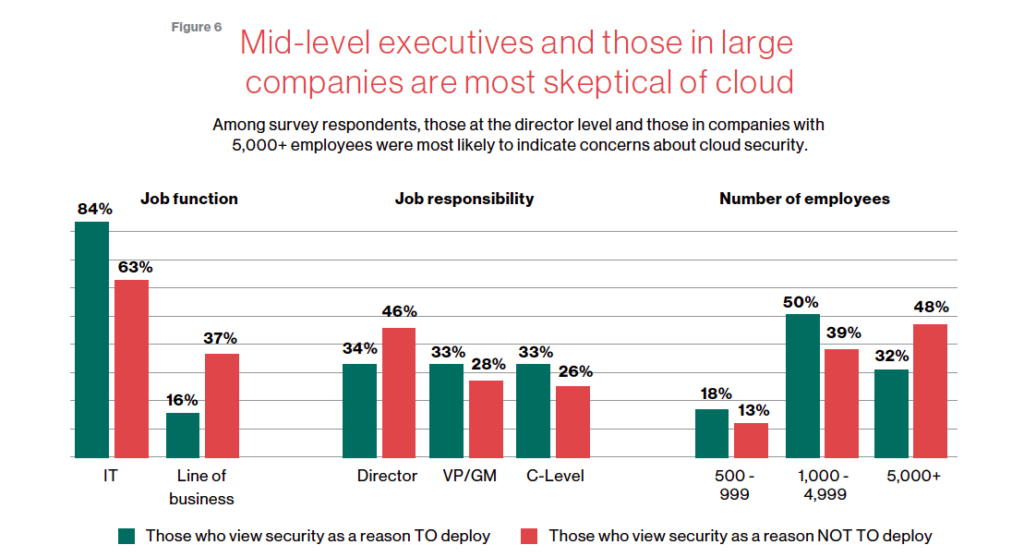
This MIT SMR survey of security professionals studies trends in security, which workloads are seeing the highest cloud utilization, the steady growth of comfort with cloud security–and interestingly paints a picture of the executives who are holding out with regards to cloud security.
Download the report now!
How Google Cloud Helps Educational Institutions Ward off the Risk of Data Breaches

2947
Of your peers have already read this article.
2:00 Minutes
The most insightful time you'll spend today!
In the US alone, 24.5 million school records have been leaked across 1,327 data breaches since 2005. And when +1.3 billion students moved to remote learning, the pandemic became an accelerant for cyber attacks with the number of attacks in education spiking 30% YoY during July and August 2020. In our experience working with education customers, we’ve seen three areas impacted by cyber attacks:
- Financial: Institutions experience financial loss from operational disruption and demands from cyber criminals who stole data. For example, The University of California, San Francisco confirmed it paid a ransom of $1.14 million to the criminals behind a cyber attack on its School of Medicine. To protect sensitive student data, the federal government released a statement encouraging all postsecondary institutions to implement NIST 800-171 controls, a policy designed to protect sensitive student data.
- Operational:Cyber attacks can prevent students, faculty and staff from accessing systems that are necessary to continue teaching, learning, and research initiatives, bringing operations to a halt. Hartford Public Schools in Connecticut postponed its first day of classes following a ransomware attack that shut down the district’s system.
- Reputational: Institutions who have financial or student data breaches can suffer from lower enrollment rates and a loss of grant funding. A study conducted by the Ponemon Institute pointed out that higher education institutions are judged largely on their reputation. A single data breach can significantly impact the reputation of the institution, in addition to substantial financial implications.
How is Google Cloud helping educational institutions put security in place before a data breach happens?
Google Cloud’s security model model, global infrastructure, and unique capability to innovate is helping academic institutions keep their organizations secure and in compliance. For example, Brown University leverages Google Workspace for Education to protect information sharing among faculty, students, and staff, while reducing IT maintenance costs.
Google Workspace helps establish each user’s identity in Google Cloud and this feature has become a core component of Google’s Zero Trust security model, implemented through BeyondCorp. By shifting access controls from the network perimeter to individual users, BeyondCorp enables secure work from virtually any location without the need for a traditional VPN.
Most academic institutions look to minimize their risk in a shared responsibility model when running infrastructure-as-a-service or platform-as-a-service workloads. Google Cloud has partnered with industry-leading security consortia like RHEDCloud to understand the specific needs of educational and academic research institutions, and follow applicable regulations and grant requirements. We have co-developed solutions with partners, like Burwood Group, to meet those needs and help our customers automate secure and compliant environments for their researchers, students and staff. Burwood Group has partnered with 27 top-tier research universities (R-1) to deploy security solutions. Here are a few of the products we’ve seen the most interest in:
- Blueprint scripts uses Google Cloud built-in services to automate the provisioning and management of enterprise applications and research environments to be in compliance with HIPAA, FedRAMP, CUI, NIST 800-53, NIST CSF, and GDPR regulations.
- Security Command Center manages assets in your organization, uncovers vulnerabilities and threats, and reviews your organization’s compliance. The solution generates security alerts and audit events from logs that integrate with existing enterprise systems like Security Information and Event Management (SIEMs), Endpoint Detection & Response (EDR’s) and Security, Orchestration, Automation, & Response (SOAR) tools.
- Chronicle, Google Cloud’s next generation SIEM platform, is changing the game. It is a cloud-native platform designed to ingest your organization’s logs for a flat rate, abandoning the tiered model most SIEM providers offer. It can sift through petabytes of data in seconds and is useful for organizations that are both cost and security conscious.
- VirusTotal Premium provides access to the world’s largest corpus of threat data to protect your organization proactively. The VT API can easily integrate into your commonly used SIEM, EDR and SOAR tools, alerting you to threats that would otherwise go unnoticed.
- reCAPTCHA, helps defend against common attack patterns such as scraping or credential stuffing in web applications.
- Cloud Armor defends against distributed denial-of-service (DDoS) attacks.
For research workloads, these tools provide controls for data ingestion, the export of research data, and, sharing permissions and auditability, allowing researchers to collaborate with other institutions. These tools also automate the provisioning of environments to provide secure execution of Jupyter notebooks and other applications commonly used in research, like Matlab, SAS and Python/R environments.
A customized approach that aligns with education-specific needs
Google Cloud has partnered with academic institutions and research groups to understand their specific needs, and co-develop solutions that help customers govern, control, and audit security and compliance for all types of workloads in a shared responsibility framework. These solutions integrate with most common enterprise and security systems and permit customization to accommodate specific needs around security or data sharing (e.g grant requirements).
To learn more, watch our latest on-demand webinar, Cloud Security Best Practices for Higher Education, hosted by Google Cloud and our partners, Burwood Group and Carahsoft.
Google Cloud’s Metric Scope Makes Multi-project Monitoring Simple

4756
Of your peers have already read this article.
2:00 Minutes
The most insightful time you'll spend today!
Customers need scale and flexibility from their cloud and this extends into supporting services such as monitoring and logging. Google Cloud’s Monitoring and Logging observability services are built on the same platforms used by all of Google that handle over 16 million metrics queries per second, 2.5 exabytes of logs per month, and over 14 quadrillion metric points on disk, as of 2020. However, you let us know through consistent feedback that the previous construct of Workspaces for Cloud Monitoring was not providing the flexibility needed for your larger scale projects.
Cloud Operation’s New Approach to Multi-Project Monitoring
We’re happy to announce a new model for multi-project monitoring, which replaces the concept of Workspaces. This overhaul is geared toward maximizing the flexibility you have to manage your monitoring environments by introducing Metrics Scopes. Starting today you can associate your Google Cloud projects with multiple Metrics Scopes! Like Workspaces, Metrics Scopes will still be used to store all of the configuration content for dashboards, alerting policies, uptime checks, notification channels, and group definitions. However there is no limit to the number of Metrics Scopes to which you can associate a project. Prior to this change, a project could only be scoped with a single Workspace. Now, there are virtually unlimited possibilities for how you can set up multi-project monitoring. This unlocks a large variety of options, from more granular permissions to mission-focused configurations. At its most simple implementation though: operators/SREs can now create org-wide Metrics Scopes with monitoring configurations focused on infrastructure health. And developers can leverage Metrics Scopes built on a subset of their organization’s projects that allow them to focus on their application’s performance.
How it works
- When you have a collection of projects, Metrics Scopes enable you to view each project’s metrics in isolation as well as in combination with metrics stored by other projects.
- The Metrics Scope is hosted by a scoping project. This scoping project is the Cloud project that is selected in the Cloud Console project picker.
Example
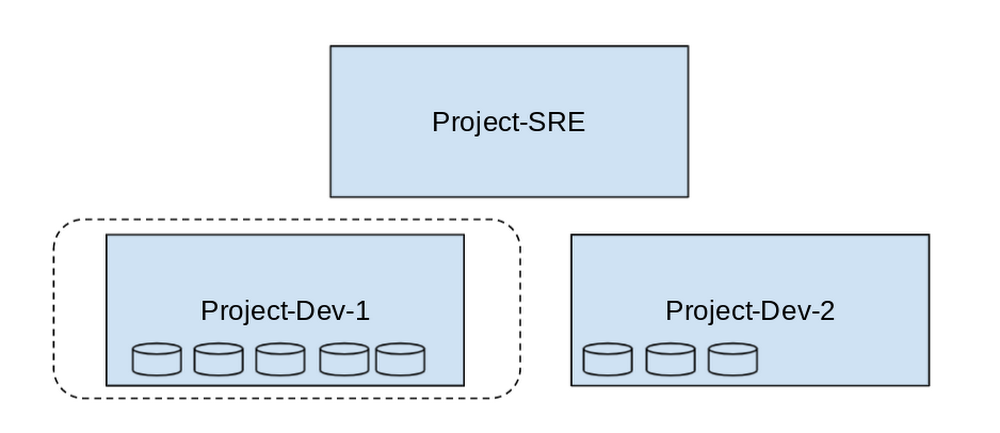
- In this example, Project-SRE is the name of a scoping project to monitor your fleet. You added two developer teams’ projects: Project-Dev-1 and Project-Dev-2, to Project-SRE’s Metrics Scope. If you select Project-SRE with the Cloud Console project picker and then go to the Monitoring page, you view the metrics for all three projects:

- If you select Project-Dev-1 with the Cloud Console project picker and then go to the Monitoring page, you view the Metrics Scope for Project-Dev-1 and you can only see the metrics for that project:
What else is new?
- Metrics Scopes can now monitor up to 375 projects (up from 100).
- New projects automatically start working in Cloud Monitoring without the previous 60-second Workspace creation process.
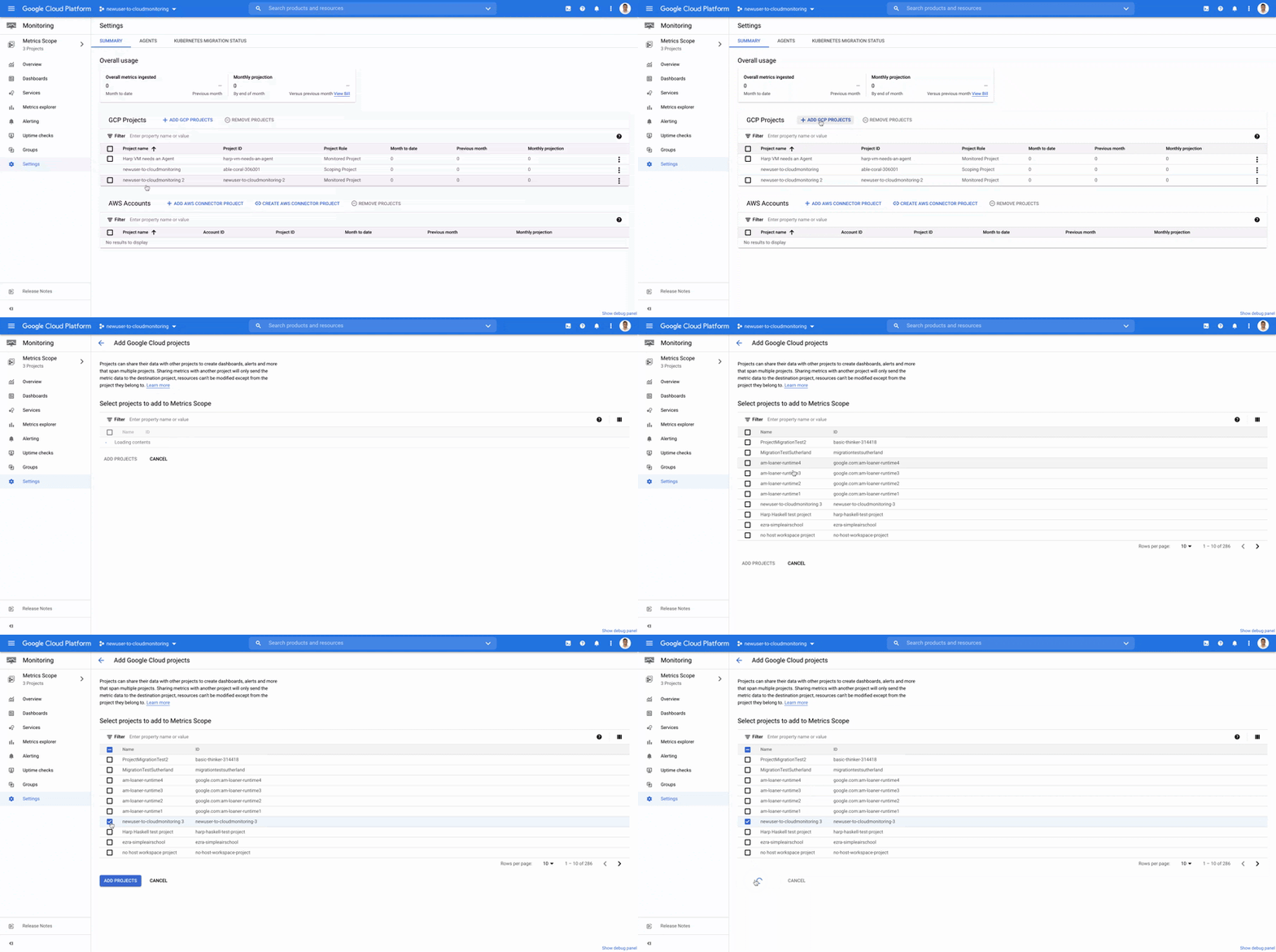
- If you want to monitor more than one project simply add it to your Metrics Scope:
Navigation
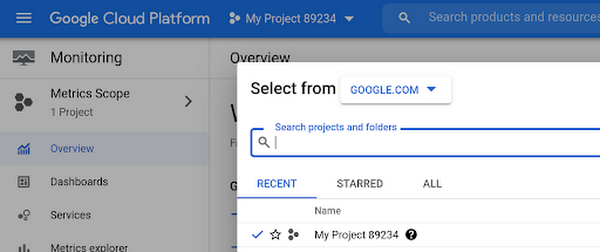
- Mentioned earlier, the Project Picker in the Cloud Console can be used to navigate between Metrics Scopes in Cloud Monitoring:
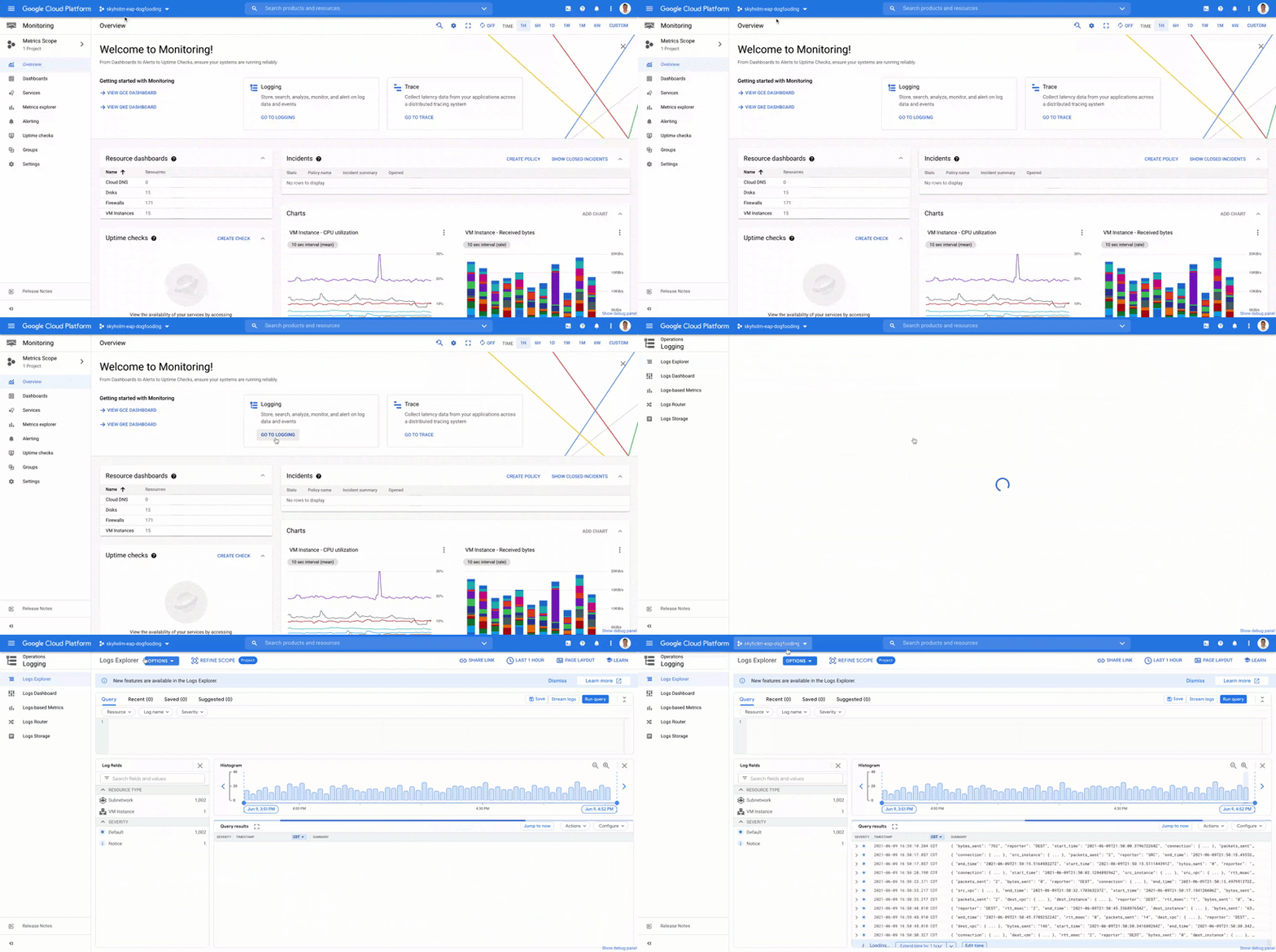
- This is now consistent with many other services across Google Cloud. Specifically, you can see how the project picker stays consistent when navigating from Cloud Monitoring to Cloud Logging:
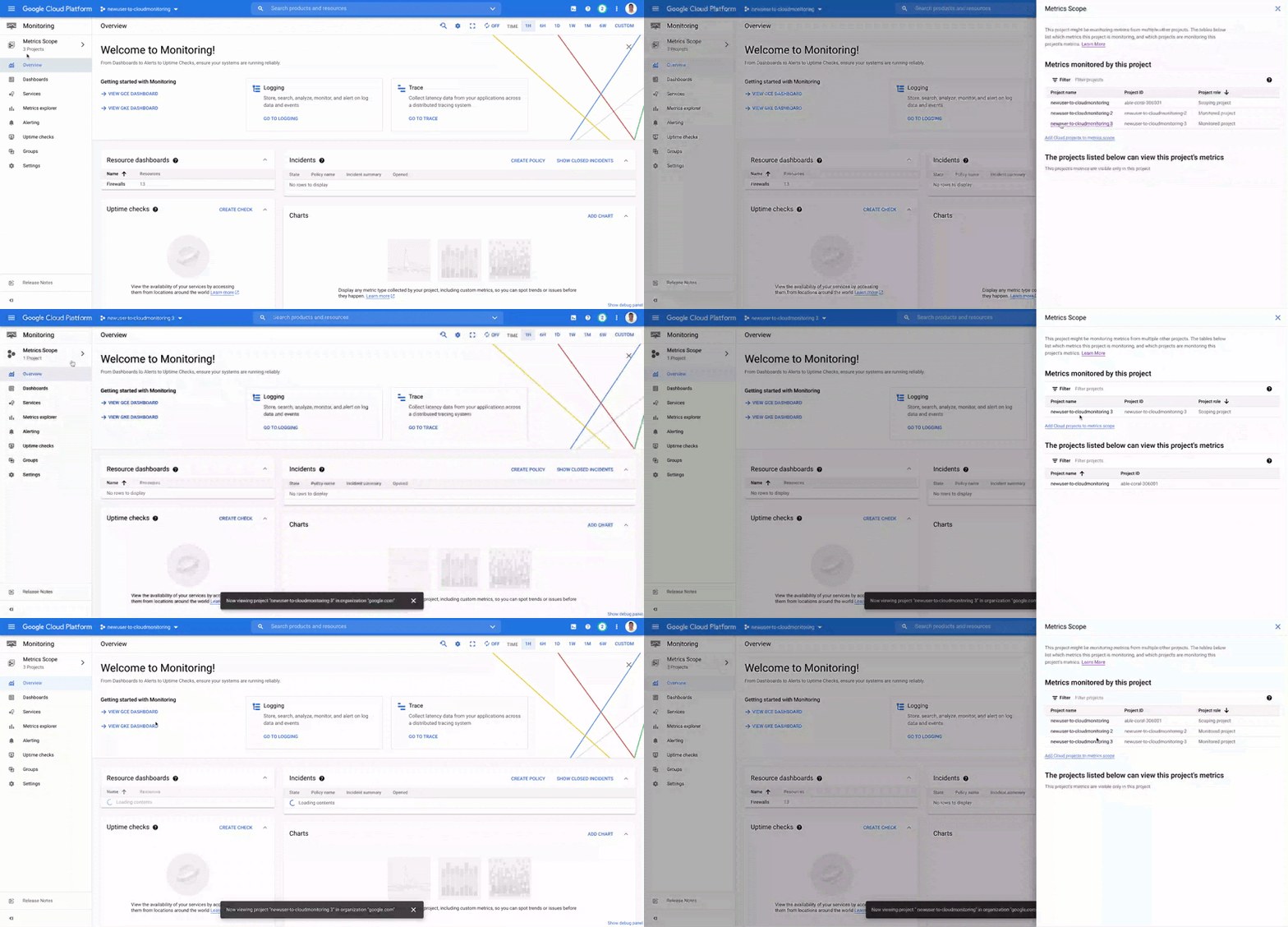
- Additionally, to make your navigation between Metrics Scopes easy we’ve added the new Metrics Scope Tab and Panel in the UI:
Coming Soon
- The Metrics Scope API is coming within the next quarter! This API will enable you to programmatically manage your monitoring configurations and Metrics Scopes.
Current Workspaces users
If you are already using Workspaces in Cloud Monitoring you may have noticed that they converted to Metrics Scopes weeks ago. There is no additional action required and you can start taking advantage of the additional features of Metrics Scopes today.
Get Started
Companies that are digitally native or in the process of digital transformation have placed an increased operational role on developers and this often creates overlapping sets of responsibilities with Operations and SRE teams. Now multiple developer teams can focus on optimizing the performance of their applications while operators can take a fleet-wide view when maintaining and improving the performance of all of the infrastructure under their purview.For information on configuring a Metrics Scope to include metrics for multiple projects, see Viewing metrics for multiple projects.
More Relevant Stories for Your Company




What Makes Google Cloud the Go-to Platform to Build Next-gen Security Services
Join the discussion by the panel of security experts and IT leaders from renowned organizations to examine the role of Google Cloud for security companies in building next-generation security services. Watch the video from the security session of Google Cloud Next '21 to deep dive into Google Cloud's security and

Stop Cribbing About Shadow IT and Start Taking Charge Now
Employees use tools at their disposal to get work done, but if these tools (often legacy) hamper collaboration or are inflexible, they’ll turn to less secure options for the sake of convenience. According to Gartner, a third of successful attacks experienced by enterprises will come from Shadow IT usage by 2020.

IT Leaders are Prioritizing Organizations’ Sustainability Goals: Study Finds
The global-wide interruptions of the coronavirus pandemic provided the opportunity for businesses to take a closer look at how we work, learn, live, and consume. With work stoppages and quarantine orders in place, carbon emissions and pollution levels saw significant reductions, highlighting how business and environmental sustainability are linked. As

Google Cloud is Every Retailer’s Most Trusted Cloud
Whether they were ready for it or not, the COVID-19 pandemic transformed many retailers into digital businesses. Retailers made huge investments into commerce technologies, customer experience tools, sales and fulfillment technology, and improving digital experiences to continue providing their goods and services to their customers. Now, more than a year
