





Towards The Next Wave of Google Cloud Infrastructure Innovation: New C3 VM and Hyperdisk
2799
Of your peers have already read this article.
3:00 Minutes
The most insightful time you'll spend today!
Meeting the rapidly growing demands of our customers’ high performance computing and data-intensive workloads requires deep innovation — at Google Cloud, we know we can’t rely on ever-faster CPUs alone, like Moore’s Law has enabled in the past. Customers can either optimize their workloads for a given platform, or we can offer them a platform that is optimized for their specific needs. At Google Cloud, we choose the latter.
Today, we have an exciting new release resulting from these efforts: the new C3 machine series powered by the 4th Gen Intel Xeon Scalable processor and Google’s custom Intel Infrastructure Processing Unit (IPU). Along with the recently announced Hyperdisk block storage which offers 80% higher IOPS per vCPU for high-end database management system (DBMS) workloads when compared to other hyperscalers. C3 machine instances can deliver strong performance gains to enable high performance computing and data-intensive workloads. Customers such as Snap, for example, have seen approximately a 20% increase in performance for a key workload over the previous generation C2.
The C3 machine series is just the latest example of this architectural approach. For over two decades, Google has purpose-built and designed some of the world’s most efficient and scalable computing systems to meet the needs of our customers. We built the Tensor Processing Unit (TPU) to power real-time voice search, photo object recognition, and interactive language translation; unveiled Titan, a secure, low-power microcontroller to help ensure that every machine boots from a trusted state; and launched Video Coding Units (VCUs) to enable video distribution that addresses a range of formats and client requirements. We engineer golden paths from silicon to the console, using a combination of purpose-built infrastructure, prescriptive architectures, and an open ecosystem to deliver what we term workload-optimized infrastructure.
Getting to know the C3 machine series
The Compute Engine C3 machine series, now available in Private Preview, is the first VM in the public cloud with the 4th Gen Intel Xeon Scalable processor and with Google’s custom Intel IPU. C3 machine instances use offload hardware for more predictable and efficient compute, high-performance storage, and a programmable packet processing capability for low latency and accelerated, secure networking.
“We are pleased to have co-designed the first ASIC Infrastructure Processing Unit with Google Cloud, which has now launched in the new C3 machine series. A first of its kind in any public cloud, C3 VMs will run workloads on 4th Gen Intel Xeon Scalable processors while they free up programmable packet processing to the IPUs securely at line rates of 200Gb/s. This Intel and Google collaboration enables customers through infrastructure that is more secure, flexible, and performant.” – Nick McKeown, Senior Vice President, Intel Fellow and General Manager of Network and Edge Group
The System on a Chip hardware architecture introduced in C3 VMs can enable better security, isolation, and performance. In the future, this purpose-built architecture will also allow us to offer a richer product portfolio, such as support for native bare-metal instances.
Hyperdisk block storage and 200 Gbps networking
Block storage and VMs go hand in hand. Last month, we announced the Preview release of Hyperdisk, our next-generation block storage. The new architecture decouples compute instance sizing from storage performance to deliver 80% higher IOPS per vCPU than other leading hyperscale cloud provider. And compared with the previous generation C2, C3 VMs with Hyperdisk deliver 4x higher throughput and 10x higher IOPS. Now, you don’t have to choose expensive, larger compute instances just to get the storage performance you need for data workloads such as Hadoop and Microsoft SQL Server.
To enable high performance computing workloads, C3 VMs also feature 200 Gbps low-latency networking powered by our custom IPU, as well as line-rate encryption using the open source PSP protocol.
What our customers and partners are saying

“We were pleased to observe a 20% increase in performance over the current generation C2 VMs from Google Cloud in testing with one of our key workloads. These continued performance improvements enable better end user experience and application cost efficiency.” – Aaron Sheldon, Sr. Software Engineer, Snap Inc.

“Based on the initial performance data, running weather research and forecasting (WRF) on C3 clusters can deliver as much as 10x quicker time to results for about the same computational cost. This will significantly accelerate R&D for our customers in weather, environment, and engineering domains.” — Michael Wilde, CEO, Parallel Works Inc.

“In early testing with our flagship products, including Ansys Fluent, Mechanical and LS-DYNA, on the new Google Cloud C3 VM, we’re seeing up to 3x performance gains over C2 VMs due to higher memory bandwidth and lower network latency.” – Shane Emswiler, Senior Vice President of Products, Ansys
Where we are headed
With the exponential rise in the complexity of cloud infrastructure, we as an industry must turn to automation to manage these platforms efficiently at scale. Along with Infrastructure as Code, custom chips like the Titan, the TPU and the IPU, pave the way for a not-so-distant future where we’ll automate over half of all infrastructure decisions, configuring systems dynamically in response to usage patterns. At Google Cloud, we are committed to continuing our long history of hardware innovation with a focus on workload optimization and automation.
To learn more about C3 VMs and Hyperdisk, check out our session at NEXT ‘22, How Google Cloud optimizes infrastructure for your workloads. To request access to the C3 VMs or Hyperdisk, please reach out to your sales representative or account manager.
Pacemaker’s Automated Alerts and Alert Reporting: No More Outages for SAP Systems on Google Cloud!

3261
Of your peers have already read this article.
6:00 Minutes
The most insightful time you'll spend today!
When critical services fail, businesses risk losing revenue, productivity, and trust. That’s why Google Cloud customers running SAP applications choose to deploy high availability (HA) systems on Google Cloud.
In these deployments Linux operating system clustering provides application and guest awareness for the application state and automates recovery actions in case of failure — including cluster node, resource or node failover or failed action.
Pacemaker is the most popular software Linux administrators use to manage their HA clusters, which includes automating notifications about events — including failover fencing and node, attribute, and resource events — and reporting on events. With automated alerts and reports, Linux administrators can not only learn about events as they happen, but they can also make sure other stakeholders are alerted to take action when critical events occur. They can even discover past events to assess the overall health of their HA systems.
Here, we break down the steps to setting up automated alerts for HA cluster events and alert reporting.
How to Deploy the Alert Script
To set up event-based alerts, you’ll need to take the following steps to execute the script.
1. Download the script file ‘gcp_crm_alert.sh’ from
https://github.com/GoogleCloudPlatform/pacemaker-alerts-cloud-logging
2. Under root user, add exec flag for the script and execute deployment with:
chmod +x ./gcp_crm_alert.sh./gcp_crm_alert.sh -d
3. Confirm that the deployment runs successfully. If it does, you will see the following INFO log messages:
In the Red Hat Enterprise Linux (RHEL) system:
gcp_crm_alert.sh:2022-01-24T23:48:30+0000:INFO:'pcs alert recipient add gcp_cluster_alert value=gcp_cluster_alerts id=gcp_cluster_alert_recepient options value=/var/log/crm_alerts_log' rc=0
In the SUSE Linux Enterprise Server (SLES):
gcp_crm_alert.sh:2022-01-25T00:13:27+00:00:INFO:'crm configure alert gcp_cluster_alert /usr/share/pacemaker/alerts/gcp_crm_alert.sh meta timeout=10s timestamp-format=%Y-%m-%dT%H:%M:%S.%06NZ to { /var/log/crm_alerts_log attributes gcloud_timeout=5 gcloud_cmd=/usr/bin/gcloud }' rc=0Now, in the event of a cluster node, resource, node failover, or failed action, Pacemaker will start the alert mechanism. For further details on the alerting agent, check out the Pacemaker Explained documentation.
How to Use Cloud Logging for Alert Reporting
Alerted events are published in Cloud Logging. Below is an example of the log record payload, where the cluster alert key-value pairs get recorded in the jsonPayload node.
{
"insertId": "ktildwg1o3fbim", "jsonPayload": { "CRM_alert_recipient": "/var/log/crm_alerts_log", "CRM_alert_attribute_name": "", "CRM_alert_kind": "resource", "CRM_alert_status": "0", "CRM_alert_rsc": "STONITH-sapecc-scs", "CRM_alert_rc": "0", "CRM_alert_timestamp_usec": "", "CRM_alert_interval": "0", "CRM_alert_node_sequence": "21", "CRM_alert_task": "start", "CRM_alert_nodeid": "", "CRM_alert_timestamp": "2022-01-25T00:17:06.515313Z", "CRM_alert_timestamp_epoch": "", "CRM_alert_desc": "ok", "CRM_alert_target_rc": "0", "CRM_alert_version": "1.1.15", "CRM_alert_attribute_value": "", "CRM_alert_node": "sapecc-ers", "CRM_alert_exec_time": "" }, "resource": { "type": "global", "labels": { "project_id": "gcp-tse-sap-on-gcp-lab" } }, "timestamp": "2022-01-25T00:17:09.662557309Z", "severity": "INFO", "logName": "projects/gcp-tse-sap-on-gcp-lab/logs/sapecc-ers%2F%2Fvar%2Flog%2Fcrm_alerts_log", "receiveTimestamp": "2022-01-25T00:17:09.662557309Z" }
To get notified of a resource event — for example, when the HANA topology resource monitor fails — you can use the following filter for the alerting definition:
jsonPayload.CRM_alert_node=("hana-venus" OR "hana-mercury") -jsonPayload.CRM_alert_status="0" jsonPayload.CRM_alert_rsc="rsc_SAPHanaTopology_SBX_HDB00" jsonPayload.CRM_alert_task="monitor" To define an alert for a fencing event, your can apply this filter: jsonPayload.CRM_alert_node=("hana-venus" OR "hana-mercury") jsonPayload.CRM_alert_kind="fencing" The fencing log entry gets recorded with warning severity to give you deeper insight, and this additional information is also helpful for more specific filtering criteria: {   "insertId": "1plznskfjsxt82",   "jsonPayload": {     "CRM_alert_attribute_value": "",     "CRM_alert_recipient": "/var/log/crm_alerts_log",     "CRM_alert_rsc": "",     "CRM_alert_rc": "0",     "CRM_alert_timestamp_usec": "529261",     "CRM_alert_desc": "Operation reboot of hana-mercury by hana-venus for crmd.2361@hana-venus: OK (ref=2a9bf814-9adf-4247-af3f-94ac254fc3ca)", "CRM_alert_target_rc": "",     "CRM_alert_nodeid": "",     "CRM_alert_kind": "fencing",     "CRM_alert_node_sequence": "33",     "CRM_alert_task": "st_notify_fence",     "CRM_alert_status": "",     "CRM_alert_exec_time": "",     "CRM_alert_attribute_name": "",     "CRM_alert_timestamp_epoch": "1643072786",     "CRM_alert_version": "1.1.19",     "CRM_alert_timestamp": "2022-01-25T01:06:26.529261Z",     "CRM_alert_interval": "",     "CRM_alert_node": "hana-mercury"   },   "resource": {     "type": "global",     "labels": {       "project_id": "gcp-tse-sap-on-gcp-lab"     }   },   "timestamp": "2022-01-25T01:06:27.267017052Z",   "severity": "WARNING",   "logName": "projects/gcp-tse-sap-on-gcp-lab/logs/hana-venus%2F%2Fvar%2Flog%2Fcrm_alerts_log", "receiveTimestamp": "2022-01-25T01:06:27.267017052Z"
}
Alerts can be delivered through multiple channels, including text and email. Below is an example of an email notification for our earlier example, when we defined an alert for a HANA topology resource monitor failure:
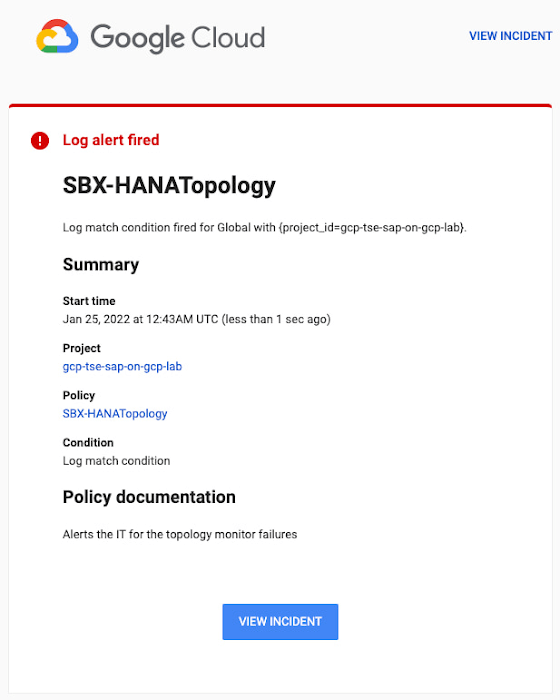
You can write and apply filters to your log-based alerts to isolate certain types of incidents and analyze events over time. For example, the following script will surface a resource event occurring within a two-hour window on a specific date:
timestamp>="2022-01-25T00:00:00Z" timestamp<="2022-01-25T02:00:00Z"
jsonPayload.CRM_alert_kind="resource"
With the ability to analyze these logged alerts over time, determine whether event patterns warrant any action.
[SIDEBAR]
The alert script prints details in the standard output and in the log file /var/log/crm_alerts_log, and this can grow over time. We recommend that the log file is set with the Linux logrotate service in order to limit the file system space. Use the following command to create the necessary logrotate setting for the alerting log file:
cat > /etc/logrotate.d/crm_alerts_log << END-OF-FILE /var/log/crm_alerts_log { create 0660 root root rotate 7 size 10M missingok compress delaycompress copytruncate dateext dateformat -%Y%m%d-%s notifempty } END-OF-FILE [END SIDEBAR]
Tips for Troubleshooting When you first deploy your alert script, how can you tell for certain that you’ve done it correctly? Use the following commands to test it out:
In RHEL:
pcs alert show
In SLES:
sudo crm config show | grep -A3 gcp_cluster_alert
You should see the following if the script is correct:
In RHEL:
Alerts: Alert: gcp_cluster_alert (path=/usr/share/pacemaker/alerts/gcp_crm_alert.sh) Description: "Cluster alerting for hana-node-X" Options: gcloud_cmd=/usr/bin/gcloud gcloud_timeout=5 Meta options: timeout=10s timestamp-format=%Y-%m-%dT%H:%M:%S.%06NZ Recipients: Recipient: gcp_cluster_alert_recepient (value=gcp_cluster_alerts) Options: value=/var/log/crm_alerts_log In SLES:
alert gcp_cluster_alert "/usr/share/pacemaker/alerts/gcp_crm_alert.sh" \ meta timeout=10s timestamp-format="%Y-%m-%dT%H:%M:%S.%06NZ" \ to "/var/log/crm_alerts_log" attributes gcloud_timeout=5 gcloud_cmd="/usr/bin/gcloud" If the commands do not display the alerts properly, re-deploy the script.
In case there is an issue with the script, or if the Cloud Logging records are not presenting as expected, examine the script log file /var/log/crm_alerts_log. The errors and warning can be filtered with:
egrep '(ERROR|WARN)' /var/log/crm_alerts_log
Any Pacemaker alert failures will be recorded in the messages and/or Pacemaker log. To examine recent alert failures, use the following command:
egrep '(gcp_crm_alert.sh|gcp_cluster_alert)' \ /var/log/messages /var/log/pacemaker.log
Keep in mind, though, that the Pacemaker log location may be different in your system from the one in the example above.
From reactive to proactive
Your SAP applications are too critical to risk outages. The most effective way to manage high availability clusters for your SAP systems on Google Cloud is to take full advantage of Pacemaker’s alerting capabilities, so you can be proactive in ensuring your systems are healthy and available.
Learn more about running SAP on Google Cloud.

5631
Of your peers have already downloaded this article
1:30 Minutes
The most insightful time you'll spend today!
Even before the current crisis, IT organizations saw pressure to be more agile and innovative. Customer demographics and expectations are changing. Competition is emerging faster and from unexpected sources. Business models are being reinvented. Digital technology was at the heart of many of these challenges, and its adoption was key to every company’s response.
As a result, CIOs face a series of urgent challenges:
- How can they raise system visibility and system control over operations that are more dispersed and changing than ever?
- How can they cut costs, yet create a more agile and responsive IT system?
- How can they do more with older data, even as they understand better the data from a market that is changing every week?
- How can they help people work faster, with a minimum of change management, or set the stage for growth, while preserving capital?
In many cases the answer is a step-by-step deployment of cloud computing technology, tailored to meet the most pressing needs first.
1405
Of your peers have already watched this video.
2:30 Minutes
The most insightful time you'll spend today!
Greenovation: Adani and Google Cloud Join Forces for a Sustainable and Data-Driven India
As the biggest renewable energy developer, Adani aims to put India on the green map. Working with the world’s cleanest cloud inspired the organisation to solve their own efficiency issues, and better manage their facilities across the country to lower their carbon footprint.
- For more on Adani, visit: https://www.adani.com/
- For more on Google Cloud Customer Stories, visit: https://cloud.google.com/customers
- For more on how our customers across the region are solving with Google Cloud, visit: APAC YouTube Channel: @GoogleCloudAPAC
- Follow Google Cloud India on Facebook for more updates: https://www.facebook.com/GoogleCloudIN
Beany’s Cloud-Based Accounting Solutions Transform Small Business Finance

1816
Of your peers have already read this article.
2:30 Minutes
The most insightful time you'll spend today!
Many people start a small business that aligns with their passions, but soon discover the day-to-day running of a business is very different than anticipated. Dealing with accounting, finance, and other daily activities can quickly overwhelm even the most promising of new businesses.
Recognizing the unique challenges facing small businesses, we founded Beany. With our personalized accounting platform, small business owners can relax knowing that we will look after all their compliance and advisory needs. Business owners who use Beany also benefit because they end up freeing more time to focus on what they enjoy and do best—likely the main reasons they started their business in the first place. We prepare financial statements, minimize tax and keep an eye that our clients are paying the right amount at the right time. We also advise on business purchase and sale, valuations and forecasting for banks. In fact, we do everything that a business owner needs from their accountant, including a help desk filled with domain experts to provide free & unlimited advice and support.
As we expand our team, we’ll continue to introduce new solutions, services, and integrations that make it even easier for small businesses to prioritize business planning, balance budgets, and keep up with ever-changing tax laws. We also plan to launch Beany in new markets and extend our global footprint beyond New Zealand, Australia, and the UK.
Migrating and scaling Beany
Beany was initially developed and hosted on a virtual private server (VPS) with limited capabilities. As our subscriber base grew, we realized we needed a more scalable, secure solution to eliminate downtime and deliver a reliable customer experience. We also understood it would be challenging for our small engineering team to cost-effectively test and deploy new features without a more agile development environment.
With that in mind, we chose the secure-by-design infrastructure of Google Cloud to power Beany and help us scale our innovative accounting platform. We now use Compute Engine to cost-effectively create virtual machines (VMs) that automatically select optimal amounts of processing and memory.
In addition, we encrypt, store, and archive everything on highly secure Cloud Storage, leveraging a combination of solid-state drives (SSDs) and hard disk drives (HDDs) for hot, nearline, and coldline data. With Cloud Storage, we can replicate data between regions in under 15 minutes to enable rapid recovery and business continuity. This has been really useful moving images to data centers on the other side of the planet quickly as we primarily operate out of Sydney and London.
We also connect, create, and collaborate on Google Workspace using Google Gmail, Docs, Calendar, and Meet. Beany smoothly integrates with Google Sheets to provide live reporting from our application direct to our sales, marketing and support staff. It also makes sharing account data with our accounting clients easy and secure.
Analyzing financial data with Google Cloud AI and machine learning
Joining the Google for Startups Cloud Program gave us immediate access to Google Cloud credits which we use to cost-effectively trial and deploy additional Google Cloud solutions. We continue to evaluate Cloud Code which will help our developers more efficiently create, deploy, and integrate applications directly on Google Cloud. We’re also exploring how Google Cloud AI and machine learning products such as Vertex AI and AutoML can further revolutionize accounting with advanced financial analyses and end-to-end automation of business processes.
We can’t wait to see what we accomplish next as we grow our team and introduce new services and solutions that enable small businesses to streamline operations, lower costs, and increase profits. It’s exciting to help small business owners manage accounting and financial planning so they can spend more time doing what they love and realize their business vision.

Beany team members
If you want to learn more about how Google Cloud can help your startup, visit our page here to get more information about our program, and sign up for our communications to get a look at our community activities, digital events, special offers, and more.
4460
Of your peers have already downloaded this article
1:30 Minutes
The most insightful time you'll spend today!
Increasingly, technology, data, and human interactions will follow a new model of real-time inputs, enabling change without interruption and positive iteration. Cloud computing powers an important shift for information technology, and it will usher in new and better ways to serve customers, make discoveries, and build great products and services.
As part of this transformation, technology models will become more flexible, interoperable, and open; office cultures will shift toward transparency, collaboration, and constant learning. That means innovation and team building – the best parts of work – can happen more frequently and efficiently. Customer focus can sharpen and become more responsive. Corporate knowledge gained over decades of competing and innovating can be brought to bear more easily and meaningfully.
To compete effectively in this changing landscape, business and technology leaders must find ways to embrace the potential of cloud computing – whether in the tools and systems they choose, the institutional cultures they create, or the business strategies they prioritize. Today’s enterprises can set the stage for future success by infusing their unique assets – such as customer relationships, excellent service capabilities, strong partnerships, market knowhow, and technology investment – with the power of innovative IT.
More Relevant Stories for Your Company

Taking Partnership forward: Google Cloud VMware Engine Now in VMware Cloud Universal
As the pace of digital transformation accelerates, our partnership with VMware continues to focus on helping customers successfully navigate their cloud journey and achieve their business objectives through seamless and rapid migration of business critical VMware workloads. We announced the general availability of Google Cloud VMware Engine in May 2020.

Digital Maturity in Higher Ed Tied to Improvements in Students’ Journey: Study
Why Higher Ed Needs to Go All-in on Digital In the wake of the COVID-19 pandemic, the majority of students within the 18-24-year-old demographic now expect hybrid learning environments--even once we are beyond the pandemic. And a vast number of adult learners are seeking options that accommodate their work and

Google Unveils Topaz, the New Subsea Cable Connecting Asia and Canada
There’s a new subsea cable in town: Topaz, the first-ever fiber cable to connect Canada and Asia. Once complete, Topaz will run from Vancouver to the small town of Port Alberni on the west coast of Vancouver Island in British Columbia, and across the Pacific Ocean to the prefectures of


Managing Change in an SAP World
Change is a constant for SAP customers. Now more than ever, SAP customers need solutions that provide them business agility, rock solid availability, enhanced security, and true economic value. Learn how Google Cloud can guide your SAP journey to the cloud with simple and no cost migrations, powerful infrastructure, and
