





Smart Home Appliances Start-up Chooses Google Cloud to Wow European Customers

3444
Of your peers have already read this article.
2:00 Minutes
The most insightful time you'll spend today!
The internet of things is everywhere now. Almost everyone has at least one connected device at home, likely a virtual assistant and perhaps a smart programmable thermostat. Nearly all new televisions come preinstalled with streaming apps. Even electric vehicles send drivers communications when tire pressure is low or other problems come up.
Smart home appliances aren’t quite as common just yet, but the market is growing rapidly worldwide. And at TecPal, we are helping lead the way.
I’ve had the privilege to work around the world, in Hamburg, Bangkok, and Beijing, and I’ve been in the amazing city of Hong Kong for the past five years. It’s an ideal location for a startup like ours.
I collaborated with a friend from a previous job in mainland China to come up with the idea to start our new venture. He owns a factory that manufactures all kinds of small kitchen appliances and sells them mostly to European retailers. When more and more of his customers started asking about smart appliances, he called me because he knew about my background in IT.
That’s where our idea was born for a more specialized developer of software for smart appliances. Given my friend’s manufacturing expertise and my software experience, we were really more than halfway there before even getting started. That was just four years ago, and today we employ more than 50 people.
We started by adding smart technology to the products his factory produces but realized that what we’re doing could be so much bigger. Why produce smart technology for just a handful of clients when the global market is growing? So now we’re transitioning from creating a customized solution for his products to a software-as-a-service model that can be used in all kinds of smart appliances.
Rapid delivery of custom apps
At TecPal, we started with kitchen appliances, but our software also works in washing machines, ovens, vacuum cleaners, and more. We put everything together in an end-to-end service: hardware integration, cloud services and consumer-facing apps. And the IoT management platform can roll out updates, manage the devices, and ensure their security. Manufacturers and retailers don’t need to know about software development, embedded systems development, cloud development, or mobile development. We can handle that for them so they can stay focused on their core areas of expertise.
Today we have appliances that come preloaded with recipes that are optimized for the appliance so you don’t have to worry about the time, the temperature, and other details. Everything is preset.
We launched multiple IoT products with a major European retailer in 2021 that includes not only preloaded recipes but also user-generated content geared to specific appliances. The Monsieur Cuisine Smart is an advanced multi-cooker utilizing TecPal’s IoT solution. The mobile companion app allows users to control the appliances remotely. They can check the remaining cooking time or stop one of the many cooking programs like kneading, steaming, frying from the living room or from their office across town. The ability to embed content in an appliance is valuable, and so is the ability to control the appliance remotely, but we double down on value by offering both.
Winning with best-in-class IoT technology
Companies in Northeast Asia generally shop around for technology partners based mostly on price, but that’s not us. We chose Google Cloud for the quality of its technology, especially its IoT Core fully managed services. We’re using almost everything in Google Cloud IoT Core, but we’re particularly reliant on the environment for its highly secure two-way device connection and management. We set up some clusters in Google Kubernetes Engine (GKE) and are using that as the underlying virtualization architecture because it allows us to quickly and cost-effectively scale up and down to meet changing customer demands.
We also use Google Cloud Pub/Sub as our message broker to update app statuses automatically and reliably in our back end, for our ETL processes, and for our data pipeline. At the same time, Google Cloud Dataflow is key because it’s a fast, efficient way to funnel all data from different devices and events into BigQuery for data collection, storage, and analytics. BigQuery is a great choice for us because most developers are already familiar with it as a relational database that supports advanced data analytics. We can expand our use of BigQuery without worrying about dimensions, and our new developers can come up to speed quickly on it.
We only end up checking in with a Google Cloud support team once a month, if that. If we don’t find what we’re looking for in documentation, we can just drop them an email. Their response time is excellent.
Beyond the immediate technology advantages we’ve realized by standardizing on Google Cloud, we’re also finding that it helps us win business with big clients in Europe. Google Cloud is an environment that other big businesses know and trust.
We’re still just getting started
We’re already seeing double-digit growth in our market, up to about 25 percent annually. More importantly, there’s a lot of runway in front of us before our growth is expected to plateau.
The market for smart consumer appliances is increasing every day, and there’s a lot of room to reach new regions with new products. Most countertop food processors and slow cookers are still old-fashioned, for instance, but they probably won’t stay that way—especially now that two out of three homeowners say their next appliance purchase will be a smart one.
Together with Google Cloud, we are committed to meeting that demand and exceeding expectations as people embrace new at-home technologies that will make their everyday lives easier.
If you want to learn more about how Google Cloud can help your startup, visit our page here to get more information about our program, and sign up for our communications to get a look at our community activities, digital events, special offers, and more.
Enhancing Developer Productivity with Skaffold v2 GA

2843
Of your peers have already read this article.
2:30 Minutes
The most insightful time you'll spend today!
For years, Google has been committed to maximizing developer productivity. In 2019, we announced the general availability of Skaffold, a command-line tool that facilitates continuous development and delivery for containerized applications. Today, we’re excited to announce that Skaffold V2 is now generally available.
Skaffold V2 expands Skaffold’s supported platforms and architectures with the introduction of Cloud Run as a supported deployer, and now supports building from and deploying to both ARM and x86 architectures. Skaffold V2 also offers enhanced support for CI/CD and GitOps workflows, with the introduction of the skaffold render phase, verify phase, and kpt integration. Best of all, all existing Skaffold configurations are fully compatible with Skaffold V2, and upgrading from V1 is as easy as running skaffold fix.
Expanded platform support
Since its inception, Skaffold has supported deploying applications to Kubernetes, using either kubectl or Helm deployers. Deploying to Kubernetes with Skaffold unlocks the benefits of improved velocity from source to prod, with reusable building blocks for iterative development and CI/CD.
We’re excited to expand these benefits to Cloud Run, Google’s serverless container runtime. Cloud Run provides a fully managed platform for any containerized application, and includes features such as automatic resource scaling and integrated storage, security, and monitoring solutions.
It’s easy to get started with Skaffold and Cloud Run; all you need is a Cloud Run service config and a few small updates to your skaffold.yaml. Skaffold also powers Cloud Deploy’s support of Cloud Run. Check out our documentation to learn more.
In addition to the new deployment target, the expanded set of compatible image-architecture configurations with Skaffold V2 helps developers ensure that the architecture of the machine on which an image is built is compatible with the architecture of the machine on which the image is intended to be run. Skaffold now intelligently checks the architecture of your local machine as well as the target Kubernetes cluster before building your images, allowing you to deploy to ARM, x86 or multi-arch clusters from a x86 or ARM machine without any manual configuration.
Check out our documentation to learn more about deploying to Cloud Run and managing ARM workloads.
CI/CD and DevOps, simplified
Skaffold helps developers implement CI/CD and DevOps workflows by providing a set of reusable building blocks for repeatable build, tag, and deploy steps. With Skaffold, the same config can be shared in development and production, leveraging Skaffold profiles to implement environment-specific configuration.
With Skaffold V2, the Skaffold render phase is now distinct from the deploy phase. The output of the Skaffold render phase is a manifest, hydrated with tagged image names and templated values, which can then be persisted in source control before deployment as part of a GitOps workflow.
In addition to the render phase, Skaffold V2’s new verify phase helps to configure post-deployment tests. This phase can be used to configure a series of test containers that are then monitored to ensure that the deployment was successful. This allows developers to integrate this verification step into reusable deployment pipelines rather than running these tests manually.
Finally, the introduction of kpt as a supported renderer in Skaffold V2 provides a sophisticated syntax for serially transforming and validating your manifests, unlocking additional customizability and verification in your GitOps workflows. Using Skaffold makes it easy to adopt kpt because you can take advantage of kpt’s transformation and validation functionality without needing to write any separate kpt configuration. It’s as easy as adding a few stanzas to your existing skaffold.yaml. Kpt can also be used alongside Skaffold’s pre-existing integrations with renderers Helm and Kustomize.
Check out our documentation to learn more about the Skaffold render phase, verify phase, and kpt integration.
Upgrading to Skaffold V2
Getting started with Skaffold V2 is easy. If you’re new to Skaffold, check out the V2 installation guide for platform-specific installation instructions.
If you’re an existing Skaffold user, upgrading to Skaffold V2 is simple and requires no manual configuration changes. All of your existing Skaffold configurations will continue to work as-is with Skaffold V2. Simply download the Skaffold V2 binary and run skaffold fix to update your config. Check out the V2 upgrade guide for more details.
Finally, check out our documentation for more detailed instructions on taking advantage of all of the new features introduced in Skaffold V2.
What’s next?
If you’re interested in harnessing the power of Skaffold for serverless workloads, check out our documentation for using Skaffold V2 with Cloud Run.
Also, be sure to check out Cloud Deploy, Google’s fully managed continuous delivery offering, which leverages Skaffold to construct reusable deployment pipelines.
We’re excited to hear from you. As always, you can reach out to us on GitHub and Slack.

4110
Of your peers have already downloaded this article
10:32 Minutes
The most insightful time you'll spend today!
While microservices are lauded as catalysts for speed and scale, the conversation is incomplete if it does not include APIs. Without APIs, microservices cannot be securely, reliably, and adaptably scaled across an organization or to outside partners. Moreover, because these APIs and their microservices are meant to be widely consumed and reused, it’s not enough for companies to merely create the APIs and move on. Rather, the APIs should be continually managed so the business can control how its microservices are accessed, generate insight into how they are used, and encourage reliability of its services.
As microservices grow beyond their original use cases and are being leveraged to share important functionality throughout the enterprises and even with external partners, the problem that arises is how this sharing creates challenges for teams trying to secure, monitor, understand usage of, and fully take advantage of microservices.
In this eBook we explore how leading enterprises are facing these challenges head-on and scaling their microservices strategies. Learn how APIs make it possible for microservices to be securely, reliably, and adaptably shared, and how an API management platform enables enterprises to ensure that they maintain control over their microservices as consumption grows.
6 Common Errors to Sidestep in RESTful API Design

3194
Of your peers have already read this article.
2:30 Minutes
The most insightful time you'll spend today!
Imagine ordering a “ready-to-assemble” table online, only to find that the delivery package did not include the assembly instructions. You know what the end product looks like, but have little to no clue how to start assembling the individual pieces to get there. A poorly designed API tends to create a similar experience for a consumer developer. Well designed APIs make it easy for consumer developers to find, explore, access, and use them. In some cases, good quality APIs even spark new ideas and open up new use cases for consumer developers.
There are methods to improve API design — like following RESTful practices. But time and again we are seeing customers unknowingly program minor inconveniences into their APIs. To help you avoid these pitfalls, here are six of the most common mistakes we have seen developers make while creating the API — and guidance on how to get it right.
#1 Thinking inside-out vs outside-in
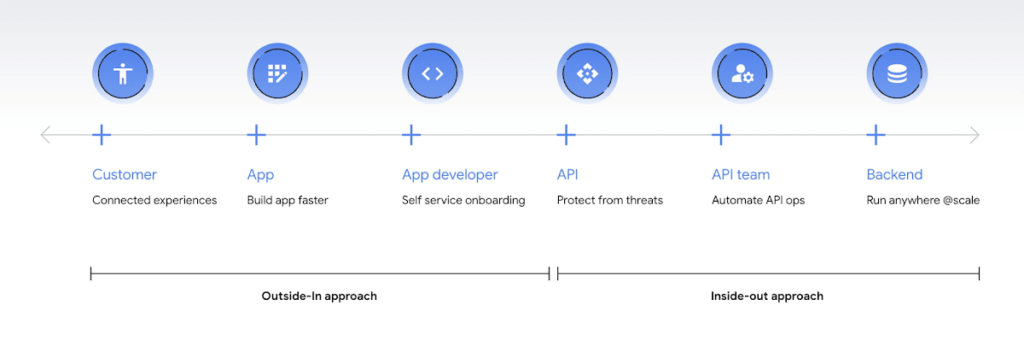
Being everything for everybody often means that nothing you do is the best it could be, and that is just as true for APIs. When customers turn to APIs, they are looking for specific solutions to make their work easier and more productive. If there is an API that better works to their needs, they will choose that one over yours. This is why it’s so important to know what your customers need to do their work better, and then building to fill those needs. In other words, start thinking Outside-in as opposed to Inside-Out. Specifically,
- Inside-out refers to designing APIs around internal systems or services you would like to expose.
- Outside-in refers to designing APIs around customer experiences you want to create. Read more about the Outside-in perspective in the API product mindset.
The first step to this is learning from your customers — be it internal consumer developers or external customers — and their use cases. Ask them about the apps they are building, their pain points, and what would help streamline or simplify their development. Write down their most significant use cases and create a sample API response that only gives them the exact data they need for each case. As you test this, look for overlap between payloads and adapt your designs to genericize them across common or similar use cases.
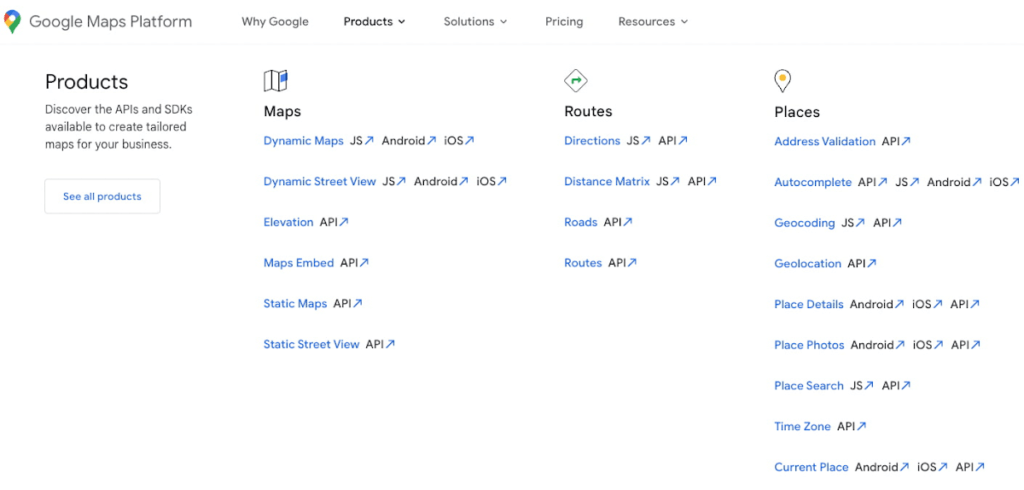
If you can’t connect with your customers — because you don’t have direct access, they don’t have time, or they just don’t know what they want — the best approach is to imagine what you would build with your APIs. Think big and think creatively. While you don’t want to design your APIs for vaporware, thinking about the big picture can make it easier to build non-breaking changes in the future. For example the image below showcases APIs offered by Google Maps. Even without diving into the documentation, looking at the names like “Autocomplete” or “Address Validation” clearly outlines the purposes and potential fit for a customer’s use case.
#2 Making your APIs too complex for users
Customers turn to APIs to bypass complicated programming challenges so they can get to the part they know how to do well. If they feel like using your API means learning a whole new system or language, then it isn’t fitting their needs and they will likely look for something else. It’s up to your team to make an API that is strong and smart enough to do what your customer wants, but also simple enough to hide how complicated the tasks your API solves for really are. For example if you know your customers are using your APIs to present information about recently open restaurants and highly rated pizzeria to their consumers, providing them with a simple API call as below would be of great help:
GET /restaurants?location=Austin&category=Pizzeria&open=true&sort=-priority,created_atTo see if your API design is simple enough, pretend you are building the whole system from scratch — or if you have a trusted customer who is willing to help, ask them to test it and report their results. If you can complete the workflow without having to stop to figure something out, then you’re good to go. On the other hand, if you catch rough edges caused by trying to code around system complexity issues, then keep trying to refactor. The API will be ready when you can say that nothing is confusing and that it either meets your customers’ needs or can easily be updated as needs change.
#3 Creating “chatty” APIs with too many calls
Multiple network calls slow down the process and creates higher connection overhead — which means higher operational costs. This is why it’s so important to minimize the number of API calls.
The key to this is outside-in design: simplify. Look for ways to reduce the number of API calls a customer must make in their application’s workflow. If your customers are building mobile applications, for example, they often need to minimize their network traffic to reduce battery drain, and requiring a couple calls instead of a dozen can make a big difference.
Rather than deciding between building distinct, data-driven microservices and streamlining API usage, consider offering both: fine-grained APIs for specific data types, and “experience APIs” (APIs that are designed to power user experiences. Here is a further theoretical discussion on Experience APIs) around common or customer-specific user interfaces. These experience APIs compose multiple smaller domains into a single endpoint; making it much simpler for your customers — especially those building user interfaces — to render their screens easily and quickly.
Another option here is to use something like GraphQL to allow for this type of customizability. Generally you should avoid building a unique endpoint for every possible screen, but common screens like home pages and user account information can make a world of difference to your API consumers.
#4 Not allowing for flexibility
Even if you’ve followed all of the steps above, you may find that there are edge cases that do not fit under your beautifully designed payloads. Maybe your customer needs more data in a single page of results than usual, or the payload has way more data than their app requires. You can’t create a one-size-fits-all solution, but you also don’t want a reputation for building APIs that are limiting. Here are 3 simple options to make your endpoints more flexible.
Filter out response properties: You can either use query parameters for sorting and pagination, or use GraphQL which provides these types of details natively. By giving customers the option to request only the properties they need, it guarantees that they won’t have to sort through tons of unnecessary data to get what they need. For example, if some of your customers only need the title, author, and bestseller ranking, give them the ability to retrieve only that data with a query string parameter.
GET /books?fields=title,author,ranking- Ability to sort with pagination. Generally, you don’t want to guarantee the order of objects in an API response because minor changes in logic or peculiarities in your data source might change the sort order at some point. In some cases, however, your customers may want to sort by a particular field. Giving them that option, combined with a pagination option, will give them a highly efficient API when they only want the top few results. For example Spotify API utilizes a simple offset and limit parameter set to allow pagination. A sample endpoint as shown in the documentation would look like this
$ curl https://api.spotify.com/v1/artists/1vCWHaC5f2uS3yhpwWbIA6/albums?album_type=SINGLE&offset=20&limit=10- Use mature compositions like GraphQL: Since customer data needs can differ, giving them on-the-fly composites lets them build to the combinations of data they need, rather than being restricted to a single data type or a pre-set combination of data fields. Using GraphQL can even bypass the need to build experience APIs, but when this isn’t an option, you can use query string parameter options like “expand” to create these more complex queries. Here is a sample response that demonstrates a collection of company resources with embedded properties included
"data": [
{
"CompanyUid": "27e9cf71-fca4",
"name": "ABCCo",
"status": "Active",
"_embedded": {
"organization": {
"CompanyUid": "27e9cf71-fca4",
"name": "ABCCo",
"type": "Company",
"taxId": "0123",
"city": "Portland",
"notes": ""
}
}
}
]
#5 Making design unreadable to humans
“K”eep “I”t “S”imply “S”tupid when you are designing your API. While APIs are meant for computer-to-computer interaction, the first client of an API is always a human, and the API contract is the first piece of documentation. Developers are more apt to study your payload design before they dig into your docs. Observation studies suggest that developers spend more than 51% of their time in editor and client as compared to ~18% on reference.
For example, if you skim through the payload below it takes some time to understand because instead of property names it includes an “id”. Even the property name “data” does not suggest anything meaningful aside from just being an artifact of the JSON design. A few extra bytes in the payload can save a lot of early confusion and accelerate adoption of your API. Notice how user-ids appearing on the left of the colon (in the position where other examples of JSON ideally have property names) creates confusion in reading the payload.
"{id-a}":
{ "data":
[
{
"AirportCode": "LAX",
"AirportName": "Los Angeles",
"From": "LAX",
"To": "Austin",
"departure": "2014-07-15T15:11:25+0000",
"arrival": "2014-07-15T16:31:25+0000"
}
… // More data
]
},
We think that JSON like this is more difficult to learn. If you want to eliminate any ambiguity in the words you choose to describe the data, keep the payload simple and if any of those labels could be interpreted in more than one way, adjust them to be more clear. Here is a sample response from Airlines endpoint of aviationstack API. Notice how the property names clearly explain the expected result while maintaining a simple JSON structure.
"data": [
{
"airline_name": "American Airlines",
"iata_code": "AA",
"iata_prefix_accounting": "1",
"icao_code": "AAL",
"callsign": "AMERICAN",
"type": "scheduled",
"status": "active",
"fleet_size": "963",
"fleet_average_age": "10.9",
"date_founded": "1934",
"hub_code": "DFW",
"country_name": "United States",
"country_iso2": "US"
},
[…]
]
#6 Know when you can break the RESTful rules
Being true to the RESTful basics — such as using the correct HTTP verbs, status codes, and stateless resource-based interfaces — can make your customers’ lives easier because they don’t need to learn an all new lexicon, but remember that the goal is just to help them get their job done. If you put RESTful design first over user experience, then it doesn’t really serve its purpose.
Your goal should be helping your customers be successful with your data, as quickly and easily as possible. Occasionally, that may mean breaking some “rules” of REST to offer simpler and more elegant interfaces. Just be consistent in your design choices across all of your APIs, and be very clear in your documentation about anything that might be peculiar or nonstandard.
Conclusion
Beyond these common pitfalls, we have also created a comprehensive guide packaging up our rich experience designing and managing APIs at incredible scale with Google Cloud’s API management product, Apigee.
Apigee — Google Cloud’s native API management platform — helps you build, manage, and secure APIs — for any use case, scale or environment. Get started with Apigee today or check out our documentation for additional information.
The Latest in Spring Cloud GCP: Upgrading the Sample Bank of Anthos App

1389
Of your peers have already read this article.
3:30 Minutes
The most insightful time you'll spend today!
We’re excited to announce that Spring Cloud GCP version 4.0 is now generally available! In this post, we’ll be describing what the new major version has to offer, and demonstrating the process of using the migration guide on one of our reference architectures, Bank of Anthos.
What’s new?
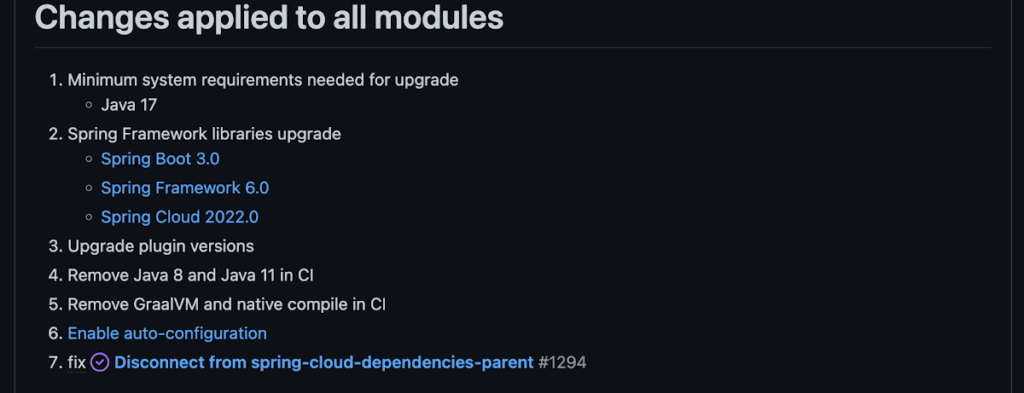
With this release, Spring Cloud GCP officially supports Spring Boot 3.x. However, this migration involves a number of breaking changes as outlined in the migration guide. The full list of changes made is available on Github, but the one of the most significant differences is that Java 17 is now a minimum requirement.
Another notable feature of this release is the addition of starter artifacts – Spring Boot starters for Google Cloud – that provide dependencies and auto-configurations for 80+ Google Client libraries. Just as the name suggests, these starters can serve as helpful starting points when working with a new client library. For now, they’re in preview.
These starters are not included in the BOM by default and need to be added as a dependency to your project before they can be used. For example, if you wanted to get started with Cloud Text-to-Speech, you would include the following:
<dependency>
    <groupId>com.google.cloud</groupId>
    <artifactId>google-cloud-texttospeech-spring-starter</artifactId>
    <version>4.0.0-preview</version>
  </dependency>
The upgrade process
We prepared a migration guide to help answer any questions involved with moving from 3.x to 4.x. Let’s follow those instructions to migrate Bank of Anthos.
We’ll start by cloning and building the application before the upgrade, according to the quickstart and development guide:
PROJECT_ID=<YOUR-PROJECT-ID>
gcloud services enable container --project ${PROJECT_ID}

git clone https://github.com/GoogleCloudPlatform/bank-of-anthos.git
cd bank-of-anthos/

gcloud services enable container.googleapis.com monitoring.googleapis.com \
  --project ${PROJECT_ID}

REGION=us-central1
gcloud container clusters create-auto bank-of-anthos \
  --project=${PROJECT_ID} --region=${REGION}

gcloud container clusters get-credentials bank-of-anthos \
  --project=${PROJECT_ID} --region=${REGION}

skaffold run --default-repo=gcr.io/${PROJECT_ID}/bank-of-anthos
At the end of this, you should see a “deployment stabilized” message:
Deployments stabilized in 9.657 secondsWith the environment set up for development, we’re ready to move on to the actual migration. The migration is already complete at time of writing, but here’s the full list of changes made:
- We began by checking the current Java, Spring Boot and Spring Cloud GCP versions.
- Our Java version is okay, but the other two are out of date, and will need to be updated.
We can also add the Spring Cloud GCP BOM to manage our versions going forward while we’re here.
- Our Java version is okay, but the other two are out of date, and will need to be updated.
- Then, in no particular order, we can make the following code changes:
- Remove the explicit type declarations from our ResponseEntity instantiations.
- Replace all javax.* imports with Jakarta.* counterparts, since Spring 3.0 makes use of Jakarta EE 9.0
With those changes in place, the app is upgraded and ready to re-deploy!
Live example
For a finished example of this migration, check out the Bank of Anthos repository on Github. It’s an excellent sample application that showcases a polyglot Java & Python app, served on Kubernetes and Google Cloud. All CI/CD and configurations are open source, so it may be instructive as you approach this migration.
Thanks for reading, and feel free to provide comments or feedback on Twitter, or in the issues section of the repository.
GCP Launches Datastream, A Serverless Change Data Capture and Replication Service

5597
Of your peers have already read this article.
1:30 Minutes
The most insightful time you'll spend today!
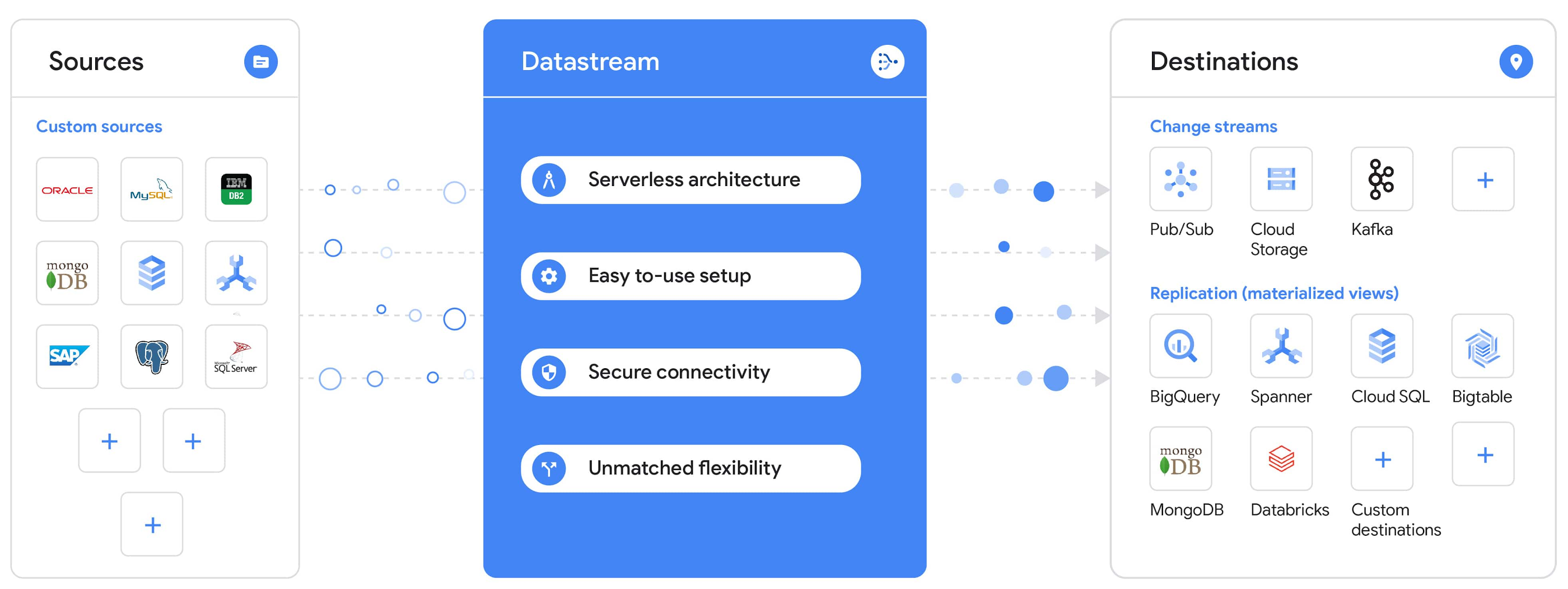
Today, we’re announcing Datastream, a serverless change data capture (CDC) and replication service, available now in preview. Datastream allows enterprises to synchronize data across heterogeneous databases, storage systems, and applications reliably and with minimal latency to support real-time analytics, database replication, and event-driven architectures. You can now easily and seamlessly deliver change streams from Oracle and MySQL databases into Google Cloud services such as BigQuery, Cloud SQL, Google Cloud Storage, and Cloud Spanner, saving time and resources and ensuring your data is accurate and up-to-date.
“Global companies are demanding change data capture to provide replication capabilities across disparate data sources, and provide a real-time source of streaming data for real-time analytics and business operations,” says Stewart Bond, Director, Data Integration and Intelligence Software Research at IDC.
However, companies are finding it difficult to realize these capabilities because commonly used data replication offerings are costly, cumbersome to set up, and require significant management and monitoring overhead to run flexibly or at scale. This leaves customers with a difficult-to-maintain and fragmented architecture.
Datastream’s differentiated approach
Datastream is taking on these challenges with a differentiated approach. Its serverless architecture seamlessly and transparently scales up or down as data volumes shift in real time, freeing teams to focus on delivering up-to-date insights instead of managing infrastructure. It also provides the streamlined customer experience, ease of use, and security that our customers have come to expect from Google Cloud, with private connectivity options built into the guided setup experience.
Datastream integrates with purpose-built and extensible Dataflow templates to pull the change streams written to Cloud Storage, and create up-to-date replicated tables in BigQuery for analytics. It also leverages Dataflow templates to replicate and synchronize databases into Cloud SQL or Cloud Spanner for database migrations and hybrid cloud configurations.
Datastream also powers a Google-native Oracle connector in Cloud Data Fusion’s new replication feature for easy ETL/ELT pipelining. And by delivering change streams directly into Cloud Storage, customers can leverage Datastream to implement modern, event-driven architectures.
Customers tell us about the benefits they’ve found using Datastream. That includes Schnuck Markets, Inc., “Leveraging Datastream, we’ve been able to replicate data from our on-premises databases to BigQuery reliably and with little impact to our production workloads. This new method replaced our batch processing and allowed for insights to be leveraged from BigQuery quicker,” says Caleb Carr, principal technologist from Schnuck Markets. “Furthermore, implementing Datastream removed the need for our analytics group to reference on-premises databases to do their work and support our business users.”
Cogeco Communications, Inc. used Datastream to also realize the value of low-latency data access. “Datastream unlocked new customer interaction opportunities not previously possible by enabling low-latency access in BigQuery to our operational Oracle data.” says Jean-Lou Dupont, Senior Director, Enterprise Architecture, Cogeco Communications, Inc. “This streamlined integration process brings data from hundreds of disparate Oracle tables into a unified data hub. Datastream enabled us to achieve this with 10X time and effort efficiency.”
In addition, Major League Baseball (MLB) used Datastream’s replication capabilities to migrate their data from Oracle to Cloud SQL for PostgreSQL. “As we’re modernizing our applications, replicating the database data reliably out of Oracle and into Cloud SQL for PostgreSQL is a critical component of that process,” says Shawn O’Rourke, manager of technology at MLB. “Using Datastream’s CDC capabilities, we were able to replicate our database securely and with low latency, resulting in minimal downtime to our application. We can now standardize on this process and repeat it for our next databases, regardless of scale.”
Our partner HCL has worked with many organizations looking to get more out of their data and plan for the future. “HCL customers across every industry are looking for ways to extract more value out of their vast amounts of data,” says Siva G. Subramanian, Global Head for Data & Analytics at HCL Google Business Unit. “CDC plays a big part in the solutions we offer to our customers using Google Cloud. Datastream enables us to deliver a secure and reliable solution to our customers that’s easy to set up and maintain. CDC is a key and integrated part of Google Cloud Data Solutions.”
“Google Cloud’s new CDC offering, Datastream, is a differentiator for Google among hyperscale cloud service providers, by supporting replication of data from Oracle and MySQL databases into the Google Cloud environment using a serverless cloud-native architecture, which removes the burden of infrastructure management for organizations, and provides elastic scalability to handle real-time workloads,” says Stewart Bond, Director, Data Integration and Intelligence Software Research at IDC.
Datastream under the hood
Datastream reads CDC events (inserts, updates, and deletes) from source databases, and writes those events with minimal latency to a data destination. It leverages the fact that each database source has its own CDC log—for MySQL it’s the binlog, for Oracle it’s LogMiner—which it uses for its own internal replication and consistency purposes. Using Google-native, agentless, high-scale log reader technology, Datastream can quickly and efficiently generate change streams populated by events based on the database’s CDC log while minimizing performance impact on the source database.
Each generated event includes the entire row of data from the database, with the data type and value of each column. The original source data types, whether it’s, for example, an Oracle NUMBER type or a MySQL NUMERIC type, are normalized into Datastream unified types. The unified types represent a lossless superset of all possible source types, and the normalization means data from different sources can easily be processed and queried downstream in a source-agnostic way. Should a downstream system need to know the original source data type, it can perform a quick API call to Datastream’s Schema Registry, which stores up-to-date, versioned schemas for every data source. This also allows for in-flight downstream schema drift resolution as source database schemas change.
The generated streams of events, referred to as “change streams,” are then written as files, either in JSON or Avro format during preview or in other formats like Parquet in the future, into a Cloud Storage bucket organized by source table and event times. Files are rotated as table schemas change, so events in a single file always have the same schema, as well as on a configurable file size or rotation frequency setting. This way customers can find the best balance between the speed of data availability and the file size that makes the most sense for their business use case.
Through its integration with Dataflow, Datastream powers up-to-date, replicated tables for analytics over BigQuery, and for data replication and synchronization to Cloud SQL and Spanner. Datastream refers to these constantly updated tables as “materialized views.” They are kept up-to-date via Dataflow template-based upserts into Cloud SQL or Spanner, or through consolidations into BigQuery. The consolidations, performed as part of the Dataflow template, take the change streams that are written into a log table in BigQuery, and push those changes into a final table, which mirrors the table from the source.

Datastream offers a variety of secure connectivity methods to sources, so your data is always safe in transit. And with its serverless architecture, Datastream can scale up and down readers and processing power to seamlessly keep up with the speed of data and ensure minimal latency end to end. As data volumes decrease, Datastream automatically scales back down—the result is a “pay for what you use” pricing model, where you never have to pay for idle machines or worry about bottlenecks and delays during data peaks.
Get started with Datastream
Datastream, now available in preview, supports streaming change data from Oracle and MySQL sources, hosted either on-premises or in the cloud, into Cloud Storage. You can start streaming your data today for $2 per GB of data processed by Datastream.
To get started, head over to the Datastream area of your Google Cloud console, under Big Data, and click Create Stream. There you can:
- Initiate stream creation, and see what actions you need to take to set up your source and destination for successful streaming.
- Define your source and destination, whose connectivity information is saved as connection profiles you can re-use for other streams. Sources support multiple connectivity options, with both private and public connectivity options to suit your business needs.
- Select the source data you’d like to stream, and which you’d like to exclude.
- Test your stream to ensure it will be successful when you’re ready to go.
Start your stream and your database’s CDC data will start to flow to your Cloud Storage bucket! From there you can integrate with Dataflow templates to load data into BigQuery, Spanner, or Cloud SQL. Datastream’s preview is supported in us-central1, europe-west1, and asia-east1, with additional regions coming soon.https://www.youtube.com/embed/FZG4w4Vbj38?enablejsapi=1&
Datastream will become generally available later this year, and will soon expand its support to also include PostgreSQL and SQL Server as sources, as well as out-of-the-box integration with BigQuery for easy delivery of up-to-date replicated tables for analytics, and message queues like Pub/Sub for real-time change stream access.
For more resources to help get you started with change streaming, check out the Datastream documentation.
More Relevant Stories for Your Company
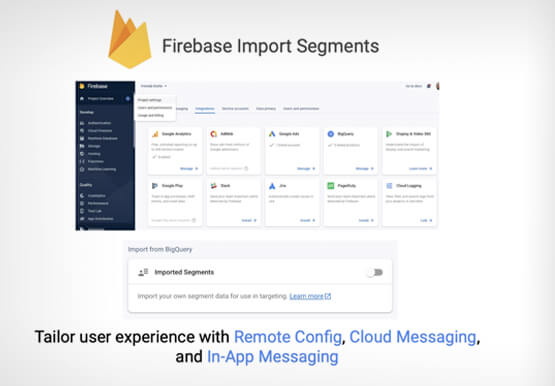
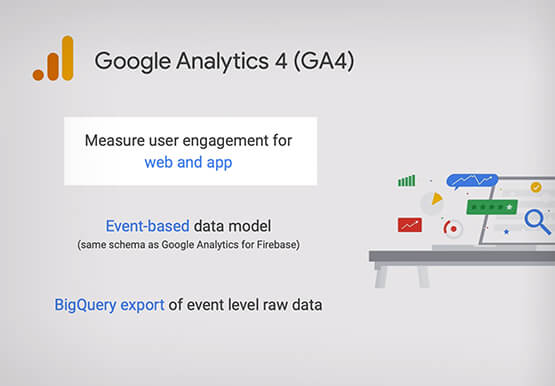
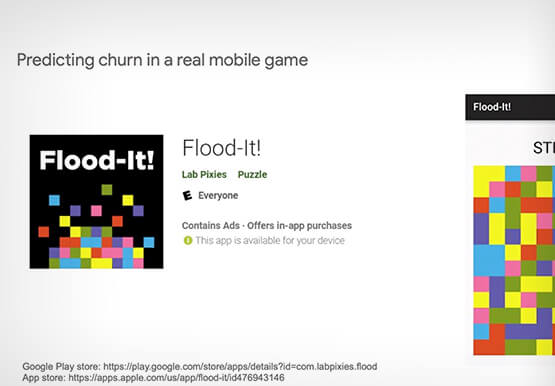

Predict User Churn on Gaming Apps with Google Analytics Data using BigQuery ML
User retention can be a major challenge for mobile game developers. According to the Mobile Gaming Industry Analysis in 2019, most mobile games only see a 25% retention rate for users after the first day. To retain a larger percentage of users after their first use of an app, developers can

How Experian Transformed its Business by Using APIs
Chances are, when you think of Experian you think of a traditional credit bureau that provides credit reports. But Experian has transformed into a true technology and software provider. We gather, analyze, and process data in ways that other companies just can’t. Businesses use this data to make smarter decisions about credit

A Human Centered Design to Chart a Superior Customer Journey!
Banking, insurance and fintech companies strive to deliver superior customer experience. By adopting a human centered design for the digital customer journey, platform providers can drive monetization by focusing on interactions, behaviors and events!

The Digital Transformation Journey
Aspiration is easy, but execution is hard. Few concepts illustrate this as well as digital transformations. Most businesses today are at some phase of their digital transformation journey. While some are evaluating strategies and solutions, many companies have already embarked on full-scale project implementations. However, one thing is clear. While
