





Reasons to Leverage Vertex AI Custom Training Service

2954
Of your peers have already read this article.
6:00 Minutes
The most insightful time you'll spend today!
At one point or another, many of us have used a local computing environment for machine learning (ML). That may have been a notebook computer or a desktop with a GPU. For some problems, a local environment is more than enough. Plus, there’s a lot of flexibility. Install Python, install JupyterLab, and go!
What often happens next is that model training just takes too long. Add a new layer, change some parameters, and wait nine hours to see if the accuracy improved? No thanks. By moving to a Cloud computing environment, a wide variety of powerful machine types are available. That same code might run orders of magnitude faster in the Cloud.
Customers can use Deep Learning VM images (DLVMs) that ensure that ML frameworks, drivers, accelerators, and hardware are all working smoothly together with no extra configuration. Notebook instances are also available that are based on DLVMs, and enable easy access to JupyterLab.
Benefits of using the Vertex AI custom training service
Using VMs in the cloud can make a huge difference in productivity for ML teams. There are some great reasons to go one step further, and leverage our new Vertex AI custom training service. Instead of training your model directly within your notebook instance, you can submit a training job from your notebook.
The training job will automatically provision computing resources, and de-provision those resources when the job is complete. There is no worrying about leaving a high-performance virtual machine configuration running.
The training service can help to modularize your architecture. As we’ll discuss further in this post, you can put your training code into a container to operate as a portable unit. The training code can have parameters passed into it, such as input data location and hyperparameters, to adapt to different scenarios without redeployment. Also, the training code can export the trained model file, enabling working with other AI services in a decoupled manner.
The training service also supports reproducibility. Each training job is tracked with inputs, outputs, and the container image used. Log messages are available in Cloud Logging, and jobs can be monitored while running.
The training service also supports distributed training, which means that you can train models across multiple nodes in parallel. That translates into faster training times than would be possible within a single VM instance.
Example Notebook
In this blog post, we are going to explain how to use the custom training service, using code snippets from a Vertex AI example. The notebook we’re going to use covers the end-to-end process of custom training and online prediction. The notebook is part of the ai-platform-samples repo, which has many useful examples of how to use Vertex AI.
Custom model training concepts
The custom model training service provides pre-built container images supporting popular frameworks such as TensorFlow, PyTorch, scikit-learn, and XGBoost. Using these containers, you can simply provide your training code and the appropriate container image to a training job.
You are also able to provide a custom container image. A custom container image can be a good choice if you’re using a language other than Python, or are using an ML framework that is not supported by a pre-built container image. In this blog post, we’ll use a pre-built TensorFlow 2 image with GPU support.
There are multiple ways to manage custom training jobs: via the Console, gcloud CLI, REST API, and Node.js / Python SDKs. After jobs are created, their current status can be queried, and the logs can be streamed.
The training service also supports hyperparameter tuning to find optimal parameters for training your model. A hyperparameter tuning job is similar to a custom training job, in that a training image is provided to the job interface. The training service will run multiple trials, or training jobs with different sets of hyperparameters, to find what results in the best model. You will need to specify the hyperparameters to test; the range of values to explore for those hyperparameters; and details about the number of trials.
Both custom training and hyperparameter tuning jobs can be wrapped into a training pipeline. A training pipeline will execute the job, and can also perform an optional step to upload the model to Vertex AI after training.
How to package your code for a training job
In general, it’s a good practice to develop your model training code that is self-contained when especially executing them inside containers. This means the training codebase would operate in a standalone manner when executed.
Below is a template of such a self-contained, heavily-commented Python script that you can follow for your own projects too.
# Imports go hereimport tensorflow_datasets as tfdsimport tensorflow as tf…# Define the hyperparameters and constants like epochs, batch size, number of GPUs, etcparser = argparse.ArgumentParser()parser.add_argument('--lr', dest='lr',default=0.01, type=float,help='Learning rate.')parser.add_argument('--epochs', dest='epochs',default=10, type=int,help='Number of epochs.')...args = parser.parse_args()...# Prepare data loadersdef make_datasets_unbatched():# Scaling CIFAR10 data from (0, 255] to (0., 1.]def scale(image, label):image = tf.cast(image, tf.float32)image /= 255.0return image, labeldatasets, info = tfds.load(name='cifar10',with_info=True,as_supervised=True)return datasets['train'].map(scale).cache().shuffle(BUFFER_SIZE).repeat()# Build our model, compile, and train itmodel = [define your model]model.compile(loss=..., optimizer=..., metrics=...)model.fit(...)# Serialize our modelmodel.save(MODEL_DIR)
Note that the MODEL_DIR needs to be a location inside a Google Cloud Storage (GCS) bucket. This is because the training service can only communicate with that and not with our local system. Here is a sample location inside a GCS Bucket to save a model: gs://caip-training/cifar10-model where caip-training is the name of the GCS bucket.
Although we are not using any custom modules in the above code listing, one can easily incorporate them as we would normally inside a Python script. Refer to this document if you want to know more. Next up, we will review how to configure the training infrastructure, including the type and number of GPUs to use, and submit a training script to run inside the infrastructure.
How to submit a training job, including configuring which machines to use
To train a deep learning model efficiently on large datasets, we need hardware accelerators that are suited to run matrix multiplication in a highly parallelized manner. Distributed training is also common when it comes to training a large model on a large dataset. For this example, we will be using a single Tesla K80 GPU. Vertex AI supports a range of different GPUs (find out more here).
Here is how we initialize our training job with the Vertex AI SDK:
job = aiplatform.CustomTrainingJob(display_name=JOB_NAME,script_path="task.py",container_uri=TRAIN_IMAGE,requirements=["tensorflow_datasets==1.3.0"],model_serving_container_image_uri=DEPLOY_IMAGE,)
(aiplatform is aliased as from google.cloud import aiplatform)
Let’s review the arguments:
display_namerefers to a unique identifier to the training job used for easily locating it.script_pathrefers to the path of the training script to run. This is the script we discussed in the section above.container_urirefers to the URI of the container that will be used to run our training script. For this, we have several options to choose from. For this example, we will usegcr.io/cloud-aiplatform/training/tf-gpu.2-1:latest. We will use this same container for deployment as well but with a slightly changed container URI. You can find the containers available for model training here and the containers available for deployment purposes can be found here.requirementslet us specify any external packages that might be required to run the training script.model_serving_container_image_urispecifies the container URI that would be used during deployment.
Note: Using separate containers for distinct purposes like training and deployment is often a good practice, since it isolates the relevant dependencies for each purpose.
We are now all set up to submit a custom training job:
model = job.run(model_display_name=MODEL_DISPLAY_NAME,args=CMDARGS,replica_count=1,machine_type=TRAIN_COMPUTE,accelerator_type=TRAIN_GPU.name,accelerator_count=TRAIN_NGPU)
Here, we have:model_display_name that provides a unique name to identify our trained model. This comes in handy later down the pipeline when we would deploy it using the prediction service. args are our command-line arguments typically used to specify things like hyperparameter values.replica_count denotes the number of worker replicas to be used during training. machine_type specifies the type of base machine to be used during training. accelerator_type denotes the type of accelerator to be used during training. If we are interested in using a Tesla K80, then TRAIN_GPU should be specified as aip.AcceleratorType.NVIDIA_TESLA_K80. (aip is aliased as from google.cloud.aiplatform import gapic as aip.)accelerator_count specifies the number of accelerators to use. For a single host multi-GPU configuration, we would set the replica_count to 1 and then specify the accelerator_count as per our choice depending on the resource available under the corresponding compute zone.
Note that model here is a google.cloud.aiplatform.models.Model object. It is returned by the training service after the job is completed.
With this setup, we can actually start a custom training job that we can monitor. After we submit the above training pipeline, we should see some initial logs resembling this:
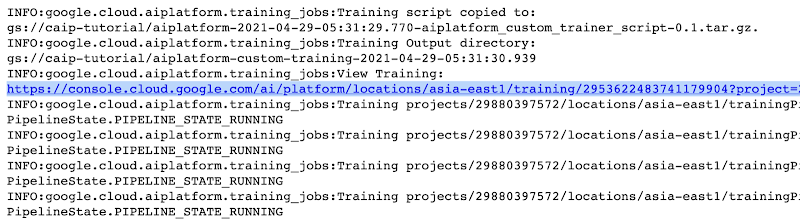
The link highlighted in Figure 2 will redirect to the dashboard of the training pipeline which looks like so:
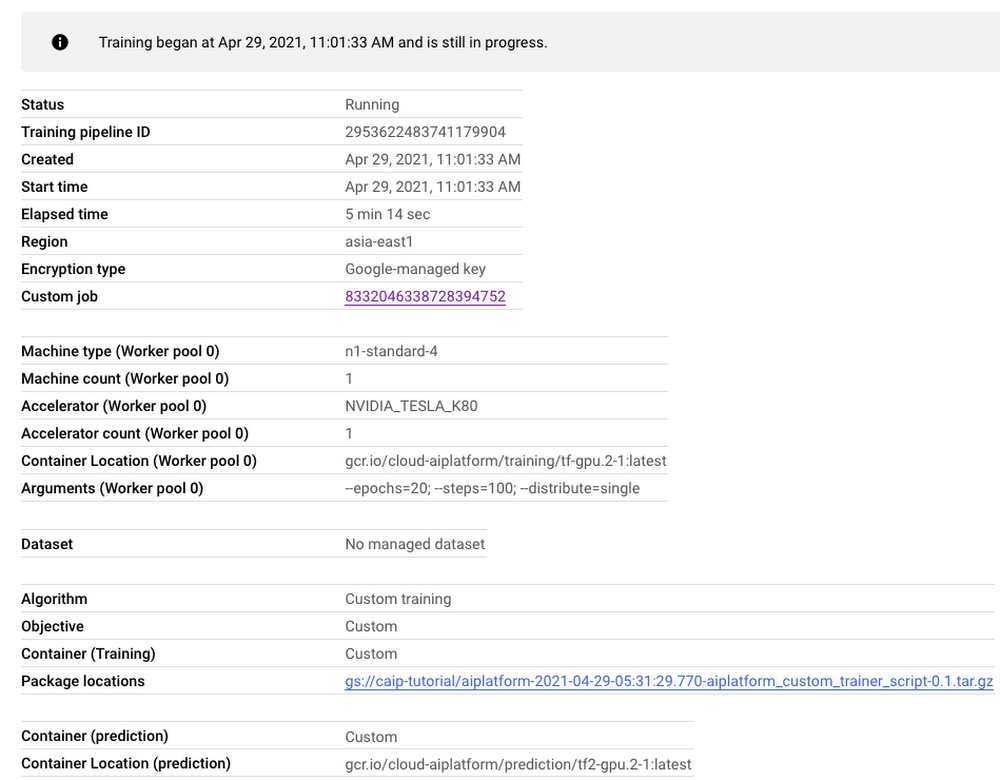
As seen in Figure 3, the dashboard provides a comprehensive summary of all the necessary artifacts related to our training pipeline. Monitoring your model training is also very important especially to catch any early training bugs. To view the training logs, we need to click the link beside the “Custom job” tab (refer to Figure 3). There also we are presented with roughly similar information as shown in Figure 3 but this time it includes the logs as well:
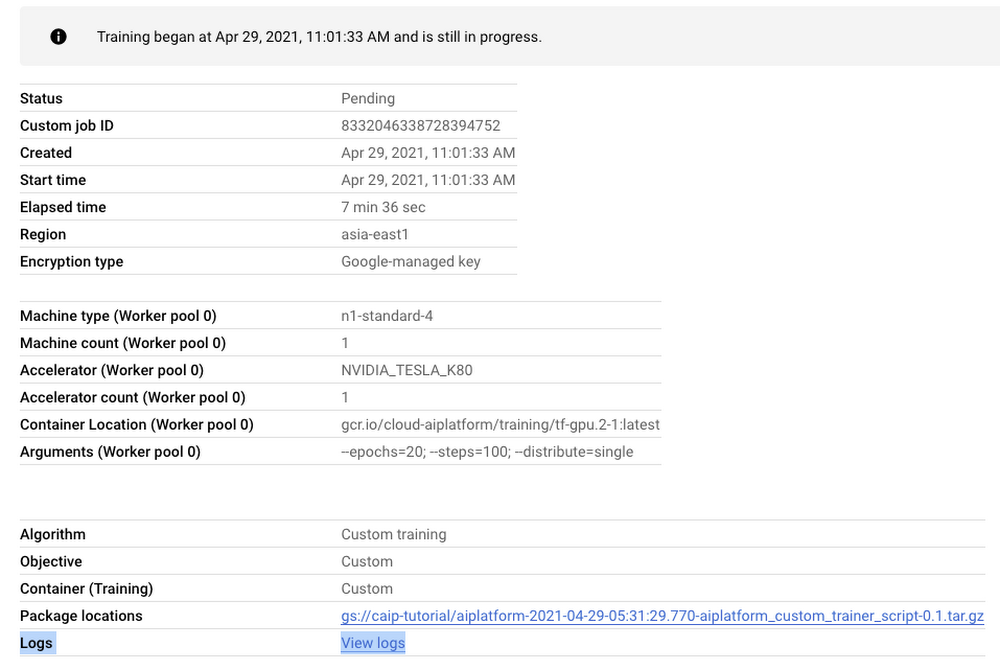
Note: Once we submit the custom training job, a training pipeline is first created to provision the training. Then inside the pipeline, the actual training job is started. This is why we see two very similar dashboards above but they have different purposes. Let’s check out the logs (which is maintained using Cloud Logging automatically):
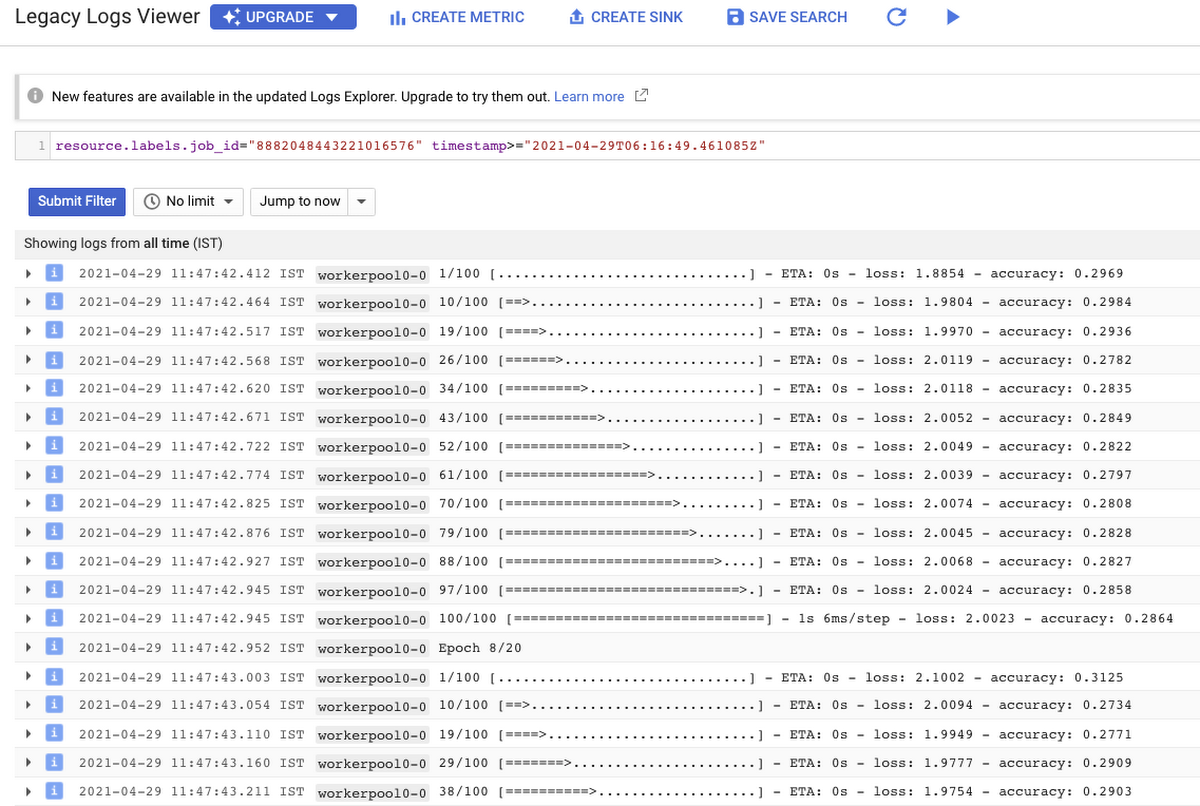
With Cloud Logging, it is also possible to set alerts on the basis of different criteria. For example, alerting the users when the training job fails or completes so that some immediate action could be taken. You can refer to this post for more details.
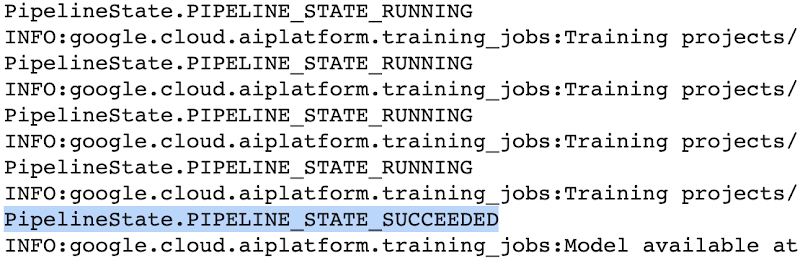
After the training pipeline is completed, on your end, you will notice the success status:
Accessing the trained model
Recall that we had to serialize our model inside a GCS Bucket in order to make it compatible with the training service. So, after the model is trained, we can access it from that location. We can even directly load it using the following line of code:
model = tf.keras.models.load_model('gs://[your-bucket-name]/[model-name]')
Note that we are referring to the TensorFlow model that resulted from training. The training service also maintains a similar “model” namespace to help us manage these models. Recall that the training service returns a google.cloud.aiplatform.models.Model object as mentioned earlier. It comes with a deploy() method that allows us to deploy our model programmatically within minutes with several different options. Check out this link if you are interested in deploying your models using this option.
Vertex AI also provides a dashboard for all the models that have been trained successfully and it can be accessed with this link. It resembles this:
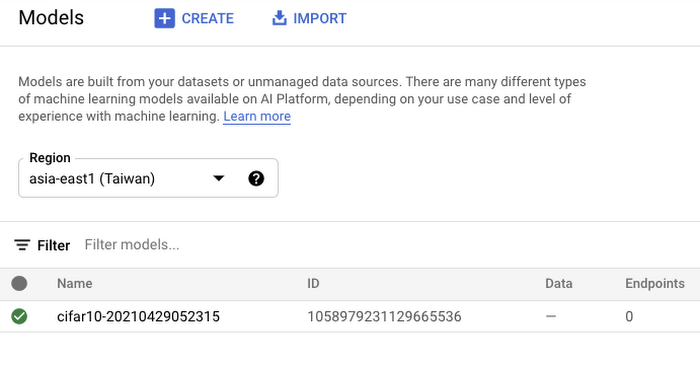
If we click the model as listed in Figure 7, we should be able to directly deploy from the interface:
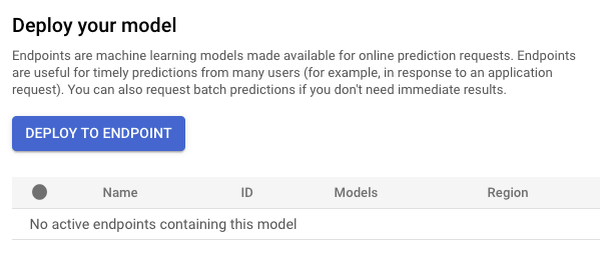
In this post, we will not be covering deployment, but you are encouraged to try it out yourself. After the model is deployed to an endpoint, you will be able to use it to make online predictions.
Wrapping Up
In this blog post, we discussed the benefits of using the Vertex AI custom training service, including better reproducibility and management of experiments. We also walked through the steps to convert your Jupyter Notebook codebase to a standard containerized codebase, which will be useful not only for the training service, but for other container-based environments. The example notebook provides a great starting point to understand each step, and to use as a template for your own projects.
3743
Of your peers have already downloaded this article
8:30 Minutes
The most insightful time you'll spend today!
Automation and machine learning technologies are changing the way marketers drive results for their customers and brands. But there’s still a significant gap between those who are just talking about machine learning and those who are taking action.
For marketers looking to become leaders in their field, this is an exciting time. It’s a chance to make your mark, get ahead of competitors, and drive real results.
To explore this shifting landscape, Google partnered with the Massachusetts Institute of Technology Sloan Management Review (MIT SMR) to conduct a global survey and interview over a dozen executives and academics about their use of automation and machine learning technology and the results they’re seeing.
The survey’s findings show there are clear opportunities for marketers to get ahead of the pack.
While nearly three-quarters of the survey’s respondents believe their organization’s current goals would be better achieved with greater investment in machine learning and automation, only half the surveyed organizations have any incentives to make such investments.
View the survey results and unearth ways your organization can embrace machine learning and grasp the opportunity. Download the whitepaper now!
Tyson Foods’ Story of Unlocking Opportunities by Integrating Real-time Analytics with AI and BI

6503
Of your peers have already read this article.
3:00 Minutes
The most insightful time you'll spend today!
As data environments become more complex, companies are turning to streaming analytics solutions that analyze data as it’s ingested and deliver immediate, high-value insights into what is happening now. These insights enable decision makers to act in real time to take advantage of opportunities or respond to issues as they occur.
While understanding what is happening now has great business value, forward-thinking companies are taking things a step further, using real-time analytics integrated with artificial intelligence (AI) and business intelligence (BI) to answer the question, “what might happen in the future?” Arkansas-based Tyson Foods has embraced AI/BI analytics to enable predictive insights that unlock new opportunities and drive future growth.
Creating a digital twin for connected intelligence company wide
Before using AI/BI, Tyson’s analytics capabilities consisted of traditional BI solutions focused on KPIs and simplifying data so that humans could understand it. Tyson wanted to leverage its data to uncover ways to improve current processes and grow its business. But with BI alone, Tyson struggled to use data to run the simulations and scenarios essential to make educated decisions. To keep growing, it had to embrace the complexity of its data, building ways to analyze it and use it to inform decision making.
Tyson’s on-premises analytics solutions limited its ability to be aggressive and make intelligent, timely, prescriptive decisions. The solution was to create a digital twin to scale optimizations within business processes, moving from local optimizations to system-wide connected optimizations. Doing so meant shifting entirely to cloud computing, with an initial focus on building the ingestion component of the digital twin platform.
Investing in a digital twin enabled Tyson to accelerate new capabilities like supply chain simulation “what-if” scenarios, prescriptive price elasticity recommendations, and improvement of customer intimacy.
Solving the ingestion problem for faster time to insights
Before its migration to Google Cloud, analytics projects that Tyson suffered from uncertainty over how to obtain the data. This problem was prolific and caused project times to be extended for weeks or even months due to the need to write and support one-off data ingestion processes at the front end. This problem also prevented the IT team from delivering analytics solutions fast enough for the business to take full advantage of them.
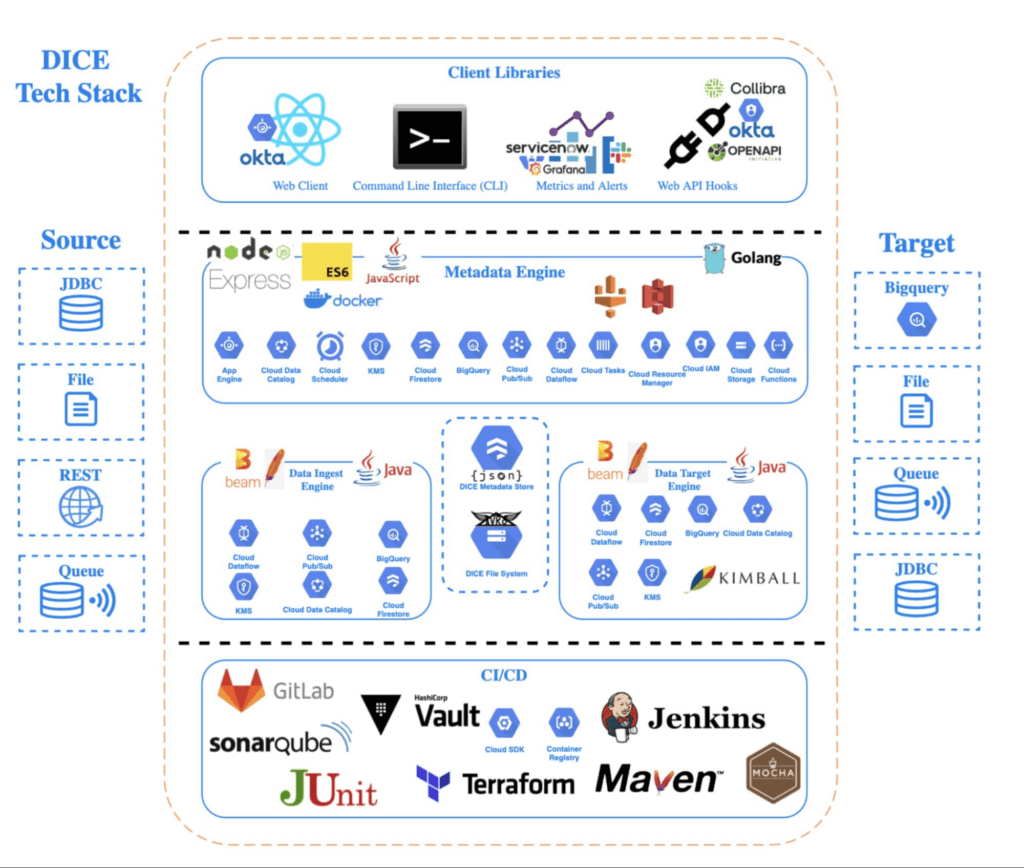
To solve this analytics problem, the team created Data Ingestion Compute Engine (DICE). DICE is a Google Cloud-hosted, open-source, cloud-native ingestion platform developed to provide configuration-based, no-ops, code-free ingestion from disparate enterprise data systems, both internal and external. It is centered on three high-level goals:
- Accelerate the speed of delivery of IT analytics solutions
- Enable growth of IT capabilities to produce meaningful insight
- Reduce long-term total cost of ownership for ingestion solutions
Creating DICE ingestion platform with Google Cloud services
Teams use DICE to set up secure data ingestion jobs in minutes without having to manage complex connections or write, deploy, and support their own code. DICE enables unbound scale, highly parallel processing, DevSecOps, open source, and the implementation of Lambda Data Architecture.
A DICE job is the logical unit of work in the DICE platform, consisting of immutable and mutable configurations persisted as JSON documents stored in Firestore. The job exists as an instruction set for the DICE data engine, which is Apache Beam running Dataflow to instruct which data to pull, how to pull it, how often to pull it, how to process it, when it changes, and where to direct it.
Two of DICE’s primary layers include the metadata engine and the data engine. The metadata engine is responsible for the creation and management of DICE job configuration and orchestration. It is made up of many microservices that interact with multiple Google Cloud services, including the job configuration creation API, job build configuration helper API, and job execution scheduler API.
The data engine is responsible for the physical ingestion of data, the change detection processing of that data, and the delivery of that data to specified targets. The data engine is Java code that uses the Apache Beam unified programming model and runs in Dataflow. It is comprised of streaming, jobs, and Dataflow flex template batch jobs. Logically, the data engine is segmented across three layers: the inbound processing layer, the DICE file system layer, and the target processing layer, which takes the data from the DICE file system and moves it to targets.
Rolling DICE for thousands of ingestion jobs each day
DICE was first deployed to a production environment in November 2019, and just two years later, it has more than 3,000 data ingestion jobs from more than a hundred disparate data systems, both internal and external to Tyson Foods. Most of these jobs run multiple times a day. On a daily basis the DICE environment sees more than 25,000 Dataflow jobs running and an average of 3.25 terabytes of new data being ingested.
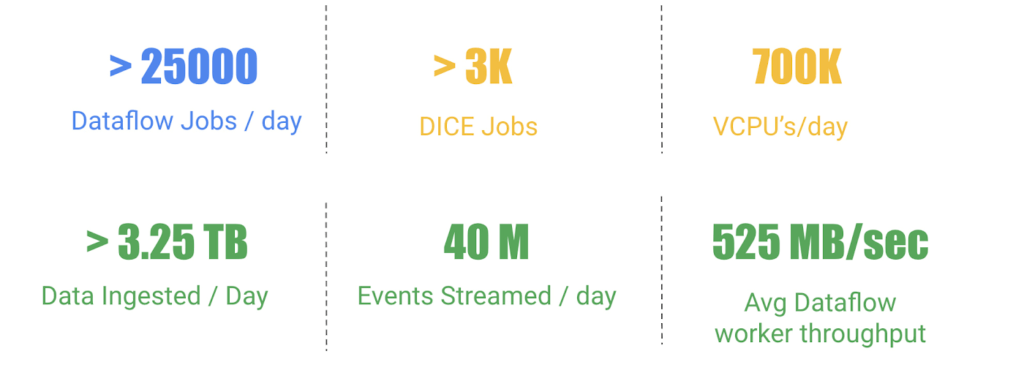
DICE supports ingestion from many different types of technologies, including BigQuery, SQL Server, SAP HANA, Postgres, Oracle, MySQL, Db2, various types of file systems, and FTP servers. Additionally, DICE supports target platform technologies for ingestion jobs that include multiple JDBC targets, multiple file system targets, and BigQuery and queue-based store and forward technologies.
The platform continues to see linear growth of DICE jobs, all while keeping platform costs relatively flat. With increasing demand for the platform, Tyson’s IT team is constantly enhancing DICE to support new sources and targets.
This intelligent platform keeps adding new value and makes it simple for Tyson to take advantage of its data. This innovation is a necessity in this fast-changing world of digital business in which companies must transform a high volume of complex data into actionable insight.
4551
Of your peers have already watched this video.
31:00 Minutes
The most insightful time you'll spend today!
How Google Secures its Data Centers: Watch Video
Security is in the DNA of Google Cloud’s dozens of data centers, complex network and workloads scattered the globe. Take a tour to the nucleus of data center’s six layers of physical security designed to keep unauthorized access at bay, and also learn about Google Cloud’s security fundamentals to leverage the same philosophy on Google Cloud. Watch now!
Plainsight Vision AI Available for Google Cloud Customers to Unlock Accurate, Actionable Insights
4696
Of your peers have already read this article.
4:00 Minutes
The most insightful time you'll spend today!
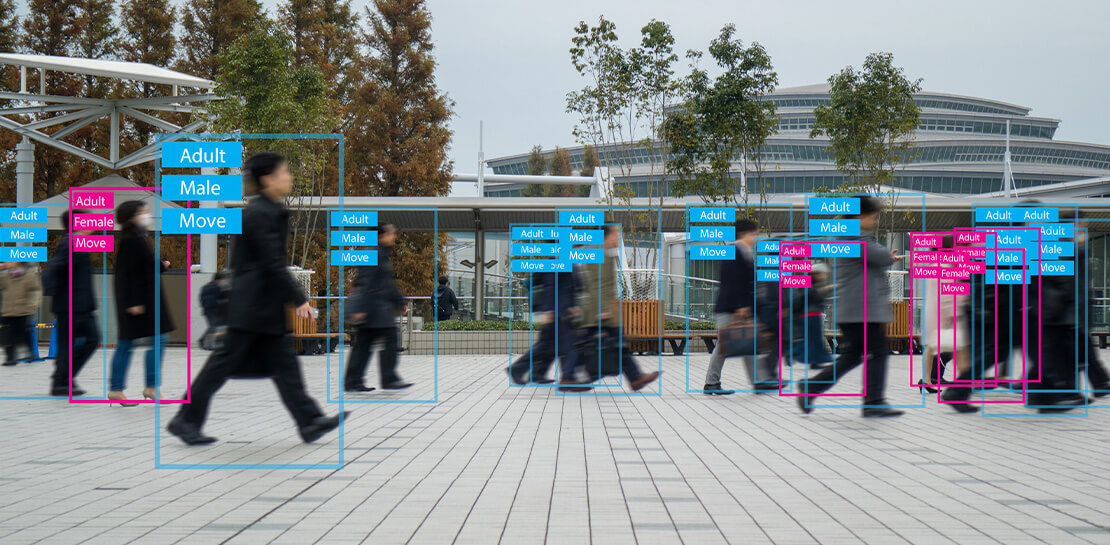
Data-savvy businesses increasingly rely on images and videos for critical functions, and yet are challenged by the sheer mass of information—more than 3.2 billion images and 720,000 hours of video are created daily. This explosion in visual data has paved the way for the growth of computer vision, a form of artificial intelligence (AI) that enables computers to “see” the world similarly to the way people do, but with unblinking consistency, and greater accuracy.
The transformational impact and value of computer vision solutions are significant and has been a guiding objective for companies and AI developers. And yet, even as the applications for computer vision increase dramatically, architecting and implementing vision AI solutions remain highly complex. Visual data, such as images and video, are made up of thousands of pixels of information that represent millions of different patterns and meanings, which can make interpreting even a single image overwhelming from a computational perspective.
Many organizations struggle with deployments and fail to operationalize vision AI solutions due to development delays, machine learning and data science hiring challenges, inaccurate output, a lack of integration with existing infrastructure, difficulty of use, and high cost. Plainsight, with the power of Google Cloud resources, is addressing all these challenges and helping businesses by enabling the deployment of vision AI within enterprise private networks that can be managed easily and scaled economically.
Plainsight has announced availability of its vision AI platform on Google Cloud Marketplace. Businesses can now easily deploy end-to-end vision AI to private clouds to realize the full value of their video and other visual data for accurate, actionable insights across diverse use cases.
Delivering on the Promise of AI: Seeing What’s Hiding In Plain Sight
For organizations to integrate AI and machine learning into their businesses successfully, the technology must be powerful enough to solve real challenges, yet fast, easy, and accessible enough to ensure the innovation potential is realized. Plainsight on Google Cloud delivers the power of enterprise vision AI that’s quick and easy to use with Google Cloud resources that enable global scale, increased security, bolstered privacy, unified billing, and cost savings.
To streamline vision AI workflows, Plainsight facilitates the entire pipeline, from visual data ingestion and annotation, through continuous model training, deployment, and monitoring for easier innovation and faster time-to-production. Our platform accelerates vision AI development in a manner that is complete, accurate, and accessible to non-technical business leaders. We believe that AI should be available and accessible to anyone and everyone—so that teams across entire organizations can reap the benefits.
By integrating Plainsight into their private networks, companies worldwide can now leverage one intuitive platform for centralized control of streamlined vision AI model creation and training with optimized visual data handling for diverse enterprise solutions. These use cases include: social distancing monitoring, medical imaging, drug compound screening, defect detection in manufacturing processes, identifying gas leaks, or even livestock counting and crop health monitoring for agriculture, to name a few.https://www.youtube.com/embed/A7U_0UkjvEg?enablejsapi=1&
We enable customers so they can create successful solutions that enable them to clearly see their business from all angles and to take advantage of the knowledge visual data can reveal by simply and quickly operationalizing practical vision AI applications.
AI-Powered Dataset Creation, Automated Model Training & Easy Deployment Without A Single Line Of Code
For vision AI applications, success is inextricably dependent on the quality and quantity of the datasets required to train the relevant models. To aid enterprises in this vital stage, the Plainsight platform provides built-in data annotation for the fast and easy creation of datasets. This includes AI-powered features that accelerate the speed and quality of labeling such as SmartPoly, for the automated polygon masking of objects, TrackForward, to predict and automatically label objects from frame to frame in video annotations, and AutoLabel for automated object recognition and labeling based on pre-trained machine learning models, to highlight a few.

In addition, to ensure the success of AI integration, we significantly reduce time-intensive processes with Plainsight vision AI’s automated machine learning with continuous model training and easy deployment capabilities. In just a few clicks, users can leverage optimizations for the most reliable model training without endless experimentation cycles. And, models are easily deployed at scale all within one, easy-to-manage model operationalization process for the business.
Growing With Google Cloud
Plainsight is a vision AI innovation leader, developing solutions that address unmet needs for challenger brands and Fortune 500s across vertical markets. As a team recognized for succeeding where others have failed, our expanding partnership with Google Cloud provides a powerful combination that helps customers see and activate the value of their visual data with a suite of services in a secure and private manner.
Our vision AI Platform simplifies building and operationalizing AI to solve business problems enterprises are facing every day—and the demand is increasing. To accelerate our journey to faster, more accessible AI for enterprises, we knew we needed strong support to grow Plainsight and scale our backend tools to match our vision.
Google Cloud delivered everything, and more, in one program. The Startup Program by Google Cloud provided the technology and services for scale and the support we needed to maximize the value the Program provided us. The Startup Program has been a springboard for architecting Plainsight vision AI in the cloud, accelerating our goals and optimizing innovation, efficiency, and growth. The team also helped us optimize Google Ads campaigns, fueling adoption of Plainsight.
After launching the SaaS version of Plainsight Data Annotation in November 2020, we grew our user base by nearly 110x in just three short months. Google Ads has also dramatically increased website traffic, growing new users by nearly 5.75X and page views by over 5X. The Google team helped us identify where Google Cloud offerings could be leveraged instead of developing in-house solutions and offered best practices that enabled us to deliver faster on our initiatives.
Kubernetes was already the underlying component of our platform and leveraging Google Kubernetes Engine (GKE) as a managed service removed a layer of complexity. By combining GKE and Anthos, we were able to standardize our deployments, aligning to how our customers leverage Anthos for enterprise applications in their own organizations. In addition, as a fast-moving, customer-centric company we use Google Workspace to help us centralize and manage our day-to-day work internally. By leveraging multiple products across Google’s ecosystem, we take advantage of a holistic partnership that has helped our business tremendously as we scale.
Leveraging Google’s Partners for Strategic Consultation
To facilitate this expansion of our partnership with Google and to maximize our use of Google Cloud services, we are working with DoiT International, a Google Managed Services Provider and 2020 Global Reseller Partner of the Year. DoiT provides us with ongoing technical consultation for cloud-native architecture, Google Cloud Marketplace integration, production-grade Kubernetes support, Google Cloud cost optimization, and technical support. The DoiT team has been invaluable in compiling best practices, tips, and strategies from their vast experience with various cloud customers to ease our Marketplace integration and is providing input for infrastructure strategy to support our continued rapid growth.
Plainsight Delivers Enterprise Vision AI Through The Google Cloud Platform Marketplace
Plainsight vision AI is now available to Google Cloud Customers on Google Cloud Marketplace enabling organizations across industries to deploy private Plainsight instances within their own environments. Marketplace customers will benefit from Google Cloud privacy, security, scalability and unified billing through their Google Cloud account.
Combining the powerful benefits provided by Google Cloud resources with Plainsight’s vision AI Platform into private networks, enterprises worldwide can now leverage one intuitive platform for centralized control of streamlined vision AI model creation and training with optimized visual data handling for diverse enterprise solutions.
Through our Google partnership, we’re able to leverage a powerful foundation that allows us to rapidly innovate, scale and accelerate delivery on our vision AI platform capabilities. By executing on our vision to make AI easier, faster and more accessible for all users across entire enterprises, we’re helping businesses see more and by seeing more, they’ll have the power to solve more.
If you want to learn more about how Google Cloud can help your startup, visit our page here where you can apply for our Startup Program, and sign up for our monthly startup newsletter to get a peek at our community activities, digital events, special offers, and more.
Revolutionizing Generative AI Applications with Google’s Vertex AI

1192
Of your peers have already read this article.
2:30 Minutes
The most insightful time you'll spend today!
At Google Cloud, we’re committed to making generative AI useful for everyone. Doing so requires more than making powerful foundation models available to businesses, governments, and developers. Models also need to be backed by platforms that make adoption faster and safer, with onramps to meet organizations wherever they are, regardless of their software or data science expertise.
Today, we’re excited to announce general availability of Generative AI support on Vertex AI, giving customers access to our latest platform capabilities for building and powering custom generative AI applications. With this update, developers can access our text model powered by PaLM 2, Embeddings API for text, and other foundation models in Model Garden, as well as leverage user-friendly tools in Generative AI Studio for model tuning and deployment. Backed by enterprise-grade data governance, security, and safety features, Vertex AI can make it easier than ever for customers to access foundation models, customize them with their own data, and quickly build generative AI applications.
Vertex AI powers generative AI model customization for enterprise developers, data scientists, and everyone in between
Foundation models are the starting point for creating customized generative AI applications—but models alone are not sufficient. That’s why in March, we announced Generative AI support on Vertex AI, the biggest-ever update to our machine learning platform, and began working with trusted testers. Now generally available to customers, Model Garden and Generative AI Studio leverage Google Cloud’s tight partnership with Google Research and Google DeepMind, making it easy for developers and data scientists to use, customize, and deploy models.
Model Garden lets customers access and experiment with foundation models from Google and its partners, with over 60 models available and many more to come. In addition to making Model Garden, PaLM 2, and Embeddings API for text generally available, we’re also making our recently-announced Codey model for code completion, generation, and chat available for public preview.
Along with these and other foundation models, Vertex AI offers a full ecosystem of tools to help builders tune, deploy, and govern models in production. For example, in May, we were the first enterprise ML platform to provide Reinforcement Learning with Human Feedback, or RLHF, which helps improve model usefulness and reduce cost. We’ve also upgraded Vertex AI’s suite of MLOps tools for model development and maintenance for customers who need to manage large models. With Generative AI Studio generally available, customers can now leverage an even wider range of tools, including multiple tuning methods for large models, that can significantly accelerate development of custom generative AI applications.
We’re already seeing innovative results from early adopters via our trusted tester program and preview period. For example, leading global airline supplier GA Telesis is using our PaLM model on Vertex AI to build a data extraction solution that automatically synthesizes email orders and provides customers a quote. This eliminates the need for their sales teams to manually cross-reference emails with inventory availability. GitLab is leveraging our Codey model on Vertex AI for their “Explain this Vulnerability” feature, which gives their users a natural language description of code vulnerabilities, along with recommendations for resolving them. Canva, the visual communication platform, is using Google Cloud’s rich generative AI capabilities in language translation to better support its non-English speaking users, letting users easily translate presentations, posters, social media posts, and more into over a hundred languages. The company is also testing ways that Google’s PaLM technology can turn short video clips into longer, more compelling stories.
And today, we’re pleased to share that Typeface, and DataStax are also building new generative AI capabilities with Vertex AI.
Now is the time to build
These announcements add to our news yesterday that we’ve added expanded access to Enterprise Search on Generative AI App Builder (Gen App Builder), allowing businesses to create custom chatbots and search engines that combine generative AI with Google’s semantic search technologies. Gen App Builder offers out-of-box solutions to common generative AI use cases, Vertex AI’s expansive platform capabilities can accelerate wide-ranging innovation, and growing ecosystem support from partners help our customers build freely. Together, these technologies and partnerships mean the full spectrum of developers and data scientists, from novices to seasoned experts, can build generative AI apps with enterprise-ready services on Google Cloud.
As with our entire Cloud portfolio, Vertex AI and Gen App Builder help give customers complete control over their data; it doesn’t need to leave the customer’s tenant, is encrypted both in transit and at rest, and is not shared or used to train Google models. Google rigorously evaluates our new models to ensure they meet our Responsible AI Principles, and all of our generative AI offerings include the user security, data management, and access controls Google Cloud customers have come to expect.
We’re grateful to our trusted testers for their integral role in bringing Generative AI support on Vertex AI to market, and we look forward to seeing what customers across all industries create with our growing catalog. To learn more about Google Cloud’s generative AI products, visit our solutions page, and to keep up with our latest AI news, don’t miss “The Prompt” or our generative AI primer for executives on Transform with Google Cloud.
More Relevant Stories for Your Company

Google Cloud Platform Gives Us 5x the Processing Power to Analyze Physician Performance at 75% Lower Cost
Patients about to undergo a healthcare procedure understandably want the best medical professionals they can get. But how can they know which doctors have had the most experience and the best outcomes with that particular procedure? How can they make an informed decision about which doctor to select when the

Google AppSheet Leads the Low-code Development Platform Market for Business Developers: Forrester
We’re excited to share the news that leading global research and advisory firm Forrester Research has named Google AppSheet a Leader in the recently released report The Forrester Wave™: Low-code Platforms for Business Developers, Q4 2021. It’s our treasured community of business developers—those closest to the challenges that line-of-business apps can

SEED: The 4 Areas of a Well-functioning and Responsible AI
The future of AI is better AI—designed with ethics and responsibility built in from the start. This means putting the brakes on AI-driven transformation until you have a well-functioning strategy and process in place to ensure your models deliver fair outcomes. Failing to recognize this imperative is a threat to

Takeaways from Forrester’s Cloud Data Warehouse Q1 2021 Report
Cloud data warehouse (CDW) solutions have transformed the delivery of modern analytics and are known to have the capabilities to provision data warehouse of any size in a matter of minutes, autotune queries, scale resources including compute and storage on demand and auto-upgrade to the latest version. As the need
