





Multicloud Mindset: Thinking About Open Source and Security in a Multicloud World

2779
Of your peers have already read this article.
1:30 Minutes
The most insightful time you'll spend today!
There’s never been a better time to talk about multicloud, and the Google Cloud Multicloud Mindset series on Twitter Spaces was created to do just that! This series takes place once every two weeks and features live conversations with top experts about the latest multicloud topics. You can join the 15-minute Q&A to ask your top questions and listen to episodes later offline for up to 30 days after we chat.
If you happened to miss our last few episodes, we recommend checking out our introduction blog to the series for what you missed. Let’s dive into our latest episodes, discussing the impact of open source and novel security challenges in multicloud environments.
Episode #5: ‘The intersection of open source and multicloud’
Open source technology has been an integral part of computing since its earliest era, predating even the birth of technology hubs like Silicon Valley. Open source projects have been responsible for giving us some of the most popular software in the world, such as Mozilla Firefox and the operating system Linux.
In the fifth episode, we sat down with Mike Coleman, Cloud Developer Advocate at Google Cloud, and took a closer look into the history of open source technologies, the role they play in a multicloud world, and the developer perspective on using these technologies to do their work.
The concept of multicloud anchors on the ability to run workloads across clouds and being able to pick the providers that are best suited for specific parts of workloads. Adopting open source technologies and languages empower companies to use the tools they need, regardless of cloud provider, without the fear of getting locked into a specific provider.
“As you think about moving across different environments, whether that be cloud to cloud, or developer desktop to ultimate destination, whether that be your data center or the cloud. Open source software allows you to do that…and multicloud is just an extension of that. This idea that I need to run the same software wherever I go.” — Mike Coleman, Cloud Developer Advocate at Google Cloud
If you’ve ever wanted a developer’s take on the impact of multicloud and the influence of open source in software development and digital transformation trends, you’ll want to tune into this episode.
You can access the full conversation on Twitter Spaces.
Episode #6: ‘Novel challenges in security with multicloud’
In the sixth episode of the series, we chatted with Dr. Anton Chuvakin, Security Advisor at Office of the CISO at Google Cloud, about how security leaders and architects are shifting away from traditional security models, which are increasingly insufficient for multicloud environments.
As more organizations adopt multicloud approaches, the question of how to maintain security in these complex environments and the increasing burden on SecOps teams is top of mind. As Dr. Chuvakin noted, the challenges in the cloud facing more traditional teams range from types of telemetry and logs to volumes and lack of clarity on detection use cases. However, these issues intensify when extended to include multiple clouds, where learning how to do something on one provider may be completely different on another.
“If you end up multicloud, you need to know public cloud and how it works at a better level than you would if you’re going to a single provider. Just like if you’re trying to repair three cars, you need to first learn how to repair cars. You need to have more cloud knowledge to do multicloud, not less. You need to have more powerful superpowers in the public cloud computing area because you can’t just learn one provider and call it a day.” — Dr. Anton Chuvakin, Security Advisor at Office of the CISO at Google Cloud
During the discussion, he offered three tips for tackling multicloud security:
- Learn cloud more, not less if you’re going multicloud. Multicloud requires more cloud knowledge because you can’t learn a single provider and call it a day. You’ll need to understand the differences in order to be able to secure multiple cloud environments.
- Focus on learning cloud identity management and how it compares to your traditional identity management service functions. Start with identifying the differences and similarities in what you see in one cloud and then continue with other clouds you use.
- Explore where your threat areas change in cloud environments when you plan detection and response activities to understand if your detection is covered across clouds.
If your organization is embracing multicloud, this is a great episode to listen and learn more about cloud security, the primary considerations and challenges facing security teams, and some helpful best practices for thinking about security in multicloud environments.
We’ll be sharing the latest topics and episodes with you every month in this blog series. Until next time.
Manage Packages Using Artifact Registry in Google Cloud Functions with Private Dependencies

3392
Of your peers have already read this article.
2:30 Minutes
The most insightful time you'll spend today!
Late last year, we announced that Artifact Registry was going GA, allowing GCP customers to manage their packages within the same platform as they were being deployed. In this blogpost, we want to show you how to do exactly that with a private dependency.
Private dependencies allow your packages to be shared with only a select group of viewers. If your codebase is already private, a private dependency can help modularize functionality using the same methodologies you use in your open source projects. Furthermore, you can experimentally develop your private dependency without breaking your overall codebase by pinning the version of the dependency on a working release. It can also provide necessary and durable abstraction if multiple projects depend on the same functionality. It does so by allowing multiple teams access to up-to-date and tested code rather than relying on copying and pasting fragmented code snippets.
With Artifact Registry, you can now wire together your serverless processes with your private dependencies without ever leaving Google Cloud Platform. This blogpost will discuss one example of how you can host your private dependency and later deploy to a serverless host like Google Cloud Functions using Cloud Build to automate the deployment.
Before getting started, take a look at the sample code here to copy and follow along.
Creating a package
Let’s walk through deploying a Google Cloud Function with a simple private dependency written in Node. Our example dependency will return the input given in unicode. It’s index.js file will look like this:
const unicode = require('to-unicode');// This function returns the input in unicode.module.exports = (input) => {return unicode(input);};
First, you’ll want to prepare your package to upload to Artifact Registry. For Node, this package should have a package.json file, which should dictate the entry point and information about the package. You can create a simple one like the one below by running the command npm init -y.
For the name of the package you should specify your scope. A scope allows you to group packages, which is helpful if you want to publish a private package; alternatively, publishing without a scope would make the repository public by default. In this blogpost, we’re going to use the scope @example, but you should name it after your private dependency’s group (i.e., your company, team or project).
{"name": "@example/blog-repo","version": "1.0.0","description": "A sample repository for blogpost demonstration purposes.","main": "index.js","scripts": {"test": "echo \"Error: no test specified\" && exit 1","artifactregistry-login": "npx google-artifactregistry-auth"},"author": "Blogpost Authors","license": "ISC","devDependencies": {"google-artifactregistry-auth": "^2.1.0"},"dependencies": {"to-unicode": "^1.0.2"}}
Another important detail in this file is that the devDependencies property contains the dependency for authenticating to the google artifact registry. To authenticate, you will use the command in the scripts section later in this tutorial.
Uploading the package to Artifact Registry & setting up authentication
Follow the instructions on these guides for creating an npm package repository on Artifact Registry, without configuring npm or pushing the repository. Next, you’ll want to configure the .npmrc file. To do so, simply add an empty file titled .npmrc, which should live at the base of your repository. To configure this file to deploy to the registry you just created, run the following command, and add the output to the .npmrc file. (Note: you may need to install the Google Cloud SDK before running the command.)
gcloud alpha artifacts print-settings npm –scope=@example
—repository=blog-repo —location=”us-central1”
Copy that output into your .npmrc file. Ultimately, it should look like this, substituting <projectId> for your Google Cloud Platform project ID.
@example:registry=https://us-central1-npm.pkg.dev/<projectId>/blog-repo///us-central1-npm.pkg.dev/<projectId>/blog-repo/:_authToken=""//us-central1-npm.pkg.dev/<projectId>/blog-repo/:always-auth=true
Then, you can push the package to the artifact repository. To do so, run this command (ensuring that you’ve copied the scripts portion from the package.json file above):
npm run artifactregistry-login <path to your .npmrc file>
This command allows you to refresh your access token when pushing your repository.
Then, simply publish by running:
npm publish
You can confirm you’ve deployed your library by searching for the repo in Artifact Registry in your Google Cloud Platform dashboard.
Setting up your Google Cloud Function
Once you have set up a repository in Artifact Registry, you can start to build your applications on top of it. Take a simple serverless example, like a Google Cloud Function:
const unicode = require('@example/blog-repo');const escapeHtml = require('escape-html');exports.mygcf= (req, res) => {res.send(`Hello ${escapeHtml(unicode(req.query.name || req.body.name || 'World'))}!`);};
This simple Cloud Function uses our private dependency to print out “Hello World” to the specified URL in unicode (it actually uses the same example in this tutorial). But how will Cloud Function successfully pull the private dependency? By using the .npmrc file you created in your original repository.
To see it in action, follow instructions for creating a simple Google Cloud Function. You can follow the tutorial exactly, ensuring that the following three key elements are in your function:
- When you create the index.js file (as done in the tutorial), it should live at the base of the repository, and should use the private dependency you’ve set up in artifact registry (like the example above),
- Its package.json should list:
- Your dependency with the version as listed in Artifact Registry
- A script to authenticate with artifact registry (just as for your dependency)
{"name": "mygcf","version": "1.0.0","description": "","main": "index.js","scripts": {"test": "echo \"Error: no test specified\" && exit 1","artifactregistry-login": "npx google-artifactregistry-auth .npmrc"},"author": "","license": "ISC","dependencies": {"escape-html": "^1.0.3","@example/blog-repo": "1.0.0","ini":: "^2.0.0"}}
- And, most importantly, you should copy over your
.nmprcfile to the base of this Google Cloud Function to authenticate your npmrc token.
Then, you can deploy the function using the following command:
gcloud functions deploy mygcf --runtime nodejs12 --trigger-http --allow-unauthenticated
To see it in action, simply follow the http trigger link (from the tutorial) and check out your input in unicode.
Automate and protect your Cloud Function
The command above will deploy the function, but it does so by exposing your token in your .npmrc file, and by forcing you to manually re-authenticate each time you redeploy the function. To automate the redeployment of the function in a safe manner, you can add a cloudbuild.yaml file to the root of your Cloud Function package.
First, let’s start by creating a helper function to modify the .npmrc file. You should save the following file to the root of your Cloud Function package, and name it npmrc-parser.js:
const fs = require('fs');const ini = require('ini');function main(pathToAuthToken, pathToNpmrc) {const config = ini.parse(fs.readFileSync(pathToNpmrc, 'utf-8'));const token = config[pathToAuthToken];config[pathToAuthToken] = "${TOKEN}";fs.writeFileSync(pathToNpmrc, ini.stringify(config));console.log(token);return token;}const args = process.argv.slice(2);main(...args);
Next, let’s create the file cloud build file. To do so, copy the following file in the root of your directory, and title it cloudbuild.yaml:
steps:- name: nodeentrypoint: npmargs: ['run', 'artifactregistry-login']- name: nodeentrypoint: npmargs: ['install']- name: nodeentrypoint: /bin/bashargs:- -c- |token=$(node npmrc-parser.js ${_PATHTOTOKEN} ${_PATHTONPMRC})echo $tokenecho $token > _TOKEN- name: gcr.io/cloud-builders/gcloudentrypoint: /bin/bashargs:- -c- |gcloud functions deploy "${_FUNCTIONNAME}" \--trigger-http \--runtime nodejs12 \--allow-unauthenticated \--set-build-env-vars TOKEN="$(cat _TOKEN)"
The first two steps of the build file will authenticate your private dependency, and install all dependencies on the project. The third step will call the custom helper function we created above to prepare your .npmrc file. This function takes two arguments, pathToAuthToken, and pathToNpmrc. The pathToAuthToken is the left-hand side of the authToken assignment in your .npmrc file. It should look something like this, replacing projectId with your own project:
"//us-central1-npm.pkg.dev/<projectId>/blog-repo/:_authToken"
The pathToNpmrc would be wherever you’ve saved your .npmrc file. In this case, the value would look like so:
".npmrc"
This build step removes the token value on the file and saves it to a variable, and replaces the .npmrc file with the environment variable TOKEN. So, the Cloud Function never stores the actual token in the source code, and the .npmrc file that is saved locally looks like this:
@example:registry=https://us-central1-npm.pkg.dev/<projectId>/blog-repo/
//us-central1-npm.pkg.dev/<projectId>/blog-repo/:_authToken=””
//us-central1-npm.pkg.dev/<projectId>/blog-repo/:always-auth=true
The last step in the build file redeploys the function, replacing the environment variable in the .npmrc file with the token value we just created. To run the build steps, you can set up a trigger, or run the following command manually, replacing the variables as we’ve described above:
gcloud builds submit --config=cloudbuild.yaml \ --substitutions=_PATHTOTOKEN="<PATHTOTOKEN>",_PATHTONPMRC="<PATHTONPMRC>",_FUNCTIONNAME="<CLOUDFUNCTIONNAME>"
Before running, make sure you’ve set the appropriate permissions for your Cloud Build function.
That’s all there is to it! Once set up this way, your Google Cloud Function can pull in your private dependency from Artifact Registry without hosting on any external package managers, and without any manual deployment steps.
Automate publishing your private dependency
To speed up the deployment of your local package to Artifact Registry, you can also add a Cloud Build file to your Artifact Registry package that will trigger a publishing event when changes are saved to your package. You can follow the setup steps here, but here is a snippet of a sample cloudbuild.yaml file that would live in your private dependency:
steps:- name: gcr.io/cloud-builders/npmargs: ['run', 'artifactregistry-login']- name: gcr.io/cloud-builders/npmargs: ['publish','${_PACKAGE}']
What about other languages and runtimes?
Even though this blog post focuses on Node.js, Cloud Functions and Artifact Registry support other runtimes as well, like Python and Java. For example, with Python the steps for deploying the module to Python aren’t much more complicated than Node. Once you’ve readied your private dependency and published to Artifact Registry, you can start creating a Google Cloud Function like the one above, but in Python. Next, you will want to fetch and package these dependencies locally.
Google Maps’ Cloud-based Styling Features Betters UX, Control and Flexibility

3371
Of your peers have already read this article.
2:00 Minutes
The most insightful time you'll spend today!
This year at Google I/O, we announced the general availability of Cloud-based maps styling for the Maps JavaScript API. In an effort to provide you with more options and more control to help create the best experience for your users, today we’re releasing new features to Cloud-based maps styling. You may already be familiar with these features from the consumer Google Maps web and mobile apps—Landmarks and Building Footprints. We’re also releasing updates to our industry optimized map styles to provide even more map details while providing the flexibility to craft the best experience for your users. Let’s take a look.
Help users quickly scan and orient themselves with Landmarks
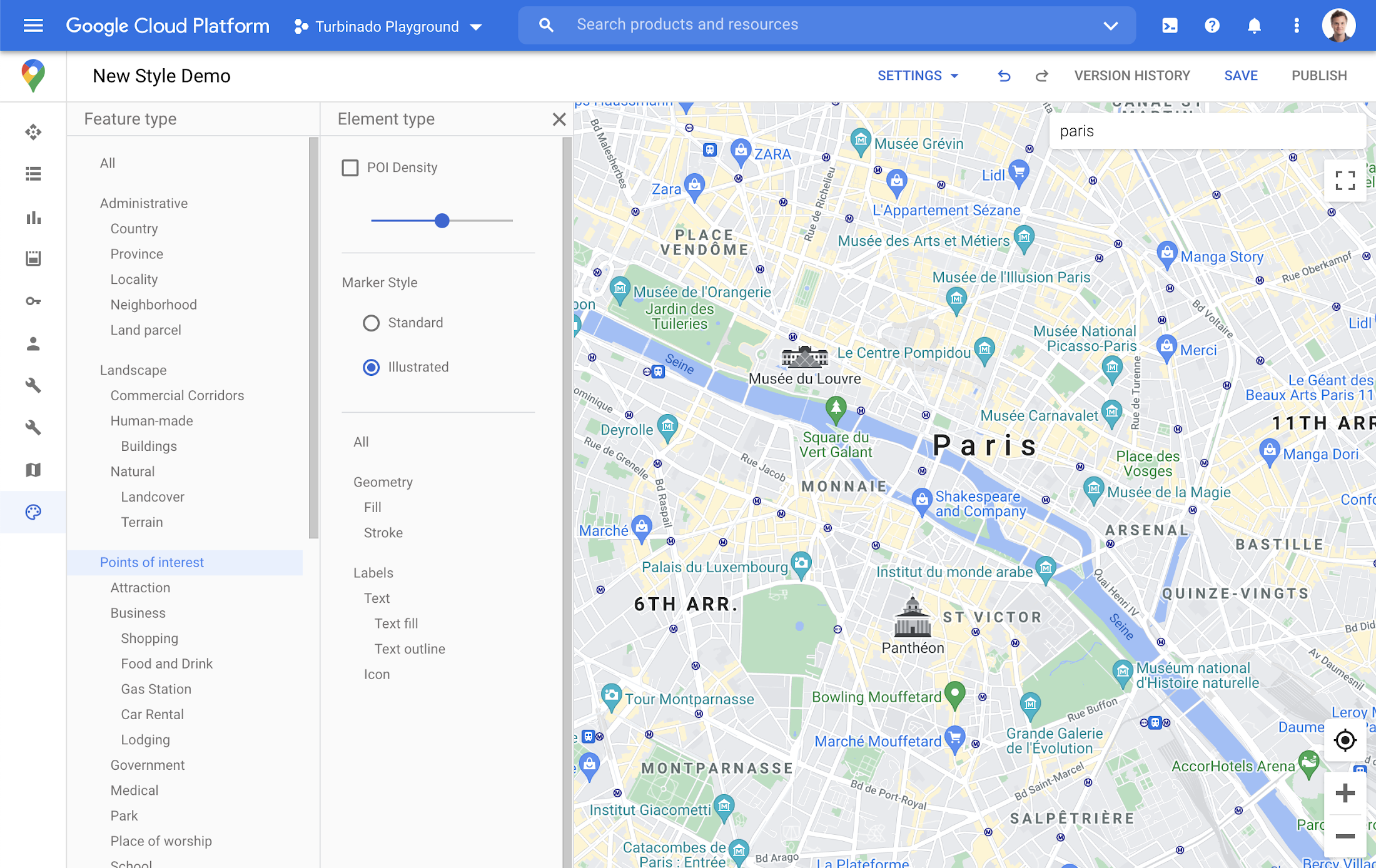
You may have noticed some enhancements for prominent places in the consumer Google Maps web and mobile apps, these landmarks help show your users points of interest that help them orient and navigate cities they are exploring or visiting.

You now have the ability to bring this same experience to your users by creating maps using Cloud-based maps styling. This feature is available in 100 cities globally including New York, Dubai, Paris, Mumbai, and Singapore. To enable landmarks for your map, log into the Cloud console and in our style editor navigate to the Points of interest feature type and select ‘Illustrated’ under Marker Style.
Simplify maps features by switching to Building Footprints
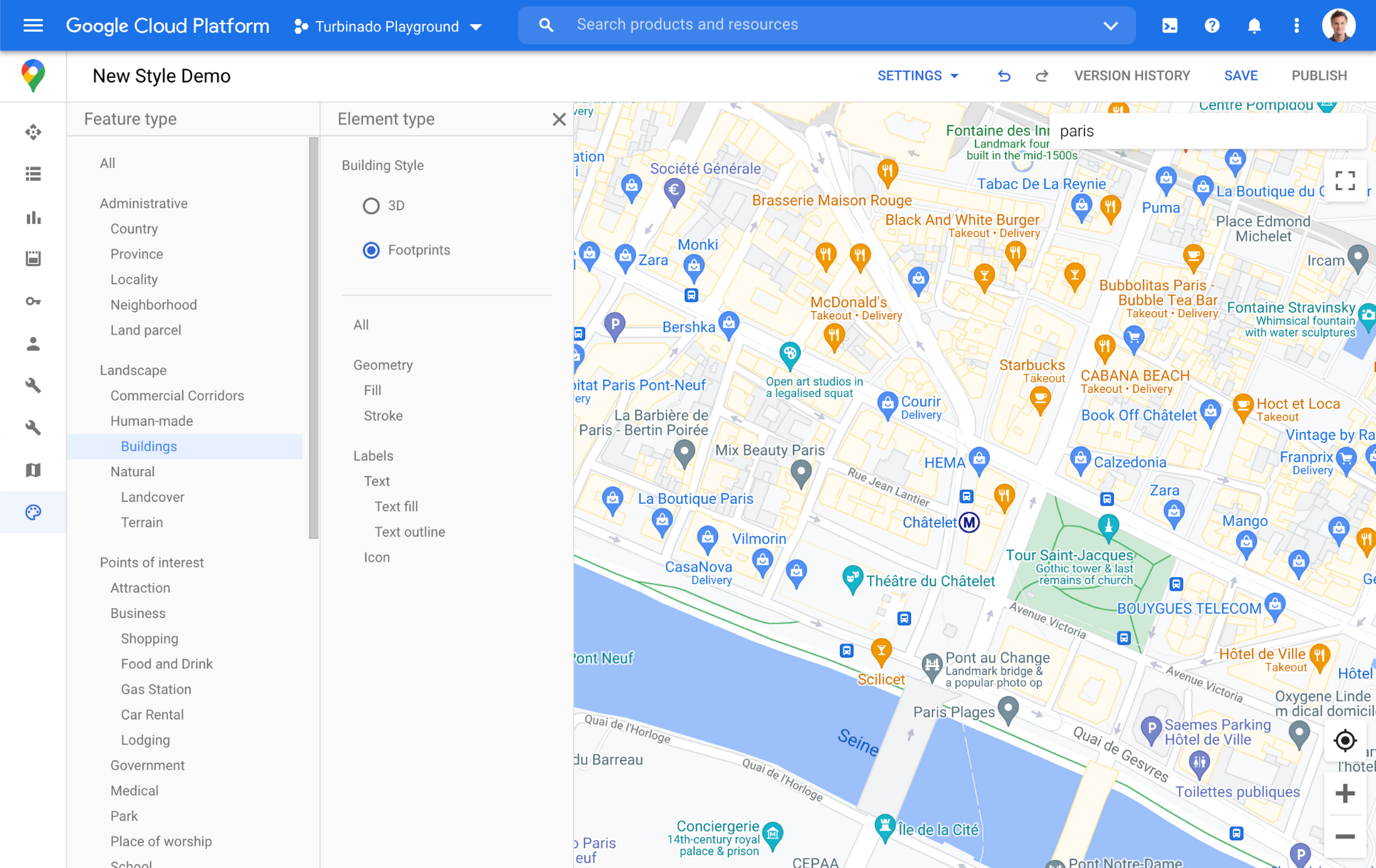
Sometimes less is more. In dense, highly vertical cities, showing 3D building heights can add cognitive load for users. Now, in addition to 3D buildings, we offer building footprints as an option in the style editor. Building footprints can provide a strikingly different basemap balance and composition to better support use cases that may not benefit from the added complexity that 3D buildings can present.

Fill and stroke geometries can also be styled independently to support various color themes. To enable Building Footprints, log into the Cloud console and in our style editor navigate to Buildings and choose ‘Footprints’ under building style.
Industry Optimized Map Styles now include Landmarks and Building Footprints, plus Detailed Street Maps
In January of this year we launched Industry Optimized Map Styles for the travel, real estate, retail, and logistics industries, providing customers with pre-styled map configurations, available via Cloud-based maps styling. Landmarks are now included in all of our Industry Optimized Map Styles and we have turned on Building Footprints in the travel style map. If you are already an Industry Optimized Map Styles user, these new features will be applied to your map with no action needed from you. If you would like to disable these changes, you can use the style editor to turn off these features.
For Industry Optimized Map Styles only, we are also excited to enable Detailed Street Maps. You may have seen these features in our consumer products at Google I/O, released back in August of 2020 for the consumer Google Maps web and mobile apps. Detailed Street Maps are available in San Francisco, New York, London, and Tokyo, and we are targeting expansion to 50 new cities by the end of 2021.
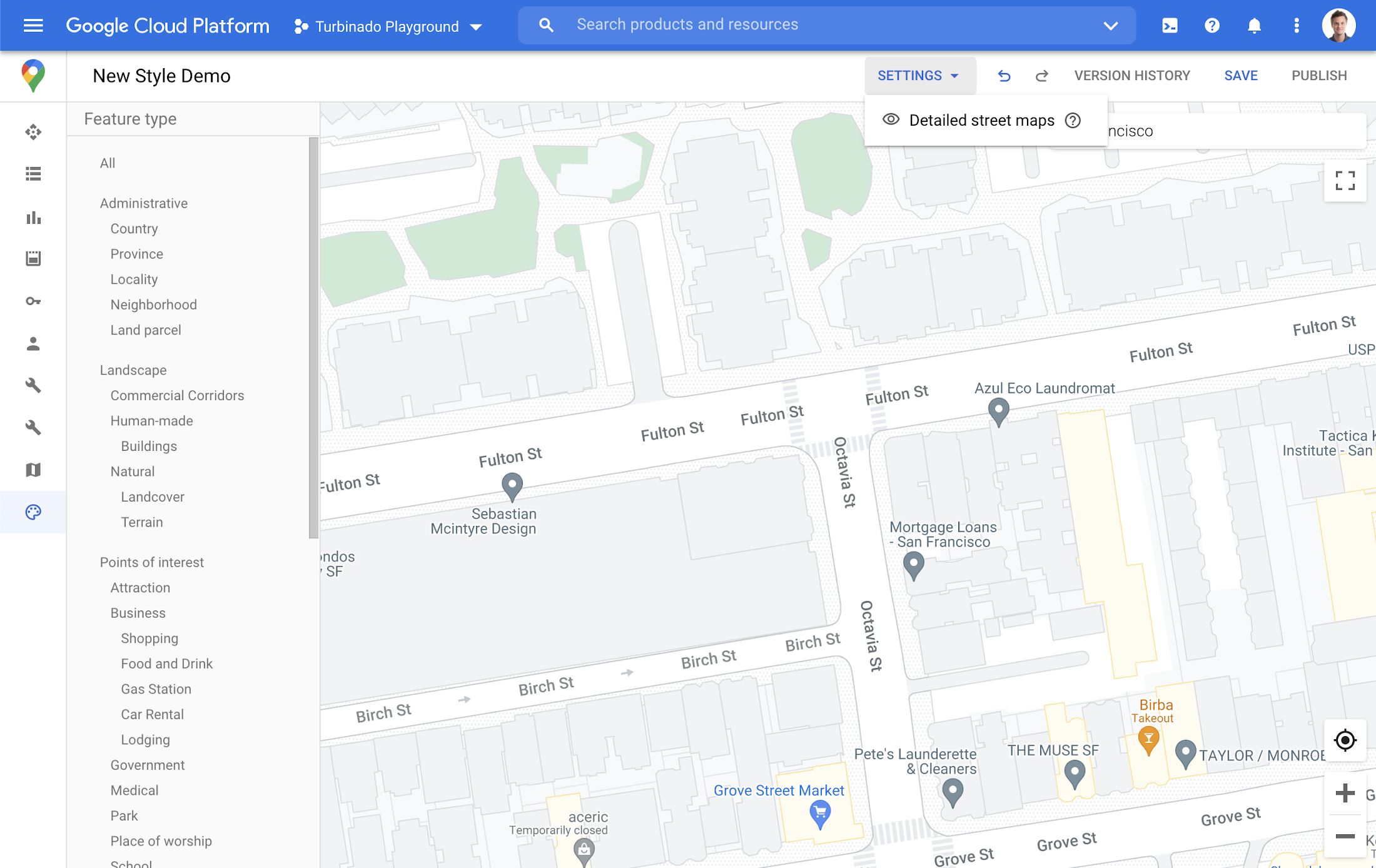
Detailed Street Maps are on by default for all Industry Optimized Map Styles and we created a new settings menu to change the visibility, as needed. We are working on bringing the full styling capability for Detailed Street Maps features to all Cloud-based maps styles in the future.
Landmarks and Building Footprints as well as the updates to Industry Optimized Map Styles are only available via Cloud-based map styling in the Google Cloud Console and are included in Google Maps Platform pricing. Learn more about how to use Landmarks and Building Footprints and Industry Optimized Map Styles. To get started with Cloud-based map styling, check out our documentation for JavaScript.
For more information on Google Maps Platform, visit our website.

3712
Of your peers have already downloaded this article
5:23 Minutes
The most insightful time you'll spend today!
APIs power all digital marketing channels and the apps we use today. APIs are a window on your company’s digital assets, exposing them so developers and partners can build mobile apps and become part of your innovation engine.
Thanks to the open API economy, you can build mobile apps that use a mix of APIs; you can combine location APIs with targeted promotions, or map your morning run with a calorie counter. Wrapping an API around your digital assets gets you into the game and builds value that wins customer loyalty and revenue. Marketing is about highlighting value, and promoting that value to customers.
This eBook highlights how APIs are evolving as the business technology that brings the CIO and CMO together. They bridge the gap between what the CMO needs to create value for customers and what the CIO needs to deliver a platform for a digital business. With alignment in place and technology that’s purpose-built for the requirements of the digital world, the potential to grow and succeed is limitless.
Google Cloud is a Leader in Q1 2022’s Public Cloud Container Platform: Forrester

3243
Of your peers have already read this article.
2:00 Minutes
The most insightful time you'll spend today!
We’re thrilled to share the news that leading global research and advisory firm Forrester Research has named Google Cloud a Leader in the recently published report The Forrester WaveTM: Public Cloud Container Platforms, Q1 2022. Forrester evaluated the container and cloud-native offerings of a select group of top public cloud container platform vendors across 29 comprehensive criteria.
We are proud that Forrester evaluated the strength and cohesion of our offerings, including Google Kubernetes Engine (GKE), Cloud Run, Anthos, Cloud Build, Cloud Deploy, Cloud Code and more, writing that, “Google Cloud is the best fit for firms that want extensive cutting-edge cloud-native capabilities for distributed workloads spanning public cloud, private cloud, and multicloud environments.”
Google Cloud received the highest possible scores in the criteria of service and application catalogs, microservice development support, service mesh support, serverless and FaaS support, DevOps automation, container image support, control plane configuration, hybrid cloud support, container networking, product vision, supporting products and services, market approach, revenue, and breadth of offering. We also achieved the highest score in the Strategy category of all the vendors evaluated.
Google Cloud is all-in on containers and cloud native
The cloud-native tools and technologies created by Google Cloud are already powering the most innovative, scalable and secure apps around the world, from the most exciting digital natives to the most important enterprise industry leaders. Why? Cloud native means building and running modern apps that intentionally take advantage of the global scale, pervasive automation, elastic infrastructure, and secure resiliency of the public cloud.
For enterprises, cloud native in practice means using containers, Kubernetes, serverless, and DevOps automation to build amazing customer-facing apps quickly, to modernize existing business-critical apps safely, and to operate them all on cost-efficient, powerful, and secure cloud infrastructure globally.Over the past decade, Google Cloud’s technology innovation has fueled various domains of the cloud native ecosystem, such as Kubernetes and Go languages as the foundation, Istio for service mesh, Kubeflow for machine learning, Knative for serverless, and Tekton for CI/CD. Long-term investment and practices in cloud-native power its superior product vision and excellent supporting products and services.
The Forrester Wave: Public Cloud Container Platforms, Q1 2022
Dedicated to simplicity, speed, and scale for your modern apps
Our mission is to create, integrate, scale, and secure the best open source and commercial cloud-native technologies – backed by a consistent cloud control plane – so you can spend more time dreaming of ways to delight your customers and less time building and operating platforms. We are committed to leading in cloud-native open source communities and making containers and Kubernetes accessible to everyone, from everywhere.
Here are a few recent highlights across our container services and tools, aimed at helping you build and modernize your most important apps with cloud native:
The most scalable fully managed Kubernetes service, Google Kubernetes Engine (GKE), achieved an overall solution score of 92 out of 100 in Gartner’s Solution Scorecard. In 2021, we introduced GKE Autopilot, a fully managed, security-hardened Kubernetes service optimized for production workloads. This unique mode of operation allows you to focus on your workloads while Google manages your cluster infrastructure. There’s nothing else like it. Then, we made GKE apps even faster with GKE image streaming. With proven scalability to 15K nodes in a single cluster and innovations such as four-way autoscaling, node auto-upgrades, integrated logging and metrics, cost optimization insights, native backup and restore, and multi-instance GPUs to accelerate machine learning workloads, GKE remains the best choice in managed Kubernetes services.
With Cloud Run, we expanded the range of users who benefit from containers to those who don’t know much about them. Introduced in 2019, Cloud Run combines the serverless attributes of autoscaling and developer experience with the flexibility of containers. Developers can use any language, runtime or binary, and deploy code using buildpacks to automatically build container images from source without worrying about provisioning machines and clusters. Cloud Run goes beyond FaaS and beyond earlier generations of serverless computing. Cloud Run runs more legacy workloads, integrates with Cloud Build for secure and compliant builds, offers deeper cost controls and billing flexibility, and encourages portability. We added support for social feeds, collaborative editing, and multiplayer games that use bidirectional streaming. Minimum instances reduce cold-start delays so you can run more latency-sensitive applications. And recently, we launched support for network file systems, allowing developers to share and persist data between multiple containers and services.
Anthos is at the heart of the Google Distributed Cloud, a portfolio of software and hardware solutions announced in 2021 that extend Google’s container platform services to the data center and the edge. Anthos is how we extend GKE to wherever you need cloud-native apps. Manage clusters on-premises on bare metal and VMware-virtualized servers, on AWS and Azure, and at the edge – all with a Google Cloud-backed control plane for consistent, automated operations at scale. We added a hosted service for configuration management to keep all your clusters in sync, and trimmed our installation footprint and streamlined cluster management with a new multi-cloud API that enables you to use a single API for full lifecycle management of Anthos Kubernetes clusters in AWS or Azure.
Finally, since no public cloud container platform is complete without powerful DevOps tools, we expanded our CI/CD offerings to make your developers even more productive, wherever they build and deploy cloud native apps. Use Cloud Code and Cloud Shell as your go-to cloud-native IDEs. Cloud Build is a fully managed serverless DevOps automation platform for use cases spanning CI/CD, Infrastructure-as-Code, AI/MLOps, and more, across infrastructure GKE, Cloud Run, Cloud Functions and more. Google Cloud Deploy is a fully managed continuous delivery service that provides one-click release promotion and roll-backs, built-in metrics, and out-of-the-box security. Artifact Registry and Container Analysis provide managed artifact repositories, vulnerability scanning, and help secure the software supply chain.Google Cloud has a solid cloud-native innovation roadmap, targeting simplicity at scale for enterprise clients.
The Forrester Wave: Public Cloud Container Platforms, Q1 2022
We are delighted and humbled to be recognized as a Leader in public cloud container platforms by Forrester. Grab your copy of The Forrester WaveTM: Public Cloud Container Platforms, Q1 2022 today and let us know how we can help you build and modernize your most important apps how you want and where you want.
6550
Of your peers have already watched this video.
24:00 Minutes
The most insightful time you'll spend today!
Swarovski’s Journey towards Online and Offline Conversion with Predictive Analytics
Luxury brand and leader in crystals and glass production, Swarovski has charmed customers with its exquisite collections for over 125 years. To understand their customers better and map their online behaviors, Swarovski had to overcome prediction hurdles as majority of the purchases are not frequent or habitual. They are mostly impulse buys or have no rational behind the purchase in order for the brand to accurately map customers’ interest and delight them with relevant personalization or website customization strategy.
Swarovski used a machine learning (ML) model to predict the most performing SKUs and list of products based on both online and offline indicators to target buyers. A score was assigned to each product in the list and was personalized at the country level that delivered relevant insights. Swarovski is aiming to expand the product listing page to personalize at customer level. Watch the video to dive deep into Swarovski’s data analytics efforts to answer complex questions, reporting and prediction using both online and offline data.
More Relevant Stories for Your Company


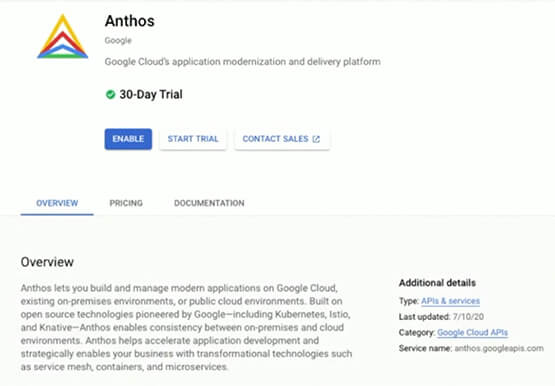

A Guide to Anthos: the App Modernization Platform for Hybrid and Multi-cloud Deployments
Anthos gives you a consistent platform for all your application deployments, both legacy as well as cloud native, while offering a service-centric view of all your environments. You can build enterprise-grade containerized applications faster with managed Kubernetes on cloud and on-premises environments. Create a fast, scalable software delivery pipeline with

Learn to Easily Administer Multi-cluster Kubernetes Environs: Part 4 KRM Series
This is part 4 in a multi-part series about the Kubernetes Resource Model. See parts 1, 2, and 3 to learn more. Kubernetes clusters can scale. Open-source Kubernetes supports up to 5,000 Nodes, and GKE supports up to 15,000 Nodes. But scaling out a single cluster can only get you so far: if your cluster’s control plane

Woolaroo App and Vision AI are Helping Users Explore Native Languages
One of the most vibrant elements of culture is the use of native languages and the time-honored tradition of storytelling. Anthropologists and linguists have been vocal on the role that language plays in the preservation of culture and how it contributes to the appreciation of heritage. Unfortunately, of the more

Enhancing Romi’s Conversations: The Role of BigQuery and LLMs
MIXI, Inc. (MIXI) is a social networking organization that provides a diverse range of services for friends and family to enjoy together, such as the social-media platform mixi, a mobile game called Monster Strike, and a family photo and video sharing service known as FamilyAlbum. One of our current projects
