





Latest Update: Keep Your Accounts Secure with Sensitive Actions

2740
Of your peers have already read this article.
2:00 Minutes
The most insightful time you'll spend today!
At Google Cloud, we operate in a shared fate model, working in concert with our customers to help achieve stronger security outcomes. One of the ways we do this is to identify potentially risky behavior to help customers determine if action is appropriate. To this end, we now provide insights on what we are calling Sensitive Actions.
Sensitive Actions, now available in Preview, are focused on understanding IAM account, or user account, behavior. They are changes made in a Google Cloud environment that are security relevant — and therefore important to be aware of and evaluate — because they may be precursors to an attack, an effort to make other attacks possible, or part of an effort to monetize a compromised account. They can quickly highlight potentially malicious activities that are facilitated by authentication cookie theft, and are another defense-in-depth mechanism that Google Cloud offers to help address this attack vector.
The Sensitive Actions that are detected today will appear in two places. They are available in Security Command Center Premium, the primary source for security and risk alerts in Google Cloud, as Observations from the Sensitive Actions Service. They are also available in Cloud Logging, where we recommend that customers integrate them into their monitoring workflows.
Sensitive Actions include the following list of action names (mapped to the MITRE ATT&CK tactics that these actions may correspond to) and descriptions:
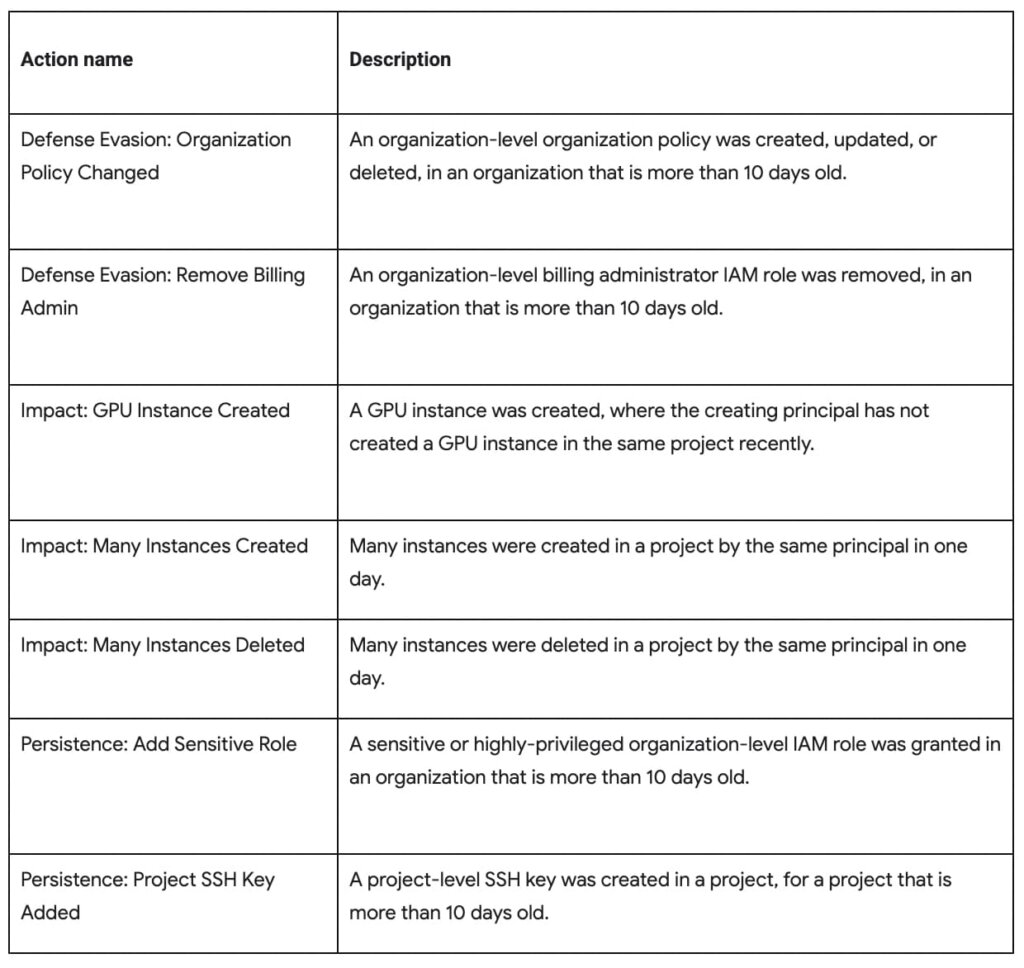
To ensure that adversaries do not have mechanisms to disable this protection or hide logs from users, Sensitive Actions is an on-by-default service now enabled for Cloud customers. In cases where customers have certain privacy controls or policy restrictions applied to their logging pipeline, their logs will not be analyzed by this service.
You can learn more about Sensitive Actions and our overall recommendations for keeping your account secure by visiting our documentation here.
Utilizing Google Cloud’s PII Security Features

2612
Of your peers have already read this article.
2:30 Minutes
The most insightful time you'll spend today!
BigQuery is a leading data warehouse solution in the market today, and is valued by customers who need to gather insights and advanced analytics on their data. Many common BigQuery use cases involve the storage and processing of Personal Identifiable Information (PII)—data that needs to be protected within Google Cloud from unauthorized and malicious access.
Too often, the process of finding and identifying PII in BigQuery data relies on manual PII discovery and duplication of that data. One common way to do this is by taking an extract of columns used for PII and copying them into a separate table with restricted access. However, creating unnecessary copies of this data and processing it manually to identify PII increases the risks of failure and subsequent security events.
In addition, the security of PII data is often mandated by multiple regulations and failure to apply appropriate safeguards may result in heavy penalties. To address this issue, customers need solutions that 1) identify PII in BigQuery and 2) automatically implement access control on that data to prevent unauthorized access and misuse, all without having to duplicate it.
This blog will discuss a solution developed by Google Professional Services for leveraging Google Cloud DLP to inspect and classify sensitive data and suggest a solution for using these insights to automatically tag and protect data in BigQuery tables.
BigQuery Auto Tagging solution overview
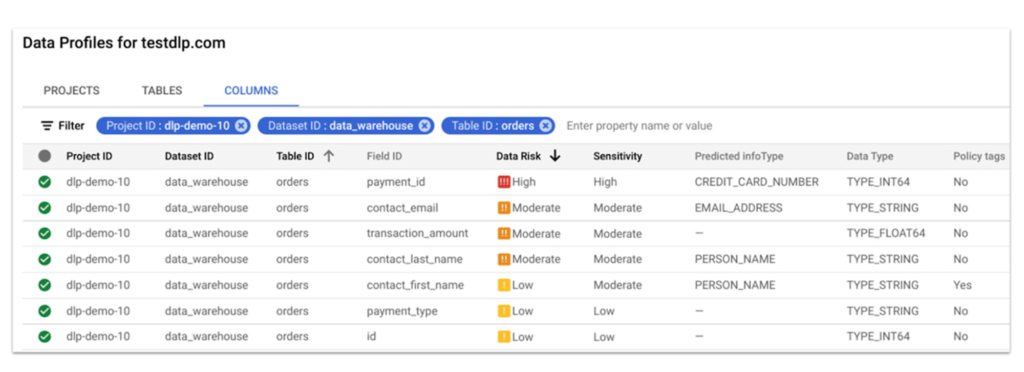
Automatic DLP can help to identify sensitive data, such as PII, in BigQuery. Organizations can leverage Automatic DLP to automatically search across their entire BigQuery data warehouse for tables that contain sensitive data fields and report detailed findings in the console (see Figure 1 below,) in Data Studio, and in a structured format (such as a BigQuery results table.) Newly created and updated tables can be discovered, scanned, and classified automatically in the background without a user needing to invoke or schedule it. This way you have an ongoing view into your sensitive data.
In this blog, we show how a new open source solution called BigQuery Auto Tagging Solution solves our second goal—automating access control on data. This solution sits as a layer on top of Automatic DLP and automatically enforces column-level access controls to restrict access to specific sensitive data types based on user-defined data classification taxonomies (such as high confidentiality or low confidentiality) and domains (such as Marketing, Finance, or ERP System.) This solution minimizes the risk of unrestricted access to PII and ensures that there is only one copy of data maintained with appropriate access control applied down to the column level.
The code for this solution is available on Github at GoogleCloudPlatform/bq-pii-classifier. Please note that while Google does not maintain this code, you can reach out to your Sales Representative to get in contact with our Professional Services team for guidance on how to implement it.
BigQuery and Data Catalog Policy Tags (now Dataplex) have some limitations that you should be aware of before implementing this solution to ensure that it will work for your organization:
- Taxonomies and Policy Tags are not shared across regions: If you have data in multiple regions you will need to create or replicate your taxonomy in each region that you want to apply policy tags.
- Maximum number of 40 taxonomies per project: If you require different taxonomies for different business domains or have replications to support multiple Cloud regions those will count against this quota.
- Maximum number of 100 policy tags per taxonomy: Cloud DLP supports up to 150 infoTypes for classification, however, a single policy taxonomy can only support up to 100 including any nested categories. If you need to support more than 100 data types, you may need to split these across more than one taxonomy.
High-level overview of the solution
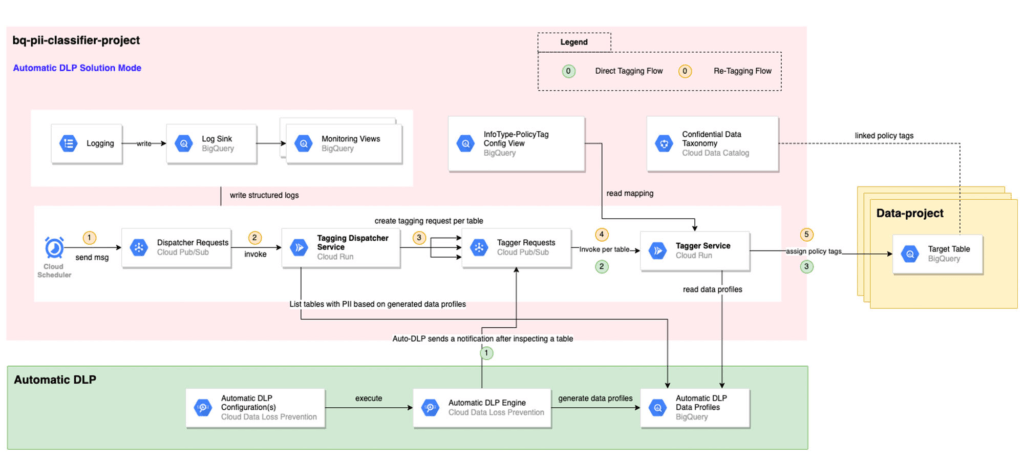
The solution is composed mainly of the following components: Dispatcher Requests topic, Dispatcher service, BigQuery Policy Tagger Requests topic, and BigQuery Policy Tagger service and logging components.
The Dispatcher Service is a Cloud Run service that expects a BigQuery scope to be expressed as inclusion and exclusion lists of projects, datasets, and tables. This Dispatcher service will query Automatic DLP Data Profiles to check if the tables in-scope have data profiles generated. For these tables, it will publish one request per table to the “BigQuery Policy Tagger Requests” PubSub topic. This topic enables rate limiting of BigQuery column tagging operations and apply auto-retries with backoffs.
The “BigQuery Policy Tagger” Service is also a Cloud Run service that receives the information of the DLP scan results of a BigQuery table. This service will determine the final InfoType of each column and apply the appropriate Policy Tags as defined in the InfoType – Policy Tags mapping. Only-one INFO_TYPE is selected and the function assigns the associated policy tag.
Lastly, all Cloud Run services maintain structured logs that are exported by a log sink to BigQuery. There are multiple BigQuery views that help with monitoring and debugging Cloud Run call chains and tagging actions on columns.
Deployment options
After deploying the solution, it can be used in two different ways:
[Option 1] Automatic DLP-triggered immediate tagging:
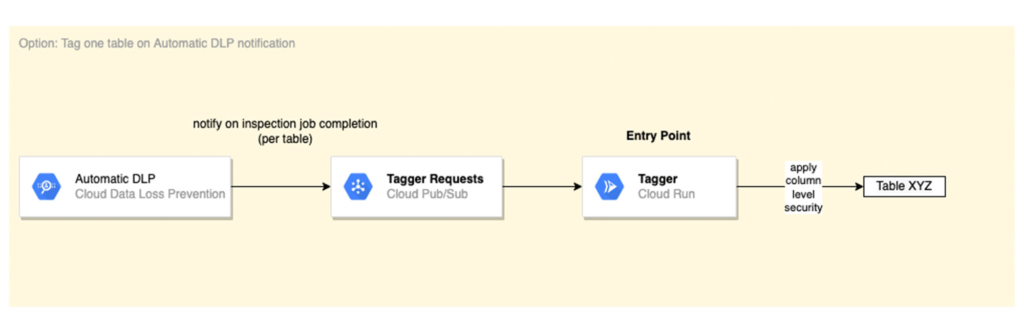
Automatic DLP is configured to send a Pub/Sub notification on each inspection job completion. The Pub/Sub notification includes the resource name and it triggers the Tagger service directly
[Option 2] Scheduled tagging:
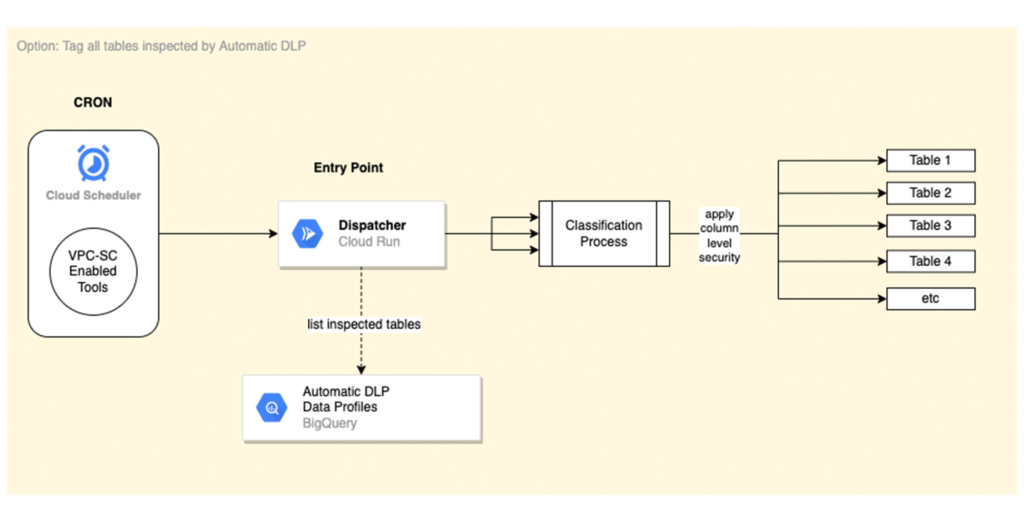
In this scenario, the Dispatcher service is invoked on a schedule with a payload representing a BigQuery scope to list inspected tables by Automatic DLP and create a tagging request per table. You could use Cloud Scheduler (or any Orchestration tool) to invoke the Dispatcher service. If the solution is deployed within a VPC-SC perimeter, other schedulers that support VPC-SC should be used (such as Composer or Custom App.)
In addition, more than one Cloud Scheduler/Trigger could be defined to group projects/datasets/tables that have the same tagging schedule (such as daily or monthly.)
To learn more about Automatic DLP, see our webpage. To learn more about the BQ classifier, see the open source project on Github: GoogleCloudPlatform/bq-pii-classifier and get started today!
Enable high quality curated detections in Chronicle SecOps Suite

2834
Of your peers have already read this article.
2:30 Minutes
The most insightful time you'll spend today!
A critical component of any security operations team’s job is to deliver high-fidelity detections of potential threats across the breadth of adversary tactics. But increasingly sophisticated threat actors, an expanding attack surface, and an ever-present cybersecurity talent shortage make this task more challenging than ever.
Google keeps more people safe online than anyone else. Individuals, businesses and governments globally depend on our products that are secure-by-design and secure-by-default. Part of the “magic” behind Google’s security is the sheer scale of threat intelligence we are able to derive from our billions of users, browsers, and devices.
Today, we are putting the power of Google’s intelligence in the hands of security operations teams. We are thrilled to announce the general availability of curated detections as part of our Chronicle SecOps Suite. These detections are built by our Google Cloud Threat Intelligence (GCTI) team, and are actively maintained to reduce manual toil in your team.
Our detections provide security teams with high quality, actionable, out-of-the-box threat detection content curated, built and maintained by Google Cloud Threat Intelligence (GCTI) researchers. Our scale, and depth of intelligence, gained by securing billions of users everyday, gives us a unique vantage point to craft effective and targeted detections. These native detection sets cover a wide variety of threats for cloud and beyond, including Windows-based attacks like ransomware, remote-access tools (RAT), infostealers, data exfiltration, suspicious activity, and weakened configurations.
With this launch, security teams can smoothly leverage Google’s expertise and unique visibility into the threat landscape. This release helps understaffed and overstressed security teams keep up with an ever evolving threat landscape, quickly identify threats, and drive effective investigation and response. With this new release, security teams can:
- Enable high quality curated detections with a single click from within the Chronicle console.
- Operationalize data with high-fidelity threat detections, stitched with context available from authoritative sources (such as IAM and CMDB).
- Accelerate investigation and response by finding anomalistic assets and domains with prevalence visualization for the detections triggered.
- Map detection coverage to the MITRE ATT&CK framework to better understand adversary tactics and techniques and uncover potential gaps in defenses.
Detections are constantly updated and refined by GCTI researchers based on the evolving threat landscape. The first release of curated detections includes two categories that cover a broad range of threats, including:
- Windows-based threats: Coverage for several classes of threats including infostealers, ransomware, RATs, misused software, and crypto activity.
- Cloud attacks and cloud misconfigurations: Secure cloud workloads with additional coverage around exfiltration of data, suspicious behavior, and additional vectors.
Let’s look at an example of how you can put curated detections to work within the Chronicle dashboard, monitor coverage, and map to MITRE ATT&CK®.
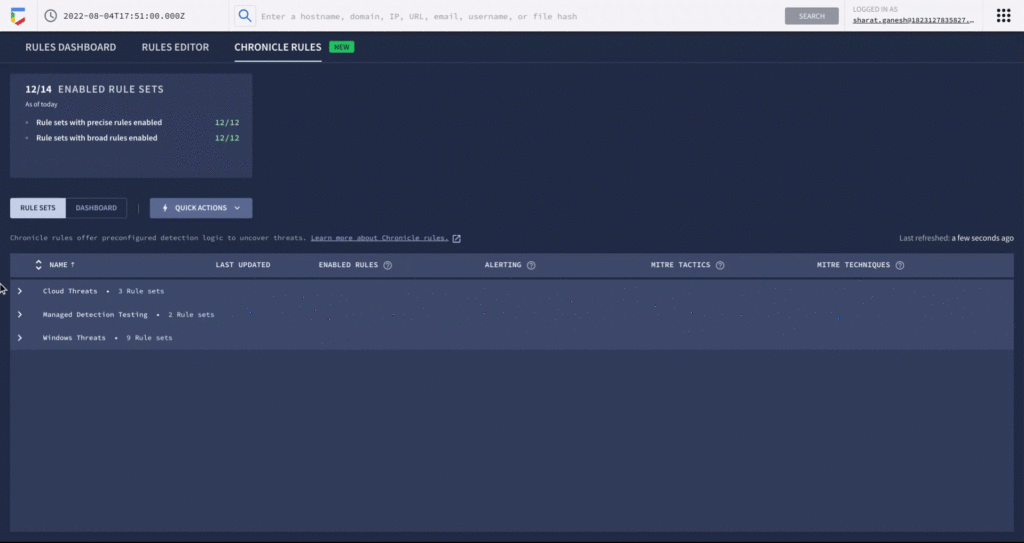
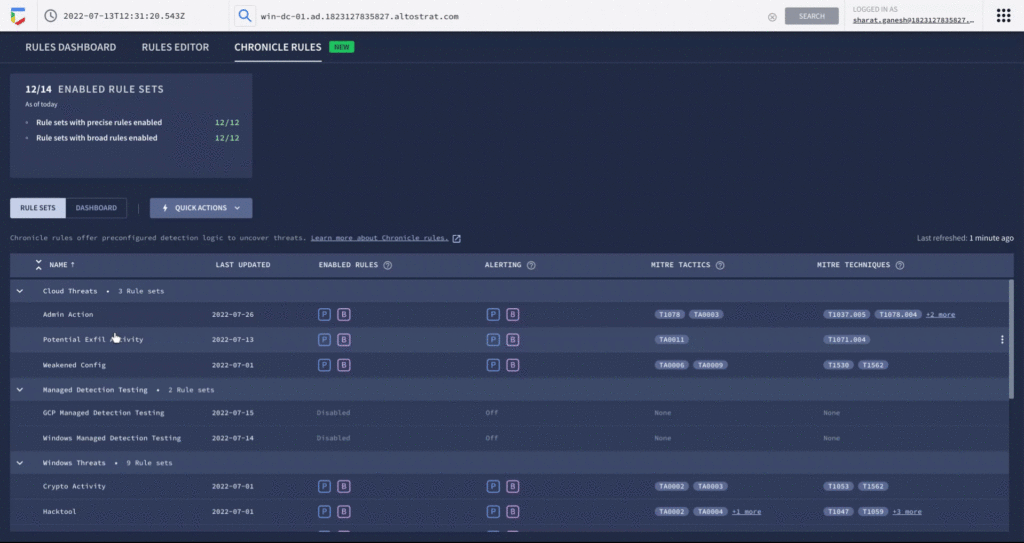
An analyst can learn more details around specific detections and understand how they map to the MITRE ATT&CK framework. There are customized settings to configure deployment and alerting, and specify exceptions via reference lists.
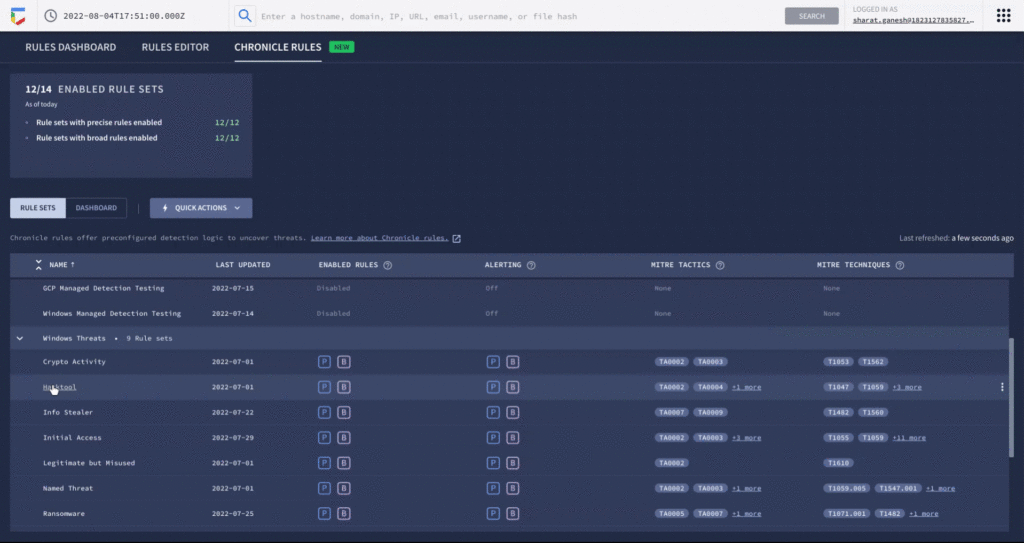
You can see each rule which has generated a detection against your log data in the Chronicle rules dashboard. You can observe detections associated with the rule and pivot to investigative views. For example, here is the detection view from the timeline of an Empire Powershell Stager launch triggered by the Windows RAT rule set. You can also easily pivot to associated information and investigate the asset on which it was triggered.
By surfacing impactful, high-efficacy detections, Chronicle can enable analysts to spend time responding to actual threats and reduce alert fatigue. Our customers who used curated detections during our public preview were able to detect malicious activity and take actions to prevent threats earlier in their lifecycle. And there’s more to come. We will be delivering a steady release of new detection categories covering a wide variety of threats, community-driven content, and other out-of-the-box analytics.
Ready to put Google’s intelligence to work in your Security Operations Center? Contact Google Cloud sales or your customer success CSM team. You can also learn more about all these new capabilities in Google Chronicle in our product documentation.
3243
Of your peers have already watched this video.
3:00 Minutes
The most insightful time you'll spend today!
Why CISOs Need to Know This to Protect Users From Unsafe Websites
Unsafe web resources include social engineering sites—such as phishing and deceptive sites—and sites that host malware or unwanted software. For CISOs and their teams, this can quickly become an insurmountable challenge if it’s not nipped in the bud.
But there’s a way to enable companies to find unsafe URLs before their users do, identify phishing and deceptive sites, as well as sites that host malware or unwanted software.
Google Cloud’s Web Risk API was built to help admins protect users from unsafe websites. If a URL is known to be unsafe, Web Risk API responds with the threat type and the amount of time during which the website should be considered unsafe.
The Web Risk API can be integrated into both cloud-based and on-premises hosted applications and websites.
Watch this three-minute video to find out how Web Risk APIs can break the chain of malicious attacks and protect the data of your customers and users.
New Certificate Manager Helps Leverage Google’s Network Security and Performance

3036
Of your peers have already read this article.
2:00 Minutes
The most insightful time you'll spend today!
We’re excited to announce the public preview of Certificate Manager and its integration with External HTTPS Load Balancing. Certificate Manager enables you to use External HTTPS Load Balancing with as many certificates or domains as you need. You can bring your own TLS certificates and keys if you have an existing certificate lifecycle management solution you’d like to use with Google Cloud, or enjoy the convenience of our fully Managed TLS offerings.
Extend the security and performance of the Google network to your customers
Certificate Manager brings support for multiple certificates per customer. When coupled with our global anycast load balancing solution with automated autoscaling and failover, you now have a powerful platform for building robust SaaS and PaaS offerings. This enables custom domain support for your customers with the lowest latency and the highest level of availability.
Alon Kochba, the head of web performance at website-building service Wix, explained how the new features lighten their workload.
“As a SaaS product, we need to terminate SSL for millions of custom domains and certificates. GCP’s Certificate Manager and External HTTPS Load Balancing lets us do this at the edge, close to the clients, without having to rely on our own custom solution for terminating SSL,” Kochba said.
Customers who switch to External HTTPS Load Balancing can also now protect their SaaS users from denial of service attacks, OWASP Top 10 risks, and other common Web attacks by adopting Cloud Armor.
DNS authorization
This release also now enables you to provision your Google-managed certificates with DNS-based authorizations and have them ready to use before your load-balancing production environment is fully set up. This will help streamline the migration process to Google Cloud, for example. To create a DNS authorization, use the following command:
gcloud beta certificate-manager dns-authorizations create example-authorization --domain="example.com"
This command returns the CNAME record for _acme-challenge.example.com that you must add to your DNS configuration in the DNS zone of the target domain. This CNAME record points to a special Google Cloud domain, e.g.: “534959-1a8a-40cf-90b6-b1f5f8d22517.2.authorize.certificatemanager.goog” that is used to verify domain ownership.
When you request a certificate based on the above authorization, Cloud Certificate Manager will work with the Certificate Authority automatically to get and later renew your certificate for that domain.
Wildcard support
This DNS-based domain control authorization also allows us to bring you support for wildcard certificates. To configure the use of wildcard certificates you first must configure the DNS authorization as we’ve indicated above. Once that has been completed, you can configure the use of a wildcard certificate using the following command. Our example below is for a top-level registered domain and its wildcard subdomains.
gcloud beta certificate-manager certificates create example-wildcard-certificate --domains="example.com,*.example.com" --dns-authorizations="example-authorization"
Monitoring for Certificate Expiration
Another new feature that will be enabled with this product is the ability to monitor certificate expiration with Google Cloud Logging. Cloud Logging creates a record of certificate expiration, uses the `certificatemanager.googleapis.com/Project` monitored resource, and is represented by the following message:
message CertificatesExpiry {// Expiration state of the certificate.enum State {// Unspecified state, should never be reported.STATE_UNSPECIFIED = 0;// Certificate will expire soon.CLOSE_TO_EXPIRY = 1;// Certificate is expired.EXPIRED = 2;}// Number of reported certificates.int64 count;// Names of reported certificates. If there are too many, the list is sampled.repeated string certificates = 2;// State of reported certificates.State state = 3;// Approximate expiration time of reported certificates.// Multiple certificates with close expiration time are batched// together in a single log, so the timestamp is not precise.google.protobuf.Timestamp expire_time = 4;}
The log message is delivered every hour and contains a sample of the certificates being close to expiry or already expired.
Pricing
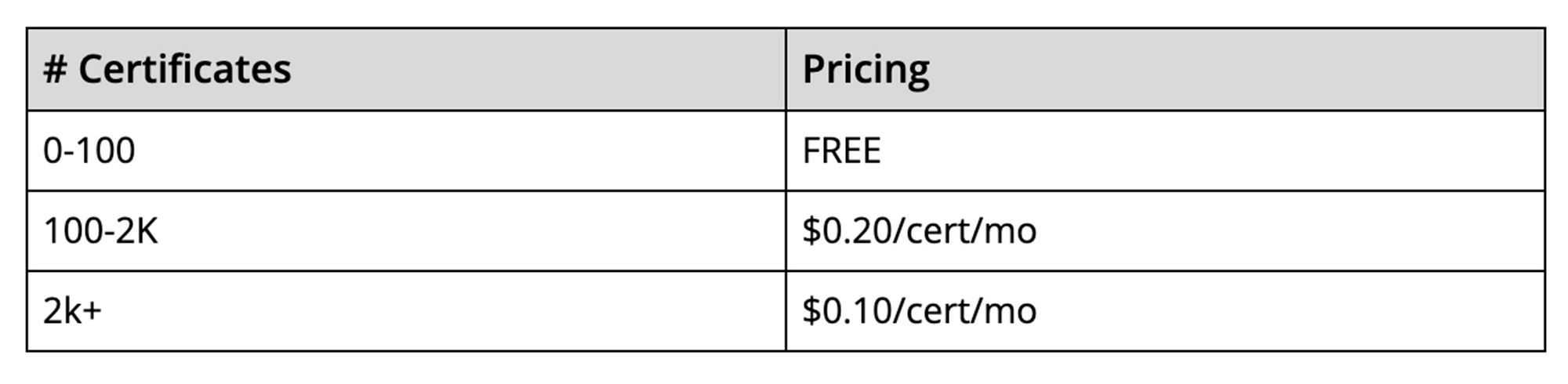
The best part is that there’s no additional charge to use the Certificate Manager for the first 100 certificates. To use more than 100 certificates with the management tools, we will charge on a per-certificate, per-month pricing structure. This empowers you to scale up to as many certificates as you need, and as cost-effectively as possible. The pricing will be enabled when the solution goes to General Availability.
It is our hope that these new features, combined with the programmability offered by Certificate Manager, will enable you to simplify the way you deploy HTTPS and offer a more scalable and secure service to your customers.
Boost Security with Google’s reCAPTCHA Enterprise Fraud Prevention
1173
Of your peers have already read this article.
2:30 Minutes
The most insightful time you'll spend today!
Today, we are putting the power of Google’s insights and intelligence in the hands of risk, fraud, and security teams everywhere. We are pleased to announce the general availability of reCAPTCHA Enterprise Fraud Prevention, a new product that uses Google’s own fraud models, machine learning, and intelligence from protecting more than 6 million websites to help stop payment fraud.
reCAPTCHA Enterprise Fraud Prevention can help protect payment transactions by identifying targeted manual attacks and large-scale fraud attempts. It automatically trains fraud models based on behavior and transaction data to identify events that are likely fraudulent and could cause a dispute or chargeback if accepted.
When threat actors are identified and blocked on any site in the reCAPTCHA network, the intelligence is made available to help protect other organizations from those same attackers. Organizations can then use the scores to send the transaction for manual review or directly block suspicious transactions, drive increased trust in their legitimate transactions, reduce the amount of friction for good users, and reduce erroneous rejection rates.
“Being a safe and trusted place to give and receive help is our top priority. We are constantly innovating, refining and enhancing our fraud defenses and Google’s reCAPTCHA Enterprise Fraud Prevention adds another layer of industry-leading protection for our users. Combining Google’s rich security expertise with GoFundMe’s focus on fraud prevention is already showing promising results as we strive to keep our platform the safest place to give online,” said Matthew Murray, director of risk, GoFundMe.
According to data obtained from our customers using reCAPTCHA Enterprise Fraud Prevention in private Preview, the new solution can help drive comprehensive value for organizations by:
- Reducing fraud losses: Get behavior modeling (not just mouse movements), stop financial damage created by account takeovers (ATOs), and connect fraud and abuse intelligence across your site and application.
- Increasing legitimate sales: Fraud Prevention can help businesses increase their revenue by providing insights to understand who good users are, who may otherwise be caught in an overly aggressive, customer restrictive fraud model.*
These benefits are enabled for organizations by:
- Preventing advanced attacks: Stopping sophisticated attacks in an environment where attackers use cloud fraud infrastructure, and data leaks, virtual cards and VPN usage are on the rise
- Increasing trust in good transactions: Focus on good approval rates through a unique combination of supervised and unsupervised models
- Improving customer experience: By preventing fraudulent transactions with zero user friction, Fraud Prevention can help businesses protect legitimate users and increase customer retention
Our customers have used these new capabilities in preview in customer experiences that include online checkouts and payment transactions. Fraud Prevention has been used by merchants and payment processors to block millions of dollars in fraudulent transactions in a frictionless way.
reCAPTCHA Enterprise provides a comprehensive online fraud detection platform that helps prevent fraudulent, spammy, and abusive digital client activity across your web and application footprint. This platform includes Account Defender, which protects users from account takeovers (ATO), frictionless bot management capabilities, and password leak detection to identify compromised accounts. With an additional API call for Fraud Prevention, organizations can leverage a comprehensive solution to secure financial transactions along with core reCAPTCHA Enterprise capabilities.
To get started, organizations can install a score-based site key on each part of the payment user flow front end and send transaction data when a purchase occurs. This site key helps train site-specific fraud models and start returning fraud scores for each transaction.
Ready to put reCAPTCHA Enterprise Fraud Prevention to work? Contact our fraud specialists or your customer success CSM team and sign up with the free tier. You learn more about these new capabilities in reCAPTCHA Enterprise in our product documentation. You can also register for our webinar where our experts will be discussing this capability in great detail on June 1, 2023.
Coming up at our Security Summit on June 13-14, you can hear how reCAPTCHA Enterprise helped GoFundMe secure their donors from fraud. Sign up here for free Security Summit registration.
More Relevant Stories for Your Company

Google Cloud & Siemplify Join Forces to Empower Companies to Manage Threat Responses Better
At Google Cloud, we are committed to advancing invisible security and democratizing security operations for every organization. Today, we’re proud to share the next step in this journey with the acquisition of Siemplify, a leading security orchestration, automation and response (SOAR) provider. Siemplify shares our vision in this space, and

Know the Leaders of Google Cloud Public Sector Community
At Google Cloud, being a strategic partner is part of our DNA. Whether it’s listening closely to our customers, helping to build team skills for innovation or simply being there (since we know the cloud is 24/7), we get excited about working hands-on with customers to deliver new solutions. As

Groupe Dauphinoise Grows it Customer Base with G Suite and Google Cloud Platform
As a leading French agricultural cooperative, Groupe Dauphinoise places collaboration at the heart of its philosophy. Working with farmers in the Rhone-Alpes region, Groupe Dauphinoise takes on a diverse range of activities from agricultural production to research and development to running retail outlets. As its operations expanded and strained its

Ensuring Ironclad Security: Our Validation Process for the Confidential Space
We’re pleased to announce that Confidential Space, our new solution that allows you to control access to your sensitive data and securely collaborate in ways not previously possible, is now available in public Preview. First announced at Google Cloud Next, Confidential Space can offer many benefits to securely manage data
