





Google Cloud Region in Columbus to Accelerate Ohioan Businesses and Tech Transformation

3215
Of your peers have already read this article.
1:30 Minutes
The most insightful time you'll spend today!
Digital tools such as cloud computing are fueling economic transformation across the US, including Ohio. Google continues to invest across cities and communities in Ohio, bringing over 200 jobs to the state, and helping provide $12.85 billion of economic activity for tens of thousands of Ohio businesses, nonprofits, publishers, creators and developers. To further accelerate the transformation of all Ohioan businesses and technologists, we’re thrilled to announce our newest Google Cloud region in Columbus, Ohio is open. The Columbus cloud region brings a second region to the Midwest, the 10th region to North America, and grows our global cloud region count to 33.
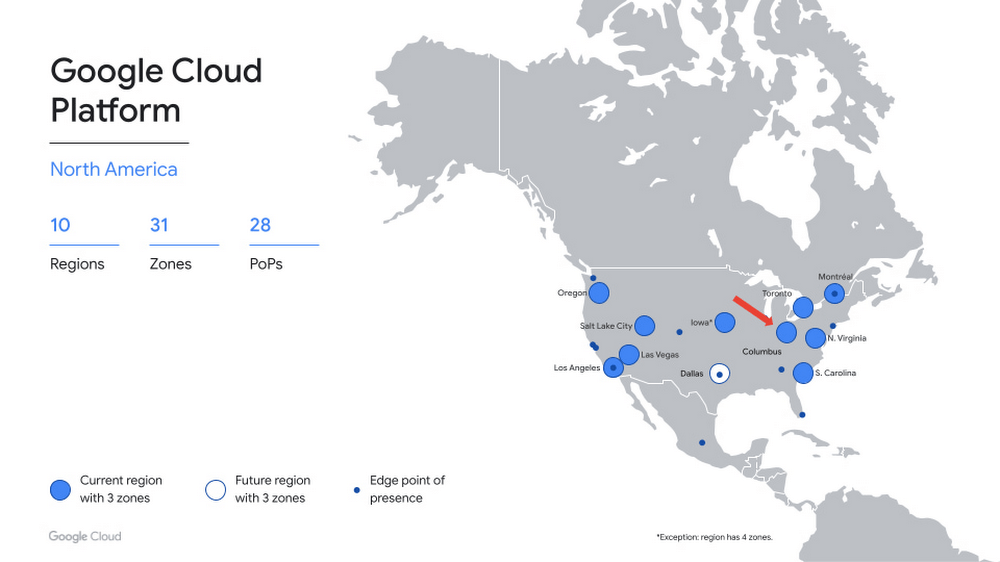
A region for the Buckeye State
Now open to Google Cloud customers, the Columbus region (us-east5) provides you with the speed and availability you need to innovate faster, build high-performing applications, and serve local customers — all on the cleanest cloud in the industry. Additionally, the region gives you added flexibility to distribute your workloads across the central, midwest, and eastern US.
The Columbus region offers immediate access to three zones, for high availability workloads, and our standard set of products, including Compute Engine, Google Kubernetes Engine, Cloud Storage, Persistent Disk, CloudSQL, and Cloud Identity. Our private backbone connects Columbus to our global network more quickly and securely. In addition, you can integrate your on-premises workloads with our new region using Cloud Interconnect. This means that Columbus-based customers can expand globally from their front door, and those based outside the region can more easily reach their users in the Midwest.
What customers are saying
Industries including retail, financial services, and IT are investing in Columbus. Organizations across these verticals have turned to the Google Cloud to innovate faster and help solve their most complex challenges
“As Wendy’s continues to innovate in new ways to create fast, frictionless, and fun interactions that redefine the way customers visit and enjoy our restaurants, our partnership with Google Cloud is a key enabler to delivering on our AI/ML and data analytics strategies. The proximity of the new Google Cloud region to Wendy’s headquarters provides the ability for us to move and scale quickly as business needs evolve. Additionally, Google Cloud’s investment in Columbus positions central Ohio as a true technology hub, which further boosts Wendy’s and other regional employers’ ability to recruit innovative talent,” said Kevin Vasconi, Chief Information Officer, Wendy’s.
“Huntington National Bank’s API Architecture is a central component to our growth and technology strategy. As our business segments grow from an offering and geographic perspective, we must evolve our technology to provide the optimal experience for our customers and our partners. Collaborating directly with Google Cloud on the build out of their cloud region in Central Ohio, provides the access our technology teams need to innovatively scale our infrastructure to meet the demands of our business with increased availability, lower latency, and greater resiliency,” said Geoff Preston, Chief Architect, Huntington National Bank.
“Google Cloud has been instrumental in our ability to scale and optimize data management and compute resources. We prioritize scale, elasticity and resilience in cloud services and Google Cloud delivers all three globally and locally. With Google Cloud security, we can efficiently process the quantities of application data required to accelerate alert detection and reduce response times for the critical infrastructure our customers depend on to enable the continuity of their vital applications.” said Sheryl Haislet, Chief Information Officer at Vertiv, a global provider of critical digital infrastructure and continuity systems headquartered in Columbus, Ohio, that leverages Google Cloud solutions to provide resilience for its operations and to better support customers.
“The addition of the new cloud region in Ohio continues to demonstrate Google Cloud’s commitment to the enterprise space and their presence in the region,” said Chris Delong, Chief Technology Officer, Designer Brands Inc. / DSW
What’s next
We are thrilled to welcome you to our new cloud region in Columbus, and eagerly await to see what you build with our platform. Register here for our Cloud Study Jam in June – an event for local developers to get hands-on training with Google Cloud. Stay tuned for more region announcements and launches this year, including our next U.S. region in Dallas, TX. And for more information, contact sales to get started with Google Cloud today.
Finding Your Favorite Google Cloud Product is Now Easy!
3322
Of your peers have already read this article.
1:30 Minutes
The most insightful time you'll spend today!
Welcome to a new way of exploring Google Cloud products. Finding your favorite products and discovering new ones requires a user interface that’s easy-to-use, clear, informative, and delightful. Google Cloud users have primarily used our side menu to navigate, but with almost one hundred products and growing, it’s safe to say our product list has outgrown the side menu. Over time, we have listened long and hard to feedback from Google Cloud users, who have highlighted challenges navigating the console to explore our products. We’ve heard over and over that it’s difficult and time consuming to scroll through the long list of products and remember what each one offers.
That’s why we created a new All products page to help you easily navigate to your favorite Google Cloud products. This page showcases all of the Google Cloud products as well as our key partner products in one, easy-to-navigate place. With one click, you can discover the right product that is right for your solution.
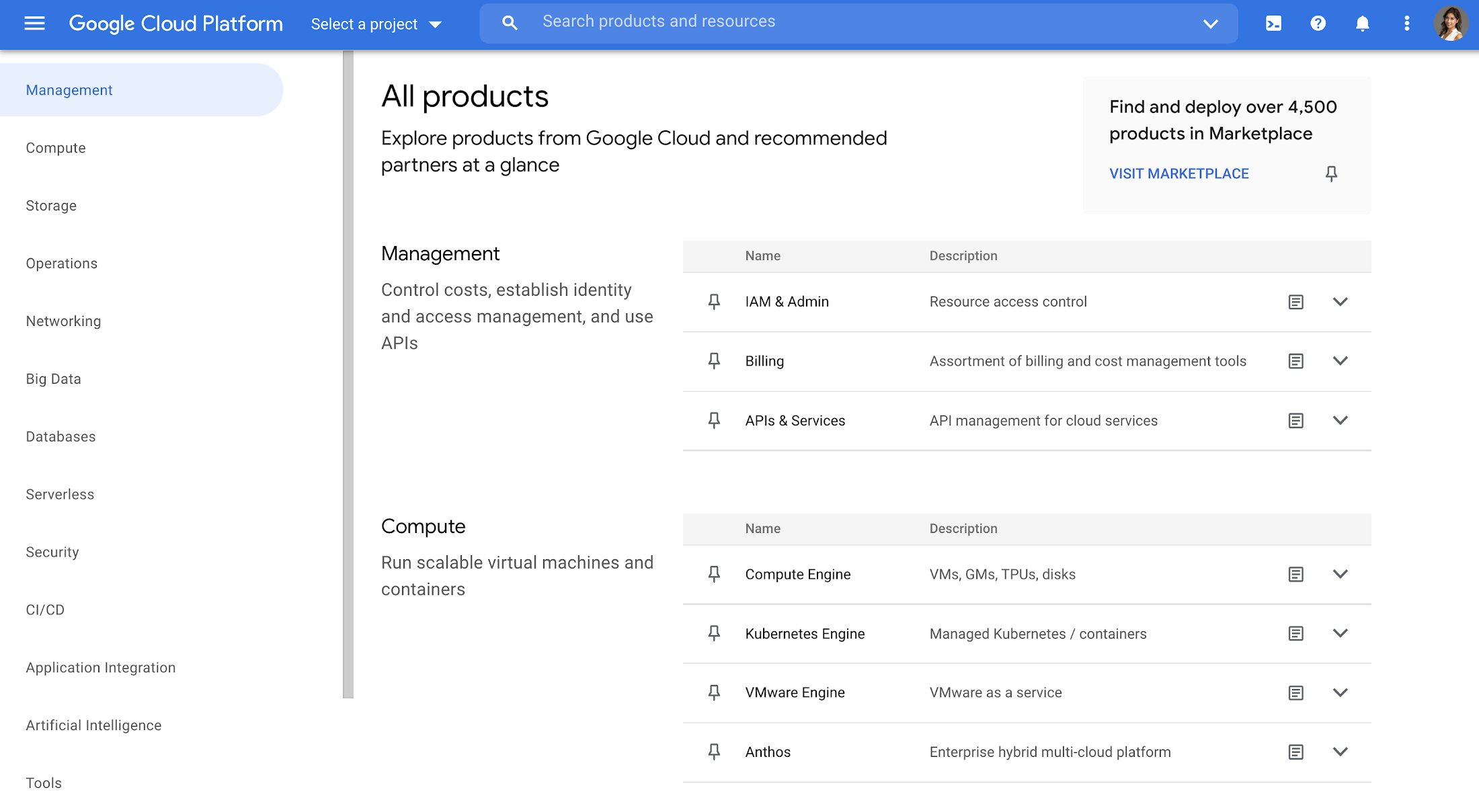
Explore all Google Cloud products
The page is organized into different categories, including Management (ie. IAM, Billing), Compute, Storage, Operations, Security, CI/CD, Artificial Intelligence, Support, and more. Quickly jump to the category of interest through the panel on the left, or you can scroll the entire page. Then you can click each product name to navigate directly to the product homepage. Each product listing also includes a short and long description so you can quickly understand what a product does and whether it fits your needs. This lets you compare categories at-a-glance, saving you the hassle of digging up product overviews elsewhere.
Under each product, you’ll also find a link to documentation and Quickstarts so you can understand it in more depth and try it out right away, removing the extra step of navigating to documentation in another tab.
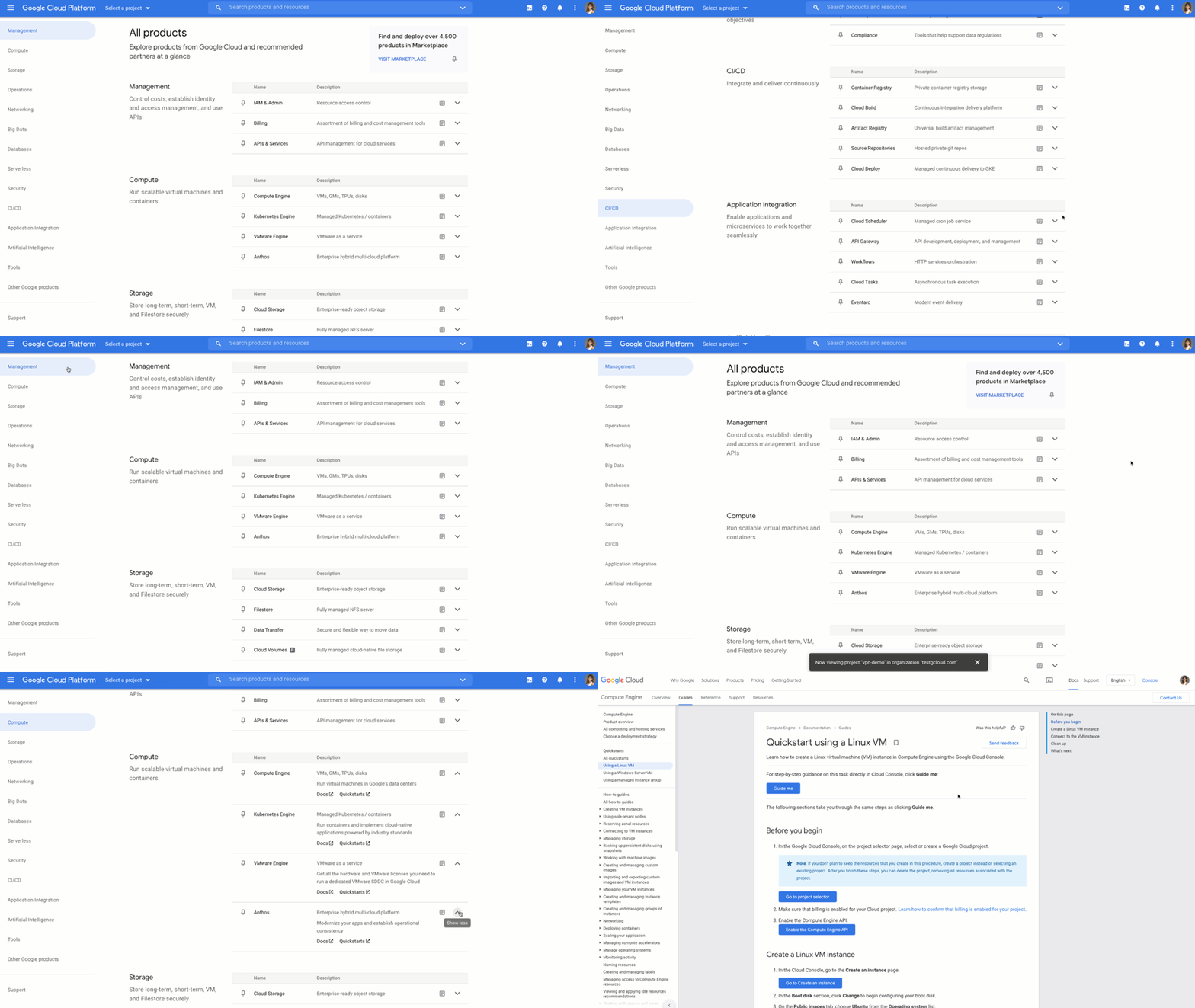
Customize your navigation
To make navigation even easier, you can pin products directly from the All products page, and they will show up at the top of your side menu. You can also customize your navigation by reordering your pins in the side menu. That way, you can quickly access your most-used products directly from the side menu instead of scrolling through the panel or the All products page.
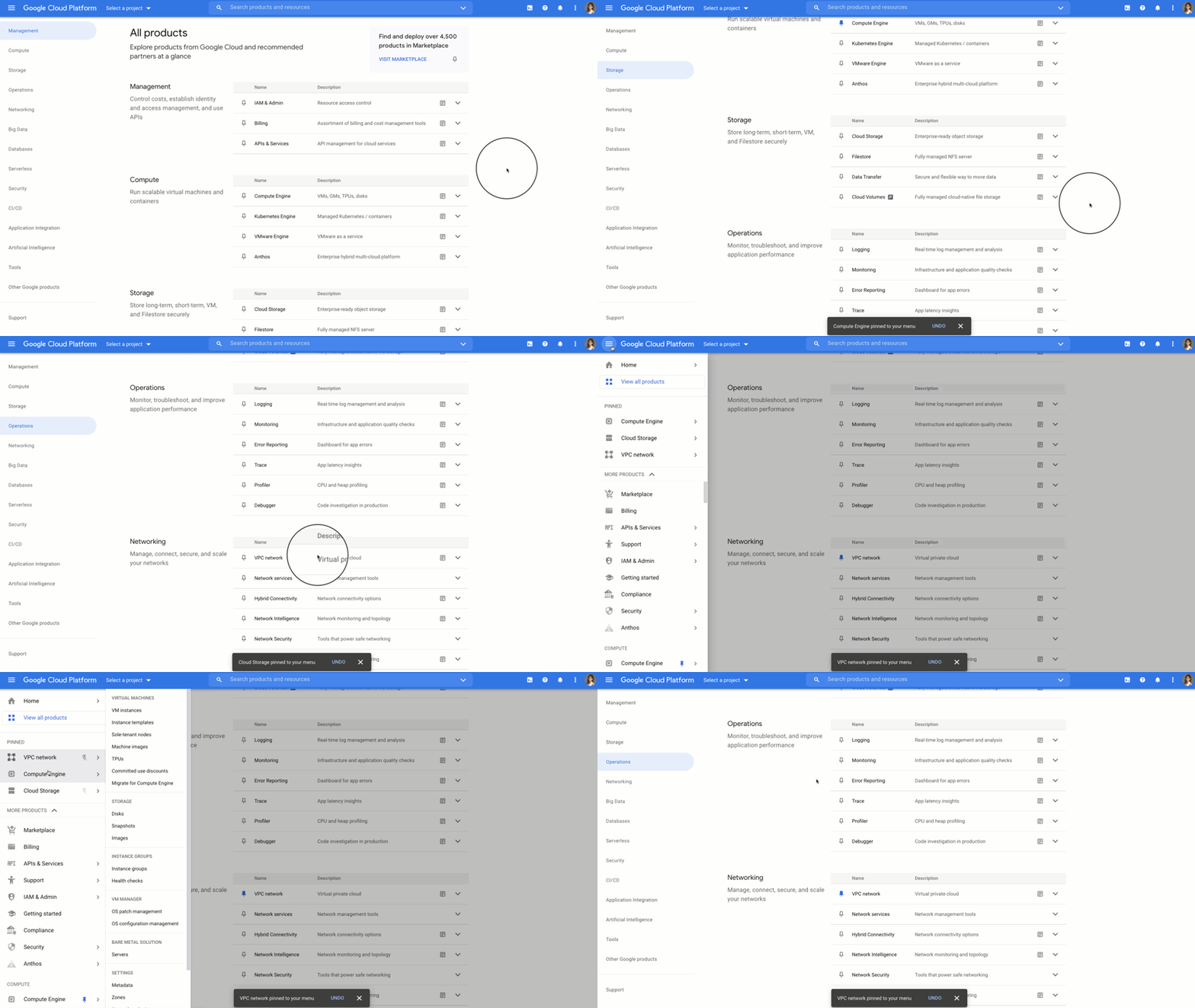
Save time and get more done faster
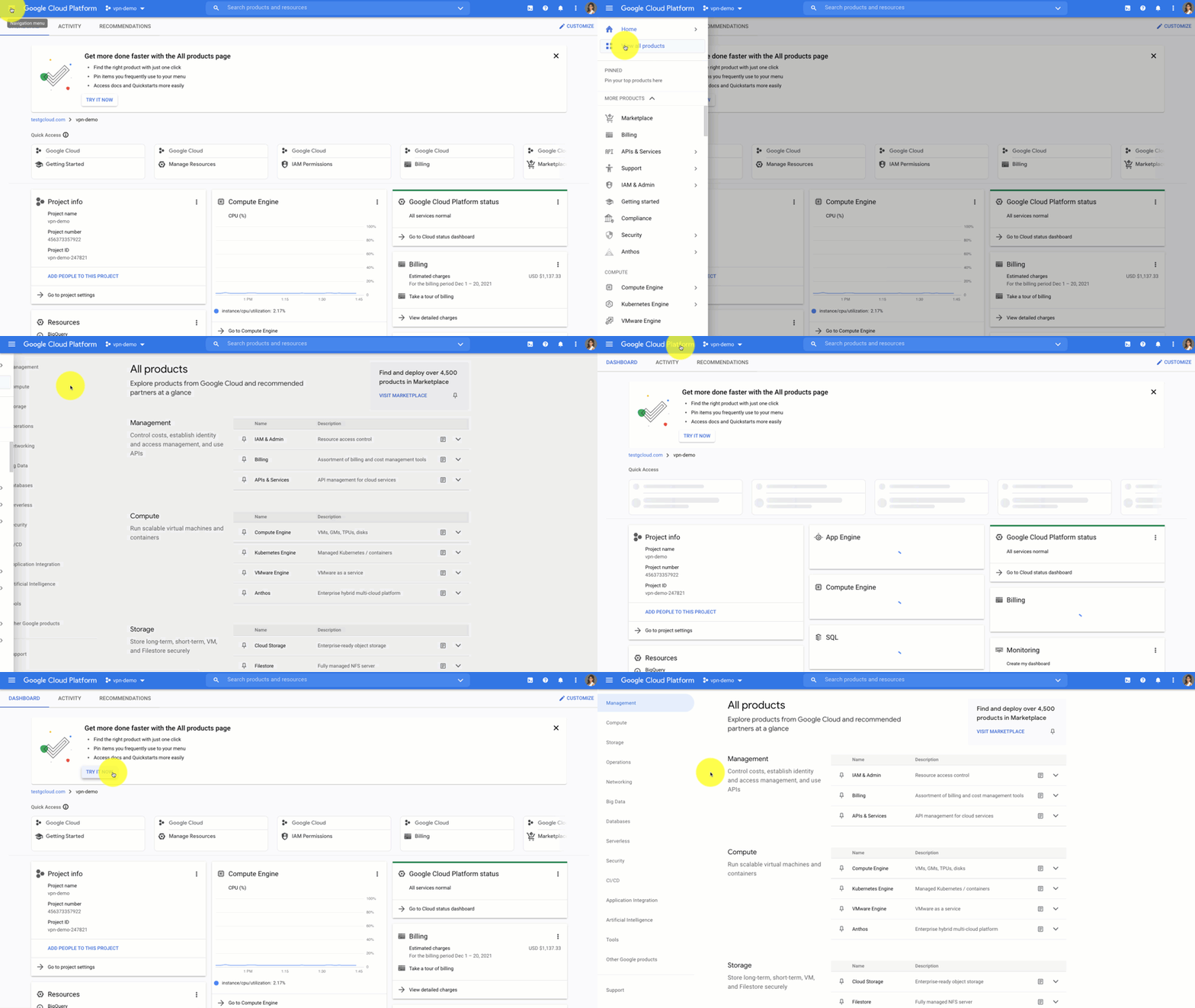
With the new All products page you can save time scrolling and cut straight to the good stuff – finding your products, discovering new ones, learning, and getting hands on. Try it out for yourself by heading to the Google Cloud Console. Click the side panel and click “View All products,” or on the home dashboard you’ll see a call out to try out the All products page.
If you have any feedback about this new experience, I want to hear! Reach out to me on Twitter at @stephr_wong or on Linkedin at stephrwong.
What You Need to Know About Compute Engines

6549
Of your peers have already read this article.
1:30 Minutes
The most insightful time you'll spend today!
Compute Engine is a customizable compute service that lets you create and run virtual machines on Google’s infrastructure. You can create a Virtual Machine (VM) that fits your needs. Predefined machine types are pre-built and ready-to-go configurations of VMs with specific amounts of vCPU and memory to start running apps quickly. With Custom Machine Types, you can create virtual machines with the optimal amount of CPU and memory for your workloads. This allows you to tailor your infrastructure to your workload. If requirements change, using the stop/start feature you can move your workload to a smaller or larger Custom Machine Type instance, or to a predefined configuration.
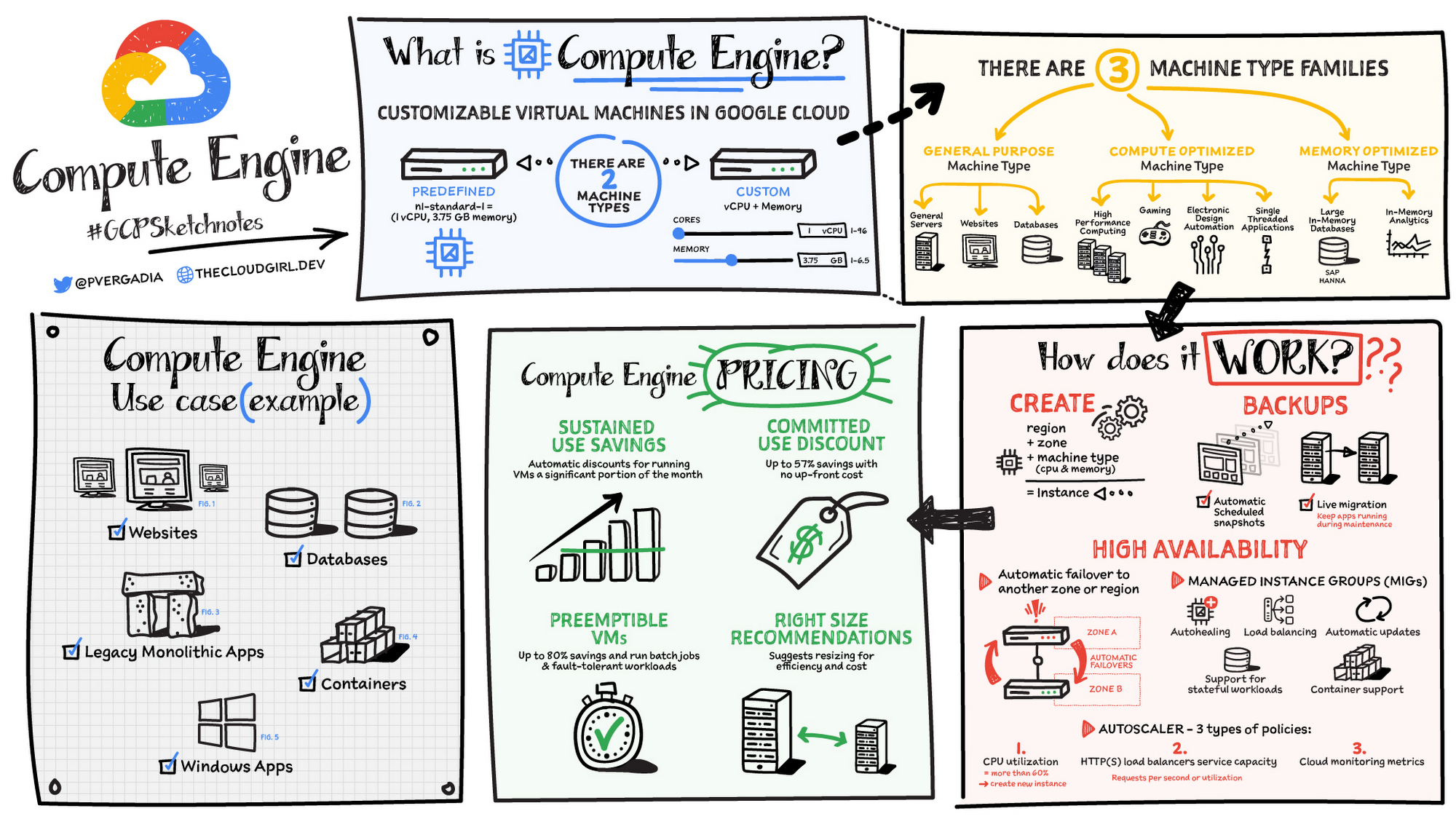
Machine types
In Compute Engine, machine types are grouped and curated by families for different workloads. You can choose from general-purpose, memory-optimized, compute-optimized and accelerator-optimized families.
- General-purpose machines are used for Day-to-day computing at a lower cost and for balanced price/performance across a wide range of VM shapes. The use cases that best fit here are web serving, app serving, back office applications, databases, cache, media-streaming, microservices, virtual desktops, development environments.
- Memory-Optimized machine are recommended for ultra high-memory workloads such as in-memory analytics and large in-memory databases such as SAP HANA
- Compute-Optimized machines are recommended for ultra high performance workloads such as High Performance Computing (HPC), Electronic Design Automation (EDA), gaming, video transcoding, single-threaded applications.
- Accelerator-Optimized machines are optimized for high performance computing workloads such as Machine learning (ML), Massive parallelized computations and High Performance Computing (HPC)
How does it work?
You can create a VM instance using a boot disk image, a boot disk snapshot, or a container image. The image can be a public operating system (OS) image or a custom one. Depending on where your users are you can define the zone you want the virtual machine to be created in. By default all traffic from the internet is blocked by the firewall and you can enable the HTTP(s) traffic if needed.
Use snapshot schedules (hourly, daily, or weekly) as a best practice to back up your Compute Engine workloads. Compute Engine offers live migration by default to keep your virtual machine instances running even when software or hardware update occurs. Your running instances are migrated to another host in the same zone instead of requiring your VMs to be rebooted.
Availability
For High Availability (HA) Compute Engine offers automatic failover to other regions or zones in event of a failure. Managed instance groups (MIGs) help keep the instances running by automatically replicating instances from a predefined image. They also provide application based autohealing health checks. If an application is not responding on a VM, the auto healer automatically recreates that VM for you. Regional MIGs let you spread app load across multiple zones. This replication protects against zonal failures. MIGs work with load balancing services to distribute traffic across all of the instances in the group.
Compute Engine offers autoscaling to automatically add or remove VM instances from a managed instance group based on increases or decreases in load. Autoscaling lets your apps gracefully handle increases in traffic, and it reduces cost when the need for resources is lower. You define the autoscaling policy for automatic scaling based on the measured load, CPU utilization, requests per second or other metrics.
Active Assist’s new feature, predictive autoscaling, helps improve response times for your applications–When you enable predictive autoscaling, Compute Engine forecasts future load based on your Managed Instance Group’s (MIG) history and scales it out in advance of predicted load, so that new instances are ready to serve when the load arrives. Without predictive autoscaling, an autoscaler can only scale a group reactively, based on observed changes in load in real time. With predictive autoscaling enabled, the autoscaler works with real-time data as well as with historical data to cover both the current and forecasted load. That makes predictive autoscaling ideal for those apps with long initialization times and whose workloads vary predictably with daily or weekly cycles. For more information, see How predictive autoscaling works or check if predictive autoscaling is suitable for your workload, and to learn more about other intelligent features, check out Active Assist.
Pricing
You pay for what you use. But you can save cost by taking advantage of some discounts! Sustained use saving are automatic discounts applied for running instances for a significant portion of the month. If you know your usage upfront, you can take advantage of committed use discounts which can lead up to significant savings without any upfront cost. And by using short lived preemptive instances you can save up to 80%, they are great for batch jobs and fault tolerant workloads. You can also optimize resource utilization with automatic recommendations. For example if you are using a bigger instance for a workload that can run on a smaller instance you can save costs applying these recommendations.
Security
Compute Engine provides you default hardware security. Using Identity and Access Management (IAM) you just have to ensure that proper permissions are given to control access to your VM resources. All the other basic security principles apply, if the resources are not related and don’t require network communication amongst themselves, consider hosting them on different VPC networks. By default, users in a project can create persistent disks or copy images using any of the public images or any images that project members can access through IAM roles. You may want to restrict your project members so that they can create boot disks only from images that contain approved software that meet your policy or security requirements. You can define an organization policy that only allows Compute Engine VMs to be created from approved images. This can be done by using the Trusted Images Policy to enforce images that can be used in your organization.
By default all VM families are Shielded VMs. Shielded VMs are virtual machine instances that are hardened with a set of easily configurable security features to ensure that when your VM boots, it’s running a verified bootloader and kernel — is the default for everyone using Compute Engine, at no additional charge. For more details on Shielded VMs refer to the documentation here.
For additional security, you also have the option to use Confidential VM to encrypt your data in use, while it’s being processed in Compute Engine. For more details on Confidential VM refer to the documentation here.
Use cases
There are many use cases Compute Engine can serve in addition to running websites and databases. You can also migrate your existing systems onto Google Cloud, with Migrate for Compute Engine, enabling you to run stateful workloads in the cloud within minutes rather than days or weeks. Windows, Oracle or VMware applications have solution sets enabling a smooth transition to Google Cloud. To run windows applications either bring your own license leveraging Sole-tenant nodes or using the included licenced images.
Conclusion
Whatever your application use case may be, from legacy enterprise applications to digital native applications, Compute Engine’s families will fit it. For a more in-depth look into Compute Engine check out the documentation.
For more #GCPSketchnote, follow the GitHub repo. For similar cloud content follow me on Twitter @pvergadia and keep an eye out on thecloudgirl.dev
3617
Of your peers have already downloaded this article
1:30 Minutes
The most insightful time you'll spend today!
Many organizations are looking to the public cloud to solve on-premises infrastructure challenges. These range from capacity constraints, aging hardware, or reliability issues; or alternatively, organizations may be looking to capitalize on the value that cloud infrastructure can bring – saving money through automatic scaling, or deriving business value from large scale, cloud-native approaches to data processing and analytics.
However, moving to the cloud can be a complex and time-consuming journey. An inefficient migration program can significantly reduce the benefits realized from the migration, and a pure lift-and-shift approach can leave you with similar challenges and costs in the cloud as you were trying to escape from on-premises.
In this whitepaper, we outline Google’s approach to building a Migration Factory – an organization structure and set of processes that enable a fast, efficient migration to the cloud. We don’t presume that this is a team of Googlers coming to deliver your migration. We recommend building a blended team of people with the right skills and understanding of your organization, with clearly defined goals that are closely measured through the life of the program.

ATB Financial Focuses on Customer Experience with the Speed it Gains in the Cloud
DOWNLOAD CASE STUDY3837
Of your peers have already downloaded this article
5:30 Minutes
The most insightful time you'll spend today!
As senior vice president and head of technology enablement for ATB Financial, Barry Hensch has a mission: creating a seamless experience for the Alberta, Canada-based bank’s nearly 800,000 customers by leveraging the latest digital technology. ATB is a purpose-driven financial institution owned and operated by Alberta’s provincial government, with about C$55.1 billion in assets under management between its banking and wealth-management arms. The full-service bank also boasts a large market share of small businesses in the province.
As part of ATB’s drive to meet its customers’ ever growing expectations, Hensch has embarked on an ambitious digital transformation strategy, migrating the bank’s vast SAP infrastructure onto Google Cloud. The move takes hardware capacity and maintenance concerns entirely off his plate so he and his team can pursue innovations that bring true value to the customer.
Hensch recently discussed ATB’s cloud journey, the new capabilities the cloud has opened up for ATB, and where the company plans to go using Google Cloud’s artificial intelligence and machine learning capabilities.
Synopsys & Google Cloud: Helping Semiconductor Companies Drive Electronic Design Automation Innovation

2860
Of your peers have already read this article.
2:30 Minutes
The most insightful time you'll spend today!
Google Cloud and Synopsys Inc are partnering to help semiconductor companies drive Electronic Design Automation (EDA) innovation in the cloud to accelerate time to market, and lower costs across the entire semiconductor product life cycle. Synopsys is the industry’s largest provider of EDA technology used in the design and verification of integrated circuits, or semiconductor chips. Bringing Synopsys technology onto Google Cloud enables customers to benefit from scalable cloud bursting and complementary licensing models to help them quickly deploy and scale Synopsys’ EDA tools. Semiconductor companies can significantly accelerate chip design and production, increase designer productivity, and empower innovation in power-performance-area optimization.
Google Cloud Platform has enabled high performance computing workloads, such as those used by today’s semiconductor chip designers, to deliver exceptionally fast results and reduce prototyping from years to months. Google Cloud’s HPC services have delivered highly scalable solutions across multiple industries – from scientific research to autonomous vehicle testing and simulation.
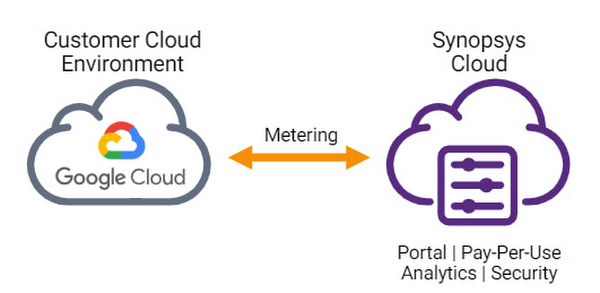
EDA software is a large consumer of high performance computing capacity in the cloud. With the release of Synopsys Cloud bring-your-own-cloud (BYOC) solution on Google Cloud, chip designers can now scale their Google Cloud infrastructure with Synopsys’s leading EDA tools under the flexible FlexEDA pay-per-use model and access unlimited EDA software license availability on-demand by the hour or minute.
The Synopsys Cloud BYOC deployment architecture on Google Cloud is enabled through their unique cloud metering service which uses Google Cloud regional MIGs (Managed Instance Groups) for autoscaling and multi-zone deployment. This enables the service to scale up to meet customer workload demands and scale down to optimize costs. Secrets used by Synopsys Cloud are securely stored in Google Secret Manager and usage data is encrypted using Google Cloud key management, providing customers with a highly secure design environment.
Synopsys Cloud also leverages Google Cloud’s Ops Agent and Operations Suite Dashboards are used to show metric data, alerting policies, and log entries, providing customers with detailed analytics visibility to make better chip design project lifecycle management decisions. The Synopsys Cloud BYOC solution has been validated with EDA workloads scaling out to thousands of cores on Google Cloud, using Google Filestore network file storage during validation to provide the highest throughput performance.
Vikram Bhatia, Head, Synopsys Cloud Product Management, Synopsys said, “With the release of Synopsys Cloud BYOC solution on Google Cloud, we are transforming the way our mutual semiconductor customers can design the chips of the future. Google Cloud has been leading the innovation wave for semiconductors in the cloud and we are excited about being an early adopter in leveraging those innovations for our unique EDA offerings on the cloud.” Customers can evaluate a full featured Synopsys Cloud BYOC environment on Google Cloud for free by signing up at: synopsys.com/cloud.
“Combined with GCP’s unique platform services for AI, security, and shared storage, the Synopsys Cloud BYOC solution creates a compelling package for semiconductor designers who will create the next generation of chips for the world’s insatiable needs” says Simon Floyd, Industry Director, Manufacturing & Transportation, Google Cloud.
Google Cloud provides everything you need, including free Google Cloud credits to get you up and running. Click here to learn more about Semiconductors on Google Cloud.
More Relevant Stories for Your Company

Beyond Traditional Learning: AI-based Online Learning Platform and Google Cloud Solutions Push Learners to Get Ahead
The combination of a vital need for IT experts among businesses and a digital skills gap is making lifelong learning increasingly critical. Beyond professional development, learning new skills offers additional rewards from building peer connections to boosting your creativity. That’s why in 2020 Krishna Deepak Nallamilli and I launched KIMO.ai to reimagine how people


How Google’s Customer Data Platform Helps Retail Brands Offer Data-driven , Personalized CX
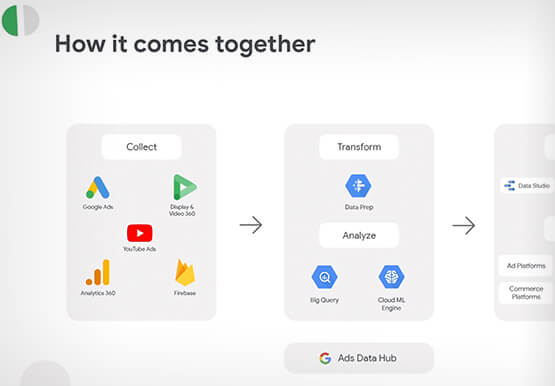
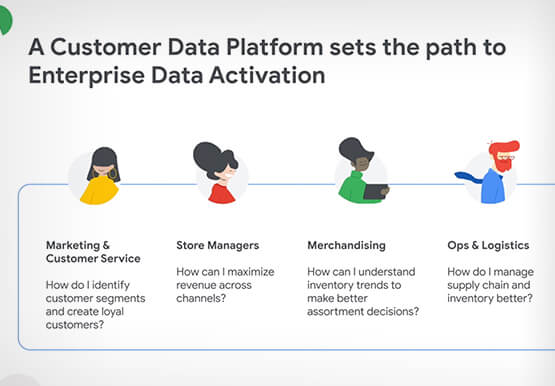
Retail companies need customer insights to deliver personalized experiences that impact revenue generation and cost savings. Watch how Google Cloud's customer data platform helps brands integrate and build holistic view of data in silos to drive marketing and customer service success.

6 Tips for Stress-Free Google Cloud Billing
If you took one look at the title of this blog and thought, “just show me how, because I already know a million reasons why I’m stressed about billing things” then check out the interactive tutorial right here. For everyone else, read on, because we’ll walk through some common sense tips,

Ubuntu Pro Images Now Available on Google Cloud
Today, we’re pleased to announce the general availability of Ubuntu Pro images on Google Cloud, providing customers with an improved Ubuntu experience, expanded security coverage, and integration with critical Google Cloud features. In partnership with Canonical, we’re making it even easier for customers that have fully embraced open source to ensure
