





Google Cloud is Every Retailer’s Most Trusted Cloud

6620
Of your peers have already read this article.
3:00 Minutes
The most insightful time you'll spend today!
Whether they were ready for it or not, the COVID-19 pandemic transformed many retailers into digital businesses. Retailers made huge investments into commerce technologies, customer experience tools, sales and fulfillment technology, and improving digital experiences to continue providing their goods and services to their customers. Now, more than a year into the COVID-19 pandemic, digital retail is the new normal. In fact, many retailers are planning on expanding their digital investments. However, as their digital footprint expands, so do their threats and security concerns.
As a digital-focused retailer, your website is the most visible part of your attack surface. Your website is where your customers search for goods or services, make payments, or learn more about your brand. However, your website does not operate in isolation. There is an underlying infrastructure as well as the services that run on top of it that need protection from a wide array of attacks that may seek to compromise your data, internal employees, business, and customers. During this week’s Google Cloud Retail Summit, we’ve shared why Google Cloud is built to be the most trusted cloud for retailers. From providing you with control over your data as you move from your own data centers to the public cloud to giving you built-in technology to protect your applications all the way to your end users, Google Cloud helps you safely migrate to and operate in our Trusted Cloud.
Trusted Cloud Gives You Control, Transparency, and Sovereignty
- Access Transparency: We offer the ability to monitor and approve access to your data or configurations by Google Cloud support and engineering based on specific justifications and context, so you have visibility and control over insider access.
- Certificate Authority Service (CAS): CAS is a highly scalable and available service that simplifies and automates the management and deployment of private CAs while meeting the needs of modern developers and applications. With CAS, you can offload to the cloud time-consuming tasks associated with operating a private CA, like hardware provisioning, infrastructure security, software deployment, high-availability configuration, disaster recovery, backups, and more, allowing you to stand up a private CA in minutes, rather than the months it might normally take to deploy.
- Confidential Computing: We already encrypt data at-rest and in-transit, but customer data needs to be decrypted for processing. Confidential Computing is a breakthrough technology which encrypts data in-use—while it’s being processed. Confidential VMs take this technology to the next level by offering memory encryption so that you can further isolate your workloads in the cloud. With the beta launch of Confidential VMs, we’re the first major cloud provider to offer this level of security and isolation while giving you a simple, easy-to-use option for your newly built and “lift and shift” applications.
- Cloud Key Management: We allow you to configure the locations where your data is stored, where your encryption keys are stored, and where your data can be accessed from. We give you the ability to manage your own encryption keys, even storing them outside Google’s infrastructure. Using our External Key Management service, you have the ability to deny any request by Google to access encryption keys necessary to decrypt customer data at rest for any reason.
Trusted cloud Helps You Prevent, Detect, and Respond to Threats
- BeyondCorp Enterprise is Google’s comprehensive zero trust product offering. Google has over a decade of experience managing and securing cloud applications at a global scale, and this offering was developed based on learnings from our experience managing our own enterprise, feedback from customers and partners, as well as informed by leading engineering and security research. We understand that most customers host resources across different cloud providers. With this in mind, BeyondCorp Enterprise was purpose-built as a multicloud solution, enabling customers to securely access resources hosted not only on Google Cloud or on-premises, but also across other clouds such as Azure and Amazon Web Services (AWS).
- Cloud Armor: We’re simplifying how you can use Cloud Armor to help protect your websites and applications from exploit attempts, as well as Distributed Denial of Service (DDoS) attacks. With Cloud Armor Managed Protection Plus, you will get access to DDoS and WAF services, curated rule sets, and other services for a predictable monthly price.
- Chronicle: Chronicle is a threat detection solution that identifies threats, including ransomware, at unparalleled speed and scale. Google Cloud Threat Intelligence for Chronicle surfaces highly actionable threats based on Google’s collective insight and research into Internet-based threats. Threat Intel for Chronicle allows you to focus on real threats in the environment and accelerate your response time.
- Google Workspace Security: Used by more than five million organizations worldwide, from large banks and retailers with hundreds of thousands of people to fast-growing startups, Google Workspace and Google Workspace for Education include the collaboration and productivity tools found here. Google Workspace and Google Workspace for Education are designed to help teams work together securely in new, more efficient ways, no matter where members are located or what device they use. For instance, Gmail scans over 300 billion attachments for malware every week and prevents more than 99.9% of spam, phishing, and malware from reaching users. We’re committed to protecting against security 1 threats of all kinds, innovating new security tools for users and admins, and providing our customers with a secure cloud service.
- Identity & Access Management IAM: Identity and Access Management (IAM) lets administrators authorize who can take action on specific resources, giving you full control and visibility to manage Google Cloud resources centrally. For enterprises with complex organizational structures, hundreds of workgroups, and many projects, IAM provides a unified view into security policy across your entire organization, with built-in auditing to ease compliance processes.
- reCAPTCHA Enterprise: reCAPTCHA has over a decade of experience defending the internet and data for its network of more than 5 million sites. reCAPTCHA Enterprise builds on this technology with capabilities, such as two-factor authentication and mobile application support, designed specifically for enterprise security concerns. With reCAPTCHA Enterprise, you can defend your website against common web-based attacks like credential stuffing, account takeovers, and scraping and help prevent costly exploits from malicious human and automated actors. And, just like reCAPTCHA v3, reCAPTCHA Enterprise will never interrupt your users with a challenge, so you can run it on all webpages where your customers interact with your services.
- Security Command Center: With Security Command Center (SCC), our native posture management platform, you can prevent and detect abuse of your cloud resources, centralize security findings from Google Cloud services and partner products, and detect common misconfigurations, all in one easy-to-use platform. We have Premium tier for Security Command Center to provide even more tools to protect your cloud resources. It adds new capabilities that let you spot threats using Google intelligence for events in Google Cloud Platform (GCP) logs and containers, surface large sets of misconfigurations, perform automated compliance scanning and reporting. These features help you understand your risks on Google Cloud, verify that you’ve configured your resources properly and safely, and document it for anyone who asks.
- VirusTotal: VirusTotal inspects items with over 70 antivirus scanners and URL/domain blocklisting services, in addition to a myriad of tools to extract signals from the studied content. Any user can select a file from their computer using their browser and send it to VirusTotal.
- Web Risk API: With Web Risk, you can quickly identify known bad sites, warn users before they click infected links, and prevent users from posting links to known infected pages from your site. Web Risk includes data on more than a million unsafe URLs and stays up to date by examining billions of URLs each day.
Trusted cloud Plays an Active Role in Our Shared Fate
Our trusted cloud provides a shared-fate model for risk management. We stand with retailers from day one, helping them implement best practices for safely migrating to and operating in our trusted cloud.
We hope you enjoy the sessions we’ve created for you with Google Cloud Retail Summit and that they help you understand the ways our trusted cloud can help secure retailers all over the world.
Want to Code for the Cloud? Get Started with the Native App Development Track

6752
Of your peers have already read this article.
2:00 Minutes
The most insightful time you'll spend today!
Earlier this year, we launched the Google Cloud skills challenge, which provides 30 days of free access to training to build your cloud knowledge and an opportunity to earn skill badges that showcase your Google Cloud competencies. Today, we’re adding a Native App Development track to the skills challenge, joining the Getting Started, Data Analytics, Kubernetes, Machine Learning (ML) and Artificial Intelligence (AI) tracks.
The Native App Development track is designed for cloud developers who want to learn to build serverless web apps and Google Assistant applications on Google Cloud using Cloud Run and Firebase. Specifically, you’ll have an opportunity to earn three skill badges in the Native App Dev track: Serverless Firebase Development, Serverless Cloud Run Development, and Build Interactive Apps with Google Assistant. To earn a skill badge, you complete a series of hands-on labs and take a final assessment challenge lab to test your skills.
Here’s an overview of each badge.
Serverless Firebase Development
To earn this skill badge, you’ll learn how to build serverless web apps, import data into a serverless database, and build Google Assistant applications using Firebase, Google’s backend-as-service platform for creating mobile and web applications.
Serverless Cloud Run Development
For this badge, you’ll discover how to use Cloud Run, a fully managed serverless platform, to connect and leverage data stored in Cloud Storage. You’ll learn how to use Cloud Run to build a resilient, asynchronous system with Pub/Sub, build a REST API gateway as well as build and expose services.
Build Interactive Apps with Google Assistant
To earn the final skills badge, you’ll build Google Assistant applications by creating a project in the Actions console, integrating Dialogflow, testing your action in the Actions simulator, and adding Cloud Translation API to your assistant application.
Ready to jump into the skills challenge? Sign up here.
You can also check out this quick video below to learn how to join the skills challenge.
Learn About Kf: How it Helps Move Existing Cloud Foundry Workloads to Kubernetes

3432
Of your peers have already read this article.
1:30 Minutes
The most insightful time you'll spend today!
While many companies are writing brand-new Kubernetes-based applications, it’s still quite common to find companies who want to migrate existing workloads. A common source platform for these applications is Cloud Foundry. However, getting an existing Cloud Foundry application running on Kubernetes can be non-trivial, especially if you want to avoid making code changes in your applications, or taking on big process changes across teams. That is, if you’re not using Kf to do a lot of that heavy lifting for you.
Kf is a Google Cloud service that allows you to easily move existing Cloud Foundry workloads to Kubernetes with minimal disruption to your existing processes.
Kf features a command line interface (CLI) also named kf, that replaces the existing Cloud Foundry cf command line utility. The kf CLI implements the most commonly used cf functionality, including the ability to manage bindings, services, apps, routes and more.
For example, to deploy an existing application you would simply issue the kf push command.
On the server side Kf is built on several open source technologies. In some cases these technologies are also the Google Cloud implementation. For instance GKE is our managed Kubernetes offering, and provides the platform for managing and running the applications. Routing and ingress is handled by Anthos Service Mesh, Google Cloud’s managed Istio-based service mesh. Finally, Tekton provides on-cluster build functionality for Kf. Developers don’t have to worry about any of those technologies, as Kf abstracts them away.
Kf primitives such as spaces, bindings and services are implemented as custom Kubernetes resources and controllers. The custom resources effectively serve as the Kf API and are used by the kf CLI to interact with the system. The controllers use Kf’s CRDs to orchestrate the other components in the system.
The beauty of this approach is that developers who are familiar with existing workflows can largely replicate those workflows with the kf CLI. On the other hand, platform operators who are more familiar with Kubernetes can use kubectl to interact with the CRDs and controllers.
For instance if you wanted to list the apps running on your Kf cluster you could issue either of the following commands:
kf appskubectl get apps -n space-name
Notice that CF / Kf spaces get mapped one to one to Kubernetes namespaces.
To get a list of all the custom resources you can examine the api-resources in the kf.dev API group.
kubectl api-resources --api-group=kf.devNAME SHORTNAMES APIGROUP NAMESPACED KINDapps kf.dev true Appbuilds kf.dev true Buildclusterservicebrokers kf.dev false ClusterServiceBrokerroutes kf.dev true Routeservicebrokers kf.dev true ServiceBrokerserviceinstancebindings kf.dev true ServiceInstanceBindingserviceinstances kf.dev true ServiceInstancespaces kf.dev false Space
With Kf developers can continue to work with a familiar interface and platform operators can use declarative Kubernetes practices and tooling such as Anthos Config Management to manage the cluster. It’s really the best of both worlds if you’re looking to manage your existing Cloud Foundry applications on Kubernetes.
If you’d like to learn more about Kf check out the video I just released on YouTube. It reviews some of the concepts discussed here, and includes a short demo. If you’d like to get hands on, try the quick start. And, of course, you can always read the documentation.
A Guide to Anthos Hybrid Environment Reference Architecture
1279
Of your peers have already read this article.
1:30 Minutes
The most insightful time you'll spend today!
To help improve your security posture, improve the reliability of your applications, and reduce configuration drift in your environment, we’re excited to announce a new Anthos reference architecture.
Written in collaboration across our product, engineering, support, and field teams, this new reference architecture helps you plan, deploy, and configure the required components for Anthos hybrid environments.
Anthos hybrid environments give you the flexibility to deploy on-premises components that run container-based workloads and VMs using Anthos clusters on VMware and Anthos clusters on bare metal. You can continue to utilize existing investments in your on-premises infrastructure, and start to add components like Anthos Config Management. When you’re ready to bring everything together, you can add additional Google Cloud-based services like Artifact Registry, Cloud Monitoring, and Identity and Access Management (IAM).
The following sneak peek covers some of our best practices for architecting an Anthos hybrid environment. For more detailed guidance and planning information, see the full Anthos hybrid environment reference architecture.
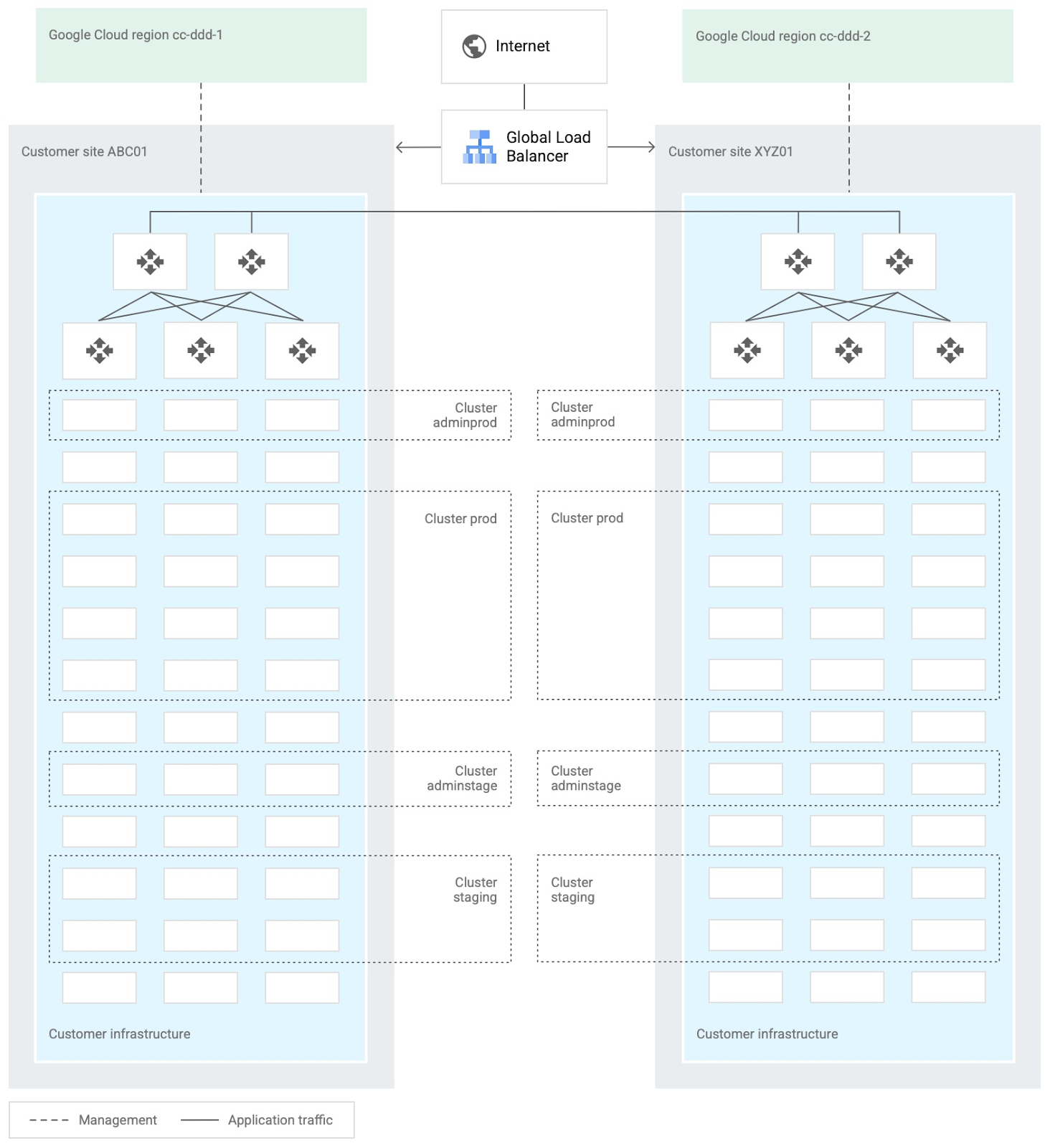
When you design and deploy an Anthos hybrid environment, we recommend that you use two or more on-premises computing customer sites and two or more Google Cloud regions. In your sites, run multiple clusters. This approach is recommended for several reasons, such as:
- Disaster recovery. If one cluster or site fails, you can continue to run workloads.
- Multiple environments, like production and staging, to test infrastructure changes.
- Different cluster types in each environment: admin clusters and user clusters. This approach separates administrative resources, which is a security best-practice.
The following diagram shows an example of an Anthos hybrid environment that’s spread across customer sites and regions, with different clusters for admin and user workloads and for production and staging:
In each site, you can use Anthos clusters on VMware or Anthos clusters on bare metal. For both products, we recommend the following:
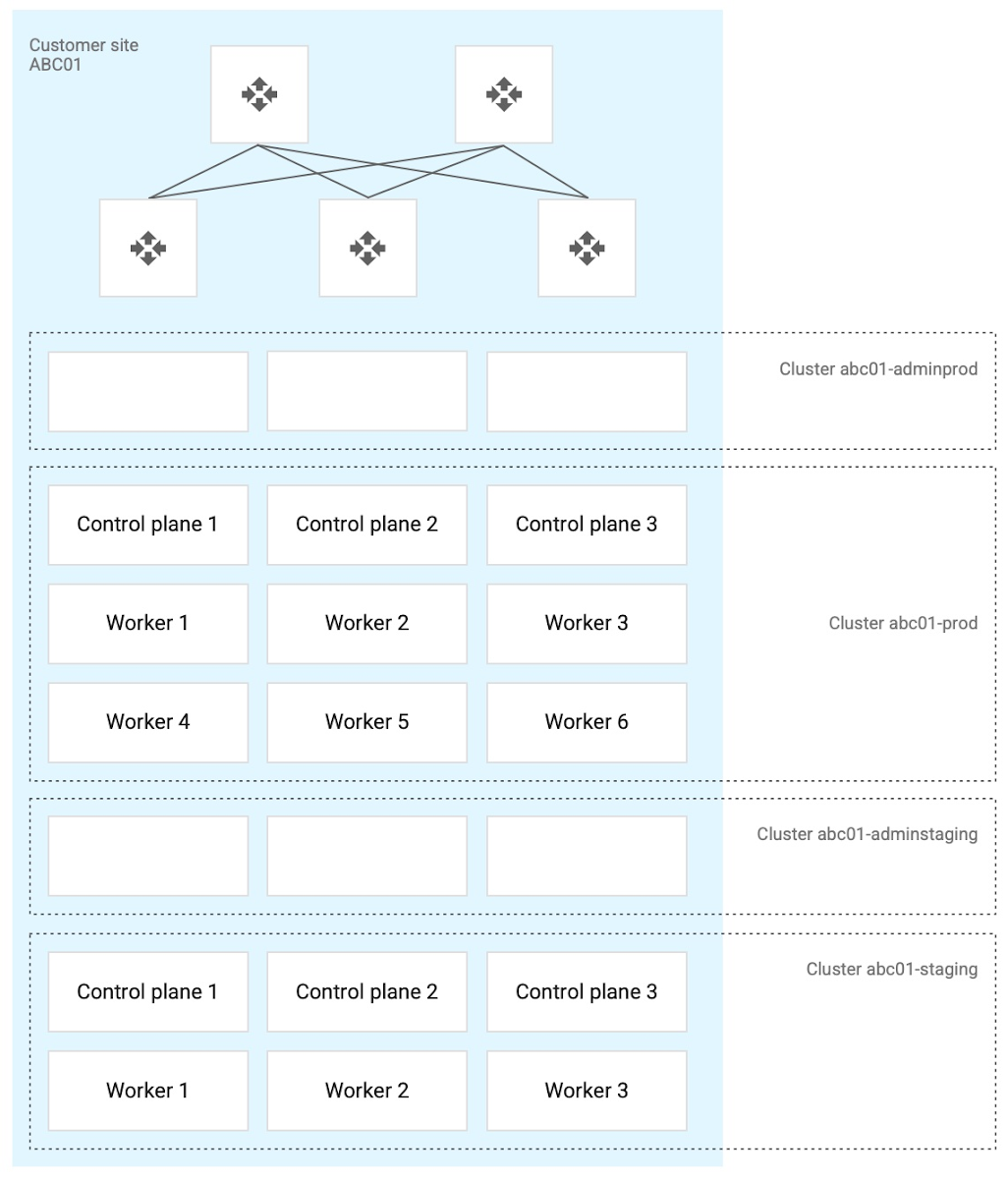
- Use a highly available (HA) control plane with three members for continued control plane availability concurrently with operating system upgrades, control plane software updates, or single-machine hardware or kernel failures.
- Deploy two admin clusters so that admin cluster configuration changes and updates can be tested in the staging environment first.
The following diagram shows an example of Anthos clusters on bare metal with control plane and worker nodes spread across physical machines. With Anthos clusters on VMware, the control plane and worker nodes are spread across VMware VMs:
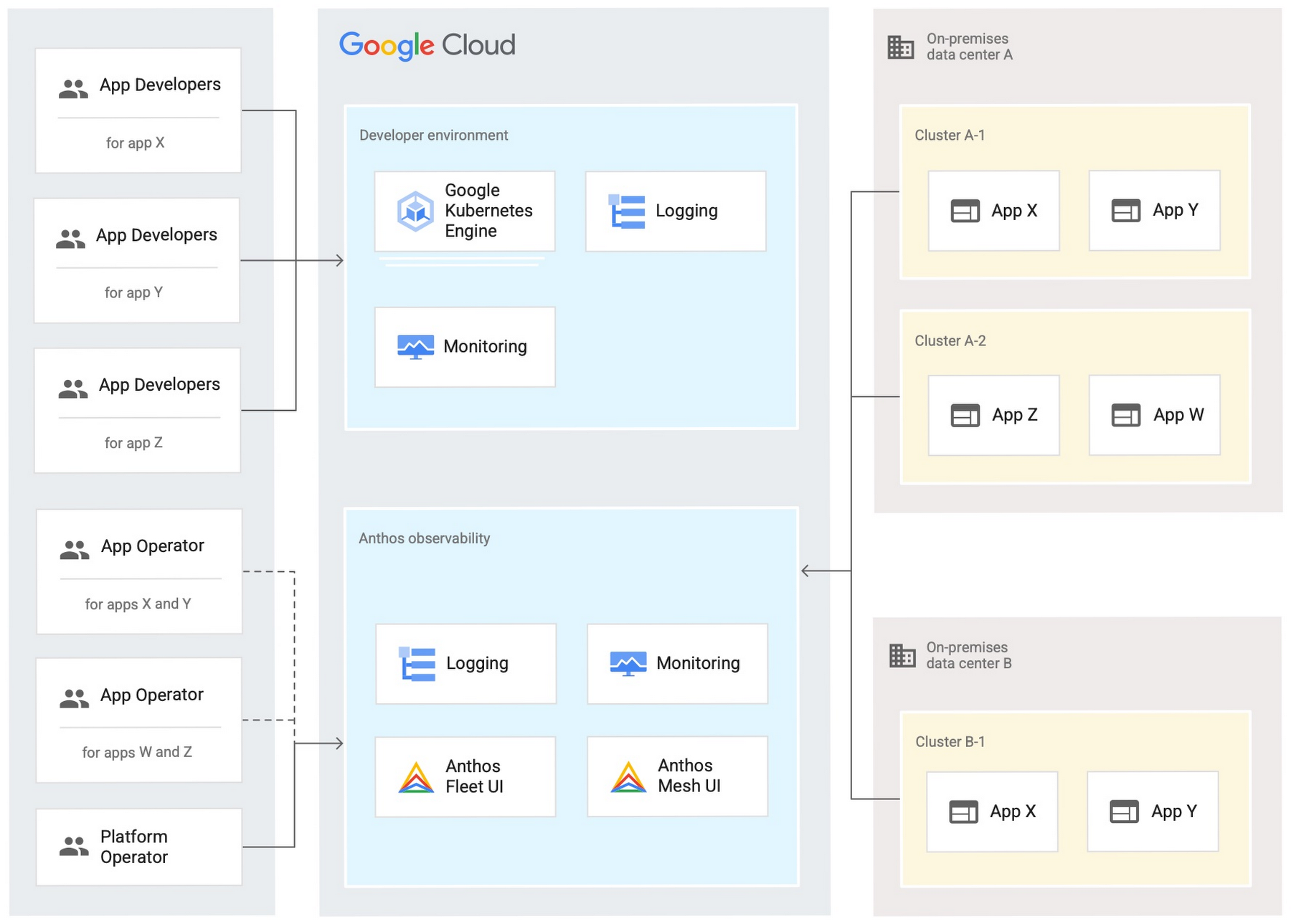
Configure your on-premises clusters and applications to send logging and monitoring data back to Google Cloud for analysis and review. Different personas should only be granted access to the environments they need. The following diagram shows how application developers and application or platform operators can then view logging and monitoring data in Google Cloud:
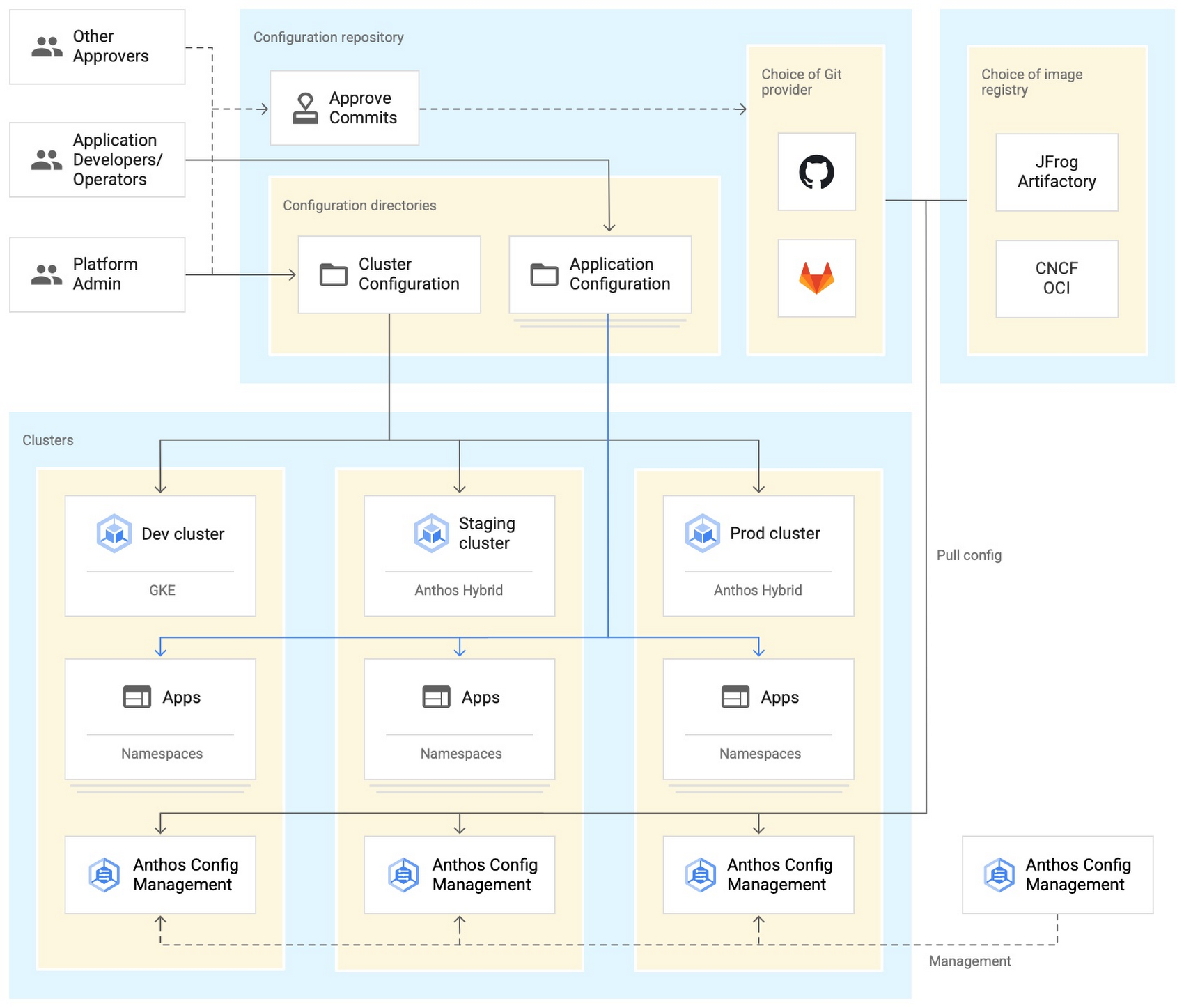
Use Anthos Config Management to manage Kubernetes objects in your clusters. Anthos Config Management is a GitOps-style tool that uses a Git repository or Open Container Initiative (OCI) as its storage mechanism and source of truth. Git provider workflows allow multiple stakeholders to participate in review of changes.
As shown in the following diagram, a common Anthos Config Management deployment uses one folder containing configuration for all clusters. Use separate additional folders to hold configuration data, one for application:
Plan and implement a way to secure the network traffic in your Anthos hybrid environment. The following services help with authentication, connectivity, and communication in a cluster:
- Anthos Identity Service connects clusters to on-site identity providers to authenticate local access.
- Connect gateway and workforce identity federation can provide secure cloud-mediated access to mobile workforce clusters without using a VPN.
- Workload Identity provides on-premises workloads with managed short-lifetime credentials for access to cloud resources.
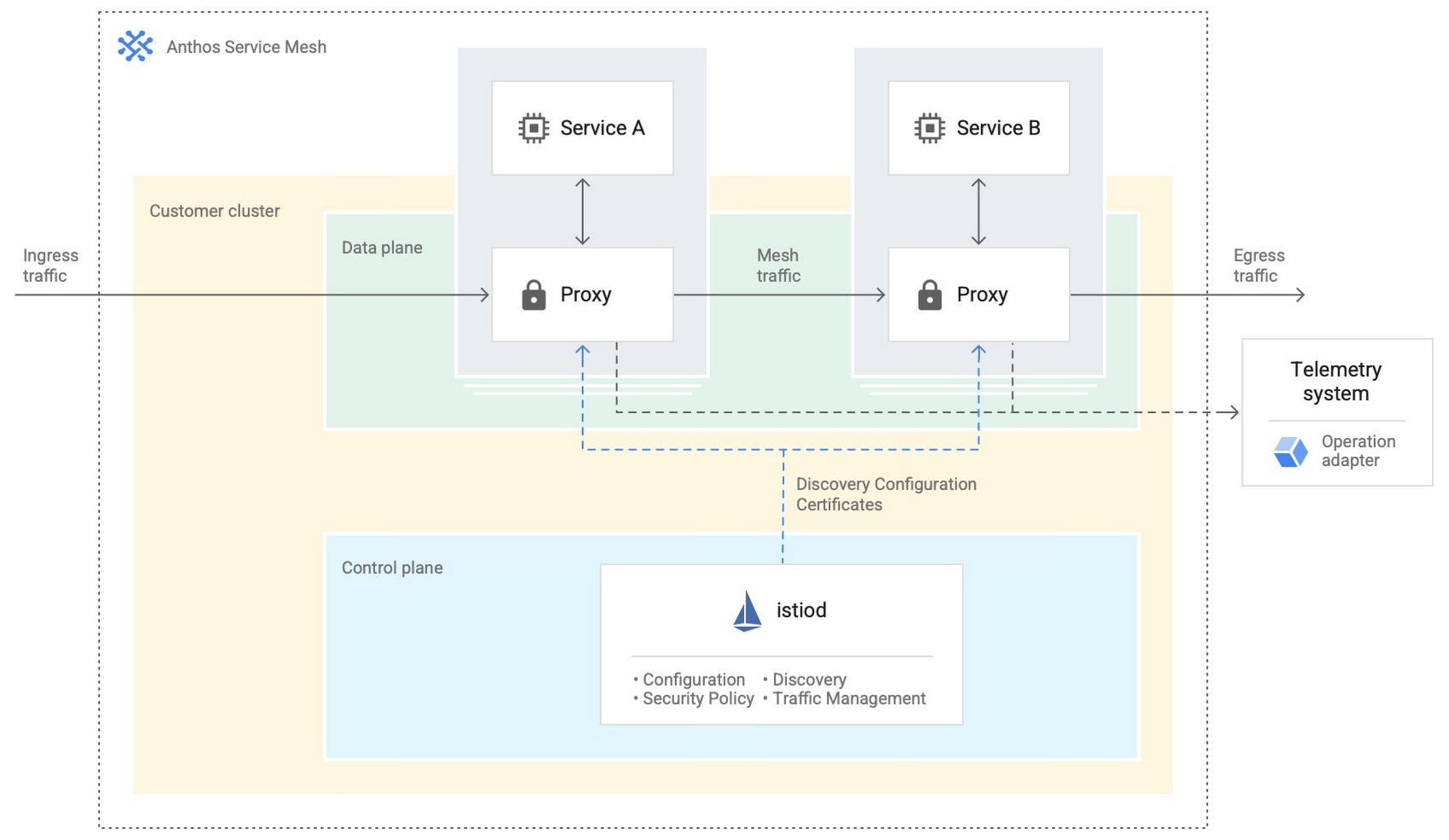
- Anthos Service Mesh encrypts and controls communication between services in the same cluster.
The following diagram shows how Anthos Service Mesh can control the flow of traffic between services within your clusters:
You don’t have to implement all these cloud-based services as part of your initial on-premises deployments. As you become more comfortable and want to expand your capabilities, you can add in some of these hybrid offerings. But, we hope that this blog post has given you some ideas to think about when you start to plan and design your own Anthos hybrid environments.
For more detailed guidance and planning information, see the full Anthos hybrid environment reference architecture. Let us know what you think!
3437
Of your peers have already watched this video.
1:30 Minutes
The most insightful time you'll spend today!
Lowe’s: Building a Centralized Price Management Solution
Watch how American retail company specializing in home improvement Lowe’s used Google Cloud to build a centralized price management solution. The company’s application development team leveraged Google Cloud to enable the improvement of their software development life cycle – from code development to CI/CD and monitoring.
Ensuring Reliability in a DevOps World: Insights from the 2022 State of DevOps Report

2684
Of your peers have already read this article.
3:30 Minutes
The most insightful time you'll spend today!
When a software change is deployed — after being designed, coded, tested, packaged, and tested some more — a journey comes to an end. At the same time, a new journey begins: your customer’s relationship with your service. It’s here, in the domain of operations, that abstract risks like launch schedule slippage give way to tangible risks like lost revenue, degraded trust, and tarnished reputation. Only when it’s available to users can software contribute to (or threaten!) the success of your organization. And so, throughout the past several years, the DevOps Research and Assessment (DORA) project has incrementally deepened our research into the reliability of services, through and beyond deployment, into ongoing operation.
Reliability is a broadly defined term, which refers to a team’s ability to meet their users’ expectations — for software services, it may encompass aspects of availability, latency, correctness, or other characteristics that influence the consistency and quality of user experience. Google’s practice of Site Reliability Engineering (SRE), which has been embraced and extended by a global community of reliability engineering practitioners, is an approach to operations that prioritizes user-oriented measurement, shared responsibility, and collaborative, blameless learning. Starting with the 2021 Accelerate State of DevOps Report, we began asking survey respondents detailed questions about reliability engineering in their organizations. We continued and expanded our investigation in 2022, and found further evidence that modern reliability engineering is widespread: a majority of respondents report that they employ SRE-style practices. With this extensive body of data to draw from, this year we pushed further into analyses of the impact of reliability and its interaction with other dynamics present in our model of technology’s influence on organizational success.
Reliability matters
When reliability is poor, improvements to software delivery have no effect — or even a negative effect — on organizational outcomes
Reliability is more than beneficial: it’s essential. As in prior studies, we find that software delivery performance (as measured by the “four key metrics” of change lead time, deploy frequency, change failure rate, and failure recovery time) is predictive of organizational performance. However, this year’s analysis revealed a previously unseen nuance: the influence of software delivery on organizational performance is predicated on reliability. When reliability is high, high-performance software delivery predicts better outcomes for the organization. But when reliability is poor, improvements to software delivery have no effect — or even a negative effect — on organizational outcomes. This affirms a long-held belief among reliability engineers: “reliability is the most important feature of any system.” If a service or product doesn’t meet its users’ reliability expectations, it’s counter-productive to rapidly ship flashy new features, because users can’t properly experience them. Software delivery relies on a foundation of reliability to create value.
https://storage.googleapis.com/gweb-cloudblog-publish/images/dora.max-900×900.jpg
Reliability is a journey
Any experienced leader will tell you that progress is rarely linear: even with a discipline like SRE, widely practiced and with demonstrable benefits, the path to success is unlikely to follow a straight line. DORA describes the “J-Curve” of organizational transformation, a phenomenon in which durable success comes only after setbacks and lessons learned. This year, we compared the depth of teams’ reliability engineering practices to their impact on the services they provide: will an investment in SRE produce greater reliability? The answer is yes, but with a significant caveat: not at first. Comparing reliability outcomes across a range of levels of SRE adoption, the J-Curve is plainly visible. A team which practices SRE only lightly — at the beginning of their SRE journey, perhaps — is likely not only to not benefit, but to regress in terms of the reliability experienced by their users. However, after these practices have more deeply permeated, an inflection point is reached and we see strong reliability benefits from continuing to grow the reliability engineering capability.
Knowing that it will likely take time to realize the benefits of adopting SRE, it may be tempting to start the process as soon, and as broadly, as possible. But we offer a note of caution here: organization-wide cultural transformation initiatives typically fail from overreach. We studied this and reported findings in a previous report. And even if you manage to beat the odds and fully adopt SRE across multiple teams simultaneously, the cost may be unacceptable: the setbacks in reliability that you are likely to experience early on, amplified across an entire organization all at once, could have catastrophic consequences. Therefore the SRE principle of gradual change should also be applied to the adoption of SRE itself.
Reliability is about people
Reflecting back on over a decade of SRE practice and theory, the Enterprise Roadmap to SRE underlines the importance of culture, suggesting that Site Reliability Engineering is in fact emergent from culture. Tools and frameworks are important; language is essential. But only a trustful, psychologically safe culture can support the environment of continuous learning which enables SRE to manage today’s complex, dynamic technology environments. DORA’s research in 2022 demonstrates the interplay between culture and reliability: we found that “generative” culture, as defined by the Westrum model, is predictive of higher reliability outcomes. And reliability has benefits not only for a system’s users, but for its makers as well: teams whose services are highly reliable are 1.6 times less likely to suffer from burnout.
Got a story to share about your DevOps journey? Submit it to Google Cloud’s 2022 DevOps Awards by January 31, 2023!
More Relevant Stories for Your Company

Google Unveils New Cloud Region in Delhi NCR to Power India’s Digitization
In the past year, Google has worked to surface timely and reliable health information, amplify public health campaigns, and help nonprofits get urgent support to Indians in need. Now, we are continuing to focus on helping India’s businesses accelerate their digital transformation, deepening our commitment to India’s digitization and economic recovery.

Anthos Makes Hybrid and Multi-Cloud Deployments Easy
Most enterprises have applications in disparate locations—in their own data centers, in multiple public clouds, and at the edge. These apps run on different proprietary technology stacks, which reduces developer velocity, wastes computing resources, and hinders scalability. How can you consistently secure and operate existing apps, while developing and deploying

Streamlining Business Processes with Google Cloud’s Application Integration
According to a recent Accenture report, large businesses deploy an average of 500 different applications. This trend shows no signs of slowing down, with the majority of respondents signaling plans to acquire even more applications. No surprise, all these applications present a number of integration challenges, which the impending wave of



APIs Help Cleveland Clinic Revamp their IT Infrastructure and Deliver High Quality Healthcare
Cleveland Clinic is one of the largest and most respected hospitals in the United States. Its mission is to provide better care of the sick, investigate their problems, and deliver further education of physicians. The clinic deployed electronic medical records (EMR) to help doctors deliver greater quality healthcare. But the
