





Elevating SAP Operations: Cardinal Health Implements Google Cloud Bare Metal Solution

2013
Of your peers have already read this article.
1:30 Minutes
The most insightful time you'll spend today!
Over the past few years, Google Cloud has become the platform of choice for a growing number of SAP enterprise customers. That’s especially true for companies looking to migrate large and challenging SAP workloads, including those moving to S/4HANA systems as part of a cloud modernization strategy.
Google Cloud’s Bare Metal Solution (BMS) for SAP systems plays an important role in our success with these customers. Our BMS offerings are dedicated, single-tenant systems that combine uncompromising performance with the advantages of fully managed cloud infrastructure solutions. With SAP-certified BMS offerings available in North America and Europe, we’re offering SAP customers a set of high-end infrastructure capabilities.
Cardinal Health: Building for the future
Cardinal Health, Inc. is a distributor of pharmaceuticals, a global manufacturer and distributor of medical and laboratory products, and a provider of performance and data solutions for healthcare facilities. With operations in more than 30 countries and approximately 46,500 employees, Cardinal Health is a crucial link between the clinical and operational sides of healthcare. The company serves 90% of U.S. hospitals, more than 60,000 U.S. pharmacies and more than 10,000 specialty physician offices and clinics.
Over the past several years, a series of acquisitions drove a major expansion of Cardinal Health’s business. These acquisitions also created an increasingly complex and unwieldy IT environment that included a variety of ERP systems and dozens of other legacy applications, in addition to multiple ERP instances.
Cardinal Health’s technology modernization strategy will migrate its business away from these legacy systems to a single, modern digital platform. This includes leveraging the Google Cloud Large Memory Bare Metal Solution to modernize and consolidate its SAP application architecture within its Pharma segment with a single, massively scalable SAP S/4HANA system and BigQuery to unify SAP data with a fully managed enterprise data warehouse.
Scaling up to support SAP consolidation goals
Cardinal Health’s SAP modernization effort presented significant challenges. The migration process had to take place within a very narrow window and at 100% accuracy to avoid significant financial and operational impacts. Additionally, Cardinal Health’s strategy of consolidating its pharma business onto a single SAP HANA scale-up instance, with no performance or capacity issues, would require Google Cloud to scale its SAP-certified server systems beyond their previous 12TB upper limit.
Google Cloud raised the bar with its SAP-certified Bare Metal Solution server options—one that supports up to 672 vCPUs and 18TB of memory, and another with up to 896 vCPUs and 24TB of memory. Additionally, customers have multiple storage options, offering up to a maximum of 96TB and 400,000 IOPS per system. Both offerings, along with a high-performance storage SKU, are certified for SAP HANA online transaction processing (OLTP) and meet SAP standard sizing requirements.
Our work with Cardinal Health involved some of the first production deployments of Google Cloud Large Memory Bare Metal Solution 24TB VMs to run the company’s SAP HANA in-memory database. Cardinal Health got what it needed: modern, fully managed, and SAP-certified cloud infrastructure that can support a single, consolidated scale-up SAP HANA instance for the company’s pharma operations. Google Cloud BMS also ensures that Cardinal Health’s SAP environment can scale effortlessly to support its goals, including plans to transform and migrate 200+ million business records onto its HANA system.
In addition, Cardinal Health leveraged Google Cloud’s ability to run SAP application servers on virtualized systems alongside its SAP HANA instance running on a 24TB BMS server. This hybrid approach to SAP cloud infrastructure offered significant advantages in terms of efficiency and cost-effectiveness: Cardinal Health’s use of the BMS server played a big role in achieving significant improvements in reporting and decision-making efficiency, as well as millions in cost savings over the first five years of the effort.
On top of these quantitative improvements, Google Cloud delivered the SAP migration for Cardinal Health in a single weekend—without user impacts or business disruptions.
An even bigger future for bare metal on Google Cloud
Based on raw performance, the Google Cloud server offerings define the cutting edge for our SAP customers. In fact, SAP’s certification of our 24TB Bare Metal Solution configuration earned us a world-record SAP HANA benchmark for Intel-based servers of 892,270 SAPS. And customers that combine our BMS server and high-performance storage offerings can expect to reload even the biggest SAP HANA datasets, following a full system restart, in as little as 30 minutes—a fraction of the time required in the past for an SAP HANA “rehydration” procedure.
More SAP customers are facing the same challenges that drove Cardinal Health to embark upon its modernization efforts: rapid business growth, pressure to consolidate sprawling and often chaotic SAP environments, and SAP HANA systems that now routinely require multi-TB memory capacities to run efficiently. For Google Cloud Bare Metal Solution customers, these industry-leading benchmarks translate directly into success with real-world SAP cloud modernization and growth initiatives.
It probably won’t take long for today’s boundary-pushing 24TB Bare Metal Solution systems to become tomorrow’s mainstream SAP HANA infrastructure. What we know for sure is that Google Cloud will be ready with cutting-edge solutions for our biggest and most demanding SAP customers.
New Map Customization Features for Enhanced User Experiences

5570
Of your peers have already read this article.
1:30 Minutes
The most insightful time you'll spend today!
A customized map can be key to delivering a frictionless experience that engages users and sets you apart in users’ minds–whether you’re a real estate company fine-tuning points of interest (POIs) on a map to help buyers decide where to live, or a regional pharmacy styling a map to ensure your locations stand out from the competition. That’s why we’ve focused on empowering you with these capabilities through features like POI density and POI filtering controls, zoom level customization, and even industry-optimized map styles. But we’re not done helping you take your map to the next level. Today, we’re making two updates generally available—a new Maps SDK for Android and the extension of Cloud-based maps styling features to our Android and iOS SDKs. Together they enhance the native mobile map experience and make it easier for you to deliver consistent, optimized maps across all your platforms. We’ll also give you an early look at additional features that we’re working on.
Update your Maps SDKs for Android for an enhanced user experience
Developers around the world depend on the Maps SDK for Android to power critical experiences like helping drivers make a delivery or helping retailers visually confirm an order’s shipping address. With consumers spending an increasing amount of time in apps, it’s more important than ever that mobile experiences meet the high consumer expectations that come with essential, everyday use.
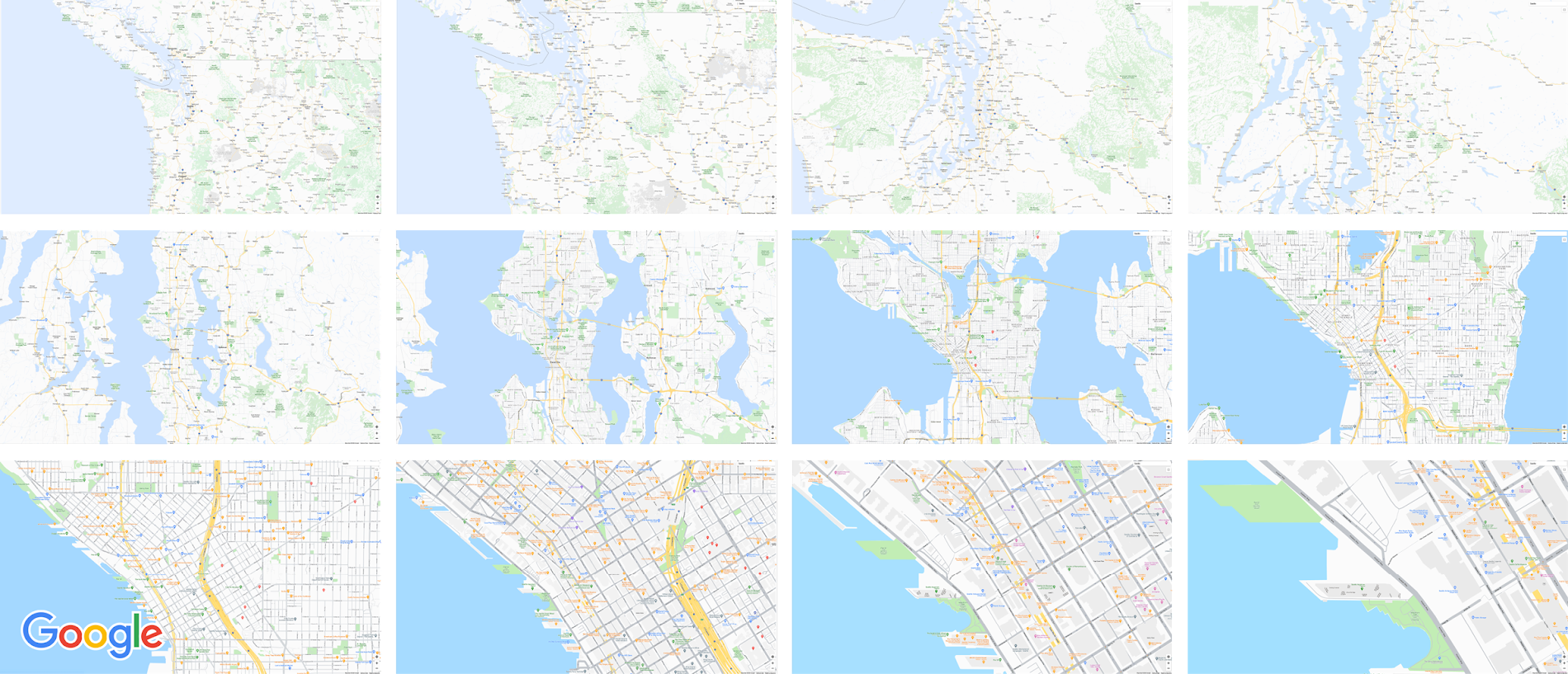
Today we released version 18.0.0 of the Maps SDK for Android, which delivers an enhanced map experience to app users, thanks to a new renderer. The new renderer introduces optimizations to our tile serving and rendering architecture, reducing payload size. This can help to reduce network load, on-device processing, and memory consumption for a more stable and smoother end-user experience. You’ll also see specific improvements with map labels. Now more fluid and clearly positioned, they pave the way for future marker management features. We’ve also enhanced overall gesture handling for better animations and smoother panning and zooming.
Because the Maps SDK for Android continues to be distributed as part of the Google Play services SDK, you can upgrade to v18.0.0 along with all its improvements with no increase to your APK size.
A consistent cross-platform maps experience with Cloud-based maps styling for mobile
Earlier this year at Google I/O, we announced the general availability of Cloud-based maps styling for JavaScript. Since then customers have used the richer customization capabilities and efficient cloud-enhanced deployment workflow to power millions of mapping experiences, from a curated interactive map of Munich to fun virtual Easter egg hunts hosted by Cadbury. Starting today, Cloud-based maps styling features are supported in the GA versions of our Maps SDK for Android (v18+) and Maps SDK for iOS (V5.0+).
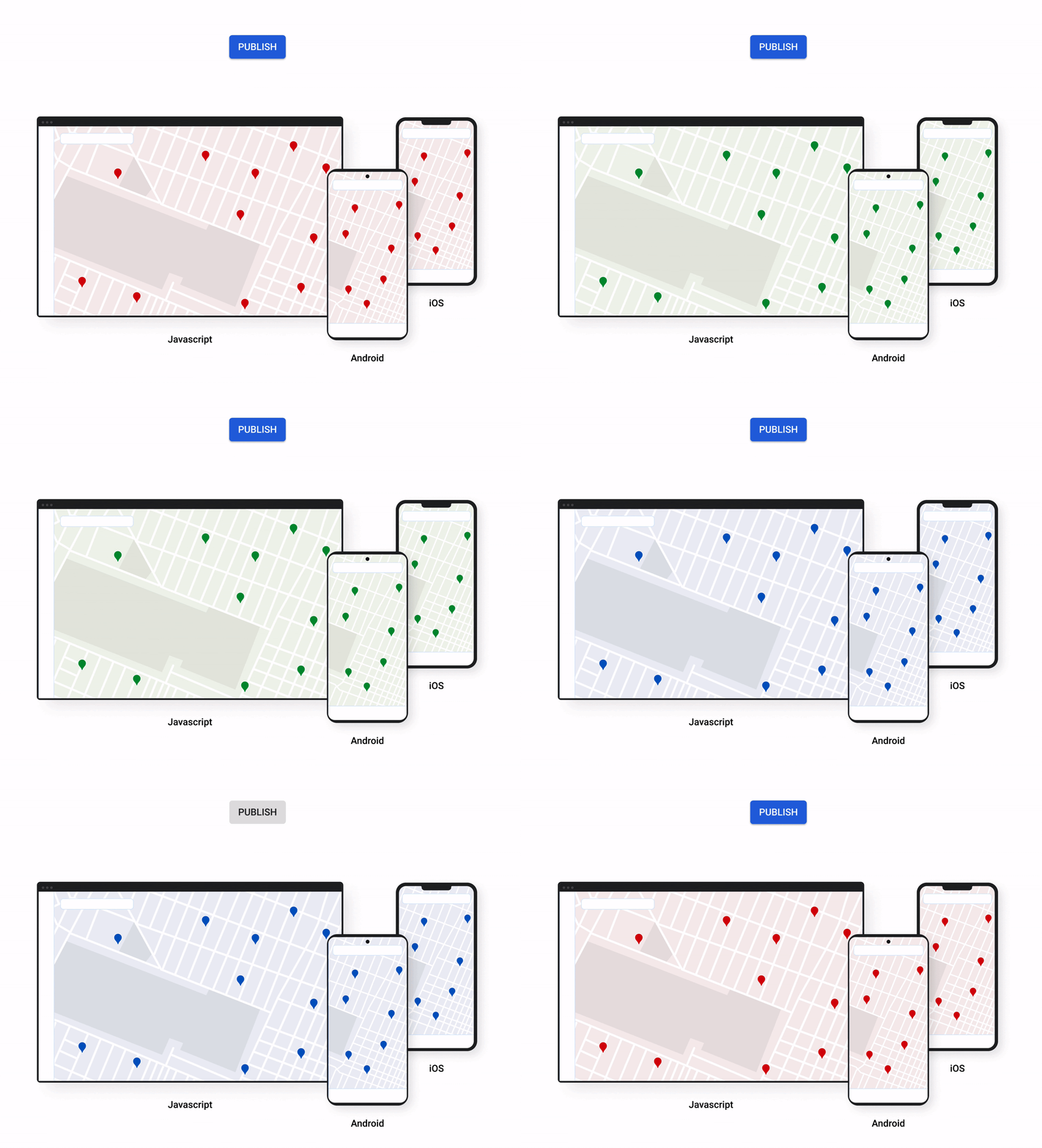
Cloud-based maps styling moves map customization code off the client and into the cloud–where it can be easily modified to use new features or test new configurations. This decoupling of client code and customization code makes it easy to manage a single branded and optimized style across any number of apps across all supported platforms. It also makes it possible to simultaneously publish changes to a map style across platforms and install bases with the click of a button. Cloud-based maps styling is the foundation for a growing set of new customization features including POI filtering and POI boosting, zoom level customization, landmarks, and commercial corridor styling.
Mobile developers can now take advantage of Cloud-based maps styling features and simple cross-platform customizations for their Dynamic Maps by creating a MapID in Google Cloud Console and using it within their Maps SDK for Android or Maps SDK for iOS. Dynamic maps loaded with a Map ID via our Maps SDK for Android or Maps SDK for iOS will be billed to the same SKU as Maps JavaScript API (Dynamic Maps) and covered under the same $200 monthly credit and volume pricing. Developers can upgrade to the new Maps SDK for Android and continue using client-styled maps for no charge as they always have.
Additional capabilities we’re working on¹
We know you have a range of map customization needs to engage your users with differentiated experiences. We’re working on developing more Cloud-based maps styling features–focused on marker capabilities, map elements, and data-driven styling–to help you do just that. We’re working on a new set of markers capabilities, easier pin customizations, marker collision management, performance optimizations, and the ability to build custom marker elements that you can use to quickly deploy deeply customized, highly optimized marker-driven experiences. For those seeking greater detail in their maps, we’re working on expanding the availability and customization of detailed street maps to even more cities. We’re also working on features to make it easier to programmatically style map elements by exposing new APIs to enable things like the simple creation of choropleths by styling Google geographical boundaries based on your data.
This is just a peek into what we’re excited to be building for our developer community. While we’re working hard to bring these additional features to life, visit our website to learn more and our developer documentation to start customizing and enhancing your mobile maps.
¹Product capabilities, timeframes, and features are subject to change.
What’s New in Retail: Bits from Google Cloud’s Retail & Consumer Goods Summit

7979
Of your peers have already read this article.
3:00 Minutes
The most insightful time you'll spend today!
Today we’re hosting our Retail & Consumer Goods Summit, a digital event dedicated to helping leading retailers and brands digitally transform their business. For me, this is a personally exciting moment, as I see tremendous opportunities for those companies that choose to focus on their customers and leverage technology to elevate experiences.
Our event includes breakout sessions to help retailers and brands become customer centric, embrace the digital moment and transform their operations. Some of my favorite sessions include:
- Why Search Abandonment is the metric that matters, highlighting Retail Search, and featuring a conversation with Macy’s
- Driving Consumer Closeness in a Privacy-Centric World, discussing how retailers and brands can create a successful first party data strategy, featuring a conversation with P&G
- The Modern Store: 7 Innovation Hotspots, sharing how retailers and brands can approach store transformation to unlock the most value from technology, featuring a conversation with The Home Depot.
I’ll be speaking in our Retail Spotlight session, discussing the current retail landscape and our industry approach, followed by conversations with Albert Bertilsson, Head of Engineering – Edge at IKEA Retail (Indga Group) and Neelima Sharma, Senior Vice President, Technology Ecommerce, Marketing and Merchandising at Lowe’s.
Let me share a bit more about the topics we’ll discuss in that session.
In retail specifically, digital-first shopping journeys are blurring the lines between the physical and digital brand experience. Shoppers want to know what’s available before they visit your stores, and they expect fulfillment options like curbside pickup. We see this when tracking trends for interest in curbside pickup or in-stock items.

This has left many retailers asking how they can get smarter with their data, tackle the $300 billion dollar problem of “search abandonment,” move faster to create new customer experiences, and do a better job of connecting their employees and customers – with confidence.
Our team has been spending time thinking about how we can rise and succeed in this new era together. We continue to focus on areas where we can bring the best of our capabilities to our retail customers around the world. And we’re focused on ways we can bring the best of what Google has to offer through cloud integrations.
Our goal is to help retailers become customer-centric and data-driven, capture digital and omni-channel revenue growth, create the modern store and drive operational improvement.

Let’s dig into each of these strategic pillars in a bit more detail.
Become customer centric and data driven
Customers today expect experiences that are timely, targeted, and tailored for them and their needs, and reject experiences that can’t deliver these features. Data modeling, legacy technology, and siloed systems often prevent retailers from providing that level of personalized experience.
At Google Cloud, we work with global retailers and our ecosystem partners to activate and bring value from first-party data, particularly in the field of customer data platforms (CDPs). This includes integrations from Google Cloud, such as our business intelligence platform Looker and other popular platforms to power one source of customer data through the organization. We also help retailers modernize their data warehouse with Looker for gathering business intelligence across their organization. This is important not just for consumer data, but inventory, supply chain, and store operations as well.
Capture Digital and Omnichannel Growth
We power some of the largest e-commerce sites in the world, helping them scale for Black Friday, Cyber Monday, and other holiday events. While scale is critically important, it’s also important to consider the quality of the online experience. How do your customers find products? How can you help deliver seamless online and omnichannel experiences?
To help, we’re building product discovery solutions that bring together the best of our technologies that help retailers drive engagement with their consumers. Retail Search, for example, gives retailers the ability to provide Google-quality search on their own digital properties – search that is customizable for their unique business needs and built upon Google’s advanced understanding of user intent & context.
The imperative is clear. Recent research found that retailers lose more than $300 billion to search abandonment — when purchase intent is not converted into a sale due to bad search results — every year in the US alone.
Today, we announced that Retail Search is available to a larger set of retailers. If you are interested in learning more about Retail Search you can contact your sales representative for additional details.
Create the modern store
With the rise of buying trends like curbside pickup and proximity-based search, our Google Maps Platform team is working on new products and features to help raise inventory awareness for your shoppers. We want to help you make it easier for them to understand what’s available to purchase in their channel of choice.
With Product Locator, each product page connects customers with information they need for local pickup and delivery options. This ensures customers are aware of pickup and delivery options throughout the buying journey—not just checkout.
Awareness of local inventory can boost a wide range of key metrics for your business. Shopify recently shared that shoppers who opt for local pickup over delivery had a +13% higher conversion rate and that 45% of local pickup customers make an additional purchase upon arrival.
This is just one quick example of how our Google Maps Platform team can improve experiences for your shoppers.
Operational improvement
It can be challenging to operate in a world and at a time when consumer behavior and supply chains are so disrupted and volatile, and where entire retail teams had to go remote during the pandemic and beyond.
We’re working with retailers to leverage artificial intelligence (AI) to improve consumer experience through chat bots or conversational commerce that solves problems for customers from anywhere. You can learn more about these offerings in our Conversational Commerce with Google breakout session, featuring Albertsons.
As the need for digital transformation continues to accelerate, Google Cloud is helping retailers stay ahead of the curve with solutions for digital and omnichannel growth, data-driven and customer-focused experiences, and operational improvement. For every era of cloud technologies, from the past into the future, Google Cloud is committed to providing solutions to retailers.
Read more about our solutions for retail, and check out additional sessions, including the CPG Industry Spotlight Session How To Grow Brands in Times of Rapid Change – Featuring L’Oréal at our Retail & Consumer Goods Summit.
Scaling with Breaking News: BBC’s Serverless Infrastructure on Google Cloud

1279
Of your peers have already read this article.
3:30 Minutes
The most insightful time you'll spend today!
Editors note: Today’s post is from Neil Craig at the British Broadcasting Corporation (BBC), the national broadcaster of the United Kingdom. Neil is part of the BBC’s Digital Distribution team which is responsible for building the services such as the public-facing www bbc.co.uk and .com websites and ensuring they are able to scale and operate reliably.
The BBC’s public-facing websites inform, educate, and entertain over 498 million adults per week across the world. Because breaking news is so unpredictable, we need a core content delivery platform that can easily scale in response to surges in traffic, which can be quite unpredictable.
To this end, we recently rebuilt our log-processing infrastructure on a Google Cloud serverless platform. We’ve found that the new system, based on Cloud Storage, Eventarc, Cloud Run and BigQuery, enables us to provide a reliable and stable service without us having to worry about scaling up during busy times. We’re also able to save license fee payers money by operating the service more cost effectively than our previous architecture. Not having to manually manage the scale of major components of the stack has freed up our time, allowing us to spend it on using, rather than creating the data.
A log in time
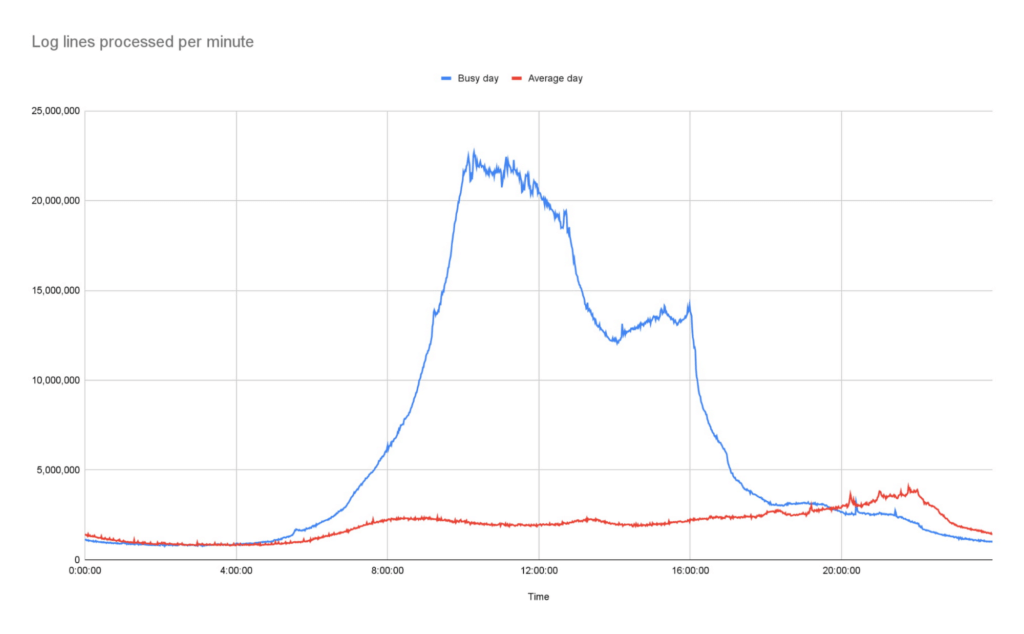
To operate the site and ensure our services run smoothly we continually monitor Traffic Manager and CDN access logs. Our websites generate more than 3B log lines per day, and handle large data bursts during major news events; on a busy day our system supports over 26B log lines in a single day.
As initially designed, we stored log data in a Cloud Storage bucket. But every time we needed to access that data, we had to download terabytes of logs down to a virtual machine (VM) with a large amount of attached storage, and use the ‘grep’ tool to search and analyze them. From beginning to end, this took us several hours. On heavy news days, the time lag made it difficult for the engineering team to do their jobs.
We needed a more efficient way to make this log data available, so we designed and deployed a new system that deals with logs and reacts to spikes more efficiently as they arrive, improving the timeliness of critical information significantly.
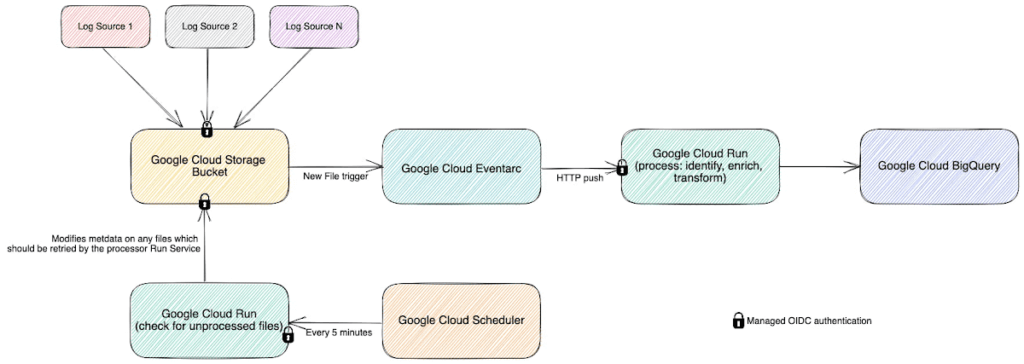
In this new system, we still leverage Cloud Storage buckets, but on arrival, each log generates an event using EventArc. That event triggers Cloud Run to validate, transform and enrich various pieces of information about the log file such as filename, prefix, and type, then processes it and outputs the processed data as a stream into BigQuery. This event-driven design allows us to process files quickly and frequently — processing a single log file typically takes less than a second. Most of the files that we feed into the system are small, fewer than 100 Megabytes, but for larger files, we automatically split those into multiple files and Cloud Run automatically creates additional parallel instances very quickly, helping the system scale almost instantly.
The nature of running a global website which provides news coverage means we see frequent, unpredictable large spikes of traffic. We learn from these and optimize our systems where necessary so we’re confident in the system’s ability to handle significant traffic. For example, around the time of the announcement of the Queen’s passing in September, we saw some huge traffic spikes. During the largest, within one minute, we went from running 150 – 200 container instances to over 1000…. and the infrastructure just worked. Because we engineered the log processing system to rely on the elasticity of a serverless architecture, we knew from the get-go that it would be able to handle this type of scaling.
Around the time of the announcement of the Queen’s passing in September, we saw some huge traffic spikes. During the largest, within one minute, we went from running 150 – 200 container instances to over 1000…. and the infrastructure just worked
Our initial concern about choosing serverless was cost. It turns out that using Cloud Run is significantly more cost-effective than running the number of VMs we would need for a system that could survive reasonable traffic spikes with a similar level of confidence.
Switching to Cloud Run also allows us to use our time more efficiently, as we no longer need to spend time managing and monitoring VM scaling or resource usage. We picked Cloud Run intentionally because we wanted a system that could scale well without manual intervention. As the digital distribution team, our job is not to do ops work on the underlying components of this system — we leave that to the specialist ops teams at Google.
Another conscious choice we made whilst rebuilding the system was to use the built-in service-to-service authentication in Google Cloud. Rather than implementing and maintaining the authentication mechanism ourselves, we add some simple configuration which instructs the client side to create and send a OIDC token for a service account we define and the server side to authenticate and authorize the client. Another example is pushing events into Cloud Run, where we can configure Cloud Run authorization to only accept events from specific EventArc triggers, so it is fully private.
Going forward, the new system has allowed us to make better use of our data safely. For example, BigQuery’s per-column permissions allow us to open up access to our logs to other engineering teams around the organization, without having to worry about sharing PII that’s restricted to approved users.
The goal of our team is to empower all teams within the BBC to get the content they want on the web when they want it, make it reliable, secure, and make sure it can scale. Google Cloud serverless products helped us to achieve these goals with relatively little effort and require significantly less management than previous generations of technology.
Trimoz Technologies and Google Cloud-built Vaccination Appointment Scheduler Managed 365,000 Appointments Daily!

3197
Of your peers have already read this article.
2:00 Minutes
The most insightful time you'll spend today!
When public health officials in Quebec set out to provide COVID-19 vaccination services for their 8 million residents in February 2021, they needed an easy-to-use, scalable solution to schedule appointments online. To make it simple for Quebecers to register for vaccines, the goal was to use Clic Santé, a familiar online portal built on Google Cloud and already in use to schedule flu vaccines and other health-related services. Trimoz Technologies, the portal’s creator, prepared to meet high-volumes of traffic by creating a seamless appointment scheduling experience.
To meet demand, Trimoz relied on Google Cloud – optimizing it for the expected surges. As an enterprise solutions provider to the public sector in Canada, Google Cloud scaled to meet the ongoing surges in traffic to the Clic Santé portal, with the stability and reliability the portal needed. At its peak surge, Clic Santé scheduled 365,000 appointment schedules in a single day, and on average, continues to handle a volume of roughly 50,000 appointments per day. Since launching their appointment scheduling service, Clic Sante has been able to deploy up to a over dozen new appointment functionalities each month with no service interruptions, while maintaining up to 3,000 vaccination and 1,500 pharmacies sites to serve the population.
“Thanks to our talented and agile team and the flexibility of Google Cloud, we performed hundreds of new releases and added new features and functionalities, without interrupting our services and while maintaining flawless security. We found extraordinary capacity to resolve complex problems with simple solutions
Stéphane Lajoie
CEO of Trimoz Technologies
Google Cloud services that helped build a more secure, flexible and scalable portal used by millions
The main components of Clic Santé are hosted using different services to give the team at Trimoz more flexibility with their platform functionality. The portal’s user interface, for example, was built using AppEngine, a Platform as a Service (PaaS) solution, that hosts websites and automatically scales up and down based on the load. AppEngine allows the portal to deploy its web interface without having to manage the infrastructure. Trimoz implemented Cloud SQL, another PaaS solution, to run instances of relational-type databases without needing to manage the infrastructure. Changing the number of instances based on active users gave them more freedom to scale as needed without affecting portal users.
Various healthcare organizations (CIUSSS and CISSS) required appointment-level metrics gathered from Clic Santé to track progression towards their vaccination goal. To handle this, Trimoz uses BigQuery, a serverless data warehouse service from Google Cloud. This service handles data storage economically and allows for future analysis as needed so Trimoz can ensure all data, at rest and in motion, is encrypted to protect the platform and its users.
A reliable, user-friendly vaccination experience for Quebec
Through the partnership between Trimoz and Google Cloud, the vaccine appointment-scheduling portal handles 80,000 connections on average per day, with zero service interruptions. It also provides a user-friendly interface that can handle swells of traffic as needed. This reliability of the solution was one factor among many that helped reach the goal of vaccinating “75% of the admissible population” three weeks early., making Quebec’s population one of the most vaccinated populations in the world.
The performance and scalability of the platform will now allow Trimoz Technologies to expand into new markets like pharmacies, other healthcare organizations in other Canadian provinces, U.S. or European markets.
Clic Santé in numbers:
- More than 7,000,000 unique users
- 50,000 appointments set in average per day
- Peak of 365,000 daily appointments
- 80,000 connections per day in average
- 100% uptime of the Clic Santé platform
- 4 to 12 new production releases per month
Google Cloud is already widely available for public sector organizations in Canada. We are actively expanding with new regions and solutions with the highest compliance and standards and are committed to providing Canada with the quality service they need from a public sector cloud provider.
To learn more, visit the Google Cloud for Canada public sector solutions page.
Consent is a Key Component for a Successful Embedded Financial Solution: Read Why

3241
Of your peers have already read this article.
5:00 Minutes
The most insightful time you'll spend today!
When banks and other financial institutions make their products available via non-banks, we call that Embedded Finance. Think, for example, of a retailer offering financing for people buying goods; or a budgeting app gathering bank transactions to help you categorize and understand your spending patterns. The finance – the money management – has been embedded into the retailer or the budgeting experience.
This last example falls under the Data Exchange category of Embedded Finance , and it’s often also called Open Banking. In many countries this active data exchange is actually mandated by law, with specific Open Banking standards encoded into law for all financial institutions. As of this blog post, there are approximately 37 countries with such laws already in place or currently being worked on.
In an Embedded Finance scheme there are three main players: The financial institution offering their products and services, a third party provider (TPP) making use of those products or services, and an end user who is a customer of the financial institution and is interacting with the TPP.
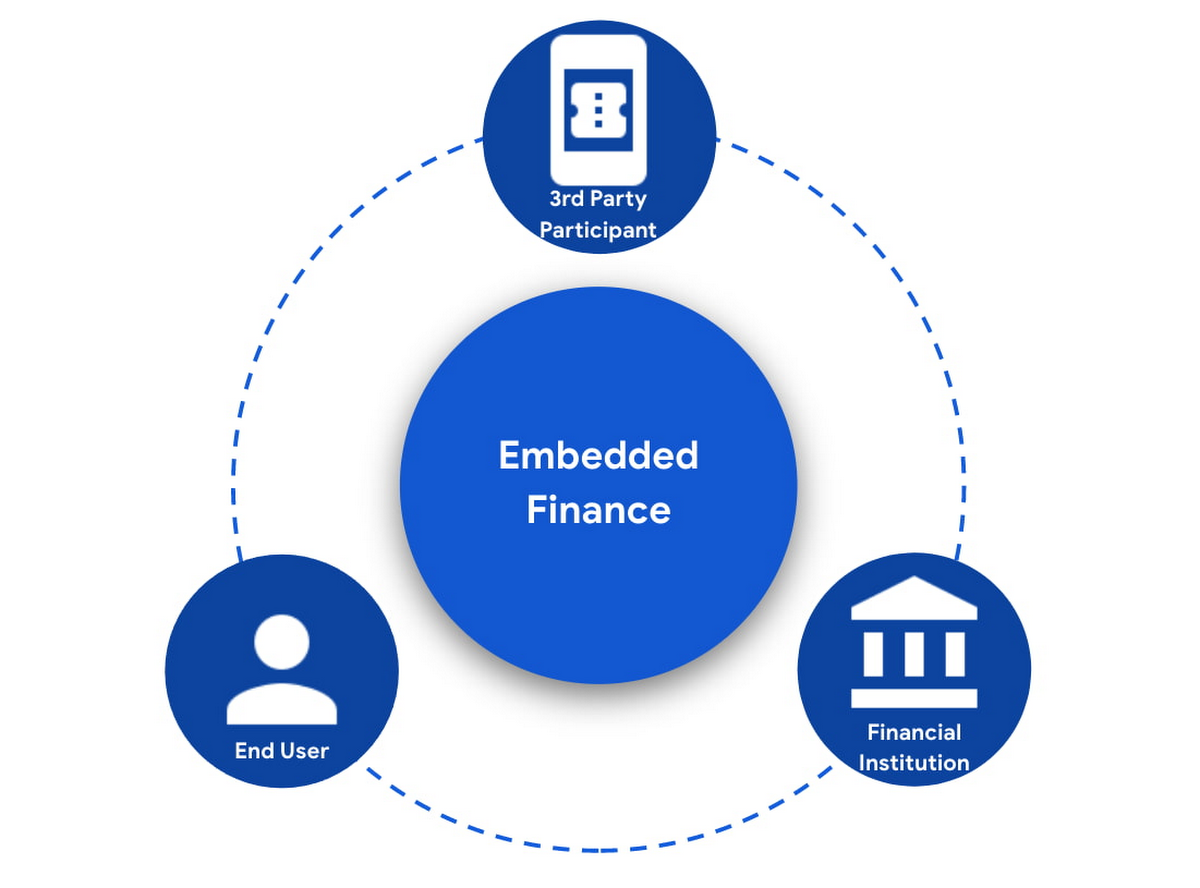
The most important ingredient for these schemes is consumer trust. If a consumer does not trust that their data will be safely shared with a third party, and that they can easily understand the terms they have agreed to and stop sharing their data whenever they want to, consumers will simply not participate. When a consumer agrees for their data to be shared, this is called consent.
What components do I need for a successful Embedded Finance solution?
Banks’ products and services are made available to other parties via APIs, thus a fundamental component is an API Management platform. An API Management Platform lets you design, secure, analyze, and scale APIs anywhere with visibility and control.
Also, we need a component to manage consents given by end users. Consent Management refers not only to the capability of checking whether a certain action by a third party (eg: access an end user’s account balance) is valid according to the consent granted by the end user to that TPP, but also the availability of tools for end users to check existing consents, modify them or revoke them, as well as tools for financial institutions to perform similar actions on behalf of their customers.
Finally, we need an Identity Platform capable of authenticating an end user and establishing their identity.

A Google Cloud based embedded finance solution uses Apigee as the API management platform, Identity Platform or your own identity platform of choice, and a consent management service (CMS). Google Cloud has partnered with two leading providers in the consent management space: Clarip and CloudEntity.

How do these components work together?
The main roles and responsibilities of each of the three components are quite clear, but there is a certain degree of flexibility on how to orchestrate the interactions between the components, and which component performs which function when there is an overlap of functionality between them.
Google Cloud has tested the following interaction patterns:
- Interaction Pattern #1: Apigee as the main orchestrator
In this interaction pattern, Apigee interacts with both the consent management service and the identity platform, coordinating end user authentication with the identity platform, and authorization and consent with the consent management service. Apigee acts as the “broker” between users, their identity, and their consent.
- Interaction Pattern #2: The consent management service abstracts the identity platform.
In this case, the consent management service manages all the interactions with the identity management platform, and the identity platform acts as the “broker”. Apigee only interacts with the consent service.
The three components share a common pool of client apps and end users. One of the components is typically designated as the source of truth for these entities, while the other components that need to know about these entities synchronize that information from the source of truth.
The identity platform is typically the source of truth for end user identities and the consent management component will synchronize that information by pulling it from the identity platform.
The consent management service is the source of truth for user opt-in and current consent status. Apigee will either check with the service the validity of a consent every time a request comes through, or to make it more efficient, it will validate the main attributes of the consent based on information stored in Apigee. To maintain consistency, the consent management service should tell Apigee to invalidate any tokens associated with a consent when it is revoked via other means (for example, if an end user revoked consent from a consent dashboard).
For client apps, either Apigee or the consent management component can act as the source of truth, with the other component synchronizing the information. In the context of Open Banking in particular, standards often mandate that financial institutions support Dynamic Client Registration. This means having endpoints that new clients can use to register themselves as clients for the Open Banking APIs. In this case, the synchronization of clients can easily be incorporated into Dynamic Client Registration.
Let’s look now into more detail about how the three components interact. There are two user journeys that are particularly relevant:
Authentication/Authorization/Consent
This is the beginning of the typical consumer client journey, when an end user starts using a third party app that requires access to that user’s data. The third party app needs to authenticate itself, and request authorization to access the user’s data. This will trigger the authentication of the end user and consent granting: Consent granting being the process of, the user authorizing the operations the app will execute on their behalf, and establishing the list of accounts on which these operations will be performed. The authorization is represented by an access token, which the app will need to include in all subsequent requests.
This is quite a complex journey with many steps involved in order to make this as secure as possible. To make it easier to understand, we will simplify some of the steps (apologies in advance to you OIDC/FAPI experts out there!).
At a high level, these are the steps involved in this user journey:
- End user starts using an app
- The app requests permission to access user’s data
- The identity platform (IdP) authenticates the end user
- The consent management service obtains consent from end user
- An access token is issued for the app, encapsulating the authorized permissions, accounts, etc. A refresh token is also issued – the access token normally has a short life (measured in minutes), but the app can use the refresh token, which typically lasts much longer (days or months), in order to obtain a new access token without the need of going through the end user authentication/authorization/consent process again.
The way these steps are orchestrated varies depending on the interaction pattern among the components.
Pattern #1: Apigee orchestrates all interactions
When the client requests permission, Apigee will record the request and then redirect the client app to the IdP login page. Once the end user logs in, the IdP will return an authorization code to the callback URL that Apigee registered in the IdP configuration.
Apigee will then redirect the client app to the Consent Management service, so that the consent form is displayed. Once the user grants consent, selects the desired permissions, and selects the accounts it will apply to, the Consent Management Service will update Apigee with the status of the consent, via a callback Apigee registered in the consent configuration.
Now that the end user has authenticated and granted consent, Apigee can now issue an authorization code, and associate all the necessary information, for instance, details about the consent, the authorization code issued by the Identity Platform (IdP), the identification of the end user in the IdP, etc. Apigee will return this authorization code to the client app via a callback endpoint that the app provided when registering with Apigee.
The app will then exchange the authorization code for an access token. Apigee will obtain an access token from the IdP, abd update the status of the consent before issuing an access token to the client.
Pattern #2: The Consent Management Service is the center of the Architecture
In Pattern #2, Apigee will only communicate with the Consent Management Service, which acts as an authorization server for the app and will also coordinate all interaction with the IdP.
When the client requests permission, Apigee will forward the request to the CMS. The CMS will record the request and then redirect the client app to the IdP login page. Once the end user logs in, the IdP will return an authorization code to the callback the CMS registered in the IdP configuration.
The CMS then displays the consent form. Once the user approves the consent and selects the desired permissions and accounts it will apply to, the Consent Management Service will return an authorization code to Apigee, via a callback Apigee registered in the CMS configuration.
From now on, the flow is the same as explained above. Apigee will issue an authorization code, associate all the necessary information and will return this authorization code to the client app via a callback endpoint. The app will then exchange the authorization code for an access token. Apigee will obtain an access token from the CMS, before issuing an access token to the client.
Let’s now look at the other relevant user journey:
Access shared data
Once the third party app has been authorized, it will then start requesting that end user’s data. For instance, it may request the list of accounts or the balance of a particular account.
When that request goes through, a series of checks need to be performed: Is this third party app still authorized? Has it been granted the right permission for the operation being requested? Is the account involved included in the list of accounts authorized by the end user? Apigee can perform all these checks by inspecting the access token presented by the third party app.
There is, however, one other check which cannot be done simply by inspecting the token. Imagine for a moment that in-between the user granting consent and the app requesting the user’s data, the end user decided to revoke that consent. This could be done by other means than the app itself, for instance by checking all consents granted to all apps in a consent dashboard accessible via other channels such as an “Internet Banking” site. When the app requests the user data, the token is still valid, however the consent has already been revoked. Therefore, in this user journey, Apigee will check with the Consent Management service to check if the consent is still valid. This adds a bit of overhead, which can be minimized by other means. For instance, one popular optimization is to make sure that the Consent Management service asks Apigee to revoke any access or refresh tokens associated with a given consent when that consent is revoked via other channels. If that guardrail is in place, then Apigee can determine if a request should be allowed simply by validating the access token and using the consent information stored alongside the token.
The following diagram summarizes the interactions required between Apigee and the Consent Management component. The interaction is essentially the same in both interaction patterns.

What’s next?
In this article we have described how Apigee, a Consent Management service, and an Identity Platform are the fundamental ingredients of a successful and secure Embedded Finance solution. We have also looked at how these components interact with each other to keep user consent consistent and available. Both interaction patterns described are valid and have been proven to work. So which one may be right for you? The answer ultimately depends on your particular requirements, the choice of consent management service, and your choice of identity platform. As a rule of thumb, if you have multiple application experiences, identity systems, and sources of consent, an Apigee-centric architecture is a great solution. If you are looking at a Consent Management service in the context of an Open Banking implementation mandated by a centralized authority (eg: Open Banking Brazil, Consumer Data Standards in Australia), CloudEntity is a good choice for consent management, as their product is also Certified Financial-grade API (FAPI) OpenID Provider, with profiles for the various Open Banking standards. CloudEntity integrates with Apigee using Pattern #2.
For more details on both Clarip and CloudEntity’s offerings and how their particular solution works with GCP please check:
- Clarip: Universal Consent Management Platform – GDPR
- CloudEntity: Certified OpenBanking & Consent (UK, Brazil and Australia) at scale
For more details on Apigee API Management, see https://cloud.google.com/apigee
You can also learn about our solutions for retail banking or contact sales.
More Relevant Stories for Your Company

How Kubernetes is enabling digital transformation for retailers
Retail organizations constantly face financial pressure to increase sales while maintaining profit margins. Digital commerce creates new opportunities and a more competitive landscape for retailers by allowing them to reach a global customer base online, but it also exposes them to competition from larger online retailers. To be successful in


Application Development with Kpt
Learn how to create and customize configuration packages with Kpt to build applications and adhere to configuration-as-data philosophy.

How Smart Parking Transformed into a Data-Intelligent Business
Google Cloud Results Reduced smart parking/smart city IoT installation and operational support effort by more than halfEnabled development of a Smart Cloud IoT platform in just four monthsDemocratised data access and use across the organisationBuilt core infrastructure in under 4 months Smart Parking’s core product is a sensor-based system called

Securing apps using Anthos Service Mesh
Hi there! I'm David Challoner from Access Site Reliability Engineering (SRE), here with Anthony Bushong from Developer Relations to talk about how Corp Eng is adopting Anthos Service Mesh internally at Google. Corp Eng is Google's take on "Enterprise IT". A big part of the Corp Eng mission is running
