





Efficient, Safe and Dynamic Gaming Experience: Aristocrat’s Digital Journey on Google Cloud

4783
Of your peers have already read this article.
2:00 Minutes
The most insightful time you'll spend today!
Since Aristocrat’s founding in 1953, technology has constantly transformed gaming and the digital demands on our gaming business are a far cry from challenges we faced when we started. As we continue to expand globally, security and compliance are top priorities.
Managing IT security for several gaming subsidiaries and our core business became more complex as we entered into new markets and scaled up our number of users. We needed a centralized platform that could give us full visibility into all of our systems and efficient monitoring capabilities to keep data and applications secure. We also needed the ability to secure our systems without compromising user experiences.
We turned to Google Cloud and Splunk to better manage complexity and support highly efficient, secure, and more dynamic gaming experiences for everyone. We are committed to using today’s modern technologies to give players more optimal experiences.
Bringing our digital footprint into the cloud
When we set out on our digital transformation, we looked to address many business requirements.
These requirements included:
- Regulation: We wanted a platform that could efficiently address our industry’s stringent and global regulatory compliance requirements.
- Player experience: Our IT environment must support smooth gaming experiences to keep users engaged and satisfied.
- Scalability: As we grow and diversify, meeting the changing demands of an increasingly global gaming community, we need an easily scalable platform to align with our current and future needs.
Google Cloud offered us the perfect foundation through solutions such as Compute Engine, Google Kubernetes Engine, BigQuery, and Google Cloud Storage. These acted as the right infrastructure components for us for the following reasons:
- Google Cloud is globally accessible and supports compliance, helping to streamline security and regulatory processes for our team.
- With Google Cloud, we can manage our entire development and delivery processes globally with fast and efficient reconciliation of regional compliance requirements.
- When we need to adjust existing infrastructure or deliver new capabilities, Google Cloud accelerates the process and takes the heavy lifting off of our team.
- Google Cloud allows us to support tens of thousands of players on each of our apps while experiencing minimal downtime and low latency. The importance of this support can’t be underestimated in an industry where players have little to no patience if lags in games occur.
We migrated our back-office IT stack alongside our consumer-facing production applications to Google Cloud given our positive experiences with compliance, security, scalability, and process management. This migration has significantly accelerated our digital transformation while streamlining our infrastructure for faster and more cost-effective performance.
In many ways, Google Cloud has been, with maybe a pun intended, a game-changer for us. For instance, when we suddenly had to support a lot of remote work during the COVID-19 pandemic, native identity and access management tools in Google Cloud allowed us to retire costly VPNs used for backend access and quickly adopt a more easily managed, cost-effective zero-trust security posture.
Accessing vital third-party partners and managed services
Aristocrat has many IT needs best addressed in a multi-cloud environment. Google Cloud is particularly attractive given its strong cloud interoperability, as well as the many products and services available on Google Cloud Marketplace. The marketplace accelerated our deployment of key third-party apps including Splunk and Qualys.
Given the personal information we store and the global regulatory compliance statutes we must oblige, security lies at the heart of our business. Splunk is a critical component of our digital transformation because it offers solutions that provide the enhanced monitoring capabilities and visibility we need. The integration between Splunk and Google Cloud gives us confidence that our data is secure. We know our data can be secure in Google Cloud, while simplified billing through Google Cloud Marketplace makes payments and license tracking easier for our procurement team.
As part of our protected environment, we use the Splunk platform as our security information and event management system, leveraging the InfoSec app for Splunk that provides continuous monitoring and advanced threat detection to significantly improve our security.
We can manipulate and present data in Splunk in a way that provides us with a single pane-of-glass for our hybrid, multi-cloud environment and our third-party apps and systems. Splunk observability tools have likewise helped us to track browser-based applications like our online gaming apps to monitor details related to security and performance.
Splunk and Google Cloud have transformed how we operate. We can now quickly ingest and analyze data at scale within our refined approach to security management by offloading software management to Splunk and Google Cloud. This ability enables us to approach security more strategically, and positions us to integrate more AI/ML capabilities into our products for even greater governance and performance.
This is just the beginning of our journey with Splunk and Google Cloud. We’re excited to see the innovation we can continue bringing to the gaming community worldwide.
VMware Engine’s Exciting New Updates: A Google Cloud Journey

1346
Of your peers have already read this article.
2:30 Minutes
The most insightful time you'll spend today!
IT leaders today are being asked to simultaneously support their company’s infrastructure, find opportunities for growth, and meet their goals with fewer resources and smaller budgets than before. Recently we highlighted three customers who are leveraging Google Cloud VMware Engine to achieve these goals while lowering their TCO and transforming their organization.
It’s because of these successful customer outcomes that we have been awarded the 2023 VMware Cloud Innovation and SaaS Transformation partner achievement award for delivering solutions that accelerate customers’ digital transformation journey. We’re honored to receive this award and continue to stay focused on delivering tremendous value to our customers.
In the past few months, we’ve also made several updates to Google Cloud VMware Engine. Today’s post provides a recap of the latest milestones that make it easier for you to migrate and run your vSphere workloads in a cloud-first, enterprise-class VMware environment in Google Cloud.
Back in September 2022, we announced a number of updates including the preview of API/CLI support (which is now available). In February 2023, we also talked about how to use NetApp CVS as datastores for VMware Engine.
Key updates this time around include:
Availability of VMware Engine in Delhi, Santiago and Milan regions: This brings the availability of VMware Engine to 17 regions worldwide, each supporting 4 9’s of uptime SLA for clusters 5 or more, serving the needs of our regional and multi-national customers. In addition, we have also added a second zone in the London region.
Filestore datastore support for VMware Engine: Generally Available in all VMware Engine regions, you can use Filestore High Scale and Enterprise tier instances as external NFS datastores for VMware Engine nodes. Filestore is VMware certified as an NFS datastore with VMware Engine. You can size compute and storage capacity independently to meet your workload requirements for your storage-intensive VMs. You can also leverage vSAN for low-latency VM requirements and scale Filestore from TBs to PBs for the capacity hungry VMs. If interested in this feature, please contact your Google account team.
Stretched private clouds: These private clouds stretch across two data zones and a witness zone all within the same Google Cloud region. Stretched private clouds use vSphere and vSAN stretched clusters to provide compute and storage high availability against zone-level failures. This capability is now available in Frankfurt and Sydney regions. Learn more here.
Zerto solution version 9.5u1 support: This recovery solution allows critical infrastructure and application virtual machines (VMs) to be replicated continuously from your on-premises vCenter to your private cloud. Learn more about setting up Zerto here.
Google Cloud Backup and Disaster Recovery (GCBDR): GCBDR is available to protect applications running in VMware Engine, and can be managed within the Google Cloud Console. We recently launched GCBDR under Google Cloud Platform Terms of Service simplifying customers’ purchasing and support experience.
vTPM support: Google Cloud VMware Engine private clouds now support the addition of a Trusted Platform Module (TPM) 2.0 virtual cryptoprocessor to a virtual machine. You can add vTPMs to VMs by following VMware instructions or upgrading your existing VMs to include a vTPM. You can read more about this in the VMware blog.
This brings us to the end of our updates this time. For the latest updates to the service, please bookmark our release notes.
Recapping Google Cloud VMware Engine’s Latest Milestones
3471
Of your peers have already read this article.
3:00 Minutes
The most insightful time you'll spend today!
We’ve made several updates to Google Cloud VMware Engine in recent weeks—today’s post provides a recap of our latest milestones. Google Cloud VMware Engine delivers an enterprise-grade VMware stack running natively in Google Cloud. This cloud service is one of the fastest paths to the cloud for VMware workloads without making changes to existing applications or operating models across a variety of use-cases. These include rapid data center exit, application lift and shift, disaster recovery, virtual desktop infrastructure, or modernization at your own pace.
In fact, Mitel, a global provider of unified communications-as-a-service to 70 million business users across 100 countries, migrated 1,000 VMware instances to Google Cloud VMware Engine in less than 90 days and improved its monthly operational output four times.
In our last update, we focused on several innovative capabilities around networking, reach, and scale. Let us take a look at the highlights we released since our last installment.
Fast provisioning of a dedicated, intrinsically secure VMware private cloud
With Google Cloud VMware Engine, you can spin up a VMware private cloud in about 30 minutes. You can also scale your VMware-based infrastructure on-demand with dedicated hosts located in secure Google data centers. Let us look at what’s new:
Autoscale: The ability to elastically and programmatically manage infrastructure resources to align with business needs or what is called “right-sizing” is a core capability of an IaaS platform. With autoscale, Google Cloud VMware Engine users can leverage policy-driven automation to scale the nodes needed to meet the compute demands of the VMware infrastructure.
Autoscale:
- Addresses seasonal spikes in demand, gradual increases of utilization, or new projects being onboarded or expanded due to disaster recovery events.
- Analyzes the CPU, memory, and storage utilization to give you the controls to scale Google Cloud VMware Engine nodes up or down.
- Ensures that storage consumption does not exceed the recommended limits for maintaining the Google Cloud VMware Engine service-level agreement.
- Reduces overhead on IT teams by automating capacity monitoring and enabling sufficient availability of resources based on thresholds. Note that safeguards for maintaining minimum capacity and maximum capacity can be configured to ensure there are boundaries to the automation.
Learn how to set up Autoscale.

Mumbai region availability
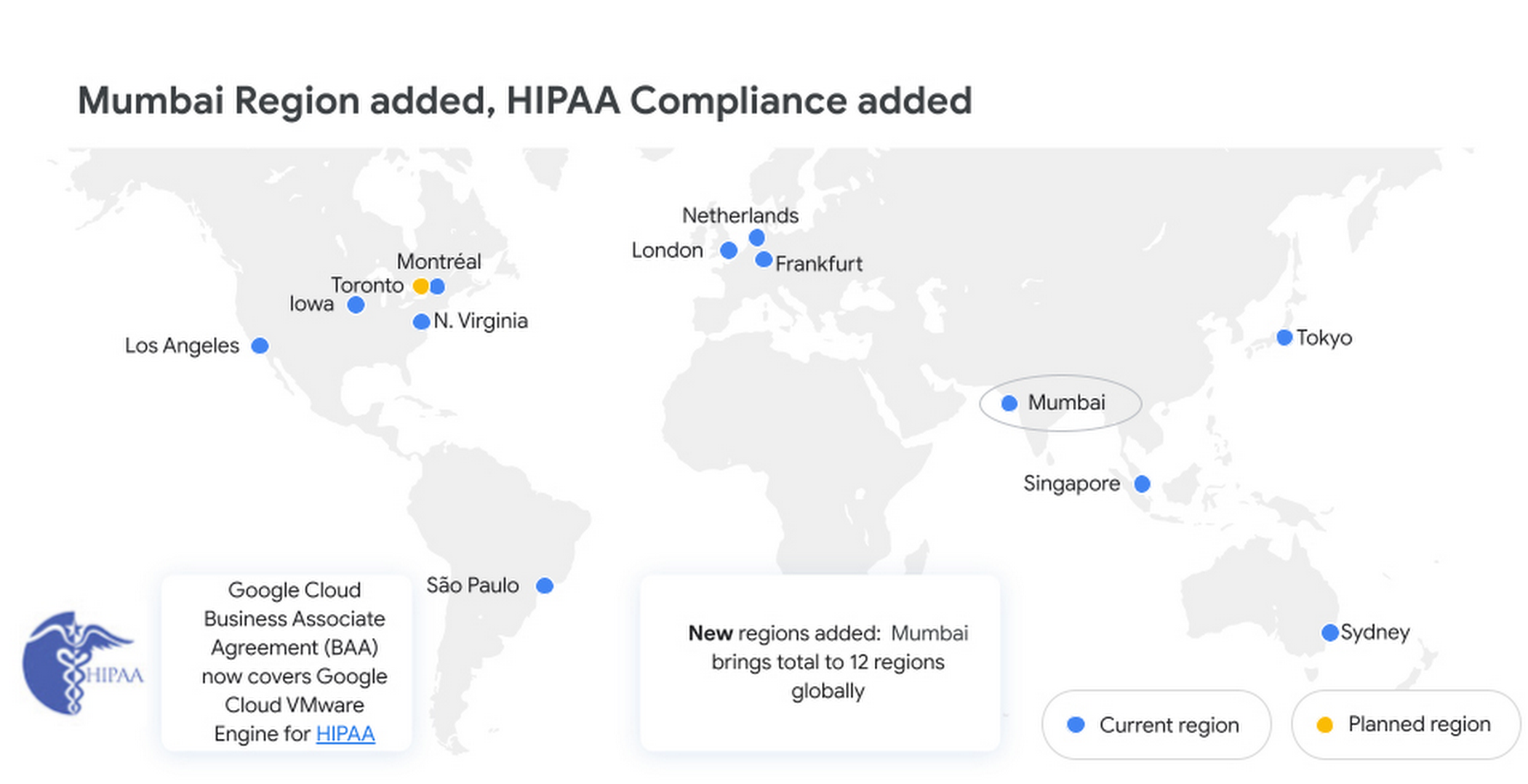
Google Cloud VMware Engine is now available in the Mumbai region. This brings the availability of the service to 12 regions globally, enabling our multi-national and regional customers to leverage a VMware-compatible infrastructure-as-a-service platform on Google Cloud. For more details, please read the press release.
Enterprise-grade infrastructure
With 99.99% availability for a cluster in a single zone, fully dedicated 100 Gbps east-west networking with no oversubscription, and all nonvolatile memory express storage, Google Cloud VMware Engine provides the highest performance required for the most demanding workloads. Let us look at what’s new:
Preview – Google Cloud KMS integration: You already have the ability to bring your own keys to encrypt your vSAN datastores. With this new capability, organizations that want to eliminate the overhead of managing external key providers can leverage a Google managed key provider, using Cloud KMS. This brings increased flexibility in securing workloads and data by enabling vSAN encryption by default for newly instantiated VMware Private Clouds. This feature is currently in Preview.
HIPAA compliance: Since April, Google Cloud VMware Engine is Health Insurance Portability and Accountability Act (HIPAA) compliant. This opens the service up to healthcare organizations, that can now migrate and run their HIPAA-compliant VMware workloads in a fully compatible VMware Cloud Verified stack running natively in Google Cloud with Google Cloud VMware Engine, without changes or re-architecture to tools, processes, or applications. Read more in this blog.
NSX-T support for Active Directory: With NSX-T support for Active Directory, you can now leverage your on-premises Active Directory as one of the lightweight directory access protocol identity sources for user authentication into NSX-T manager. This extends the theme of being able to leverage your on-premises tools with Google Cloud VMware Engine. For more information, read the documentation on how to set up identity sources.
vSAN TRIM/UNMAP support: For space-efficiency, vSAN allows creating thin-provisioned disks that grow gradually as they are filled with data. However, files that are deleted within the guest operating system (OS) do not result in vSAN freeing up space allocated. To increase space efficiency, guest OS file systems have the ability to reclaim capacity that is no longer used, using TRIM/UNMAP commands. vSAN is fully aware of these commands that are sent from the guest OS and enables reclamation of previously allocated storage as free space. We have enabled TRIM/UNMAP for vSan by default in Google Cloud VMware Engine.
Simplicity in experience and operations
With Google Cloud VMware Engine, you only need to worry about your workloads—not patching, upgrading, and updating the solution layer, for fewer interoperability issues and infrastructure maintenance. IIn addition, we have pre-built service accounts to enable your third-party VMware-supported tools and solutions to work seamlessly in VMware Engine. Access to Google services privately over local connections is also natively supported, enabling enrichment of existing applications and modernization over time. Finally, this service brings the power of Google Cloud Virtual Private Cloud (VPC) design by natively providing multi-VPC, multi-region networking that’s unique. Let’s look at what’s new:
Dashboards for Day 2 operations: To speed up cloud transformation and enable efficiency, Google Cloud VMware Engine administrators can take advantage of Cloud Operations dashboards for the solution. In addition, administrators can create custom policies through cloud alerting and enable notifications via channels of their choice (SMS, email, Slack, and more). For more details on how to set up cloud monitoring, please refer to Setting up Cloud Monitoring.
For the latest updates, bookmark Google Cloud VMware Engine release notes.
Thanks to Manish Lohani, Product Management, Google Cloud; Nargis Sakhibova, Product Management, Google Cloud; and Wade Holmes, Solutions Management, Google Cloud; for their contributions to this blog post.
Cloud Bigtable Helps Fraud-detection Company Meet Scalability Demands and Secure Customer Data

7127
Of your peers have already read this article.
3:00 Minutes
The most insightful time you'll spend today!
Editor’s note: Today we are hearing from Jono MacDougall , Principal Software Engineer at Ravelin. Ravelin delivers market-leading online fraud detection and payment acceptance solutions for online retailers. To help us meet the scaling, throughput, and latency demands of our growing roster of large-scale clients, we migrated to Google Cloud and its suite of managed services, including Cloud Bigtable, the scalable NoSQL database for large workloads.
As a fraud detection company for online retailers, each new client brings new data that must be kept in a secure manner and new financial transactions to analyze. This means our data infrastructure must be highly scalable and constantly maintain low latency. Our goal is to bring these new organizations on quickly without interrupting their business. We help our clients with checkout flows, so we need latencies that won’t interrupt that process—a critical concern in the booming online retail sector.
We like Cloud Bigtable because it can quickly and securely ingest and process a high volume of data. Our software accesses data in Bigtable every time it makes a fraud decision. When a client’s customer places an order, we need to process their full history and as much data as possible about that customer in order to detect fraud, all while keeping their data secure. Bigtable excels at accessing and processing that data in a short time window. With a customer key, we can quickly access data, bring it into our feature extraction process, and generate features for our models and rules. The data stays encrypted at rest in Bigtable, which keeps us and our customers safe.
Bigtable also lets us present customer profiles in our dashboard to our client, so that if we make a fraud decision, our clients can confirm the fraud using the same data source we use.

We have configured our bigtable clusters to only be accessible within our private network and have restricted our pods access to it using targeted service accounts. This way the majority of our code does not have access to bigtable and only the bits that do the reading and writing have those privileges.
We also use Bigtable for debugging, logging, and tracing, because we have spare capacity and it’s a fast, convenient location.
We conduct load testings against Bigtable. We started at a low rate of ~10 Bigtable requests per second and we peaked at ~167000 mixed read and write requests per second at absolute peak. The only intervention that was done to achieve this was pressing a single button to increase the number of nodes in the database. No other changes were made.
In terms of real traffic to our production system, we have seen ~22,000 req/s (combined read/write) on Bigtable in our live environment as a peak within the last 6 weeks.
Migrating seamlessly to Google Cloud
Like many startups, we started with Postgres, since it was easy and it was what we knew, but we quickly realized that scaling would be a challenge, and we didn’t want to manage enormous Postgres instances. We looked for a kind of key value store, because we weren’t doing crazy JOINS or complex WHERE clauses. We wanted to provide a customer ID and get everything we knew about it, and that’s where key value really shines.
I used Cassandra at a previous company, but we had to hire several people just for that chore. At Ravelin we wanted to move to managed services and save ourselves that headache. We were already heavy users and fans of BigQuery, Google Cloud’s serverless, scalable data warehouse, and we also wanted to start using Kubernetes. This was five years ago, and though quite a few providers offer Kubernetes services now, we still see Google Cloud at the top of that stack with Google Kubernetes Engine (GKE). We also like Bigtable’s versioning capability that helped with a use case involving upserts. All of these features helped us choose Bigtable.
Migrations can be intimidating, especially in retail where downtime isn’t an option. We were migrating not just from Postgres to Bigtable, but also from AWS to Google Cloud. To prepare, we ran in AWS like always, but at the same time we set up a queue at our API level to mirror every request over to Google Cloud. We looked at those requests to see if any were failing, and confirmed if the results and response times were the same as in AWS. We did that for a month, fine tuning along the way.
Then we took the big step and flipped a config flag and it was 100% over to Google Cloud. At the exact same time, we flipped the queue over to AWS so that we could still send traffic into our legacy environment. That way, if anything went wrong, we could fail back without missing data. We ran like that for about a month, and we never had to fail back. In the end, we pulled off a seamless, issue-free online migration to Google Cloud.
Flexing Bigtable’s features
For our database structure, we originally had everything spread across rows, and we’d use a hash of a customer ID as a prefix. Then we could scan each record of history, such as orders or transactions. But eventually we got customers that were too big, where the scanning wasn’t fast enough. So we switched and put all of the customer data into one row and the history into columns. Then each cell was a different record, order, payment method, or transaction. Now, we can quickly look up the one row and get all the necessary details of that customer. Some of our clients send us test customers who place an order, say, every minute, and that quickly becomes problematic if you want to pull out enormous amounts of data without any limits on your row size. The garbage collection feature makes it easy to clean up big customers.
We also use Bigtable replication to increase reliability, atomicity, and consistency. We need strong consistency guarantees within the context of a single request to our API since we make multiple bigtable requests within that scope. So within a request we always hit the same replica of Bigtable and if we have a failure, we retry the whole request. That allows us to make use of the replica and some of the consistency guarantees, a nice little trade-off where we can choose where we want our consistency to live.https://www.youtube.com/embed/0-eH5u7rrQQ?enablejsapi=1&
We also use BigQuery with Bigtable for training on customer records or queries with complicated WHERE clauses. We put the data in Bigtable, and also asynchronously in BigQuery using streaming inserts, which allows our data scientists to query it in every way you can imagine, build models, and investigate patterns and not worry about query engine limitations. Since our Bigtable production cluster is completely separate, doing a query on BigQuery has no impact on our response times. When we were on Postgres many years ago, it was used for both analysis and real time traffic and it was not the optimal solution for us. We also use Elasticsearch for powering text searches for our dashboard.
If you’re using Bigtable, we recommend three features:
- Key visualizer. If we get latency or errors coming back from Bigtable, we look at the key visualizer first. We may have a hotkey or a wide row, and the visualizer will alert us and provide the exact key range where the key lives, or the row in question. Then we can go in and fix it at that level. It’s useful to know how your data is hitting Bigtable and if you’re using any anti-patterns or if your clients have changed their traffic pattern that exacerbated some issue.
- Garbage collection. We can prevent big row issues by putting size limits in place with the garbage collection policies.
- Cell versioning. Bigtable has a 3d array, with rows, columns, and cells, which are all the different versions. You can make use of the versioning to get history of a particular value or to build a time series within one row. Getting a single row is very fast in Bigtable so as long as you can keep the data volume in check for that row, making use of cell versions is a very powerful and fast option. There are patterns in the docs that are quite useful and not immediately obvious. For example, one trick is to reverse your timestamps (MAXINT64 – now) so instead of the latest version, you can get the oldest version effectively reversing the cell version sorting if you need it.
Google Cloud and Bigtable help us meet the low-latency demands of the growing online retail sector, with speed and easy integration with other Google Cloud services like BigQuery. With their managed services, we freed up time to focus on innovations and meet the needs of bigger and bigger customers.
Learn more about Ravelin and Bigtable, and check out our recent blog, How BIG is Cloud Bigtable?

1133
Of your peers have already downloaded this article
5:30 Minutes
The most insightful time you'll spend today!
This comprehensive guide provides a detailed process for migrating archival workloads from Amazon Glacier to Google Cloud Storage Nearline in the Indian context. The process involves carefully planning data retrieval and staging strategies to ensure an efficient and cost-effective migration.
The whitepaper includes:
- Different storage methods on Amazon Glacier and their respective retrieval processes.
- Recommendations on managing retrieval costs to avoid high charges from Amazon Web Services.
- The recommended rate for data availability and download to prevent unnecessary repetition of the process.
- Utilization of Google Compute Engine for data staging, if stored directly in Amazon Glacier.
- Use of command-line utility, gsutil, or the Storage Transfer Service for transferring data from the staging location to Google Cloud Storage Nearline.
- Insights to achieve a streamlined and economical migration process from Amazon Glacier to Google Cloud Storage Nearline.
Three Benefits of VPC Network Peering for SAP Managed Apps
3532
Of your peers have already read this article.
3:00 Minutes
The most insightful time you'll spend today!
Over the past year, RISE with SAP has emerged as a valuable solution for SAP customers seeking a faster, simpler, and more affordable path to the cloud. RISE with SAP is a subscription-based offering that typically includes a number of fully managed cloud application options, including SAP S/4HANA Cloud and elements of the SAP Business Technology Platform. It’s a great way to migrate your business to modern cloud ERP applications, while handing off the implementation and management to SAP and freeing your own IT staff to focus on other projects.
As a strategic partner for RISE with SAP, Google Cloud works closely with SAP to ensure reliable, secure, high-performance connectivity between your SAP managed applications and your other Google Cloud applications and services. Today, we’re focusing on a Google Cloud capability that plays a big part in achieving this goal: VPC network peering. If your company uses Google Cloud to host its RISE with SAP managed applications (or any other SAP-managed offering, such as SAP Enterprise Cloud Services), it’s worth learning more about why VPC network peering is an important capability and how your network admin can implement it.
VPC network peering: The critical link for your SAP managed applications
We recently co-authored a white paper with SAP that goes into technical detail about how VPC network peering works and includes step-by-step configuration instructions. But it is useful to understand, at a higher level, why it matters for RISE with SAP subscribers.
When SAP implements your RISE with SAP managed applications on Google Cloud, it also provisions a virtual private cloud (VPC) — a virtualized network that provides the same functionality, performance, and security benefits as a dedicated physical network — for this SAP environment. In fact, a VPC actually gives you some capabilities that a physical network can’t match, such as the ability to increase IP space without downtime.
Using VPC network peering to connect your SAP managed environment with your Google Cloud applications and services gives you three key benefits:
- Network latency: Traffic that remains inside Google’s network enjoys lower latency than connectivity that uses external addresses.
- Network security: Service owners do not need to have their services exposed to the public internet and deal with its associated risks.
- Network cost: Rather than pay egress bandwidth costs for networks using external IPs to communicate, peered networks can use internal IPs to communicate, saving you money on those egress costs. Regular network pricing still applies to all traffic.
Many customers also appreciate the flexibility they get from VPC network peering: It supports the ability to peer your own VPC networks with other VPC networks that reside in different projects and even in different organizations.
Using VPC network peering to strengthen your SAP security posture
Most Google Cloud customers find VPC network peering most useful to ensure seamless connectivity between their SAP managed applications and the rest of their Google Cloud environment. But some companies also rely on VPC network peering to gain greater control over the security of their cloud environments. This can include:
- Implementing additional network security capabilities, such as advanced firewalls, intrusion detection, and network package inspection, that go above and beyond standard SAP security measures.
- Leveraging Google Cloud Interconnect to link your on-premises and Google Cloud environments, including your RISE with SAP managed applications, without sending traffic across the public internet.
Once your company has configured VPC network peering, things get even more interesting. Google Cloud offers plenty of ways to complement and enhance the value of your SAP applications: using Google BigQuery to consolidate and enrich your SAP application data; relying on Google AI/ML capabilities to sharpen your predictive analytics and real-time decision-making; or leveraging Google Kubernetes Engine to jump-start your own cloud-native application development efforts, among many other examples.
Some of the world’s biggest SAP customers, including The Home Depot, and Cardinal Health, have chosen Google Cloud to migrate their business-critical SAP applications. And we’ve seen how useful VPC network peering can be for SAP customers to unlock the full value and potential of Google Cloud. Be sure to download our white paper so you can get VPC network peering configured for your RISE with SAP managed applications, and discover for yourself just what’s possible when you run SAP applications on Google Cloud.
More Relevant Stories for Your Company

Google Cloud: Lowering Migration Risks for Indian Firms
A common perception is that migrating existing workloads to the public cloud—especially those with a lot of data—is complex, time consuming, and risky. But with the right planning, organizations can rapidly establish the right practices to accelerate migrations, lower risk, and succeed in the cloud.


How L&T Financial Services Processes 95% of Motorcycle Loans in Less Than Two Minutes
L&T Financial Services is one of the largest lenders in India. India’s demonetization policy in recent years has led to a shift from cash transactions to digital payments. In 2016, the government withdrew 500 and 1000 rupee notes from circulation and encouraged a heavily cash-based population to deposit their canceled notes
Guide to Google’s Underwater Infrastructure
From data centers and cloud regions to subsea cables, Google is committed to connecting the world. Our investments in infrastructure aim to further improve our network—one of the world’s largest—which helps improve global connectivity, supporting users and Google Cloud customers. Our subsea cables play a starring role in this work,

Google Cloud is Every Retailer’s Most Trusted Cloud
Whether they were ready for it or not, the COVID-19 pandemic transformed many retailers into digital businesses. Retailers made huge investments into commerce technologies, customer experience tools, sales and fulfillment technology, and improving digital experiences to continue providing their goods and services to their customers. Now, more than a year
