





Download the Forrester Study to Explore the Benefits of AI for IT Operations in Cloud Environment

7119
Of your peers have already read this article.
1:30 Minutes
The most insightful time you'll spend today!
Organizations are currently modernizing their businesses in order to meet the increasing complexity of today’s business landscape. In effect, business leaders must evaluate the best way to mitigate the challenges which plague their cloud operations, all while meeting customers’ growing expectations around digital experience (DX) through agility, automation, and proactive incident avoidance.
In this commissioned study, “Modernize With AIOps To Maximize Your Impact”, Forrester Consulting surveyed organizations worldwide to better understand how they’re approaching artificial intelligence for IT operations (AIOps) in their cloud environments, and what kind of benefits they’re seeing.
Within this July 2021 study, you’ll see that AIOps systems and principles are here to help. It covers how AIOps increases efficiency and productivity across day-to-day operations, and how businesses are taking note. In fact, 91% of respondents have implemented AIOps to address at least one cloud operations issue, and expansion is set to skyrocket. Those that wait to act, risk losing out on the efficacy of their cloud investment and falling behind their more efficient competitors.
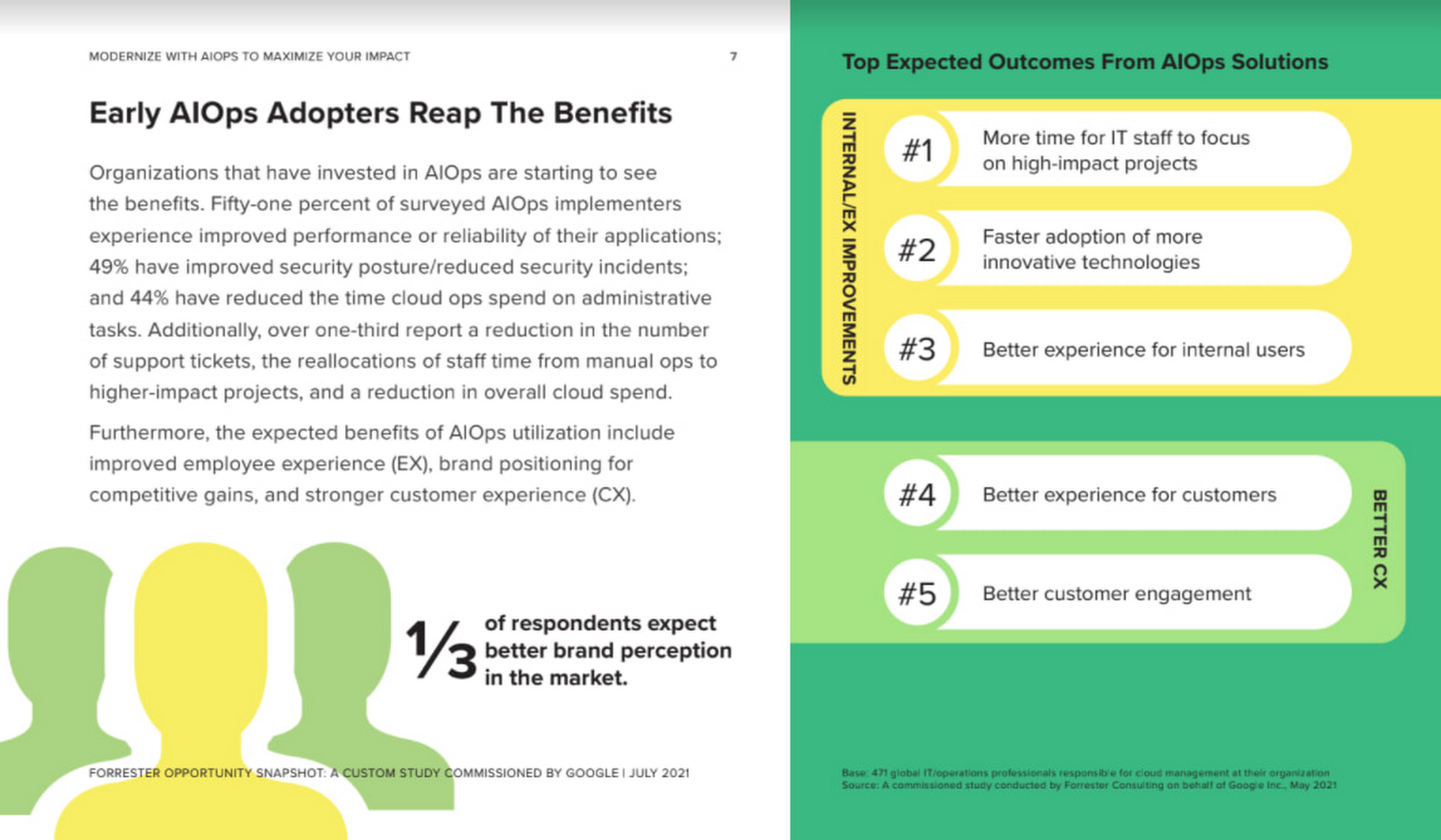
As you can see in the image above, there is a plethora of great information in this complimentary study. So, if you’re looking to enhance your cloud operations and/or adopt AIOps within your organization, be sure to download this free study today.
How Eventrac and Workflows Integration Helps Implement Hybrid Architecture in Google Cloud

6557
Of your peers have already read this article.
3:00 Minutes
The most insightful time you'll spend today!
I previously talked about Eventarc for choreographed (event-driven) Cloud Run services and introduced Workflows for orchestrated services.
Eventarc and Workflows are very useful in strictly choreographed or orchestrated architectures. However, you sometimes need a hybrid architecture that combines choreography and orchestration.
For example, imagine a use case where a message to a Pub/Sub topic triggers an automated infrastructure workflow or where a file upload to a Cloud Storage bucket triggers an image processing workflow. In these use cases, the trigger is an event but the actual work is done as an orchestrated workflow.
How do you implement these hybrid architectures in Google Cloud? The answer lies in Eventarc and Workflows integration.
Eventarc triggers
To recap, an Eventarc trigger enables you to read events from Google Cloud sources via Audit Logs and custom sources via Pub/Sub and direct them to Cloud Run services:

One limitation of Eventarc is that it currently only supports Cloud Run as targets. This will change in the future with more supported event targets. It’d be nice to have a future Eventarc trigger to route events from different sources to Workflows directly.
In absence of such a Workflows enabled trigger today, you need to do a little bit of work to connect Eventarc to Workflows. Specifically, you need to use a Cloud Run service as a proxy in the middle to execute the workflow.
Let’s take a look at a couple of concrete examples.
Eventarc Pub/Sub + Workflows integration
In the first example, imagine you want a Pub/Sub message to trigger a workflow.
Define and deploy a workflow
First, define a workflow that you want to execute. Here’s a sample workflows.yaml that simply decodes and logs the Pub/Sub message body:
main:params: [args]steps:- init:assign:- headers: ${args.headers}- body: ${args.body}...- pubSubMessageStep:call: sys.logargs:text: ${"Decoded Pub/Sub message data is " + text.decode(base64.decode(args.body.message.data))}severity: INFODeploy the workflow with a single command:gcloud workflows deploy ${WORKFLOW_NAME} --source=workflow.yaml --location=${REGION}
Deploy a Cloud Run service to execute the workflow
Next, you need a Cloud Run service to execute this workflow. Workflows has an execution API and client libraries that you can use for your favorite language. Here’s an example of the execution code from a Node app.js file. It simply passes the received HTTP request headers and body to the workflow and executes it:
const execResponse = await client.createExecution({parent: client.workflowPath(GOOGLE_CLOUD_PROJECT, WORKFLOW_REGION, WORKFLOW_NAME),execution: {argument: JSON.stringify({headers: req.headers, body: req.body})}});
Deploy the Cloud Run service with the Workflows name and region passed as environment variables:
gcloud run deploy ${SERVICE_NAME} \--image gcr.io/${PROJECT_ID}/${SERVICE_NAME} \--region=${REGION} \--allow-unauthenticated \--update-env-vars GOOGLE_CLOUD_PROJECT=${PROJECT_ID},WORKFLOW_REGION=${REGION},WORKFLOW_NAME=${WORKFLOW_NAME}
Connect a Pub/Sub topic to the Cloud Run service
With Cloud Run and Workflows connected, the next step is to connect a Pub/Sub topic to the Cloud Run service by creating an Eventarc Pub/Sub trigger:
gcloud eventarc triggers create ${SERVICE_NAME} \--destination-run-service=${SERVICE_NAME} \--destination-run-region=${REGION} \--location=${REGION} \--event-filters="type=google.cloud.pubsub.topic.v1.messagePublished"
This creates a Pub/Sub topic under the covers that you can access with:
export TOPIC_ID=$(basename $(gcloud eventarc triggers describe ${SERVICE_NAME} --format='value(transport.pubsub.topic)'))
Trigger the workflow
Now that all the wiring is done, you can trigger the workflow by simply sending a Pub/Sub message to the topic created by Eventarc:
gcloud pubsub topics publish ${TOPIC_ID} --message="Hello there"
In a few seconds, you should see the message in Workflows logs, confirming that the Pub/Sub message triggered the execution of the workflow:

Eventarc Audit Log-Storage + Workflows integration
In the second example, imagine you want a file creation event in a Cloud Storage bucket to trigger a workflow. The steps are similar to the Pub/Sub example with a few differences.
Define and deploy a workflow
As an example, you can use this workflow.yaml that logs the bucket and file names:
main:params: [args]steps:...- log:call: sys.logargs:text: ${"Workflows received event from bucket " + bucket + " for file " + file}severity: INFO
Deploy a Cloud Run service to execute the workflow
In the Cloud Run service, you read the CloudEvent from Eventarc and extract the bucket and file name in app.js using the CloudEvent SDK and the Google Event library:
const cloudEvent = HTTP.toEvent({ headers: req.headers, body: req.body });//"protoPayload" : {"resourceName":"projects/_/buckets/events-atamel-images-input/objects/atamel.jpg}";const logEntryData = toLogEntryData(cloudEvent.data);const tokens = logEntryData.protoPayload.resourceName.split('/');const bucket = tokens[3]
Executing the workflow is similar to the Pub/Sub example, except you don’t pass in the whole HTTP request but rather just the bucket and file name to the workflow:
const execResponse = await client.createExecution({parent: client.workflowPath(GOOGLE_CLOUD_PROJECT, WORKFLOW_REGION, WORKFLOW_NAME),execution: {argument: JSON.stringify({bucket: bucket, file: file})}});
Connect Cloud Storage events to the Cloud Run service
To connect Cloud Storage events to the Cloud Run service, create an Eventarc Audit Logs trigger with the service and method names for Cloud Storage:
gcloud eventarc triggers create ${SERVICE_NAME} \--destination-run-service=${SERVICE_NAME} \--destination-run-region=${REGION} \--location=${REGION} \--event-filters="type=google.cloud.audit.log.v1.written" \--event-filters="serviceName=storage.googleapis.com" \--event-filters="methodName=storage.objects.create" \--service-account=${PROJECT_NUMBER}-compute@developer.gserviceaccount.com
Trigger the workflow
Finally, you can trigger the workflow by creating and uploading a file to the bucket:
echo "Hello World" > random.txtgsutil cp random.txt gs://${BUCKET}/random.txt
In a few seconds, you should see the workflow log the bucket and object name.
Conclusion
In this blog post, I showed you how to trigger a workflow with two different event types from Eventarc. It’s certainly possible to do the opposite, namely, trigger a Cloud Run service via Eventarc with a Pub/Sub message (see connector_publish_pubsub.workflows.yaml) from Workflows or a file upload to a bucket from Workflows.
All the code mentioned in this blog post is in eventarc-workflows-integration. Feel free to reach out to me on Twitter @meteatamel for any questions or feedback.
There are 2 Key Traits You Need to Battle the Slowdown. FM Logistic Know How to Enable Them

6394
Of your peers have already read this article.
4:30 Minutes
The most insightful time you'll spend today!
FM Logistic provides its international customers with complete logistics solutions that cover everything from warehousing and handling, to transport and distribution, co-packing and co-manufacturing, and supply chain optimization. Operating in 14 countries including France, Russia, Poland, India, Vietnam, Brazil, and China, FM Logistic supports its clients by offering specialized services across a number of markets including consumer goods, retail, cosmetics, and health.
“We are in the process of transforming all our tools and integrating new solutions to be able to work faster and more efficiently. Two main IT priorities are mobility and openness, in terms of working from anywhere and being able to interact with other information systems.”
– Communication Manager, FM Logistic
As a business that has existed since 1967 and in 2018 achieved a turnover of €1.178 billion with 9.5% annual growth, FM Logistic is always looking to help secure the company’s position within an evolving sector. To better serve its customers, FM Logistic decided to launch an innovation project in 2017 to transform the internal digital tools of the company and replace its intranet, email, and productivity software. The company looked for an integrated solution that would enable more collaborative ways of working and bring its international operations closer together. The company found that implementing G Suite and LumApps social intranet was the perfect combination.
“We are in the process of transforming all our tools and integrating new solutions to be able to work faster and more efficiently,” says the Communication Manager at FM Logistic. “Two main IT priorities are mobility and openness, in terms of working from anywhere and being able to interact with other information systems.”
A global transformation
For large international companies with global operations, implementing a single integrated solution to enable collaboration across regions while respecting regional variations can be a real challenge.
“We have 26,000 employees spread across a broad geography, with a variation in cultures and technological maturity. There was an aspiration to work in collaboration, but the necessary tools were not in place,” says FM Logistic’s Communication Manager. FM Logistic looked for a solution to enable new, more collaborative work practices, which were flexible in terms of usage and that, most importantly, would work as part of an integrated solution.
To do that, FM Logistic worked with Google Partner Devoteam G Cloud to implement G Suite alongside the LumApps intranet portal. It took six months to complete the migration of 7,000 accounts, with employees accessing the Business or Basic G Suite edition according to their needs. “Before, with our physical infrastructure we found ourselves buying additional hard drives as we ran out of storage,” says the Technical Project Manager at FM Logistic. “That’s no longer a problem, and we can tailor access depending on whether or not employees need unlimited storage .”
“It’s a real advantage to be able to access your account from any device and work from anywhere. Hangouts Meet has been really transformational in that respect: it has reduced the need for travel significantly, even in the few months we’ve been using it so far.”
– Communication Manager, FM Logistic
“We followed Google’s G Suite migration advice and had early adopter ambassadors in every country. By the time we got around to the final country, very little input was needed as they were ready to go!” says the Technical Project Manager. “Many of them were already familiar with the product, so it was very intuitive. Our feedback surveys gave a satisfaction rating of almost 4.5 out of 5 in relation to the transition. We also had significant executive support, with two members of the executive committee on the steering board. That really helped the project to move quickly.”
As a result, employees were quick to understand the benefits of the new system. “It’s a real advantage to be able to access your account from any device and work from anywhere. That was clear from the start,” says the Communication Manager. “Hangouts Meet has been really transformational in that respect: it has reduced the need for travel significantly, even in the few months we’ve been using it so far.”
LumApps: a fully-integrated enterprise hub
One of FM Logistic’s main reasons for choosing G Suite was the seamless integration with LumApps’ intranet portal. LumApps adds value to G Suite, thereby boosting and sustaining employee adoption. FM Logistic chose LumApps to create a hub for its enterprise, where everything is centralized from internal communications to business apps.
“We didn’t want a patchwork of solutions, we needed a platform that worked as an integral whole,” says the Technical Project Manager. “With LumApps, employees access the intranet using their Google authentication and can access all their G Suite tools through the intranet. Moreover, LumApps is Google native, so the integration is seamless and we know that it will evolve to accommodate any changes that might take place.”
“The main advantages we see are communication and knowledge sharing,” says the Communication Manager. “With LumApps, all 26,000 of our employees are now able to access the portal in their own language and access local news.”
For the next step, FM Logistic is considering integrating social communities so that employees can express themselves and be more engaged in the corporate culture.
Supporting digital maturity
Thanks to Drive, employees can now work from wherever they are, and are able to work more efficiently and more collaboratively. “From an administrative point of view, users can benefit from automatic updates, so there is less pressure on the IT department,” says the Technical Project Manager. “And we’re seeing many innovative uses of the tools to work in more efficient ways: many services have gone paperless with Forms, so less time is wasted; commercial agents are using Drive to work together on tenders simultaneously; and with Sheets, tasks are automatically sent from the team manager’s file to employee’s Calendar.”
“G Suite and LumApps are the first step of our digital transformation, in terms of collaboration and moving into the cloud. We have real confidence in our partners LumApps and Google, and we’re investing in those relationships for the long-term benefit of the company.”
– Communication Manager, FM Logistic
Now, FM Logistic wants to further support its employees in exploring all the tools G Suite has to offer. “We are embarking on a second phase to give our employees the skills they need for advanced uses of Docs, Sheets, and Forms,” says the Communication Manager. “It’s a learning curve, but it’s key to our goal of transforming our everyday processes.”
“G Suite and LumApps are the first step of our digital transformation, in terms of collaboration and moving into the cloud. We have real confidence in our partners LumApps and Google, and we’re investing in those relationships for the long-term benefit of the company.”
How Google Cloud and SAP Address Global Supply Chain Initiatives

3523
Of your peers have already read this article.
1:30 Minutes
The most insightful time you'll spend today!
With SAP Sapphire kicking off today in Orlando, we’re looking forward to seeing our customers and discussing how they can make core processes more efficient and improve how they serve their customers.
One thing is certain to be top of mind – the global supply chain challenges facing the world today. It’s affecting every business across every industry, from common household items that once filled store shelves and are now on backorder, to essential goods and services like food and medical treatments, which are at risk. Even cloud-native companies are making changes to ensure they have the insights, equipment, and other assets they need to continue serving customers.
We are proud to work with SAP on many initiatives that are driving results for our customers and helping them run more intelligent and sustainable companies. I’d like to highlight three of these important initiatives and how they are helping address global supply chain challenges.
Enabling more efficient migrations of critical workloads
We know a key barrier to entry in the cloud is the ability to easily migrate from on-premises environments. Our cloud provides a safe path to help companies including Johnson Controls, PayPal, and Kaeser Compressor to digitize and solve large, complex business problems, reduce costs, scale without cycles of investment, and gain access to key services and capabilities that can unlock value and enable growth.
Singapore-based shipping company Ocean Network Express (ONE) has become more agile by running their mission-critical SAP workloads on Google Cloud and using our data analytics to improve operational efficiency and make faster decisions. They have gone from an on-premises data warehouse solution that would take a full day loading data from SAP S/4HANA, to using our BigQuery solution that delivers business insights in minutes.
Since The Home Depot moved its critical SAP workloads to Google Cloud, the company has been able to shorten the time it takes to prepare a supply chain use case from 8 hours to 5 minutes by using BigQuery to analyze large volumes of internal and external data. This helps improve forecast accuracy and more effectively replenish inventory by being able to create a new plan when circumstances change unexpectedly with demand or a supplier.
Accelerating cloud benefits through RISE and LiveMigration
At Google Cloud, we have dedicated programs to help migrate SAP and other mission-critical workloads to our cloud with our Cloud Acceleration Program for SAP.
For SAP customers moving to Google Cloud, we provide LiveMigration to provide superior uptime and business continuity. LiveMigration eliminates downtime required for planned infrastructure maintenance. This means that your SAP system continues running even when Google Cloud is performing planned infrastructure maintenance upgrades thus ensuring superior business continuity for your mission critical workloads.
We are also proud to be a strategic partner with the RISE with SAP program, which helps accelerate cloud migration for SAP’s global customer base while minimizing risks along the migration journey. This program provides solutions and expertise from SAP and technology ecosystem partners to help companies transform through process consulting, workload migration services, cloud infrastructure, and ongoing training and support. To secure your mission critical workloads, SAP and Google Cloud can provide a 99.9% uptime SLA as part of the RISE with SAP program.
Many large manufacturers have taken advantage of RISE with SAP to forge a secure, proven path to our cloud, including Energizer Holdings Inc., a leading manufacturer and distributor of primary batteries, portable lights, and auto care products. Energizer has turned to RISE with SAP on Google Cloud to power its move to SAP S/4HANA. The company wants to automate essential business processes, improve customer service, and boost innovation. It had been using a private cloud solution but needed to gain flexibility while better containing costs.
“SAP S/4HANA for central finance will help us automate essential business processes, improve customer service, and fuel innovation that grows our company’s leadership position globally. We selected RISE with SAP to begin our journey to SAP S/4HANA and maintain the freedom and flexibility to move at our own pace,” said Energizer Chief Information Officer Dan McCarthy.
Another example is global automotive distributor Inchcape, which moved its mission-critical sales, marketing, finance, and operations systems and data to Google Cloud. With its diverse data sets now in a single, secure cloud platform, Inchcape is applying Google Cloud AI and ML capabilities to manage and analyze its data, automate operations, and ultimately transform the car ownership experience for millions.
“Google Cloud’s close relationship with SAP and its strong technical expertise in this space were a big pull for us,” said Mark Dearnley, Chief Digital Officer at Inchcape. “Ultimately, we wanted a headache-free RISE with SAP implementation and to unlock value for auto makers and consumers in all our regions, while continuing to have the choice and flexibility to modernize our 150-year old business in a way that works for us.”
A new intelligence layer for all SAP Google Cloud customers
When moving mission-critical workloads to the cloud, companies not only need to migrate safely, they also need to quickly realize value, which we enable with Google Cloud Cortex Framework — a layer of intelligence that integrates with SAP Business Technology Platform (SAP BTP). Google Cloud Cortex Framework provides reference architectures, deployment accelerators, and integration services for analytics scenarios.
Like many large e-commerce companies, Mercado Libre experienced skyrocketing transactions that more than doubled in 2020 as people sheltered at home during the pandemic, and they are anticipating more growth. The Google Cloud Cortex Framework is enabling Mercado Libre to respond, run more efficiently, and make faster, data-driven decisions.
Continued partnership to support organizations around the world
Our longstanding partnership with SAP continues to yield exciting innovations for our customers, and we’re honored to work with them to help customers address the ongoing impact of global supply chain challenges. We’re looking forward to sharing new insights and innovations at SAP Sapphire this week, and to listening and learning from you about your plans and challenges, and how we can best support your transformation to the cloud.
Recent Updates on Google Cloud EKM to Meet Customers’ Cloud Data Security

3229
Of your peers have already read this article.
2:00 Minutes
The most insightful time you'll spend today!
Google Cloud External Key Manager (Cloud EKM) lets you protect your cloud data with encryption keys that are stored and managed in a third-party key management system outside Google Cloud’s infrastructure. This allows you to achieve full separation between your encryption keys and your data stored in the cloud, making you the ultimate arbiter of access to your data. We are continuously innovating and developing the functionality of Cloud EKM, so let’s explore some recent updates we’ve made.
New functionality
Available today, we have added several much-anticipated features to Cloud EKM to help meet customer requirements:
Cloud EKM over VPC
Many customers want to incorporate an additional layer of security and reliability when connecting their key manager to the cloud. To help meet this need, we are introducing Cloud EKM support for Virtual Private Cloud (VPC) networks. This support allows Cloud EKM to connect via a secured private network, giving customers stricter control over network access to their external key manager. For more information, see Using Cloud EKM with VPC.
Support for asymmetric keys
In addition to symmetric encryption keys, Cloud EKM now recognizes both RSA as well as Elliptic Curve asymmetric keys created in a supported external key manager. With support for asymmetric keys, you can sign approvals granted via Access Approval. Asymmetric keys can add a layer of assurance when granting administrative access to customer data. You can also use the external asymmetric keys to sign data just as you would a cloud native key. For more information, see Asymmetric signing keys.
Protection level organization policy
We’ve made a new organization policy available for Cloud KMS that allows for fine-grained control over what types of keys are used. By using this org policy, you can specify that only specified KMS key types, for example EXTERNAL or EXTERNAL_VPC, may be created. This function can help meet specific requirements for separation of data or data sovereignty, ensuring only externally-managed keys are used with certain workloads. For more information, see Organization policy constraints.
Cloud EKM supports the Google Cloud services which typically store customers’ most sensitive data assets, and we are constantly adding support for more services. For example, we recently added Cloud EKM support for Cloud Storage, allowing customers to leverage Google-scale storage while adhering to local regulations and holding their keys in their own key manager. For a complete list, see our currently supported services, and if you’re interested in using Cloud EKM with a GCP service that is not yet supported, you can make feature suggestions here.
Best practices for Cloud EKM
The newly published Reference architectures for reliable deployment of Cloud EKM services guide provides recommendations for running a highly available and reliable external key manager integrated with Cloud EKM. These recommendations answer some of the most common questions and concerns we’ve heard from customers. The recommendations are aimed at operators of an external key manager, meaning that if a supported partner operates your EKM, you might share some of these responsibilities with a partner, depending on the design of their product and how it integrates with Cloud EKM.
Take encryption into your own hands
Being deliberate about encryption is critical for securing your sensitive data on Google Cloud. We’re always evolving our encryption products to meet your needs and help you achieve your business goals, and we hope that the additional features mentioned in this blog will allow you to make better use of your key management infrastructure. To get started with Cloud EKM, check out our documentation to learn more or try it for yourself in the GCP console.
Multicloud Mindset: Thinking About Open Source and Security in a Multicloud World

2781
Of your peers have already read this article.
1:30 Minutes
The most insightful time you'll spend today!
There’s never been a better time to talk about multicloud, and the Google Cloud Multicloud Mindset series on Twitter Spaces was created to do just that! This series takes place once every two weeks and features live conversations with top experts about the latest multicloud topics. You can join the 15-minute Q&A to ask your top questions and listen to episodes later offline for up to 30 days after we chat.
If you happened to miss our last few episodes, we recommend checking out our introduction blog to the series for what you missed. Let’s dive into our latest episodes, discussing the impact of open source and novel security challenges in multicloud environments.
Episode #5: ‘The intersection of open source and multicloud’
Open source technology has been an integral part of computing since its earliest era, predating even the birth of technology hubs like Silicon Valley. Open source projects have been responsible for giving us some of the most popular software in the world, such as Mozilla Firefox and the operating system Linux.
In the fifth episode, we sat down with Mike Coleman, Cloud Developer Advocate at Google Cloud, and took a closer look into the history of open source technologies, the role they play in a multicloud world, and the developer perspective on using these technologies to do their work.
The concept of multicloud anchors on the ability to run workloads across clouds and being able to pick the providers that are best suited for specific parts of workloads. Adopting open source technologies and languages empower companies to use the tools they need, regardless of cloud provider, without the fear of getting locked into a specific provider.
“As you think about moving across different environments, whether that be cloud to cloud, or developer desktop to ultimate destination, whether that be your data center or the cloud. Open source software allows you to do that…and multicloud is just an extension of that. This idea that I need to run the same software wherever I go.” — Mike Coleman, Cloud Developer Advocate at Google Cloud
If you’ve ever wanted a developer’s take on the impact of multicloud and the influence of open source in software development and digital transformation trends, you’ll want to tune into this episode.
You can access the full conversation on Twitter Spaces.
Episode #6: ‘Novel challenges in security with multicloud’
In the sixth episode of the series, we chatted with Dr. Anton Chuvakin, Security Advisor at Office of the CISO at Google Cloud, about how security leaders and architects are shifting away from traditional security models, which are increasingly insufficient for multicloud environments.
As more organizations adopt multicloud approaches, the question of how to maintain security in these complex environments and the increasing burden on SecOps teams is top of mind. As Dr. Chuvakin noted, the challenges in the cloud facing more traditional teams range from types of telemetry and logs to volumes and lack of clarity on detection use cases. However, these issues intensify when extended to include multiple clouds, where learning how to do something on one provider may be completely different on another.
“If you end up multicloud, you need to know public cloud and how it works at a better level than you would if you’re going to a single provider. Just like if you’re trying to repair three cars, you need to first learn how to repair cars. You need to have more cloud knowledge to do multicloud, not less. You need to have more powerful superpowers in the public cloud computing area because you can’t just learn one provider and call it a day.” — Dr. Anton Chuvakin, Security Advisor at Office of the CISO at Google Cloud
During the discussion, he offered three tips for tackling multicloud security:
- Learn cloud more, not less if you’re going multicloud. Multicloud requires more cloud knowledge because you can’t learn a single provider and call it a day. You’ll need to understand the differences in order to be able to secure multiple cloud environments.
- Focus on learning cloud identity management and how it compares to your traditional identity management service functions. Start with identifying the differences and similarities in what you see in one cloud and then continue with other clouds you use.
- Explore where your threat areas change in cloud environments when you plan detection and response activities to understand if your detection is covered across clouds.
If your organization is embracing multicloud, this is a great episode to listen and learn more about cloud security, the primary considerations and challenges facing security teams, and some helpful best practices for thinking about security in multicloud environments.
We’ll be sharing the latest topics and episodes with you every month in this blog series. Until next time.
More Relevant Stories for Your Company

Simplify Your Modernization Journey from Windows
Microsoft and Windows on Google Cloud provides a first-class experience for Windows workloads. You can self-manage workloads or leverage managed services and use license-included images or bring your own licenses. Now, easily migrate, optimize, and modernize your Windows workloads for agility and scalability. Start with migration Migrate to increase IT

30 Guides to Ease Your Cloud Migration Journey
Getting started with your migration One of the challenges with cloud migration is that you’re solving a puzzle with multiple pieces. In addition to a number of workloads you could migrate, you’re also solving for challenges you’re facing, the use cases driving you to migrate, and the benefits you’re looking to gain.

Sainsbury’s Uses AI to Figure Out How the World Eats
Retail will forever be an industry that must constantly reinvent itself in response to, and anticipation of, ever-changing consumer demands. Digital transformation is fueling these changes and we've previously spoken about how businesses including Ulta Beauty and Kohl’s are taking advantage of Google Cloud to put data at the center of what they do


Relax: Support on Google Cloud is Easy and Efficient
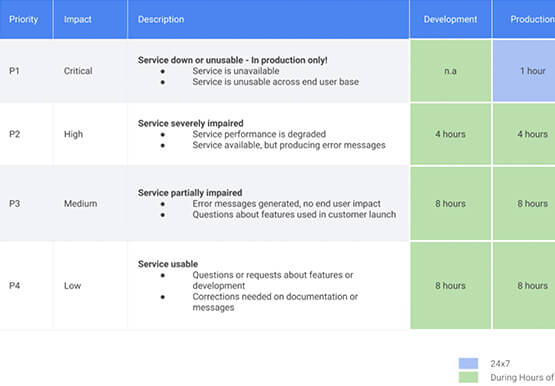
To navigate the complexity of today’s cloud environment and to get the most out of your investment, you need robust support that is fast, efficient, and available at the time of need. Google Cloud Platform support checks all the boxes and helps you architect for the inevitable and quickly resolve
