





Deploying Ray on GKE: Distributed Computing Made Easy

960
Of your peers have already read this article.
3:30 Minutes
The most insightful time you'll spend today!
The rapidly evolving landscape of distributed computing demands efficient and scalable frameworks. Ray.io is an open-source framework to easily scale up Python applications across multiple nodes in a cluster. Ray provides a simple API for building distributed, parallelized applications, especially for deep learning applications.
Google Kubernetes Engine (GKE) is a managed container orchestration service that makes it easy to deploy and manage containerized applications. GKE provides a scalable and flexible platform that abstracts away the underlying infrastructure.
KubeRay enables Ray to be deployed on Kubernetes. You get the wonderful Pythonic unified experience delivered by Ray, and the enterprise reliability and scale of GKE managed Kubernetes. Together, they offer scalability, fault tolerance, and ease of use for building, deploying, and managing distributed applications.
In this blog post, we share a solution template to get you started easily with Ray on GKE. We discuss the components of the solution and showcase an inference example using Ray Serve for Stable Diffusion.
Overview of the Solution
In this solution template we use KubeRay, an OSS solution for managing Ray clusters on Kubernetes, as the operator for provisioning our workloads. Follow the step-by-step instructions in the README file to get started. The solution contains two groups of resources: platform-level and user-level.
Platform-level resources are expected to be deployed once for each development environment by the system administrator. These include the common infrastructure and GCP service integrations that are shared by all users.
- GKE cluster and node pool. Configurations can be changed in the main.tf file. This module deploys a GKE cluster with a GPU node pool, including required Nvidia drivers for GPUs. You can replace these with other machine types.
- Kubernetes system namespace and service accounts, along with the necessary IAM policy bindings. This allows the platform administrator to provide fine-grained user access control and quota policies for Ray cluster resources.
- KubeRay operator. The operator is responsible for watching for changes in KubeRay resources and reconciling the state of the KubeRay clusters.
- Logging. The `logging_config` section enables logs from system components and workloads to write logs to Cloud logging.
- Monitoring. The `monitoring_config` section enables Managed Prometheus integration. This allows the deployment to automatically scrape system-level metrics and writes them to the managed metrics service.
- Workload identity. This enables your workloads to authenticate with other GCP services using Google IAM service accounts.
User-level resources are expected to be deployed once by each user in the development environment.
- KubeRay cluster. This is the actual Ray cluster that we will be used for your workloads. It is configured to use a Workload Identity pool and a IAM-binded service account that provides fine-grained access to GCP services. You can customize the Ray cluster settings by editing the kuberay-values.yaml file.
- Logging. The solution adds a side car container deployed alongside each KubeRay worker node. This uses fluentbit to forward Ray logs from the head node to Cloud logging. You can edit the fluentbit-config file to change how the logging container filters and flushes logs.
- Monitoring. This module provides a PodMonitoring resource that scrapes metrics from the user’s Ray cluster and uploads data points to Google Managed Prometheus. An optional installation for Grafana dashboard is included and can be accessed through a web browser.
- JupyterHub server. This module installs a JupyterHub notebook server in the user namespace, enabling users to interact directly with their Ray clusters.
Run a Workload on Your Ray Cluster
Let’s try running the provided example with Ray Serve to deploy Stable Diffusion. This example was originally taken from the Ray Serve documentations here. To open the example in Jupyter notebook, go to the external IP for proxy-public in your browser (instructions to get the IP). And then click on File -> Open from URL, and input the raw URL of the notebook to open it.
Since the notebook runs in the same Kubernetes cluster as the Ray cluster, it is able to talk directly to the latter using its cluster-internal service endpoint – thus there is no need to expose the Ray cluster to public internet traffic. For production workloads, you should secure your endpoints with GCP account credentials. Google Cloud Identity Aware Proxy (IAP) can be used to enable fine-grained access control to user resources, such as our Ray cluster, to protect your GCP resources from unnecessary exposure. A full tutorial on how to enable IAP on your GKE cluster can be found here.
The notebook contains code for deploying a pre-trained model to a live endpoint. The last cell makes a call to the created service endpoint:prompt = “a cute cat is dancing on the grass.”input = “%20″.join(prompt.split(” “))resp = requests.get(f”http://example-cluster-kuberay-head-svc:8000/imagine?prompt={input}”)with open(“output.png”, ‘wb’) as f: f.write(resp.content)
Executing the notebook will generate a file with a unique picture of a cute cat. Here is an example we got:

Congratulations! You have now deployed a large model for image generation on GKE.
Logging and Monitoring
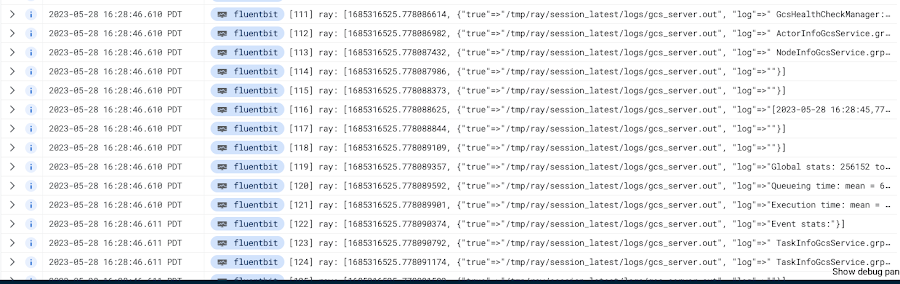
As mentioned earlier, this solution enables logging and monitoring automatically. Let’s find those logs.
In your Cloud Console, open up Logging -> Log Explorer. In the query text box, enter the following:resource.type=”k8s_container”resource.labels.cluster_name=%CLUSTER_NAME%resource.labels.pod_name=%RAY_HEAD_POD_NAME%resource.labels.container_name=”fluentbit”
You should see the Ray logs from your cluster forwarded here.
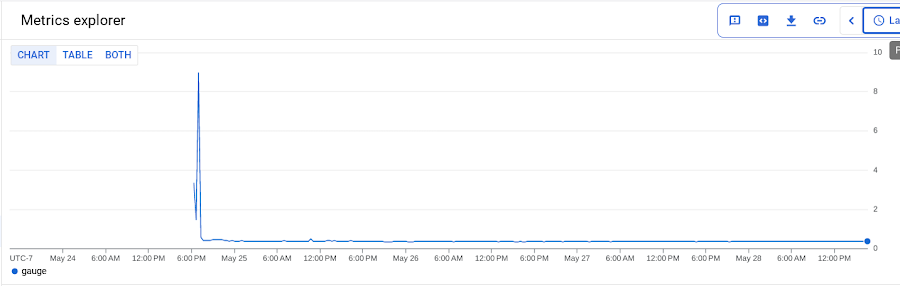
To see your monitoring metrics, go to Metrics Explorer in the Cloud Console. Under the menu for “Target”, select “Prometheus Target” and then “Ray”. Select the metric that you want to see, for instance `prometheus/ray_component_cpu_percentage/gauge`:
The deployment also comes with a Grafana deployment. Follow this guide to open it up and view your Ray cluster’s metrics.
Conclusion
The combination of Ray and GKE offers a simple and powerful solution for building, deploying, and managing distributed applications. Ray’s simplicity makes it an attractive choice for data and model developers while GKE’s scalability and reliability is the defacto choice for enterprise platforms. The solution template presented in this blog post offers a convenient way to get started quickly with KubeRay, the recommended approach to deploy Ray on GKE.
If you have any questions for building Ray on Kubernetes and GKE, you can contact us directly at ray-on-gke@google.com or comment in GitHub. Learn more about building AI Platforms with GKE by visiting our User Guide.
Google Cloud Helps LiveRamp Capture, Manage, Process and Visualize Data at Scale

4920
Of your peers have already read this article.
2:30 Minutes
The most insightful time you'll spend today!
Editor’s note: Today we’re hearing from Sagar Batchu, Director of Engineering at LiveRamp. He shares how Google Cloud helped LiveRamp modernize its data analytics infrastructure to simplify its operations, lower support and infrastructure costs and enable its customers to connect, control, and activate customer data safely and securely.
LiveRamp is a data connectivity platform that provides best in class identity resolution, activation and measurement for customer data so businesses can create a true customer 360 degree view. We run data engineering workloads at scale, often processing petabytes of customer data every day via LiveRamp Connect platform APIs.
As we integrated more internal and external APIs and the sophistication of our product offering grew, the complexity of our data pipelines increased. The status quo for building data pipelines very quickly became painful and cumbersome as these processes take time and knowledge of an increasingly complex data engineering stack. Pipelines became harder to maintain as the dependencies grew and the codebase became increasingly unruly.
Beginning last year, we set out to improve these processes and re-envision how we reduce time to value for data teams by thinking of our canonical ETL/LT analytics pipelines as a set of reusable components. We wanted teams to spend their time adding new features which encapsulate business value rather than spending time figuring out how to run workloads at scale on cloud infrastructure. This was even more pertinent with data science, data analyst and services teams whose daily wheelhouse was not the nitty gritty of deploying pipelines.
With all this in mind, we decided to start a data operations initiative, a concept popularised in the last few years, which aims to accelerate the time to value for data-oriented teams by allowing different personas in the data engineering lifecycle to focus on the “what” rather than the “how.”
We chose Google Cloud to execute on this initiative to speed up our transformation. Our architectural optimizations, coupled with Google Cloud’s platform capabilities simplified our operational model, reduced time to value, and greatly improved the portability of our data ecosystem for easy collaboration. Today, we have ten teams across LiveRamp running hundreds of workloads a day, and in the next quarter, we plan to scale to thousands.
Why LiveRamp Chose Google Cloud
Google Cloud provides all the necessary services in a serverless fashion to build complex data applications and run massive infrastructure. Google Cloud offers data analytics capabilities that help organizations like LiveRamp to easily capture, manage, process and visualize data at scale. Many of the Google Cloud data processing platforms also have open source roots making them extremely collaborative. One such platform is CDAP (Cask Data Application Platform), which Cloud Data Fusion is built on. We were drawn to this for the following reasons:
- CDAP is inherently multicloud. Pipeline building blocks known as Plugins define individual units of work. They can be run through different provisioners which implement managed cloud runtimes.
- The control plane is a set of microservices hosted on Kubernetes, whereas the data plane leverages the best of breed big data cloud products such as Dataproc.
- It is built as a framework and is inherently extensible, and decoupled from the underlying architecture. We can extend it both at the system and user-level through “extensions” and “plugins” respectively. For example, we were able to add a system extension for LiveRamp specific authorisation and build a plugin that encompasses common LiveRamp identity operations.
- It is open sourced, and there is a dedicated team at Google Cloud building and maintaining the core codebase as well as a growing suite of source, transform and sink connectors.
- It aligns with our remote execution and non-data movement strategy. CDAP executes pipelines remotely and manages through a stream of metadata via public cloud APIs.
- CDAP supports an SRE mindset by providing out of the box monitoring and observability tooling.
- It has a rich set of APIs backed by scalable microservices to provide ETL as a Service to other teams.
- Cloud Data Fusion, Google Cloud’s fully managed, native data integration platform is based on CDAP. We benefit from the managed security features of Data Fusion like IAM integration, customer manager encryption keys, role based access controls and data residency to ensure stricter governance requirements around data isolation.
How are teams using the Data Operations Platform?
Through this initiative, we have encouraged data science and engineering teams to focus on business logic and leave data integrations and infrastructure as separate concerns. A centralised team runs CDAP as a service, and custom plugins are hosted in a democratized plugin marketplace where any team can contribute their canonical operations.
Adoption of the platform was driven by one of our most common patterns of data pipelining: The need to resolve customer data using our Identity APIs. LiveRamp Identity APIs connect fragmented and inaccurate customer identity by providing a way to resolve PII to pseudonymous identifiers. This enables client brands to connect, control, and activate customer data safely and securely.
The reality of customer data is that it lives in a variety of formats, storage locations, and often needs bespoke cleanup. Before, technical services teams at LiveRamp had to develop expensive processes to manage these hygiene and validation processes even before the data was resolved to an identity. Over time, a combination of bash and python scripts and custom ETL pipelines became untenable.

By implementing our most used Identity APIs, a series of CDAP plugins, our customers were able to operationalise their processes by logging into a Low Code user interface, select a source of data, run standard validation and hygiene steps, visually inspect using CDAP’s Wrangler interface for especially noisy cases, and channel data into our Identity API. As these workflows became validated, they have been established as standard CDAP pipelines that can now be parameterized and distributed on the internal marketplace. These technical services teams have not only reduced their time to value but have also enabled future teams to leverage their customer pipelines without worrying about the portability to other team’s infrastructures.
What’s Next ?
With critical customer use cases now powered by CDAP, we plan on scaling out usage of the platform to the next batch of teams. We plan on taking on more complex pipelines, cross-team workloads, and adding support for the ever growing LiveRamp platform API suite.
In addition to the Google Cloud community and the external community, we have a growing base of LiveRamp developers building out plugins on CDAP to support routine transforms and APIs. These are used by other teams who push the limits and provide feedback — spinning a flywheel of collaboration between those who build and those who operate. Furthermore, teams internally can continue to use their other favorite data tools like BigQuery and Airflow as we continue to deeply integrate CDAP into our internal data engineering ecosystem.
Our data operations platform powered by CDAP is quickly becoming a center point for data teams – a place to ingest, hygiene, transform, and sink their data consistently.
We are excited by Google Cloud’s roadmap for CDAP and Data Fusion. Support for new execution engines, data sources and sinks, and new features like Datastream and Replication will mean LiveRamp teams can continue to trust that their applications will be able to interoperate with the ever evolving cloud data engineering ecosystem.

Microservices Done Right: How Indian Businesses Can Build a Highly Scalable Business
DOWNLOAD E-BOOK4321
Of your peers have already downloaded this article
4:30 Minutes
The most insightful time you'll spend today!
Microservices represent a new form of API-based application architecture that enables enterprises to leverage continuous iteration/continuous deployment (CI/CD) tools and processes within containerized architectures and PaaS.
Nearly 70% of organizations are either using or investigating microservices, and nearly one-third are using them in production.
These are powerful techniques popularized by many companies, including Amazon, Netflix, and Airbnb. Amazon championed the approach and proved it to be useful in ensuring effective communication within teams and enabling the company to deploy code to production hundreds of times of day two.
At Netflix, one of the earliest adopters of microservices, roughly 30 independent teams have delivered over 500 microservices.
However, companies have struggled with security, with a lack of visibility into usage and performance of the microservices APIs, and with building agile microservices for clean reuse.
Their challenges include bolstering security in a zero-trust environment, ensuring compliance, providing transparent control to mitigate risk, improving the developer experience, and encouraging and increasing microservices reuse.
Managed microservices are the solution; companies are making strategic investments in API management platforms for their microservices success. All microservices have APIs and enterprises need to manage their microservices in the same way as they manage APIs.
3307
Of your peers have already watched this video.
27:00 Minutes
The most insightful time you'll spend today!
Unburden Your Operations and Development Teams with Anthos
VMs are used to run the majority of services in enterprises. Whether due to specific technical requirements, developer preferences, or simply time and budget constraints, many applications are not moving to containers and Kubernetes yet.
Think services first
Microservices architectures present numerous benefits but also introduce challenges like added complexity and fragmentation for different workloads. The Anthos platform unburdens your operations and development teams by simplifying service delivery across the board, from traffic management and mesh telemetry to securing communications between services. Anthos Service Mesh, Google’s fully managed service mesh, lets you easily manage these complex environments and enjoy the benefits they promise.
Learn how to incorporate these existing VM workloads into Anthos Service Mesh. Also, see how to use Compute Engine to simplify the installation and management of the Envoy proxy and how to add VMs to the mesh. Lastly, explore how you can modernize your VMs in place or develop a strategy to migrate your VMs to containers. Regardless of the path chosen, we show how the VMs can participate in the mesh and get all the same benefits of security, policy, and telemetry that Anthos Service Mesh provides to Kubernetes workloads.
What Users and System Designers Must Learn from Google’s Best Practices for Password Management

5279
Of your peers have already read this article.
3:00 Minutes
The most insightful time you'll spend today!
Updated for 2021: This post includes updated best practices including the latest from Google’s Best Practices for Password Management whitepapers for both users and system designers.
Account management, authentication and password management can be tricky. Often, account management is a dark corner that isn’t a top priority for developers or product managers. The resulting experience often falls short of what some of your users would expect for data security and user experience.
Fortunately, Google Cloud brings several tools to help you make good decisions around the creation, secure handling and authentication of user accounts (in this context, anyone who identifies themselves to your system—customers or internal users). Whether you’re responsible for a website hosted in Google Kubernetes Engine, an API on Apigee, an app using Firebase, or other service with authenticated users, this post lays out the best practices to follow to ensure you have a safe, scalable, usable account authentication system.
1. Hash those passwords
My most important rule for account management is to safely store sensitive user information, including their password. You must treat this data as sacred and handle it appropriately.
Do not store plaintext passwords under any circumstances. Your service should instead store a cryptographically strong hash of the password that cannot be reversed—created with Argon2id, or Scrypt. The hash should be salted with a value unique to that specific login credential. Do not use deprecated hashing technologies such as MD5, SHA1 and under no circumstances should you use reversible encryption or try to invent your own hashing algorithm. Use a pepper that is not stored in the database to further protect the data in case of a breach. Consider the advantages of iteratively re-hashing the password multiple times.
Design your system assuming it will be compromised eventually. Ask yourself “If my database were exfiltrated today, would my users’ safety and security be in peril on my service or other services they use?” As well as “What can we do to mitigate the potential for damage in the event of a leak?”
Another point: If you could possibly produce a user’s password in plaintext at any time outside of immediately after them providing it to you, there’s a problem with your implementation.
If your system requires detection of near-duplicate passwords, such as changing “Password” to “pAssword1”, save the hashes of common variants you wish to ban with all letters normalized and converted to lowercase. This can be done when a password is created or upon successful login for pre-existing accounts. When the user creates a new password, generate the same type of variants and compare the hashes to those from the previous passwords. Use the same level of hashing security as with the actual password.
2. Allow for third-party identity providers if possible
Third-party identity providers enable you to rely on a trusted external service to authenticate a user’s identity. Google, Facebook, and Twitter are commonly used providers.
You can implement external identity providers alongside your existing internal authentication system using a platform such as Identity Platform. There are a number of benefits that come with Identity Platform, including simpler administration, a smaller attack surface, and a multi-platform SDK. We’ll touch on more benefits throughout this list.
3. Separate the concept of user identity and user account
Your users are not an email address. They’re not a phone number. They’re not even a unique username. Any of these authentication factors should be mutable without changing the content or personally identifiable information (PII) in the account. Your users are the multi-dimensional culmination of their unique, personalized data and experience within your service, not the sum of their credentials. A well-designed user management system has low coupling and high cohesion between different parts of a user’s profile.
Keeping the concepts of user account and credentials separate will greatly simplify the process of implementing third-party identity providers, allowing users to change their username, and linking multiple identities to a single user account. In practical terms, it may be helpful to have an abstract internal global identifier for every user and associate their profile and one or more sets of authentication datavia that ID as opposed to piling it all in a single record.
4. Allow multiple identities to link to a single user account
A user who authenticates to your service using their username and password one week might choose Google Sign-In the next without understanding that this could create a duplicate account. Similarly, a user may have very good reason to link multiple email addresses to your service. If you’ve properly separated user identity and authentication, it will be a simple process to link several authentication methods to a single user.
Your backend will need to account for the possibility that a user gets part or all the way through the signup process before they realize they’re using a new third-party identity not linked to their existing account in your system. This is most simply achieved by asking the user to provide a common identifying detail, such as email address, phone, or username. If that data matches an existing user in your system, require them to also authenticate with a known identity provider and link the new ID to their existing account.
5. Don’t block long or complex passwords
NIST publishes guidelines on password complexity and strength. Since you are (or will be very soon) using a strong cryptographic hash for password storage, a lot of problems are solved for you. Hashes will always produce a fixed-length output no matter the input length, so your users should be able to use passwords as long as they like. If you must cap password length, do so based on the limits of your infrastructure; often this is a matter of memory usage (memory used per login operation * potential concurrent logins per machine), or more likely—the maximum POST size allowable by your servers. We’re talking numbers from hundreds of KB to over 1MB. Seriously. Your application should already be hardened to prevent abuse from large inputs. This doesn’t create new opportunities for abuse if you employ controls to prevent credential stuffing and hash the input as soon as possible to free up memory.
Your hashed passwords will likely already consist of a small set of ASCII characters. If not, you can easily convert a binary hash to Base64. With that in mind, you should allow your users to use literally any characters they wish in their password. If someone wants a password made of Klingon, Emoji, and ASCII art with whitespace on both ends, you should have no technical reason to deny them. Just make sure to perform Unicode normalization to ensure cross-platform compatibility. See our system designers whitepaper (PDF) for more information on Unicode and supported characters in passwords.
Any user attempting to use an extreme password is probably following password best practices (PDF) including using a password manager, which allows the entry of complex passwords even on limited mobile device keyboards. If a user can input the string in the first place (i.e., the HTML specification for password input disallows line feed and carriage return), the password should be acceptable.
6. Don’t impose unreasonable rules for usernames
It’s not unreasonable for a site or service to require usernames longer than two or three characters, block hidden characters, and prevent whitespace at the beginning and end of a username. However, some sites go overboard with requirements such as a minimum length of eight characters or by blocking any characters outside of 7-bit ASCII letters and numbers.
A site with tight restrictions on usernames may offer some shortcuts to developers, but it does so at the expense of users and extreme cases will deter some users.
There are some cases where the best approach is to assign usernames. If that’s the case for your service, ensure the assigned username is user-friendly insofar as they need to recall and communicate it. Alphanumeric generated IDs should avoid visually ambiguous symbols such as “Il1O0.” You’re also advised to perform a dictionary scan on any randomly generated string to ensure there are no unintended messages embedded in the username. These same guidelines apply to auto-generated passwords.
7. Validate the user’s identity
If you ask a user for contact information, you should validate that contact as soon as possible. Send a validation code or link to the email address or phone number. Otherwise, users may make a typo in their contact info and then spend considerable time using your service only to find there is no account matching their info the next time they attempt login. These accounts are often orphaned and unrecoverable without manual intervention. Worse still, the contact info may belong to someone else, handing full control of the account to a third party.
8. Allow users to change their username
It’s surprisingly common in legacy systems or any platform that provides email accounts not to allow users to change their username. There are very good reasons not to automatically release usernames for reuse, but long-term users of your system will eventually come up with significant reasons to use a different username and they likely won’t want to create a new account.
You can honor your users’ desire to change their usernames by allowing aliases and letting your users choose the primary alias. You can apply any business rules you need on top of this functionality. Some orgs might limit the number of username changes per year or prevent a user from displaying or being contacted via anything but their primary username. Email address providers are advised to never re-issue email addresses, but they could alias an old email address to a new one. A progressive email address provider might even allow users to bring their own domain name and have any address they wish.
If you are working with a legacy architecture, this best practice can be very difficult to meet. Even companies like Google have technical hurdles that make this more difficult than it would seem. When designing new systems, make every effort to separate the concept of user identity and user account and allow multiple identities to link to a single user account and this will be a much smaller problem. Whether you are working on existing or greenfield code, choose the right rules for your organization with an emphasis on allowing your users to grow and change over time.
9. Let your users delete their accounts
A surprising number of services have no self-service means for a user to delete their account and associated PII. Depending on the nature of your service, this may or may not include public content they created such as posts and uploads. There are a number of good reasons for a user to close an account permanently and delete all their PII . These concerns need to be balanced against your user experience, security, and compliance needs. Many if not most systems operate under some sort of regulatory control (such as PCI or GDPR), which provides specific guidelines on data retention for at least some user data. A common solution to avoid compliance concerns and limit data breach potential is to let users schedule their account for automatic future deletion.
In some circumstances, you may be legally required to comply with a user’s request to delete their PII in a timely manner. You also greatly increase your exposure in the event of a data breach where the data from “closed” accounts is leaked.
10. Make a conscious decision on session length
An often overlooked aspect of security and authentication is session length. Google puts a lot of effort into ensuring users are who they say they are and will double-check based on certain events or behaviors. Users can take steps to increase their security even further.
Your service may have good reason to keep a session open indefinitely for non-critical analytics purposes, but there should be thresholds after which you ask for password, 2nd factor, or other user verification.
Consider how long a user should be able to be inactive before re-authenticating. Verify user identity in all active sessions if someone performs a password reset. Prompt for authentication or 2nd factor if a user changes core aspects of their profile or when they’re performing a sensitive action. Re-authenticate if the user’s location changes significantly in a short period of time. Consider whether it makes sense to disallow logging in from more than one device or location at a time.
When your service does expire a user session or requires re-authentication, prompt the user in real time or provide a mechanism to preserve any activity they have not saved since they were last authenticated. It’s very frustrating for a user to take a long time to fill out a form, only to find all their input has been lost and they must log in again.
11. Use 2-Step Verification
Consider the practical impact on a user of having their account stolen when choosing 2-Step Verification (also known as two-factor authentication, MFA, or 2FA) methods. Time-based one-time passwords (TOTP), email verification codes, or “magic links” are consumer-friendly and relatively secure. SMS 2FA auth has been deprecated by NIST due to multiple weaknesses, but it may be the most secure option your users will accept for what they consider a trivial service.
Offer the most secure 2FA auth you reasonably can. Hardware 2FA such as the Titan Security Key are ideal if feasible for your application. Even if a TOTP library is unavailable for your application, email verification or 2FA provided by third-party identity providers is a simple means to boost your security without great expense or effort. Just remember that your user accounts are only as secure as the weakest 2FA or account recovery method.
12. Make user IDs case-insensitive
Your users don’t care and may not even remember the exact case of their username. Usernames should be fully case-insensitive. It’s trivial to store usernames and email addresses in all lowercase and transform any input to lowercase before comparing. Make sure to specify a locale or employ Unicode normalization on any transformations.
Smartphones represent an ever-increasing percentage of user devices. Most of them offer autocorrect and automatic capitalization of plain-text fields. Preventing this behavior at the UI level might not be desirable or completely effective, and your service should be robust enough to handle an email address or username that was unintentionally auto-capitalized.
13. Build a secure auth system
If you’re using a service like Identity Platform, a lot of security concerns are handled for you automatically. However, your service will always need to be engineered properly to prevent abuse. Core considerations include implementing a password reset instead of password retrieval, detailed account activity logging, rate-limiting login attempts to prevent credential stuffing, locking out accounts after too many unsuccessful login attempts, and requiring two-factor authentication for unrecognized devices or accounts that have been idle for extended periods. There are many more aspects to a secure authentication system, so please see the further reading section below for links to more information.
Further reading
There are a number of excellent resources available to guide you through the process of developing, updating, or migrating your account and authentication management system. I recommend the following as a starting place:
- Our Modern Password Security for System Designers whitepaper (PDF)
- The related Modern password security for users whitepaper (PDF)
- NIST 800-063B covers Authentication and Lifecycle Management
- OWASP continually updates their Password Storage Cheat Sheet
- OWASP goes into even more detail with the Authentication Cheat Sheet
- Google Cloud Identity Platform is a multi-protocol customer identity and access management solution, with robust authentication features
- Google’s Firebase Authentication site has a rich library of guides, reference materials and sample code
Pizza Hut India: Increasing Customer Coverage and Delivering Pizzas on Time

4974
Of your peers have already read this article.
3:30 Minutes
The most insightful time you'll spend today!
A subsidiary of United States-headquartered corporation Yum! Brands, Pizza Hut prides itself on serving more pizzas than any other pizza business. Founded in 1958, Pizza Hut operates 18,000 restaurants in over 100 countries. In the Indian subcontinent, Pizza Hut and franchise partners Devyani International and Sapphire Foods India operate more than 500 pizza restaurants, including 430 in India itself.
Yum! Brands aims to increase the number of Pizza Hut restaurants in India to 700 by 2022 and has nominated the country as one of the keys to its future growth. The business also operates the KFC and Taco Bell brands in India.
“Globally we are the number one pizza chain in the world based on store count and we aim to be the single biggest pizza brand in India,” says Prashant Gaur, Chief Brand and Customer Officer, Pizza Hut India Subcontinent.
Google Cloud Results
- Maximizes customer coverage and helps ensure riders deliver pizzas to customers within required timeframes
- Onboards new stores to delivery in half a day, rather than the one month required previously
- Meets tech-savvy customer demands to interact across new social media messaging channels
- Launch of live tracking delivers superior customer experience, driving positive word of mouth and repeat business
Pizza Hut launched initially in the country in the late 1990s as a dine-in restaurant brand. However, with changing customer needs, Pizza Hut soon included delivery and takeaway to provide customers with the best tasting pizzas whenever and wherever they wanted them. “Pizza is always at the center of the experience, whether through delivery, dine-in, or takeaway,” says Gaur. “Convenience is key in allowing people to access our products.”
Manual processes
While the business had long shifted into a model that featured delivery and takeaway options, it still used some manual processes. For example, some restaurants used manual listings of customer addresses to manage delivery, which ended up excluding some customers and compromising the brand. In other cases it could take the business up to a week to create a trade zone – a delivery zone assigned to a restaurant – for each new outlet, delaying the commencement of delivery services and costing the business money.
In addition, Pizza Hut India identified an opportunity to more closely track whether pizzas were being delivered within targeted timeframes.
“In some cases, we were using a manual, self-reporting mechanism that provided information about the number of orders that reached consumers less than 30 minutes after an order was placed,” explains Ashish Agarwal, Director, Technology and eCommerce, Pizza Hut India Subcontinent. “We wanted to objectively track and verify delivery times.”
Manual order tracking and execution also limited the number of orders that could be processed effectively during demand peaks. Further, customers could not monitor the status of their pizza orders, including estimated time of arrival.
“Millennial consumers expect products and services to be available when and where they want them. Our focus is to retain the heritage of the brand, which is the dine-in environment, legendary service, and great assets in terms of our stores, while responding to this demand,” adds Gaur.
Pizza Hut India also needed improved analytics in order to identify where the best returns could be achieved by opening new restaurants; how to improve the customer experience; and operate more efficiently.
The business decided to implement a transformation program underpinned by two imperatives: the need to deliver operational efficiencies and scale faster by accelerating the opening of new stores, and the need to give consumers the option of connecting with the brand using the most convenient channel.
A ground-breaking initiative
Pizza Hut India evaluated potential technology partners that could help deliver the program and decided to partner with digital consulting services company MediaAgility, and use Google Maps Platform and Google Cloud Platform services.
“Our journey with MediaAgility and Google incorporated two key initiatives that had a specific impact on our brand and consumers,” says Gaur. “The first of these initiatives was the launch of a feature that enabled consumers and our business to track delivery riders in real time.”
This initiative was ground-breaking for a business that had, until recent years, focused on establishing itself as a restaurant brand. However, with delivery an increasingly important part of its revenue mix, Pizza Hut India decided to build customer engagement through the channel. “By allowing customers to track delivery riders in real time, we could improve engagement – but more importantly give them control,” says Gaur.
During the evaluation, MediaAgility demonstrated Google Maps Platform to Pizza Hut India. “We loved Google Maps Platform as its accuracy and value was proven by consumers using Google Maps for their day-to-day needs,” says Agarwal.
Pizza Hut India conducted brainstorming sessions with MediaAgility and its franchise partners to develop its strategy and complete the implementation. The business then completed several proofs of concept to determine how best to deploy and adapt the technology to some operational processes. “We submitted some data points to our franchise partners and our Pizza Hut brand operations team, and they determined which option to adopt,” says Agarwal.
Google Maps Platform powers delivery
MediaAgility, Pizza Hut India, and the franchise partners then completed a three-month implementation that included onboarding all existing restaurants and new restaurants to the delivery platform based on Google Maps Platform and on Google Cloud Platform.
Pizza Hut India now uses Distance Matrix API through Google Maps Platform to provide travel time and distance based on recommended routes between origins and destinations. This service helps provide delivery riders’ estimated time of arrival to customers.
Directions Service calculates directions by communicating with the Google Maps API Directions Service, which receives direction requests and returns efficient paths based on travel time and factors such as distance and number of turns. This service provides a view of the delivery rider’s position relative to the customer’s location.
Through the Nearest Roads service included in Roads API, Pizza Hut India obtains individual road segments for given GPS coordinates, while Snap to Roads provides the best-fit road geometry for given GPS coordinates.
The business employs Maps Javascript API to customize maps with dedicated content and imagery for websites and mobile devices – showing a map view to store managers and customers – and uses Maps SDK for Android to add maps based on Google Maps to its applications.
Google Cloud Platform runs the delivery platform
Pizza Hut India is running its delivery platform on a Google Cloud Platform architecture that comprises App Engine to run its web applications; virtual machine instances provided through Compute Engine; Cloud Datastore to run a NoSQL document database; Firebase to develop and run its mobile applications; Cloud Storage to store data; and a BigQuery analytics data warehouse.
Realizing goals
With Google Maps Platform and Google Cloud Platform, Pizza Hut India and its franchise partners are realizing the goals of the transformation program.
Rather than take up to seven days to manually map trade zones for stores, Pizza Hut India uses Google Maps Platform to create and update them as required. “After we started working with MediaAgility and Google, we digitized those maps and created trade zones – zones within which Pizza Hut India restaurants will deliver – based on estimated travel times during the busiest time of the week,” says Gaur. “This minimizes the risk of late deliveries.
“The other benefit was reduced time to activate new stores,” he adds. “If you are launching 100 stores per year, this becomes a big, big task. Now we can bring new stores into the market much more quickly.”
With MediaAgility and Google Maps Platform, the business can also help ensure newly built establishments – such as blocks of flats – are captured within trade zones, allowing stores to deliver to residents.
Delivery accounts for increased transactions
Pizza Hut India now automatically allocate orders to delivery riders using a rider tracking application on their mobile phones. When a rider starts his or her journey, Google Maps Platform enables point-by-point tracking by consumers and store managers. The Pizza Hut India delivery operations team monitors delivery performance through a real-time dashboard.
Pizza Hut India is meeting customer expectations of live, map-based streaming of delivery status on their devices – enhancing customer experience and loyalty, and adding accountability to the process. The business is reaping the rewards of its investment, with delivery now a large slice of its overall offering. “We have taken significant strides in the past three to four years to change our customers’ online ordering experience, and the last-mile delivery experience to the customers’ homes,” says Gaur.
Launching delivery tracking has also had a dramatic impact on Pizza Hut India’s internal key performance indicators. “The proportion of calls to our call center that are following up on an order, as opposed to placing an order, has fallen dramatically,” says Gaur.
Advanced analytics
Further, Pizza Hut India is running advanced analysis of data in the BigQuery data warehouse, enabling the business to determine which restaurants are doing well, which deliveries may be delayed, and what locations are most promising to open a new store. These insights enable the business to boost productivity, expand effectively, and operate more efficiently.
The business can now onboard new stores to delivery in half a day, rather than the month required previously. “The process enabled by Google Cloud and MediaAgility is also delivering significant operational cost savings as well as helping us open and grow new stores quickly,” says Agarwal.
“MediaAgility acted as our development partner across the project, helping us deploy everything from zones to rider tracking,” he says. “It’s been with us from the strategy discussion through the implementation and stabilization phases.”
Chatbot in development
MediaAgility has also helped Pizza Hut India create a chatbot using the Dialogflow development suite for creating conversational interfaces. “This project is about giving millennials and other customers one more channel to reach out and connect to the brand,” explains Agarwal.
Pizza Hut India is now ideally placed to continue growing and position itself as a brand of choice for tech-savvy consumers. “We’re extremely pleased with the contribution of all the parties involved in this project and look forward to continue transforming our business to meet the demands of the digital age,” says Agarwal.
While Gaur acknowledges it is difficult to predict change over the next two to five years, he believes delivery is likely to become more prominent in Pizza Hut India’s combination of offerings. “When we began our online journey in 2016, we predicted delivery would be about 25 percent of the mix by 2020,” he says. “With Google and MediaAgility, I think it will keep growing.”
More Relevant Stories for Your Company

How The New York Times Increased Speed of Delivery by Using Kubernetes
When New York Times decided a few years ago to move out of its data centers, its first deployments on the public cloud were smaller and less critical applications that were being managed on virtual machines. "We started building more and more tools, and at some point, we realized that

5 Ways You Need to Know to Reduce Costs with Containers
“Cloud Wisdom Weekly: for tech companies and startups” is a new blog series we’re running this fall to answer common questions our tech and startup customers ask us about how to build apps faster, smarter, and cheaper. In this installment, Google Cloud Product Manager Rachel Tsao explores how to save


How Google Cloud Helps Banks and FinTech Create Cutting-edge, Digital Banking Products
Today's customers demand sophisticated and secure banking platforms to keep up with the digital era. Banking and financial institutions spend time and investments either modernizing traditional banking products and solutions or building new cutting-edge products from the scratch. Money transfer solutions, bill payments and rewards, credit cards facilities, retail payments,

Reference Guide to Get You Started with Development on GKE
Getting started with Kubernetes is often harder than it needs to be. While working with a cluster “from scratch” can be a great learning exercise or a good solution for some highly specialized workloads, often the details of cluster management can be made easier by utilizing a managed service offering. Google Kubernetes Engine (GKE)
