





Cloud Computing at Sea: Google Public Sector Boosts U.S. Navy Collaboration

3051
Of your peers have already read this article.
2:00 Minutes
The most insightful time you'll spend today!
With a global, always-on workforce, the U.S. Navy requires secure collaboration between teams across countries and time zones. This is especially relevant for the 50,000 U.S. Navy sailors deployed aboard approximately 100 ships at any given time, who need to connect with personnel at regional shipyards for everything from routine maintenance, to more serious ship repairs.
Google Public Sector directly assists Naval Sea Systems Command (NAVSEA), the largest of the U.S. Navy’s five “systems commands,” by providing support to the U.S. Naval Ship Repair Facility and Japan Regional Maintenance Center (SRF-JRMC) in Yokosuka and Sasebo, Japan. NAVSEA is using Google Workspace, which harnesses Google’s threat protection and zero trust capabilities, to enable effective, secure, and compliant collaboration between the SRF-JRMC and Navy stakeholders around the world.
The workforce in the SRF-JRMC facility had two unique challenges. The first was around ineffective collaboration and communication channels. Before deploying Google Workspace, a Navy officer in Japan would need to be on-base to communicate over a secure connection, and calls were typically late at night given the time difference. This challenge was even further magnified when the COVID-19 pandemic hit, further restricting staff mobility.
The second challenge was a language barrier. With more than 3,000 Japanese Master Labor Contract (MLC) employees providing critical support to SRF-JRMC’s shipyard, Navy leadership needed an easier way to communicate with their Japanese-speaking counterparts. Breaking down this barrier would ensure work could be completed faster and more effectively, facilitating a more collaborative environment.
Enabling secure collaboration
The Navy partnered with Google Public Sector to enable Google Workspace for SRF-JRMC. Today, Google Workspace assists the Navy’s shipyards by enabling Google Voice for secure voice over Internet Protocol (VoIP) calling options, so personnel can join calls and sessions on-site or at-home to communicate securely and reliably across continents. In addition, early access to solutions like English to Japanese translated captions in Google Meet help break down the language barrier by providing instant translation during meetings. The platform also saves the U.S. Navy thousands of dollars a month in phone bills by providing country-specific dial-in numbers for interviews.
Moreover, Google Workspace tools like Google Drive and Docs also help to simplify human resource workflows by streamlining the hiring for onboarding local Japanese employees for the shipyard. Having a shared Google Drive eliminates the need to send multiple files back and forth among the NAVSEA team, allowing them to minimize on-premises storage space. In addition, Google Docs enables Navy employees to communicate and collaborate with each other and with potential candidates securely, and across any device.
“As the largest overseas ship repair facility of the U.S. Navy, operational readiness and continuity of operations is our top priority,” said Peter Guo, chief information officer at SRF-JRMC. “Cloud collaboration capabilities provide us seamless and secure connectivity across continents and break down language barriers with our colleagues across the globe. We’ve improved our ability to operate anytime, and anywhere and have increased our ability to securely communicate and coordinate especially during network outages and natural disasters.”
Providing pandemic assistance
Google for Government’s Workspace solutions also became useful to the SRF-JRMC during the pandemic, providing valuable communication and collaboration tools during a time of uncertainty. In addition to deploying Google Workspace, SRF-JRMC’s IT department created a COVID-19 Pandemic Dashboard, a Google-based site that consolidated Japanese and international open-source data on COVID-19 outbreaks and provided updated guidance. The Dashboard was built in less than two hours, using Looker Studio, and it leveraged an automated data collection process to track local hospitalization numbers. Before building the site, it took the NAVSEA team hours to compile this information; now, the team can access this information in real-time.
“This Dashboard drastically reduced redundant weekly meetings centered on COVID-19 updates, and saved more than 10 hours per week manually gathering data and presenting it via slide decks,” said Guo. “Additionally, this capability enabled our leadership to make real-time, data-driven decisions and put necessary risk mitigations in place. It empowered supervisors across the shipyard to reference this website at any time and put additional health measures in place to minimize the transmission of COVID-19. Every minute counts at our two shipyards in Japan, so this made a tremendous impact on our operational efficiency and ensured the safety of our sailors.”
Delivering the best possible tools means making life better and work more fulfilling for millions of people, inside and outside of government. To help government agencies maintain access to communications and collaboration tools that they need during and after an incident to keep work going, we are also offering workshops for federal, state and local governments. Learn more about Google for Government solutions for the Department of Defense, and Google Workspace for Government.
How to Get Your Cloud Migration Journey Started Off on the Right Foot

3597
Of your peers have already read this article.
2:30 Minutes
The most insightful time you'll spend today!
When moving to the cloud, many organizations concentrate their focus on the change in technology, and overlook an area just as complex: cultural change.
At Google, we’ve spent years nurturing our culture and workforce to best operate in the cloud, and the Google Cloud Professional Services team leverages the lessons we’ve learned for the benefit of enterprise customers embarking on their own cloud journeys.
While it can be tempting to believe in a universally ‘correct’ strategy for change management, there is no one-size-fits-all answer. Every organization will have its own unique considerations. But with that said, there are some core strategies we’ve found to be relevant and useful across a broad range of businesses.
1. Define your purpose for moving to Cloud
While pockets of cloud use and experimentation can evolve independently and in parallel across an organization, it’s important to make some deliberate decisions before starting a larger migration. At this stage, we recommend having a detailed answer to two key questions to ensure a successful cloud migration:
- Where do you want to go? (Or “What’s your cloud vision?”)
- How do you plan to get there?
Start by having a conversation with leaders and those who will be key to the journey about how far you want to push your cloud vision. This alignment ensures everyone is on the same page—and will provide greater direction, allowing more deliberate action.
2. Find the change path which is right for you
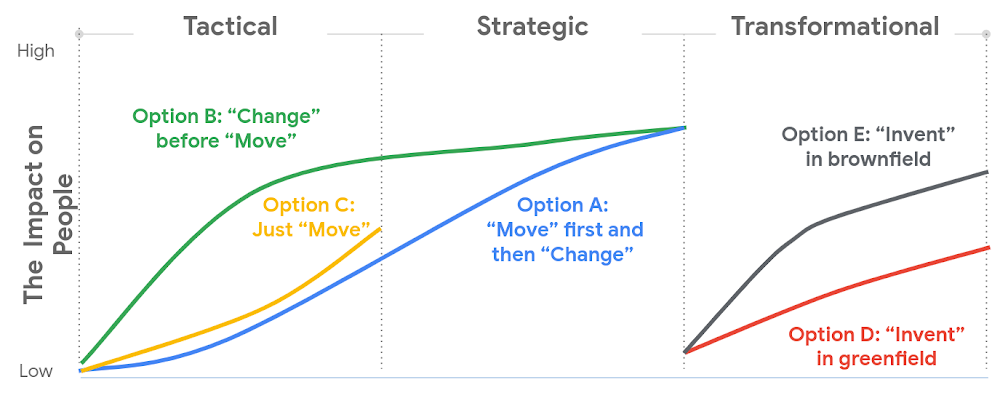
Whether a ‘lift and shift’ approach to the cloud is right for you, or a more transformative approach with a lot of re-architecting—the most important thing is to find the flavor of change which is appropriate to your context and level of ambition.This will both shape your key migration activities, but also the level of impact to be managed within your organization.
There are many ways to embark on a change journey for cloud migration (which one can find in the chart below). It is important to deeply understand the needs of your business and its people and determine what strategy makes the most sense.
3. Learn from best practices
Based on the lessons we’ve learned along our own journey, and the work we’ve done with customers, there are a number of recommendations we can share that can make a cloud migration more successful. We go into these in more detail in our new whitepaper, but below you can find the ones we think are most relevant:
- Share the vision—and measure, measure, measure. Once you’ve crystallised your cloud vision with leadership and key stakeholders, share that vision widely. Set success goals and communicate them to hold yourself accountable.
- Be clear about the capabilities you will need in the future—and where you’ll get them. For example, if your vision is to become a cloud-first, data and AI-led organization, ensuring you have the right data science skills and machine learning capabilities in your organization to achieve that vision becomes a critical step—be they home-grown or bought-in.
- Find the right balance between capabilities that should be under central control, and capabilities that should be decentralized, or agile. For example, should machine learning be something that sits centrally, or should it be spread across your organization? For every business, the solution will be a little different, and there’s no “one true answer.” There’ll be lots of different opinions about this, so the sooner the conversation starts, the better.
- Start thinking about the needed tech and non-tech skills now, and how you’ll fill the gaps. Building the tech skills will take time, and not everyone will feel comfortable with the future picture of collaboration, innovation, and agility.
To help businesses navigate their own cloud journeys, Google Cloud Professional Services has released a new whitepaper that can help guide organizations. “Managing Change in the Cloud” is closely aligned with the Google Cloud Adoption Framework and is a practical guide for organizations looking to maintain momentum in their cloud adoption. You can download the whitepaper here.
HarbourBridge Schema Assistant Allows Quick, Bulk Migration to Cloud Spanner

5460
Of your peers have already read this article.
1:30 Minutes
The most insightful time you'll spend today!
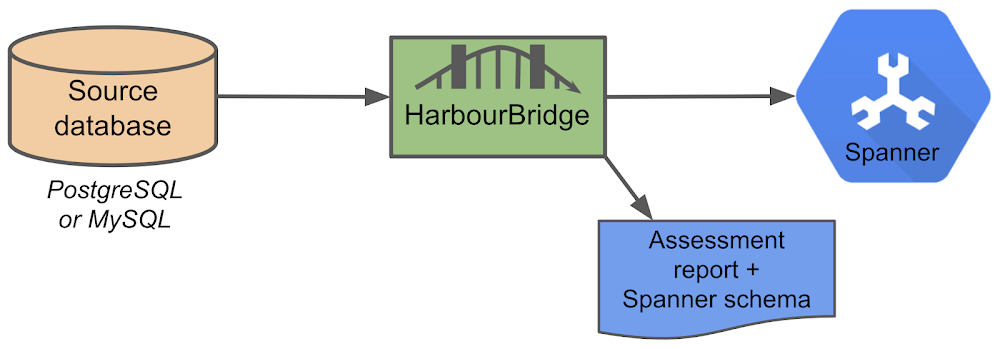
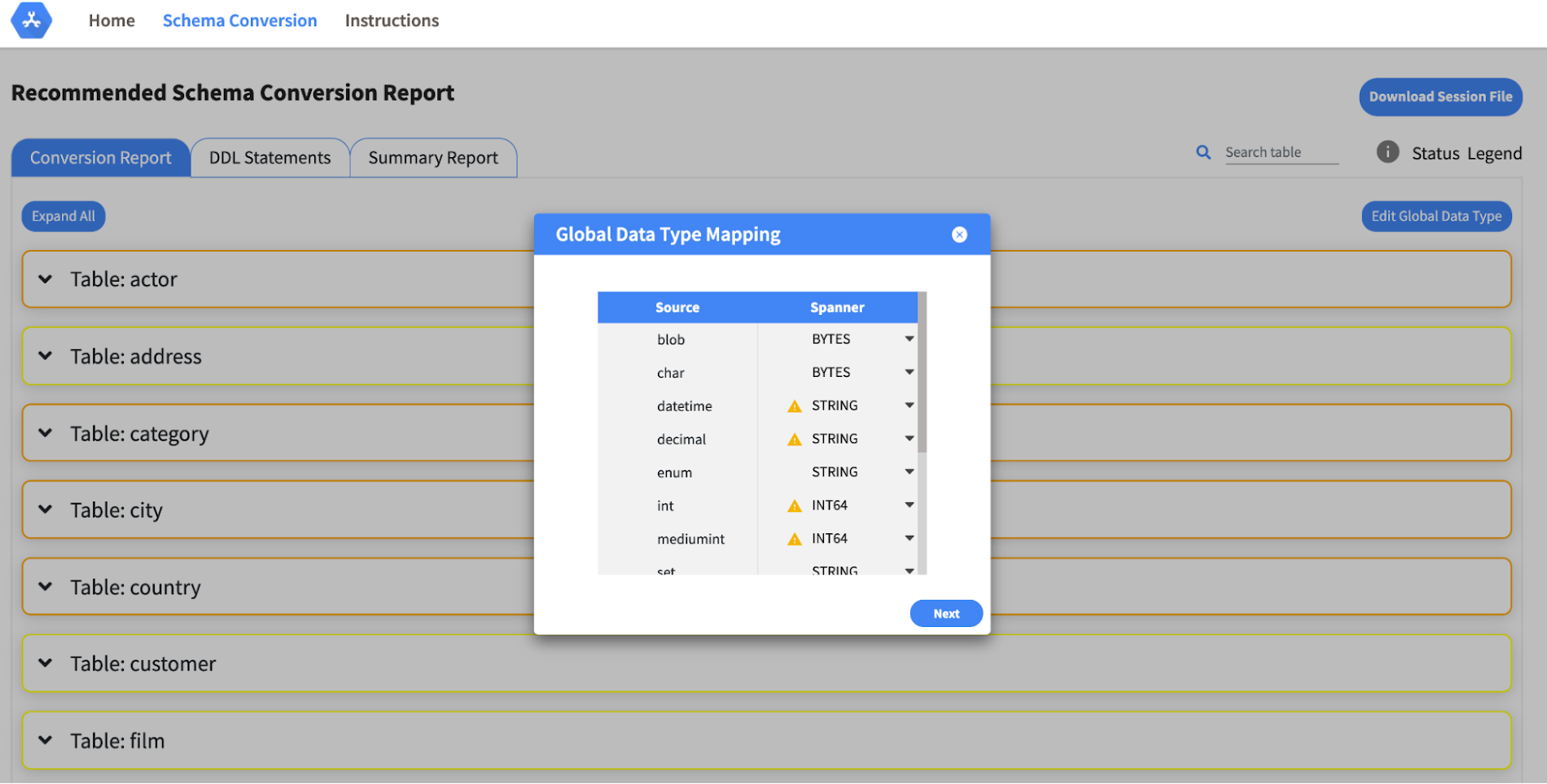
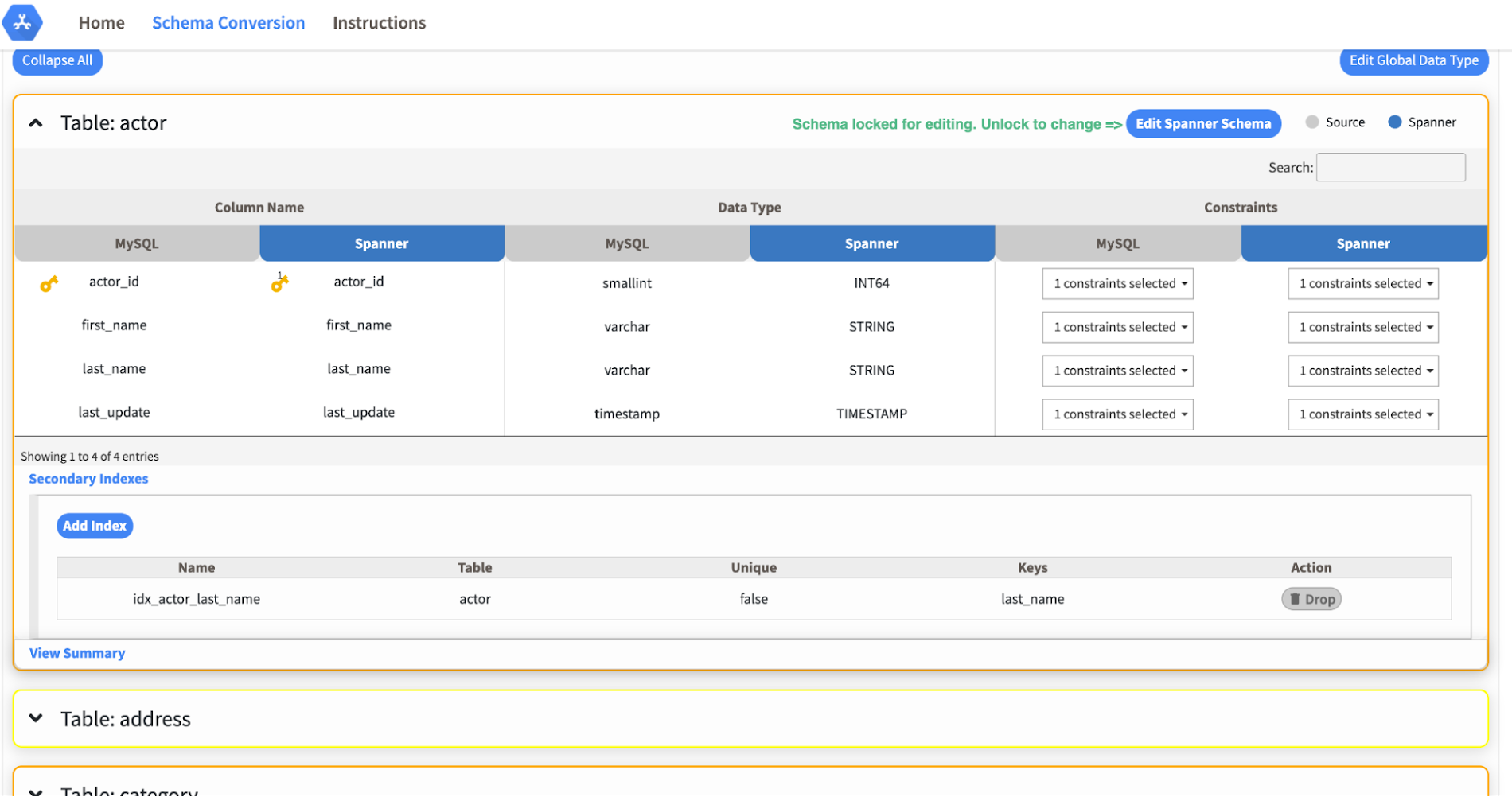
Today we’re announcing the HarbourBridge Schema Assistant, which provides a guided schema-design workflow for migrating from MySQL or PostgreSQL to Spanner. HarbourBridge imports dump files (from mysqldump or pg_dump) or directly connects to your source database, and converts the source database schema to an equivalent Spanner schema. The new Schema Assistant capability displays the source schema and Spanner schema side-by-side, highlights errors and walks you through a series of steps to validate and optimize your Spanner schema. It also produces a browsable assessment report with an overall migration-fitness score for Spanner, a table-by-table detailed analysis of type mappings and a list of features used in the source database that aren’t supported by Spanner. It supports editing of table and column names, column types, primary keys and constraints, as well as dropping of tables, columns, foreign keys and secondary indexes.
The new Schema Assistant complements HarbourBridge’s existing data and schema migration capabilities and is a critical step towards our goal of building a complete open-source migration toolkit. HarbourBridge continues to support command-line schema and data migration and turn-key Spanner evaluation.
Complementing the bulk data migration capabilities of HarbourBridge, we are also announcing the ability to migrate change events from MySQL to Cloud Spanner.
Supported Features in Schema Assistant
- Global type mapping. Users can customize the global mapping for how types should be mapped to Spanner consistently across the schema. For example, mapping large integers in source schema to Spanner’s NUMERIC.
- Local type mapping. Users can override the custom type mapping for a given table/column.
- Session management. A session keeps track of all the changes made to the schema mapping.
- Customization of secondary indexes. Users can add, edit and delete secondary indexes to optimize their Spanner performance.
- Customization of foreign keys and interleaved tables. Table interleaving is an important design consideration when migrating to Cloud Spanner as explained in more detail in this blog post.
Features in the pipeline
We are already working to further expand the supported set of schema editing features and welcome your feedback. We are particularly excited to expand the Schema Assistant’s design recommendations for optimizing Spanner schemas e.g. in-depth recommendations for primary key design.
HarbourBridge is open source and we gladly accept contributions from the wider community.
Google Introduces BigQuery Connector for SAP to Power Customers’ Data Analytics Strategy

5465
Of your peers have already read this article.
2:00 Minutes
The most insightful time you'll spend today!
Google Cloud has a genuine passion for solving technology problems that make a difference for our customers. With the release of our BigQuery Connector for SAP, we’re taking a another big step towards solving a major challenge for SAP customers with a quick, easy, and inexpensive way to integrate SAP data with BigQuery, our serverless, highly scalable, and cost-effective multi cloud data warehouse designed for business agility.
Solving for simplified data integration
Like most businesses today, SAP customers are eager to unlock the immediate insights and opportunities within their ever-growing stores of business data. However, many are discovering just how hard it can be to take the first step in any modern, cloud-enabled data analytics strategy: combining SAP data with other cloud-native, and enterprise data sets in real-time and at scale. According to a 2020 SAPInsider study, more than half of SAP customers surveyed said data integration was their top analytics pain point. These companies urgently need a rapid, sustainable, cost-effective and scalable way to integrate SAP data with modern cloud data analytics solutions.
The BigQuery Connector for SAP gives our customers a solution: a fast, simple, cost-effective and massively scalable way to make SAP data fully accessible within BigQuery by leveraging customers’ existing SAP Landscape Transformation Replication Server (SLT) tooling and skill sets. It’s the first SAP SLT direct near real-time connector for BigQuery without the need to set up additional infrastructure or third-party middleware, and can be deployed using a variety of embedded or stand-alone deployment options. In fact, most customers can install the BigQuery Connector for SAP in less than an hour—a remarkably easy way to start working with our industry-leading analytics solution that delivers proven and quantifiable business advantages for customers. Additionally, the BigQuery Connector for SAP is not restricted to customers who have deployed their SAP applications on Google Cloud. Customer’s who are running their SAP applications on-premise, or on any cloud, can also deploy and realize the analytical benefits of the solution.
Designing a solution with customer requirements and investments in mind
When the Google Cloud team started work on an analytics data integration tool for our SAP customers, we began with a set of requirements designed to root out the usual sources of cost and complexity. These included:
- The need for real-time performance with deltas replicated in milliseconds
- The ability to integrate data from almost any SAP Netweaver based application running today, regardless of its deployment location (on premises, any cloud, Google Cloud)
- Automatic BigQuery data type mapping with minimal transformation required
- Generation of target tables in BigQuery directly from source, if required
- Application layer integration that avoids the issues of direct database access
- Leveraging customers’ existing SAP skillsets, change data capture, and infrastructure
An important step towards meeting these requirements came when Alphabet, Google’s parent company, decided to leverage SAP SLT as a foundation for developing direct data replication between SAP and BigQuery for its internal corporate landscape. SLT as part of SAP’s strategic Business Technology Platform, supports real-time replication of data from SAP or third-party systems to SAP HANA, however, one of its limitations was direct integration with targets like BigQuery.
SAP SLT was a logical foundation for developing the connector for several reasons:
- It’s widely adopted among SAP customers who likely already leverage SLT for SAP analytics data integration
- It works with almost every non-SaaS SAP application environment running today
- It supports real-time replication performance at massive scale
It was an obvious choice for the Alphabet engineering team who saw immediate value from integrating SAP with BigQuery.
“The BigQuery Connector for SAP has enabled fast, low latency data replication for billions of records from 500+ tables of our most critical financial and supply chain data. Now in one cost-effective BigQuery data lake, this ERP data can be combined with other data sources for previously impossible real-time analytics and ML use cases. This allows us to drive much deeper strategic insights that support business and operational excellence, management and P&L reporting and more.”—Anil Nagalla, Sr. Engineering Director, Financial Systems, Google
SAP data integration with BigQuery enables new value
By leveraging SAP SLT, the BigQuery Connector for SAP can integrate real-time data streams from any SAP system—while also taking advantage of customers’ existing SAP investments and skillsets.
At the same time, the BigQuery Connector for SAP does a lot of heavy lifting on its own. For example, it automatically handles the complex, multi-step process of transforming SAP data types for use in BigQuery—mapping data-type transitions between the SAP and BigQuery environments, creating a target table schema on BigQuery for the transformed data types, building the target BigQuery table, and even adapting as new data types appear in your SAP environment.
For teams that want to fine-tune the BigQuery Connector for SAP’s automated recommendations, the connector supports additional levels of customization and choice. But if you simply want to get the job done and give your data analytics team greater support for their high-value work, then you’ll love just how quickly and easily the BigQuery Connector for SAP turns the complicated work of data integration and performance to process large volumes of data into a done deal. By integrating enterprise data sets in real time, customers can drive differentiated value and unlock new insights and actions that drive a competitive advantage.
The BigQuery Connector for SAP really shines as an enabling tool that transports and transforms your SAP data to power analytics solutions enabled by accelerators like the Google Cloud Cortex Framework: a comprehensive set of reference architectures, deployment accelerators, and integration services designed to give SAP customers a fast and seamless path to value with their data analytics investments. Simply put, the more SAP data you make available within Google Cloud, the easier it is to get meaningful—and often game-changing—insights from these solutions.
Learn more about the BigQuery Connector for SAP
Ready to get started with your own SAP data analytics strategy on Google Cloud? Install the Google Cloud BigQuery Connector for SAP, and discover a faster, simpler, more sustainable way to power your company’s data analytics strategy.

Customer Voices: How Firms from Across Industries Leverage Google Cloud
DOWNLOAD CASE STUDY14080
Of your peers have already downloaded this article
1:30 Minutes
The most insightful time you'll spend today!
From powering everyday operations and accelerating application innovation, to providing tools for specific business needs and executing on big ideas, to advancing the security of technology solutions, companies from across industries have leveraged Google Cloud for business benefits.
Companies from across industries have turned to Google Cloud for transforming their business, modernizing their infrastructure, and gleaning intelligence from data. For instance:
- Johnson & Johnson achieved a 41% increase in search results from high-quality job applicants, significantly improving the company’s ability to quickly hire top talent.
- Sony Network Communications now processes 10 billion monthly queries faster, which advances data analysis.
- University College Dublin saw significant 6-figure savings by eliminating legacy hardware, software, and maintenance.
And there are many such examples. Read the collection of case studies to find out how companies from across industries and geographies leveraged Google Cloud for measurable business benefits and for solving complex problems.

3358
Of your peers have already downloaded this article
3:30 Minutes
The most insightful time you'll spend today!
The need for agility and flexibility in the face of accelerating innovation and disruptions from competitors is the primary driver for cloud adoption across businesses both big and small. However, simply moving and shifting legacy system to the cloud does not sufficiently meet enterprise needs.
The systems and applications running in production environment that are built with a monolithic architecture are often not the best fit for complex cloud-based systems and are holding the companies back from realizing their goals.
What is needed is a cloud-native approach with microservices that helps in migrating a working monolithic system and transform it for the cloud world to derive the true business benefits that organizations truly desire.
Download this whitepaper and understand why a different architecture is needed to maximize the cloud investments and how this new architecture is better suited for the cloud.
More Relevant Stories for Your Company

Multicloud Mindset: Thinking About Open Source and Security in a Multicloud World
There’s never been a better time to talk about multicloud, and the Google Cloud Multicloud Mindset series on Twitter Spaces was created to do just that! This series takes place once every two weeks and features live conversations with top experts about the latest multicloud topics. You can join the

Dassana: Choosing Google Workspace and Google Cloud to accelerate growth and reach goals
When Dassana co-founders Gaurav Kumar and Parth Shah, formerly founder and founding engineer at RedLock (now Prisma Cloud by Palo Alto Networks), set out on a new startup journey in 2020, they knew exactly where to start: sign up for Google Workspace. “Every startup I’ve been at, we used Google

A Record Breaking Calculation: 100 Trillion Digits of π on Google Cloud!
Records are made to be broken. In 2019, we calculated 31.4 trillion digits of π — a world record at the time. Then, in 2021, scientists at the University of Applied Sciences of the Grisons calculated another 31.4 trillion digits of the constant, bringing the total up to 62.8 trillion

Digital Maturity in Higher Ed Tied to Improvements in Students’ Journey: Study
Why Higher Ed Needs to Go All-in on Digital In the wake of the COVID-19 pandemic, the majority of students within the 18-24-year-old demographic now expect hybrid learning environments--even once we are beyond the pandemic. And a vast number of adult learners are seeking options that accommodate their work and
