





Built with BigQuery: Retailers Unlock the Value of Data with SoundCommerce

3242
Of your peers have already read this article.
3:30 Minutes
The most insightful time you'll spend today!
As economic conditions change, retail brands’ reliance on ever-growing customer demand puts these companies at financial and even existential risk. Top-line revenue and active customer growth do not equal profitable growth.
Despite multi-billion dollar valuations for some brands, especially those operating the direct-to-consumer model, the rising costs of meeting shoppers’ high expectations (i.e. free shipping, free returns) along with the escalating cost of goods, fulfillment operations, and delivery costs, create pressure for brands to turn a profit. The ONLY way brands drive profitable growth is by managing variable costs in real-time. This in turn mandates adopting modern data cloud infrastructure including Google Cloud services such as BigQuery.
To unlock the value of data, Google Cloud has partnered with SoundCommerce, a retail data and analytics platform that offers a unique way of connecting marketing, merchandising, and operations data and modeling it within a retail context – all so brands can optimize profitability across the business.
Profitability can be measured per order through short-term metrics like contribution profit or long-term metrics like Customer Lifetime Value (CLV). Often, retailers calculate CLV as a measure of revenue with no consideration for the variable costs of serving that customer, for instance: the costs of marketing, discounting, delivering orders to the doorstep, or post-conversion operational exceptions (e.g. cancellations, returns).
What may first appear to be a high lifetime value customer through revenue-based CLV models, may not be profitable at all. By connecting marketing, merchandising, and operations data together, brands can understand their most profitable programs, channels, and products through the lens of actual customer value – and optimize accordingly.
The journey for brands starts with the awareness and data enablement of a more complex data set containing all variable revenue, cost, and margin inputs. What does a retailer need to do to achieve this?
- All data together in one place
- Matched and deduplicated disparate data
- Data is organized into entities and concepts that business decision makers can understand
- A common definition of key business metrics (this is especially important yet challenging for retailers because systems are siloed by the department and common KPIs like contribution profit per order may be defined differently across a company)
- Branched outputs for actionability: BI dashboards vs. data activation to improve marginal profit.
Once brands understand these requirements, up next is execution. This responsibility may fall within a ‘build’ strategy on the shoulders of technical IT/data leadership and their team(s) within a brand. This offers maximum control but at maximum cost and time-to-value. Retail data sources are complicated and change often. Technical teams within brands can spend too much time building and maintaining the tactical data ingestion process, which means they are spending less time deriving business value from the data.
But it doesn’t have to be this hard. There are other options in the market that brands can consider, such as a tool like SoundCommerce which provides a library of data connectors, pre-built and customizable date mappings, and outbound data orchestrations all tailor-made and ready-to-go for retail brands.
SoundCommerce empowers retail technology leaders to:
- Maintain data ownership to allow users to send modeled data to external data warehouses or layer-on business analytics tools for greater flexibility
- Provide universal access to data across the organization so every employee can have access to and participate in a low-code or no-code experience
- Expand and democratize data exploration and activation among both technical and non-technical users
For retail business and marketing decision-makers, SoundCommerce makes it easy to:
- Calculate individual customer lifetime value through the lens of profitability – not just revenue.
- Evaluate and predict lifetime shopper performance – identify which programs drive the highest CLV impact
- Set CAC and retention cost thresholds – determine optimal Customer Acquisition Costs (CAC) and retention costs that ensure marketing efforts are profitable through the lens of total lifetime transactions
Below is a sample data flow that illustrates how SoundCommerce connects to all the tools a Retailer is using and ingests the first-party data, agnostic of the platform. SoundCommerce then models and transforms the data within the retail context for brands to take immediate action on the insights they gain from the modeled data.
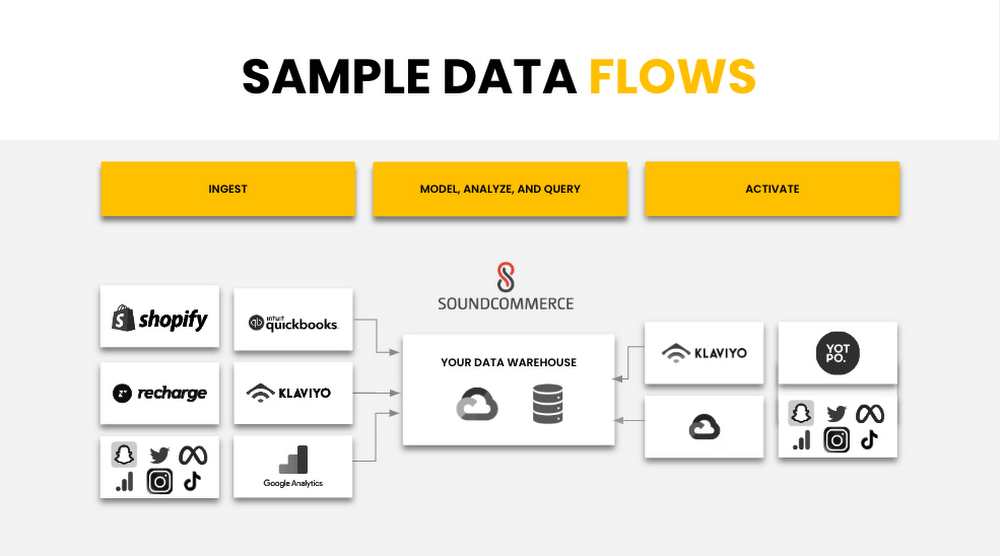
SoundCommerce built on Google Cloud Platform Services
SoundCommerce selected the Google Cloud Platform and its services to achieve what they set out to do – drive profitability for retailers and brands. SoundCommerce perfected this very need of retailers to centralize and harmonize data, map to business users’ needs to infer key metrics and insights by visualizing the data, or reuse the produced datasets to build upon other use cases specific to retailers. SoundCommerce built a cloud-native solution on Google Cloud leveraging the data cloud platform. Data from various sources are ingested in raw format, parsed, and processed as messages in Cloud Storage buckets using Google Kubernetes Engine (GKE) and stored as individual events in Cloud BigTable. A mapping engine maps the data to proprietary data models stored in BigQuery to store the produced data as datasets. Customers use visualization dashboards in Looker to access the data exposed as materialized views from within BigQuery. In many cases, these views are directly accessible by the customer per their use case.
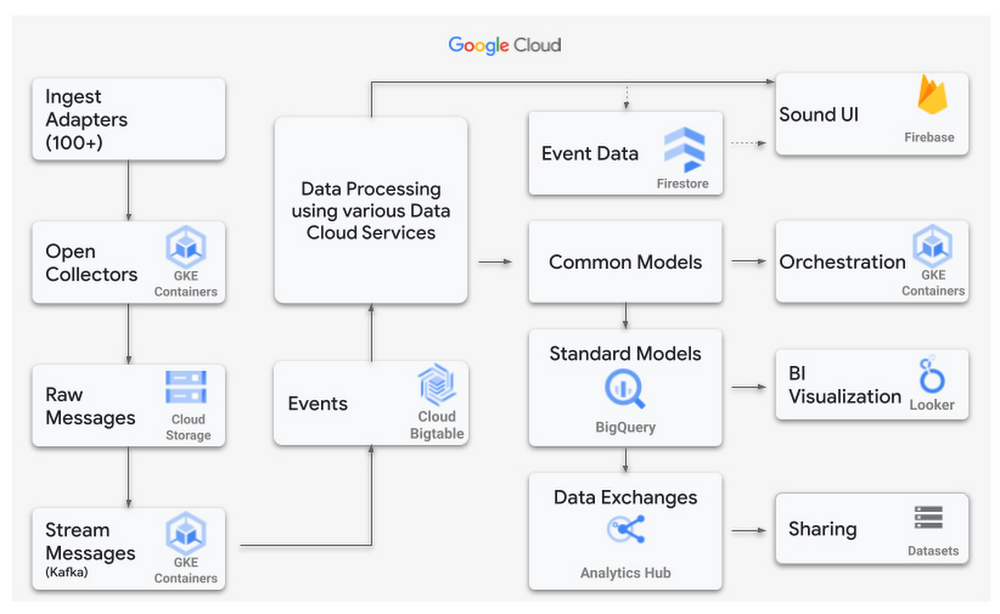
Power Retail Profitable Growth with Analytics Hub
SoundCommerce adopted BigQuery and the recent release of Analytics Hub – a data exchange that enables BigQuery users to efficiently and securely share data. This feature ensures a more scalable direct access experience for SoundCommerce’s current and future customers. It meets brands where they are in their data maturity by giving them the keys to own their data and control their analytics-driven business outcomes. With this feature, retailers can customize their analysis with additional data they own and manage.
“Retail Brands need flexible data models to make key business decisions in real-time to optimize contribution profit and shopper lifetime value,” said SoundCommerce CEO Eric Best. “GCP and BigQuery with Analytics Hub make it easy for SoundCommerce to land and maintain complex data sets, so brands and retailers can drive profitable shopper experiences with every decision.”
SoundCommerce uses Analytics Hub to increase the pace of innovation by sharing datasets with its customers in real time by using the streaming functionality of BigQuery. Customers subscribe to specific datasets through a data exchange as data is generated from external data sources and published into BigQuery. This leads to a natural flow of data that scales easily to hundreds of exchanges and thousands of listings. From the Customer’s viewpoint, Analytics Hub enables them to search listings and coalesce data from other software vendors to produce richer insights. All of the benefits are an add-on to the BigQuery features such as separation of compute and storage, petabyte-scale serverless data warehouse, and tighter integration with several Google Cloud products.
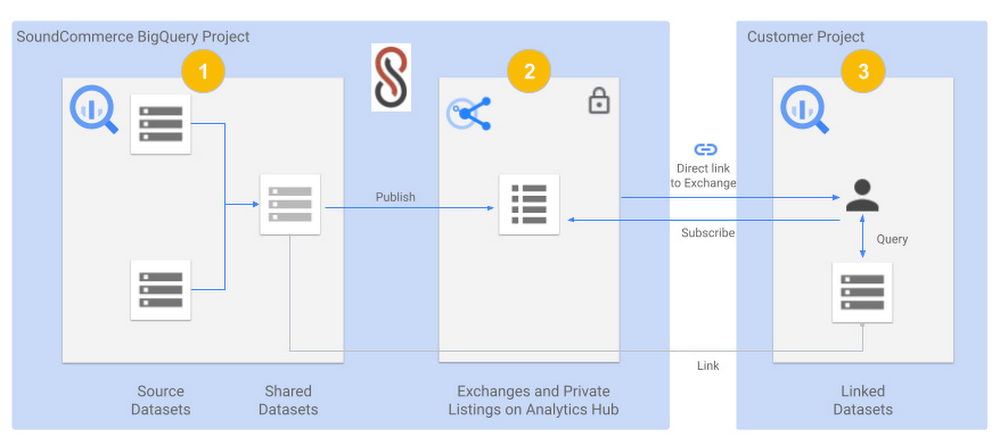
The below diagram shows a view of SoundCommerce sharing datasets with one of its customers:
- A SoundCommerce GCP project that hosts the BigQuery instance contains one or more Source Datasets that are composed into a Shared Dataset for a specific customer. The dataset is wrapped around Materialized views but can include other BigQuery objects such as Tables, Views, Authorized views and datasets, BigQuery ML models, external Tables, etc.
- The same SoundCommerce GCP project contains the data exchange that acts as a container regarding the shared datasets. The exchange is made private to securely share the curated dataset relevant to the customer. The shared dataset is published into the data exchange as a private listing. The listing inherits the security permissions that are configured on the exchange.
- SoundCommerce shares a direct link to the Exchange to the Customer, which they can add as a Linked dataset into their project in their Google Cloud Organization. The shareable link can be pointed to a private listing. From here on, the dataset is visible in the Customer project like any other dataset and immediately available to accept queries and return results. Alternatively, the customer can also view the listing in their own project under Analytics Hub and subscribe to it by adding it as a linked dataset.
SoundCommerce is incrementally onboarding customers to use Analytics Hub for all data sharing use cases. This enables brands to get business insights faster and gain an understanding of their profitable growth quickly. Plus, it gives them the ownership to own their own data and manage it how they see fit for their business. From a technical standpoint, the adoption of Analytics Hub has led to leveraging an inherent capability in BigQuery for data sharing, faster scaling, and reducing operational overhead to onboard customers.
The Built with BigQuery advantage for ISVs
Through Built with BigQuery launched in April as part of the Google Data Cloud Summit, Google is helping tech companies like SoundCommerce build innovative applications on Google’s data cloud with simplified access to technology, helpful and dedicated engineering support, and joint go-to-market programs. Participating companies can:
- Get started fast with a Google-funded, pre-configured sandbox.
- Accelerate product design and architecture through access to designated experts from the ISV Center of Excellence who can provide insight into key use cases, architectural patterns, and best practices.
- Amplify success with joint marketing programs to drive awareness, generate demand, and increase adoption.
BigQuery gives ISVs the advantage of a powerful, highly scalable data warehouse that’s integrated with Google Cloud’s open, secure, sustainable platform. And with a huge partner ecosystem and support for multi-cloud, open source tools, and APIs, Google provides technology companies the portability and extensibility they need to avoid data lock-in.
Click here to learn more about Built with BigQuery.
We thank the many Google Cloud team members including Yemi Falokun in Partner Engineering who contributed to close collaboration with the SoundCommerce team.
6696
Of your peers have already downloaded this article
4:30 Minutes
The most insightful time you'll spend today!
Unlocking the Power of Data and Creativity with
the Cloud: The WPP Story
Cart.com to Transform e-Commerce for Brands Globally

8752
Of your peers have already read this article.
1:30 Minutes
The most insightful time you'll spend today!
The ecommerce playing field has been hard to navigate for most retailers, and Cart.com is on a mission to change that. Traditionally, retailers needing to run their online store, order fulfillment, customer service, marketing, and other essential activities have had to cobble together systems to get the capabilities they need – much less having access to analytics across these functions. The result is costly, siloed ecommerce operations that are difficult to manage and scale.
It’s clearly not a formula for success, yet that’s the reality facing most retailers. Cart.com, in contrast, has set out to democratize ecommerce by giving brands of all sizes the full capabilities they need to take on the world’s largest online retailers. Our end-to-end environment empowers retailers to keep more of their revenue, set up proven strategies for managing all aspects of their business, and act on valuable insights from customer data every step of the way.
Together with our talented team, we’re building a unified ecommerce platform that already provides value to many leading or up and coming brands including Whataburger, GUESS, Dr. Scholl’s, Rowing Blazers, and Howler Bros.
We’re excited about the opportunity ahead as we reimagine traditional approaches to online sales, fulfillment, marketing, accessing growth capital, providing a unified view of all ecommerce and marketing analytics, and other activities. Expectations for Cart.com are high, and we are building a company that can scale to $100B in revenue and beyond. Supported by the Startup Program by Google Cloud and Google Cloud solutions, we’re establishing a technology platform to transform all aspects of ecommerce for brands worldwide.
Partner in disruption
At Cart.com, we’re currently targeting an underserved market. Our ideal customer is beyond demonstrating product-market-fit and is now at an inflection point seeking a growth opportunity. Typically, those companies are generating between $1M and $100M in annual revenue. We’ve seen an enthusiastic response from brands and retailers as well as investors, with backing from investors in just over a year totaling $143 million in three funding rounds.
Our strategy is to build an integrated ecommerce model that combines best-of-breed solutions, many of which we gain through acquisitions and then build upon to provide a streamlined and fully integrated experience for our brands. We’ve made seven acquisitions so far to round out our online store, order fulfillment, marketing services, customer service, and we have launched some integral partnerships including easy access to growth capital through our relationship with Clearco and product protection for customers on every purchase with Extend. Instead of acquiring a data company, we’re building our data platform on Google Cloud, across each operating function for a single-view for brands to harness actionable data. We see Google Cloud as the leader for data management, analytics, machine learning (ML) and artificial intelligence (AI).
Other reasons why we’re building our business on Google Cloud include scalability, excellence, security, reach, and data analytics that are far superior to other environments.
We also feel a cultural and mission alignment with Google Cloud and envision leaning into a long-term partnership of marketing, selling, and disrupting the disruptors together. Equally important to us are the investments Google Cloud is willing to make in early-stage companies like ours. The support through the Google Cloud for Startups program has been outstanding.
Built on Google Cloud
A wide range of Google Cloud solutions provide the foundation for our platform. For instance, Cloud Pub/Sub keeps our services communicating with one another. We rely on fully managed relational databases, like Cloud SQL and Cloud Spanner, to securely handle the huge volume of brand and shopper data generated every day.
Cloud Run allowed us to develop inside of containers before our Kubernetes infrastructure was ready to go. Now, we are taking advantage of all the capabilities in Google Kubernetes Engine. BigQuery integrates with all Google Cloud solutions and offers true data streaming natively out of the box, along with Dataflow for advanced analytics. We also use Container Registry to store and manage our Docker container images. Right now, we’re testing Cloud Composer to evaluate using it for data workflow orchestration instead of Apache Airflow.
The openness of the Google Cloud environment is further enabled by Anthos, which we may deploy soon to perform data integrations quickly as we acquire more companies over the next year. For example, if we acquire a company using Azure, we can easily align it with our Google Cloud ecosystem.
Enabling ecommerce 2.0
Recently, our team has been experimenting with Google Cloud Vertex AI and the fully managed services of AI deployment and ML operations. The capabilities would save us substantial time in the management of the ML lifecycle which allows us to focus more on developing proprietary AI that will transform commerce at scale.
Because Google Cloud is so far ahead in data science, our teams benefit from deep Google Cloud expertise as we look to provide brands with unmatched insights into customers to improve services and revenue. We’re also planning to test Recommendations AI among other tools to deploy customer product recommendations and personalization as turnkey productized offerings. Moving forward, we will likely use Bigtable to aid in serving machine learning to hundreds of thousands of brands due to its low latency and scalability.
Fanatical about brand success
We know that our work with Google Cloud for Startups and use of Google Cloud solutions for best-in-class data management, analytics, ML, and AI will enable us to offer even more transformative services to brands.
We also see the opportunity to use our platform and customer insights to break down barriers between brands, enabling retailers to share information and work better together when it’s in their best interests. What we’re building today on Google Cloud is fundamentally changing what’s possible for retailers of any size everywhere.
As a startup, when recruiting talent or working with prospective customers, it helps to share our success with Google Cloud. We view them as an extension of the Cart.com team. It also validates our business as we continue building a more integrated, holistic approach to commerce that opens new opportunities and drives growth for brands worldwide.
For more details about Cart.com’s vision for unified ecommerce, check out our video.
If you want to learn more about how Google Cloud can help your startup, visit our page here to get more information about our program, and sign up for our communications to get a look at our community activities, digital events, special offers, and more.
Renaulution: Renault’s story of migrating to 70 applications in 2 years

3311
Of your peers have already read this article.
3:00 Minutes
The most insightful time you'll spend today!
Editor’s note: Renault, the French automaker, embarked on a wholesale migration of its information systems—moving 70 applications to Google Cloud. Here’s how they migrated from Oracle databases to Cloud SQL for PostgreSQL.
The Renault Group, known for its iconic French cars has grown to include four complementary brands, and sold nearly 3 million vehicles in 2020. Following our company-wide strategic plan, “Renaulution,” we’ve shifted our focus over the past year from a car company integrating tech, to a tech company integrating cars that will develop software for our business. For the information systems group, that meant modernizing our entire portfolio and migrating 70 in-house applications (our quality and customer information systems) to Google Cloud. It was an ambitious project, but it’s paid off. In two years we migrated our Quality and Customer Satisfaction information systems applications, optimized our code, and cut costs thanks to managed database services. Compared to our on-premises infrastructure, using Google Cloud services and open-source technologies comes to roughly one dollar per user per year, which is significantly cheaper.
An ambitious journey to Google Cloud
We began our cloud journey in 2016 with digital projects integrating a new way of working and new technologies. These new technologies included those for agility at scale, data capabilities and CI/CD toolchain. Google Cloud stood out as the clear choice for its data capabilities. Not only are we using BigQuery and Dataflow to improve scaling and costs, but we are also now using fully managed database services like Cloud SQL for PostgreSQL. Data is a key asset for a modern car maker because it connects the car maker to the user, allows car makers to better understand usage and better informs what decisions we should make about our products and services. After we migrated our data lake to Google Cloud, it was a natural next step to move our front-end applications to Google Cloud so they would be easier to maintain and we could benefit from faster response times. This project was no small undertaking. For those 70 in-house applications (e.g. vehicle quality evaluation, statistical process control in plants, product issue management, survey analysis), for our information systems landscape, we had a range of technologies—including Oracle, MySQL, Java, IBM MQ, and CFT—with some applications created 20 years ago.
Champions spearhead each migration
Before we started the migration, we did a global analysis of the landscape to understand each application and its complexity. Then we planned a progressive approach, focusing on the smallest applications first such as those with a limited number of screens or with simple SQL queries, and saving the largest for last. Initially we used some automatic tools for the migration, but we learned very quickly nothing can replace the development team’s institutional knowledge. They served as our migration champions.
The apps go marching one by one
When we migrated our first few Oracle databases to Cloud SQL for PostgreSQL we tracked our learnings in an internal wiki to share common SQL patterns, which helped us speed up the process. For some applications, we simplified the architecture and took the opportunity to analyze and optimize SQL queries during the rework. We also used monitoring tools like Dynatrace and JavaMelody to ensure we improved the user experience.
The approach we developed was very successful—where database migration was initially seen as insurmountable, the entire migration project was completed in two years.
With on-premises applications it was hard for our developers to separate code performance from infrastructure limitations. So as part of our migration to Google Cloud, we optimized our applications with monitoring services. With these insights our team has more control over resources, which has reduced our maintenance and operations activity and resulted in faster, more stable applications. Plus, migrating to Cloud SQL has made it much easier for us to change our infrastructure as needed, add more power when necessary or even reduce our infrastructure size.
A new regime on Cloud SQL
Now that we’re running on Cloud SQL, we’ve improved performance even on large databases with many connected users. Thanks to built-in tools in the Google Cloud environment, we can now easily understand performance issues and quickly solve them. For example, we were able to reduce the duration of a heavy batch processing by a factor of three from nine to three hours. And we don’t have to wait for the installation of a new server, so our team can move faster. Beyond speed, we’ve also been able to cut costs. We optimized our code based on insights from monitoring tools, which not only enabled a more responsive application for the user, but it also reduced our costs because we’re not overprovisioned.
Learn more about the Renault Group and try out Cloud SQL today.
Recommendations for Modelling SAP Data inside BigQuery

8399
Of your peers have already read this article.
4:00 Minutes
The most insightful time you'll spend today!
Over the past few years, many organizations have experienced the benefits of migrating their SAP solutions to Google Cloud. But this migration can do more than reduce IT maintenance costs and make data more secure. By leveraging BigQuery, SAP customers can complement their SAP investments and gain fresh insights by consolidating enterprise data and easily extending it with powerful datasets and machine learning from Google.
BigQuery is a leading cloud data warehouse, fully managed and serverless, and allows for massive scale, supporting petabyte-scale queries at super-fast speeds. It can easily combine SAP data with additional data sources, such as Google Analytics or Salesforce, and its built-in machine learning lets users operationalize machine learning models using standard SQL — all at a comparatively low cost.
If your SAP-powered organization is looking to supercharge its analytics with the strength of BigQuery, read on for considerations and recommendations for modeling with SAP data. These guidelines are based on our real-world implementation experience with customers and can serve as a roadmap to the analytics capabilities your business needs.
Considerations for data replication
Like most technology journeys, this one should start with a business objective. Keeping your intended business value and goals in mind is critical to making the right decisions in the early steps of the design process.
When it comes to replicating the data from an SAP system into BigQuery, there are multiple ways to do it successfully. Decide which method will work best for your organization by answering these questions:
- Does your business need real-time data? Will you need to time travel into past data?
- Which external datasets will you need to join with the replicated data?
- Are the source structures or business logic likely to change? Will you be migrating the SAP source systems any time soon? For instance, will you be moving from SAP ECC to SAP S/4HANA?
You’ll also need to determine whether replication should be done on a table-by-table basis or whether your team can source from pre-built logic. This decision, along with other considerations such as licensing, will influence which replication tool you should use.
Replicating on a table-by-table basis
Replicating tables, especially standard tables in their raw form, allows sources to be reused and ensures more stability of the source structure and functional output. For example, the SAP table for sales order headers (VBAK) is very unlikely to change its structure across different versions of SAP, and the logic that writes to it is also unlikely to change in a way that affects a replicated table.
Something else to consider: Reconciliation between the source system and the landing table in BigQuery is linear when comparing raw tables, which helps avoid issues in consolidation exercises during critical business processes, such as period-end closing. Since replicated tables aren’t aggregated or subject to process-specific data transformation, the same replicated columns can be reused in different BigQuery views. You can, for instance, replicate the MARA table (the material master) once and use it in as many models as needed.
Replicating pre-built logic
If you replicate pre-built models, such as those from SAP extractors or CDS views, you don’t need to build the logic in BigQuery, since you’re using existing logic. Some of these extraction objects have embedded delta mechanisms, which may complement a replication tool that can’t handle deltas. This will save initial development time, but it can also lead to challenges if you create new columns, or if customizations or upgrades change the logic behind the extraction.
It’s also important to note that different extraction processes may transform and load the same source columns multiple times, which creates redundancy in BigQuery and can lead to higher maintenance needs and costs. However, replicating pre-built models may still be a good choice, since doing so can be especially useful for logic that tends to be immutable, such as flattening a hierarchy, or logic that is highly complex.
How you approach replication will also depend on your long-term plans and other key factors — for example, the availability (and curiosity) of your developers, and the time or effort they can put into applying their SQL knowledge to a new data warehouse.
With either replication approach, bear in mind when designing your replication process that BigQuery is meant to be an append-always database — so post-processing of data and changes will be required in both cases.
Processing data changes
The replication tool you choose will also determine how data changes are captured (known as CDC – change data capture). If the replication tool allows for it (for example as SAP SLT does) the same patterns described in the CDC with BigQuery documentation also apply to SAP data.
Because some data, like transactions, are known to be less static than others (e.g., master data), you need to decide what should be scanned in real time, what will require immediate consistency, and what can be processed in batches to manage costs. This decision will be based on the reporting needs from the business.
Consider the SAP table BUT000, containing our example master data for business partners, where we have replicated changes from an SAP ERP system:

In an append-always replication in BigQuery, all updates are received as new records. For example, deleting a record in the source will be represented as a new record in BigQuery with a deletion flag. This applies to whether the records are coming from raw tables like BUT000 itself or pre-aggregated data, as from a BW extractor or a CDS view.
Let’s take a closer look at data coming particularly from the partners “LUCIA” and “RIZ”. The operation flag tells us whether the new record in BigQuery is an insert (I), update (U) or deletion (D), while the timestamps help us identify the latest version of our business partner.

If we want to find the latest updated record for the partners LUCIA and RIZ, this is what the query would look like:
SELECT partner,ARRAY_AGG(i1 ORDER BY i1.recordstamp DESC LIMIT 1) AS rowFROM SAP_ECC.but000 i1WHERE partner in ('LUCIA','RIZ')GROUP BY partner
With the following result:

After identifying stale records for “LUCIA” and “RIZ” business partners, we can proceed to deleting all stale records for “LUCIA” if we do not want to retain the history. In this example, we are using a different table to which the same replication has been done, for the purpose of comparison and to check that all stale records have been deleted for the selection made and that we only kept last updated records. For example:
DELETE SAP_HANA.but000 i1WHEREi1.recordstamp < TIMESTAMP_SUB(CURRENT_TIMESTAMP(), INTERVAL 3 HOUR) ANDi1.recordstamp < (SELECT MAX(recordstamp) FROM SAP_HANA.but000 i2WHEREi1.partner = i2.partnerand partner="LUCIA")
You can also use the following query to retrieve stale records for “LUCIA” partner before moving forward with deletion
SELECT partner, operation_flag, recordstamp FROM SAP_HANA.but000 i1WHEREi1.recordstamp < TIMESTAMP_SUB(CURRENT_TIMESTAMP(), INTERVAL 3 HOUR)ANDi1.recordstamp < (SELECT MAX(recordstamp) FROM SAP_HANA.but000 i2WHEREi1.partner = i2.partnerand partner="LUCIA")
Which produces all of the records, except the latest update:

Partitioning and clustering
To limit the number of records scanned in a query, save on cost and achieve the best performance possible, you’ll need to take two important steps: determine partitions and create clusters.
Partitioning
A partitioned table is one that’s divided into segments, called partitions, which make it easier to manage and query your data. Dividing a large table into smaller partitions improves query performance and controls costs because it reduces the number of bytes read by a query.
You can partition BigQuery tables by:
- Time-unit column: Tables are partitioned based on a “timestamp,” “date,” or “datetime” column in the table.
- Ingestion time: Tables are partitioned based on the timestamp recorded when BigQuery ingested the data.
- Integer range: Tables are partitioned based on an integer column.
Partitions are enabled when the table is created, as in the example below. A great tip is to always include the partition filter as shown on the left-hand side of the query.

Clustering
Clustering can be created on top of partitioned tables by applying the fields that are likely to be used for filtering. When you create a clustered table in BigQuery, the table data is automatically organized based on the contents of one or more of the columns in the table’s schema. The columns you specify are then used to colocate related data.
Clustering can improve the performance of certain query types — for example, queries that use filter clauses or that aggregate data. It makes a lot of sense to use them for large tables such as ACDOCA, the table for accounting documents in SAP S/4HANA. In this case, the timestamp could be used for partitioning, and common filtering fields such as the ledger, company code, and fiscal year could be used to define the clusters.

A great feature is that BigQuery will also periodically recluster the data automatically.
Materialized views
In BigQuery, materialized views are precomputed views that periodically cache the results of a query for better performance and efficiency. BigQuery uses precomputed results from materialized views and, whenever possible, reads only the delta changes from the base table to compute up-to-date results quickly. Materialized views can be queried directly or can be used by the BigQuery optimizer to process queries to the base table.
Queries that use materialized views are generally completed faster and consume fewer resources than queries that retrieve the same data only from the base table. If workload performance is an issue, materialized views can significantly improve the performance of workloads that have common and repeated queries. While materialized views currently only support single tables, they are very useful common and frequent aggregations like stock levels or order fulfillment.
Further tips on performance optimization while creating select statements can be found in the documentation for optimizing query computation.
Deployment pipeline and security
For most of the work you’ll do in BigQuery, you’ll normally have at least two delivery pipelines running — one for the actual objects in BigQuery and the other to keep the data staging, transforming, and updated as intended within the change-data-capture flows. Note that you can use most existing tools for your Continuous Integration / Continuous Deployment (CI/CD) pipeline — one of the benefits of using an open system like BigQuery. But, if your organization is new to CI/CD pipelines, this is a great opportunity to gradually gain experience. A good place to start is to read our guide for setting up a CI/CD pipeline for your data-processing workflow.
When it comes to access and security, most end-users will only have access to the final version of the BigQuery views. While row and column-level security can be applied, as in the SAP source system, separation of concerns can be taken to the next level by splitting your data across different Google Cloud projects and BigQuery datasets. While it’s easy to replicate data and structures across your datasets, it’s a good idea to define the requirements and naming conventions early in the design process so you set it up properly from the start.
Start driving faster and more insightful analytics
The best piece of advice we can give you is this: Try it yourself. Anyone with SQL knowledge can get started using the free BigQuery tier. New customers get $300 in free credits to spend on Google Cloud during the first 90 days. All customers get 10 GB storage and up to 1 TB queries/month, completely free of charge. In addition to discovering the massive processing capabilities, embedded machine learning, multiple integration tools, and cost benefits, you’ll soon discover how BigQuery can simplify your analytics tasks.
If you need additional assistance, our Google Cloud Professional Services Organization (PSO) and Customer Engineers will be happy to help show you the best path forward for your organization. For anything else, contact us at cloud.google.com/contact.
Cloud Spanner Powers Vimeo to Deliver Consistent UX for across Content

3510
Of your peers have already read this article.
3:00 Minutes
The most insightful time you'll spend today!
Editor’s note: The video platform Vimeo leverages managed database services from Google Cloud to serve up billions of views around the world each day. Here’s how they deliver a consistent user experience across all their content.
Vimeo is the world’s leading video software solution, powering hundreds of thousands of new uploads every day and billions of views. At our scale, it’s paramount that we retain a seamless user experience across all of the videos hosted, shared, and viewed on our platform. With managed database services from Google Cloud, we’ve been able to deliver a consistent and reliable user experience no matter where our users and their audiences are.
https://youtube.com/watch?v=ggpAUgEL2iE%3Fenablejsapi%3D1%26
Outgrowing the data center and gaining more scale
Our first exposure to Google Cloud was the excellent performance between Google Compute Engine (GCE) and Google Cloud Storage (GCS), which we used to design a really high quality playback and upload environment for our customers’ videos. At first we were simply creating cloud-based packaging and delivery of their content, but the bulk of our application ran on an on-premises MySQL database. Seeing the gains from our initial investment in GCE and GCS, we decided to fully migrate to Google Cloud.
We started by lifting and shifting our workloads from our on-premises deployments to GCE. But we quickly realized we had to redesign our application to deliver higher availability and responsiveness for an exceptional user experience, which led us to Cloud Spanner, a distributed SQL database management and storage service. With Spanner, we found all the benefits of a relational semantics database with global scale, allowing us to add more nodes with the push of a button.
Today we have a multi-region instance with 99.999% uptime, so we’re confident it can handle our video workloads. We use about 16 Spanner nodes to cover approximately 50.8 billion rows and about 4.5 terabytes of storage/disk space. And with the launch of Video Library, we have the scale we need to fundamentally change the way organizations handle content.
Using Spanner as a time machine during migration
During the initial migration, we wanted to ensure an accurate data transfer with as few errors or bugs as possible. When we moved data from MySQL tables into Spanner, we ran spot analyses to check for potential problems. If the data didn’t match, Spanner allowed us to revert to the original in a single click. Through Spanner we could check stale timestamps or past users. It almost functioned like a time machine by offering point-in-time recovery functionality.
Serving up any video at any time
We work with a long tail of content. Depending on how popular a video is, we take a different approach to storing it. We cache the most popular material so it’s immediately accessible and use Cloud Spanner to ensure it’s highly available across multiple regions. On the flip side, we use Cloud SQL for some lower volume satellite services that support other components of the application that don’t require the same guarantees or performance that Cloud Spanner provides.
As our millions of users continue to upload their own videos, Spanner also acts as a video metadata indexing and cataloging service. When we need to play back a particular video, we can quickly and easily find it in a sea of content. It’s crucial that our database is highly available and reliable so the playback experience is seamless for our users.
To learn more about Vimeo, visit our site.
Learn more about how your organization can use Cloud Spanner.
More Relevant Stories for Your Company
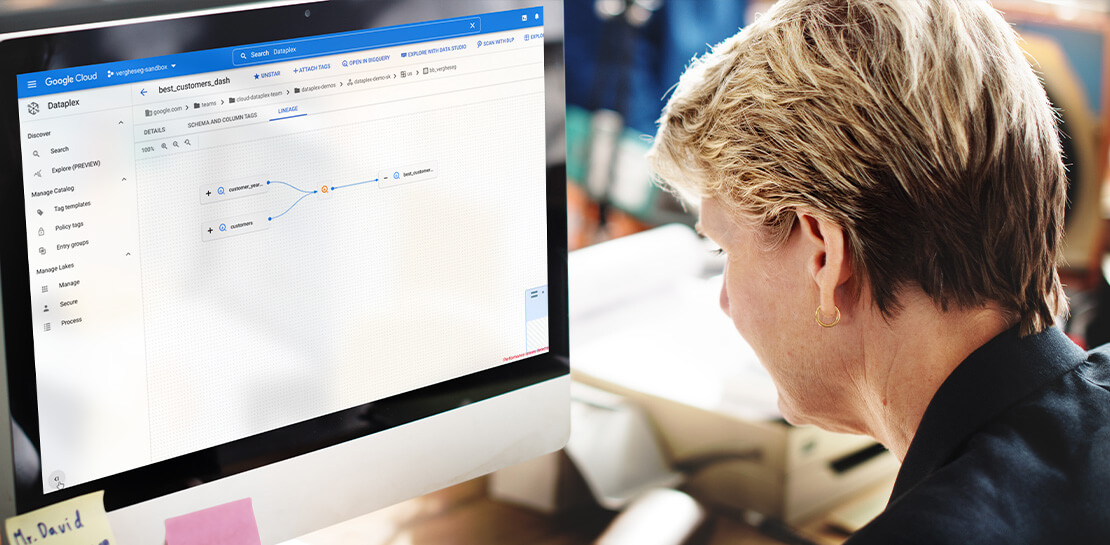
Dataplex Data Lineage: Leverage the Complete Data Story for Better Business Decisions
Today, we are excited to announce the general availability of Dataplex data lineage — a fully managed Dataplex capability that helps you understand how data is sourced and transformed within the organization. Dataplex data lineage automatically tracks data movement across BigQuery, BigLake, Cloud Data Fusion (Preview), and Cloud Composer (Preview), eliminating operational
What Differences in Functionalities Can I Expect Between Google Cloud’s SQL Database and Standard MySQL?
In general, the MySQL functionality provided by a Google Cloud’s SQL Database (Cloud SQL) instance is the same as the functionality provided by a locally-hosted MySQL instance. However, there are a few differences between a standard MySQL instance and a Cloud SQL for MySQL instance. Unsupported Features User defined functionsInnoDB

Google Cloud Tools Help U.S. Forest Department Generate Years of Insights into Earth’s Natural Resources
For 117 years, the U.S. Department of Agriculture’s Forest Service has been a steward of America's forests, grasslands, and waterways. It directly manages 193 million acres and supports sustainable management on a total of 500 million acres of private, state, and tribal lands. Its impact reaches far beyond even that,

PaGaLGuY Turns to Google Cloud Platform to Power Leading India Education Network
Founded in 2006, PaGaLGuY started as a forum that enabled students, typically aged between 20 and 30 to discuss and seek advice on academic issues. By 2011, PaGaLGuY had increased its traffic to about 250,000 page views per month. The business is now one of India’s largest education networks and
