





Apigee: Unlock Innovation by Managing APIs for SAP Workloads

3659
Of your peers have already read this article.
3:00 Minutes
The most insightful time you'll spend today!
Businesses migrating their SAP environments to Google Cloud do so for a number of reasons. Most cite the agility, scalability and security advantages of migrating SAP workloads to Google Cloud; many also focus on improved uptime and performance.
At some point, most businesses also want to explore the idea that there’s a fortune locked up in their business data—and that the cloud holds the key. But leveraging the cloud to transform data into dollars is a process that involves special challenges—and specialized tools to address these challenges. For businesses running SAP environments in the cloud, most of which maintain a significant stake in legacy systems and data stores, the challenges tend to get even bigger.
The promises and pitfalls of APIs
This is where Google Cloud’s advanced data analytics, machine learning and AI capabilities, especially our API (application programming interface) management tools, come into play. Our Apigee API Management Platform is emerging as a star player for many of our SAP customers because it can open the door to innovation and opportunity for SAP systems and data stores.
API management speaks directly to what it really means to get value from business data. By connecting the right data sets with people willing and able to monetize that data, your business can benefit both indirectly (for example, by generating insights that lead to increased sales or better customer experiences) and directly (such as by selling access to your data to another business).
APIs have emerged as a pillar of modern digital business practices because they facilitate precisely these types of transactions. Today, every mobile device, website and application uses APIs to access connected services and data sources. APIs provide connection points between apps, platforms and entire application ecosystems. And by using de-facto standards such as REST (representational state transfer), businesses can utilize APIs to build and deploy innovative applications quickly.
3 reasons legacy systems and modern APIs don’t mix
Google Cloud customers running SAP environments may be ready to find the value in their data, but their SAP systems and data, as well as legacy APIs that don’t adhere to REST or other modern approaches, may not quite be up to the task. This is because:
- Balancing accessibility, usability and security is a tough task—and the stakes are high. Opening up access to business-critical systems to third-party as well as internal developers could raise significant risks. Even for SAP teams with a high focus on security, the process of providing dependable, programmatic access to legacy SAP systems often involves significant time and effort. And while limiting access and API functionality are both valid ways to mitigate security risk, employing these tactics can slow the pace of innovation and very quickly undermine the reasons for starting this process in the first place.
- Managing APIs across legacy SAP applications and other data stores can be complex, costly and technically challenging. There’s a fundamental mismatch between the “how and why” of modern APIs and the types of programmatic access for which legacy systems were designed. Modern apps, for example, typically deliver API requests in far greater numbers; that’s true for client-side single-page applications as well as for more traditional server-side apps running on modern, elastically scaled app servers. There are also disparities in the size and structure of data payloads between what modern apps were designed to use and what legacy systems were designed to serve.
These examples boil down to the same issue: If your business is running legacy SAP systems or is in the process of migrating away from them, you’ll have serious work to do to make your data accessible for modern use cases and integrations. And asking third-party developers to adjust their methods and skill sets to consume your legacy systems is going to be a very tough sell.
- Monetizing API access presents another set of technical and practical challenges. For many companies, the name of the data game is monetization: actually charging developers for the privilege of accessing your high-value data sources. Getting this right isn’t just a matter of putting a virtual turnstile in front of your existing APIs. Any monetization strategy lives or dies based on its pricing—and this means understanding exactly who’s using your data, when they access it and how they’re using it. Even if you are not charging your developers for API calls, there are also some valuable insights to be gained from more advanced types of analysis, right up to having a unified view of every data flow and data interaction related to your organization’s API traffic. Overall, API monetization demands that APIs be built in a modern style, designed and maintained for developer consumption rather than just, per legacy methods, for exposing a system.
It probably comes as no surprise that an SAP environment, whether or not it’s considered legacy, was designed to focus on SAP system data and not designed to open the data inside an SAP system to other applications. And since these tools don’t build themselves, the question becomes, who will build them?
Apigee: Bridging the gaps with API management
An API management solution such as Apigee can help IT organizations tackle these issues more efficiently. In practice, companies are turning to Apigee for help with three primary SAP application modernization patterns, all of which speak to the challenges of using APIs to create value:
1. Modernizing legacy services. One of Apigee’s most important capabilities involves placing an API “wrapper” around legacy SAP interfaces. Developers then get to work with feature-rich, responsive, thoroughly modern APIs, and the Apigee platform handles the process of translating and optimizing incoming API calls before passing the requests through to the underlying SAP environment.
This approach to API management also gives IT organizations some useful capabilities. Apigee simplifies the process of designing, implementing and testing APIs that can add more functionality on top of legacy SAP interfaces; and it helps manage where, how and when developers work with APIs. This is also the basis for Apigee’s API monitoring and metrics—essential capabilities that would involve significant effort for most IT teams to build themselves.
2. Abstracting APIs from source systems. By providing an abstraction layer between SAP legacy systems and developers, the Apigee platform also ensures a consistent, reliable and predictable developer experience. Through this decoupling of APIs from the underlying source systems, Apigee can adjust to changes in the disposition and availability of systems while carrying on business as usual with developers using its APIs. In this way, SAP enterprises can package and market their API offerings—for example, publishing APIs through a developer portal—and lets them monitor API consumption by target systems.
Decoupling the source system from the developer entry points also shields connected applications from significant backend changes like a migration from ECC to S/4HANA. As you make backend changes to your services, apps continue to call the same API without any interruption. The migration may also provide opportunities for consolidating multiple SAP and non-SAP implementations into S/4HANA or cleaning up core SAP systems by moving out some of the functionality to cloud-native systems. Because Apigee abstracts consuming applications from changes to underlying systems and creates uniformity across these diverse systems, it can de-risk the migration from ECC to S/4HANA or similar consolidation projects.
3. Creating cloud-native, scalable services. Apigee also excels at bridging the often wide gap between SAP applications and modern, distributed application architectures in which microservices play an essential role. In addition to repackaging SAP data as a microservice and providing capabilities to monetize this data, Apigee takes on some essential performance, availability and security functions: handling access control, authentication, security monitoring and threat assessment plus throttling traffic when necessary to keep backend systems running normally while providing applications with an endpoint that can scale to suit any of your workloads.
Needless to say, Apigee’s security capabilities are absolutely essential no matter how you’re using API management tools. But because Apigee also offers performance, analytics and reliability features, it can position companies to jump into a fully mature API monetization strategy. At the same time, it can give IT teams confidence that opening their SAP systems to innovation does not expose mission critical systems to potential harm.
Conrad Electronic and Apigee: using APIs to drive innovation
We’re seeing quite a few businesses using Apigee to create value from legacy SAP environments in ways that didn’t seem possible before. For an example of how Apigee and the rest of Google Cloud work together to open new avenues for innovation for SAP users, consider Conrad Electronic.
Conrad Electronic combines many years of history as a successful German retailer with a progressive approach to innovation. The company has digitally transformed itself by leveraging an existing, legacy SAP environment alongside Google BigQuery, which provides a single repository for data that once resided in dozens of disparate systems. Conrad Electronic is using Apigee to amplify the impact and value of its transformation on two levels.
First, it’s using Apigee to manage data exchanges with shipping companies and with the procurement systems of its B2B customers, giving these companies an improved retail experience and reducing the friction and potential for error that come with traditional transaction environments.
At the same time, Conrad Electronic uses Apigee to give its own developers a modern set of tools for innovation and experimentation. A small development team ran with the idea, building an easy-to-use tool that gives in-store staff and visitors access to key product, service and warranty information, using their own tablets and other devices.
“APIs give people the freedom and independence to implement their ideas quickly and effectively,” said Aleš Drábek, Conrad Electronics’ Chief Digital and Disruption Officer. “As an effective API management solution, Apigee enables us to harness the power of APIs to transform how we interact with customers and how we transfer data with our B2B customers.”
Explore the possibilities with API management
To learn more about how Apigee can solve the challenges that come with opening up your SAP systems to new business models and methods for innovation, see here. Also for more information on Google Cloud solutions for SAP customers, see here.
1 Developer. 5 Months. A Revenue Generating App With 100K Users With Firebase

7881
Of your peers have already read this article.
5:30 Minutes
The most insightful time you'll spend today!
This is a guest post authored by Firebase customer, Anton Ivanov, Founder & CEO of DealCheck
Real estate investing is a fantastic way to build a stream of passive income and grow your wealth. Numerous studies have pointed out that real estate investing has created more millionaires throughout history than any other form of investing (like this one and this one). So why don’t more people do it?
I asked myself this very question a few years ago after talking to a group of friends about the success I’ve had with real estate, and listening to their reasons why they think it’s out of their reach.
A common theme among them was that they viewed it as something too difficult to learn and master. There were too many steps, the learning curve was steep and there was a lot of room for mistakes for somebody just starting out, especially when analyzing the financial performance of potential investment properties.
Traditionally, most investors used spreadsheets to do the math – which works only if you know what and how you’re calculating something. But if you don’t know that, it’s very easy to make mistakes and overlook things. And no one wants to make mathematical errors before a huge purchase like an investment property.

Where do I even begin?!
And that’s when I had the idea to build DealCheck – a cloud-based, easy-to-use property analysis tool for real estate investors and agents. I wanted to create a platform that would help new investors learn the ropes and avoid costly mistakes, but at the same time provide the flexibility to perform more advanced analysis with a click of a button.
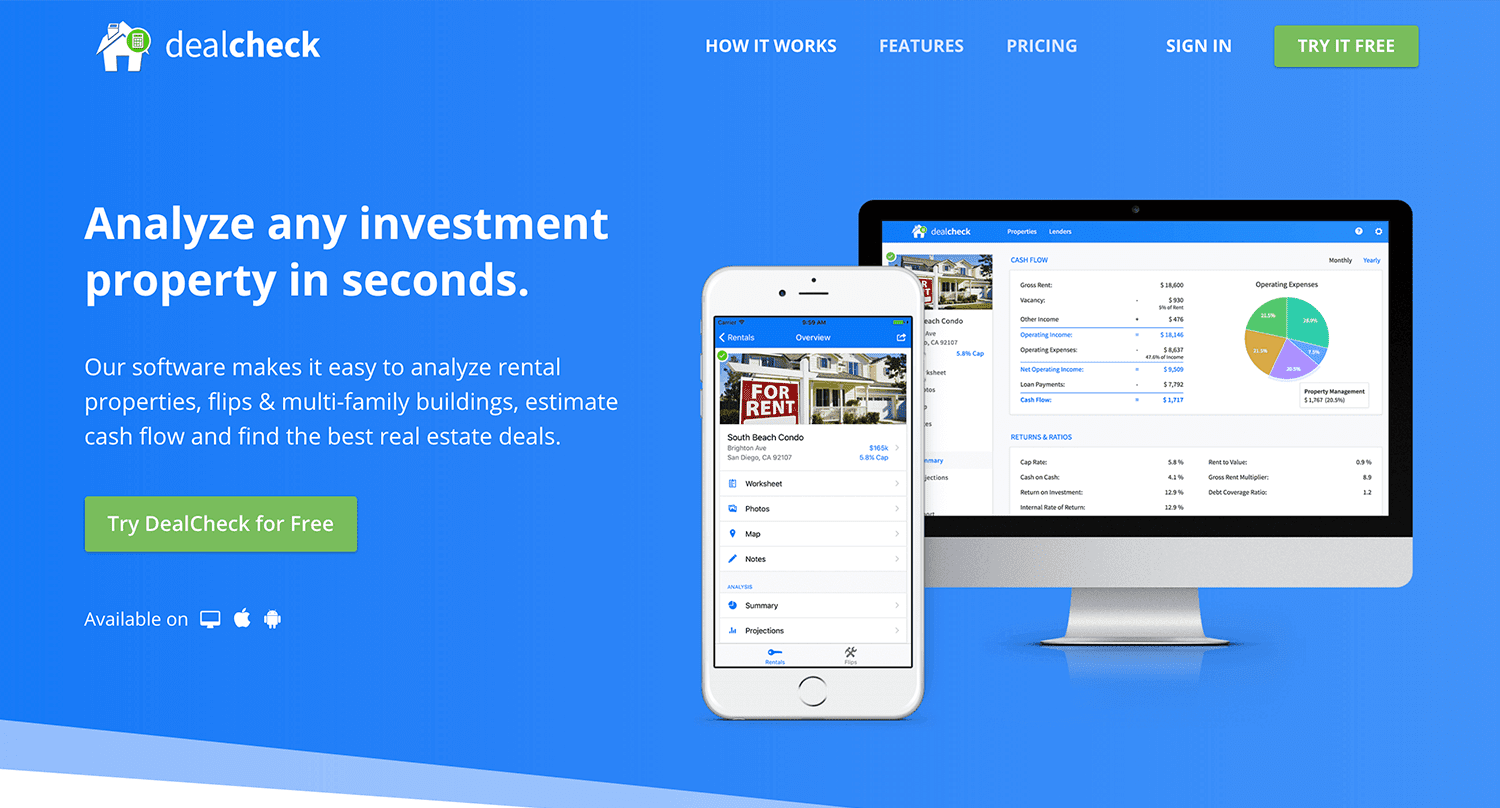
Making real estate investing easier and more accessible.
The Challenges of Solo Development
I was working as a front-end engineer at the time, so I knew I could build the UI myself, but what about the back-end, data storage, authentication, and a bunch of other things you need for a full-functioning cloud app?
I didn’t know anybody I could bring on as a co-founder, so I set out to research what technologies and platforms I could leverage to help me with the back-end and server infrastructure.
Firebase kept popping up again and again and I began to look at it in more detail. It was then recently acquired by Google and its collection of BaaS (backend-as-a-service) modules seemed to offer the exact solution I needed to build DealCheck.
I was especially impressed with the documentation for each feature and how well all of the different technologies could be tied together to create one unified platform.
It wasn’t long before I signed up and started building the first MVP of the app.
Using Firebase to Quickly Build a Scalable Backend
As the only developer on the project, I had limited time and resources to spend on building the back-end, so I set out to use every Firebase feature that was available at the time to my advantage.
My goal was actually to write as little server-side code as possible and instead focus on leveraging the different Firebase modules to solve three specific challenges:
Challenge #1 – Authentication and User Management
The first one was authentication and user management. DealCheck’s users needed the ability to create their accounts so they can view and analyze properties on any device (more on that later). I wanted to have the ability to sign in with email, Facebook or a Google account.
Firebase Authentication was designed specifically for this purpose and I used it to handle pretty much the entire authentication flow. Out-of-the-box, it has support for all the major social networks, cross-network credential linking and the basic account management operations like email changes, password resets and account deletions.
There was no server-side code required at all – I just needed to build the UI on the front-end.
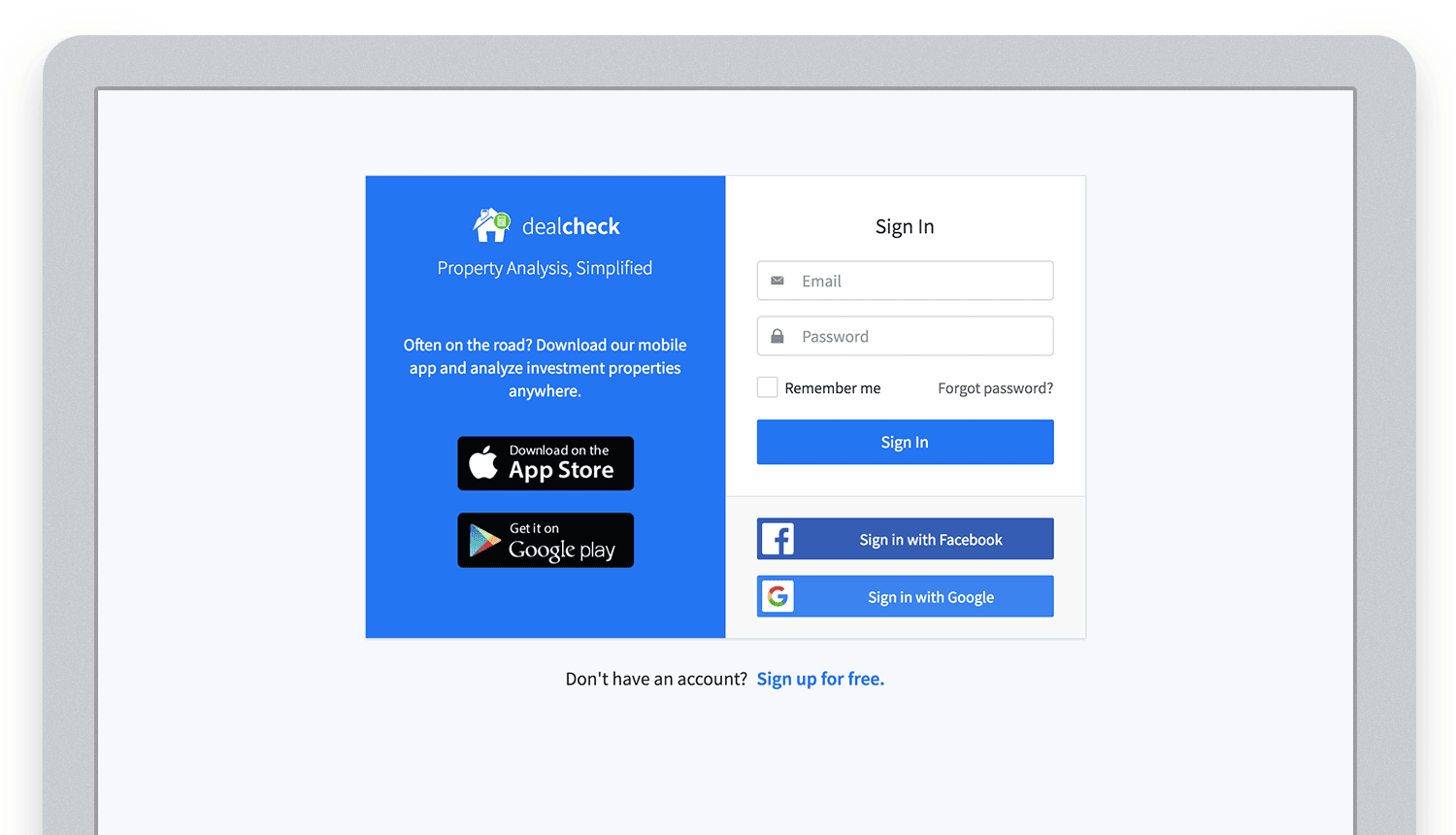
Email, Facebook and Google sign in powered by Firebase.
And as an added benefit, Firebase Authentication ties directly into the Realtime Database product to create a declarative permissions and access control framework that’s easy to implement and maintain. This helped me make sure user data was protected from unauthorized access, but also facilitate data sharing among users.
Challenge #2 – Cloud Storage with Cross-Device Sync
Next up was data storage. I knew that I wanted DealCheck’s users to be able to use the app and analyze properties online, on iOS and Android. So I needed a real-time, cloud-based database solution that could sync data across any device.
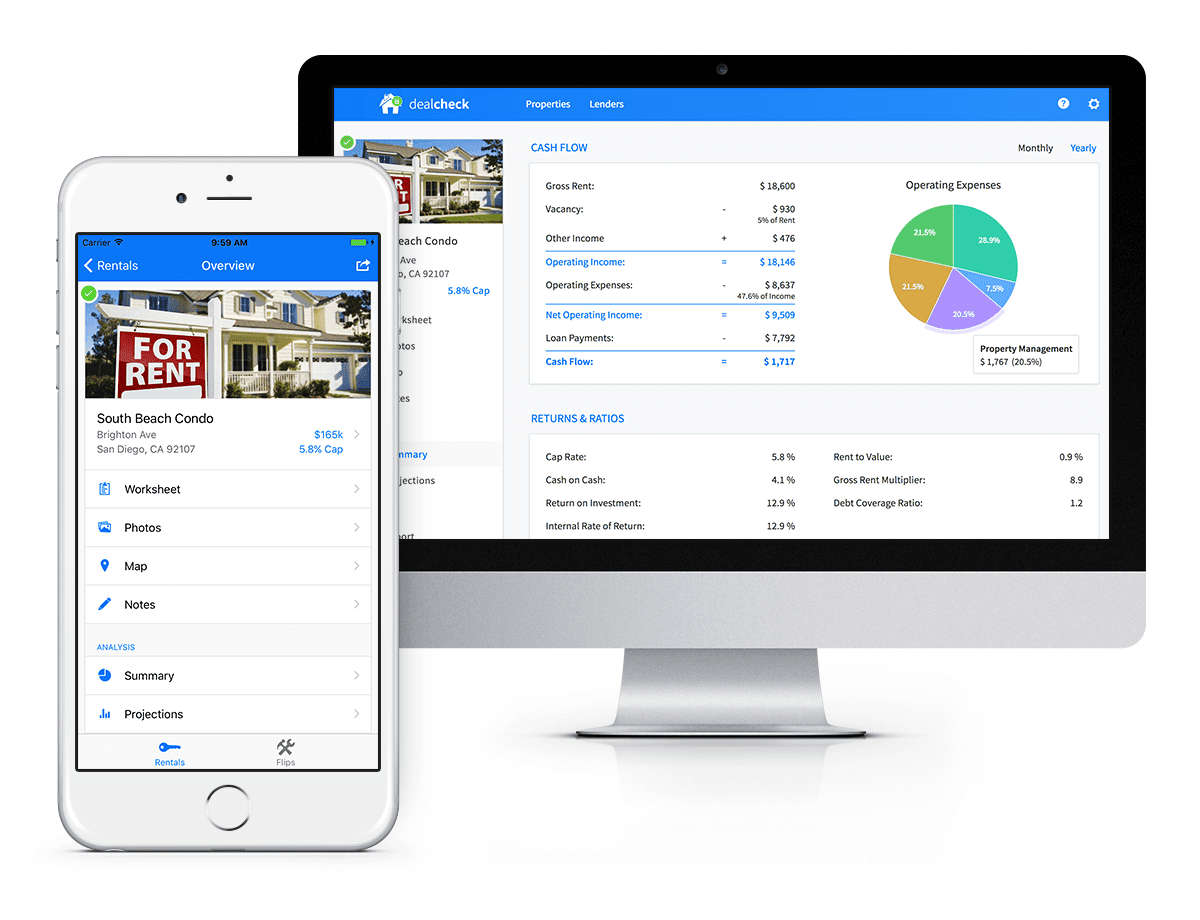
Syncing data across web and mobile is not easy!
Firebase Realtime Database is a NoSQL, JSON-based database solution that was designed exactly for this purpose, and I was actually surprised how great it worked. I used the official AngularJS bindings for Firebase on the front-end to read and write to it directly from the client.
I had to do some extra work on mobile to implement an offline mode with syncing after reconnections, but all-together the code required to make everything work was minimal.
As I mentioned, Firebase Authentication tied directly to the database to facilitate access control, so I really didn’t need to do anything extra there. And I was able to set up automatic daily backups of all the data with a click of a button.
Challenge #3 – Third-Party Integrations
Up to now, I had written exactly 0 lines of server-side code and everything was handled by the client directly. As DealCheck’s development progressed, however, I knew that I would need a server to handle some operations that could not be done in the client.
I wasn’t very experienced with server maintenance and DevOps, but fortunately the Firebase Cloud Functions product was able to solve all of my needs. Cloud Functions are essentially single-purpose functions that can be triggered (or executed) based on a specific HTTP request or events coming from the Authentication, Realtime Database or other Firebase products.
Each function can be run once based on a specific event trigger to perform its prescribed task. You don’t have to worry about provisioning a server instance or managing load – everything is done automatically for you by Firebase.
What’s even cooler, is that Cloud Functions can access the Realtime Database and Cloud Storage buckets of the same project, performing operations on them server-side, as needed.
This is how DealCheck processes subscription payments through Stripe, validates Apple and Google Play mobile subscription receipts, integrates with third-party APIs and updates database records without user interaction.
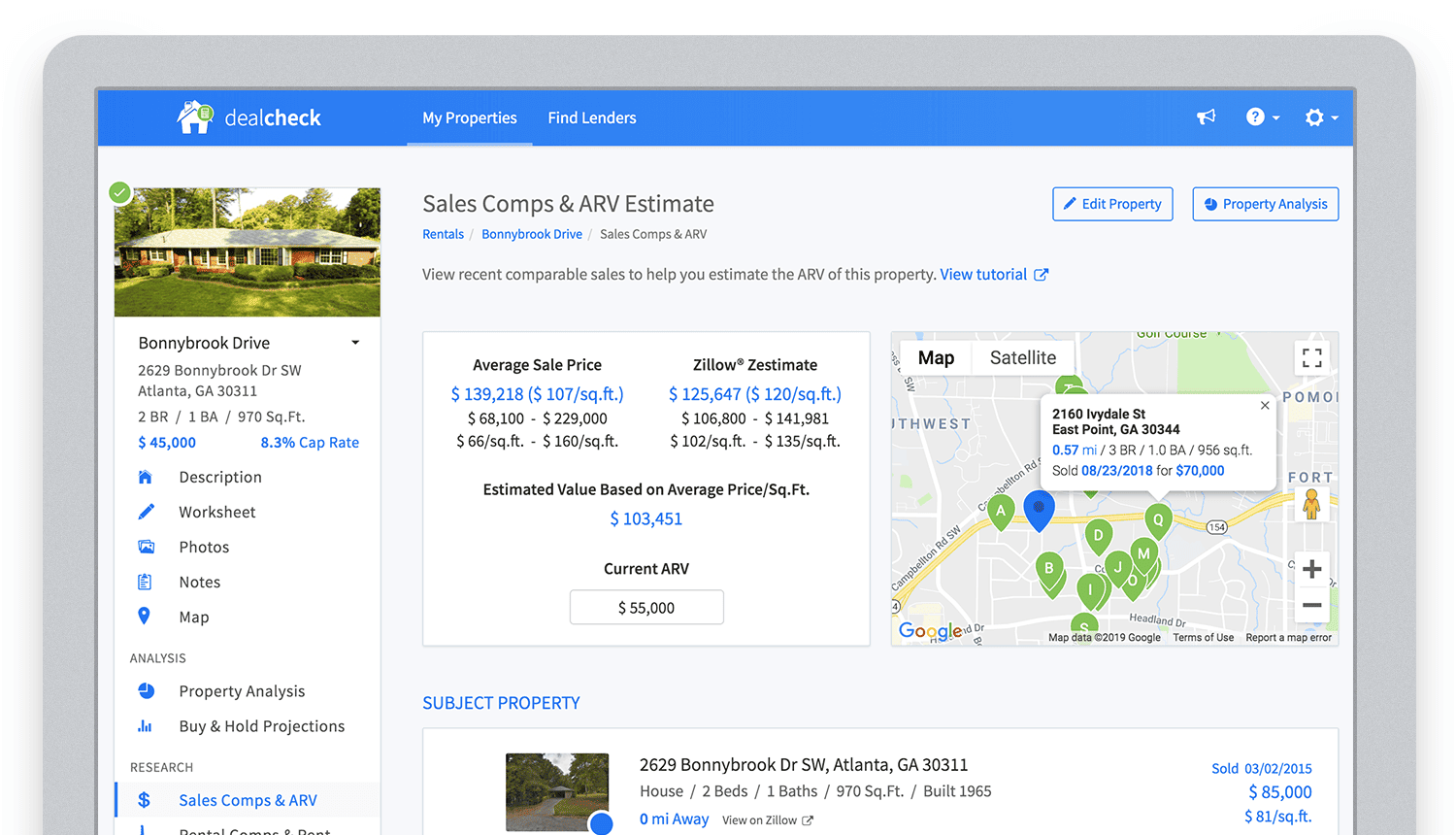
Bringing in sales comparable data from third-party providers into DealCheck.
Cloud Functions became the “glue” that tied the entire back-end infrastructure together.
Growing from an MVP to 100,000 Users with Firebase
The first version of the DealCheck app was built and launched in less than 5 months with just me on the development team. I definitely don’t think that would have been possible without Firebase powering the back-end infrastructure. Maybe the project wouldn’t have ever launched at all.
While Firebase is awesome for quick MVP development, it’s definitely designed to power production applications at scale as well. As DealCheck grew from a small side-project to one of the most popular real estate apps with over 100k users, all of the Firebase products that we use scaled to support the increasing load.
Moreover, the fantastic interoperability of all Firebase modules allows us to develop and release new features much faster because of the reduced coding requirements and ease of configuration.
So next time you’re looking to build an ambitious project with a small team – take a look at how Firebase can help you reduce development time and provide a suite of powerful tools that scale as your business grows.
This is exactly how DealCheck grew from a simple idea to make property analysis easier and faster, to an app that is helping tens of thousands of people grow their wealth and passive income through real estate investing. It’s a truly awesome and fulfilling experience to see your work positively impact so many people and it wouldn’t have been possible without Firebase.
Accelerate Developer Productivity with Google Workspace

5783
Of your peers have already read this article.
3:30 Minutes
The most insightful time you'll spend today!
The software development process requires complex, cross-functional collaboration while continuously improving products and services. Our customers who build software say that they value Google Workspace for its ability to drive innovation and collaboration throughout the entire software development life cycle. Developers can hold standups and scrums in Google Chat, Meet, and Spaces, create and collaborate on requirements documentation in Google Docs and Sheets, build team presentations in Google Slides, and manage their focus time and availability with Google Calendar.
Development teams also use many other tools to get work done, like tracking issues and tasks in Atlassian’s Jira, managing workloads with Asana, and incident management in PagerDuty. One of the benefits of Google Workspace is that it’s an open platform tailored to improve the performance of your tools by seamlessly integrating them together. We’re constantly expanding our ecosystem and improving Google Workspace, giving you the power to push your software development even further.
Make software development more agile
Google Workspace gives you real-time visibility into project progress and decisions to help you ship quality code fast and stay connected with your stakeholders, all without switching tools and tabs. By leveraging applications from our partners, you can pull valuable information out of silos, making collaborating on requirements, code reviews, bug triage, deployment updates, and monitoring operations easy for the whole team. This allows your teams to stay focused on their priorities while keeping everyone aligned, ensuring collaborators are always in the loop.
Plan and execute together
When combined with integrations, Google Workspace makes the software development planning process more collaborative and efficient. For example, many organizations use Asana—a leading work management platform—to coordinate and manage everything from daily tasks to cross-functional strategic initiatives. To make the experience more seamless, Asana built integrations so users can always have access to their tasks and projects with Google Drive, Gmail, and Chat. With these integrations for Google Workspace, you can turn your conversations into action and create new tasks in Asana—all without leaving Google Workspace.
“We’ve seen exceptional, heavy adoption of tasks being created from within the Gmail add-on. Our customers and community have also shown very strong interest in future development work, which is something we’ll continue to prioritize.” Strand Sylvester, Product Manager, Asana
To date, users have installed the Asana for Gmail add-on over 2.5 million times, as well as over 3.8 million installs of the Asana for Google Workspace add-on for Google Drive.

Start coding quickly
Google Workspace makes it easy for product managers, UX designers, and engineers to agree on what they’re building and why. By bringing all stakeholders, decisions, and requirements into one place—whether it’s a Gmail or Google Chat conversation, or a document in Google Docs, Sheets, or Slides—Google Workspace removes friction, helping your teams finalize product specifications and get started right away.
Integrations like GitHub for Google Chat make the entire development process fit easily into a developer’s workflow. With this integration, teams can quickly push new commits, make pull requests, do code reviews, and provide real-time feedback that improves the quality of their code—all from Google Chat.

Speed up testing
Integrations like Jira for Google Chat accelerate the entire QA process in the development workflow. The app acts as a team member in the conversation, sending new issues and contextual updates as they are reported to improve the quality of your code and keep everyone informed on your Jira projects.

Ship code faster
Developers use Jenkins—a popular open-source continuous integration and continuous delivery tool—to build and test products continuously. Along with other cloud-native tools, Jenkins supports strong DevOps practices by letting you continuously integrate changes into the software build.
With Jenkins for Google Chat, development and operations teams can connect into their Jenkins pipeline and stay up to date by receiving software build notifications directly in Google Chat.

Proactively monitor your services
Improving the customer experience requires capturing and monitoring data sources to improve application and infrastructure observability. Google Workspace supports DevOps teams and organizations by helping stakeholders collaborate and troubleshoot more effectively. When you integrate Datadog with Google Chat, monitoring data becomes part of your team’s discussion, and you can efficiently collaborate to resolve issues as soon as they arise.
The integration makes it easy to start a discussion with all the relevant teams by sharing a snapshot of a graph in any of your Chat spaces. When an alert notification is triggered, it allows you to notify each Chat space independently, precisely targeting your communication to the right teams.

Improve service reliability
Orchestrating business-wide responses to interruptions is a cross-functional effort. When revenue and brand reputation depends on customer satisfaction, it’s important to proactively manage service-impacting events. Google Workspace supports response teams by ensuring that urgent alerts reach the right people by providing teams with a central space to discover incidents, find the root cause, and resolve them quickly.
PagerDuty for Google Chat empowers developers, DevOps, IT operations, and business leaders to prevent and resolve business-impacting incidents for an exceptional customer experience—all from Google Chat. See and share details with link previews, and perform actions by creating or updating incidents. By keeping all conversations in a central space, new responders can get up to speed and solve issues faster without interrupting others.

Accelerate developer productivity
Integrating your DevOps tools with Google Workspace allows your development teams to centralize their work, stay focused on what’s important—like managing their work—build code quickly, ship quality products, and communicate better during service impacting incidents. For more apps and solutions that help centralize your work so you and your teams can connect, create, and get things done, check out Google Workspace Marketplace, where you’ll find more than 5,300 public applications that integrate directly into Google Workspace.
Anthos Makes Hybrid and Multi-Cloud Deployments Easy

3669
Of your peers have already read this article.
1:30 Minutes
The most insightful time you'll spend today!
Most enterprises have applications in disparate locations—in their own data centers, in multiple public clouds, and at the edge. These apps run on different proprietary technology stacks, which reduces developer velocity, wastes computing resources, and hinders scalability. How can you consistently secure and operate existing apps, while developing and deploying new apps across hybrid and multicloud environments? How can you get centralized visibility and management of the resources? Well, that is why Anthos exists!
This post explores why traditional hybrid and multicloud deployments are difficult, and then shows how Anthos makes it easy to manage applications across multiple environments.
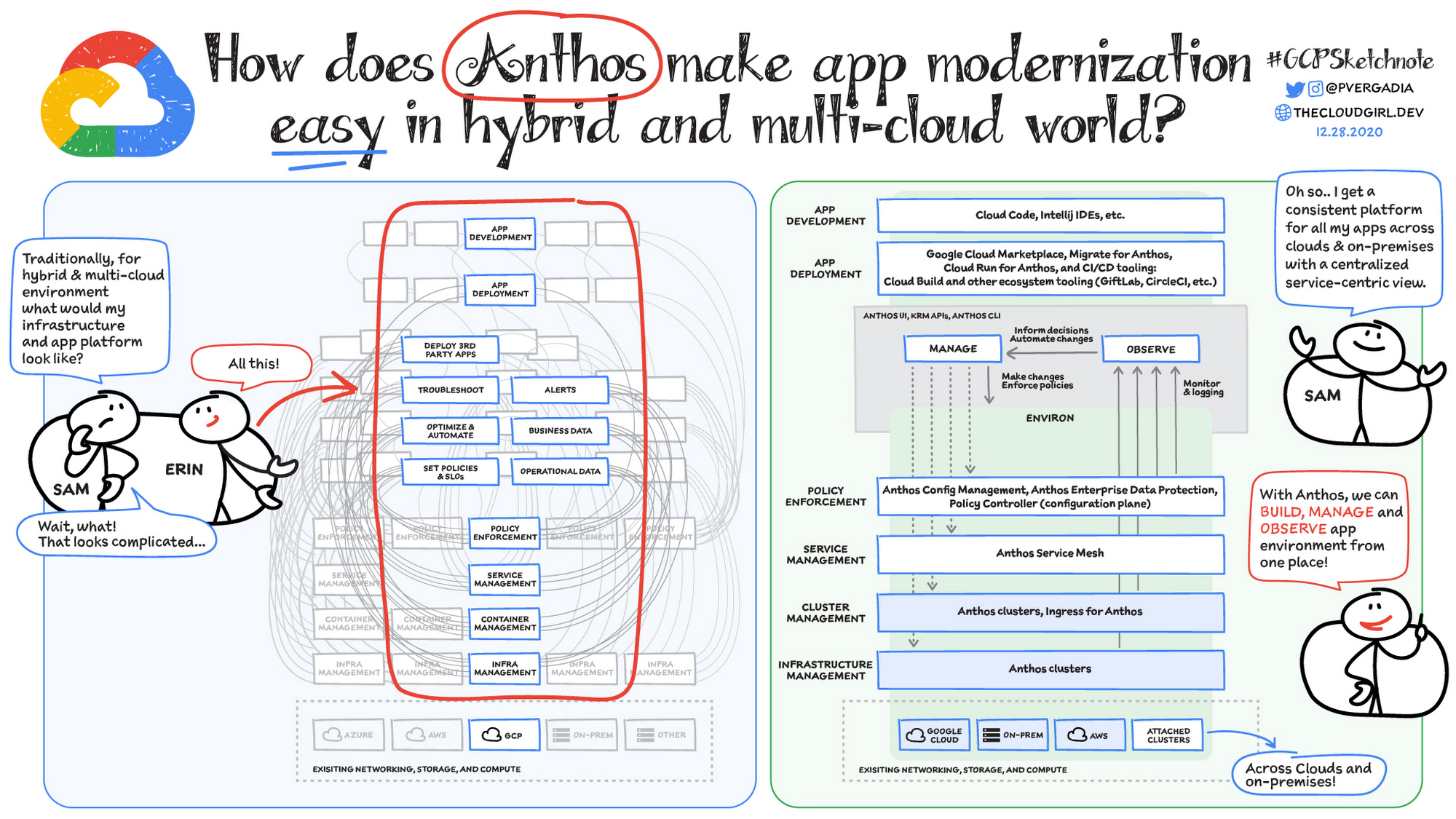
Why is traditional hybrid and multicloud difficult?
In hybrid and multicloud environments, you need to manage infrastructure. Let’s say you use containers on the clouds, and you develop apps using services on Google Cloud and AWS. Regardless of environment, you will need policy enforcement across your IT footprint. To manage your apps across the environment, you need monitoring and logging systems. You need to integrate that data into meaningful categories, like business data, operational data, and alerts.
Digging further, you might use operational data and alerts to inform optimizations, implement automations, and set policies or SLOs. You might use business data to do all those things, and to deploy third-party apps. Then, to actually enact the changes you decide to implement, you need to act on different parts of the system. That means digging into each tool for policy enforcement, securing services, orchestrating containers, and managing infrastructure. Don’t forget, all of this work is in addition to what it takes to develop and deploy your own apps.
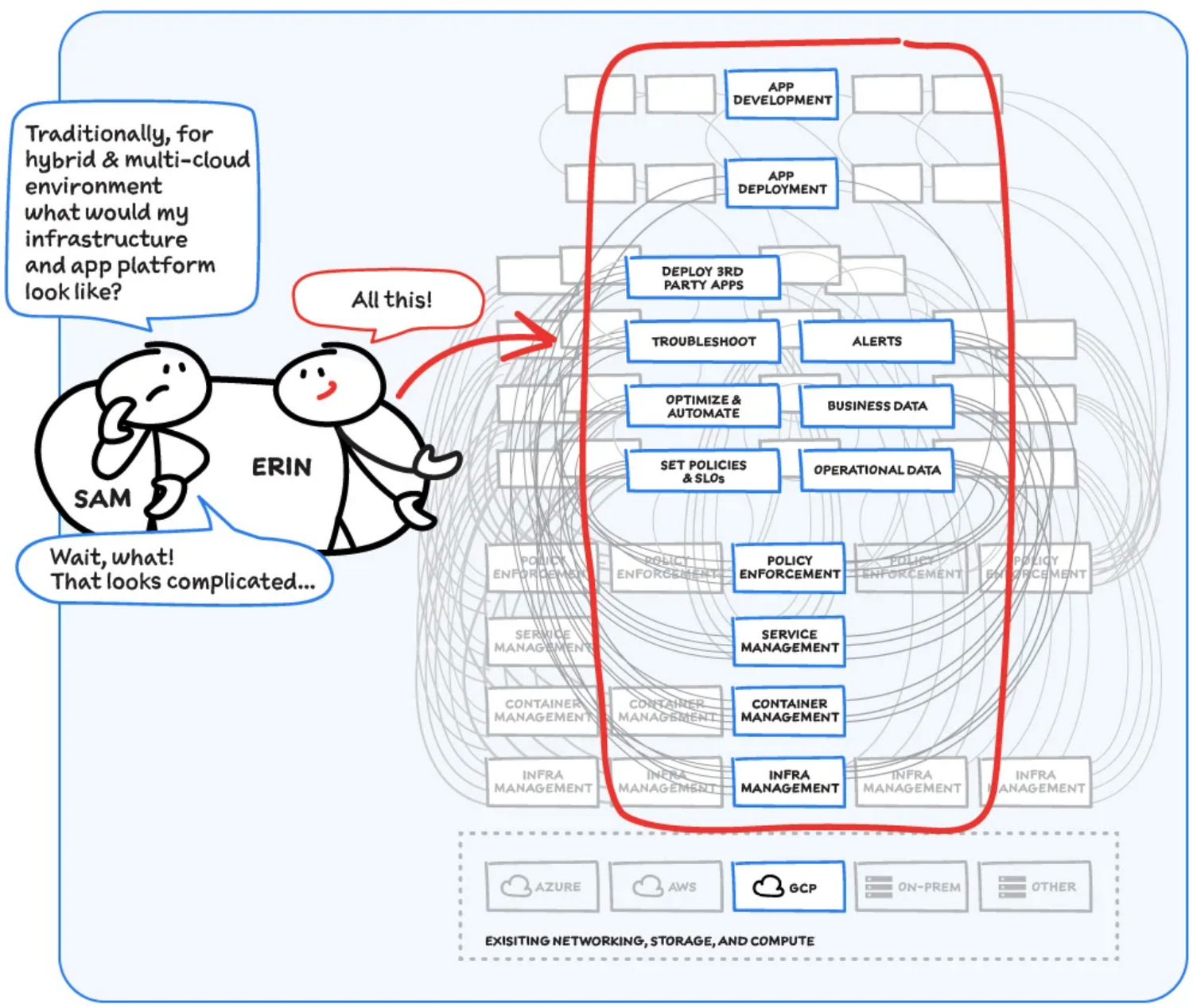
Now, consider repeating this set of tasks across a hybrid and multicloud landscape. It becomes very complex, very quickly. Your platform admins, SREs, and DevOps teams who are responsible for security and efficiency have to do manual, cluster-by-cluster management, data collection, and information synthesis. With this complexity, it’s hard to stay current, to understand business implications, and to ensure compliance (not to mention the difficulty of onboarding a new hire). Anthos helps solve these challenges!
How does Anthos make hybrid and multicloud easy?
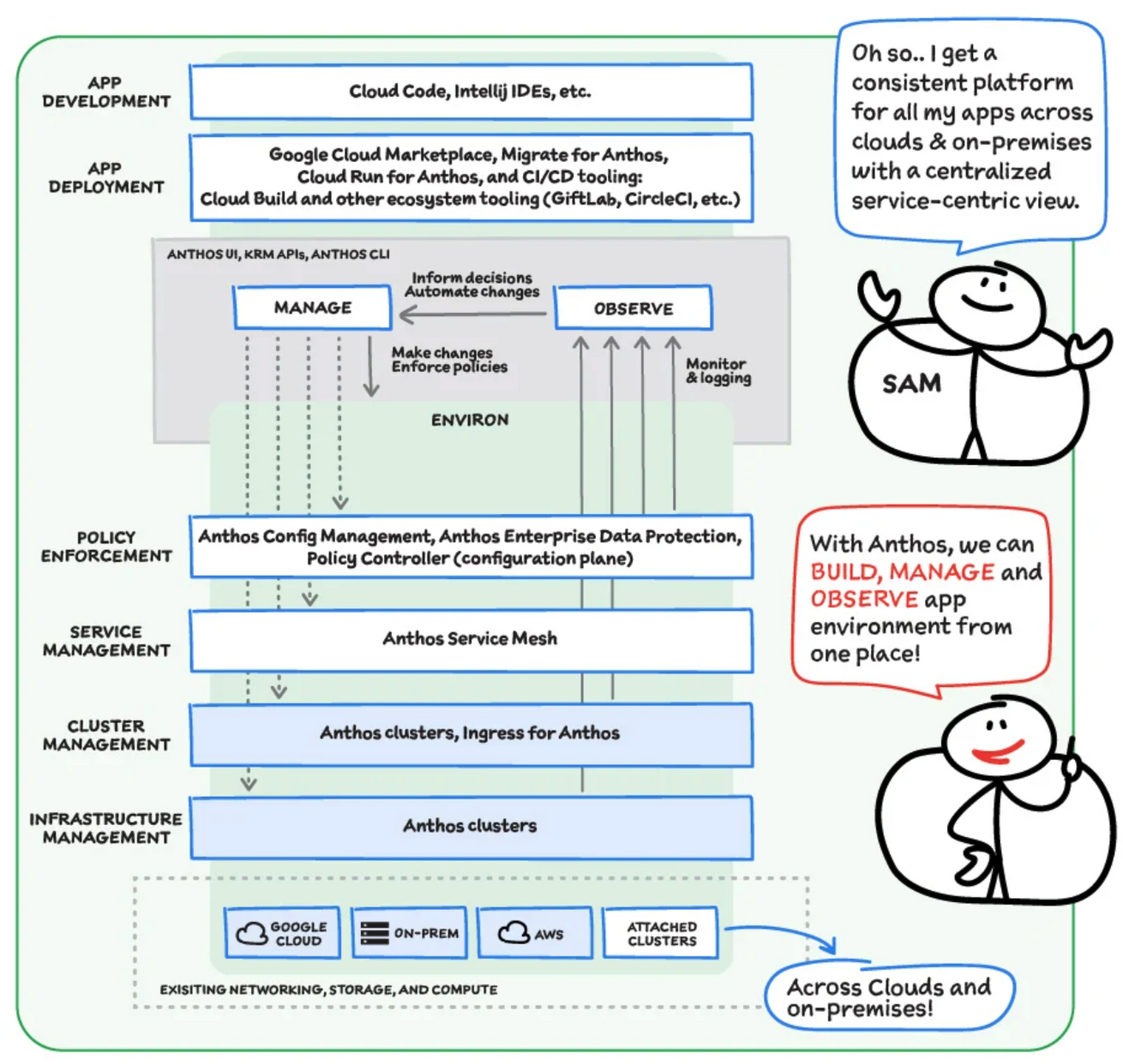
With Anthos, you get a consistent way to manage your infrastructure, with similar infrastructure management, container management, service management, and policy enforcement across your landscape.
As a result, you have observability across all your platforms in one place, including access to business information, alerts, and operations information. With this information you might decide to optimize, automate, and set policies or SLOs.
Digging deeper into Anthos
Environs
You may have different regions that need different policies, and also have different development, staging, or production environments that need different permissions. Some parts of your work may need more security. That’s where environs come in! Environs are a way to create logical sets of underlying Kubernetes clusters, regardless of which platform those clusters live on.
By considering, grouping, and managing sets of clusters as logical environs, you can think about and work with your applications at the right level of detail for what you need to do, be it acquiring business insights over the entire system, updating settings for a dev environment, or troubleshooting data for a specific cluster. Using environs, each part of the functional stack can take declarative direction about configuration, compliance, and more.
Modernize application development
Anthos also helps modernize application development because it uses environs to enforce policies and processes, and abstracts away the cluster and container management from application teams. Anthos enables you to easily abstract away infrastructure from application teams, making it easy for them to incorporate a wide variety of CI/CD solutions on top of environs. It lets you view and manage your applications at the right level of detail, be it business insights for services across the entire system, or troubleshooting data for a specific cluster. Anthos also works with container-based tools like buildpacks to simplify the packaging process. It offers Migrate for Anthos to take those applications out of the VMs and move them to a more modern hosting environment.
What’s in it for platform administrators?
Anthos provides platform administrators a single place to monitor and manage their landscape, with policy control and marketplace access. This reduces person-hours needed for management, enforcement, discovery, and communication. Anthos also provides administrators an out-of-the-box structured view of their entire system, including services, clusters, and more, so they can improve security, use resources more efficiently, and demonstrate measurable success. Administrators also save time and effort by managing declaratively, and they can communicate the success, cost savings, and efficiency of the platforms without needing to manually combine data.
Interested in getting started with Anthos? Check out the free on-demand training here and my YouTube series.
For more resources, you can also read the Anthos ebook at no cost. For more #GCPSketchnote and similar cloud content, follow me on twitter @pvergadia and keep an eye out on thecloudgirl.dev
3358
Of your peers have already watched this video.
17:30 Minutes
The most insightful time you'll spend today!
An App Modernization Story with Cloud Run
Back in 2016, an ASP.NET monolith app was deployed to IIS on Windows. While it worked, it was clunky in every sense of the word.
Over the years, the app was freed from Windows (thanks to .NET Core), containerized to run consistently in different environments (thanks to Docker) and decomposed into a set of loosely-coupled, event-driven, microservices (thanks to Cloud Run). The end result is a simpler and portable serverless architecture that’s much cheaper to run and maintain.
Watch the modernization journey, explore the decision points, and deep dive into the final architecture and code.
Picsart’s Apigee-powered Pivot: From B2C to B2B, Bringing Graphic Design Capabilities to Businesses

1196
Of your peers have already read this article.
3:30 Minutes
The most insightful time you'll spend today!
With 150 million users and counting, Picsart was originally founded as a photo and video editing app we use to enhance our everyday life before uploading them to various social media platforms. As its user numbers continue growing, the company began exploring options for incorporating its easy-to-use editing tools into other applications and services. Now, businesses looking for a low-lift solution to enhance their product offerings with Picsart’s award-winning software suite can do so. Thanks to Apigee, organizations from assorted markets, such as printers, t-shirt makers, and phone case designers, are benefiting from Picsart’s custom design APIs.
Picsart helps companies reach a new audience of customers by offering them graphic design capabilities at an affordable cost, avoiding the resource and time-intensive process of hiring developers and building these functions from scratch. The benefits of APIs are energizing Picsart’s business partners, too; with the addition of photo editing, keeping customers engaged, and returning to their apps.
“Eighty percent of our users are Generation Z and Millennials,” says Jinny Jung, vice-president of Picsart’s API program. “They’re the future of creators all over the globe. They want creative control.”
“Many of the businesses we serve are looking to tap into that audience. They really need solutions like this to take their business to the next level,” Jung adds. Having an API service also takes Picsart to the next level — thanks in part to Apigee.
How to turn a quick pivot
Moving from strictly business-to-consumer (B2C) services to a business-to-business (B2B) offering wasn’t easy for Picsart. The company had to adopt an entirely new business model and develop a new suite of API products — and they did so quickly.
When a prominent social media site contacted Picsart about offering its editing tools to their users via APIs, Picsart knew it couldn’t miss this opportunity. However, none of their developers knew how to manage APIs for external use, an endeavor involving multiple processes and fraught with logistical complications. Failing to configure APIs correctly allows malicious actors to effortlessly bypass cybersecurity protections, exposing network data.
The company quickly assembled an API business unit to plan and coordinate the creation of a secure API development process. This process would support marketing, sales, distribution, and other facets of the business, all while still delivering great functionality to the company’s original B2C customers. And voila! Picsart was reborn.
The API BU works as “a scrappy startup within a larger company,” as Jung puts it. Its budget is scrappy too. Among the unit’s first tasks: finding an API management platform that could simplify and streamline all the tasks the team faced at an affordable price. Jung says that Apigee was a clear choice.
“Apigee’s offerings gave us the flexibility to get off the ground without a huge budget and grow our business over time. It’s super easy to use, the dashboard is very intuitive, and the price came in well for us.”
The company had already used APIs internally, but had never provided them to customers or partners.
“We needed to lean on gateways and management platforms that already knew how to set everything up,” Jung says. “We really needed the shortcut.”
Her team did consider other API platforms, but being part of Google Cloud gave Apigee a natural edge.
“We were already Google Cloud clients. We were already part of the Google Cloud ecosystem. We really liked Apigee’s ease of use and the power of Google behind it.”
Apigee works seamlessly in tandem with its other Google Cloud services, including the Google Cloud Content Delivery Network (CDN) and BigQuery, Google Cloud’s fully-managed data warehouse.
“Apigee’s integration with the whole Google ecosystem makes our lives easier, and makes it quite natural for us to use,” says Tiberiu Stanescu, director of engineering for the Picsart API business unit. “It allows us to also meet our technical needs, including scalability and even improved performance with queries and, when we’re integrating the data, dashboards.”
Using Apigee for total API control
Picsart uses Apigee to manage all its external APIs, which include those that enable users to remove or change photo backgrounds, apply filters, and add text. Apigee also manages the API features for Picsart’s Editor SDK package.
Key ways in which Picsart uses Apigee include:
- API management. Apigee runs test/stage and production environments, can customize pre-and post-flows, and automatically authorize for services with different methods including API Keys and oAuth.
Apigee’s pre-built integrated portal has helped Picsart “greatly” in the time the company has been using it, Stanescu says. He praised its flexibility and its rate-limiting function, “which allows us to properly define and secure our products.”
- Developer support. With Apigee, Picsart now takes an “API-first” approach to developing new features by using microservice architectures. They’re exposing APIs via their developer portal, which allows them to describe precisely how developers can use each API.
- Apigee helps Picsart’s own developers use APIs to simplify the development process and save the company time and money. In conjunction with other Google products, Apigee is providing Picsart with the data and analytics it needs to view and monitor API-related productivity improvements.
- Security. Apigee’s out-of-the-box security requires no specialized knowledge or skill to implement. Picsart relies on Apigee security features such as including headers to set up security parameters, and custom rate-limiting policies and quotas, allowing the company to avoid stack overflow from API calls.
As a result, the company has experienced zero API-related security incidents, Stanescu notes. “We’re definitely grateful to Apigee for this,” he adds. Recently, Stanescu says, a company performed penetration testing on Picsart’s APIs, looking for vulnerabilities, but failed to discover any security flaws or threats. Apigee’s easy-to-use, but powerful security features are helping Picsart keep its clients and customers safe and secure.
From scrappy startup to business core
In the three years since implementing Google Apigee, Picsart’s API business unit has gone from a seemingly simple request to a critical product offering enabling new and recurring revenue.
“It’s part of the foundation of our business,” says Jinny Jung. “It powers our entire API external-facing business. We wouldn’t be able to sell APIs to developers and partners without the Apigee API gateway. We wouldn’t have gotten off the ground without Apigee.”
Apigee is helping Picsart in another key way, too: its integration with products like BigQuery, Google’s data analytics platform that lets it stay on top of which APIs are most used. That information guides every aspect of the business and helps the company develop and release new generative AI-powered products.
“The data absolutely informs what we choose to develop and where we put our resources,” Jung says. “Apigee makes it super easy for us to track API use and see the trends.”
With Apigee, Picsart is opening up a new world of creative design to audiences across all markets and demographics, while avoiding the stress that comes with a costly development process. Today, generative AI apps continue capturing imaginations, unlocking the ability to create awe-inspiring art with only a few natural language prompts. Picsart and Apigee will continue working together to provide a canvas through APIs no matter where an artist may be.
More Relevant Stories for Your Company

How OnlineSales.ai and Google Cloud Helped TATA 1mg Increase Ad Revenue by 700%
Editor’s note: We invited partners from across our retail ecosystem to share stories, best practices, and tips and tricks on how they are helping retailers transform during a time that continues to see tremendous change. This original blog post was published by OnlineSales.ai. Please enjoy this updated entry from our partner. Tata’s




Microservices in the Cloud with Kubernetes and Istio
Are you building or interested in building microservices? They are a powerful method to build a scalable and agile backend, but managing these services can feel daunting: building, deploying, service discovery, load balancing, routing, tracing, auth, graceful failures, rate limits, and more. The most suited solution for you is Istio.

Google Launches Open Saves To Power Gaming Platforms Scale to User Demands
Many of today’s games are rich, immersive worlds that engage the audience in ways that make a gamer a part of a continuing storyline. To create these persistent experiences, numerous storage technologies are required to ensure game data can scale to the standards of gamers’ demands. Not only do game



FedEx Ground Makes Talent Recruitment More Effective with AI
FedEx Ground is a package shipping company and is a subsidiary of FedEx. It wanted to make hiring easier, and more intuitive so that it could hire the best people. "We need to have every advantage we can to recruit and retain talent. That's what led us to the work with
