





A Pro’s Tip on Choosing the Right Google Cloud Compute Options

5738
Of your peers have already read this article.
2:00 Minutes
The most insightful time you'll spend today!
Where should you run your workload? It depends…Choosing the right infrastructure options to run your application is critical, both for the success of your application and for the team that is managing and developing it. This post breaks down some of the most important factors that you need to consider when deciding where you should run your stuff!
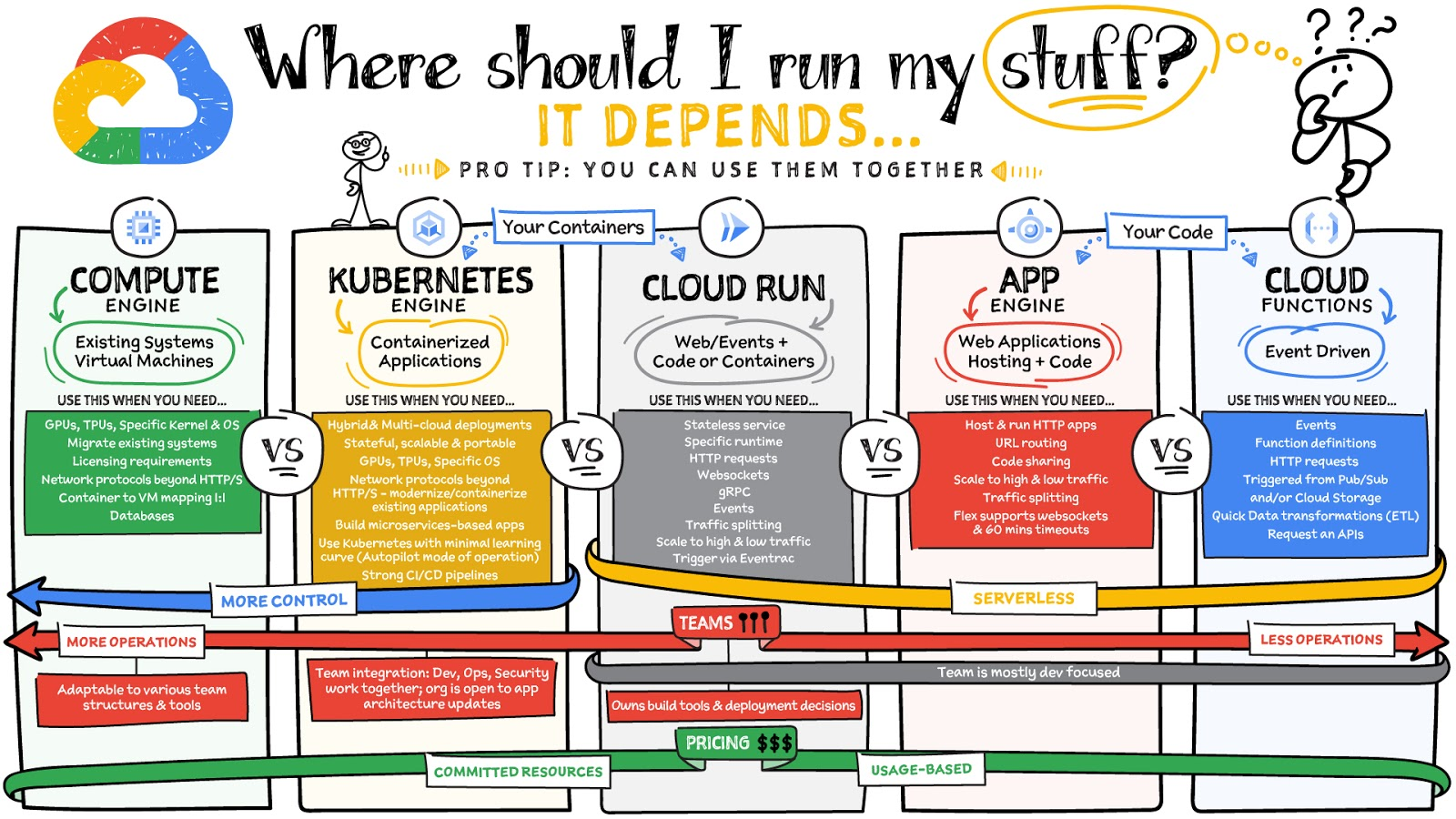
What are these services?
- Compute Engine – Virtual machines. You reserve a configuration of CPU, memory, disk, and GPUs, and decide what OS and additional software to run.
- Kubernetes Engine – Managed Kubernetes clusters. Kubernetes is an open-source system for automating deployment, scaling, and management of containerized applications. You create a cluster and configure which containers to run; Kubernetes keeps them running and manages scaling, updates and connectivity.
- Cloud Run – A fully managed serverless platform that runs individual containers. You give code or a container to Cloud Run, and it hosts and auto scales as needed to respond to web and other events.
- App Engine – A fully managed serverless platform for complete web applications. App Engine handles the networking, application scaling, and database scaling. You write a web application in one of the supported languages, deploy to App Engine, and it handles scaling, updating versions, and so on.
- Cloud Functions – Event-driven serverless functions. You write individual function code and Cloud Functions calls your function when events happen (for example, HTTP, Pub/Sub, and Cloud Storage changes, among others).
What level of abstraction do you need?
- If you need more control over the underlying infrastructure (for example, the operating system, disk images, CPU, RAM, and disk) then it makes sense to use Compute Engine. This is a typical path for legacy application migrations and existing systems that require a specific OS.
- Containers provide a way to virtualize an OS so that multiple workloads can run on a single OS instance. They are fast and lightweight, and they provide portability. If your applications are containerized then you have two main options.
- You can use Google Kubernetes Engine, or GKE, which gives you full control over the container down to the nodes with specific OS, CPU, GPU, disk, memory, and networking. GKE also offers Autopilot, when you need the flexibility and control but have limited ops and engineering support.
- If, on the other hand, you are just looking to run your application in containers without having to worry about scaling the infrastructure, then Cloud Run is the best option. You can just write your application code, package it into a container, and deploy it.
- If you just want to code up your HTTP-based application and leave the scalability and deployment of the app to Google Cloud then App Engine — a serverless, fully-managed option that is designed for hosting and running web applications — is a good option for you.
- If your code is a function and just performs an action based on an event/trigger, then deploying it with Cloud Functions makes sense.
What is your use case?
- Use Compute Engine if you are migrating a legacy application with specific licensing, OS, kernel, or networking requirements. Examples: Windows-based applications, genomics processing, SAP HANA.
- Use GKE if your application needs a specific OS or network protocols beyond HTTP/s. When you use GKE, you are using Kubernetes, which makes it easy to deploy and expand into hybrid and multi-cloud environments. Anthos is a platform specifically designed for hybrid and multi-cloud deployments. It provides single-pane-of-glass visibility across all clusters from infrastructure through to application performance and topology. Example: Microservices-based applications.
- Use Cloud Run if you just need to deploy a containerized application in a programming language of your choice with HTTP/s and websocket support. Examples: websites, APIs, data processing apps, webhooks.
- Use App Engine if you want to deploy and host a web based application (HTTP/s) in a serverless platform. Examples: web applications, mobile app backends
- Use Cloud Functions if your code is a function and just performs an action based on an event/trigger from Pub/Sub or Cloud Storage. Example: Kick off a video transcoding function as soon as a video is saved in your Cloud Storage bucket.
Need portability with open source?
If your requirement is based on portability and open-source support take a look at GKE, Cloud Run, and Cloud Functions. They are all based on open-source frameworks that help you avoid vendor lock-in and give you the freedom to expand your infrastructure into hybrid and multi-cloud environments. GKE clusters are powered by the Kubernetes open-source cluster management system, which provides the mechanisms through which you interact with your cluster. Cloud Run for Anthos is powered by Knative, an open-source project that supports serverless workloads on Kubernetes. Cloud Functions use an open-source FaaS (function as a service) framework to run functions across multiple environments.
What are your team dynamics like?
If you have a small team of developers and you want their attention focused on the code, then a serverless option such as Cloud Run or App Engine is a good choice because you won’t have to have a team managing the infrastructure, scale, and operations. If you have bigger teams, along with your own tools and processes, then Compute Engine or GKE makes more sense because it enables you to define your own process for CI/CD, security, scale, and operations.
What type of billing model do you prefer?
Compute Engine and GKE billing models are based on resources, which means you pay for the instances you have provisioned, independent of usage. You can also take advantage of sustained and committed use discounts.
Cloud Run, App Engine, and Cloud Functions are billed per request, which means you pay as you go.
Conclusion
It’s important to consider all the relevant factors that play a role in picking appropriate compute options for your application. Remember that no decision is necessarily final; you can always move from one option to another.
To explore these points in more detail, please take a look at the “Where Should I Run My Stuff?” video.
For more #GCPSketchnote, follow the GitHub repo & thecloudgirl.dev. For similar cloud content follow us on Twitter at @pvergadia and @briandorsey
A Record Breaking Calculation: 100 Trillion Digits of π on Google Cloud!

3580
Of your peers have already read this article.
4:00 Minutes
The most insightful time you'll spend today!
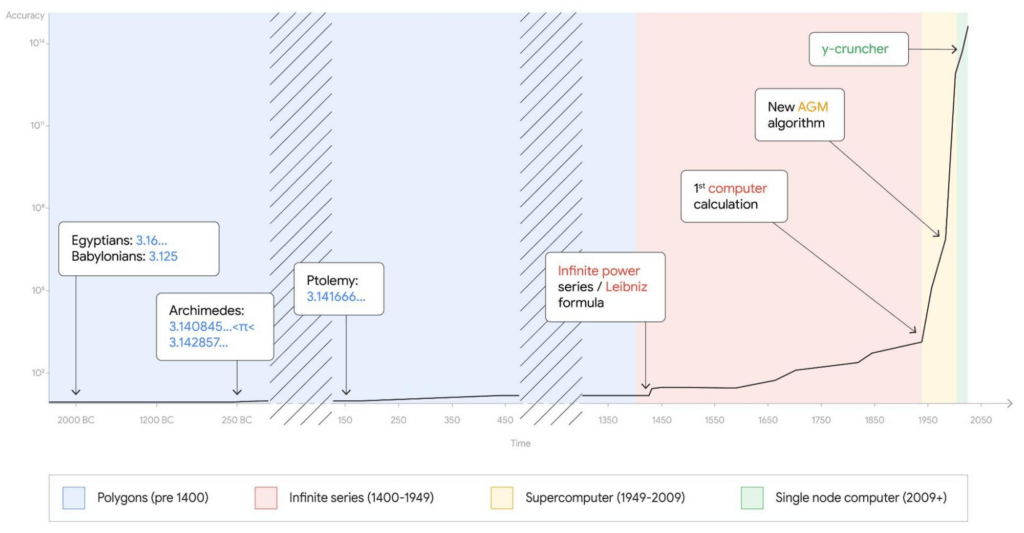
Records are made to be broken. In 2019, we calculated 31.4 trillion digits of π — a world record at the time. Then, in 2021, scientists at the University of Applied Sciences of the Grisons calculated another 31.4 trillion digits of the constant, bringing the total up to 62.8 trillion decimal places. Today we’re announcing yet another record: 100 trillion digits of π.
This is the second time we’ve used Google Cloud to calculate a record number1 of digits for the mathematical constant, tripling the number of digits in just three years.
This achievement is a testament to how much faster Google Cloud infrastructure gets, year in, year out. The underlying technology that made this possible is Compute Engine, Google Cloud’s secure and customizable compute service, and its several recent additions and improvements: the Compute Engine N2 machine family, 100 Gbps egress bandwidth, Google Virtual NIC, and balanced Persistent Disks. It’s a long list, but we’ll explain each feature one by one.
Before we dive into the tech, here’s an overview of the job we ran to calculate our 100 trillion digits of π.
- Program: y-cruncher v0.7.8, by Alexander J. Yee
- Algorithm: Chudnovsky algorithm
- Compute node: n2-highmem-128 with 128 vCPUs and 864 GB RAM
- Start time: Thu Oct 14 04:45:44 2021 UTC
- End time: Mon Mar 21 04:16:52 2022 UTC
- Total elapsed time: 157 days, 23 hours, 31 minutes and 7.651 seconds
- Total storage size: 663 TB available, 515 TB used
- Total I/O: 43.5 PB read, 38.5 PB written, 82 PB total
Architecture overview
Calculating π is compute-, storage-, and network-intensive. Here’s how we configured our Compute Engine environment for the challenge.
For storage, we estimated the size of the temporary storage required for the calculation to be around 554 TB. The maximum persistent disk capacity that you can attach to a single virtual machine is 257 TB, which is often enough for traditional single node applications, but not in this case. We designed a cluster of one computational node and 32 storage nodes, for a total of 64 iSCSI block storage targets.
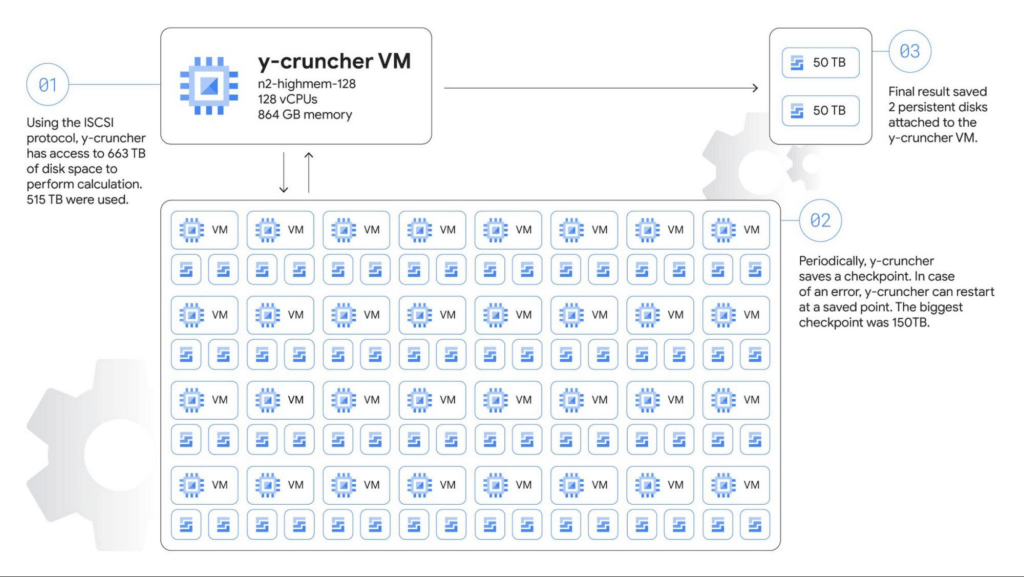
The main compute node is a n2-highmem-128 machine running Debian Linux 11, with 128 vCPUs and 864 GB of memory, and 100 Gbps egress bandwidth support. The higher bandwidth support is a critical requirement for the system as we adopted a network-based shared storage architecture.
Each storage server is a n2-highcpu-16 machine configured with two 10,359 GB zonal balanced persistent disks. The N2 machine series provides balanced price/performance, and when configured with 16 vCPUs it provides a network bandwidth of 32 Gbps, with an option to use the latest Intel Ice Lake CPU platform, which makes it a good choice for high-performance storage servers.
Automating the solution
We used Terraform to set up and manage the cluster. We also wrote a couple of shell scripts to automate critical tasks such as deleting old snapshots, and restarting from snapshots (we didn’t need to use this though). The Terraform scripts created OS guest policies to help ensure that the required software packages were automatically installed. Part of the guest OS setup process was handled by startup scripts. In this way, we were able to recreate the entire cluster with just a few commands.
We knew the calculation would run for several months and even a small performance difference could change the runtime by days or possibly weeks. There are also a number of combinations of parameters in the operating system, infrastructure, and application itself. Terraform helped us test dozens of different infrastructure options in a short time. We also developed a small program that runs y-cruncher with different parameters and automated a significant portion of the measurement. Overall, the final design for this calculation was about twice as fast as our first design. In other words, the calculation could’ve taken 300 days instead of 157 days!
The scripts we used are available on GitHub if you want to look at the actual code that we used to calculate the 100 trillion digits.
Choosing the right machine type for the job
Compute Engine offers machine types that support compute- and I/O-intensive workloads. The amount of available memory and network bandwidth were the two most important factors, so we selected n2-highmem-128 (Intel Xeon, 128 vCPUs and 864 GB RAM). It satisfied our requirements: high-performance CPU, large memory, and 100 Gbps egress bandwidth. This VM shape is part of the most popular general purpose VM family in Google Cloud.
100 Gbps networking
The n2-highmem-128 machine type’s support for up to 100 Gbps of egress throughput was also critical. Back in 2019 when we did our 31.4-trillion digit calculation, egress throughput was only 16 Gbps, meaning that bandwidth has increased by 600% in just three years. This increase was a big factor that made this 100-trillion experiment possible, allowing us to move 82.0 PB of data for the calculation, up from 19.1 PB in 2019.
We also changed the network driver from virtio to the new Google Virtual NIC (gVNIC). gVNIC is a new device driver and tightly integrates with Google’s Andromeda virtual network stack to help achieve higher throughput and lower latency. It is also a requirement for 100 Gbps egress bandwidth.
Storage design
Our choice of storage was crucial to the success of this cluster – in terms of capacity, performance, reliability, cost and more. Because the dataset doesn’t fit into main memory, the speed of the storage system was the bottleneck of the calculation. We needed a robust, durable storage system that could handle petabytes of data without any loss or corruption, while fully utilizing the 100 Gbps bandwidth.
Persistent Disk (PD) is a durable high-performance storage option for Compute Engine virtual machines. For this job we decided to use balanced PD, a new type of persistent disk that offers up to 1,200 MB/s read and write throughput and 15-80k IOPS, for about 60% of the cost of SSD PDs. This storage profile is a sweet spot for y-cruncher, which needs high throughput and medium IOPS.
Using Terraform, we tested different combinations of storage node counts, iSCSI targets per node, machine types, and disk size. From those tests, we determined that 32 nodes and 64 disks would likely achieve the best performance for this particular workload.
We scheduled backups automatically every two days using a shell script that checks the time since the last snapshots, runs the fstrim command to discard all unused blocks, and runs the gcloud compute disks snapshot command to create PD snapshots. The gcloud command returns and y-cruncher resumes calculations after a few seconds while the Compute Engine infrastructure copies the data blocks asynchronously in the background, minimizing downtime for the backups.
To store the final results, we attached two 50 TB disks directly to the compute node. Those disks weren’t used until the very last moment, so we didn’t allocate the full capacity until y-cruncher reached the final steps of the calculation, saving four months worth of storage costs for 100 TB.
Results
All this fine tuning and benchmarking got us to the one-hundred trillionth digit of π — 0. We verified the final numbers with another algorithm (Bailey–Borwein–Plouffe formula) when the calculation was completed. This verification was the scariest moment of the entire process because there is no sure way of knowing whether or not the calculation was successful until it finished, five months after it began. Happily, the Bailey-Borwein-Plouffe formula found that our results were valid. Woo-hoo! Here are the last 100 digits of the result:
4658718895 1242883556 4671544483 9873493812 1206904813
2656719174 5255431487 2142102057 7077336434 3095295560
You can also access the entire sequence of numbers on our demo site.
So what?
You may not need to calculate trillions of decimals of π, but this massive calculation demonstrates how Google Cloud’s flexible infrastructure lets teams around the world push the boundaries of scientific experimentation. It’s also an example of the reliability of our products – the program ran for more than five months without node failures, and handled every bit in the 82 PB of disk I/O correctly. The improvements to our infrastructure and products over the last three years made this calculation possible.
Running this calculation was great fun, and we hope that this blog post has given you some ideas about how to use Google Cloud’s scalable compute, networking, and storage infrastructure for your own high performance computing workloads. To get started, we’ve created a codelab where you can create and calculate pi on a Compute Engine virtual machine with step-by-step instructions. And for more on the history of calculating pi, check out this post on The Keyword. Here’s to breaking the next record!
- We are actively working with Guinness World Records to secure their official validation of this feat as a “World Record”, but we couldn’t wait to share it with the world. This record has been reviewed and validated by Alexander J. Yee, the author of y-cruncher.

1116
Of your peers have already downloaded this article
1:30 Minutes
The most insightful time you'll spend today!
A common perception is that migrating existing workloads to the public cloud—especially those with a lot of data—is complex, time consuming, and risky. But with the right planning, organizations can rapidly establish the right practices to accelerate migrations, lower risk, and succeed in the cloud.
Google Introduces Cloud Career Jump Start Certification for the U.S. Underrepresented Communities

3235
Of your peers have already read this article.
3:00 Minutes
The most insightful time you'll spend today!
It’s no question that the cloud computing industry is booming and cloud experts are in high demand. In 2020, 67 percent of organizations surveyed in the IDG Cloud Computing Report added new cloud roles and functions (source).
So there are plenty of cloud jobs out there, but if you don’t have years of experience, you might find it difficult to get one. This is especially true for members of underrepresented communities, who face other kinds of systemic barriers in education and employment.
To help meet this demand and democratize opportunity, Google Cloud is introducing its first virtual Certification Journey Learning program for underrepresented communities across the United States—Cloud Career Jump Start. The program is free of charge for participants, and includes technical and professional skill development and resources with an aim to provide a readiness path to certification via the Google Cloud Associate Cloud Engineer Exam.
Google Cloud’s Certification Journey Learning Program
The program offers free access to the Google Cloud Associate Cloud Engineer training, which provides support preparations for the Certification Exam. This industry-recognized certification helps job applicants validate their cloud expertise, elevate their career, and transform businesses with Google Cloud technology. Learn more about the exam by watching the Certification Prep: Associate Cloud Engineer webinar.
Designed specifically for Computer Science or Information Systems-related majors (or relevant experience), the 12-week program offers:
- Exclusive free access to Google Cloud Associate Cloud Engineer-related training to support preparations for the Certification Exam.
- Guided progress through the certification prep training on Qwiklabs.
- Office hours hosted by Google Cloud technical experts.
- Technical workshops, including sessions with Googlers who earned cloud industry certifications and have built impactful careers in cloud tech, such as Google Cloud’s Kelsey Hightower (a Principal Developer Advocate) and Jewel Langevine (a Solution Engineer).
Earn your Associate Cloud Engineer Certification
Curious if you qualify to apply for the program? We’ve put together a guide below to help:
- What does an associate cloud engineer do? Associate Cloud Engineers deploy applications, monitor operations, and manage enterprise solutions. They also use the Google Cloud Console and the command-line interface to perform common platform-based tasks, to maintain one or more deployed solutions that leverage Google-managed or self-managed services on Google Cloud.
- Who’s eligible? We are encouraging applicants from groups that have been historically underrepresented in tech including Black, Latinx, Native American & Indigenous communities. Applicants should have six or more months of hands-on experience in a Computer Information Systems-related major, and/or relevant experience through online courses, boot camps, hackathons or internships. Although the ability to program is not required, familiarity with the following IT concepts is highly recommended: virtual machines, operating systems, storage and file systems, networking, databases, programming, and working with Linux at the command line.
How do you know if you are ready for the program?
To get an idea of what the program will cover:
- Watch the Certification Prep: Associate Cloud Engineer webinar
- Complete the Skill IQ Assessment via Pluralsight
- Review the Associate Cloud Engineer Certification Exam Guide
- Take the Associate Cloud Engineer Practice Exam
Jump start a career in cloud infrastructure and technology
Following the hands-on training, Google Cloud will offer an additional 9 months of career development resources and activities. This includes an online support community, mentoring with Googlers & partners including SADA, EPAM Systems Inc., and Slalom, resume and interviewing support from Google Recruiting & Staffing, and additional career workshops. We are also partnering with a number of Black-owned and -operated, nonprofit and cloud training organizations like Kura Labs.
Cloud certifications open doors
Want to hear more about this program from two Googlers who completed it? We asked Kelsey and Jewel to share more on how certifications helped them launch their careers in the cloud industry:
- “IT certifications introduced me to the game; opportunities and hard work helped me change it.” – Kelsey Hightower, Staff Developer Advocate, Google Cloud Platform
- “Becoming certified as a cloud computing professional combined with prayer, networking, and practice has kept me moving on my purposeful and rewarding career path as an engineer.” – Jewel Langevine, Solution Engineer, Google Cloud Solutions Studio
Kelsey and Jewel’s wisdom doesn’t end there. They play a central role in the program, sharing more about how they navigated certifications and leveraged them for success.
Apply today to Cloud Career Jump Start
The program is now live in the United States, with plans to expand to other regions in the coming months. It is completely virtual, and all training is on-demand so that participants can access their coursework anytime, anywhere via the web or mobile device. To determine whether you (or someone you know) would be a great fit for the Cloud Career Jump Start, check out our guidelines and apply.
4112
Of your peers have already watched this video.
10:00 Minutes
The most insightful time you'll spend today!
HSBC Looks to Google Cloud to Transform Banking
HSBC, a global bank that is a central part of global commerce with a presence in 67 countries, serving 38 million customers ranging from individuals to small businesses to corporations and governments, and having over $2.5 trillion assets in its balance sheet, had a vision of being a cloud first company and wanted to transform the banking experience for its customers.
The bank wanted to glean valuable insights from its huge data asset of about 100 petabytes and wanted to use those insights to manage its business better. What it needed was a managed service with elastic capability so that HSBC can focus on the data science and management, which enables better customer experience.
For many years HSBC had, like most large corporations, tried to build its own data centers, provision the infrastructure, and run it. However, to realize its ambition of focussing on customer experience, the bank decided to partner with Google Cloud.
However, the journey wasn’t an easy one. Being a globally systemically important financial institution, it had to convince regulators across the world that moving customer data to the cloud is a good thing. Towards that end, it formed a joint team to work through all the challenges and created a cloud framework for banking describing the controls needed.
The results have been quite stunning. Able to calculate the global liquidity for a country in minutes rather than hours, run better financial crime analytics with speeds that are 10 times faster with a higher level of precision and accuracy have been some of the benefits that the bank has derived.
See how HSBC and Google Cloud are bringing a new level of security, compliance and governance capabilities to one of the world’s leading banking institutions.
4827
Of your peers have already watched this video.
2:30 Minutes
The most insightful time you'll spend today!
Haaretz on Google Cloud Guarantees Faster, Reliable & Responsive Services to its Audience
Israeli centenarian newspaper, Haaretz relied on on-prem infrastructure to serve readers digitally. As the need for scalability, security and business intelligence grew alongside their readership, Haaretz was looking for more than just a cloud-based solution to replace their infrastructure. Inon Gershovitz, CTO, Haaretz takes us through the journey of recreating digital news experience, serving growing reader traffic and keeping up the editorial standards with Google Cloud.
Watch the video to hear from Haaretz’ leaders on delivering personalized content to readers with Google Cloud solutions!
More Relevant Stories for Your Company

Airbus: Taking the flight to a brighter future with Google Cloud and Google Workplace
“Any device, anytime, anywhere.” A cohort of CIOs within Airbus believed that the cloud, combined with new ways of working, could provide the foundation for this vision. Google Workspace and Google Cloud have played a pivotal role in helping Airbus realize this new path, transforming security, data management, and collaboration

Google Cloud’s Data Analytics May Recap
May was a very busy month for data analytics product innovation. If you didn’t have the chance to attend our inaugural Data Cloud Summit, video replays of all our sessions are now available so feel free to watch them at your own pace. In this blog, I’d like to share some background behind

Application Modernization Made Easy
Modernizing apps on the cloud isn’t an “all or nothing” decision. Businesses want the option to modernize on-premises or choose multi-cloud solutions that meet their needs. That’s why we created a new solution for running apps anywhere – simply, flexibly, and securely. Embracing open standards, Anthos lets you run your applications, unmodified,




Journey to Transformation and Modernization with Google’s Distributed Cloud
Google Cloud has been leading the way of helping businesses make most from their cloud investments to drive digital transformation through modern application platforms that cater to today's customer needs. Watch the video from the Next '21 to explore three areas where companies are supported by Google Cloud throughout their
