





Know the Leaders of Google Cloud Public Sector Community

5025
Of your peers have already read this article.
1:30 Minutes
The most insightful time you'll spend today!
At Google Cloud, being a strategic partner is part of our DNA. Whether it’s listening closely to our customers, helping to build team skills for innovation or simply being there (since we know the cloud is 24/7), we get excited about working hands-on with customers to deliver new solutions.
As we look to solve decades-old challenges with new technologies in workforce productivity, cybersecurity, and artificial intelligence/machine learning, we know that we are only as good as the people behind the technology. Today, we’re proud to spotlight a few of the inspiring folks behind Google Cloud Public Sector and celebrate their recognition in the industry.
Melissa Adamson, Head of Government Channels at Google Cloud, has been named to the highly respected Women of the Channel list for 2021. This annual list recognizes the unique strengths, leadership and achievements of female leaders in the IT channel. The women honored this year pushed forward with comprehensive business plans, marketing initiatives and innovative ideas to support their partners and customers.
Melissa was brought on to build the Public Sector channel from scratch. The initial focus was building the channel for the US government team and has since expanded to include education, Canada and Latin America.
Having a career background at both Microsoft and Accenture, Melissa leveraged her extensive professional network to build the organic partnerships needed to accelerate the Public Sector partner ecosystem. This helped her drive two key wins (US Postal Service and PTO) and personally recruit top cloud partners in the industry. Melissa loves card games and is learning a new language.
Todd Schoeder, Director of Global Public Sector Digital Strategy, was recently featured in the “Top 20 Cloud Executives to Watch in 2021” by Wash Exec. Recognized for his work in helping customers navigate through the impact of COVID-19 and developing innovative solutions to meet mission challenges, he says: “New partnerships are required to solve for the problems of the future. Challenges that were previously thought of as insurmountable, too risky or expensive, are actually quite the opposite — as long as you have the right partner that is working in your best interest with you.”
Josh Marcuse, Head of Strategy & Innovation, received his second Wash100 Award for leading a digital transformation team that works to drive the development of public sector solutions, including cyber defense, smart cities, and public health.
Josh has launched services to support collaborative team operations including Workspace for Government and an artificial intelligence-based customer service platform to support remote work needs. His work also includes leading Google Cloud’s partnerships with organizations to improve data sharing in the public health community, contact tracing activities, and supporting research efforts across national laboratories.
Like Melissa, Josh was brought on to build a new team dedicated to strategy and innovation. This team’s purpose is to bring an intense focus to public sector mission outcomes and the public servants who own them. Josh spent a decade pushing digital modernization and workforce transformation at the U.S. Department of Defense, and co-founded the Federal Innovation Council at the Partnership for Public Service, and now brings that domain expertise to supporting government workers who are driving digital transformation.
Join us in celebrating these folks for their leadership and contributions!
Accelerating Success: Tips and Techniques for Optimizing and Scaling Your Startup

3161
Of your peers have already read this article.
2:30 Minutes
The most insightful time you'll spend today!
At Google Cloud, we want to provide you with the access to all the tools you need to grow your business. Through the Google Cloud Technical Guides for Startups, leverage industry leading solutions with how-to video guides and resources curated for startups.
This multi-series contains 3 chapters: Start, Build and Grow, which matches your startup’s journey:
- The Start Series: Begin by building, deploying and managing new applications on Google Cloud from start to finish.
- The Build Series: Optimize and scale existing deployments to reach your target audiences.
- The Grow Series: Grow and attain scale with deployments on Google Cloud.
Additionally, at Google we have the Google for Startups Cloud Program, which is designed to help your business get off the ground and enable a sustainable growth plan for the future. The start of the Build Series delineates the benefits of the program, the application process, and more to help your business get started on Google Cloud.
A quick recap of the Build Series
Once you have applied for the Google for Startups Cloud Program, there’s so much to explore and try out on Google Cloud.
Figuring out a rapid but solid application development process can be key to many businesses in reducing time to market. Furthermore, learning what database to use to handle application data can be tricky. Deep dive into our Firestore video which walks through how Firestore can help you unlock application innovation with simplicity and speed.
We then move on to a deep dive into BigQuery and how it can help businesses. BigQuery is designed to support analysis over petabytes of data regardless of whether it’s structured or unstructured. This video is the goto video for getting started on BigQuery!
If you are someone looking to run your Spark and Hadoop jobs faster and on the cloud, look to Dataproc. To learn more about Dataproc and how this has helped other customers with their Hadoop clusters, click the video below to learn all things Dataproc related.
Next, we find out what Dataflow can bring to your business; some advantages, sample architectures, demos on the console, and how other customers are using Dataflow.
We also talked about Machine Learning, starting from selecting the right ML solution to Machine Learning APIs on cloud to exploring Vertex AI. Following that we look into API management in Google Cloud and how Apigee helps operate your APIs with enhanced scale, security, and automation.
We ended the series with the last two episodes focusing around security deep-dive and using Cloud Tasks and Cloud Scheduler.
Coming up next – The Grow Series
Dive into the next chapter of this multi-series, with our upcoming Grow Series, where we will be focusing on growing and attaining scale with deployments on Google Cloud.
Check out our website and join us by checking out the video series on the Google Cloud Tech channel, and subscribe to stay up to date.
See you in the cloud!
Dataflow Guarantees 50+% Increase in Developer Productivity and Infrastructure Cost Savings: Read More

8413
Of your peers have already read this article.
3:00 Minutes
The most insightful time you'll spend today!
In our conversations with technology leaders about data-driven transformation using Google Data Cloud – industry’s leading unified data and AI solution – , one important topic is incorporating continuous intelligence to move from answering questions such as “What has happened? to questions like “What is happening?” and “What might happen?”. The core to this evolution is the need for an underlying data processing that not only provides powerful real-time capabilities for events happening close to origination, but also brings together existing data sources under one unified data platform to enable organizations to draw insights and take actions holistically. Dataflow, Google’s cloud-native data processing and streaming analytics platform, is a key component of any modern data and AI architecture and data transformation journey, along with BigQuery, Google’s internet-scale warehouse with built-in streaming, BI engine and ML; Pub/Sub, a global no-ops event delivery service; and Looker, a modern BI and embedded analytics platform. One of the key evaluation factors is potential economic value of Dataflow to their organization, particularly in the context of engaging other stakeholders is key for many of the leaders that we engage with. So we commissioned Forrester Consulting to conduct a comprehensive study on the impact that Dataflow had on their organization by interviewing actual customers .
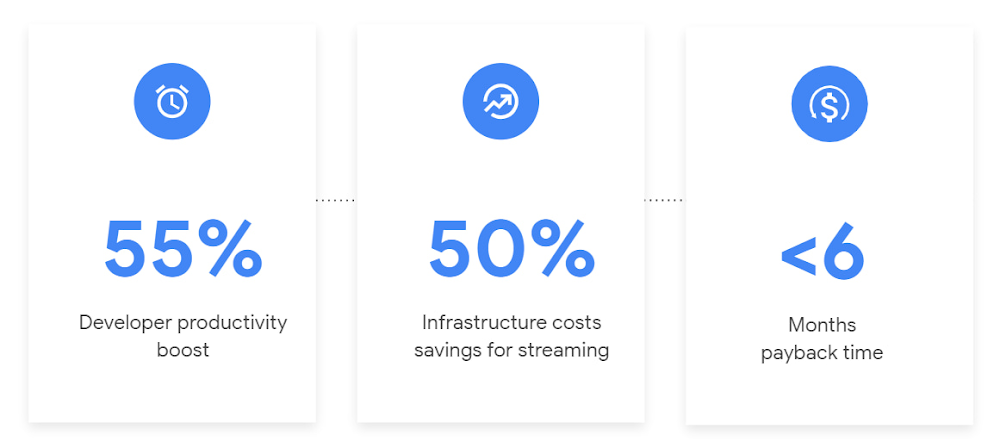
Today we’re excited to share our commissioned study conducted by Forrester Consulting, the Total Economic Impact™ of Google Cloud Dataflow, which allows data leaders to understand and quantify the benefits of Dataflow, and use cases it enables. Forrester conducted interviews with Dataflow customers to evaluate the benefits, costs, and risks of investing in Dataflow across an organization. Based on their interviews, Forrester identified major financial benefits across four different areas: business growth, infrastructure cost savings, data engineer productivity, and administration efficiency. In fact, Forrester found that customers adopting Dataflow can achieve a 55% boost in developer productivity and a 50% reduction in infrastructure costs. In fact, Forrester projects that customers adopting Dataflow can achieve a range of up to 171% Return on Investment (ROI) and a less than six months payback period. Customers can now use figures in the report to compute their own Return on Investment (ROI) and payback period.
“Dataflow is integral to accelerating time-to-market, decreasing time-to-production, reducing time to figure out how to use data for use cases, focusing time on value-add tasks, streamlining ingestion, and reducing total cost of ownership.” – Lead technical architect, CPG
Let’s take a deeper look at the ways that Forrester found that Dataflow can help you achieve your goals and unlock your business potential.
Benefit #1: Increase data engineer productivity by 55%
Developers can choose among a variety of programming languages to define and execute data workflows. Dataflow also seamlessly integrates with other Google Cloud Platform and open source technologies to maximize value and applicability to a wide variety of use cases. Dataflow streamlined workflows with code reusability,dynamic templates, and the simplicity of a managed service. Engineers trusted pipelines to run correctly and adhere to governance. Data engineers avoided laborious issue-monitoring and remediation tasks that were common in the legacy environments such as poor performance, lack of availability, and failed jobs. Teams valued the language flexibility and open source base.
“Dataflow provided us with ETL replacement that opened limitless potential use cases and enabled us to do smarter data enhancement while data remains in motion.” — Director of data projects, financial services
Benefit #2: Reduce infrastructure costs by up-to 50% for batch and streaming workloads
Dataflow’s serverless autoscaling and discrete control of job needs, scheduling, and regions eliminated overhead and optimized technology spending. Consolidating global data processing solutions to Dataflow further eliminated excess costs while ensuring performance, resilience, and governance across environments. Dataflow’s unified streaming and batch data platform gives organizations the flexibility to define either workload in the same programming model, run it on the same infrastructure, and manage it from a single operational management tool.
“Our costs with our cloud data platform using Dataflow are just a fraction of the costs we faced before. Now we only pay for cloud infrastructure consumption because the open source base helps us avoid licensing costs. We spend about $120,000 per year with Dataflow, but we’d be spending millions with our old technologies.” – Lead technical architect, CPG
Benefit #3: Increase top-line revenue by improving customer experience and retention with payback time of < 6 months
Streaming analytics is an essential capability in today’s digital world to gain real-time actionable insights. Likewise, organizations must also have flexible, high- performance batch environments to analyze historical data for building machine learning models, business intelligence, and advanced analytics. Dataflow enabled real-time streaming use cases, improved data enrichment, encouraged data exploration,improved performance and resiliency, reduced errors, increased trust, and eliminated barriers to scale. As a result, organizations provided customers with more accurate, relevant, and in-the-moment data-backed services and insights — boosting customer experience, creating new revenue streams, and improving acquisition, retention, and enrichment.
“It’s already been proven that we are getting more business [with Dataflow] because we can turn around results faster for customers.” – VP of technology, financial services technology
“When we provide data to our customers and partners with Dataflow, we are much more confident in those numbers and can provide accurate data within a minute. Our customers and partners have taken note and commented on this. It’s reduced complaints and prevented churn.” – Senior software engineer, media
Other benefits
Eliminated administrative overhead and toil
As a cloud-native managed service, all administration tasks such as provisioning, scaling, and updates are automatically handled by Google Cloud. Teams no longer need to manage servers and related software for legacy data processing solutions. Admins also streamlined processes for setting up data sources, adding pipelines, and enforcing governance.
Saved business operations costs for support teams and data end users
Dataflow improved the speed, quality, reliability, and ease of access to data for insights for general business users, saving time and empowering users to drive better data-backed outcomes. It also reduced support inquiry volume while automating manual job creation.
What’s next?
Download the Forrester Total Economic Impact study today to dive deep into the economic impact Dataflow can deliver your organization. We would love to partner with you to explore the potential Dataflow can unlock in your teams. Please reach out to our sales team to start a conversation about your data transformation with Google Cloud.
4932
Of your peers have already watched this video.
9:37 Minutes
The most insightful time you'll spend today!
L’Oréal: Managing Big-data Complexity with Google Cloud
L’Oreal is a global company with a presence in 150 countries worldwide. Between managing all of its brands and requirements for different countries, L’Oreal looks to data to make insightful business decisions. How does L’Oreal unify its data across all its systems and databases? How does L’Oreal make the data accessible to thousands of employees? In this video, Antoine Castex, Enterprise Architect at L’Oreal, discusses with Martin Omander how L’Oreal built a serverless, multi-cloud warehouse based on Google Cloud.
Chapters:
0:00 – Intro
0:23 – Why does L’Oreal need a new data warehouse?
0:51 – Who is the L’Oreal group?
1:35 – Which systems does L’Oreal use?
2:14 – How does L’Oreal manage complexity?
3:59 – What is ELT?
4:57 – Who are L’Oreal’s data consumers?
5:41 – How L’Oreal built the data warehouse
8:51 – L’Oreal’s future plans
9:10 – Wrap up
Google Cloud Workflows → https://goo.gle/3q20M1V
Cloud Run → https://goo.gle/3CSWbXG
Eventarc → https://goo.gle/3B7qhFy
BigQuery → https://goo.gle/3KHgyJ3
Looker → https://goo.gle/3Rx4Ind
Checkout more episodes of Serverless Expeditions → https://goo.gle/ServerlessExpeditions
Subscribe to Google Cloud Tech → https://goo.gle/GoogleCloudTech
5 Features IT Departments Love About Google Cloud

3665
Of your peers have already read this article.
5:30 Minutes
The most insightful time you'll spend today!
Throughout the past couple of years, I have helped a good number of companies, big and small, migrate their systems to the Google Cloud Platform (aka GCP). During the course of these migrations, there are always a few of those moments where people look at a specific Google Cloud feature and say, “now, that’s cool!”.
More often than not, it is because, coming from other platforms, they have gotten used to some features requiring multiple steps, or some operations being complicated, etc. And often they find out that in GCP you can do this specific operation in a couple of clicks, or by setting up a simple text-based configuration. Then you see that light bulb turning on in their head, and there you go… happy customer.
A few of these happen so often that I compiled them in a list to share with others who might also benefit from these “aha!” moments. You could say these are the five things I wish they told me when I started using Google Cloud.
Projects: Naturally Group Resources Together
A project is a namespace where resources live. Every resource you instantiate in GCP, from load balancers to Kubernetes clusters to virtual machines, belongs to a single project, and has no access (by default) to resources in other projects. User roles and authorisations can be defined per-project and trickle down to everything in it. This has two immediate benefits: you can group things that belong together in neat logical units, and things that don’t belong together are isolated from each other (and isolation is a Good Thing)
This is powerful and quite simple, but it often takes new users off-guard. I’ve had many clients call me and ask me “How can I make sure my developers cannot access the production machines? What’s the best way to create access policies? ”
The answer to this is actually super-simple:
- have a project for development where your developers have rights,
- have a project for production where they don’t.
- That’s it.
Every machine/other resource in the production project won’t be accessible to developers.
Of course there is a lot more to it, and you can refine roles and permissions to a much greater degree using Organizations, Folders, etc. Not to mention all the crazy things you can do with per-project billing. But at least you can say “hey, if it’s a machine in the staging environment then it can be found in the “staging” project”.
Global Virtual Networks Are *Truly* Global
Imagine you are using a Cloud provider and that you have servers in the US, and servers in Singapore, and that they need to communicate.
So you create a VPC (Virtual Private Cloud) network in the US data center, another one in the Singapore data center, and then you will connect them by setting up inter-region VPC peering or a VPN (Virtual Private Network) or a transit VPC or other routing magic.
Lots of work, right? And many moving parts, so lots of opportunities for things to break.
With GCP, however, what makes my clients go “aha!” is when they realize that in GCP a single VPC network covers the entire planet. Only subnets are attached to a geographic location, and virtual machines communicate between subnets on private IPs (good old RFC1918 addresses) — no extra routing needed.
So, to make your server communicate across continents on GCP, here are the steps:
- create a VPC network
- create a subnet in the US, put your US servers in it
- create a subnet in Singapore, put your Singapore servers in it
That’s all there is to it. Your VPC network spanning 2 continents is ready to use. Below is a screenshot of how it looks on my account, for a VPC network called ‘my-global-network’ with 2 subnets. The first column (“us-central1” and “asia-southeast1”) contains the name of the GCP regions (read: data centers). The second column is the subnet name that I picked when I created them.

A machine in the US (on the “us-central” subnet) with IP 10.0.0.5 can communicate directly with a machine in Singapore (on the “singapore”) subnet with IP 10.10.0.8.
Nothing else to set up.
And thanks to the way these networks work, the Google Cloud Load Balancer can present a single IP to the world, and forward traffic to the instances that are the closest to you geographically without having to setup a tedious DNS-based load balancing. But that’s worth an entire blog. I’ll save it for another day.
Firewalls with Tags and (Almost) No IP Addresses
There is no network security without a firewall so unsurprisingly GCP comes with one built-in.
Now, I don’t know about you, but nothing makes my brain hurt like a list of firewall rules displaying IP ranges and addresses and ‘Allow/Deny’ directives. It looks a bit like this:

If you imagine a normal network with a few dozen (hundred?) servers, you can quickly see how this can get out of control. You’d better have a solid printout of your network layout to refer to when you start adding and changing rules. And good luck debugging things!
Wouldn’t it be nice if, instead, you could just tell the firewall: “the HTTP traffic from outside can only reach the HTTP servers and the MySQL database is only reachable by the HTTP server(s) on the same network?”
Turns out it’s pretty simple on GCP by using a little thing called network tags. As the documentation says:
“Network tags are text attributes you can add to Compute Engine virtual machine (VM) instances. Tags allow you to make firewall rules and routes applicable to specific VM instances.”
So let’s see how it works. Firewall rules in GCP are defined in terms of source and target (the traffic flows from the source to the target). You can define filtering rules that apply to the source or the target, and in both cases you can use tags.
This is simpler shown with an example. The rule below states that on the default network, the traffic to the VMs with the tag mysql-server can come from the VMs with the tag http-appserver. Any other traffic is “Deny”-ed by default.

All you have to do is to tag your machines properly, and they will automatically be covered by the rule. You don’t need to enter their IP range.
That’s neat if you ask me. It makes it a lot simpler to grasp what’s happening.
Of course, there’s a TON more to firewalls in GCP. Tags also apply to routes and you can mix and match IP-based rules with tag-based rules. Not to mention that thing called service accounts, but I’ll leave those for another day.
The bottom line is that you can create most rules by just expressing a business need and not having to remember complicated network layouts. I have no hard stats, but I’m pretty sure this has saved me hours of work.
Console Access to VMs from the Browser
Easily access virtual machines (VMs) from the Google Cloud console was one of my first “aha!” moments when I started using GCP.
This is a screen capture of my Google Cloud console, with a virtual machine and its internal IP.

The last column has a header that says “Connect” and when you click on the word “SSH” a separate windows pops up. You wait for a few seconds, and… this is what you get. Your personal shell access — in a browser popup no less.

You are connected through ssh to the virtual machine of your choice. You did not have to download ssh keys and put them in the ~/.ssh directory, do the correct chmod command and run a long-winded ssh -i ~/.ssh/somekey me@<it-took-me-forever-to-copy-paste-the-address-here>
In addition, you have access to a few nifty features such as uploading and downloading files, changing the user etc. Just use the menu behind the cog icon at the top right.
In truth, you should not need to connect directly that often, but when you have to, this is a godsend.
Your Personal Jumphost from the Google Cloud Console
The Google Cloud console has a cool trick: you can actually connect to a virtual environment that is managed by the Google Cloud console itself. It serves a bit as a jump host. You can access most resources from the projects from it, and you can activate it directly from the top menu with, no particular setup on your side. It’s called the Cloud Shell.
This is how it looks at the top right of the console:

When you activate the Cloud Shell, the session opens at the bottom of the console. You get a command line prompt and it’s fully configured with the gcloud command line tool (the jack-of-all-trades of Google Cloud scripting).

You can do a great many things from there, and this even includes uploading and downloading files, editing code or deploying it, a web preview for your AppEngine application, and more.
So you can get access to a fully configured shell environment in your project from any laptop where you can connect with your credentials. On top of this, it persists between connections so you can fine-tune it to your needs and have these changes available the next time you re-connect.
This has saved me many times during my previous life as a traveling consultant!
Live migration
Did I say 5 “Aha!” moments ? Well, you’ve been patient reading all the way to here, so here’s one more for free.
Google Cloud has an amazing way to literally “teleport” a running virtual machine between physical hosts without stopping it. It’s called Live Migration. It allows Google to move your virtual machine away from a defective host, or a host that needs a patch or an upgrade, or for any other infrastructure related reason.
It’s all done in the background, and is totally transparent, so you never really see it happening. Unless you look VERY closely. I once did a demo to a client, where a machine was live migrated while he was simulating a solid network load — and we did not lose a single packet, with no noticeable degradation in latency.
And that’s a wrap!
So there you go. These are 5+1 things that made me go “Aha!” when I became more familiar with the Google Cloud Platform, and that still make my clients do the same.
There is a lot of depth to the platform, and my examples above only scratch the surface of our features. I encourage you to try it yourself. There is a generous free tier, and when you are ready to take the plunge and create that new company, please contact us at Google Cloud for Startups. We’ll get you up and running in no time.
Jerome is a Startup Architect at Google Cloud. Based in Singapore, he helps startups make the most of the Google Cloud Platform.
IDC Survey: Why 95% of CEOs Have a Digital-first Strategy

2933
Of your peers have already read this article.
3:00 Minutes
The most insightful time you'll spend today!
When IDC recently asked CEOs what single word most reflects what their organization needs to thrive in 2022, the overwhelming response was “technology.” CEOs want to acquire greater digital know-how as they recognize that technology will underpin the business model of the future.
Digital transformation, already well underway, is becoming digital first.
In fact, an astonishing 95% of CEOs see the need to adopt a digital-first strategy, according to IDC, and the majority of organizations are down the path of executing their plans. Currently, they report that about 30% of their organization’s revenue comes from digital products, services and experiences, a figure that will reach past 40% by 2027.
But what will power this digital-first enterprise? Successful large-scale digital transformations are executed by a diverse set of partners and vendors—including a cloud partner, valuable channel partners and resellers, independent software vendors (commonly called ISVs), and services partners; multiple cloud partners are even becoming quite common.
These networks of experts are increasingly the driver behind enterprise transformation. They help companies and organizations to establish an actively managed and governed cloud ecosystem that integrates native and third-party solutions, which can create shared value for all partners from the latest digital technologies. In fact, 85% of CEOs told IDC that actively participating in digital ecosystems is important to their revenue growth.
The new digital agenda is built on cloud ecosystems
Recently, I sat down with the author of the IDC CEO survey, Philip Carter. He’s the group vice president, European chief analyst, and worldwide C-suite tech research lead at IDC, and I wanted to better understand from him how executives are approaching their digital-first mission.
He explained that CEOs are turning to cloud platforms as a primary partner to put in place new, industry-specific digital business models. These platforms are at the center of “industry value networks” that accelerate time to value and benefit from cloud architecture’s ability to deliver scale, extensibility, and AI-driven experiences to create new revenue streams.
At Google Cloud, we have made building such industry value networks a priority, comprising of:
- Google Cloud, which provides the infrastructure and develops industry-specific data and analytics capabilities using artificial intelligence.
- Broader Google product areas like Google Shopping, Ads, Maps, Pay, Assistant, Android and Chrome.
- Independent software vendors (ISVs) relevant to a specific industry, who co-innovate with Google to provide end-to-end solutions to industry problems.
- System integrators (SIs) with deep industry knowledge who build the strategy and implement the business transformation for customers.
As an example, Google Cloud customers across multiple industries are looking for digital transformation to reinvent their core functions, such as supply chain. They might be identifying new distribution channels or restructuring their inventory. Google Cloud understands how to link the enterprise ecosystem with the consumer ecosystem. We can help enterprises access this broader ecosystem while leveraging AI-driven insights from data to help inform decisions in real time, at the point of engagement.
Google Cloud’s partner ecosystem can help achieve multiple items on the C-suite tech agenda such as improving customer experience, powering enterprise intelligence, building trust, supporting a distributed workplace, driving innovation, and streamlining operations.
According to IDC, 75% of all organizations will be completely digitally transformed by 2030. Google Cloud has been working hard with our partners to create an extensive ecosystem that can help your organization achieve its digital transformation ahead of competitors. This includes co-developing and co-innovating industry-specific solutions with a host of partners in key areas such as operations, enterprise intelligence, customer experience, workplace productivity, innovation, security, and trust.
And over the next few years, Google Cloud will double its investment in its partner ecosystem with increased co-innovation resources, more incentives, and co-marketing campaigns and funding. We’ll also offer greater integration into the Google Cloud Marketplace and a larger commitment to training and enablement.
For more insights on the C-suite “Future of Enterprise” agenda, you can watch my full IDC interview. You might also download our ebook featuring IDC data on the future of enterprise with ecosystem examples from partners like AMD, Confluent, Fortinet, Genesys, Informatica, and Workspot.
Our goal is to provide comprehensive best-in-class support for our mutual customers’ digital transformations. As we look toward that goal, one thing is for sure: Our ecosystem of partners will continue to grow, adding solutions to meet the needs of digital-first enterprises. Care to join us on that journey?
More Relevant Stories for Your Company

What to Look for from Cloud CISO Perspective
May is a big month for the security industry. It's been over a year since we gathered for RSA in San Francisco for one of 2020’s last major in-person events. While we likely won’t be together in person this year, it's an important time for the security community to come



The Inside Story of How Home Depot Migrated to Google BigQuery From an On-prem DW Solution
In the media, you will often hear story of how born-in-the-cloud companies manage with massive infrastructure. But it is one thing is to be a startup, and build infrastructure with bespoke requirements. And quite another to have a complex, multinational organization with online, with mobile, with brick-and-mortar presence, and hundreds

Google Introduces Cloud Career Jump Start Certification for the U.S. Underrepresented Communities
It’s no question that the cloud computing industry is booming and cloud experts are in high demand. In 2020, 67 percent of organizations surveyed in the IDG Cloud Computing Report added new cloud roles and functions (source). So there are plenty of cloud jobs out there, but if you don’t

Managing Change in the Cloud
When moving to the cloud, many organizations concentrate their focus on the change in technology and overlook an area just as complex and impactful: cultural change. Having your people ready to embrace the change — supporting them with the right processes, equipping them with the right skills — is as
