





From operations to planning, G Suite customers scale data insights with Connected Sheets

4066
Of your peers have already read this article.
4:30 Minutes
The most insightful time you'll spend today!
We recently announced the general availability of Connected Sheets, which brings you the power and scale of a BigQuery data warehouse in the familiar context of Google Sheets. With Connected Sheets, you can analyze billions of rows and petabytes of data in Sheets without specialized knowledge of computer languages like SQL. This makes it easy for anyone, not just data analysts, to apply pivot tables, charts, and formulas to massive datasets and unlock insights.
Our customers use Connected Sheets to enable data-driven decision-making across their organizations. We’ve heard many stories about how Connected Sheets has enabled them to achieve operational efficiencies and new ways of unlocking the power of their data; we’d like to share a few here.
Operate with agility
Now more than ever, it’s critical for organizations to react with flexibility and agility to new realities. Connected Sheets helps organizations harness and collaborate on massive amounts of data, making it easier to understand and quickly respond to today’s dynamic landscape.
The United Nations Office for Project Services (UNOPS) helps the UN and its partners deliver peace and security, humanitarian, and development solutions. As COVID-19 emerged, UNOPS used Connected Sheets to help coordinate a swift global response. Says Tushar Dighe, Chief Information Officer at UNOPS, “When the COVID-19 pandemic started, we needed to quickly assess the status of our operational capacity in order to assist governments with the response. We used a Connected Sheet with data from our BigQuery data warehouse combined with manual status inputs on the same Sheet, where colleagues in more than 80 countries were able to collaboratively provide inputs. The results in the form of pivots and charts were instantly available live. It took less than three hours to design and implement the solution, and we had status information from more than 80 countries within the first 24 hours.”
Improve business and financial reporting
Reports and dashboards displaying business metrics, like revenue figures or operational KPIs, play a critical role in organizations. These reports help sales teams track performance, enable finance teams to make projections, and provide business leaders with a picture of their organization’s health. Especially now, as businesses adapt their planning to reflect the new normal and employees remain dispersed, it’s doubly important that teams can quickly access and collaborate on business and financial dashboards, from wherever they are. But building and maintaining these reports can be time consuming and error-prone, and requests for changes or new views result in manual work for data analysts. All of this just extends the time to insight and action.
Connected Sheets helps automate report creation, while maintaining a single source of truth for data in BigQuery. The live connection between BigQuery and Sheets also means that data stays fresh, minimizing the risk that people make decisions based on outdated information and avoiding the data integrity risks of manual data pulls.
Says Alexander Danilowicz, a Software Engineer at data connectivity company LiveRamp, “Our Finance team uses Connected Sheets to automate reports that are shared with other stakeholders to run the business. This enables our business partners to analyze and create pivot tables on massive datasets, which is not possible in a traditional spreadsheet.”
“Now that it’s all integrated, there’s no human error involved. Changes can be made at the click of a button, resulting in 10 hours saved per month,” he adds.
Track product adoption
It’s important for teams across the business to understand customer adoption of products and services, whether it’s the product team tracking usage of a newly released feature or the support team trying to anticipate incoming service requests. Similarly, IT teams need to analyze adoption of an organization’s internal applications and systems, so they know what tools employees are using and how they are being used. But product adoption datasets are often too large for traditional spreadsheets to handle, and new data is continuously being added.
Connected Sheets can provide teams access to large, powerful, and up-to-date usage datasets, in the familiar Sheets interface. PwC, a global professional services organization, uses Connected Sheets as part of its efforts to make technology and data more accessible across its workforce. One way PwC uses Connected Sheets is to monitor and analyze internal adoption of tools like G Suite.
Says Peter Van Nieuwerburgh, Global Change Manager at PwC, “If you look at our own adoption dashboarding, it’s more than three terabytes of data—good luck putting that in any spreadsheet. With Connected Sheets, we’re not really pulling the data into the spreadsheet, rather it lives in the database where it belongs. The ability to go and so easily analyze and visualize the data is really powerful.”
We hope Connected Sheets helps to scale data-driven decision making at your organization, by making powerful data easily accessible across your sales, finance, product, and IT teams.
Hybrid Work with Google Workspace: What Customers can Expect

5853
Of your peers have already read this article.
4:00 Minutes
The most insightful time you'll spend today!
In June, we shared our vision for navigating the future of hybrid work with a single connected experience in Google Workspace. Now, as many of our customers begin to embark on their own hybrid journeys, I wanted to share how we’re helping them bridge the gaps in this new way of working.
A dedicated place for team collaboration: Spaces are now live
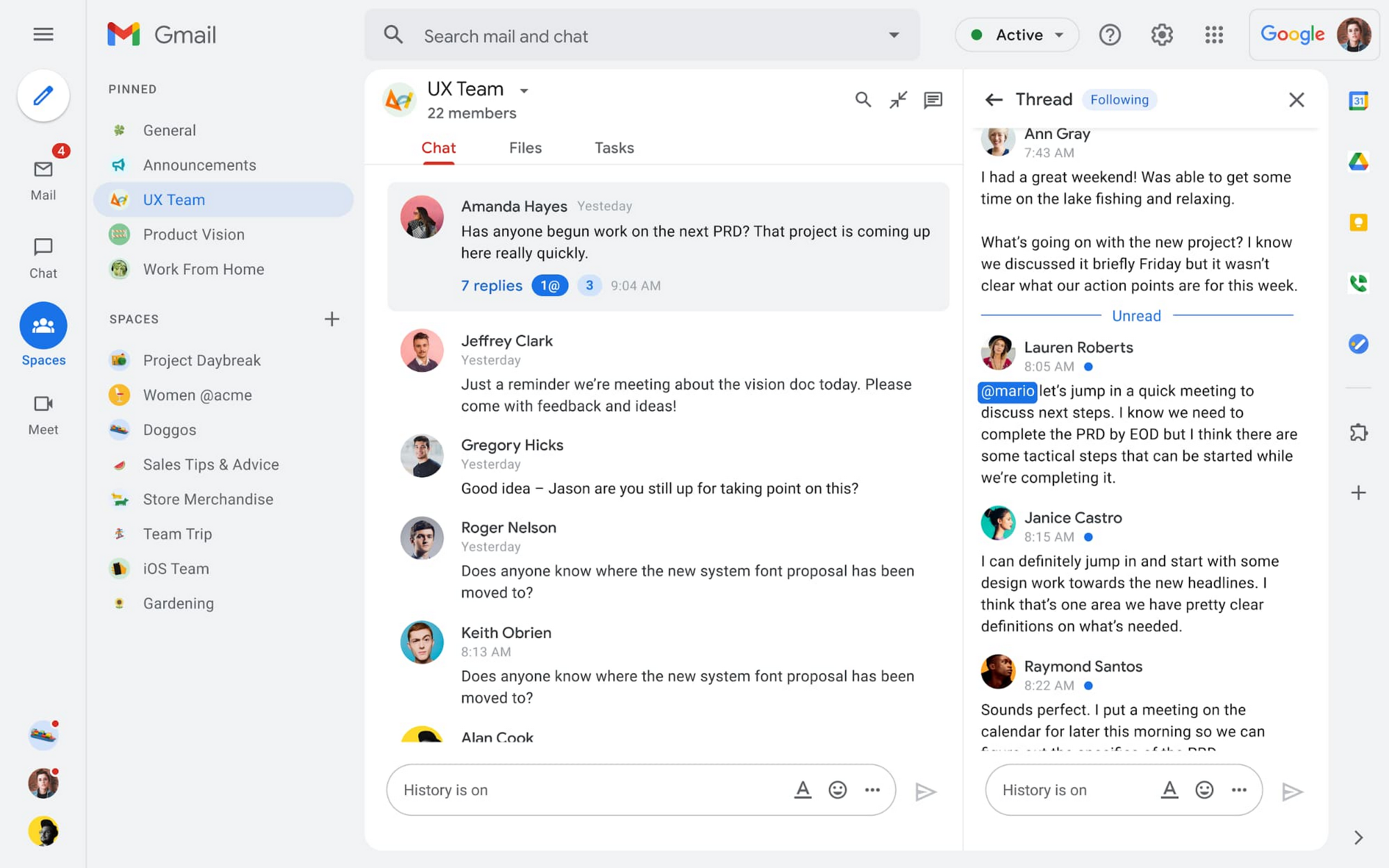
Spaces are the central place for team collaboration in Workspace and starting today, Spaces are live for all users. Spaces are unique in that they are tightly integrated with Google Workspace tools like Calendar, Drive, Docs, Sheets, Slides, Meet, and Tasks, providing a better way for people to engage in topic-based discussions, share knowledge and ideas, move projects forward and build communities and team culture.
We hear from our customers that they’re continuing to work across a broad range of locations and working hours, and that Spaces can be a central hub for collaboration, both in real time and asynchronously. Instead of starting an email chain or scheduling a video meeting, teams can come together directly in a Space to move projects and topics along, whether it’s a team of 10 for “2022 Roadmap Planning” or a team of 1,000 for the “Company-wide All-Hands.”
With Spaces, teams can share ideas, collaborate on documents, and manage tasks from a single place. Because all their work is preserved for future reference, team members can easily jump in and contribute at a time that works best for them, seeing a full history of the conversations, context, and content along the way. Using Spaces has already helped my own team, which is spread across time zones and varied in its working styles. It’s been helpful to rely on Spaces to retain and structure foundational knowledge, whether it’s for onboarding a new teammate or preserving context when someone moves to a new role.
We’re just getting started with Spaces and I’m excited to share a little more about where we’ll take it next.
In the coming months, our users will see:
- Streamlined navigation: A flexible user interface helps users easily access their inbox, chats, Spaces and meetings—all from a single location—so they can stay on top of everything that’s important.
- Discoverable Spaces: Spaces and their content can be made discoverable to all members of an organization, so other people can find and join the conversation. Administrators can also set discoverability as the default for their organization.
- Enhanced search: Allows users to easily find content from within and across Spaces, or even discover new Spaces to join. “Search everything” in Spaces opens up powerful new collaboration possibilities and makes it easier to access the team’s collective knowledge base.
- In-line topic threading: The ability to reply to any message within a Space fuels deeper discussions and collaboration across teams and organizations.
- Robust security & admin features: Tools for content moderation, managing Spaces, and establishing the right rules for healthy communication across domains and companies.
Making meetings more hybrid friendly
Spaces will play an important role in laying the groundwork for meetings and, in some cases, reduce the number of meetings a team needs to gain alignment. Having a dedicated space for asynchronous collaboration, with access to all the right content and context, will help teams be more deliberate about scheduling meetings. This is top of mind for us and many of our customers given the rise in meeting fatigue over the last 18 months. But when having a meeting genuinely feels worthwhile, the experience of transitioning into (and out of) it from different collaboration touchpoints should be seamless.
Over the past few months, in collaboration with many customers and across teams within Google, we developed a handbook for navigating hybrid work that includes best-practice blueprints for the five most common hybrid meeting types. Because meetings are a foundational piece of hybrid work, our goal is to make them as productive, immersive and inclusive as possible.
Scheduling meetings that work across the entire team
With hybrid work, many teams—my own included—have locations and working hours that can change daily. When many of us were together in the office, we might have tended to schedule meetings at a time that favored the “in-office majority,” but now it’s especially important to schedule meetings that scale across the entire distributed team.
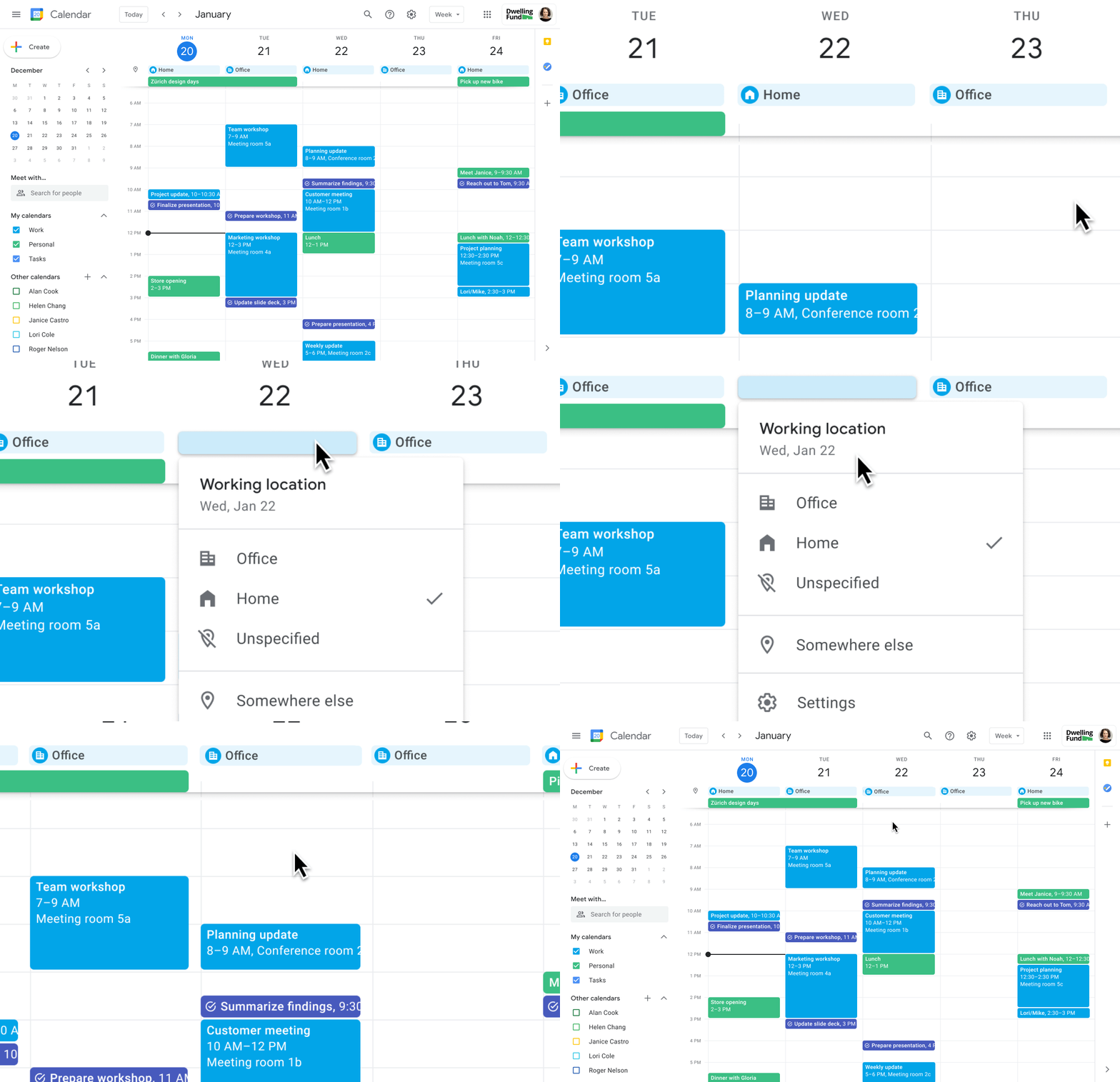
Now, beyond indicating their virtual or physical presence when accepting meeting invites, team members can set their location for each work day in Calendar. When combined, these capabilities allow meeting organizers and on-site support teams to plan for the right mix of in-person and virtual attendance. They can also provide greater visibility and help set expectations across hybrid teams.
Making meetings more spontaneous
Remember when you’d casually bump into a colleague in the office hallway or a break room and start a conversation that sparked new ideas? That’s perhaps the thing I’m looking forward to most as more of my team plan their part-time return to the office. These casual encounters were always a great way to build relationships and learn about topics that might not come up in structured meetings. To help enable these spontaneous connections when teammates aren’t in the office together, we’re bringing Google Meet calling to Workspace.
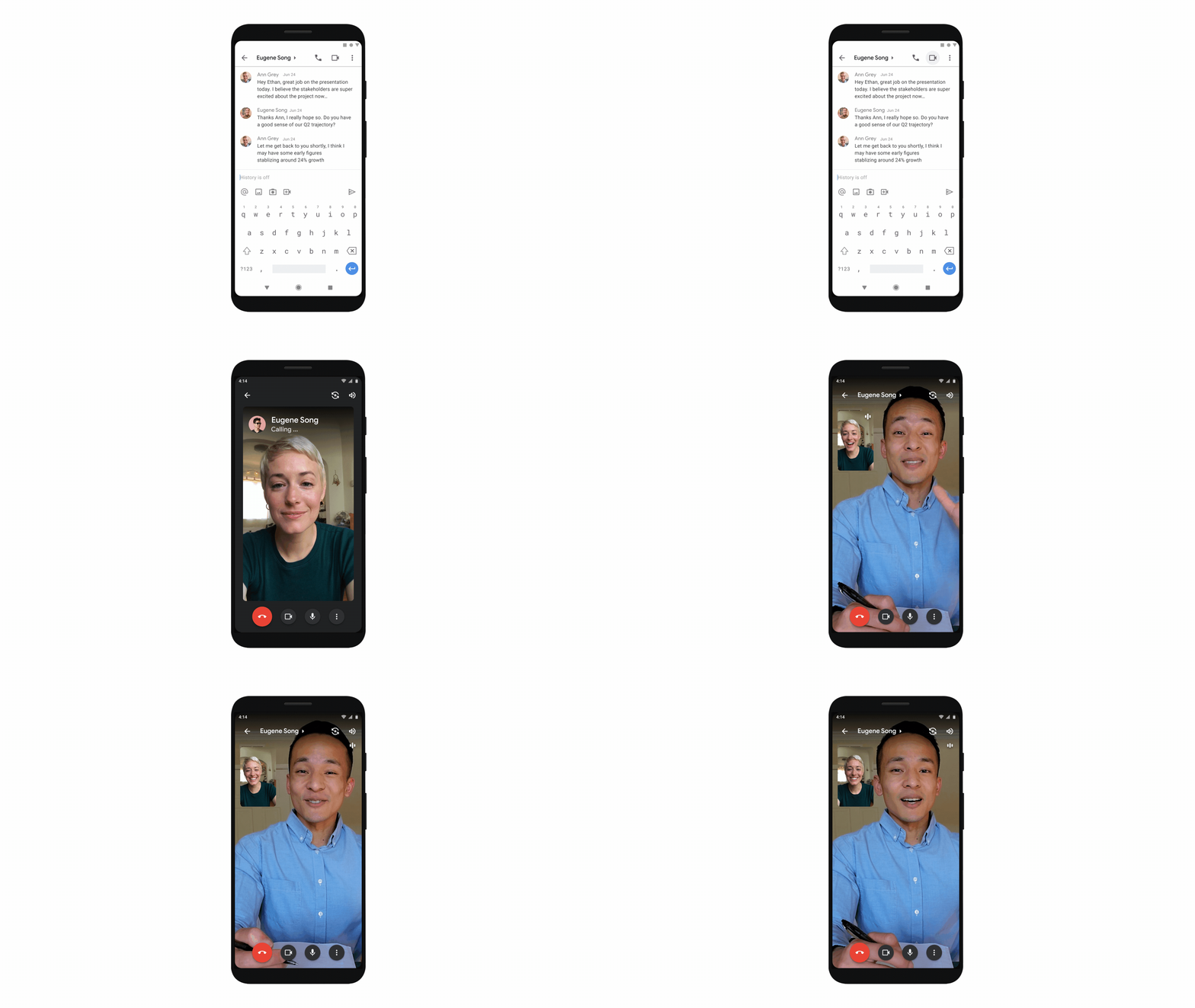
Google Meet calling is a seamless experience of initiating a video or audio call between one or more participants, complementing more structured, scheduled video meetings. Our intention is to bring Meet calling to all the natural endpoints in Workspace where you’d initiate an ad-hoc call including chats, people cards, and Spaces, but this will come first to one-to-one chats within the Gmail mobile app. Soon I’ll be able to call members of my team directly from a one-to-one chat. This will ring their device running the Gmail mobile app and send a call chip to our chat on their laptop, so they can easily answer from any device. It’s not quite the same as a spontaneous hallway conversation, but it might be the next best thing in a hybrid setting.
Ensuring collaboration equity in hybrid meetings
How do we ensure that hybrid meetings aren’t two meetings in one, divided between those in-person and those who are remote? Effective hybrid meetings need a unified experience so that the people sitting together in the same room can interact with their remote colleagues seamlessly, without it ever feeling like there are two parallel conversations.
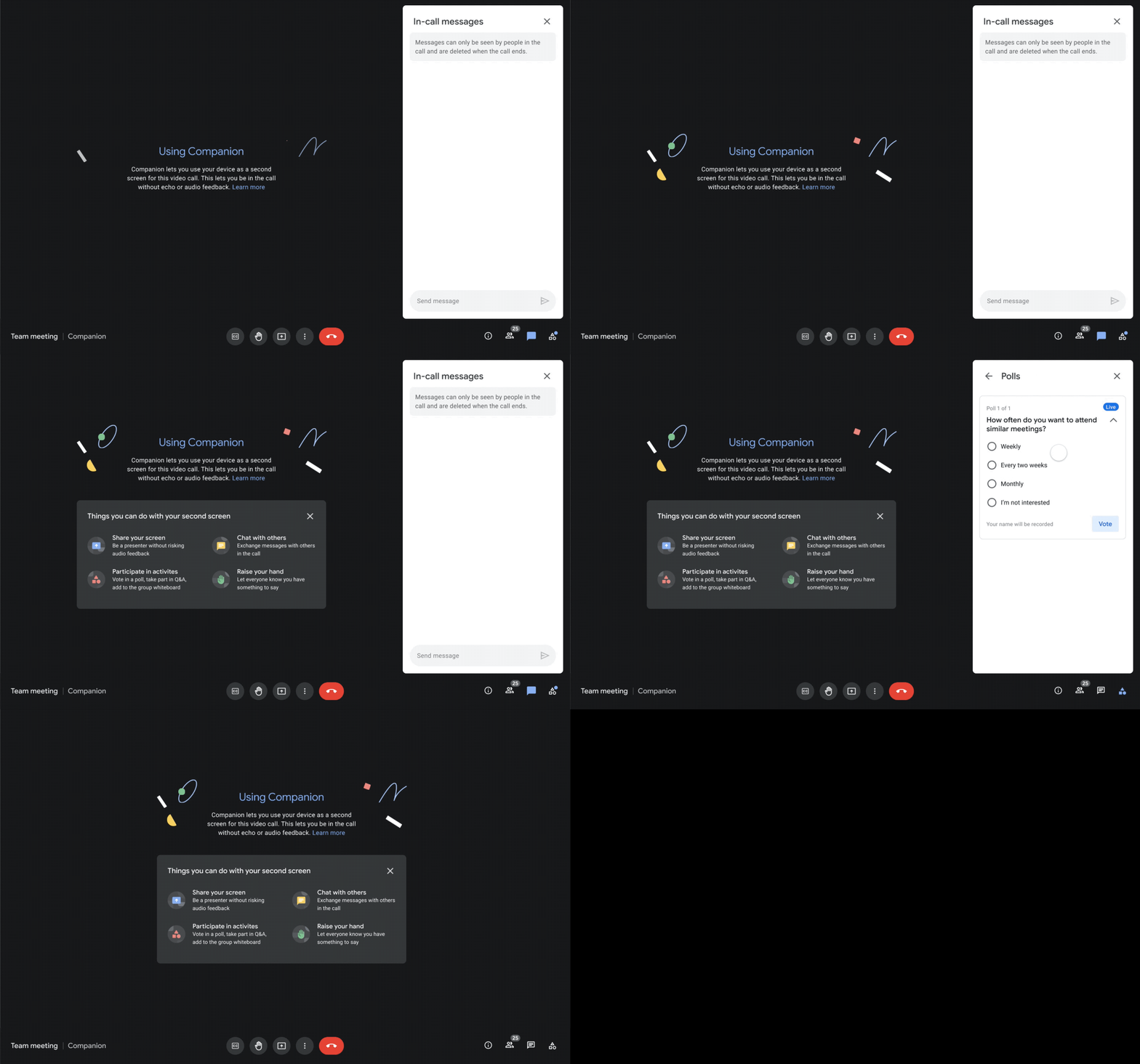
We designed Companion mode in Google Meet to specifically meet this challenge and we’ll start rolling it out to customers in November. With Companion mode I can host or join a meeting from within a conference room using my laptop while leveraging the in-room audio and video—and it all happens without any awkward audio feedback. This functionality lets me share content or see presentations up close on my own device, access the meeting chat and whiteboard, initiate and vote on polls, or post a question in Q&A, just as I would from home. And to ensure that users have greater choice over how they participate in meetings, live-translated captions will be available in Meet and through Companion mode by the end of the year. We’re currently working on translating meetings in English to French, German, Spanish and Portuguese, with many more languages coming in the future.
Expanding choice and flexibility for meeting hardware
While Companion mode keeps people in the room seamlessly connected to their remote colleagues, meeting hardware plays a crucial role in making hybrid meetings feel more immersive and human, with the ability for everyone to be clearly seen and heard. To provide more flexibility and choice on this foundation of how we come together in a hybrid work world, we’re announcing an expanded Google Meet hardware portfolio and interoperability with other conference room solutions.
First, we’re announcing two new all-in-one video conferencing devices to complement our Series One Room Kits. The Series One Desk 27 is an all-in-one 27” device that’s perfect for small shared spaces or your desktop, either in the office or at home. Series One Board 65 is an all-in-one 65” 4K device that can be paired with an optional stand for ultimate configuration flexibility—turning any room or space into a video collaboration hub in minutes.
Both devices feature collaboration capabilities with the Jamboard app built right in, and each can be used as an external display. While optimized for Google Meet, USB-C connection from your laptop gives you the flexibility to use the meeting app of your choice while leveraging the high-fidelity audio and high-definition video on Series One Desk 27 and Board 65. You can learn more about these devices developed in partnership with Avocor through our on-demand webinar starting at 9 AM PT today.
https://www.youtube.com/embed/BR81EAce5BQ?enablejsapi=1&
We’re also proud to announce new third-party devices coming to the Google Meet hardware ecosystem. Google has certified the Logitech Rally Bar Mini and Rally Bar for Google Meet, which provide complete room solutions for small and mid-sized rooms. You can learn more about these Google Meet-certified products in Logitech’s September 21 webinar. Additionally, the Rayz Rally Pro is a new mobile device speaker dock by Appcessori that will automatically launch Google Meet for video meetings and provide an improved audio experience from your mobile device.
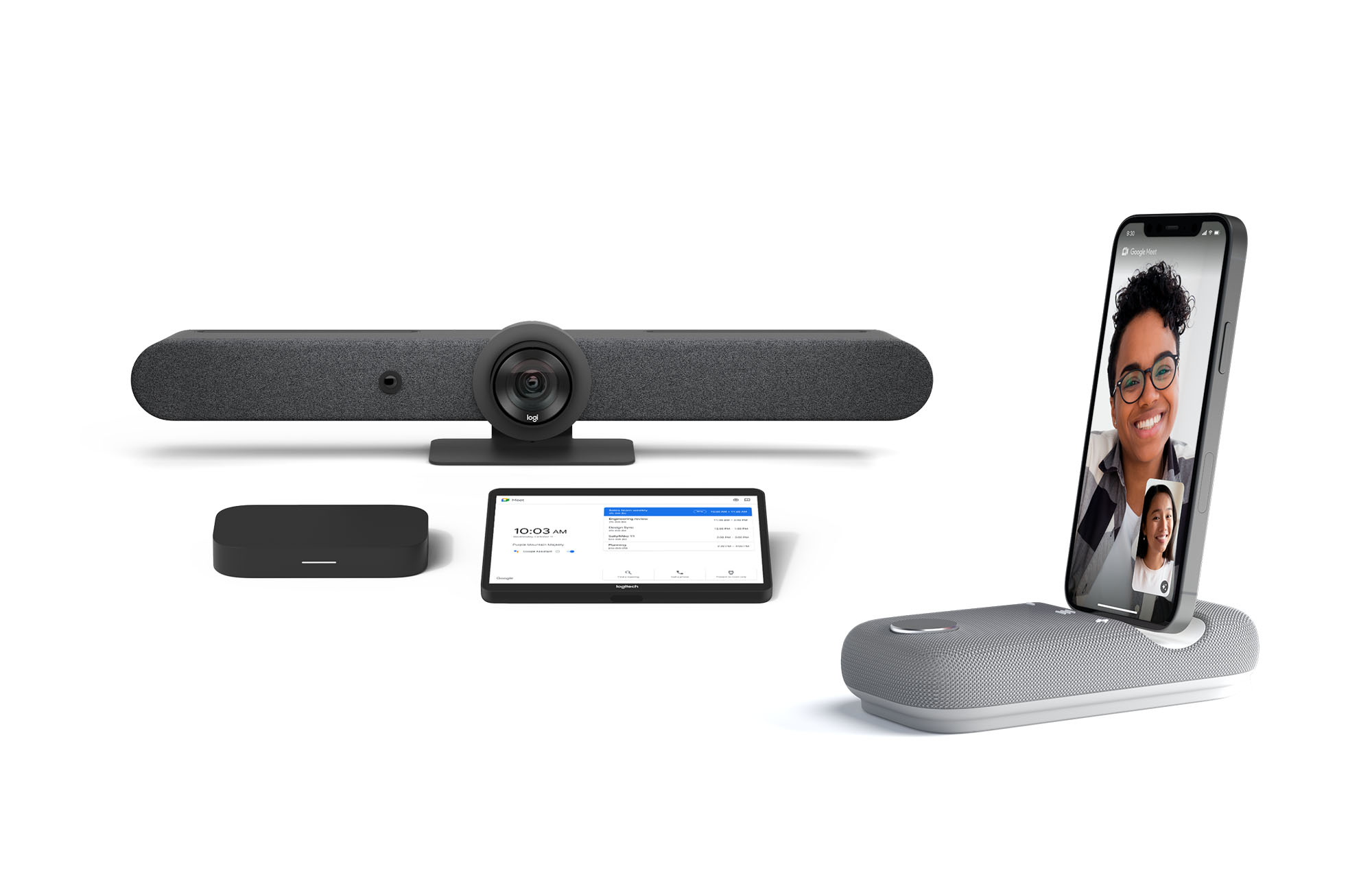
Certified Google Meet hardware ensures high-quality video and audio in meetings and is easy to deploy and manage. You can view our full Google Meet device portfolio and purchase directly from approved resellers by visiting the Google Meet Hardware website.
While Google Meet customers enjoy a full-featured experience on Meet hardware, we realize they sometimes need to connect with people outside of their video calling network. To enable this, organizations can use Pexip for Google Meet to seamlessly join Meet meetings from the widest range of third-party video conferencing solutions. Today, we’re also announcing support for bidirectional interoperability with devices from Webex by Cisco and Google Meet hardware. Soon you’ll be able to launch a Google Meet meeting on Webex hardware and a Webex meeting on Google Meet hardware. Calling interoperability between Meet and Webex is supported on Series One Board 65, Series One Desk 27, and the rest of the Google Meet hardware portfolio, as well as Webex Room Series, Room Kit Series, Desk Series and Board Series. We expect general availability later this year. You can find more details here. We plan to give Meet users even broader calling interoperability with support for other conferencing services in the near future.
Navigating hybrid work is a journey
We’re thrilled to bring these new Google Workspace experiences and devices to our customers, but we also realize that navigating hybrid work will be a journey of learning and adaptation for every organization. Two resources we recently developed can help along the way:
- Navigating hybrid work: A Google Workspace handbook
- The newly launched Future of Work site from Google Workspace, where you can keep up with all the ways work is changing.
Bridging the gaps in the emerging hybrid work world will necessarily be a combination of technology, workplace culture, and reimagining the use of physical spaces. But developing a “hybrid-first” mindset starts with the tools people use every day to connect, create, and collaborate, and Google Workspace will continue to play a crucial role in that evolution.
6 ways Google Workspace helps IT admins safely use BYOD

4189
Of your peers have already read this article.
6:30 Minutes
The most insightful time you'll spend today!
Many organizations, including Google, have moved quickly to embrace working from home. With this widespread remote work, it’s never been more important for IT admins to be certain that every device in their organization is secure, even when that device isn’t company-owned.
We pioneered zero-trust security through our BeyondCorp strategy and leverage it to offer advanced security for G Suite* users to protect secure access for all devices. Admins can enforce these controls across G Suite and other corporate applications and data, ensuring consistent security and user experience across your organization.
Today, we’re laying out six key controls that IT admins can use within G Suite to help keep their organizations safe when using the bring your own device approach (BYOD). You can also review our detailed security checklist here, and learn more from our course on Managing G Suite here.
Secure mobile and desktop devices with endpoint management

BYOD devices can differ widely across an organization, with a range of OS versions, hardware modes, patch versions, and more, so it’s impossible to rely on a one-size-fits-all approach to device management. With Google endpoint management, IT admins can easily support a variety of mobile and desktop devices by enforcing measures like minimum software versions and blocking jailbroken or rooted devices, in many cases without requiring full device rights for employee privacy.
When it comes to managing mobile devices, G Suite offers basic and advanced mobile device management:
- With basic mobile device management, BYOD devices are secured with baseline security features with no end user friction. Admins can enforce a passcode, get a device inventory, wipe Google accounts remotely, and even remotely install applications on Android devices.
- With advanced mobile device management, admins can apply more policy controls over BYOD devices, and Android users can keep their personal data private and separate from their work data with Android Work Profiles. You can also allow and manage work apps on iOS and Android devices.
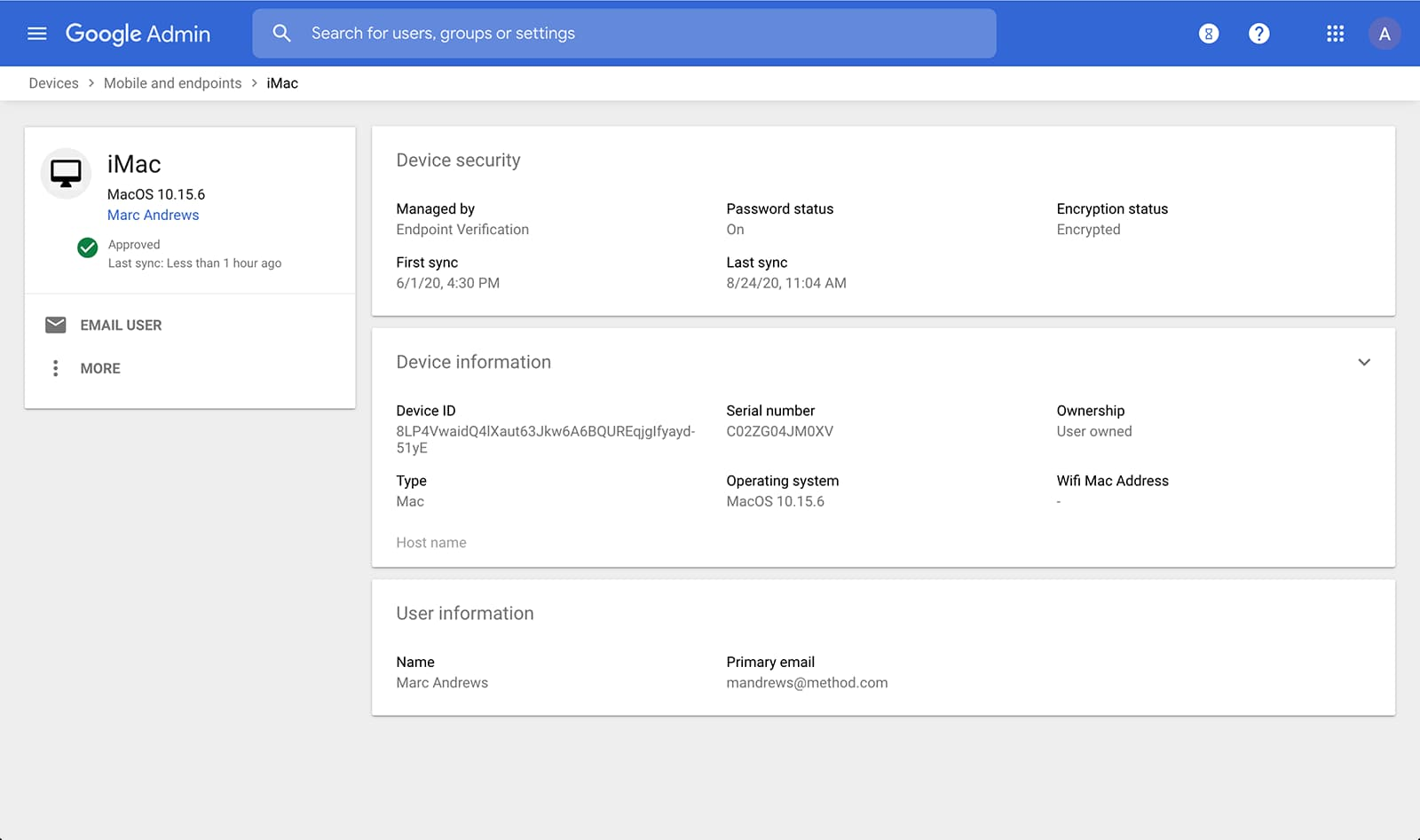
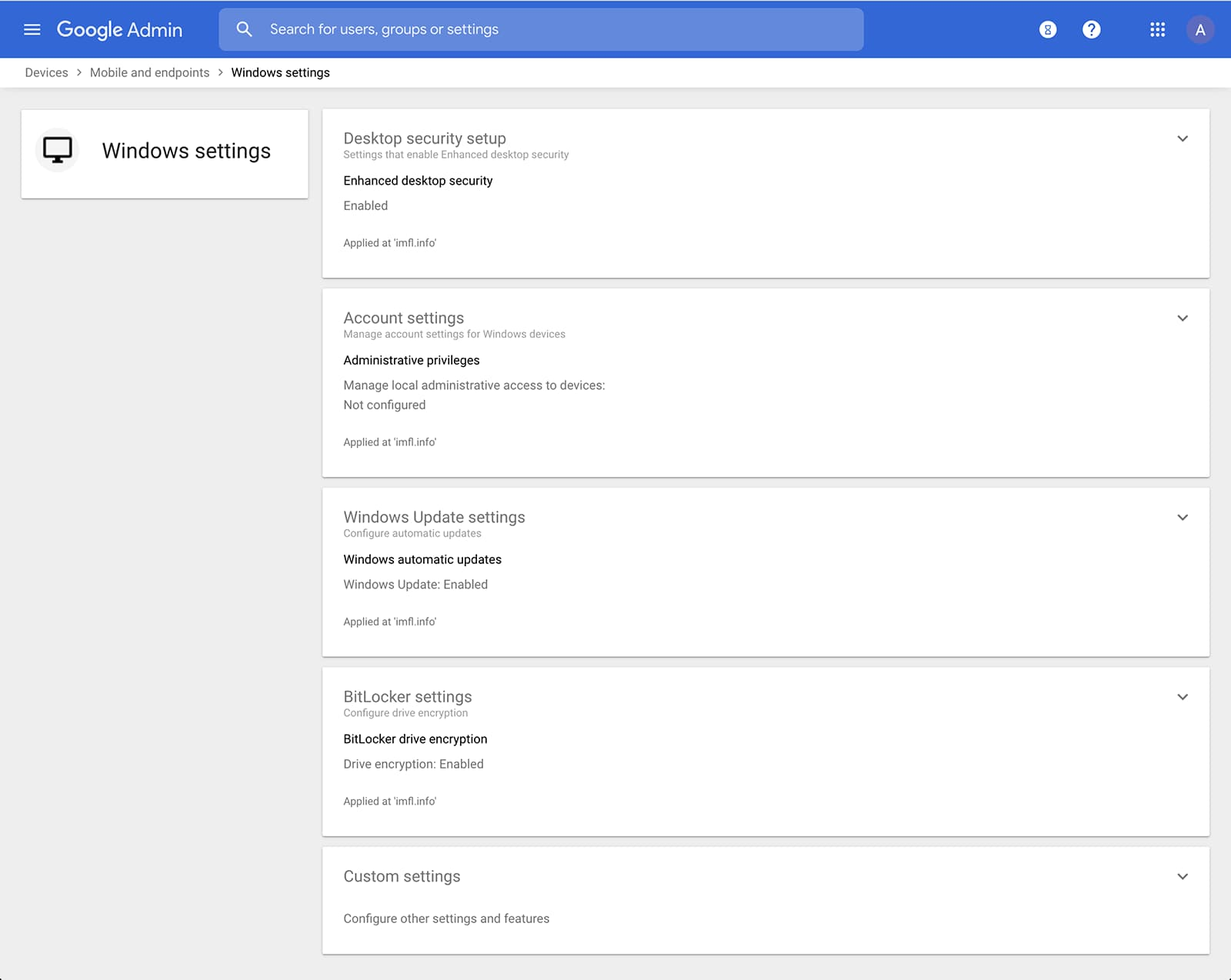
Admins can also manage and secure desktop devices with fundamental device management and enhanced desktop security for Windows. With fundamental device management, when a user logs into G Suite through any browser on a Windows, Mac, Chrome, or Linux device, that device will be automatically enrolled with endpoint management. This provides a base level of security to every desktop device that accesses G Suite data. With enhanced desktop security for Windows, admins can easily manage and secure Windows 10 devices through the admin console.
Enable secure connections without a corporate VPN using context-aware access
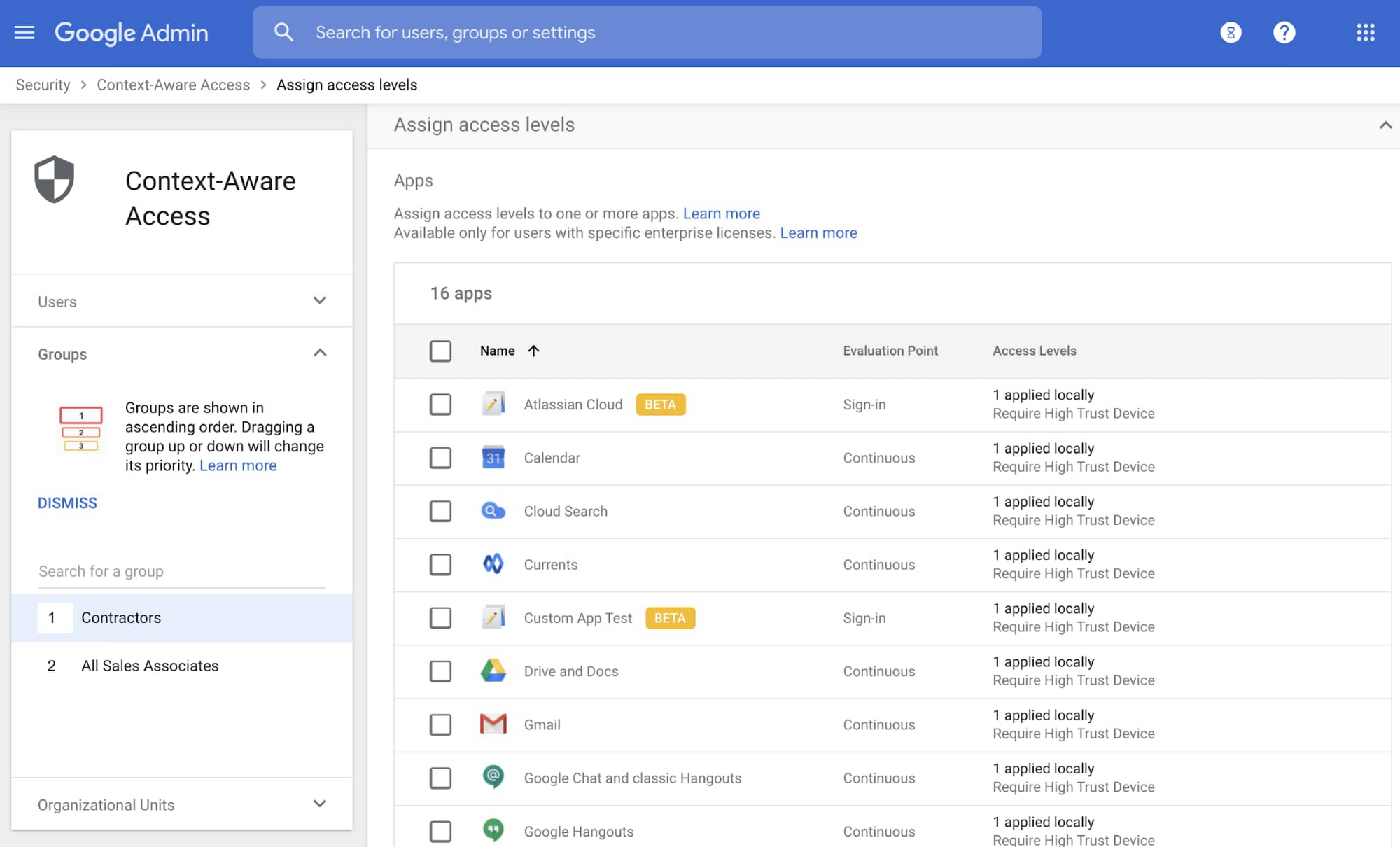
Context-aware access offers protection from unwanted access to G Suite services without the need for a VPN, and allows admins to set up different access levels based on a user’s identity and the context of the request, taking into account factors such as the country, device security status, and IP address of the request. For example, you can require BYOD devices accessing G Suite to meet encryption and password requirements, or restrict contractors from accessing G Suite from company managed Chromebooks.
Control data access with app access control
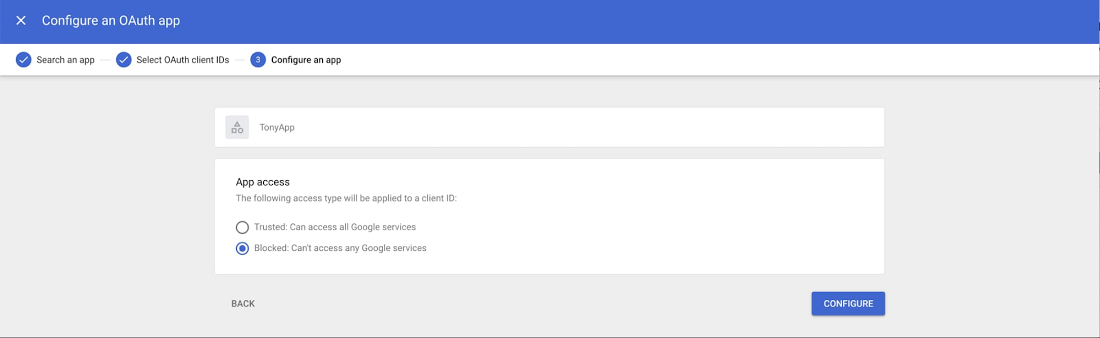
It’s important to protect all devices in your organization—corporate or BYOD—from malicious apps trying to gain access to corporate data. Using app access control, admins can take steps to prevent these apps from tricking users into mistakenly granting access to corporate data. With this feature, admins can choose which third-party apps are allowed to access users’ G Suite data by explicitly trusting, limiting, or blocking access for apps.
Enforce 2-Step Verification
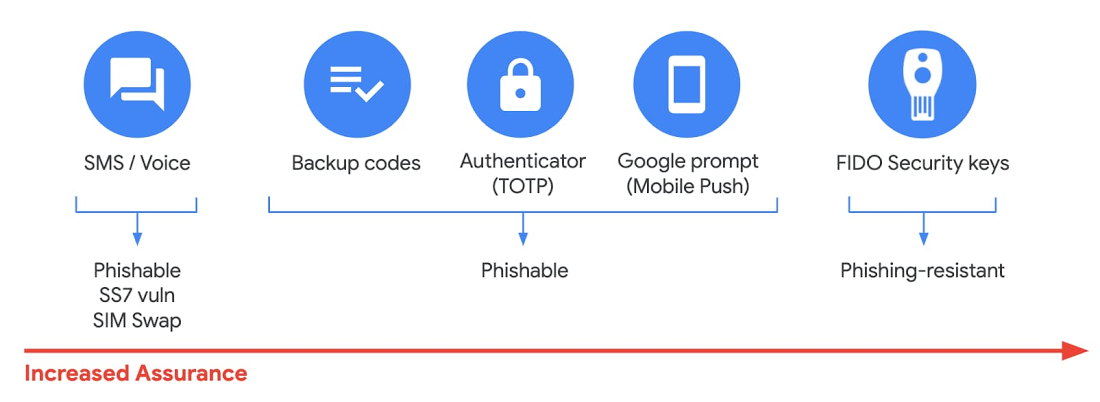
With 2-Step Verification, admins can reduce the risk of unauthorized access by asking users for additional proof of identity when signing in. And you can now use the Advanced Protection Program—our strongest protection for users at risk of targeted attacks. With the Advanced Protection Program for the enterprise, we’ll enforce a specific set of policies for enrolled users including security key enforcement, blocking access to untrusted apps and enhanced scanning for email threats
If you choose not to use security keys for any reason, you have multiple other options to enforce 2-Step Verification on BYOD devices. For Android and iOS, you can use Google prompt, Google Authenticator, text message, or phone call options for a second verification step.
Prevent data loss and leakage with data loss prevention
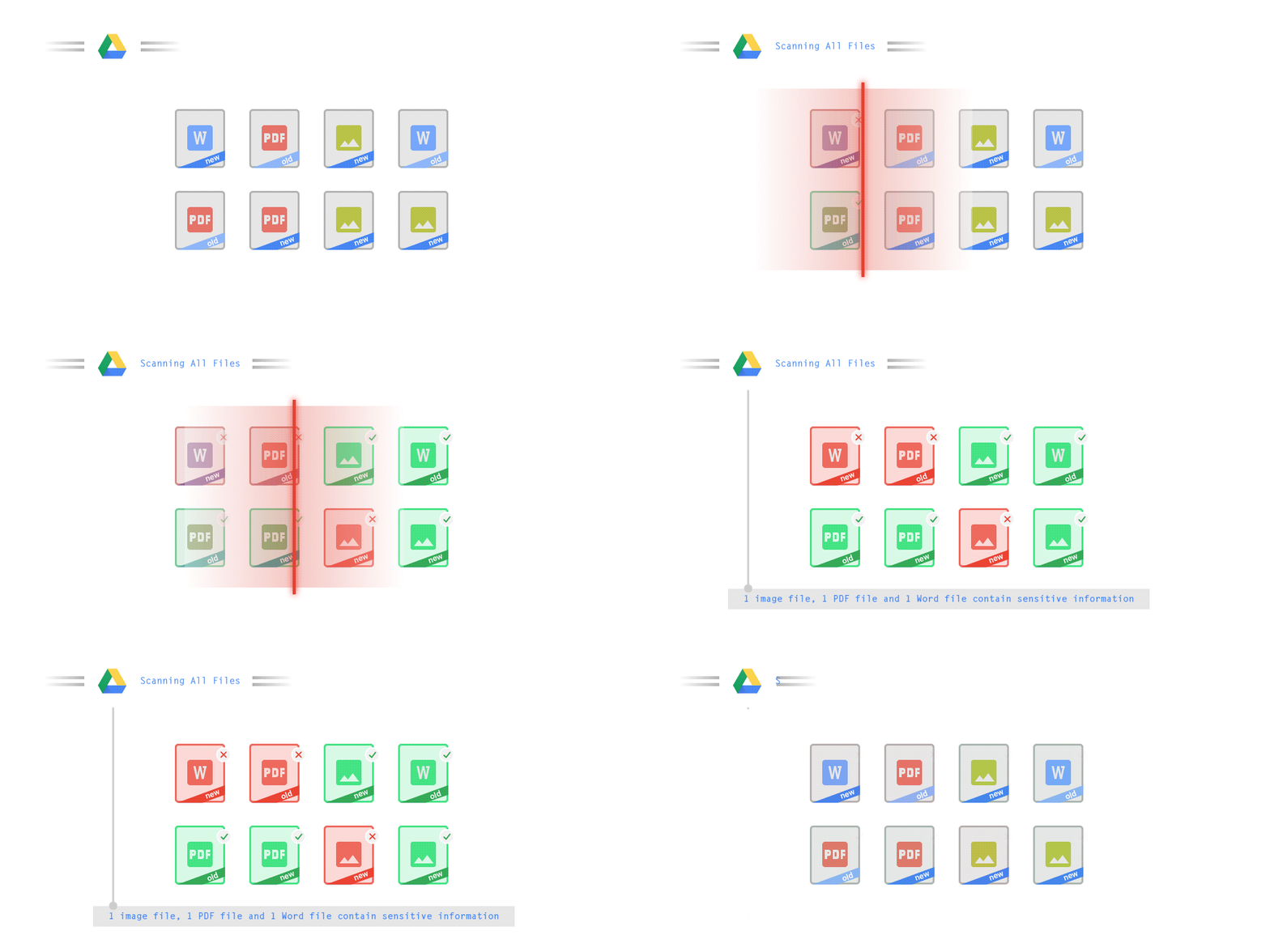
We know that as an admin, one of your highest priorities is to keep internal information safe and secure. That’s why we developed data loss prevention (DLP) policies to help protect sensitive information in Drive, Docs, Sheets, Slides, and Gmail from loss, misuse, or being accessed by unauthorized users. With G Suite DLP, admins can choose which types of data are sensitive and exactly how to protect them. Our controls enable easy detection of a wide variety of common info types, and administrators can supplement this with custom content detectors to meet their organization’s needs. You can also classify files in Drive automatically using DLP rules (beta) to categorize your data by sensitivity levels. DLP works on all the devices in your organization, including BYOD ones, since the protection is at the data and application level.
In addition to DLP, you can use DXP for iOS devices to restrict the copy/pasting of G Suite data to other accounts, personal or otherwise. DXP for iOS can also restrict users’ ability to drag and drop files from specific apps within their G Suite account. Similarly, you can use Google endpoint management to configure Android devices to prevent data sharing between personal and work profiles.
Make retention and eDiscovery possible on all your devices with Vault

To support your organization’s retention and eDiscovery needs, Vault enables corporate data that’s stored in G Suite and accessed by BYOD devices to be available for all your information governance needs. No matter the owner of the device, your organization’s data stored in Gmail, Drive, Chat, Groups, Voice, and Meet are accessible to Vault.
Using the zero-trust security model, the G Suite features above work together to keep your data protected and organization secure across all devices, whether they’re corporate-owned or BYOD.
(*Google Workspace was previously G Suite)
Why settle for the status quo?

3966
Of your peers have already read this article.
2:30 Minutes
The most insightful time you'll spend today!
Virtual meetings, remote collaboration, flexible hours: it’s becoming clear that these new ways of working are here to stay.
Business leaders, since the onset of COVID-19, have seen workplace transformation go from an almost theoretical long-term goal to an urgent priority. Employers and employees want more flexible ways of working, and delivering on this requires the right technology.
But flexibility isn’t the only thing that employees want. Remote working has significantly increased the demands we’re getting from many directions—in both our professional and our personal lives. Employees feel overloaded with too much information and too many tasks across too many different tools. Instead of learning another tool, we need the tools we already use to be even more helpful, and work together, in an integrated, intuitive way.
Today’s teams need to re-imagine not only how they communicate and collaborate with each other remotely, but also how they continue to serve their own customers and support the communities they belong to. From doctors consulting with patients, to financial institutions providing critical advice to customers, to teachers delivering distant learning, to car dealerships creating virtual showrooms—it’s clear that these new ways of working are here to stay.
The future of work is here. COVID-19 has accelerated a shift in how organizations like yours get work done. Take this 2-minute assessment below to see where you’re at on the journey to the future of work, and get a free guide to help you take the next step.
4127
Of your peers have already watched this video.
23:18 Minutes
The most insightful time you'll spend today!
Securing Remote Workers with Google and Chrome Enterprise
With the proliferation of COVID-19 across the globe, the need for a remote working strategy has become paramount to keep businesses running.
A Gartner survey found that 88% of organizations have asked their employees to work remotely. And 97% of the organizations canceled work-related travel. However, only 10% of the organizations planned to reduce working hours. For us, this shows that despite the prevalence of coronavirus across the world, business demands require that work must go on.
Technologies such as Chromebooks, Chrome Browser, and SaaS applications have helped make this strategy a reality, providing access to critical data wherever employees may be working from during this challenging time.
However, this way of working has created new security challenges for IT departments, who may not be equipped to address these issues.
This session provides a walkthrough of many of Google’s solutions, such as Chrome devices, Chrome Enterprise Upgrade, BeyondCorp Remote Access, and Chrome Browser Cloud Management to ensure your business can keep secure, even in a remote working environment.
Enterprises can Push the Limits of Edge Even Further!
6994
Of your peers have already read this article.
2:30 Minutes
The most insightful time you'll spend today!
Whether with the cloud or within their own data centers, enterprises have undergone a period of remarkable consolidation and centralization of their compute resources. But with the rise of ever more powerful mobile devices, and increasingly capable cellular networks, application architects are starting to think beyond the confines of the data center, and looking out to the edge.
What exactly do we mean by edge? Think of the edge as distributed compute happening on a wide variety of non-traditional devices — mobile phones of course, but also equipment sensors in factories, industrial equipment, or even temperature and reaction monitoring in a remote lab. Edge devices are also connected devices, and can communicate back to the mothership over wireless or cellular networks.
Equipped with increasingly powerful processors, these edge devices are being called upon to perform tasks that have thus far been outside the scope of traditional IT. For enterprises, this could mean pre-processing incoming telemetry in a vehicle, collecting video in kiosks at a mall, gathering quality control data with cameras in a warehouse, or delivering interactive media to retail stores. Enterprises are also relying on edge to ingest data from outposts or devices that have even more intermittent connectivity, e.g., oil rigs or farm equipment, filtering that data to improve quality, reducing it to right-size information load, and processing it in the cloud. New data and models are then pushed back to the edge; in addition, we can also push configuration, software, and media updates and decentralize processing workload.
Edge isn’t all about enabling new use cases – it’s also about right-sizing environments and improving resource utilization. For example, adopting an edge model can also relieve load on existing data centers.
But while edge computing is full of promise for enterprises, there are many pieces that are still works in progress. Further, developing edge workloads is very different from developing traditional applications, which enjoy the benefits of persistent data connections and run on well-resourced hardware platforms. As such, cloud architects are still in the early days of figuring out how to use and implement edge for their organizations.
Fortunately, there are tools you can use to help ease the transition to edge computing — and that likely fit into your organization’s existing computing systems. Kubernetes, of course, but also higher level management tools like Anthos, which provides a consistent control plane across cloud, private data center and edge locations. Other parts of the Anthos family – Anthos Config Management and Anthos Service Mesh — go one step further and provide consistent, centralized management to your edge and cloud deployments. And there’s more to come.
For the remainder of this blog post, we’ll dive deeper into the past and current state of edge computing, and the benefits that architects and developers can expect to see from edge computing. In a next post, we’ll take a deeper look at some of the challenges that designing for edge introduces, and some of the advantages the average enterprise has in adopting the edge model. Finally, we’ll look at the Google Cloud tools that are available today to help you build out your edge environment, and look at some early customer examples that highlight what’s possible today — and that will spark your imagination for what to do tomorrow.
The evolution of edge computing
The edge is not a new concept. In fact, it’s been around for the last two decades, spanning many use cases that are prevalent today. One of the first applications for edge was to use content delivery networks (CDN) to cache and serve daily static website pages near clients, for example, web servers in California data centers serving financial data to European customers.
As connectivity has improved and software evolved, the edge has evolved too, and the focus has shifted towards using edge to distribute services. First, simple services expanded from static HTML to javascript libraries or image repositories. Common functions like image transformation, credit and address validation support services followed. Soon, organizations were deploying more complex cloudlet and clustered microservices installations, as well as distributed and replicated datasets. The term “endpoint” became ubiquitous, and APIs profilerated.
In parallel, there’s been an explosion of creativity in hardware, microcontrollers and dedicated edge devices. Fit-for-purpose products were deployed globally. Services like Google Cloud IoT Core extended our ability to manage and securely connect these dispersed devices, allowing platform managers to register tools and leverage managed services like Pub/Sub and Dataflow for data ingestion. And with Kubernetes, large remote clusters — mini private clouds in and of themselves — operate as self-healing, autoscaling services across the broader internet, opening the door to new models for applications and architectural patterns. In short, both distributed asynchronous systems and economies have blossomed.
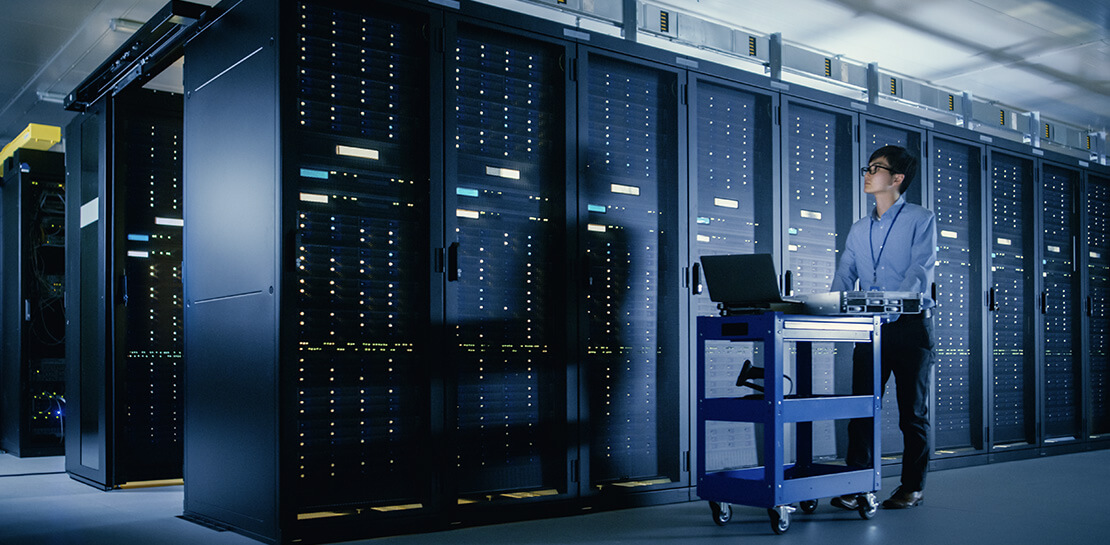
What does this mean for enterprises? For the purposes of this series, edge means you can now go beyond the corporate network, beyond cloud VPCs, and beyond hybrid. The modern edge is not sitting at a major remote data center, nor is it a CDN, cloud provider, or in a corporate data center rack — it’s just as likely to look like 100 of these attached to a thousand sensors.
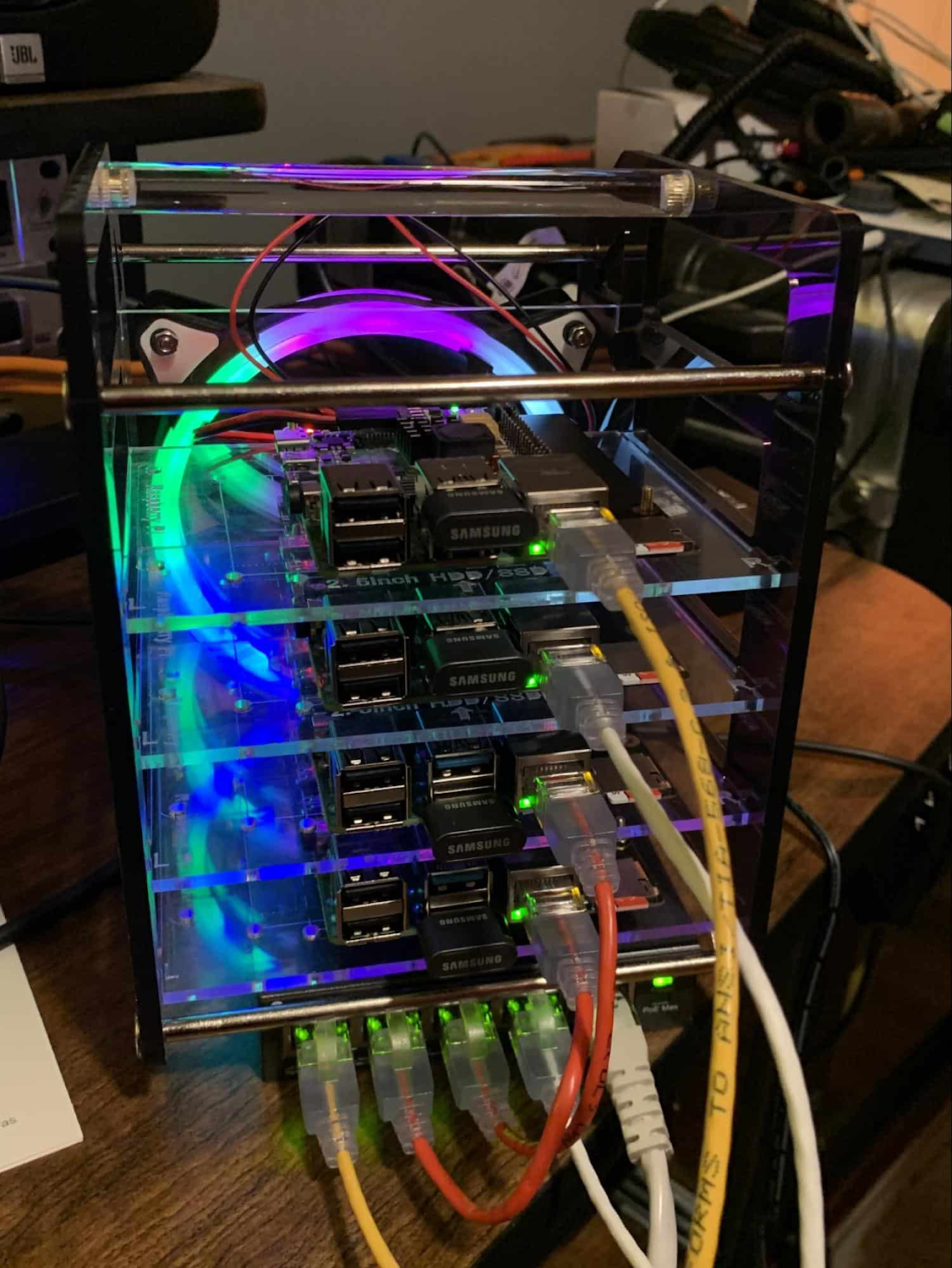
Edge, in short, is about having hardware and devices installed at remote locations that can process and communicate back the information they collect and generate. The edge management challenge, meanwhile, is being able to push configuration and software/model/media updates to these remote locations when they are connected.
Enable new use cases
Today, we have reached a new threshold for edge computing — one where micro-data-processing centers are deployed as the edge of a fractal arm, as it were. Together, they form a broad, geographically distributed, always-on framework for streaming, collecting, processing and serving asynchronous data. This big, loosely coupled application system lives, breathes and grows. Always changing, always learning from the data it collects — and always pushing out updated models when the tendrils are connected.
Right now, the rise of 5G is pushing the limits of edge even further. Devices enabled with 5G can transmit using a mobile network — no ISP required — enabling connectivity anywhere within reach of a cell tower. Granted, these networks have lower bandwidth, but they are often more than adequate for certain types of data, for example fire sensors in forests bordering remote towns that emit temperature or carbon monoxide data periodically. Recently, Google Cloud partnered with AT&T to enhance business use of 5G edge technology but there is so much more that can be done.
Reduce data center investments
In addition to enabling the digitization of a broad range of new use cases, adopting edge can also benefit your existing data center.
Let’s face it: data centers are expensive to maintain. Moving some data center load to edge locations can reduce your data center infrastructure investment, as well as compute time spent there. Edge services tend to have much lower service level objectives (SLOs) than data center services, driving lower levels of hardware investment. Edge installations also tend to tolerate disconnectedness, and thus function perfectly well with lower SLOs — and lower costs.
Let’s look at an example of where edge can really reduce costs: big data. Back in the day, we used to build monolithic serial processors — state machines — that had to keep track of where they were in processing in case of failure. But time and again, we’ve seen that smaller, more distributed processing can break down big, expensive problems into smaller, more cost-effective chunks.
Starting with the explosion of MapReduce almost 20 years ago, big-data workloads were parallelized across clusters on a network, and state management was simplified with intermediate output to share, wait for, or restart processing from checkpoints. Those monolithic systems were replaced by cheaper, smarter, networked clusters and data repositories where parallel work could be executed and rendered into workable datasets.
Flash forward to today, and we are seeing those same concepts applied and distributed to edge data-collection points. In this evolution of big data processing, we are scaling up and out to the point where observation data is so massive that it must first be prefiltered, and then preprocessed down to a manageable size and still be actionable. Only then should it be written back to the main data repositories for more resource-intensive processing and model building.
In short, data collection, cleanup, and potentially initial aggregation happens at the edge location, which reduces the amount of junk data sitting in costly data stores. This increases performance of the core data warehouse, and reduces the size and cost of network transfers and storage!
The edge is a huge opportunity for today’s enterprises. But designing environments that can make effective use of the edge isn’t without its challenges. Stick around for part two of this series, where we look at some of the architectural challenges typically encountered while designing for the edge and how we begin to address them.
More Relevant Stories for Your Company

How Machine Learning in G Suite Helps Employees of Dalmia Bharat Discover the Next Big Idea
Creating expense reports, Email management, formatting documents: Your time is caught in the quicksand of formatting, tracking, analysis or other mundane tasks. These are just some of the time-sinks that can affect your—and your employees’—productivity at work. At Google Cloud, this is referred to as “overhead”—time spent working on tasks

New ways Google Workspace works with tools you already use
Looking back on 2020, it’s clear that the ways we work have rapidly transformed—from the rise of remote work and increasingly digitized processes, to balancing time across work and personal responsibilities. But one thing hasn’t changed—businesses still rely on a staggering number of applications to get work done. Working from

Celebrating Google Cloud and State of Wyoming’s Decade of Partnership!
When Wyoming became the first state to transition all its employees to Google Workspace ten years ago, everyone expected a million dollars in cost savings. What started as a move to save money and ease communication has turned into much more. While the cost savings continues to be significant, state efficiency skyrocketed, allowing

Reactive Programming on Google Maps Platform: Watch Video to Learn
The Google Maps Platform Android SDK supports extensions for reactive programming, which helps you write code to handle asynchronous operations. Write reactive and responsive mapping applications with Google Maps Platform In mobile apps, asynchronous events can happen at any point in time: user touch events, waiting for network calls to complete, or
