





6 ways Google Workspace helps IT admins safely use BYOD

4182
Of your peers have already read this article.
6:30 Minutes
The most insightful time you'll spend today!
Many organizations, including Google, have moved quickly to embrace working from home. With this widespread remote work, it’s never been more important for IT admins to be certain that every device in their organization is secure, even when that device isn’t company-owned.
We pioneered zero-trust security through our BeyondCorp strategy and leverage it to offer advanced security for G Suite* users to protect secure access for all devices. Admins can enforce these controls across G Suite and other corporate applications and data, ensuring consistent security and user experience across your organization.
Today, we’re laying out six key controls that IT admins can use within G Suite to help keep their organizations safe when using the bring your own device approach (BYOD). You can also review our detailed security checklist here, and learn more from our course on Managing G Suite here.
Secure mobile and desktop devices with endpoint management

BYOD devices can differ widely across an organization, with a range of OS versions, hardware modes, patch versions, and more, so it’s impossible to rely on a one-size-fits-all approach to device management. With Google endpoint management, IT admins can easily support a variety of mobile and desktop devices by enforcing measures like minimum software versions and blocking jailbroken or rooted devices, in many cases without requiring full device rights for employee privacy.
When it comes to managing mobile devices, G Suite offers basic and advanced mobile device management:
- With basic mobile device management, BYOD devices are secured with baseline security features with no end user friction. Admins can enforce a passcode, get a device inventory, wipe Google accounts remotely, and even remotely install applications on Android devices.
- With advanced mobile device management, admins can apply more policy controls over BYOD devices, and Android users can keep their personal data private and separate from their work data with Android Work Profiles. You can also allow and manage work apps on iOS and Android devices.
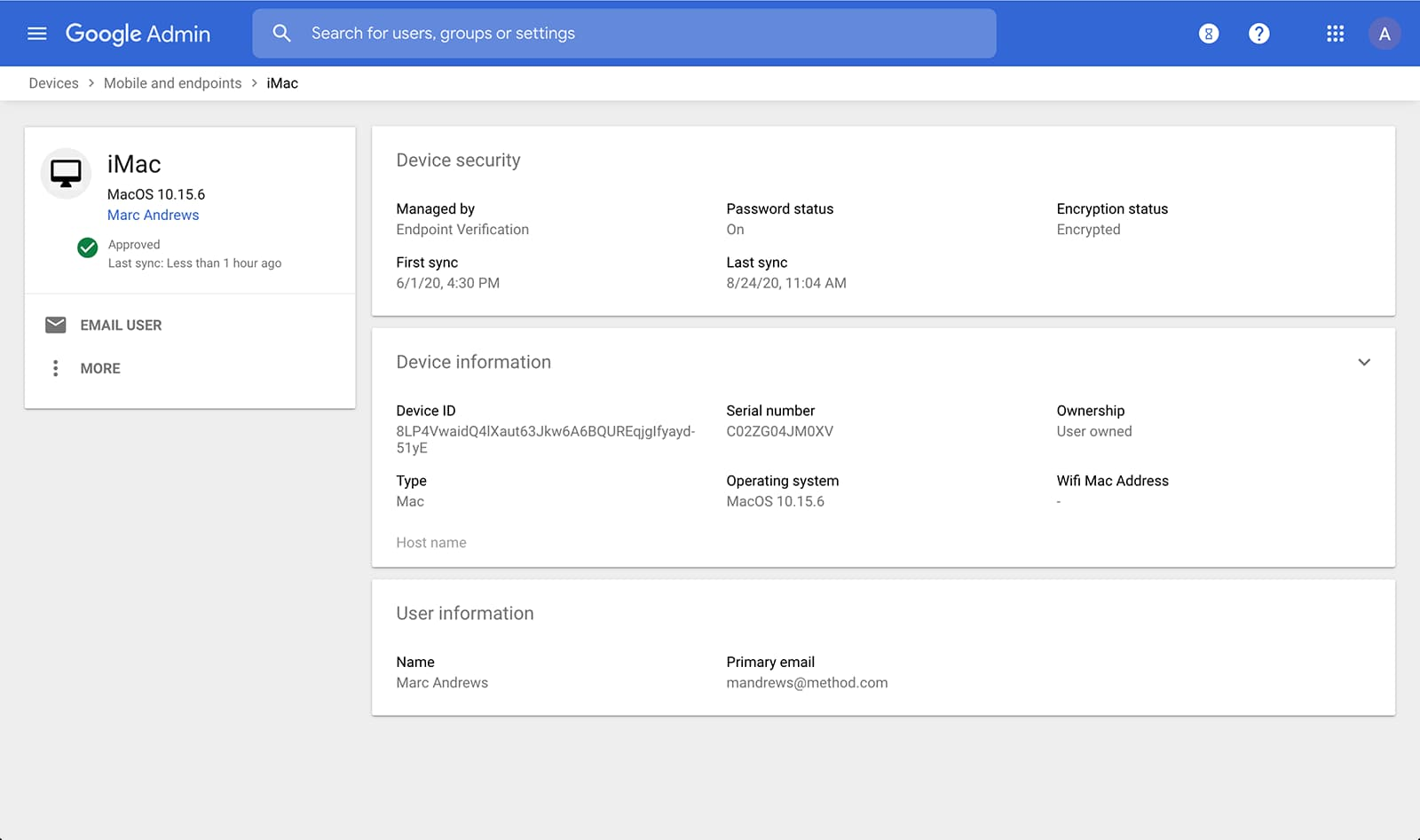
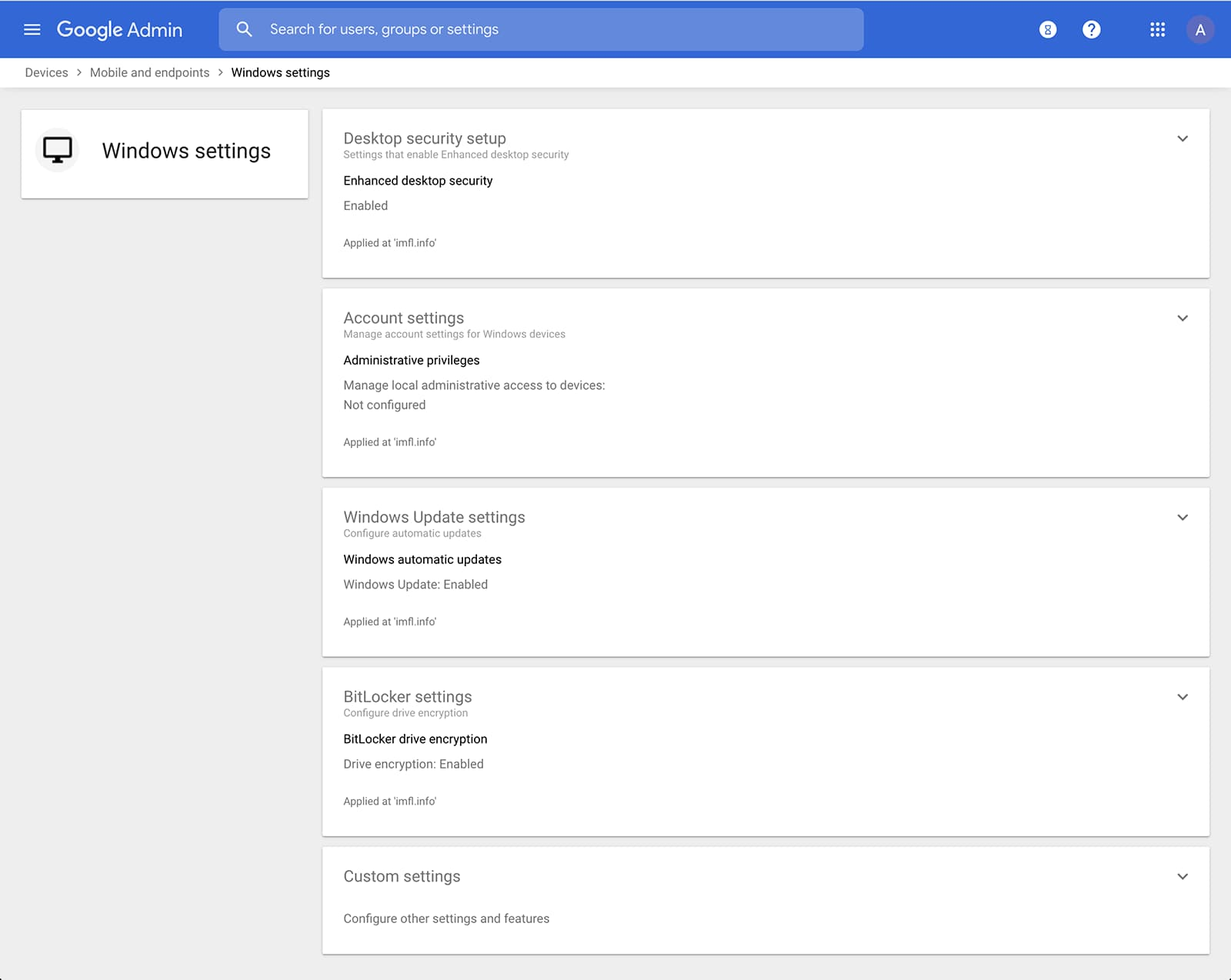
Admins can also manage and secure desktop devices with fundamental device management and enhanced desktop security for Windows. With fundamental device management, when a user logs into G Suite through any browser on a Windows, Mac, Chrome, or Linux device, that device will be automatically enrolled with endpoint management. This provides a base level of security to every desktop device that accesses G Suite data. With enhanced desktop security for Windows, admins can easily manage and secure Windows 10 devices through the admin console.
Enable secure connections without a corporate VPN using context-aware access
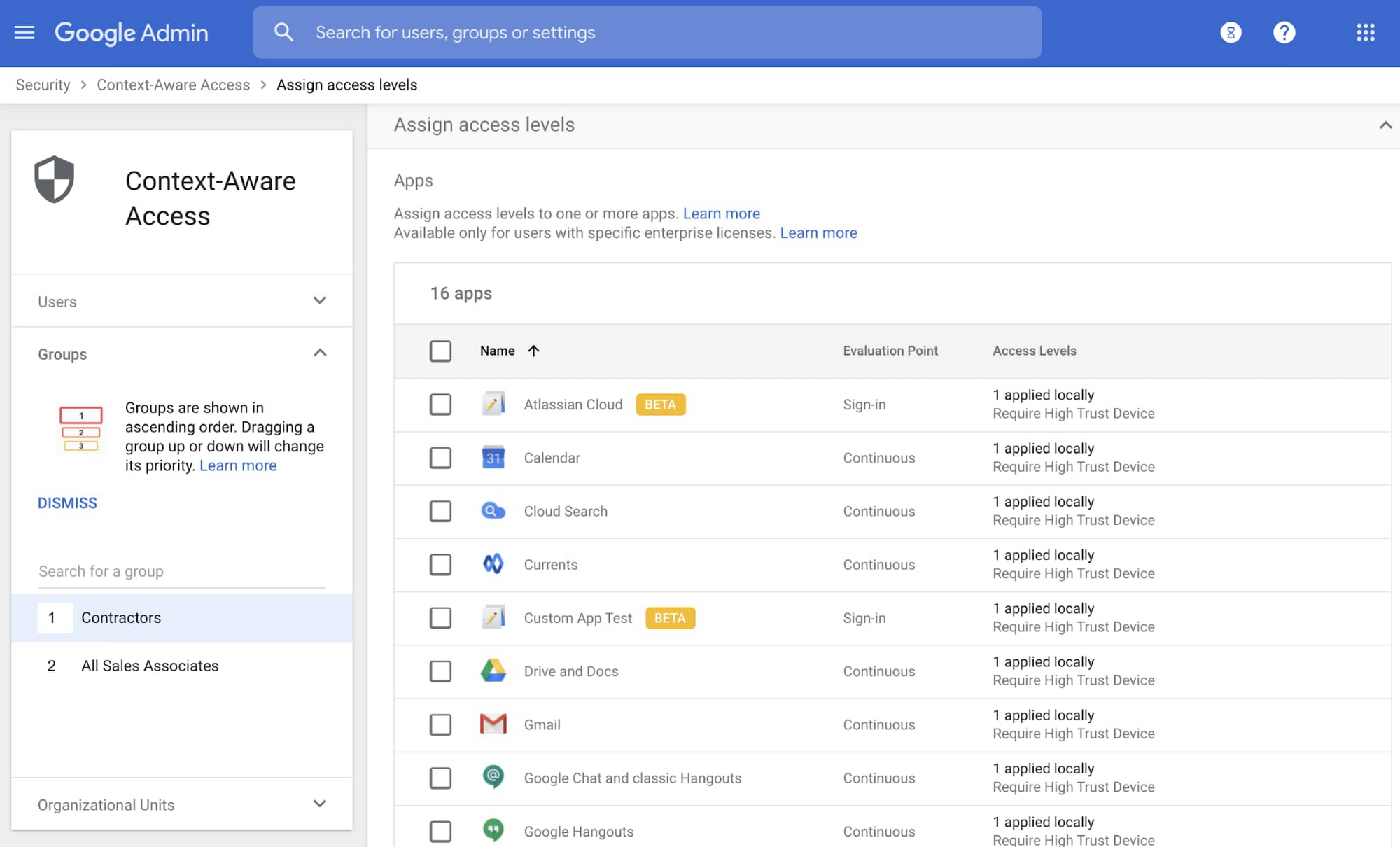
Context-aware access offers protection from unwanted access to G Suite services without the need for a VPN, and allows admins to set up different access levels based on a user’s identity and the context of the request, taking into account factors such as the country, device security status, and IP address of the request. For example, you can require BYOD devices accessing G Suite to meet encryption and password requirements, or restrict contractors from accessing G Suite from company managed Chromebooks.
Control data access with app access control
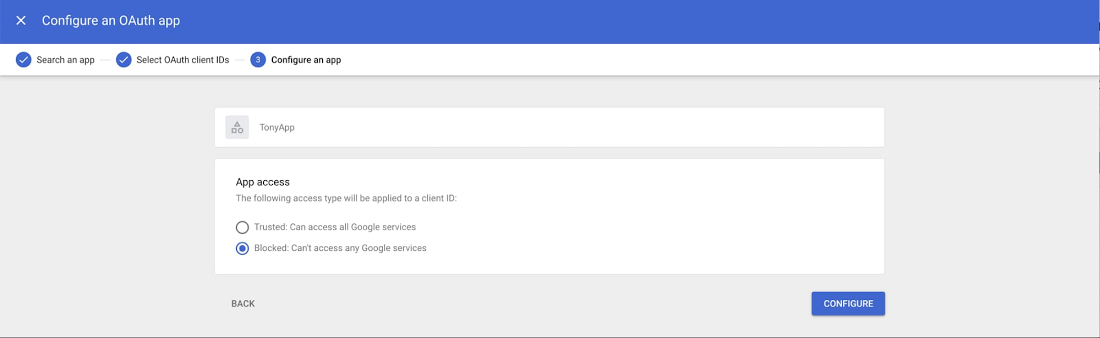
It’s important to protect all devices in your organization—corporate or BYOD—from malicious apps trying to gain access to corporate data. Using app access control, admins can take steps to prevent these apps from tricking users into mistakenly granting access to corporate data. With this feature, admins can choose which third-party apps are allowed to access users’ G Suite data by explicitly trusting, limiting, or blocking access for apps.
Enforce 2-Step Verification
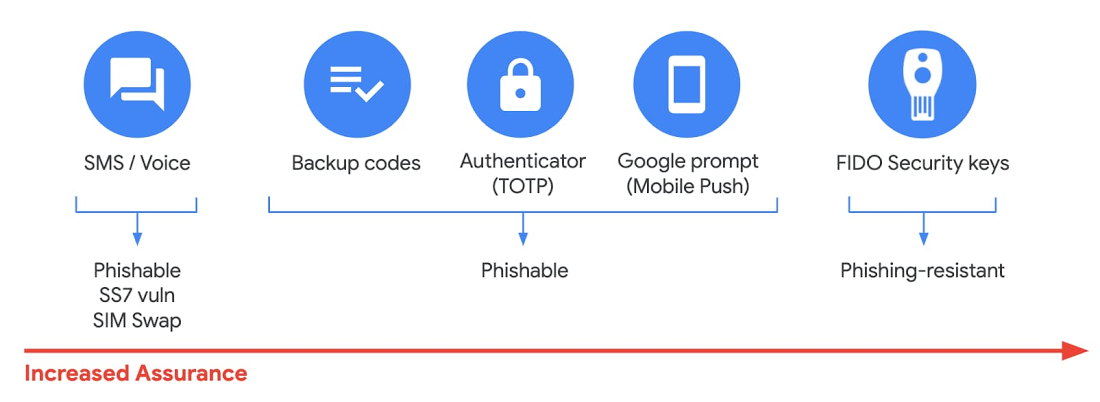
With 2-Step Verification, admins can reduce the risk of unauthorized access by asking users for additional proof of identity when signing in. And you can now use the Advanced Protection Program—our strongest protection for users at risk of targeted attacks. With the Advanced Protection Program for the enterprise, we’ll enforce a specific set of policies for enrolled users including security key enforcement, blocking access to untrusted apps and enhanced scanning for email threats
If you choose not to use security keys for any reason, you have multiple other options to enforce 2-Step Verification on BYOD devices. For Android and iOS, you can use Google prompt, Google Authenticator, text message, or phone call options for a second verification step.
Prevent data loss and leakage with data loss prevention
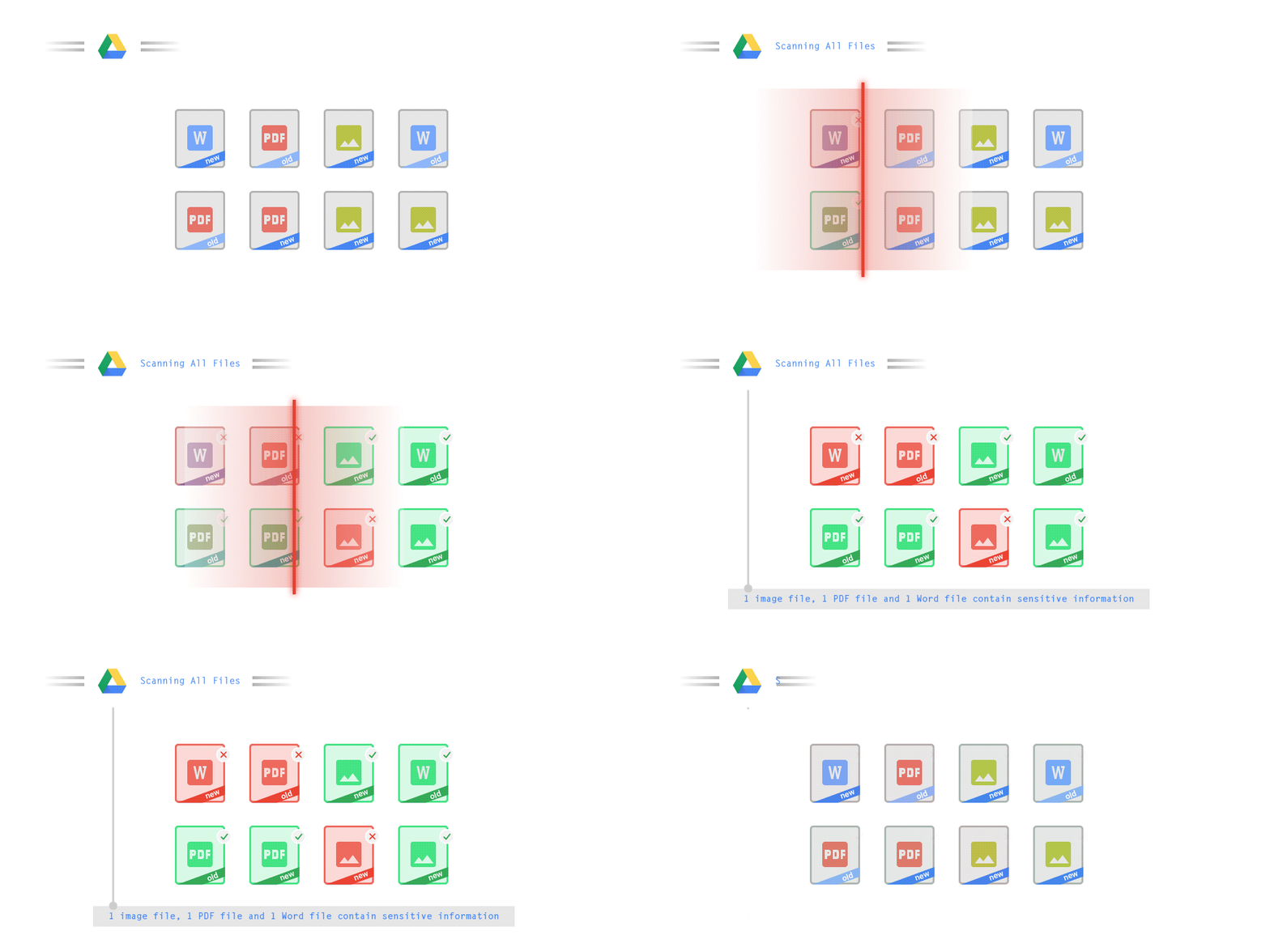
We know that as an admin, one of your highest priorities is to keep internal information safe and secure. That’s why we developed data loss prevention (DLP) policies to help protect sensitive information in Drive, Docs, Sheets, Slides, and Gmail from loss, misuse, or being accessed by unauthorized users. With G Suite DLP, admins can choose which types of data are sensitive and exactly how to protect them. Our controls enable easy detection of a wide variety of common info types, and administrators can supplement this with custom content detectors to meet their organization’s needs. You can also classify files in Drive automatically using DLP rules (beta) to categorize your data by sensitivity levels. DLP works on all the devices in your organization, including BYOD ones, since the protection is at the data and application level.
In addition to DLP, you can use DXP for iOS devices to restrict the copy/pasting of G Suite data to other accounts, personal or otherwise. DXP for iOS can also restrict users’ ability to drag and drop files from specific apps within their G Suite account. Similarly, you can use Google endpoint management to configure Android devices to prevent data sharing between personal and work profiles.
Make retention and eDiscovery possible on all your devices with Vault

To support your organization’s retention and eDiscovery needs, Vault enables corporate data that’s stored in G Suite and accessed by BYOD devices to be available for all your information governance needs. No matter the owner of the device, your organization’s data stored in Gmail, Drive, Chat, Groups, Voice, and Meet are accessible to Vault.
Using the zero-trust security model, the G Suite features above work together to keep your data protected and organization secure across all devices, whether they’re corporate-owned or BYOD.
(*Google Workspace was previously G Suite)
Google Cloud’s Journey about Building DEI into Business

3881
Of your peers have already read this article.
1:30 Minutes
The most insightful time you'll spend today!
Diversity, equity, and inclusion (DEI) are more than buzzwords, they are critical components of workplace culture that have real, tangible impacts on your entire organization. Well-executed and robust DEI initiatives ensure that every single employee feels welcomed and valued when they are at work. And that’s not all—done right, DEI will create a thriving environment that fosters increased engagement, productivity, and ultimately, new innovation.
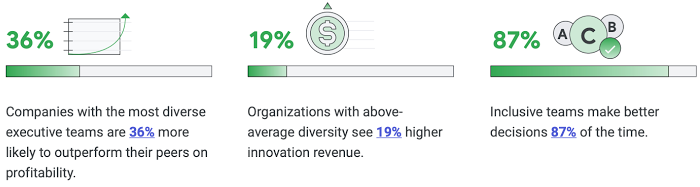
Now, more than ever there is more urgency to incorporate diversity and inclusion into every aspect of your business. Not only because it enhances your ability to be responsive to users and customers, but because it builds trust and a sense of belonging for your employees.
So, how do you build a representative workforce and inclusive teams?
Read our short eBook to learn steps you can take to build DEI into your business along with insights from our own journey at Google Cloud.
No-code Development Platforms Help Employees Reclaim their Time and Talent

3882
Of your peers have already read this article.
4:00 Minutes
The most insightful time you'll spend today!
As offices reopen, businesses aren’t keeping to a single formula. Many are embracing hybrid models, with employees splitting time between home and the office. Some are staying 100% remote. Others are returning the full workforce to offices with a greater focus on digitization.
Regardless of their model, one thing is certain: technology is more central than ever to organizations’ ability to work smarter and more effectively. In particular, organizations need technology that can be tailored to specific business needs. For example, a retail store manager may need a way to ensure improved sanitation practices, or office workers may need to create an app to manage desk reservations.
Google Workspace can help by bringing together everything you need to get things done, all in one place—including the ability to build custom apps and automations with AppSheet. AppSheet, Google Cloud’s no-code development platform, lets employees–even those with no programming experience–reclaim their time and talent by building custom apps and automations.
Building solutions with AppSheet is often easier and faster than traditional coding, as AppSheet leverages Google’s machine learning expertise to help you quickly go from idea to solution, helping your business to match the pace and agility that today’s landscape requires. In this article, we’ll explore how you can use AppSheet to create custom solutions that will help your business adapt to shifting business needs. To illustrate, we’ll focus on a use case many businesses face: reservation and management of meeting rooms and other office resources, but this process can easily be adapted for a wide variety of use cases, from apps for retail pickup to incident reporting and more.
Simplify and centralize with apps
The first thing to consider is whether your solution would be best managed via a custom interface. If you’re trying to simplify a process for someone, such as inspections or inventory tracking, or centralize information, such as resource portals or events calendars, creating a custom app is the way to go.
For this example app, we created a simple Google Sheet to hold our backend data. Sheets are ideal backend data sources when we know the amount of data will not grow exponentially, especially when piloting to a first office or group of users. We can switch our data seamlessly at any time to a scalable Google Cloud SQL database or other database if needed.
The example app has several worksheets to manage the different buildings, rooms, checkpoints and people (including their roles).

We can build an app in AppSheet directly from our Sheet by selecting Tools > AppSheet > Create an App.
After creating our app, we see an overview of the data that we’ve connected, how pieces of data relate to each other, the views that are presented to the user, and a live interactive preview of the app. Refining the app is intuitive. When you input keywords, for instance, AppSheet surfaces appropriate functionality options that can be further customized. If we have address or location data, it’s automatically turned into a map view that we can further customize.
Our office management app will offer building managers and cleaners administrative features for managing equipment, disinfection schedules, and maintenance information, and it will also offer views for employees to check occupancy and safely reserve desks and equipment.
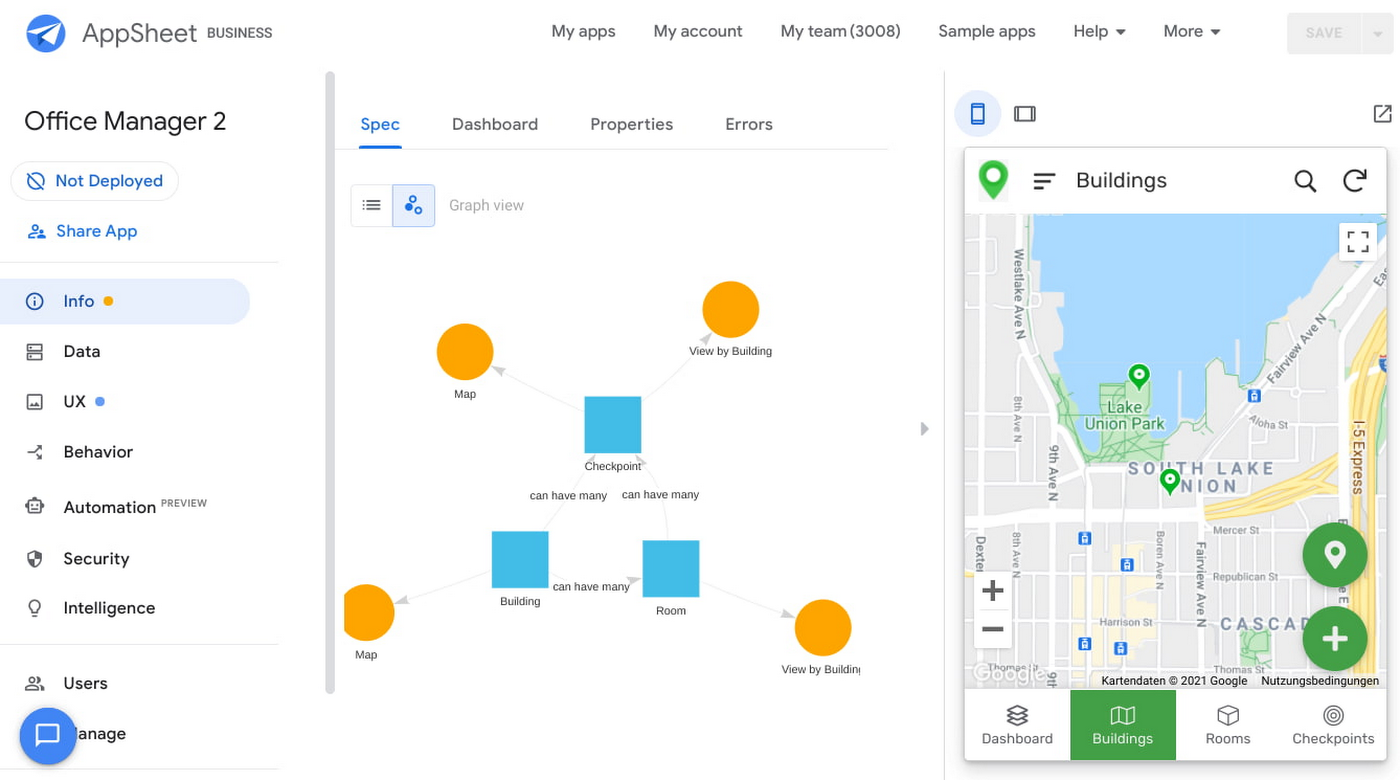
Opening an office and then a room in the app gives us an overview of both the floorplan and the occupancy and reservations for spaces and equipment in the room.
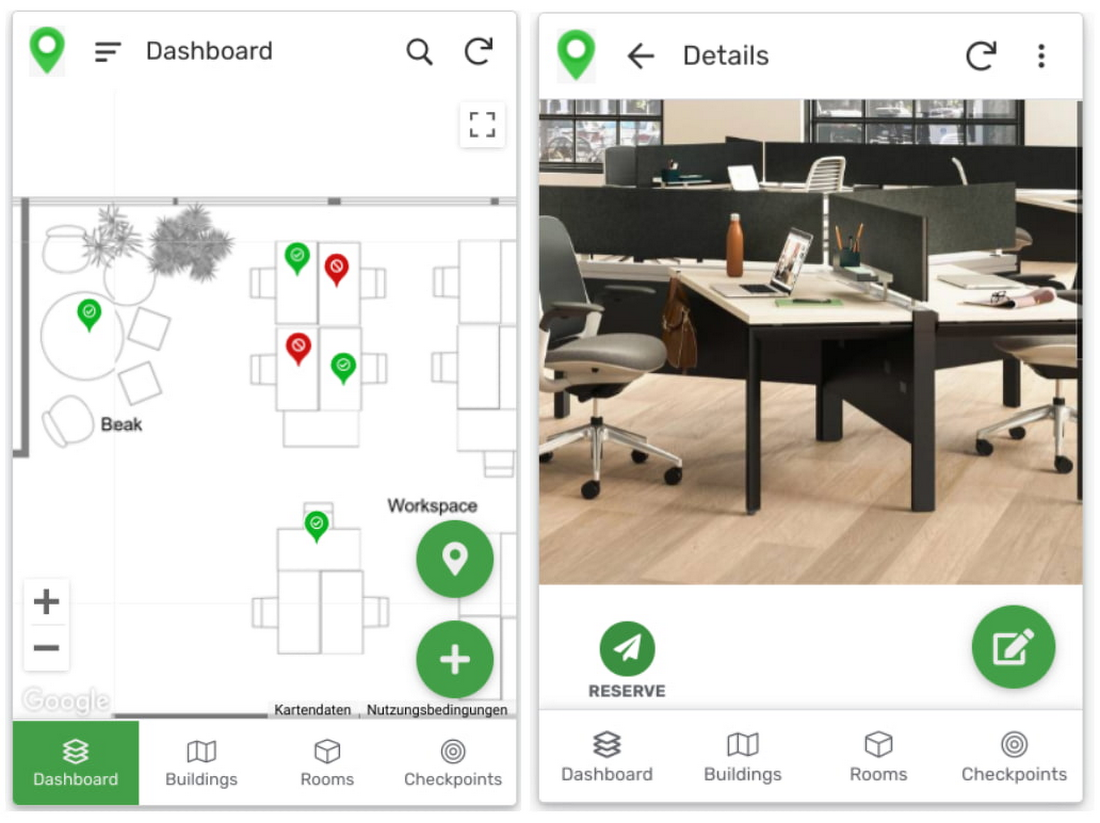
Users can then reserve spaces and equipment in the app, without having to first search for a form or page in the intranet, or even log onto their work computer. The reservation is an automation routine in AppSheet, which performs pre-configured actions when triggered.
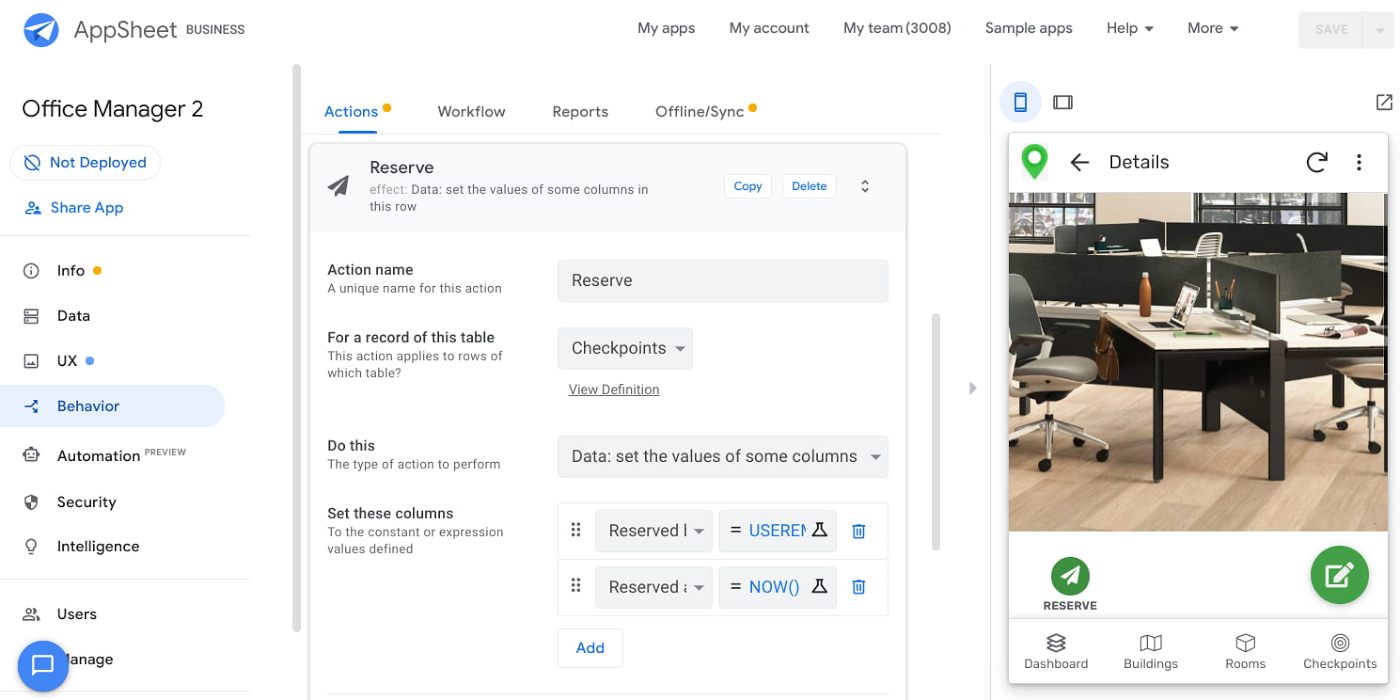
As illustrated in the screenshot above, when the action is triggered either by pressing a button in the app, scanning a QR code, or tapping an RFC tag, the action simply sets the “Reserved by” and “Reserved at” columns to the current user and timestamp.
Streamline with automations
AppSheet Automation, which was recently made generally available, makes it possible to reduce repetitive tasks and streamline processes even further.
In this example, one challenge you may encounter is that users often forget to release a desk or resource when they’re finished, which means those reservations stay blocked until an administrator releases all blocked reservations. However, it’s also important that resources aren’t immediately released, as they first need to be cleaned and disinfected before being made available to new users.
AppSheet Automation can solve this challenge by periodically checking all resources that have been reserved for longer than four hours, then alerting the user to either re-reserve them or release them to be cleaned. If there is no answer, the automation can trigger the resources to be cleaned, then released.

We can configure this as a recurring event, and create a bot that sends the notifications and triggers actions based on the user input (or lack of input).
Optimize for multiple roles
Creating an app for one user is one thing–creating an app that fits the needs of multiple types of users is another. AppSheet has you covered for this kind of complexity because it lets you build multiple roles into a single app.
In our office management app, for example, the office manager can have a particular view and dashboard, and workers in the office can have their own views and functionalities front and center. This makes it possible to automate tasks for all types of users with a single app.
Likewise, AppSheet Automation lets you easily react to real-time changes in data, send notifications to groups of users, and initiate additional workflows using data shared between the app and the users. If a group needs to reserve a conference space for an important late-breaking meeting, for example, there might be ripple effects across a number of user groups. The ability to automate all these updates and interactions can ultimately save a lot of time and effort.
AppSheet also supports advanced features such as QR codes, NFC, and bluetooth sensor integration. This could help users check into locations or workspaces, further streamlining the task of helping people safely navigate and collaborate within the office.
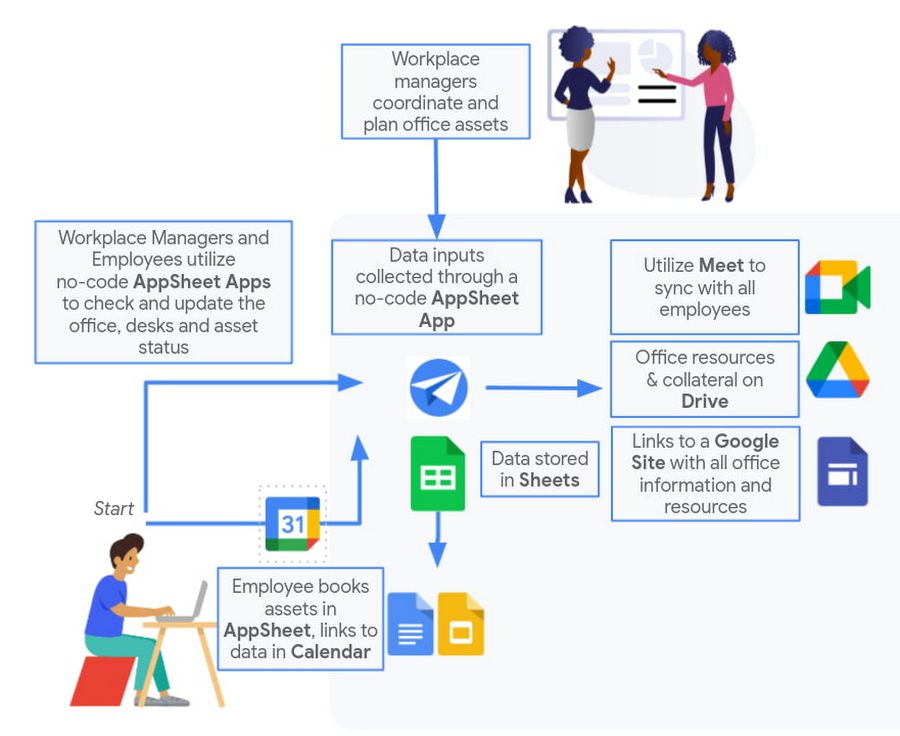
Mission critical solutions, faster than ever
In the past, the type of app explored in this article would have required a central data store, distribution to specific groups of users, management and dashboard capabilities, as well as smartphone sensor integration for NFC and image capturing. This would have necessitated a mammoth implementation project and a team of professional coders.
But with no-code, you can effectively design and implement these requirements in hours and days rather than months and years. Changes can be made on the fly in any browser, including pushing out new versions to users. Though AppSheet opens up app building and digital automations to any knowledge worker, it also includes robust security and governance controls, ensuring that as you manage getting employees back into office, you don’t neglect IT security.
Try out your own back-to-the-office app for free today at AppSheet.com, or explore and copy our sample app.
YoungCapital CIO: Why I Moved to Google Cloud and G Suite to Grow Our Business

7291
Of your peers have already read this article.
4:30 Minutes
The most insightful time you'll spend today!
When your business is rapidly adding new employees, expanding to new countries, and always focused on staying ahead of the competition, you have to take a hard look at the tools that are slowing you down—and swap them out for better ones that can keep pace with the company. We’re expanding YoungCapital in Germany, which means more offices, more people, and more technology to make the business run smoothly.
As we scale, Google Cloud tools like Chromebooks and G Suite help us grow our business efficiently. They free us up from sluggish, time-intensive technology that’s hard to maintain and repair, and give us the freedom to work together in faster, smarter ways.
Free from hours of device setup. Some months, there are as many as 40 new employees starting at YoungCapital—and as we continue to expand that number will continue to rise, especially now that we’ve opened three new offices in Germany. With our old Windows desktops, setting up new computers could take up to an hour per employee (which can add up to about 40 hours a month for IT). Today, using Chrome Enterprise tools, it takes about five minutes to get an Acer Spin or Pixelbook ready to hand off to a new hire—saving us more than three months per year of device setup time.
Free from VPNs. Our previous Windows machines required a complicated virtual private network (VPN) for accessing corporate files outside of the office. Using a VPN was complicated for our employees because the software wasn’t intuitive; if an employee had trouble signing into the VPN while at home or traveling, they could not log in and work as quickly as they needed to. With Chromebooks, all you need is an online connection to sign into G Suite to access files and work from anywhere.
From our perspective, Chromebooks are resistant to threats like ransomware and phishing attacks, giving us confidence that our data can stay secure. With Chrome Enterprise Upgrade, our IT admins can strengthen security even further: for example, by enabling advanced security features that help block vulnerabilities, locking down lost or stolen devices right away, and setting device security policies in the cloud so devices everywhere are safer.
Free from infrastructure. We used to have to invest in servers, and then add more time and money to keep them running. Now we don’t have to run the business on infrastructure or hire people to maintain it—we can just use Google’s cloud. NextNovate is helping us make the most of Google Cloud Platform, like integrating some of our proprietary applications with G Suite and building our own add-ons. For example, we created a button for Gmail that connects to our job candidate database; when candidates email us, we can click on the button and see their profiles and work experience.
Free from multiple passwords and logins. Chrome Browser and G Suite with single sign-provider SAML are the portal to all the productivity apps our employees need. Once people log in to G Suite, they don’t have to remember a bunch of other user names and passwords. The IT team loves it too, because we don’t have to spend hours zeroing out passwords and creating new ones.
Free to manage cross-country devices easily in the cloud. Our four-person IT support team, which keeps our systems humming, hasn’t grown, even though we’ve doubled the number of employees. When we were on Windows devices, we fielded roughly 1,800 IT support requests every month. Now we get about 1,300 requests a month, from a much bigger employee base. This translates to nearly 30% fewer requests for our lean support team, which reduces their workload significantly even though we have roughly 20% more employees—all made possible with Chrome Enterprise.
Being free of slow, high-maintenance technology doesn’t just make the IT department happy—people are actually changing how they work. They no longer send files to each other by email or struggle to keep track of versions; they store everything in Google Drive and work together in Google Docs on a single document at the same time. And instead of traveling to other offices, connecting with each other in video conferences on Hangouts Meet has become a completely natural way to do business.
With Chromebooks and G Suite, we’re ready for anything: more new markets, more employees, and more-flexible ways to work together and shake up the staffing industry.
Why I Moved to the G Suite: Rentokil CIO

4444
Of your peers have already read this article.
2:13 Minutes
The most insightful time you'll spend today!
Whether it’s getting rid of pests, cleaning up a crime scene or tending to office plants, Rentokil Initial is a service business whose primary aim is to offer customers the best possible standard. This can only be achieved if teams work closely together, sharing expertise and ideas and communicating constantly.
We used to have 180 email domains and 40 mail systems in place, so finding contact details and responding quickly to colleagues was a challenge. To tackle this, in 2009, we moved 0 business users, including our ‘on the road’ service technicians and salespeople onto a single communications platform, G Suite.
Since switching to G Suite, we’ve saved millions of pounds (£) on IT maintenance and several hundred thousand pounds by cutting the time spent on administrative tasks through using tools such as Google Docs, Sites and Forms. For senior management, Google Hangouts Meet has also proved its worth, saving roughly 54 hours of the senior management’s time a week – that’s over 2,000 hours a year. In addition to maximizing productivity, online sharing through G Suite products has enabled us to spread knowledge and ideas organically across countries and divisions.
Individual teams have fully embraced the opportunity to share knowledge, using the group intranet, powered by Google Sites, to post training videos and access technical images. But it’s not all about official documents and meetings: online sharing is helping us to become a more personal, sociable organization, which is important for staff retention and working culture. Colleagues use our intranet to share personal achievements, from sleeping on the streets for a homeless charity to boxing in international championships, giving a true flavor of the diversity within the company.
Employees at all levels are embracing G Suite to connect with colleagues. For example, our UK Managing Director uses Google+ to post updates and pictures of his ‘road trips’ across the UK and his encounters with colleagues, from the CFO to our longest standing pest control technicians, providing new insight into his role in the business. The ability to connect directly with our executives and create communities amongst our new employees is radically changing and modernizing the culture of our company.
All in all, we’ve been amazed by the journey which G Suite has taken us on, connecting our teams no matter where they are and no matter what they’re doing and making a difference in almost every corner of our business. Thanks to Google we see ourselves as better connected, able to offer a better service to customers and more competitive on a global scale.
4184
Of your peers have already watched this video.
2:00 Minutes
The most insightful time you'll spend today!
How Intuit Solved a Long-standing Dilemma: Frictionless, But Secure, Collaboration
If there’s one thing that the folks at Intuit hold dear, it’s the ability to stay agile.
“Intuit is a 35-year-old start-up. We’re about 9,000 people in eight countries around the world,” is how Atticus Tysen, SVP and CIO, Intuit, describes the company.
Founded in 1983, Intuit is a financial software company that creates financial, accounting, and tax software for small businesses, accountants, and individuals, with revenues of $6 billion. It’s products include TurboTax, QuickBooks, ProConnect, and Mint, among others.
A few years ago, different groups, in different parts of the world, used different tools. “We had a lot of siloed solutions and people worked locally and then emailed attachments and documents,” says Brynna Donn, Director, Collaboration and Productivity at Intuit.
What Intuit needed was a way for teams to work together and collaborate without friction—yet securely. Box for G-Suite did that for them.
“Box for G-Suite has allowed us to enable our global workforce to pick the right tools for collaboration but also have all the information in one place. It makes everything easy to find, govern and manage,” says Tysen.
Find out how Intuit benefitted from Box for G-Suite. Watch this two-minute case study.
More Relevant Stories for Your Company

ShareChat Builds its Diverse, Hyperlocal Social Network. Thanks to Google Cloud
Editor’s note: Today’s guest post comes from Indian social media platform ShareChat. Here’s the story of how they improved performance, app development, and analytics for serving regional content to millions of users using Google Cloud. How do you create a social network when your country has 22 major official languages and

How to Get Over 200 Percent ROI from Your Collaboration Tool
There’s no doubt that Google Cloud is one of the most recognizable user interfaces in the world—everybody knows how to use it to find the information they need. It has upheld this standard of ease-of-use throughout their entire suite of cloud applications for business. Simply put, G Suite—Google Cloud’s collaboration

Quick Recap on Google Cloud: Latest News, Launches, Updates, Events and More
Want to know the latest from Google Cloud? Find it here in one handy location. Check back regularly for our newest updates, announcements, resources, events, learning opportunities, and more. Tip: Not sure where to find what you’re looking for on the Google Cloud blog? Start here: Google Cloud blog 101: Full list

New ways Google Workspace works with tools you already use
Looking back on 2020, it’s clear that the ways we work have rapidly transformed—from the rise of remote work and increasingly digitized processes, to balancing time across work and personal responsibilities. But one thing hasn’t changed—businesses still rely on a staggering number of applications to get work done. Working from
