





5337
Of your peers have already watched this video.
31:30 Minutes
The most insightful time you'll spend today!
Enhancing Collaboration with Sheets, Python, and Google Cloud
See how you can enhance collaboration within your organization using Google Sheets. Watch to learn about a new set of tools to create custom functions that tap into the power of Python and to expose functions in a standardized fashion throughout your organization.
Optimizing Cloud Load Balancing in Hybrid and Multicloud Architectures

2759
Of your peers have already read this article.
3:30 Minutes
The most insightful time you'll spend today!
Today’s enterprise applications are often assembled across distributed environments. This includes the integration of services across multi-cloud, multi-SaaS and on-premises environments. While the approach has the advantage of enabling enterprises to choose the best service available to support their applications, it adds the complexity of delivering services across heterogeneous environments. To solve this, Cloud Load Balancing supports an open cloud strategy, which includes:
- Supporting universal traffic management policies across heterogeneous environment by leveraging open source and open standards
- Enabling a global front-end so applications can leverage a common set of policies and security postures
- Providing tools that give your users the highest possible performance and reliability
Universal traffic management with open source and open standards
Kubernetes is a great solution for managing containers across environments. We believe that traffic management policies should also be supported across environments. Cloud Load Balancing creates homogeneous traffic policies across highly distributed heterogeneous environments by supporting standard-based traffic management in a fully managed solution, and allowing open source Envoy Proxy sidecars to be used on-premises or in a multi-cloud environment, using the same traffic management as our fully managed Cloud Load Balancers.
As enterprises start modernizing services and refactor monolithic applications, they require solutions that can provide consistent traffic management across distributed systems at scale. But organizations want to invest their time and resources innovating and building new applications — not on the infrastructure and networking required to deploy and manage these services. Envoy is an open-source high-performance proxy that runs alongside the application to deliver common platform-agnostic networking capabilities, including:
- New load balancing algorithms, (e.g. round robin, ring hash, least conns)
- Weighted traffic splitting
- Fault injection
- Request mirroring
- Outlier detection
- Additional header transformation options
- Request retries
- Additional backend session affinity options
- Cross-origin resource sharing (CORS)
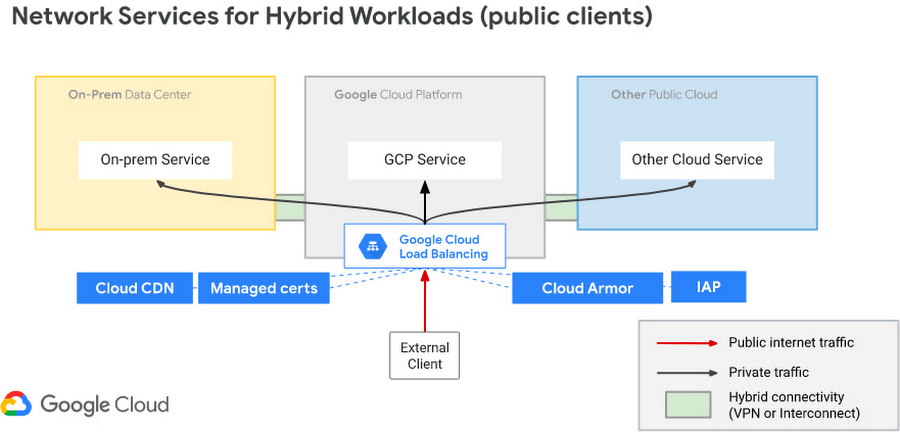
Hybrid Load Balancing across multi-cloud and private clouds
Over the years Google has deployed Load Balancers across 173+ Edge Pop locations, delivering customer applications at massive-scale on Google infrastructure. And now Google Cloud has introduced Hybrid Load Balancing, extending our Load Balancing capabilities beyond Google’s network to on-premises private clouds and multi-cloud solutions. This allows our customers to migrate applications to the cloud iteratively, or build hybrid applications that are assembled from services that are running across heterogeneous environments.
Supporting modern application delivery with HTTP3/QUIC
Cloud Load Balancing is a fully distributed load balancing solution that balances user traffic (HTTP(s), HTTPS/2, HTTPS/3 with gRPC, TCP/SSL, UDP, and QUIC) to multiple backends to avoid congestion, reduce latency, increase security, and reduce costs. It is built on the same frontend-serving infrastructure that powers Google services, supporting millions of queries per second with consistent high performance and low latency.
To serve massive amounts of traffic, Google built the first scaled-out software-defined load balancing, Maglev, which has been serving global traffic since 2008. It has sustained the rapid global growth of Google services, and it also provides network load balancing functions for Google Cloud Platform customers. To accommodate ever-increasing traffic, Maglev is specifically optimized for packet processing performance with Linux Kernel Offload. Maglev is also equipped with consistent hashing and connection tracking features, to minimize the negative impact of unforeseen faults and failures on connection-oriented protocols.
Another key enabler to support this global-scale is that our Cloud Load Balancers are built on top of QUIC(RFC9000), a protocol developed from the original Google QUIC) (gQUIC). HTTP/3 is supported between the External HTTP(S) Load Balancer, Cloud CDN, and end clients. And once enabled, customers typically see dramatic improvements in performance and throughput.

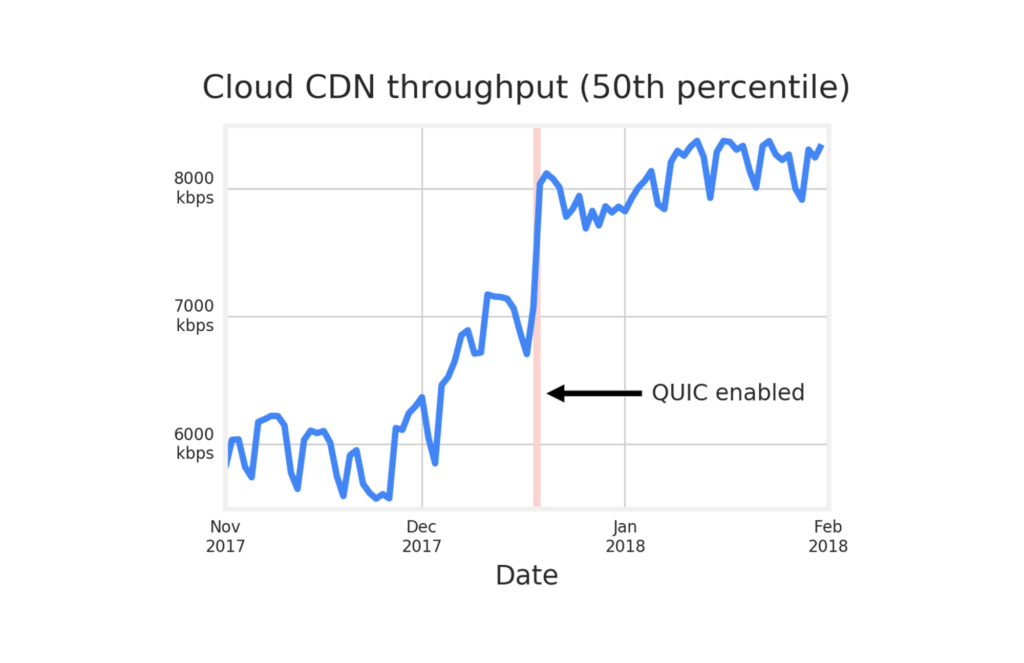
Google Cloud already supports HTTP3 in Cloud Load Balancer. To use HTTP/3 for your applications, you can enable it on your external HTTPS Load Balancers via the Google Cloud Console or the gCloud SDK with a single click.
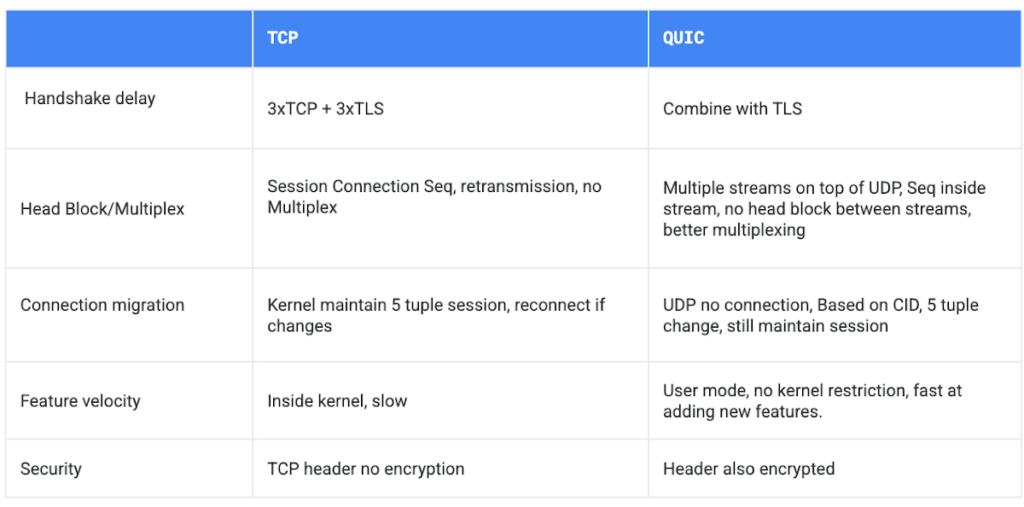
If your service is sensitive to latency, QUIC will make it faster because it establishes connections with reduced handshakes. When a web client uses TCP and TLS, it requires two to three round trips with a server to establish a secure connection before the browser can send a request. With QUIC, if a client has connected with a given server before, it can start sending data without any round trips, so your web pages will load faster.
QUIC has advantages over legacy TCP as follows.
Summary
Since 2008, Google has been an innovator in software-defined networking, supporting applications running at massive scale. Google Cloud Load Balancers support HTTP3 and QUIC as a next generation web transport protocol, which significantly improves customer traffic latency. Google Load Balancers also have incorporated the Envoy proxy as a foundational technology, providing our customers with advanced traffic management that’s compatible with the open source Envoy ecosystem. This allows our users to have the choice to combine Google’s fully-managed Cloud Load Balancers with open source Envoy Proxies, to enable consistent traffic management capabilities across a multi-cloud distributed environment. And with Hybrid Load Balancing, customers can leverage our 173+ world wide PoPs to seamlessly manage traffic across Google Cloud, on-premises and other cloud providers.
Google Cloud Load Balancers include all these capabilities natively. And when used together, they support globally-scaled applications that run seamlessly across the heterogeneous environments many enterprises deploy today.
Your Guide to Kubernetes Best Practices

3425
Of your peers have already read this article.
2:30 Minutes
The most insightful time you'll spend today!
Kubernetes made a splash when it brought containerized app management to the world a few years back. Now, many of us are using it in production to deploy and manage apps at scale. Along the way, we’ve gathered tips and best practices on using Kubernetes and Google Kubernetes Engine (GKE) to your best advantage. Here are some of the most popular posts on our site about deploying and using Kubernetes.
- Use Kubernetes Namespaces for easier resource management. Simple tasks get more complicated as you build services on Kubernetes. Using Namespaces, a sort of virtual cluster, can help with organization, security, and performance. This post shares tips on which Namespaces to use (and not to use), how to set them up, view them, and create resources within a Namespace. You’ll also see how to manage Namespaces easily and let them communicate.
- Use readiness and liveness probes for health checks. Managing large, distributed systems can be complicated, especially when something goes wrong. Kubernetes health checks are an easy way to make sure app instances are working. Creating custom health checks lets you tailor them to your environment. This blog post walks you through how and when to use readiness and liveness probes.
- Keep control of your deployment with requests and limits. There’s a lot to love about the scalability of Kubernetes. However, you do still have to keep an eye on resources to make sure containers have enough to actually run. It’s easy for teams to spin up more replicas than they need or make a configuration change that affects CPU and memory. Learn more in this post about using requests and limits to stay firmly in charge of your Kubernetes resources.
- Discover services running outside the cluster. There are probably services living outside your Kubernetes cluster that you’ll want to access regularly. And there are a few different ways to connect to these services, like external service endpoints or ConfigMaps. Those have some downsides, though, so in this blog post you’ll learn how best to use the built-in service discovery mechanisms for external services, just like you do for internal services.
- Decide whether to run databases on Kubernetes. Speaking of external services: there are a lot of considerations when you’re thinking about running databases on Kubernetes. It can make life easier to use the same tools for databases and apps, and get the same benefits of repeatability and rapid spin-up. This post explains which databases are best run on Kubernetes, and how to get started when you decide to deploy.
- Understand Kubernetes termination practices. All good things have to come to an end, even Kubernetes containers. The key to Kubernetes terminations, though, is that your application can handle them gracefully. This post walks through the steps of Kubernetes terminations and what you need to know to avoid any excessive downtime.
For even more on using GKE, check out our latest Containers and Kubernetes blog posts.
Reactive Programming on Google Maps Platform: Watch Video to Learn

5313
Of your peers have already read this article.
1:30 Minutes
The most insightful time you'll spend today!
The Google Maps Platform Android SDK supports extensions for reactive programming, which helps you write code to handle asynchronous operations.
Write reactive and responsive mapping applications with Google Maps Platform
In mobile apps, asynchronous events can happen at any point in time: user touch events, waiting for network calls to complete, or receiving push notifications, to name a few. As an app developer, accounting for these events and composing them with other asynchronous events can be challenging. Reactive programming is an alternative to passing callbacks for different events and helps simplify the process of working with asynchronous events. In reactive programming, events are modeled as a stream, emitting items over time.
https://youtube.com/watch?v=1TmJvOZfBVQ%3Fenablejsapi%3D1%26
There are two libraries you can use to write reactive code: Kotlin Flows and RxJava. The next two videos show you how to use each one.
Writing reactive and responsive mapping applications using Kotlin
If you’re a Kotlin developer looking to use Coroutines and Flows, the KTX library allows you to use Kotlin Flows to receive events. The Maps KTX library includes extension functions that return Kotlin Flow objects, so you can listen to events in a reactive manner. Unlike suspending functions, which return a single value, Kotlin Flows can return several values over time. For example, you can use a Flow to receive camera event changes over time. To get started using Kotlin Flows in your app, include the Maps KTX library in the dependencies section in your build.gradle file.
https://youtube.com/watch?v=Cotx1ZmEYg8%3Fenablejsapi%3D1%26
Creating reactive maps on Android with RxJava
Integrate Google Maps Platform SDKs with popular Android library RxJava. RxJava is the Java implementation of Reactive Extensions, which is a library for composing asynchronous and event-based programs using observable sequences. One thing RxJava does is allows you to convert callback-based asynchronous code into a chain of transformations. Learn how this works and the other ways you can use RxJava in the third video in this series.
https://youtube.com/watch?v=AgGE7fAMrdA%3Fenablejsapi%3D1%26
We hope you learn more about reactive programming concepts to help you build responsive and reactive mobile apps in this three-part YouTube series. Have ideas for helpful videos you’d like to see on our channel? Leave a comment on any of our videos. And don’t forget to subscribe to our YouTube channel for the latest updates, tutorials, customer stories, and more.
For more information on Google Maps Platform, visit our website.
The Latest in Spring Cloud GCP: Upgrading the Sample Bank of Anthos App

1403
Of your peers have already read this article.
3:30 Minutes
The most insightful time you'll spend today!
We’re excited to announce that Spring Cloud GCP version 4.0 is now generally available! In this post, we’ll be describing what the new major version has to offer, and demonstrating the process of using the migration guide on one of our reference architectures, Bank of Anthos.
What’s new?
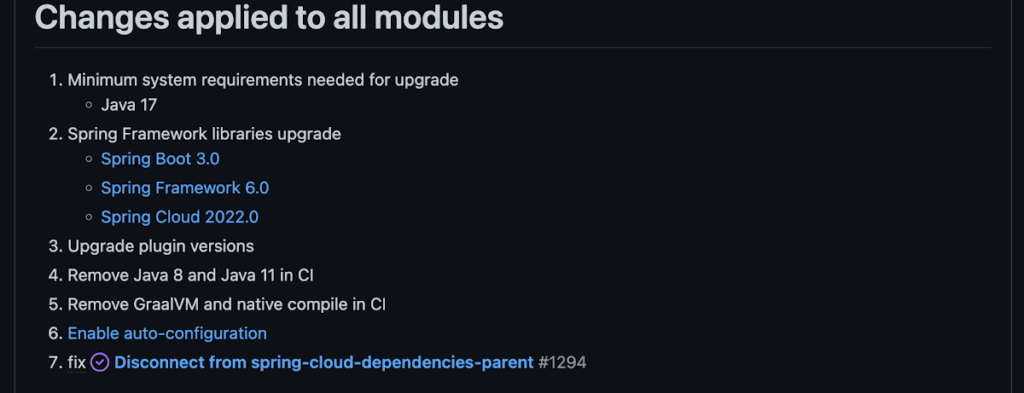
With this release, Spring Cloud GCP officially supports Spring Boot 3.x. However, this migration involves a number of breaking changes as outlined in the migration guide. The full list of changes made is available on Github, but the one of the most significant differences is that Java 17 is now a minimum requirement.
Another notable feature of this release is the addition of starter artifacts – Spring Boot starters for Google Cloud – that provide dependencies and auto-configurations for 80+ Google Client libraries. Just as the name suggests, these starters can serve as helpful starting points when working with a new client library. For now, they’re in preview.
These starters are not included in the BOM by default and need to be added as a dependency to your project before they can be used. For example, if you wanted to get started with Cloud Text-to-Speech, you would include the following:
<dependency>
    <groupId>com.google.cloud</groupId>
    <artifactId>google-cloud-texttospeech-spring-starter</artifactId>
    <version>4.0.0-preview</version>
  </dependency>
The upgrade process
We prepared a migration guide to help answer any questions involved with moving from 3.x to 4.x. Let’s follow those instructions to migrate Bank of Anthos.
We’ll start by cloning and building the application before the upgrade, according to the quickstart and development guide:
PROJECT_ID=<YOUR-PROJECT-ID>
gcloud services enable container --project ${PROJECT_ID}

git clone https://github.com/GoogleCloudPlatform/bank-of-anthos.git
cd bank-of-anthos/

gcloud services enable container.googleapis.com monitoring.googleapis.com \
  --project ${PROJECT_ID}

REGION=us-central1
gcloud container clusters create-auto bank-of-anthos \
  --project=${PROJECT_ID} --region=${REGION}

gcloud container clusters get-credentials bank-of-anthos \
  --project=${PROJECT_ID} --region=${REGION}

skaffold run --default-repo=gcr.io/${PROJECT_ID}/bank-of-anthos
At the end of this, you should see a “deployment stabilized” message:
Deployments stabilized in 9.657 secondsWith the environment set up for development, we’re ready to move on to the actual migration. The migration is already complete at time of writing, but here’s the full list of changes made:
- We began by checking the current Java, Spring Boot and Spring Cloud GCP versions.
- Our Java version is okay, but the other two are out of date, and will need to be updated.
We can also add the Spring Cloud GCP BOM to manage our versions going forward while we’re here.
- Our Java version is okay, but the other two are out of date, and will need to be updated.
- Then, in no particular order, we can make the following code changes:
- Remove the explicit type declarations from our ResponseEntity instantiations.
- Replace all javax.* imports with Jakarta.* counterparts, since Spring 3.0 makes use of Jakarta EE 9.0
With those changes in place, the app is upgraded and ready to re-deploy!
Live example
For a finished example of this migration, check out the Bank of Anthos repository on Github. It’s an excellent sample application that showcases a polyglot Java & Python app, served on Kubernetes and Google Cloud. All CI/CD and configurations are open source, so it may be instructive as you approach this migration.
Thanks for reading, and feel free to provide comments or feedback on Twitter, or in the issues section of the repository.
Google Maps’ Cloud-based Styling Features Betters UX, Control and Flexibility

3366
Of your peers have already read this article.
2:00 Minutes
The most insightful time you'll spend today!
This year at Google I/O, we announced the general availability of Cloud-based maps styling for the Maps JavaScript API. In an effort to provide you with more options and more control to help create the best experience for your users, today we’re releasing new features to Cloud-based maps styling. You may already be familiar with these features from the consumer Google Maps web and mobile apps—Landmarks and Building Footprints. We’re also releasing updates to our industry optimized map styles to provide even more map details while providing the flexibility to craft the best experience for your users. Let’s take a look.
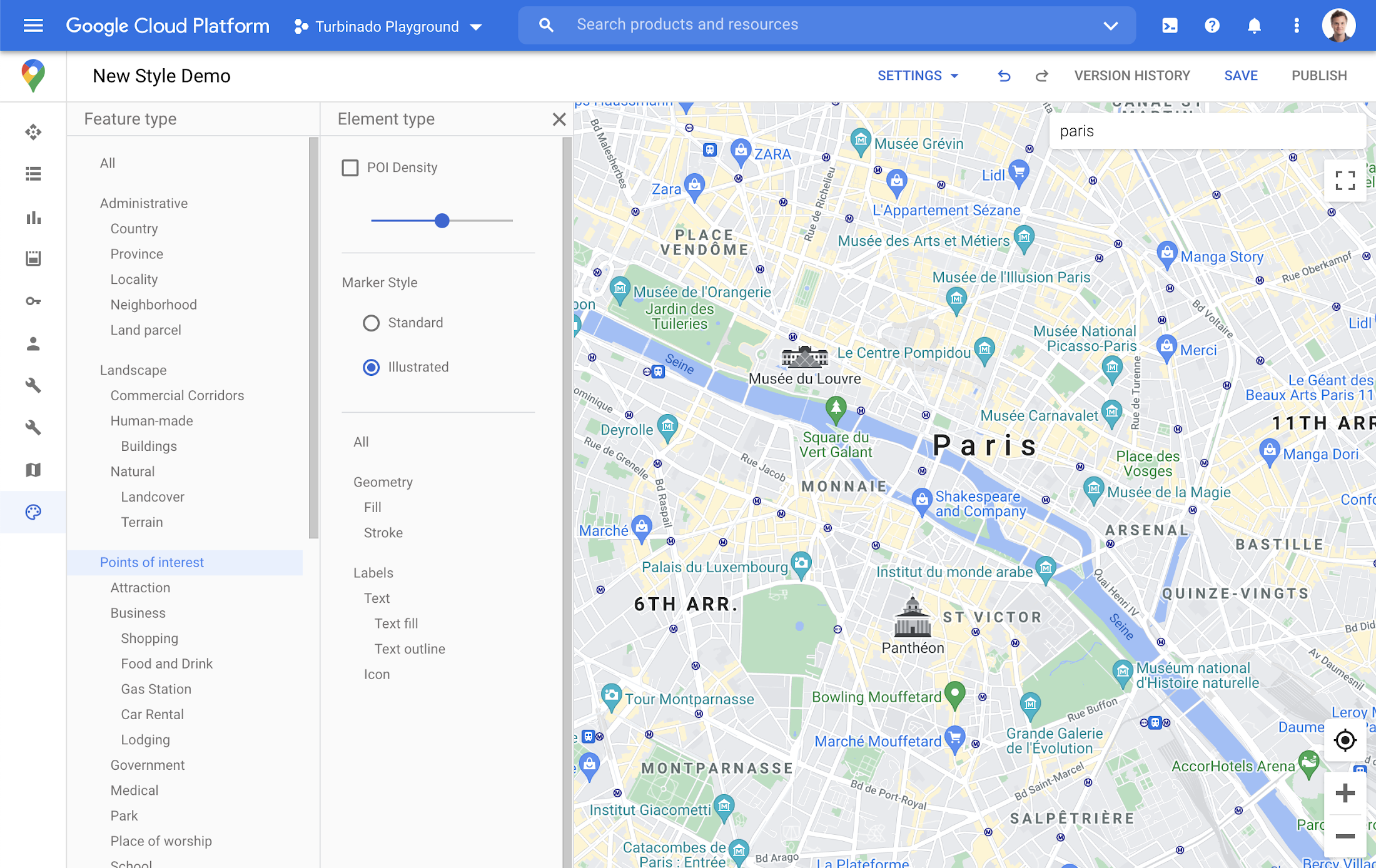
Help users quickly scan and orient themselves with Landmarks
You may have noticed some enhancements for prominent places in the consumer Google Maps web and mobile apps, these landmarks help show your users points of interest that help them orient and navigate cities they are exploring or visiting.

You now have the ability to bring this same experience to your users by creating maps using Cloud-based maps styling. This feature is available in 100 cities globally including New York, Dubai, Paris, Mumbai, and Singapore. To enable landmarks for your map, log into the Cloud console and in our style editor navigate to the Points of interest feature type and select ‘Illustrated’ under Marker Style.
Simplify maps features by switching to Building Footprints
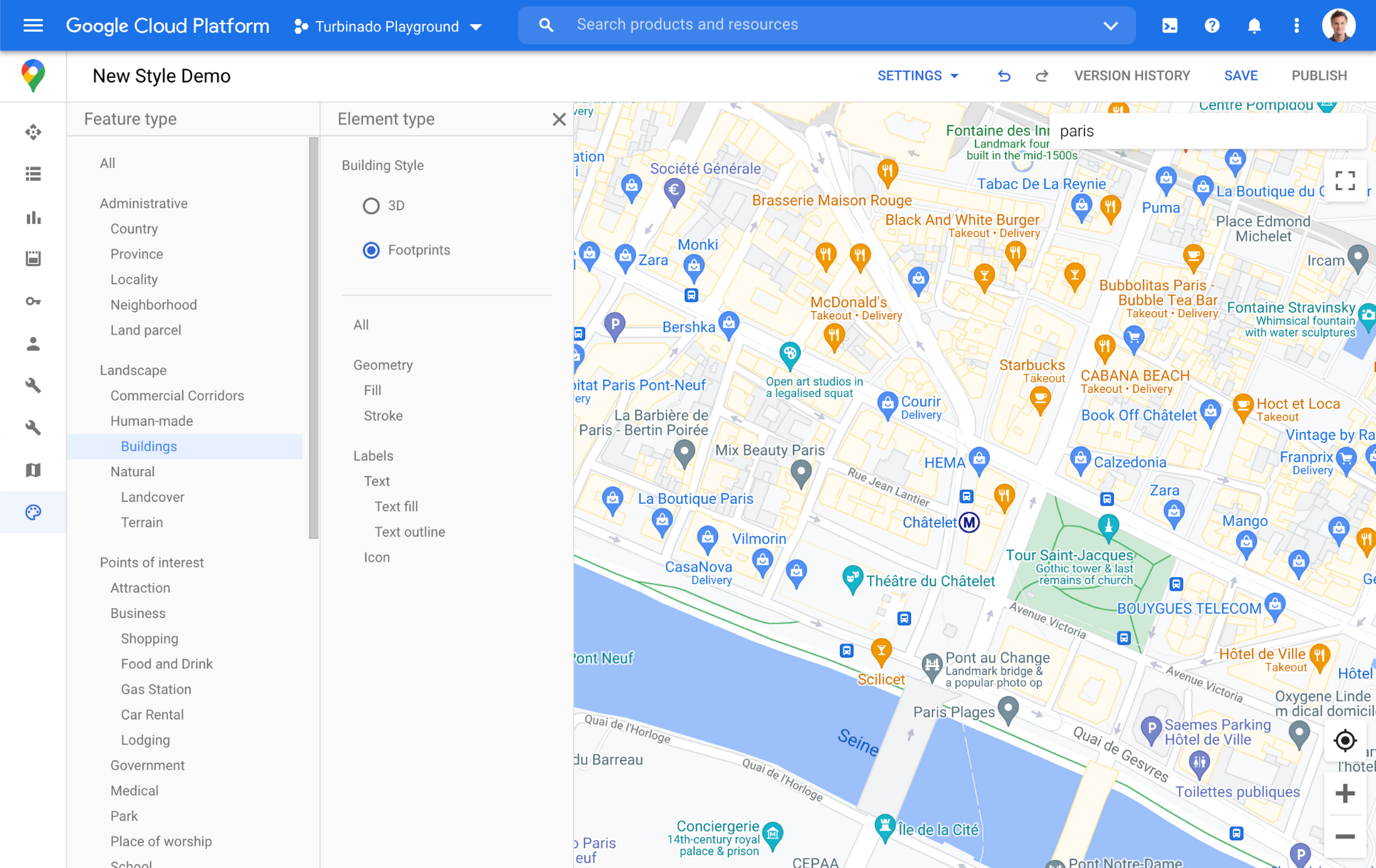
Sometimes less is more. In dense, highly vertical cities, showing 3D building heights can add cognitive load for users. Now, in addition to 3D buildings, we offer building footprints as an option in the style editor. Building footprints can provide a strikingly different basemap balance and composition to better support use cases that may not benefit from the added complexity that 3D buildings can present.

Fill and stroke geometries can also be styled independently to support various color themes. To enable Building Footprints, log into the Cloud console and in our style editor navigate to Buildings and choose ‘Footprints’ under building style.
Industry Optimized Map Styles now include Landmarks and Building Footprints, plus Detailed Street Maps
In January of this year we launched Industry Optimized Map Styles for the travel, real estate, retail, and logistics industries, providing customers with pre-styled map configurations, available via Cloud-based maps styling. Landmarks are now included in all of our Industry Optimized Map Styles and we have turned on Building Footprints in the travel style map. If you are already an Industry Optimized Map Styles user, these new features will be applied to your map with no action needed from you. If you would like to disable these changes, you can use the style editor to turn off these features.
For Industry Optimized Map Styles only, we are also excited to enable Detailed Street Maps. You may have seen these features in our consumer products at Google I/O, released back in August of 2020 for the consumer Google Maps web and mobile apps. Detailed Street Maps are available in San Francisco, New York, London, and Tokyo, and we are targeting expansion to 50 new cities by the end of 2021.
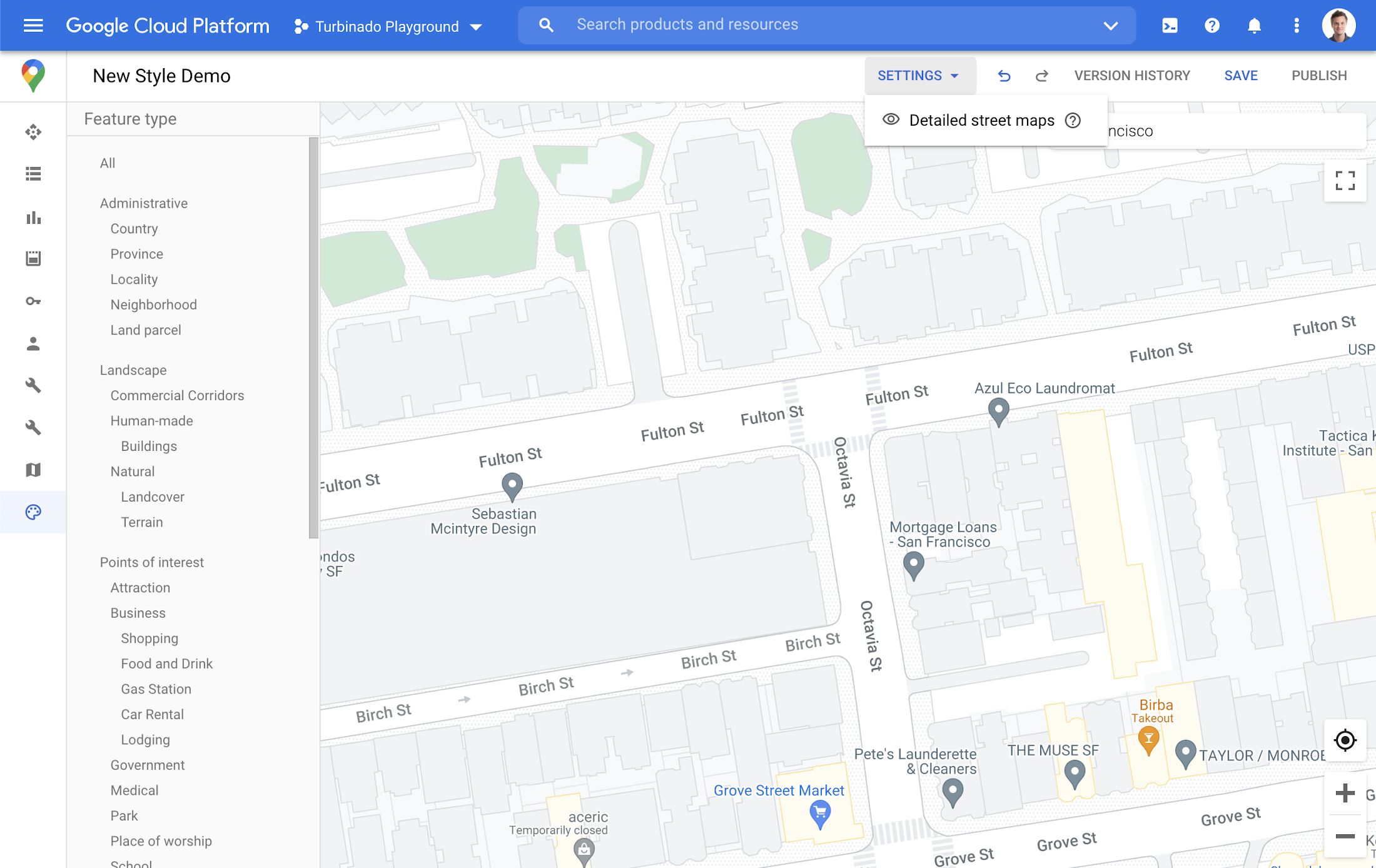
Detailed Street Maps are on by default for all Industry Optimized Map Styles and we created a new settings menu to change the visibility, as needed. We are working on bringing the full styling capability for Detailed Street Maps features to all Cloud-based maps styles in the future.
Landmarks and Building Footprints as well as the updates to Industry Optimized Map Styles are only available via Cloud-based map styling in the Google Cloud Console and are included in Google Maps Platform pricing. Learn more about how to use Landmarks and Building Footprints and Industry Optimized Map Styles. To get started with Cloud-based map styling, check out our documentation for JavaScript.
For more information on Google Maps Platform, visit our website.
More Relevant Stories for Your Company

Why You Should Consider API-first Integration
Enterprises need to move faster than ever to gain a competitive advantage in today’s customer-focused environment. Time-to-market for products and services has shortened dramatically, from years to days. IT teams must move fast, react fast, and enable business strategies via constant innovation. All of this digital transformation is about more

How to Decide Whether to Run a Database on Kubernetes
Today, more and more applications are being deployed in containers on Kubernetes—so much so that we’ve heard Kubernetes called the Linux of the cloud. Despite all that growth on the application layer, the data layer hasn’t gotten as much traction with containerization. That’s not surprising, since containerized workloads inherently have

Managing the API Lifecycle: Design, Delivery, and Everything in Between
Digital is disrupting every industry. From drugstore chains to banks to telcos, businesses are becoming software companies and adopting modern software practices. Why? If they don’t adapt to a new market reality, they will fail. As the business context is changing so is the technology stack. Enterprise application architectures are

How This Leading Trading Company Uses APIs to Build Fintech Apps Quickly and Cost-Effectively
Tradier uses the Apigee API management platform from Google to abstract the legacy complexities of capital markets so that developers can build FinTech applications in an agile, nimble, and quick fashion at minimal cost. The company embodies the evolution of what cloud technology can enable in the form of an API-first business delivered
