






5676
Of your peers have already downloaded this article
5:30 Minutes
The most insightful time you'll spend today!
Cardinal Health Leads the Way in Healthcare App Modernization

2860
Of your peers have already read this article.
3:30 Minutes
The most insightful time you'll spend today!
Apps play a critical role in an ever-expanding range of healthcare services, as patients and providers increasingly expect streamlined, engaging digital experiences. This means that IT must become faster, more agile, and free from the constraints of everyday infrastructure management.
At Cardinal Health, we are continuously enhancing our technology to empower innovators across our organization as they strive to build connections across the continuum of care. Through our efforts, we have adopted a continuous integration and continuous delivery (CI/CD) pipeline that powers breakthroughs and drives innovation. Our CI/CID pipelines use a combination of Cloud Build for foundational elements, as well as our internal DevSecOps platform, NitroDX, to deploy our application workloads built on Google Cloud.
This CI/CD pipeline powered the development of our Pharmacy Marketing Advantage (PMA) Commerce, which was built from the ground up on Google Kubernetes Engine (GKE), to provide independent pharmacists with a digital platform that expands online shopping capabilities for patients by offering more than 11,000 over-the-counter products. We also replatformed our Order Express tool, which is a simple, reliable web ordering application for independent pharmacists, from on-prem to Google Compute Engine and GKE, which allowed us to shift from quarterly releases to weekly on-demand releases.
Our application teams work in close alignment with our product teams and handle everything from basic software updates to more advanced cloud-native app development. We place tremendous value on our ability to empower our application teams, and we invest in tools and technologies to make them as efficient and successful as possible.
As part of our efforts to optimize applications and deliver engaging digital experiences for our customers and their patients, we saw the value of rethinking our approach to storage and overall IT administration. Working with the NetApp Cloud Volume Service (CVS), a fully managed storage service, and Google Cloud, we fundamentally changed our IT capabilities.
Accelerating app development
As a cloud-first company, Cardinal Health has embraced a managed approach to IT provisioning in many areas. When we offload responsibilities like infrastructure maintenance, patching, and updates, we enable our developers to focus on continuous innovations that directly impact the quality of patient and provider experiences.
We’ve made measurable progress in automating our CI/CD pipelines to simplify provisioning Virtual Machines (VMs), managing firewall rules, launching Google Cloud projects, and more. Our NitroDx platform also significantly reduced development time from weeks to minutes, improving the software delivery process and accelerating digital transformation.
Google Cloud is our primary cloud services vendor and has removed much of the heavy lifting related to server provisioning, firmware patches, and similar tasks. We rely on a mix of Google Cloud services, including Compute Engine, GKE, BigQuery, and Vertex AI to deliver patient-centric solutions. We also work closely with partners like NetApp to improve our storage management at a much greater scale and more efficiently than we could do on our own.
By using a combination of NetApp and Google Cloud solutions, we’ve been able to decouple storage from our underlying infrastructure to make better use of our resources and accelerate app development. When running on-prem, shared storage proved to be a time and resource drain.
If an application needed shared storage in our legacy on-prem environment, we had to communicate the requirements to an engineer and create a change control. And even then, if all staff and funding were in place to support the change, it would take weeks to complete. This held up projects and delayed our time to market.
We quickly overcame this challenge with NetApp CVS. Through this tool, we can delegate permissions directly within a teams’ Google Cloud project, allowing them to administer their own shared volumes. This translates to on-demand shared storage without operational complexities or the need for dedicated teams to manage it.
We were an early adopter of NetApp CVS, and we’re happy to have made that decision. In addition to cost savings and faster time-to-market, we can now provide our staff with more professional development opportunities. The team members who made up the dedicated storage team now work across the cloud organization, focused on innovation and enablement rather than maintenance.
A stronger foundation for developers to stand on
We constantly work to fill gaps at any point in the developer experience. Containerizing our apps and deploying to GKE has been a major part of this process, driving efficiencies through consolidation and improving our processes to keep our operating systems patched, updated and maintained.
In the past, it was also difficult for us to get reproducible or CI/CD pipelines into our application spaces. Now, we make things easier for application teams as we can provide a CI/CD pipeline for the containers themselves, automating more of the underlying technology to keep developers moving forward.
As we shift more traditional virtual machine (VM) workloads into GKE and leverage NetApp CVS for shared storage, our developers can more easily plug into file-based services. This further accelerates app development and deployments and fuels a more easily managed, efficient CI/CD framework focused on value, not system maintenance.
Smart, data-driven decisions
We’ve been impressed by how quickly we can aggregate data, analyze it, and uncover insights with BigQuery, Vertex AI, and Dataproc — at a speed that would not have been possible without Google Cloud. Vertex AI pipelines helped us automate and standardize our ML operations so data scientists can focus on innovating code vs. managing deployments. This allowed us to make improvements in areas such as more accurately predicting market demand and providing more relevant product recommendations to our customers.
To date, Google Cloud has collaborated with us on many projects, giving us access to early-release products, listening to our needs, and applying our feedback to their product development. Likewise, NetApp continues to work closely with us to expand what is possible with NetApp CVS, particularly with the types of data we can store and the ability to manage it easily.
It’s an excellent partnership, and our work with Google Cloud and NetApp helps us redefine the possibilities of app modernization in healthcare. We can continue to push boundaries of speed, agility, and success of CI/CD pipelines. It’s exciting to see what we are accomplishing today and what we’ll do in the future to constantly improve our customer’s digital experience.
Learn how integrated solutions with NetApp on Google Cloud can help you unlock the full potential of your data.
AL/ML and Data Products Delivered through Google Cloud Makes them Leader of Gartner 2022 Magic Quadrant

4869
Of your peers have already read this article.
2:00 Minutes
The most insightful time you'll spend today!
Gartner® named Google as a Leader in the 2022 Magic Quadrant™ for Cloud AI Developer Services report. This evaluation covered Google’s language, vision and structured data products including AutoML, all of which we deliver through Google Cloud. We believe this recognition is a reflection of the confidence and satisfaction that customers have in our language, vision, and AutoML products for developers. Google remains a Leader for the third year in a row, based upon the completeness of our vision and our ability to execute.
Developers benefit in many ways by using Cloud AI services and solutions. Customers recognize the advantages of Google’s AI and ML services for developers, such as Vertex AI, BigQuery ML, AutoML and AI APIs. In addition, customers benefit from the pace of progress in the field of Responsible AI and actionable ethics processes applied to all customer and partner solutions leveraging Google Cloud technology, as well as our core architecture including the Vertex AI platform, vision, conversational AI, language and structured data, and optimization services and key vertical industry solutions.
We believe that our ‘Leader’ placement validates this vision for AI developer tools. Let’s take a closer look at some of the report findings.
ML tools purpose-built for developers
Google’s machine learning tools have been built by developers, for developers, based on the groundbreaking research generated from Google Research and DeepMind. This developer empathy drives product development, which supports the developer community to achieve deep value from Google’s AI and ML services. An example of this is the unification of all of the tools needed for building, deploying and managing ML models into one ML platform, Vertex AI, resulting in accelerated time to production. They also cite BigQuery ML, AutoML for language, vision video and tabular data) and prebuilt ML APIs (such as speech and translation) as having high utility for developers at all levels of ML expertise to build custom AI and quickly infuse AI into their applications.
Leading organizations like OTOY, Allen Institute for AI and DeepMind (an Alphabet subsidiary) choose Google for ML, and enterprises like Twitter, Wayfair and The Home Depot shared more about their partnership with Google in their recent sessions at Google Next 2021.
Responsible AI principles and practices
Responsible AI is a critical component of successful AI. A 2020 study commissioned by Google Cloud and the Economic Intelligence Unit highlighted that ethical AI does not only prevent organizations from making egregious mistakes, but that the value of responsible AI practices for competitive edge, as well as talent acquisition and retention are notable. At Google, we not only apply our ethics review process to first party platforms and solutions, to ensure that our services design-in responsible AI from the outset, we also consult with customers and partners based on AI principles to deliver accountability and avoid unfair biases. In addition, our best-in-class tools provide developers with the functionality they need to evaluate fairness and biases in datasets and models. Our Explainable AI tools such as model cards provide model transparency in a structured, accessible way, and the What-If Tool is essential for developers and data scientists to evaluate, debug and improve their ML models.
Clear and understandable product architecture
Google Cloud’s investment in our ML product portfolio has led to a comprehensive, integrated and open offering that spans breadth (across vision, conversational AI, language and structured data, and optimization services) and depth (core AI services, with features such as Vertex AI Pipelines and Vertex Explainable AI built on top). Industry-specific solutions tailored by Google for retail, financial services, manufacturing, media and healthcare customers, such as Recommendations AI, Visual Inspection AI, Media Translation, Healthcare Data Engine, add another layer leveraging this foundational platform to help organizations and users adopt machine learning solutions more easily.
At Google Cloud, we refuse to make developers jump through hoops to derive value out of our technology; instead, we bring the value directly to them by ensuring that all of our AI and ML products and solutions work seamlessly together. To download the full report, click here. Get started on Vertex AI and talk with our sales team.
Disclaimer:
Gartner, Magic Quadrant for Cloud AI Developer Services, Van Baker, Arun Batchu, Erick Brethenoux, Svetlana Sicular, Mike Fang, May 23, 2022.
Gartner and Magic Quadrant are registered trademarks of Gartner, Inc. and/or its affiliates in the U.S. and internationally and is used herein with permission. All rights reserved.
Gartner does not endorse any vendor, product or service depicted in its research publications, and does not advise technology users to select only those vendors with the highest ratings or other designation. Gartner research publications consist of the opinions of Gartner’s research organization and should not be construed as statements of fact. Gartner disclaims all warranties, expressed or implied, with respect to this research, including any warranties of merchantability or fitness for a particular purpose.
3218
Of your peers have already watched this video.
2:00 Minutes
The most insightful time you'll spend today!
Simplified Document Processing with AppSheet Automation
Move over legacy, time-consuming systems and processes to update data from documents and invoices into disparate data systems. AppSheet integrates no-code development with Google Cloud’s state-of-the-art Document AI to automate the data extraction and validation from invoices, documents, receipts, etc.
You can end all ‘guesstimates’ and rely on the accuracy of the intelligent document processing feature, and set custom triggers for automation events or the way data is displayed from its unstructured source. Watch the video to understand how your business can save time and resources with automation and seamlessly manage high-volume, unstructured data.
Budget-Friendly Log Management: Four Steps to Cost Optimization in Google Cloud

1207
Of your peers have already read this article.
4:30 Minutes
The most insightful time you'll spend today!
As part of our ongoing series on cost management for observability data in Google Cloud, we’re going to share four steps for getting the most out of your logs while on a budget. While we’ll focus on optimizing your costs within Google Cloud, we’ve found that this works with customers with infrastructure and logs on prem and in other clouds as well.
Step 1: Analyze your current spending on logging tools
To get started, create an itemized list of what volume of data is going where and what it costs. We’ll start with the billing report and the obvious line items including those under Operations Tools/Cloud Logging:
- Log Volume – the cost to write log data to disk once (see our previous blog post for an explanation)
- Log Storage Volume – the cost to retain logs for more than 30 days
If you’re using tools outside Cloud Logging, you’ll also need to include any costs related to these solutions. Here’s a list to get you started:
- Log vendor and hardware costs — what are you paying to observability vendors? If you’re running your own logging solution, you’ll want to include the cost of compute and disk.
- If you export logs within Google Cloud, include Cloud Storage and BigQuery costs
- Processing costs — consider the costs for Kafka, Pub/Sub or Dataflow to process logs. Network egress charges may apply if you’re moving logs outside Google Cloud.
- Engineering resources dedicated to managing your logging tools across your enterprise often are significant too!
Step 2: Eliminate waste — don’t pay for logs you don’t need
While not all costs scale directly with volume, optimizing your log volume is often the best way to reduce spend. Even if you are using a vendor with a contract that locks you into a fixed price for a period of time, you may still have costs in your pipeline that can be reduced by avoiding wasteful logs such as Kafka, Pub/Sub or Dataflow costs.
Finding chatty logs in Google Cloud
The easiest way to understand which sources are generating the highest volume of logs within Google Cloud is to start with our pre-built dashboards in Cloud Monitoring. To access the available dashboards:
- Go to Monitoring -> Dashboards
- Select “Sample Library” -> “Logging”
This blog post has some specific recommendations for optimizing logs for GKE and GCE using prebuilt dashboards.
As a second option, you can use Metrics Explorer and system metrics to analyze the volume of logs. For example, type “log bytes ingested” into the filter. This specific metric corresponds to the Cloud Logging “Log Volume” charge. There are many ways to filter this data. To get a big picture, we often start with grouping by both “resource_type” and “project_id”.
To narrow down the resource type in a particular project, add a “project_id” filter. Select “sum” under the Advanced Options -> Click on Aligner and select “sum”. Sort by volume to see the resources with the highest log volume.
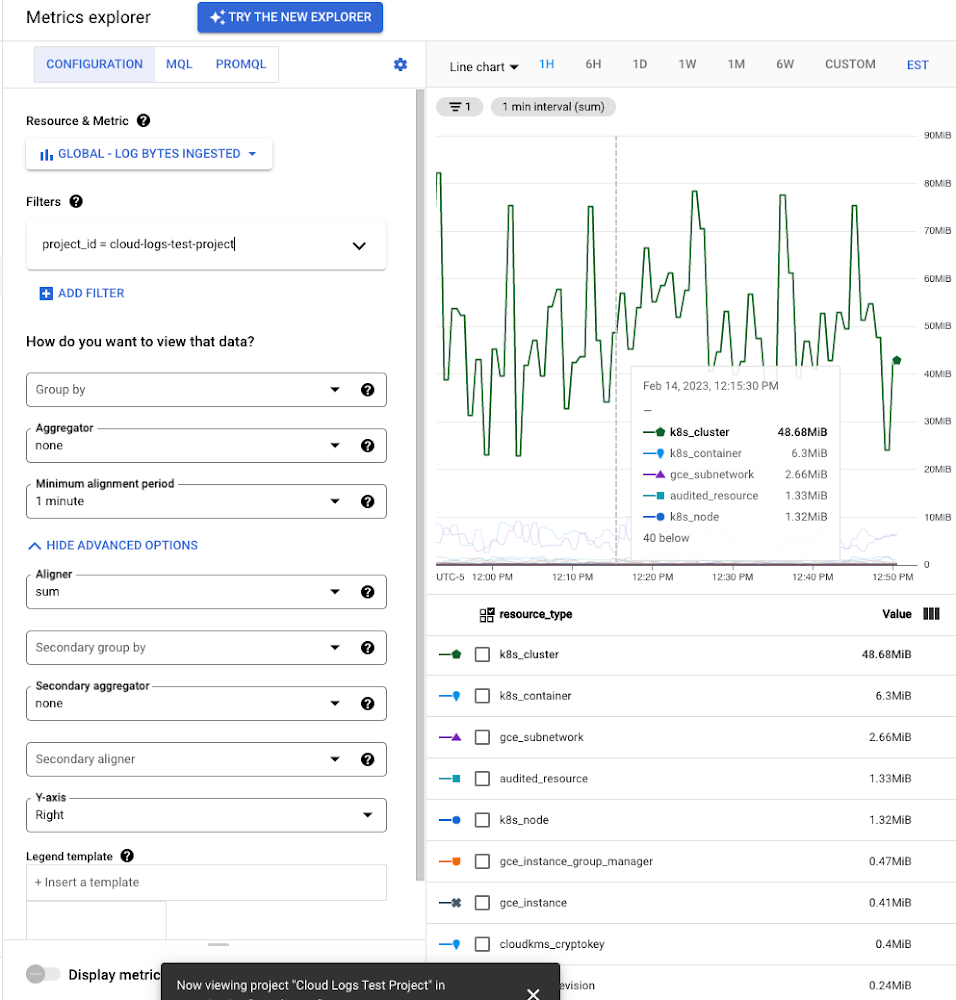
While these rich metrics are great for understanding volumes, you’ll probably want to eventually look at the logs to see whether they’re critical to your observability strategy. In Logs Explorer, the log fields on the left side help you understand volumes and filter logs from a resource type.
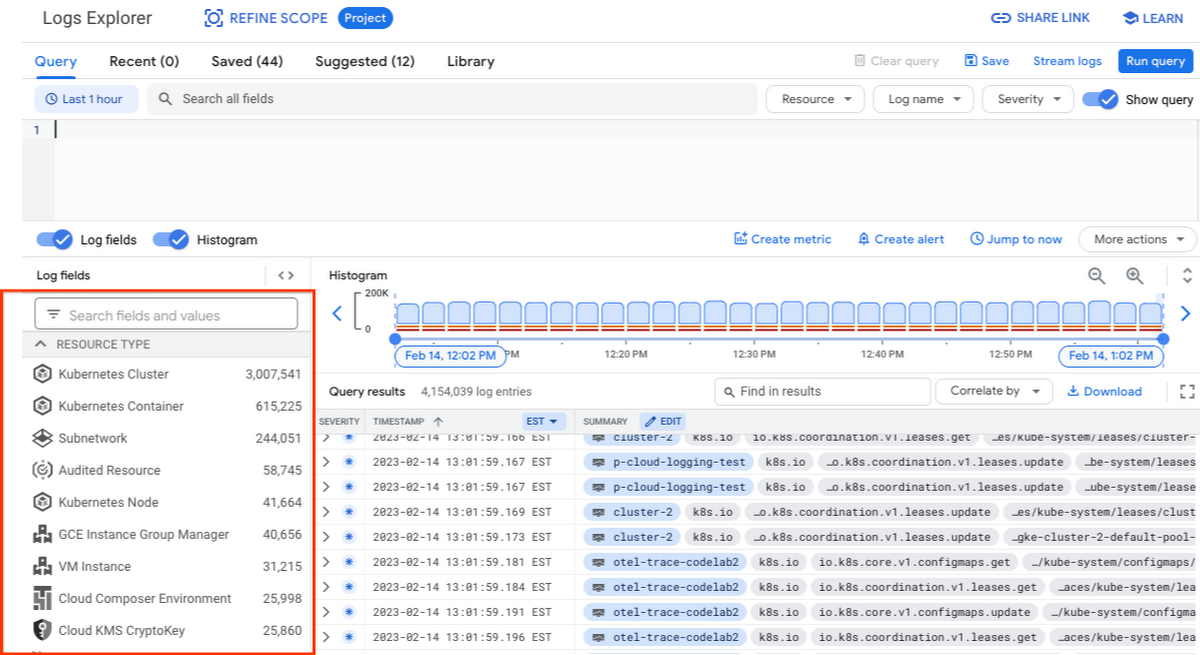
Reducing log volume with the Logs Router
Now that we understand what types of logs are expensive, we can use the Log Router and our sink definitions to reduce these volumes. Your strategy will depend on your observability goals, but here are some general tools we’ve found to work well.
The most obvious way to reduce your log volume is not to send the same logs to multiple storage destinations. One common example of this is when a central security team uses an aggregated log sink to centralize their audit logs but individual projects still ingest these logs. Instead, use exclusion filters on the _Default log sink and any other log sinks in each project to avoid these logs. Exclusion filters also work on log sinks to BigQuery, Pub/Sub, or Cloud Storage.
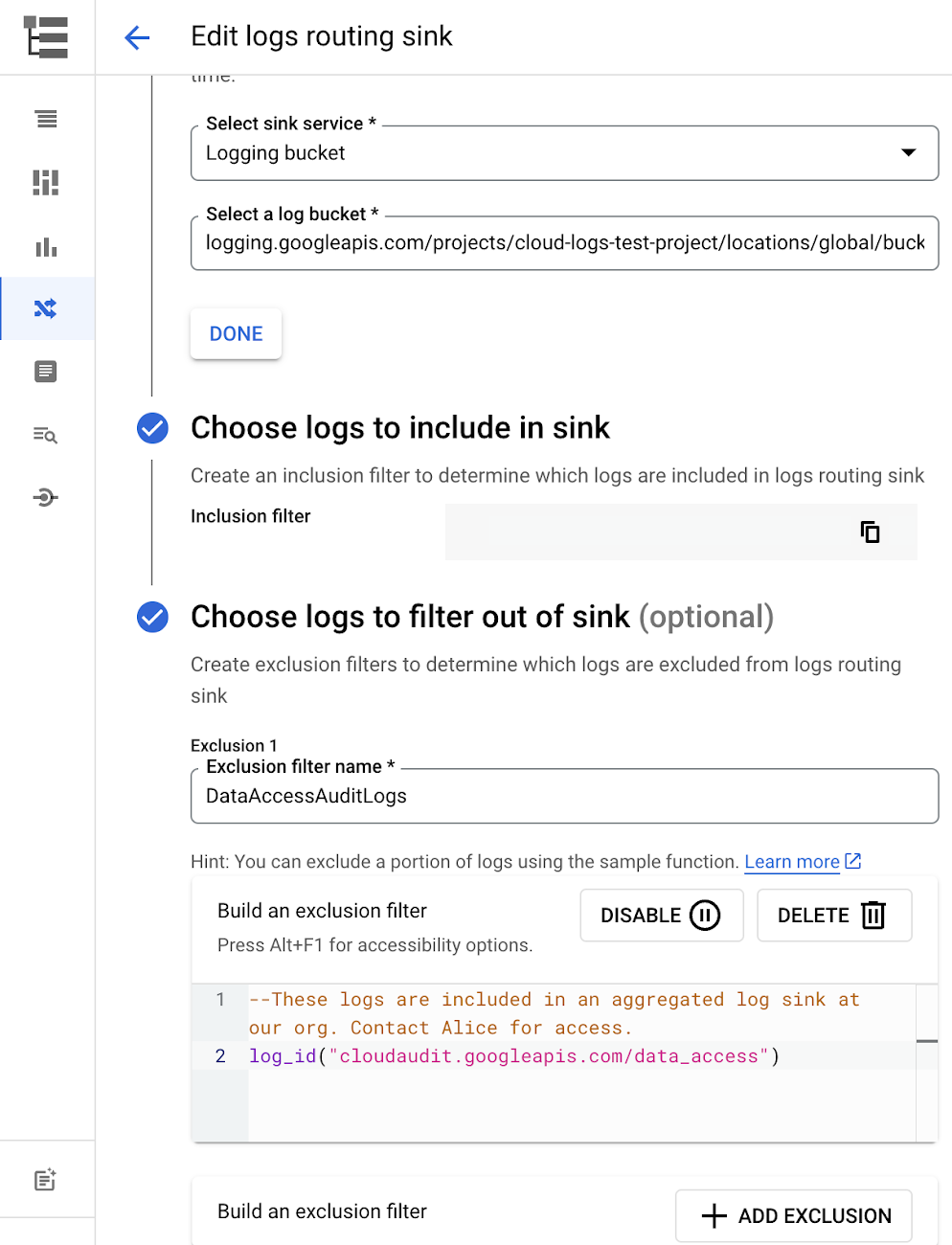
Similarly, if you’re paying to store logs in an external log management tool, you don’t have to save these same logs to Cloud Logging. We recommend keeping a small set of system logs from GCP services such as GKE in Cloud Logging in case you need assistance from GCP support but what you store is up to you, and you can still export them to the destination of your choice!
Another powerful tool to reduce log volume is to sample a percentage of chatty logs. This can be particularly useful with 2XX log balancer logs, for example. This can be a powerful tool, but we recommend you design a sampling strategy based on your usage, security and compliance requirements and document it clearly.
Step 3: Optimize costs over the lifecycle of your logs
Another option to reduce costs is to avoid storing logs for more time than you need them. Cloud Logging charges based on the monthly log volume retained per month. There’s no need to switch between hot and cold storage in Cloud Logging; doubling the default amount of retention only increases the cost by 2%. You can change your custom log retention at any time.
If you are storing your logs outside of Cloud Logging, it is a good idea to compare the cost to retain logs and make a decision.
Step 4: Setup alerts to avoid surprise bills
Once you are confident that the volume of logs being routed through log sinks fit in your budget, set up alerts so that you can detect any spikes before you get a large bill. To alert based on the volume of logs ingested into Cloud Logging:
- Go to the Logs-based metrics page. Scroll down to the bottom of the page and click the three dots on “billing/bytes_ingested” under System-defined metrics.
- Click “ Create alert from metric”
- Add filters (For example: use resource_id or project_id. This is optional).
- Select the logs based metric for the alert policy.
You can also set up similar alerts on the volume for log sinks to Pub/Sub, BigQuery or Cloud Storage.
Conclusion
One final way to stretch your observability budget is to use more Cloud Operations. We’re always working to bring our customers the most value possible for their budget such as our latest feature, Log Analytics, which adds querying capabilities but also makes the same data available for analytics, reducing the need for data silos. Many small customers can operate entirely on our free tier. Larger customers have expressed their appreciation for the scalable Log Router functionality available at no extra charge that would otherwise require an expensive event store to process data. So it’s no surprise that a 2022 IDC report showed that more than half of respondents surveyed stated that managing and monitoring tools from public cloud platforms provide more value compared to third-party tools. Get started with Cloud Logging and Monitoring today.
Three Reasons Why Enterprises Must Think Next-gen Serverless

4913
Of your peers have already read this article.
2:00 Minutes
The most insightful time you'll spend today!
As we reflect on the past year, Heraclitus’ phrase “The only constant in life is change” has never rang more true. With the pandemic, companies had to shift operations, launch new products and adapt to extreme demand patterns, sometimes within a matter of weeks.
To respond to customer needs faster and more efficiently, many companies turned to serverless technology, designing applications with real-time signals and intelligence built in. From apps and sites for healthcare appointments and vaccinations, public-sector employment benefits, contact tracing, retail logistics, curbside delivery, hotel and travel booking—you name it, companies built it with serverless.
Redefining serverless
The world changed, the market changed, our lives changed and we here at Google Cloud also changed, introducing new products to meet our customers’ needs and grow with them.
Serverless technology, in particular, has changed a lot since it was first introduced. Google first launched serverless compute in 2008 with the launch of App Engine, helping customers scale their applications faster and seamlessly. We then added the ability to run Functions as a Service with Cloud Functions, giving customers a simple developer experience with integrated telemetry and observability. In parallel, we also introduced innovations to the container market with Kubernetes. Pretty soon, customers started asking us if we could combine the awesome serverless attributes of auto-scaling and developer experience with the flexibility of containers.
Enter Cloud Run, the next generation of serverless. Serverless is now no longer just about event-driven programming or microservices. It’s also about running complex workloads at scale while still preserving a delightful developer experience. In fact, serverless with Cloud Run is about having a true developer platform with the flexibility to run any language, any library, any binary.
There are three capabilities that make Cloud Run the next-generation of serverless, and not the same ‘serverless’ you find elsewhere:
- A great developer-centric experience
- Versatility: expanding to a broader set of containerized apps
- Built-in DevOps and security
Let’s take a look at the attributes in greater depth.
A great developer experience
Being developer-centric comes from having fully-managed self-operating infrastructure and a great developer experience. We want everyone to be able to develop smart applications and for that we have to make it easy. We also want to be sure we are bringing your technical talent closer to where you generate your business value.
To make things easy, last year we introduced buildpacks, which creates container images directly from source code. No need to learn Docker or containers. Although there are containers underneath, they’re transparent to the developer.
To simplify things further, we also introduced a single “gcloud run deploy” command to build and deploy code to Cloud Run. These types of features are some of the reasons why 98% of Cloud Run users deploy an application on their first try in less than 5 minutes.
In fact, in the past year alone, we added over 25 new features and services to our serverless stack, making development of complex apps easier. One of our main launches was Workflows, which lets you combine Cloud Run with any Google Cloud product or any HTTP-based API service. As a developer, this is very useful when automating complex processes, or integrating GCP’s analytic services across a variety of systems.
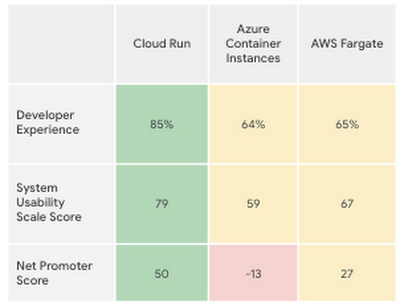
Taken together, all these new features make the Cloud Run developer experience far easier than its competitors’, according to a recent report by User Research International.
Versatility
Next-generation serverless is also about versatility. It supports a wider variety of applications and caters to enterprise requirements. Functions and web apps of course, but also heavyweight applications, and in the fullness of time, also brownfield and third-party containerized apps. This versatility is enabled by the container primitive, which removes restrictions on languages, run times, and hardware.
Being able to run a greater variety of apps on our serverless stack means you can optimize for predictable usage. Today, we announced new spend-based committed use discounts for Cloud Run. Enterprises with stable, steady-state, and predictable usage can now purchase committed use contracts directly in the billing UI. There are no upfront payments, so these discounts are a perfect way to reduce your spend by as much as 17%. RELATED ARTICLEMaximize your Cloud Run investments with new committed use discountsCommitted use discounts in Cloud Run enable predictable costs—and a substantial discount!
Another way we provide versatility is with support for WebSockets and gRPC in Cloud Run. With these new additions, you get the benefits of serverless infrastructure to build responsive, high-performance applications. We also added the use of min instances with Cloud Run. This feature allows you to cut cold-start times and run latency-sensitive applications on Cloud Run! At the same time, you can still scale to zero, or keep a minimum amount of compute available, for example when running brownfield Java applications.
Built-in DevOps
Serverless doesn’t just make it faster for developers to set up their apps—it also helps once the application is up and running, taking a big management load off of operations teams. Notably, serverless systems take care of “scaling” an application up or down. That means that if your application suddenly starts fielding a lot of traffic, the serverless platform automatically spins up more resources to handle the load. No more dreaded timeouts, wheels or hourglasses—or work for your operations team. Likewise, as soon as demand goes down, the platform takes care of decommissioning resources, i.e., scaling down, so that you’re not paying for resources that you no longer need. Want to run your service globally with low latency, without an operations team, and zero stranded costs? Cloud Run takes care of global load balancing and autoscaling to zero for you in every Google Cloud region.
Further, features like support for gradual rollouts and rollbacks allow developers to experiment and test ideas quickly, as well as sophisticated traffic management in Cloud Run. Likewise, Cloud Run provides access to distributed tracing with no setup or configuration, allowing developers to find performance bottlenecks in production.
Next up: serverless security
As part of DevOps best practices, we build in security for your serverless applications at every layer: deployment time, runtime and networking. For example, built-in vulnerability scanning ensures you only deploy artifacts you trust.
Today, we are announcing Cloud Run support for Google Secret Manager and customer-managed encryption keys (CMEK), making it easy to protect data at rest and store sensitive data. We’re also integrating Cloud Run with Binary Authorization, which lets you enforce specific policies to make sure only verified images make it to production. And finally, we added a new integration with Identity-Aware Proxy, support for VPC-SC, and egress controls that you can use to enforce a security perimeter, limiting both who can access specific services and what resources can be accessed when these services run in production. You can read more about these security enhancements here. RELATED ARTICLE4 new features to secure your Cloud Run servicesWe’re improving the security of your Cloud Run environment with things like support for Secret Manager and Binary Authorization.
In summary, the next generation of serverless combines the best of serverless with containers to run a broad spectrum of apps, with no language, networking or regional restrictions. The next generation of serverless will help developers build the modern applications of tomorrow—applications that adapt easily to change, scale as needed, respond to the needs of their customers faster and more efficiently, all while giving developers the best developer experience. Learn more by attending The Power of Serverless, a two-hour virtual event where we’ll lay out our vision for serverless compute, and where serverless subject matter experts will present on in-depth serverless development topics. Hope to see you there!
Want to learn even more about serverless and cloud-native application development? Check out the upcoming Modern App Dev & Delivery workshop, and our Ask the Experts roundtable.
More Relevant Stories for Your Company

Google Products Helps HMH’s Healthcare Staff Work from Anywhere Efficiently and Securely!
Hackensack Meridian Health (HMH) executive Mark Eimer explains how an ambitiously-timed rollout of a comprehensive suite of Google products helped the entire organization—from doctors to IT staff—achieve better security, cultivate a more equitable work environment, and ultimately, improve patient outcomes. How does a recently merged, 17-hospital healthcare system fast-track a platform migration

How This Leading Trading Company Uses APIs to Build Fintech Apps Quickly and Cost-Effectively
Tradier uses the Apigee API management platform from Google to abstract the legacy complexities of capital markets so that developers can build FinTech applications in an agile, nimble, and quick fashion at minimal cost. The company embodies the evolution of what cloud technology can enable in the form of an API-first business delivered

MerPay Platform Scales its Reach to Millions of Users using Cloud Spanner
Editor’s note: To launch a new mobile payment platform, Mercari needed a database solution strong on scalability, availability, and performance. Here’s how Cloud Spanner delivered those results. E-commerce companies need to connect customers to their services securely, reliably, with zero downtime. When Mercari, Inc. launched a new mobile payment platform, we chose Cloud

Kitabisa is shaping the future of fundraising with Google Cloud
The name Kitabisa means "we can" in Bahasa Indonesia, the official language of Indonesia, and captures our aspirational ethos as Indonesia's most popular fundraising platform. Since 2013, Kitabisa has been collecting donations in times of crisis and natural disasters to help millions in need. Pursuing our mission of "channeling kindness
