





4 Steps to a Successful Cloud Migration

3960
Of your peers have already read this article.
2:00 Minutes
The most insightful time you'll spend today!
Digital transformation and migration to the cloud are top priorities for a lot of enterprises. At Google Cloud, we’re working hard to make this journey easier. For example, we recently launched Migrate for Compute Engine and Migrate for Anthos to simplify cloud migration and modernization. These services have helped customers like Cardinal Health perform successful, large-scale migrations to GCP.
But we understand that the migration journey can be daunting. To make things easier, we developed a whitepaper on application migration featuring investigative processes and advice to help you design an effective migration and modernization strategy. This guide outlines the four basic steps you need to follow to migrate successfully and efficiently:
- Build an inventory of your applications and infrastructure: Understanding how many items, such as applications and hardware appliances, exist in your current environment is an important first step.
- Categorize your applications: Analyze the characteristics of all of your applications and evaluate them across two dimensions: migration to cloud, and modernization.
- Decide whether or not to migrate an application to the cloud: Not all applications should move to the cloud quite yet. The whitepaper lists the questions to ask to determine whether or not to migrate a given application.
- Pick your migration strategy: For the applications you decided to migrate, decide on your ideal strategy—pure lift and shift, containers, cloud managed services, or a combination thereof.
There’s a lot to consider when you start thinking about digital transformation, and every cloud modernization project has its nuances and unique considerations. The secret to success is understanding the advantages and disadvantages of the options at your disposal, and weighing them against what you want to transform and why. To learn how to migrate and modernize your applications with Google Cloud, download this whitepaper.
Cloud Bigtable Helps Fraud-detection Company Meet Scalability Demands and Secure Customer Data

7130
Of your peers have already read this article.
3:00 Minutes
The most insightful time you'll spend today!
Editor’s note: Today we are hearing from Jono MacDougall , Principal Software Engineer at Ravelin. Ravelin delivers market-leading online fraud detection and payment acceptance solutions for online retailers. To help us meet the scaling, throughput, and latency demands of our growing roster of large-scale clients, we migrated to Google Cloud and its suite of managed services, including Cloud Bigtable, the scalable NoSQL database for large workloads.
As a fraud detection company for online retailers, each new client brings new data that must be kept in a secure manner and new financial transactions to analyze. This means our data infrastructure must be highly scalable and constantly maintain low latency. Our goal is to bring these new organizations on quickly without interrupting their business. We help our clients with checkout flows, so we need latencies that won’t interrupt that process—a critical concern in the booming online retail sector.
We like Cloud Bigtable because it can quickly and securely ingest and process a high volume of data. Our software accesses data in Bigtable every time it makes a fraud decision. When a client’s customer places an order, we need to process their full history and as much data as possible about that customer in order to detect fraud, all while keeping their data secure. Bigtable excels at accessing and processing that data in a short time window. With a customer key, we can quickly access data, bring it into our feature extraction process, and generate features for our models and rules. The data stays encrypted at rest in Bigtable, which keeps us and our customers safe.
Bigtable also lets us present customer profiles in our dashboard to our client, so that if we make a fraud decision, our clients can confirm the fraud using the same data source we use.

We have configured our bigtable clusters to only be accessible within our private network and have restricted our pods access to it using targeted service accounts. This way the majority of our code does not have access to bigtable and only the bits that do the reading and writing have those privileges.
We also use Bigtable for debugging, logging, and tracing, because we have spare capacity and it’s a fast, convenient location.
We conduct load testings against Bigtable. We started at a low rate of ~10 Bigtable requests per second and we peaked at ~167000 mixed read and write requests per second at absolute peak. The only intervention that was done to achieve this was pressing a single button to increase the number of nodes in the database. No other changes were made.
In terms of real traffic to our production system, we have seen ~22,000 req/s (combined read/write) on Bigtable in our live environment as a peak within the last 6 weeks.
Migrating seamlessly to Google Cloud
Like many startups, we started with Postgres, since it was easy and it was what we knew, but we quickly realized that scaling would be a challenge, and we didn’t want to manage enormous Postgres instances. We looked for a kind of key value store, because we weren’t doing crazy JOINS or complex WHERE clauses. We wanted to provide a customer ID and get everything we knew about it, and that’s where key value really shines.
I used Cassandra at a previous company, but we had to hire several people just for that chore. At Ravelin we wanted to move to managed services and save ourselves that headache. We were already heavy users and fans of BigQuery, Google Cloud’s serverless, scalable data warehouse, and we also wanted to start using Kubernetes. This was five years ago, and though quite a few providers offer Kubernetes services now, we still see Google Cloud at the top of that stack with Google Kubernetes Engine (GKE). We also like Bigtable’s versioning capability that helped with a use case involving upserts. All of these features helped us choose Bigtable.
Migrations can be intimidating, especially in retail where downtime isn’t an option. We were migrating not just from Postgres to Bigtable, but also from AWS to Google Cloud. To prepare, we ran in AWS like always, but at the same time we set up a queue at our API level to mirror every request over to Google Cloud. We looked at those requests to see if any were failing, and confirmed if the results and response times were the same as in AWS. We did that for a month, fine tuning along the way.
Then we took the big step and flipped a config flag and it was 100% over to Google Cloud. At the exact same time, we flipped the queue over to AWS so that we could still send traffic into our legacy environment. That way, if anything went wrong, we could fail back without missing data. We ran like that for about a month, and we never had to fail back. In the end, we pulled off a seamless, issue-free online migration to Google Cloud.
Flexing Bigtable’s features
For our database structure, we originally had everything spread across rows, and we’d use a hash of a customer ID as a prefix. Then we could scan each record of history, such as orders or transactions. But eventually we got customers that were too big, where the scanning wasn’t fast enough. So we switched and put all of the customer data into one row and the history into columns. Then each cell was a different record, order, payment method, or transaction. Now, we can quickly look up the one row and get all the necessary details of that customer. Some of our clients send us test customers who place an order, say, every minute, and that quickly becomes problematic if you want to pull out enormous amounts of data without any limits on your row size. The garbage collection feature makes it easy to clean up big customers.
We also use Bigtable replication to increase reliability, atomicity, and consistency. We need strong consistency guarantees within the context of a single request to our API since we make multiple bigtable requests within that scope. So within a request we always hit the same replica of Bigtable and if we have a failure, we retry the whole request. That allows us to make use of the replica and some of the consistency guarantees, a nice little trade-off where we can choose where we want our consistency to live.https://www.youtube.com/embed/0-eH5u7rrQQ?enablejsapi=1&
We also use BigQuery with Bigtable for training on customer records or queries with complicated WHERE clauses. We put the data in Bigtable, and also asynchronously in BigQuery using streaming inserts, which allows our data scientists to query it in every way you can imagine, build models, and investigate patterns and not worry about query engine limitations. Since our Bigtable production cluster is completely separate, doing a query on BigQuery has no impact on our response times. When we were on Postgres many years ago, it was used for both analysis and real time traffic and it was not the optimal solution for us. We also use Elasticsearch for powering text searches for our dashboard.
If you’re using Bigtable, we recommend three features:
- Key visualizer. If we get latency or errors coming back from Bigtable, we look at the key visualizer first. We may have a hotkey or a wide row, and the visualizer will alert us and provide the exact key range where the key lives, or the row in question. Then we can go in and fix it at that level. It’s useful to know how your data is hitting Bigtable and if you’re using any anti-patterns or if your clients have changed their traffic pattern that exacerbated some issue.
- Garbage collection. We can prevent big row issues by putting size limits in place with the garbage collection policies.
- Cell versioning. Bigtable has a 3d array, with rows, columns, and cells, which are all the different versions. You can make use of the versioning to get history of a particular value or to build a time series within one row. Getting a single row is very fast in Bigtable so as long as you can keep the data volume in check for that row, making use of cell versions is a very powerful and fast option. There are patterns in the docs that are quite useful and not immediately obvious. For example, one trick is to reverse your timestamps (MAXINT64 – now) so instead of the latest version, you can get the oldest version effectively reversing the cell version sorting if you need it.
Google Cloud and Bigtable help us meet the low-latency demands of the growing online retail sector, with speed and easy integration with other Google Cloud services like BigQuery. With their managed services, we freed up time to focus on innovations and meet the needs of bigger and bigger customers.
Learn more about Ravelin and Bigtable, and check out our recent blog, How BIG is Cloud Bigtable?
12041
Of your peers have already watched this video.
3:26 Minutes
The most insightful time you'll spend today!
How L&T Financial Services Processes 95% of Motorcycle Loans in Less Than Two Minutes
L&T Financial Services is one of the largest lenders in India. India’s demonetization policy in recent years has led to a shift from cash transactions to digital payments. In 2016, the government withdrew 500 and 1000 rupee notes from circulation and encouraged a heavily cash-based population to deposit their canceled notes in banks. Financial institutions needed to pivot to a new way of doing business to stay competitive. L&T Financial Services modernized its IT infrastructure to keep up with changes and capture digital opportunities.
“Working capital is crucial to stimulate growth in rural communities. Our role as a lender is to provide access to funds. We don’t want to burden borrowers with the complexities of getting a loan. Towards this end, digitization is an important step,” says Dinanath Dubhashi, Managing Director and CEO at L&T Financial Services. “Google Cloud helps us streamline service delivery and identify the right customers. By offering the fastest processing time in the industry, we want to be the go-to lender for all customers.”
L&T Financial Services considered multiple cloud providers before choosing Google Cloud. According to Dinanath, Google Cloud understands both the need for businesses to move fast and the need for IT to modernize at different speeds. “We weren’t forced to abandon existing IT systems and migrate lock, stock, and barrel to Google Cloud on day one.”
L&T Financial Services engaged Google Cloud Professional Services to guide its digital transformation journey. The smooth migration from proof of concept to full-scale deployment on Google Cloud took a matter of months.
“Collaboration: a small idea with big opportunities. G Suite helps us connect remote branches with the head office, easily access shared files to submit and track approvals, and conduct face-to-face discussions to accelerate approval processes.”
—Dinanath Dubhashi, MD and CEO, L&T Financial Services
Digitizing the workforce with G Suite
The move to the cloud at L&T Financial Services started in 2017 when the company introduced G Suite to its 14,500 employees. The legacy email system was cumbersome to use, especially for frontline staff who need email access while they are on the road. Using Gmail, employees can connect with customers and co-workers from anywhere, on any device. Employees save time by scheduling meetings with Calendar, collaborating on Docs, and conducting video calls using Hangouts Meet.
Converting data into credit insights using BigQuery
Taking data intelligence one step further, L&T Financial Services adopts a responsible lending approach by applying algorithm-based data analytics to improve credit standards. Beyond traditional data such as credit score and credit payment history, the company also considers macro-economic indicators for risk audits. For example, a farmer’s ability to pay off the loan of his new tractor depends on a successful planting and harvest. So L&T Financial Services feeds long-term data into BigQuery and runs queries to predict loan defaults based on rainfall and crop yield.
Earth Week: Google Cloud at the Heart of Sustainability

3482
Of your peers have already read this article.
1:30 Minutes
The most insightful time you'll spend today!
Today’s Google Doodle reminds us of the enormous changes our planet is experiencing due to climate change. Everyone, from businesses to governments to technologists, has the opportunity to meet this challenge — transforming themselves and their organizations to be more sustainable. For this Earth Day 2022, and indeed Earth Week, Google Cloud celebrates the organizations and individuals who are fighting climate change with innovative technology. We don’t want you to miss a thing, so here’s a recap of all our news in one handy location.
We asked global CEOs: what is it going to take to make progress on sustainability in your org?
In a survey of 1,500 CXOs across 16 countries, many executives say they are willing to do what it takes to have more sustainable practices. But despite their ambition, real measures of impact are lacking. To see what will change that, check out the blog.
We announced a new innovation challenge supporting climate science and research…
Our blog on Monday announced the Climate Innovation Challenge Research Credits program, to support researchers as they work to better understand climate change, increase climate resilience and develop new, promising solutions to urgent climate challenges. You can apply for research credits here.
…and shared stories of researchers making a difference
We interviewed Dr. Richard Fernandes from Natural Resources Canada, who built the LEAF toolbox that maps and assesses vegetation with satellite data from Google Earth Engine. You can read our Q&A here.
Canada has approximately 10 million square kilometers of land and the annual data volume of these maps is equivalent to streaming HD movies for over 750 hours non-stop. Cloud computing allows us to manage all this data in a useful and accessible way.Dr. Fernandes, Research Scientist
We also published a story about the U.S. Department of Agriculture’s Forest Service, and how they use Google Cloud processing and analysis tools to help sustainably manage 193 million acres of land.
We turned the lights on at new clean energy projects in four countries…
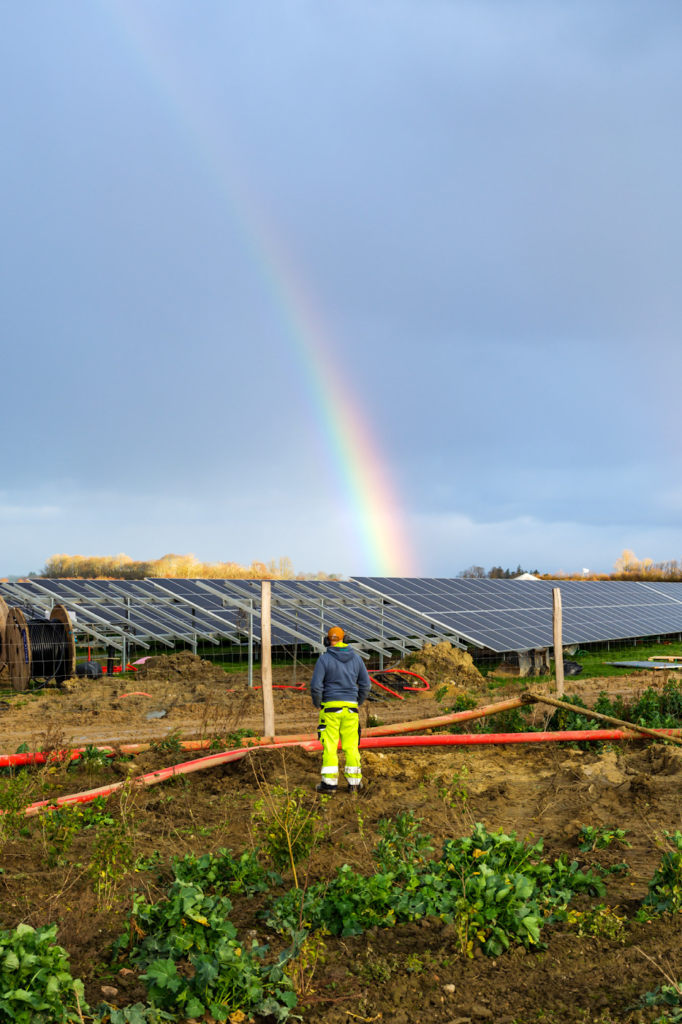
We shared details of our battery project in Belgium, solar projects in Denmark, and wind projects in Chile and Finland. Our battery project in Belgium is the first of its kind, enabling us to switch from diesel generators to a cleaner backup solution that will keep the internet up and running in the event of a power disruption. These will all help us continue to operate the cleanest cloud in the industry.
…and made it easier to learn how to build applications more sustainably
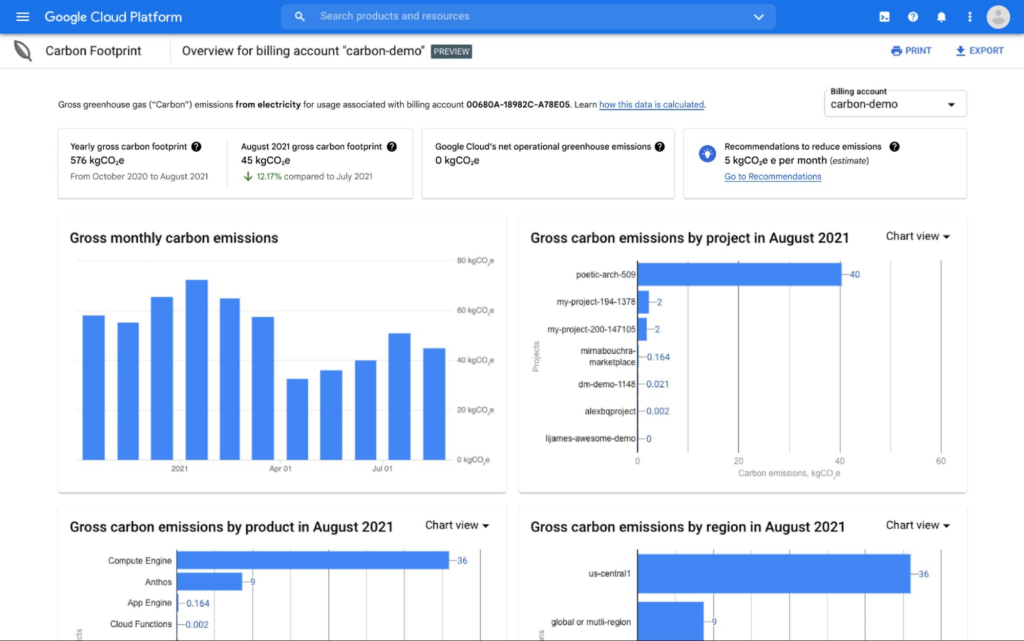
We launched a new lab that walks users through our Carbon Sense suite of products. From using our region picker app to make low-carbon architecture decisions, to analyzing the carbon footprint of your Google Cloud app with Carbon Footprint, we’re building sustainability into the tools you use every day. You can also find Carbon Footprint training in the new Data Warehouse Cloud On-Board.
We formed an ecosystem of partners to help accelerate sustainability projects…
The Google Cloud partner ecosystem is critical to helping our customers act sustainably today. A new whitepaper produced in partnership with Enterprise Strategy Group shares real-world solutions that could make an immediate impact — not in the next decade, but right now.
…and shared stories of innovative startups changing the game with Google Cloud.
Take Enexor and its partners, who are producing clean and sustainable energy from discarded plastics and agro-waste. The blog from Lee Jestings, Enexor Founder & CEO, shares how Google for Startups got them started, and which Google Cloud tools help them build predictive models. Check out their story.
Or Nuuly, the rental and resale business created by the URBN portfolio, which also includes Urban Outfitters, Anthropologie, and Free People. In the blog you can read how Nuuly is using technology to provide a sustainable experience to employees and customers — from upcycling clothing, to recyclable and reusable packaging.
Whether you’re a startup, scientist, executive or developer, at Google Cloud we’ll continue to work hard to help make your digital transformation a sustainable one.
Learn more about our sustainability work here, and don’t miss the inaugural Cloud Sustainability Summit this June. Register now.
How We Built a Brand New Bank on Google Cloud and Cloud Spanner: The First Scalable, Enterprise-grade, Database Service

6570
Of your peers have already read this article.
6:30 Minutes
The most insightful time you'll spend today!
Editor’s note: Technology today lets companies of any size take on entire industries simply with an innovative business model plus digital distribution. Take Shine, a French startup whose platform helps freelancers manage their finances — and their administrative commitments. Here, Raphael Simon, Shine’s CTO and co-founder, talks about why Shine built a new bank on Google Cloud Platform, and in particular Cloud Spanner.
More and more people are deciding to take the plunge and start a freelance career. Some of them by choice, others out of necessity. One of their biggest pain points is dealing with administrative tasks.
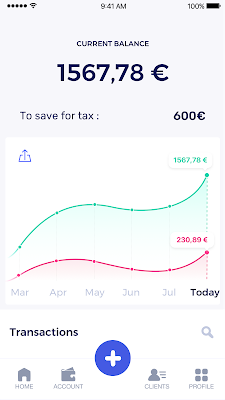
In some countries, especially in Europe, the administrative burden of being a freelancer is similar to what a company of 10 or more people deals with. A freelancer doesn’t necessarily have the time or skills to manage all this paperwork. So we are building a new bank for freelancers from the ground up that helps automate administrative tasks associated with their business.
Shine’s banking services and financial tools make it as easy to work as a freelancer as it is to work for a larger company. We deal with administrative tasks on behalf of the freelancer so that he or she can focus on their job: finding and wowing clients.

Building our infrastructure
As a new bank, we had the opportunity to build our infrastructure from the ground up. Designing an infrastructure and choosing a database presents tough decisions, especially in the financial services world. Financial institutions come under tremendous scrutiny to demonstrate stability and security. Even a tiny leak of banking data can have tremendous consequences both for the bank and its clients, and any service interruption can trigger a banking license to be suspended or a transaction to be declined.
At the same time, it’s vital for us to optimize our resources so we can maximize the time we spend developing user-facing features. In our first six months, we iterated and validated a prototype app using Firebase, and secured our seed funding round (one of the largest in Europe in 2017).
Based on our positive experience with Firebase, plus the ease-of-use and attractive pricing that Google Cloud offered, we decided to build our platform on Google Cloud Platform (GCP).
We were drawn to GCP because it has a simple, consistent interface that is easy to learn. We chose App Engine flexible environment with Google Cloud Endpoints for an auto-scaling microservices API. These helped us reduce the time, effort, and cost in terms of DevOps engineers, so we could invest more in developing features, while maintaining our agility.
We use Cloud Identity and Access Management (Cloud IAM) to help control developer access to critical parts of the application such as customer bank account data. It was quite a relief to lean on a reliable partner like Google Cloud for this.
Database decisions
Next came time to choose a database. Shine lives at the financial heart of our customers’ businesses and provides guidance on things like accounting and tax declaration. The app calculates the VAT for each invoice and forecasts the charges they must pay each quarter.
Due to the sensitivity of our customers’ data, the stakes are high. We pay careful attention to data integrity and availability and only a relational database with support for ACID transactions (Atomicity, Consistency, Isolation, Durability) can meet this requirement.
At the same time, we wanted to focus on the app and user experience, not on database administration or scalability issues. We’re trying to build the best possible product for our users, and administering a database has no direct value for our customers. In other words, we wanted a managed service.
Cloud Spanner combines a globally distributed relational database service with ACID transactions, industry-standard SQL semantics, horizontal scaling, and high availability. Cloud Spanner provided additional security, high-availability, and disaster recovery features out-of-the-box that would have taken months for us to implement on our own. Oh, and no need to worry about performance — Cloud Spanner is fast. Indeed, Cloud Spanner has been a real asset to the project, from the ease-of-use of creating an instance to scaling the database.
Cloud Spanner pro tips
We began working with Cloud Spanner and have learned a lot along the way. Here are some technical notes about our deployment and some best practices that may be useful to you down the road:
- Cloud Spanner allows us to change a schema in production without downtime. We always use a NOT NULL constraint, because we generally think that using NULL leads to more errors in application code. We always use a default value when we create an entity through our APIs and we use Cloud Dataflow to set values when we change a schema (e.g., adding a field to an entity).
- With microservices, it’s generally a good practice to make sure every service has its own database to ensure data isolation between the different services. However, we adopted a slightly different strategy to optimize our use of Cloud Spanner. We have an instance on which there are three databases — one for production, one for staging and one for testing our continuous integration (CI) pipeline. Each service has one or more interleaved tables that are isolated from others services’ tables (we do not use foreign-keys between tables from different services). This way our microservices data are not tightly “coupled”.
- We created an internal query service that performs read-only queries to Cloud Spanner to generate a dashboard or do complex queries for analytics. It is the only service where we allow joins between tables across services.
- We take advantage of Cloud Spanner’s scalability, and thus don’t delete any data that could one day be useful and/or profitable.
- We store all of our business logs on Cloud Spanner, for example connection attempts to the application. We append the ‘-Logs’ suffix to them.
- When possible, we always create an interleave.
In short, implementing Cloud Spanner has been a good choice for Shine:
- It’s saved us weeks, if not months, of coding.
- We feel we can rely on it since it’s been battle-tested by Google.
- We can focus on building a disruptive financial services product for freelancers and SMBs.
And because Cloud Spanner is fully managed and horizontally scalable, we don’t have to worry about hardware, security patches, scaling, database sharding, or the possibility of a long and risky database migration in the future. We are confident Cloud Spanner will grow with our business, particularly as we expand regionally and globally. I strongly recommend Cloud Spanner to any company looking for a complete database solution for business-critical, sensitive, and scalable data.
Recapping Google Cloud VMware Engine’s Latest Milestones
3472
Of your peers have already read this article.
3:00 Minutes
The most insightful time you'll spend today!
We’ve made several updates to Google Cloud VMware Engine in recent weeks—today’s post provides a recap of our latest milestones. Google Cloud VMware Engine delivers an enterprise-grade VMware stack running natively in Google Cloud. This cloud service is one of the fastest paths to the cloud for VMware workloads without making changes to existing applications or operating models across a variety of use-cases. These include rapid data center exit, application lift and shift, disaster recovery, virtual desktop infrastructure, or modernization at your own pace.
In fact, Mitel, a global provider of unified communications-as-a-service to 70 million business users across 100 countries, migrated 1,000 VMware instances to Google Cloud VMware Engine in less than 90 days and improved its monthly operational output four times.
In our last update, we focused on several innovative capabilities around networking, reach, and scale. Let us take a look at the highlights we released since our last installment.
Fast provisioning of a dedicated, intrinsically secure VMware private cloud
With Google Cloud VMware Engine, you can spin up a VMware private cloud in about 30 minutes. You can also scale your VMware-based infrastructure on-demand with dedicated hosts located in secure Google data centers. Let us look at what’s new:
Autoscale: The ability to elastically and programmatically manage infrastructure resources to align with business needs or what is called “right-sizing” is a core capability of an IaaS platform. With autoscale, Google Cloud VMware Engine users can leverage policy-driven automation to scale the nodes needed to meet the compute demands of the VMware infrastructure.
Autoscale:
- Addresses seasonal spikes in demand, gradual increases of utilization, or new projects being onboarded or expanded due to disaster recovery events.
- Analyzes the CPU, memory, and storage utilization to give you the controls to scale Google Cloud VMware Engine nodes up or down.
- Ensures that storage consumption does not exceed the recommended limits for maintaining the Google Cloud VMware Engine service-level agreement.
- Reduces overhead on IT teams by automating capacity monitoring and enabling sufficient availability of resources based on thresholds. Note that safeguards for maintaining minimum capacity and maximum capacity can be configured to ensure there are boundaries to the automation.
Learn how to set up Autoscale.

Mumbai region availability
Google Cloud VMware Engine is now available in the Mumbai region. This brings the availability of the service to 12 regions globally, enabling our multi-national and regional customers to leverage a VMware-compatible infrastructure-as-a-service platform on Google Cloud. For more details, please read the press release.
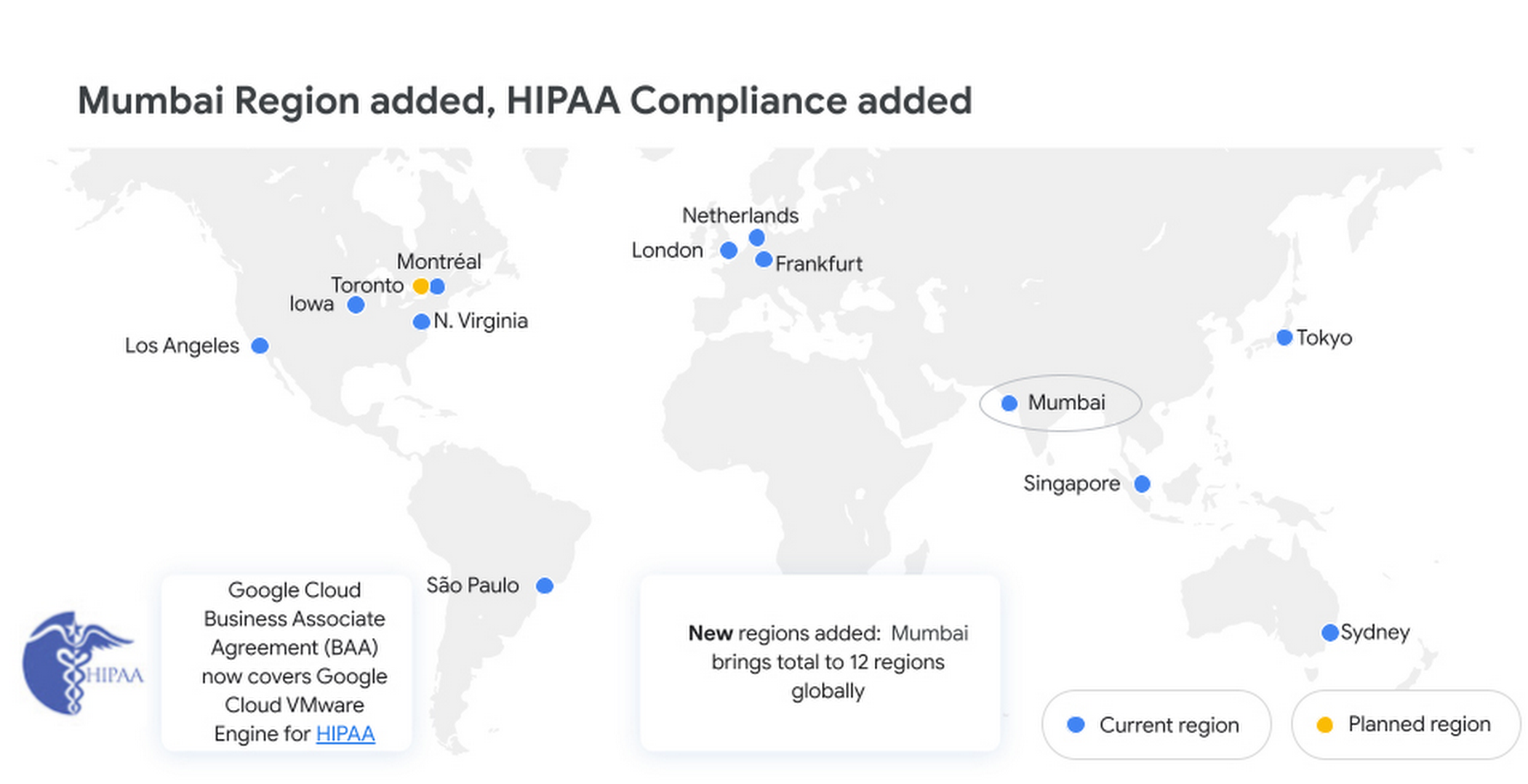
Enterprise-grade infrastructure
With 99.99% availability for a cluster in a single zone, fully dedicated 100 Gbps east-west networking with no oversubscription, and all nonvolatile memory express storage, Google Cloud VMware Engine provides the highest performance required for the most demanding workloads. Let us look at what’s new:
Preview – Google Cloud KMS integration: You already have the ability to bring your own keys to encrypt your vSAN datastores. With this new capability, organizations that want to eliminate the overhead of managing external key providers can leverage a Google managed key provider, using Cloud KMS. This brings increased flexibility in securing workloads and data by enabling vSAN encryption by default for newly instantiated VMware Private Clouds. This feature is currently in Preview.
HIPAA compliance: Since April, Google Cloud VMware Engine is Health Insurance Portability and Accountability Act (HIPAA) compliant. This opens the service up to healthcare organizations, that can now migrate and run their HIPAA-compliant VMware workloads in a fully compatible VMware Cloud Verified stack running natively in Google Cloud with Google Cloud VMware Engine, without changes or re-architecture to tools, processes, or applications. Read more in this blog.
NSX-T support for Active Directory: With NSX-T support for Active Directory, you can now leverage your on-premises Active Directory as one of the lightweight directory access protocol identity sources for user authentication into NSX-T manager. This extends the theme of being able to leverage your on-premises tools with Google Cloud VMware Engine. For more information, read the documentation on how to set up identity sources.
vSAN TRIM/UNMAP support: For space-efficiency, vSAN allows creating thin-provisioned disks that grow gradually as they are filled with data. However, files that are deleted within the guest operating system (OS) do not result in vSAN freeing up space allocated. To increase space efficiency, guest OS file systems have the ability to reclaim capacity that is no longer used, using TRIM/UNMAP commands. vSAN is fully aware of these commands that are sent from the guest OS and enables reclamation of previously allocated storage as free space. We have enabled TRIM/UNMAP for vSan by default in Google Cloud VMware Engine.
Simplicity in experience and operations
With Google Cloud VMware Engine, you only need to worry about your workloads—not patching, upgrading, and updating the solution layer, for fewer interoperability issues and infrastructure maintenance. IIn addition, we have pre-built service accounts to enable your third-party VMware-supported tools and solutions to work seamlessly in VMware Engine. Access to Google services privately over local connections is also natively supported, enabling enrichment of existing applications and modernization over time. Finally, this service brings the power of Google Cloud Virtual Private Cloud (VPC) design by natively providing multi-VPC, multi-region networking that’s unique. Let’s look at what’s new:
Dashboards for Day 2 operations: To speed up cloud transformation and enable efficiency, Google Cloud VMware Engine administrators can take advantage of Cloud Operations dashboards for the solution. In addition, administrators can create custom policies through cloud alerting and enable notifications via channels of their choice (SMS, email, Slack, and more). For more details on how to set up cloud monitoring, please refer to Setting up Cloud Monitoring.
For the latest updates, bookmark Google Cloud VMware Engine release notes.
Thanks to Manish Lohani, Product Management, Google Cloud; Nargis Sakhibova, Product Management, Google Cloud; and Wade Holmes, Solutions Management, Google Cloud; for their contributions to this blog post.
More Relevant Stories for Your Company

How Google Cloud’s PSO Supports Customers’ Migration Goals
Google Cloud’s Professional Services Organization (PSO) engages with customers to ensure effective and efficient operations in the cloud, from the time they begin considering how cloud can help them overcome their operational, business or technical challenges, to the time they’re looking to optimize their cloud workloads. We know that all parts of

What’s Google Cloud Firestore Database and What are its Benefits for Business and Developers?
Cloud Firestore is a NoSQL document database that simplifies storing, syncing, and querying data for your mobile and web apps at global scale. Cloud Firestore is a fast, fully managed, serverless, cloud-native NoSQL document database that simplifies storing, syncing, and querying data for your mobile, web, and IoT apps at
The Total Economic Impact of SAP on Google Cloud Gives Businesses a Transformation Accelerator: Forrester
By using Google Cloud, organizations can quickly and easily migrate their SAP applications and data to Google Cloud with minimal disruption to the business, reduce hardware and maintenance costs, and eliminate the complexities and risks of managing SAP applications on-premises. Because of Google Cloud’s pure-cloud infrastructure, organizations can host large

Ease Your Migration and Modernization Journey with Microsoft and Windows on Google Cloud Demo Center
If you’re looking to migrate and modernize your Microsoft and Windows workloads, Google Cloud is your premiere destination. No matter what migration strategy you’ve selected or what value you’re looking to achieve, with Google Cloud you’re able to: simplify your migration and modernization journeyreduce your on-prem footprint and increase agilityoptimize license
