





How APIs Help National Bank of Pakistan Modernize the Banking Experience

3484
Of your peers have already read this article.
4:20 Minutes
The most insightful time you'll spend today!
NBP, Pakistan’s largest government-owned bank, serves private and commercial customers and also acts as the government treasury bank. This means that it handles all government transactions—including disbursements and cash collection. In the past, every government transaction had to be handled physically through the NBP branch network. But in a populous country like Pakistan, managing the huge volume of financial transactions is a big task, especially if a single bank is the only conduit. While we’re still in the early stages, here are a few ways that we’re actively working to find solutions that overcome these challenges.
Using APIs to increase access
Our digital banking implementation team, which includes product developers and a small in-house think tank, is responsible for developing new technology and out-of-the-box solutions tailored to the requirements of different areas of the bank. Our implementation partner Abacus played a key role in evaluating and implementing Apigee for NBP.
Recently, we developed a plan to open up the NBP government mandate to other banks and third-party fintech partners. Under this new model, instead of relying solely on our own channels, customers can now transact through fintech apps and other approved Pakistani banks. To be able to roll out a solution that would be reliable, scalable, and secure enough to meet our needs, we adopted Google Cloud’s Apigee API management platform. This platform allows us to accelerate our product development, so that we can compete in the fintech space. It also gives our customers access to a wide range of banking services through our own and partner channels.
As a government bank, NBP has to deal with a lot of procedural hurdles, which have slowed down our entry into the fintech market. Additionally, legacy systems required us to develop solutions for each particular channel and use case. APIs and API management increase the reusability of our services, while also bringing ease and speed of getting our services to market. In fact, we’ve seen the time it takes to offer a new solution reduced by 20%. Apigee not only helps us to achieve our go-to-market goals—it enhances our capacity to capture new and unique use cases across multiple channels. We appreciate the speed, agility, and security that Apigee brings us, along with its many out-of-the-box features.
Reducing barriers to consumer services
One example of how we’re using Apigee is our passport collection use case. In Pakistan, to obtain a passport, citizens have to visit an NBP branch. This can involve waiting in long lines to deposit the government-required passport insurance fee. The sheer volume of these transactions was overwhelming our local branch teams, and costs for this type of manual transaction were high. Furthermore, the government had problems reconciling the fee collection with the passport transactions.
To address these concerns, we developed an API that allows not only NBP branches, but also third-party banks and fintechs, to accept passport issuance fees.Customers can now visit the bank or fintech provider of their choice, reducing the load on NBP, while the government passport department inspectors can now easily reconcile these transactions.
We also developed a bill payment solution with Apigee that gives customers the possibility of paying utility bills online. Previously, the NBP process was inefficient. We had an in-person bill payment mechanism operating in our 1,500+ bank branches. Now, we’ve integrated the payment API with the branch channel so that bill payment is automated, whether it takes place in a branch or online.
Increasing the API footprint inside and outside the bank
Now that we’ve implemented the Apigee platform, our partner ecosystem is benefiting from it and growing, too. We’ve enrolled a wide range of fintechs that are developing products in the corporate payment space. We’re also planning to partner with several incubation centers to provide our APIs via sandbox environments, once our Apigee developer portal goes live. Other fintechs will be enrolled through the incubation centers as well. Finally, alternative third-party partners, such as fintechs and banks, will consume our APIs and/or partner with us for product development.
We’ve currently published 10 APIs and by the end of this year, we expect to have 25 to 30 live. We’re looking forward to implementing monetization, but not necessarily with revenue as the primary focus. As NBP is a government-owned bank, we have a responsibility to act as a catalyst for smaller players, and we see monetization expertise as an opportunity for fulfilling our mandate to help fintech startups grow and mature. In the long run, API revenues will certainly become more important, but the short-term goal is seeding innovation in the marketplace and providing the best possible retail banking experience for our customers, nationwide.
Creation of Go applications on Google Cloud Made Easy

900
Of your peers have already read this article.
2:30 Minutes
The most insightful time you'll spend today!
Go is the world’s leading programming language for cloud-based development, used by millions of developers to build and scale their cloud applications and business-critical cloud infrastructure. Whether it’s building CLIs, web applications, or cloud and network services, developers find Go easy to learn, easy to maintain, and packed with useful features such as built in concurrency and a robust standard library.
And now, getting started with Go on Google Cloud is a little bit easier. Following Go’s recent announcement of gonew, an experimental tool for instantiating new projects in Go from predefined templates, Google Cloud is releasing four templates for gonew that developers can use to bootstrap their Go applications across several Google Cloud products. This includes common use cases such as creating a simple HTTP handler Cloud Function, subscribing to a Cloud Pub/Sub topic, or creating an HTTP Server on Cloud Run.
Google Cloud Go templates
- httpfn: A basic HTTP handler (Cloud Function)
- pubsubfn: A function that is subscribed to a PubSub topic handling a Cloud Event (Cloud Function)
- microservice: An HTTP server that can can be deployed to a serverless runtime (Cloud Run)
- taskhandler: An basic app that handles tasks from requests (App Engine)
Let’s get started
- Make sure you have Go installed on your machine, if not you need to download/install from here .
- Start by installing gonew using go install:
$ go install golang.org/x/tools/cmd/gonew@latest
To generate a basic HTTP Handler Cloud Function, instantiate the existing httpfn template by running gonew in your new project’s parent directory. As of now, gonew’s syntax expects two arguments: first, the path to the template you wish to invoke, and second, the module name of the project you are creating. For example:$ gonew github.com/GoogleCloudPlatform/go-templates/functions/httpfn yourdomain.com/httpfn - Deploy this new go module to Cloud Functions by following the steps listed here, you can also try this in the Cloud Shell editor.
What’s next?
We have big plans for Go on Google Cloud, with several new enhancements on our roadmap. In the meantime, please try out these new templates, deploy them to Google Cloud using the instructions provided and let us know how we can make them better. Please use this to report any issues.
5176
Of your peers have already watched this video.
24:40 Minutes
The most insightful time you'll spend today!
Case Study: How Texas’ Largest Grocery Chain Successfully Modernized its Legacy Mainframes
H-E-B, like many enterprises, is moving away from legacy mainframes in favor of microservices and public cloud infrastructure. With hundreds of applications powering their 100+ year-old grocery business (with more than 400 stores in Texas and Mexico), H-E-B needs to be confident that the platform they are building will provide them the agility and security to continue to innovate for their customers.
In this session, the H-E-B engineering team provides details on how they’ve started breaking down their Curbside and Home Delivery monoliths into microservices, why they chose to make Kubernetes a first-class citizen, and why they’re leveraging Anthos as a hybrid cloud platform.
The grocer began to map out a two- to four-year modernization plan in 2017. Initially, the enterprise signed on with Google Cloud and used GKE to move toward a container-first approach to app delivery. Later, it decided to adopt Anthos. Today, Anthos gives H-E-B tighter control over compliance and better proximity to its retail data.
Join the discussion with Joe Rodriguez, Platform Engineering Manager for H-E-B, and. Justin Turner, Sr. Software Engineering Manager for Curbside and Delivery Fulfillment at H-E-B, to learn about the lessons that led to the company’s successful transformation. Find out how Anthos, when deployed on-premises, will expedite their journey to microservices. Learn about the challenges that come with adopting a hybrid modernization strategy and how Anthos plays a critical role in their success in this session.
Anthos Makes Hybrid and Multi-Cloud Deployments Easy

3664
Of your peers have already read this article.
1:30 Minutes
The most insightful time you'll spend today!
Most enterprises have applications in disparate locations—in their own data centers, in multiple public clouds, and at the edge. These apps run on different proprietary technology stacks, which reduces developer velocity, wastes computing resources, and hinders scalability. How can you consistently secure and operate existing apps, while developing and deploying new apps across hybrid and multicloud environments? How can you get centralized visibility and management of the resources? Well, that is why Anthos exists!
This post explores why traditional hybrid and multicloud deployments are difficult, and then shows how Anthos makes it easy to manage applications across multiple environments.
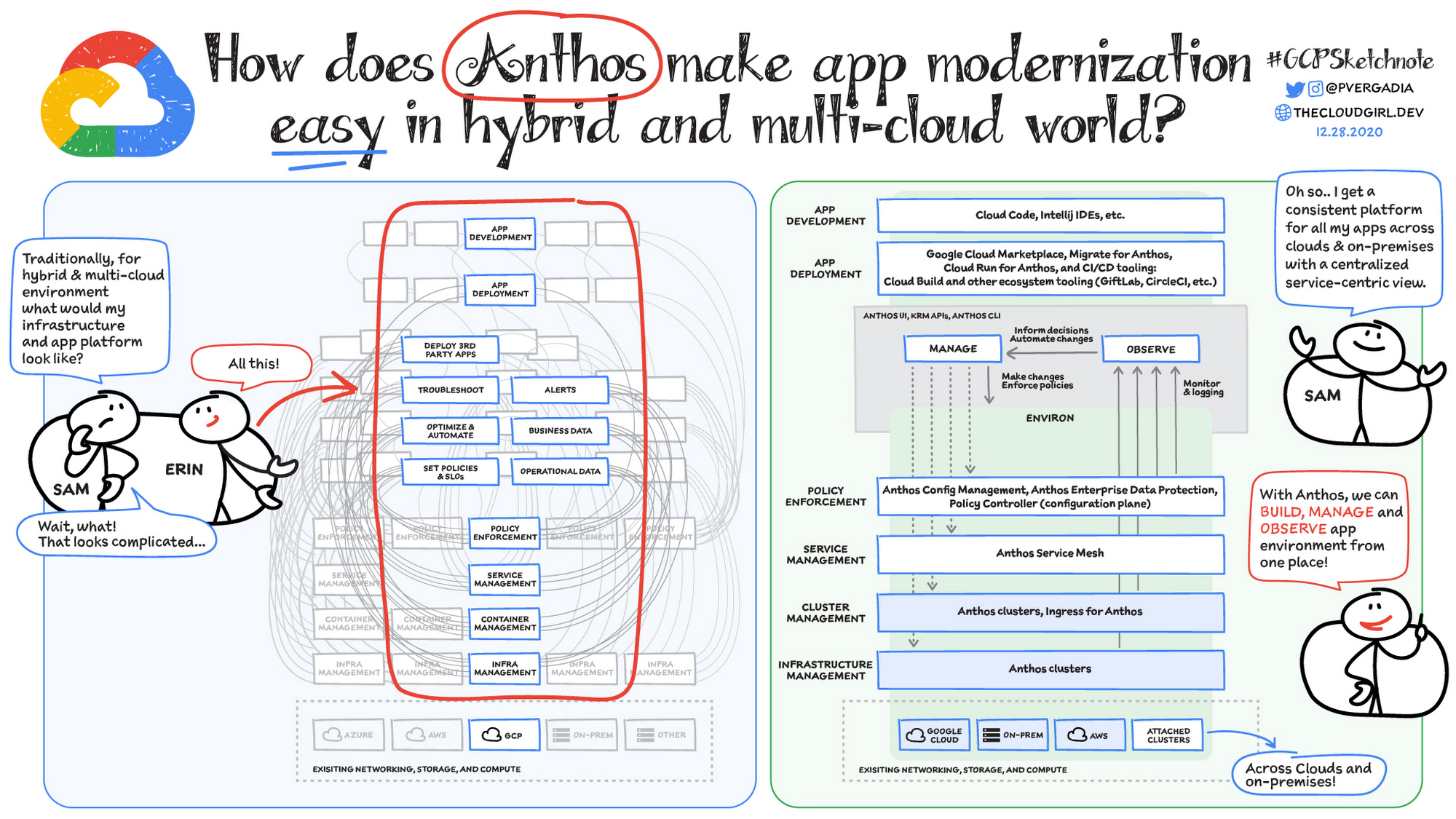
Why is traditional hybrid and multicloud difficult?
In hybrid and multicloud environments, you need to manage infrastructure. Let’s say you use containers on the clouds, and you develop apps using services on Google Cloud and AWS. Regardless of environment, you will need policy enforcement across your IT footprint. To manage your apps across the environment, you need monitoring and logging systems. You need to integrate that data into meaningful categories, like business data, operational data, and alerts.
Digging further, you might use operational data and alerts to inform optimizations, implement automations, and set policies or SLOs. You might use business data to do all those things, and to deploy third-party apps. Then, to actually enact the changes you decide to implement, you need to act on different parts of the system. That means digging into each tool for policy enforcement, securing services, orchestrating containers, and managing infrastructure. Don’t forget, all of this work is in addition to what it takes to develop and deploy your own apps.
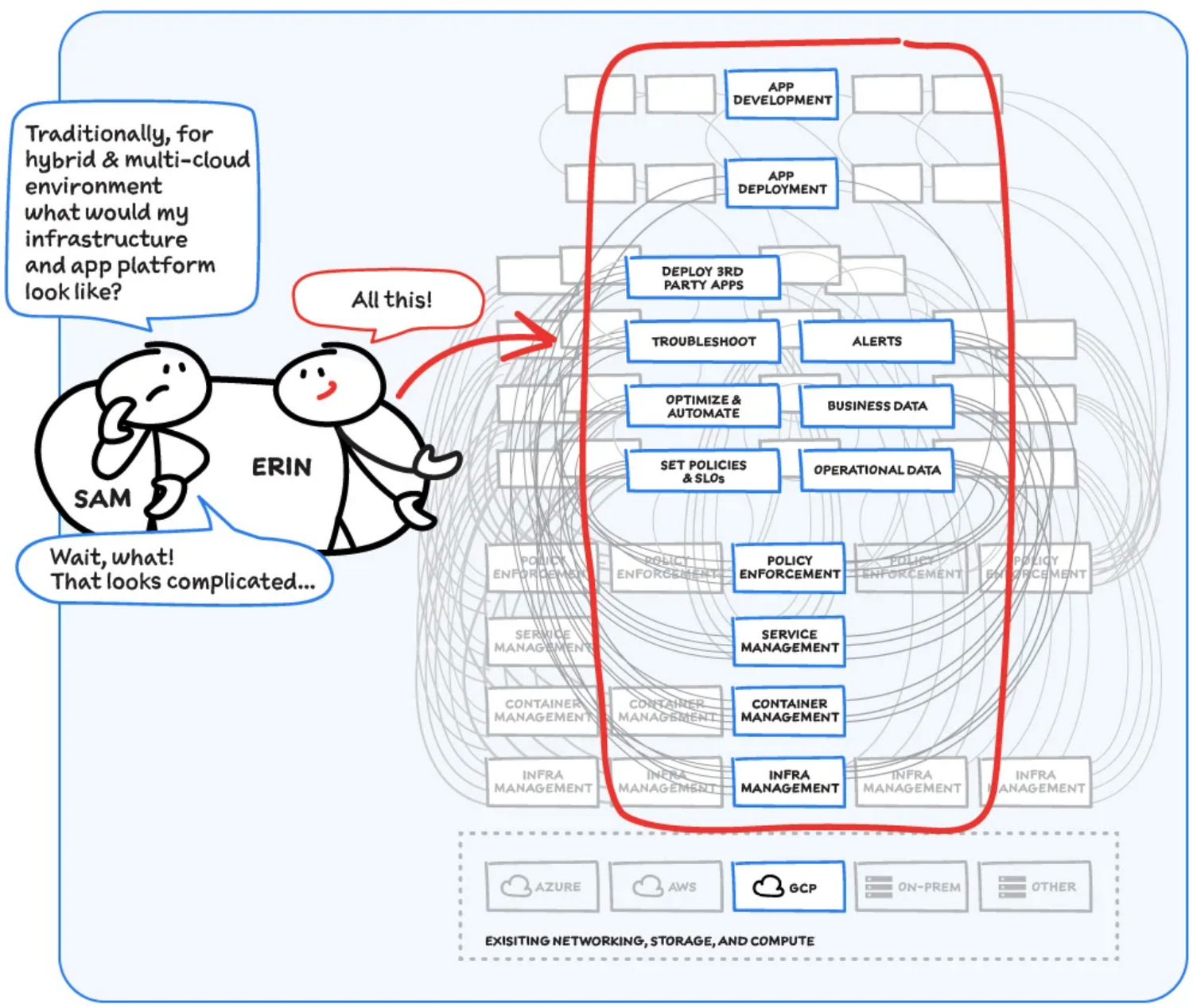
Now, consider repeating this set of tasks across a hybrid and multicloud landscape. It becomes very complex, very quickly. Your platform admins, SREs, and DevOps teams who are responsible for security and efficiency have to do manual, cluster-by-cluster management, data collection, and information synthesis. With this complexity, it’s hard to stay current, to understand business implications, and to ensure compliance (not to mention the difficulty of onboarding a new hire). Anthos helps solve these challenges!
How does Anthos make hybrid and multicloud easy?
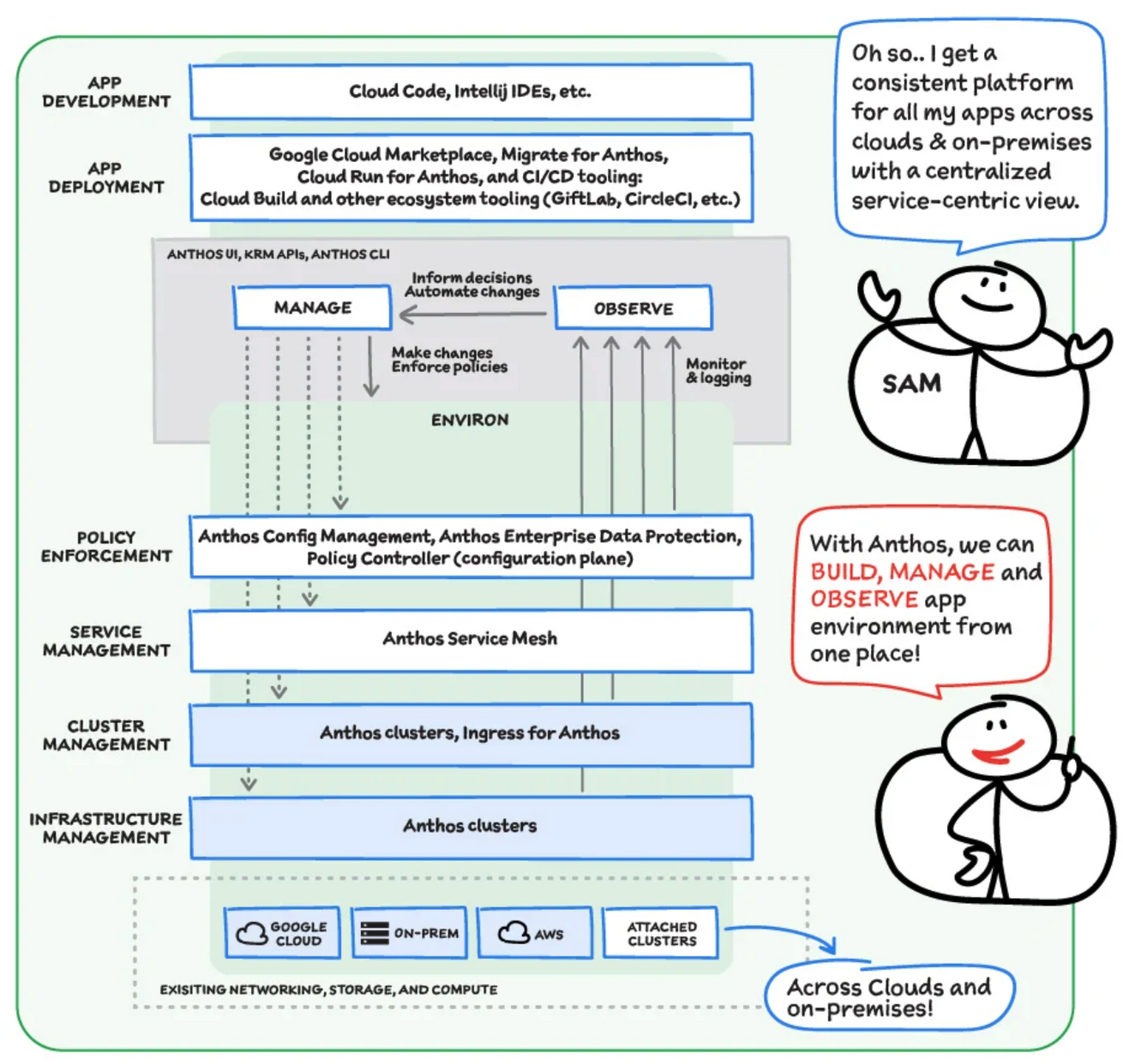
With Anthos, you get a consistent way to manage your infrastructure, with similar infrastructure management, container management, service management, and policy enforcement across your landscape.
As a result, you have observability across all your platforms in one place, including access to business information, alerts, and operations information. With this information you might decide to optimize, automate, and set policies or SLOs.
Digging deeper into Anthos
Environs
You may have different regions that need different policies, and also have different development, staging, or production environments that need different permissions. Some parts of your work may need more security. That’s where environs come in! Environs are a way to create logical sets of underlying Kubernetes clusters, regardless of which platform those clusters live on.
By considering, grouping, and managing sets of clusters as logical environs, you can think about and work with your applications at the right level of detail for what you need to do, be it acquiring business insights over the entire system, updating settings for a dev environment, or troubleshooting data for a specific cluster. Using environs, each part of the functional stack can take declarative direction about configuration, compliance, and more.
Modernize application development
Anthos also helps modernize application development because it uses environs to enforce policies and processes, and abstracts away the cluster and container management from application teams. Anthos enables you to easily abstract away infrastructure from application teams, making it easy for them to incorporate a wide variety of CI/CD solutions on top of environs. It lets you view and manage your applications at the right level of detail, be it business insights for services across the entire system, or troubleshooting data for a specific cluster. Anthos also works with container-based tools like buildpacks to simplify the packaging process. It offers Migrate for Anthos to take those applications out of the VMs and move them to a more modern hosting environment.
What’s in it for platform administrators?
Anthos provides platform administrators a single place to monitor and manage their landscape, with policy control and marketplace access. This reduces person-hours needed for management, enforcement, discovery, and communication. Anthos also provides administrators an out-of-the-box structured view of their entire system, including services, clusters, and more, so they can improve security, use resources more efficiently, and demonstrate measurable success. Administrators also save time and effort by managing declaratively, and they can communicate the success, cost savings, and efficiency of the platforms without needing to manually combine data.
Interested in getting started with Anthos? Check out the free on-demand training here and my YouTube series.
For more resources, you can also read the Anthos ebook at no cost. For more #GCPSketchnote and similar cloud content, follow me on twitter @pvergadia and keep an eye out on thecloudgirl.dev
WebGL-powered Features to Build Next-generation Mapping Experience

3461
Of your peers have already read this article.
3:00 Minutes
The most insightful time you'll spend today!
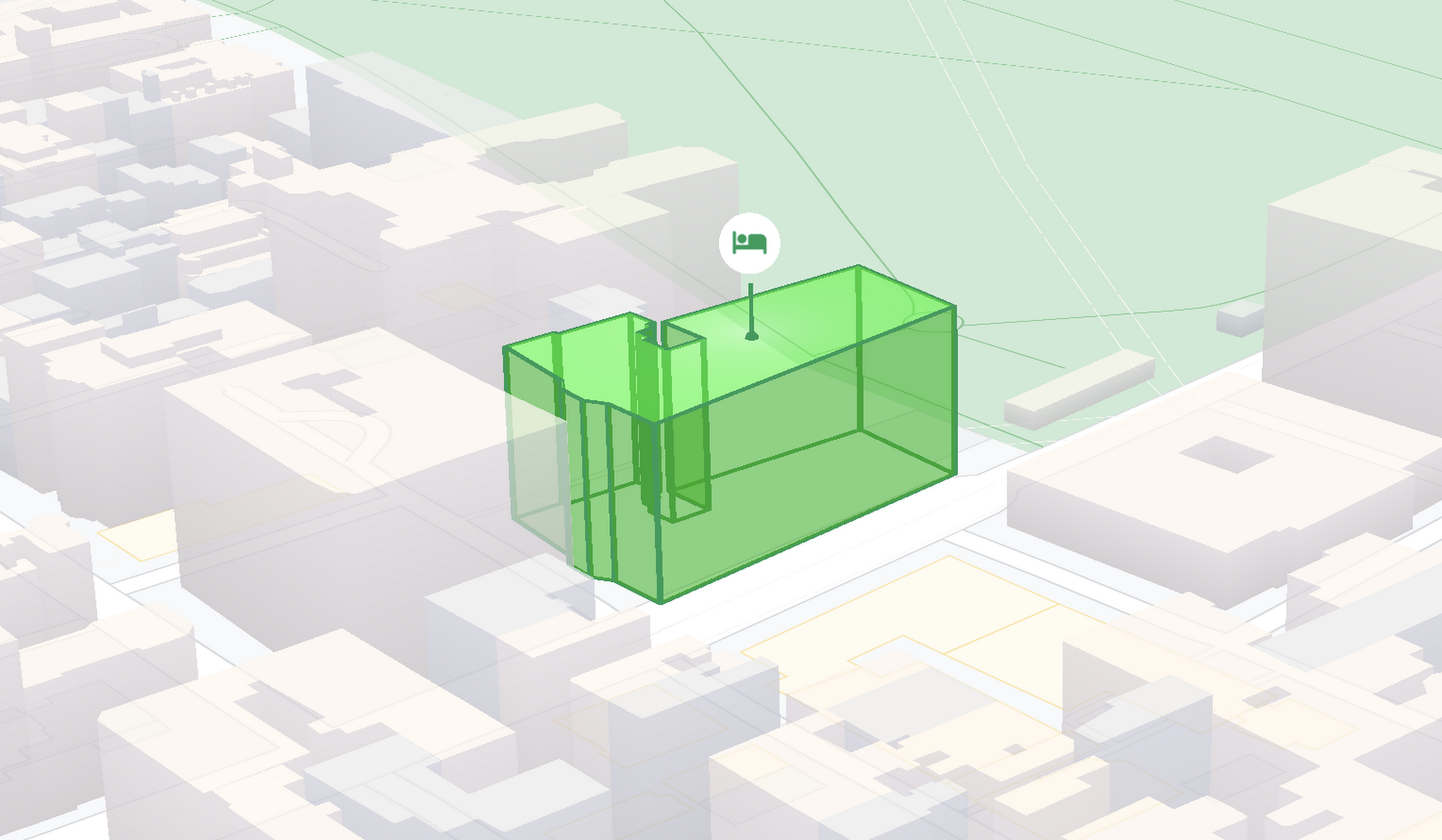
At Google I/O 2021, we announced the beta release of Tilt and Rotation, and Webgl Overlay View, which give you a fundamentally new way to build mapping experiences. You may be familiar with the existing Overlay View feature of the Maps JavaScript API that lets you render in a transparent layer that sits on top of the map. For years, developers have been using Overlay View to draw in two dimensions over the top of the map, but for as much as you can do with Overlay View, it only allows you to render on a transparent layer that effectively floats above the map.
In contrast, WebGL Overlay View gives you direct hooks into the lifecycle of the exact same WebGL rendering context we use to render the vector basemap. This means that for the first time ever, you can performantly render two and three dimensional objects directly on the map, enabling you to build experiences that were previously impossible with the Maps JavaScript API.https://www.youtube.com/embed/9eycQLef6iU?enablejsapi=1&
Today, we’re going to give you a quick overview of the new WebGL-powered features of the Maps JavaScript API, so that you have all the knowledge you need to get started creating next generation mapping experiences.
What is WebGL?
WebGL is a low-level browser API, originally authored by the Mozilla Foundation, that gives you access to the rendering and processing power of the graphics processing unit (GPU) on client devices, such as mobile phones and computers, in your web apps. On its own, the browser is not able to handle the heavy computation needed to render objects in 3D space, but using WebGL it is able to pass those processes off to be handled by the GPU, which is purpose built to handle such computations.
To learn more about WebGL, check out the documentation from the Khronos Group, the designers and maintainers of WebGL.
Requirements
To use WebGL Overlay View, you’ll need a Map ID with the vector map enabled. It’s also strongly recommended that you enable Tilt and Rotation when you create your Map ID, otherwise your map will be constrained to the default top-down view – in short, you won’t be able to move your map in three-dimensions.
To learn more about using Map IDs and the vector map, see the documentation.
Setting Tilt and Rotation
To load your map with a set tilt and rotation, you can provide a value for the `tilt` and `heading` properties when you create the map:
const mapOptions = {mapId: "15431d2b469f209e",tilt: 0,heading: 0,zoom: 17,center: {lat: -33.86957547870852,lng: 151.20832318199652}}const mapDiv = document.getElementById("map");const map = new google.maps.Map(mapDiv, mapOptions);
Tilt is specified as a number or float in degrees between 0 and 67.5, with 0 degrees being the default straight down view and 67.5 being the maximum tilt. The available maximum tilt also varies by zoom level.
The rotation is set in the heading property as a number or float between 0 and 360 degrees, where 0 is true north.
You can also change the tilt and rotation programmatically at runtime whenever you want by calling `setTilt` and `setHeading` directly on the map object. This is useful if you want to change the orientation of the map in response to events like user interactions.
map.setTilt(45);map.setHeading(180);
In addition, your users can manually control the tilt and rotation of the map by holding the <shift> key and dragging with the mouse or using the arrow keys.
For more information on Tilt and Rotation, see the documentation.
Adding WebGL Overlay View to the Map
WebGL Overlay View is made available in the Maps JavaScript API by creating an instance of `google.maps.WebglOverlayView`. Once an instance of the overlay is created, you simply need to call `setMap` on the instance to apply it to the map.
const webglOverlayView = new google.maps.WebglOverlayView;webglOverlayView.setMap(map);
To give you access to the WebGL rendering context of the map and handle any objects you want to render there, WebGL Overlay View exposes a set of five hooks into the lifecycle of the WebGL rendering context of the vector basemap.
Here’s a quick rundown:
- `onAdd` is where most of your pre-processing should be done, like fetching and creating intermediate data structures to eventually pass to the overlay. The reason to do all of that here is to ensure you don’t bog down the rendering of the map.
- `onRemove` is where you’ll want to destroy all intermediate objects, though it would be nice if you did it sooner.
- `onContextRestored` is called before the map is rendered and is where you should initialize, bind, reinitialize or rebind any WebGL state, such as shaders, GL buffer objects, etc.
- `onDraw` is where we actually render the map, as well as anything that you specify in this hook. You should try to execute the minimal set of draw calls to render your scene. If you try to do too much here you’ll bog down both the rendering of the basemap and anything you’re trying to do with WebGL, and trust me, no one wants that.
- `onContextLost` is where you’ll want to clean up any state associated with pre-existing GL state, since at this point the WebGL context will have been destroyed, so it’ll be garbage.
To implement these hooks, set them to a function, which the Maps JavaScript API will execute at the appropriate time in the WebGL rendering context lifecycle. For example:
webglOverlayView.onDraw = (gl,coordinateTransformer) => { //do somerendering }
For more information on using WebGL Overlay View and its lifecycle hooks, check out the documentation.
Creating Camera Animations
As part of the beta release of WebGL Overlay View, we’re also introducing `moveCamera`, a new integrated camera control that you can use to set the position, tilt, rotation, and zoom of the camera position simultaneously. Like `setTilt` and `setHeading`, `moveCamera` is called directly on the `Map` object.
By making successive calls to `moveCamera` in an animation loop you can also create smooth animations between camera positions. For example, here we are using the browser’s `requestAnimationFrame` API to change the tilt and rotation each frame:
const cameraOptions = {tilt: 0,heading: 0}function animateCamera () {cameraOptions.tilt += 1;cameraOptions.heading += 1;map.moveCamera(cameraOptions);}requestAnimationFrame(animateCamera);
Plus, all of these adjustments, including zoom, support floats, which means not only can you control the camera like never before, you can also do it with a high degree of precision.
For more information on `moveCamera`, see the documentation.
Give it a tryYou can try the new WebGL-powered features of the Maps JavaScript API right now by loading the API from the beta channel. We’ve got a new codelab, and documentation with all the details, as well as sample code and end-to-end example apps to help you get started. Also, be sure to check out our feature tour and travel demos to learn more and play with a real implementation of these features.
And let us know what you think by reporting through our issue tracker. We need your bug reports, your feature requests, and your feedback to help us test and improve the new WebGL-based map features.
Have fun building with the map in 3D—we can’t wait to see the amazing things you’ll build.
For more information on Google Maps Platform, visit our website.
Pizza Hut India: Increasing Customer Coverage and Delivering Pizzas on Time

4977
Of your peers have already read this article.
3:30 Minutes
The most insightful time you'll spend today!
A subsidiary of United States-headquartered corporation Yum! Brands, Pizza Hut prides itself on serving more pizzas than any other pizza business. Founded in 1958, Pizza Hut operates 18,000 restaurants in over 100 countries. In the Indian subcontinent, Pizza Hut and franchise partners Devyani International and Sapphire Foods India operate more than 500 pizza restaurants, including 430 in India itself.
Yum! Brands aims to increase the number of Pizza Hut restaurants in India to 700 by 2022 and has nominated the country as one of the keys to its future growth. The business also operates the KFC and Taco Bell brands in India.
“Globally we are the number one pizza chain in the world based on store count and we aim to be the single biggest pizza brand in India,” says Prashant Gaur, Chief Brand and Customer Officer, Pizza Hut India Subcontinent.
Google Cloud Results
- Maximizes customer coverage and helps ensure riders deliver pizzas to customers within required timeframes
- Onboards new stores to delivery in half a day, rather than the one month required previously
- Meets tech-savvy customer demands to interact across new social media messaging channels
- Launch of live tracking delivers superior customer experience, driving positive word of mouth and repeat business
Pizza Hut launched initially in the country in the late 1990s as a dine-in restaurant brand. However, with changing customer needs, Pizza Hut soon included delivery and takeaway to provide customers with the best tasting pizzas whenever and wherever they wanted them. “Pizza is always at the center of the experience, whether through delivery, dine-in, or takeaway,” says Gaur. “Convenience is key in allowing people to access our products.”
Manual processes
While the business had long shifted into a model that featured delivery and takeaway options, it still used some manual processes. For example, some restaurants used manual listings of customer addresses to manage delivery, which ended up excluding some customers and compromising the brand. In other cases it could take the business up to a week to create a trade zone – a delivery zone assigned to a restaurant – for each new outlet, delaying the commencement of delivery services and costing the business money.
In addition, Pizza Hut India identified an opportunity to more closely track whether pizzas were being delivered within targeted timeframes.
“In some cases, we were using a manual, self-reporting mechanism that provided information about the number of orders that reached consumers less than 30 minutes after an order was placed,” explains Ashish Agarwal, Director, Technology and eCommerce, Pizza Hut India Subcontinent. “We wanted to objectively track and verify delivery times.”
Manual order tracking and execution also limited the number of orders that could be processed effectively during demand peaks. Further, customers could not monitor the status of their pizza orders, including estimated time of arrival.
“Millennial consumers expect products and services to be available when and where they want them. Our focus is to retain the heritage of the brand, which is the dine-in environment, legendary service, and great assets in terms of our stores, while responding to this demand,” adds Gaur.
Pizza Hut India also needed improved analytics in order to identify where the best returns could be achieved by opening new restaurants; how to improve the customer experience; and operate more efficiently.
The business decided to implement a transformation program underpinned by two imperatives: the need to deliver operational efficiencies and scale faster by accelerating the opening of new stores, and the need to give consumers the option of connecting with the brand using the most convenient channel.
A ground-breaking initiative
Pizza Hut India evaluated potential technology partners that could help deliver the program and decided to partner with digital consulting services company MediaAgility, and use Google Maps Platform and Google Cloud Platform services.
“Our journey with MediaAgility and Google incorporated two key initiatives that had a specific impact on our brand and consumers,” says Gaur. “The first of these initiatives was the launch of a feature that enabled consumers and our business to track delivery riders in real time.”
This initiative was ground-breaking for a business that had, until recent years, focused on establishing itself as a restaurant brand. However, with delivery an increasingly important part of its revenue mix, Pizza Hut India decided to build customer engagement through the channel. “By allowing customers to track delivery riders in real time, we could improve engagement – but more importantly give them control,” says Gaur.
During the evaluation, MediaAgility demonstrated Google Maps Platform to Pizza Hut India. “We loved Google Maps Platform as its accuracy and value was proven by consumers using Google Maps for their day-to-day needs,” says Agarwal.
Pizza Hut India conducted brainstorming sessions with MediaAgility and its franchise partners to develop its strategy and complete the implementation. The business then completed several proofs of concept to determine how best to deploy and adapt the technology to some operational processes. “We submitted some data points to our franchise partners and our Pizza Hut brand operations team, and they determined which option to adopt,” says Agarwal.
Google Maps Platform powers delivery
MediaAgility, Pizza Hut India, and the franchise partners then completed a three-month implementation that included onboarding all existing restaurants and new restaurants to the delivery platform based on Google Maps Platform and on Google Cloud Platform.
Pizza Hut India now uses Distance Matrix API through Google Maps Platform to provide travel time and distance based on recommended routes between origins and destinations. This service helps provide delivery riders’ estimated time of arrival to customers.
Directions Service calculates directions by communicating with the Google Maps API Directions Service, which receives direction requests and returns efficient paths based on travel time and factors such as distance and number of turns. This service provides a view of the delivery rider’s position relative to the customer’s location.
Through the Nearest Roads service included in Roads API, Pizza Hut India obtains individual road segments for given GPS coordinates, while Snap to Roads provides the best-fit road geometry for given GPS coordinates.
The business employs Maps Javascript API to customize maps with dedicated content and imagery for websites and mobile devices – showing a map view to store managers and customers – and uses Maps SDK for Android to add maps based on Google Maps to its applications.
Google Cloud Platform runs the delivery platform
Pizza Hut India is running its delivery platform on a Google Cloud Platform architecture that comprises App Engine to run its web applications; virtual machine instances provided through Compute Engine; Cloud Datastore to run a NoSQL document database; Firebase to develop and run its mobile applications; Cloud Storage to store data; and a BigQuery analytics data warehouse.
Realizing goals
With Google Maps Platform and Google Cloud Platform, Pizza Hut India and its franchise partners are realizing the goals of the transformation program.
Rather than take up to seven days to manually map trade zones for stores, Pizza Hut India uses Google Maps Platform to create and update them as required. “After we started working with MediaAgility and Google, we digitized those maps and created trade zones – zones within which Pizza Hut India restaurants will deliver – based on estimated travel times during the busiest time of the week,” says Gaur. “This minimizes the risk of late deliveries.
“The other benefit was reduced time to activate new stores,” he adds. “If you are launching 100 stores per year, this becomes a big, big task. Now we can bring new stores into the market much more quickly.”
With MediaAgility and Google Maps Platform, the business can also help ensure newly built establishments – such as blocks of flats – are captured within trade zones, allowing stores to deliver to residents.
Delivery accounts for increased transactions
Pizza Hut India now automatically allocate orders to delivery riders using a rider tracking application on their mobile phones. When a rider starts his or her journey, Google Maps Platform enables point-by-point tracking by consumers and store managers. The Pizza Hut India delivery operations team monitors delivery performance through a real-time dashboard.
Pizza Hut India is meeting customer expectations of live, map-based streaming of delivery status on their devices – enhancing customer experience and loyalty, and adding accountability to the process. The business is reaping the rewards of its investment, with delivery now a large slice of its overall offering. “We have taken significant strides in the past three to four years to change our customers’ online ordering experience, and the last-mile delivery experience to the customers’ homes,” says Gaur.
Launching delivery tracking has also had a dramatic impact on Pizza Hut India’s internal key performance indicators. “The proportion of calls to our call center that are following up on an order, as opposed to placing an order, has fallen dramatically,” says Gaur.
Advanced analytics
Further, Pizza Hut India is running advanced analysis of data in the BigQuery data warehouse, enabling the business to determine which restaurants are doing well, which deliveries may be delayed, and what locations are most promising to open a new store. These insights enable the business to boost productivity, expand effectively, and operate more efficiently.
The business can now onboard new stores to delivery in half a day, rather than the month required previously. “The process enabled by Google Cloud and MediaAgility is also delivering significant operational cost savings as well as helping us open and grow new stores quickly,” says Agarwal.
“MediaAgility acted as our development partner across the project, helping us deploy everything from zones to rider tracking,” he says. “It’s been with us from the strategy discussion through the implementation and stabilization phases.”
Chatbot in development
MediaAgility has also helped Pizza Hut India create a chatbot using the Dialogflow development suite for creating conversational interfaces. “This project is about giving millennials and other customers one more channel to reach out and connect to the brand,” explains Agarwal.
Pizza Hut India is now ideally placed to continue growing and position itself as a brand of choice for tech-savvy consumers. “We’re extremely pleased with the contribution of all the parties involved in this project and look forward to continue transforming our business to meet the demands of the digital age,” says Agarwal.
While Gaur acknowledges it is difficult to predict change over the next two to five years, he believes delivery is likely to become more prominent in Pizza Hut India’s combination of offerings. “When we began our online journey in 2016, we predicted delivery would be about 25 percent of the mix by 2020,” he says. “With Google and MediaAgility, I think it will keep growing.”
More Relevant Stories for Your Company

Google Unveils New Cloud Region in Delhi NCR to Power India’s Digitization
In the past year, Google has worked to surface timely and reliable health information, amplify public health campaigns, and help nonprofits get urgent support to Indians in need. Now, we are continuing to focus on helping India’s businesses accelerate their digital transformation, deepening our commitment to India’s digitization and economic recovery.

MerPay Platform Scales its Reach to Millions of Users using Cloud Spanner
Editor’s note: To launch a new mobile payment platform, Mercari needed a database solution strong on scalability, availability, and performance. Here’s how Cloud Spanner delivered those results. E-commerce companies need to connect customers to their services securely, reliably, with zero downtime. When Mercari, Inc. launched a new mobile payment platform, we chose Cloud

Speeding up migrations to Google Cloud with migVisor by EPAM
Application modernization is quickly becoming one of the pillars of successful digital transformation and cloud migration initiatives. Many organizations are becoming aware of the dramatic benefits that can be achieved by moving legacy, on-premises apps and databases into cloud native infrastructure and services, such as reduced Total Cost of Ownership

AL/ML and Data Products Delivered through Google Cloud Makes them Leader of Gartner 2022 Magic Quadrant
Gartner® named Google as a Leader in the 2022 Magic Quadrant™ for Cloud AI Developer Services report. This evaluation covered Google’s language, vision and structured data products including AutoML, all of which we deliver through Google Cloud. We believe this recognition is a reflection of the confidence and satisfaction that
