





Spot Slow MySQL Queries Fast with Stackdriver Monitoring

4034
Of your peers have already read this article.
4:30 Minutes
The most insightful time you'll spend today!
When you’re serving customers online, speed is essential for a good experience. As the amount of data in a database grows, queries that used to be fast can slow down.
For example, if a query has to scan every row because a table is missing an index, response times that were acceptable with a thousand rows can turn into multiple seconds of waiting once you have a million rows.
If this query is executed every time a user loads your web page, their browsing experience will slow to a crawl, causing user frustration. Slow queries can also impact automated jobs, causing them to time out before completion.
If there are too many of these slow queries executing at once, the database can even run out of connections, causing all new queries, slow or fast, to fail.
The popular open-source databases MySQL and Google Cloud Platform‘s fully managed version, Cloud SQL for MySQL, include a feature to log slow queries, letting you find the cause, then optimize for better performance.
However, developers and database administrators typically only access this slow query log reactively, after users have seen the effects and escalated the performance degradation.
With Stackdriver Logging and Monitoring, you can stay ahead of the curve for database performance with automatic alerts when query latency goes over the threshold, and a monitoring dashboard that lets you quickly pinpoint the specific queries causing the slowdown.
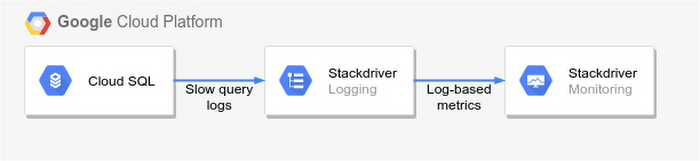
To get started, import MySQL’s slow query log into Stackdriver Logging.
Once the logs are in Stackdriver, it’s straightforward to set up logs-based metrics that can both count the number of slow queries over time, which is useful for setting up appropriate alerts, and also provide breakdowns by slow SQL statement, allowing speedy troubleshooting.
What’s more, this approach works equally well for managed databases in Cloud SQL for MySQL and for self-managed MySQL databases hosted on Compute Engine.
For a step-by-step tutorial to set up slow query monitoring, check out Monitoring slow queries in MySQL with Stackdriver. For more ideas about what else you can accomplish with Stackdriver Logging, check out Design patterns for exporting Stackdriver Logging.
Architecting Data Pipelines Directly Improves Customer Experience at Universe.com

6100
Of your peers have already read this article.
3:30 Minutes
The most insightful time you'll spend today!
At Universe, we serve customers day and night and are always working to make sure they have a great experience, whether online or at one of our live events.
Our technology has to make that possible, and our legacy systems weren’t cutting it anymore. What we needed was a consistent, reliable infrastructure that would help our internal teams provide a fast and innovative ticket-buying experience to customers.
With our data well-managed, we could free up time for our developers to bring new web features to customers, like tailored add-ons at checkout.
Our team of about 20 software engineers needed more flexibility and agility in our infrastructure; we were using various data processing tools, and it wasn’t easy to share data across teams so that everyone saw the same information.
We also needed to incorporate streaming data into the data warehouse to ensure the consistency and integrity of data that’s read in a particular window of time from multiple sources. Our developer teams needed to be able to ship new features faster, and the data back ends were getting in the way.
In addition, when GDPR regulations went into effect, we needed to make sure all our data was anonymized, and we couldn’t do that with our legacy tools.
Finding the right data tools for the job
To make sure our customers were getting a top-notch online experience, we had to make the right technology choices.
Our first step was to centralize multiple data sources and create a single data warehouse that could serve as the foundation for all of our reporting requirements, both internal and external.
The new technology infrastructure we built had to let us move and analyze data easily, so our teams could focus on using that data and insights to better serve our customers.
Previously, we had lots of siloed systems and applications running in AWS. We did a trial using Redshift, but we needed more flexibility than it offered in how we loaded historical data into our cloud data warehouse. Though we were using MongoDB Atlas for our transactional database, it was important to continue using SQL for querying data.
The trial task that really sold us on BigQuery was when we wanted to alter a small table that had about 20 million rows, used for internal reporting.
We needed to add a value, but our PostgreSQL system wouldn’t allow it. Using Apache Beam, we set up a simple pipeline that moved data from the original source into BigQuery to see if we could add the column there.
BigQuery ingested the data and let us add the new value in seconds. That was a significant moment that led us to start looking at how we could build end-to-end solutions on Google Cloud. BigQuery gave us multiple options to load our historical data in batches and build powerful pipelines.
We also explored Google Cloud’s migration tools and data pipeline options. Once we saw how Cloud Dataflow worked, with its Apache Beam back-end, we never looked back. Google Cloud provided us with the data tools we needed to build our data infrastructure.
Cloud for data, and for users
Introducing new technologies isn’t always simple—companies sometimes avoid it altogether because it’s so hard. But our Google Cloud onboarding process has been easy.
It took us less than two months to fully deploy our BigQuery data warehouse using the Cloud Dataflow-Apache Beam combination.
Moving to Google Cloud brought us a lot of technology advantages, but it’s also been hugely helpful for our internal users and customers. The data analytics capabilities that we’re now able to offer users has really impressed our internal teams, including developers and DevOps, even those who haven’t used this type of technology before.
Some internal clients are already entirely self-service. We’ve hosted frequent demos, and also hosted some “hack days,” where we share knowledge with our internal teams to show them what’s possible.
We quickly found that BigQuery helped us solve scale and speed problems.
One of our main pain points had been adding upsell opportunities for customers during the checkout process. The legacy technology hadn’t allowed us to quickly reflect those changes in the data warehouse. With BigQuery, we’re able to do that, and devote fewer resources to making it happen. We’ve also eliminated the time we were spending tuning memory and availability, since BigQuery handles that. Database administration and tuning required specialized knowledge and experience and took up time. With BigQuery, we don’t have to worry about configuring that hardware and software. It just works.
We’ve also eliminated the time we were spending tuning memory and availability, since BigQuery handles that. Database administration and tuning required specialized knowledge and experience and took up time. With BigQuery, we don’t have to worry about configuring that hardware and software. It just works.
Two features in particular that we implemented using BigQuery have helped us improve the performance of our core transactional database. First, using Cloud Dataflow to convert raw MongoDB logs to structured rows under a BigQuery table, which we can then query using SQL to identify slow or underperforming queries. Second, we can now query multiple logging tables using wildcards, since we load Fastly logs to BigQuery.
Along with MongoDB Atlas as our main transactional database, much of our infrastructure now runs as Google Cloud microservices using Google Kubernetes Engine (GKE), including the home page and our payment system. Kubernetes cron jobs power background scheduled jobs, and we also use Cloud Pub/Sub. Cloud Storage handles any data storage if any space constraints emerge.
Our overall performance has increased by about 10x with BigQuery. Both our customers and internal clients, like our sales and finance teams, benefit from the new low-latency reporting. Reports that used to be weekly or monthly are now available in near-real time. It’s not only faster to read records, but faster to move the data, too.
We have Cloud Dataflow pipelines that write to multiple places, and the speed of moving and processing data is incredibly helpful. We stream in financial data using Cloud Dataflow in streaming mode, and plan to have different streaming pipelines as we grow. We have several batch pipelines that run every day. We can move terabytes of data without performance issues, and process more than 100,000 rows of data per second from the underlying database. It used to take us a month to move that volume of data into our data warehouse. With BigQuery, it takes two days.
We’re also enjoying how easy and productive these tools are. They make our life as software engineers easier, so we can focus on the problem at hand, not fighting with our tools.
What’s next for Universe
Our team will continue to push even more into Google Cloud’s data platform. We have plans to explore Cloud Datastore next. We’re also moving our databases to PostgreSQL on GCP, using Cloud Dataflow and Beam. BigQuery’s machine learning tools may also come into play as Universe’s cloud journey evolves, so we can start doing predictive analytics based on our data. We’re looking forward to gaining even more speed and agility to meet our business goals and customer needs.
6198
Of your peers have already watched this video.
13:00 Minutes
The most insightful time you'll spend today!
Google Cloud’s 2021 Data Analytics Launches
Google Cloud announced closed to 15 services and programs spanning database, analytics, business intelligence and AI to help businesses gain value out of their data. Here’s a rundown of announcements throughout 2021 on analytics solutions and services such as Dataplex, an intelligent data fabric solution, Datastream, a serverless change data capture and replication service and Google Cloud analytics hub. Watch the video to get started with Google Cloud’s Data Analytics offerings.
Carbon Health: Transforming outcomes with Connected Sheets for Looker

3116
Of your peers have already read this article.
2:30 Minutes
The most insightful time you'll spend today!
Everyone wants affordable, quality healthcare but not everyone has it. A 2021 report by the Commonwealth Fund ranked the U.S. in last place among 11 high-income countries in healthcare access.1 Carbon Health is working to change that. We are doing so by combining the best of virtual care, in-person visits, and technology to support patients with their everyday physical and mental health needs.
Rethinking how data and analytics are accessed at Carbon Health
Delivering premium healthcare for the masses that’s accessible and affordable is an ambitious undertaking. It requires a commitment to operating the business in an efficient and disciplined way. To meet our goals, our teams across the company require detailed, daily insights into operating results.
In the last year, we realized our existing BI platform was inaccessible to most of our employees outside of R&D. Creating the analytics, dashboards, and reports needed by our clinic leaders and executives required direct help from our data scientists.
However, this has all changed since deploying Looker as our new BI platform. We initially used Looker to build tables, charts, and graphs that improved how people could access and analyze data about our operating efficiency. As we continued to evaluate how our data and analytics should be experienced by our in-clinic staff, we learned about Connected Sheets for Looker, which has unlocked an entirely new way of sharing insights across the company.
A new way to deliver performance reporting and drive results
Connected Sheets for Looker gives Carbon Health employees who work in Google Sheets—practically everyone—a familiar tool for working with Looker data. For instance, one of our first outputs using the Connected Sheets integration has been a daily and weekly performance push-report for the clinic’s operating leaders, including providers.
Essentially a scorecard, the report tracks the most important KPIs for measuring clinics’ successes, including appointment volume, patient satisfaction such as net promoter score (NPS), reviews, phone call answer rates, and even metrics about billing and collections. To provide easy access, we built a workflow through Google App Script that takes our daily performance report and automatically emails a PDF to key clinic leaders each morning.
Within the first 30 days of the report’s creation, clinic leaders were able to drive noticeable improvements in operating results. For instance, actively tracking clinic volume has enabled us to manage our schedules more effectively, which in turn drives more visits and enables us to better communicate expectations with our patients. Other clinics have dramatically improved their call answer rates by tracking inbound call volume, which has also led to better patient satisfaction.
Greater accountability, greater collaboration
As you can imagine, a report that holds people accountable for outcomes in such a visible way can create some anxiety. We’ve eased those concerns by using the information constructively, with the goal to use reporting as a positive feedback mechanism to bolster open collaboration and identify operational processes that need improvement. For example, data about our call answer rates initiated an investigation that led to an operational redesign of how phones are deployed and managed at more than 120 clinics across the U.S.
Looker as a scalable solution with endless applications
We’re now rolling out Connected Sheets for Looker to deliver performance push-reporting across all teams at Carbon Health. Additionally, we continue to find new ways to leverage Connected Sheets for Looker to meet other needs of the business.
For instance, we’ve recently been able to better understand our software costs by analyzing vendor spend from our accounting systems directly in Google Sheets. Going forward, this will allow us to build a basic workflow to monitor subscription spend and employee application usage, which will lead to us saving money on unnecessary licenses and underutilized software.
We’ve come a long way in the last year. Between Looker and its integration with Google Sheets, we can meet the data needs of all our stakeholders at Carbon Health. Connected Sheets for Looker has been an impactful solution that’s going to help us drive measurable results in how we deliver premium healthcare to the masses.
1. Mirror, Mirror 2021: Reflecting Poorly
2. HEALTHCARE EDITORS’ PICK Meet The Immigrant Entrepreneurs Who Raised $350 Million To Rethink U.S. Primary Care
Two Ways to Deploy SAP HANA System on Google Cloud

7887
Of your peers have already read this article.
4:00 Minutes
The most insightful time you'll spend today!
Many of the world’s leading companies run on SAP—and deploying it on Google Cloud extends the benefits of SAP even further. Migrating your current SAP S/4HANA deployment to Google Cloud—whether it resides on your company’s on-premises servers or another cloud service—provides your organization with a flexible virtualized architecture that lets you scale your environment to match your workloads, so you pay only for the compute and storage capacity you need at any given moment. Google Cloud includes built-in features, such as Compute Engine live migration and automatic restart, that minimize downtime for infrastructure maintenance. And it allows you to integrate your SAP data with multiple data sources and process it using Google Cloud technology such as BigQuery to drive data analytics.
SAP server-side architecture consists of two layers: the SAP HANA database, and the Netweaver application layer. In this blog post, we’ll look at the options and steps for moving the database layer to Google Cloud as a lift and shift or rehost, a straightforward approach that entails moving your current SAP environment unchanged onto Google Cloud.
Deploying an SAP HANA system on Google Cloud
Google Cloud offers SAP-certified virtual machines (VMs) optimized for SAP products, including SAP HANA and SAP HANA Enterprise Cloud, as well as dedicated servers for SAP HANA for environments greater than 12TB. (For a complete list of VM and hardware options, visit the Certified and Supported SAP HANA Hardware Directory.)
Before proceeding with a rehost migration to Google Cloud, your current (source) environment and Google Cloud (target) environments should meet these specifications:
Prerequisites:
- The configuration of the Google Cloud environment (i.e., VM resources, SSD storage capacity) should be identical to that of the source environment. If the underlying hardware is different, however, you must use Option 2 for your migration, detailed below.
- Both environments should be running the same operating system (SUSE or RHEL Linux).
- The HANA version, instance number, and system ID (SID) should be identical.
- Schema names must remain the same.
- Establishing the network connection between the on-premises environment and Google Cloud will be required in this phase to support rehost of the SAP application.you can use Cloud VPN or Dedicated Interconnect. Learn more about Dedicated Interconnect and Cloud VPN.
Note: Depending on your internet connection and bandwidth requirements, we recommend using a Dedicated Interconnect over Cloud VPN for production environments.
We offer a number of automated processes to accelerate your cloud journey. To deploy the SAP HANA system on Google Cloud, you can use the Google Cloud Deployment manager or Terraform and Ansible scripts available on GitHub with configuration file templates to define your installation. For more details, see the Google Cloud SAP HANA Planning Guide.
Note: To deploy SAP HANA on Google Cloud machine types that are certified by SAP for production, please review the Certification for SAP HANA on Google Cloud page.
Moving an SAP HANA Database to Google Cloud
There are two different options you can use to rehost your SAP HANA database to Google Cloud, and each has pros and cons that you should consider when deciding on your approach.
Option 1: Asynchronous replication uses SAP’s built-in replication tool to provide continuous data replication from the source system (also known as the primary system) to the destination or secondary system—in this case residing on Google Cloud. It’s best for mission-critical applications for which minimum downtime is a high priority, and for large databases. In addition, the high level of automation means that the process requires less manual intervention. Here’s where you can learn more on HANA Asynchronous Replication.
Option 2: Backup and restore relies on SAP’s backup utility to create an image of the database that is then transferred to Google Cloud, where it is restored in the new environment. Downtime for this method varies by database size, so large databases may require more downtime via this method vs. asynchronous replication. It also involves more manual tasks. However, it requires fewer resources to perform, making it an attractive option for less urgent use cases. Here’s where you can learn more on SAP HANA database Backup and restore.

How to migrate the SAP HANA database to Google Cloud using Asynchronous Replication

- Create and configure Dedicated Interconnect or Cloud VPN between the current environment and Google Cloud.
- Set up SAP HANA asynchronous replication. You can configure system replication using SAP HANA Cockpit, SAP HANA Studio, or hdbnsutil. See Setting Up SAP HANA System Replication in the SAP HANA Administration Guide.
- Be sure to use the same instance number and HANA SID in the template as the primary instance.
- Configure the Google Cloud instance as the secondary node for using HANA Asynchronous replication.
- Perform data validation once full data replication is completed to the SAP HANA database in Google Cloud. To learn more: HANA System Replication overview.
- Perform an SAP HANA takeover on your standby database. This switches your active system from the current primary system onto the secondary system on Google Cloud. Once the takeover command runs, the system on Google Cloud becomes the new primary system.To learn more: HANA Takeover.
How to migrate the SAP HANA database to Google Cloud using Backup and Restore

- Create a full backup of your SAP HANA database in your current environment.
- Create a new storage bucket in your Google Cloud environment. Visit Creating Storage Buckets in the Google Cloud Storage documentation.
- Download and install gsutil onto the source environment and run it to upload the HANA backup to the Google Cloud storage bucket. To install gsutil utility on any computer or server, visit Install gsutil in the Google Cloud Storage documentation.
Note: You can run parallel multi thread/multi processing in gsutil to copy large files more quickly. - Recover the HANA database on Google Cloud using SAP’s RECOVER DATABASE statement. See RECOVER DATABASE Statement (Backup and Recovery) in the SAP HANA SQL Reference Guide for SAP HANA Platform.
Note: BackInt agent is an integrated SAP interface tool used for HANA database on Google Cloud.Backint agent for SAP HANA can be used to store and retrieve backups directly from Google Cloud Storage. It is supported and certified by SAP on Google Cloud. To learn more: SAP HANA Backint Agent on Google Cloud.
In summary, we recommend using Asynchronous Replication (Option 1) for mission-critical applications that require the lowest downtime window. For all other applications, we recommend Backup and Restore (Option 2), as this approach requires fewer resources. It’s also a great way to implement the backup and restore functionality on Google Cloud.
A rehost migration is the most straightforward path to getting your SAP on HANA system up and running on Google Cloud. And the sooner you migrate, the sooner you can take advantage of the many benefits Google Cloud brings to your SAP solution. For more information on the different migration options please review: SAP on Google Cloud: Migration strategies.
Learn more about deploying SAP on Google Cloud. Technical resources can be found here.
10516
Of your peers have already watched this video.
2:15 Minutes
The most insightful time you'll spend today!
The True Story of How HotStar Broke a World-Record–Thanks to Firebase and Google BigQuery
Hotstar, India’s largest video streaming platform with 150 million monthly active users around the world, provides live-streaming of TV shows, movies, sports, and news on the go.
By using a combination of Firebase products together, Hotstar safely rolled out new features to its watch screen during a major live-streaming event without disrupting users, sacrificing stability, or releasing a new build. They also used Firebase with BigQuery to analyze their event data and reduce app startup time.
“We have an ambitious mission, but our engineering team is only a fraction of the size of most of our competitors. But we are still keeping up, and we are doing it with the help of Firebase,” says Ayushi Gupta, Android Engineer, Hotstar.
More Relevant Stories for Your Company

Guide for Measuring Cloud Spanner Performance for Your Custom Workload
Database migration to a new database platform or technology can be daunting for various reasons. One of the common concerns is database performance. It is hard to evaluate database performance early in the evaluation cycle without performing actual data migration and application changes. This becomes even more important in the

Google Migration and BigQuery Brings PedidosYa Closer towards its Goal of Becoming Data-driven
Editor’s note: PedidosYa is the market leader for online food ordering in Latin America, serving 15 markets and over 400 cities. It’s also one of the largest brands within the German multinational company Delivery Hero SE. With over 20 million app downloads, PedidosYa provides the best online delivery experience through

Simplifying Your Database Migration With Google Cloud
For several decades, before the rise of cloud computing upended the way we think about databases and applications, Oracle and Microsoft SQL Server databases were a mainstay of business application architectures. But today, as you map out your cloud journey, you’re probably reevaluating your technology choices in light of the

Case Study: When Database Choice Powers New Revenue-driving Product Features
Editor’s note: Streak makes a CRM add-on for Gmail, and recently adopted Cloud Spanner to take advantage of its scalability and SQL capabilities to implement a graph data model. Read on to learn about their decision, what they love about the system, and the ways in which it still needs
