





4046
Of your peers have already watched this video.
2:20 Minutes
The most insightful time you'll spend today!
Telstra Leverages APIs To Accelerate Digital Transformation
Telstra is Australia’s leading telecommunications and technology company, offering a full range of communication services and competing in all telecommunications markets.
In Australia, it provides 17.7 million retail mobile services, 4.9 million retail fixed voice services and 3.6 million retail fixed broadband services.
But owing to legacy infrastructure the company was unable to boost business efficiency and agility. To address these challenges, the company decided to leverage the Apigee platform.
“One of the key challenges that Apigee helped us solve was ensuring greater efficiency. Efficiency in business is absolutely critical. The more efficient you become the quicker you can solve problems and hence lower costs of solving those problems,” says David Freeman, General Manager of API enablement, Telstra.
Freeman also highlights that the Apigee platform has helped Telstra reduce the cycle time of delivery from months to days and sometimes even minutes. It also empowered the organization to efficiently track their developer community as well.
“Apigee was not only able to take systems and services and turn them into APIs but it also provided an analytics capability where we could keep an eye on the developer community, we could see what the developers were doing with APIs. On top of that, it also provided a great way to monetize APIs. This ensures that our developers can quickly and easily consume APIs,” says Freeman.
Watch this short video and get greater insights into how Apigee is helping Telstra accelerate digital transformation.
A Pro’s Tip on Choosing the Right Google Cloud Compute Options

5722
Of your peers have already read this article.
2:00 Minutes
The most insightful time you'll spend today!
Where should you run your workload? It depends…Choosing the right infrastructure options to run your application is critical, both for the success of your application and for the team that is managing and developing it. This post breaks down some of the most important factors that you need to consider when deciding where you should run your stuff!
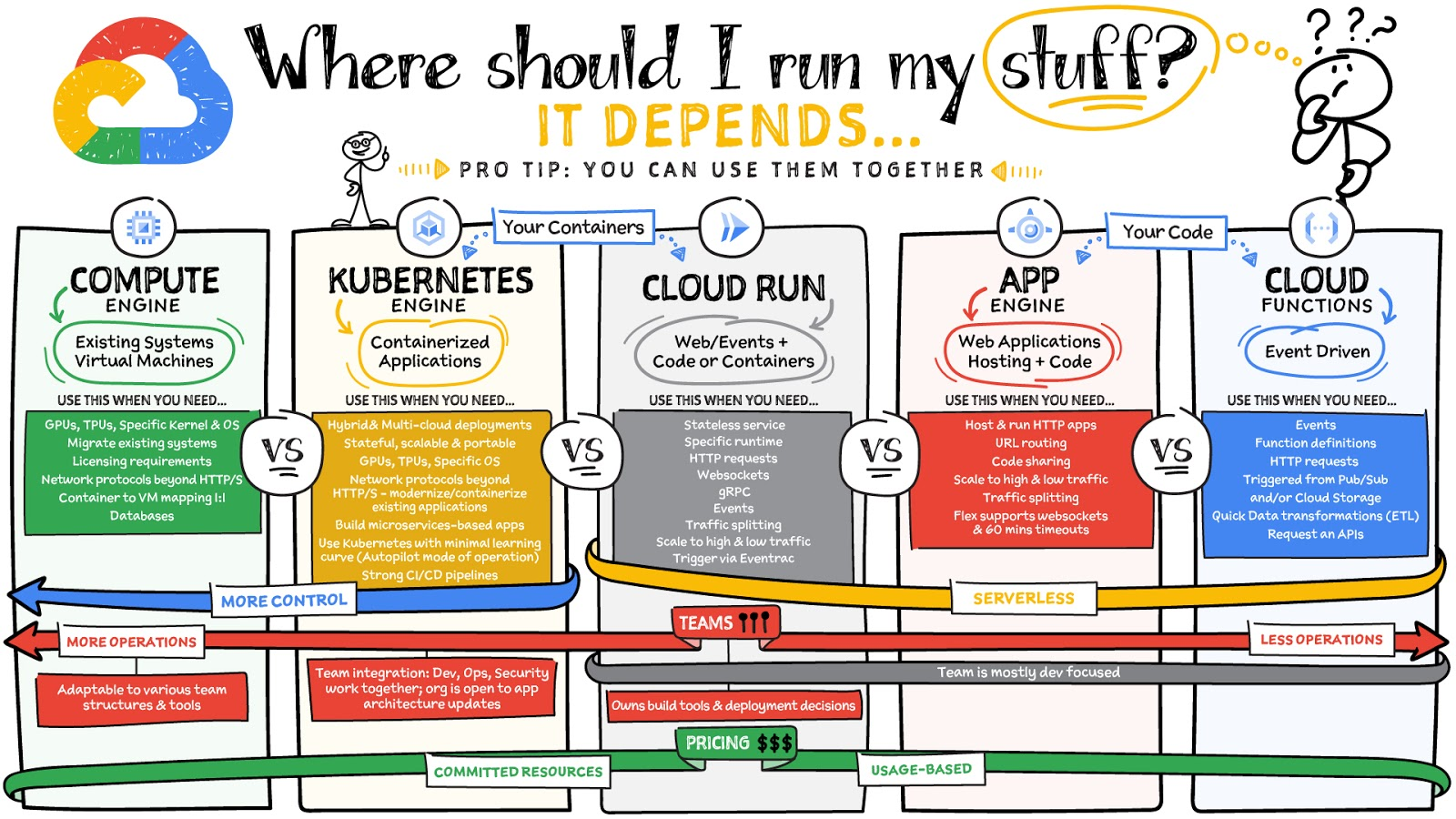
What are these services?
- Compute Engine – Virtual machines. You reserve a configuration of CPU, memory, disk, and GPUs, and decide what OS and additional software to run.
- Kubernetes Engine – Managed Kubernetes clusters. Kubernetes is an open-source system for automating deployment, scaling, and management of containerized applications. You create a cluster and configure which containers to run; Kubernetes keeps them running and manages scaling, updates and connectivity.
- Cloud Run – A fully managed serverless platform that runs individual containers. You give code or a container to Cloud Run, and it hosts and auto scales as needed to respond to web and other events.
- App Engine – A fully managed serverless platform for complete web applications. App Engine handles the networking, application scaling, and database scaling. You write a web application in one of the supported languages, deploy to App Engine, and it handles scaling, updating versions, and so on.
- Cloud Functions – Event-driven serverless functions. You write individual function code and Cloud Functions calls your function when events happen (for example, HTTP, Pub/Sub, and Cloud Storage changes, among others).
What level of abstraction do you need?
- If you need more control over the underlying infrastructure (for example, the operating system, disk images, CPU, RAM, and disk) then it makes sense to use Compute Engine. This is a typical path for legacy application migrations and existing systems that require a specific OS.
- Containers provide a way to virtualize an OS so that multiple workloads can run on a single OS instance. They are fast and lightweight, and they provide portability. If your applications are containerized then you have two main options.
- You can use Google Kubernetes Engine, or GKE, which gives you full control over the container down to the nodes with specific OS, CPU, GPU, disk, memory, and networking. GKE also offers Autopilot, when you need the flexibility and control but have limited ops and engineering support.
- If, on the other hand, you are just looking to run your application in containers without having to worry about scaling the infrastructure, then Cloud Run is the best option. You can just write your application code, package it into a container, and deploy it.
- If you just want to code up your HTTP-based application and leave the scalability and deployment of the app to Google Cloud then App Engine — a serverless, fully-managed option that is designed for hosting and running web applications — is a good option for you.
- If your code is a function and just performs an action based on an event/trigger, then deploying it with Cloud Functions makes sense.
What is your use case?
- Use Compute Engine if you are migrating a legacy application with specific licensing, OS, kernel, or networking requirements. Examples: Windows-based applications, genomics processing, SAP HANA.
- Use GKE if your application needs a specific OS or network protocols beyond HTTP/s. When you use GKE, you are using Kubernetes, which makes it easy to deploy and expand into hybrid and multi-cloud environments. Anthos is a platform specifically designed for hybrid and multi-cloud deployments. It provides single-pane-of-glass visibility across all clusters from infrastructure through to application performance and topology. Example: Microservices-based applications.
- Use Cloud Run if you just need to deploy a containerized application in a programming language of your choice with HTTP/s and websocket support. Examples: websites, APIs, data processing apps, webhooks.
- Use App Engine if you want to deploy and host a web based application (HTTP/s) in a serverless platform. Examples: web applications, mobile app backends
- Use Cloud Functions if your code is a function and just performs an action based on an event/trigger from Pub/Sub or Cloud Storage. Example: Kick off a video transcoding function as soon as a video is saved in your Cloud Storage bucket.
Need portability with open source?
If your requirement is based on portability and open-source support take a look at GKE, Cloud Run, and Cloud Functions. They are all based on open-source frameworks that help you avoid vendor lock-in and give you the freedom to expand your infrastructure into hybrid and multi-cloud environments. GKE clusters are powered by the Kubernetes open-source cluster management system, which provides the mechanisms through which you interact with your cluster. Cloud Run for Anthos is powered by Knative, an open-source project that supports serverless workloads on Kubernetes. Cloud Functions use an open-source FaaS (function as a service) framework to run functions across multiple environments.
What are your team dynamics like?
If you have a small team of developers and you want their attention focused on the code, then a serverless option such as Cloud Run or App Engine is a good choice because you won’t have to have a team managing the infrastructure, scale, and operations. If you have bigger teams, along with your own tools and processes, then Compute Engine or GKE makes more sense because it enables you to define your own process for CI/CD, security, scale, and operations.
What type of billing model do you prefer?
Compute Engine and GKE billing models are based on resources, which means you pay for the instances you have provisioned, independent of usage. You can also take advantage of sustained and committed use discounts.
Cloud Run, App Engine, and Cloud Functions are billed per request, which means you pay as you go.
Conclusion
It’s important to consider all the relevant factors that play a role in picking appropriate compute options for your application. Remember that no decision is necessarily final; you can always move from one option to another.
To explore these points in more detail, please take a look at the “Where Should I Run My Stuff?” video.
For more #GCPSketchnote, follow the GitHub repo & thecloudgirl.dev. For similar cloud content follow us on Twitter at @pvergadia and @briandorsey
How Ather Energy is leveraging the Cloud to build and scale smart mobility solutions for India

8364
Of your peers have already read this article.
8:30 Minutes
The most insightful time you'll spend today!
In 2013, long before the world was discussing clean energy and sustainable practices, two IIT Madras graduates — Swapnil Jain and Tarun Mehta — had an idea to develop India’s first-ever electrical scooter.
This was at a time when auto manufacturers were still focusing on fossil-fuel-driven vehicles and ‘eco-friendly’ mobility solutions were more a trendy alternative catering to a niche market.
The duo founded Ather Energy in 2013 and launched their first fully-electric scooter, the Ather S340, in Bengaluru in 2016. Since then, the company has released several new models into the market and is planning to expand to eight more cities by the end of the year.
To support the smooth running of their vehicles, lower costs, improve time to market, and create great customer experience, Ather turned to Google Cloud.
Read the Full Story on YourStory
A Guide to Anthos Hybrid Environment Reference Architecture
1269
Of your peers have already read this article.
1:30 Minutes
The most insightful time you'll spend today!
To help improve your security posture, improve the reliability of your applications, and reduce configuration drift in your environment, we’re excited to announce a new Anthos reference architecture.
Written in collaboration across our product, engineering, support, and field teams, this new reference architecture helps you plan, deploy, and configure the required components for Anthos hybrid environments.
Anthos hybrid environments give you the flexibility to deploy on-premises components that run container-based workloads and VMs using Anthos clusters on VMware and Anthos clusters on bare metal. You can continue to utilize existing investments in your on-premises infrastructure, and start to add components like Anthos Config Management. When you’re ready to bring everything together, you can add additional Google Cloud-based services like Artifact Registry, Cloud Monitoring, and Identity and Access Management (IAM).
The following sneak peek covers some of our best practices for architecting an Anthos hybrid environment. For more detailed guidance and planning information, see the full Anthos hybrid environment reference architecture.
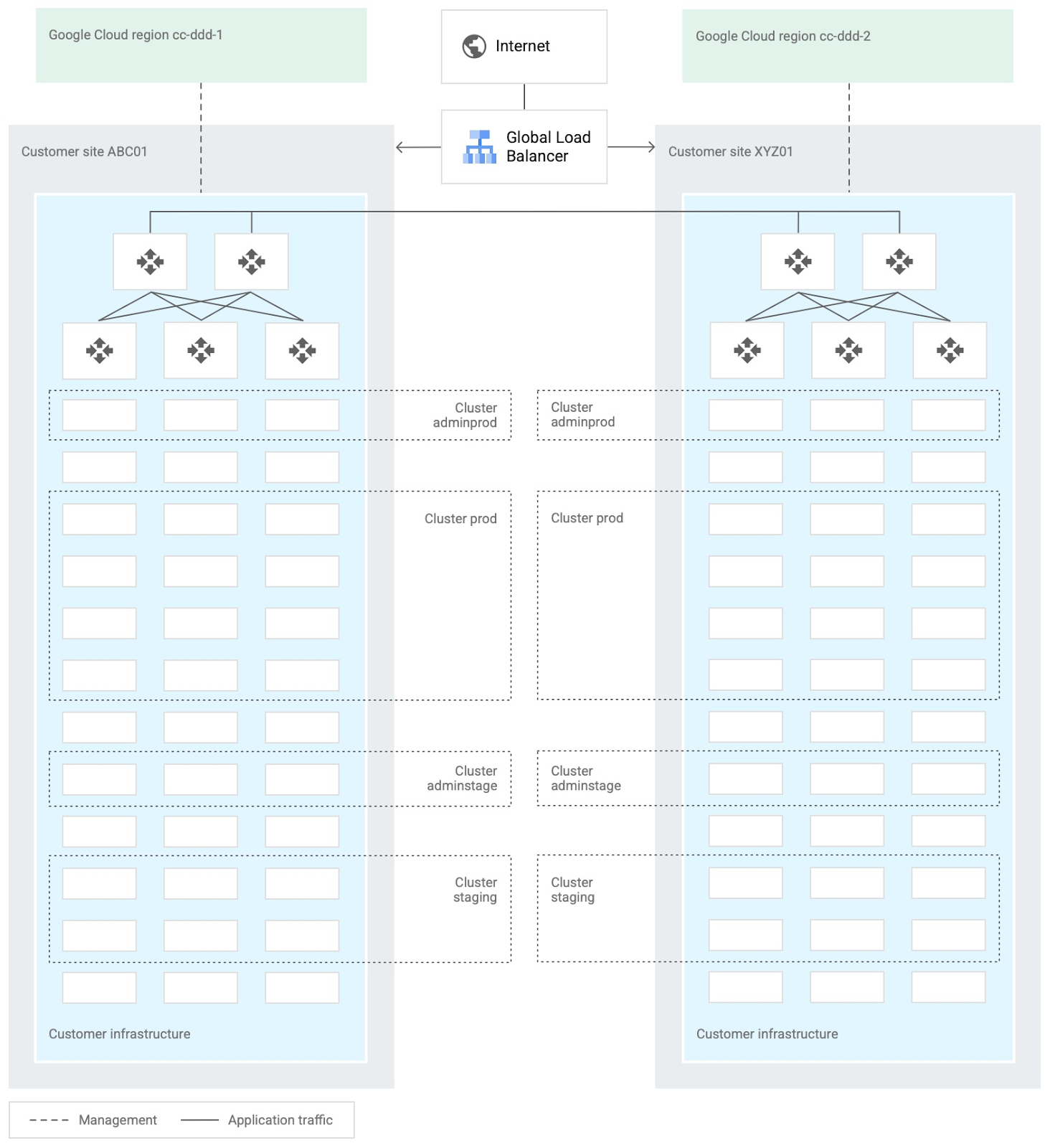
When you design and deploy an Anthos hybrid environment, we recommend that you use two or more on-premises computing customer sites and two or more Google Cloud regions. In your sites, run multiple clusters. This approach is recommended for several reasons, such as:
- Disaster recovery. If one cluster or site fails, you can continue to run workloads.
- Multiple environments, like production and staging, to test infrastructure changes.
- Different cluster types in each environment: admin clusters and user clusters. This approach separates administrative resources, which is a security best-practice.
The following diagram shows an example of an Anthos hybrid environment that’s spread across customer sites and regions, with different clusters for admin and user workloads and for production and staging:
In each site, you can use Anthos clusters on VMware or Anthos clusters on bare metal. For both products, we recommend the following:
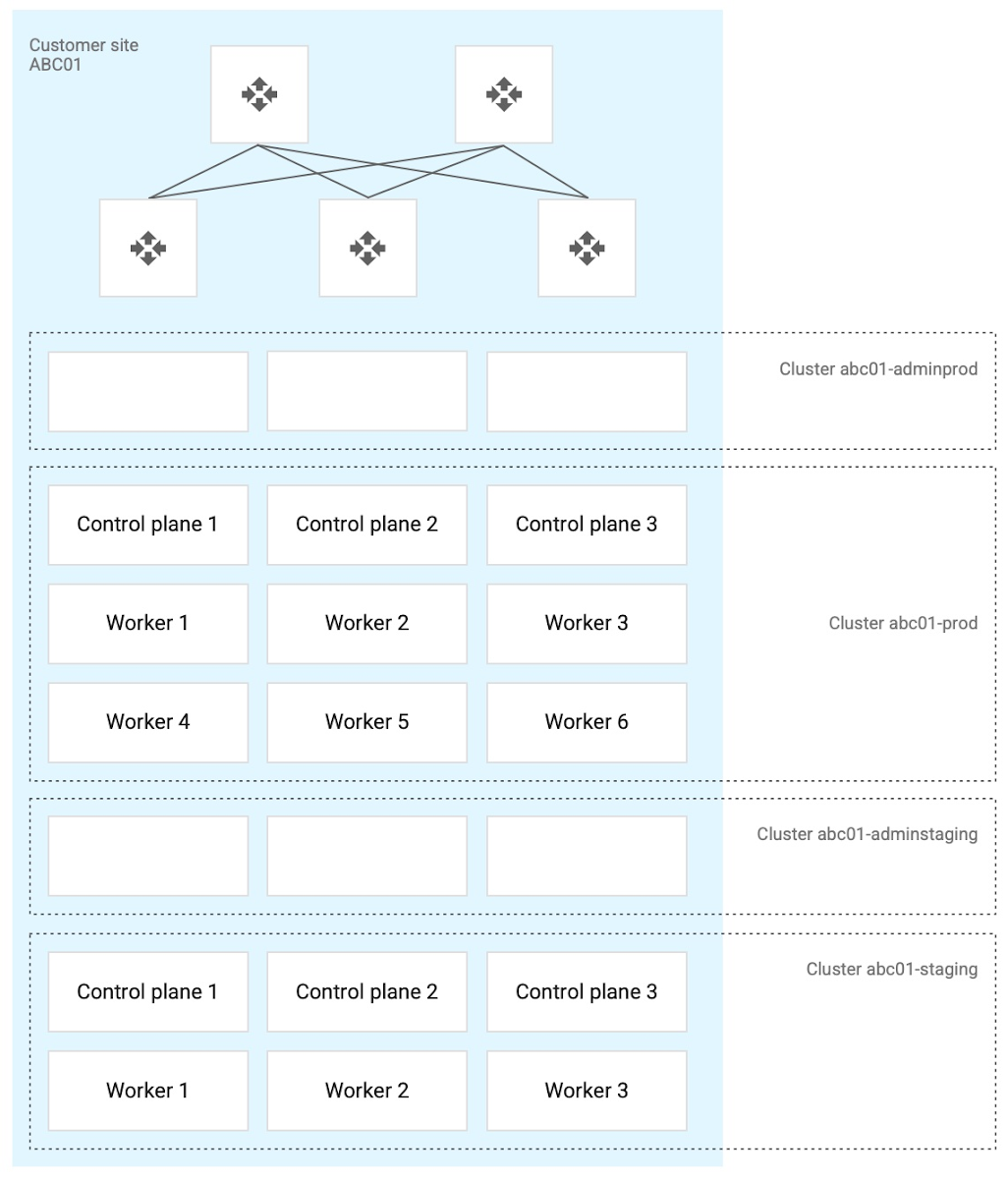
- Use a highly available (HA) control plane with three members for continued control plane availability concurrently with operating system upgrades, control plane software updates, or single-machine hardware or kernel failures.
- Deploy two admin clusters so that admin cluster configuration changes and updates can be tested in the staging environment first.
The following diagram shows an example of Anthos clusters on bare metal with control plane and worker nodes spread across physical machines. With Anthos clusters on VMware, the control plane and worker nodes are spread across VMware VMs:
Configure your on-premises clusters and applications to send logging and monitoring data back to Google Cloud for analysis and review. Different personas should only be granted access to the environments they need. The following diagram shows how application developers and application or platform operators can then view logging and monitoring data in Google Cloud:
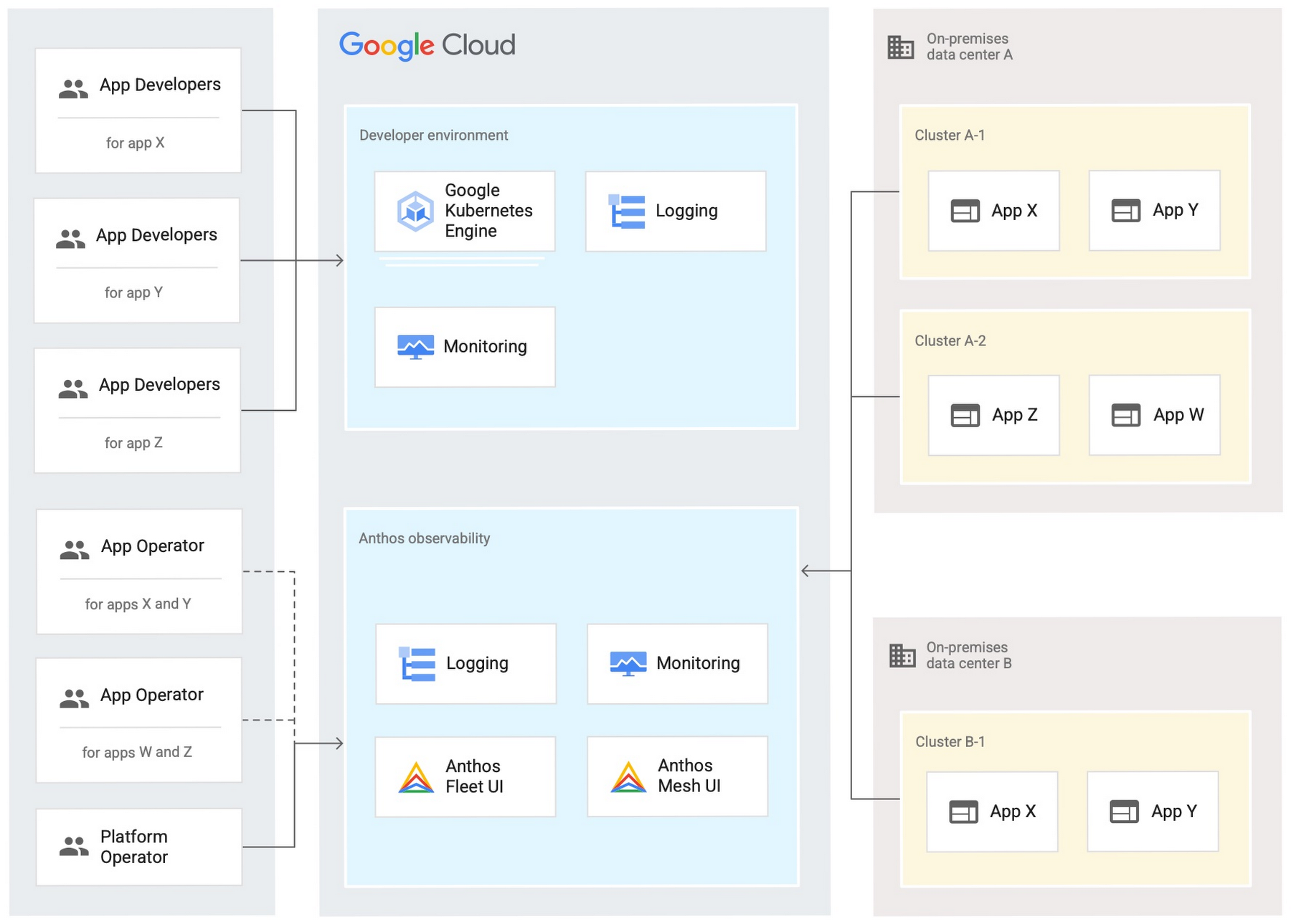
Use Anthos Config Management to manage Kubernetes objects in your clusters. Anthos Config Management is a GitOps-style tool that uses a Git repository or Open Container Initiative (OCI) as its storage mechanism and source of truth. Git provider workflows allow multiple stakeholders to participate in review of changes.
As shown in the following diagram, a common Anthos Config Management deployment uses one folder containing configuration for all clusters. Use separate additional folders to hold configuration data, one for application:
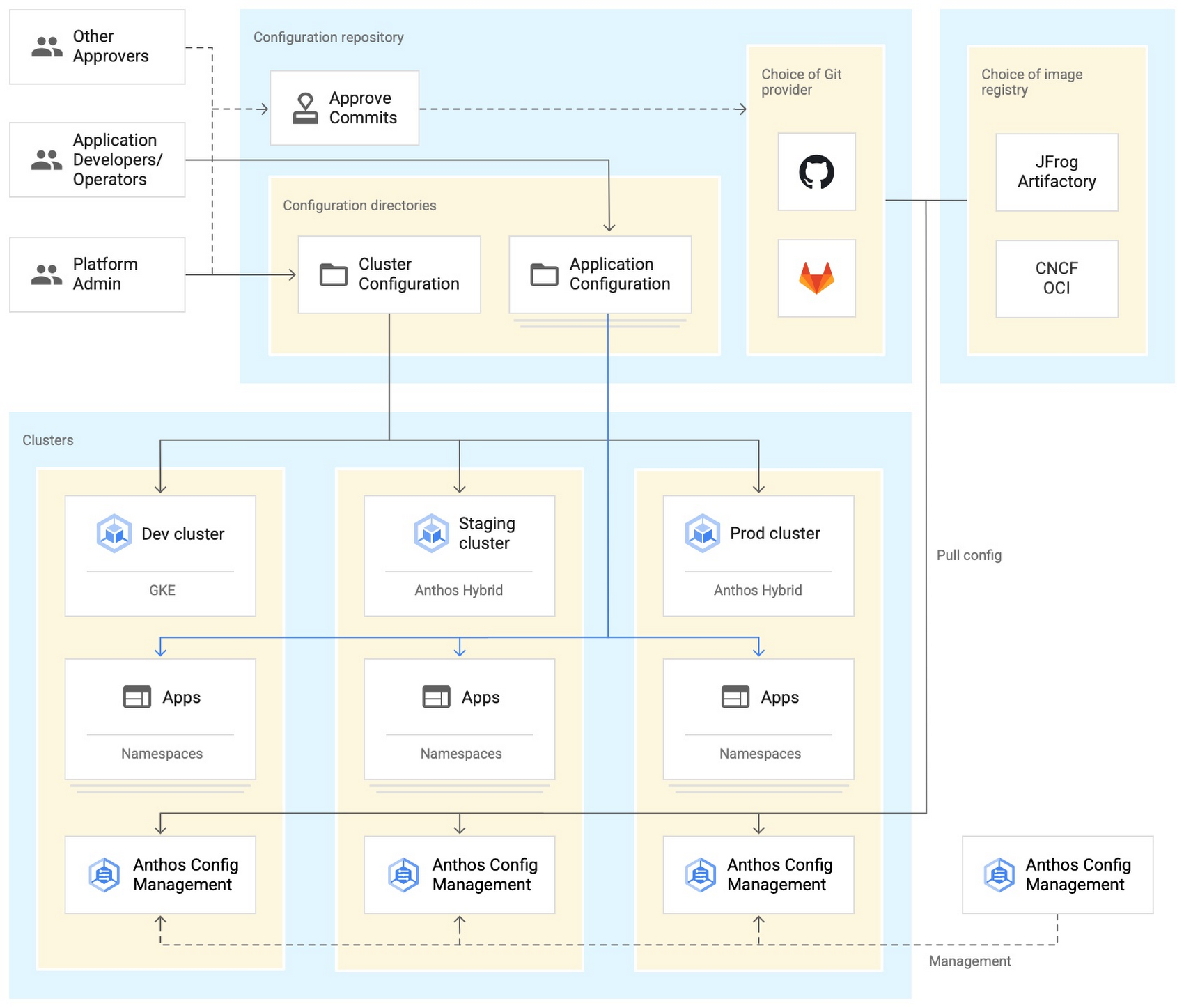
Plan and implement a way to secure the network traffic in your Anthos hybrid environment. The following services help with authentication, connectivity, and communication in a cluster:
- Anthos Identity Service connects clusters to on-site identity providers to authenticate local access.
- Connect gateway and workforce identity federation can provide secure cloud-mediated access to mobile workforce clusters without using a VPN.
- Workload Identity provides on-premises workloads with managed short-lifetime credentials for access to cloud resources.
- Anthos Service Mesh encrypts and controls communication between services in the same cluster.
The following diagram shows how Anthos Service Mesh can control the flow of traffic between services within your clusters:
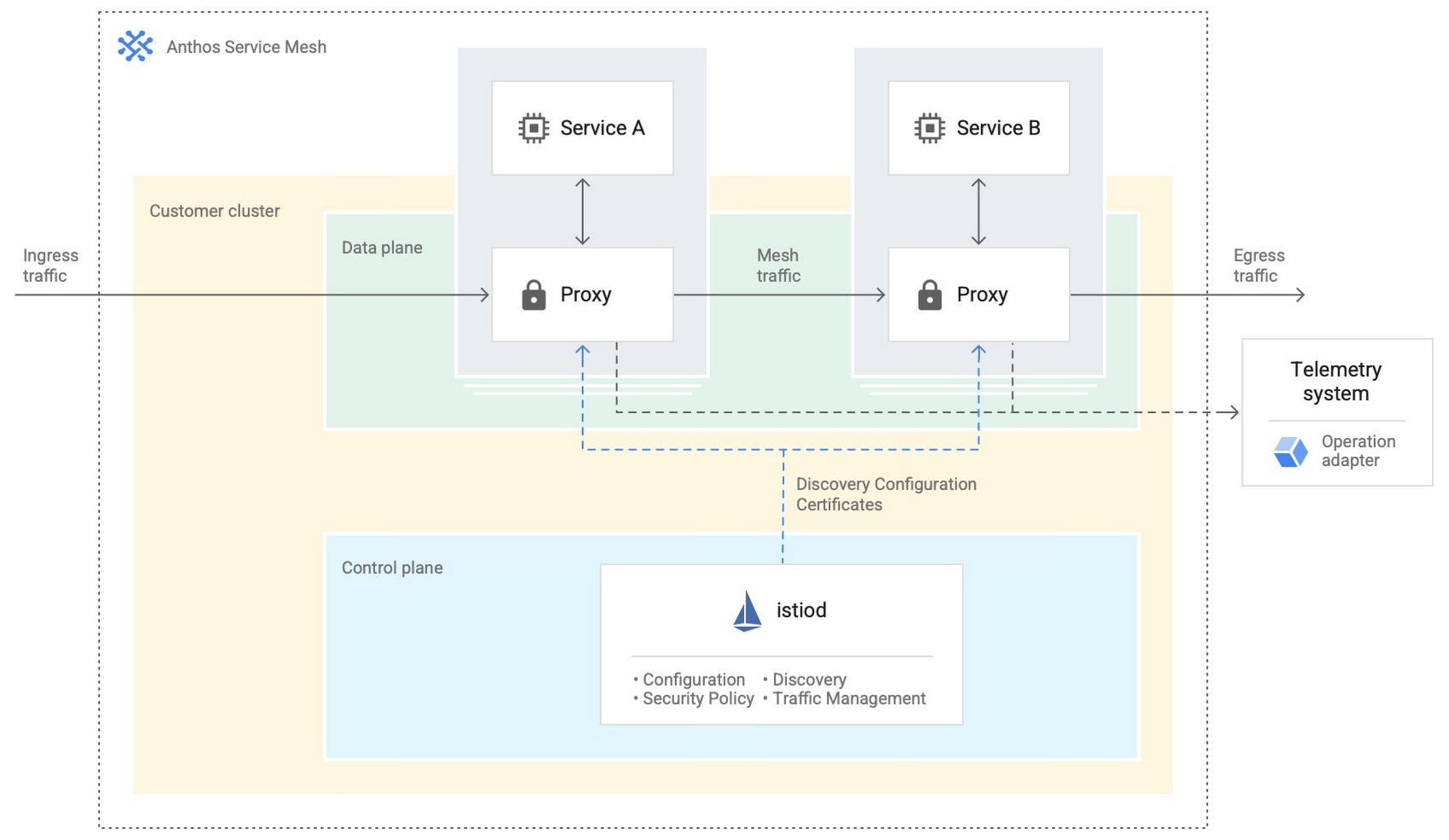
You don’t have to implement all these cloud-based services as part of your initial on-premises deployments. As you become more comfortable and want to expand your capabilities, you can add in some of these hybrid offerings. But, we hope that this blog post has given you some ideas to think about when you start to plan and design your own Anthos hybrid environments.
For more detailed guidance and planning information, see the full Anthos hybrid environment reference architecture. Let us know what you think!
3174
Of your peers have already watched this video.
6:00 Minutes
The most insightful time you'll spend today!
A Headless Ecommerce on Google Cloud
Headless commerce helps marketing teams gain flexibility to alter frontend elements to run marketing campaigns and promotions and create the most superior customer experience on frontend devices. Watch the video to learn the basics of building a headless commerce application on Google Cloud. Meaning you will learn to have the frontend experience deployed on Cloud Run in Google Cloud, and integrate with commerce backend from Google Cloud Marketplace offering partner commerce tools.

5616
Of your peers have already downloaded this article
1:30 Minutes
The most insightful time you'll spend today!
Even before the current crisis, IT organizations saw pressure to be more agile and innovative. Customer demographics and expectations are changing. Competition is emerging faster and from unexpected sources. Business models are being reinvented. Digital technology was at the heart of many of these challenges, and its adoption was key to every company’s response.
As a result, CIOs face a series of urgent challenges:
- How can they raise system visibility and system control over operations that are more dispersed and changing than ever?
- How can they cut costs, yet create a more agile and responsive IT system?
- How can they do more with older data, even as they understand better the data from a market that is changing every week?
- How can they help people work faster, with a minimum of change management, or set the stage for growth, while preserving capital?
In many cases the answer is a step-by-step deployment of cloud computing technology, tailored to meet the most pressing needs first.
More Relevant Stories for Your Company
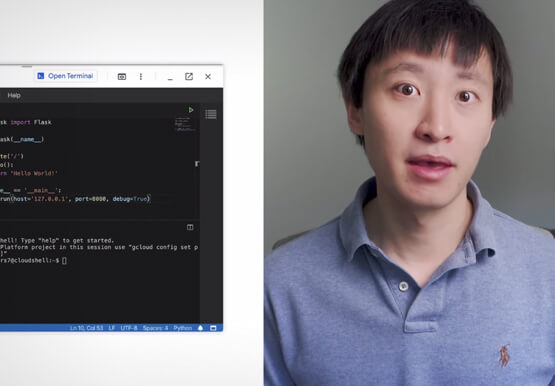
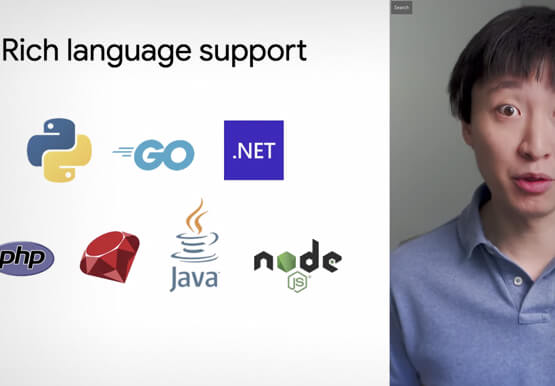


Introduction to Cloud Shell Editor
Watch the video to understand how Google's Cloud Shell Editor and its powerful features-packed environment can streamline your development workflows.



Google Cloud’s ML-based Image Classification App: A Key to Global Wildlife Conservation
Wildlife provides critical benefits to support nature and people. Unfortunately, wildlife is slowly but surely disappearing from our planet and we lack reliable and up-to-date information to understand and prevent this loss. By harnessing the power of technology and science, we can unite millions of photos from [motion sensored cameras]



Ship Faster, Spend Less by Going Multi-Cloud with Anthos
Today's success depends more than ever on making the most of both on-premises investments and the various cloud offerings available to you. Learn about how Google Cloud is bringing simplified operations everywhere to help ensure success in a world of hybrid, multi cloud and edge scenarios that could otherwise threaten

Announcing reCAPTCHA Enterprise’s Mobile SDK to Help Protect iOS, Android apps
reCAPTCHA Enterprise is Google’s online fraud detection service that leverages more than a decade of experience defending the internet. reCAPTCHA Enterprise can be used to prevent fraud and attacks perpetrated by scripts, bot software, and humans. When installed inside a mobile app at the point of action, such as login,
