





Master AI Prompt Engineering with 6 Proven Tips

1030
Of your peers have already read this article.
2:30 Minutes
The most insightful time you'll spend today!
As AI-powered tools become increasingly prevalent, prompt engineering is becoming a skill that developers need to master. Large language models (LLMs) and other generative foundation models require contextual, specific, and tailored natural language instructions to generate the desired output. This means that developers need to write prompts that are clear, concise, and informative.
In this blog, we will explore six best practices that will make you a more efficient prompt engineer. By following our advice, you can begin creating more personalized, accurate, and contextually aware applications. So let’s get started!
Tip #1: Know the model’s strengths and weaknesses
As AI models evolve and become more complex, it is essential for developers to comprehend their capabilities and limitations. Understanding these strengths and weaknesses can help you, as a developer, avoid making mistakes and create safer, more reliable applications.
For example, an AI model that is trained to recognize images of blueberries may not be able to recognize images of strawberries. Why? Because the model was only trained on a dataset of blueberry images. If a developer uses this model to build an application that is supposed to recognize both blueberries and strawberries, the application would likely make mistakes, leading to an ineffective outcome, and poor user experience.
It’s important to note that AI models have the ability to be biased. This is due to AI models being trained on data that is collected from the real world, and so it can reflect the inequitable power dynamics inherently rooted in our social hierarchy. If the data that is used to train an AI model is biased, then the model will also be biased. This can lead to problems if the model is used to make decisions that affect people by reinforcing societal biases. Addressing these biases is important to ensure that data is fair, promoting equality, and ensuring the responsibility of AI technology. Prompt engineers should be aware of training limitations or biases so they can craft prompts more effectively and understand what kind of prompting is even possible for a given model.
Tip #2: Be as specific as possible
AI models have the ability to comprehend a variety of prompts. For instance Google’s PaLM 2 can understand natural language prompts, multilingual text, and even programming codes like Python and JavaScript. Although AI models can be very knowledgeable, they are still imperfect, and have the ability to misinterpret prompts that are not specific enough. In order for AI models to navigate ambiguity, it is important to tailor your prompts specifically to your desired outcome.
Let’s say you would like your AI model to generate a recipe for 50 vegan blueberry muffins. If you prompt the model with “what is a recipe for blueberry muffins?”, the model does not know that you need to make 50 muffins. It is thus unlikely to list the larger volume of ingredients you’ll need or include tips to help you more efficiently bake such a large number of muffins. The model can only go off the context that is provided. A more effective prompt would be “I am hosting 50 guests. Generate a recipe for 50 blueberry muffins.” The model is more likely to generate a response that is relevant to your request and meets your specific requirements.
Tip #3: Utilize contextual prompts
Utilize contextual information in your prompts to help the model gain an in-depth understanding of your requests. Contextual prompts can include the specific task you want the model to perform, a replica of the output you’re looking for, or a persona to emulate, from a marketer or engineer to a high school teacher. Defining a tone and perspective for an AI model gives it a blueprint of the tone, style, and focused expertise you’re looking for to improve the quality, relevance, and effectiveness of your output.
In the case of the blueberry muffins, it is important to prompt the model using the context of the situation. The model might need more context than generating a recipe for 50 people. If it needs to be aware that the recipe must be vegan friendly, you might prompt the model by asking it to answer by emulating a skilled vegan chef.
By providing contextual prompts, you can help ensure that your AI interactions are as seamless and efficient as possible. The model will be able to more quickly understand your request and it will be able to generate more accurate and relevant responses.
Tip #4: Provide AI models with examples
When creating prompts for AI models, it is helpful to provide examples. This is because prompts act as instructions for the model, and examples can help the model to understand what you are asking for. Providing a prompt with an example looks something like this: “here are several recipes I like – create a new recipe based on the ones I provided.” The model can now understand the your ability and needs in order to make this pastry,
Tip #5: Experiment with prompts and personas
The way you construct your prompt impacts the model’s output. By creatively exploring different requests, you will soon have an understanding of how the model weighs its answers, and what happens when you interfuse your domain knowledge, expertise, and lived experience with the power of a multi-billion parameter large language model.
Try experimenting with different keywords, sentence structures, and prompt lengths to discover the perfect formula. Allow yourself to step into the shoes of various personas, from work personas such as “product engineer” or “customer service representatives,” to parental figures or celebrities such as your grandmother, a celebrity chef, and explore everything from cooking to coding!
By crafting unique, and innovative, requests replete with your expertise and experience, you can learn which prompts provide you with your ideal output. Further refining your prompts, known as ‘tuning,’ allows the model to have a greater understanding and framework for your next output.
Tip #6: Try chain-of-thought prompting
Chain of thought prompting is a technique for improving the reasoning capabilities of large language models (LLMs). It works by breaking down a complex problem into smaller steps, and then prompting the LLM to provide intermediate reasoning for each step. This helps the LLM to understand the problem more deeply, and to generate more accurate and informative answers. This will help you to understand the answer better and to make sure that the LLM is actually understanding the problem.
Conclusion
Prompt engineering is a skill that all workers, across industries and organizations, will need as AI-powered tools are becoming more prevalent. Remember to incorporate these five essential tips the next time you communicate with an AI model, so you can generate the accurate outputs that you desire. AI will forever continue to develop, constantly refining itself as we use it, so I encourage you to remember that learning, for mind and machine, is a never ending journey. Happy Prompting!
Minimum Instances for Cloud Functions to Keep Performances Going for Serverless Apps

3368
Of your peers have already read this article.
2:00 Minutes
The most insightful time you'll spend today!
Cloud Functions, Google Cloud’s Function as a Service (FaaS) offering, is a lightweight compute platform for creating single-purpose, standalone functions that respond to events, without needing an administrator to manage a server or runtime environment.
Over the past year we have shipped many new important capabilities on Cloud Functions: new runtimes (Java, .NET, Ruby, PHP), new regions (now up to 22), an enhanced user and developer experience, fine-grained security, and cost and scaling controls. But as we continue to expand the capabilities of Cloud Functions, the number-one friction point of FaaS is the “startup tax,” a.k.a. cold starts: if your function has been scaled down to zero, it can take a few seconds for it to initialize and start serving requests.
Today, we’re excited to announce minimum (“min”) instances for Cloud Functions. By specifying a minimum number of instances of your application to keep online during periods of low demand, this new feature can dramatically improve performance for your serverless applications and workflows, minimizing your cold starts.
Min instances in action
Let’s take a deeper look at min instances with a popular, real-world use case: recording, transforming and serving a podcast. When you record a podcast, you need to get the audio in the right format (mp3, wav), and then make the podcast accessible so that users can easily access, download and listen to it. It’s also important to make your podcast accessible to the widest audience possible including those with trouble hearing and those who would prefer to read the transcript of the podcast.
In this post, we show a demo application that takes a recorded podcast, transcribes the audio, stores the text in Cloud Storage, and then emails an end user with a link to the transcribed file, both with and without min instances.
Approach 1: Building the application with Cloud Functions and Cloud Workflows
In this approach, we use Cloud Functions and Google Cloud Workflows to chain together three individual cloud functions. The first function (transcribe) transcribes the podcast, the second function (store-transcription) consumes the result of the first function in the workflow and stores it in Cloud Storage, and the third function (send-email) is triggered by Cloud Storage when the transcribed result is stored and sends an email to the user to inform them that the workflow is complete.

Cloud Workflows executes the functions in the right order and can be extended to add additional steps in the workflow in the future. While the architecture in this approach is simple, extensible and easy to understand, the cold start problem remains, impacting end-to-end latency.
Approach 2: Building the application with Cloud Functions, Cloud Workflows and min instances
In this approach, we follow all the same steps as in Approach 1, with a slightly modified configuration that enables a set of min instances for each of the functions in the given workflow.

This approach presents the best of both worlds. It has the simplicity and elegance of wiring up the application architecture using Cloud Workflows and Cloud Functions. Further, each of the functions in this architecture leverages a set of min instances to mitigate the cold-start problem and time to transcribe the podcast.
Comparison of cold start performance
Now consider executing the Podcast transcription workflow using Approach 1, where no min instances are set on the functions that make up the app. Here is an instance of this run with a snapshot of the log entries. The start and end timestamps are highlighted to show the execution of the run. You can see here that the total runtime in Approach 1 took 17 s.
Approach 1: Execution Time (without Min Instances)

Now consider executing the podcast transformation workflow using Approach 2, where min instances are set on the functions. Here is an instance of this run with a snapshot of the log entries. The start and end timestamps are highlighted to show the execution of the run, for a total of 6 s.
Approach 2: Execution Time (with Min Instances)
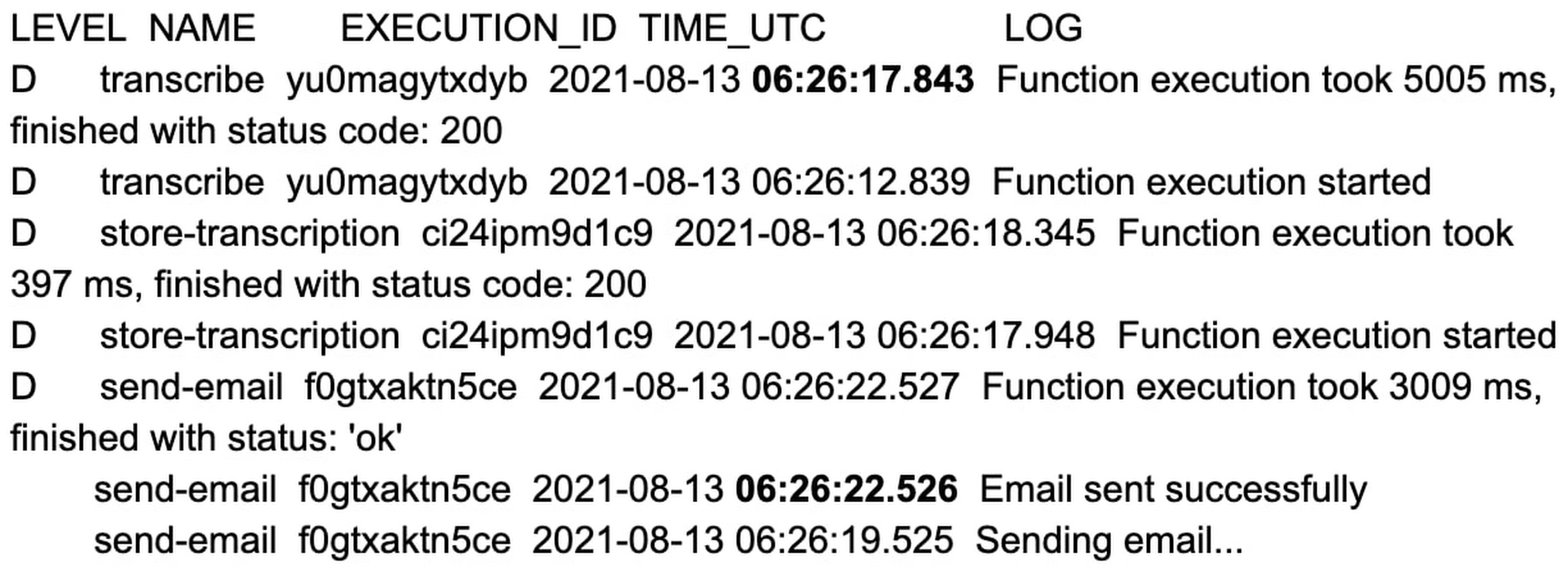
That’s an 11 second difference between the two approaches. The example set of functions are hardcoded with a 2 to 3 second sleep during function initialization, and when combined with average platform cold-start times, you can clearly see the cost of not using min instances.
You can reproduce the above experiment in your own environment using the tutorial here.
Check out min instances on Cloud Functions
We are super excited to ship min instances on Cloud Functions, which will allow you to run more latency-sensitive applications such as podcast transcription workflows in the serverless model. You can also learn more about Cloud Functions and Cloud Workflows in the following Quickstarts: Cloud Functions, Cloud Workflows.
3683
Of your peers have already watched this video.
3:35 Minutes
The most insightful time you'll spend today!
APIs Help Cleveland Clinic Revamp their IT Infrastructure and Deliver High Quality Healthcare
Cleveland Clinic is one of the largest and most respected hospitals in the United States. Its mission is to provide better care of the sick, investigate their problems, and deliver further education of physicians.
The clinic deployed electronic medical records (EMR) to help doctors deliver greater quality healthcare. But the challenge was, it was not being used at it to its full potential.
“To understand how to use APIs it’s important to understand the challenges that we face. We use the electronic medical record. It’s a great investment we made and it is a great delivery tool but it only gets us so far. For the nurses and the doctors that is not good enough as they are focused in delivering the best possible care,” says Beth Meese, Administrative Director of Technology and Innovations at Cleveland Clinic.
To ensure that the EMR was being used at its full potential the clinic added APIs on top of it.
“Using the Apigee platform, we have been able to write APIs on top of our EMRs and then fill the gap for what the medical records was not able to deliver. APIs help us run analytics, run predictive models, and then surface the data back in a way to the clinicians that they can use to deliver high-quality healthcare,” says Meese.
Leveraging Apigee, Cleveland Clinic was also able to securely give developers access to APIs and reduce a considerable amount of burden from the rest of the IT team.
Enhance Your GKE Deployment with Improved Control Plane Connectivity and Isolation

2703
Of your peers have already read this article.
3:00 Minutes
The most insightful time you'll spend today!
Once upon a time, all Google Kubernetes Engine (GKE) clusters used public IP addressing for communication between nodes and the control plane. Subsequently, we heard your security concerns and introduced private clusters enabled by VPC peering.
To consolidate the connectivity types, starting in March 2022, we began using Google Cloud’s Private Service Connect (PSC) for new public clusters’ communication between the GKE cluster control plane and nodes, which has profound implications for how you can configure your GKE environment. Today, we’re presenting a new consistent PSC-based framework for GKE control plane connectivity from cluster nodes. Additionally, we’re excited to announce a new feature set which includes cluster isolation at the control plane and node pool levels to enable more scalable, secure — and cheaper! — GKE clusters.
New architecture
Starting with GKE version 1.23 and later, all new public clusters created on or after March 15th, 2022 began using Google Cloud’s PSC infrastructure to communicate between the GKE cluster control plane and nodes. PSC provides a consistent framework that helps connect different networks through a service networking approach, and allows service producers and consumers to communicate using private IP addresses internal to a VPC.
The biggest benefit of this change is to set the stage for using PSC-enabled features for GKE clusters.
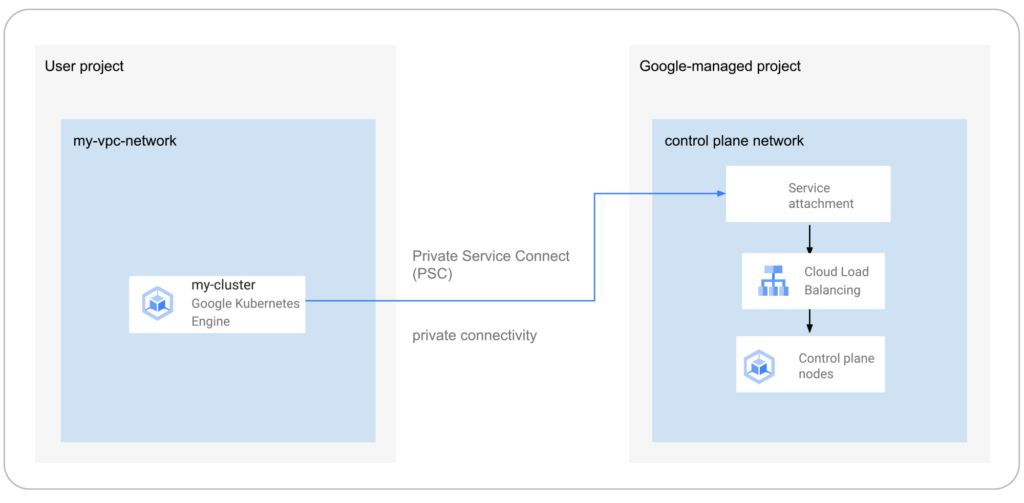
The new set of cluster isolation capabilities we’re presenting here is part of the evolution to a more scalable and secure GKE cluster posture. Previously, private GKE clusters were enabled with VPC peering, introducing specific network architectures. With this feature set, you now have the ability to:
- Update the GKE cluster control plane to only allow access to a private endpoint
- Create or update a GKE cluster node pool with public or private nodes
- Enable or disable GKE cluster control plane access from Google-owned IPs.
In addition, the new PSC infrastructure can provide cost savings. Traditionally, control plane communication is treated as normal egress and is charged for public clusters as a normal public IP charge. This is also true if you’re running kubectl for provisioning or other operational reasons. With PSC infrastructure, we have eliminated the cost of communication between the control plane and your cluster nodes, resulting in one less network egress charge to worry about.
Now, let’s take a look at how this feature set enables these new capabilities.
Allow access to the control plane only via a private endpoint
Private cluster users have long had the ability to create the control plane with both public and private endpoints. We now extend the same flexibility to public GKE clusters based on PSC. With this, if you want private-only access to your GKE control plane but want all your node pools to be public, you can do so.
This model provides a tighter security posture for the control plane, while leaving you to choose what kind of cluster node you need, based on your deployment.
To enable access only to a private endpoint on the control plane, use the following gcloud command:
gcloud container clusters update CLUSTER_NAME \
--enable-private-endpoint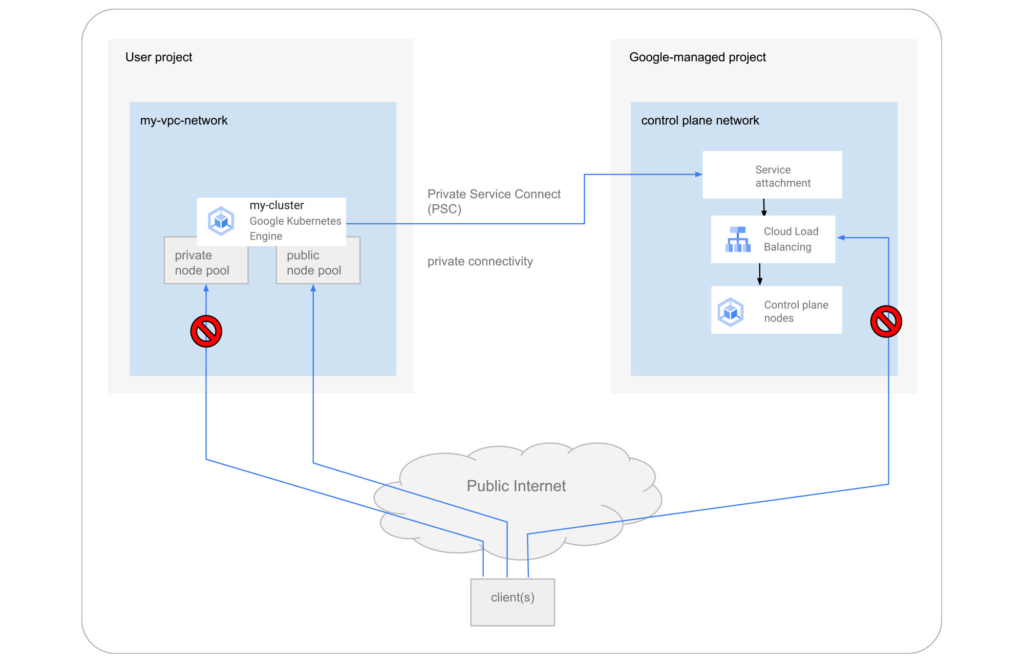
Allow toggling and mixed-mode clusters with public and private node pools
All cloud providers with managed Kubernetes offerings offer both public and private clusters. Whether a cluster is public or private is enforced at the cluster level, and cannot be changed once it is created. Now you have the ability to toggle a node pool to have private or public IP addressing.
You may also want a mix of private and public node pools. For example, you may be running a mix of workloads in your cluster in which some require internet access and some don’t. Instead of setting up NAT rules, you can deploy a workload on a node pool with public IP addressing to ensure that only such node pool deployments are publicly accessible.
To enable private-only IP addressing on existing node pools, use the following gcloud command:
gcloud container node-pools update POOL_NAME \
--cluster CLUSTER_NAME \
--enable-private-nodes
To enable private-only IP addressing at node pool creation time, use the following gcloud command:
gcloud container node-pools create POOL_NAME \
--cluster CLUSTER_NAME \
--enable-private-nodes
Configure access from Google Cloud
In some scenarios, users have identified workloads outside of their GKE cluster, for example, applications running in Cloud Run or any GCP VMs sourced with Google Cloud public IPs were allowed to reach the cluster control plane. To mitigate potential security concerns, we have introduced a feature that allows you to toggle access to your cluster control plane from such sources.
To remove access from Google Cloud public IPs to the control plane, use the following gcloud command:
gcloud container clusters update CLUSTER_NAME \
--no-enable-google-cloud-access
Similarly, you can use this flag at cluster creation time.
Choose your private endpoint address
Many customers like to map IPs to a stack for easier troubleshooting and to track usage. For example — IP block x for Infrastructure, IP block y for Services, IP block z for the GKE control plane, etc. By default, the private IP address for the control plane in PSC-based GKE clusters comes from the node subnet. However, some customers treat node subnets as infrastructure and apply security policies against it. To differentiate between infrastructure and the GKE control plane, you can now create a new custom subnet and assign it to your cluster control plane.
gcloud container clusters create CLUSTER_NAME \
--private-endpoint-subnetwork=SUBNET_NAME
What can you do with this new GKE architecture?
With this new set of features, you can basically remove all public IP communication for your GKE clusters! This, in essence, means you can make your GKE clusters completely private.
You currently need to create the cluster as public to ensure that it uses PSC, but you can then update your cluster using gcloud with the --enable-private-endpoint flag, or the UI, to configure access via only a private endpoint on the control plane or create new private node pools.
Alternatively, you can control access at cluster creation time with the --master-authorized-networks and --no-enable-google-cloud-access flags to prevent access from public addressing to the control plane.
Furthermore, you can use the REST API or Terraform Providers to actually build a new PSC-based GKE cluster with the default (thus first) node pools to have private nodes. This can be done by setting the enablePrivateNodes field to true (instead of leveraging the public GKE cluster defaults and then updating afterwards, as currently required with gcloud and UI operations).
Lastly, the aforementioned features extend not only to Standard GKE clusters, but also to GKE Autopilot clusters.
When evaluating if you’re ready to move these PSC-based GKE cluster types to take advantage of private cluster isolation, keep in mind that the control plane’s private endpoint has the following limitations:
- Private addresses in URLs for new or existing webhooks that you configure are not supported. To mitigate this incompatibility and assign an internal IP address to the URL for webhooks, set up a webhook to a private address by URL, create a headless service without a selector and a corresponding endpoint for the required destination.
- The control plane private endpoint is not currently accessible from on-premises systems.
- The control plane private endpoint is not currently globally accessible: Client VMs from different regions than the cluster region cannot connect to the control plane’s private endpoint.
All public clusters on version 1.25 and later that are not yet PSC-based are currently being migrated to the new PSC infrastructure; therefore, your clusters might already be using PSC to communicate with the control plane.
To learn more about GKE clusters with PSC-based control plane communication, check out these references:
- GKE Concept page for public clusters with PSC
- How-to: Change Cluster Isolation page
- How-to: GKE node pool creation page with isolation feature flag
- How-to: Schedule Pods on GKE Autopilot private nodes
- gcloud reference to create a cluster with a custom private subnet
- Terraform Providers Google: release v4.45.0 page
- Google Cloud Private Services Connect page.
Here are the more specific features in the latest Terraform Provider, handy to integrate into your automation pipeline:
Enterprises can Push the Limits of Edge Even Further!

6983
Of your peers have already read this article.
2:30 Minutes
The most insightful time you'll spend today!
Whether with the cloud or within their own data centers, enterprises have undergone a period of remarkable consolidation and centralization of their compute resources. But with the rise of ever more powerful mobile devices, and increasingly capable cellular networks, application architects are starting to think beyond the confines of the data center, and looking out to the edge.
What exactly do we mean by edge? Think of the edge as distributed compute happening on a wide variety of non-traditional devices — mobile phones of course, but also equipment sensors in factories, industrial equipment, or even temperature and reaction monitoring in a remote lab. Edge devices are also connected devices, and can communicate back to the mothership over wireless or cellular networks.
Equipped with increasingly powerful processors, these edge devices are being called upon to perform tasks that have thus far been outside the scope of traditional IT. For enterprises, this could mean pre-processing incoming telemetry in a vehicle, collecting video in kiosks at a mall, gathering quality control data with cameras in a warehouse, or delivering interactive media to retail stores. Enterprises are also relying on edge to ingest data from outposts or devices that have even more intermittent connectivity, e.g., oil rigs or farm equipment, filtering that data to improve quality, reducing it to right-size information load, and processing it in the cloud. New data and models are then pushed back to the edge; in addition, we can also push configuration, software, and media updates and decentralize processing workload.
Edge isn’t all about enabling new use cases – it’s also about right-sizing environments and improving resource utilization. For example, adopting an edge model can also relieve load on existing data centers.
But while edge computing is full of promise for enterprises, there are many pieces that are still works in progress. Further, developing edge workloads is very different from developing traditional applications, which enjoy the benefits of persistent data connections and run on well-resourced hardware platforms. As such, cloud architects are still in the early days of figuring out how to use and implement edge for their organizations.
Fortunately, there are tools you can use to help ease the transition to edge computing — and that likely fit into your organization’s existing computing systems. Kubernetes, of course, but also higher level management tools like Anthos, which provides a consistent control plane across cloud, private data center and edge locations. Other parts of the Anthos family – Anthos Config Management and Anthos Service Mesh — go one step further and provide consistent, centralized management to your edge and cloud deployments. And there’s more to come.
For the remainder of this blog post, we’ll dive deeper into the past and current state of edge computing, and the benefits that architects and developers can expect to see from edge computing. In a next post, we’ll take a deeper look at some of the challenges that designing for edge introduces, and some of the advantages the average enterprise has in adopting the edge model. Finally, we’ll look at the Google Cloud tools that are available today to help you build out your edge environment, and look at some early customer examples that highlight what’s possible today — and that will spark your imagination for what to do tomorrow.
The evolution of edge computing
The edge is not a new concept. In fact, it’s been around for the last two decades, spanning many use cases that are prevalent today. One of the first applications for edge was to use content delivery networks (CDN) to cache and serve daily static website pages near clients, for example, web servers in California data centers serving financial data to European customers.
As connectivity has improved and software evolved, the edge has evolved too, and the focus has shifted towards using edge to distribute services. First, simple services expanded from static HTML to javascript libraries or image repositories. Common functions like image transformation, credit and address validation support services followed. Soon, organizations were deploying more complex cloudlet and clustered microservices installations, as well as distributed and replicated datasets. The term “endpoint” became ubiquitous, and APIs profilerated.
In parallel, there’s been an explosion of creativity in hardware, microcontrollers and dedicated edge devices. Fit-for-purpose products were deployed globally. Services like Google Cloud IoT Core extended our ability to manage and securely connect these dispersed devices, allowing platform managers to register tools and leverage managed services like Pub/Sub and Dataflow for data ingestion. And with Kubernetes, large remote clusters — mini private clouds in and of themselves — operate as self-healing, autoscaling services across the broader internet, opening the door to new models for applications and architectural patterns. In short, both distributed asynchronous systems and economies have blossomed.
What does this mean for enterprises? For the purposes of this series, edge means you can now go beyond the corporate network, beyond cloud VPCs, and beyond hybrid. The modern edge is not sitting at a major remote data center, nor is it a CDN, cloud provider, or in a corporate data center rack — it’s just as likely to look like 100 of these attached to a thousand sensors.
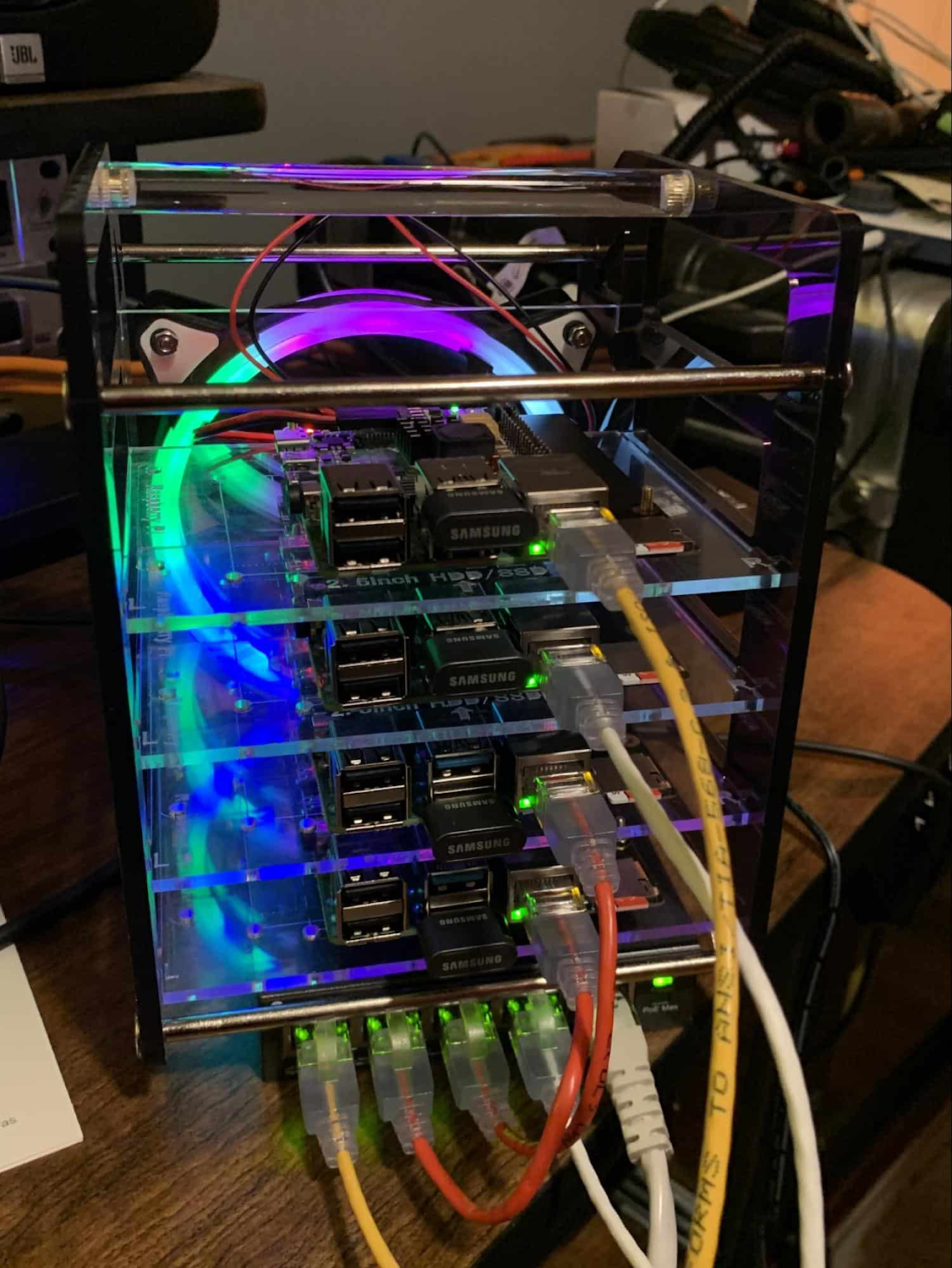
Edge, in short, is about having hardware and devices installed at remote locations that can process and communicate back the information they collect and generate. The edge management challenge, meanwhile, is being able to push configuration and software/model/media updates to these remote locations when they are connected.
Enable new use cases
Today, we have reached a new threshold for edge computing — one where micro-data-processing centers are deployed as the edge of a fractal arm, as it were. Together, they form a broad, geographically distributed, always-on framework for streaming, collecting, processing and serving asynchronous data. This big, loosely coupled application system lives, breathes and grows. Always changing, always learning from the data it collects — and always pushing out updated models when the tendrils are connected.
Right now, the rise of 5G is pushing the limits of edge even further. Devices enabled with 5G can transmit using a mobile network — no ISP required — enabling connectivity anywhere within reach of a cell tower. Granted, these networks have lower bandwidth, but they are often more than adequate for certain types of data, for example fire sensors in forests bordering remote towns that emit temperature or carbon monoxide data periodically. Recently, Google Cloud partnered with AT&T to enhance business use of 5G edge technology but there is so much more that can be done.
Reduce data center investments
In addition to enabling the digitization of a broad range of new use cases, adopting edge can also benefit your existing data center.
Let’s face it: data centers are expensive to maintain. Moving some data center load to edge locations can reduce your data center infrastructure investment, as well as compute time spent there. Edge services tend to have much lower service level objectives (SLOs) than data center services, driving lower levels of hardware investment. Edge installations also tend to tolerate disconnectedness, and thus function perfectly well with lower SLOs — and lower costs.
Let’s look at an example of where edge can really reduce costs: big data. Back in the day, we used to build monolithic serial processors — state machines — that had to keep track of where they were in processing in case of failure. But time and again, we’ve seen that smaller, more distributed processing can break down big, expensive problems into smaller, more cost-effective chunks.
Starting with the explosion of MapReduce almost 20 years ago, big-data workloads were parallelized across clusters on a network, and state management was simplified with intermediate output to share, wait for, or restart processing from checkpoints. Those monolithic systems were replaced by cheaper, smarter, networked clusters and data repositories where parallel work could be executed and rendered into workable datasets.
Flash forward to today, and we are seeing those same concepts applied and distributed to edge data-collection points. In this evolution of big data processing, we are scaling up and out to the point where observation data is so massive that it must first be prefiltered, and then preprocessed down to a manageable size and still be actionable. Only then should it be written back to the main data repositories for more resource-intensive processing and model building.
In short, data collection, cleanup, and potentially initial aggregation happens at the edge location, which reduces the amount of junk data sitting in costly data stores. This increases performance of the core data warehouse, and reduces the size and cost of network transfers and storage!
The edge is a huge opportunity for today’s enterprises. But designing environments that can make effective use of the edge isn’t without its challenges. Stick around for part two of this series, where we look at some of the architectural challenges typically encountered while designing for the edge and how we begin to address them.
6 Common Errors to Sidestep in RESTful API Design

3195
Of your peers have already read this article.
2:30 Minutes
The most insightful time you'll spend today!
Imagine ordering a “ready-to-assemble” table online, only to find that the delivery package did not include the assembly instructions. You know what the end product looks like, but have little to no clue how to start assembling the individual pieces to get there. A poorly designed API tends to create a similar experience for a consumer developer. Well designed APIs make it easy for consumer developers to find, explore, access, and use them. In some cases, good quality APIs even spark new ideas and open up new use cases for consumer developers.
There are methods to improve API design — like following RESTful practices. But time and again we are seeing customers unknowingly program minor inconveniences into their APIs. To help you avoid these pitfalls, here are six of the most common mistakes we have seen developers make while creating the API — and guidance on how to get it right.
#1 Thinking inside-out vs outside-in
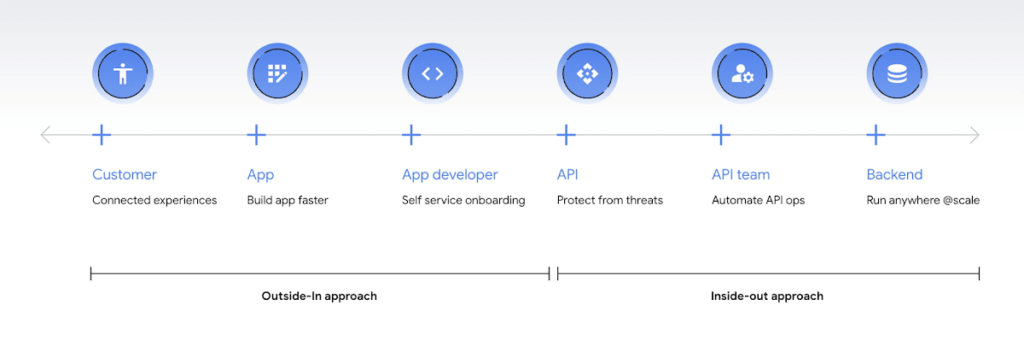
Being everything for everybody often means that nothing you do is the best it could be, and that is just as true for APIs. When customers turn to APIs, they are looking for specific solutions to make their work easier and more productive. If there is an API that better works to their needs, they will choose that one over yours. This is why it’s so important to know what your customers need to do their work better, and then building to fill those needs. In other words, start thinking Outside-in as opposed to Inside-Out. Specifically,
- Inside-out refers to designing APIs around internal systems or services you would like to expose.
- Outside-in refers to designing APIs around customer experiences you want to create. Read more about the Outside-in perspective in the API product mindset.
The first step to this is learning from your customers — be it internal consumer developers or external customers — and their use cases. Ask them about the apps they are building, their pain points, and what would help streamline or simplify their development. Write down their most significant use cases and create a sample API response that only gives them the exact data they need for each case. As you test this, look for overlap between payloads and adapt your designs to genericize them across common or similar use cases.
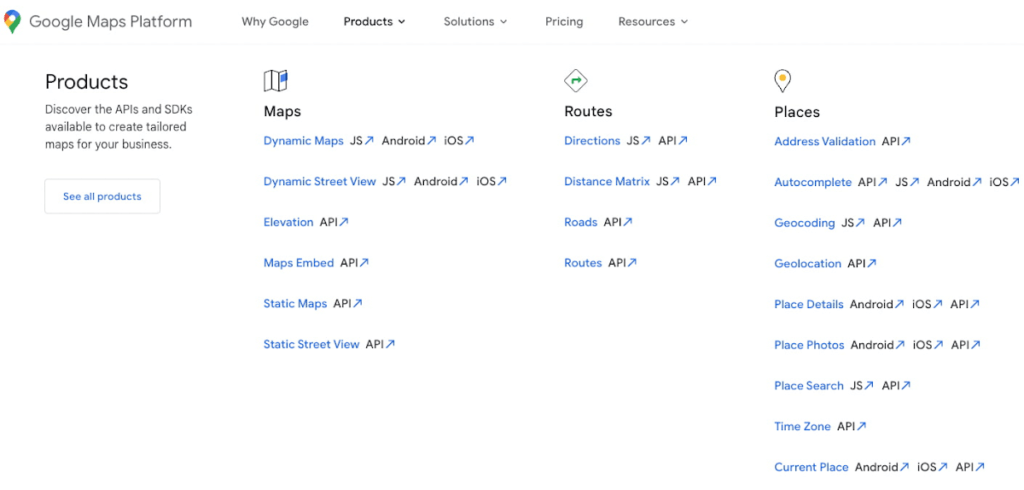
If you can’t connect with your customers — because you don’t have direct access, they don’t have time, or they just don’t know what they want — the best approach is to imagine what you would build with your APIs. Think big and think creatively. While you don’t want to design your APIs for vaporware, thinking about the big picture can make it easier to build non-breaking changes in the future. For example the image below showcases APIs offered by Google Maps. Even without diving into the documentation, looking at the names like “Autocomplete” or “Address Validation” clearly outlines the purposes and potential fit for a customer’s use case.
#2 Making your APIs too complex for users
Customers turn to APIs to bypass complicated programming challenges so they can get to the part they know how to do well. If they feel like using your API means learning a whole new system or language, then it isn’t fitting their needs and they will likely look for something else. It’s up to your team to make an API that is strong and smart enough to do what your customer wants, but also simple enough to hide how complicated the tasks your API solves for really are. For example if you know your customers are using your APIs to present information about recently open restaurants and highly rated pizzeria to their consumers, providing them with a simple API call as below would be of great help:
GET /restaurants?location=Austin&category=Pizzeria&open=true&sort=-priority,created_atTo see if your API design is simple enough, pretend you are building the whole system from scratch — or if you have a trusted customer who is willing to help, ask them to test it and report their results. If you can complete the workflow without having to stop to figure something out, then you’re good to go. On the other hand, if you catch rough edges caused by trying to code around system complexity issues, then keep trying to refactor. The API will be ready when you can say that nothing is confusing and that it either meets your customers’ needs or can easily be updated as needs change.
#3 Creating “chatty” APIs with too many calls
Multiple network calls slow down the process and creates higher connection overhead — which means higher operational costs. This is why it’s so important to minimize the number of API calls.
The key to this is outside-in design: simplify. Look for ways to reduce the number of API calls a customer must make in their application’s workflow. If your customers are building mobile applications, for example, they often need to minimize their network traffic to reduce battery drain, and requiring a couple calls instead of a dozen can make a big difference.
Rather than deciding between building distinct, data-driven microservices and streamlining API usage, consider offering both: fine-grained APIs for specific data types, and “experience APIs” (APIs that are designed to power user experiences. Here is a further theoretical discussion on Experience APIs) around common or customer-specific user interfaces. These experience APIs compose multiple smaller domains into a single endpoint; making it much simpler for your customers — especially those building user interfaces — to render their screens easily and quickly.
Another option here is to use something like GraphQL to allow for this type of customizability. Generally you should avoid building a unique endpoint for every possible screen, but common screens like home pages and user account information can make a world of difference to your API consumers.
#4 Not allowing for flexibility
Even if you’ve followed all of the steps above, you may find that there are edge cases that do not fit under your beautifully designed payloads. Maybe your customer needs more data in a single page of results than usual, or the payload has way more data than their app requires. You can’t create a one-size-fits-all solution, but you also don’t want a reputation for building APIs that are limiting. Here are 3 simple options to make your endpoints more flexible.
Filter out response properties: You can either use query parameters for sorting and pagination, or use GraphQL which provides these types of details natively. By giving customers the option to request only the properties they need, it guarantees that they won’t have to sort through tons of unnecessary data to get what they need. For example, if some of your customers only need the title, author, and bestseller ranking, give them the ability to retrieve only that data with a query string parameter.
GET /books?fields=title,author,ranking- Ability to sort with pagination. Generally, you don’t want to guarantee the order of objects in an API response because minor changes in logic or peculiarities in your data source might change the sort order at some point. In some cases, however, your customers may want to sort by a particular field. Giving them that option, combined with a pagination option, will give them a highly efficient API when they only want the top few results. For example Spotify API utilizes a simple offset and limit parameter set to allow pagination. A sample endpoint as shown in the documentation would look like this
$ curl https://api.spotify.com/v1/artists/1vCWHaC5f2uS3yhpwWbIA6/albums?album_type=SINGLE&offset=20&limit=10- Use mature compositions like GraphQL: Since customer data needs can differ, giving them on-the-fly composites lets them build to the combinations of data they need, rather than being restricted to a single data type or a pre-set combination of data fields. Using GraphQL can even bypass the need to build experience APIs, but when this isn’t an option, you can use query string parameter options like “expand” to create these more complex queries. Here is a sample response that demonstrates a collection of company resources with embedded properties included
"data": [
{
"CompanyUid": "27e9cf71-fca4",
"name": "ABCCo",
"status": "Active",
"_embedded": {
"organization": {
"CompanyUid": "27e9cf71-fca4",
"name": "ABCCo",
"type": "Company",
"taxId": "0123",
"city": "Portland",
"notes": ""
}
}
}
]
#5 Making design unreadable to humans
“K”eep “I”t “S”imply “S”tupid when you are designing your API. While APIs are meant for computer-to-computer interaction, the first client of an API is always a human, and the API contract is the first piece of documentation. Developers are more apt to study your payload design before they dig into your docs. Observation studies suggest that developers spend more than 51% of their time in editor and client as compared to ~18% on reference.
For example, if you skim through the payload below it takes some time to understand because instead of property names it includes an “id”. Even the property name “data” does not suggest anything meaningful aside from just being an artifact of the JSON design. A few extra bytes in the payload can save a lot of early confusion and accelerate adoption of your API. Notice how user-ids appearing on the left of the colon (in the position where other examples of JSON ideally have property names) creates confusion in reading the payload.
"{id-a}":
{ "data":
[
{
"AirportCode": "LAX",
"AirportName": "Los Angeles",
"From": "LAX",
"To": "Austin",
"departure": "2014-07-15T15:11:25+0000",
"arrival": "2014-07-15T16:31:25+0000"
}
… // More data
]
},
We think that JSON like this is more difficult to learn. If you want to eliminate any ambiguity in the words you choose to describe the data, keep the payload simple and if any of those labels could be interpreted in more than one way, adjust them to be more clear. Here is a sample response from Airlines endpoint of aviationstack API. Notice how the property names clearly explain the expected result while maintaining a simple JSON structure.
"data": [
{
"airline_name": "American Airlines",
"iata_code": "AA",
"iata_prefix_accounting": "1",
"icao_code": "AAL",
"callsign": "AMERICAN",
"type": "scheduled",
"status": "active",
"fleet_size": "963",
"fleet_average_age": "10.9",
"date_founded": "1934",
"hub_code": "DFW",
"country_name": "United States",
"country_iso2": "US"
},
[…]
]
#6 Know when you can break the RESTful rules
Being true to the RESTful basics — such as using the correct HTTP verbs, status codes, and stateless resource-based interfaces — can make your customers’ lives easier because they don’t need to learn an all new lexicon, but remember that the goal is just to help them get their job done. If you put RESTful design first over user experience, then it doesn’t really serve its purpose.
Your goal should be helping your customers be successful with your data, as quickly and easily as possible. Occasionally, that may mean breaking some “rules” of REST to offer simpler and more elegant interfaces. Just be consistent in your design choices across all of your APIs, and be very clear in your documentation about anything that might be peculiar or nonstandard.
Conclusion
Beyond these common pitfalls, we have also created a comprehensive guide packaging up our rich experience designing and managing APIs at incredible scale with Google Cloud’s API management product, Apigee.
Apigee — Google Cloud’s native API management platform — helps you build, manage, and secure APIs — for any use case, scale or environment. Get started with Apigee today or check out our documentation for additional information.
More Relevant Stories for Your Company

Announcing reCAPTCHA Enterprise’s Mobile SDK to Help Protect iOS, Android apps
reCAPTCHA Enterprise is Google’s online fraud detection service that leverages more than a decade of experience defending the internet. reCAPTCHA Enterprise can be used to prevent fraud and attacks perpetrated by scripts, bot software, and humans. When installed inside a mobile app at the point of action, such as login,

A French News Company’s Web Modernization Journey with Cloud Run
Editor's note: Today's post documents the solution to a problem of how to scale website infrastructure as it moves from on-prem to the cloud. It is the result of collaboration between technical teams of Les Echos Le Parisien Annonces (a division of Groupe Les Echos, subsidiary company of LVMH) and
A Guide to Anthos Hybrid Environment Reference Architecture
To help improve your security posture, improve the reliability of your applications, and reduce configuration drift in your environment, we're excited to announce a new Anthos reference architecture. Written in collaboration across our product, engineering, support, and field teams, this new reference architecture helps you plan, deploy, and configure the required

Google Announces Cloud Functions’ Native Integration with Secret Manager
Google Cloud Functions provides a simple and intuitive developer experience to execute code from Google Cloud, Firebase, Google Assistant, or any web, mobile, or backend application. Oftentimes that code needs secrets—like API keys, passwords, or certificates—to authenticate to or invoke upstream APIs and services. While Google Secret Manager is a fully-managed, secure, and
