





Harnessing the Power of AI with Google Cloud: What Every IT Pro Needs to Know

955
Of your peers have already read this article.
4:30 Minutes
The most insightful time you'll spend today!
As an IT architect or IT professional, you are essential to the success of your organization, responsible for designing, building, and maintaining the IT systems that your businesses and governments rely on. As if that wasn’t enough, you’ve also got to constantly learn and adapt to keep up with the demand of an ever-changing IT landscape — especially when technologies like generative AI suddenly emerge and become a crucial part of your business. Did you know that 77% of companies are using or plan to use AI in the future? And that’s growing year over year. Then there are the constant firedrills, a contributing factor in 40% of IT professionals being at risk of burnout. So, the fundamental question you’re asking yourself is: how can I do my job successfully, but with less toil and stress?
Well, we come with good news! First, Google Cloud has a plethora of ways to help you evolve your IT landscape quickly, easily, and effectively. And second, our upcoming event, Google Cloud Next ‘23 from August 29th to 31st, is exactly what you need to learn more about capitalizing on those opportunities. But if you’re still on the fence about going, let’s power through five scenarios that might be on your plate right now, and how Next ‘23 can help you
#1 — Architect infrastructure for AI workloads
Chances are good that you’ve been asked to spin up new resources to run emerging AI-based applications on. At Next ‘23, we’ll show you how you can innovate, scale and optimize workloads quickly, safely, and cost effectively with purpose-built infrastructure that has AI efficiencies baked-in. Google is an AI-first company, so our AI-optimized infrastructure is built to deliver the global scale and performance demanded by our own products such as YouTube, Gmail, Google Maps, Google Play, and Android, all of which serve billions of users. It’s also designed for intensive workloads like training and serving large language models like PaLM 2, the basis of generative AI features and tools Bard and the PaLM API.
Google’s deep experience in AI and cloud computing means that Google Cloud is uniquely positioned to present one of the strongest AI infrastructure offerings on the market. Here’s a few ways you can learn about our AI infrastructure during Next ‘23:
- Watch our exciting spotlight session “What’s next for architects and IT professionals,” where our GMs will explore what’s coming for infrastructure and AI/ML.
- Attend our “Build your organization’s future on Google AI and machine learning infrastructure” breakout session, or check out dozens of others on AI/ML.
- Visit our AI Innovation pavilion within our Demo Showcase.
- Get hands on (literally!) with some of our AI infrastructure at our Hardware-verse.
- Upgrade your AI/ML skillsets with our live training workshops at the Innovators Hive.
#2 — Build and run modern container-based applications quickly and securely
Your org has no doubt been using containers and Kubernetes for years, but are they Google Cloud containers and Kubernetes? Google Cloud provides one of the best places to run modern containerized workloads, packaging more than a decade’s worth of experience launching several billion containers per week into our offerings, so that developers and businesses of many sizes can tap the latest in container innovation.
IT pros who are building modern, container-based applications often choose Google Cloud because of its managed services and range of database options, so developers can quickly build applications securely and at scale. For these types of use cases, here’s where you should spend some time during Next ‘23:
- Watch our GM Spotlight session “What’s next for IT operations,” which will dive deep into everything from containers to AI.
- Learn how legendary gaming company CAPCOM is running Street Fighter 6 on Google Cloud in this breakout session “The future of modern enterprise applications with Google Kubernetes Engine,” and browse all our other great container sessions.
- Come and mingle with your friends and peers in our Innovators Hive Community Hub.
- Watch our Innovator Hive Lightning Talk “How to run ML workloads in GKE with Cloud TPU and GPU.”
- Visit our Containers area at the Demo Showcase.
#3 — Boost traditional enterprise applications with high reliability, scale, and price-performance
Cloud-native workloads are great and all, but traditional enterprise workloads such as ERP, databases, web apps, and mainframes continue to be the lifeblood of the organization. These workloads will likely not disappear. They are evolving into more modern versions of themselves — often with major opportunities for modernization using data analytics and AI. Now more than ever, CIOs have to ensure these workloads are healthy and thriving.
Google Cloud ensures that our platform design and choices are centered on real-world workloads like SAP and VMware. We simplify the migration and modernization decision-making process so customers can get to the cloud confidently with an intuitive set of options and prescriptive solutions that deliver better reliability, security, scale, performance, and cost. At Next ‘23, there are a ton of ways to learn more about solving these challenges:
- No matter what you’re looking to deploy or migrate, we’ve got a breakout session for you. For starters, check out “How Sabre migrated their apps and data centers to Google Cloud with speed and ease,” “Accelerate innovation with SAP on Google Cloud,” or any of these others.
- Explore how our customer ADT successfully migrated their VMware estate to Google Cloud by visiting their interactive story in our Demo Showcase.
- Click through Migration Center, our unified service for end-to-end migration and modernization, as well as other demos at our Architect’s Corner of Innovators Hive.
#4 – Run on high performance, distributed infrastructure
Google Cloud’s infrastructure isn’t limited to what we run in our data centers. If your business or government needs infrastructure designed for sovereignty, scale, security, and high-intensity compute workloads, we’ve got exactly what you need:
- For governments and highly regulated businesses, we have unique offerings and services including Google Distributed Cloud Hosted and Google Cloud Sovereign Solutions for organizations with specific sovereignty and security needs.
- For Telecommunications, we have purpose-built telecom offerings to help Communication Service Providers (CSPs) digitally transform their networks with hybrid cloud principles and identify new revenue opportunities. In addition, we have Google Distributed Cloud Edge which provides an open, Kubernetes-based offering tuned for telecom network workloads.
- Telecoms should also be sure to check out “How Google Cloud helps shape and transform Telecom Network deployment and monetization models” and live on the edge at the Demo Showcase.
- And for Distributed Cloud, make sure you attend “Running AI at the edge to deliver modern customer experiences” and “Mind the air gap: How cloud is addressing today’s sovereignty needs”, or visit our area at the Demo Showcase.
#5 — Save money and help meet sustainability ambitions
Everyone knows that AI can help you do more, faster, but did you know that our AI-assisted recommendations and cost optimization tools can help you save money and to plan for strong financial resiliency? Take control of your cloud spending and optimize costs through APIs, Cloud Scheduler, and with Committed Use Discounts (CUDs). Complementary to these cost optimization capabilities, we’ve also built a collection of tools to help you accurately report on the carbon emissions associated with your Google Cloud usage and take action to reduce your carbon footprint and costs. Looking to learn more at Next ‘23, here’s what you need to explore:
- For sustainability, register for our “GreenOps: Drive carbon and cost efficiencies with a new wave of developer tools” breakout session.
- And for cost savings, check out “Creating a FinOps culture change through cloud automation” and “Unlock cloud value for everyone with Google Cloud FinOps tools”, and also visit our cost optimization area at the Demo Showcase.
So, what do you think: are any of those challenges on your plate right now? If they are, we hope you’ll join us at Next ‘23 starting on August 29th, so that we can show you how we live up to your motto: your cloud, your way. See you soon!
How Recommendation AI Helps Retailers Optimize Click-through and Conversion Rates

7047
Of your peers have already read this article.
3:00 Minutes
The most insightful time you'll spend today!
Time to go outside again, I guess. I’ll need a sun hat. Sunscreen. Maybe some new sandals? What else?
With the Recommendations AI service, I might be reminded to grab a reusable water bottle and a swimsuit. Or some after-sun aloe lotion. Good thing, cause I’ll need it.

Recommendations AI is a solution that uses machine learning to bring product recommendations to their shoppers across any catalog or client list. This service is part of our full suite of Retail solutions. When you integrate with the Retail API, you get the benefit of Google’s Product Discovery. Integrating once to reap the benefits over and over. Recommendations is the starting point, and you can easily extend into Retail Search and Vision Product Search in the upcoming future.
The Recommendations solution is fully managed, global-scale and powered by deep learning, so you can focus on a great shopping experience and let someone else worry about the infrastructure.
Compared to baseline recommendation systems used by customers, Recommendations AI showed double digit uplift in conversion and clickthrough rates in A/B experiments controlled by the customers. You can optimize for click-through, conversion or session revenue, and fine tune the models to make sure you omit out-of-stock items or duplicates, for example.

So how does it work, and how do you get started? Read on, and we’ll walk you through the pipeline, starting with the data you already have to placement in your online store.
Formula: Data -> Model -> Placement
You start with your catalog, the list of all the things (postcards, movies, pie recipes) that you want to show your customers. Then you ingest your PII-redacted user events -this is the historic event data like home page views, add to cart events and more along with real time user events. This user event is joined with the product catalog and items that allows us to construct the sequence of shoppers’ activity, thus being able to predict what the shopper has a high propensity to purchase next. The user events can come from both online activity across devices or offline store purchases
The recommendation model will return a list of products, which are the recommendations. The brains of the operation, if you will. This model is trained using all the data that you ingest, using the latest neural network models and techniques that Google has built expertise over the years in flagship products like Youtube and News, that allows us to uncover shopper intent, so it can best predict the right recommendations to show to the right people.
Every model outputs a list of product identifiers, but where do they go? They go into placements, the spots, panels, carousels on your customer’s journey interacting with your brand that you’ve set aside to highlight recommendations. A model can send recommendations to one or more placements, but each placement only receives information from one recommendation model. Your pages will then need to render the products with the right images, text or other metadata, using the product ID that is returned by the model.
What do recommendations look like?
Let’s start by browsing our postcard-selling website, where I’ve been buying some vintage California postcards already. The recommendations algorithm has caught on to my interest, showing me other potential cards to purchase based on my history:

Put your data to work
To get started we need to bring your data into the recommendation model, so it can understand your customers, your inventory, and your sales patterns.
The model takes in the product catalog you use, and metadata about those products to better understand nuances in assortment, pricing and variables like size and style. You might already have this data stored in BigQuery or Merchant Center, and hence we provide easy integrations that you can leverage to get started even faster.
As for the user events, don’t worry if you already have systems in place to capture web and mobile activity. We make it easy to bring in your real time event logs by providing seamless integrations with Google Tag Manager, Javascript pixel, or even historic events from Cloud Storage, BigQuery or using inline API or JSON, so you can immediately train the models on this imported data. All this allows you to kickstart integrating with Recommendations AI in a matter of days.
The models then construct a sequence of activities that the user went through and joins with the products that the user engaged with. Once your data is ready to go, it takes a few days to train the model. Next onto making the data work for you.
Quickly customize your model
Setting up your own recommendations project in the console gives you the ability to choose what sort of model to train (based on what recommendations you want to generate) and your objective. Are you optimizing for click-through rate–more people click on the recommendation links or products–or for conversion rate–more people choose or buy what was suggested or revenue ?
Different models can be optimized for different optimization goals.; the GCP console explains what each one can do and how you can choose to optimize it.

Let’s unpack some of this terminology real quick.
We’ve got three model types:
- Recommended for you – Means we think these are items you’ll want to buy, based on your history; this is usually used on a home page to showcase items.
- Others you may like – Means if you’re browsing the page of a water bottle, we will recommend alternative brands of water bottles that you may like as well as a backpack, based on your engagement history.
- Frequently bought together – Means that when anyone buys sunscreen, we notice that they often also buy aloe lotion, so we will surface those items when someone adds any one of them to their cart.
And then we have three business objectives that the models optimize for:
- Click-through rate – How frequently did somebody click on a recommended item?
- Conversion rate– How frequently did somebody add a recommended item to their cart?
- Revenue per session – How much money did the recommendations generate for you?
Deliver anywhere along the journey
Now that you’re all set up in the Retail AI console, you can test out the recommendations in the console, even before you deploy to production.

You can integrate Recommendations into your frontend by calling the Predict APIt. The placements of recommendations will report data back into the dashboard and you can analyze and measure success for future iterations.
On top of that you can use the recommendations for other parts of your customer’s journey. Email promotions, storefront kiosks, display ads or follow-up notifications can include recommendations based on past activity and cart contents. The model gives you useful product recommendations for a wide variety of touchpoints and steps in the purchasing process.
More best practices, and guides, are available inside our documentation.
How to get started
Training your own models can be tedious, time-consuming, and expensive. On top of that it requires deeper data science expertise to set up. Let us do it instead!
You can see how IKEA Retail uses Recommendations AI in this recent talk and blog from the Google Cloud Retail Summit..
To get started today you’ll need to make a Cloud project and enable the Retail API, which then allows you to access all the recommendation tools in one menu. Bring in your catalog and purchasing data, define a placement or two, and you can start putting recommendations on your site in a matter of days.
Swiggy: Delivering Local Food Within 40 Minutes

8798
Of your peers have already read this article.
1:30 Minutes
The most insightful time you'll spend today!
Founded in 2014, Swiggy started small, delivering food to a few neighborhoods in Bengaluru, India. As the company grew, the team wanted a mapping technology that could help expand the service throughout India.
Swiggy needed a scalable mapping platform that covered a wide geographic area and offered tools to help the company to build an efficient mobile app and website for customers and delivery staff.
Customers find restaurants and order from them using the Android app, iOS app, or the website. Swiggy worked with Google Maps Partner Media Agility and used a variety of Google Maps Platform APIs to develop web and mobile apps that incorporate relevant local restaurant details.
Google Maps Platform Results
- Built a hyper-local delivery service that is growing throughout India at a rate of 25 percent per month
- Deliveries are made quickly, resulting in higher customer satisfaction and retention—users have been so satisfied that nearly 80 percent of its orders are from repeat customers
- Drivers seamlessly handle tens of thousands of orders per day
In order to guarantee fast food delivery, Swiggy returns only restaurants within four to five kilometers of the customer’s location. The Directions API is used by drivers to easily route to restaurants and customers. The customer can track the progress of the delivery and estimated arrival time using a mobile app or the website.
“Google Maps provides the most accurate and reliable data, which is crucial for us because maps and location are central to our business. We also knew Google’s intuitive interface would provide a great customer experience with little to no learning curve… Google Maps’ ability to provide customer location and the distances of nearby restaurants is the backbone of our success, because it ensures a reliable, consistent customer experience,” said Aman Jain, Senior Product Manager, Swiggy.
Ease Your Migration and Modernization Journey with Microsoft and Windows on Google Cloud Demo Center

8266
Of your peers have already read this article.
2:00 Minutes
The most insightful time you'll spend today!
If you’re looking to migrate and modernize your Microsoft and Windows workloads, Google Cloud is your premiere destination. No matter what migration strategy you’ve selected or what value you’re looking to achieve, with Google Cloud you’re able to:
- simplify your migration and modernization journey
- reduce your on-prem footprint and increase agility
- optimize license usage to reduce costs
- modernize to reduce single-vendor dependencies
- rely on enterprise-class support backed by Microsoft
Whether you’re looking to migrate applications running on Windows virtual machines, adopt Windows containers in Google Kubernetes Engine (GKE), convert SQL databases to Cloud SQL, or something else, Google Cloud offers you the first-class experience you need.
But we don’t want you to take our word for it. Try it out yourself with our new online Microsoft and Windows on Google Cloud Demo Center without any commitment or friction.

The demo center uses hands-on guided simulations to walk you through several scenarios for solving business critical challenges with Google Cloud’s Microsoft and Windows solutions. Because these are all simulated, you’ll see how it works without any deployment, configuration, or commitment. It’s a seamless way for you to see exactly how Google Cloud can help you.
Run dedicated hardware and optimize with sole tenant
Sometimes you might want to run your workloads on dedicated hardware (with oversubscription options) for compliance, licensing, and management. Google Cloud provides sole-tenant nodes that allow you to easily deploy your virtual machines onto dedicated machines to avoid “noisy neighbor” issues, address regulatory or licensing constraints, and optimize inter-VM communications.
Plus, the CPU Overcommit option allows oversubscribing sole-tenant node resources by up to 2x, therefore helping save on per-physical core licensing for many licensed workloads like SQL Server.
Learn how to set up a sole tenant group and node.
Optimize license costs with premium images & custom VMs
One of the easiest ways to optimize your cloud experience with virtual machines (VM) is to pick the right VM image. Google Cloud provides premium license-included VM images that are thoroughly tested and optimized, including SQL Server options with pay-as-you-go licensing. These are great for workloads that don’t need to run all the time or when you do not have spare licenses for bring your own license (BYOL).
Explore some Windows & SQL images and learn how CPU/Memory options can help optimize deployment and save on licensing.
Modernize your databases with Managed SQL Server
Sometimes you need to manage your SQL Server instance to achieve certain business or operational goals. But more often, managing SQL Server deployments can be undifferentiated: backups, high-availability, updates, and patching are just some of the many things you have to take care of when going the do-it-yourself route. One way to modernize your database tier is to migrate to a managed service like Cloud SQL, which is a fully managed Relational Database service for SQL.
Explore the process of creating an instance in just a few clicks!
Extract apps from VMs and move to containers in GKE with Migrate for Anthos
Many Windows workloads running on virtual machines such as Internet Information Services (IIS) are ideal candidates for migrating to containers without major changes like rewriting or rearchitecting. However, doing this migration manually can be tedious, which is why Migrate for Anthos can help easily re-platform a .NET app running on IIS into a container-based app.
Simulate intelligently extracting, migrating, and modernizing applications to run natively on containers in GKE and Anthos clusters.
Move .NET applications to GKE on Windows without code changes
When you’re looking to go fully cloud native, you can leverage Windows containers in GKE without rewriting your .NET applications. Simply create clusters with Windows nodes and deploy containerized Windows workloads in a few clicks, even alongside Linux containers. These deployments reduce operational overhead with features such as auto-upgrade, auto-repair, and release channels.
Learn how easy it is to build a GKE cluster with a Windows node and deploy an app.
Now that you’ve gotten a feel for what’s available, go check out the Demo Center. You can also visit us at Windows and Microsoft on Google Cloud to learn more.
Google Launches Product Locator and Gives Store Locator Plus an Upgrade to Expand Retail Offerings

5832
Of your peers have already read this article.
1:30 Minutes
The most insightful time you'll spend today!
We all experienced, first hand, how Covid-19 has impacted the world and our communities. Last year, store closures, reduced hours, and social-distancing requirements drove people to adopt more e-commerce options, which, according to eMarketer, grew 27.6% worldwide in 2020. Meanwhile, consumer desires to shop locally also grew with Google searches for “____ near me” up 100% year over year,1 and 1 in 3 consumers having tried curbside pickup over the last year.2
As countries begin to lift Covid-19 restrictions, businesses are looking toward a post-pandemic future and asking ‘Which of these shopping trends will stick and how should I adapt?’ At Google, we expect consumers to continue demanding helpful shopping experiences that blur the line between the physical retail and digital experience, as well as help them to continue shopping locally.3 To address these changes in shopper behavior, we refreshed our retail solutions—adding a new solution, Product Locator, and updating Store Locator Plus—to help you offer the best possible online-to-offline experience and drive shoppers to your stores.
Introducing Product Locator solution: connecting online shopping to nearby stores
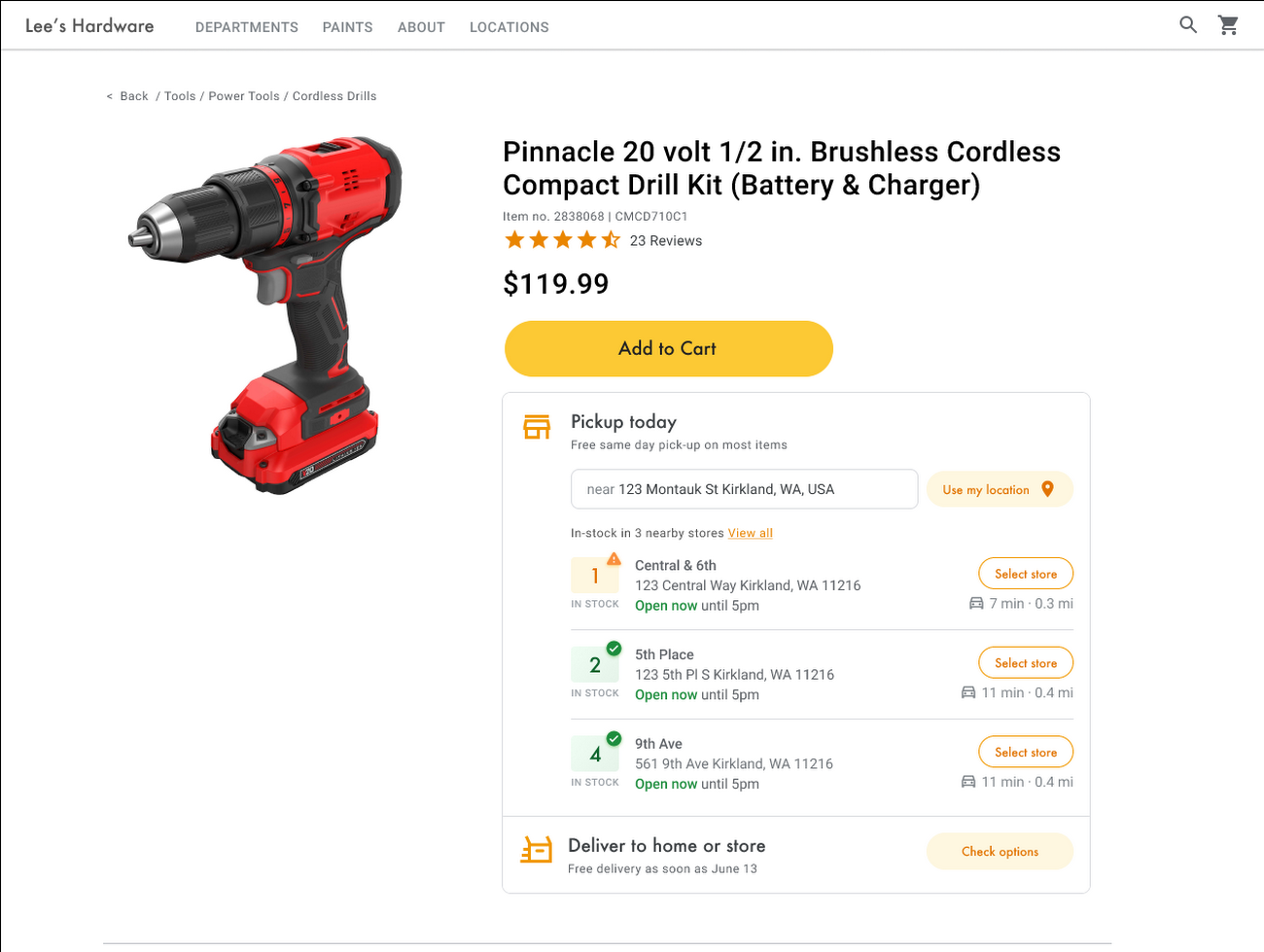
Under Covid restrictions, consumers have grown accustomed to having a myriad of shopping options, from curbside pickup to same-day delivery. Increased searches for ‘along my route’ and ‘in stock’ tell us that convenience is king for today’s consumer.4 Retailers can increase online conversion rates and drive store visits by including product availability and pick-up options on each of their product description pages (PDP); emphasizing the speed and convenience of these options and saving on significant shipping costs.
Our newest retail solution, Product Locator, can further help drive customers to visit by showing the exact distance stores are to the shopper and even estimated driving time, to further highlight the convenience of a store visit. A study conducted by Shopify found that showcasing local inventory boosted key store metrics including 45% of local pickup who made an additional purchase upon arrival.5 See the Product Locator solution guide to get started today.
Update your store locator page to address more of shoppers’ needs
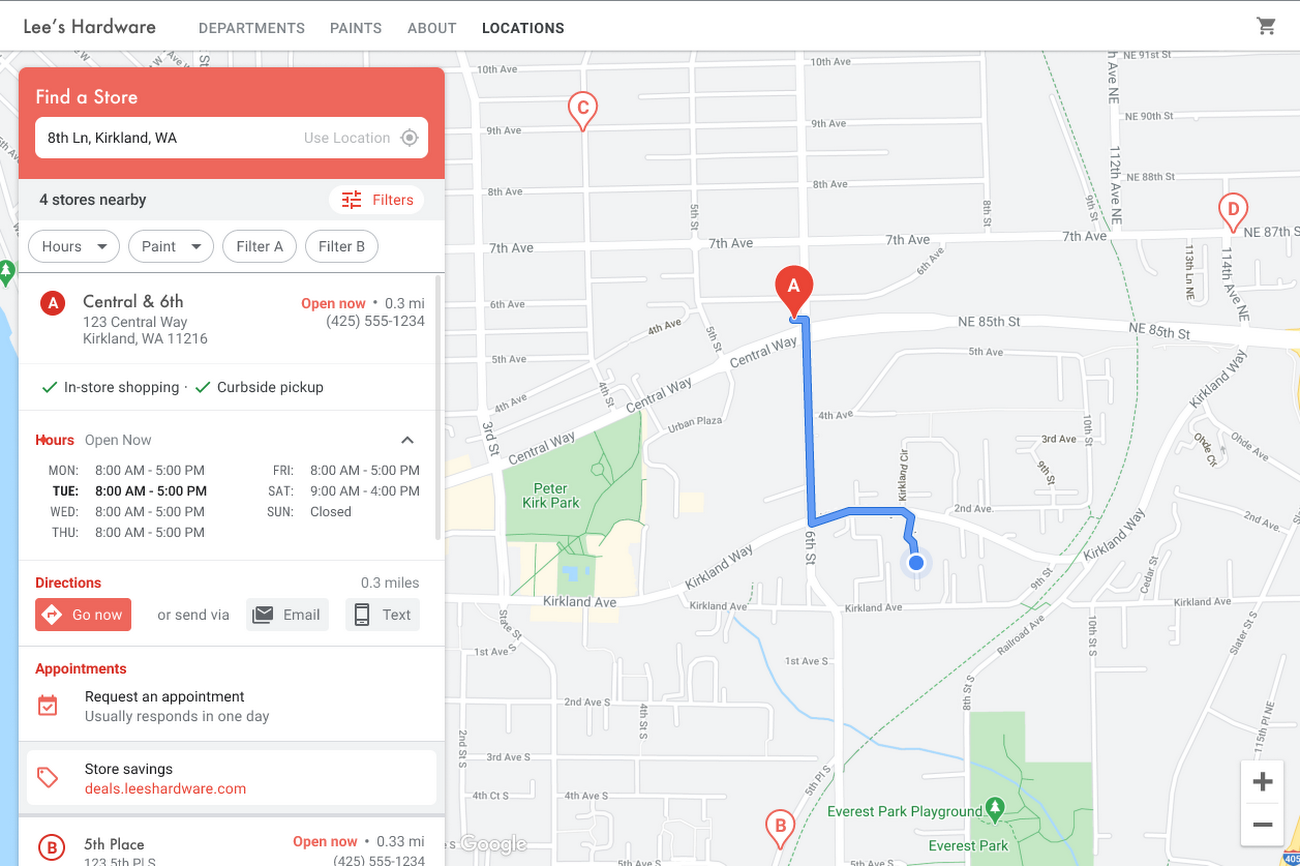
Store locators allow shoppers to more easily find your stores and can be made even more helpful with our Store Locator Plus solution. Our updated Store Locator Plus solution refreshes the store locator page to be more informative and engaging by integrating offers redeemable in-store, online scheduling for appointments and services, and text me directions services. Implement Store Locator Plus today using the guide.
Build and customize Store Locator Plus for your business in minutes
At Google Maps Platform, we are always thinking of ways to make building a map easier and faster for our customers. In May at I/O we made Cloud-based Maps Styling generally available, enabling map updates to happen without touching a line of code. Today we’re excited to introduce Quick Builder, our free, low code builder which allows you to demo, customize and build a version of the Store Locator Plus solution for your website in minutes. Experience Quick Builder today.
To learn more about how you can start adopting these retail solutions, visit our retail solutions page.
For more information on Google Maps Platform, visit our website.
1 Global Insights Briefing: Getting back out there
2 https://www.shopify.com/pos/future-of-retail-2021
3 https://www.thinkwithgoogle.com/future-of-marketing/digital-transformation/covid-trends-1-year/
4 https://www.thinkwithgoogle.com/consumer-insights/consumer-trends/pandemic-shopping-behavior/
5 https://www.shopify.com/pos/future-of-retail-2021
Vodafone Turns to Google Maps Platform to Expand and Improve its Network

6377
Of your peers have already read this article.
1:30 Minutes
The most insightful time you'll spend today!
Vodafone India had a manual, labor-intensive process for determining network capabilities and reach. The company sent field operatives to every customer location to conduct a feasibility study. These feasibility studies help Vodafone determine whether they can provide connectivity and services to customers based on the infrastructure at that location.
Everyone from the IT team and end users to the field operatives doing the work recognized the need to adopt a new solution to automate the measurements. They needed a technology that was easy to use and maintain.
“Vodafone used to manually perform physical surveys for each feasibility, which is a time-consuming and labor-intensive process. Often, feasibility studies were delayed, and we missed out on opportunities to serve additional customers. With SmartFeasibility, we’ve increased our capacity 15 fold, which positively impacts our bottom line and allows us to provide better and smarter customer service.”
—Rajneesh Asthana, IT Planning and Delivery, Vodafone India
Partnering with Lepton Software (a leading global provider of location-based analytics solution) Vodafone introduced SmartFeasibility—a solution that changed the feasibility testing from a manual to an automated process. This involved a full Google geo platform solution – leveraging world class technology like maps, roads and directions.
Google Maps Platform Results
- Employees are able to access information faster with SmartFeasibility—they have data at their fingertips, rather than waiting for an employee to collect it
- Field operatives have increased their conversion rates by providing more accurate readings on feasibilities and closing more customer business
- Addresses are now easy to find with a click of a button. The Vodafone India team can search feasibilities that have been loaded into the database, so if there’s an issue or if they need to reference a past action, they have that information at their fingertips
- 2 day turnaround versus 5 before the solution was implemented
- 400+ new customers added per day
With the new solution, Vodafone India no longer needs field operatives to manually calculate these measurements. With Google Maps, users can search customers’ addresses, calculate the distance between Vodafone’s location and the customer’s location and research building data such as height.
The old system of having field operatives collect data was unreliable. With Google Maps Platform, the Vodafone India team knows that the measurements are accurate and reliable.
More Relevant Stories for Your Company


A Guide to Anthos: the App Modernization Platform for Hybrid and Multi-cloud Deployments
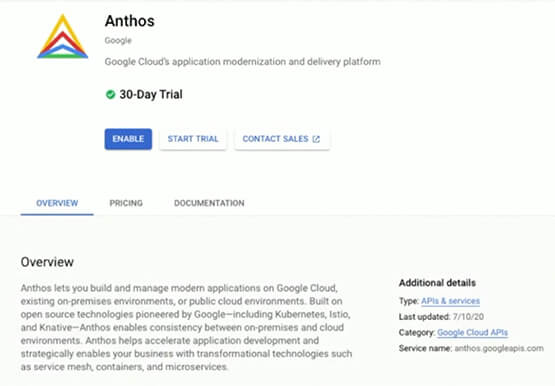
Anthos gives you a consistent platform for all your application deployments, both legacy as well as cloud native, while offering a service-centric view of all your environments. You can build enterprise-grade containerized applications faster with managed Kubernetes on cloud and on-premises environments. Create a fast, scalable software delivery pipeline with

Release of Go 1.18 is A New Milestone for Development of Secure Apps
On March 15th, the Go team announced Go 1.18 GA, the latest release of the Go programming language. The culmination of over a decade of design delivers the features our developers demanded: generics, fuzzing, and module workspaces. With this release, Go becomes the first major language to integrate fuzz testing

Quick Recap on Google Cloud: Latest News, Launches, Updates, Events and More
Want to know the latest from Google Cloud? Find it here in one handy location. Check back regularly for our newest updates, announcements, resources, events, learning opportunities, and more. Tip: Not sure where to find what you’re looking for on the Google Cloud blog? Start here: Google Cloud blog 101: Full list

State of DevOps 2019
The 2019 Accelerate State of DevOps Report confirms analyst reports that DevOps is crossing the chasm with the proportion of elite performers almost tripling compared to last year. The report finds that delivering software quickly, reliably, and safely is at the heart of technology transformation and organizational performance. The report
