





Streamlining Workflow Executions: Using Cloud Tasks in Google Cloud

891
Of your peers have already read this article.
3:30 Minutes
The most insightful time you'll spend today!
Introduction
In my previous post, I talked about how you can use a parent workflow to execute child workflows in parallel for faster overall processing time and easier detection of errors. Another useful pattern is to use a Cloud Tasks queue to create Workflows executions and that’s the topic of this post.
When your application experiences a sudden surge of traffic, it’s natural to want to handle the increased load by creating a high number of concurrent workflow executions. However, Google Cloud’s Workflows enforces quotas to prevent abuse and ensure fair resource allocation. These quotas limit the maximum number of concurrent workflow executions per region, per project, for example, Workflows currently enforces a maximum of 2000 concurrent executions by default. Once this limit is reached, any new executions beyond the quota will fail with an HTTP 429 error.
A Cloud Tasks queue can help. Rather than creating Workflow executions directly, you can add Workflows execution tasks to the Cloud Tasks queue and let Cloud Tasks drain the queue at a rate that you define. This allows for better utilization of your workflow quota and ensures the smooth execution of workflows.
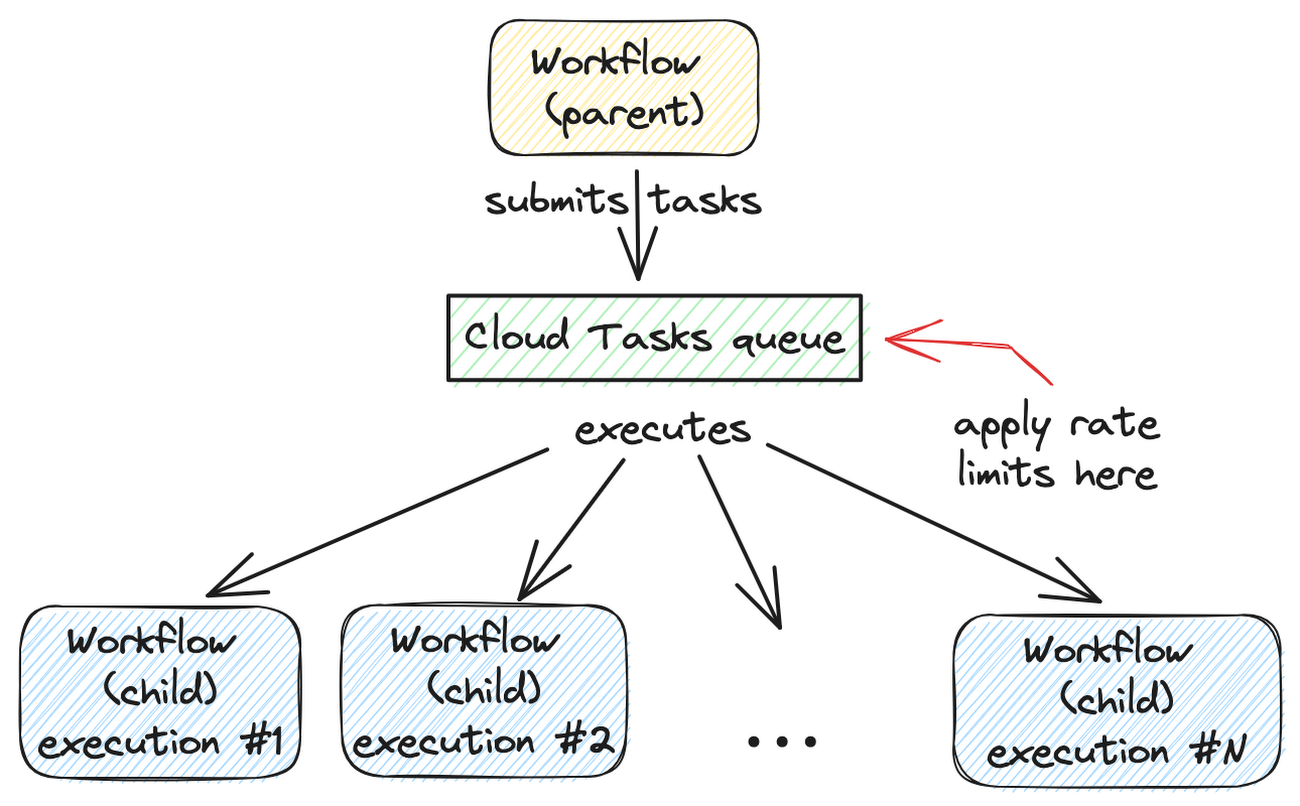
Let’s dive into how to set this up.
Create a Cloud Tasks queue
We’ll start by creating a Cloud Tasks queue. The Cloud Tasks queue acts as a buffer between the parent workflow and the child workflows, allowing us to regulate the rate of executions.
Create the Cloud Tasks queue (initially with no dispatch rate limits) with the desired name and location:
QUEUE=queue-workflow-child
LOCATION=us-central1

gcloud tasks queues create $QUEUE --location=$LOCATION
Now that we have our queue in place, let’s proceed to set up the child workflow.
Create and deploy a child workflow
The child workflow performs a specific task and returns a result to the parent workflow.
Create workflow-child.yaml to define the child workflow:
main:

  params: [args]

  steps:

    - init:

        assign:

          - iteration: ${args.iteration}

    - wait:

        call: sys.sleep

        args:

            seconds: 10

    - return_message:

        return: ${"Hello world" + iteration}
In this example, the child workflow receives an iteration argument from the parent workflow, simulates work by waiting for 10 seconds, and returns a string as the result.
Deploy the child workflow:
gcloud workflows deploy workflow-child --source=workflow-child.yaml --location=$LOCATION
Create and deploy a parent workflow
Next, create a parent workflow in workflow-parent.yaml.
The workflow assigns some constants first. Note that it’s referring to the child workflow and the queue name between the parent and child workflows:
main:
  steps:
    - init:
        assign:
          - project_id: ${sys.get_env("GOOGLE_CLOUD_PROJECT_ID")}
          - project_number: ${sys.get_env("GOOGLE_CLOUD_PROJECT_NUMBER")}
          - location: ${sys.get_env("GOOGLE_CLOUD_LOCATION")}
          - workflow_child_name: "workflow-child"
          - queue_name: "queue-workflow-child"
In the next step, Workflows creates and adds a high number of tasks (whose body is an HTTP request to execute the child workflow) to the Cloud Tasks queue:
- enqueue_tasks_to_execute_child_workflow:
        for:
          value: iteration
          range: [1, 100]
          steps:
              - iterate:
                  assign:
                    - data:
                        iteration: ${iteration}
                    - exec:
                        # Need to wrap into argument for Workflows args.
                        argument: ${json.encode_to_string(data)}
              - create_task_to_execute_child_workflow:
                  call: googleapis.cloudtasks.v2.projects.locations.queues.tasks.create
                  args:
                      parent: ${"projects/" + project_id + "/locations/" + location + "/queues/" + queue_name}
                      body:
                        task:
                          httpRequest:
                            body: ${base64.encode(json.encode(exec))}
                            url: ${"https://workflowexecutions.googleapis.com/v1/projects/" + project_id + "/locations/" + location + "/workflows/" + workflow_child_name + "/executions"}
                            oauthToken:
                              serviceAccountEmail: ${project_number + "-compute@developer.gserviceaccount.com"}
Note that task creation is a non-blocking call in Workflows. Cloud Tasks takes care of running those tasks to execute child workflows asynchronously.
Deploy the parent workflow:
gcloud workflows deploy workflow-parent --source=workflow-parent.yaml --location=$LOCATION
Execute the parent workflow with no dispatch rate limits
Time to execute the parent workflow:
gcloud workflows run workflow-parent --location=$LOCATION
As the parent workflow is running, you can see parallel executions of the child workflow, all executed roughly around the same:
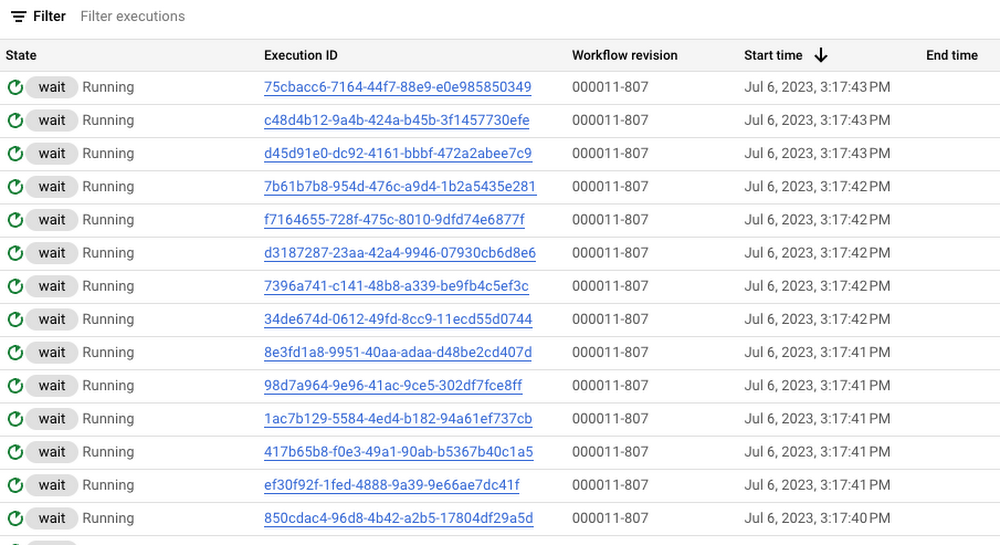
In this case, 100 executions is a well under the concurrency limit for Workflows. Quota issues may arise if you submit 1000s of executions all at once. This is when Cloud Tasks queue and its rate limits become useful.
Execute the parent workflow with dispatch rate limits
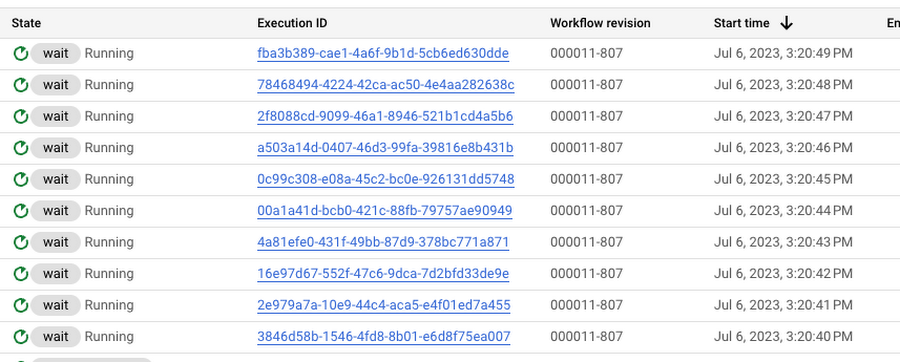
Let’s now apply a rate limit to the Cloud Tasks queue. In this case, 1 dispatch per second:
gcloud tasks queues update $QUEUE --max-dispatches-per-second=1 --location=$LOCATION
Execute the parent workflow again:
gcloud workflows run workflow-parent --location=$LOCATION
This time, you see a more smooth execution rate (1 execution request per second):
Summary
By introducing a Cloud Tasks queue before executing a workflow and playing with different dispatch rates and concurrency settings, you can better utilize your Workflows quota and stay below the limits without triggering unnecessary quota related failures.
Check out the Buffer HTTP requests with Cloud Tasks codelab, if you want to get more hands-on experience with Cloud Tasks. As always, feel free to contact me on Twitter @meteatamel for any questions or feedback.
6871
Of your peers have already watched this video.
14:21 Minutes
The most insightful time you'll spend today!
How Anthos Helps Organizations Implement Multi and Hybrid Cloud Strategy
Organizations have become increasingly focused on using modernization solutions to build competitive advantage, for faster time to market, serve customers better and seamlessly operate in hybrid and multi-cloud environments. Anthos by Google Cloud, a managed application platform plays an important role in application modernization and also in empowering customers to deploy a hybrid or multi-cloud strategy with opensource technologies and platforms like Kubernetes.
Watch the video to refer to the real use-cases of Anthos for application modernization and hybrid/multi cloud deployment across retail, digital natives, banking and manufacturing space.
Also, explore the latest tool, Migrate for Anthos if you are a traditional enterprise looking to skip rewriting of applications and lift-and-shift process!
Why APIs are De Facto Business Requirements

5533
Of your peers have already read this article.
1:30 Minutes
The most insightful time you'll spend today!
The benefits of APIs are becoming more clear in an ever-evolving tech landscape, yet ITDMs still struggle to convince executives and investors to buy into an API-first strategy. Here’s a look at the importance of APIs in a changing world, and how ITDMs can make the business case in order to secure the best API strategy for their organization.

According to Google Cloud’s new “State of the API Economy 2021” report, a majority of IT decision-makers view application programming interfaces, or APIs, as essential ingredients in improved customers experiences, expanded partner engagement, accelerated innovation, and other demands of today’s business environment. This is encouraging: APIs are how software talks to other software, and since much of digital transformation involves combining disparate data and functionality into rich user experiences and process automations, APIs are an essential ingredient in modern business strategies.
What’s less encouraging: the research surveys primarily IT professionals, not business leaders. It’s clear that IT people see the benefits of APIs in the ever-changing tech landscape, but we still hear regular concerns from these same people that they have trouble convincing executives and investors to buy into an API-first strategy. In this article, we’ll look into why they are having these difficulties and some proven ways to successfully position an API strategy not just as a technological solution, but also as a business requirement.
The importance of APIs in a changing world
The rise of APIs has been heavily influenced by the introduction of disruptive new business models and evolving customer preferences that traditional technologies are not positioned to quickly and efficiently address.
For example, traditionally, if your business sold tickets to events, it would build physical ticket booths and maybe a website or first-party mobile app. Today, tickets in many cases aren’t so much a physical thing presented to an usher as a digital code that an usher scans. Likewise, tickets are less-often purchased in person as opposed to online, and reliance on a first-party website can be unnecessarily restrictive. It places the burden on the business to attract customers, whereas surfacing organically in social media, search engine results, and other digital experiences lets the business meet customers where they’re already assembled.
Moreover, as COVID-19 continues to disrupt events throughout the world, many ticket sellers—and most organizations, for that matter—have pivoted to digital-first business interactions as a matter of necessity. All of these changes in the business model, and all of the interacting systems and functionality that underpin them, rely on communication among APIs.
Similarly, today’s banks cannot grow by simply building more branches or hiring more tellers. Instead, they need to make financial information and functionality available when and where customers require it, whether that means via an ATM, a first-party app, or within some other digital experience. Many banks also need to do more than just present this functionality, as customers are increasingly interested in the analytics and insights their spending patterns can yield. Again, all of these interactions—from customers making a purchase within an app to banks applying machine learning in order to offer customers financial insights—are enabled by APIs.
Related: The “State of API Economy 2021” report describes how digital transformation initiatives evolved throughout 2020, as well as where they’re headed in the years to come. Download for free.
When guidance meets resistance
These examples do not illustrate technology that updates the status quo, but rather technology that unlocks business opportunities that transcend the status quo—and that help businesses to thrive even as the status quo fades into irrelevance and obsolescence. APIs are thus not just an IT topic but also important business enablers that should be understood by everyone involved with the enterprise’s investments, from internal stakeholders approving business strategies to external shareholders trying to assess an organization’s trajectory.
The challenge for investor relations is to convey these financial and operational benefits in a way that clearly communicates the need for a new business model rather than refinements to the existing models. It’s essential that IT professionals understand APIs, but it’s also essential for business leaders to understand them too.
This is even trickier given that arguments for API investments are often based on future potential, while arguments for more conservative alternatives are based on past success.
At a high level, the API value proposition is clear: In the past, valuable functionality and data have been encased in systems and applications, making them difficult to scale or leverage for new, evolving use cases. In contrast, APIs make functionality and data infinitely reusable, infinitely scalable, and modular such that APIs can easily be combined for new uses. All of this accrues to richer user experiences and more flexibility than ever for companies to monetize their digital assets, share them with partners, or combine them with assets from third parties.
It’s essential that IT professionals understand APIs, but it’s also essential for business leaders to understand them too.
But investors typically want as much information as possible because their decisions can affect not just productivity and output, but company stock prices and potential future growth. High-level arguments may not be persuasive. The deeper assurances investors crave would normally come from guidance.
Guidance in this context refers to insights based on growth forecasts and customer adoption, but this can be difficult early in market entry. Robust forecasting processes need to be developed to demonstrate the efficacy and value of the API economy, which can be hard to predict: whereas APIs are well understood in some sectors, and especially among digital natives, they are in the early stages of the growth rate in other verticals, making it challenging to forecast developer adoption of a given API. And since there is a shortage of information, trying to use traditional guidance comes with a risk of being wrong and thus of little value to investors.
Related: Set your 2021 API resolutions with these top 2020 posts.
How to deliver a more useful value proposition
While guidance may be premature during the early stages of market entry, investor relations teams still need to convey the full value of an enterprise to investors. To do this, they need a value proposition that emphasizes the intrinsic value of the investment while reinforcing the benefits that can best drive business and stock growth. Considering how large an investment of time, effort, and money transitioning to an API economy can be, it is vital to convey that the benefits are substantial.
A solid value proposition should demonstrate maximum returns, and while this shouldn’t include far-fetched or unobtainable claims, it can include reasonable aspirational visions alongside statistical insights. To craft these aspirational narratives, investor relations teams should look to their organization’s existing business needs and challenges, and then demonstrate how APIs can benefit the organization in these areas. Here are some options that speak to a number of common business requirements:
- Sales channel: API investments are reusable, improve speed to market, enable automated processes and partner onboarding, and can uncover unanticipated opportunities.
- Cost: Businesses can reduce operational costs by using and reusing APIs for innovation and business development, and by using the services native to your partner’s digital surface, you can further reduce innovation costs and risks.
- Earnings: API-enabled digital ecosystems unlock a variety of partner services that leverage the business’s shared data to drive new customer acquisition, new market positions, new transaction volumes, and direct API monetization.
- Risk mitigation: By investing in a credible API, businesses can mitigate downside risks that traditional enterprises can face from market disruptors, industry-wide shifts to digital tools, and inabilities to ingest and analyze growing data sources.
- Intellectual property: Unlike project-driven innovation and customized, point-to-point integration that traps enterprise knowledge in small teams and divisional silos, APIs are reusable and modular, breaking down silos and encouraging intra-organizational collaboration.
- Speed to market: The efficient, repeatable API interface informs improvements to the fulfillment process with consistent access to data from across the organization, which drives solutions that more quickly and efficiently meet customer needs.
- Ethics: APIs offer the flexibility and economical advantages that give organizations the capacity to focus on their brand’s ethical “reason for being” beyond profitability by serving economically marginal and underserved market segments.
- Customer credibility: Organizations can deliver the extended, connected digital experiences that customers expect with the tools and flexibility included with API products.
- Employee retention: Businesses can avoid losing key employees by updating their legacy technologies with APIs, giving employees the opportunity to enhance their skills with modern technologies.
- Corporate strategy: Enterprises that use APIs’ reusable, modular structure and tools are more capable of adapting to rapid structural shifts in customer demand patterns and sectoral changes in the economy.
Whichever of these business challenges a team speaks to, it is imperative that they demonstrate the benefits of APIs, and that once they’ve determined the angle they intend to use, they keep their message consistent. While we’ve seen a number of viable ways to position APIs as a winning strategy, switching among them could make the presentation—and APIs in general—seem insubstantial and unreliable.
This is why it’s key to decide on the most relevant business concerns, and once you’ve tailored your presentation, to make sure that you have message alignment, including buy-in and support from C-level executives. With a strong pitch built around solving existing business concerns and solidarity from relevant stakeholders, you can go into your investor meeting with the confidence to secure the best API strategy for your organization.
Strengthen your pitch with additional insights. Here are five key trends in 2021 for API-first digital transformation.
About the Author: Paul Rohan is a researcher on Open Banking and a Google Cloud solutions consultant. Paul works with banking C-Suites that are examining the impact of the Platform Economy and Digital Ecosystems on financial services industry growth, market structures and governance. Paul is the author of “PSD2 in Plain English” and “Open Banking Strategy Formation”.
What’s New in Retail: Bits from Google Cloud’s Retail & Consumer Goods Summit

7946
Of your peers have already read this article.
3:00 Minutes
The most insightful time you'll spend today!
Today we’re hosting our Retail & Consumer Goods Summit, a digital event dedicated to helping leading retailers and brands digitally transform their business. For me, this is a personally exciting moment, as I see tremendous opportunities for those companies that choose to focus on their customers and leverage technology to elevate experiences.
Our event includes breakout sessions to help retailers and brands become customer centric, embrace the digital moment and transform their operations. Some of my favorite sessions include:
- Why Search Abandonment is the metric that matters, highlighting Retail Search, and featuring a conversation with Macy’s
- Driving Consumer Closeness in a Privacy-Centric World, discussing how retailers and brands can create a successful first party data strategy, featuring a conversation with P&G
- The Modern Store: 7 Innovation Hotspots, sharing how retailers and brands can approach store transformation to unlock the most value from technology, featuring a conversation with The Home Depot.
I’ll be speaking in our Retail Spotlight session, discussing the current retail landscape and our industry approach, followed by conversations with Albert Bertilsson, Head of Engineering – Edge at IKEA Retail (Indga Group) and Neelima Sharma, Senior Vice President, Technology Ecommerce, Marketing and Merchandising at Lowe’s.
Let me share a bit more about the topics we’ll discuss in that session.
In retail specifically, digital-first shopping journeys are blurring the lines between the physical and digital brand experience. Shoppers want to know what’s available before they visit your stores, and they expect fulfillment options like curbside pickup. We see this when tracking trends for interest in curbside pickup or in-stock items.

This has left many retailers asking how they can get smarter with their data, tackle the $300 billion dollar problem of “search abandonment,” move faster to create new customer experiences, and do a better job of connecting their employees and customers – with confidence.
Our team has been spending time thinking about how we can rise and succeed in this new era together. We continue to focus on areas where we can bring the best of our capabilities to our retail customers around the world. And we’re focused on ways we can bring the best of what Google has to offer through cloud integrations.
Our goal is to help retailers become customer-centric and data-driven, capture digital and omni-channel revenue growth, create the modern store and drive operational improvement.

Let’s dig into each of these strategic pillars in a bit more detail.
Become customer centric and data driven
Customers today expect experiences that are timely, targeted, and tailored for them and their needs, and reject experiences that can’t deliver these features. Data modeling, legacy technology, and siloed systems often prevent retailers from providing that level of personalized experience.
At Google Cloud, we work with global retailers and our ecosystem partners to activate and bring value from first-party data, particularly in the field of customer data platforms (CDPs). This includes integrations from Google Cloud, such as our business intelligence platform Looker and other popular platforms to power one source of customer data through the organization. We also help retailers modernize their data warehouse with Looker for gathering business intelligence across their organization. This is important not just for consumer data, but inventory, supply chain, and store operations as well.
Capture Digital and Omnichannel Growth
We power some of the largest e-commerce sites in the world, helping them scale for Black Friday, Cyber Monday, and other holiday events. While scale is critically important, it’s also important to consider the quality of the online experience. How do your customers find products? How can you help deliver seamless online and omnichannel experiences?
To help, we’re building product discovery solutions that bring together the best of our technologies that help retailers drive engagement with their consumers. Retail Search, for example, gives retailers the ability to provide Google-quality search on their own digital properties – search that is customizable for their unique business needs and built upon Google’s advanced understanding of user intent & context.
The imperative is clear. Recent research found that retailers lose more than $300 billion to search abandonment — when purchase intent is not converted into a sale due to bad search results — every year in the US alone.
Today, we announced that Retail Search is available to a larger set of retailers. If you are interested in learning more about Retail Search you can contact your sales representative for additional details.
Create the modern store
With the rise of buying trends like curbside pickup and proximity-based search, our Google Maps Platform team is working on new products and features to help raise inventory awareness for your shoppers. We want to help you make it easier for them to understand what’s available to purchase in their channel of choice.
With Product Locator, each product page connects customers with information they need for local pickup and delivery options. This ensures customers are aware of pickup and delivery options throughout the buying journey—not just checkout.
Awareness of local inventory can boost a wide range of key metrics for your business. Shopify recently shared that shoppers who opt for local pickup over delivery had a +13% higher conversion rate and that 45% of local pickup customers make an additional purchase upon arrival.
This is just one quick example of how our Google Maps Platform team can improve experiences for your shoppers.
Operational improvement
It can be challenging to operate in a world and at a time when consumer behavior and supply chains are so disrupted and volatile, and where entire retail teams had to go remote during the pandemic and beyond.
We’re working with retailers to leverage artificial intelligence (AI) to improve consumer experience through chat bots or conversational commerce that solves problems for customers from anywhere. You can learn more about these offerings in our Conversational Commerce with Google breakout session, featuring Albertsons.
As the need for digital transformation continues to accelerate, Google Cloud is helping retailers stay ahead of the curve with solutions for digital and omnichannel growth, data-driven and customer-focused experiences, and operational improvement. For every era of cloud technologies, from the past into the future, Google Cloud is committed to providing solutions to retailers.
Read more about our solutions for retail, and check out additional sessions, including the CPG Industry Spotlight Session How To Grow Brands in Times of Rapid Change – Featuring L’Oréal at our Retail & Consumer Goods Summit.
Report on API-led Digital Transformations in 2020 and the Future

6792
Of your peers have already read this article.
1:30 Minutes
The most insightful time you'll spend today!
In 2020, many businesses across industries turned their focus and investments towards digital strategies. APIs being an integral part of every organization’s digital disruption, will grow in relevance throughout 2021. Read the report to gain more insights on driving API-led digital transformations and in-depth analysis of Google Cloud’s Apigee API Management Platform usage data, case studies and third-party surveys conducted with tech leaders.
10128
Of your peers have already watched this video.
1:00 Minutes
The most insightful time you'll spend today!
Predict User Churn on Gaming Apps with Google Analytics Data using BigQuery ML
User retention can be a major challenge for mobile game developers. According to the Mobile Gaming Industry Analysis in 2019, most mobile games only see a 25% retention rate for users after the first day. To retain a larger percentage of users after their first use of an app, developers can take steps to motivate and incentivize certain users to return. But to do so, developers need to identify the propensity of any specific user returning after the first 24 hours.
In this blog post, we will discuss how you can use BigQuery ML to run propensity models on Google Analytics 4 data from your gaming app to determine the likelihood of specific users returning to your app.
You can also use the same end-to-end solution approach in other types of apps using Google Analytics for Firebase as well as apps and websites using Google Analytics 4. To try out the steps in this blogpost or to implement the solution for your own data, you can use this Jupyter Notebook.
Using this blog post and the accompanying Jupyter Notebook, you’ll learn how to:
- Explore the BigQuery export dataset for Google Analytics 4
- Prepare the training data using demographic and behavioural attributes
- Train propensity models using BigQuery ML
- Evaluate BigQuery ML models
- Make predictions using the BigQuery ML models
- Implement model insights in practical implementations
Google Analytics 4 (GA4) properties unify app and website measurement on a single platform and are now default in Google Analytics. Any business that wants to measure their website, app, or both, can use GA4 for a more complete view of how customers engage with their business. With the launch of Google Analytics 4, BigQuery export of Google Analytics data is now available to all users. If you are already using a Google Analytics 4 property, you can follow this guide to set up exporting your GA data to BigQuery.
Once you have set up the BigQuery export, you can explore the data in BigQuery. Google Analytics 4 uses an event-based measurement model. Each row in the data is an event with additional parameters and properties. The Schema for BigQuery Export can help you to understand the structure of the data.
In this blogpost, we use the public sample export data from an actual mobile game app called “Flood It!” (Android, iOS) to build a churn prediction model. But you can use data from your own app or website.
Here’s what the data looks like. Each row in the dataset is a unique event, which can contain nested fields for event parameters.
SELECT *FROM `firebase-public-project.analytics_153293282.events_*`TABLESAMPLE SYSTEM (1 PERCENT)
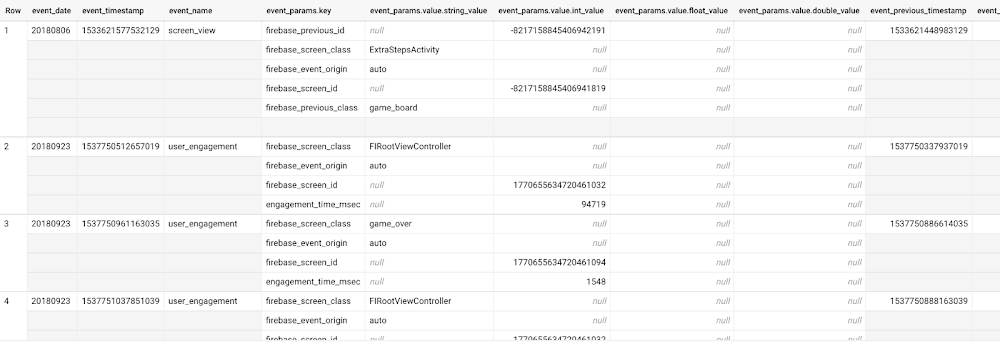
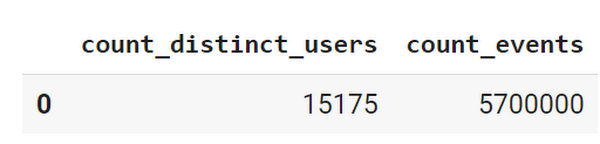
This dataset contains 5.7M events from over 15k users.
SELECTCOUNT(DISTINCT user_pseudo_id) as count_distinct_users,COUNT(event_timestamp) as count_eventsFROM`firebase-public-project.analytics_153293282.events_*
Our goal is to use BigQuery ML on the sample app dataset to predict propensity to user churn or not churn based on users’ demographics and activities within the first 24 hours of app installation.
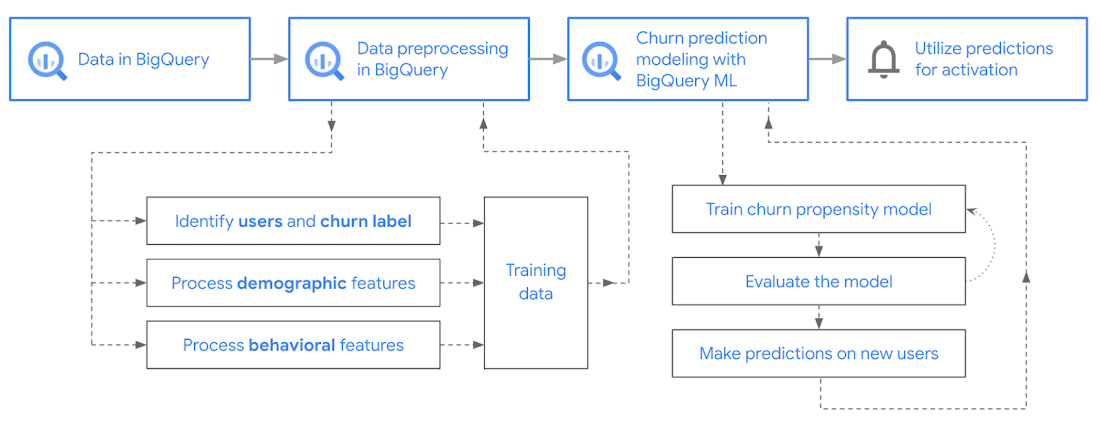
In the following sections, we’ll cover how to:
- Pre-process the raw event data from GA4
- Identify users & the label feature
- Process demographic features
- Process behavioral features
- Train classification model using BigQuery ML
- Evaluate the model using BigQueryML
- Make predictions using BigQuery ML
- Utilize predictions for activation
Pre-process the raw event data
You cannot simply use raw event data to train a machine learning model as it would not be in the right shape and format to use as training data. So in this section, we’ll go through how to pre-process the raw data into an appropriate format to use as training data for classification models.
This is what the training data should look like for our use case at the end of this section:
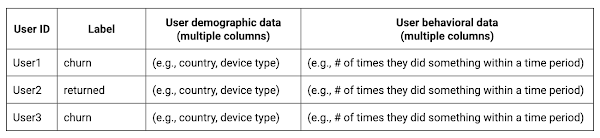
Notice that in this training data, each row represents a unique user with a distinct user ID (user_pseudo_id).
Identify users & the label feature
We first filtered the dataset to remove users who were unlikely to return the app anyway. We defined these ‘bounced’ users as ones who spent less than 10 mins with the app. Then we labeled all remaining users:
- churned: No event data for the user after 24 hours of first engaging with the app.
- returned: The user has at least one event record after 24 hours of first engaging with the app.
For your use case, you can have a different definition of bounce and churning. Also you can even try to predict something else other than churning, e.g.:
- whether a user is likely to spend money on in-game currency
- likelihood of completing n-number of game levels
- likelihood of spending n amount of time in-game etc.
In such cases, label each record accordingly so that whatever you are trying to predict can be identified from the label column.
From our dataset, we found that ~41% users (5,557) bounced. However, from the remaining users (8,031), ~23% (1,883) churned after 24 hours:
SELECTbounced,churned,COUNT(churned) as count_usersFROMbqmlga4.returningusersGROUP BY 1,2ORDER BY bounced

To create these bounced and churned columns, we used the following snippet of SQL code.
...#churned = 1 if last_touch within 24 hr of app installation, else 0IF (user_last_engagement < TIMESTAMP_ADD(user_first_engagement,INTERVAL 24 HOUR),1,0 ) AS churned,#bounced = 1 if last_touch within 10 min, else 0IF (user_last_engagement <= TIMESTAMP_ADD(user_first_engagement,INTERVAL 10 MINUTE),1,0 ) AS bounced,...
You can view the Jupyter Notebook for the full query used for materializing the bounced and churned labels.
Process demographic features
Next, we added features both for demographic data and for behavioral data spanning across multiple columns. Having a combination of both demographic data and behavioral data helps to create a more predictive model.
We used the following fields for each user as demographic features:
geo.countrydevice.operating_systemdevice.language
A user might have multiple unique values in these fields — for example if a user uses the app from two different devices. To simplify, we used the values from the very first user engagement event.
CREATE OR REPLACE VIEW bqmlga4.user_demographics AS (WITH first_values AS (SELECTuser_pseudo_id,geo.country as country,device.operating_system as operating_system,device.language as language,ROW_NUMBER() OVER (PARTITION BY user_pseudo_id ORDER BY event_timestamp DESC) AS row_numFROM `firebase-public-project.analytics_153293282.events_*`WHERE event_name="user_engagement")SELECT * EXCEPT (row_num)FROM first_valuesWHERE row_num = 1 #first engagement);
Process behavioral features
There is additional demographic information present in the GA4 export dataset, e.g. app_info, device, event_params, geo etc. You may also send demographic information to Google Analytics through each hit via user_properties. Furthermore, if you have first-party data on your own system, you can join that with the GA4 export data based on user_ids.
To extract user behavior from the data, we looked into the user’s activities within the first 24 hours of first user engagement. In addition to the events automatically collected by Google Analytics, there are also the recommended events for games that can be explored to analyze user behavior. For our use case, to predict user churn, we counted the number of times the follow events were collected for a user within 24 hours of first user engagement:
user_engagementlevel_start_quickplaylevel_end_quickplaylevel_complete_quickplaylevel_reset_quickplaypost_scorespend_virtual_currencyad_rewardchallenge_a_friendcompleted_5_levelsuse_extra_steps
The following query shows how these features were calculated:
WITHevents_first24hr AS (SELECTe.*FROM`firebase-public-project.analytics_153293282.events_*` eJOINbqmlga4.returningusers rONe.user_pseudo_id = r.user_pseudo_idWHERETIMESTAMP_MICROS(e.event_timestamp) <= r.ts_24hr_after_first_engagement)SELECTuser_pseudo_id,SUM(IF(event_name = 'user_engagement', 1, 0)) AS cnt_user_engagement,# ... repeated for all behavior data ...SUM(IF(event_name = 'use_extra_steps', 1, 0)) AS cnt_use_extra_steps,FROMevents_first24hrGROUP BY1
View the notebook for the query used to aggregate and extract the behavioral data. You can use different sets of events for your use case. To view the complete list of events, use the following query:
SELECTevent_name,COUNT(event_name) as event_countFROM`firebase-public-project.analytics_153293282.events_*`GROUP BY 1ORDER BYevent_count DESC
After this we combined the features to ensure our training dataset reflects the intended structure. We had the following columns in our table:
- User ID:
user_pseudo_id
- Label:
churned
- Demographic features
countrydevice_osdevice_language
- Behavioral features
cnt_user_engagementcnt_level_start_quickplaycnt_level_end_quickplaycnt_level_complete_quickplaycnt_level_reset_quickplaycnt_post_scorecnt_spend_virtual_currencycnt_ad_rewardcnt_challenge_a_friendcnt_completed_5_levelscnt_use_extra_stepsuser_first_engagement
At this point, the dataset was ready to train the classification machine learning model in BigQuery ML. Once trained, the model will output a propensity score between churn (churned=1) or return (churned=0) indicating the probability of a user churning based on the training data.
Train classification model
When using the CREATE MODEL statement, BigQuery ML automatically splits the data between training and test. Thus the model can be evaluated immediately after training (see the documentation for more information).
For the ML model, we can choose among the following classification algorithms where each type has its own pros and cons:
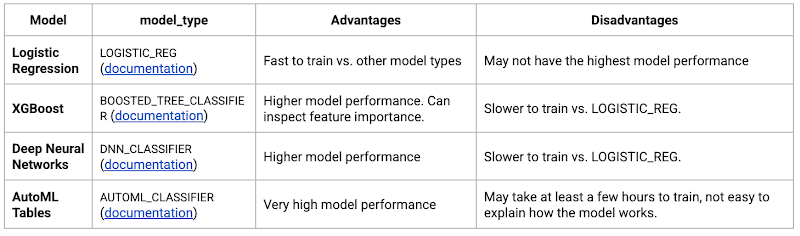
Often logistic regression is used as a starting point because it is the fastest to train. The query below shows how we trained the logistic regression classification models in BigQuery ML.
CREATE OR REPLACE MODEL bqmlga4.churn_logregTRANSFORM(EXTRACT(MONTH from user_first_engagement) as month,EXTRACT(DAYOFYEAR from user_first_engagement) as julianday,EXTRACT(DAYOFWEEK from user_first_engagement) as dayofweek,EXTRACT(HOUR from user_first_engagement) as hour,* EXCEPT(user_first_engagement, user_pseudo_id))OPTIONS(MODEL_TYPE="LOGISTIC_REG",INPUT_LABEL_COLS=["churned"]) ASSELECT*FROMbqmlga4.train
We extracted month, julianday, and dayofweek from datetimes/timestamps as one simple example of additional feature preprocessing before training. Using TRANSFORM() in your CREATE MODEL query allows the model to remember the extracted values. Thus, when making predictions using the model later on, these values won’t have to be extracted again. View the notebook for the example queries to train other types of models (XGBoost, deep neural network, AutoML Tables).
Evaluate model
Once the model finished training, we ran ML.EVALUATE to generate precision, recall, accuracy and f1_score for the model:
SELECT*FROMML.EVALUATE(MODEL bqmlga4.churn_logreg)

The optional THRESHOLD parameter can be used to modify the default classification threshold of 0.5. For more information on these metrics, you can read through the definitions on precision and recall, accuracy, f1-score, log_loss and roc_auc. Comparing the resulting evaluation metrics can help to decide among multiple models.Furthermore, we used a confusion matrix to inspect how well the model predicted the labels, compared to the actual labels. The confusion matrix is created using the default threshold of 0.5, which you may want to adjust to optimize for recall, precision, or a balance (more information here).
SELECTexpected_label,_0 AS predicted_0,_1 AS predicted_1FROMML.CONFUSION_MATRIX(MODEL bqmlga4.churn_logreg)

This table can be interpreted in the following way:

Make predictions using BigQuery ML
Once the ideal model was available, we ran ML.PREDICT to make predictions. For propensity modeling, the most important output is the probability of a behavior occurring. The following query returns the probability that the user will return after 24 hrs. The higher the probability and closer it is to 1, the more likely the user is predicted to return, and the closer it is to 0, the more likely the user is predicted to churn.
SELECTuser_pseudo_id,returned,predicted_returned,predicted_returned_probs[OFFSET(0)].prob as probability_returnedFROMML.PREDICT(MODEL bqmlga4.churn_logreg,(SELECT * FROM bqmlga4.train)) #can be replaced with a proper test dataset
Utilize predictions for activation
Once the model predictions are available for your users, you can activate this insight in different ways. In our analysis, we used user_pseudo_id as the user identifier. However, ideally, your app should send back the user_id from your app to Google Analytics. In addition to using first-party data for model predictions, this will also let you join back the predictions from the model into your own data.
- You can import the model predictions back into Google Analytics as a user attribute. This can be done using the Data Import feature for Google Analytics 4. Based on the prediction values you can Create and edit audiences and also do Audience targeting. For example, an audience can be users with prediction probability between 0.4 and 0.7, to represent users who are predicted to be “on the fence” between churning and returning.
- For Firebase Apps, you can use the Import segments feature. You can tailor user experience by targeting your identified users through Firebase services such as Remote Config, Cloud Messaging, and In-App Messaging. This will involve importing the segment data from BigQuery into Firebase. After that you can send notifications to the users, configure the app for them, or follow the user journeys across devices.
- Run targeted marketing campaigns via CRMs like Salesforce, e.g. send out reminder emails.
You can find all of the code used in this blogpost in the Github repository:
What’s next?
Continuous model evaluation and re-training
As you collect more data from your users, you may want to regularly evaluate your model on fresh data and re-train the model if you notice that the model quality is decaying.
Continuous evaluation—the process of ensuring a production machine learning model is still performing well on new data—is an essential part in any ML workflow. Performing continuous evaluation can help you catch model drift, a phenomenon that occurs when the data used to train your model no longer reflects the current environment.
To learn more about how to do continuous model evaluation and re-train models, you can read the blogpost: Continuous model evaluation with BigQuery ML, Stored Procedures, and Cloud Scheduler
More resources
If you’d like to learn more about any of the topics covered in this post, check out these resources:
- BigQuery export of Google Analytics data
- BigQuery ML quickstart
- Events automatically collected by Google Analytics 4
- Qwiklabs: Create ML models with BigQuery ML
Or learn more about how you can use BigQuery ML to easily build other machine learning solutions:
- How to build demand forecasting models with BigQuery ML
- How to build a recommendation system on e-commerce data using BigQuery ML
Let us know what you thought of this post, and if you have topics you’d like to see covered in the future! You can find us on Twitter at @polonglin and @_mkazi_.Thanks to reviewers: Abhishek Kashyap, Breen Baker, David Sabater Dinter.
More Relevant Stories for Your Company

BPAY: Uncovering New Business Opportunities with APIs
Editor's note: Today we hear from Jon White and Angela Donohoe from BPAY Group. BPAY Group is best known for BPAY, the leading electronic bill payment system in Australia, handling one-third of the market. Learn how BPAY Group is positioning the organization for the future by using APIs to streamline workflows

Pinterest Case: Pinning Its Past, Present, and Future on Cloud Native
After eight years in existence, Pinterest had grown into 1,000 microservices and multiple layers of infrastructure and diverse set-up tools and platforms. In 2016 the company launched a roadmap towards a new computing platform, led by the vision of creating the fastest path from an idea to production, without making

App Engine Basics to Help You Build and Deploy Low-latency, Scalable Apps
App Engine is a fully managed serverless compute option in Google Cloud that you can use to build and deploy low-latency, highly scalable applications. App Engine makes it easy to host and run your applications. It scales them from zero to planet scale without you having to manage infrastructure. App




Leveraging APIs to Deliver Connected Customer Experiences
What does the connected customer experience even mean? It's not just about a checklist of assets like website and mobile but how those channels seamlessly work together with the physical world to give your customer great experiences with your brand. Modern APIs enable companies to mask back-end complexities behind a
