





Active Assist Expands Globally: Unleashing Cloud Optimization Insights Worldwide

1289
Of your peers have already read this article.
3:30 Minutes
The most insightful time you'll spend today!
Active Assist provides insights and recommendations to help Google Cloud customers proactively optimize their cloud environments for cost, security, performance, and sustainability. If you’re like most customers, you’ve likely encountered these insights and recommendations in the console — either in the Recommendations Hub or embedded on a resource page, like IAM or the VM list pages. (Note that for the rest of this post, we’ll use the word “recommendations” to mean “insights and recommendations.”)
We heard from customers who love recommendations that it should be easier to discover and work with these valuable suggestions across an entire organization, so last year we launched the Recommendations BigQuery export feature to Preview. This allows you to automatically export the recommendations to a BigQuery dataset, which you can then investigate with tools like DataStudio or Looker, and integrate with your company’s existing monitoring solutions and workflows.
Many of you have told us how powerful this feature is, so we’ve been working hard on improvements to make it even more useful. We’re happy to announce that BQ Export 1.0 is now in GA, and that BQ Export 2.0 is in Preview, with new support for Billing Account-level recommendations and cost optimization recommendations that include discount information. This post will cover what’s new with Active Assist BQ Export, as well as a couple other new features of Active Assist.
New features to Active Assist BigQuery Export
Before we dive into the details, if you’re new to Recommendations BQ Export check out our handy getting started guide. It covers the permissions you’ll need and how to set up the export, including instructions for using a service account. It also includes some sample queries and instructions for interacting with the data using Google Sheets. You may also want to check out our prior blog post showing how to optimize your cloud spend with BigQuery and Looker.
Now, on to what’s new!
1. Non-project scoped recommendations
You can now see non-project scoped recommendations, such as billing account, organization, and folder-level recommendations in your export to BigQuery. This ensures that in your export, you are able to see the full portfolio of recommendations that are available to you.
2. Custom contract Pricing
If you have any applicable custom contract pricing for your company, your cost-related recommendations now take those into account (based on your historical costs) in the cost saving calculation when you export them to BigQuery. This will ensure that you have the most accurate cost savings data we have for you and your organization to help you make the best judgment and prioritization when choosing to adopt recommendations. However, you must have the correct permissions first in order to see the custom contract pricing. If the user executing the export to BigQuery does not have the correct permissions, you may continue to see list pricing in your estimated savings. Also, note that the console UI and the Recommender API already have this support.
3. Export now available globally
Customers outside of the US can now set up an export of recommendations to a BigQuery dataset.
Improvements to Active Assist discoverability and usability
1. Global Recommender Viewer role: You can now add the global Recommender Viewer role, which gives you view access to all insights and recommendations available to you, simplifying permission management for new recommenders. Newly launched recommendations will also automatically be added as they become generally available.
2. Dismiss recommendations via Recommender API: You can now directly dismiss recommendations via our API, allowing you to focus on the recommendations you care about and work more efficiently.
3. Shareable links: Another feature that quietly launched recently is the availability of shareable URLs that link to recommendation details in the console. You can access these links in the UI from the upper right of the details panel of any recommendation.
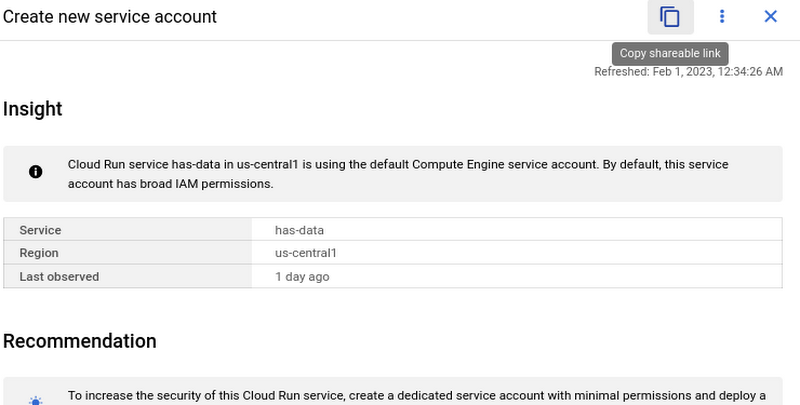
However, these links become even more powerful when combined with Recommendations BigQuery Export. The URLs all have a standard format. This means that within the BigQuery export tables you can easily calculate a new column containing these links using an expression like:
“https://console.cloud.google.com/home/recommendations/view-link/” +
name +
“?project=” +
cloud_entity_id
This example is for project level recommendations (where cloud_entity_type = PROJECT_NUMBER).
For cloud_entity_type = FOLDER, use:
“https://console.cloud.google.com/home/recommendations/view-link/” +
name +
“?folder=” +
cloud_entity_id
For cloud_entity_type = ORGANIZATION, use
“https://console.cloud.google.com/home/recommendations/view-link/” +
name +
“?organizationId=” +
cloud_entity_id
These links can then be embedded in your reports and dashboards, or used by other BigQuery clients.
As a reminder, if you’re interested in setting up reports or dashboards using Recommendations BigQuery Export, take a look at this previous blog post for some great ideas, or you can reference our getting started guide. If you have any feedback, please feel free to reach out to active-assist-feedback@google.com.
Google Cloud’s Virtual Appointment Scheduling Tool (VAST) Helps State of Arizona Recover from Unemployment Situation

6545
Of your peers have already read this article.
2:00 Minutes
The most insightful time you'll spend today!
When the world was forced to go primarily online, state governments also faced the reality of needing to provide community services without the health risk of meeting in person. Old systems that relied on interpersonal contact could not keep up. An unprecedented number of displaced workers swamped every unemployment system. The capacity challenges weren’t limited to state labor departments either. Everything from birth certificates and marriage licenses to apostilles and court system services that could usually be handled by a simple walk-in had to be scheduled in advance. Both internal and external communication suffered.
To meet these challenges, many organizations turned to new technology solutions and innovative approaches.
How VAST helped Arizona get back to work
The State of Arizona had tens of thousands of constituents who relied on pandemic unemployment insurance and would also need tools to reenter the workforce.Tim Tucker, Deputy Administrator of the Workforce Development Administration for the Arizona Department of Economic Security, started preparing in late 2020. He collaborated with Google Cloud and SADA to introduce the Virtual Appointment Scheduling Tool (VAST) to State of Arizona staff members. Using VAST reduced the excessive workload taken on by the Workforce Development Administration as they got Arizona back to work. VAST lets constituents book an appointment, upload documents and forms, and conduct career counseling virtually. This helped constituents move through the system faster so they could successfully reenter the workforce.
That preparation paid off. As of September 2021, Arizona had recovered the majority of the jobs lost during the pandemic. It has also seen one of the smallest percent change in employment compared with pre-pandemic numbers. Even more impressive, Arizona is one of only five states where unemployment claims are now lower than pre-pandemic numbers. Using VAST helped them get people back to work faster and has become a permanent part of their unemployment program.
Bringing streamlined services to the community
To fully realize a solution to the challenges faced by our public sector customers, we focused on three key areas in which we knew we needed VAST to excel:
- Efficient staff allocation
- Streamlined internal meetings
- Confident constituent interactions
We also knew our customers needed to get VAST online fast, and it needed to work with existing infrastructure without requiring a total overhaul. These areas informed the design of VAST’s features and have allowed us to meet the challenges faced by agencies such as the Arizona Department of Economic Security.
Virtual Agent support and integrations
VAST gives constituents 24×7 virtual agent support powered by Google Cloud’s contact center AI virtual agents. Virtual agents are custom programmed to fit the specific needs of each agency and community they serve. It’s easy to add new options and information whenever an update is needed. Virtual agents can be designed to understand the user’s intent and serve up relevant content for a smooth user experience on both ends of the system. Virtual agents run at scale and offer multi-language support, ensuring they can serve everyone in the community. By pairing these with VAST, constituents can experience seamless self-service.
6 week deployment time
Most of our public sector clients needed a solution yesterday. VAST can be deployed rapidly, taking about six weeks from start to finish, which includes everything–even staff training time.
Integration with Google Workspace and Chrome
VAST securely integrates with other Google solutions, such as Google Workspace and Chromebooks. We work to ensure VAST is fully functional within your existing systems.
Collaboration and support
SADA collaborates with each organization to ensure that the design, development, and functionality of VAST align with their needs. SADA specializes in helping public sector customers migrate to Google Cloud.
Analytics
Application administrators have access to analytic data gathered by VAST and options to customize and add additional datasets.This data helps organizations find blind spots in coverage, fix service bottlenecks, and better organize internal resources. Leveraging this data gives organizations the power to make changes, resulting in everything from a smoother customer experience to cost savings.
To learn more about how Google Cloud has supported Arizona during the pandemic, check out this blog on how their vaccination distribution system leveraged Google Cloud to get the vaccine to more people. For more information on how VAST can streamline a customer experience.
4793
Of your peers have already watched this video.
50:00 Minutes
The most insightful time you'll spend today!
How G Suite Makes it Easy to Work with Microsoft Office and Exchange
A silent transformation is taking shape in organizations today. Employees are looking for new ways to discover new ideas, and work together anytime, anywhere to ensure businesses are always on.
Without IT’s help that’s not possible. And to make this possible IT teams are working over-time to ensure seamless collaboration by integrating disparate systems. But what happens when IT teams have to marry Microsoft tools with Google?
With G Suite, IT managers don’t have to bother. G Suite interoperates with Microsoft tools. Its multiple features create a more seamless experience between G Suite and Office—including support for user and resource availability lookups between Google Calendar and Microsoft Exchange, as well as the ability to seamlessly collaborate on Microsoft Office documents in real time.
This interoperability ensures that these two tools are designed to work together. There are three pillars that are necessary for interoperability. One, data needs to move from on-premise to the cloud. Two, ensure internal co-existence where some users use Microsoft tools, while others run on G Suite. This interoperability is important to ensure both sets of users can work together irrespective of the tools they are using.
And three, collaborating with external parties that use Microsoft tools—external co-existence—is also
How Japan’s Vaccine Locator Platform Became A One-stop Shop for COVID-19 and Vaccination-related Information

3903
Of your peers have already read this article.
4:00 Minutes
The most insightful time you'll spend today!
Editor’s Note: David Moore, Founder and CEO of Navagis, shares his story of teaming up with the Google Maps Platform team to help people across Japan get vaccinated amid COVID-19 pandemic.
The roots of Navagis go back to Hurricane Katrina, when I led an Army Corps of Engineers team that deployed 3D mapping technologies with Google Earth to respond to critical needs on the U.S. Gulf Coast. As a Google Cloud Premier Partner we work across various industries and organizational types to solve location intelligence challenges with our software solutions.
The experience taught me how powerful mapping insights can be in protecting lives when disaster strikes. The COVID-19 crisis brought a brand new human challenge to the world and like other countries, Japan found itself struggling to vaccinate its 125 million people, while trying to communicate about where (and under what circumstances) people could get their vaccines.
Our end goal was to build a reliable, enriched, real-time dataset on Japan’s vaccination centers. Living in Japan, seeing some confusion and anxiety, I felt great urgency when I accepted the mission on behalf of our team.
From the very beginning we faced many challenges. Japan was experiencing unique difficulties in building an accurate real-time vaccine locator. First, we noticed the fragmentation of address information across thousands of local governments, from Hokkaido in the north to subtropical Okinawa in the south. Second, Japan’s Ministry of Health, Labor and Welfare had launched a website of nationwide vaccination sites, which they were constantly updating data sources. We noticed the location information was prone to inconsistencies due to its dispersion at the local level, and different conventions among prefectures on writing addresses. In order to ensure the integrity of a massive amount of decentralized data, mostly in Japanese, we required on-the-ground presence and experience.
In addition, we needed to go beyond simply mapping the location of vaccination centers. Each one needed to be a one-stop shop for all information regarding vaccination, including opening hours, safety precautions, and qualifications for getting the COVID-19 vaccine.
Round-the-clock teamwork builds a helpful, informative mapping solution
People might think of mapping as all about AI, advanced satellites, and cloud computing power. Of course, these are essential. What is less known is the massive amount of human toil and dedication that goes into making vaccine location information available especially for an urgent health mission for a country as large and complex as Japan.
Realizing our task was urgent, we worked with the Google Maps Platform team across time zones and over weekends to make this happen fast. In some cases a vaccine center was at a place where one would not normally expect to get a vaccine—like a pop-up location at a convention center. So we matched vaccine center addresses from the government website against Google Maps Platform’s Places data.
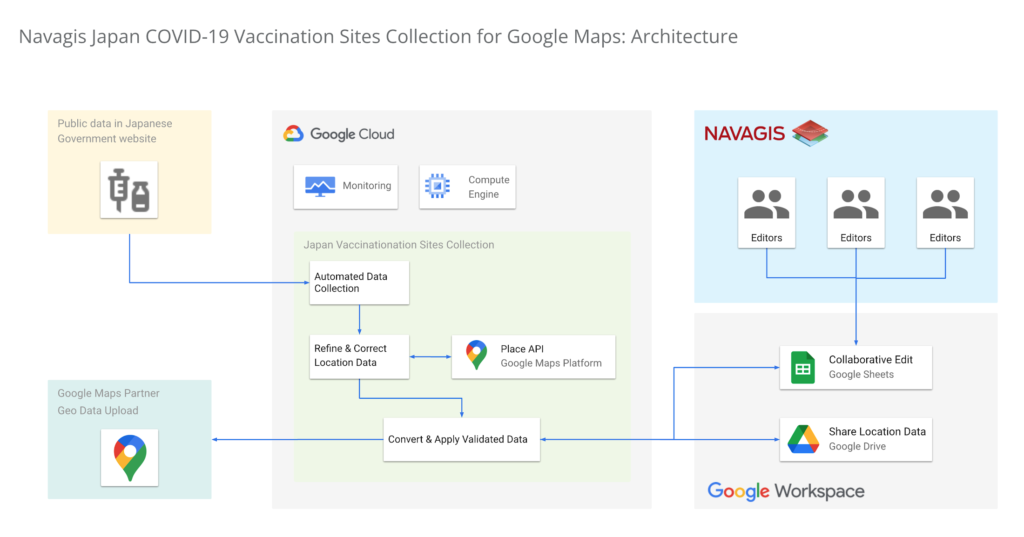
In under two weeks, we had identified, matched and marked tens of thousands of locations as vaccination centers around the country. Moreover, the power of the Geolocation API and Places API enabled us to provide richer details for many of the centers.

One of the unique aspects of this project was being able to surface our work across multiple channels to accomplish a single goal. We were able to work with Google to ensure the vaccine centers appeared on the consumer user-facing Google Maps apps and website, with information to help citizens learn where and how to get their vaccine. Our team was in hourly contact with requests such as “this center is mission-critical, can we get it mapped?” They were able to quickly get the site listed and visible on the map for end-users. This was a big human mobilization.
Powerful mapping APIs for pinpointed vaccine location information
We couldn’t have accomplished the massive task of validating 35,000 vaccination sites in such a short period of time without Google’s mapping APIs. The Maps Geocoding API and Places API enabled us to take location data from the government website, and quickly verify whether the location existed, or not, with up-to-date places intelligence.

The Places API served a critical role in two ways: breadth of information (covering Japan’s entire territory), and depth of information (complex insight into each place, such as landmarks and phone numbers).
The ability to take the addresses provided by the government of vaccination sites, run them through the Places API, and assess the address quality helped enormously. Google Street View, meanwhile, provided a further level of validation, enabling us to visually identify the specific locations where errors remained, and manually identifying clinics and hospitals before identifying their precise latitude and longitude within cities in Japan.
Looking beyond COVID-19
Japan went from being a laggard in global vaccination rates before the summer of 2021 to one of the leaders, with nearly 80% of the population fully vaccinated. And, daily confirmed cases had been as low as 100 nationwide prior to Omicron emerging globally.
The prospect of putting to bed our adventure with the Japan Vaccine Locator couldn’t bring us more joy.
Except perhaps, the prospect of helping people rediscover the joy of a return to normalcy—in partnership with Google Maps Platform.
For more information on Google Maps Platform, visit our website.
Quick Recap on Google Cloud: Latest News, Launches, Updates, Events and More

12906
Of your peers have already read this article.
2:00 Minutes
The most insightful time you'll spend today!
Want to know the latest from Google Cloud? Find it here in one handy location. Check back regularly for our newest updates, announcements, resources, events, learning opportunities, and more.
Tip: Not sure where to find what you’re looking for on the Google Cloud blog? Start here: Google Cloud blog 101: Full list of topics, links, and resources.
Week of May 24-May 28 2021
- Google Cloud for financial services: driving your transformation cloud journey–As we welcome the industry to our Financial Services Summit, we’re sharing more on how Google Cloud accelerates a financial organization’s digital transformation through app and infrastructure modernization, data democratization, people connections, and trusted transactions. Read more or watch the summit on demand.
- Introducing Datashare solution for financial services–We announced the general availability of Datashare for financial services, a new Google Cloud solution that brings together the entire capital markets ecosystem—data publishers and data consumers—to exchange market data securely and easily. Read more.
- Announcing Datastream in Preview–Datastream, a serverless change data capture (CDC) and replication service, allows enterprises to synchronize data across heterogeneous databases, storage systems, and applications reliably and with minimal latency to support real-time analytics, database replication, and event-driven architectures. Read more.
- Introducing Dataplex: An intelligent data fabric for analytics at scale–Dataplex provides a way to centrally manage, monitor, and govern your data across data lakes, data warehouses and data marts, and make this data securely accessible to a variety of analytics and data science tools. Read more.
- Announcing Dataflow Prime–Available in Preview in Q3 2021, Dataflow Prime is a new platform based on a serverless, no-ops, auto-tuning architecture built to bring unparalleled resource utilization and radical operational simplicity to big data processing. Dataflow Prime builds on Dataflow and brings new user benefits with innovations in resource utilization and distributed diagnostics. The new capabilities in Dataflow significantly reduce the time spent on infrastructure sizing and tuning tasks, as well as time spent diagnosing data freshness problems. Read more.
- Secure and scalable sharing for data and analytics with Analytics Hub–With Analytics Hub, available in Preview in Q3, organizations get a rich data ecosystem by publishing and subscribing to analytics-ready datasets; control and monitoring over how their data is being used; a self-service way to access valuable and trusted data assets; and an easy way to monetize their data assets without the overhead of building and managing the infrastructure. Read more.
- Cloud Spanner trims entry cost by 90%–Coming soon to Preview, granular instance sizing in Spanner lets organizations run workloads at as low as 1/10th the cost of regular instances, equating to approximately $65/month. Read more.
- Cloud Bigtable lifts SLA and adds new security features for regulated industries–Bigtable instances with a multi-cluster routing policy across 3 or more regions are now covered by a 99.999% monthly uptime percentage under the new SLA. In addition, new Data Access audit logs can help determine whether sensitive customer information has been accessed in the event of a security incident, and if so, when, and by whom. Read more.
- Build a no-code journaling app–In honor of Mental Health Awareness Month, Google Cloud’s no-code application development platform, AppSheet, demonstrates how you can build a journaling app complete with titles, time stamps, mood entries, and more. Learn how with this blog and video here.
- New features in Security Command Center—On May 24th, Security Command Center Premium launched the general availability of granular access controls at project- and folder-level and Center for Internet Security (CIS) 1.1 benchmarks for Google Cloud Platform Foundation. These new capabilities enable organizations to improve their security posture and efficiently manage risk for their Google Cloud environment. Learn more.
- Simplified API operations with AI–Google Cloud’s API management platform Apigee applies Google’s industry leading ML and AI to your API metadata. Understand how it works with anomaly detection here.
- This week: Data Cloud and Financial Services Summits–Our Google Cloud Summit series begins this week with the Data Cloud Summit on Wednesday May 26 (Global). At this half-day event, you’ll learn how leading companies like PayPal, Workday, Equifax, and many others are driving competitive differentiation using Google Cloud technologies to build their data clouds and transform data into value that drives innovation. The following day, Thursday May 27 (Global & EMEA) at the Financial Services Summit, discover how Google Cloud is helping financial institutions such as PayPal, Global Payments, HSBC, Credit Suisse, AXA Switzerland and more unlock new possibilities and accelerate business through innovation. Read more and explore the entire summit series.
- Announcing the Google for Games Developer Summit 2021 on July 12th-13th–With a surge of new gamers and an increase in time spent playing games in the last year, it’s more important than ever for game developers to delight and engage players. To help developers with this opportunity, the games teams at Google are back to announce the return of the Google for Games Developer Summit 2021 on July 12th-13th. Hear from experts across Google about new game solutions they’re building to make it easier for you to continue creating great games, connecting with players and scaling your business. Registration is free and open to all game developers. Register for the free online event at g.co/gamedevsummit to get more details in the coming weeks. We can’t wait to share our latest innovations with the developer community. Learn more.
Future of Work: What You Don’t Know Will Cost You

5264
Of your peers have already read this article.
3:40 Minutes
The most insightful time you'll spend today!
The future of work is here—it’s just not evenly distributed. Indeed, many of the technologies, trends, and cultural norms that will drive tomorrow’s workplaces are already reshaping organizations around the world today. We examine this topic in a new Google Cloud report on the future of collaboration and productivity, featuring the results of original research, predictions by business and technology leaders, and recommendations from Google experts.
The report also identifies three important and impactful changes that businesses can make today to catch up with forward-thinking competitors. Here are the highlights:
1. Give people tools that help them save time and work faster.
What is it about work that just isn’t working? Research shows that employees around the world spend significant chunks of their day on low-value activities that get in the way of efficiency, productivity, and innovation. These include attending unnecessary meetings, managing high volumes of email, tracking down the right versions of documents, switching between applications, and generally struggling with outdated technology.
To help their employees spend more time on work that matters, future-minded organizations are replacing legacy business software with cloud-based tools that integrate seamlessly with one another and use automation to make routine tasks less burdensome. For example, an app might surface the right information at the right time so you don’t have to go hunting for it, suggest commonly used phrases as you type, or propose available meeting times and conference rooms. Add up the few minutes you save on each task, and that’s a significant portion of the day you’ve reclaimed for the work that matters.
2. Empower people to access knowledge and share ideas.
Have you ever used Google Search to find your own company’s logo? Or recreated content that already existed because you couldn’t track something down? Employees around the world experience similar challenges when searching for what they need across siloed, ineffective information repositories within their organizations. And that’s a problem, because nearly 80% of business leaders agree that seamless, digital access to knowledge is very important to overall performance, according to a survey sponsored by Google Cloud and conducted by Harvard Business Review Analytic Services.
The solution? Providing employees with centrally managed technology that lets them access and share knowledge more easily, curbing reliance on unsanctioned apps that may put sensitive data at risk. Fast access to relevant information can also help cultivate new opportunities for employees to contribute, whether it’s by suggesting a new product or service, providing feedback on internal processes or business initiatives, or exchanging insights with colleagues across the company. Eighty-nine percent of executives say that for a business to be successful, new ideas must come from everyone across the organization, from senior executives to front-line employees, according to another survey sponsored by Google Cloud and conducted by Harvard Business Review Analytic Services.
3. Let people work how they want: flexibly and collaboratively.
Along with time-saving tools and expanded access to information, two core values are reshaping work for forward-thinking organizations and will help determine the future success of every business: flexibility and collaboration. According to Deloitte research, only 17% of millennials are willing to stay with an employer for more than five years without the opportunity to work where they choose, while 74% of global employees believe that businesses perform better when they encourage teamwork.
Luckily, technology is evolving to support this sweeping shift toward flexible collaboration. We now have tools that let people on opposite sides of the globe work together as a team, from video meetings for face-to-face interaction to digital whiteboards for collective brainstorming. Research shows that more and more businesses are taking advantage of these cloud-powered services: 27% of global executives adopted integrated software suites for collaborative content creation and idea-sharing in the last two years, while an additional 24% plan to do so by 2021, according to Harvard Business Review Analytic Services.
More Relevant Stories for Your Company

Transitioning to Hybrid Environment with Chrome Browser
It’s been quite a year. In general, and for work. Just the other day, I read a new study from Pew Research that shows 71% of people are currently working from home, and 50% of employees say they want to continue working from home at least three days a week. That’s more



How PwC Migrated 275,000+ Users to Google Workspace
PwC, a 150-year-old professional services firm, has deployed and measured the impact of G Suite on its network of firms in 158 countries to help change its culture and make digital mastery a competitive advantage. In 2015, PwC embarked on a journey of cultural change by deploying G Suite* to

Ways to Manage Extensions on Windows and Mac If You Haven’t Moved to Chrome Browser Cloud Management
Many enterprises are looking to better manage extensions on their corporate devices. Extensions themselves are a great tool for productivity and customization of Chrome. However, some extensions can have the potential for far reaching rights to sites your users visit and devices they browse from, giving IT the desire to

Precarious to Precision: How Dainik Bhaskar Corp Transitioned Its Business in a Time of Great Change
Headquartered in Bhopal, India, and listed on the Bombay Stock Exchange, DB Corp is India’s largest newspaper group. DB Corp publishes 62 editions in four languages and sells about 6 million newspaper copies per day. Beyond newspapers, DB Corp operates 29 radio stations, 13 portals and two mobile apps. Like
