





BigQuery Omni: Your Solution for Multi-Cloud Geospatial Analytics

1486
Of your peers have already read this article.
6:30 Minutes
The most insightful time you'll spend today!
As we become increasingly reliant on technology to make decisions, geospatial data is becoming more critical than ever. It is a powerful resource that can be used to solve a variety of problems, from tracking the movement of goods, identifying interest areas and potential areas of disaster.
Geospatial data incorporates data with a geographic component, such as latitude and longitude coordinates, addresses, postal codes, or place names, and can be obtained from a variety of sources, including satellites, sensors, and surveys, making it an incredibly powerful tool with a broad range of applications.
One of the key features of BigQuery, Google Cloud’s serverless enterprise data warehouse, is its ability to analyze geospatial data. However, oftentimes geospatial data sits in a variety of public clouds, not just Google Cloud. To access it effectively, you need a multi-cloud analytics solution that lets you capitalize on the distinct capabilities of each cloud platform, while extracting insights and value from data sitting across multiple cloud platforms.
BigQuery Omni is a multi-cloud analytics solution that enables the analysis of data stored across public cloud environments, including Google Cloud, Amazon Web Services (AWS) and Microsoft Azure, without the need to transfer the data. With BigQuery Omni, users can employ the same SQL queries and tools used to analyze data in Google Cloud to analyze data in other clouds, making it easier to gain insights from all data, regardless of the storage location. For businesses using multiple clouds, BigQuery Omni is an excellent tool to unify analytics and optimize the value of data.
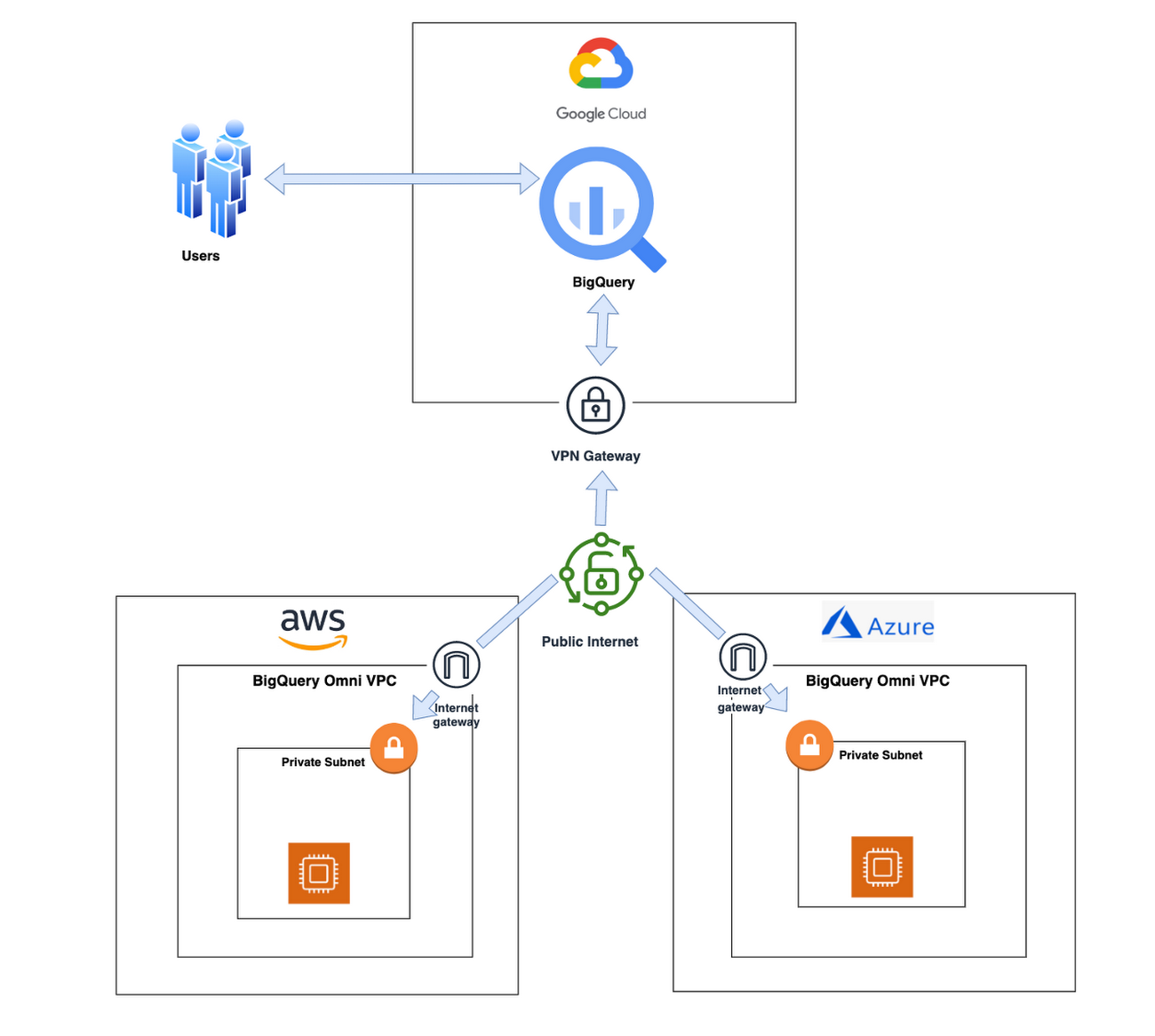
With BigQuery Omni, organizations can analyze location-based information or geographic components, such as latitude and longitude coordinates, addresses, postal codes, or place names without even copying their data to Google Cloud. For example, you could use BigQuery Omni to analyze data from a fleet of delivery vehicles to track their location and identify potential problems.
BigQuery Omni and geospatial data analysis
If you are working with geospatial data, BigQuery Omni is a powerful tool that can help you to get insights from your data. It is scalable, reliable, and secure, making it a great option for unifying your analytics and getting the most out of your data.
Here are a few examples of ways organizations might use BigQuery Omni for geospatial data:
- A transportation company could use BigQuery Omni to analyze data from GPS sensors in its vehicles to track the movement of its fleet and identify potential problems.
- A retail company could use BigQuery Omni to analyze data from its point-of-sale systems to track customer behavior and identify trends.
- A government agency could use BigQuery Omni to analyze data from its weather sensors to track the movement of storms and identify areas at risk of flooding.
BigQuery Omni and geospatial data can be used together to gain insights into a variety of business problems. Specifically, some of the advantages of using BigQuery Omni and geospatial data include:
- Access to quality geospatial data: BigQuery supports loading of newline-delimited GeoJSON files and provides built-in support for loading and querying geospatial data. Data from public data sources like BigQuery public datasets, the Earth Engine catalog, and the United States Geological Survey (USGS) can be easily integrated into your BigQuery environment. Earth Engine has an integrated data catalog with a comprehensive collection of analysis-ready datasets, including satellite imagery and climate data. This data can be combined with proprietary data sources such as SAP, Oracle, Esri ArcGIS Server, Carto, and QGIS.
- Loading and preprocessing of geospatial data: BigQuery has built-in support for loading and querying geospatial data types, and you can use partner solutions such as FME Spatial ETL to load data.
- Working with different geospatial data types and formats: BigQuery supports a variety of file types and formats including WKT, WKB, CSV and GeoJSON.
- Coordinate reference systems: BigQuery’s geography data type is globally consistent. That means that your data is registered to the WGS84 reference system and your analyses can span a city block or multiple continents.
Overall, geospatial analytics with BigQuery Omni provides a wide range of technical capabilities for processing and analyzing geospatial data, making it a powerful tool for businesses that need to work with location-based data.
Analyzing geospatial data with BigQuery Omni
Imagine a retailer who has a large chain of department stores with locations all over the country. They are looking to expand their business and want to identify areas with high sales potential. They want a way to get a better understanding of their sales volume within specific geographic boundaries. To achieve this goal, the retailer turns to the GIS (Geographic Information System) functions built into BigQuery. Here are the steps what the retailer takes to analyze this dataset:
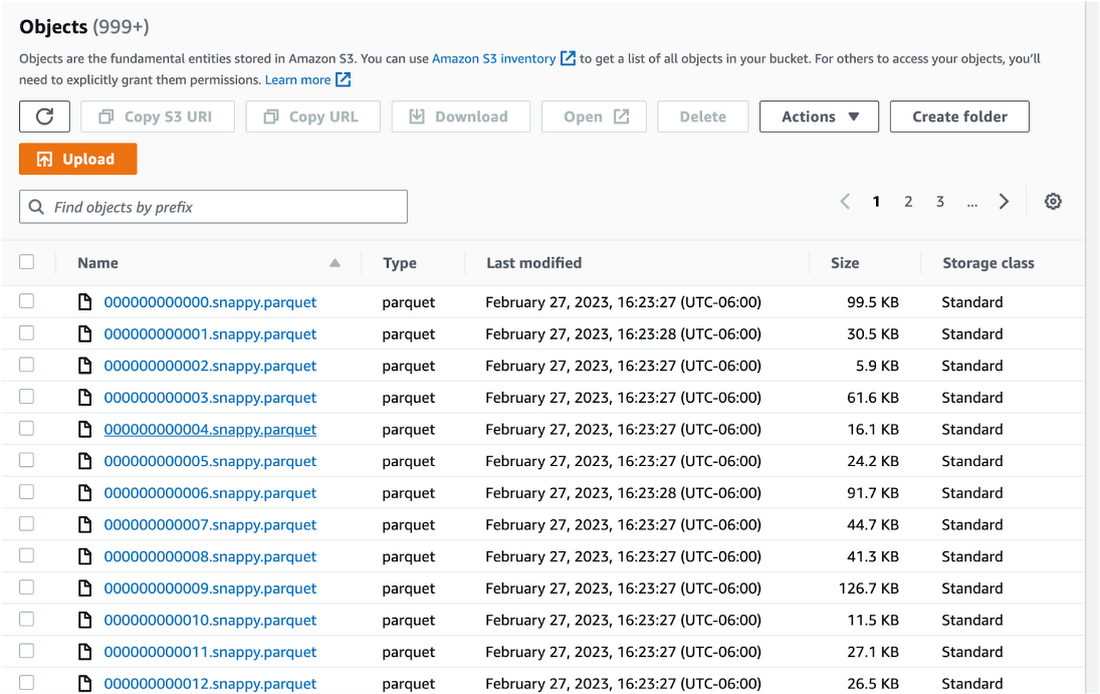
Step 1 : An initial orders dataset on AWS S3 contains 5.54 million rows, and with separate locations (300 rows) and zipcode (33144 rows) metadata files on AWS S3.
Orders Parquet files:
Location and Zipcode files:

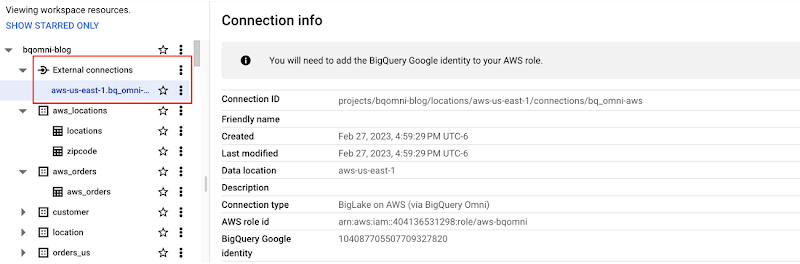
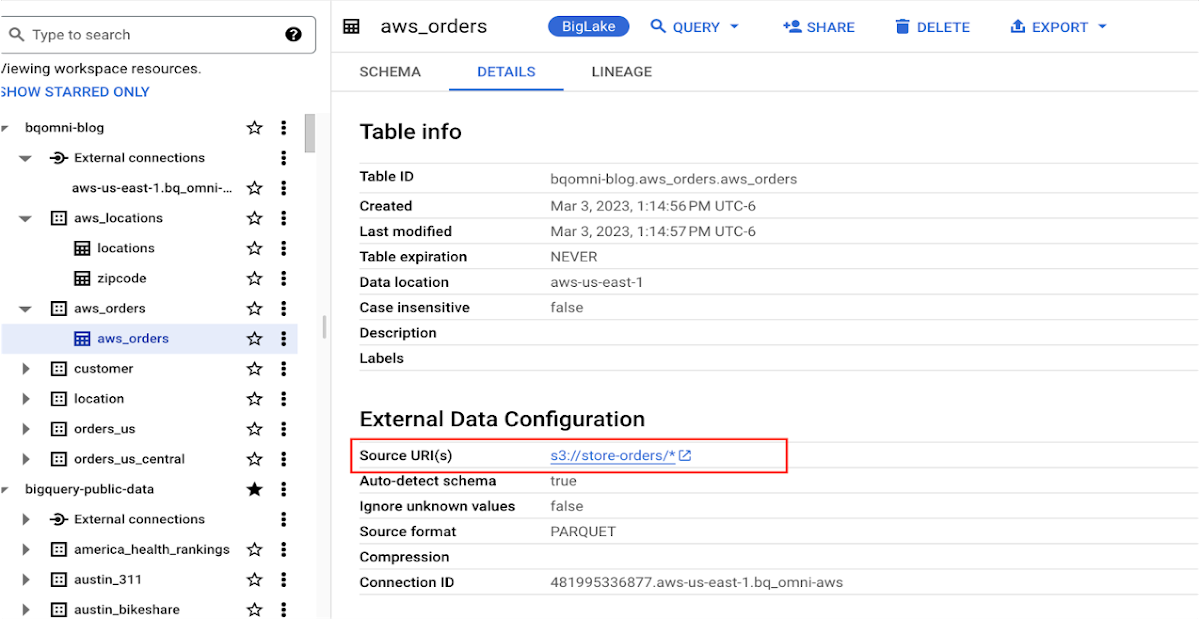
Step 2 : The retailer uses BigQuery Omni to establish a connection between the data stored in AWS and BigQuery, enabling them to access the S3 datasets externally.
External Connection for AWS
External Table for orders
External Table for locations
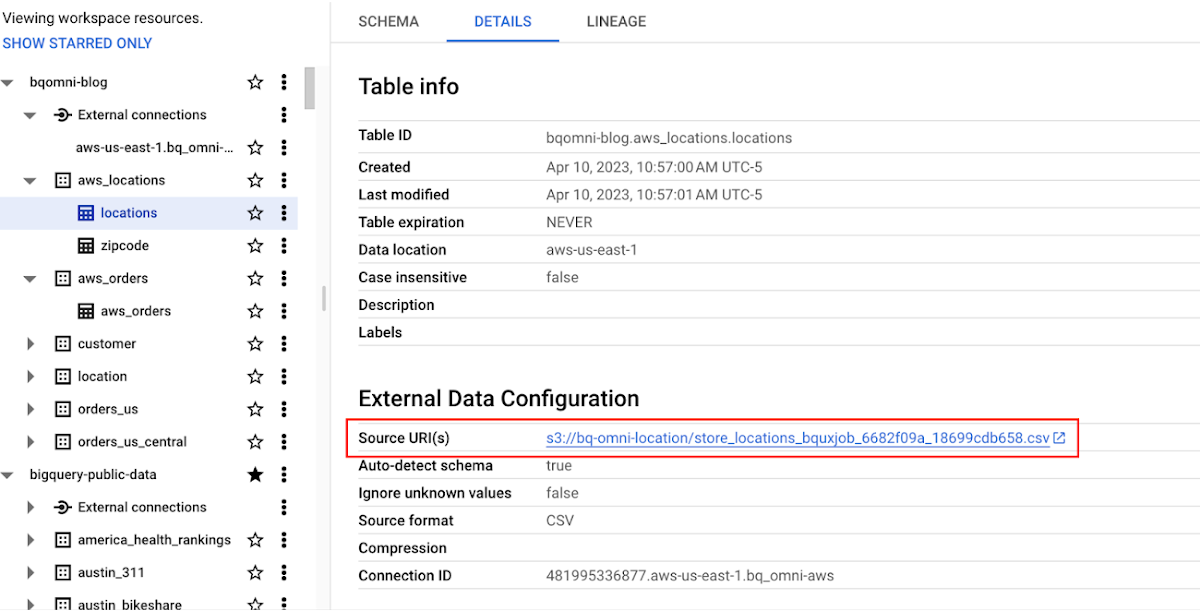
External Table for zipcode
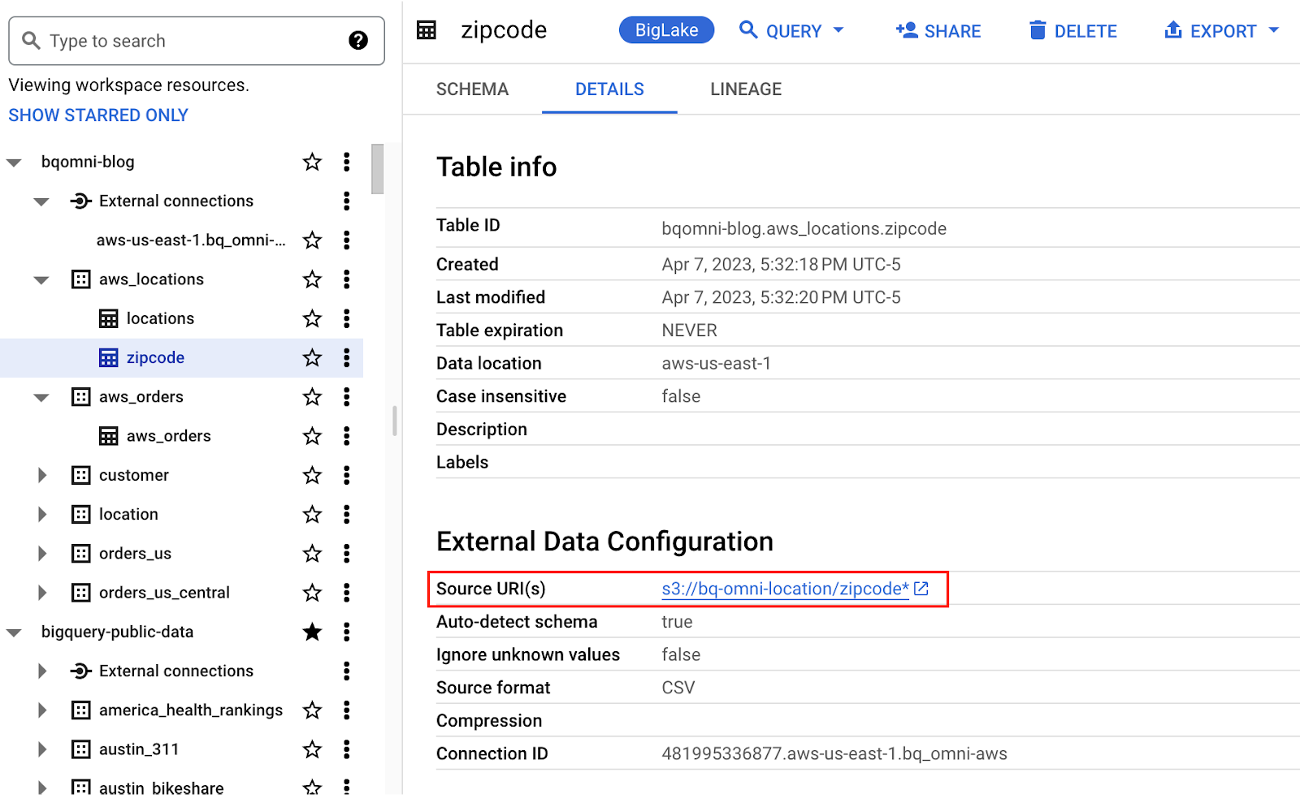
Step 3 : They combine the orders and locations datasets using BigQuery Omni, and remotely aggregate the data on AWS. Joining this dataset with geospatial datasets helps them derive geospatial coordinates.
The final aggregated dataset is reduced to 23 rows. Subsequently, they bring back the result dataset, which contains just 23 rows. This helps them reduce the extraction of millions of rows to just 23 rows for their geospatial analytics.
Select sales.store_city store_city,
sales.number_of_sales_last_10_mins number_of_sales_last_10_mins,
sales.store_zip store_zip,
 ST_GeogPoint(zip_lat_lng.longitude ,
   zip_lat_lng.latitude  ) geo
FROM (
 SELECT
   FORMAT_DATETIME("%X",
     CURRENT_DATETIME("America/Los_Angeles")) current_time,
   MAX(DATETIME(time_of_sale,
       "America/Los_Angeles")) time_of_last_sale,
   COUNT(1) number_of_sales_last_10_mins,
   locations.city store_city,
   locations.zip store_zip
 FROM
   `bqomni-blog.aws_locations.orders_small`  sales
 JOIN
   `bqomni-blog.aws_locations.locations` locations
 ON
   sales.store_id = locations.id
 GROUP BY
   locations.city,
   locations.zip ) sales
JOIN
   `bqomni-blog.aws_locations.zipcode` zip_lat_lng
ON
 cast(sales.store_zip as INT) = cast(zip_lat_lng.zipcode as INT)
 WHERE ST_WITHIN( ST_GeogPoint(zip_lat_lng.longitude , zip_lat_lng.latitude  ) ,ST_GeogFromText(zip_lat_lng.zipcode_geom ) )
 AND zip_lat_lng.state_name  = "New York"
 ORDER BY number_of_sales_last_10_mins
Aggregated Sales data by region
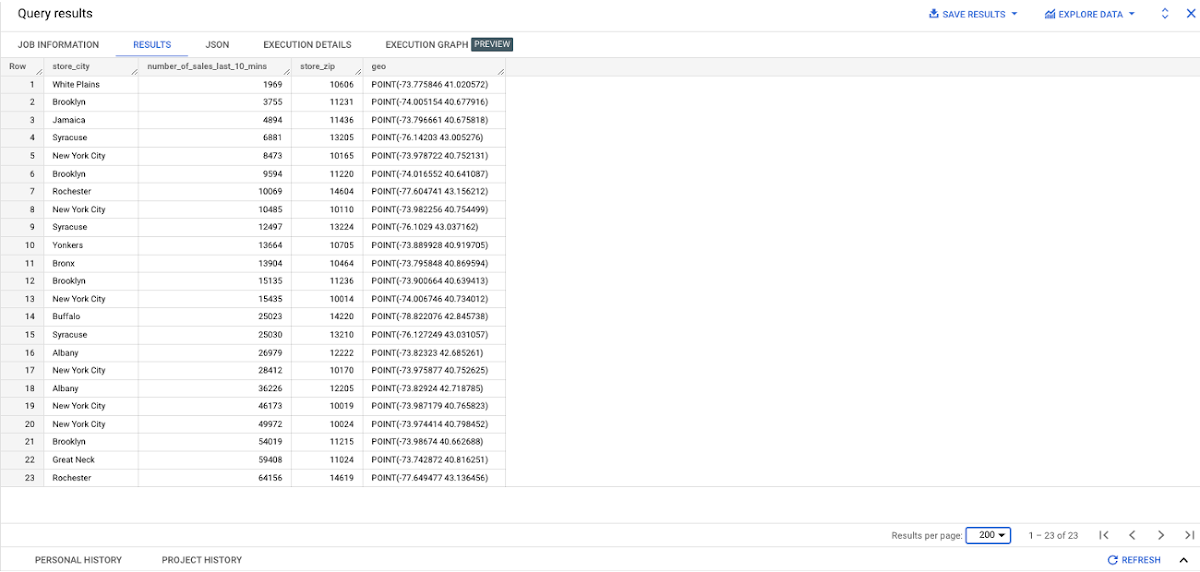
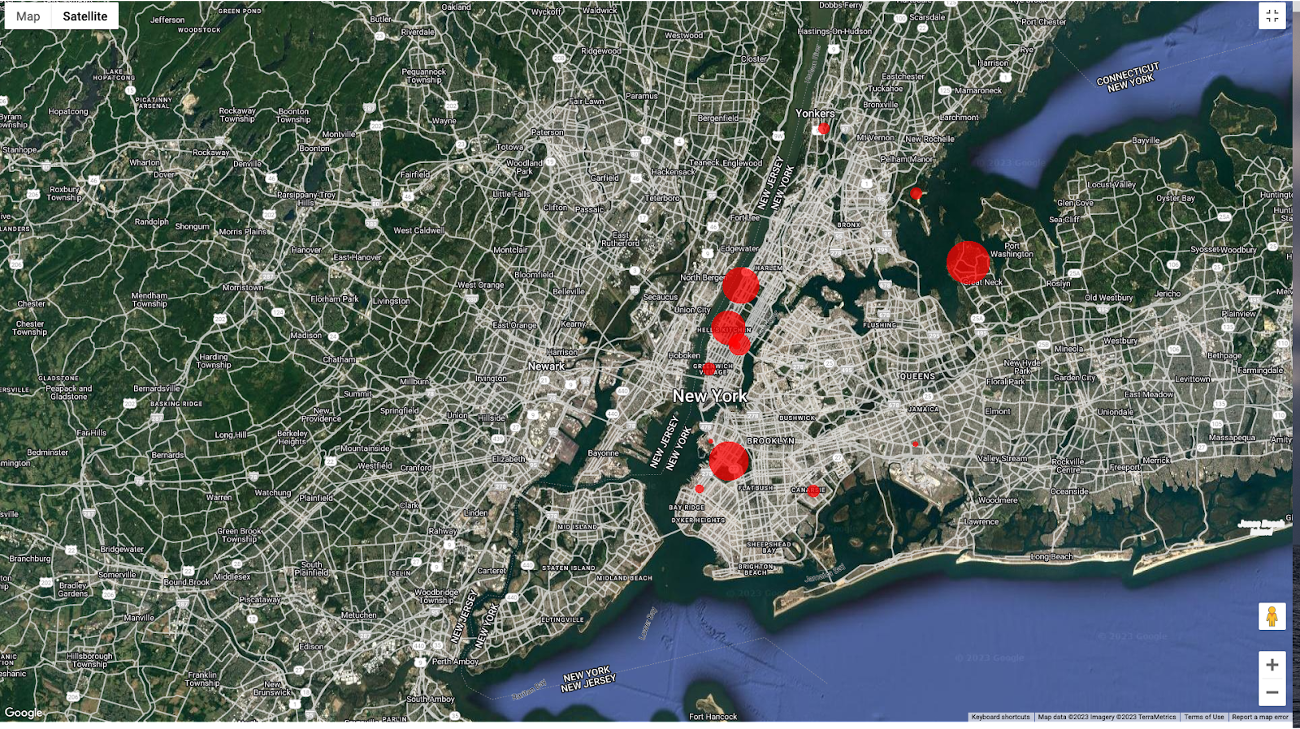
To build richer views of their sales volume data, the retailer uses BigQuery GeoViz integration, a powerful tool that allows for visualizing geographic data on maps.BigQuery Geo Viz is a web tool for visualization of geospatial data in BigQuery using Google Maps APIs. You can run a SQL query and display the results on an interactive map
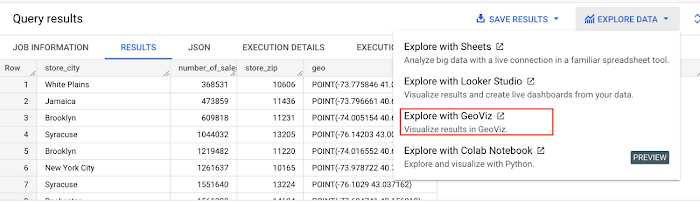
BigQuery Geo view for sales data analysis
With the geo-tagged data in place, the retailer can now see regional sales volume, sales density, distribution by department by time, and distribution within department, all powered through BigQuery.
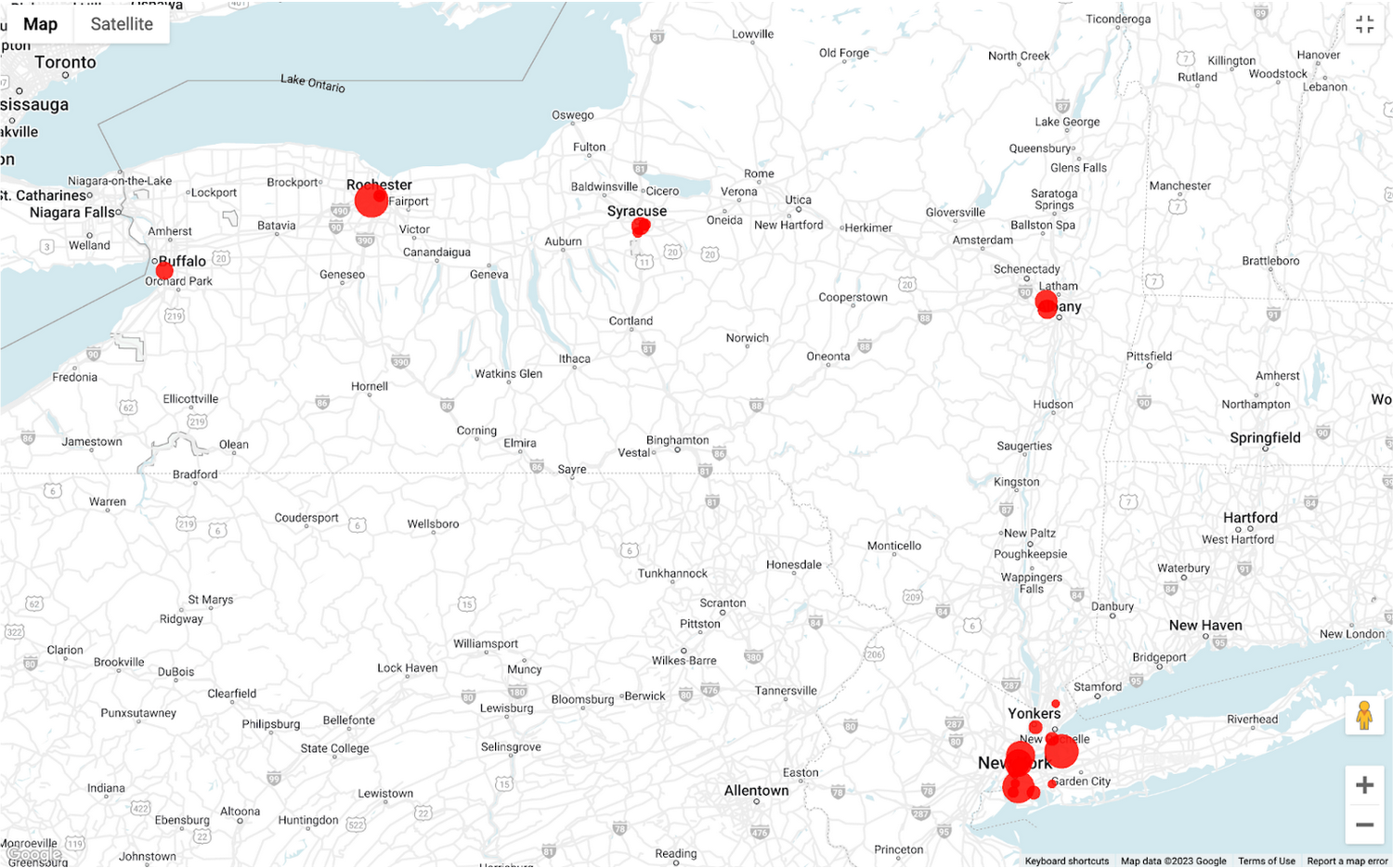
Satellite view
Benefits of using BigQuery Omni
Beyond geospatial analysis, BigQuery Omni offers a number of benefits, including:
Reduced costs: BigQuery Omni’s ability to eliminate data transfers between clouds can help organizations reduce costs and simplify data management, making it a valuable tool for multi-cloud analytics. Also, the ability to access and analyze data across multiple clouds can reduce the need for data replication and synchronization, which can further simplify the ETL process and improve data consistency.
Unified governance: BigQuery Omni uses the same security controls as BigQuery, which include features such as encryption, access controls, and audit logs, to help protect data from unauthorized access.
Single pane for analytics: BigQuery Omni provides a single interface for querying data across all three clouds, which can simplify the process of analyzing data and reduce the need for organizations to use multiple analytics tools.
Flexibility: Analyze data stored in any of the supported cloud storage services, giving organizations the flexibility to work with the data they have regardless of where it’s located.
BigQuery Omni is a valuable tool for geospatial analysis because it allows you to analyze data from multiple sources without having to move the data. This can save you time and money, and it can also help you to get more accurate insights from your data.If you are looking for a way to improve the accuracy, efficiency, and decision-making of your business, using BigQuery Omni to analyze geospatial data can be a powerful tool.
References
- Omni-introduction
- Omni-benefits
- Omni-aws-create-connection
- Omni-azure-create-connection
- BigQuery Omni Retail Demo on Looker
- Omni-pricing
- Working with Geospatial Data
- Geospatial Analytics – Intro
Learn more about how BigQuery Omni can help your organization.
Anthos Makes Hybrid and Multi-Cloud Deployments Easy

3661
Of your peers have already read this article.
1:30 Minutes
The most insightful time you'll spend today!
Most enterprises have applications in disparate locations—in their own data centers, in multiple public clouds, and at the edge. These apps run on different proprietary technology stacks, which reduces developer velocity, wastes computing resources, and hinders scalability. How can you consistently secure and operate existing apps, while developing and deploying new apps across hybrid and multicloud environments? How can you get centralized visibility and management of the resources? Well, that is why Anthos exists!
This post explores why traditional hybrid and multicloud deployments are difficult, and then shows how Anthos makes it easy to manage applications across multiple environments.
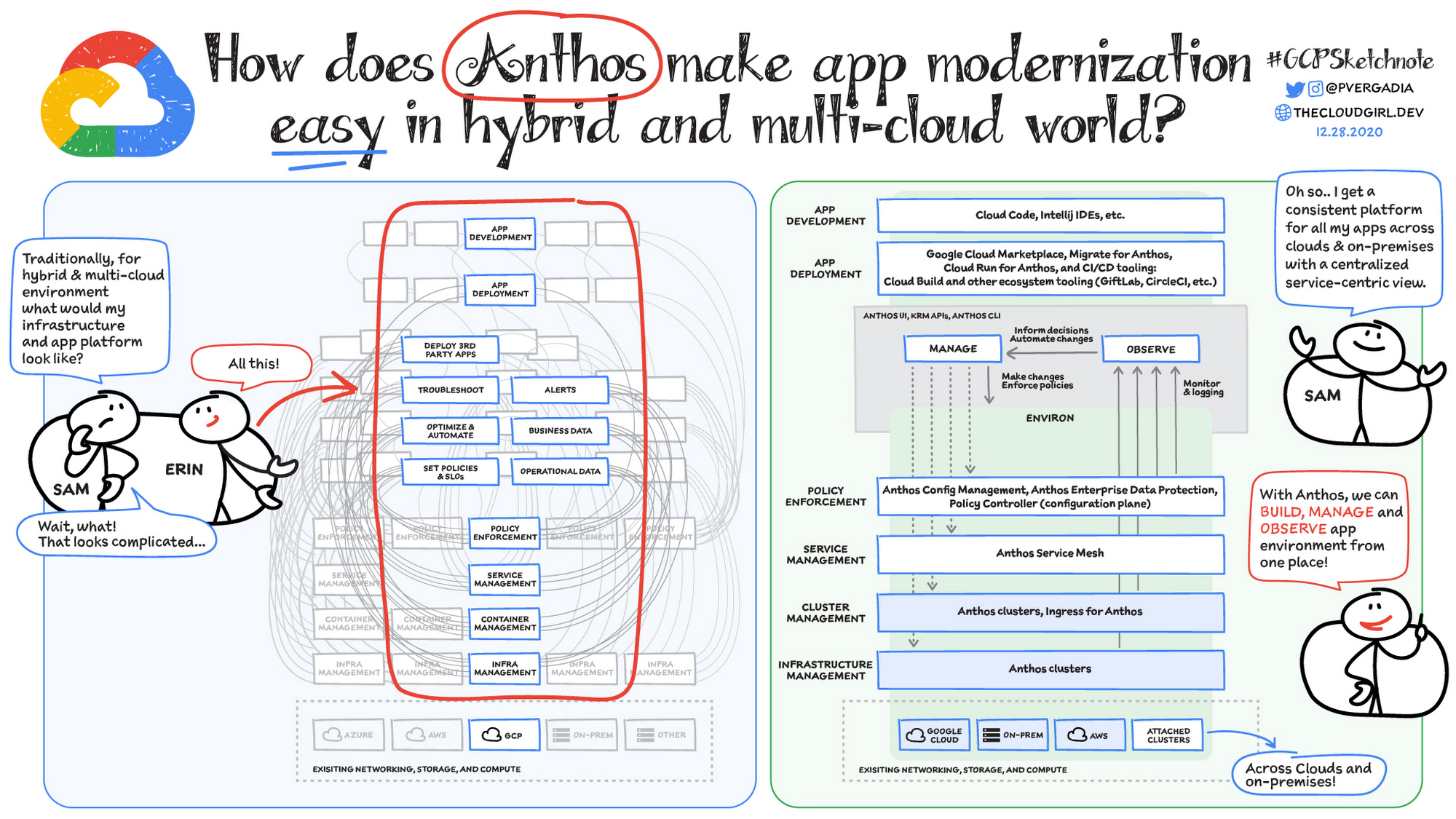
Why is traditional hybrid and multicloud difficult?
In hybrid and multicloud environments, you need to manage infrastructure. Let’s say you use containers on the clouds, and you develop apps using services on Google Cloud and AWS. Regardless of environment, you will need policy enforcement across your IT footprint. To manage your apps across the environment, you need monitoring and logging systems. You need to integrate that data into meaningful categories, like business data, operational data, and alerts.
Digging further, you might use operational data and alerts to inform optimizations, implement automations, and set policies or SLOs. You might use business data to do all those things, and to deploy third-party apps. Then, to actually enact the changes you decide to implement, you need to act on different parts of the system. That means digging into each tool for policy enforcement, securing services, orchestrating containers, and managing infrastructure. Don’t forget, all of this work is in addition to what it takes to develop and deploy your own apps.
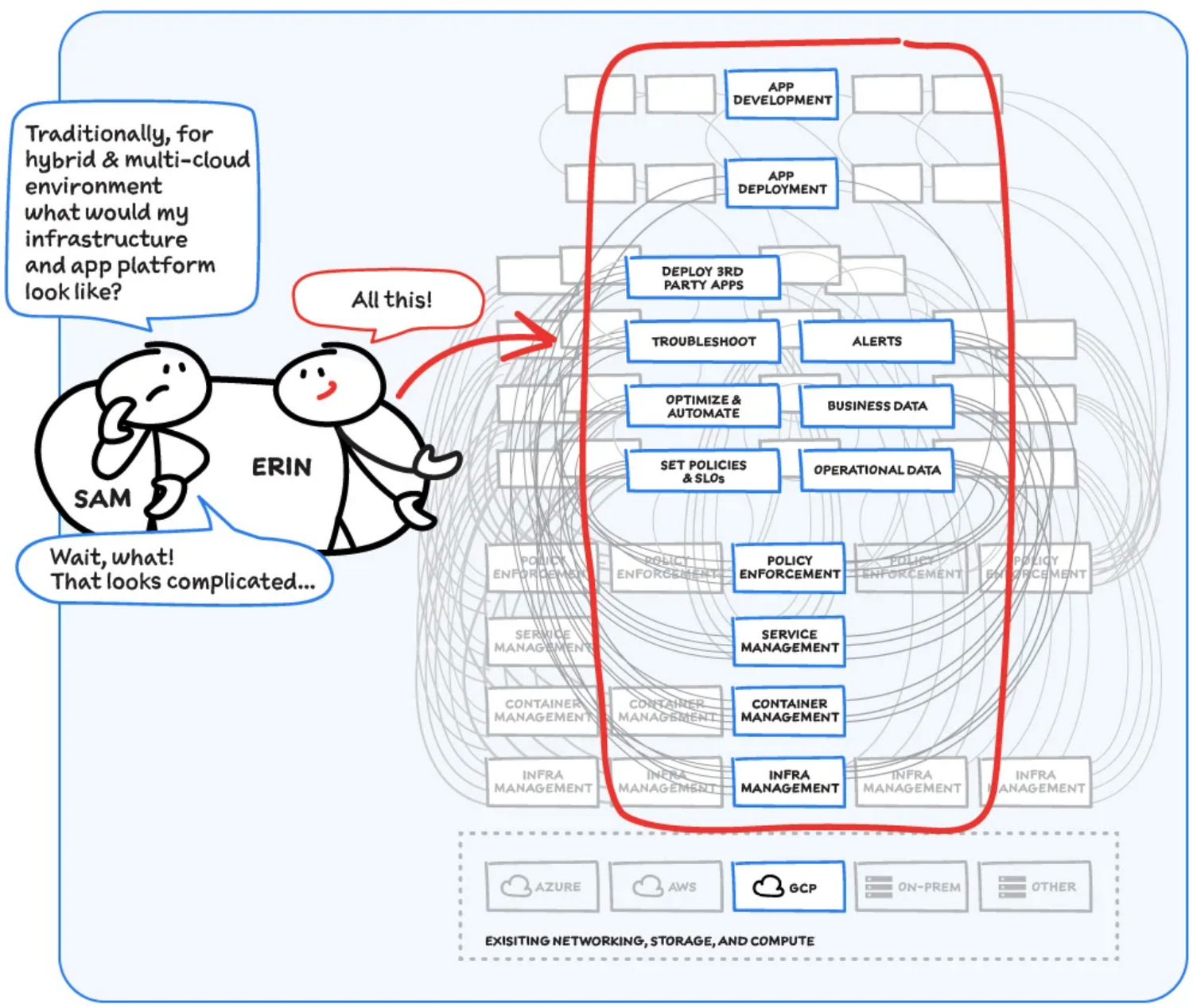
Now, consider repeating this set of tasks across a hybrid and multicloud landscape. It becomes very complex, very quickly. Your platform admins, SREs, and DevOps teams who are responsible for security and efficiency have to do manual, cluster-by-cluster management, data collection, and information synthesis. With this complexity, it’s hard to stay current, to understand business implications, and to ensure compliance (not to mention the difficulty of onboarding a new hire). Anthos helps solve these challenges!
How does Anthos make hybrid and multicloud easy?
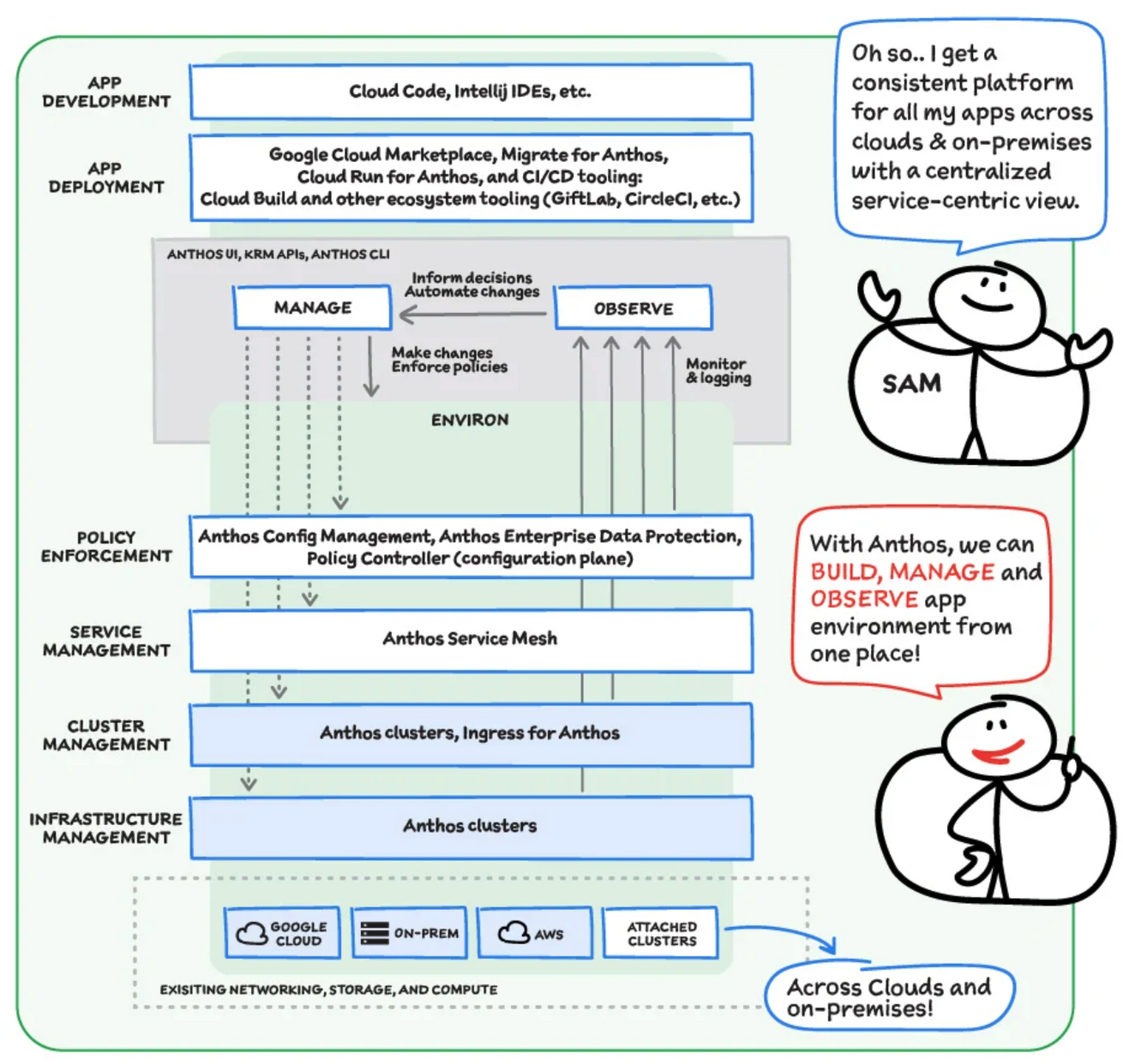
With Anthos, you get a consistent way to manage your infrastructure, with similar infrastructure management, container management, service management, and policy enforcement across your landscape.
As a result, you have observability across all your platforms in one place, including access to business information, alerts, and operations information. With this information you might decide to optimize, automate, and set policies or SLOs.
Digging deeper into Anthos
Environs
You may have different regions that need different policies, and also have different development, staging, or production environments that need different permissions. Some parts of your work may need more security. That’s where environs come in! Environs are a way to create logical sets of underlying Kubernetes clusters, regardless of which platform those clusters live on.
By considering, grouping, and managing sets of clusters as logical environs, you can think about and work with your applications at the right level of detail for what you need to do, be it acquiring business insights over the entire system, updating settings for a dev environment, or troubleshooting data for a specific cluster. Using environs, each part of the functional stack can take declarative direction about configuration, compliance, and more.
Modernize application development
Anthos also helps modernize application development because it uses environs to enforce policies and processes, and abstracts away the cluster and container management from application teams. Anthos enables you to easily abstract away infrastructure from application teams, making it easy for them to incorporate a wide variety of CI/CD solutions on top of environs. It lets you view and manage your applications at the right level of detail, be it business insights for services across the entire system, or troubleshooting data for a specific cluster. Anthos also works with container-based tools like buildpacks to simplify the packaging process. It offers Migrate for Anthos to take those applications out of the VMs and move them to a more modern hosting environment.
What’s in it for platform administrators?
Anthos provides platform administrators a single place to monitor and manage their landscape, with policy control and marketplace access. This reduces person-hours needed for management, enforcement, discovery, and communication. Anthos also provides administrators an out-of-the-box structured view of their entire system, including services, clusters, and more, so they can improve security, use resources more efficiently, and demonstrate measurable success. Administrators also save time and effort by managing declaratively, and they can communicate the success, cost savings, and efficiency of the platforms without needing to manually combine data.
Interested in getting started with Anthos? Check out the free on-demand training here and my YouTube series.
For more resources, you can also read the Anthos ebook at no cost. For more #GCPSketchnote and similar cloud content, follow me on twitter @pvergadia and keep an eye out on thecloudgirl.dev

Microservices Done Right: How Indian Businesses Can Build a Highly Scalable Business
DOWNLOAD E-BOOK4315
Of your peers have already downloaded this article
4:30 Minutes
The most insightful time you'll spend today!
Microservices represent a new form of API-based application architecture that enables enterprises to leverage continuous iteration/continuous deployment (CI/CD) tools and processes within containerized architectures and PaaS.
Nearly 70% of organizations are either using or investigating microservices, and nearly one-third are using them in production.
These are powerful techniques popularized by many companies, including Amazon, Netflix, and Airbnb. Amazon championed the approach and proved it to be useful in ensuring effective communication within teams and enabling the company to deploy code to production hundreds of times of day two.
At Netflix, one of the earliest adopters of microservices, roughly 30 independent teams have delivered over 500 microservices.
However, companies have struggled with security, with a lack of visibility into usage and performance of the microservices APIs, and with building agile microservices for clean reuse.
Their challenges include bolstering security in a zero-trust environment, ensuring compliance, providing transparent control to mitigate risk, improving the developer experience, and encouraging and increasing microservices reuse.
Managed microservices are the solution; companies are making strategic investments in API management platforms for their microservices success. All microservices have APIs and enterprises need to manage their microservices in the same way as they manage APIs.
Take a Look at 30 Eventrac Locations!

4918
Of your peers have already read this article.
2:00 Minutes
The most insightful time you'll spend today!
New locations in Eventarc
Back in August, we announced more Eventarc locations (17 new regions, as well as 6 new dual-region and multi-region locations to be precise). This takes the total number of locations in Eventarc to more than 30. You can see the full list in the Eventarc locations page or by running gcloud eventarc locations list .
What does location mean in Eventarc?
An Eventarc location usually refers to the single region that the Eventarc trigger gets created in. However, depending on the trigger type, the location can be more than a single region:
- Pub/Sub triggers only support single-region locations.
- Cloud Storage triggers support single-region, dual-region, and multi-region locations.
- Cloud Audit Logs triggers support single-region locations and the special
globalregion.
Before looking into trigger location in more detail, let’s look at other locations relevant in Eventarc.
What other locations are relevant in Eventarc?
Triggers connect event sources to event targets:
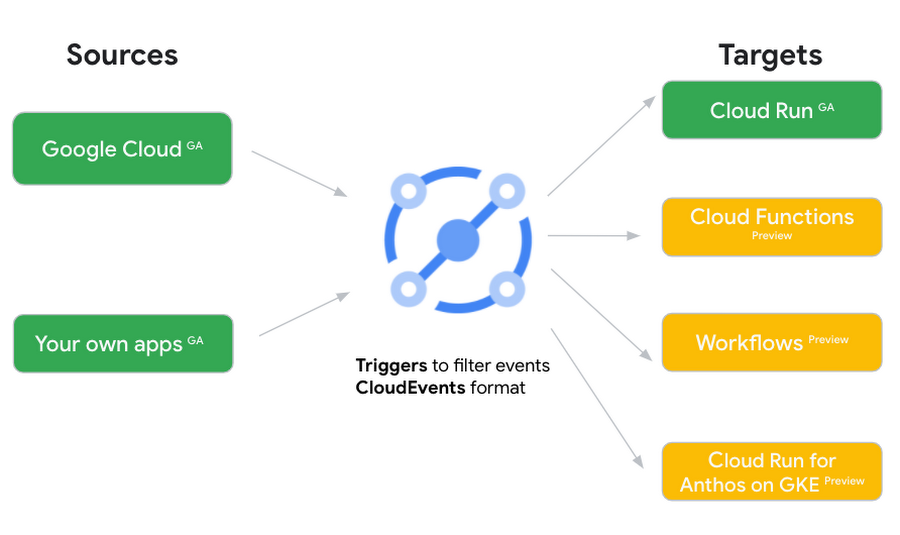
Each event source, event target, and trigger has its own location. Sometimes, these locations have to match and sometimes they can be different.
Here’s an example of a trigger connecting Cloud Storage events from a bucket in the europe-west1 region to a Cloud Run service in the us-central1 region with a trigger located in the europe-west1 region:
gcloud eventarc triggers create trigger-storage \--destination-run-service=hello \--destination-run-region=us-central1 \--location=europe-west1 \--event-filters="type=google.cloud.storage.object.v1.finalized" \--event-filters="bucket=my-bucket-in-europe-west1-region" \--service-account=$PROJECT_NUMBER-compute@developer.gserviceaccount.com
In many cases, you don’t have control over the location of the event source. In the example above, the Cloud Storage bucket is in the europe-west1 region. That’s the location that you need to work with and it has implications for the trigger location (which I’ll get to later).
The location of the event target is the region of the service where you want the events to go. You get to choose this from one of the supported regions when you deploy your Cloud Run service. You typically want this to be in the same region as your event source for latency and data locality reasons (but this is not strictly a requirement). In the example above, the event source (bucket) is in europe-west1 but the event target (Cloud Run service) is in us-central1 as specified by the --destination-run-region flag.
The location of the trigger is dictated by the event source location, but the trigger type also comes into play. It is specified by the –location flag. Let’s take a look at the trigger location for each trigger type in more detail.
Location in Pub/Sub triggers
In a Pub/Sub trigger, you connect a Pub/Sub topic to an event target. Pub/Sub topics are global and not tied to a single region. However, when you create a Pub/Sub trigger, you need to specify a region for it (because Eventarc triggers need to live in a region) with the --location flag as follows:
gcloud eventarc triggers create trigger-pubsub \--destination-run-service=hello \--destination-run-region=us-central1 \--location=us-central1 \--event-filters="type=google.cloud.pubsub.topic.v1.messagePublished" \--transport-topic=projects/your-projectid/topics/your-topic
By specifying a location, Eventarc automatically configures the geofencing feature in Pub/Sub such that events only persist in the specified location. As I noted above, you typically want to (but are not required to) choose the same region for the trigger and the Cloud Run service for lower latency and data locality. You can also use regional Pub/Sub service endpoints to publish to the topic to ensure that all of the data stays in a single region.
Location in Cloud Storage triggers
In a Cloud Storage trigger, you connect a Cloud Storage bucket to an event target. A Cloud Storage bucket can be in a single-region (e.g. europe-west1), dual-region (e.g. eur4), or multi-region (e.g. eu) location. The location of the bucket dictates the location of the trigger and they have to match. The earlier trigger example was for a bucket in the europe-west1 single-region location. Here’s another trigger connecting Cloud Storage events from a bucket in the eu multi-region location. Notice how the location flag matches the bucket region:
gcloud eventarc triggers create trigger-storage \--destination-run-service=hello \--destination-run-region=us-central1 \--location=eu \--event-filters="type=google.cloud.storage.object.v1.finalized" \--event-filters="bucket=my-bucket-in-eu-multi-region" \--service-account=$PROJECT_NUMBER-compute@developer.gserviceaccount.com
If the bucket region and the trigger region do not match, you’ll see an error:
ERROR: (gcloud.eventarc.triggers.create) INVALID_ARGUMENT: The request was invalid: Bucket "my-bucket-in-eu-multi-region" location "eu" does not match trigger location "europe-west1". Try again by creating the trigger in "eu".
Location in Cloud Audit Logs triggers
In a Cloud Audit Logs trigger, you connect any event source that emits Audit Logs to an event target. The location of the event source will dictate the trigger location. This is typically a single region but there is a special global region that’s necessary in some cases.
For example, if you want to read Cloud Storage events from a bucket in the europe-west1 region with an Audit Logs trigger, you will create the trigger with the same location. Note that this will match all buckets in the europe-west1 region as there’s no filter by bucket in Audit Logs:
gcloud eventarc triggers create trigger-auditlog \--destination-run-service=hello \--destination-run-region=us-central1 \--location=europe-west1 \--event-filters="type=google.cloud.audit.log.v1.written" \--event-filters="serviceName=storage.googleapis.com" \--event-filters="methodName=storage.objects.create" \--service-account=$PROJECT_NUMBER-compute@developer.gserviceaccount.com
On the other hand, if you want to match a dual-region or a multi-region bucket such as eu, you will create the trigger with the global location as Audit Logs triggers only support a single or global region. Note that this will match all buckets in all regions globally:
gcloud eventarc triggers create trigger-storage \--destination-run-service=hello \--destination-run-region=us-central1 \--location=global \--event-filters="type=google.cloud.storage.object.v1.finalized" \--event-filters="bucket=my-bucket-in-europe-west1-region" \--service-account=$PROJECT_NUMBER-compute@developer.gserviceaccount.com
As you can see from this example, if you want to read Cloud Storage events, the native Cloud Storage trigger is a much better option, but this example illustrates a typical case in which a global Audit Log trigger is necessary.
That wraps up this closer look at locations in Eventarc. Feel free to reach out to me on Twitter @meteatamel for any questions or feedback.
4755
Of your peers have already downloaded this article
8:30 Minutes
The most insightful time you'll spend today!
Anthos is a modern app management platform from Google Cloud that aims to deliver a consistent development, operations, and security experience across cloud environments.
Anthos is designed for enterprise organizations that want to accelerate the development and deployment of dynamic apps and who value service automation, cost governance, and security controls.
Anthos enables you to build apps once and run anywhere. With Anthos, as an enterprise organization you can modernize apps in place, automate at scale, and manage consistently across hybrid- and multi-cloud environments.
With Anthos, you can modernize your approach to app security. As much as possible, Anthos aims to provide security by default and can help you automate the following security operations:
• Enforcing consistent policy across environments.
• Isolating workloads with different risk profiles.
• Deploying only trusted workloads.
Download Anthos: An Opportunity to Modernize Application Security
5181
Of your peers have already watched this video.
25:30 Minutes
The most insightful time you'll spend today!
Modernize Your Security Posture for Cloud-Native Applications with Anthos
Modern security approaches have moved beyond a traditional perimeter-based security model. As many organizations seek to adopt cloud-native architectures and are deploying applications in hybrid and multi-cloud environments they demand a more flexible and extensible approach towards security.
Learn how to address security issues as early in the development and deployment life-cycle as possible—when addressing security issues can be less costly—and do so in a way that is standardized and consistent. Help keep your organization secure and compliant with Anthos.
More Relevant Stories for Your Company

Private Services Connect in Google Cloud Regions Enables Customers to Consume Services Faster
At Google Cloud, we believe in making it simple and secure to consume services whether they're from Google, a third party or customer-owned. With Private Service Connect, we have adopted a service-centric approach to our network that abstracts the underlying networking infrastructure. And today, we are announcing Private Service Connect is

Fully-managed-zero-trust Security Solution, Traffic Director Integrated with CA Service
We created Traffic Director to bring to you a fully managed service mesh product that includes load balancing, traffic management and service discovery. And now, we’re happy to announce the availability of a fully-managed zero-trust security solution using Traffic Director with Google Kubernetes Engine (GKE) and Certificate Authority (CA) Service. When platform administrators and security

Google Cloud Offering a Natural Migration Path for Developers Accustomed to Heroku
Modern developers worldwide have grown accustomed to the comfort of writing code, pushing to a remote Git repository and having that code be deployed at an accessible URL without having to worry about how it is deployed. This was a workflow popularized by Heroku years ago which brought joy and

Held Back by Database Scalability, This Financial Services Company Switches to Google Cloud and Cloud Spanner
Azimut Group operates an international network of companies handling investment and asset management, mutual funds, hedge funds, and insurance. Founded in Milan, Italy in 1988, Azimut Group today has branches in fifteen countries, including Brazil, China, and the USA. “We have subsidiaries and manage funds all over the world,” explains Simone
