





Revamping Cloud Security: Google Introduces Attack Path Simulation to Security Command Center

1167
Of your peers have already read this article.
3:30 Minutes
The most insightful time you'll spend today!
To help secure increasingly complex and dynamic cloud environments, many security teams are turning to attack path analysis tools. These tools can enable them to better prioritize security findings and discover pathways that adversaries can exploit to access and compromise cloud assets such as virtual machines, databases, and storage buckets.
Other attack path tools rely on static, point-in-time snapshots of an organization’s cloud footprint, which often contain sensitive data about their environment, how it is configured, and where the most sensitive data resides.
At Google Cloud, we are taking a different approach. We are excited to announce today at the Google Cloud Security Summit that we are adding attack path simulation to Security Command Center, our built-in security and risk management solution for Google Cloud. This new risk management capability automatically analyzes a customer’s Google Cloud environment to pinpoint where and, importantly, how vulnerable resources may be attacked, so security teams can stay one step ahead of adversaries.
We expect attack path simulation capabilities to be available in Security Command Center Premium later this summer.
Unlike some third-party security products, Security Command Center continuously scans an organization’s cloud environment gathering near real-time data about cloud resources and security vulnerabilities. Our attack path simulation engine uses this information to automatically generate and render high-risk attack paths, without the hands-on toil of having to repeatedly run manual queries.
A different approach to attack path analysis
Other attack path analysis tools involve significant operational toil. The static, point-in-time snapshots that these tools generate have to be sent to an external provider, which can add risk. Then security teams have to follow up with complex queries before they can identify likely attack paths.
Google Cloud’s advanced attack simulation engine leverages our first-party, agentless visibility of Google Cloud assets, the relationships between assets, and the current state of defenses. Attack path simulation is fully automated with no need to manually run queries. Simulations run in the Google Cloud environment, and do not send snapshots outside your environment, avoiding exposure of sensitive information.
See what attackers can see
Effective attack path analysis should mimic how a real-world attacker can reach and compromise high value resources. This is why Security Command Center simulates how attackers try many different ways to infiltrate a cloud environment. SCC then generates attack path graphs to give defenders insight into how adversaries could exploit a single security weakness or various combinations of security vulnerabilities to access valuable assets. SCC also provides detailed information on how to remediate issues and shore up defenses based on its findings
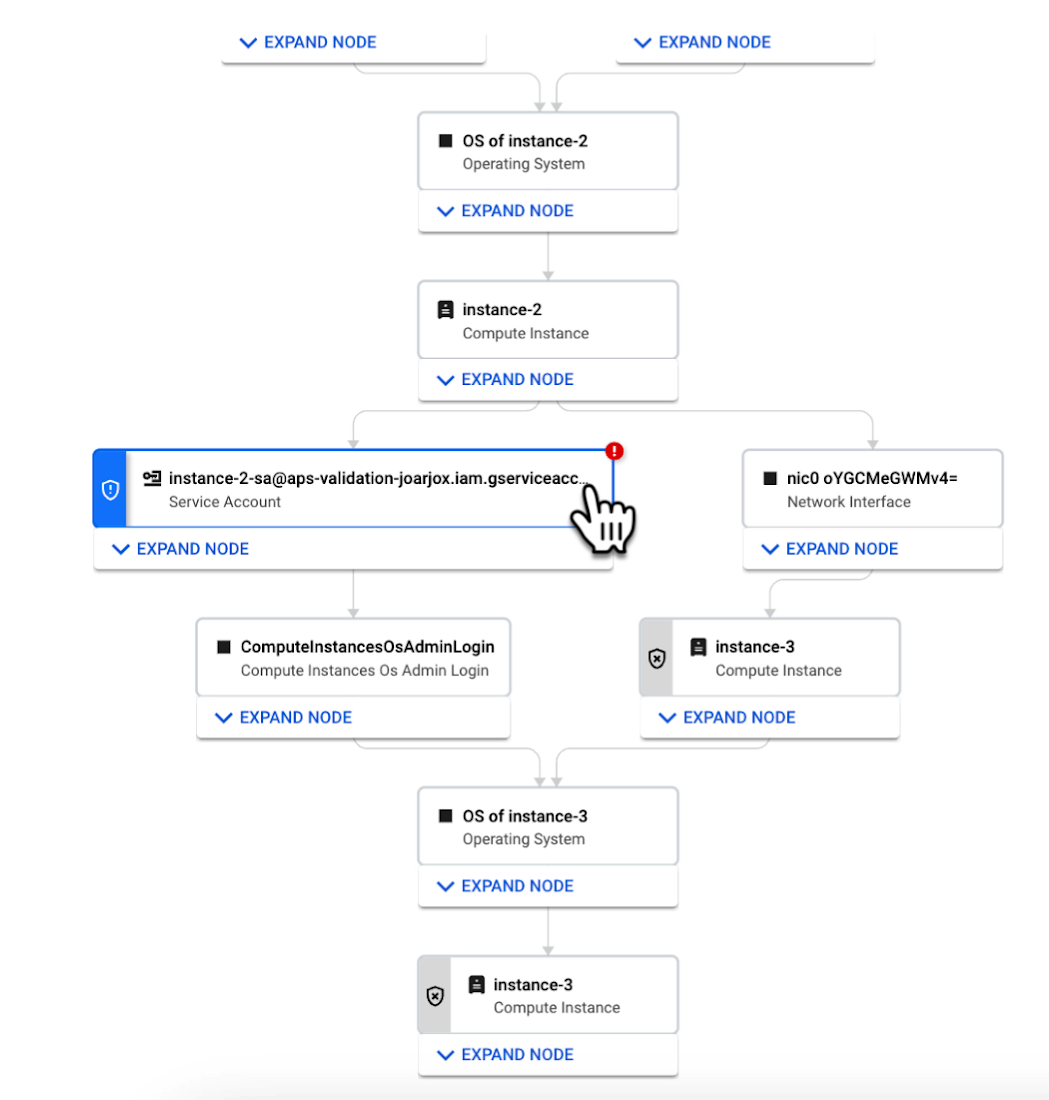
We are delivering combined attack path simulation and analysis as a managed service. There are no agents to install or manage. Results automatically reflect changes in your organization’s Google Cloud environment. Because our attack path simulations are conducted on models of an organization’s cloud resources, there is no performance or operational impact to the live production environment.
Better security prioritization
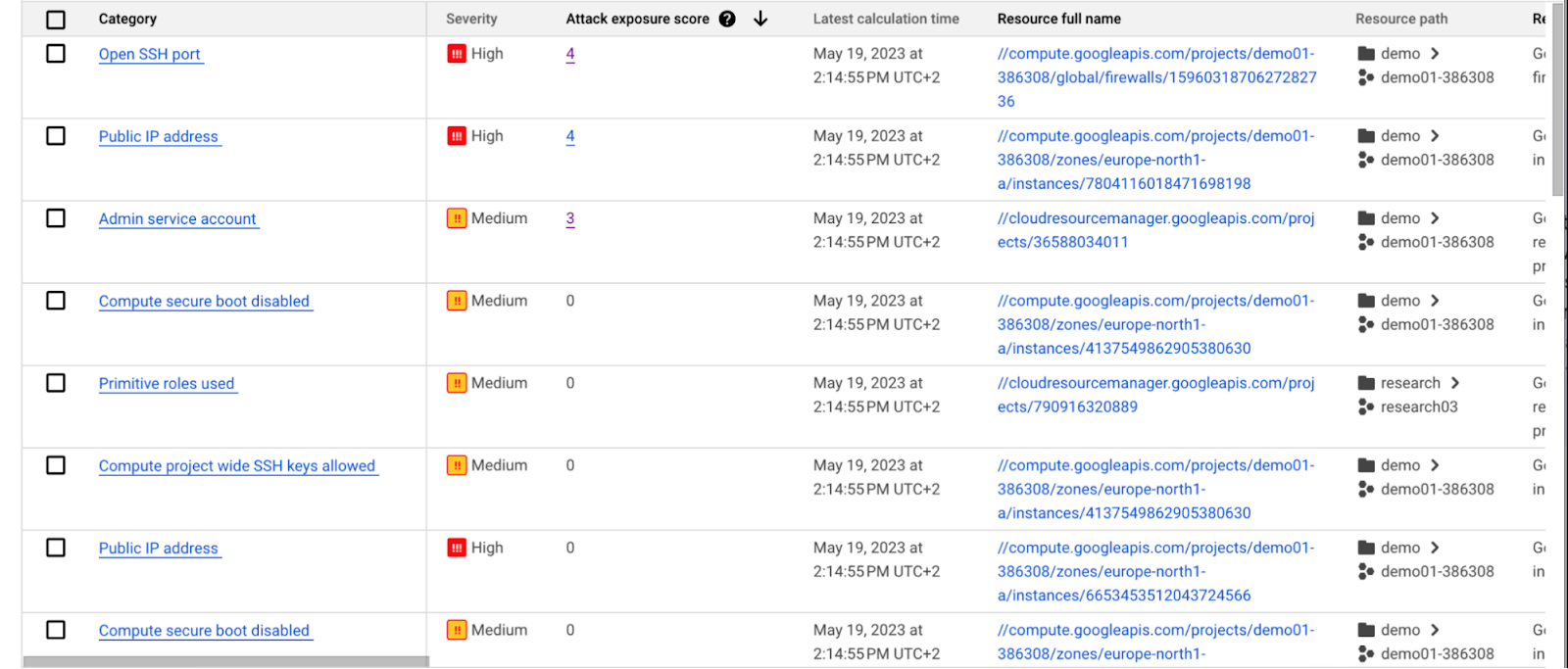
Security Command Center automatically computes an attack exposure score for misconfigurations and vulnerabilities that expose valuable resources to attackers. The score is a measure of cyber risk. It takes into account how exposed valued resources are, and the paths of least resistance for attackers to reach those resources.
Security teams can use these scores to prioritize remediation efforts and improve their overall risk posture.
How attack path analysis has already reduced risk for customers
Dozens of customers have already used our attack path capabilities in private Preview to improve their security posture and reduce their operational risk.
Security Command Center alerted one customer to a finding with a high attack exposure score. The finding was related to a service account whose keys were not being rotated. After reviewing the attack paths related to this finding, the cloud security manager discovered that even though the service account was named “test,” it provided access to storage buckets outside of the test environment.
If an attacker had been able to steal the credentials for this test account, they could have easily accessed production data. The security manager removed administrator privileges on the account. The attack path simulation enhanced their understanding of the severity of the finding, and helped convince them to make it a high-priority fix.
Another customer using attack path simulation needed to assess which security findings created the greatest risk. Two findings related to the same service account with high exposure scores rose to the top of the list. The attack paths revealed that the service account had access to more than 500 storage buckets. If an attacker were to gain access to this account they would be able to read, write, or delete data across any of those buckets, many of which contained sensitive business data and confidential customer information.
Using Security Command Center’s attack path results, the security team remediated the risk by limiting permissions to the storage buckets needed for that specific role.
Next steps
Attack path simulation capabilities are planned for availability later this summer. We expect forthcoming enhancements to use Security AI Workbench to translate complex attack graphs to human-readable explanations of attack exposure, including impacted assets and recommended mitigations.
You can learn more about Nordnet Bank’s experience using attack path simulation at our Security Summit session. To get started with Security Command Center today, please go to the Google Cloud console.
How to Evolve Security for the Cloud: McKinsey with Google Cloud

3957
Of your peers have already read this article.
8:30 Minutes
The most insightful time you'll spend today!
Not too long ago, McKinsey released a report titled “Making a secure transition to the public cloud,” the result of interviews with IT security experts at nearly 100 enterprises around the world.
Leveraging the expertise of Google Cloud and McKinsey security experts, the research presents a strategic framework for IT security in cloud and hybrid environments, and provides recommendations on how to migrate to the cloud while keeping security top of mind.
The research shows what many already know: that public cloud adoption is accelerating thanks to increased technical flexibility, simpler scaling, and lower operating costs.
What’s exciting is that the research also reveals that many Chief Information Security Officers (CISOs) no longer view security as an inhibitor to adoption but instead an opportunity.
“In many cases [CISOs] acknowledge that cloud service providers’ security resources dwarf their own,” the authors write—and now these companies are focused on how to best adopt and configure cloud services for increased security.
The research identifies three common archetypes for perimeter security: backhauling, cleansheeting, and adopting cloud provider controls by default.
- Backhauling allows companies to continue managing IT security on-prem, with an external gateway connecting the data center to the public cloud. Approximately half of the companies surveyed currently use this model, but only 11% plan to continue doing so, since it can keep companies from realizing certain cloud benefits, such as agility.
- Cleansheeting requires greater investment and expertise, as it calls for redesigning IT security around a “virtual perimeter” and leveraging multiple cloud-native tools and services.
- Using cloud provider controls is the most cost-effective solution, but—depending on the cloud provider—can limit autonomy and may offer limited capabilities.
McKinsey uses these three models, along with the decision to re-architect applications for the cloud, to identify six “archetypes” for cloud security. Each archetype has its own tradeoffs.
The report also includes a tactical 10-step plan for successful cloud migration. Download it now.
4 Cloud Security Trends to Watch Out for in 2022

3387
Of your peers have already read this article.
1:30 Minutes
The most insightful time you'll spend today!
When it comes to cloud security, 2022 will be the year that the past catches up with the future. Trends that businesses have been ignoring for too long will force organizations large and small to confront and control their security debt.
That’s according to Google Cloud’s own cybersecurity experts, who have identified four security trends that organizations need to watch out for—and get ahead of. We have predictions on what to expect in the coming year from MK Palmore, director of the Office of the CISO; Brian Roddy, vice president of engineering for Cloud Security; Tim Dierks, engineering director for data protection; and Panos Mavrommatis and Vikram Makhija, senior directors of security engineering for Google Cloud.
Supply chain shenanigans
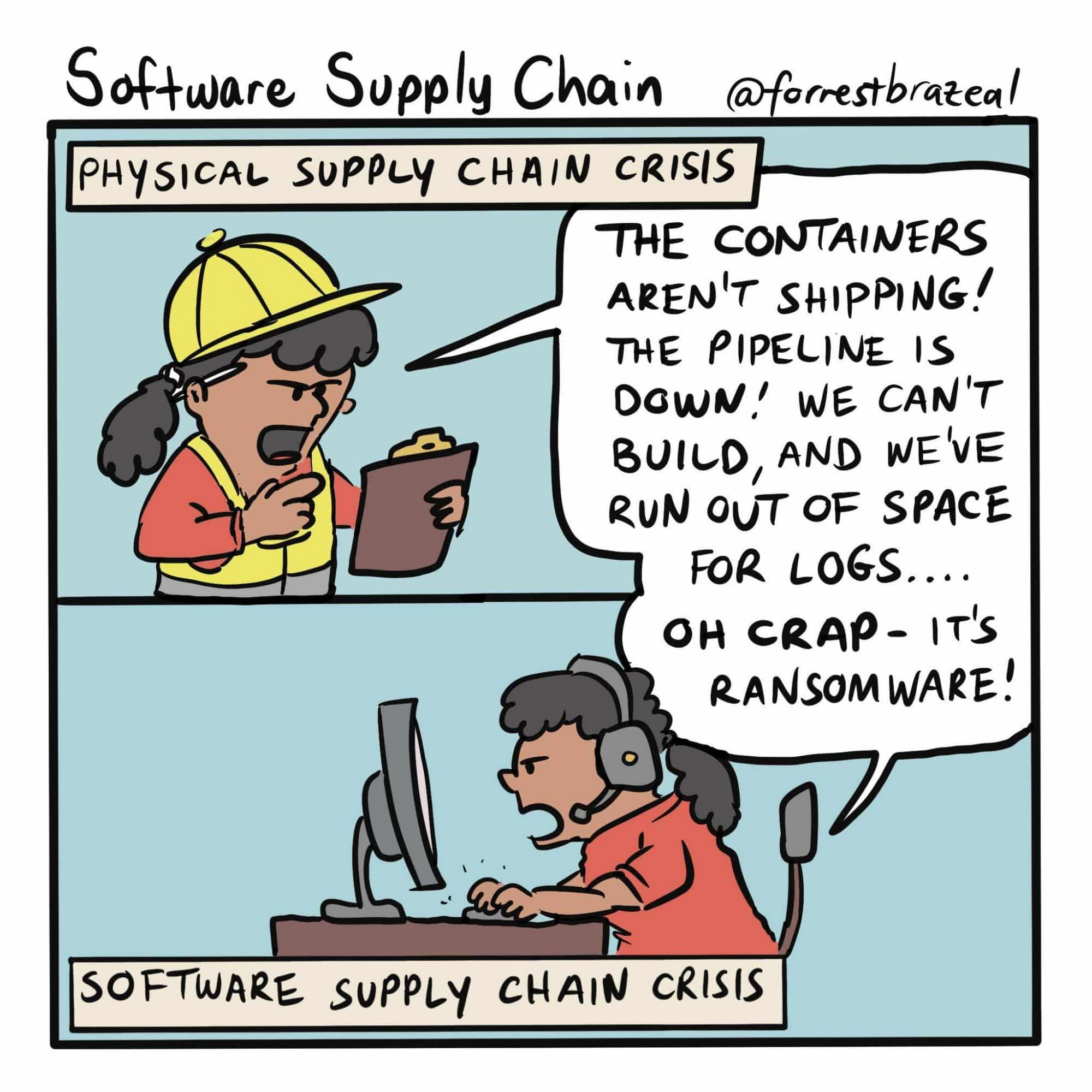
“We will see continued asymmetric attacks from adversaries as they exploit supply chains and other previously ‘trusted’ third-party entities,” says Palmore.
Supply-chain problems in cloud computing should be easily solvable, right? Software versions and any vulnerabilities they contain should be trackable and patchable, but the reality of fixing software is that “just patch it” is hard to execute—just look at the challenges posed by the Log4j 2 vulnerability. Supply chain is such a huge problem that President Biden addressed it in an Executive Order in May 2021. Customers can expect the issue to be top of mind at Google Cloud.
Not exactly many happy returns (to the office)
“Return to office around the world will drive changes as office infrastructure has not been invested in for a year and a half while the focus has been on remote users. This likely will drive a short-term boom in traditional on-prem security, but it will be the last boom for that as people adapt their remote, zero-trust style strategies to a more modern on-prem approach,” says Roddy.
The misconception that on-prem infrastructure is categorically more secure than cloud is driven by the desire to have physical access to servers and backups so that only the organization which owns the data controls it and has access to it, even in cases of a catastrophic failure or successful cyberattack. In the early years of cloud computing, that may even have been true. But the conditions that drove the myth of on-prem security primacy changed years ago, and the needs driving secure cloud infrastructure help ensure that cloud stays more secure.
Paying down your security debt
“While there’s all the new hotness of cutting-edge concerns, many enterprises still carry security risks and security debt from not yet fully adopting controls which have been broadly accepted as important for years. For example, loads of companies are still not using phishing-resistant two-factor authentication such as FIDO keys,” says Dierks.
Authentication keys such as those made by Yubico and Google’s own Titan Security key support the zero-trust security principles that require user identities to be authenticated, authorized, and then continuously validated before they can access applications and data. Strong authentication is such an important part of contemporary user security that even weaker forms of it that rely on text messages are significantly more secure than not using it at all. That said, why use a less-secure standard when you can reduce risks to your data and bottom line even further by requiring a phishing-resistant hardware key?
Dierks stresses another challenging but important part of eliminating security debt: using social connections to encourage best security practices. “It’s important for CISOs to use their business relationships to emphasize the importance of baseline controls [such as 2FA] for their partners. Enterprises have close relationships that attackers can leverage, so it’s critical that partners hold each other accountable to maintain high security.”
KYD (Know Your Data)
The impact of a data breach can harm organizations as they currently are as well as far into the future. Current tough-to-crack encryption standards protecting data could become easier to decode in the years ahead, so even if cybercriminals can’t access stolen data now there’s no guarantee that paradigm will hold. This means it’s crucially important that organizations understand what data they’re storing, how they’re storing it, and where they’re storing it, say Mavrommatis and Makhija.
“You can’t secure what you don’t know about, and not all data breaches are equal. Stolen machine logs are not as bad as customer data. But how many security teams know the difference? So you have to crawl your own data to automatically classify and discover where sensitive data lives,” they say.
Makhija adds that the shared fate model requires the cloud providers and cloud customers to have a mutual understanding of the quantitative risks each faces. “Shared fate models will pick up significantly in 2022,” he says, as more organizations move to the cloud, and those already using cloud infrastructure improve their security postures.
“To date, there’s been a disparate set of tools for understanding your posture. It’s difficult for third-party tools to stitch together what cloud services should be providing from the start,” he says.
What you can do to make your organization more secure
One cloud security trend that’s ever-present is the ever-increasing importance of keeping cloud deployments secure. As cloud infrastructure becomes more commonplace across businesses and industries of all sizes, it will continue to grow as an attractive target for cybercriminals and other threat actors.
- Because enterprise data has expanded exponentially, the ability to identify and detect threats have become increasingly challenging. To better secure the enterprise software supply chain, use advanced threat detection and analysis tools—especially those designed to catch anomalies.
- The faster that organizations adopt a zero-trust architecture, the more secure the new normal can be. Zero trust helps limit the blast radius of any potential intrusion, while maximizing new enterprise access expectations. Part of adopting zero trust means many end-users can abandon legacy technology like VPNs, but the benefits of segmentation and context-aware access for both identity and device will make all the difference for large scale enterprises. When coupled with a full zero-trust approach and the use of a zero-trust maturity model for improvement, organizations will be better positioned to manage their digital risks.
- Security debt can come in many forms and one critical payoff that needs to be made is for organizations to migrate en masse to hardware two-factor authentication keys. They make user accounts significantly more resistant to takeovers, and are much harder to circumvent than two-factor authentication over SMS.
- It’s past time to get to know your data, and a bouquet of flowers and a bottle of red wine won’t help. There are third-party tools that can do this, but for Google Cloud customers who use BigQuery there’s automatic Data Loss Prevention. It continuously monitors existing tables and profiles new ones; it can be customized for selected folders or projects, or for an entire organization; and it generates data profiles in the same geographic region as the original data.
Understanding and managing the security challenges of cloud infrastructure helps maximize its benefits, and makes for a safer security landscape in 2022—and beyond.
Introducing IAM Deny: Harden Your Security Posture at Scale the Easy Way

2642
Of your peers have already read this article.
1:30 Minutes
The most insightful time you'll spend today!
At Google Cloud, we’re focused on making it easy for organizations to build solutions quickly and securely. Identity and Access Management (IAM) is the core security control for establishing who has access to which cloud resources and making sure access permissions are aligned to your company’s business and security policies.
We are excited to announce the general availability of IAM Deny policies. This new capability helps you easily create access guardrails for Google Cloud resources. With IAM Deny policies, you can create rules that broadly restrict resource access. It provides a powerful, coarse-grained access control to help implement security policies at scale.
Control with IAM Policy – Allow and Deny
IAM Deny policies complement IAM Allow policies as you define access to your resources. Google Cloud’s IAM Allow policy lets you grant granular access to Google Cloud resources. The more coarse-grained Deny policies let you explicitly prohibit access to certain resources regardless of existing Allow rules. IAM Deny policies always supersede IAM Allow policies and override conflicting IAM Allow rules.
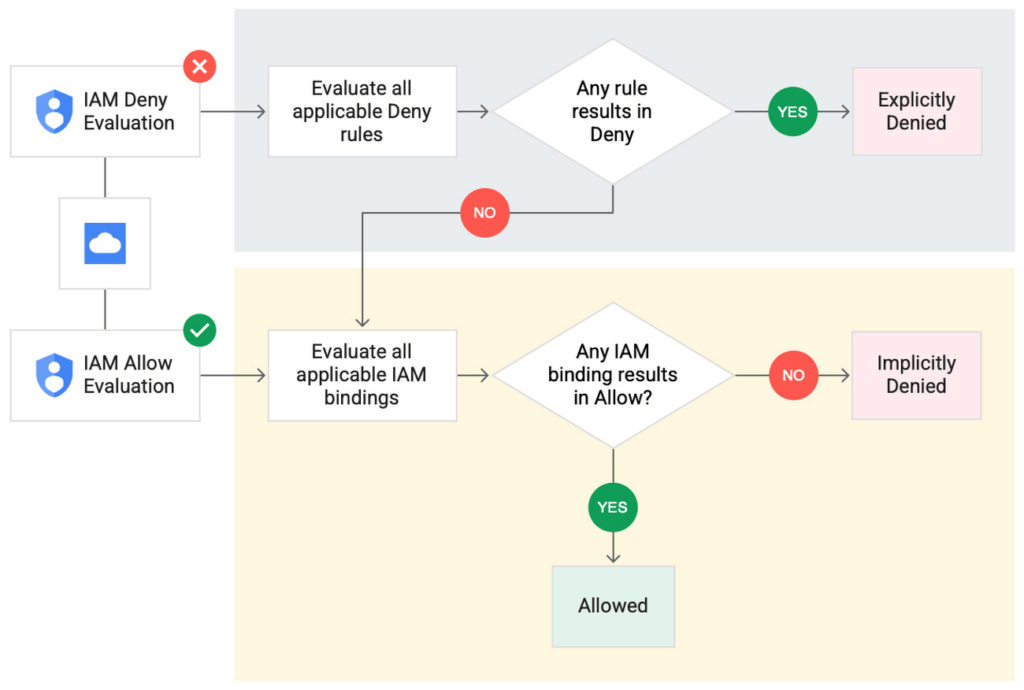
IAM Deny policies can be applied across many Google Cloud resources, such as Compute Engine, Cloud Storage, and Google Cloud Kubernetes Engine. These policies can help reduce toil on administrators as they can set up deny rules that will be enforced at scale without requiring reviews and changes of existing access rules. This makes resource governance simpler.
How to strengthen your security posture with IAM Deny
There are multiple use cases where IAM Deny policies can be used to help strengthen posture. Some of these are:
- Establish a default security baseline: IAM Deny can be used to set base policies at the organization level, folder level, and project level to deny access to resources. For example, you can attach a deny policy at the organization level to deny all users access to sensitive data storage buckets, making an exception for a specific user group.
- Prevent backdoors: IAM Deny rules override any IAM Allow rules. This can help you ensure that no “backdoor” access can be granted. For example, an organization that wants to ensure only central-admin can create projects in a folder can add an IAM Deny policy that restricts all users from creating projects except central-admin. This can help ensure no backdoor users will be added using allow policy rules.
- Prevent data exfiltration: Controlling access to data is a key measure to prevent exfiltration. For example, an organization that wants to restrict access to their personally identifiable information (PII) can set an IAM Deny policy on resources containing PII that denies access to all users except those in a group called PII-admin.
- Demonstrate compliance: Many industry regulations and compliance frameworks require organizations to demonstrate least-privilege access to sensitive resources. IAM Deny policies can create a baseline access restriction that always takes precedence when applied to resources.
Simplify IAM administration
IAM Deny can also help simplify common administrative tasks. It provides a list of permissions for Google Cloud services that you can readily use in your deny policies. Here are a few common situations where you can use IAM Deny to help streamline your access management.
- Centralize administrative privileges: You can use deny policies to restrict certain types of administrative activities to specific users or user groups. For example, if you want to limit custom role management to a single central team, you can create a deny rule that denies the permissions required for custom role management to all users, except users in the central-admin group. This will only let members of the central-admin group manage custom roles, even if other users have the required permissions.
- Create exceptions to access grants: You can use deny policies to deny inherited permissions. For example, you can grant a role at a high level in the resource hierarchy, and then deny the role’s permissions on individual lower-level resources if necessary.
- Block access based on tags: Google Cloud supports key-value based tags and you can use deny policies to deny permissions based on tags without adding an IAM Condition to every role grant. For example, you can create a rule to deny delete permissions for resources tagged as “production” for everyone except project-admins.
IAM Deny in action
The following example illustrates how a deny policy can be used to block all users from deleting projects unless the user is a member of a project-admins group or the project being deleted is tagged as a “test” project. Without a deny policy, you would have to manually track all members who have the permission to delete projects, and ensure that no undesired user has access to this permission. The deny policy makes it easy for the administrator to build this guardrail.
The below deny rule denies permission to everyone except project-admins@example.com for projects not tagged as test. Add this deny rule to a deny policy and attach the policy at the org level. That’s it!
(Note that project-admins@example.com is a security group. Using security groups is a best practice that should be followed to help keep your resources secure.)
{
"name": "policies/cloudresourcemanager.googleapis.com%2Fprojects%2F253519172624/denypolicies/limit-project-deletion",
"uid": "06ccd2eb-d2a5-5dd1-a746-eaf4c6g3f816",
"kind": "DenyPolicy",
"displayName": "Only project admins can delete projects.",
"etag": "MTc1MTkzMjY0MjUyMTExODMxMDQ=",
"createTime": "2021-09-07T23:15:35.258319Z",
"updateTime": "2021-09-07T23:15:35.258319Z",
"rules": [
{
"denyRule": {
"deniedPrincipals": [
"principalSet://goog/public:all"
],
"exceptionPrincipals": [
"principalSet://goog/group/project-admins@example.com"
],
"deniedPermissions": [
"cloudresourcemanager.googleapis.com/projects.delete"
],
"denialCondition": {
"title": "Only for non-test projects",
"expression": "!resource.matchTag('12345678/env', 'test')"
}
}
}
]
}
Getting started with IAM Deny Policies
With IAM Deny, you now have a powerful new capability to build security guardrails and more effectively control access to your Google Cloud resources. IAM Deny is now generally available for all customers through gCloud and APIs. We offer IAM Deny to Google Cloud customers at no additional cost. You can learn more about IAM Deny by visiting our documentation page.
Google Cloud’s Metric Scope Makes Multi-project Monitoring Simple

4757
Of your peers have already read this article.
2:00 Minutes
The most insightful time you'll spend today!
Customers need scale and flexibility from their cloud and this extends into supporting services such as monitoring and logging. Google Cloud’s Monitoring and Logging observability services are built on the same platforms used by all of Google that handle over 16 million metrics queries per second, 2.5 exabytes of logs per month, and over 14 quadrillion metric points on disk, as of 2020. However, you let us know through consistent feedback that the previous construct of Workspaces for Cloud Monitoring was not providing the flexibility needed for your larger scale projects.
Cloud Operation’s New Approach to Multi-Project Monitoring
We’re happy to announce a new model for multi-project monitoring, which replaces the concept of Workspaces. This overhaul is geared toward maximizing the flexibility you have to manage your monitoring environments by introducing Metrics Scopes. Starting today you can associate your Google Cloud projects with multiple Metrics Scopes! Like Workspaces, Metrics Scopes will still be used to store all of the configuration content for dashboards, alerting policies, uptime checks, notification channels, and group definitions. However there is no limit to the number of Metrics Scopes to which you can associate a project. Prior to this change, a project could only be scoped with a single Workspace. Now, there are virtually unlimited possibilities for how you can set up multi-project monitoring. This unlocks a large variety of options, from more granular permissions to mission-focused configurations. At its most simple implementation though: operators/SREs can now create org-wide Metrics Scopes with monitoring configurations focused on infrastructure health. And developers can leverage Metrics Scopes built on a subset of their organization’s projects that allow them to focus on their application’s performance.
How it works
- When you have a collection of projects, Metrics Scopes enable you to view each project’s metrics in isolation as well as in combination with metrics stored by other projects.
- The Metrics Scope is hosted by a scoping project. This scoping project is the Cloud project that is selected in the Cloud Console project picker.
Example
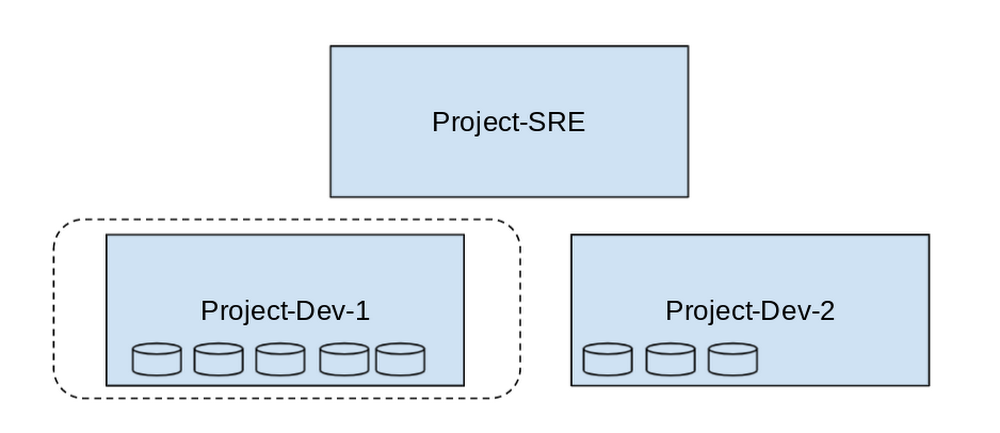
- In this example, Project-SRE is the name of a scoping project to monitor your fleet. You added two developer teams’ projects: Project-Dev-1 and Project-Dev-2, to Project-SRE’s Metrics Scope. If you select Project-SRE with the Cloud Console project picker and then go to the Monitoring page, you view the metrics for all three projects:

- If you select Project-Dev-1 with the Cloud Console project picker and then go to the Monitoring page, you view the Metrics Scope for Project-Dev-1 and you can only see the metrics for that project:
What else is new?
- Metrics Scopes can now monitor up to 375 projects (up from 100).
- New projects automatically start working in Cloud Monitoring without the previous 60-second Workspace creation process.
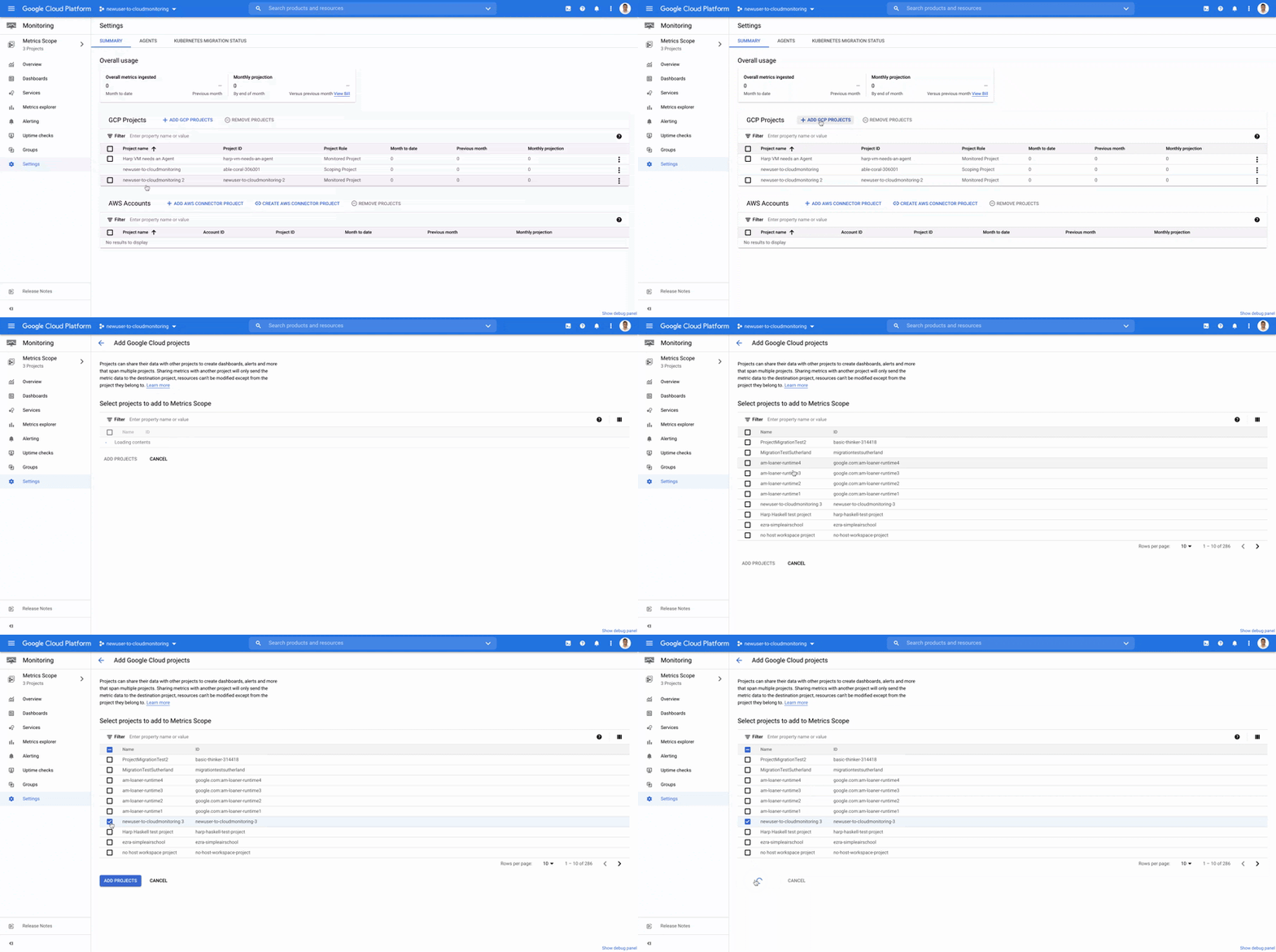
- If you want to monitor more than one project simply add it to your Metrics Scope:
Navigation
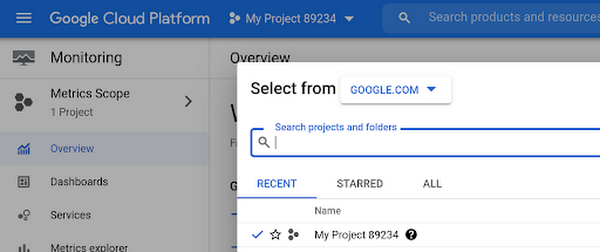
- Mentioned earlier, the Project Picker in the Cloud Console can be used to navigate between Metrics Scopes in Cloud Monitoring:
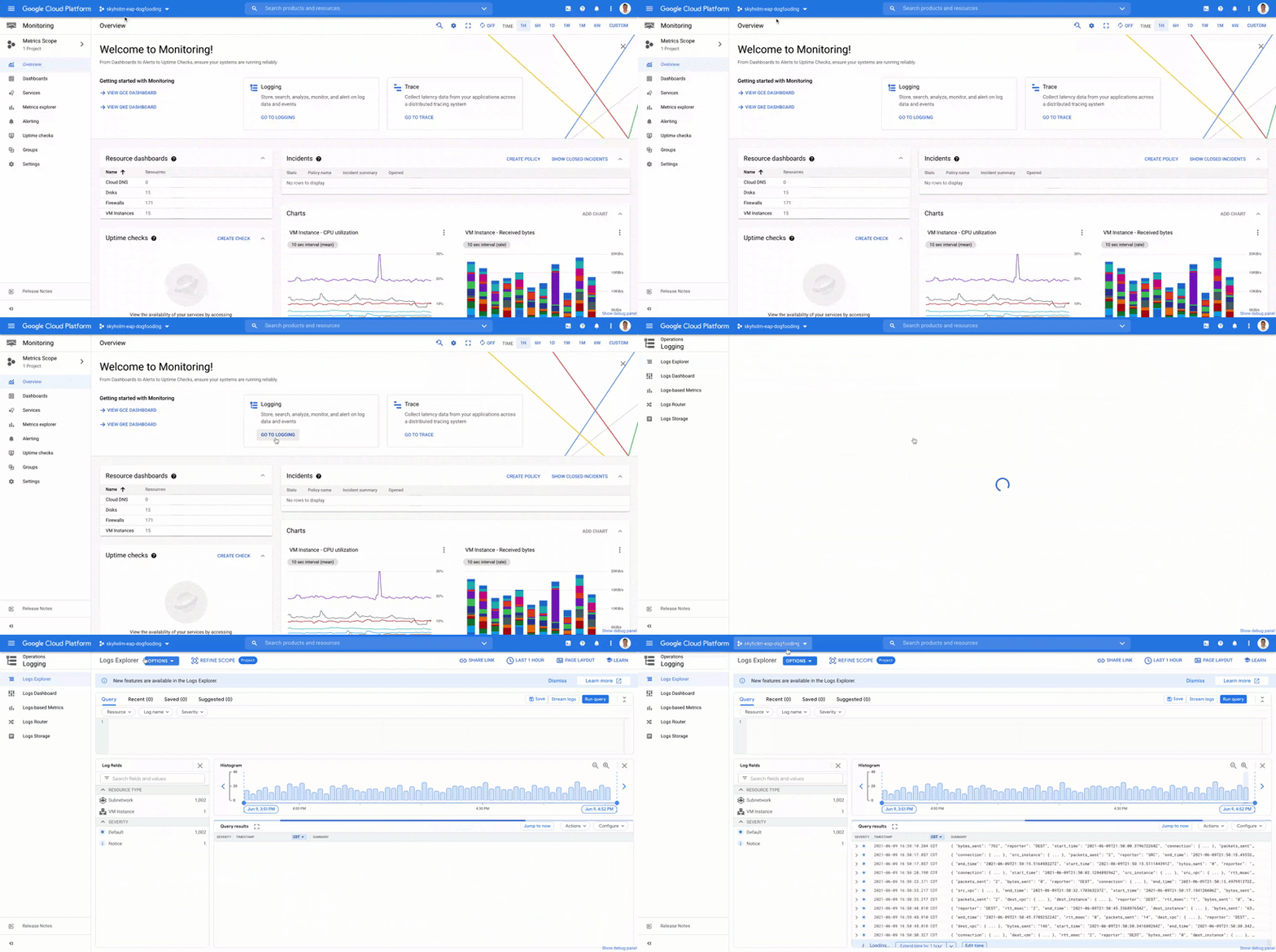
- This is now consistent with many other services across Google Cloud. Specifically, you can see how the project picker stays consistent when navigating from Cloud Monitoring to Cloud Logging:
- Additionally, to make your navigation between Metrics Scopes easy we’ve added the new Metrics Scope Tab and Panel in the UI:
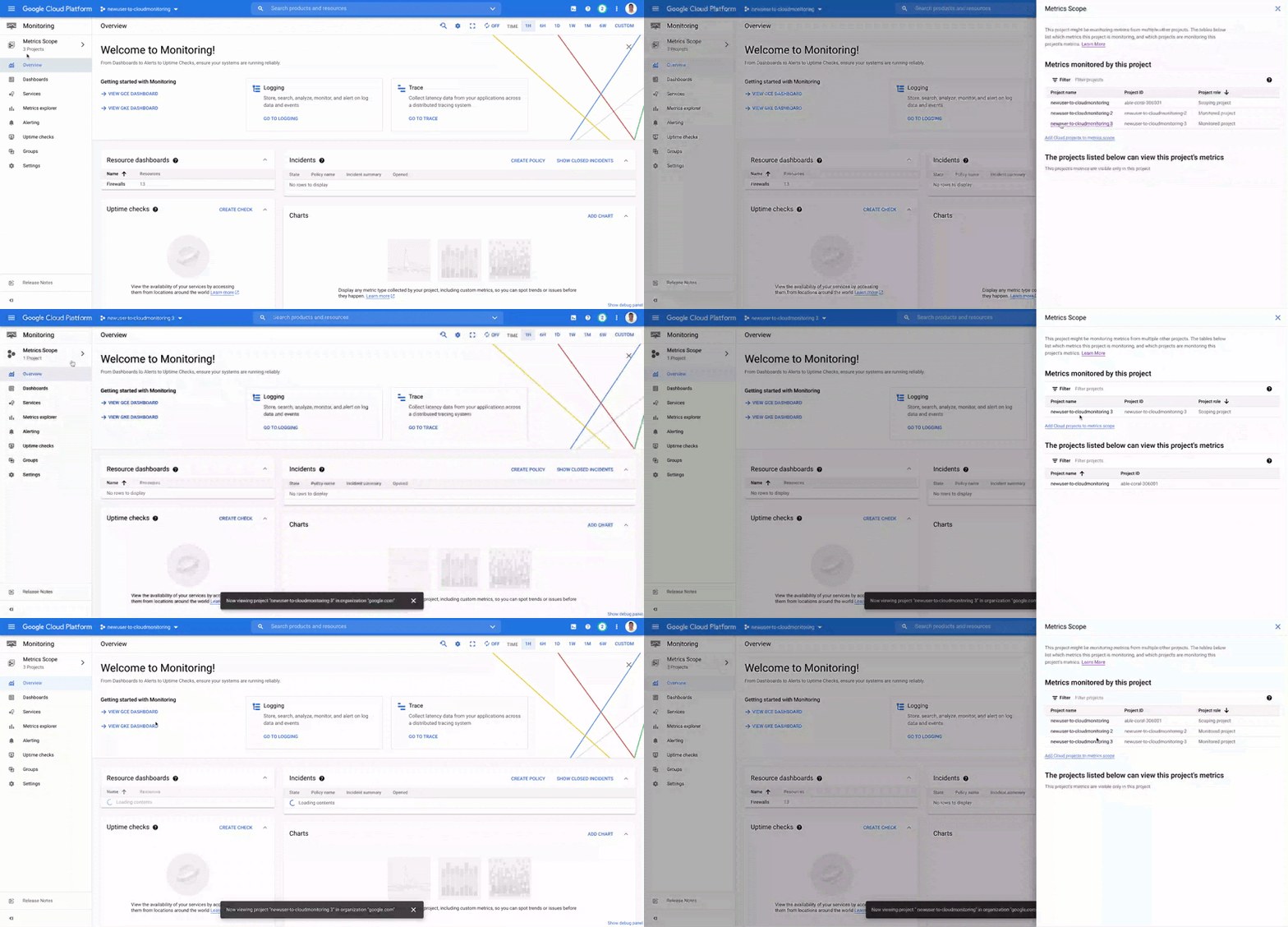
Coming Soon
- The Metrics Scope API is coming within the next quarter! This API will enable you to programmatically manage your monitoring configurations and Metrics Scopes.
Current Workspaces users
If you are already using Workspaces in Cloud Monitoring you may have noticed that they converted to Metrics Scopes weeks ago. There is no additional action required and you can start taking advantage of the additional features of Metrics Scopes today.
Get Started
Companies that are digitally native or in the process of digital transformation have placed an increased operational role on developers and this often creates overlapping sets of responsibilities with Operations and SRE teams. Now multiple developer teams can focus on optimizing the performance of their applications while operators can take a fleet-wide view when maintaining and improving the performance of all of the infrastructure under their purview.For information on configuring a Metrics Scope to include metrics for multiple projects, see Viewing metrics for multiple projects.
Monitoring and defending threats in the cloud

2806
Of your peers have already read this article.
3:00 Minutes
The most insightful time you'll spend today!
As your organization transitions from on-premises to hybrid cloud or pure cloud, how you think about threat detection must evolve as well—especially when confronting threats across many cloud environments. A new foundational framework for thinking about threat detection in public cloud computing is needed to better secure digital transformations.
Because these terms have had different meanings over time, here’s what we mean by threat detection and detection and response. A balanced security strategy covers all three elements of a security triad: prevention, detection, and response. Prevention can improve, but never becomes perfect. Despite preventative controls, we still need to be on the lookout for threats that penetrate our defenses. Finding and confirming malicious activities, and automatically responding to them or presenting them to the security team constitutes detection and response.
Vital changes impact the transition from the traditional environment to the cloud and affect three key areas:
- Threat landscapes
- IT environment
- Detection methods
First, threat landscapes change. This means new threats evolve, old threats disappear, and the importance of many threats changes. If you perform a threat assessment on your environment and then migrate the entire environment to the public cloud, even if you use the lift and shift approach, the threat assessment will look very different. MITRE ATT&CK Cloud can help us understand how some threat activities apply to public cloud computing.
Second, the entire technology environment around you changes. This applies to the types of systems and applications you as a defender would encounter, but also to technologies and operational practices. Essentially, cloud as a realm where you have to detect threats is different —this applies to the assets being threatened and technologies doing the detecting. Sometimes cloud looks to traditional “blue teams” as some alien landscape where they would have only challenges. In reality, cloud does bring a lot of new opportunities for detection. The main theme here is change, some for the worse and some for the better.
After all, cloud is
- Usually distributed—running over many regions and data centers
- Often immutable—utilizes systems that are replaced, rather than updated
- Ephemeral uses workloads often created for the task and then removed
- API driven—enabled by pervasive APIs
- Centered on identity layer—mostly uses identities and not just network perimeter to separate workloads
- Automatically scalable—able to expand with the increasing workload
- Shared with the provider
Sometimes the combination of Distributed, Immutable, and Ephemeral cloud properties is called a DIE triad. All these affect detection for the cloud environment.
Third, telemetry sources and detection methods also change. While this may seem like it’s derived from the previous point we made, that’s not entirely true. For some cloud services, and definitely for SaaS, a popular approach of using an agent such as EDR would not work. However, new and rich sources of telemetry may be available—Cloud Audit Logs are a great example here.
Similarly, the expectation that you can sniff traffic on the perimeter, and that you even will have a perimeter, may not be entirely correct. Pervasive encryption hampers Layer 7 traffic analysis, while public APIs rewrite the rules on what a perimeter is. Finally, detection sources and methods are also inherently shared with the cloud provider, with some under cloud service provider control while others are under cloud user control.
This leads to several domains where we can and should detect threats in the cloud.
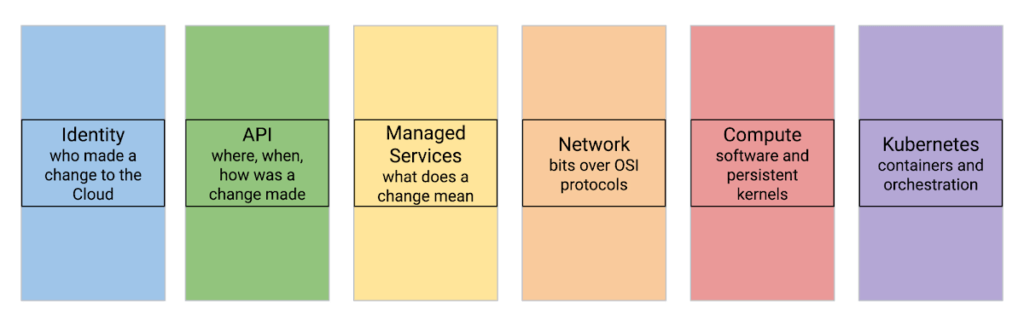
Let’s review a few cloud threat detection scenarios.
Everybody highlights the role of identity in cloud security. Naturally, it matters in threat detection as well—and it matters a lot. While we don’t want to repeat the cliche that in a public cloud you are one IAM mistake away from a data breach, we know that cloud security missteps can be costly. To help protect organizations, Google Cloud offers services that automatically and in real-time analyze every IAM grant to detect outsiders being added—even indirectly.
Detecting threats inside compute instances such as virtual machines (VM) using agents seems to be about the past. After all, VMs are just servers, right? However, this is an area where cloud brings new opportunities. For example, VM Threat Detection allows security teams to do completely agentless YARA rule execution against their entire compute fleet.
Finally, products like BigQuery require new ways of thinking about detecting data exfiltration. Security Command Center Premium detects queries and backups in BigQuery that would copy data to different Google Cloud organizations.
Naturally, some things stay the same in the cloud. These include broad threat categories such as insiders or outsiders; steps in the cyber exploit chain such as coarse-grained stages of an attack; and the MITRE ATT&CK Tactics are largely unchanged. It is also likely that broad detection use cases stay the same.
What does that mean for the defenders?
When you move to the cloud, your threats and your IT change—and change a lot.
This means that using on-premises detection technology and approaches as a foundation for future development may not work well.
This also means that merely copying all your on-premise detection tools and their threat detection content is not optimal.
Instead, moving to Google Cloud is an opportunity to transform how you can achieve your continued goals of confidentiality, integrity, and availability with the new opportunities created by the technology and process of cloud.
Call to action:
- Listen to “Threat Models and Cloud Security” (ep12)
- Listen to “What Does Good Detection and Response Look Like in the Cloud? Insights from Expel MDR” (ep72)
- Listen to “Cloud Threats and How to Observe Them” (ep69) and read the related blog “How to think about cloud threats today”
- Review how to test cloud detections
- Read the guidance on cloud threat investigation with SCC and Chronicle
More Relevant Stories for Your Company

The Many Risks of Ignoring the Impact of a Tighter Cloud Security Framework
The perimeter has disappeared and access to company data is no longer limited to your physical office or your employees. Instead, in today’s transformed workforce - increasingly connected, collaborative and in the cloud - the security perimeter has become dispersed and elastic, wrapped around each user and device. Moreover, ‘users’

Know the Leaders of Google Cloud Public Sector Community
At Google Cloud, being a strategic partner is part of our DNA. Whether it’s listening closely to our customers, helping to build team skills for innovation or simply being there (since we know the cloud is 24/7), we get excited about working hands-on with customers to deliver new solutions. As

Nine Interesting Google Cloud Identity and Environment Features to Know About!
I’ve been at Google Cloud just a few weeks, following years of experience as an AWS Hero and building on other clouds. So last week’s Google Cloud Next–my first!—was a bit of a culture shock. On the GCP podcast, I used the word “intentionality” to describe what I’m seeing: a thoughtful,

Data Security Excellence: Google Takes the Lead in Forrester’s Wave Report
To help organizations confidently move their sensitive data to the cloud, Google Cloud works diligently to earn and maintain customer trust. Our Trusted Cloud is committed to giving you a secure foundation that you can verify and independently control. Discovery and protection of sensitive data are integral parts of Google
