





How Kubernetes is enabling digital transformation for retailers

2641
Of your peers have already read this article.
3:30 Minutes
The most insightful time you'll spend today!
Retail organizations constantly face financial pressure to increase sales while maintaining profit margins. Digital commerce creates new opportunities and a more competitive landscape for retailers by allowing them to reach a global customer base online, but it also exposes them to competition from larger online retailers. To be successful in this environment, retailers must not only have a strong online presence to keep up with their competition and gain market share, but also uplift the transactional customer experience to a more experiential one.
In today’s data-driven artificial intelligence-inspired business environment, organizations require complex IT infrastructure to support various functions such as prospecting, product development, marketing, and data analytics. Managing and scaling this infrastructure can be challenging, especially as needs evolve. As a result, many organizations are turning to Google Cloud as a solution for meeting their business goals, rather than simply expanding their in-house IT resources with more equipment and personnel. Specifically, retailers across the globe are betting on Kubernetes on Google Cloud to take advantage of secure, reliable, and scalable infrastructure.
Here are a few examples of worldwide retailers adapting to changing customer expectations using intelligent infrastructure solutions including Google Kubernetes Engine (GKE), the most scalable and automated fully managed Kubernetes from Google Cloud.
Haravan is a Vietnamese ecommerce platform that aims to improve the process of buying and selling products, allowing businesses to focus on creating and selling their products.
By using Google Cloud, Haravan helped small and medium-sized enterprises in Vietnam achieve double-digit growth, consistently met its 99.97% uptime commitment to clients, efficiently managed 5 times the normal amount of ecommerce activity, and facilitated the implementation of artificial intelligence-powered expansion plans.
“We have a guaranteed commitment to enable any volume of sales for clients over all channels, be it social networks, marketplaces, livestream, or website. Only Google Cloud, with the flexible autoscaling of GKE, gives us certainty to meet our guarantees even in the most massive Black Friday surges.” —Hung Le, VP of Software Engineering, Haravan
Loblaw is Canada’s food and pharmacy leader and the nation’s largest retailer. The company operates over 2,500 locations, including corporate, franchised, and associate-owned stores, and employs nearly 200,000 full- and part-time employees.
By using Google Cloud, boosted the performance of the online grocery platform, resulting in higher conversion rates and increased revenue, recovered up to 50% of Site Reliability Engineers’ time for innovation, introduced new, real-time personalization features and shopping conveniences for customers, and enhanced resiliency to protect customers and revenue.
“Moving our online grocery site to Google Cloud gave us a 4x performance increase and the capacity to handle up to three times the traffic; and we can scale up at any time.” —Hesham Fahmy, VP Technology, Loblaw
L.L.Bean is a North American retail company known for its boots and mail-order catalog, which dates back to 1912. The company has a strong online presence, with ecommerce accounting for $1 billion of its annual revenues of $1.6 billion. Like many other retailers, L.L.Bean is adopting an omnichannel sales strategy by interacting with customers through various channels including print, physical stores, its website, app, and social media.
By using Google Cloud, L.L.Bean enhanced customers’ online experience through faster page load times and access to transaction history, allowed for a focus on providing value to customers rather than managing infrastructure, and enabled the rapid release of cross-channel services by reducing development cycles.
“GKE has significantly streamlined the process of upgrading nodes and masters. By comparison, upgrading even minor releases of another container solution that L.L.Bean tested resulted in the need to rebuild that solution’s clusters four times.” —Randy Dyer, Enterprise Architect, L.L.Bean
LPP is a Polish fashion retailer established in 1991 by Lubianiec and Piechocki, whose initials make up the company’s name. LPP currently manages five clothing brands that are popular in 38 countries across Europe, Africa, and Asia, and has over 24,000 employees based in its main offices in Central and Eastern Europe. Growing demand for its ecommerce services led LPP to migrate from an on-premises setup to Google Cloud, harnessing automation to ensure great shopping experiences globally.
By using Google Cloud, LPP promoted a DevOps culture among developers through streamlined deployment of new features, provided 90% more time for engineers to work on innovative solutions instead of managing infrastructure, instantly created and updated new VMs, allowing developers to quickly launch new features, ensured a seamless online shopping experience by automatically adjusting capacity to meet demand.
“GKE enables us to deploy new features for our ecommerce sites very quickly. Previously, it took weeks to launch new instances for each brand. Today, it takes seconds: we simply launch a new machine, deploy the code, and changes are reflected automatically across our environment.” —Marek Maciejewski, Head of IT Service Operations, LPP
Noon.com, based in Riyadh, Saudi Arabia, is a local ecommerce marketplace focused on serving the Middle East. The company aims to become the top online retailer in the region, supporting the growth of a digital economy for both consumers and local businesses.
By using Google Cloud, Noon.com built its ecommerce platform to access self-managed services, allowed developers to establish a fully operational staging environment within two weeks, provided uninterrupted service to nearly four times as many daily users during busy seasons using autoscaling on GKE, used real-time data streaming on BigQuery to inform business decisions and personalize the customer experience, and achieved 99.999% availability with no downtime for planned maintenance or schema changes using a fully managed relational database.
“Google Cloud-managed services are playing a major role in enabling Noon.com customers to get their shopping done whenever they need it, without experiencing any delays or glitches, and without us having to lose sleep at night to ensure our platform is functioning as it should.” —Alex Nadalin, SVP of Engineering, Noon.com
In conclusion, the retail industry is constantly evolving and retailers must stay up-to-date with the latest technology and customer preferences to remain competitive. Digital commerce has changed the landscape of retail, allowing businesses to reach a global customer base but also increasing competition. The use of Kubernetes on Google Cloud can help retailers improve the customer experience, streamline internal processes, and make data-driven and AI-inspired decisions. By embracing these changes, retailers can stay ahead in a constantly evolving industry. Get started today with an exclusive workshop, Unlocking efficiency and innovation with Kubernetes on Google Cloud.
3622
Of your peers have already watched this video.
15:20 Minutes
The most insightful time you'll spend today!
Building a Bank with Kubernetes: How Monzo is Creating the Best Banking App Ever
Based in London, Monzo is a bank that lives on the smartphone and is built for the way modern customers live today. By solving their problems, treating them fairly and being totally transparent, Monzo believes it can transform the way people bank.
“We are building a full retail bank. What we are trying to be is become the best banking app in the world. This means that instead of showing you cramped indecipherable descriptors that you get from traditional banks, we actually show you the name of the merchant along with the logo and a real-time balance rather than something that’s often delayed by 24 to 48-hours. Basically, we strive to make everything as clear and easy to understand for customers,” says Oliver Beattie, Head of Engineering, Monzo.
In their quest for building the best banking application, Kubernetes is significantly helping Monzo overcome core banking challenges and continuously innovate.
“Kubernetes makes our application extensible. We want our application to be very easy to change not just now but maybe 10 or 20 years from now. As what we have now will not be the gold standard 20 years down the line. We want our application to be better than those the legacy banks have,” says Beattie.
Running multiple services at the same time on a particular application and ensuring speed was a significant hurdle Monzo had to overcome.
“You cannot run 150 services on a single machine and expect all of them to be fast. What we wanted is to treat our application as a big pool of resources, which is what Kubernetes exactly allowed us to do. We can now run one big group of worker machines and run all our applications there and scale them up and down as needed. Owing to Kubernetes we are now able to reduce one-third of our infrastructure costs,” says Beattie.
Watch the full video to get deeper insights into how Kubernetes is helping Monzo build the best banking application ever.
Leverage Apigee X to Access API Backends with Multiple VPCs

4229
Of your peers have already read this article.
4:00 Minutes
The most insightful time you'll spend today!
API gateways are a critical component of a modern architecture. Apigee X is Google Cloud’s API management platform. It also allows users of the legacy Apigee Edge product to leverage Virtual Private Cloud (VPC) products and features, like Cloud Armor and Load Balancers. With these new security and availability advantages come a new set of challenges. The biggest challenge is accessing API backends in multiple VPCs. This introduces VPC peering transitivity restrictions. Only two VPCs can be peered in sequence, but the Apigee X Runtime already consumes one peering connection. This blog post discusses overcoming transitivity limits, with an eye on future managed services that solve the problem.
VPC Peering Transitivity Limits
The main challenge with Apigee X is that customers have backend servers in multiple distinct VPCs. This means that Apigee X Runtime traffic must traverse multiple VPC peering connections. However, peering transitivity limits VPC networking to only one sequential VPC hop.
In the past (Apigee Edge / SaaS) customers did not need to worry about securing their backend APIs across multiple VPCs. Apigee X networking is a new feature, compared to the original Apigee SaaS product.
VPC Connectivity Options
VPC peering is the easiest option. The restriction is that connectivity wise, only one peering hop is allowed, which is already consumed by a connection to the Apigee X Runtime. The Apigee X Runtime resides in a Google managed VPC.
Internal Global Load Balancers (ILBs) with Managed Instance Group (MIG) backends is the second option. This peering solution is complex though.
The open internet is the most parsimonious solution. Apigee X facilitates this, but it would violate the security mandates of many Google Cloud customers.
The final option is Cloud VPN. Cloud VPN supports transitivity across multiple VPC network hops. As well the implementation steps are relatively simple. Traffic does not traverse the open internet for VPCs within Google Cloud.
Apigee X Networking Explained
ApigeeX is a Private Service Access (PSA) based service that is deployed and managed in a tenant project. A tenant project is a project that is tied to the Apigee X Runtime, in a one-to-one relationship. The Apigee X deployment natively manages a load balancer in the customer’s VPC for ingress traffic. By default, egress to non-private routes from Apigee X is through Cloud NAT in the tenant project. The default Apigee X deployment is more suitable for non hub-and-spoke network design.
Single VPC Hub Design
Figure 3 demonstrates the API request flow. External API requests come from the internet and first encounter the XLB. The XLB has the Apigee X Runtime as a backend, using Network Endpoint Group to contain the Apigee X Environment Group domain name. From here the Apigee X Runtime sends the API request over the VPC peering connection to apigee-x-project.
Google Cloud VPN connections allow Virtual Private Clouds (VPCs) to reference each other’s internal resources, with the help of Google Cloud Routers. Cloud Routers advertise each VPCs’ IP address ranges. This enables traffic over the Cloud VPN tunnels to reference resources via their private IP addresses. Additionally, Google Cloud DNS peering facilitates a consumer VPC to reference hostnames in a producer VPC.
From the apigee-x-vpc (consumer), the API request references a backend-project-a-vpc (producer) resource hostname, via DNS peering. This would be the backend identified in an Apigee X API proxy. The request itself does not traverse the DNS peering connection. Instead, the API request goes through a Cloud VPN tunnel. In this way, Cloud VPN is used as a substitute for VPC peering.
Shared VPC Hub Design
A more advanced example is a shared VPC hub project, illustrated in Figure 4. The general idea is the same; use Cloud VPN connections instead of peering connections, advertise routes using Cloud Router and use DNS peering to reference any compute resources by their hostnames.
What is interesting is the idea that the apigee-x-project can use a subnet in a shared VPC, independently of the hub-project, which is in the same shared VPC. Shared VPC subnets do not violate the VPC peering transitivity limit (only two peered VPCs in sequence). This architecture pattern can be scaled to connect multiple shared VPCs via VPN tunnels. This is analogous to cascading hub-and-spoke architecture pattern: the inner hub-and-spoke is the shared VPC (with the apigee-x-project) and the outer hub-and-spoke is the VPN connected backend-projects.
Fixing VPC Peering with Private Service Connect
Private Service Connect (PSC) allows private consumption of services across VPC networks. This feature is coming to Apigee X in the first half of 2022. Private Services Access (PSA) is what enables you to reach services’ internal IP addresses. Apigee X is a PSA service, hence its ability to connect to backends by their internal IP addresses. PSC is the missing piece that will natively support Apigee X backends in other VPCs.
What Next?
Try it out for yourself! We built and shared a working Terraform example in our Github repository. Apigee X opens up users to the products and features of Google Cloud VPCs. VPC transitivity limits do require some work to overcome. Private Service Connect (PSC) will solve Apigee X VPC peering challenges later in 2022. A great next step would be to implement a “wheel” architecture pattern. This is an evolution of the hub-and-spoke design, where spoke VPCs peer to each other. Cloud VPN makes this possible and PSC makes a wheel more feasible to implement. The advantage of a wheel is that spokes no longer rely on a hub VPC; for example productizing APIs in a multi-tenant environment. More details are available in the following ebook: The API Product Mindset
Resources
You can find the Terraform code in the Github repository.
What Users and System Designers Must Learn from Google’s Best Practices for Password Management

5286
Of your peers have already read this article.
3:00 Minutes
The most insightful time you'll spend today!
Updated for 2021: This post includes updated best practices including the latest from Google’s Best Practices for Password Management whitepapers for both users and system designers.
Account management, authentication and password management can be tricky. Often, account management is a dark corner that isn’t a top priority for developers or product managers. The resulting experience often falls short of what some of your users would expect for data security and user experience.
Fortunately, Google Cloud brings several tools to help you make good decisions around the creation, secure handling and authentication of user accounts (in this context, anyone who identifies themselves to your system—customers or internal users). Whether you’re responsible for a website hosted in Google Kubernetes Engine, an API on Apigee, an app using Firebase, or other service with authenticated users, this post lays out the best practices to follow to ensure you have a safe, scalable, usable account authentication system.
1. Hash those passwords
My most important rule for account management is to safely store sensitive user information, including their password. You must treat this data as sacred and handle it appropriately.
Do not store plaintext passwords under any circumstances. Your service should instead store a cryptographically strong hash of the password that cannot be reversed—created with Argon2id, or Scrypt. The hash should be salted with a value unique to that specific login credential. Do not use deprecated hashing technologies such as MD5, SHA1 and under no circumstances should you use reversible encryption or try to invent your own hashing algorithm. Use a pepper that is not stored in the database to further protect the data in case of a breach. Consider the advantages of iteratively re-hashing the password multiple times.
Design your system assuming it will be compromised eventually. Ask yourself “If my database were exfiltrated today, would my users’ safety and security be in peril on my service or other services they use?” As well as “What can we do to mitigate the potential for damage in the event of a leak?”
Another point: If you could possibly produce a user’s password in plaintext at any time outside of immediately after them providing it to you, there’s a problem with your implementation.
If your system requires detection of near-duplicate passwords, such as changing “Password” to “pAssword1”, save the hashes of common variants you wish to ban with all letters normalized and converted to lowercase. This can be done when a password is created or upon successful login for pre-existing accounts. When the user creates a new password, generate the same type of variants and compare the hashes to those from the previous passwords. Use the same level of hashing security as with the actual password.
2. Allow for third-party identity providers if possible
Third-party identity providers enable you to rely on a trusted external service to authenticate a user’s identity. Google, Facebook, and Twitter are commonly used providers.
You can implement external identity providers alongside your existing internal authentication system using a platform such as Identity Platform. There are a number of benefits that come with Identity Platform, including simpler administration, a smaller attack surface, and a multi-platform SDK. We’ll touch on more benefits throughout this list.
3. Separate the concept of user identity and user account
Your users are not an email address. They’re not a phone number. They’re not even a unique username. Any of these authentication factors should be mutable without changing the content or personally identifiable information (PII) in the account. Your users are the multi-dimensional culmination of their unique, personalized data and experience within your service, not the sum of their credentials. A well-designed user management system has low coupling and high cohesion between different parts of a user’s profile.
Keeping the concepts of user account and credentials separate will greatly simplify the process of implementing third-party identity providers, allowing users to change their username, and linking multiple identities to a single user account. In practical terms, it may be helpful to have an abstract internal global identifier for every user and associate their profile and one or more sets of authentication datavia that ID as opposed to piling it all in a single record.
4. Allow multiple identities to link to a single user account
A user who authenticates to your service using their username and password one week might choose Google Sign-In the next without understanding that this could create a duplicate account. Similarly, a user may have very good reason to link multiple email addresses to your service. If you’ve properly separated user identity and authentication, it will be a simple process to link several authentication methods to a single user.
Your backend will need to account for the possibility that a user gets part or all the way through the signup process before they realize they’re using a new third-party identity not linked to their existing account in your system. This is most simply achieved by asking the user to provide a common identifying detail, such as email address, phone, or username. If that data matches an existing user in your system, require them to also authenticate with a known identity provider and link the new ID to their existing account.
5. Don’t block long or complex passwords
NIST publishes guidelines on password complexity and strength. Since you are (or will be very soon) using a strong cryptographic hash for password storage, a lot of problems are solved for you. Hashes will always produce a fixed-length output no matter the input length, so your users should be able to use passwords as long as they like. If you must cap password length, do so based on the limits of your infrastructure; often this is a matter of memory usage (memory used per login operation * potential concurrent logins per machine), or more likely—the maximum POST size allowable by your servers. We’re talking numbers from hundreds of KB to over 1MB. Seriously. Your application should already be hardened to prevent abuse from large inputs. This doesn’t create new opportunities for abuse if you employ controls to prevent credential stuffing and hash the input as soon as possible to free up memory.
Your hashed passwords will likely already consist of a small set of ASCII characters. If not, you can easily convert a binary hash to Base64. With that in mind, you should allow your users to use literally any characters they wish in their password. If someone wants a password made of Klingon, Emoji, and ASCII art with whitespace on both ends, you should have no technical reason to deny them. Just make sure to perform Unicode normalization to ensure cross-platform compatibility. See our system designers whitepaper (PDF) for more information on Unicode and supported characters in passwords.
Any user attempting to use an extreme password is probably following password best practices (PDF) including using a password manager, which allows the entry of complex passwords even on limited mobile device keyboards. If a user can input the string in the first place (i.e., the HTML specification for password input disallows line feed and carriage return), the password should be acceptable.
6. Don’t impose unreasonable rules for usernames
It’s not unreasonable for a site or service to require usernames longer than two or three characters, block hidden characters, and prevent whitespace at the beginning and end of a username. However, some sites go overboard with requirements such as a minimum length of eight characters or by blocking any characters outside of 7-bit ASCII letters and numbers.
A site with tight restrictions on usernames may offer some shortcuts to developers, but it does so at the expense of users and extreme cases will deter some users.
There are some cases where the best approach is to assign usernames. If that’s the case for your service, ensure the assigned username is user-friendly insofar as they need to recall and communicate it. Alphanumeric generated IDs should avoid visually ambiguous symbols such as “Il1O0.” You’re also advised to perform a dictionary scan on any randomly generated string to ensure there are no unintended messages embedded in the username. These same guidelines apply to auto-generated passwords.
7. Validate the user’s identity
If you ask a user for contact information, you should validate that contact as soon as possible. Send a validation code or link to the email address or phone number. Otherwise, users may make a typo in their contact info and then spend considerable time using your service only to find there is no account matching their info the next time they attempt login. These accounts are often orphaned and unrecoverable without manual intervention. Worse still, the contact info may belong to someone else, handing full control of the account to a third party.
8. Allow users to change their username
It’s surprisingly common in legacy systems or any platform that provides email accounts not to allow users to change their username. There are very good reasons not to automatically release usernames for reuse, but long-term users of your system will eventually come up with significant reasons to use a different username and they likely won’t want to create a new account.
You can honor your users’ desire to change their usernames by allowing aliases and letting your users choose the primary alias. You can apply any business rules you need on top of this functionality. Some orgs might limit the number of username changes per year or prevent a user from displaying or being contacted via anything but their primary username. Email address providers are advised to never re-issue email addresses, but they could alias an old email address to a new one. A progressive email address provider might even allow users to bring their own domain name and have any address they wish.
If you are working with a legacy architecture, this best practice can be very difficult to meet. Even companies like Google have technical hurdles that make this more difficult than it would seem. When designing new systems, make every effort to separate the concept of user identity and user account and allow multiple identities to link to a single user account and this will be a much smaller problem. Whether you are working on existing or greenfield code, choose the right rules for your organization with an emphasis on allowing your users to grow and change over time.
9. Let your users delete their accounts
A surprising number of services have no self-service means for a user to delete their account and associated PII. Depending on the nature of your service, this may or may not include public content they created such as posts and uploads. There are a number of good reasons for a user to close an account permanently and delete all their PII . These concerns need to be balanced against your user experience, security, and compliance needs. Many if not most systems operate under some sort of regulatory control (such as PCI or GDPR), which provides specific guidelines on data retention for at least some user data. A common solution to avoid compliance concerns and limit data breach potential is to let users schedule their account for automatic future deletion.
In some circumstances, you may be legally required to comply with a user’s request to delete their PII in a timely manner. You also greatly increase your exposure in the event of a data breach where the data from “closed” accounts is leaked.
10. Make a conscious decision on session length
An often overlooked aspect of security and authentication is session length. Google puts a lot of effort into ensuring users are who they say they are and will double-check based on certain events or behaviors. Users can take steps to increase their security even further.
Your service may have good reason to keep a session open indefinitely for non-critical analytics purposes, but there should be thresholds after which you ask for password, 2nd factor, or other user verification.
Consider how long a user should be able to be inactive before re-authenticating. Verify user identity in all active sessions if someone performs a password reset. Prompt for authentication or 2nd factor if a user changes core aspects of their profile or when they’re performing a sensitive action. Re-authenticate if the user’s location changes significantly in a short period of time. Consider whether it makes sense to disallow logging in from more than one device or location at a time.
When your service does expire a user session or requires re-authentication, prompt the user in real time or provide a mechanism to preserve any activity they have not saved since they were last authenticated. It’s very frustrating for a user to take a long time to fill out a form, only to find all their input has been lost and they must log in again.
11. Use 2-Step Verification
Consider the practical impact on a user of having their account stolen when choosing 2-Step Verification (also known as two-factor authentication, MFA, or 2FA) methods. Time-based one-time passwords (TOTP), email verification codes, or “magic links” are consumer-friendly and relatively secure. SMS 2FA auth has been deprecated by NIST due to multiple weaknesses, but it may be the most secure option your users will accept for what they consider a trivial service.
Offer the most secure 2FA auth you reasonably can. Hardware 2FA such as the Titan Security Key are ideal if feasible for your application. Even if a TOTP library is unavailable for your application, email verification or 2FA provided by third-party identity providers is a simple means to boost your security without great expense or effort. Just remember that your user accounts are only as secure as the weakest 2FA or account recovery method.
12. Make user IDs case-insensitive
Your users don’t care and may not even remember the exact case of their username. Usernames should be fully case-insensitive. It’s trivial to store usernames and email addresses in all lowercase and transform any input to lowercase before comparing. Make sure to specify a locale or employ Unicode normalization on any transformations.
Smartphones represent an ever-increasing percentage of user devices. Most of them offer autocorrect and automatic capitalization of plain-text fields. Preventing this behavior at the UI level might not be desirable or completely effective, and your service should be robust enough to handle an email address or username that was unintentionally auto-capitalized.
13. Build a secure auth system
If you’re using a service like Identity Platform, a lot of security concerns are handled for you automatically. However, your service will always need to be engineered properly to prevent abuse. Core considerations include implementing a password reset instead of password retrieval, detailed account activity logging, rate-limiting login attempts to prevent credential stuffing, locking out accounts after too many unsuccessful login attempts, and requiring two-factor authentication for unrecognized devices or accounts that have been idle for extended periods. There are many more aspects to a secure authentication system, so please see the further reading section below for links to more information.
Further reading
There are a number of excellent resources available to guide you through the process of developing, updating, or migrating your account and authentication management system. I recommend the following as a starting place:
- Our Modern Password Security for System Designers whitepaper (PDF)
- The related Modern password security for users whitepaper (PDF)
- NIST 800-063B covers Authentication and Lifecycle Management
- OWASP continually updates their Password Storage Cheat Sheet
- OWASP goes into even more detail with the Authentication Cheat Sheet
- Google Cloud Identity Platform is a multi-protocol customer identity and access management solution, with robust authentication features
- Google’s Firebase Authentication site has a rich library of guides, reference materials and sample code
Google Announces Cloud Functions’ Native Integration with Secret Manager

3279
Of your peers have already read this article.
2:00 Minutes
The most insightful time you'll spend today!
Google Cloud Functions provides a simple and intuitive developer experience to execute code from Google Cloud, Firebase, Google Assistant, or any web, mobile, or backend application. Oftentimes that code needs secrets—like API keys, passwords, or certificates—to authenticate to or invoke upstream APIs and services.
While Google Secret Manager is a fully-managed, secure, and convenient storage system for such secrets, developers have historically leveraged environment variables or the filesystem for managing secrets in Cloud Functions. This was largely because integrating with Secret Manager required developers to write custom code… until now. We listened to customer feedback and today we are announcing Cloud Functions has a native integration with Secret Manager!
This native integration has many key benefits including:
- Zero required code changes. Cloud functions that already consume secrets via environment variables or files bundled with the source upload simply require an additional flag during deployment. The Cloud Functions service resolves and injects the secrets at runtime and the plaintext values are only visible inside the process.
- Easy environment separation. It’s easy to use the same codebase across multiple environments, e.g., dev, staging, and prod, because the secrets are decoupled from the code and are resolved at runtime.
- Supports the 12-factor app pattern. Because secrets can be injected into environment variables at runtime, the native integration supports the 12-factor pattern while providing stronger security guarantees.
- Centralized secret storage, access, and auditing. Leveraging Secret Manager as the centralized secrets management solution enables easy management of access controls, auditing, and access logs.
Cloud Functions’ native integration with Secret Manager is available in preview to all Google Cloud customers today. Let’s take a deeper dive into this new integration.
Example
Suppose the following cloud function invoked via HTTP uses a secret token to invoke an upstream API:
const https = require('https');const token = process.env.TOKEN;exports.secretDemo = (req, res) => {https.get(`https://upstream-api.example.com?token=${token}`, (innerRes) => {innerRes.on('end', () => { res.send('OK') });}).on('error', (err) => {res.send(`Error: ${err}`);});}
Without Cloud Functions’ native integration with Secret Manager, this function is deployed via:
$ gcloud functions deploy "secretDemo" \--runtime "nodejs14" \--trigger-http \--allow-unauthenticated \--set-env-vars "TOKEN=abcd1234"
This approach has a number of drawbacks, the biggest of which being that anyone with viewer permissions on the Google Cloud project can see the environment variables set on a cloud function.
To improve the security of this code, migrate the secret to Secret Manager in the same project:
$ gcloud secrets create "token" \--replication-policy "automatic" \--data-file - <<< "abcd1234"
Finally, without changing any code in the function re-deploy with slightly different flags:
$ gcloud beta functions deploy "secretDemo" \--runtime "nodejs14" \--trigger-http \--allow-unauthenticated \--set-secrets "TOKEN=my_token:latest"
It’s truly that easy to migrate from hard-coded secrets to using secure secret storage with Secret Manager! To add even more layers of security, consider running each cloud function with a dedicated service account and practice the principle of least privilege. Learn more in the Secret Manager Best Practices guide.
Making security easy
Security and proper secrets management are core pillars of modern software development, and we’re excited to provide customers a way to improve the security of their cloud functions. To learn more about the new native integration, check out the Cloud Functions documentation. You can also learn more about Cloud Functions or learn more about Secret Manager.
Google Cloud’s Transfer Services Helps Move Nuro’s Petabytes of Data from Edge to the Cloud

5158
Of your peers have already read this article.
3:00 Minutes
The most insightful time you'll spend today!
Engineers that build last-mile delivery services belong to an elite order, a hallowed subcategory. Delivery customers are incredibly demanding when it comes to speed and convenience, and the services they use must take variables like increased traffic, road conditions, human error, and even driver availability into account every day.
Nuro is a company with a new approach to delivery services. Nuro has a fleet of autonomous vehicles designed to address many of the problems related to last-mile delivery. And every day, these vehicles — and their sensors — generate a lot of data before parking for the night. For Nuro engineers, that data can help them understand the impact of new on-road features, make improvements to their vehicles’ software, and ensure even better deliveries for their customers.
For Nuro, the key challenge is how to move petabytes of data as quickly, securely, and easily as possible from their edge environments, like vehicle depots, to Google’s Cloud Storage. For this delivery effort, Nuro selected Google’s Transfer Appliance with its new online transfer capability, now generally available.
Helping Nuro to speed up data delivery from the edge to the cloud
Like many Google Cloud customers, Nuro collects data from remote environments, like vehicle depots, that have different networking and storage capabilities when compared to a traditional data center. For a transfer solution to be effective moving unstructured data from these environments to the cloud, the solution needs to be easy to deploy and automate, while still providing similar performance as a more complicated alternative.
The Transfer Appliance was built for this use case. It arrives to customers as a physical appliance with a preconfigured version of Google’s Storage Transfer Service software already installed. Customers can move files to the appliance by using SFTP or SCP, or, alternately, can mount the appliance as an NFS share and copy target. Data can be stored locally on the appliance or transferred over the network, and secure encryption — at-rest and in-flight — is enabled by default.
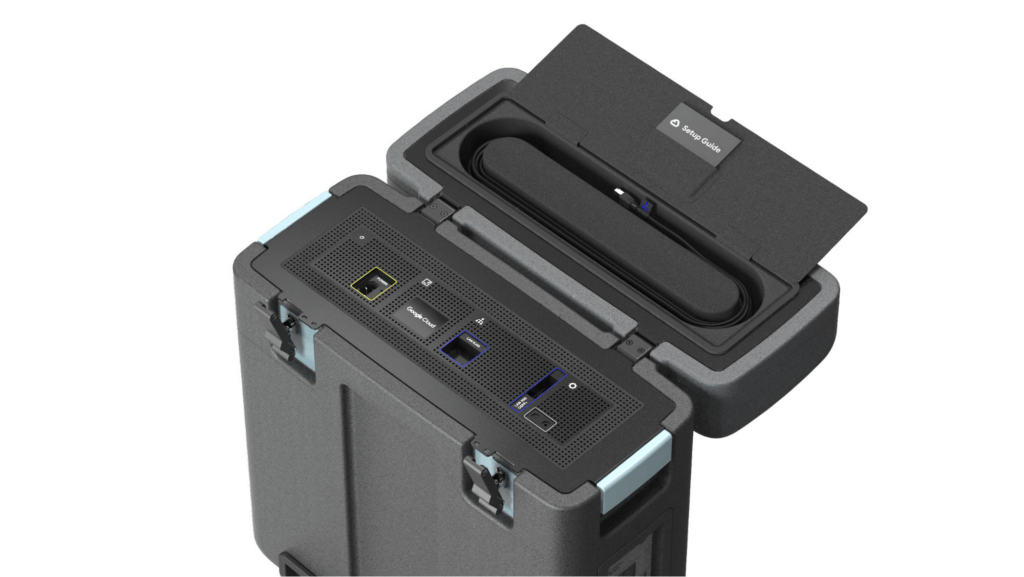
With these new appliances, Nuro will be able to automate much of their storage transfer needs. When their autonomous vehicles return to the depot, they can move data like software logs, LIDAR data, and sensor data — all ideal fits for Google’s Cloud Storage — from parked vehicles to the Transfer Appliance. Online transfers can then be performed throughout the day, ensuring a steady stream of valuable data in the cloud for developers to analyze and use in their nightly builds. All of this will help Nuro’s engineering leaders like Jie Pan to run more productive development teams with less operational overhead.
“Our autonomous vehicles generate a tremendous amount of useful data, and our goal is to get that data to our engineers as soon as possible,” said Jie Pan, Engineering Manager at Nuro. “When vehicles return to the depot, we can move data hourly into Cloud Storage over the network. We also have the flexibility to return the Transfer Appliance back to Google Cloud. Most importantly, this rapid transfer architecture gives a meaningful boost to engineering productivity and development velocity.”
Going the extra mile
Engineering and infrastructure leaders understand the value of delivering the right data to the right teams, as fast as possible. By adding preconfigured, over-the-network transfer into a turnkey Transfer Appliance, Google Cloud customers can more easily automate these data deliveries by scheduling regular migrations of on-premises files, objects, and other unstructured data to our Cloud Storage.
As Nuro continues to grow their manufacturing and testing footprint, they plan to use Transfer Appliances to further scale and simplify their data migration from on-premises to Google Cloud. Cutting the time to migrate their data by more than half will make for happier, more productive developers, and that will help Nuro bring us all the future of delivery a little faster.
If you’d like to learn more about Transfer Appliance and its new online transfer capability, click here or reach out to your Google Cloud account team.
More Relevant Stories for Your Company



Introduction to Cloud Shell Editor
Watch the video to understand how Google's Cloud Shell Editor and its powerful features-packed environment can streamline your development workflows.

Manage Packages Using Artifact Registry in Google Cloud Functions with Private Dependencies
Late last year, we announced that Artifact Registry was going GA, allowing GCP customers to manage their packages within the same platform as they were being deployed. In this blogpost, we want to show you how to do exactly that with a private dependency. Private dependencies allow your packages to be

Ensuring Reliability in a DevOps World: Insights from the 2022 State of DevOps Report
When a software change is deployed — after being designed, coded, tested, packaged, and tested some more — a journey comes to an end. At the same time, a new journey begins: your customer’s relationship with your service. It’s here, in the domain of operations, that abstract risks like launch

Google Maps Platform Helps BungkusIT Fulfil its Promise of Deliveries in One Hour!
Editor’s note: Today's post is written by Hatim M, Chief Commercial Officer at BungkusIT. The on-demand delivery service delivers packages within the hour for one million customers across Malaysia and uses Google Maps Platform to create a seamless end-to-end delivery experience for its customers. Imagine it's the end of a
