





Ensuring Reliability in a DevOps World: Insights from the 2022 State of DevOps Report

2679
Of your peers have already read this article.
3:30 Minutes
The most insightful time you'll spend today!
When a software change is deployed — after being designed, coded, tested, packaged, and tested some more — a journey comes to an end. At the same time, a new journey begins: your customer’s relationship with your service. It’s here, in the domain of operations, that abstract risks like launch schedule slippage give way to tangible risks like lost revenue, degraded trust, and tarnished reputation. Only when it’s available to users can software contribute to (or threaten!) the success of your organization. And so, throughout the past several years, the DevOps Research and Assessment (DORA) project has incrementally deepened our research into the reliability of services, through and beyond deployment, into ongoing operation.
Reliability is a broadly defined term, which refers to a team’s ability to meet their users’ expectations — for software services, it may encompass aspects of availability, latency, correctness, or other characteristics that influence the consistency and quality of user experience. Google’s practice of Site Reliability Engineering (SRE), which has been embraced and extended by a global community of reliability engineering practitioners, is an approach to operations that prioritizes user-oriented measurement, shared responsibility, and collaborative, blameless learning. Starting with the 2021 Accelerate State of DevOps Report, we began asking survey respondents detailed questions about reliability engineering in their organizations. We continued and expanded our investigation in 2022, and found further evidence that modern reliability engineering is widespread: a majority of respondents report that they employ SRE-style practices. With this extensive body of data to draw from, this year we pushed further into analyses of the impact of reliability and its interaction with other dynamics present in our model of technology’s influence on organizational success.
Reliability matters
When reliability is poor, improvements to software delivery have no effect — or even a negative effect — on organizational outcomes
Reliability is more than beneficial: it’s essential. As in prior studies, we find that software delivery performance (as measured by the “four key metrics” of change lead time, deploy frequency, change failure rate, and failure recovery time) is predictive of organizational performance. However, this year’s analysis revealed a previously unseen nuance: the influence of software delivery on organizational performance is predicated on reliability. When reliability is high, high-performance software delivery predicts better outcomes for the organization. But when reliability is poor, improvements to software delivery have no effect — or even a negative effect — on organizational outcomes. This affirms a long-held belief among reliability engineers: “reliability is the most important feature of any system.” If a service or product doesn’t meet its users’ reliability expectations, it’s counter-productive to rapidly ship flashy new features, because users can’t properly experience them. Software delivery relies on a foundation of reliability to create value.
https://storage.googleapis.com/gweb-cloudblog-publish/images/dora.max-900×900.jpg
Reliability is a journey
Any experienced leader will tell you that progress is rarely linear: even with a discipline like SRE, widely practiced and with demonstrable benefits, the path to success is unlikely to follow a straight line. DORA describes the “J-Curve” of organizational transformation, a phenomenon in which durable success comes only after setbacks and lessons learned. This year, we compared the depth of teams’ reliability engineering practices to their impact on the services they provide: will an investment in SRE produce greater reliability? The answer is yes, but with a significant caveat: not at first. Comparing reliability outcomes across a range of levels of SRE adoption, the J-Curve is plainly visible. A team which practices SRE only lightly — at the beginning of their SRE journey, perhaps — is likely not only to not benefit, but to regress in terms of the reliability experienced by their users. However, after these practices have more deeply permeated, an inflection point is reached and we see strong reliability benefits from continuing to grow the reliability engineering capability.
Knowing that it will likely take time to realize the benefits of adopting SRE, it may be tempting to start the process as soon, and as broadly, as possible. But we offer a note of caution here: organization-wide cultural transformation initiatives typically fail from overreach. We studied this and reported findings in a previous report. And even if you manage to beat the odds and fully adopt SRE across multiple teams simultaneously, the cost may be unacceptable: the setbacks in reliability that you are likely to experience early on, amplified across an entire organization all at once, could have catastrophic consequences. Therefore the SRE principle of gradual change should also be applied to the adoption of SRE itself.
Reliability is about people
Reflecting back on over a decade of SRE practice and theory, the Enterprise Roadmap to SRE underlines the importance of culture, suggesting that Site Reliability Engineering is in fact emergent from culture. Tools and frameworks are important; language is essential. But only a trustful, psychologically safe culture can support the environment of continuous learning which enables SRE to manage today’s complex, dynamic technology environments. DORA’s research in 2022 demonstrates the interplay between culture and reliability: we found that “generative” culture, as defined by the Westrum model, is predictive of higher reliability outcomes. And reliability has benefits not only for a system’s users, but for its makers as well: teams whose services are highly reliable are 1.6 times less likely to suffer from burnout.
Got a story to share about your DevOps journey? Submit it to Google Cloud’s 2022 DevOps Awards by January 31, 2023!
New Visual Interface for Google Cloud’s Speech-to-Text API Makes API Easy to Use !

4662
Of your peers have already read this article.
2:00 Minutes
The most insightful time you'll spend today!
At Google Cloud, we’re committed to making artificial intelligence (AI) accessible to everyone and easier to harness for new use cases. That’s why we’re excited to announce the general availability of our intuitive, new visual user interface for Google Cloud’s Speech-to-Text (STT) API, right in Google Cloud Console, which makes the API much simpler and easier for developers to use.
The STT API lets developers convert speech into text by leveraging Google’s years of research in automatic speech recognition and transcription technology. As advancements in AI continue to bring speech to new interfaces and devices, the STT API helps developers add speech functionality to their applications in order to better meet consumer demands.
The STT API covers a wide variety of use cases, from dictation and short commands, to captioning and subtitles. Getting the most of STT, however, can be a complicated process. To achieve the highest accuracy on any AI use case requires careful testing and tuning.
Previously, developers building on the STT API had to do this work manually by carefully experimenting with our API. Just to get started, developers needed familiarity with GCP integration concepts and had to either build their own tools or manage various scripts and API calls to fully understand the API documentation. These actions required cumbersome and time-consuming effort and made measuring, customizing, and improving models even more difficult.
Today’s announcement significantly simplifies the process, facilitating iteration and integration of models into developers’ applications by letting developers perform every API function from within the Google Cloud Console. These tools will make it easier for developers to integrate the STT API with their products or services. This update also gives developers the ability to manage and quickly iterate on their STT model customizations with Model Adaptation.
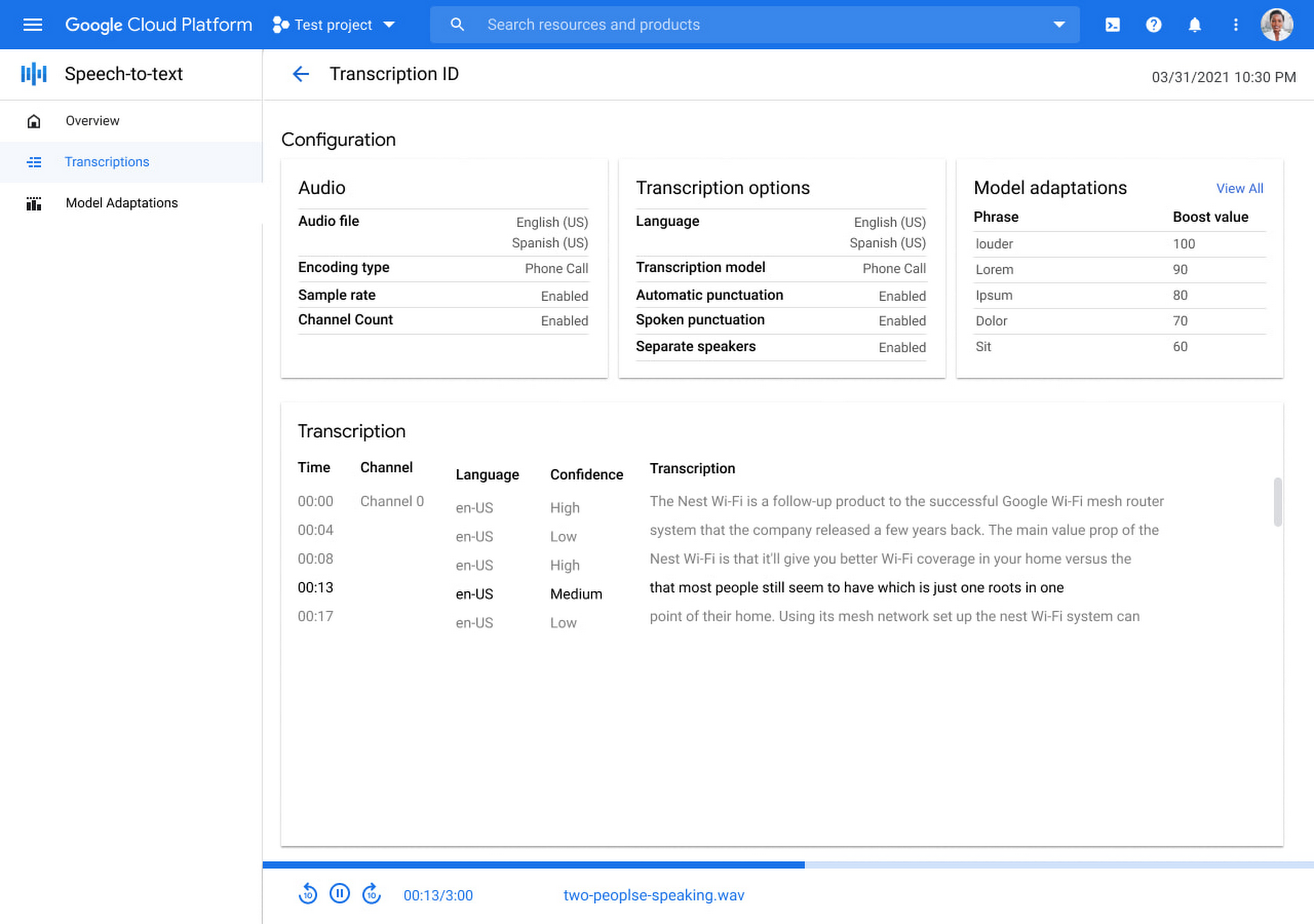
Model Adaptation allows developers to customize STT specifically for their domains or use cases. Developers can maintain lists of words and weights that will be applied to either every request or just single requests, depending on their needs. Model adaptations are reusable and composable, so once developers have seen good results in the STT Cloud Console, they can deploy to their entire solution.
The Speech-to-Text Cloud Console and Model Adaptation API is available now in all Google Cloud regions and languages and is accessible to all GCP users with no additional cost to that of the underlying API usage. The STT API supports over 70 languages in 120 different local variants. If you’re a developer looking for an easy to use, easy to integrate, and high-quality STT experience, sign up for our free trial and try our new interface on your own datasets today!
Seven Steps to Making DevOps a Reality

3920
Of your peers have already read this article.
2:30 Minutes
The most insightful time you'll spend today!
When it comes to creating a business that can thrive in the digital age, the benefits of DevOps are clear. In a recent survey sponsored by Google Cloud, Harvard Business Review Analytic Services found that about two-thirds of the respondents who use DevOps have seen benefits that impact their bottom line, including increased speed to market (identified by 70% of the respondents), productivity (67%), customer relevance (67%), innovation (66%) and product/service quality (64%). Not only do these factors deliver profitability, but they’re precisely what cements a winning reputation among customers – the ultimate payoff.
We’ve seen these benefits within Google where DevOps helped us build secure products used and loved by billions of people across the world. However, as head of DevOps practices at Google, I know firsthand how daunting implementing a new model can be, even if it’s worthwhile. Intrigued but unsure of where to begin, customers constantly ask me: “How can I make DevOps a reality?”
Implementing DevOps can be really hard. Getting people to work differently doesn’t happen overnight. From our own journey toward embracing what are now known as DevOps practices, we learned seven critical lessons essential to adopting a DevOps model:
1. Pilot a small project. This provides a low-stakes opportunity to master key DevOps capabilities, such as building small, diverse teams with shared goal. A few small wins will provide evidence to the rest of organization that DevOps works. Soon others will want to follow suit.
2. Be an open-source player. Leveraging open-source tools and engaging in the community keeps you up-to-date on the best solutions and practices and attracts top talent. It also flattens your company’s learning curve and speeds up release cycles. According to a recent DORA study, 58% of businesses made extensive use of open source.
3. Embed security within software development process. By addressing potential security issues as early as possible, you’ll avoid pushing those issues out to production. Over half of participants in the Harvard Business Review Analytic Services survey look for holistic approaches to improve security while automating the DevOps toolchain. In addition, the recent DORA study also found that top performers who build security into software development conduct security reviews and complete changes in just days.
4. Apply DevOps best practices. Use Site Reliability Engineering (SRE) principles to help build collaboration, reduce waste, and increase efficiency. Also look for ways to implement end-to-end automation. Not only does automation enable higher productivity, it frees organizations up to focus on what really matters: delivering value and driving performance.
5. Provide immersive training. People will only commit to organizational change when they understand its premise and are given the resources and opportunity to put new tech to work. That’s why three-quarters of the top-performing DevOps teams in the Harvard Business Review Analytic Services survey, as well as Google, provide immersive, hands-on DevOps coaching and training, such as code labs and quick-start projects.
6. Establish a no-blame culture. By running blameless post-mortem meetings in a safe environment built on trust, we learn from our mistakes. Because let’s face it, defects and coding errors happen when building software. By presenting mistakes as opportunities, you enable people to relate to one another and solve problems together, while ensuring that the same mistake won’t happen again. That’s how the DevOps model can evolve faster.
7. Build a culture that supports DevOps. I’m underlining this because the rest is worthless without it. When people feel like they have each other’s backs, they’re more likely to take smart risks; more likely to create; more likely to move faster. Trust comes down to these principles:
- Data-driven decisions: Look at data from code, logs, and traces, and use that data to arrive at decisions.
- Transparency: Choose sharing over secrecy and siloing. Everyone sees the same data means everyone feels comfortable and confident.
- Shared goals: Constantly collaborate so developers and operators are working toward a common goal.
Those are the basics. Reading the Harvard Business Review Analytic Services survey in its entirety will help flesh out the details. The report is full of proven tactics used by the most successful DevOps-based businesses, as well as statistics that demonstrate why it’s a worthy investment. After you’ve digested those facts and figures, consider my own intangible observation: there’s something magical about understanding what makes people productive, collaborating with them, and then empowering them to deliver value. Hope you get as much out of this transformation as we did.

Google Cloud Garners Highest Score in Forrester New Wave for Computer Vision Platforms
DOWNLOAD WHITEPAPER5324
Of your peers have already downloaded this article
8:30 Minutes
The most insightful time you'll spend today!
In Forrester’s evaluation of the emerging market for computer vision platforms, it identified the 11 most significant providers in the category — Amazon Web Services, Chooch AI, Clarifai, Deepomatic, EdgeVerve, Google, Hive, IBM, Microsoft, Neurala, and SAS — and evaluated them.
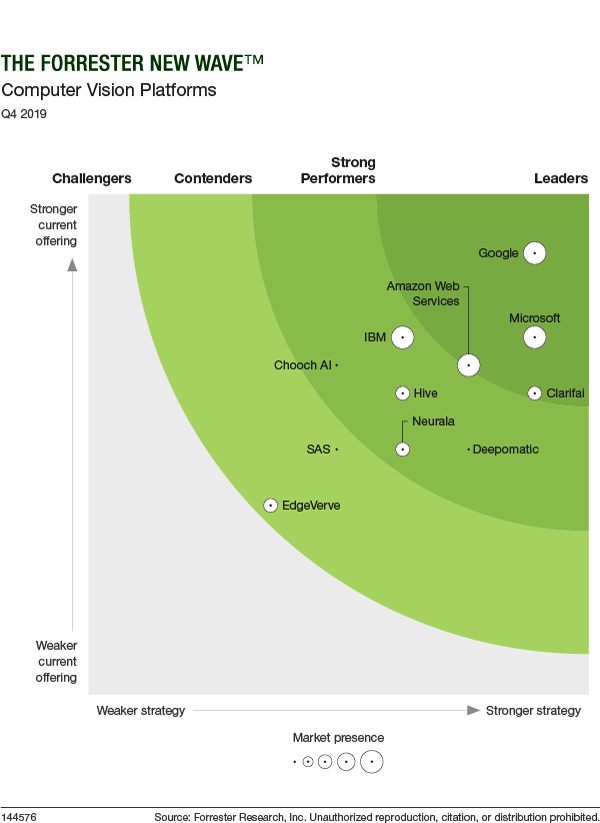
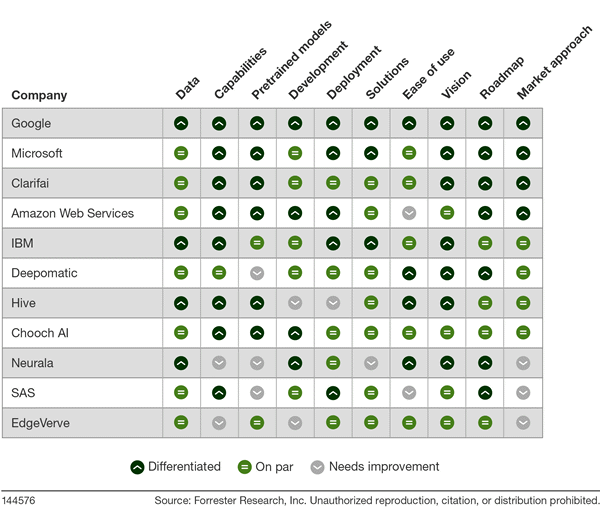
Its report details its findings about how well each vendor scored against 10 criteria and where they stand in relation to each other.
Google Cloud was classified as “differentiated” (the highest class) across all 10 criteria.
Find out more. Download The Forrester New Wave™: Computer Vision Platforms, Q4 2019.
Business Evolution with API Ecosystems

3457
Of your peers have already read this article.
1:30 Minutes
The most insightful time you'll spend today!
During uncertain times, ecosystem partnerships that leverage APIs have proven to help companies scale and address gaps in their businesses. Apigee customers, like CHAMP Cargosystems, have pursued API-first ecosystem models to enter adjacent markets, create new customer interaction models, and rapidly grow their brand reach and partner ecosystems. As a result of building their API ecosystem, they are transacting 300 million electronic exchanges and 20 million shipments per year.
CHAMP selected Apigee to provide an API platform and developer self-service portal option to all of its SaaS customers. Google Cloud’s Apigee API management platform and portal allows CHAMP and its customers to quickly connect to a variety of backend systems, including in-house, third party apps, marketplace portals and more– thereby accelerating their digitization strategies and opening up new markets through an API ecosystem.
Join this webcast and hear from this leading Enterprise company on how to:
- Identify new revenue sources and markets using an API management platform
- Improve time to market while still complying with all industry requirements
- How to create a proof of concept to grow API adoption throughout your organization
- Align internal business leaders and partners to see the importance of an API-first platform vision
Ease Your Migration and Modernization Journey with Microsoft and Windows on Google Cloud Demo Center

8287
Of your peers have already read this article.
2:00 Minutes
The most insightful time you'll spend today!
If you’re looking to migrate and modernize your Microsoft and Windows workloads, Google Cloud is your premiere destination. No matter what migration strategy you’ve selected or what value you’re looking to achieve, with Google Cloud you’re able to:
- simplify your migration and modernization journey
- reduce your on-prem footprint and increase agility
- optimize license usage to reduce costs
- modernize to reduce single-vendor dependencies
- rely on enterprise-class support backed by Microsoft
Whether you’re looking to migrate applications running on Windows virtual machines, adopt Windows containers in Google Kubernetes Engine (GKE), convert SQL databases to Cloud SQL, or something else, Google Cloud offers you the first-class experience you need.
But we don’t want you to take our word for it. Try it out yourself with our new online Microsoft and Windows on Google Cloud Demo Center without any commitment or friction.

The demo center uses hands-on guided simulations to walk you through several scenarios for solving business critical challenges with Google Cloud’s Microsoft and Windows solutions. Because these are all simulated, you’ll see how it works without any deployment, configuration, or commitment. It’s a seamless way for you to see exactly how Google Cloud can help you.
Run dedicated hardware and optimize with sole tenant
Sometimes you might want to run your workloads on dedicated hardware (with oversubscription options) for compliance, licensing, and management. Google Cloud provides sole-tenant nodes that allow you to easily deploy your virtual machines onto dedicated machines to avoid “noisy neighbor” issues, address regulatory or licensing constraints, and optimize inter-VM communications.
Plus, the CPU Overcommit option allows oversubscribing sole-tenant node resources by up to 2x, therefore helping save on per-physical core licensing for many licensed workloads like SQL Server.
Learn how to set up a sole tenant group and node.
Optimize license costs with premium images & custom VMs
One of the easiest ways to optimize your cloud experience with virtual machines (VM) is to pick the right VM image. Google Cloud provides premium license-included VM images that are thoroughly tested and optimized, including SQL Server options with pay-as-you-go licensing. These are great for workloads that don’t need to run all the time or when you do not have spare licenses for bring your own license (BYOL).
Explore some Windows & SQL images and learn how CPU/Memory options can help optimize deployment and save on licensing.
Modernize your databases with Managed SQL Server
Sometimes you need to manage your SQL Server instance to achieve certain business or operational goals. But more often, managing SQL Server deployments can be undifferentiated: backups, high-availability, updates, and patching are just some of the many things you have to take care of when going the do-it-yourself route. One way to modernize your database tier is to migrate to a managed service like Cloud SQL, which is a fully managed Relational Database service for SQL.
Explore the process of creating an instance in just a few clicks!
Extract apps from VMs and move to containers in GKE with Migrate for Anthos
Many Windows workloads running on virtual machines such as Internet Information Services (IIS) are ideal candidates for migrating to containers without major changes like rewriting or rearchitecting. However, doing this migration manually can be tedious, which is why Migrate for Anthos can help easily re-platform a .NET app running on IIS into a container-based app.
Simulate intelligently extracting, migrating, and modernizing applications to run natively on containers in GKE and Anthos clusters.
Move .NET applications to GKE on Windows without code changes
When you’re looking to go fully cloud native, you can leverage Windows containers in GKE without rewriting your .NET applications. Simply create clusters with Windows nodes and deploy containerized Windows workloads in a few clicks, even alongside Linux containers. These deployments reduce operational overhead with features such as auto-upgrade, auto-repair, and release channels.
Learn how easy it is to build a GKE cluster with a Windows node and deploy an app.
Now that you’ve gotten a feel for what’s available, go check out the Demo Center. You can also visit us at Windows and Microsoft on Google Cloud to learn more.
More Relevant Stories for Your Company

Google’s Default Messaging Apps for AT&T Android Users Ensure Richer Conversations
Today, we’re announcing that we’re working with AT&T to establish Messages by Google as the default messaging application for all AT&T customers in the United States using Android phones. The collaboration aims to help accelerate the industry toward global Rich Communication Services (RCS) coverage and interoperability to offer a consistent, secure, and

Neo4J & Google Cloud: Graph Data in Cloud to Address Challenges in FinServ Industry
Over the last decade, financial service organizations have been adopting a cloud-first mindset. According to InformationWeek, lower costs and enhanced scalability were the biggest drivers for cloud adoption in financial services, and cloud-native applications allow access to the latest technology and talent, enabling adopters to rebuild transaction processing systems capable of

Securing apps using Anthos Service Mesh
Hi there! I'm David Challoner from Access Site Reliability Engineering (SRE), here with Anthony Bushong from Developer Relations to talk about how Corp Eng is adopting Anthos Service Mesh internally at Google. Corp Eng is Google's take on "Enterprise IT". A big part of the Corp Eng mission is running

Cadbury Worldwide Hide: How the Chocolatier Made the Hiding Eggs Ritual Possible with Google Maps
Editor’s note: Today’s post is a Q&A with the VCCP London and VCCP CX team. VCCP London conceived of and built the Cadbury Worldwide Hide platform using Google Maps Platform as a way to get consumers ‘hiding’ eggs and engaging with loved ones during a time when they could not
